
March 9, 2026 #Co-Managed IT
Small business cybersecurity: 5 Crucial Steps to Secure
Don't get hacked! This guide offers vital Small business cybersecurity tips, threat prevention, NIST framework, & incident response.
Why Small Business Cybersecurity Matters More Than Ever
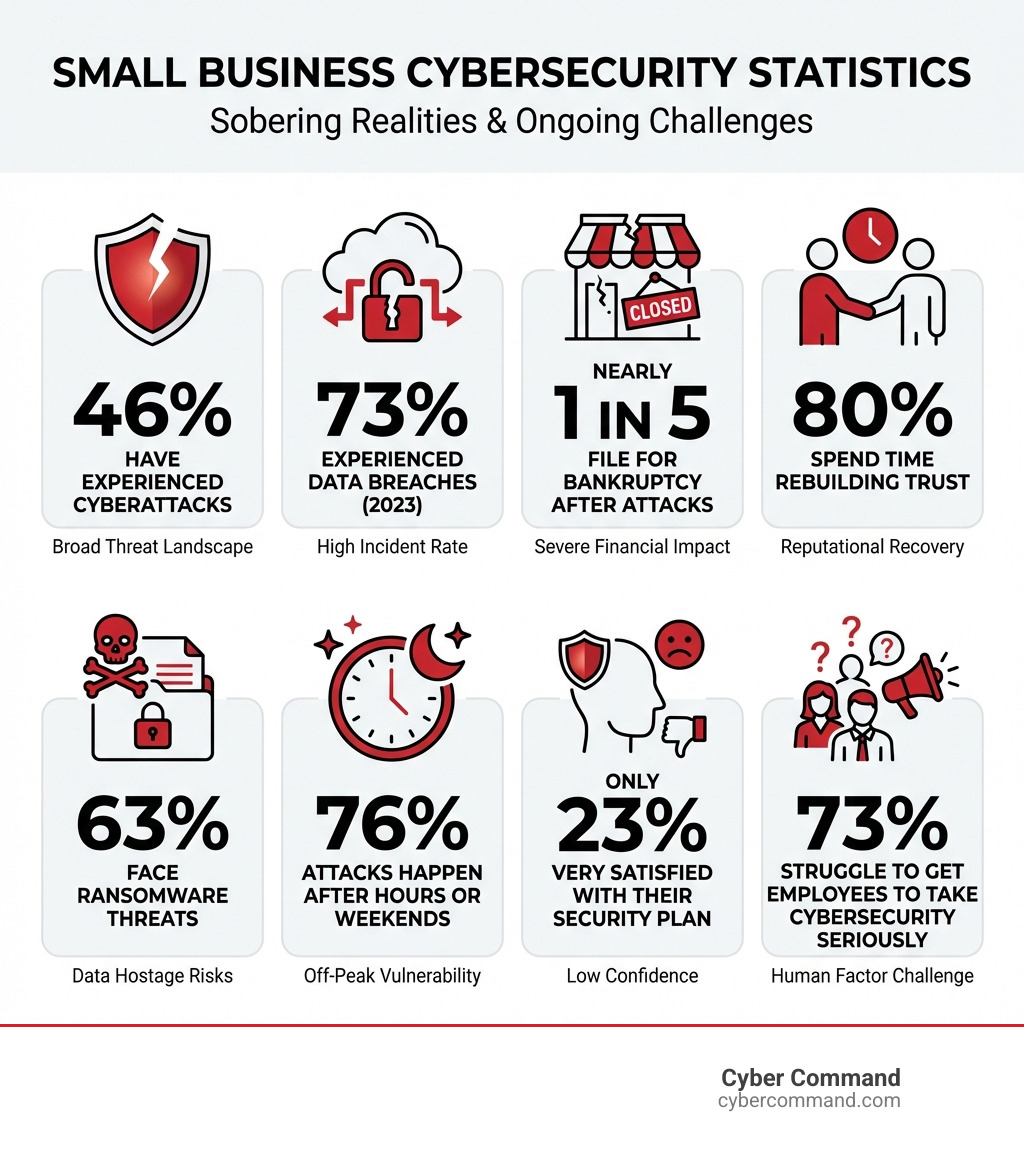
Small business cybersecurity is essential because cyberattacks can devastate operations, finances, and reputation—with 46% of small businesses already experiencing attacks and nearly 1 in 5 closing or filing for bankruptcy afterward. The core steps include implementing multi-factor authentication, training employees on phishing threats, backing up data regularly, using firewalls and antivirus software, and creating an incident response plan.
Key Small Business Cybersecurity Priorities:
- Enable Multi-Factor Authentication (MFA) - Require two or more verification factors for all accounts
- Train Employees Regularly - 73% of breaches involve human error, making awareness training critical
- Backup Data Weekly - Store copies offsite or in the cloud to recover from ransomware
- Update Software Automatically - Patch vulnerabilities that attackers exploit
- Implement Strong Password Policies - Use 12+ character passphrases, never reuse passwords
- Secure Your Network - Enable firewall protection, hide Wi-Fi SSID, use VPNs for remote access
The digital revolution has opened incredible opportunities for small businesses to reach global markets and work more efficiently. But this connectivity comes with serious risks.
Your business holds valuable data that cybercriminals want—customer information, financial records, intellectual property, and login credentials. No business is too small to be a target. In fact, attackers specifically seek out small businesses because they often lack the same defenses as large enterprises.
The statistics paint a sobering picture. 73% of small and mid-sized businesses experienced a data breach or cyberattack in 2023. When attacks succeed, 80% of businesses spend significant time rebuilding trust with clients and partners. Only 23% of small business owners feel very confident in their ability to identify threats, and the same percentage are very satisfied with their current cybersecurity plan.
The financial and operational impacts are devastating. Business email compromise alone caused over $2.7 billion in losses in 2024. Digital information theft has surpassed physical theft as the most commonly reported fraud. And perhaps most alarming—76% of attacks happen after hours or during weekends when businesses are least prepared to respond.
But here’s the reality: cybersecurity doesn’t have to be overwhelming or impossibly expensive. With the right approach, small businesses can implement effective defenses that protect operations without breaking the budget.
Know your Small business cybersecurity terms:
The Growing Landscape of Small Business Cybersecurity

In today’s economy, there is nothing “small” about small business. Whether you are operating out of Orlando, Jacksonville, or anywhere in between, the small business digital revolution has enabled local shops to grow into global competitors. However, this expansion into the digital marketplace means our attack surface has grown too.
The Impact of Cybersecurity Threats on Small Business Operations goes far beyond a simple IT glitch. When a breach occurs, it halts productivity, drains bank accounts, and forces us into a desperate scramble to keep the doors open. Research shows that 86% of small and medium-sized businesses have conducted a risk assessment, yet only 23% are actually satisfied with their plan. This gap exists because many businesses have “paper plans” that don’t translate to real-world defense.
A major part of modern small business cybersecurity is trust. If you lose your customers’ data, 80% of you will spend the next several months—or years—trying to rebuild that trust. Proactive prevention plans are no longer optional; they are the foundation of business continuity.
Stuck on something like this right now?
Talk it through with a real US-based engineer, 24/7, no phone trees: (407) 587-0089.
Book a Free Strategy SessionCommon Cyber Threats and Vulnerabilities
Cybercriminals are looking for the path of least resistance. They aren’t always looking for a complex “zero-day” exploit; they are looking for an open uped digital door. Understanding What is the Most Common Cyber Attack on Small Businesses is the first step in locking those doors.
According to research on the 3 Biggest Cybersecurity Threats Facing Small Businesses Right Now, the primary culprits are:
- Phishing: This is the most cost-effective way for attackers to get in. By tricking an employee into clicking a link, they gain credentials or install malware.
- Ransomware: 63% of small businesses face ransomware. This malicious code locks your files and demands payment, often during weekends when you’re not watching.
- Business Email Compromise (BEC): Scammers impersonate owners or vendors to redirect wire transfers.
- Identity Theft: Fraudsters use your business identity to take out loans or steal intellectual property.
One of the biggest vulnerabilities we see in growing businesses is the reliance on legacy antivirus. Here is how modern protection compares:
Feature
Legacy Antivirus
Next-Generation Antivirus (NGAV)
Detection Method
Signature-based (known threats only)
Machine learning & behavioral AI
Unknown Threats
Often misses them
Identifies suspicious patterns
Offline Protection
Limited
High (local AI models)
Response
Manual deletion
Automated isolation & remediation
Implementing the NIST Cybersecurity Framework
We don’t have to reinvent the wheel. The NIST Cybersecurity Framework provides a world-class roadmap that is free and voluntary. The latest version, NIST CSF 2.0, is specifically designed to be flexible for businesses of any size.
We recommend following the NIST CSF 2.0 Small Business Quick Start Guide which focuses on six core areas:
- Govern: Establish your security “rules of the road” and ensure leadership is involved.
- Identify: Know what assets you have (laptops, customer data, cloud accounts).
- Protect: Use tools like MFA and encryption to keep the bad guys out.
- Detect: Monitor your systems so you know the moment something looks “off.”
- Respond: Have a plan for what to do when an alert fires.
- Recover: Ensure you can get back to business quickly after an incident.
By conducting a maturity assessment against these categories, we can move from being “reactive” to “proactive.”
Essential Defense Strategies for Small Businesses
A solid defense starts with the basics. Cybersecurity for Small Businesses doesn’t require a million-dollar budget, but it does require discipline. Start by following the Cybersecurity Tip Sheet from the FCC, which emphasizes firewall security and mobile device management.
Firewalls and Patching Every device in your office—and every laptop used by remote workers in Tampa or Jacksonville—must have a firewall enabled. More importantly, you must patch your software. Many attacks succeed simply because a business didn’t click “update” on a known vulnerability. We suggest enabling automatic updates for all operating systems and browsers.
Strengthening Small Business Cybersecurity with MFA
If you do only one thing after reading this guide, let it be this: Enable Multi-Factor Authentication (MFA).
MFA is the single most effective way to stop unauthorized access. Even if a hacker steals your password through phishing, they can’t get into your account without that second factor (like a code on your phone or a fingerprint).
The Role of MFA in Strengthening Identity & Access Management is massive. However, not all MFA is created equal. Standard SMS codes can sometimes be intercepted. For the highest level of security, we look toward howFIDO resists phishing attacks. FIDO-based authentication (like security keys or biometric “Passkeys”) is virtually impossible to phish because it verifies that the website you are logging into is the real deal.
Securing Networks and Cloud Services
Your Wi-Fi is a gateway to your data. Secure it by:
- Changing default credentials: Never keep the “admin/admin” password your router came with.
- Hiding the SSID: This makes your network less visible to casual hackers.
- Using a Guest Network: Never let visitors (or their potentially infected devices) onto the same network that handles your payroll.
We often find that Benefits of Moving to the Cloud include better security. When you use reputable Cloud Services, you are leveraging their multi-billion dollar security budgets. Instead of trying to secure an on-premises server in a closet, you can use secure remote access tools and encrypted cloud storage that are maintained by experts 24/7.
Building a Culture of Security and Awareness
Cybersecurity isn’t just an “IT thing”—it’s a leadership thing. The CEO must set the tone. If leadership treats security as an annoyance, employees will too. Talk about it in meetings, include it in company goals, and lead by example (yes, the CEO needs MFA too!).
We recommend appointing a Security Program Manager. This doesn’t have to be a full-time hire; it can be a trusted lead who oversees your Incident Response Plan and organizes Tabletop Exercises (TTXs). TTXs are like fire drills for hackers. You sit down and ask, “What would we do right now if our main server was encrypted?” This builds the reflexes needed to handle a real crisis.
Part of this culture includes Proactive Insider Threat Detection: Top Tools & Practices, which helps identify if an account has been compromised or if an employee is accidentally putting data at risk.
Training Employees for Better Small Business Cybersecurity
Human error is the leading cause of data breaches. Attackers know that it’s easier to trick a person than to hack a firewall. That’s why we Boost Human Security with Cybersecurity Awareness Training.
Effective training should be:
- Frequent and Bite-Sized: Don’t do one long annual meeting. Use 5-minute monthly videos.
- Relevant: Show them what a real phishing email looks like.
- Supportive: Encourage employees to report suspicious emails rather than punishing them for mistakes.
Resources like the Global Cyber Alliance’s (GCA) cybersecurity toolkit offer fantastic free materials to help your team develop safe browsing habits.
Incident Response and Recovery
When things go wrong, every second counts. Your Disaster Recovery Plan should be your “break glass in case of emergency” manual.
The Power of Backups You must back up your data at least weekly. We recommend the “3-2-1 rule”: 3 copies of your data, on 2 different types of media, with 1 copy stored offsite (in the cloud). If ransomware hits, you don’t pay the ransom; you simply wipe your systems and restore from your clean backup.
Reporting and Insurance If you are hit, you aren’t alone. Report the crime to IC3.gov (the FBI’s Internet Crime Complaint Center) and ReportFraud.ftc.gov.
You should also look into cyber insurance.
- First-party coverage helps pay for your own losses (data recovery, legal fees).
- Third-party liability protects you if your customers sue you because their data was stolen.
Frequently Asked Questions about Small Business Cybersecurity
What should a small business do immediately after a data breach?
First, disconnect the infected devices from the internet to stop the spread. Do not turn them off, as forensic evidence might be lost. Change all passwords immediately from a “clean” device. Notify your IT provider, your insurance company, and legal counsel. Finally, follow your incident response plan to begin the recovery process.
How does cyber insurance fit into an overall security strategy?
Cyber insurance is a “risk transfer” tool. It doesn’t prevent an attack, but it helps you survive the financial fallout. Most insurers now require you to have basic protections like MFA and regular backups in place before they will even issue a policy. Think of it as the “safety net” that catches you if your primary defenses fail.
Why is legacy antivirus no longer sufficient for modern threats?
Legacy antivirus looks for “signatures”—essentially digital fingerprints of known viruses. The problem is that hackers create thousands of new variants every day that don’t have a signature yet. Modern small business cybersecurity requires NGAV, which uses AI to watch for behavior. If a program suddenly starts encrypting hundreds of files, NGAV stops it because that behavior is suspicious, regardless of whether the “virus” has been seen before.
Conclusion
At Cyber Command, we believe that every small business deserves enterprise-grade protection. Whether you are in Winter Springs, Orlando, or beyond, we act as an extension of your team. We provide proactive, 24/7/365 U.S.-based support with transparent, all-inclusive pricing.
You shouldn’t have to steer the maze of small business cybersecurity alone. Our Managed IT Services are designed to take the burden off your shoulders so you can focus on what you do best: growing your business.
Don’t wait for a “near miss” to become a total loss. Let’s secure your future today.
This article is for general informational purposes only and is not legal, compliance, insurance, or other professional advice. Threats, technologies, and regulations change quickly; confirm current requirements with your own advisors before acting. See our full disclaimer.