


Why Your Business Can’t Afford to Ignore Disaster Recovery Anymore
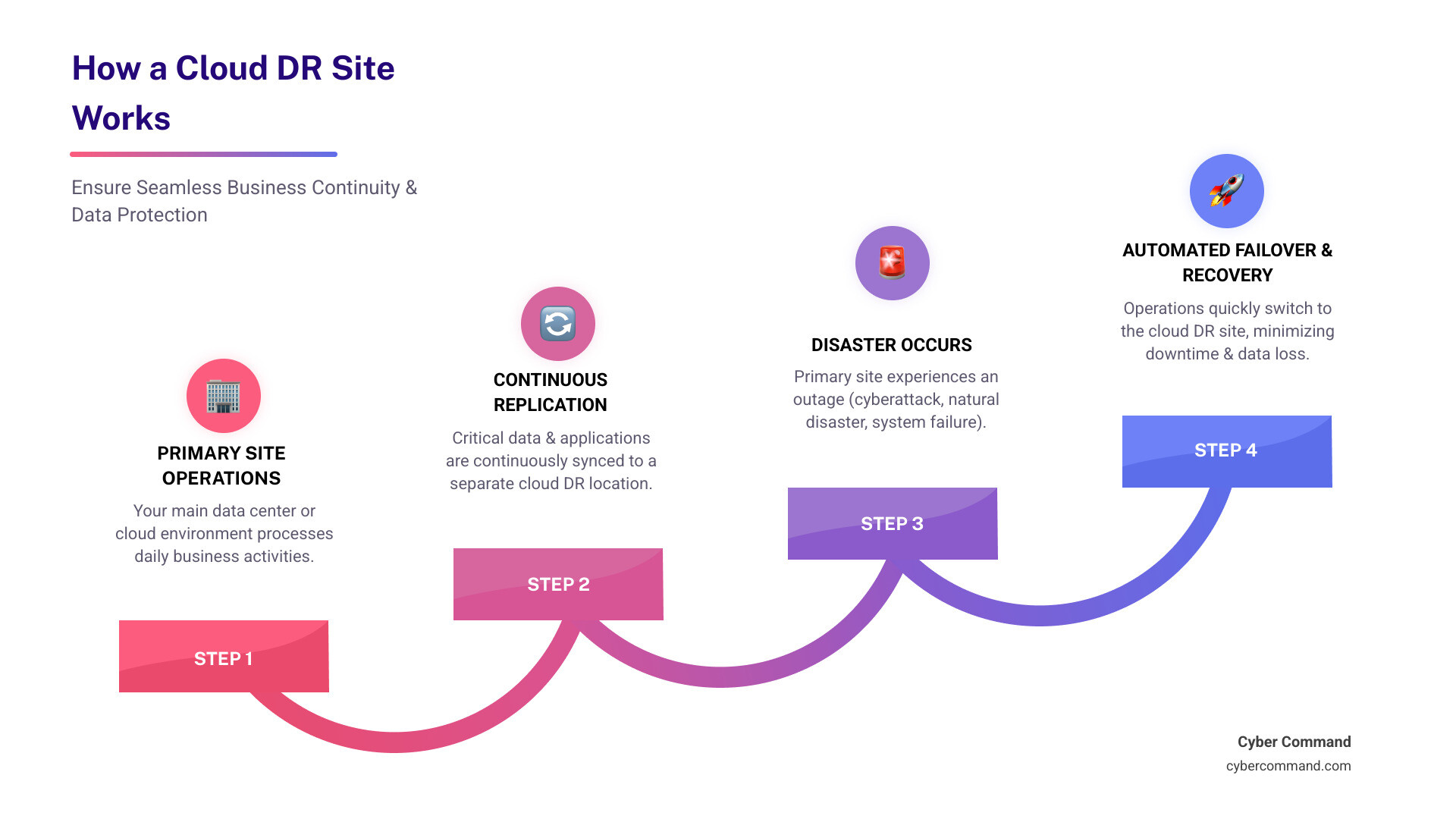
A dr site on cloud is a cloud-based environment where organizations replicate and store critical data, applications, and IT infrastructure to ensure rapid recovery after a disaster, such as a cyberattack, natural disaster, or system failure. Unlike traditional disaster recovery that requires maintaining expensive secondary data centers, cloud DR leverages virtual infrastructure and pay-as-you-go pricing to deliver faster, more cost-effective business continuity.
Key Benefits of a Cloud DR Site:
- Cost-Effective: Eliminates capital expenses for physical infrastructure
- Fast Recovery: Achieves Recovery Time Objectives (RTO) in minutes or hours
- Scalable: Resources scale up or down based on actual needs
- Resilient: Data replicated across multiple geographic locations
- Flexible: Supports hybrid, multi-cloud, and DRaaS models
Disasters happen. Not just to other businesses—to any business.
More than two-thirds of unplanned enterprise outages cost over $100,000, according to the IT advisory group Uptime Institute. A quarter cost more than $1 million. For many small and mid-sized businesses, a prolonged outage isn’t just expensive—it’s existential.
The traditional approach to disaster recovery meant building and maintaining a secondary data center. That required massive capital investment, ongoing maintenance costs, and complex testing procedures that many businesses simply couldn’t afford or manage effectively.
Cloud technology has changed everything.
Today, a dr site on cloud offers a smarter path forward. It delivers enterprise-grade disaster recovery capabilities without the enterprise-grade price tag. You get faster recovery times, better reliability, and dramatically lower costs—all while your team focuses on running the business instead of managing backup infrastructure.
This isn’t about chasing the latest tech trend. It’s about protecting what you’ve built.
I’m Reade Taylor, founder and CEO of Cyber Command. After years of building secure, highly available environments for enterprise clients at IBM Internet Security Systems, I’ve helped countless businesses transition from risky, expensive on-premises DR to resilient dr site on cloud strategies that actually work when disaster strikes. Let me show you why cloud DR isn’t just your best bet for swift recovery—it’s likely your only realistic option in today’s threat landscape.

Introduction: The Modern Approach to Business Resilience
What is a Cloud DR Site?
At its core, a dr site on cloud is an off-site, virtual environment where we store copies of your critical applications, data, and IT infrastructure. Think of it as your digital safety deposit box, but instead of physical documents, it holds the very essence of your business’s operations. When disaster strikes your primary systems—be it a cyberattack, a hardware failure in your Orlando data center, or even a regional power outage across Central Florida—your cloud DR site springs into action.
This strategy leverages the immense power of cloud computing resources. Instead of needing a second physical data center in Jacksonville or Plano, we use the cloud provider’s existing infrastructure to replicate your data and applications. This allows for rapid recovery and continuity of operations, ensuring your business can quickly get back on its feet. It’s essentially Business Continuity as a Service (BCaaS), providing on-demand resources to keep your critical functions running smoothly. Cloud DR capitalizes on the cloud’s inherent advantages: remote access, high availability, and built-in redundancy across geographically diverse locations.
Traditional vs. DR Site on Cloud: A Clear Distinction
For years, disaster recovery meant setting up and maintaining a secondary physical data center. This was a monumental undertaking, often reserved for the largest enterprises. Today, the dr site on cloud model offers a stark and compelling contrast. Let’s break down the key differences:
| Feature | Traditional DR (On-Premises) | Cloud DR (on Cloud) |
|---|---|---|
| Capital Expense (CAPEX) | High (buying hardware, real estate, infrastructure) | Low (no physical infrastructure to purchase) |
| Operational Expense (OPEX) | High (power, cooling, maintenance, staff) | Variable, often lower (pay-as-you-go, managed services) |
| Infrastructure | Dedicated physical servers, storage, networking | Virtualized resources within cloud provider’s data centers |
| Scalability | Limited, requires new hardware purchases | Highly elastic, scales up/down on demand |
| Recovery Speed | Can be slow, manual processes often involved | Rapid, automated failover capabilities, minutes to hours |
| Geographic Diversity | Requires separate physical locations | Built-in across cloud regions/availability zones |
| Maintenance & Complexity | High, requires dedicated IT staff | Lower, managed by cloud provider and DRaaS solution |
Traditional DR demanded significant capital investment and ongoing operational costs for maintaining physical infrastructure. Imagine the expense of duplicating your entire IT environment in a second location in Tampa Bay! In contrast, a dr site on cloud eliminates the need for this physical duplication. We don’t need to purchase new equipment; we simply leverage the cloud provider’s existing, massive infrastructure. This shift from CAPEX to a flexible, pay-as-you-go OPEX model makes enterprise-grade disaster recovery accessible to businesses of all sizes, right here in Florida and Texas.
Why a Cloud DR Site is a Game-Changer for Your Business
Unplanned outages are not just inconvenient; they’re incredibly expensive. According to Uptime Institute research, 44% of surveyed organizations experienced a major outage that impacted their business. Most of these outages were due to power failures. When your systems go down, swift recovery isn’t just nice to have—it’s essential for protecting your revenue, reputation, and customer trust. A dr site on cloud is a game-changer because it delivers on this promise with unparalleled cost-effectiveness, faster recovery, improved resilience, and remarkable flexibility and scalability.
Slashing Costs Without Cutting Corners
One of the most compelling reasons to accept a dr site on cloud is the dramatic cost reduction. The traditional approach of building and maintaining a secondary data center for disaster recovery was prohibitively expensive for many organizations. It involved:
- High Capital Expenses: Purchasing real estate, servers, storage arrays, networking gear, and power infrastructure.
- Ongoing Operational Costs: Paying for power, cooling, physical security, and the IT staff required to manage and maintain this redundant environment, even when it was idle.
With cloud DR, these capital expenses are largely eliminated. We don’t need to buy a second set of servers to sit idle “just in case.” Instead, we pay for the cloud resources as we use them, often at a minimal cost for standby resources and only ramping up expenses during an actual recovery event. This “pay-as-you-go” pricing model significantly reduces your Total Cost of Ownership (TCO) for disaster recovery. It means your budget can go towards growing your business in Winter Springs or Plano, rather than maintaining an empty, expensive data center.
Achieving Near-Instant Recovery with RTO and RPO
When a disaster strikes, two metrics become paramount: Recovery Time Objective (RTO) and Recovery Point Objective (RPO). These aren’t just technical jargon; they define how quickly your business can get back online and how much data you can afford to lose.
- Recovery Time Objective (RTO): This is the maximum acceptable downtime for your applications and systems. How long can your business afford to be offline before serious damage occurs? With cloud DR, RTOs can be achieved in minutes or hours, rather than days or weeks. This rapid recovery capability means we can spin up your systems in the cloud almost immediately after an incident.
- Recovery Point Objective (RPO): This defines the maximum amount of data loss your business can tolerate. How much data can you afford to lose since your last backup? Cloud DR helps minimize RPO through continuous or near-real-time replication. This means data changes made on your primary systems are almost immediately copied to your cloud DR site, drastically reducing potential data loss.
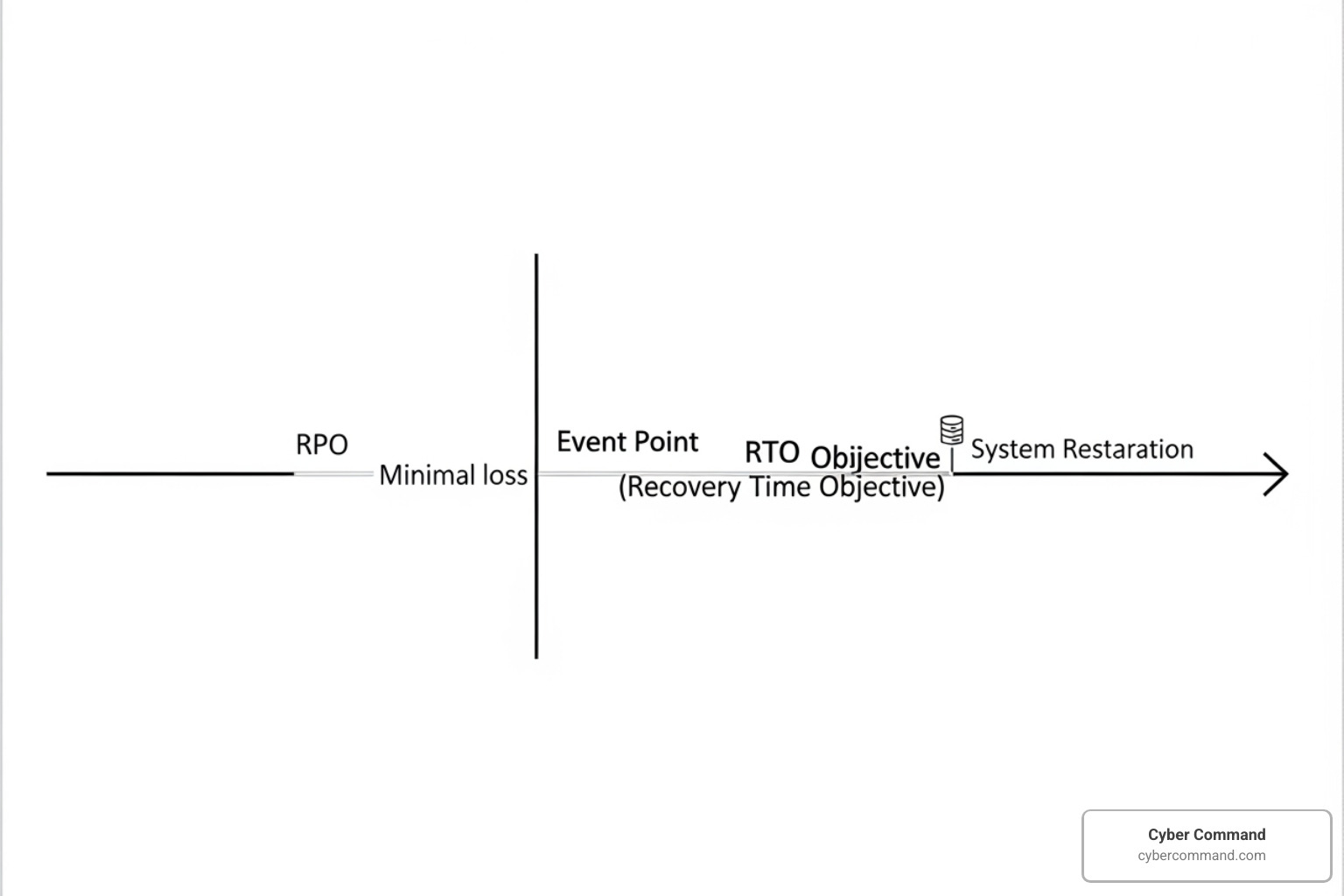

Imagine a scenario where your primary data center experiences a critical failure. With a properly configured dr site on cloud, we can initiate an automated failover. This process seamlessly redirects your users and applications to the cloud environment, which has a near-identical copy of your data and systems. This minimizes both downtime and data loss, keeping your business running and your customers happy.
Designing Your Cloud Disaster Recovery Strategy
Building an effective dr site on cloud isn’t just about picking a cloud provider and hitting “replicate.” It requires careful planning and a strategic approach. Our process always begins with a thorough understanding of your unique business needs and vulnerabilities.
Here are the key steps we take when designing a robust cloud DR strategy:
- Risk Assessment: We identify potential threats to your IT infrastructure, from cyberattacks and power outages to natural disasters specific to our Florida and Texas locations.
- Business Impact Analysis (BIA): We determine which applications and data are most critical to your business operations and the financial and operational impact of their downtime. This helps us prioritize what needs to be recovered first.
- Define RTO and RPO: Based on the BIA, we set realistic Recovery Time Objectives and Recovery Point Objectives for each critical system, balancing business needs with cost-effectiveness.
- DR Plan Development: We create a detailed, step-by-step plan outlining procedures for preparedness, prevention, response, and recovery, including roles and responsibilities.
- Implementation: This involves setting up data replication, configuring failover mechanisms, and establishing network connectivity to your cloud DR site.
- Testing and Maintenance: Crucially, we regularly test and update your DR plan to ensure it works when you need it most.
Key Components of a Robust Cloud DR Plan
A well-architected cloud DR plan integrates several critical components to ensure seamless recovery.
- Data Replication Strategy: This is the heart of your DR plan. We choose the right method for continuously copying your data from your primary site to the cloud. This could involve continuous synchronization for near-zero RPO or scheduled backups for less critical data.
- Failover and Failback Procedures: These are the automated or semi-automated processes that switch your operations to the cloud DR site during a disaster (failover) and then safely return them to your primary site once the incident is resolved (failback).
- Network Configuration: We ensure that your network infrastructure is ready to support the failover, including DNS changes, VPN connections, and IP addressing, so users can seamlessly connect to the cloud environment.
- Security Policies: Just because it’s a DR site doesn’t mean security takes a backseat. We implement robust security policies, including access controls and encryption, to protect your replicated data.
- Infrastructure as Code (IaC): This is a game-changer for cloud DR. Tools like AWS CloudFormation allow us to define your entire IT infrastructure—servers, databases, networks—as code. This means we can reliably and repeatedly deploy your infrastructure in the cloud DR site without manual errors, significantly speeding up recovery and ensuring consistency.
Choosing the Right Cloud DR Model
The beauty of cloud DR is its flexibility. There isn’t a one-size-fits-all solution; instead, we select a model that aligns with your specific RTO, RPO, and budget.
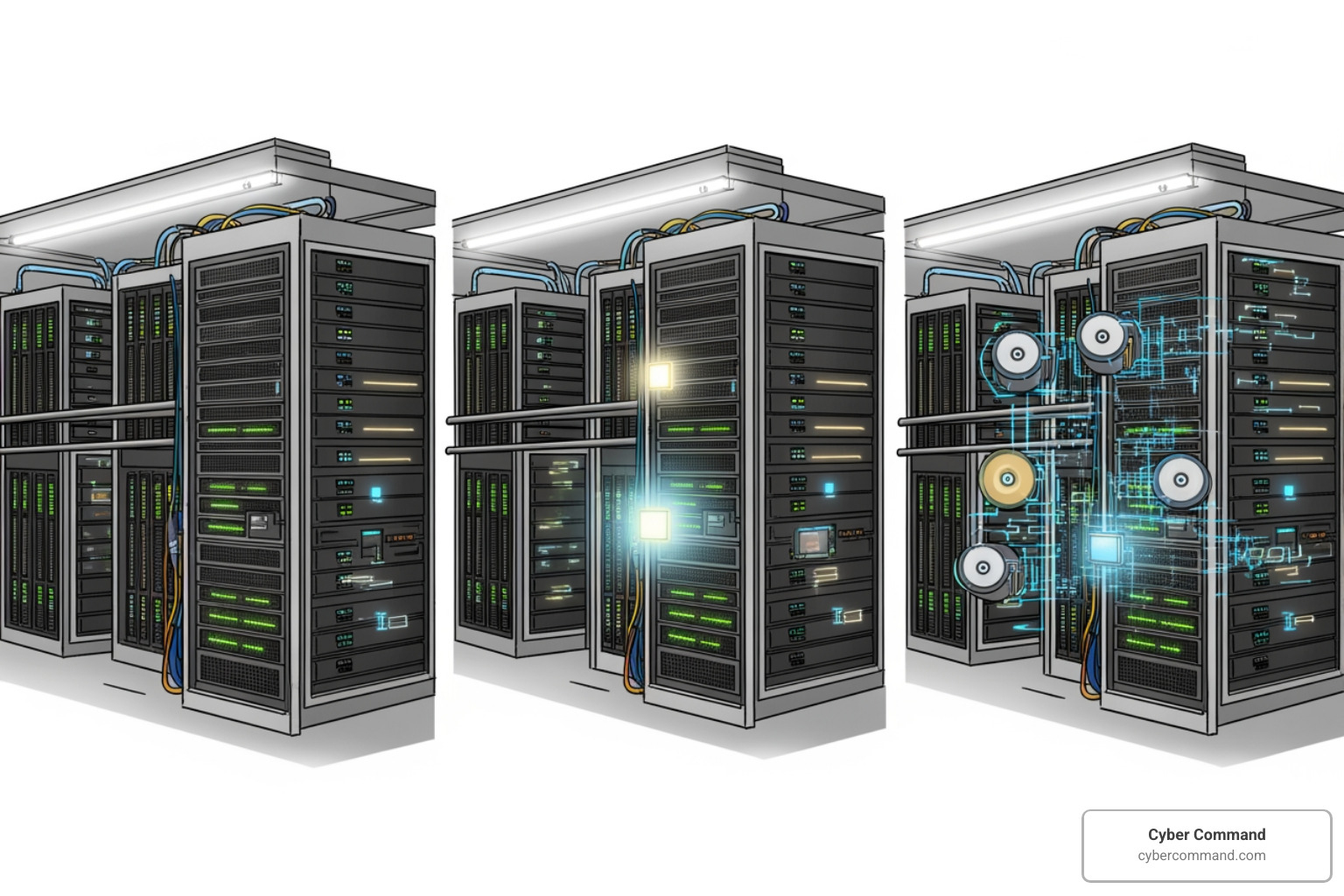
Here are the common cloud DR models:
- Backup and Restore: This is the simplest and most cost-effective model. We back up your data to the cloud and, in a disaster, restore it to a new cloud environment. It has the longest RTO and RPO but is suitable for less critical data or applications where downtime is acceptable. It’s great for mitigating data loss or corruption, and for regional disasters when combined with data replication to other cloud regions.
- Pilot Light: Imagine a pilot light on a water heater—it’s always on, but only consumes minimal gas until you need hot water. Similarly, with Pilot Light, your data is continuously replicated to the cloud, and a minimal, scaled-down copy of your core infrastructure is kept running. During a disaster, we “turn on” the full environment by provisioning additional resources. This offers a faster RTO than backup and restore, at a lower ongoing cost than a full standby.
- Warm Standby: This model goes a step further than Pilot Light. A scaled-down, but fully functional, copy of your production environment is always running in the cloud DR site. It can handle some traffic immediately but needs to scale up to full capacity during a disaster. This provides an even faster RTO, as critical applications are already running, albeit at reduced capacity.
- Multi-Site Active/Active: This is the most robust and expensive option, but it offers near-zero RTO. Your applications run simultaneously in both your primary site and the cloud DR site (or across multiple cloud regions), serving traffic from both. If one site fails, the other seamlessly takes over. This is ideal for mission-critical applications where any downtime is unacceptable.
- Disaster Recovery as a Service (DRaaS): For many businesses, DRaaS is the sweet spot. It involves outsourcing your DR operations to a specialized provider, like Cyber Command. We manage the cloud infrastructure, replication, and failover processes for you. This often includes automated recovery tasks, reducing human error and minimizing recovery times.
- Hybrid Cloud DR: This model combines your on-premises infrastructure with cloud resources. For example, we might replicate your critical data from your Winter Springs office to a cloud DR site, while keeping some less sensitive data locally. This provides flexibility, allowing you to leverage existing investments while gaining the benefits of cloud scalability and resilience.
Key Considerations for Your DR Site on Cloud
Implementing a dr site on cloud brings incredible advantages, but it also requires careful consideration of several factors. We guide our clients through these essential elements to ensure a successful and secure strategy.
Ensuring Security and Compliance in the Cloud
When moving your DR operations to the cloud, security and compliance are paramount. We understand the sensitive nature of your data and the regulatory landscape in Florida and Texas. Cloud-based DR solutions offer robust built-in security capabilities, including:
- Data Encryption: We ensure your data is encrypted both in-transit (as it moves between your primary site and the cloud) and at-rest (when it’s stored in the cloud).
- Access Control and Identity Management: Strict controls are put in place to ensure only authorized personnel can access your DR environment and data.
- Compliance: Your disaster recovery plan must address compliance requirements specific to your industry. For healthcare organizations in Orlando, this includes HIPAA requirements for protecting patient data. Financial institutions must consider regulations like SOX and PCI DSS. The European Union’s GDPR also mandates the availability of citizens’ personal data during a disaster. Our solutions are designed to help you meet these standards, including SOC 2.
- Immutable Backups: A crucial defense against ransomware is immutable storage. This means your backups are unchangeable and cannot be deleted or altered by anyone, including sophisticated ransomware. This provides a “golden copy” of your data that even the most malicious attacks can’t touch, ensuring point-in-time recovery.
Common Challenges of Implementing a DR Site on Cloud
While the benefits are clear, we believe in being transparent about potential challenges. Our expertise lies in helping you steer these:
- Bandwidth Limitations: Replicating large volumes of data to the cloud requires sufficient internet bandwidth. We assess your current infrastructure and recommend upgrades if necessary to ensure smooth data synchronization.
- Data Synchronization Complexity: Keeping data perfectly in sync between your primary site and the cloud DR site, especially for complex applications, can be challenging. We design and implement robust replication strategies to manage this.
- Testing Difficulties: It’s easy to assume your DR plan will work. It’s another thing to prove it. Regular, comprehensive testing can be complex, but it’s non-negotiable. We help you conduct simulations without impacting your production environment.
- Hidden Costs (e.g., Data Egress Fees): While cloud DR is cost-effective, some cloud providers charge “data egress fees” for transferring data out of the cloud. These can become significant during recovery or extensive testing. We help you understand and manage these costs, designing solutions that minimize unexpected expenses.
- Lack of In-House Expertise: Cloud technologies evolve rapidly, and managing a robust cloud DR strategy requires specialized skills. Many businesses in our service areas of Jacksonville or Tampa Bay find they lack the internal expertise to design, implement, and maintain these solutions. This is where Cyber Command steps in, acting as an extension of your team.
Frequently Asked Questions about Cloud DR Sites
What is the difference between backup and disaster recovery?
This is a common and important question! Think of it this way:
- Backup is like taking a snapshot of your data and storing it safely. It’s about creating a copy of your information so it can be recovered if the original is lost or corrupted. It’s a fundamental component of any data protection strategy, often following the “3-2-1 rule” (3 copies of data, on 2 different storage media, with 1 offsite copy).
- Disaster Recovery (DR) is the comprehensive plan and process to restore your entire IT infrastructure and business operations after a disruptive event. It goes far beyond just data. DR encompasses restoring applications, servers, networks, and ensuring business continuity. While backups are essential for DR, DR also considers your Recovery Time Objective (RTO) – how quickly you need to be operational – and your Recovery Point Objective (RPO) – how much data you can afford to lose. DR is a subset of the broader concept of business continuity, which aims to keep the entire business running.
How often should I test my cloud DR plan?
We can’t stress this enough: regular testing is critical! A DR plan that isn’t tested is just a document gathering dust. We recommend testing your disaster recovery plan at least annually, with more frequent testing for your most critical systems. Many organizations benefit from quarterly tabletop exercises (where we walk through the plan theoretically) and semi-annual technical tests (where we actually perform partial or full failover simulations).
Testing helps us:
- Identify weaknesses or gaps in the plan.
- Validate that RTOs and RPOs are achievable.
- Ensure your team knows their roles and responsibilities.
- Confirm that all technologies and automated processes are working correctly.
As the saying goes, “practice makes perfect,” and in disaster recovery, practice makes prepared.
Can a cloud DR site protect against ransomware?
Absolutely, and it’s one of the most compelling reasons for a dr site on cloud today! Ransomware and cybercrime are unfortunately on the rise, and threat actors are increasingly sophisticated, often targeting backups directly to prevent recovery. A well-designed cloud DR site offers multiple layers of protection:
- Immutable Storage: As discussed, this ensures your backup data cannot be altered or deleted, even by ransomware.
- Point-in-Time Recovery: Cloud DR solutions allow for granular recovery to specific points in time, meaning we can roll back to a state before the ransomware infection.
- Isolated Recovery Environments: We can create separate, isolated environments in the cloud to test recovery or restore infected systems without risking further contamination of your primary network.
- Air-Gapped Backups: While not strictly cloud, some cloud DR strategies incorporate air-gapped backups (logically or physically separated) that are completely inaccessible to your production network, providing the ultimate last line of defense.
- Rapid Restoration Capabilities: If an attack occurs, the ability to quickly failover to an uninfected cloud environment minimizes downtime and reduces the pressure to pay a ransom.
A cloud DR site, properly configured and regularly tested, acts as a powerful deterrent and recovery mechanism against the devastating impact of ransomware.
Conclusion: Fortify Your Business with a Proactive DR Strategy
A dr site on cloud is no longer a luxury but a necessity for modern business resilience. It offers a cost-effective, scalable, and rapid way to recover from disruptions, protecting your revenue, reputation, and customer trust. By carefully designing and implementing a cloud-based strategy, you can ensure your organization is prepared for any eventuality. The expert team at Cyber Command can help you build and manage a robust DR solution custom to your specific needs. Learn more about our Disaster Recovery Solutions.