How to Recover From a Ransomware Attack: An SMB Guide

The screen locks. A ransom note appears. Staff start shouting from down the hall that files won’t open. Your practice management system, accounting platform, or shared drive may already be affected.

If you’re a business owner in Orlando, Winter Springs, or anywhere in Central Florida, this is the moment when bad decisions get made fast. People reboot machines, reconnect laptops, forward screenshots over company email, or start talking about paying before anyone knows what was hit.

The way you recover from a ransomware attack starts with discipline, not speed. You need to stop the spread, preserve evidence, bring in the right people, and make business decisions in the right order. For law firms, medical practices, accounting firms, and other professional services companies, every hour of confusion turns into missed appointments, lost billable time, client exposure, and avoidable cost.

The First 60 Minutes Triage and Containment

The first hour is about one thing. Stop the attacker from reaching more systems.

Ransomware rarely stays on the first machine it touches. Attackers move across file shares, servers, remote sessions, and saved credentials. That movement is called lateral movement, and it’s why shutting a laptop lid or rebooting a PC isn’t enough. Rubrik notes that malware can remain in systems for up to six months, which creates a serious backup contamination risk and makes immediate isolation critical before recovery starts (Rubrik on ransomware recovery).
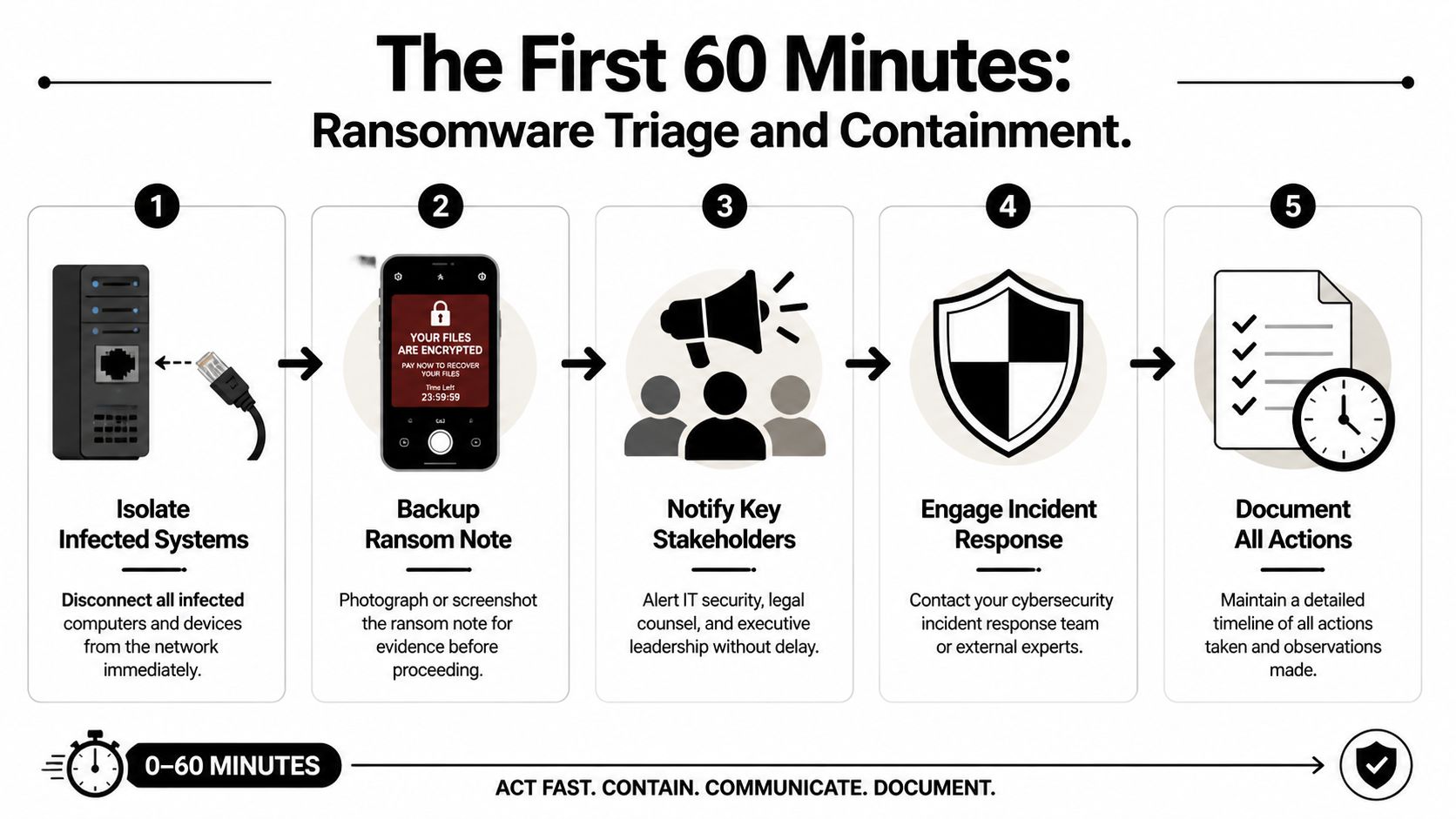
An infographic detailing five crucial steps to take within the first 60 minutes of a ransomware attack.

Do these things immediately

  1. Physically disconnect affected devices
    Unplug the network cable. Disable Wi-Fi. Remove docking connections. If a user is in the office, have them step away from the machine after disconnecting it.

  2. Isolate critical systems
    If a file server, application server, or virtual host shows signs of encryption or strange login activity, isolate it from the network before it can infect more assets.

  3. Capture the ransom note
    Take photos with a phone or screenshots if that can be done safely. Record filenames, extensions, message text, and the time you discovered the issue.

  4. Freeze internal chatter on company systems
    If your email or chat may be compromised, stop using it for response coordination. Move to personal phones or another clean channel.

  5. Start a written timeline
    Write down who discovered it, what they saw first, what devices are involved, and every action taken afterward.

What not to do

When people panic, they usually reach for the wrong fix.

  • Don’t reboot infected systems: A restart can destroy useful volatile evidence and make forensics harder.
  • Don’t begin random file restores: You can overwrite clues about what happened and restore into an unsafe environment.
  • Don’t assume one machine means one machine: In many cases, the visible note is just the first symptom.
  • Don’t let employees keep “checking” shared folders: That can spread damage and create more confusion.
  • Don’t pay immediately: That decision comes later, with legal, insurance, and forensic input.

Practical rule: Unplugging an infected machine from the network is usually more useful than turning it off in the first few minutes.

Give staff a short script

Your employees need direction fast. Keep it simple and controlled.

Use language like this:

We’re investigating a security incident. Stop using shared drives and do not reboot your computer. If you see unusual file names, ransom messages, or login prompts, disconnect from Wi-Fi or unplug the network cable and call the designated point person immediately. Do not email screenshots or message coworkers about it on company systems.

That message matters in a busy Orlando office where people share printers, file servers, cloud apps, and line-of-business software all day. A small accounting firm in Winter Springs can spread damage quickly if one compromised user account still has access to tax files, payroll data, and document storage.

Lock down visibility, not just devices

Containment also means finding out whether the ransom note is the whole incident or just the visible part. Security teams typically use EDR tools to trace process activity, suspicious logins, and spread patterns across endpoints. If you want a plain-English primer on how those tools help SMBs during active incidents, this overview of EDR and XDR for SMB cyber defense is worth reading.

In the first hour, calm beats clever. The companies that recover best don’t improvise. They isolate, document, and keep people from making the blast radius larger.

Mobilize Your Response Team Who to Call and When

Once containment starts, build your response cell. Don’t make every decision yourself, and don’t let ten people make ten separate calls. Pick one internal incident lead and start working through the outside contacts in a disciplined sequence.

For a Central Florida medical office or law firm, the pressure is different from a large enterprise. You may not have an in-house security team, but you still need a war-room mindset. Technical containment, insurance requirements, legal exposure, and reporting obligations all begin quickly.

The four calls that matter most

The first call is your incident response partner. They help determine what is affected, whether the attacker still has access, and how to contain the spread without destroying evidence.

The second is your cyber insurer. Many policies require prompt notice. They may also require approved vendors, approved counsel, or specific steps before certain recovery costs are covered.

Your third call is legal counsel. That’s especially important if you handle patient information, financial records, client files, or regulated personal data. Counsel helps guide privilege, notification questions, and communications.

The fourth is law enforcement. That doesn’t mean they take over your recovery. It means you create an official record and may receive intelligence relevant to the threat group or extortion activity.

Ransomware response team roles and triggers

Who to Call When to Call Primary Role Information to Provide
Incident response partner Immediately after initial isolation begins Technical containment, scoping, forensics, recovery guidance Time of discovery, affected systems, screenshots of ransom note, current containment actions
Cyber insurance provider As soon as you confirm likely ransomware activity Open claim, explain policy requirements, coordinate approved vendors Policy number, incident summary, systems impacted, whether data access or operations are disrupted
Legal counsel As soon as business data, regulated data, or client information may be involved Preserve privilege, advise on compliance, guide communications and risk decisions What data may be involved, business units affected, copies of extortion messages, current facts only
Law enforcement After initial containment and core advisors are engaged Official reporting, intelligence sharing, support on extortion and criminal activity Timeline, ransom note details, indicators observed, affected business functions

What each party needs from you

Don’t give long narratives. Give facts.

Prepare this short packet before each call:

  • Discovery details: Who found it, when they found it, and what they saw first.
  • Business impact: What’s unavailable right now, such as scheduling, document access, phones, billing, or EHR access.
  • Scope you know, not scope you fear: Name confirmed systems only.
  • Evidence collected so far: Photos, screenshots, filenames, user reports.
  • Actions already taken: Devices unplugged, servers isolated, accounts disabled, backups paused.

Keep internal leadership aligned

Many SMBs stumble when the owner tells staff one thing, the office manager tells them another, and a vendor starts restoring machines before legal or insurance approves the path.

A cleaner approach is to appoint:

  • One decision-maker: Usually the owner, managing partner, administrator, or COO.
  • One technical liaison: Whoever is speaking with the response team.
  • One communications coordinator: The person who sends employee instructions and external updates.

If you want a useful non-technical reference on how people and communication roles function during disruption, Paradigmie’s crisis management article is a good reminder that incidents fail just as often from confusion as from malware.

A ransomware event is both a security incident and an organizational crisis. Treat it as both.

A mature response doesn’t start during the attack. It starts with decisions you made before it. If your team needs a stronger framework afterward, a documented incident response plan for efficiency helps remove guesswork the next time something goes wrong.

Preserve Evidence for Forensics and Insurance

The strongest urge after a ransomware event is to wipe everything and get back to work. That instinct is understandable, but it often creates a second problem. You lose the evidence needed to prove what happened, support an insurance claim, and identify how the attacker got in.

Treat affected systems like a digital crime scene. If someone breaks into a physical office in Orlando, you don’t let employees clean the room before investigators arrive. The same principle applies here.

A person wearing a white lab coat and gloves touches a laptop screen showing complex data visualization graphics.

Why preservation matters to the business

Forensics is not academic busywork. It answers business questions that determine what happens next.

First, it helps support insurance claims. Carriers often want a defensible timeline, evidence of impact, and documentation of response actions.

Second, it helps legal counsel assess exposure. If an attacker accessed sensitive files before encryption, your obligations may look very different than if the attack was limited to a few endpoints.

Third, it tells you whether your recovery path is safe. If you don’t know the original entry point, you may rebuild servers and reconnect the same compromised account or remote access method a few days later.

Preserve first, clean later

Here’s the practical approach most businesses should follow:

  • Leave critical systems in their current state if advised by forensics: Don’t casually power them off.
  • Disconnect them from the network instead: Isolation protects the rest of the environment while preserving evidence.
  • Export and retain logs: Firewall, endpoint, identity, VPN, cloud admin, and backup logs can all matter.
  • Save copies of extortion messages: Include chat portals, email threats, and ransom note filenames.
  • Record user observations: Sometimes the receptionist or billing clerk noticed strange login prompts days earlier. That timeline can matter.

Evidence that often gets lost

A surprising amount of useful evidence disappears because well-meaning staff try to help.

Evidence Type Why It Matters How It Gets Lost
Ransom note and file extensions Helps identify the strain and extortion workflow Users delete files or close pop-ups without capture
Authentication logs Shows suspicious access and account misuse Logs roll over or systems get rebuilt too quickly
Endpoint state Preserves clues about malware execution and tools used Machines are rebooted, wiped, or reimaged
Staff observations Helps establish dwell time and first symptoms No one writes down what happened while it’s fresh

Don’t let convenience destroy clarity. A rushed wipe can make the next month harder than the attack itself.

For a medical practice, legal office, or financial services firm, evidence preservation protects more than IT. It protects claim recovery, regulatory posture, and the ability to explain to clients what happened. Recovery is important, but informed recovery is what keeps the same attacker from walking back in.

The Ransom Negotiation Decision Framework

The hardest question usually arrives early. Should we pay?

There isn’t a responsible one-word answer. Anyone who tells an Orlando business owner to always pay or never pay is skipping the reality of payroll, patient care, court deadlines, client commitments, and cash flow. You need a decision framework that weighs cost, time, legal risk, and the chance that paying still won’t solve the problem.

A diverse team of professionals collaborating around an interactive digital table during a business strategy meeting.

IBM’s discussion of ransomware response highlights the financial reality for professional services firms. For small-to-mid-sized businesses such as law firms and medical offices, downtime directly translates to lost billable hours and client harm. Their example frames the kind of analysis leaders have to make: “Recovery cost $150k, downtime 3 weeks” versus “Ransom demand $50k, potential recovery 3 days” (IBM on ransomware response decisions).

Start with business math, not emotion

Build the decision around four questions.

How much does downtime cost your operation

A dental office without scheduling and imaging access loses appointments. A law firm without document management loses billable work and case momentum. An accounting firm locked out during a filing deadline may face client fallout immediately.

List the business functions that are down:

  • client service
  • scheduling
  • billing
  • records access
  • communications
  • compliance work

Then estimate what each lost day means operationally. If you don’t know your cost structure exactly, still map the impact qualitatively. The point is to move from panic to informed trade-offs.

What does insurance allow or require

Before any negotiation discussion, read your policy with counsel and the carrier. Some policies require approved breach coaches, negotiators, or forensic firms. Some cover parts of recovery but not all extortion-related costs. Some impose conditions that become painful if you act first and notify later.

How confident are you in recovery without paying

Technical facts are crucial. If backups are intact, your position is much stronger. If backups are questionable, your options narrow fast.

What are the non-financial risks of paying

Payment carries real downsides:

  • you may not receive a working decryptor
  • the decryptor may work badly or slowly
  • the attacker may still retain stolen data
  • your company may be marked as willing to pay in the future
  • legal and sanctions issues may need careful review

A practical decision matrix

Decision Factor Favors Recovery Without Paying Favors Considering Negotiation
Backup condition Clean, validated, recent, accessible Uncertain, compromised, or unavailable
Operational tolerance Business can sustain downtime with workarounds Business harm escalates quickly and severely
Insurance posture Carrier supports forensic-led recovery path Carrier permits and structures extortion response
Legal and regulatory concerns Payment adds more risk than benefit Counsel advises negotiation can be explored lawfully
Trust in attacker promises Low confidence in criminal claims No good alternative, despite low trust

Paying for a key is not the same as buying certainty.

In practice, the best decision is often the least damaging one, not the morally satisfying one. But that decision should be made by leadership with legal, insurance, and incident response input together. Not by the loudest person in the room and not in the first wave of panic.

Restoring and Rebuilding Your Business Operations

Once the containment work is stable and the decision path is clear, recovery becomes a reconstruction project. This part needs patience. Businesses get into trouble when they treat restore as a race instead of a controlled rebuild.

The central rule is simple. Don’t restore blindly into production. Validate what’s clean first, test it in isolation, then rebuild core systems from a known good state.

A professional IT specialist examines a digital network topology map on a large wall display in a server room.

Validate backups before trusting them

Backup strategy either saves you or disappoints you. The data is clear that effective backup protocols materially improve recovery speed. In 2025 Sophos data summarized by N2WS, 53% of organizations recovered within one week, and 16% achieved full recovery in a single day. At the same time, only 54% of victims with encrypted data restored it using backups in 2025, which was the lowest rate in six years, showing how often attackers now target backup systems too (N2WS ransomware recovery statistics).

That means your backup process should include more than checking whether files exist. It should include:

  • anti-malware scanning
  • validation of backup integrity
  • review of restore points over time
  • isolated test restores before production use

Rebuild in phases

A clean recovery usually follows a sequence, not a single button click.

Phase one is the sandbox restore

Restore critical systems into an isolated environment first. Confirm the data opens correctly, applications function, and no malicious behavior appears during testing.

Phase two is infrastructure rebuild

Rebuild affected servers and workstations from trusted images or clean installation media. Don’t rely on old snapshots or images unless they’ve been validated. Apply security patches and review identity controls before reconnecting those systems.

Phase three is controlled reintroduction

Bring systems back online by business priority. For many Central Florida firms, that means core line-of-business systems first:

  • practice management
  • document management
  • accounting systems
  • scheduling
  • secure communications

Expect extra time for malware validation

Rubrik’s guidance notes that pre-restoration security scanning can add 24 to 48 hours to recovery because teams need to validate systems and backups before rollback. That time can feel painful when your office is down, but skipping it is how businesses restore infected data back into a fresh environment.

Recovery gets faster when the steps are slower and cleaner.

For firms that want a stronger foundation after the incident, investing in backup and disaster recovery solutions matters because restore speed is tied to backup design, isolation, and testing discipline long before an attack starts.

After the Attack Turning Lessons Learned into a Hardened Defense

A ransomware incident shouldn’t end with systems coming back online. It should end with your environment being harder to break into next time.

The businesses that improve most after an attack don’t hold a blame session. They hold a disciplined post-incident review. They look at what the attacker used, which decisions were delayed, what tools missed the activity, and which business processes failed under pressure.

Run a no-blame post-mortem

Bring in leadership, operations, IT, security, and any outside responders who played a major role. Focus on facts:

  • How did the attacker likely get access?
  • Which controls failed or were missing?
  • Which systems were hardest to restore?
  • Where did communication break down?
  • What approvals slowed containment or recovery?

Write the answers down as operational lessons, not personal criticism.

Harden the environment in the right order

Don’t try to fix everything at once. Prioritize the controls most likely to reduce repeat exposure.

Start with:

  • MFA everywhere: especially admin accounts, remote access, cloud management, and backup consoles
  • EDR deployment and tuning: so suspicious process activity and lateral movement are easier to detect
  • Credential hygiene: rotate passwords, review privileged access, remove stale accounts
  • Patch discipline: operating systems, firewalls, line-of-business apps, and remote access tools
  • Employee awareness: train staff on phishing, unusual prompts, and fast escalation

Then address architecture issues. Segment sensitive systems. Review where backups live and who can administer them. Make sure critical communications and identity systems don’t all fail together.

Fix business continuity gaps too

Ransomware exposes operational weaknesses that aren’t strictly security issues. A law office may discover it has no clean offline client contact list. A clinic may learn that appointment workflows collapse without one cloud application. A financial firm may realize too much approval authority sits with one person.

This is also a good time to review adjacent systems that affect resilience. For example, if your staff depends on voice and collaboration tools across locations, simplifying access with something like unified global login for UCaaS can reduce account confusion and access friction during a disruption.

The goal after recovery isn’t to return to normal. It’s to return stronger than normal.

A hardened defense is a mix of technology, process, and accountability. If your team only buys new software but never updates response roles, vendor access, backup testing, and employee reporting habits, you’ve improved tools but not resilience. Real recovery means the next attacker has a much harder path than the last one did.


If your business in Orlando, Winter Springs, or the surrounding Central Florida area needs a calmer, more capable response to ransomware risk, Cyber Command, LLC provides managed IT, 24/7 SOC support, incident response, recovery guidance, and resilience planning built for SMBs that can’t afford prolonged downtime. For law firms, medical practices, accountants, and other professional services teams, that means practical help before, during, and after an attack.

Contingency planning example: Cybersecurity & resilience for Florida businesses

For businesses in Orlando, Winter Springs, and across Central Florida, contingency planning often starts and ends with hurricanes. But in today's economy, the most significant threats are frequently invisible. From ransomware attacks that can cripple a law firm overnight to cloud outages that halt operations for a multi-location enterprise, a robust business continuity strategy must account for a wider spectrum of modern risks. True resilience means preparing for the disruptions that happen far more often than a Category 5 storm.

This guide moves beyond theory, providing a practical contingency planning example for 8 critical scenarios. We focus on the specific cybersecurity and operational challenges faced by professional services, medical practices, and industrial firms in our region. Instead of abstract concepts, you will find actionable templates, strategic analysis, and clear steps you can implement to protect your operations, data, and reputation.

You will learn how to build a defense against realistic threats like a primary data center failure, an unexpected compliance audit, or the sudden loss of a key vendor. Each section breaks down the incident with:

  • Triggers: What signals the start of the event.
  • Roles & Responsibilities: Who does what during the crisis.
  • Actionable Checklists: Step-by-step recovery processes.
  • Communication Scripts: What to say to clients, employees, and stakeholders.

These aren't just hypotheticals; they are survivable events when you have the right plan. This article provides the blueprint to ensure your Central Florida business is prepared for whatever comes next.

1. Ransomware Attack Response & Recovery Plan

A ransomware attack is one of the most destructive cybersecurity incidents a business can face, capable of grinding operations to a halt in minutes. This type of contingency plan provides a detailed, step-by-step guide to detect, contain, and recover from an attack where criminals have encrypted your critical data. For professional services firms in Orlando, medical practices in Kissimmee, or financial groups across Central Florida, the inability to access client files, patient records, or financial data is a business-ending event.

This plan moves beyond simple backup and restore. It establishes clear protocols for immediate action, ensuring the response is fast, organized, and effective in the face of a severe cyber threat.

Strategic Breakdown & Tactics

A strong ransomware response plan is a critical contingency planning example because it addresses a high-probability, high-impact cybersecurity threat. The goal is to minimize downtime and financial loss while maintaining client trust and regulatory compliance.

  • Immediate Isolation: The first step is to contain the threat. The plan must detail how to immediately disconnect infected devices from the network-both wired and wireless-to stop the ransomware from spreading.
  • Role-Based Activation: Not everyone needs to do everything. The plan assigns specific duties: an IT lead initiates the recovery, a communications manager informs stakeholders, and an executive member coordinates with legal counsel and law enforcement.
  • Backup Restoration: This is the core of recovery. The plan outlines procedures for restoring data from clean, verified backups. Crucially, it specifies the use of immutable or offline backups that ransomware cannot reach or alter.

Key Takeaway: A successful recovery isn't just about having backups; it's about having tested, segregated backups and a documented process to restore them under pressure. The objective is a swift and predictable return to operations, not a frantic search for files.

Actionable Implementation & Best Practices

To make this plan work, you must be proactive. For medical practices, this means restoring patient records within hours to maintain care continuity. For law firms, it's about getting case files back online to meet court deadlines.

  • Test Quarterly: Don't wait for an annual review. Simulate a recovery every quarter to find gaps in your process and ensure your team is prepared.
  • Document Everything: Create step-by-step recovery guides with screenshots. When an attack hits, nobody should be guessing what to do next.
  • Measure Your Response: Track your Mean Time to Recovery (MTTR) after every test and incident. This metric shows how quickly you can get back to business and helps identify areas for improvement.

Preventing an attack is always the best defense. A solid ransomware contingency plan is a business's last line of defense, but it must be supported by proactive security measures. For a deeper look at front-line defenses, explore our complete ransomware prevention checklist.

2. Data Center/Cloud Service Failure Contingency Plan

A complete outage of your cloud provider or primary data center can paralyze a modern business. This contingency plan addresses infrastructure failures, such as a regional AWS or Azure outage, that make your applications and data inaccessible. For Central Florida businesses, from multi-location retail chains to accounting firms in Kissimmee, losing access to core systems means lost revenue and damaged client trust.

Technician in a modern data center with glowing server racks and 'Failover' cloud graphic.

This plan details the procedures for failing over to a secondary, pre-configured environment. It ensures that even if your primary infrastructure goes down, your operations can continue with minimal disruption, preserving service delivery for law firms in Orlando or patient care for medical practices.

Strategic Breakdown & Tactics

A cloud service failure plan is a vital contingency planning example because it prepares for a high-impact, external dependency failure. The objective is to achieve a rapid, seamless transition to a backup site, maintaining business continuity without significant data loss or downtime.

  • Automated Failover Triggers: The best plans reduce human delay. This tactic involves setting up automated monitoring that detects a primary system failure and initiates the failover process to a secondary cloud region without manual intervention.
  • Designated Recovery Teams: The plan must assign clear responsibilities. An infrastructure lead manages the technical switchover, a support manager coordinates with end-users, and a communications lead updates clients using pre-approved templates.
  • Geographic Redundancy: This is the foundation of a resilient infrastructure. The strategy involves replicating data and applications to a geographically separate cloud region. For a Florida-based company, this might mean failing over from a primary site in the US East to a secondary in US Central to avoid regional disasters like hurricanes.

Key Takeaway: True resilience isn't just about having a backup site; it's about having an orchestrated, tested failover process. The goal is a predictable and swift recovery of service, driven by automated systems and clear human protocols.

Actionable Implementation & Best Practices

To ensure this plan is effective when needed, continuous preparation is key. For a law firm, this means ensuring client portals remain accessible during an outage. For medical clinics, it's about maintaining uninterrupted access to telehealth platforms and patient records.

  • Test Quarterly: Conduct full failover drills every quarter. Use actual workloads to simulate a real-world outage, which helps identify DNS issues, database replication lags, or other hidden problems.
  • Document DNS Procedures: Create a precise, step-by-step guide for switching DNS records to point to the secondary site. Clearly document who is responsible and what credentials are required.
  • Measure Recovery Points: Continuously monitor your Recovery Point Objective (RPO) to know exactly how much data might be lost in a failover. Strive to keep this window as small as possible through robust data replication.

Having a plan is the first step, but understanding the technology behind it is just as important. To explore specific strategies and tools, review our complete guide to cloud disaster recovery options.

3. Cybersecurity Breach & Incident Response Plan

A cybersecurity breach goes beyond a simple system failure; it represents an active, unauthorized intrusion that can result in data theft, reputational damage, and severe regulatory penalties. This type of contingency plan provides a structured protocol for detecting, documenting, containing, and remediating unauthorized access or data exfiltration. For Orlando medical practices handling Protected Health Information (PHI) or Kissimmee law firms managing attorney-client privileged communications, a disorganized response to a data breach is a direct threat to their license to operate.

This plan is the playbook for managing the crisis. It ensures every action is deliberate, documented, and aligned with legal and regulatory obligations from the moment an incident is suspected.

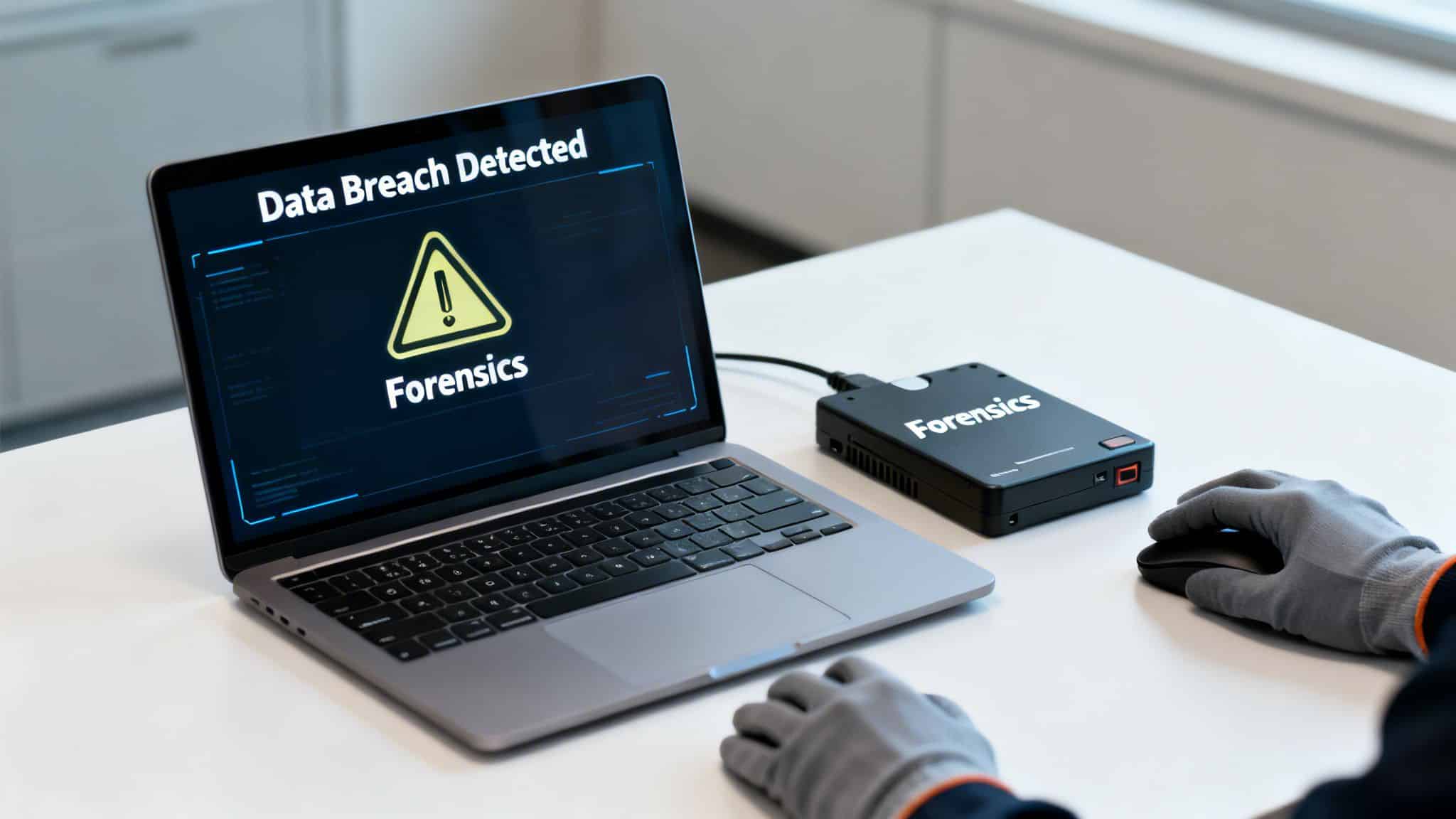
A person in gloves uses a laptop displaying 'Data Breach Detected' and 'Forensics', with an external forensics device.

Strategic Breakdown & Tactics

A detailed Incident Response Plan is a critical contingency planning example because it prepares an organization for a "when, not if" cybersecurity scenario. The strategy is to control the chaos, preserve evidence, and execute a response that protects clients and the business itself.

  • Severity Assessment & Containment: The first priority is to understand the scope and stop the bleeding. The plan must define how to assess breach severity-for instance, was sensitive data accessed or just exfiltrated? It then guides the team on isolating compromised systems without tipping off the attacker or destroying forensic evidence.
  • Forensic Investigation: This tactic involves a methodical investigation to determine the who, what, when, and how of the breach. The plan should outline procedures for engaging a pre-vetted digital forensics firm to preserve evidence in a legally defensible manner, often under attorney-client privilege.
  • Regulatory & Victim Notification: Speed and accuracy are paramount. The plan must include a decision tree for when to notify authorities and affected individuals, based on data sensitivity and legal requirements (e.g., HIPAA's 60-day rule). An accounting firm detecting unauthorized access to client tax documents, for example, would follow specific IRS and state notification timelines.

Key Takeaway: An effective breach response is not improvised. It relies on a pre-established framework that defines roles, triggers actions, and navigates complex legal requirements. The goal is to manage the incident with precision, not to react in a panic.

Actionable Implementation & Best Practices

To ensure this plan is effective under pressure, it must be integrated into your operational culture. This means preparing for an event like a medical practice needing to notify patients within days of a phishing-based credential compromise, ensuring the process is smooth and compliant.

  • Conduct Tabletop Exercises: Annually, run a simulated breach scenario with your leadership team, IT, and legal counsel. These exercises reveal gaps in your plan and build muscle memory for a real event.
  • Establish a Retainer: Don't wait for a breach to find help. Establish a retainer with a cybersecurity forensics firm and pre-approve legal counsel with your cyber insurance carrier to ensure an expert team is ready to deploy instantly.
  • Document & Destroy Securely: Maintain encrypted, attorney-privileged logs of all investigative findings. A critical part of remediation includes the secure destruction of data on compromised hardware to prevent any lingering threats from being exploited later.

The plan is your guide during the storm, but employee awareness is the breakwater that stops many storms from forming. Train your team relentlessly on identifying phishing attempts and reporting suspicious activity immediately.

4. Key Personnel Unavailability & Business Continuity Plan

The most valuable asset in any business is often its people, especially those with specialized knowledge. This contingency plan addresses the operational risk posed by the sudden unavailability of critical personnel-whether it's an IT administrator, a key executive, or an office manager. For a busy law firm in Lake Nona or a multi-location dental practice across Central Florida, the unexpected departure of the one person who knows how to run the case management software or patient scheduling system can cause immediate and significant disruption.

This plan focuses on creating resilience through knowledge sharing and documented procedures. It ensures that operations continue smoothly, even when a key team member is absent due to illness, resignation, or an emergency.

Strategic Breakdown & Tactics

A personnel-focused plan is a crucial contingency planning example because it tackles a threat that is often overlooked yet highly probable. The goal is to make operational knowledge a shared asset rather than an individual silo, guaranteeing that system access, vendor relationships, and critical processes are never dependent on a single person.

  • System & Process Documentation: The foundation of this plan is the creation of detailed "runbooks" for every critical business function. This includes everything from server reboots and software updates to processing payroll and contacting key vendors.
  • Role-Based Cross-Training: The plan identifies primary, secondary, and even tertiary personnel for each critical role. It formalizes a cross-training schedule to ensure backup team members have the hands-on experience needed to step in confidently.
  • Emergency Access Protocols: For sensitive systems like password vaults, financial software, or core infrastructure, the plan establishes secure, multi-person protocols for emergency access. This prevents a single point of failure from locking the business out of its own tools.

Key Takeaway: Business continuity isn't just about technology; it's about people and processes. A successful plan ensures that no single individual's absence can halt operations, transforming institutional knowledge from a vulnerability into a documented, shared strength.

Actionable Implementation & Best Practices

Making this plan effective requires a continuous commitment to documentation and training. For a professional services firm, this means anyone on the administrative team can access and manage client intake. For a medical practice, it ensures billing cycles continue uninterrupted even if the office manager resigns.

  • Create Video Runbooks: For complex, multi-step procedures, record screen-capture videos with voice-overs. This makes it far easier for a backup to follow along under pressure than reading dense text.
  • Conduct Knowledge Transfer Sessions: Hold quarterly sessions where key personnel walk their designated backups through critical tasks. Treat this as a mandatory, scheduled event, not an afterthought.
  • Simulate the Scenario: Once a quarter, have a cross-trained employee perform a critical task while the primary person is unavailable (but on standby). This real-world test quickly reveals gaps in documentation or training.

A plan for personnel unavailability is your company’s insurance policy against knowledge silos. While this plan ensures continuity, proactive IT management can further reduce dependency on any one individual. To see how managed services can standardize your systems and make them easier for anyone to manage, explore our co-managed IT solutions.

5. Extended Network Outage & Connectivity Loss Plan

In our hyper-connected economy, a prolonged network outage is no longer a minor inconvenience; it's a direct threat to business continuity. This plan addresses the catastrophic loss of internet connectivity, ISP failures, or wide-area network disruptions that can cripple multi-location operations. For a law firm in Orlando, this means losing access to cloud-based case management systems, while a multi-location industrial firm in Central Florida might find its field operations completely uncoordinated.

This type of contingency plan creates a playbook for maintaining productivity when digital lifelines are cut. It outlines backup connectivity, failover procedures, and alternative communication methods to ensure your business doesn't go dark when your network does.

Strategic Breakdown & Tactics

This is a critical contingency planning example because it tackles a common, high-impact vulnerability that many businesses overlook until it’s too late. The objective is to create resilience through redundancy and preparedness, enabling core functions to continue even without a primary internet connection.

  • Connectivity Redundancy: The core tactic is to eliminate single points of failure. This plan details the implementation of a secondary, independent ISP-ideally one using different physical infrastructure (e.g., fiber and cable). SD-WAN technology can then automatically reroute traffic to the working connection.
  • Operational Adaptability: When primary systems are unreachable, the plan must activate offline workflows. This involves identifying tasks that can be performed locally on devices and synched later. For a medical practice, this could mean using a documented paper-based process for patient check-ins.
  • Decentralized Communication: The plan establishes a communication cascade that doesn't rely on the company network. This includes pre-configured mobile hotspots for key personnel, a text message alert system for all staff, and a designated conference call line for leadership to coordinate a response.

Key Takeaway: Surviving a network outage depends on having pre-established alternatives. A successful plan isn't about waiting for the ISP to fix the problem; it’s about seamlessly failing over to backup systems and workflows that keep your team productive and your clients served.

Actionable Implementation & Best Practices

To make this plan effective, you must build resilience into your daily operations. For an accounting firm, this means having a way to process client deliverables during an outage. For a multi-site business, it means ensuring each location can operate independently if the main network link fails.

  • Test Failover Monthly: Don't just trust that your backup connection works. Actively switch to it once a month to simulate a real outage. This regular testing ensures the hardware is functional and your team knows the procedure.
  • Document Offline Workflows: Identify critical business functions and create step-by-step guides for performing them without internet access. Ensure these documents are stored locally on employee laptops and in physical binders.
  • Establish Clear Communication Protocols: Create an employee communication tree for outage notifications that uses personal cell phones and a non-company email system. Everyone should know who to contact and how to get status updates without needing the corporate network.

A foundational element of any comprehensive contingency strategy is a robust network infrastructure, essential for maintaining operations even during disruptions. By investing in resilient systems and practicing your response, you can turn a potential disaster into a managed event.

6. Compliance Audit Failure & Regulatory Investigation Plan

For businesses in regulated industries, a notice of a failed audit or a regulatory investigation can be just as disruptive as a technical disaster. This contingency plan provides a structured framework for responding to compliance citations from agencies like HIPAA, the IRS, or state professional boards. It moves beyond panic and ensures a deliberate, documented response to correct failures and minimize penalties. For a medical practice in Kissimmee facing a HIPAA audit or a financial firm in Orlando dealing with an SEC inquiry, this plan is essential for survival.

The objective is to manage the crisis professionally, demonstrating good-faith efforts to regulators and preserving the trust of clients and patients. It outlines a clear path for remediation, evidence gathering, and communication.

Strategic Breakdown & Tactics

A well-defined compliance response is a crucial contingency planning example because it manages legal, financial, and reputational risk simultaneously. The goal is to contain the immediate fallout, address the root cause of the failure, and establish stronger controls to prevent recurrence.

  • Dedicated Coordination: The plan immediately assigns a compliance lead or officer to act as the single point of contact. This person coordinates all internal remediation efforts and manages communication with legal counsel and the regulatory body.
  • Evidence and Timeline Management: From the moment a notice is received, every action, communication, and decision must be documented in a detailed timeline. This creates an organized evidence log demonstrating a serious and methodical response to the findings.
  • Strategic Remediation: The plan prioritizes corrective actions based on risk. A high-severity finding from a HIPAA audit related to patient data access would be addressed before a minor administrative error, ensuring resources are focused where they matter most.

Key Takeaway: The response to a regulatory failure is not just about fixing the identified problem. It's about proving to regulators that your organization is committed to compliance through a documented, organized, and transparent remediation process.

Actionable Implementation & Best Practices

To make this plan effective, it must be integrated into your operational culture, not just stored in a folder. For an accounting firm, this means systematically correcting any client data security gaps. For a law practice, it involves reinforcing attorney-client privilege protections.

  • Engage Counsel Early: Involve your legal team from the beginning. This ensures communications related to the investigation can be protected under attorney-client privilege, giving you a safe space to strategize.
  • Conduct Mock Audits: Don't wait for a real inspection to find your weaknesses. Perform internal mock audits quarterly to proactively identify and close compliance gaps before they become official findings.
  • Establish a Reporting Protocol: Create a clear, no-fault system for employees to report potential compliance issues. Catching a problem internally is always better than having it discovered by an external auditor.

7. Business Interruption from Natural Disaster or Facility Damage Plan

For businesses in Florida, the threat of a hurricane, flood, or severe storm is a constant reality. This contingency plan addresses the physical destruction of your workplace, providing a clear roadmap to maintain operations when your primary facility is inaccessible. It covers scenarios from minor water damage to a complete loss requiring relocation, ensuring your business can continue serving clients.

A flooded office with a laptop displaying 'Backup Restored' and an emergency kit on a desk.

This plan moves beyond "work from home" policies. It establishes a structured response for evacuating the premises, securing assets, and activating a secondary operational site, whether that's a pre-arranged co-working space in Orlando or a designated backup office.

Strategic Breakdown & Tactics

This is a vital contingency planning example because it directly confronts location-specific threats that can cause total operational failure. The goal is to make your business location-independent, so a disaster that hits your building doesn't also sink your company.

  • Pre-Arranged Workspaces: The plan identifies and establishes agreements with alternative work locations before an event. This could be a co-working space for a law firm or a designated branch office for a multi-location company in Central Florida.
  • Critical Operations Transfer: It outlines exactly which functions are essential and the steps to move them. For a medical practice, this means activating cloud-based EMR access and rerouting patient calls. For an industrial firm, it involves remote access to equipment diagnostics.
  • Insurance & Asset Coordination: The plan includes a detailed inventory of all physical assets, complete with photos and serial numbers. This documentation is critical for streamlining insurance claims for business interruption and equipment replacement.

Key Takeaway: Resilience isn't about having a single, perfect office; it’s about operational flexibility. The objective is to make your physical location a variable, not a single point of failure, allowing for a swift and organized transition to a temporary but fully functional workspace.

Actionable Implementation & Best Practices

To make this plan effective, you must prepare for the physical disruption. An Orlando-based accounting firm must be able to securely access client financial data from a temporary office just as easily as they could from their main one.

  • Test Evacuation and Check-in: Run annual drills for facility evacuation. More importantly, test your post-disaster employee check-in procedure and communication tree to ensure everyone can be accounted for and receive instructions.
  • Create Emergency Kits: Prepare go-bags for critical personnel. These should contain copies of important documents, emergency contact lists, encrypted hard drives with essential data, and network access credentials.
  • Review Insurance Annually: Business interruption insurance is not set-it-and-forget-it. Review your policy every year with your provider to ensure it covers modern scenarios like extended utility outages and supply chain disruptions post-disaster.

A physical disaster can strike with little warning. Having a detailed plan ensures your response is immediate and effective, safeguarding both your team and your business continuity.

8. Vendor/Third-Party Service Provider Failure Plan

Heavy reliance on external vendors is standard for modern businesses, but this dependency creates significant risk. A Vendor/Third-Party Service Provider Failure Plan addresses what happens when a critical partner-like a managed IT provider, cloud host, or software vendor-suddenly fails. For an accounting firm in Orlando depending on a specific tax software, or a dental practice in Kissimmee using a cloud-based patient management system, a vendor collapse can be just as disruptive as an internal system failure.

This plan prepares you to act decisively when a vendor goes out of business, suffers a major service outage, abandons support, or the relationship breaks down, forcing an emergency migration to an alternative solution. This is a critical cybersecurity concern, as a compromised vendor can become a direct attack vector into your own network.

Strategic Breakdown & Tactics

This is a crucial contingency planning example because it confronts the reality that business operations often extend beyond your own four walls. The goal is to ensure service continuity by either transitioning to a new vendor or bringing the capability in-house with minimal disruption to clients and revenue.

  • Dependency Mapping: The plan's foundation is a map of all third-party dependencies. It identifies which services are critical, what data they hold, and the business impact if that service is lost.
  • Pre-Vetted Alternatives: A key tactic is to pre-qualify one or two backup vendors for your most critical services before an incident occurs. This avoids a desperate, high-pressure search when your primary provider fails.
  • Data Escrow & Extraction: The plan must outline how to retrieve your data. This involves negotiating contract clauses that guarantee data access and cooperation during a transition and having a technical procedure for extracting it in a usable format.

Key Takeaway: You cannot control your vendors, but you can control your preparedness. A solid vendor failure plan assumes the worst-case scenario and establishes a clear, pre-planned "off-ramp" to protect your operations and data assets.

Actionable Implementation & Best Practices

To make this plan effective, you must treat vendor risk with the same seriousness as internal threats. For law firms, this means ensuring they can always access case files, even if their case management software provider disappears overnight.

  • Test Data Extraction Annually: Don't just assume you can get your data back. Perform an annual test to extract data from a critical vendor's platform and confirm it can be imported into an alternative system.
  • Review Vendor Health & Cybersecurity: Conduct annual due diligence. Review vendor financial stability, check for negative press, and ask direct questions about their business continuity and cybersecurity plans, including recent security audits.
  • Document Integration Points: Create clear documentation showing how each vendor's service integrates with your internal systems. This guide becomes invaluable for a swift and orderly transition to a new provider.

Proactive management is the best way to avoid being caught off-guard by a failing partner. Understanding your third-party risks is the first step in building a resilient business. For a deeper analysis, see our guide on safeguarding your business with third-party risk management insights.

8-Scenario Contingency Plan Comparison

Plan Implementation complexity Resource requirements Expected outcomes Ideal use cases Key advantages
Ransomware Attack Response & Recovery Plan High — multi-stage detection, isolation, recovery workflows Significant — immutable/offline backups, forensic capability, regular testing, staff training Rapid containment and recovery, reduced downtime, lower ransom likelihood Professional services, medical practices, financial firms with sensitive data Minimizes downtime and reputational/financial impact; supports compliance readiness
Data Center/Cloud Service Failure Contingency Plan High — multi-region failover, sync, automated routing High — multi-region or dual data centers, automation, testing resources Maintained availability and SLA compliance, geographic redundancy Multi-location companies, service providers, 24/7 operations Preserves uptime and client access; reduces single-point-of-failure risk
Cybersecurity Breach & Incident Response Plan Medium–High — detection, triage, forensics, legal coordination Specialized — forensic teams, legal counsel, notification and monitoring costs Swift containment, documented investigations, regulatory-compliant notifications Medical, law, accounting, financial services handling PHI/privileged data Reduces regulatory penalties, protects client trust, preserves forensic evidence
Key Personnel Unavailability & Business Continuity Plan Medium — role mapping, runbooks, cross-training programs Moderate — documentation effort, training time, backup staffing Reduced single-point failures, faster role coverage, preserved institutional knowledge Small teams, organizations with critical specialized staff Ensures continuity of operations and faster onboarding of replacements
Extended Network Outage & Connectivity Loss Plan Medium — failover design, SD-WAN or routing policies Moderate — dual ISPs, hotspots/satellite, network equipment, data plans Continued connectivity, support for remote work and client communications Multi-location firms, field service, remote-dependent organizations Maintains productivity and communications during ISP or WAN outages
Compliance Audit Failure & Regulatory Investigation Plan Medium — evidence collection, remediation planning, legal engagement High — legal counsel, remediation work, audit resources Demonstrated good-faith response, reduced penalties, strengthened controls Medical practices, law firms, accounting, financial services under regulation Mitigates enforcement risk and shows documented corrective action
Business Interruption from Natural Disaster or Facility Damage Plan Medium–High — evacuation, relocation, equipment recovery High — alternative workspace agreements, replacement equipment, insurance coordination Faster operational restart, employee safety, supported insurance claims Businesses in disaster-prone areas, single-site operations, field services Enables rapid recovery and protects employees while sustaining operations
Vendor/Third-Party Service Provider Failure Plan Medium — dependency mapping, transition and data extraction planning Moderate — vendor assessments, alternate contracts, backup data stores Reduced vendor lock-in, faster transition to alternatives, maintained services Organizations dependent on external IT, MSPs, software vendors Minimizes disruption from vendor failure and protects access to critical data

From Planning to Partnership: Activating Your Business Resilience

Reviewing a contingency planning example is the first step; activating a robust plan is what truly creates business resilience. The detailed scenarios we’ve explored, from ransomware recovery to third-party vendor failures, all point to a fundamental truth for modern businesses in Central Florida and beyond: operational continuity and cybersecurity are deeply intertwined and non-negotiable. A plan is only as strong as its execution, which demands the right technology, documented processes, and a skilled team ready to respond 24/7/365.

The examples in this article, whether a data center outage or a key personnel absence, were designed to be more than just theoretical exercises. They are blueprints for action. Each strategic breakdown and tactical insight serves a single purpose: to help you build a more prepared, secure, and resilient organization. The common thread connecting them all is the need for proactive measures, not reactive panic.

From Theory to Actionable Strategy

The difference between a company that survives a major disruption and one that doesn't often comes down to preparation. Waiting for an incident to occur is a high-stakes gamble. Instead, the focus must shift to building a framework for resilience.

Key Strategic Point: Effective contingency planning is not a one-time project but a continuous business function. It requires regular testing, updating, and alignment with your technology infrastructure and security posture.

The most effective plans are those that are actively managed. This means moving beyond a document stored on a server and creating a living strategy that your team understands and can execute flawlessly under pressure.

Your Next Steps Toward Business Continuity

Transforming these examples into your own operational reality is the most critical takeaway. Here are the immediate, actionable steps you can take to start this process:

  1. Identify Your Top 3 Risks: Look at the examples provided. Which three scenarios pose the most significant and immediate threat to your specific business, whether you're a law firm in Orlando, a medical practice in Winter Springs, or a multi-site industrial company?
  2. Assign Clear Ownership: For each identified risk, designate a clear owner. This individual is responsible for developing the initial draft of the contingency plan, identifying the response team, and outlining resource needs.
  3. Map Technology to Your Plan: Review your current IT infrastructure. Do you have the necessary tools for a rapid recovery? This includes verified data backups, secure remote access for your team, and advanced endpoint protection to stop threats before they escalate.
  4. Conduct a Tabletop Exercise: Once a draft plan is ready, walk through it with your key stakeholders. A simple "what-if" discussion can reveal critical gaps in communication, resource allocation, and decision-making authority that are far easier to fix now than during a real crisis.

For businesses in Central Florida, from professional services firms with strict compliance needs to medical practices handling sensitive patient data, these steps are not just best practices; they are essential for survival and growth. A well-executed contingency planning example becomes your competitive advantage, assuring clients, partners, and employees that your organization is built to last. It demonstrates a commitment to operational excellence that protects your reputation and your bottom line. Don't wait for a disruption to test your defenses. The time to build a resilient future is now, moving from planning to a proactive partnership that secures your business against any storm, digital or otherwise.


Is your business prepared to turn these plans into reality? The team at Cyber Command, LLC specializes in transforming contingency plans from paper documents into active, tested, and reliable business safeguards. We provide the managed IT, cybersecurity, and compliance expertise that businesses in Central Florida need to ensure recovery is predictable and measurable. Contact Cyber Command, LLC today to build a technology roadmap that ensures you can weather any storm.