



A lot of business owners in Orlando and Plano are in the same spot right now. The company has grown, the staff depends on cloud apps, every location needs stable Wi-Fi and secure access, and the internal IT person or small team is buried in tickets. They’re resetting passwords, dealing with printer issues, chasing software vendors, and answering after-hours calls when they should be planning security improvements or infrastructure upgrades.
That strain gets worse in regulated industries. A medical practice can’t afford patching delays. A law firm can’t shrug off email compromise. An architecture or engineering firm can’t have project files locked up by ransomware because endpoint protection was inconsistent. When the team is always reacting, important work slips. The business feels that in downtime, stress, and missed opportunities.
The Modern IT Challenge for Growing Businesses
A familiar pattern shows up in growing firms across Central Florida. The office opens at 8, users are already waiting on support, and the one person who knows the environment is trying to juggle urgent requests with larger priorities like MFA rollout, firewall review, backup testing, and vendor renewals. By noon, the plan for the day is gone.
That’s not a staffing failure. It’s a capacity problem.
For many small and midsized organizations, internal IT carries a wide job description that mixes helpdesk, systems administration, purchasing, user training, compliance support, and cybersecurity oversight. Those roles don’t scale cleanly when the business adds locations, hires quickly, or takes on stricter client and regulatory requirements.
Reactive work crowds out strategic work
The issue isn’t that your internal team lacks skill. It’s that routine support work keeps winning because the pain is immediate. A partner can wait on a roadmap update. A locked account can’t.
Common signs the model is breaking down:
- Security tasks keep getting postponed because user issues always come first.
- After-hours alerts land on the same person who already handled the workday queue.
- Vendor sprawl grows unnoticed with separate contacts, renewals, and licensing rules.
- Documentation lives in someone’s head instead of a shared operational system.
- Compliance preparation feels rushed every time an audit, insurance review, or client questionnaire appears.
About 60% of businesses now use managed or co-managed IT services to reduce costs and improve efficiency, according to industry reporting on co-managed IT adoption. That number makes sense on the ground. Businesses aren’t moving this direction because it sounds modern. They’re doing it because the old model of “let our one or two IT people handle everything” stops working at a certain level of growth and risk.
Practical rule: If your internal IT lead spends more time clearing backlog than improving security posture, you don’t have an effort problem. You have a support model problem.
For regulated businesses, governance starts to matter. Security controls, documentation, access reviews, retention policies, and audit readiness need a playbook, not just good intentions. If you’re tightening processes around regulated data or internal controls, the modern playbook for corporate compliance is a useful reference for framing what “organized” should look like.
Co-managed IT enters here as reinforcement. It doesn’t replace the people who know your staff, workflows, software quirks, and business priorities. It gives them depth, coverage, and specialized support where the pressure is highest.
Defining Co-Managed IT A Partnership Model
Co-managed IT works best when you think of your internal IT lead as the general contractor for your technology environment. That person knows the building. They know where the wiring is messy, which systems are fragile, which users need extra support, and what the business can or can’t tolerate during a change window.
A co-managed partner plays the role of specialized subcontractors. One team brings cybersecurity depth. Another handles infrastructure monitoring. Another supports cloud operations, patching, backup verification, and escalation when an issue is more complex than a routine ticket.


What the internal team should keep
The internal side should usually retain the work that depends on business context and local ownership.
That often includes:
- User relationship management such as onboarding coordination, executive support, and department-specific workflows
- Application knowledge for line-of-business software, internal approvals, and process exceptions
- Technology decision-making tied to budgets, leadership priorities, and business timing
- On-site tasks that require physical presence, local judgment, or direct access to equipment
This is why co-managed IT usually feels better to internal teams than full outsourcing. They don’t lose control. They gain support.
What the external partner should own
The partner should take work that benefits from scale, specialization, or round-the-clock operations.
That commonly includes:
- 24/7 monitoring and alert response so critical issues don’t sit overnight.
- Security operations support such as endpoint oversight, incident response assistance, and threat detection.
- Patch management and maintenance that can run consistently without depending on one person’s calendar.
- Backup and recovery oversight so restore readiness is checked, not assumed.
- Project depth for cloud changes, infrastructure refreshes, and major migrations.
RSM notes that co-managed IT gives organizations access to enterprise-grade risk management, including continuous system health monitoring, automated network assessments, and compliance expertise for frameworks like HIPAA, without the cost of hiring all of that talent internally, as described in RSM’s overview of co-managed IT services.
Co-managed IT fails when both sides think they own the same task, or worse, when both sides think the other one owns it.
That’s why the service model matters more than the label. “Co-managed” isn’t a feature. It’s an operating structure. The best arrangements document who handles Tier 1 tickets, who touches security tools, who approves changes, who manages vendors, and who gets called first when a critical system goes down.
For a busy owner, the outcome is simple. Your internal IT person remains the trusted operator who understands your business. The outside partner gives that person a bench of specialists, better tooling, and after-hours coverage without forcing you into a fully outsourced model.
Choosing Your Support Model Co-Managed vs Fully Managed vs In-House
Every support model has a place. The wrong one usually shows up when the business grows faster than the technology structure around it.
Nearly 90% of SMBs either work with MSPs for co-managed IT or plan to, driven by the need for scalable support without adding more full-time hires, according to JumpCloud’s MSP trends summary. That doesn’t mean every company should choose the same model. It means leaders are actively looking for an advantage.

Where each model fits
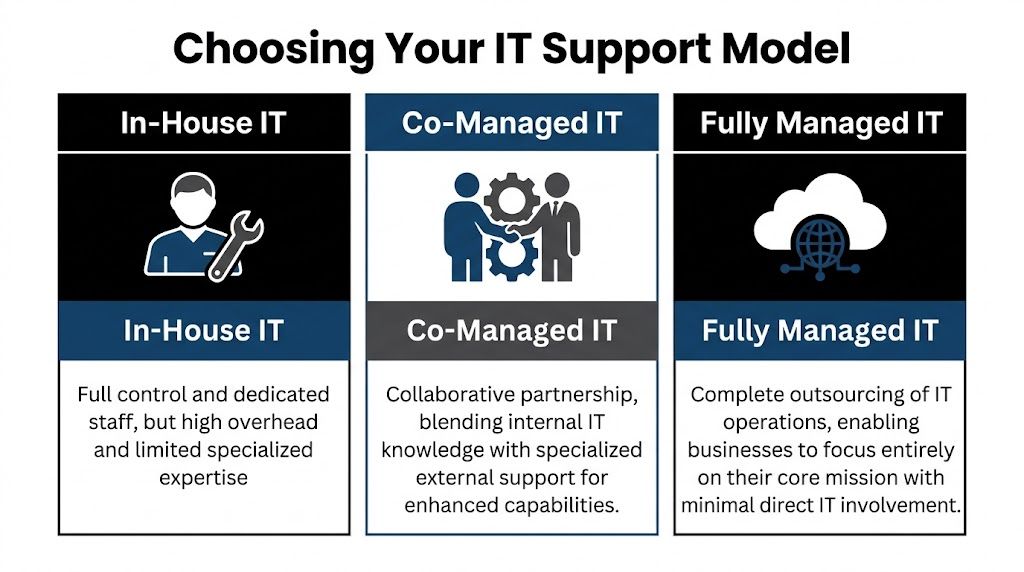
An in-house team fits companies that want maximum control and already have enough depth to cover support, infrastructure, security, documentation, vacations, and growth. That can work well, but it gets expensive and fragile if too much knowledge sits with too few people.
A fully managed IT model fits organizations that don’t want to build an internal IT function or don’t need one. That’s often a good option when the company wants a single outside partner to own support and operations end to end. If you’re weighing that route, this overview of fully managed IT support is a useful baseline for comparison.
Co-managed IT fits the middle. It’s often the sweet spot for firms that already have some IT capability but need more capacity, stronger security, or specialized depth without rebuilding the entire department.
IT Support Model Comparison
| Factor | In-House IT Team | Fully Managed IT (MSP) | Co-Managed IT (Hybrid) |
|---|---|---|---|
| Control | Highest direct control | Lower day-to-day internal control | Shared control with defined ownership |
| Staffing burden | Business handles hiring, retention, coverage | Provider handles staffing | Shared staffing model |
| Specialized expertise | Depends on current team | Broad provider bench | Broad provider bench plus internal context |
| After-hours support | Hard to sustain with small teams | Usually included in provider model | Added without replacing internal staff |
| Best fit | Large enough team with broad skill coverage | Businesses wanting complete outsourcing | Businesses with internal IT that need leverage |
The sweet spot for regulated firms
Co-managed IT makes the most sense when the business already has someone who understands the environment but doesn’t have enough time or specialist coverage to handle everything well.
That’s common in:
- Law firms where staff need quick support, document access must stay reliable, and security incidents can become client trust issues fast
- Medical practices that need HIPAA-aware processes, dependable patching, and minimal disruption to scheduling and clinical workflows
- Accounting and financial firms where compliance pressure, phishing risk, and seasonal workload spikes can overwhelm a small internal team
- Multi-location organizations that need standards across sites without hiring a full internal bench
Trade-offs leaders should be honest about
A fully internal model gives you tight control, but it can leave the company exposed when a key person is out, leaves, or gets buried.
A fully managed model simplifies accountability, but some organizations don’t want to hand over all local context, application nuance, or user relationships.
Co-managed IT solves a lot of that, but only when the division of labor is explicit. If ownership is vague, the partnership can create friction instead of relief.
For many firms in Orlando and Plano, the real question isn’t “Should we outsource IT?” It’s “Which responsibilities should stay close to the business, and which should be handled by specialists?”
That’s the decision framework that produces a support model you can live with.
Core Services in a Co-Managed IT Solution
A good co-managed agreement doesn’t stop at “extra hands.” It defines operating support that lowers risk, improves consistency, and gives your internal team room to focus on work the business notices.

Helpdesk overflow and escalation
This is often the first pain point a business feels. Your internal person becomes the catch-all for everything, from account access to device setup to application troubleshooting.
Co-managed helpdesk support changes that by splitting the queue. Routine requests can go to the partner, while escalations and business-specific issues stay with the internal team. That keeps the on-site lead from spending the whole week in reactive mode.
For a professional services firm, this matters because user interruption is expensive even when the issue is small. Fast response protects billable time.
Security operations and endpoint protection
Co-managed IT solutions create real risk reduction. Small internal teams usually can’t run continuous threat monitoring, investigate suspicious alerts after hours, or maintain the same security discipline every day while also handling regular support.
A partner can support:
- Endpoint protection oversight across laptops, desktops, and servers
- Threat detection and response when alerts require immediate review
- Patching cadence management so vulnerabilities don’t wait for a free afternoon
- Backup verification and recovery coordination when something goes wrong
- Policy alignment for access control, device standards, and user risk reduction
For regulated industries, this isn’t just about stopping malware. It’s about proving that security operations are deliberate, documented, and repeatable.
Compliance support and risk management
Owners frequently underestimate co-management's value. Compliance work isn’t one document or one annual check. It’s a series of operational habits.
The strongest providers help internal teams maintain those habits by supporting system reviews, security controls, change logging, patch documentation, backup oversight, and audit readiness. That’s especially useful for medical, financial, and industrial organizations that can’t afford to improvise around HIPAA, CMMC, or similar requirements.
Vendor management and licensing control
Many businesses have a hidden IT tax. It lives in vendor overlap, unclear renewals, duplicate software, unmanaged licenses, and finger-pointing between telecom, internet, software, and hardware providers.
A co-managed partner can centralize that process. Instead of your office manager, controller, or internal IT lead chasing every renewal and support line, the partner helps maintain ownership records, standardizes contacts, and pushes vendors toward resolution.
This is less glamorous than cybersecurity, but it’s operationally important. Clean vendor management reduces delay during outages and improves budgeting.
Field observation: The businesses that run IT smoothly usually aren’t the ones with the most tools. They’re the ones with clear documentation, consistent ownership, and fewer unmanaged exceptions.
Documentation, network diagrams, and operational visibility
If only one person knows how the environment works, you don’t have resilience. You have dependency.
Strong co-managed relationships improve documentation around assets, dependencies, network layout, access standards, and change history. That matters during troubleshooting, onboarding, cyber response, insurance reviews, and growth planning.
Examples of useful operational artifacts include:
- Network diagrams that show how locations, firewalls, wireless, and critical systems connect
- Asset inventories that identify what’s deployed, where it lives, and who supports it
- Escalation maps so users and leaders know who owns what
- Change records that reduce confusion after updates or outages
Strategic planning and business alignment
The best co-managed IT solutions don’t just absorb tickets. They create space for roadmap work.
That can include cloud planning, lifecycle planning, infrastructure standardization, budgeting, and quarterly reviews of open risks and upcoming projects. This is also the right place to mention one factual example from the market. Cyber Command, LLC offers co-managed IT that includes monitoring, ticket handling, patch management, vendor management, network diagrams, QBRs, and continuous security support for internal teams that need added depth.
When this layer is missing, IT becomes a utility that only gets attention when something breaks. When it’s present, IT starts supporting growth decisions before they turn into operational problems.
Calculating the ROI of Co-Managed IT
Business owners usually ask the right question. Not “What features are included?” but “What does this change financially and operationally?”
That’s the right lens.
According to Adams Brown’s review of co-managed IT benefits, co-managed models can produce a 20-35% TCO reduction by shifting from reactive fixes to proactive prevention, while also enabling internal teams to complete strategic initiatives 40% faster. Those two outcomes belong together. The savings don’t come only from paying a provider instead of hiring. They come from reducing interruption, limiting avoidable incidents, and freeing skilled staff to work on projects that move the business forward.
Where the return actually shows up
Most ROI in co-managed IT comes from four areas.
- Less downtime: Problems are caught earlier, handled faster, or prevented through monitoring and maintenance.
- Lower disruption from security events: Better visibility and response reduce the chance that a small issue becomes a business crisis.
- Stronger use of internal talent: Your internal team spends less time on repetitive support and more time on improvements.
- More predictable budgeting: The company trades surprise effort and scattered vendor costs for a clearer operating model.
If you want a budgeting framework before comparing proposals, this guide to managed IT services cost is a practical place to start.
A simple ROI lens for owners
You don’t need a complicated spreadsheet to evaluate co-managed IT. Start with questions like these:
| ROI Area | What to examine |
|---|---|
| Support efficiency | Are high-value employees waiting on basic support? |
| Security exposure | Are patching, monitoring, and backup checks being handled consistently? |
| Internal capacity | Is your IT lead improving systems or just clearing backlog? |
| Vendor overhead | How much leadership or admin time goes into managing providers and renewals? |
If the current model creates repeated delays, owner escalations, and preventable risk, then the cost of staying put is already high, even if it doesn’t show up neatly in one invoice.
The risk that can erase the return
There’s one trap that ruins otherwise good co-managed partnerships. Poor role design.
If the provider thinks your internal staff owns user communication, but your internal staff thinks the provider owns it, people wait. If change approval, after-hours escalation, or patching authority isn’t explicit, important work stalls or gets duplicated.
That’s why service design matters as much as technical capability.
A workable shared SLA structure should define:
- Who receives the initial ticket
- Which tickets stay internal
- Which issues escalate to the partner
- Who approves security and infrastructure changes
- How after-hours incidents are handled
- What reporting is reviewed monthly or quarterly
The fastest way to lose ROI in a co-managed model is to pay for support that no one fully operationalized.
Done right, co-managed IT turns IT from a pressure point into an efficiency layer. Done loosely, it becomes one more vendor relationship to manage. The difference is in scope clarity, process ownership, and disciplined review.
Your Vendor Evaluation Checklist for Central Florida and Plano
Most businesses don’t pick the wrong provider because the sales pitch sounded good. They pick the wrong provider because they didn’t pressure-test the operating model.
That mistake matters. An estimated 25-40% of co-managed engagements fail because roles, escalation paths, and shared SLAs weren’t clearly defined, according to Meriplex’s discussion of co-managed versus fully outsourced MSP models.

Questions that reveal how the partnership will really work
Ask these before you sign anything:
- Who owns the ticket queue by category? Don’t accept “we’ll work that out later.” Get examples.
- How do after-hours incidents get escalated? Especially for security alerts, internet outages, and line-of-business application failures.
- What compliance experience do you have in my industry? A medical practice, law firm, and industrial company don’t face the same requirements.
- How do you document the environment? Ask whether network diagrams, asset records, and change tracking are part of the service.
- Who manages third-party vendors? You want a provider that reduces finger-pointing, not one that adds another layer to it.
- How is success reviewed? Monthly reporting and quarterly review meetings should be standard.
For businesses that want to pressure-test the broader supplier exposure side, this primer on expert vendor risk assessment is a useful companion to technical due diligence.
Sample SLA language to ask for
You don’t need legal-grade wording in the first conversation, but you do need operational clarity. Ask a provider to show examples of how they define:
Shared responsibility matrix
Which tasks belong to internal IT, the MSP, or both?Escalation path by severity
Who gets notified first, and when does an issue move from service desk to engineering or security?Change approval process
What can the provider act on directly, and what requires internal approval?Reporting cadence
What metrics, risk items, and project updates are reviewed on a regular schedule?
Local and industry fit matters
For Orlando, Winter Springs, and Plano businesses, local relevance is more than a nice extra. It affects response, communication, and judgment.
Look for a provider that understands:
- Multi-location support realities for practices, firms, and distributed offices
- Regulated workflows in healthcare, finance, and public-facing organizations
- Local presence and on-site response expectations when remote support isn’t enough
- U.S.-based helpdesk and security operations expectations if your leadership wants tighter communication and accountability
If you’re comparing options side by side, this checklist for comparing IT managed services options can help structure the evaluation.
Red flags you shouldn’t ignore
A few warning signs tend to predict future friction:
- They talk tools before process.
- They can’t explain where your internal team stays in control.
- They avoid detailed SLA examples.
- They treat compliance as an add-on conversation instead of an operating requirement.
- They don’t ask how your business operates.
A good co-managed partner should sound like an operator. They should care about ownership, handoffs, business constraints, and accountability, not just technology categories.
Empowering Your Team for Strategic Growth
The strongest case for co-managed IT isn’t that it gives you more tickets closed. It’s that it lets your internal team operate at the precise level your business needs.
When routine support, monitoring, patching, documentation, and security operations are handled in a disciplined shared model, your internal IT lead can spend more time on planning, standardization, and business alignment. That changes the conversation from “Why does IT always feel behind?” to “What should we improve next?”
For firms in Central Florida and North Texas, that matters because growth creates technical complexity fast. New staff, new software, new compliance demands, and new attack surface all arrive before most businesses are ready for them.
Co-managed IT solutions work when they protect what’s valuable about your in-house knowledge while adding the specialized depth that small teams rarely have on their own. The result isn’t less ownership. It’s increased effectiveness.
Frequently Asked Questions About Co-Managed IT Solutions
Is co-managed IT only for larger companies
No. It often fits small and midsized businesses that already have an internal IT person or a lean team but need more coverage, security depth, or project support.
Does co-managed IT replace internal staff
It shouldn’t. The healthiest model keeps internal ownership for business-specific decisions and user context, while the external partner handles agreed support, monitoring, security, and specialized work.
Is co-managed IT a good fit for healthcare and legal firms
Yes, often very much so. Those environments usually need stronger cybersecurity, consistent documentation, and support for compliance-related processes without building a large internal department.
What should happen during onboarding
The provider should document systems, define responsibilities, build escalation paths, align ticket ownership, and confirm what gets reviewed regularly. If those items feel vague, stop and clarify them before service begins.
What makes co-managed IT solutions fail
Most failures trace back to unclear roles, weak communication, and SLAs that never became day-to-day operating rules.
If your team is stretched thin and you need a co-managed IT structure that supports security, compliance, and day-to-day accountability, Cyber Command, LLC is one option to evaluate for organizations in Orlando, Winter Springs, and Plano. The company provides co-managed IT, cybersecurity, U.S.-based helpdesk, and 24/7 operational support designed to work alongside internal teams rather than replace them.