


Your office opens at 8. By 8:12, staff can't reach the shared drive, the phones sound choppy, the printer queue is frozen, and the cloud app your team uses all day keeps timing out. Clients don't care whether the problem is the firewall, Wi-Fi, internet circuit, or a switch in the back closet. They see delays. Your team feels the stress immediately.
That's the essence of Network Support in Orlando FL. For small and midsized businesses across Orlando, Winter Park, Maitland, and the rest of Central Florida, network support isn't about blinking lights and technical jargon. It's about keeping appointments on schedule, protecting confidential data, and making sure people can work without constant disruption. That matters even more for firms with heavy compliance pressure or no in-house IT depth, especially professional services, medical practices, and industrial operations that can't afford downtime.
Table of Contents
- Why Orlando Businesses Cannot Ignore Network Support
- What Modern Network Support Actually Includes
- The Unbreakable Link Between Network Support and Cybersecurity
- IT Support for Orlando's Key Industries
- How to Evaluate Network Support Providers in Orlando
- Decoding Network Support Pricing Models
- Building a Resilient Business with the Right IT Partner
Why Orlando Businesses Cannot Ignore Network Support
A lot of owners still treat network support as something to call after a problem appears. That approach usually works right up until a busy Monday, a billing run, a patient day, or a deadline for a client deliverable. Then one bad device, one missed patch, or one unstable connection becomes a business issue fast.
In Orlando, the market itself shows how important this work has become. As of 2026, there are 218 network support jobs available in Orlando, FL, including Network Engineer, IT Support, and Systems Administrator roles, with hourly pay ranging from $21 to $31 depending on experience and specialization, according to Indeed's Orlando network support listings. When local employers are hiring that actively, it tells you the same thing many business owners already feel. Reliable support is hard to ignore and hard to staff casually.
Downtime doesn't stay in the server room
When a network problem hits, the first symptom often looks small. A desktop can't connect. A wireless access point keeps dropping. Staff start using personal hotspots. Then the effects spread:
- Revenue stalls: Appointments run late, transactions pause, and staff can't complete billable work.
- Trust drops: Clients notice delays before they hear explanations.
- Productivity collapses: Good employees lose time chasing workarounds instead of serving customers.
Practical rule: If your business depends on cloud apps, VoIP, shared files, remote access, or connected equipment, your network is part of your operations, not a back-office utility.
That's especially true in Central Florida, where many firms run lean teams and can't keep a full bench of internal IT specialists. Reactive support might solve the immediate outage, but it rarely addresses the reason the outage happened in the first place. Businesses that grow without a plan usually end up with a network built in layers: old hardware, inconsistent Wi-Fi, undocumented changes, and no clear ownership.
The better model is managed, proactive support. That means someone is responsible for performance, patching, visibility, escalation, and planning before the next failure shows up.
What Modern Network Support Actually Includes
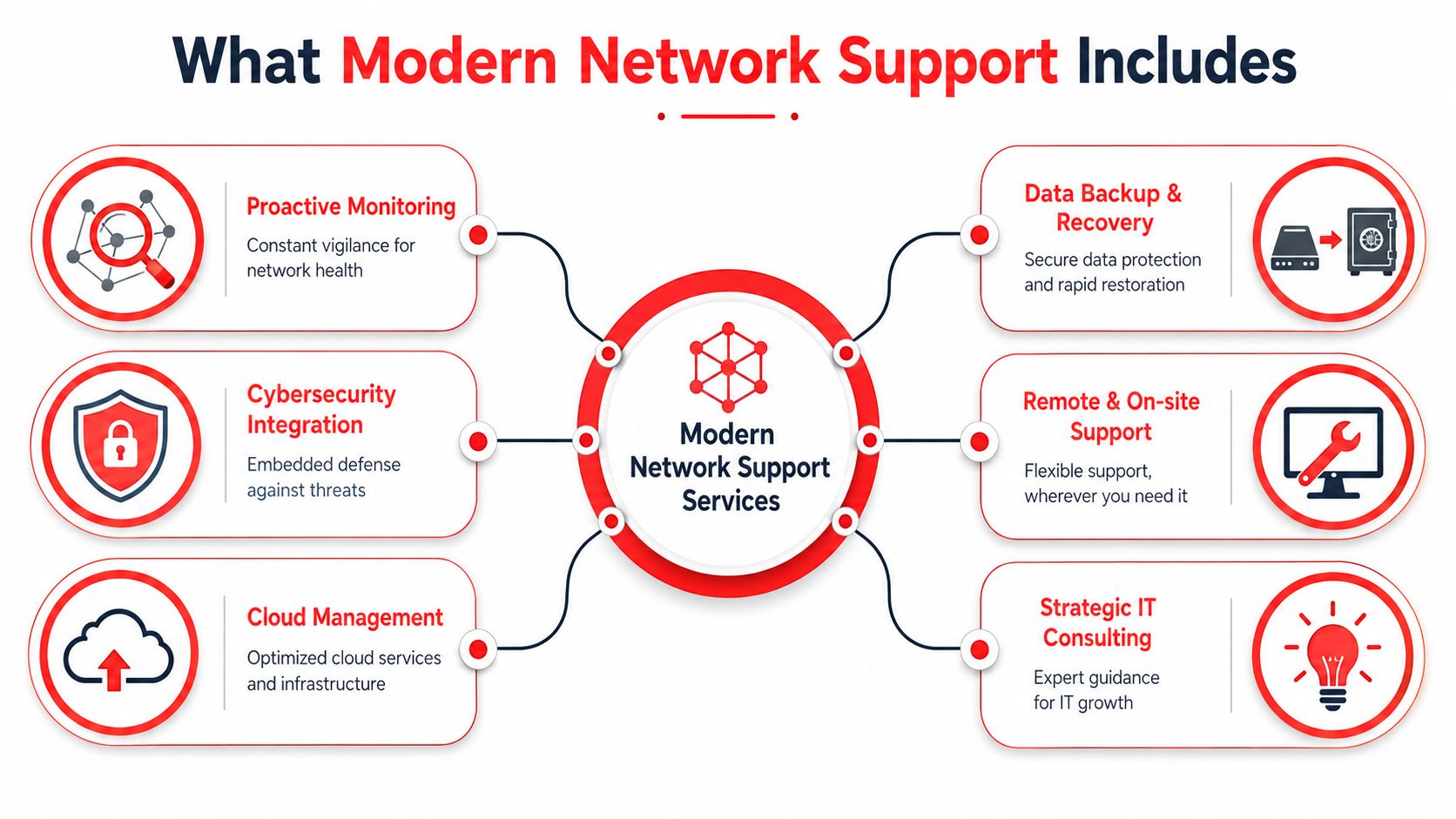
A lot of people hear “network support” and think of one person fixing internet outages. Modern support is broader than that. It covers the physical network, the security controls tied to it, the user experience on top of it, and the planning needed to keep all of it reliable as the business changes.

The foundation matters more than most owners realize
The easiest way to think about this is like a building. If the foundation is weak, the rest of the structure keeps showing cracks.
At the foundation level, modern network support includes the parts most businesses never want to think about:
- Core hardware management: Routers, switches, firewalls, wireless access points, and structured cabling all need to be configured correctly and kept current.
- Documentation: Good support teams maintain diagrams, inventory, credentials control, and change records so issues don't depend on one person's memory.
- Capacity and layout: A growing office, new suite, warehouse floor, or satellite location changes signal coverage, traffic patterns, and security boundaries.
Orlando's infrastructure environment keeps moving, too. A new facility in Maitland at 1 Pl supports enterprise connectivity with 10G internet access, private client cages, and on-demand offices, according to HostDime's Orlando data center announcement. That matters because local businesses now have better options for low-latency connectivity, hosted infrastructure, and co-managed operations when they outgrow a simple office setup.
Physical access also affects network design more than many owners expect. If your staff, vendors, or tenants rely on connected doors and remote access workflows, systems like smartphone-controlled building entry become part of the support picture. Entry systems, cameras, Wi-Fi coverage, and device segmentation need to work together cleanly.
Support should be proactive, not just available
Once the foundation is stable, the next layer is ongoing management. Many break-fix arrangements often fall short here. They answer the phone, but they don't continuously reduce risk.
A modern support model usually includes:
Monitoring that watches for degradation
Slow links, overloaded hardware, unstable wireless, and repeated device failures often show warning signs before users complain.Maintenance that prevents avoidable incidents
Firmware reviews, patching, hardware lifecycle planning, and backup checks reduce the number of surprises.User support tied to business workflows
Helpdesk shouldn't stop at “your laptop is online.” It should address why billing can't print, why the scanner won't save to the right folder, or why a remote worker can't reach a line-of-business app.Strategic guidance
Quarterly reviews, budgeting input, and roadmap planning separate real partners from ticket closers.
A network that “works most of the time” is usually one change away from a bad week.
The difference between reactive and managed support is simple. Reactive support restores service after the damage. Managed support spends time preventing the repeat incident, documenting the environment, and aligning the network to how the business operates.
The Unbreakable Link Between Network Support and Cybersecurity
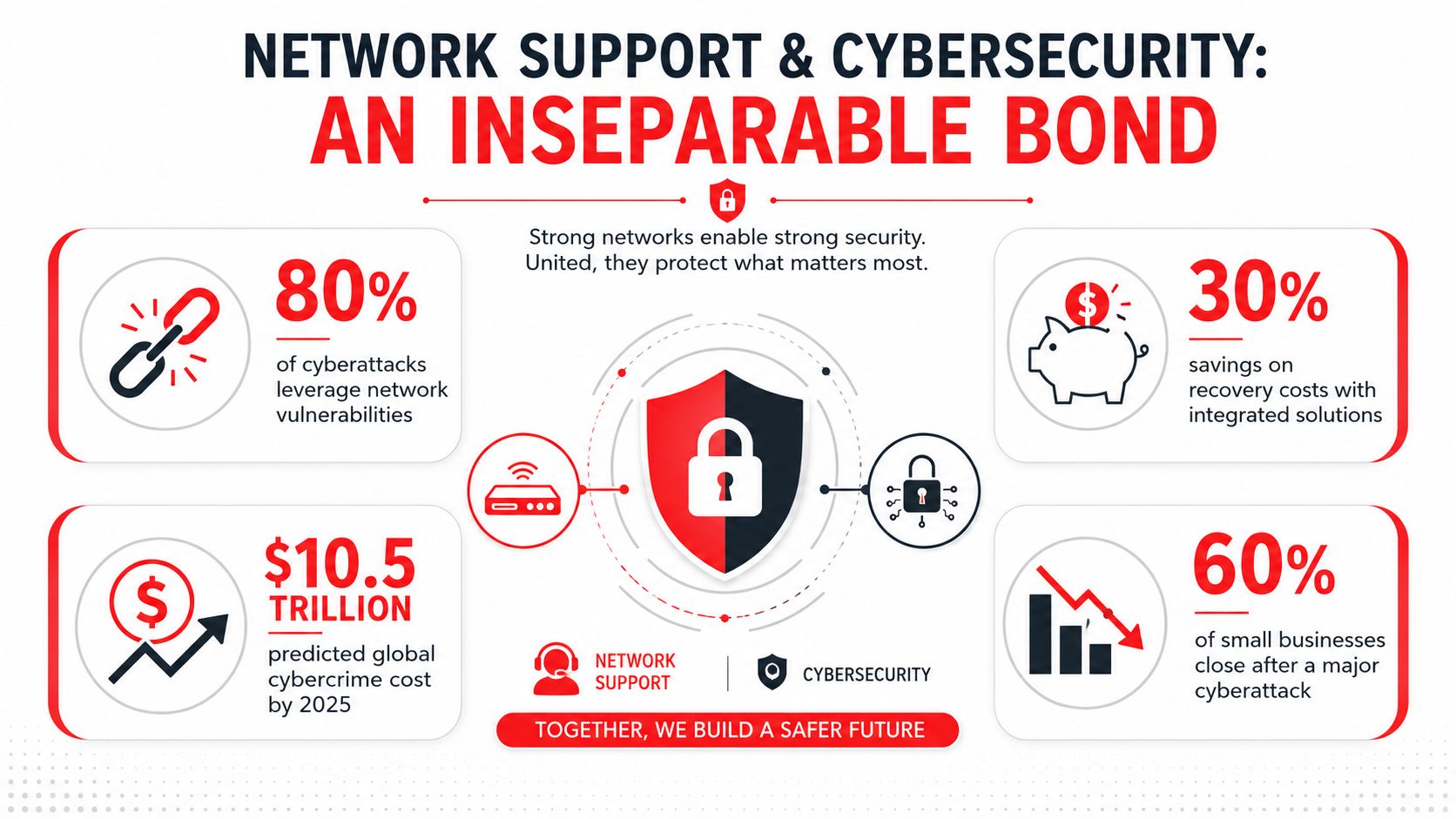
Businesses used to separate these conversations. One vendor handled IT support. Another talked about cybersecurity. That split doesn't hold up anymore. The same network that carries your files, phones, cloud traffic, and remote access also carries risk.
A working network is not the same as a secure network
Many small businesses assume they're “fine” because nobody is complaining. That's not a useful security test. A network can appear stable while exposed through weak patching, flat access across all devices, poorly managed endpoints, or bad remote access habits.
The pressure on small businesses is real. Approximately 60% of small businesses rank cybersecurity risks such as phishing and ransomware as major concerns, according to IBM's discussion of U.S. Chamber of Commerce survey findings. The impact can also be existential. According to the U.S. National Cyber Security Alliance, 60% of small businesses are unable to sustain operations beyond six months after a cyber attack, as cited in this published reference.
For Orlando businesses, that turns network support into a frontline security function. If nobody owns patch management, endpoint visibility, firewall review, backup validation, and suspicious activity response, the network may stay up while risk steadily expands.
There's also a people problem. Regular employee cybersecurity training reduces successful phishing and scam attacks by up to 70%, based on guidance for Orlando small businesses. Support teams that ignore user behavior leave a huge gap open.
What a security-aware support model looks like
A practical model ties operations and security together every day. That usually includes:
- Continuous patching and endpoint oversight: Not just servers, but laptops, desktops, and mobile endpoints tied into company workflows.
- Access control review: Staff should have the access they need, not blanket access to everything.
- Alerting and escalation: Someone has to notice suspicious behavior and respond before it becomes a business outage.
- Recovery readiness: Backups matter, but verified recovery matters more.
Security isn't a separate project. It's the standard for how support is delivered.
This is where a 24/7 SOC, or Security Operations Center, becomes important. A SOC-backed provider doesn't just reset passwords and reboot devices. The team watches for malicious behavior, investigates alerts, supports incident response, and helps contain damage when something suspicious happens outside normal business hours.
If you want a plain-language example of how organizations explain security controls and trust practices, Resgrid's approach to security is a useful reference point. It shows the kind of transparency businesses should expect when a provider handles sensitive systems.
For small firms trying to sort out the basics, this guide to cybersecurity best practices for small businesses is a practical place to start. The bigger point is simple. In 2026, network support without cybersecurity integration is incomplete.
IT Support for Orlando's Key Industries
An Orlando law office can survive a slow file transfer for an hour. A dental practice cannot afford to lose access to its schedule at 8:00 a.m. A distributor with handheld scanners going offline can miss shipments before anyone has time to open a support ticket.
That is why industry context matters. The network has to match the way the business makes money, serves clients, and handles risk.

Professional services need control, speed, and clear standards
Law firms, accounting offices, architecture firms, and engineering companies depend on documents, voice calls, video meetings, and secure remote access. Small network issues show up fast in billable time, client communication, and deadline pressure.
The priorities are usually straightforward:
- Secure file access: Staff need dependable access to shared documents from the office, home, and client sites, with permissions that match their roles.
- Consistent call and meeting quality: Weak wireless design and poor traffic handling disrupt client calls, reviews, and internal coordination.
- Standardized devices and software: Support gets easier and less expensive when laptops, printers, and line-of-business apps follow a defined standard.
A common mistake is treating the internet circuit as the whole problem. In many offices, the problem is poor wireless placement, unmanaged switches, outdated firmware, or no separation between guest Wi-Fi and business systems.
For firms comparing outside support models, this guide on how to choose a managed service provider is a useful starting point because it focuses on fit, process, and accountability instead of generic marketing language.
Medical practices need uptime, documentation, and plain-language compliance
Private medical practices across Orlando often run lean. The front desk, clinical staff, practice manager, and owner are already stretched. They do not need more technical jargon. They need a network that keeps appointments moving, protects patient information, and gives them usable records when questions come up.
That usually means support built around a few practical needs:
- Keep scheduling, imaging, phones, and practice-management systems available during business hours.
- Maintain documentation, device inventories, and access records in a format the practice can review and use.
- Turn compliance requirements into routine tasks such as password controls, workstation setup, guest network separation, and vendor coordination.
Medical offices also have workflow issues that pure IT checklists miss. A copier in the wrong area, shared logins at a nursing station, or an old wireless printer on the same network as clinical systems can create real exposure. Good support addresses those details before they become an outage or a compliance problem.
If the practice still sends records by fax, staff should also learn how to fax health records safely. The network side still matters just as much. Device placement, access permissions, transmission paths, and retention procedures all need oversight.
Medical offices do not need enterprise sprawl. They need fast support, clear guardrails, and documentation that holds up under scrutiny.
Industrial firms need dependable connectivity across offices, warehouses, and field locations
Industrial companies, distributors, warehouses, and field-service teams usually judge IT by one standard. Does the operation keep moving?
Their environment is different from a standard office. Concrete walls, metal shelving, yard space, remote sites, and mobile devices all affect performance. A Wi-Fi design that works in a law firm can fail badly in a warehouse.
The network support plan should account for that:
- Separation between business and operational systems: Office traffic and operational devices often need different access rules and network segments.
- Wireless design for physical conditions: Coverage has to be tested for shelving, interference, outdoor areas, and device roaming, not guessed from a floor plan.
- Disciplined remote support: Field locations need labeled equipment, current documentation, and clear escalation paths so problems can be solved without trial and error.
Co-managed support often fits this type of business well. An internal operations lead understands the workflow and equipment constraints. An outside IT partner handles monitoring, escalation, lifecycle planning, documentation, and after-hours response. Cyber Command, LLC is one example of that model, with managed IT, co-managed support, 24/7 SOC coverage, documentation, and predictable pricing for organizations that need both continuity and security oversight.
How to Evaluate Network Support Providers in Orlando
Choosing a provider gets easier when you stop asking broad questions like “Do you do managed IT?” and start asking how the work is delivered. The local market is tight enough that you can't assume every provider has the bench, process, or depth your business needs.
That pressure shows up in hiring data. Indeed's Florida network infrastructure listings point to a shortage of 3255 network infrastructure professionals across the state, and list the average hourly pay for IT network infrastructure roles in Orlando at $60.76 as of June 26, 2026. That's one reason outsourced support can make financial sense for small and midsized firms. Hiring strong network talent internally is expensive, and keeping enough coverage for vacations, after-hours issues, and security escalation is even harder.
Start with operating model, not marketing language
A provider's website may say “proactive,” “responsive,” and “secure.” Those words mean very little unless the operating model backs them up.
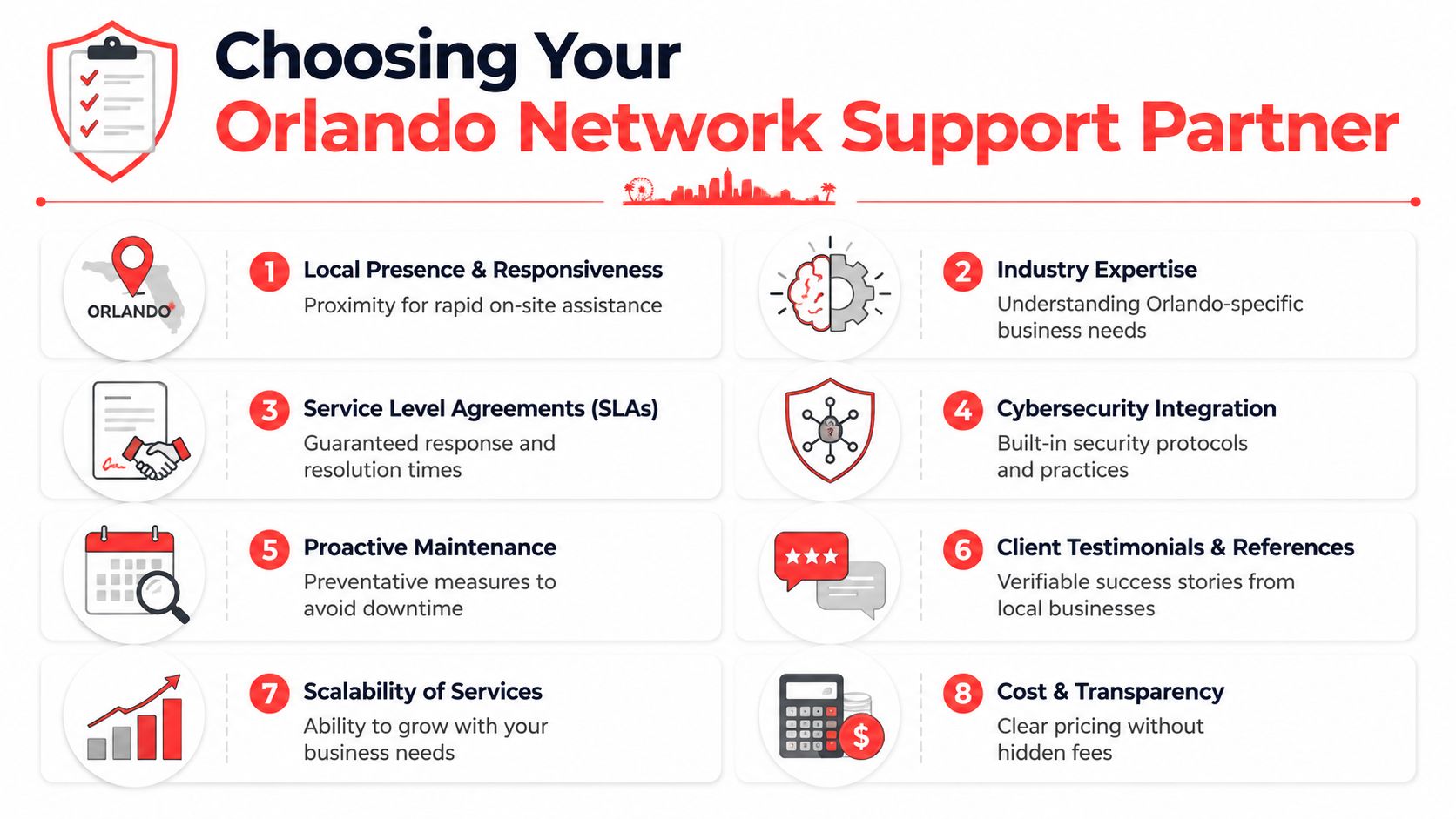
Look for evidence in these areas:
- Coverage model: Is there real after-hours support, or just voicemail and best effort?
- Documentation discipline: Ask whether they maintain diagrams, standards, asset records, and change history.
- Security integration: Find out whether support and security teams share visibility or operate in silos.
- Reporting: You should receive something more useful than ticket counts.
- Local response: If you're in Orlando, Winter Park, Maitland, or nearby, on-site support should be practical when needed.
A good screening resource is this guide on how to choose a managed service provider. It helps owners move past surface claims and evaluate how support will function week to week.
Questions that expose weak providers quickly
Sales calls tend to stay vague unless you ask pointed questions. These are the ones that usually reveal the difference between a real partner and a helpdesk-only shop:
| Question | Why it matters |
|---|---|
| Can you show a sample network diagram and reporting package? | If they don't document well, they can't support consistently. |
| What happens when an alert appears after hours? | You need to know whether anyone is actually watching. |
| How do you handle patching failures or devices that fall out of compliance? | Missed patches are a common source of trouble. |
| What parts of support are included versus billed separately? | This prevents surprise invoices later. |
| How do you coordinate with internet, phone, software, and building vendors? | Someone has to own the handoff points. |
| What does onboarding look like? | A messy start usually leads to long-term confusion. |
Ask for process, not promises. Serious providers can explain exactly how they monitor, escalate, document, and report.
If you're comparing in-house versus outsourced support, keep the trade-off grounded. Internal staff may offer familiarity and speed for daily issues. Outsourced partners can offer broader coverage, specialized security depth, documented processes, and more predictable staffing continuity. Many Orlando businesses end up choosing a hybrid model because it matches how they operate.
Decoding Network Support Pricing Models
Pricing causes a lot of confusion because many support agreements sound similar on paper while covering very different things. The important question isn't just monthly price. It's what the model rewards and what it leaves out.
Here's a practical comparison.
| Model | How It Works | Best For | Potential Downside |
|---|---|---|---|
| Per-device | You pay for each supported workstation, server, firewall, access point, or other managed asset. | Businesses with shared workstations, stable hardware counts, or limited user turnover. | Costs can climb as infrastructure expands, even if headcount doesn't. |
| Per-user | You pay based on each employee covered, usually across multiple devices. | Law firms, accounting firms, architecture practices, and other professional services where each user has several devices and support needs. | Shared devices and special-purpose equipment may create gray areas if the agreement is vague. |
| Flat-rate all-inclusive | One recurring price covers a defined support scope, often including helpdesk, monitoring, patching, vendor management, and routine projects for covered systems. | Owners who want predictable budgeting and fewer surprise bills. Often a strong fit for growing SMBs with complex day-to-day support needs. | You need clear definitions of what is and isn't covered, especially for major projects or nonstandard systems. |
The wrong model usually shows up later. A cheap-looking agreement can become expensive if every after-hours call, vendor conversation, onsite visit, or routine change order adds cost.
For Orlando businesses, the most useful model is often the one that aligns with how people work. A professional office with several devices per employee may prefer per-user simplicity. A space with shared kiosks or shop-floor devices may lean per-device. Firms that want predictable operating expenses usually prefer a flat-rate structure with clearly defined coverage.
Building a Resilient Business with the Right IT Partner
Strong network support changes how a business operates. Instead of reacting to outages, leaders get a stable platform for growth, hiring, remote work, compliance, and client service. That shift matters in Central Florida, where many firms are growing faster than their original office setup was ever designed to handle.
Local infrastructure investment supports that direction. South Reach Networks has completed over 60 miles of new fiber construction across Florida, including Orlando, strengthening network capacity and reliability for businesses that need scalable connectivity, according to South Reach Networks' project update. Better regional backbone capacity helps, but it doesn't replace internal network discipline, security oversight, and responsive support.
A good IT partner does more than fix tickets. They help standardize the environment, reduce avoidable disruption, maintain documentation, coordinate vendors, and support decisions before growth creates more risk than the business can comfortably manage.
For most Orlando SMBs, the goal isn't technical sophistication for its own sake. It's confidence. Staff can work. Clients get answers on time. Sensitive data stays protected. Costs stay understandable. When a provider can support that consistently, network support becomes part of business resilience instead of a recurring source of frustration.
If you're trying to connect day-to-day IT decisions with continuity planning, this guide on how to create a business continuity plan is a practical next step. The businesses that handle disruption best are usually the ones that planned before the bad day arrived.
If your business in Orlando, Winter Park, Maitland, or the broader Central Florida area needs a more structured approach to uptime, cybersecurity, and predictable IT costs, Cyber Command, LLC offers managed IT, co-managed IT, 24/7 SOC-backed cybersecurity, helpdesk, cloud services, and strategic support built for SMB operations. The goal is straightforward: fewer surprises, clearer accountability, and technology that supports the business instead of interrupting it.