



Most Orlando SMBs pay $100 to $300 per user per month for fully managed IT, and a 10 to 25 person office usually lands around $1,500 to $3,500 per month total. If your quote is far outside that band, or it looks low because security is missing, you're not looking at predictable pricing, you're looking at a bill waiting to happen.
You feel that problem fast in Orlando. A quote looks clean on page one, then the invoice grows after one late-night outage, one license cleanup, one security incident, or one “small project” that never had a real scope. That's why no surprise IT pricing Orlando matters more than a headline rate, especially for owners who need a number they can budget around.
Table of Contents
- Why Orlando SMBs Keep Getting Surprised by IT Bills
- What No Surprise IT Pricing Actually Means
- The Three Pricing Models Most Orlando MSPs Use
- Red Flags That Turn a Flat Rate Into a Variable Bill
- Orlando Cost Scenarios for Three Real SMB Profiles
- How to Get to a Stable Monthly Number
- Putting It Together for Central Florida SMBs
Why Orlando SMBs Keep Getting Surprised by IT Bills
A 22-person Winter Park firm thinks it has IT under control. The owner budgets $2,800 a month, signs what looks like a flat monthly agreement, and assumes the rest is routine. Then the invoice arrives. After-hours work gets charged separately, a ransomware remediation project lands on top of the base fee, and an overlooked Microsoft 365 license true-up shows up like an extra rent payment.
That's how a plan that looked affordable becomes $5,400 in a hurry. The painful part isn't only the bill, it's the timing. Owners start pushing payroll decisions, delaying hires, and pausing upgrades because the IT number stopped being predictable.
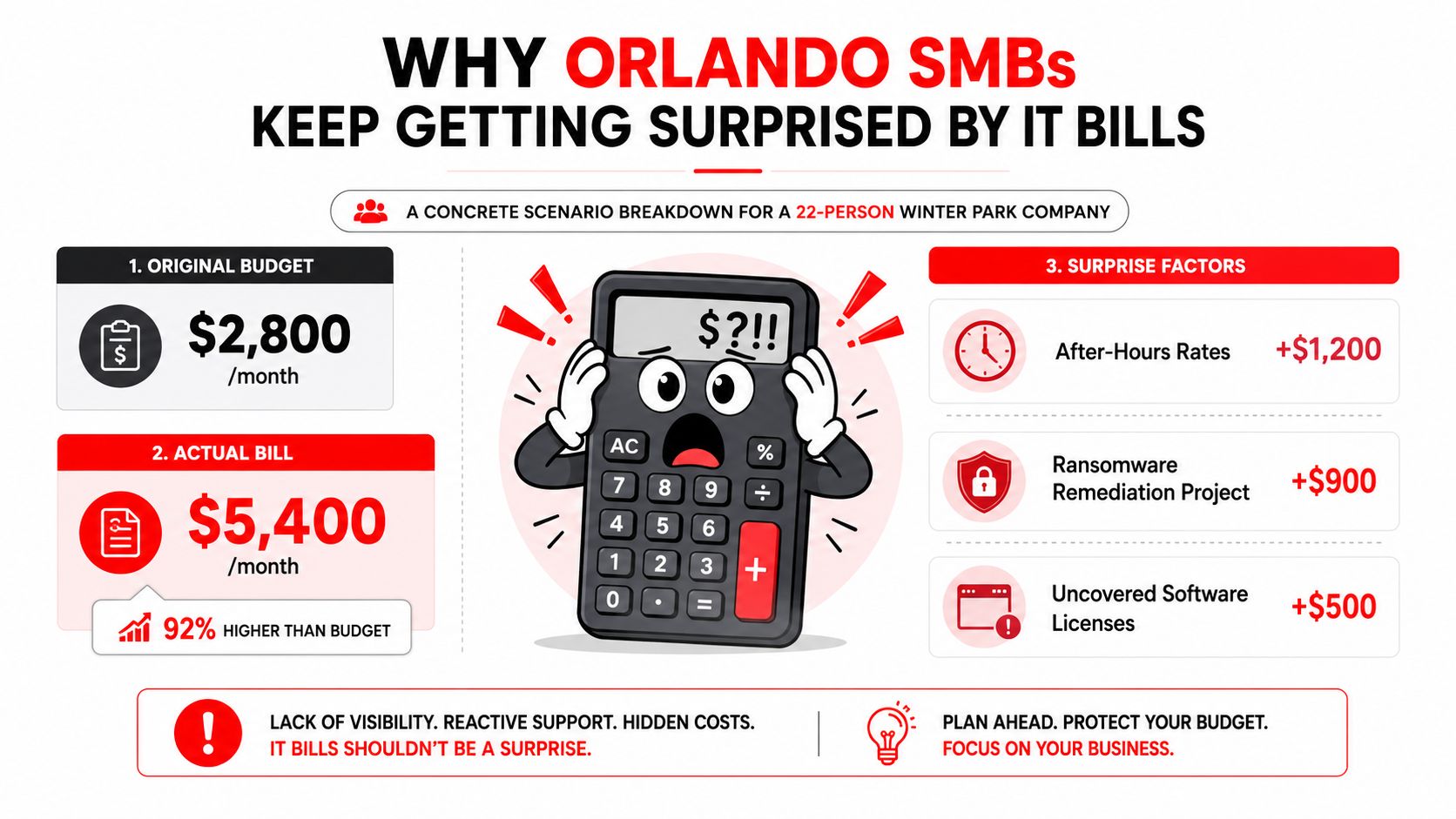

For Orlando SMBs, the benchmark is still the local managed IT range. Independent market guidance for 2026 puts fully managed IT at about $100 to $300 per user per month, with small offices often around $1,500 to $3,500 per month, mid-size firms around $3,500 to $9,000, and larger environments above that when advanced security and 24/7 support are part of the deal. If your quote sits outside that range, ask why immediately.
Why fast-growing firms feel the pain first
Small and mid-sized firms get hit harder than large enterprises because their IT demand changes faster than their contracts. New hires arrive, new locations open, shared passwords get replaced, and compliance needs show up mid-year. A bigger company usually has process, procurement, and internal review. A growing SMB often has only one office manager and one owner trying to keep up.
Practical rule: the more your business changes month to month, the more dangerous a vague IT agreement becomes.
That's why surprise billing hits growth-stage firms so hard. The business is healthy enough to move, but not big enough to absorb random spikes without real consequences. A good IT contract should stop that cycle before it starts, not explain it after the invoice lands.
What No Surprise IT Pricing Actually Means
No surprise pricing is simple. You pay one monthly number for a clearly defined scope, and that number does not change every time a user calls, a device breaks, or a ticket takes longer than expected. If the provider wants extra money for routine work, it's not really flat-rate, it's just a monthly retainer with hidden fees.
An all-inclusive resort versus a room rate with resort fees is a helpful comparison. If the base price sounds low but the final bill grows with every meal, towel, or shuttle, you didn't get predictability. You got packaging.
A true fixed-fee agreement should spell out the basics in plain English. That usually means helpdesk, monitoring, patching, endpoint protection, vendor management, cloud backups, and a quarterly business review. It should also say what happens with new users, new locations, off-hours support, and project work so nobody is guessing later.
For a useful outside example of how pricing can be broken into components, see cost factors in security guard services. The lesson is the same in IT and physical security, if the billing logic is vague, the final number will be vague too.
What to demand in writing
You want three answers before you sign anything.
- Is the price per user fixed? If headcount changes, does the monthly number change in a defined way, or does the provider treat every change like a new project?
- Are cybersecurity basics included? Endpoint protection, patching, backups, monitoring, and response cannot sit outside the base scope if the contract is sold as predictable.
- Is the scope documented? If the proposal cannot tell you exactly what's in and what's out, the invoice will do that job later.
If the agreement doesn't name the work, it's not an agreement, it's a risk transfer.
That's the entire standard. Don't let anyone dress up a partial service plan as a stable monthly fee.
The Three Pricing Models Most Orlando MSPs Use
An Orlando owner usually gets pitched one of three pricing setups, and the label matters less than the contract behind it. A downtown law office with steady staffing does not buy IT the same way a growing healthcare group does. Shared workstations, seasonal hiring, and tighter cybersecurity scope change the math fast, especially in Central Florida, where the same flat-rate quote can feel very different once local labor costs and tax treatment hit the bill.
Model fit matters more than label
| MSP pricing structures for Orlando SMBs | |||
|---|---|---|---|
| Model | How It's Billed | Best Fit For | Main Risk |
| Per-user | Each user gets a monthly rate | Law firms, accounting firms, and other headcount-based offices | New hires can push cost up fast if scope is vague |
| Per-device | Each workstation, server, or endpoint gets a fee | Small architecture firms, shared-workstation teams, mixed-device environments | The bill can climb when devices are added, moved, or refreshed |
| All-inclusive flat rate | One monthly fee for a defined bundle | Growing SMBs that want fewer variable invoices | If exclusions are buried, the “flat” price turns into project billing |
Per-user pricing is the cleanest fit for offices where staffing is the main driver of support. It is easy to forecast, easy to explain to a controller or office manager, and it usually gives you the least friction at budget time. The catch is simple. If the MSP sneaks in extra charges for onboarding, off-hours help, or security items that should have been included, the monthly number stops being predictable.
Per-device pricing works better in mixed environments where one person may use more than one machine or where shared equipment drives more of the workload. It can make sense for firms with design stations, servers, and a handful of endpoints that need separate attention. It only stays fair if every workstation, server, and endpoint is counted the same way every month, with no special billing for routine device changes.
All-inclusive flat rate is the structure Orlando SMB owners ask for when they want fewer invoices and fewer arguments. That is the right instinct. The monthly figure only stays stable if the bundle clearly includes cybersecurity monitoring, patching, backups, and support hours, plus a plain rule for new users, new sites, and project work. If those items are outside the bundle, the contract is not predictable, it is just delayed billing.
Cyber scope is what usually pushes a monthly figure from the low end toward the higher end. A contract built for basic helpdesk support will land very differently from one that has to cover HIPAA pressure, 24/7 response, and active security monitoring. That is why two Orlando quotes can both look flat and still produce very different real costs.
For teams that manage crews, vehicles, or field work, the billing structure has to match how the business operates, not how a sales deck wants it to look. If you want a plain example of how field work can be organized and tracked, browse the GPS field operations guide. The billing logic in IT works the same way, the structure has to fit the work.
How to choose without overthinking it
Use per-user pricing if headcount drives most of your support demand and your staff count stays fairly steady. Use per-device pricing if hardware, shared stations, or specialized endpoints create the main workload. Use all-inclusive flat rate if your priority is a monthly number you can budget without guessing.
If the MSP cannot explain the difference in plain English, keep shopping.
Red Flags That Turn a Flat Rate Into a Variable Bill
The most expensive IT contracts are rarely the ones that look expensive on day one. They're the ones that look tidy, then grow teeth after signature. The first thing to check is the language around scope. Phrases like “reasonable support,” “ad-hoc project work,” or “as needed” are usually code for flexible billing.

The clauses that quietly wreck predictability
- Cybersecurity excluded from base price. If endpoint protection, backups, or monitoring sit outside the monthly fee, the provider is selling a support plan, not real managed IT. Demand that baseline security be included or priced as a clearly named part of the bundle.
- After-hours and weekend surcharges. If the contract bills late-night response separately, your “flat” rate stops being flat the first time a server fails after 6 p.m. Demand a written response model for urgent issues.
- Project-hour minimums. Some agreements charge minimum blocks for anything labeled a project. That sounds harmless until a simple license cleanup gets reclassified. Ask for defined project examples and a cap on unplanned work.
- License true-up language. If the provider can change the bill whenever software counts move, the month-to-month number isn't stable. Demand a list of covered licenses and a written approval process for additions.
- Travel or on-site fees. Orlando is spread out, and offices outside a provider's main route can get tagged with drive time or trip charges. Put any on-site fee in writing before it becomes a surprise line item.
One more thing matters just as much as the contract. If the sales rep won't give you a real Service Level Agreement, or refuses to put response times in writing, walk away. That's the easiest way to spot a provider that wants flexibility on their side and accountability on yours.
Contract test: if a provider can't explain how they make money on a monthly fee, assume part of the profit comes from exceptions.
Ask for the exclusions early. Push back on vague language immediately. Flat-rate pricing only works when the exceptions are small, rare, and obvious.
Orlando Cost Scenarios for Three Real SMB Profiles
Orlando owners need local math, not a national average pasted into a proposal. A 12-person estate planning firm, a 30-person accounting practice, and a 60-person medical practice do not buy the same coverage, and they do not carry the same risk. The quote changes fast once protected health information, shared offices, or multiple locations enter the scope.
Orlando's cost structure matters too. Rent, wages, and local tax pressure shape what a provider has to charge to keep technicians, dispatch, and after-hours coverage in place. A flat quote that looks fine in a cheaper market can feel tight here if the provider is trying to cover labor, compliance work, and response time without cutting corners.
Three planning scenarios
| Business profile | Monthly flat-rate IT planning range | Security scope that should be inside the fee | What break-fix turns into |
|---|---|---|---|
| 12-person estate planning law firm in Orlando | Around $1,800 per month as a planning target | Backup, patching, endpoint protection, email security, and documented access control | Urgent attorney support, file recovery, and cleanup after a phishing event |
| 30-person accounting practice with a Winter Springs satellite office | Around $3,500 per month as a planning target | Multi-location support, monitoring, device management, backups, and user onboarding | Weekend cutover help, remote access failures, and project labor for new staff |
| 60-person medical practice handling PHI | Around $6,200 per month as a planning target | 24/7 coverage, incident response, compliance support, logging, and strong endpoint controls | Breach triage, downtime response, and documentation work after an incident |
The numbers shift because the scope shifts. A law firm needs tight document access and fast recovery after a phishing hit. An accounting practice deals with recurring onboarding, user churn, and office-to-office support. A medical practice has protected health information, which pushes security from a nice extra to part of the core service.
The local pressure point is compliance. If a medical practice in Orlando has a breach, the response is not just technical cleanup. The HIPAA Breach Notification Rule requires notice without unreasonable delay and no later than 60 calendar days after discovery in many cases, and incidents affecting 500 or more residents of a state or jurisdiction trigger media notice as well (HIPAA breach notification summary). That is why regulated offices pay more when cybersecurity scope includes monitoring, response, and the paperwork that follows an incident.
Orlando buyers should also expect the monthly number to reflect local operating costs, not just remote support minutes. If a provider has to staff a helpdesk, maintain on-site coverage, and handle compliance-driven work in Central Florida, the fee has to support that overhead. This IT cost infographic is a simple way to show owners how infrastructure, support, and security stack together before a quote lands.

The split is predictable support versus surprise labor. Break-fix looks cheaper until the first outage, the first after-hours recovery, or the first compliance scramble. Then Orlando owners see the full bill at once, and the “cheap” option stops looking cheap.
How to Get to a Stable Monthly Number
Start with your own inventory. Count users, devices, locations, software subscriptions, and compliance obligations. If you cannot describe your environment on one page, no provider can quote it accurately, and anyone who claims they can is selling hope, not a plan.
Then force the scope into plain language. Ask what is included, what is excluded, how new users are priced, and what happens when something breaks after hours. Ask for a sample invoice in three situations, a normal month, a month with a new hire, and a month with a project. That is the fastest way to expose hidden billing logic.
For Orlando owners who want a local operating model with live support, one option is Cyber Command, LLC, which offers managed IT and cybersecurity with transparent reporting and 24/7/365 helpdesk coverage. This live support infographic is useful because it shows the difference between a contract built around real coverage and one that only looks fixed on paper. The value is not the logo, it is the structure. If the provider cannot match the quote to the way your office works, keep looking.

Questions to ask before you sign
- Is the helpdesk U.S.-based? If your users need fast answers, do not accept ambiguity on where support comes from.
- Does the SOC run 24/7/365? Regulated firms need coverage that does not stop at closing time.
- Are quarterly business reviews included? If the provider is not reviewing health, risk, and roadmap regularly, the relationship will drift.
Use those answers to check references from firms like yours. A medical practice should ask other medical practices. A law office should talk to law offices. A satellite-heavy business should speak with businesses that deal with the same location complexity.
A simple week-one action list
- Write your scope. List users, devices, offices, and compliance needs.
- Mark every exclusion. Find the parts of your current support plan that can still generate a bill.
- Request itemized proposals. Compare what each quote includes, not just the monthly total.
- Check references in your industry. If they cannot name similar clients, that is a warning sign.
Do that this week and you will have enough information to stop guessing.
Putting It Together for Central Florida SMBs
Orlando pricing sits inside a higher-cost market than many owners expect. Central Florida overhead shows up in rent, wages, insurance, and everything else that goes into a monthly IT agreement. Orlando housing data shows a 1-bedroom apartment in the city center at $1,803.62 per month and outside the city center at $1,543.38, which is one reason owners watch recurring spend so closely (Orlando cost of living data). Local pricing also shifts because Florida's 6.5% state sales tax and Orange County's 13.5% combined hotel occupancy tax show how quickly a posted price changes once local rules apply (Orlando budget guide).
That makes no surprise IT pricing more than a slogan here. Orlando SMBs do not have much room for loose estimates, especially when the monthly bill has to cover security work that cannot be delayed. A regulated firm in law, accounting, healthcare, veterinary care, or a med spa needs cybersecurity in scope from the start, because incident response, logging, and notification requirements are part of the cost. A quote that leaves those items out is not predictable pricing, it is deferred billing.
The practical test is simple. Fixed monthly number. Written scope. Security included. Response times in writing. No hidden project trap.
A proposal that fails any one of those points will turn into a variable bill later. If the quote does not spell out coverage, exclusions, response windows, and the security stack, the flat rate is only cosmetic. The Top Clutch Managed Service Provider Orlando review infographic is useful for one reason, it helps you check whether the provider's structure matches the way your office runs.

If you are comparing Orlando IT proposals, ask for a fixed scope first and a monthly number second. Cyber Command, LLC builds managed IT and cybersecurity programs around predictable pricing, 24/7 support, and clear scope, so the contract lines up with the work instead of hiding it.