


It's late. A file server stops responding, remote staff can't access shared documents, and the person who normally handles IT is off the clock. On another weekend, an inbox fills with suspicious login alerts and no one is sure whether it's noise or the start of a real compromise. Those moments are when businesses find out whether they have actual 24/7 coverage or just a phone number that forwards to voicemail.
For many Orlando businesses, after-hours IT problems aren't rare edge cases. Law firms work against court deadlines. Medical practices can't afford disruption around patient data and scheduling. Industrial and field-service companies depend on systems that have to stay available before dawn, after close, and during weekends. In that environment, 24 7 IT Support in Orlando FL isn't a convenience feature. It's part of business continuity, security, and client trust.
The mistake is assuming every provider means the same thing when they say “24/7 support.” They don't. Some answer tickets around the clock. Some monitor systems. Some can isolate a security incident and drive recovery. Those are very different service models, and the difference shows up when something serious happens outside normal business hours. If you're weighing whether to outsource, augment an internal team, or replace break-fix support entirely, it helps to start with the operational reality rather than the marketing label.
Teams evaluating outsourced support often begin with broad business reasons like the benefits of outsourcing IT support. The more important question comes next. What kind of 24/7 support are you buying?
Table of Contents
- Your Business Never Sleeps Why Should Your IT Support
- Beyond an Answering Service What Is True 24/7 Support
- The Business Case For Always-On IT in Orlando
- Core Features of a Comprehensive 24/7 IT Partnership
- Co-Managed vs Fully Managed IT Which Model Is Right for You
- How to Vet 24/7 IT Support Providers in Central Florida
- Frequently Asked Questions About Orlando IT Support
Your Business Never Sleeps Why Should Your IT Support
At 9:40 PM, your card processor stops syncing, a manager cannot log in remotely, and an overnight security alert hits the same inbox no one checks until morning. That is when the gap between daytime IT support and real after-hours coverage stops being theoretical.
Business systems do not pause at 5 PM. Orlando companies depend on cloud platforms, remote access, mobile devices, line-of-business apps, and vendor integrations that stay live around the clock. Security threats follow the same schedule. They do not wait for your office to reopen.
The operational risk is not just inconvenience. It is stalled revenue, missed service windows, delayed approvals, frustrated staff, and a longer window for an attacker to move from one compromised account to a larger incident.
The cost of waiting until morning
A failed payroll batch at night still affects employees in the morning. A down remote connection still blocks work. A suspicious login that sits untouched for eight hours gives an attacker time to test permissions, spread laterally, or encrypt data.
That is why after-hours support should be tied to business impact, not office hours.
If your company depends on technology outside the workday, it needs response coverage outside the workday too. That does not always mean staffing a full internal night shift. It does mean having a provider that can do more than answer the phone and create a ticket. The business benefits of outsourcing IT support are real, but only if the support model matches your actual risk.
Many Orlando owners get caught in the middle. They know a daytime-only vendor leaves gaps. They also know hiring enough internal staff for nights, weekends, vacations, and security escalation is expensive and hard to maintain.
Orlando businesses need coverage that matches real operations
In this market, plenty of companies run beyond standard office hours. Hospitality, healthcare, logistics, field services, law firms with deadlines, and multi-location offices all create after-hours dependency on IT. Even businesses that consider themselves "daytime operations" still rely on backups, endpoint protection, cloud authentication, patching, and alert monitoring overnight.
That is the detail buyers miss. A provider can advertise 24/7 helpdesk availability and still leave you exposed after hours if no one is actively monitoring alerts, investigating suspicious activity, or authorized to contain an incident.
For Orlando firms, the practical question is simple. If a system outage or security event starts tonight, who is working the problem before your team gets back to the office tomorrow? If the answer is "someone will see it in the morning," you do not have 24/7 operational support. You have delayed response with a nicer label.
Beyond an Answering Service What Is True 24/7 Support
A lot of providers say they offer around-the-clock support. That phrase sounds reassuring until you ask what happens during a real incident.
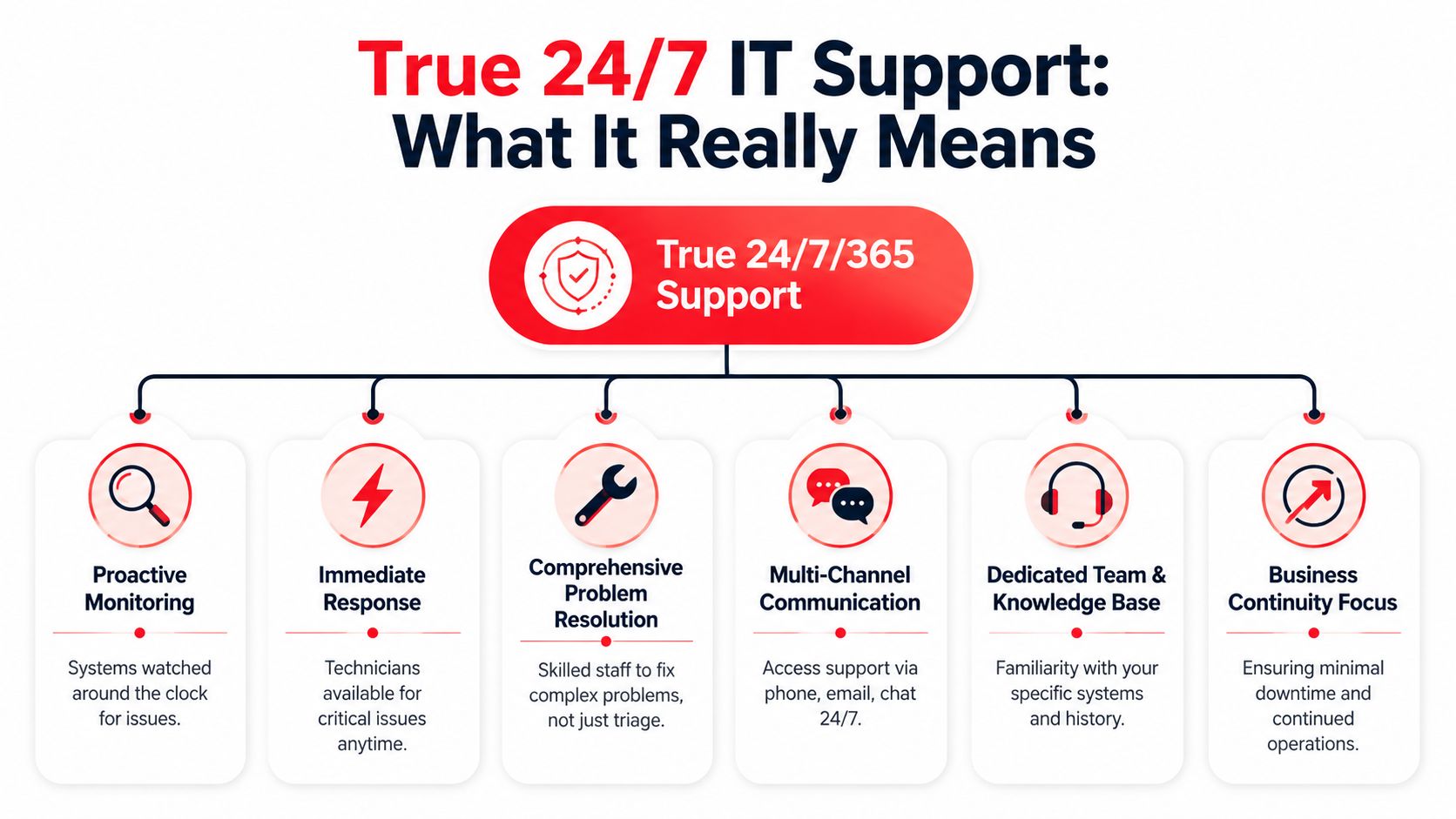

The difference that matters during a real incident
There's a major gap between 24/7 helpdesk availability and 24/7 operational coverage. Buyers often assume “24/7” means guaranteed restoration, but service levels and recovery responsibilities can vary a lot by contract, as noted in this Orlando managed service provider overview.
The easiest way to think about it is this:
- An answering service model can log the issue, send an alert, and maybe start basic triage.
- A real operations model can investigate, contain, remediate, escalate, coordinate with vendors, and stay on the issue until the business is stable.
That's the difference between a fire alarm and a fire department. The alarm tells you something is wrong. The fire department shows up with equipment, people, process, and authority to act.
A provider that answers the phone at 2 AM isn't automatically a provider that can resolve a ransomware event at 2 AM.
What true coverage looks like in practice
Operational 24/7 support usually includes several layers working together. One team handles user issues. Another monitors infrastructure and endpoints. A security function watches for signs of compromise, investigates alerts, and responds when something crosses from nuisance to incident. If a cloud platform, line-of-business application, or internet provider is involved, someone also has to coordinate that vendor chain.
A strong model usually includes:
- Continuous monitoring: Systems, endpoints, and critical services are watched for failures, unusual activity, and early warning signs.
- Immediate technician response: Critical issues don't sit in a queue waiting for normal office hours.
- Real incident handling: The team can do more than reset passwords and reopen tickets.
- Escalation paths: There's clarity about who owns what during outages, security events, and restoration work.
- Coverage across holidays and weekends: Not just message-taking, but decision-making and action.
If you want a useful technical baseline for the security side of this, review what a Security Operations Center does. That's where a lot of “24/7” promises either become real or fall apart.
The practical question for an Orlando business owner isn't “Do you offer 24/7?” It's “Who is watching, who is responding, and who stays accountable until the incident is contained and the business is running again?”
The Business Case For Always-On IT in Orlando

Always-on IT support matters because it protects outcomes that business owners already care about. Revenue continuity. Client confidence. Operational stability. Fewer disruptions that force staff into manual workarounds.
Professional services and regulated work
For law firms, accounting firms, architecture groups, engineering practices, and financial offices, technology interruptions quickly become client-service problems. Missed document access, unreliable email, and delayed remote connectivity can derail billable work and create compliance headaches. Strong 24/7 support lowers that exposure by keeping an eye on systems after hours and acting before small issues grow into next-day emergencies.
Cybersecurity also hits differently in professional services. These firms often hold sensitive contracts, financial records, legal files, and private client communications. They don't just need a helpdesk. They need disciplined patching, endpoint oversight, alert review, and an incident process that doesn't stop when the office closes.
Medical and operational environments
Privately owned medical practices face a different version of the same pressure. Scheduling, communications, protected health information, imaging access, and connected devices all depend on stable systems. If a workstation is encrypted or a critical application becomes unavailable, the issue isn't only technical. It affects patient flow, staff workload, and privacy obligations.
Industrial firms, logistics operations, and field-service companies need uptime for another reason. Their teams move on fixed schedules and often depend on dispatching, inventory systems, job records, and mobile communication. When those systems fail, crews lose time immediately and office teams start patching together workarounds.
Strong 24/7 support doesn't just shorten outages. It reduces the number of situations that turn into outages in the first place.
A lot of Orlando business owners still think of IT support as ticket handling. That's too narrow. In practice, the value sits in proactive monitoring, disciplined maintenance, faster containment during security events, and someone owning the issue from first alert to restored operation. That's what protects trust. Clients may never notice the patching schedule or after-hours alert review, but they absolutely notice when your systems stay available and your team stays responsive.
Core Features of a Comprehensive 24/7 IT Partnership
The phrase “managed services” covers a wide range of quality. Some plans are barely more than reactive support with a monthly invoice. Others provide the operational depth businesses need.
Industry guidance describes 24/7 support as coverage available “every single day of the week, including nights, weekends, and holidays,” and one Orlando guide says most managed IT providers charge $100 to $250 per user per month for that level of service in the local market, according to this 24/7 IT support pricing and coverage reference. If you're paying for an always-on model, these are the basics that should be on the table.
What should be included
- Live helpdesk coverage: Users should reach an actual support function around the clock by phone, email, or ticket. After-hours support shouldn't be limited to “we'll notify someone.”
- Monitoring with action behind it: Alerting only matters if someone is accountable for investigating and responding.
- Patch and endpoint discipline: A provider should routinely maintain supported systems so known weaknesses don't sit untouched.
- Documented incident response: During a serious outage or security event, roles need to be defined before the incident starts.
- Vendor coordination: If internet, cloud, line-of-business software, or telecom is part of the problem, your provider should manage the back-and-forth instead of leaving your staff in the middle.
- Reporting and roadmap visibility: You should know what was fixed, what remains risky, and what needs attention next quarter.
For many businesses, communications support is part of this picture too. If your phone system is cloud-based, voice reliability becomes part of operations, not a separate afterthought. A practical reference point is this overview of VoIP telephone service, because support quality often depends on how well IT and business communications are managed together.
What to pin down before signing
Not every contract includes the same scope, even when the pricing looks similar. Ask for clarity on these points:
| Area | What to confirm |
|---|---|
| After-hours incidents | Who responds, what triggers action, and what counts as emergency work |
| Security events | Whether the provider only alerts or also investigates and contains |
| Covered systems | Which devices, cloud apps, servers, and network components are included |
| Projects and changes | What's included in recurring service versus billed separately |
| Recovery responsibility | Who owns restoration steps, vendor coordination, and communication during an outage |
One local option in this category is managed IT support in Orlando FL, where the service model includes 24/7 monitoring, patching, and helpdesk coverage. Whether you choose that route or another provider, the important part is matching the contract to the operational risk your business carries.
Co-Managed vs Fully Managed IT Which Model Is Right for You
Some companies need a partner to supplement internal IT. Others need a complete outsourced department. The right answer depends less on company size than on coverage gaps, leadership expectations, and how much operational responsibility the internal team can realistically carry.
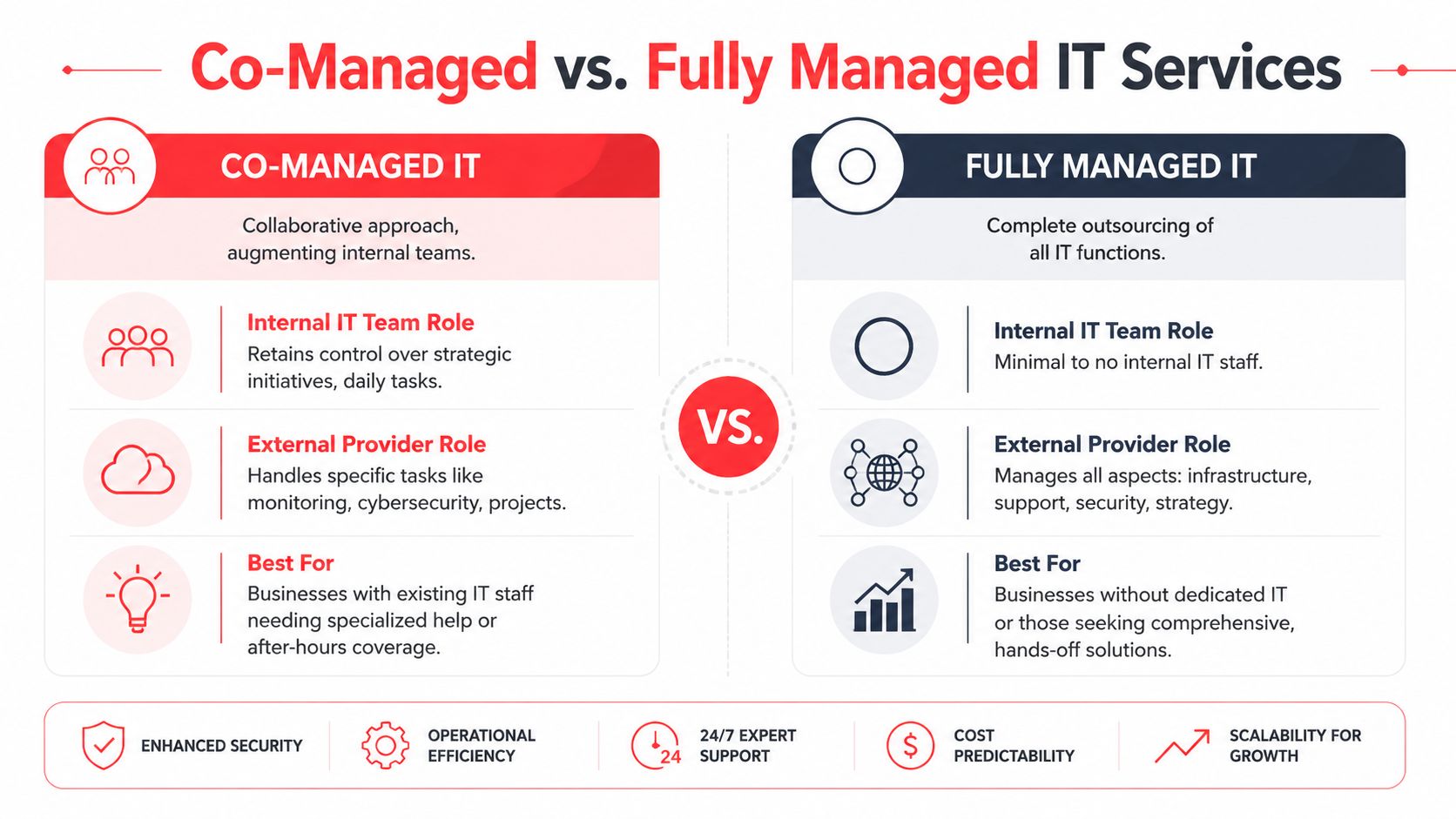
An Orlando market reference frames the issue well. Break-fix support is commonly priced near $150 per hour, and the key decision becomes which mix of human support and automation produces measurable uptime, as discussed in this Orlando IT support cost comparison.
When co-managed makes sense
Co-managed IT fits businesses that already have in-house staff but don't have enough bench strength for full coverage.
That often looks like this:
- A small internal team handles daily support but needs after-hours monitoring and escalation.
- Leadership wants strategic control in-house while outsourcing patching, security operations, vendor management, or project overflow.
- The existing technician is overloaded and needs backup for vacations, major incidents, or specialist work.
This model works well when the internal team is competent but capacity is the problem. It tends to fail when leadership expects one internal person and one outside provider to function like an integrated 24/7 department without clear ownership.
When fully managed is the better fit
Fully managed IT works better when the business wants one accountable partner handling infrastructure, support, security, and routine administration.
A fully managed model usually fits if:
- There is little or no internal IT staff
- The owner or office manager is tired of coordinating vendors
- Security, uptime, and support need a formal process rather than ad hoc response
- The business wants predictable operating costs instead of surprise hourly invoices
Choose co-managed if you need reinforcement. Choose fully managed if you need ownership.
What doesn't work well is trying to simulate 24/7 coverage with daytime staff plus occasional emergency calls. That approach looks cheaper until nights, weekends, and security incidents expose the gap.
How to Vet 24/7 IT Support Providers in Central Florida
A lot of Orlando business owners hear "24/7 support" and assume it means someone is actively watching systems, investigating security alerts, and coordinating response at 2:00 a.m. That assumption causes expensive mistakes. Some providers offer after-hours call coverage. Fewer offer true around-the-clock operations.
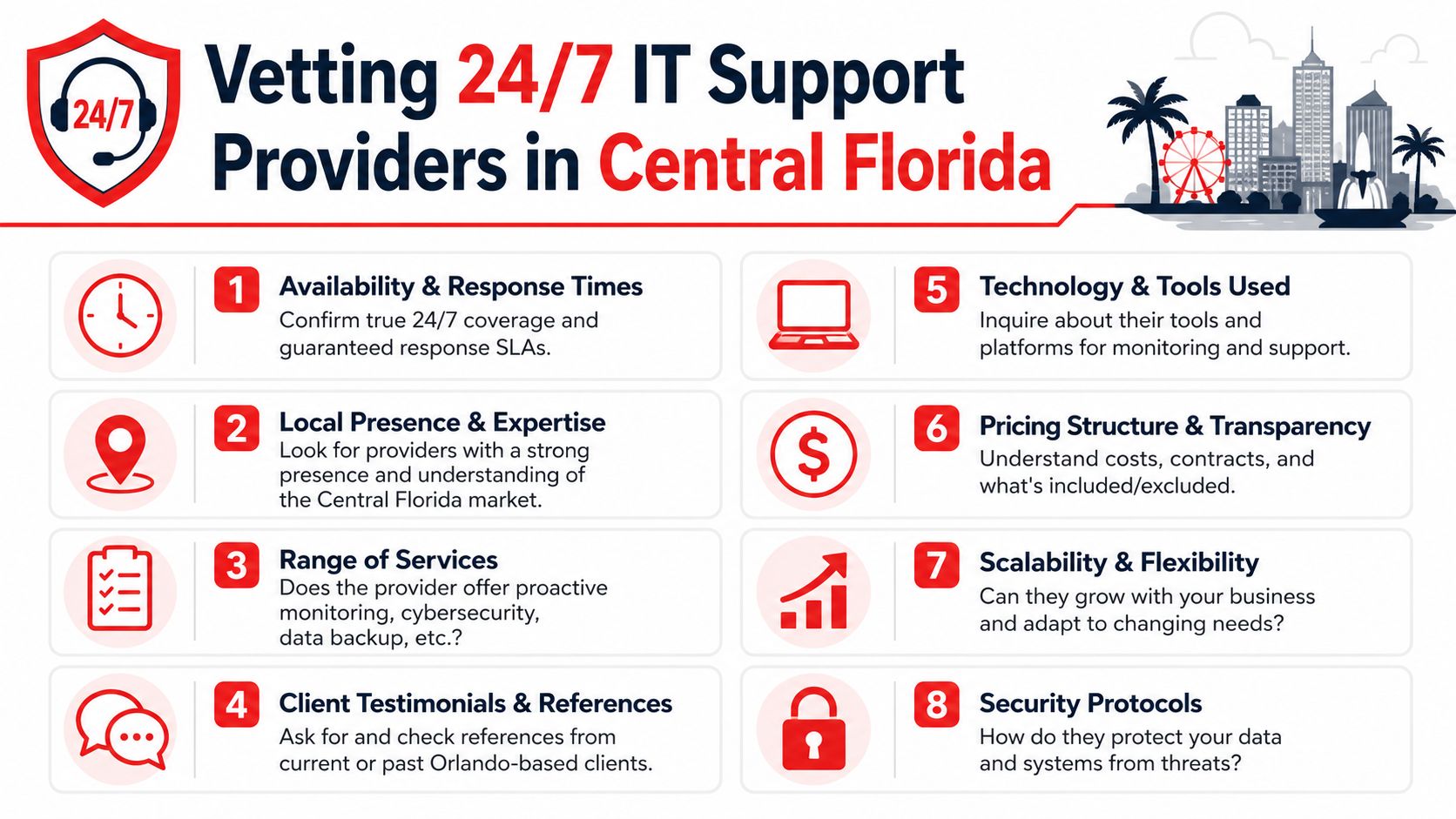
Central Florida has plenty of IT talent, but staffing depth alone does not prove service quality. What matters is whether the provider has enough trained people, enough documented process, and enough after-hours authority to act without waiting for the next business day.
Questions that expose weak coverage
Ask questions that force the provider to describe what happens overnight, on weekends, and during a security event.
- Who is working after hours: Is it a staffed service desk, a rotating on-call technician, or an answering service that takes messages?
- What happens during a critical incident: Who owns the response, who makes decisions, and who updates your leadership team?
- What happens when a security alert fires overnight: Does a security team investigate it, or does it sit in a queue until morning?
- What tools and access do after-hours staff have: Can they isolate a device, disable an account, restart a failed service, or only open a ticket?
- How do they handle vendor coordination: Will they work directly with your internet provider, cloud providers, phone vendor, and line-of-business software support teams?
- What is outside the agreement: After-hours support often sounds broad until an outage, security issue, or onsite need falls outside scope.
- How current is their documentation: Night and weekend response breaks down fast when the provider has incomplete network maps, stale passwords, or no escalation notes.
Vague answers are a warning sign.
What strong provider answers sound like
A capable provider speaks in process, roles, and timing. They should be able to tell you who receives alerts, who investigates them, who can approve containment steps, and how communication works if the issue affects payroll, phones, remote access, or customer-facing systems.
Look for specifics such as:
- A defined after-hours staffing model with named functions, not a generic promise that someone is available.
- Separate handling for user support and security events so a suspicious login or endpoint alert does not get treated like a password reset.
- Clear incident severity rules so business outages and active threats move to the front of the line.
- Documented escalation paths for cloud outages, internet failures, server issues, and account compromise.
- Regular reporting and review so repeat incidents get fixed at the root, not reopened every few weeks.
The best answers also include limits. Good providers know what they can remediate remotely, what requires client approval, and what requires onsite work. That honesty matters because false confidence is dangerous during an outage.
Ask for the operating model. "We answer the phone 24/7" is not the same as "we monitor, investigate, escalate, and respond 24/7."
Local presence still has value in Central Florida. It helps with onsite recovery, hardware failures, vendor handoffs, and communication during a messy incident. But local presence is only part of the picture. For a business that depends on uptime and secure access, the critical test is whether the provider can do more than answer calls after hours. They need to keep operating when your staff is asleep.
Frequently Asked Questions About Orlando IT Support
What cybersecurity threats should Orlando businesses expect
Most small and mid-sized businesses deal with a familiar set of risks. Suspicious login activity, phishing-driven account compromise, malware, unauthorized remote access attempts, and vulnerable endpoints are common concerns. The exact threat mix varies by industry, but the practical issue is the same. Someone needs to review alerts, validate what's real, and act fast when something crosses the line from annoyance to incident.
How is a SOC different from a helpdesk during an incident
A helpdesk is built to support users and restore routine functionality. A SOC is built to monitor, investigate, contain, and coordinate response during security events. If a user can't print, the helpdesk is usually the right first stop. If an account shows unusual activity or multiple systems start behaving abnormally, a security operations function should take the lead.
What happens during onboarding
A solid onboarding process starts with discovery. The provider gathers documentation, reviews users and devices, maps critical systems, checks administrative access, and identifies immediate risks. Then they standardize support processes, monitoring, endpoint controls, escalation contacts, and communication rules. Good onboarding reduces confusion later because the support team already knows your environment before the first major issue lands.
Can 24/7 support help with industry-specific software
Yes, if the provider is willing to support the business process around the software, not just the workstation it runs on. That can include coordinating with the application vendor, validating access paths, documenting dependencies, and helping your team recover operations when the software is affected by a broader outage. The key is to ask upfront which applications are in scope and what the provider's responsibility is when the vendor owns part of the fix.
If your business needs more than after-hours answering and wants real accountability for uptime, security, and incident response, talk with Cyber Command, LLC. They provide U.S.-based managed IT, co-managed support, and 24/7/365 security operations for organizations in Orlando and Central Florida, and a consultation can help you determine whether your current support model matches your operational risk.