
Unlocking Azure Site Recovery Your Path to a Robust DR Solution


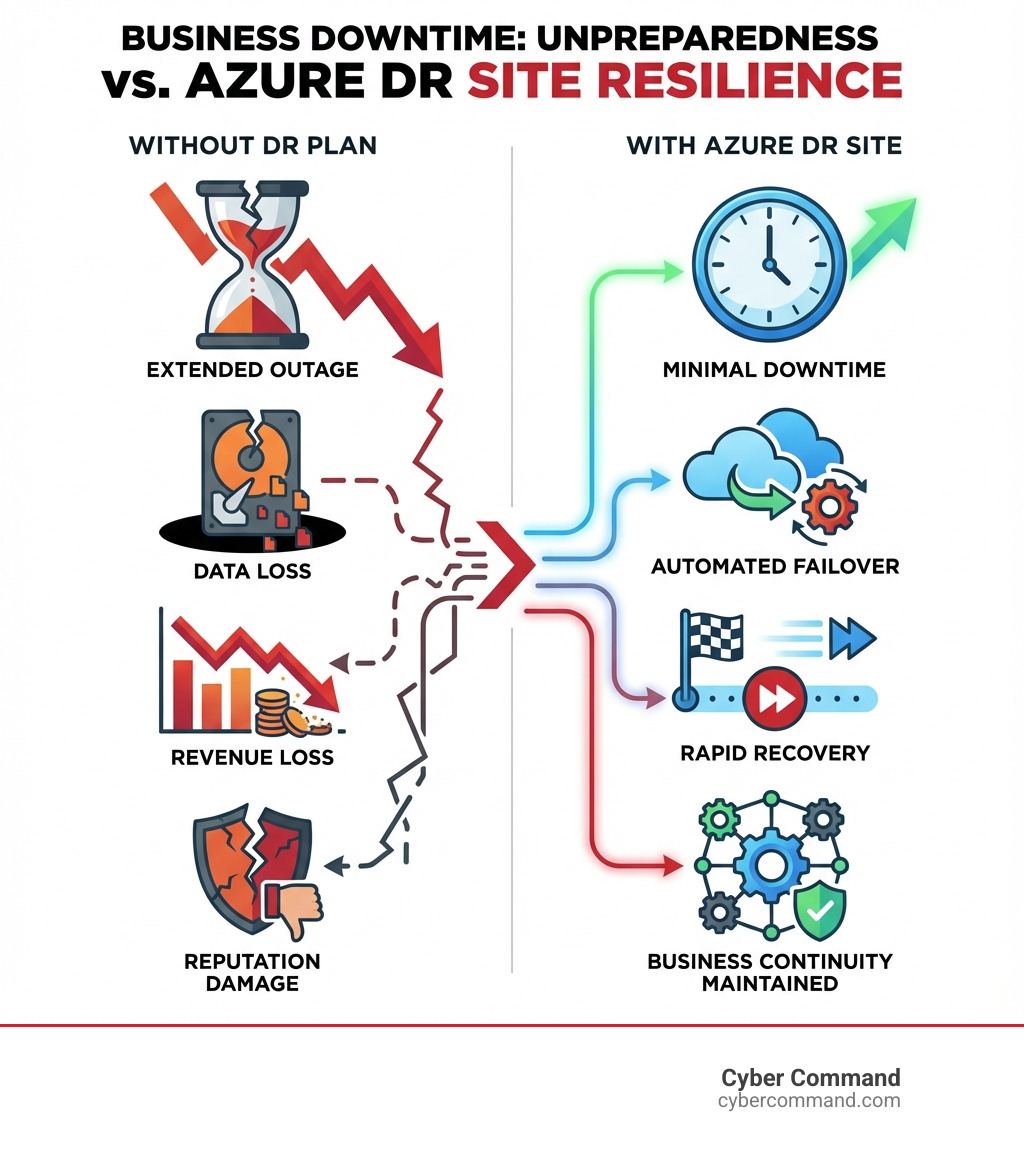
Why a Solid Azure DR Site is Critical for Business Continuity
Azure DR site solutions, powered by Azure Site Recovery (ASR), enable businesses to replicate workloads from on-premises, other cloud providers, or between Azure regions to ensure rapid recovery during outages. Here’s what you need to know:
- What it is: Azure Site Recovery is Microsoft’s built-in disaster recovery service that orchestrates replication, failover, and recovery of virtual machines and applications
- Key benefit: Eliminates the need for expensive secondary datacenters while keeping your business running during planned and unplanned outages
- Pricing: First 31 days free, then $25/month per protected instance for Azure-to-Azure replication
- Recovery targets: Achieves Recovery Point Objectives (RPO) as low as 30 seconds with continuous replication
- Supported scenarios: Azure VM to Azure region, on-premises VMware/Hyper-V to Azure, and physical servers to Azure
According to Microsoft’s research, continuous availability of services and data is crucial for business continuity in today’s digital landscape. Disasters—whether natural, cyber-related, or caused by human error—can severely disrupt operations and jeopardize your organization’s reputation and longevity.
As businesses grow, IT complexity increases. You’re juggling more applications, more data, and more risk. The question isn’t if disaster will strike, but when. Without a robust disaster recovery plan, you’re gambling with your company’s future.
That’s where Azure Site Recovery comes in. It’s a fully managed service that automates the replication and recovery process, giving you peace of mind without the massive investment of maintaining a secondary datacenter.
I’m Reade Taylor, Founder and CEO of Cyber Command, and I’ve spent years helping businesses implement secure, reliable azure dr site solutions that transform technology from a liability into a competitive advantage. My team and I specialize in building disaster-resilient infrastructures that keep businesses running when it matters most.
Introduction to Azure Site Recovery (ASR)
When we talk about keeping your business afloat no matter what, we’re talking about Business Continuity and Disaster Recovery (BCDR). And for businesses operating in Azure, that conversation quickly turns to Azure Site Recovery (ASR). ASR is a cornerstone of any robust BCDR strategy, designed to keep your business applications online and humming, even in the face of unexpected outages or planned maintenance.
What is Azure Site Recovery?
At its heart, Azure Site Recovery is a powerful service that manages and orchestrates the disaster recovery of your critical workloads. Think of it as your digital safety net. Whether your machines are running in Azure or on your premises, ASR provides a seamless way to replicate them to a secondary location. If disaster strikes your primary site—be it a regional outage, a cyberattack, or even a simple human error—ASR allows you to “fail over” to the secondary location, bringing your applications back online quickly. Once the primary site is back in action, you can “fail back,” returning your operations to their original home.
This orchestration and automation are key. ASR isn’t just about copying data; it’s about making sure your applications can resume operations with minimal fuss, reducing manual intervention and potential for error during stressful recovery scenarios. It’s about ensuring Business Continuity when you need it most.
Key Features and Benefits of ASR
Why do we love ASR so much at Cyber Command, and why do our clients in Florida and Texas benefit from it? The answer lies in its compelling features and tangible benefits:
- Minimize Downtime with Dependable Recovery: ASR is engineered for rapid recovery. It helps us meet aggressive Recovery Time Objectives (RTOs) by orchestrating the failover of multi-tier applications, ensuring your most critical services are back online swiftly. This means less disruption and happier customers.
- No Secondary Datacenter Costs: One of the biggest traditional headaches of disaster recovery was the need for a costly, often underused, secondary datacenter. ASR eliminates this. By replicating to Azure, you only pay for the compute resources you need when an actual disaster occurs, significantly reducing infrastructure expenses. It’s a game-changer for Cloud DR strategies.
- Compliance Testing Without Impact: Regulatory compliance often demands regular DR testing. ASR allows us to perform non-disruptive disaster recovery drills in an isolated environment. You can validate your recovery plans, ensure they work as expected, and prove compliance without ever affecting your live production environment. It’s like practicing a fire drill without ever setting off the alarm!
- Integration with Azure Ecosystem: ASR is a fully integrated Azure service. This means it’s automatically updated with the latest Azure features, works seamlessly with other Azure services like Azure Monitor and Azure Automation, and leverages Azure’s robust global infrastructure, including regions near our clients in Orlando, Jacksonville, Tampa Bay, and Plano.
Core Architecture and Components of ASR
Understanding how ASR works under the hood is crucial for building a resilient azure dr site. It’s a cleverly designed system that ensures your data is continuously replicated and ready for action.
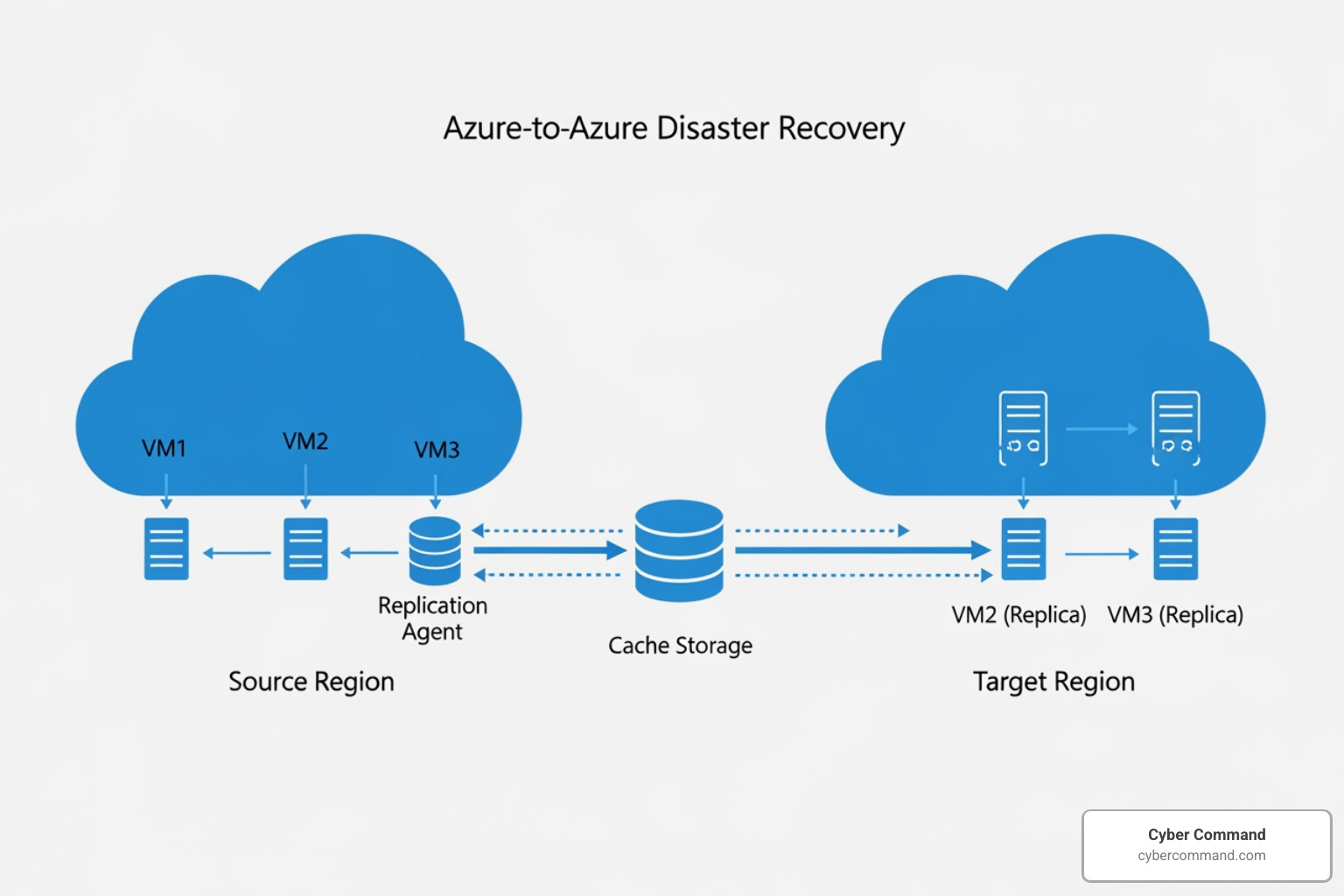
When we deploy disaster recovery for Azure virtual machines using ASR, your VMs in the source region continuously replicate to a different target Azure region. If an outage hits your primary region, we can initiate a failover, and your applications will spin up in the secondary region. Once the primary region is restored, we can fail back, returning operations to their original state. This process ensures data resilience and business continuity.
Understanding the Core Components of an Azure DR Site
Let’s break down the key players in an ASR architecture:
- Source VMs: These are your original virtual machines in the primary Azure region (e.g., a data center in Florida) that you want to protect.
- Cache Storage Account: In the source network, ASR uses a cache storage account. This acts as a temporary holding area for replication data, minimizing the impact on your production applications before the data is written to the target disks.
- Target Resource Group: In the secondary Azure region (e.g., a data center in Texas), ASR creates a target resource group where your replicated VMs and their associated resources will reside post-failover.
- Target Virtual Network: This is the network configuration in the secondary region that your failed-over VMs will connect to. It’s designed to mirror your primary network, ensuring seamless connectivity.
- Replica Managed Disks: These are the managed disks in the target region where the replicated data from your source VMs is continuously stored. They are kept in sync with your source disks.
- Recovery Services Vault: This is the central hub in Azure where you manage and orchestrate all your ASR configurations, replication policies, and recovery plans. It’s the nerve center of your azure dr site.
Network Connectivity and Security Requirements
For ASR to work its magic, your Azure VMs need to be able to talk to the ASR service. This primarily involves outbound connectivity:
- Outbound Connectivity: Azure VMs require outbound connectivity to specific Azure Site Recovery URLs and IP address ranges. This communication is essential for services like storage, Microsoft Entra ID, replication, service bus, key vault, and Azure Automation. The good news? Site Recovery never needs inbound connectivity to your VMs – only outbound.
- Required URLs and IP Ranges: To ensure seamless communication, we configure your network to allow access to necessary ASR service endpoints. For comprehensive details on required IP ranges, you can refer to the official Azure Datacenter IP Ranges.
- Service Tags: To simplify network security group (NSG) rules, we often use service tags. These tags represent a group of IP address prefixes for a given Azure service, which are automatically updated by Microsoft. This means less manual configuration and more robust security for your azure dr site.
- Network Security Groups (NSGs): We configure NSG rules to control outbound traffic from your VMs, ensuring they can reach the necessary ASR endpoints while maintaining a strong security posture.
Recovery Points: Crash-Consistent vs. App-Consistent
When we talk about recovering your applications, the “state” in which they recover is paramount. ASR offers different types of recovery points to achieve varying levels of data consistency:

- Crash-Consistent Points: Imagine your computer suddenly losing power. A crash-consistent recovery point is like that moment – it captures data on disk exactly as it was when the snapshot was taken. It doesn’t include any data that was still in memory or in the middle of being written. While useful for operating systems, it might not be ideal for applications that need all their transactions accounted for. By default, ASR generates crash-consistent recovery points every five minutes.
- App-Consistent Snapshots: This is the gold standard for critical applications. An app-consistent snapshot includes all data on disk, data in memory, and any in-progress transactions. It ensures that when your application comes back online after a failover, it starts in a fully functional and consistent state, just as if it had been gracefully shut down. ASR achieves this using services like the Volume Shadow Copy Service (VSS) on Windows machines. These snapshots are crucial for meeting stringent Recovery Point Objectives (RPOs) for database-driven or transactional applications.
By understanding these recovery point types, we can tailor your ASR policy to balance data consistency with performance and recovery speed, ensuring your azure dr site meets your specific RPO and RTO targets.
Setting Up Your Azure DR Site with ASR: A Step-by-Step Guide
Setting up an azure dr site might sound daunting, but with ASR, it’s a streamlined process. Here’s how we typically approach enabling disaster recovery for your Azure VMs, with a brief mention of on-premises scenarios.
This guide focuses on Azure-to-Azure replication, which is a popular choice for many businesses in Florida and Texas leveraging Azure’s robust cloud infrastructure. For those with on-premises environments, ASR also supports replicating VMware VMs, Hyper-V VMs, and physical servers to Azure, allowing for a comprehensive Disaster Recovery Plan across hybrid setups.
Prerequisites for Your First Azure DR Site
Before we dive into the setup, a few crucial items need to be in place:
- Azure Account and Permissions: You’ll need an active Azure subscription. Your Azure account must have sufficient permissions (Contributor or Owner role) to create and manage resources and enable replication for VMs.
- Supported Regions: Verify that your source and target Azure regions are supported by ASR. We’ll ensure you select a target region that aligns with your geographical requirements, perhaps replicating from a Florida data center to one in Texas.
- Source VM Requirements: Your Azure VMs should have a minimum of 1 GB RAM. For Windows VMs, ensure the latest Windows updates are installed to guarantee trusted root certificates are present. For Linux VMs, follow your distributor’s guidance for updating trusted root certificates and Certificate Revocation Lists (CRLs).
- Target Region Resources: Ensure your target Azure subscription has enough capacity to support the VM sizes you’ll need after failover. You’ll also need a pre-configured Azure virtual network and a storage account in the target region where replicated data will reside.
- Network Configuration: As discussed, your VMs need outbound internet connectivity to the ASR service endpoints. We’ll configure Network Security Groups (NSGs) with appropriate service tags to allow this communication securely.
Enabling and Verifying VM Replication
Once the prerequisites are met, we can begin the replication setup:
- Creating a Recovery Services Vault: Our first step is to create a Recovery Services vault in the Azure portal. We’ll select your subscription, create or choose a resource group, and give the vault a friendly name. This vault will be the central management point for your azure dr site.
- Selecting a VM for Replication: Steer to “Virtual machines” in the Azure portal and select the specific VM you wish to protect. Under the “Operations” menu, choose “Disaster recovery.”
- Choosing a Target Region: On the “Basics” tab, select your desired target Azure region. This is where your VM will fail over if a disaster impacts your primary region.
- Customizing Replication Settings: You’ll have the option to review and customize replication settings. This includes choosing your target resource group, virtual network, and storage account. For VMs with high data change rates, we might consider the ‘High Churn’ option, which supports up to 100 MB/s. You can also define the frequency of app-consistent snapshots and how long recovery points are retained (up to 15 days).
- Starting the Replication Job: After reviewing your selections, simply click to start the replication. Azure Site Recovery will then install a Mobility service extension on your VM and begin the initial replication of your data to the target region.
- Monitoring Replication Health and Status: It’s crucial to monitor the replication. You can verify the replication status, health, and failover readiness directly in the “Disaster Recovery” section of your VM in the Azure portal. This dashboard provides real-time insights into your azure dr site‘s readiness.
Disabling Replication and Cleaning Up Resources
Sometimes, a VM no longer needs disaster recovery protection, or you might be decommissioning resources. Here’s how to gracefully disable replication and clean up:
- Process for Stopping Replication: From the VM’s “Disaster Recovery Overview” in the Azure portal, select “Disable Replication.” This will stop the continuous data transfer and allow you to remove the replicated items.
- Disabling the Replication Job: Confirming the disable action will cease the replication process. This is a critical step to avoid unnecessary charges for protected instances.
- Cleaning Up ASR Resources: After disabling replication, any replica managed disks or other ASR-specific resources created in the target region will need to be manually removed if they are no longer required.
- Uninstalling the Site Recovery Extension: The Mobility service extension installed on your VM during replication is not automatically removed when you disable replication. To uninstall it, steer to your VM’s “Settings” > “Extensions” and remove the Site Recovery extension.
Advanced ASR Processes and Considerations
Beyond the basic setup, ASR offers advanced capabilities and requires specific considerations for complex environments.
The Failover Process and Performing DR Drills
The whole point of setting up an azure dr site is to be ready for a failover. ASR supports two main types:
- Planned vs. Unplanned Failover: A planned failover is typically used for expected outages, like scheduled maintenance, and aims for zero-data loss by synchronizing data before the switch. An unplanned failover is for unexpected disasters and prioritizes bringing applications online with minimal data loss.
- Test Failovers: We cannot stress this enough: test your DR plan regularly! ASR allows you to perform non-disruptive disaster recovery drills using test failovers. This creates a copy of your replicated VMs in an isolated network in the target region, letting you validate your recovery process without impacting your production environment. We recommend doing this often, perhaps even monthly, to ensure your plan is robust and your team is proficient. This aligns perfectly with our Disaster Recovery Testing services.
- Creating Recovery Plans: For multi-tier applications, a simple VM failover isn’t enough. ASR’s recovery plans allow us to customize and sequence the failover and recovery of multiple VMs. This ensures that dependencies are respected (e.g., database servers come online before web servers) and applications recover gracefully.
- Sequencing Multi-Tier Applications: Recovery plans are essential for minimizing recovery issues. By defining the order in which VMs recover and even injecting custom scripts, we can ensure that multi-tier applications running on multiple virtual machines come back online in a controlled and efficient manner.
Handling High Churn and Specialized Workloads
Not all VMs are created equal. Some have very high data change rates, and others use specialized disk types. ASR is built to handle these scenarios:
- High Churn Option for IO-Intensive Workloads: For Azure VMs with significant data churn (up to 100 MB/s), ASR offers a ‘High Churn’ option. This is critical for IO-intensive workloads like large databases, ensuring that even rapidly changing data can be reliably replicated to your azure dr site.
- Support for Encrypted VMs: ASR supports the replication of encrypted VMs, ensuring your data remains secure both at rest and in transit during the disaster recovery process.
- Considerations for Premium SSD v2 and Ultra Disks: When replicating VMs using advanced disk technologies like Premium SSD v2 or Ultra Disks, there are specific considerations. For instance, if your source region lacks availability zones but your target region supports them, a specific zone must be chosen for failover to ensure compatibility and optimal performance.
- Multi-VM Consistency Groups: For applications that require consistency across multiple VMs (e.g., a database cluster), ASR supports multi-VM consistency groups. This feature ensures that all disks across a group of VMs have the same point-in-time data, achieved by communicating between the VMs (requiring port 20004 to be open for inter-VM communication). While beneficial for data integrity, it’s important to use this feature judiciously as it can impact workload performance.
ASR vs. Azure Backup and Pricing Explained
It’s common for our clients in Central Florida and Texas to ask about the difference between Azure Site Recovery and Azure Backup. While both are crucial for data protection, they serve distinct purposes. It’s like comparing a spare tire to roadside assistance – both get you back on the road, but in different ways.
Azure Site Recovery vs. Azure Backup
Here’s a table to clarify their roles:
| Feature/Purpose | Azure Site Recovery (ASR) | Azure Backup |
|---|---|---|
| Primary Goal | Business Continuity & Disaster Recovery (BCDR) | Data Protection & Long-Term Retention |
| What it does | Replicates VMs/workloads to a secondary location | Creates point-in-time copies (backups) of data |
| RTO/RPO | Low (seconds/minutes) for rapid application recovery | Higher (hours/days) for data restoration |
| Use Case | Keeping applications running during outages | Restoring data from accidental deletion, corruption, etc. |
| Granularity | VM-level replication | VM, file/folder, SQL database, or application-level |
| Recovery Type | Orchestrated failover of entire workloads | Point-in-time restore of specific data |
ASR is about keeping your services available by shifting them to a backup location, while Azure Backup is about preserving your data and restoring it to a previous state. For a truly robust strategy, we often recommend using both in conjunction.
Understanding the ASR Pricing Model
When planning your azure dr site, understanding the costs is crucial. ASR has a straightforward pricing model:
- Per-Instance Protection Fee: ASR service charges are based on the number of instances (VMs or physical servers) you protect.
- First 31 Days Free: Microsoft is generous! For the first 31 days, all protected instances receive free protection. This is a great way to get started and see the value without immediate cost.
- Costs for ASR to Azure: After the initial free period, if you’re replicating to Azure, the rate is $25 per month for each instance protected. This same pricing structure applies to replication between Azure regions.
- Outbound Data Transfer Costs: While ASR’s protection fee is per instance, you will also incur standard Azure charges for outbound data transfer from your source region to the target region during replication.
- Storage Costs in the Target Region: You’ll pay for the storage consumed by your replicated disks in the target region. We can leverage different storage tiers (Hot, Cool, Archive) to optimize these costs, ensuring you’re only paying for the performance and accessibility you need.
For the most up-to-date and detailed pricing information, always refer to the official Azure Site Recovery pricing page. We also offer specialized Disaster Recovery as a Service Pricing that bundles these costs and provides transparent, all-inclusive rates for our clients.
Frequently Asked Questions about Azure Site Recovery
We get a lot of great questions about ASR from businesses across Florida and Texas. Here are some of the most common ones:
What are the main supported scenarios for Azure Site Recovery?
ASR is incredibly versatile, supporting a wide range of disaster recovery scenarios:
- Azure VM to Azure Region: This is one of the most common scenarios, where we replicate Azure virtual machines from one Azure region (e.g., a data center in Florida) to another (e.g., a data center in Texas).
- On-premises VMware/Hyper-V VMs to Azure: For hybrid environments, ASR allows you to replicate your virtual machines running on VMware vSphere or Microsoft Hyper-V from your on-premises data center directly to Azure.
- Physical Servers to Azure: ASR also extends protection to physical servers (both Windows and Linux) on-premises, allowing them to fail over to Azure.
This flexibility allows you to create a comprehensive Company Disaster Recovery Plan that covers hybrid environments, ensuring all your critical workloads are protected.
Can I fail back to my primary site after a disaster?
Yes, absolutely! ASR is designed for both failover and failback. After an unplanned failover to your azure dr site in the secondary region, once your primary site’s issues are resolved and it’s back online, we can initiate a failback. This process replicates the changes made in the secondary region back to your primary location, allowing you to seamlessly return your workloads to their original home.
It’s important to note a specific detail for on-premises physical servers: while they can fail over to Azure, they can only fail back to VMware VMs on-premises, not to the original physical machines. For Azure-to-Azure replication, failback is a straightforward process.
How does ASR ensure application consistency during failover?
This is a critical aspect for many of our clients, especially those with transactional databases or complex applications. ASR addresses this through application-consistent snapshots.
Unlike crash-consistent snapshots (which are like pulling the plug), application-consistent snapshots capture disk data, data in memory, and all in-process transactions. This is achieved by integrating with the Volume Shadow Copy Service (VSS) on Windows machines (or similar mechanisms for Linux). Before taking the snapshot, ASR quiesces the application, ensuring all pending transactions are flushed to disk. The result? When your application comes online after a failover, it starts in a perfectly consistent and functional state, minimizing data loss and recovery efforts.
Secure Your Business with a Robust DR Strategy
In today’s digital world, relying on luck isn’t a strategy. A robust disaster recovery solution is not just an IT checkbox; it’s a fundamental requirement for business continuity and resilience. Azure Site Recovery provides the tools to build a powerful azure dr site, enabling you to replicate, fail over, and recover your critical workloads with confidence.
At Cyber Command, we believe in proactive planning and rigorous testing. We work with businesses across Florida, including Winter Springs, Orlando, Jacksonville, and Tampa Bay, and in Texas, including Plano, to design, implement, and manage comprehensive DR solutions custom to their unique needs. Our enterprise-grade IT, cybersecurity, and platform engineering services ensure that your technology is not just functional, but truly resilient. We’re here to act as an extension of your business, providing 24/7/365 U.S.-based support with transparent, all-inclusive pricing.
Don’t wait for disaster to strike. Let us help you transform your disaster recovery strategy from a worry into a competitive advantage.
