


Here in Florida, backup services aren't just an IT best practice—they’re a core part of business survival. It’s easy to think it won’t happen to you, but from a sudden ransomware attack freezing your Orlando operations to a hurricane physically wiping out your Winter Springs office, relying on luck is not a strategy.
A proper backup plan is what ensures you can get back to your critical data and keep serving clients, no matter what disaster comes your way.
Why Backups Are a Lifeline for Florida Businesses
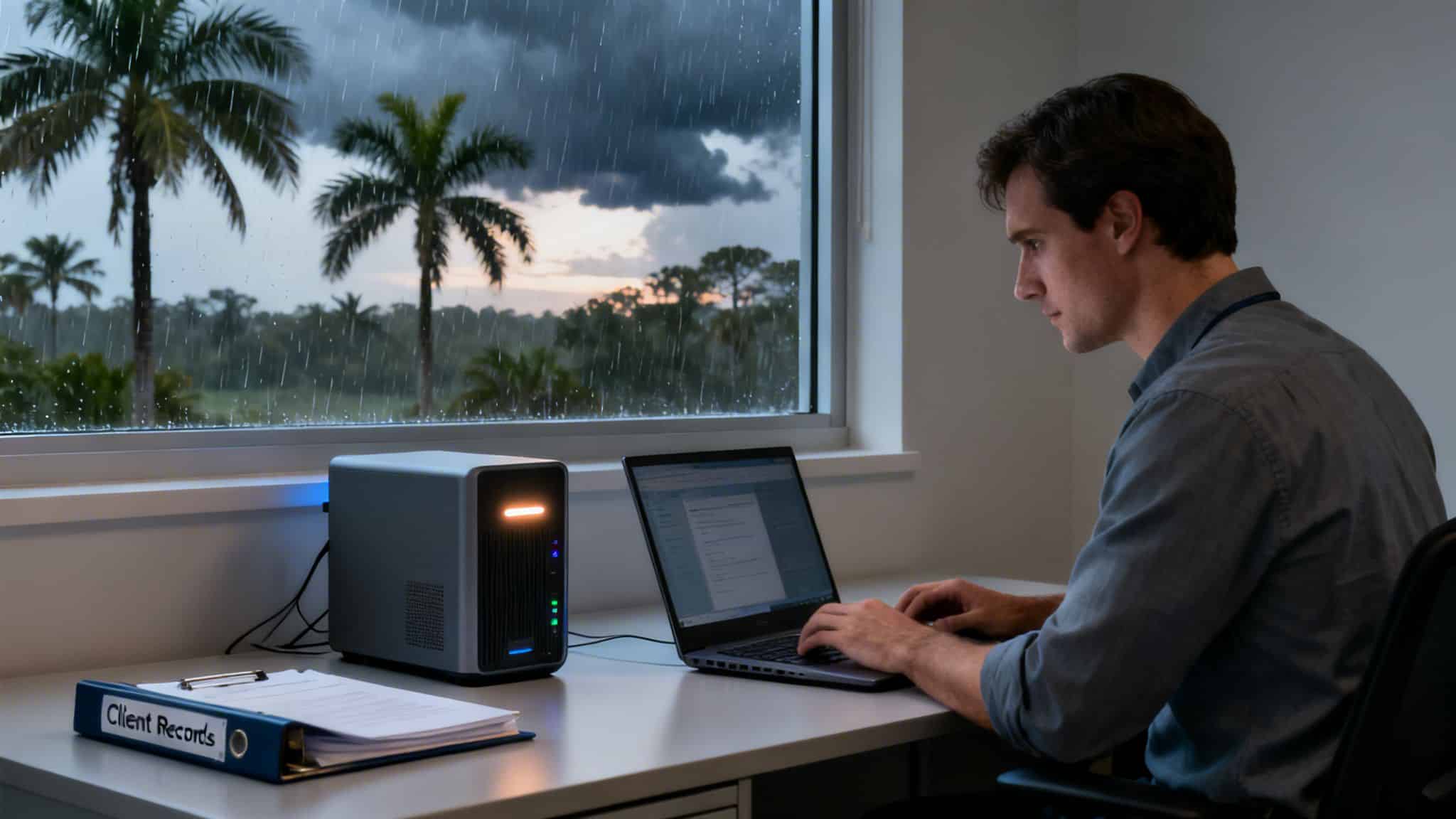

Imagine your Orlando accounting firm gets hit with ransomware right in the middle of tax season. Suddenly, years of client financials, tax records, and sensitive communications are gone—locked behind an encryption wall. This isn't some far-fetched Hollywood scenario.
In reality, small and medium-sized businesses face nearly four times as many data breaches as large corporations. Cybercriminals see smaller firms as easy, lucrative targets, gambling that they lack robust cybersecurity and, more importantly, a solid recovery plan.
But for Central Florida businesses, the threats don't stop there. Beyond the digital dangers that affect everyone, we have localized disasters to worry about. A severe storm can knock out power for days or cause flooding that destroys on-site servers, hard drives, and any other hardware in its path. That USB drive you keep next to the main computer? It offers zero protection when the office is under a foot of water.
The Dual Threats to Central Florida Firms
This unique mix of digital and physical risks makes a comprehensive backup strategy an absolute necessity. Without one, you're exposed on two fronts. A real plan for backup services for small business has to address both threats by creating secure, redundant copies of your data in geographically separate locations.
This dual protection is non-negotiable for professional services, where data is the entire business:
- Legal Practices: Attorneys in Kissimmee or Lake Mary are responsible for confidential case files and client data. A breach or total loss doesn't just halt work—it can trigger malpractice claims and destroy a firm's reputation overnight.
- Financial Firms: Accountants and financial advisors in Altamonte Springs manage irreplaceable records. Losing that data could cripple their ability to function and bring on serious regulatory penalties.
- Medical and Dental Offices: A Winter Park medical spa or dental practice holds sensitive patient health information (PHI). A data loss event not only disrupts patient care but also opens the door to massive HIPAA fines.
A robust backup plan is your first and last line of defense. It stops being an IT cost and becomes an indispensable investment in business survival and operational continuity.
Ultimately, these services create a safety net that protects your client relationships, your reputation, and your bottom line. The ability to restore operations quickly after a data loss event is what separates a minor hiccup from a business-ending catastrophe.
Getting a handle on what you truly need is the first step, and our comprehensive guide to business IT support in Florida can provide even more valuable context. A well-designed backup strategy means you can keep serving your clients with confidence, no matter what comes your way.
Decoding Your Data Recovery Needs
Before you can even look at backup services, you need to answer two gut-check questions about your business. Forget the technical jargon for a moment. This is about defining your absolute, must-have survival requirements when a data disaster strikes. Get these right, and you’ll be able to have a meaningful conversation with any IT provider.
The first question is simple but critical: how much data can you afford to lose and recreate from scratch? This is your Recovery Point Objective (RPO). Think of it as hitting the ‘rewind button’ for your business data.
Imagine your Orlando legal practice processes client payments and case updates all day long. If your system crashes at 4 PM, an RPO of 24 hours means you lose everything from that day. Every payment, every document, every billable minute. Is your team prepared to manually re-enter a full day's work? For most, that’s a hard no, which pushes them toward a much smaller RPO—maybe an hour, or even just a few minutes.
Defining Your Downtime Tolerance
The second question gets to the heart of business continuity: how long can your business afford to be completely shut down? This is your Recovery Time Objective (RTO). It’s the countdown clock for getting your systems back online after they fail.
Could your Winter Springs dental office survive being down for a whole day? That means no access to patient schedules, no new appointments, and no way to view medical records. The cost of canceled appointments, idle staff, and the hit to your reputation adds up fast. For businesses where every minute of downtime bleeds money and erodes client trust, a low RTO—measured in minutes, not days—is non-negotiable.
Together, RPO and RTO are the twin pillars of any serious backup strategy. They translate fuzzy ideas about data loss into hard business numbers, defining your tolerance for loss and downtime. They are the foundation for choosing the right solution.
Getting this right has never been more important. The global market for backup services is on track to explode past $60 billion by 2033, a surge driven by relentless cyberattacks and the sheer volume of data we all create. With compliance rules in sectors like healthcare and finance getting stricter, having a solid backup plan isn't optional. You can find more detailed market analysis on Data Insights Market.
Key Concepts Beyond RPO and RTO
Once you have your RPO and RTO dialed in, a few other concepts are vital for building a truly resilient defense.
- Data Retention Policies: These are the rules that dictate how long you’re legally or operationally required to keep data. An accounting firm in Altamonte Springs, for example, might need to hold financial records for seven years to satisfy tax laws, while a medical spa in Lake Nona has to follow strict HIPAA rules for patient data. Your backup strategy needs to enforce these rules without anyone having to think about it.
- Encryption: This is your data’s digital vault. Encryption scrambles your data, making it completely unreadable to anyone who doesn't have the key. It's an absolute must-have cybersecurity feature that protects your information whether it’s "at rest" (sitting on a server) or "in transit" (moving across the internet to the cloud).
- Image-Based vs. File-Level Backups: This is a big one. A file-level backup is great for grabbing individual files and folders. But an image-based backup takes a complete snapshot of an entire server—the operating system, all your applications, the settings, and every last piece of data. If you lose a spreadsheet, a file-level backup will save the day. But if your main server crashes? Only an image-based backup can bring it back to life quickly, which can make a world of difference to your RTO.
And what happens if, despite all these precautions, you face a catastrophic failure? Knowing that professional data recovery services exist is a good fallback. But with a solid plan built on these principles, you make it far less likely you'll ever need to make that call. Now you’re equipped to ask the right questions and have a productive conversation with any potential IT partner.
Comparing Backup Models for Your Business
Once you know what a data disaster would cost you, the next step is picking the right backup model to prevent it. Not all backups are the same, and the best choice for a business involves a careful balance between recovery speed, security, and budget. Whether you’re an architect in Sanford or an accountant in Winter Park, let’s break down the common approaches to find your perfect fit.
The most basic method is a Local Backup. This is probably what you think of first: copying your data to an external hard drive or a local Network Attached Storage (NAS) device. The main advantage here is speed. Restoring a file or even an entire server is incredibly fast because the data is already on your network.
But there’s a massive catch. Since your backup hardware is in the same building as your computers, it's exposed to the exact same risks. A fire, flood, or even a simple theft that takes out your main equipment will almost certainly destroy your backups, too.
The Rise of Cloud and Hybrid Solutions
This is exactly why Cloud Backups have become so popular. Instead of storing data locally, this model encrypts your files and sends them over the internet to a secure, off-site data center. For any Central Florida business, this is a game-changer. It offers real protection from localized disasters like hurricanes. If your office is flooded or you lose power for days, your data is still safe and accessible from anywhere.
The growth in this space is staggering. The global cloud backup market is expected to explode from $6.99 billion in 2025 to a massive $51.57 billion by 2034. This trend means that enterprise-grade data protection, once out of reach for small businesses, is now affordable and accessible. In fact, U.S. National Institute of Standards and Technology (NIST) data shows that 75% of businesses have already adopted cloud backups for precisely this reason.
This chart helps you visualize which backup model fits best by weighing your tolerance for data loss against your tolerance for downtime.
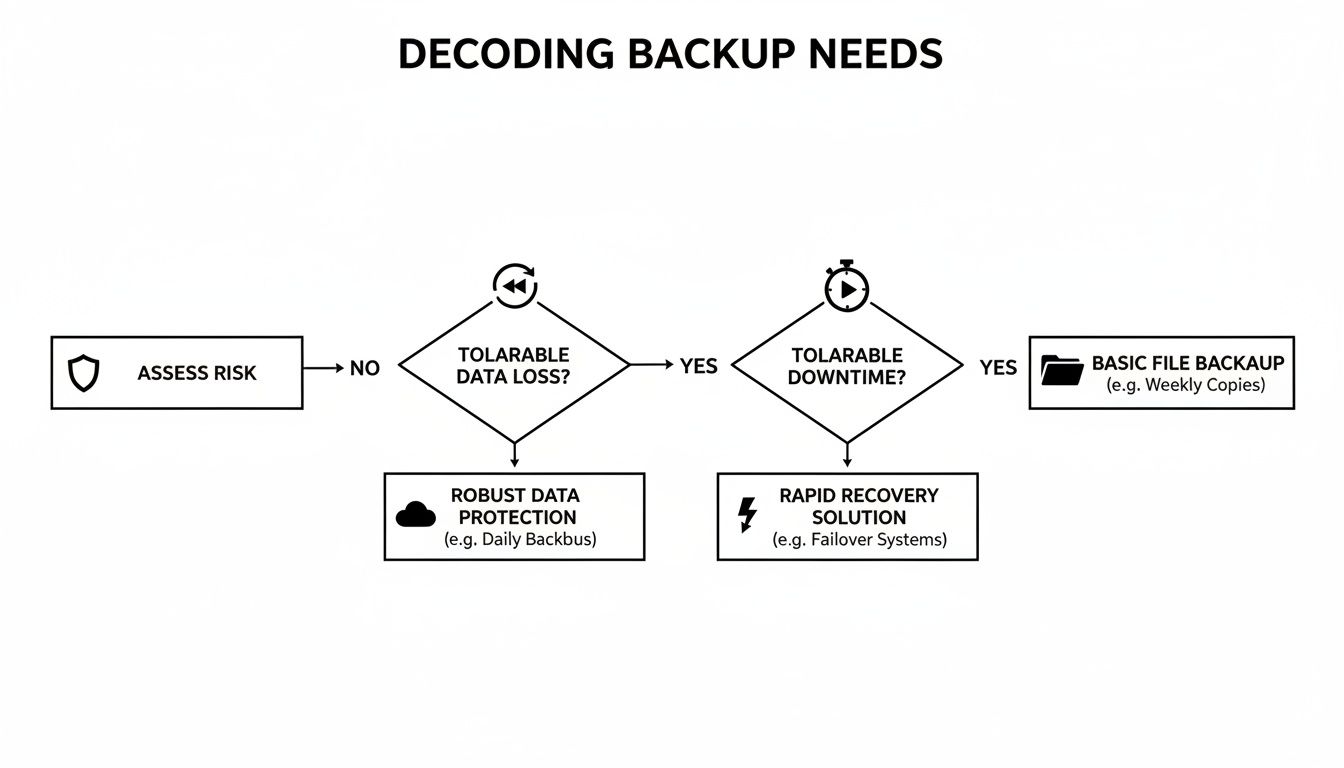

The key takeaway is simple: the less data you can afford to lose and the less downtime you can handle, the more you need a robust, multi-layered solution.
That brings us to what many consider the gold standard: the Hybrid Backup. This strategy combines the best of both worlds. It creates a local backup for speed and a cloud backup for disaster-proofing. With a hybrid model, you get lightning-fast restores for everyday hiccups (like an accidentally deleted file) while keeping a complete, secure copy off-site for a major catastrophe.
To help you see the trade-offs at a glance, here’s a quick comparison of the main backup strategies.
Comparison of Business Backup Models
| Backup Model | Primary Benefit | Key Weakness | Best For |
|---|---|---|---|
| Local | Fast, on-site recovery | Vulnerable to local disasters | Quick file restores, non-critical data |
| Cloud | Disaster-proof, accessible anywhere | Slower restores, internet-dependent | Disaster recovery, remote teams |
| Hybrid | Combines speed and safety | More complex, slightly higher cost | Businesses needing both speed and DR |
This table makes it clear that while local and cloud backups have their place, a hybrid approach offers the most comprehensive protection for a business that can't afford to be offline.
Beyond Backup with Disaster Recovery as a Service
Finally, for businesses that need the ultimate safety net, there’s Disaster Recovery as a Service (DRaaS). This goes far beyond just saving your files; it’s like having a complete "standby office" ready to go in the cloud. DRaaS doesn't just back up your data—it replicates your entire IT environment, including your servers, applications, and network settings.
If a disaster takes your primary office offline, DRaaS allows you to "failover" and run your entire business from that cloud environment. Your team can keep working, and your clients won't even notice a disruption.
For a busy law firm in Maitland or a medical practice in Kissimmee where any downtime is unacceptable, DRaaS transforms backup from a simple data archive into a true business continuity solution. You can explore our complete guide on cloud disaster recovery options to see how this works in practice.
As you weigh these options, looking at what the market offers, like the 7 best backup solutions for small business, can provide valuable context. Ultimately, the right choice will align perfectly with your operations, budget, and how much risk you're willing to take.
Meeting Cybersecurity and Compliance Demands
For most professional services here in Central Florida, a backup service is about so much more than just getting your files back after a glitch. It's a fundamental cybersecurity and compliance requirement. A modern backup strategy isn't just a safety net; it must directly combat the relentless cybersecurity threats and strict industry rules that define how businesses in Orlando, Winter Springs, and Apopka operate. Getting this wrong can lead to crippling fines, client lawsuits, and a hit to your reputation from which you might never recover.
Your backups must do more than just restore data. They are a critical component of your cybersecurity posture, proving that data was protected, kept confidential, and never compromised. This is where your backup plan, security defenses, and compliance obligations all come together.
Targeted Advice for Central Florida Industries
Different industries face unique cyber threats and regulatory pressures. For a law firm in Kissimmee, the top priority might be client confidentiality and producing tamper-proof records for legal discovery. A dental practice in Lake Mary, on the other hand, is laser-focused on HIPAA and protecting Patient Health Information (PHI) from ransomware. A one-size-fits-all approach to backup services simply doesn't work.
Let’s dig into the specific cybersecurity needs for a few key sectors right here in our community:
- Legal and Accounting Firms: For any business in Orlando or Maitland where client data is the crown jewel, protection is everything. This demands backups that are not only encrypted but also immutable. An immutable backup is a write-once, read-many version of your data that cannot be changed, deleted, or even encrypted by a ransomware attack. It creates a perfect, untouchable archive you can count on for recovery and as legal proof against cyber tampering.
- Medical, Dental, and Wellness Practices: Any practice that touches PHI, from a Winter Park plastic surgeon to a Clermont dentist, operates under the strict rules of HIPAA. Your backup solution must have end-to-end encryption for all data, whether it's being sent over the network or just sitting on a server. Just as important, your IT partner must be willing to sign a formal Business Associate Agreement (BAA)—a legal contract that makes them accountable for helping you protect that patient data from cyber threats.
A well-designed backup plan is also one of the most powerful weapons in your cybersecurity arsenal. If your business becomes a target, your backups will be the deciding factor between a minor headache and a full-blown catastrophe.
Your Ultimate Defense Against Ransomware
Ransomware is one of the most terrifying threats facing small businesses today. Cybercriminals know that smaller firms in cities like Ocoee and Sanford often lack the fortress-like defenses of giant corporations, which puts a target on their backs. A successful attack can lock you out of your entire business—your files, your software, your client records—while demanding a huge payment for their return.
In this scenario, a modern backup system is not just a recovery tool; it's your get-out-of-jail-free card. Paying the ransom is a risky gamble that funds criminal enterprises and offers no guarantee you'll get your data back. A clean, tested, and isolated backup makes the ransom demand irrelevant.
This is where the concept of an air-gapped backup becomes absolutely essential. An air-gapped backup is one that is physically or logically disconnected from your live network. Since it isn't connected, ransomware that infects your main systems can't spread to and encrypt your backups. It creates a digital firewall between your live environment and your recovery data.
By combining immutability with air-gapped storage, you build a fortress around your data. Even if a sophisticated attack gets past your frontline defenses, you can confidently restore your systems from an uncompromised copy. This is the difference between a swift, controlled recovery that takes hours and a business-crippling disaster that drags on for weeks. For a small business, this cybersecurity capability is a lifeline.
You can get more details on how to navigate complex rules by checking out our guide on compliance mapping for GDPR and HIPAA.
Choosing the Right IT Partner in Orlando

The right backup technology is only half the battle. Without a skilled partner managing, monitoring, and testing it, even the best software is just an expensive, unused insurance policy. For a small business in Orlando, choosing a managed IT and cybersecurity partner is one of the most critical decisions you can make for your operational resilience.
This isn't about hiring a company to just fix computers. It’s about finding a team you can genuinely trust to protect your most valuable asset—your data. The difference between a true partner and a simple vendor becomes painfully obvious during a crisis. A proactive partner turns a potential catastrophe into a manageable incident, while a reactive one leaves you scrambling when every second of downtime costs you money and erodes client trust.
Exposing the Dangerous 'Confidence Gap'
Imagine you run a small dental practice here in Orlando, where patient records are your absolute lifeline. You have backups in place, so you feel secure. But then a shocking reality hits: even when backup services for small business are active, they're often untested and unreliable when you need them most.
A recent study projected that in 2025, only 15% of businesses will test their backups daily, with many settling for weekly checks that leave gaping holes in their defenses. This feeds directly into the growing 'Confidence Gap' plaguing organizations. Over 60% of businesses believe they can recover from downtime in a few hours, but only 35% actually pull it off.
For professional services in Central Florida—accountants, lawyers, or medical spas—this overconfidence is a terribly costly gamble. Every minute your systems are down means missed appointments and lost revenue, especially as cybercriminals increasingly target SMBs. You can read more about these critical data backup trends on TPx.
This gap between feeling protected and being protected is where businesses fail. A true partner closes that gap with proof, not promises. They operate on the principle that a backup that has never been tested isn't a backup at all—it's just a hope.
Critical Questions to Vet Your IT Partner
To avoid falling into the confidence gap, you need to ask tough, specific questions that reveal a provider’s real capabilities. Forget the sales pitch and zero in on the operational details that matter during an actual disaster. A trustworthy partner will have clear, immediate answers.
Use this checklist to vet any potential managed IT provider:
- Recovery Testing: "Do you perform automated, daily restore tests, and can you provide the reports to prove it?" This is the single most important question. Manual or weekly tests are simply not enough in today's threat landscape.
- Guaranteed SLAs: "What are your guaranteed RTO and RPO metrics in the Service Level Agreement (SLA)?" If they can’t put their recovery promises in writing, you should walk away.
- Support Availability: "Is your support team available 24/7/365, and are they based in the U.S.?" When a crisis hits at 2 AM on a Saturday, you need immediate help from experts, not a ticket in an overseas queue.
- Cybersecurity Focus: "How do your backup services integrate with a broader cybersecurity strategy to protect against threats like ransomware?" A modern provider should speak fluently about immutable backups, air-gapping, and proactive threat detection.
- Pricing Model: "Is your pricing a predictable, flat-rate fee, or am I going to be charged extra for emergency support and projects?" Hidden fees and hourly billing for disaster recovery can be financially devastating.
A provider’s hesitation or inability to answer these questions directly is a major red flag. True partners operate with complete transparency because their processes are built to withstand scrutiny.
The Value of a Local Orlando Partner
In a world of remote everything, the value of having a local partner can't be overstated. While most IT issues can be resolved from afar, some crises demand an immediate, on-the-ground presence. This is especially true here in Central Florida, where a hurricane or major power outage can cause physical hardware damage that no remote session can fix.
Having a partner with a physical presence in the Orlando area means they can provide rapid, hands-on support when you need it most. They can be at your office to replace failed servers, restore network connectivity, or manage on-site recovery efforts. This local expertise and rapid response capability can dramatically shorten your downtime, turning a potentially business-ending event into a well-managed recovery.
Frequently Asked Questions About Backup Services
When you're looking into backup services, a lot of practical questions come up. As a business owner here in Orlando or Winter Springs, you need straight answers to make the right call. Here are a few of the most common questions we get, with the kind of no-nonsense answers we'd give you over coffee.
How Much Should My Small Business Budget for Backup Services?
It's the first question on everyone's mind, and the honest answer is: it depends. The cost is tied to how much data you have, the type of solution you need, and how fast you need to be back up and running (your RTO).
A basic file backup can be cheap, but a fully managed service with Disaster Recovery (DRaaS) and a guaranteed uptime SLA is a bigger investment—though it often comes with a predictable, flat monthly fee. The real question isn't what it costs, but what it saves. For a professional service firm in Central Florida, a single day of downtime can easily blow past the entire annual cost of a rock-solid backup plan. It's an investment that pays for itself the first time you need it.
Is Google Drive or Dropbox Good Enough for Business Backup?
We get this one a lot. While services like Google Drive and Dropbox are fantastic for sharing and syncing files, they are absolutely not true business backup solutions. They're built for convenience, not for continuity.
Think of it this way: file-sync tools are like a spare tire, while a true backup is a full roadside assistance plan. They lack critical cybersecurity features for business survival, like full system image backups, robust ransomware protection that stops criminals from encrypting your synced files, automated recovery testing, and contractually guaranteed recovery times.
For a medical practice or law firm, they also fall short of compliance standards like HIPAA. A dedicated business backup service is your safety net, designed for one thing: getting your entire business back on its feet, fast.
My Business Is Very Small. Do I Really Need a Managed Service?
Yes, without a doubt. Cybercriminals have gotten wise—they actively hunt for small businesses, betting that they've cut corners on security. A single ransomware attack is a business-ending event for many, yet an astonishing 68% of small companies still use outdated backup methods that leave the door wide open.
DIY backups might feel cheaper upfront, but you're taking a huge gamble on human error, untested restores, and painfully slow recovery. A managed service provider takes that entire burden off your shoulders. We monitor, manage, and test your backups daily. It’s our job to make sure that when disaster strikes—and it’s a matter of when, not if—your data is safe and your business is ready to recover. That peace of mind is priceless.
At Cyber Command, LLC, we believe your backup strategy should be a core strength, not a hidden liability. Our managed IT and cybersecurity services for businesses in Orlando and across Central Florida ensure your data is always protected, tested, and ready for anything. Secure your business's future and schedule a consultation with our team today.