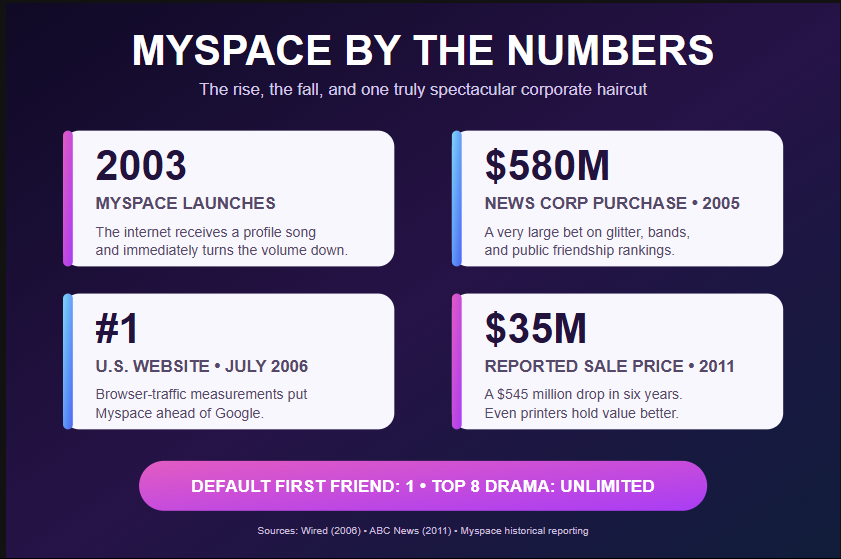
The internet spent twenty years getting cleaner, smarter, and more addictive. Maybe what it needs now is glitter text, profile music, and the social consequences of a Top 8
Somewhere, a Millennial just heard the opening notes of an emo song that has been playing in their head for over two decades.
That is because Myspace, the former center of the digital universe and the only website ever capable of ending a friendship through basic list management, may be preparing for another run.
And honestly? Good. Bring it back. Bring back the glitter. Bring back the music. Bring back the completely unnecessary cursor that trails tiny flames across the screen. The modern internet has had twenty years to become elegant, efficient, and personalized. It responded by showing us seventeen consecutive videos we never asked to see.
Before the Algorithm Became Your Manager
Myspace belonged to a period when a social profile was not merely a feed. It was a room. You decorated it. You chose the colors. You selected the song that would ambush visitors at full volume. You pasted in HTML you did not understand and prayed that it did not move your About Me section six feet to the left.
Was it tasteful? Absolutely not. But it was yours.
Today, nearly every social platform offers the same basic bargain: supply the content and the platform will decide who sees it, when they see it, and what you should watch next. Your personality gets poured into the same white rectangle as everyone else’s. The software does not ask what kind of digital room you want to build. It asks what will keep somebody else scrolling for another eleven seconds.
Myspace, at its best, worked in the opposite direction. The page was the product of the person. It was messy, expressive, occasionally unreadable, and sometimes powerful enough to launch a band from a garage into an actual audience.
Yes, Myspace Was Actually That Big
It is easy to remember Myspace as an ancient internet joke, like dial-up noises or asking Jeeves a question. But for a brief and spectacular period, Myspace was not merely popular. It was the internet’s main entrance.
Modern platforms quietly rank everyone in your life using data you cannot see. Myspace had the courage to make you do it publicly.
The Top 8 was a visible list of your most important friends, closest allies, current crushes, favorite bands, and whichever person you desperately hoped would notice they had been promoted from sixth to fourth. It was primitive. It was cruel. It was also refreshingly honest. Nobody needed an analytics dashboard. If you were removed from the Top 8 on Tuesday, you knew the quarterly relationship report was not going well.
But Please Bring Back the Fun, Not the Security Problems
Nostalgia cannot be the entire product plan. Old Myspace also struggled with spam, phishing, malware, creepy messages, broken pages, and the general security philosophy of ‘perhaps this animated skull is safe.’ A modern revival needs strong privacy controls, real moderation, account protection, sensible defaults, and a firm policy against letting random profile code become a loaded weapon. There is also a painful lesson in digital stewardship. In 2019, Myspace acknowledged that a server migration had wiped out years of uploaded music, photos, and video, potentially including tens of millions of songs. That was not simply lost data. It was a chunk of internet culture disappearing because somebody apparently discovered backups after the migration meeting.
Make the Internet Weird Again
Myspace does not need to reclaim the entire social internet to succeed. It does not need two billion users, a metaverse, or a CEO testifying before Congress while pretending not to understand how notifications work. It only needs to become a place people enjoy visiting. That sounds like a modest goal until you remember how few social networks still seem designed around enjoyment. A platform built around creativity, personal spaces, music discovery, chronological updates, and visible human choices could feel genuinely new precisely because it is borrowing from something old.
So yes, bring back Myspace.
Bring back the Top 8. Bring back the song that starts before the page finishes loading. Bring back the profile background that makes the text impossible to read. Bring back Tom, even if Tom wisely declines. Keep the phishing, malware, spam, and catastrophic data migrations in 2006 where they belong.
The modern internet is optimized. It is personalized. It is frictionless. And increasingly, it feels like nobody actually lives there.
Maybe what social media needs now is a little less perfection, a little more ownership, and one beautifully irresponsible amount of glitter.
On Monday morning, your front desk manager can't log in. A remote employee in Winter Springs can open email but not the shared drive. A former staff member still appears to have access to an old folder with client records. Nobody is sure which passwords control what, or who approved the current setup.
That kind of confusion is common in small and mid-sized businesses. It shows up in Orlando accounting firms during tax season, in medical practices trying to protect patient data, and in industrial offices where field staff, office staff, and vendors all need different access. At first it feels like an IT inconvenience. In reality, it's an operations problem and a security problem at the same time.
When leaders ask what is active directory and how it works, they usually aren't asking for a server manual. They're asking a business question: how do we control who gets in, what they can reach, and how to keep that organized as the company grows?
The Hidden Chaos in Your Business Network
An Orlando firm can get away with informal access management for a while. One employee knows the file server password. Another person sets up laptops by hand. A manager calls IT whenever a new hire needs access to QuickBooks, the printer, a shared folder, and remote VPN. It works, until it doesn't.
The trouble starts when the business adds people, locations, devices, and compliance requirements. A law office needs tighter matter-based access. A dental group needs screen lock rules on every workstation. An engineering company needs the right software on the right machines without someone walking desk to desk.
That is where Active Directory, usually shortened to AD, changes the game. It gives a business one central system for identity, access, and policy control across a Windows network. Instead of managing users and computers one by one, IT can manage them from one place.
This isn't a niche technology. Over 90% of Fortune 1,000 companies rely on Microsoft Active Directory as their primary corporate network access management tool according to ONLC's overview of Active Directory.
Active Directory matters because it turns access management from a collection of one-off fixes into a controlled business system.
For a non-technical manager, the practical value is simple:
Faster onboarding: New hires get the right access without a chain of manual requests.
Cleaner offboarding: Former employees lose access in a controlled way.
Less guesswork: Permissions can follow job role, department, or location.
Stronger security: The business can enforce rules centrally instead of hoping each device is configured correctly.
Without that structure, access drifts over time. People collect permissions they no longer need. Shared passwords linger. Old laptops keep outdated settings. That's the hidden chaos most businesses don't notice until an audit, an outage, or a ransomware event forces the issue.
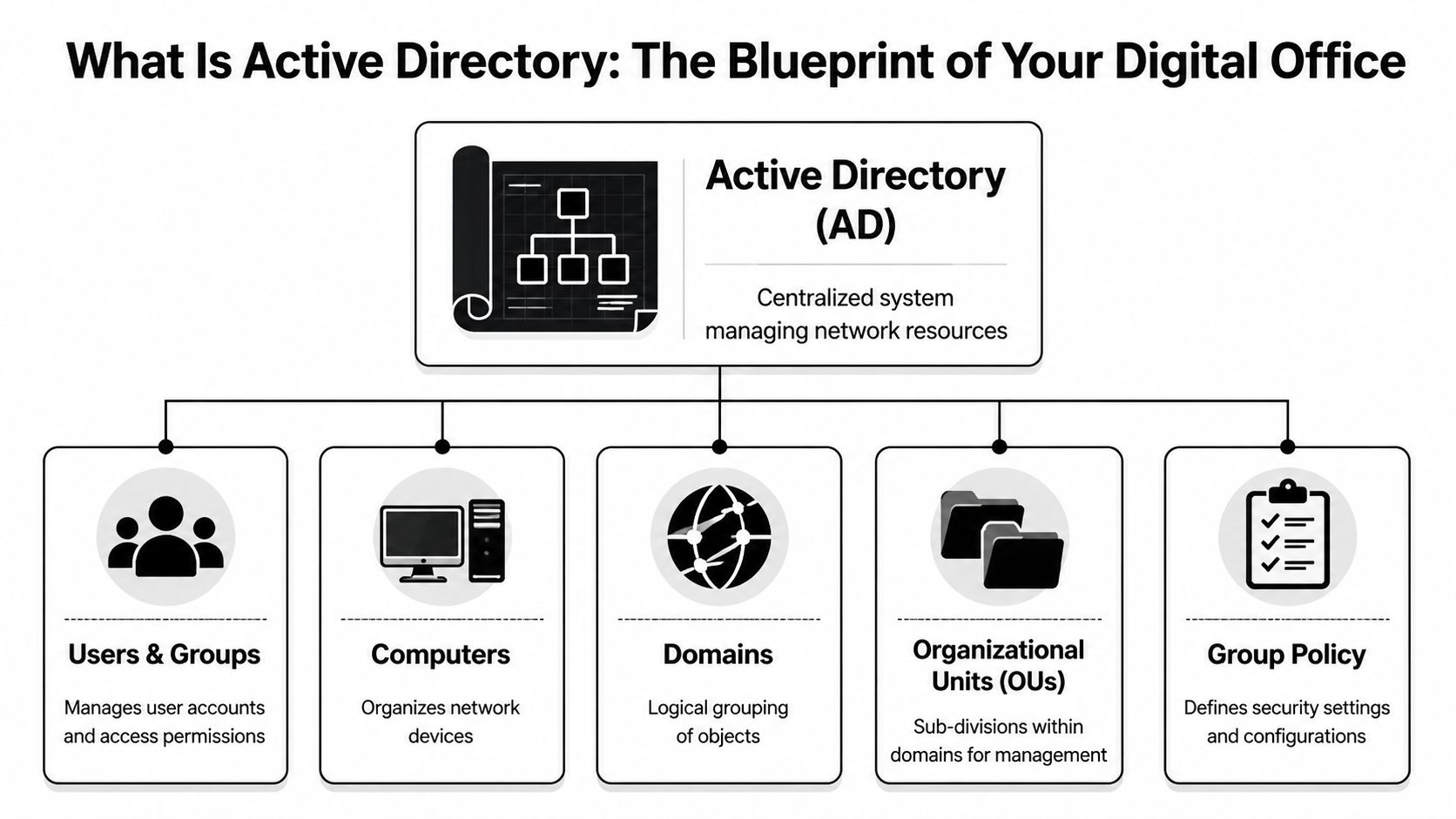
What Is Active Directory The Blueprint of Your Digital Office
The easiest way to understand Active Directory is to stop thinking of it as a technical product and start thinking of it as the blueprint of your digital office.
A physical office has employees, departments, rooms, locked cabinets, badges, printers, and policies. Your digital office has the same needs. People need access to some things and not others. Devices need standard settings. Shared resources need structure. AD keeps that organized.
The database behind the system
Active Directory is a directory service database. The database file is called NTDS.dit. It stores directory information about the business's digital environment, such as user accounts, groups, computers, and other network objects.
According to MiniOrange's explanation of Active Directory, NTDS.dit stores all directory data and can scale to manage millions of objects. The same source notes that AD uses a hierarchy of forest, domains, and Organizational Units (OUs), and that this structure is replicated across Domain Controllers to support consistency and uptime.
If those terms sound abstract, use this model:
AD term
Plain-English analogy
What it means for your business
Forest
The entire corporate campus
The top-level boundary for the directory
Domain
A major building or division
A main administrative and security boundary
OU
Departments or suites within the building
A way to organize users and devices for management
Domain Controller
The secure records office
A server that stores and processes directory data
A city planner model that actually makes sense
Think of AD like a city planner for your network.
The forest is the whole city. It contains the overall identity structure. The domains are neighborhoods. A company might have one domain for the whole business, or more in a larger environment. OUs are the individual buildings, floors, or departments inside those neighborhoods.
That structure matters because it lets IT apply rules in the right place. The accounting OU can get one set of policies. The front desk can get another. A branch office can be managed differently from headquarters.
Here are the objects AD commonly organizes:
Users: Employee accounts, admin accounts, shared service accounts
Groups: Collections of users who need the same access
Computers: Desktops, laptops, and some servers joined to the domain
Printers and shared folders: Network resources people need to find and use
Practical lens: If you can describe a business role, a department, or a location, Active Directory can usually mirror that structure so access follows the organization instead of personal memory.
Why business leaders should care
This structure isn't about elegance. It's about control.
If a medical practice has ten exam room PCs, a front office, billing staff, and a practice manager, AD gives IT a way to place those users and computers into logical containers and manage them centrally. If a professional services firm opens a second office, AD can keep access consistent without rebuilding everything from scratch.
For a manager, the big takeaway is this: Active Directory is the system that answers, in one place, who your people are in the network, what devices they use, and how rules are applied across the business.
How Active Directory Works The Digital Gatekeeper
If the previous section answered what Active Directory is, this part answers what is active directory and how it works in day-to-day business life.
The simplest explanation is that AD acts like the security desk and badge system for your digital office. Every time someone tries to sign in or open a protected resource, AD helps decide two things: who they are, and what they're allowed to do.
Authentication means proving identity
Authentication is the first checkpoint. A user enters a username and password, and Active Directory checks whether those credentials are valid.
In Windows environments, this often involves protocols such as Kerberos or NTLM. You don't need to memorize the protocol names. The useful mental model is that Kerberos works like a digital passport process. The employee proves identity once, receives trusted proof, and then uses that proof to request access to approved services.
That first check happens through Active Directory Domain Services, often called AD DS, running on Domain Controllers. Those are the servers that process identity requests against the directory database.
Authorization means deciding what happens next
Passing the identity check doesn't mean someone should see everything. That would be a disaster.
Authorization is the second checkpoint. AD looks at the user's group memberships and assigned permissions to determine what they can access. One employee may open the accounting share but not HR files. A physician may reach clinical systems that the front desk can't. A plant manager may use a production server that office staff should never touch.
Here is the simplest way to separate the two:
Authentication: Are you really who you claim to be?
Authorization: Now that we know who you are, what are you allowed to open, use, or change?
Why single sign-on feels so useful
One reason people like Active Directory is single sign-on, or SSO. That means users sign in once and can then access multiple approved resources without entering passwords over and over.
For a busy office, that reduces friction. For IT, it centralizes control. For security teams, it creates a clearer identity trail than a patchwork of separate local accounts.
This matters well beyond private business. If you're comparing identity models across industries, SamSearch has a useful primer on understanding IAM in government contracting, which helps frame why centralized identity and access controls matter when compliance and accountability are high.
A healthy AD environment should make secure access feel boring. Employees log in, get what they need, and don't need workarounds.
What happens when someone logs in
A non-technical manager can think of the sequence like this:
Step one: The employee enters credentials on a company device.
Step two: The Domain Controller checks those credentials.
Step three: AD confirms the user's role through groups and policies.
Step four: The user gets access to approved resources like shared drives, printers, apps, or remote services.
If that sequence is well designed, employees barely notice it. If it's messy, the business feels it immediately through lockouts, failed app access, risky workarounds, and support calls.
Organizing Your Digital Workplace with Group Policy
Many business leaders understand user accounts. The part that often feels mysterious is Group Policy.
Group Policy is best thought of as a set of company rules that Windows devices follow automatically. Instead of asking staff to configure settings themselves, or asking IT to touch every machine by hand, administrators can push standards from the center.
What Group Policy looks like in real life
A Winter Springs medical practice might need every exam room computer to lock automatically after a short period of inactivity. That protects patient information when someone steps away between appointments. Rather than setting that manually on each device, IT can apply the rule through Group Policy to the right OU.
A law office can use Group Policy to control who can use USB storage on certain machines. That's helpful when client documents shouldn't leave the office on removable media. An accounting firm can map shared drives automatically so staff don't have to guess where returns, templates, or archived files live.
Group Policy can also standardize practical settings such as:
Screen lock behavior: Useful for front desks, nurse stations, and shared work areas
Printer deployment: Helpful when each office or department has assigned printers
Software rollout: Important when engineers, accountants, or designers need the same tools
Security settings: Password policies, firewall settings, and device restrictions
Why managers should care about GPOs
Group Policy Objects, usually called GPOs, are where Active Directory shifts from organization to enforcement.
Without GPOs, two employees with the same role may have two very different device setups. One machine might have the right settings. Another might be missing updates, allow risky behavior, or connect to the wrong resources. In regulated industries, that inconsistency creates exposure.
Manager takeaway: Group Policy turns "our policy says" into "our systems enforce."
For a multi-location architecture or engineering firm, this can save huge amounts of effort. New CAD software can be deployed to the engineering group instead of being installed manually one workstation at a time. Shared settings can follow the department, not the memory of whichever technician handled the last setup.
Where businesses get confused
A common misunderstanding is that Group Policy is only for highly technical enterprises. It isn't. Even smaller firms benefit when they stop treating every computer like a one-off exception.
Another confusion point is scope. Group Policy doesn't replace every security product or every cloud setting. But in an on-premises Windows environment, it remains one of the most powerful ways to create consistency.
A good rule of thumb is this: if your business has repeated device settings, repeated access rules, or repeated compliance requirements, Group Policy should probably be part of the answer.
Top Active Directory Security Risks for Florida Businesses
Active Directory is valuable for the same reason it's dangerous when poorly managed. It centralizes identity and access. In security terms, that makes it a high-value target.
If an attacker compromises AD, they often don't stop with one user account. They use that foothold to move through the environment, escalate privileges, and reach systems that were supposed to be protected. For a professional services firm in Orlando, that could mean client records. For a medical office, it could mean systems tied to patient care and sensitive data. For an industrial company, it could mean production disruption and business downtime.
The big risk is centralization without discipline
According to Delinea's overview of Active Directory risks, Microsoft reports that over 80% of corporate breaches involve a compromised Active Directory, and CISA alerts in 2025 highlighted AD misconfigurations in 40% of reported security incidents.
Those numbers matter because they point to a pattern. Attackers don't always need a dramatic zero-day exploit. Often they win by finding weak passwords, stale admin privileges, poor segmentation, or systems that no one has hardened properly.
Common ways attackers abuse AD
Here are the risks non-technical leaders should understand in plain language:
Weak passwords: If a user or service account has an easy-to-guess password, an attacker can gain an initial foothold and start probing the environment.
Over-privileged accounts: Staff sometimes have more rights than their role requires. That makes a single compromised account more dangerous.
Misconfigurations: A setting that seems minor can expose unnecessary access paths.
Unpatched Domain Controllers: If core identity servers fall behind on updates, attackers have a larger opening.
Poor offboarding: Old accounts and forgotten permissions create hidden entry points.
What a Golden Ticket attack means in business terms
You may hear security teams mention a Golden Ticket attack. The technical details matter to defenders, but the business meaning is what leaders need to grasp.
A Golden Ticket attack is the kind of AD abuse that can let an attacker create trusted access inside the environment. In plain English, it can amount to forging a high-trust badge in your building's security system. Once that happens, ordinary security boundaries become far less reliable.
If your business relies on AD, identity security isn't a side project. It's part of business continuity.
Why Florida SMBs should treat this as an executive issue
Central Florida firms often run lean IT teams. That's especially true in law, accounting, private healthcare, and owner-led industrial operations. The result is that AD may exist, but nobody is reviewing permissions, watching Domain Controllers closely, or testing whether controls still match the business.
That gap becomes dangerous during ransomware events. Attackers use AD because it helps them spread. They identify who has power, what machines trust each other, and how to reach backups, file shares, or line-of-business systems.
One practical safeguard is stronger identity verification. This matters alongside AD, not instead of it. Cyber Command has a useful article on the role of MFA in strengthening identity and access management, especially for businesses trying to reduce the impact of stolen credentials.
The executive checklist
A manager doesn't need to run PowerShell to ask good questions. Start with these:
Question
Why it matters
Who has administrative rights today?
Excess privilege increases blast radius
Are former employees fully removed?
Stale accounts create exposure
Are Domain Controllers monitored closely?
They are central to identity trust
Are Group Policies reviewed regularly?
Old policies can weaken security or break operations
Is MFA used where appropriate?
It helps reduce credential-driven compromise
If you can't get clear answers, that's not a paperwork issue. It's a risk signal.
On-Premises AD vs Cloud-Native Azure AD
Many business leaders ask about Active Directory only after another question appears: should we keep our traditional setup, move to the cloud, or run both?
The old name Azure Active Directory is now Microsoft Entra ID. Even so, many people still say Azure AD, so you'll hear both names. The important distinction is that traditional on-premises Active Directory and cloud-native Entra ID are related, but they are not the same thing.
The difference in plain English
On-premises AD runs in your environment on Windows servers called Domain Controllers. It is well suited to office networks, Windows device management, legacy applications, shared drives, and environments where local control matters.
Entra ID is Microsoft's cloud identity platform. It is designed for cloud applications, remote access, Microsoft 365, and modern identity workflows. It shines when users work from anywhere and when the business depends more on SaaS than local servers.
Most SMBs don't live entirely in one world or the other. They often end up in a hybrid model, with local AD still handling some legacy needs while Entra ID supports cloud apps and remote identity.
Migration is where strategy meets reality
Projects often get messy. Moving from on-prem AD to the cloud isn't just flipping a switch.
According to Quest's guidance on Active Directory, 35% of projects encounter significant issues due to schema mismatches or Group Policy translation failures, which can lead to downtime and cost overruns. That helps explain why so many migration projects stall in the middle, especially when older apps or custom policies are involved.
A business may assume that if email is already in Microsoft 365, the rest of identity migration will be easy. Often it isn't. Old organizational structures, inherited permissions, login dependencies, and line-of-business software can complicate the move.
For organizations already deep in the Microsoft stack, Cyber Command's page on Microsoft 365 support and management is useful context because identity decisions often follow the broader cloud productivity strategy.
When each model makes sense
The right answer depends on how your business operates.
Feature
On-Premises Active Directory
Azure Active Directory (Entra ID)
Primary use case
Office-based Windows networks and legacy resources
Cloud apps, remote work, Microsoft 365 identity
Infrastructure
Requires local servers and Domain Controllers
Delivered as a cloud service
Device management style
Strong for domain-joined Windows environments
Strong for cloud-first and remote scenarios
Best fit
Businesses with file servers, legacy apps, and site-based operations
Businesses using SaaS heavily with distributed users
Management burden
More hands-on server and policy administration
Less local server overhead, but still needs governance
Common challenge
Hardware, patching, and local infrastructure upkeep
App compatibility, role design, and migration planning
A practical decision guide
A professional services firm with a central office, a local file server, and several legacy applications may still need on-prem AD for now. A newer business running mostly cloud apps may lean hard toward Entra ID. A medical or industrial organization often lands in the middle because some systems remain tied to local infrastructure.
Don't treat identity migration like a branding update. It is an access-control redesign that affects operations, security, and user experience.
If you're evaluating what is active directory and how it works in your own company, the better question may be: which identity model matches our applications, our locations, our compliance needs, and our risk tolerance right now?
How Cyber Command Manages and Secures Your AD
Active Directory rewards discipline and punishes neglect. That's why many Central Florida businesses need more than occasional break-fix help. They need a partner that treats identity infrastructure as an operational and security priority.
Cyber Command supports organizations in Orlando, Winter Springs, and beyond with managed and co-managed IT built around uptime, accountability, and prevention. In an AD environment, that means getting the fundamentals right first. Clean user lifecycle management, well-structured OUs, tightly controlled administrative access, and Group Policy that reflects real business needs instead of years of accumulated exceptions.
What strong AD management looks like
Good management isn't just about keeping users logged in. It includes active oversight of the systems that hold trust across the network. That means monitoring Domain Controllers, reviewing privilege levels, tightening access paths, and aligning identity controls with the way the business works.
Cyber Command also brings a security layer through its 24/7 SOC, which is important because AD attacks don't always begin with obvious alarms. Threat hunting, incident response, and continuous review help catch suspicious identity activity earlier, before a compromised account turns into a wider event.
For organizations balancing on-prem systems with cloud platforms, governance matters as much as technology. CloudConsultingFirms.com offers a helpful overview of multi-cloud governance best practices, and that broader governance mindset applies directly when identity spans local infrastructure, Microsoft 365, and other cloud services.
Why this matters during change
AD often becomes most fragile during transitions. Office moves, mergers, cloud projects, staffing changes, and application rollouts can all expose weak assumptions in identity design.
The primary value is that leaders don't have to choose between security and usability. With the right management approach, AD becomes a stable foundation instead of a hidden liability.
Frequently Asked Questions About Active Directory
Does a small business need Active Directory
Not every small business needs full on-premises AD. But if you have multiple employees, shared files, company-managed PCs, compliance requirements, or role-based access needs, some form of centralized identity management becomes important quickly. For many firms, the question isn't whether to centralize identity. It's which platform fits best.
Is Active Directory only for Windows
Traditional Active Directory is primarily built for Windows domain networks. That's where it is strongest. Businesses with mixed environments can still use it, but planning gets more important when Macs, Linux systems, cloud apps, and mobile devices are all part of daily operations.
What is the first step to securing Active Directory
Start with visibility. Identify who has admin rights, which accounts are stale, how Group Policy is structured, and whether Domain Controllers are monitored and patched. If leadership can't get a clean answer on those basics, the environment needs review.
Is Microsoft Entra ID the same as Active Directory
No. They are related but different systems. Traditional AD is on-premises directory infrastructure. Entra ID is a cloud identity platform. Many businesses use both during a hybrid phase.
What confuses managers most about AD
Usually this: they think it's just for login. It isn't. AD affects onboarding, offboarding, file access, remote work, device control, security policy, and incident impact. It's one of the few IT systems that touches nearly every employee and every critical business process.
If your business in Orlando, Winter Springs, or North Texas needs help untangling identity sprawl, securing Active Directory, or planning a move to a modern cloud or hybrid model, Cyber Command, LLC can help you assess the current environment, reduce risk, and build a more reliable foundation for growth.
Here in Florida, backup services aren't just an IT best practice—they’re a core part of business survival. It’s easy to think it won’t happen to you, but from a sudden ransomware attack freezing your Orlando operations to a hurricane physically wiping out your Winter Springs office, relying on luck is not a strategy.
A proper backup plan is what ensures you can get back to your critical data and keep serving clients, no matter what disaster comes your way.
Why Backups Are a Lifeline for Florida Businesses
Imagine your Orlando accounting firm gets hit with ransomware right in the middle of tax season. Suddenly, years of client financials, tax records, and sensitive communications are gone—locked behind an encryption wall. This isn't some far-fetched Hollywood scenario.
In reality, small and medium-sized businesses face nearly four times as many data breaches as large corporations. Cybercriminals see smaller firms as easy, lucrative targets, gambling that they lack robust cybersecurity and, more importantly, a solid recovery plan.
But for Central Florida businesses, the threats don't stop there. Beyond the digital dangers that affect everyone, we have localized disasters to worry about. A severe storm can knock out power for days or cause flooding that destroys on-site servers, hard drives, and any other hardware in its path. That USB drive you keep next to the main computer? It offers zero protection when the office is under a foot of water.
The Dual Threats to Central Florida Firms
This unique mix of digital and physical risks makes a comprehensive backup strategy an absolute necessity. Without one, you're exposed on two fronts. A real plan for backup services for small business has to address both threats by creating secure, redundant copies of your data in geographically separate locations.
This dual protection is non-negotiable for professional services, where data is the entire business:
Legal Practices: Attorneys in Kissimmee or Lake Mary are responsible for confidential case files and client data. A breach or total loss doesn't just halt work—it can trigger malpractice claims and destroy a firm's reputation overnight.
Financial Firms: Accountants and financial advisors in Altamonte Springs manage irreplaceable records. Losing that data could cripple their ability to function and bring on serious regulatory penalties.
Medical and Dental Offices: A Winter Park medical spa or dental practice holds sensitive patient health information (PHI). A data loss event not only disrupts patient care but also opens the door to massive HIPAA fines.
A robust backup plan is your first and last line of defense. It stops being an IT cost and becomes an indispensable investment in business survival and operational continuity.
Ultimately, these services create a safety net that protects your client relationships, your reputation, and your bottom line. The ability to restore operations quickly after a data loss event is what separates a minor hiccup from a business-ending catastrophe.
Getting a handle on what you truly need is the first step, and our comprehensive guide to business IT support in Florida can provide even more valuable context. A well-designed backup strategy means you can keep serving your clients with confidence, no matter what comes your way.
Decoding Your Data Recovery Needs
Before you can even look at backup services, you need to answer two gut-check questions about your business. Forget the technical jargon for a moment. This is about defining your absolute, must-have survival requirements when a data disaster strikes. Get these right, and you’ll be able to have a meaningful conversation with any IT provider.
The first question is simple but critical: how much data can you afford to lose and recreate from scratch? This is your Recovery Point Objective (RPO). Think of it as hitting the ‘rewind button’ for your business data.
Imagine your Orlando legal practice processes client payments and case updates all day long. If your system crashes at 4 PM, an RPO of 24 hours means you lose everything from that day. Every payment, every document, every billable minute. Is your team prepared to manually re-enter a full day's work? For most, that’s a hard no, which pushes them toward a much smaller RPO—maybe an hour, or even just a few minutes.
Defining Your Downtime Tolerance
The second question gets to the heart of business continuity: how long can your business afford to be completely shut down? This is your Recovery Time Objective (RTO). It’s the countdown clock for getting your systems back online after they fail.
Could your Winter Springs dental office survive being down for a whole day? That means no access to patient schedules, no new appointments, and no way to view medical records. The cost of canceled appointments, idle staff, and the hit to your reputation adds up fast. For businesses where every minute of downtime bleeds money and erodes client trust, a low RTO—measured in minutes, not days—is non-negotiable.
Together, RPO and RTO are the twin pillars of any serious backup strategy. They translate fuzzy ideas about data loss into hard business numbers, defining your tolerance for loss and downtime. They are the foundation for choosing the right solution.
Getting this right has never been more important. The global market for backup services is on track to explode past $60 billion by 2033, a surge driven by relentless cyberattacks and the sheer volume of data we all create. With compliance rules in sectors like healthcare and finance getting stricter, having a solid backup plan isn't optional. You can find more detailed market analysis on Data Insights Market.
Key Concepts Beyond RPO and RTO
Once you have your RPO and RTO dialed in, a few other concepts are vital for building a truly resilient defense.
Data Retention Policies: These are the rules that dictate how long you’re legally or operationally required to keep data. An accounting firm in Altamonte Springs, for example, might need to hold financial records for seven years to satisfy tax laws, while a medical spa in Lake Nona has to follow strict HIPAA rules for patient data. Your backup strategy needs to enforce these rules without anyone having to think about it.
Encryption: This is your data’s digital vault. Encryption scrambles your data, making it completely unreadable to anyone who doesn't have the key. It's an absolute must-have cybersecurity feature that protects your information whether it’s "at rest" (sitting on a server) or "in transit" (moving across the internet to the cloud).
Image-Based vs. File-Level Backups: This is a big one. A file-level backup is great for grabbing individual files and folders. But an image-based backup takes a complete snapshot of an entire server—the operating system, all your applications, the settings, and every last piece of data. If you lose a spreadsheet, a file-level backup will save the day. But if your main server crashes? Only an image-based backup can bring it back to life quickly, which can make a world of difference to your RTO.
And what happens if, despite all these precautions, you face a catastrophic failure? Knowing that professional data recovery services exist is a good fallback. But with a solid plan built on these principles, you make it far less likely you'll ever need to make that call. Now you’re equipped to ask the right questions and have a productive conversation with any potential IT partner.
Comparing Backup Models for Your Business
Once you know what a data disaster would cost you, the next step is picking the right backup model to prevent it. Not all backups are the same, and the best choice for a business involves a careful balance between recovery speed, security, and budget. Whether you’re an architect in Sanford or an accountant in Winter Park, let’s break down the common approaches to find your perfect fit.
The most basic method is a Local Backup. This is probably what you think of first: copying your data to an external hard drive or a local Network Attached Storage (NAS) device. The main advantage here is speed. Restoring a file or even an entire server is incredibly fast because the data is already on your network.
But there’s a massive catch. Since your backup hardware is in the same building as your computers, it's exposed to the exact same risks. A fire, flood, or even a simple theft that takes out your main equipment will almost certainly destroy your backups, too.
The Rise of Cloud and Hybrid Solutions
This is exactly why Cloud Backups have become so popular. Instead of storing data locally, this model encrypts your files and sends them over the internet to a secure, off-site data center. For any Central Florida business, this is a game-changer. It offers real protection from localized disasters like hurricanes. If your office is flooded or you lose power for days, your data is still safe and accessible from anywhere.
The growth in this space is staggering. The global cloud backup market is expected to explode from $6.99 billion in 2025 to a massive $51.57 billion by 2034. This trend means that enterprise-grade data protection, once out of reach for small businesses, is now affordable and accessible. In fact, U.S. National Institute of Standards and Technology (NIST) data shows that 75% of businesses have already adopted cloud backups for precisely this reason.
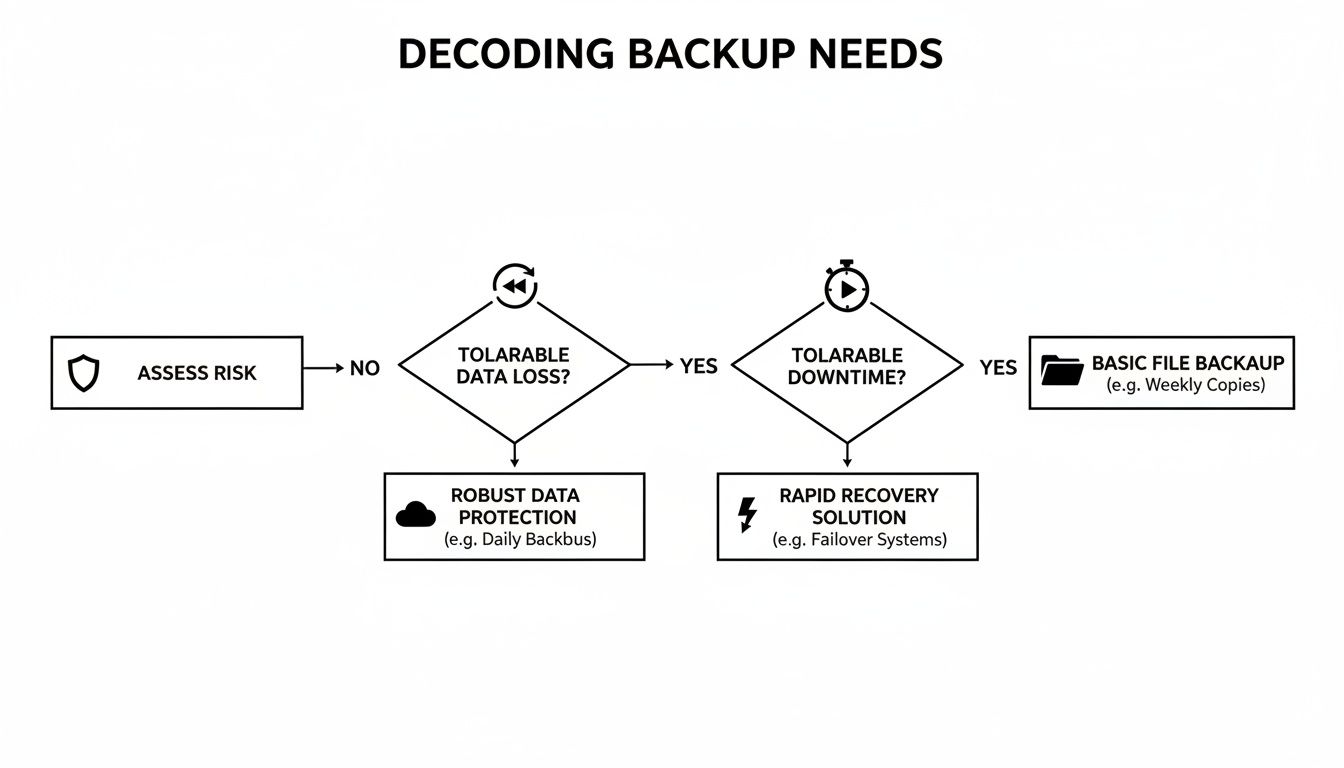
This chart helps you visualize which backup model fits best by weighing your tolerance for data loss against your tolerance for downtime.
The key takeaway is simple: the less data you can afford to lose and the less downtime you can handle, the more you need a robust, multi-layered solution.
That brings us to what many consider the gold standard: the Hybrid Backup. This strategy combines the best of both worlds. It creates a local backup for speed and a cloud backup for disaster-proofing. With a hybrid model, you get lightning-fast restores for everyday hiccups (like an accidentally deleted file) while keeping a complete, secure copy off-site for a major catastrophe.
To help you see the trade-offs at a glance, here’s a quick comparison of the main backup strategies.
Comparison of Business Backup Models
Backup Model
Primary Benefit
Key Weakness
Best For
Local
Fast, on-site recovery
Vulnerable to local disasters
Quick file restores, non-critical data
Cloud
Disaster-proof, accessible anywhere
Slower restores, internet-dependent
Disaster recovery, remote teams
Hybrid
Combines speed and safety
More complex, slightly higher cost
Businesses needing both speed and DR
This table makes it clear that while local and cloud backups have their place, a hybrid approach offers the most comprehensive protection for a business that can't afford to be offline.
Beyond Backup with Disaster Recovery as a Service
Finally, for businesses that need the ultimate safety net, there’s Disaster Recovery as a Service (DRaaS). This goes far beyond just saving your files; it’s like having a complete "standby office" ready to go in the cloud. DRaaS doesn't just back up your data—it replicates your entire IT environment, including your servers, applications, and network settings.
If a disaster takes your primary office offline, DRaaS allows you to "failover" and run your entire business from that cloud environment. Your team can keep working, and your clients won't even notice a disruption.
For a busy law firm in Maitland or a medical practice in Kissimmee where any downtime is unacceptable, DRaaS transforms backup from a simple data archive into a true business continuity solution. You can explore our complete guide on cloud disaster recovery options to see how this works in practice.
As you weigh these options, looking at what the market offers, like the 7 best backup solutions for small business, can provide valuable context. Ultimately, the right choice will align perfectly with your operations, budget, and how much risk you're willing to take.
Meeting Cybersecurity and Compliance Demands
For most professional services here in Central Florida, a backup service is about so much more than just getting your files back after a glitch. It's a fundamental cybersecurity and compliance requirement. A modern backup strategy isn't just a safety net; it must directly combat the relentless cybersecurity threats and strict industry rules that define how businesses in Orlando, Winter Springs, and Apopka operate. Getting this wrong can lead to crippling fines, client lawsuits, and a hit to your reputation from which you might never recover.
Your backups must do more than just restore data. They are a critical component of your cybersecurity posture, proving that data was protected, kept confidential, and never compromised. This is where your backup plan, security defenses, and compliance obligations all come together.
Targeted Advice for Central Florida Industries
Different industries face unique cyber threats and regulatory pressures. For a law firm in Kissimmee, the top priority might be client confidentiality and producing tamper-proof records for legal discovery. A dental practice in Lake Mary, on the other hand, is laser-focused on HIPAA and protecting Patient Health Information (PHI) from ransomware. A one-size-fits-all approach to backup services simply doesn't work.
Let’s dig into the specific cybersecurity needs for a few key sectors right here in our community:
Legal and Accounting Firms: For any business in Orlando or Maitland where client data is the crown jewel, protection is everything. This demands backups that are not only encrypted but also immutable. An immutable backup is a write-once, read-many version of your data that cannot be changed, deleted, or even encrypted by a ransomware attack. It creates a perfect, untouchable archive you can count on for recovery and as legal proof against cyber tampering.
Medical, Dental, and Wellness Practices: Any practice that touches PHI, from a Winter Park plastic surgeon to a Clermont dentist, operates under the strict rules of HIPAA. Your backup solution must have end-to-end encryption for all data, whether it's being sent over the network or just sitting on a server. Just as important, your IT partner must be willing to sign a formal Business Associate Agreement (BAA)—a legal contract that makes them accountable for helping you protect that patient data from cyber threats.
A well-designed backup plan is also one of the most powerful weapons in your cybersecurity arsenal. If your business becomes a target, your backups will be the deciding factor between a minor headache and a full-blown catastrophe.
Your Ultimate Defense Against Ransomware
Ransomware is one of the most terrifying threats facing small businesses today. Cybercriminals know that smaller firms in cities like Ocoee and Sanford often lack the fortress-like defenses of giant corporations, which puts a target on their backs. A successful attack can lock you out of your entire business—your files, your software, your client records—while demanding a huge payment for their return.
In this scenario, a modern backup system is not just a recovery tool; it's your get-out-of-jail-free card. Paying the ransom is a risky gamble that funds criminal enterprises and offers no guarantee you'll get your data back. A clean, tested, and isolated backup makes the ransom demand irrelevant.
This is where the concept of an air-gapped backup becomes absolutely essential. An air-gapped backup is one that is physically or logically disconnected from your live network. Since it isn't connected, ransomware that infects your main systems can't spread to and encrypt your backups. It creates a digital firewall between your live environment and your recovery data.
By combining immutability with air-gapped storage, you build a fortress around your data. Even if a sophisticated attack gets past your frontline defenses, you can confidently restore your systems from an uncompromised copy. This is the difference between a swift, controlled recovery that takes hours and a business-crippling disaster that drags on for weeks. For a small business, this cybersecurity capability is a lifeline.
The right backup technology is only half the battle. Without a skilled partner managing, monitoring, and testing it, even the best software is just an expensive, unused insurance policy. For a small business in Orlando, choosing a managed IT and cybersecurity partner is one of the most critical decisions you can make for your operational resilience.
This isn't about hiring a company to just fix computers. It’s about finding a team you can genuinely trust to protect your most valuable asset—your data. The difference between a true partner and a simple vendor becomes painfully obvious during a crisis. A proactive partner turns a potential catastrophe into a manageable incident, while a reactive one leaves you scrambling when every second of downtime costs you money and erodes client trust.
Exposing the Dangerous 'Confidence Gap'
Imagine you run a small dental practice here in Orlando, where patient records are your absolute lifeline. You have backups in place, so you feel secure. But then a shocking reality hits: even when backup services for small business are active, they're often untested and unreliable when you need them most.
A recent study projected that in 2025, only 15% of businesses will test their backups daily, with many settling for weekly checks that leave gaping holes in their defenses. This feeds directly into the growing 'Confidence Gap' plaguing organizations. Over 60% of businesses believe they can recover from downtime in a few hours, but only 35% actually pull it off.
For professional services in Central Florida—accountants, lawyers, or medical spas—this overconfidence is a terribly costly gamble. Every minute your systems are down means missed appointments and lost revenue, especially as cybercriminals increasingly target SMBs. You can read more about these critical data backup trends on TPx.
This gap between feeling protected and being protected is where businesses fail. A true partner closes that gap with proof, not promises. They operate on the principle that a backup that has never been tested isn't a backup at all—it's just a hope.
Critical Questions to Vet Your IT Partner
To avoid falling into the confidence gap, you need to ask tough, specific questions that reveal a provider’s real capabilities. Forget the sales pitch and zero in on the operational details that matter during an actual disaster. A trustworthy partner will have clear, immediate answers.
Use this checklist to vet any potential managed IT provider:
Recovery Testing: "Do you perform automated, daily restore tests, and can you provide the reports to prove it?" This is the single most important question. Manual or weekly tests are simply not enough in today's threat landscape.
Guaranteed SLAs: "What are your guaranteed RTO and RPO metrics in the Service Level Agreement (SLA)?" If they can’t put their recovery promises in writing, you should walk away.
Support Availability: "Is your support team available 24/7/365, and are they based in the U.S.?" When a crisis hits at 2 AM on a Saturday, you need immediate help from experts, not a ticket in an overseas queue.
Cybersecurity Focus: "How do your backup services integrate with a broader cybersecurity strategy to protect against threats like ransomware?" A modern provider should speak fluently about immutable backups, air-gapping, and proactive threat detection.
Pricing Model: "Is your pricing a predictable, flat-rate fee, or am I going to be charged extra for emergency support and projects?" Hidden fees and hourly billing for disaster recovery can be financially devastating.
A provider’s hesitation or inability to answer these questions directly is a major red flag. True partners operate with complete transparency because their processes are built to withstand scrutiny.
The Value of a Local Orlando Partner
In a world of remote everything, the value of having a local partner can't be overstated. While most IT issues can be resolved from afar, some crises demand an immediate, on-the-ground presence. This is especially true here in Central Florida, where a hurricane or major power outage can cause physical hardware damage that no remote session can fix.
Having a partner with a physical presence in the Orlando area means they can provide rapid, hands-on support when you need it most. They can be at your office to replace failed servers, restore network connectivity, or manage on-site recovery efforts. This local expertise and rapid response capability can dramatically shorten your downtime, turning a potentially business-ending event into a well-managed recovery.
Frequently Asked Questions About Backup Services
When you're looking into backup services, a lot of practical questions come up. As a business owner here in Orlando or Winter Springs, you need straight answers to make the right call. Here are a few of the most common questions we get, with the kind of no-nonsense answers we'd give you over coffee.
How Much Should My Small Business Budget for Backup Services?
It's the first question on everyone's mind, and the honest answer is: it depends. The cost is tied to how much data you have, the type of solution you need, and how fast you need to be back up and running (your RTO).
A basic file backup can be cheap, but a fully managed service with Disaster Recovery (DRaaS) and a guaranteed uptime SLA is a bigger investment—though it often comes with a predictable, flat monthly fee. The real question isn't what it costs, but what it saves. For a professional service firm in Central Florida, a single day of downtime can easily blow past the entire annual cost of a rock-solid backup plan. It's an investment that pays for itself the first time you need it.
Is Google Drive or Dropbox Good Enough for Business Backup?
We get this one a lot. While services like Google Drive and Dropbox are fantastic for sharing and syncing files, they are absolutely not true business backup solutions. They're built for convenience, not for continuity.
Think of it this way: file-sync tools are like a spare tire, while a true backup is a full roadside assistance plan. They lack critical cybersecurity features for business survival, like full system image backups, robust ransomware protection that stops criminals from encrypting your synced files, automated recovery testing, and contractually guaranteed recovery times.
For a medical practice or law firm, they also fall short of compliance standards like HIPAA. A dedicated business backup service is your safety net, designed for one thing: getting your entire business back on its feet, fast.
My Business Is Very Small. Do I Really Need a Managed Service?
Yes, without a doubt. Cybercriminals have gotten wise—they actively hunt for small businesses, betting that they've cut corners on security. A single ransomware attack is a business-ending event for many, yet an astonishing 68% of small companies still use outdated backup methods that leave the door wide open.
DIY backups might feel cheaper upfront, but you're taking a huge gamble on human error, untested restores, and painfully slow recovery. A managed service provider takes that entire burden off your shoulders. We monitor, manage, and test your backups daily. It’s our job to make sure that when disaster strikes—and it’s a matter of when, not if—your data is safe and your business is ready to recover. That peace of mind is priceless.
At Cyber Command, LLC, we believe your backup strategy should be a core strength, not a hidden liability. Our managed IT and cybersecurity services for businesses in Orlando and across Central Florida ensure your data is always protected, tested, and ready for anything. Secure your business's future and schedule a consultation with our team today.