
Building Resilience: Azure Cloud Disaster Recovery Strategies


Why Azure Cloud Disaster Recovery Matters for Your Business
Azure cloud disaster recovery is a comprehensive strategy that uses Microsoft Azure’s cloud services to protect your business from data loss and downtime caused by outages, cyberattacks, or natural disasters. It combines automated replication, backup, and failover capabilities to ensure your critical systems can recover quickly when disaster strikes.
Key components of Azure cloud disaster recovery include:
- Azure Site Recovery (ASR) – Automates replication and failover of virtual machines and applications
- Azure Backup – Provides centralized data protection with long-term retention and ransomware protection
- Recovery Time Objective (RTO) – Defines how quickly you need to restore services after a disaster
- Recovery Point Objective (RPO) – Determines how much data loss your business can tolerate
- Multi-region deployment – Protects against regional outages by spreading resources across Azure’s global infrastructure
Business continuity isn’t optional anymore. A single ransomware attack, hardware failure, or natural disaster can shut down operations for days or even weeks. For growing businesses, that kind of downtime means lost revenue, damaged customer relationships, and potential compliance violations.
The good news? Azure cloud disaster recovery makes enterprise-grade protection accessible without the massive costs of maintaining a secondary data center. You pay only for what you use, test your recovery plans without affecting production, and scale protection as your business grows.
I’m Reade Taylor, founder and CEO of Cyber Command. Over my career building secure, highly available systems—from my engineering days at IBM Internet Security Systems to helping businesses implement robust azure cloud disaster recovery strategies today—I’ve seen how proper planning transforms technology from a vulnerability into a competitive advantage.
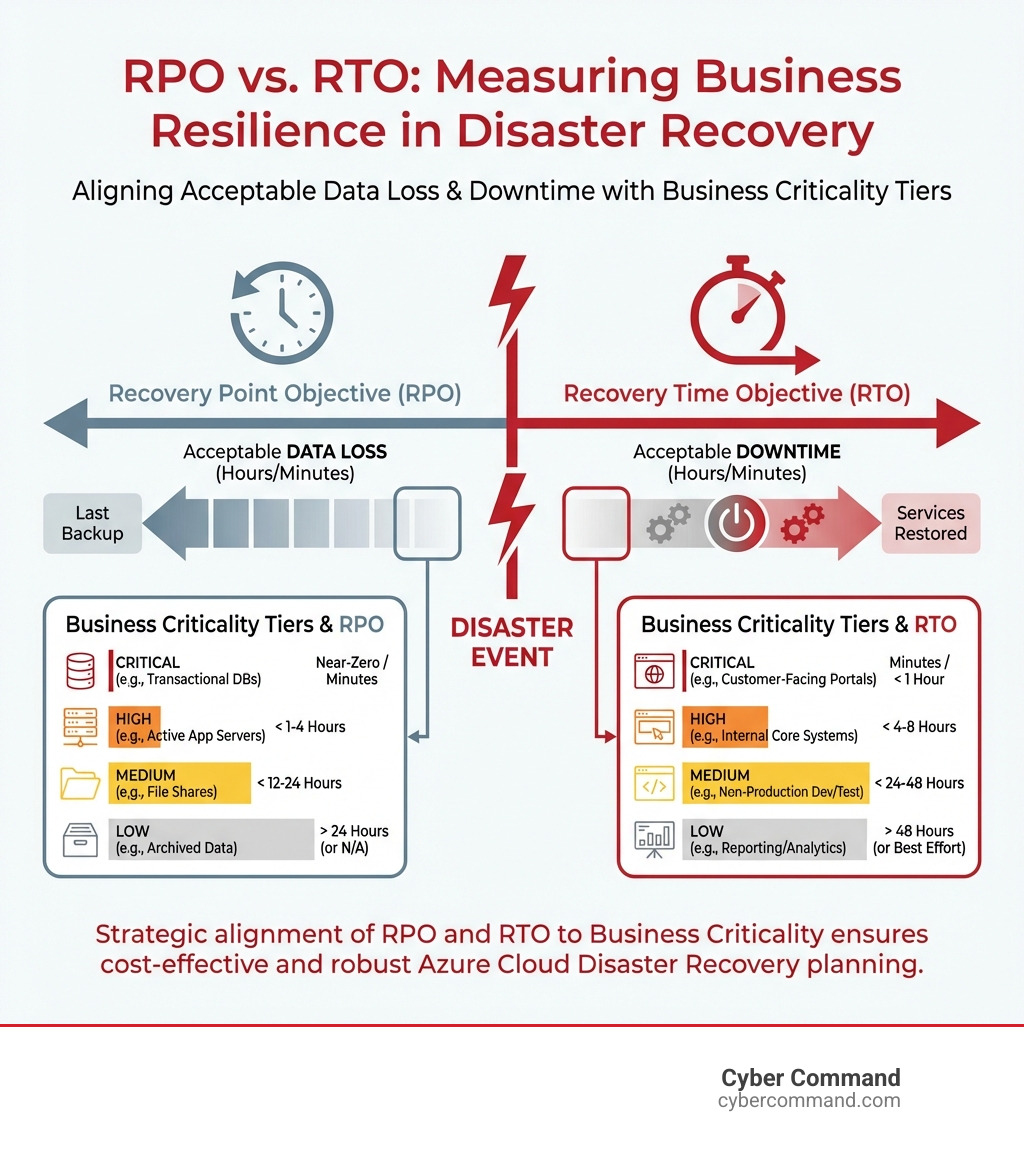
Quick azure cloud disaster recovery definitions:
Understanding the Core Components of Azure Disaster Recovery
At the heart of any robust azure cloud disaster recovery strategy lies Azure’s powerful global infrastructure. Think of it as the bedrock upon which we build our resilience. Azure’s network of regions and Availability Zones is designed to provide high availability and protect against localized failures, ensuring your data and applications remain accessible even if disaster strikes one location.
Azure’s global footprint includes numerous regions, each a distinct geographical area containing multiple datacenters. These regions are often paired, enabling cross-region replication for disaster recovery. Within many regions, we find Availability Zones – physically separate locations within an Azure region that have independent power, cooling, and networking. This design ensures that if one zone experiences an outage, your applications can continue to run from another, minimizing downtime.
Data residency is another critical aspect. For businesses operating in Florida or Texas, knowing exactly where your data resides and how it’s protected is paramount for compliance and peace of mind. Azure allows us to specify the regions where our data is stored, helping us meet regulatory requirements while still leveraging the cloud’s vast capabilities.

Azure Site Recovery (ASR)
Azure Site Recovery (ASR) is a game-changer for disaster recovery. It’s Microsoft’s Disaster Recovery as a Service (DRaaS) offering, providing orchestration and automation for replication, failover, and failback processes. In simple terms, ASR keeps your business running during major IT outages by deploying replication, failover, and recovery processes to keep applications running during planned and unplanned outages.
ASR handles the continuous replication of your virtual machines (VMs) and physical servers. Whether you’re replicating from your on-premises environment to Azure, or from one Azure region to another, ASR ensures that a copy of your critical systems is always ready.
- Replication: ASR continuously copies your data and application state to a secondary location. For Azure VMs, this means replicating to a different Azure region. For on-premises servers, it can mean replicating to Azure itself.
- Failover: If a disaster occurs in your primary location, ASR orchestrates the failover, bringing up your replicated systems in the secondary location with minimal downtime.
- Failback: Once your primary site is restored, ASR helps you seamlessly fail back, returning your operations to the original location.
ASR is incredibly versatile. It protects important services by coordinating the automated replication and recovery of protected instances at a secondary location, simplifying disaster recovery while reducing infrastructure costs. It allows for sequencing the order of multi-tier applications for recovery, minimizing potential issues. You can learn more about this powerful service here: What is Site Recovery?
Azure Backup
While ASR focuses on the continuity of your entire workloads, Azure Backup is all about protecting your data. It’s a simple, secure, and cost-effective solution for backing up your data in the cloud and on-premises environments.
Azure Backup offers a centralized service that helps us reduce data loss risk through automated backups and encryption. This service is crucial for:
- Data Protection: Safeguarding critical data against accidental deletion, corruption, or cyberattacks.
- Centralized Backup Management: Managing backups for various workloads (VMs, databases, files, etc.) from a single console.
- Long-Term Retention: Storing backups cost-effectively for extended periods, meeting compliance requirements. Azure Archive Storage, for example, provides a cost-effective solution for long-term data retention, suitable for data that is infrequently accessed but must be retained for extended periods due to business or regulatory requirements.
- Ransomware Protection: Offering features like immutability and soft delete to protect backups from malicious modification or deletion, a critical layer of defense in today’s threat landscape.
Azure Backup removes the need for third-party backup software and infrastructure for many scenarios, simplifying your data protection strategy.
Azure Resiliency Platform
Microsoft has evolved its approach to business continuity and disaster recovery (BCDR) with the “Resiliency in Azure” platform. Formerly known as the Azure Business Continuity Center, this unified platform brings together Zonal Resiliency, High Availability, Backup & Disaster Recovery, and Ransomware Protection.
This means we get a single pane of glass for managing our BCDR posture across Azure, hybrid, and even edge environments. It provides:
- Unified Management: A holistic view of your resiliency estate, simplifying management across solutions and environments.
- Posture Management: Proactively identifying gaps in our current protection estates and evaluating our BCDR posture.
- Zonal Resiliency: Leveraging Azure’s Availability Zones to protect infrastructure from outages.
- Proactive Monitoring: Unified monitoring across jobs, alerts, and reports, ensuring we’re always aware of our protection status.
- Azure Policy Integration: Enforcing and auditing BCDR configurations, helping us maintain compliance.
With this platform, we can define, validate, orchestrate, and manage application resilience strategies with confidence, knowing we have a comprehensive solution at our fingertips.
Planning and Designing Your DR Strategy
Developing an effective azure cloud disaster recovery strategy isn’t just about picking services; it’s about thoughtful planning that aligns with your business objectives. This process starts long before any technical implementation.
A crucial first step is conducting a Business Impact Analysis (BIA). This helps us identify our mission-critical and non-critical systems and user flows. Why is this important? Because not all workloads are created equal. Some applications, like your financial platform or customer-facing e-commerce site, demand near-zero downtime and data loss. Others, like an internal reporting tool, might tolerate a few hours of disruption.
This classification leads to assigning criticality tiers (Tier 0, 1, 2, 3) to our workloads, which directly influences the level of investment, resilience, and recovery sequencing. Over-engineering low-impact services can waste resources, while under-preparing high-impact ones risks serious consequences.
Cost optimization is another vital consideration. Cloud disaster recovery is typically more cost-effective than relying on a second on-premises datacenter. By carefully classifying workloads and choosing appropriate DR strategies, we can ensure we’re spending wisely.
Finally, documentation is key. A strong DR plan isn’t just a strategy; it’s a living document that turns strategy into decisive action. This includes detailed runbooks, communication plans, and escalation paths. A DR plan that’s never tested stays theoretical and unproven. For more in-depth guidance, explore: Develop a disaster recovery plan for multi-region deployments
Core Principles of an Azure Cloud Disaster Recovery Plan
The foundation of any solid azure cloud disaster recovery plan rests on two key metrics: Recovery Time Objective (RTO) and Recovery Point Objective (RPO). These aren’t just technical terms; they’re business decisions.
- Defining RTO: This is the maximum acceptable length of time your organization can tolerate for a service to be down after a failure. If your customer-facing website can only be offline for 15 minutes without significant revenue loss, your RTO is 15 minutes.
- Defining RPO: This determines the maximum acceptable amount of data loss, measured in time, that your business can endure. If losing more than 30 minutes of transaction data is unacceptable, your RPO is 30 minutes. This metric directly dictates how often your critical data should be backed up. For example, if your organization’s RPO is four hours, your critical data should be backed up at least every 4 hours.
Aligning these metrics with business goals is paramount. We work with stakeholders to confirm RTO and RPO targets based on the real consequences of downtime and data loss. This also influences our backup frequency and the choice of replication technologies.
Designing for Redundancy and Resilience
When designing for resilience in Azure, we accept patterns that ensure continuous operation and rapid recovery. Redundancy is key, meaning duplicating critical components or functions. Scaling ensures our resources match demand, even during peak loads or recovery. And for the ultimate in resilience, we design for self-preservation and self-healing systems that can automatically adjust operations or recover from failures without human intervention.
We consider various architectural patterns:
- Active-active patterns: Here, multiple instances of an application run simultaneously in different regions or Availability Zones, distributing traffic and providing instant failover. If one instance fails, others continue to serve requests.
- Active-passive patterns: This involves a primary site running the application and a secondary site standing by.
- Cold standby: Minimal infrastructure is running in the secondary region until a disaster occurs. This is the most cost-effective but has the highest RTO.
- Warm standby: Some infrastructure is pre-deployed and running at reduced capacity in the secondary region, allowing for faster failover than cold standby.
- Self-healing systems: These are designed to automatically detect and recover from failures, often leveraging Azure’s built-in monitoring and automation capabilities.
Here are some key design considerations for resilient architecture:
- Leverage native PaaS DR capabilities: Many Azure Platform as a Service (PaaS) offerings have built-in DR and high availability features that simplify our design.
- Consistent backups: Implement consistent backups for applications and data using VM snapshots and Azure Backup Recovery Services vaults.
- Network connectivity for failover: Plan for robust network connectivity, including sufficient bandwidth and traffic routing strategies during outages. Avoid overlapping IP address ranges in production and DR networks.
- Data residency: Understand and adhere to data residency requirements when designing cross-region replication.
- Azure Key Vault DR: Plan for disaster recovery of Azure Key Vault for application keys, certificates, and secrets.
- Automated integrity checks: During data store recovery, automate integrity checks to validate the health of restored data.
Azure Cloud Disaster Recovery Solution Architectures
The beauty of azure cloud disaster recovery is its flexibility, allowing us to tailor solutions to specific needs, from small businesses to large enterprises. A common thread across many architectures is hybrid cloud connectivity, enabling seamless integration between on-premises environments and Azure. This often involves robust network design, careful traffic routing, and maintaining IP address consistency, typically utilizing Azure Virtual Network and VPN Gateway for secure, encrypted connections.
Solutions for Small and Medium Businesses (SMBs)
For SMBs, the goal is often cost-effective, simplified disaster recovery without sacrificing protection for critical data and applications. Azure provides an excellent platform for this, often leveraging partner solutions alongside native Azure services.

An SMB disaster recovery architecture in Azure might involve:
- Azure Traffic Manager: Used for DNS routing to direct user traffic to the healthy site, whether primary or secondary.
- Azure Virtual Network: Providing the isolated network infrastructure for the failover site in Azure.
- Azure Site Recovery: Orchestrating the replication of on-premises VMs or Azure VMs to the secondary Azure region.
- Azure Backup: Providing cost-effective, secure backups for critical data and applications.
These solutions enable SMBs to avoid the prohibitive costs of a second physical datacenter, offering scalable and secure end-to-end backup and disaster recovery.
Enterprise-Scale Solutions
Enterprise-scale azure cloud disaster recovery solutions are designed for complex environments with stringent RTO/RPO requirements, multi-tier applications, and extensive dependencies. These often involve multi-region deployments, leveraging Azure’s global infrastructure for maximum resilience.
A typical enterprise-scale DR architecture in Azure includes:
- Multi-region deployments: Distributing applications across different Azure regions and Availability Zones to ensure availability during regional failures.
- Azure ExpressRoute: Providing high-bandwidth, low-latency, private connections between on-premises datacenters and Azure, crucial for efficient replication and large data transfers. We often recommend using multiple regions and peering locations for ExpressRoute connectivity to ensure redundant hybrid network architecture.
- Azure Active Directory (AAD) replication: Ensuring consistent identity and access management during failovers.
- Azure Site Recovery: For orchestrating the replication of complex application stacks, including virtual machines and physical servers, from on-premises to Azure or between Azure regions.
- Complex application dependencies: Solutions are designed to handle applications like SharePoint, Dynamics CRM, and custom Linux web servers, ensuring all components fail over and recover together.
These architectures are designed to meet aggressive RTO and RPO targets, ensuring that even the most critical business operations can quickly resume after a major incident.
Best Practices for Implementation and Management
Implementing a successful azure cloud disaster recovery strategy goes beyond selecting the right services; it requires adherence to best practices that ensure reliability, security, and continuous improvement.
Automation is a cornerstone of effective DR. We strive to automate as many disaster recovery tasks as possible, which significantly reduces human error and accelerates recovery times. This includes using Infrastructure as Code (IaC) principles with Azure Resource Manager (ARM) templates for consistent and repeatable infrastructure deployments. Automating deployment and recovery procedures wherever possible is key to meeting RTO targets.
Security considerations are paramount. Our DR strategy must include safeguarding critical data with air-gapped immutable backups, encryption (in transit and at rest), and secure access controls. It’s also vital to ensure that DR documentation, scripts, and recovery components are accessible during outages.
Here’s a list of best practices for a successful Azure DR implementation:
- Prioritize by business impact: Categorize workloads by criticality tiers to align investment and recovery sequencing.
- Define clear RTO/RPO targets: Work with business stakeholders to establish realistic and measurable recovery objectives.
- Automate recovery procedures: Leverage Azure services and IaC for rapid and consistent failover.
- Implement robust backup strategies: Use Azure Backup for frequent, consistent backups with appropriate retention policies and multi-region storage.
- Design for redundancy: Employ active-active or active-passive patterns, Availability Zones, and geo-replication.
- Ensure network readiness: Plan for concurrent connectivity to all sites and avoid overlapping IP ranges.
- Document everything: Create detailed runbooks, communication plans, and escalation procedures, treating them like production code.
- Train employees: Ensure all relevant staff are familiar with DR procedures and their roles.
- Regularly review and update: Treat your DR plan as a living document, adapting it to new threats and architectural changes.
Testing and Validating Your Azure Cloud Disaster Recovery Strategy
A DR plan that’s never tested is just a theory. Regular testing and validation are non-negotiable for proving its effectiveness and building confidence.
- DR drills: These are planned exercises to test DR procedures and validate recovery capabilities. They can range from tabletop exercises (walking through the plan mentally) to dry runs in non-production environments.
- Failover testing: Simulate a disaster by initiating a failover to your secondary region. This validates that your applications come online as expected and meet RTO/RPO targets. Azure Site Recovery allows you to test your disaster recovery plan without impacting production workloads or end users.
- Non-disruptive testing: Azure Site Recovery enables compliance testing without impacting production.
- Azure Chaos Studio: For advanced validation, we can leverage Azure Chaos Studio to deploy automated faults and execute drills, simulating outages or performance degradations to proactively identify weaknesses.
- Validating RTO/RPO targets: During testing, we rigorously measure actual recovery times and data loss to ensure they align with our defined RTO and RPO. This identifies any gaps or areas for improvement.
The goal is to test multiple scenarios, including edge cases, and use the results as inputs to continuously improve our DR posture. Performing DR drills directly in production can introduce unexpected, potentially severe failures, so it’s best to start in non-production environments.
Ensuring Compliance and Security
For businesses in regulated industries, azure cloud disaster recovery isn’t just about business continuity; it’s also about compliance. Our DR strategies must ensure regulatory adherence and protect sensitive data according to data privacy laws.
Azure’s comprehensive compliance portfolio is a significant advantage. Microsoft maintains Over 100 compliance certifications, including over 50 specific to global regions and countries, such as ISO 27001. This helps us build DR solutions that meet stringent industry standards.
Key security features embedded within Azure’s disaster recovery services include:
- Immutability: For backups, this prevents data from being altered or deleted, offering strong protection against ransomware.
- Soft delete: Provides a grace period during which deleted items can be recovered, preventing accidental data loss.
- Azure Private Link: Ensures secure, private connectivity between on-premises networks and Azure services, enhancing data transfer security during DR.
We also consider the shared responsibility model in the cloud. While Azure secures the cloud infrastructure, we are responsible for security within the cloud, including our applications, data, configurations, and user access. Misconfigurations cause over 80% of cloud breaches, so diligent management of our Azure environment is critical.
Monitoring and Governance
Effective azure cloud disaster recovery requires continuous monitoring and robust governance. We need to know our protection posture at all times and react swiftly if an issue arises.
- Azure portal & Resiliency dashboard: The Azure portal provides a central hub for managing our DR services. The Resiliency in Azure dashboard offers a unified view of our protection estate, making it easy to monitor backup and replication health across multiple subscriptions and regions.
- Azure Policy for BCDR: We leverage Azure Policy to audit and enforce BCDR configurations, ensuring that our DR setup remains compliant with our organizational standards and best practices. This can include policies to enable replication, audit VM protection, and enforce backup configurations.
- Configuring alerts: Setting up alerts for all Azure services consumed by an application is crucial. This ensures we are immediately notified of any issues that could impact our DR capabilities.
- Health monitoring: Continuous health monitoring of our replicated items, backup jobs, and overall DR infrastructure helps us proactively identify and address potential problems before they escalate.
- Managing protection estate: The Resiliency in Azure platform allows us to manage data sources protected across various solutions and environments (Azure and on-premises) from a single interface, streamlining our DR operations.
Frequently Asked Questions about Azure DR
What is the difference between Azure Backup and Azure Site Recovery?
Azure Backup is for data protection and restoration (recovering data). Think of it as your digital vault for individual files, databases, or entire VMs, allowing you to restore them to a specific point in time. Azure Site Recovery is for business continuity and workload availability (recovering entire services/applications). It’s designed to orchestrate the replication and failover of entire application stacks, ensuring your critical services can resume operation in a secondary location with minimal downtime. While both are crucial for resilience, Backup protects data, and Site Recovery protects the continuity of operations.
How much does Azure disaster recovery cost?
The cost of azure cloud disaster recovery is based on a pay-as-you-go model, depending on the data replicated, storage consumed, and compute resources used during failover. This eliminates the high capital expense of a secondary on-premises datacenter. While you pay for replicated storage and potentially a small charge per protected instance, you only pay for the full compute resources of your VMs when you actually fail over. This makes cloud DR typically more cost-effective than building and maintaining your own secondary site.
Can I use Azure for DR if my primary site is on-premises?
Yes, absolutely! Azure Site Recovery is specifically designed for hybrid scenarios, allowing you to replicate on-premises VMware VMs, Hyper-V VMs, and physical servers directly to Azure. This means your on-premises workloads can fail over to Azure, running there during a disaster, and then fail back to your refreshed on-premises environment once the issue is resolved. It’s a popular and effective way for businesses to leverage the cloud for robust DR without a full migration.
Secure Your Business with a Proactive DR Strategy
In today’s and unpredictable digital landscape, a robust azure cloud disaster recovery strategy isn’t a luxury; it’s a necessity. We’ve seen how Azure’s comprehensive suite of services—from the foundational global infrastructure to specialized tools like Azure Site Recovery and Azure Backup, all managed under the unified Resiliency platform—provides scalable, cost-effective, and reliable solutions for businesses across Florida and Texas.
The benefits are clear: reduced downtime, minimized data loss, improved compliance, and the peace of mind that comes from knowing your business can withstand unexpected disruptions. However, the true strength of any DR plan lies in its design, rigorous testing, and continuous refinement.
That’s where Cyber Command comes in. As an extension of your business, we specialize in crafting enterprise-grade IT, cybersecurity, and platform engineering services. Our proactive, 24/7/365 U.S.-based support ensures your azure cloud disaster recovery strategy is not only expertly implemented but also continuously monitored and maintained. We believe in transparent, all-inclusive pricing, delivering solutions that are both powerful and predictable.
Don’t wait for a disaster to strike. Let’s partner to build a resilient future for your business.
