


You're probably dealing with one of two problems right now.
Either your team is losing time to constant small IT issues. Password resets, flaky Wi-Fi, slow remote access, printers that fail when you need them most, software vendors blaming your network, and staff waiting around because nobody owns the problem. Or you've had a more serious scare. A suspicious login alert. A ransomware warning from your insurance broker. A compliance question from a client. A server outage during business hours when every minute felt expensive.
That's the point where “we just need someone to fix computers” stops being enough. In Central Florida, IT support has become a business continuity decision. For firms in Orlando, Winter Springs, and nearby cities, the key question isn't whether you can find help. It's whether the provider you choose can keep operations running, reduce security exposure, and support the way your industry operates.
Table of Contents
- Why Your Central Florida Business Needs a New IT Strategy
- Decoding IT Support Services What You Actually Get
- The Non-Negotiable Features of Modern IT Support
- Navigating IT Support Pricing Models in Central Florida
- Tailoring IT Support for Your Florida Industry
- Your Vendor Evaluation Checklist and RFP Questions
- Taking the Next Step Toward Secure and Reliable IT
Why Your Central Florida Business Needs a New IT Strategy
A common Central Florida scenario looks like this. A practice manager in Orlando finds out the phones are up but the clinical system is crawling. A law office in Winter Springs can't open matter files before a client meeting. A field service company has crews waiting because someone can't connect to dispatch tools. In each case, the problem starts as “IT is down,” but the business impact is much larger. Revenue pauses, staff confidence drops, and leadership realizes there isn't a real plan.

Break-fix support fails in moments like this because it only reacts after damage has already started. It doesn't harden systems ahead of time, it doesn't monitor for suspicious behavior around the clock, and it usually doesn't connect technical work to business priorities like uptime, compliance, or vendor accountability.
The market around you has matured. Florida's Data Processing & Hosting Services industry reached $21.8 billion in 2026, expanded at an average annual rate of 6.2% since 2021, and includes nearly 6,000 firms, according to IBISWorld's Florida industry data on data processing and hosting services. That matters because it signals something bigger than vendor abundance. Businesses across the state are investing in managed infrastructure, cybersecurity support, cloud operations, and ongoing service models instead of waiting for the next outage.
What the old model gets wrong
Reactive support creates a bad incentive structure.
- It waits for failure: You pay after disruption starts.
- It rewards volume: More incidents can mean more billable work.
- It hides risk: Security gaps often stay invisible until an audit, insurance review, or breach forces them into the open.
Practical rule: If your IT provider mostly shows up when something breaks, you don't have a strategy. You have a repair arrangement.
What a new strategy looks like
A stronger model treats Central Florida IT support as part operations, part risk management, and part planning. That means continuous monitoring, tested escalation paths, clear ownership of vendors and licenses, and security controls that fit your industry.
For business owners, the shift is simple. Stop asking, “Who can fix this?” Start asking, “Who can keep this from interrupting us again?”
Decoding IT Support Services What You Actually Get
A lot of business owners buy IT support without getting a clean explanation of what they're paying for. That's where confusion starts. One provider says “managed services.” Another says “helpdesk.” Another says “co-managed IT.” Those terms aren't interchangeable.
Break-fix versus managed services
The easiest comparison is car ownership.
Break-fix IT is like driving until the engine light flashes, then calling for a tow. You only spend money when there's a visible problem, but the downtime is expensive and the repair is always urgent.
Managed IT services are closer to a maintenance plan. Systems get monitored, patched, reviewed, and supported before small issues become business interruptions. You're paying for prevention, not just repair.
That difference changes everything. In a break-fix model, your provider's work begins when your staff is already blocked. In a managed model, the provider should be reducing the number of those disruptions in the first place.
The core services most SMBs should expect
If you're shopping for Central Florida IT support, these are the services that usually matter most:
- Helpdesk support: Staff need a direct way to get help with login problems, device issues, software errors, and day-to-day troubleshooting.
- Monitoring and maintenance: Servers, workstations, firewalls, backups, and key applications should be watched continuously, with routine patching and health checks.
- Endpoint protection: Laptops and desktops need security controls, not just antivirus installed once and forgotten.
- Vendor management: Someone should own the calls with your internet provider, line-of-business software company, copier vendor, and phone system support.
- Backup and recovery coordination: Backups only matter if they're monitored and restoration is practical under pressure.
A provider that only resolves tickets is handling symptoms. A provider that documents systems, monitors trends, and fixes root causes is managing your environment.
Where co-managed IT fits
Some organizations have an internal IT employee or a small internal team, but they still need outside support. That's where co-managed IT makes sense.
A good co-managed arrangement doesn't replace your internal staff. It fills the gaps. That might mean after-hours coverage, cybersecurity operations, escalation support for complex infrastructure work, or project assistance during migrations and office changes.
Here's the practical test:
| Situation | Better fit |
|---|---|
| No in-house IT, constant interruptions, unclear security ownership | Fully managed IT |
| One internal IT generalist who's overloaded | Co-managed IT |
| Only calling someone when things break | Break-fix, but with higher risk |
The right model depends on how much internal ownership you already have. What doesn't work is paying for a premium label while still operating like a reactive shop.
The Non-Negotiable Features of Modern IT Support
A provider can sound polished in a sales call and still leave you exposed. The features that matter most aren't cosmetic. They directly affect how fast incidents get contained, how well your systems stay available, and whether your business can pass client or regulatory scrutiny.
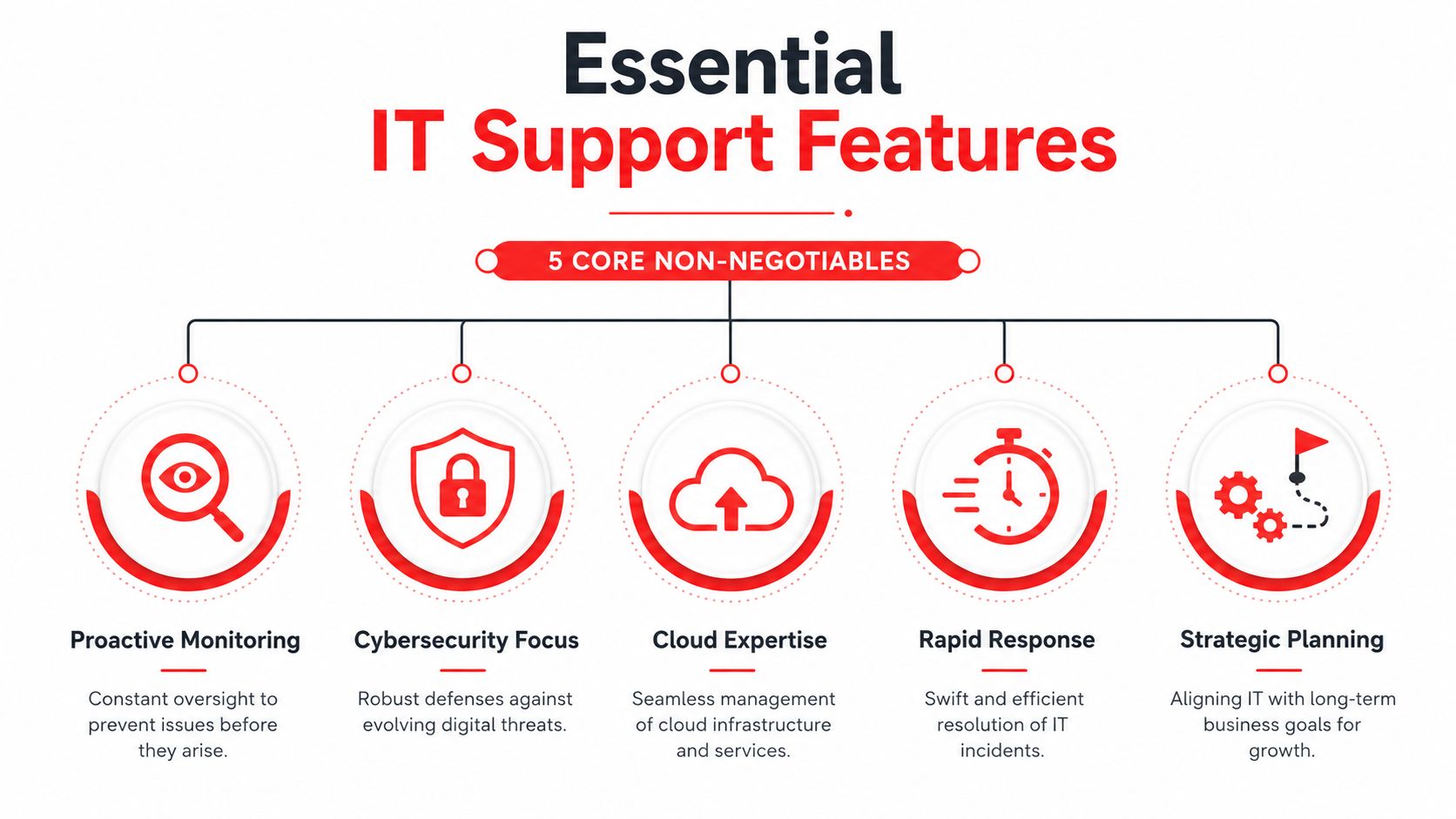
Live support that exists after business hours
If your provider only answers during office hours, you're accepting a blind spot. Suspicious logins, failed backups, internet outages, and locked accounts don't politely wait for Monday morning.
Ask whether the helpdesk is live, who answers, and what happens at night, on weekends, and on holidays. You want a real operating model, not an answering service that creates a ticket and delays action.
A real SOC, not just security software
Many businesses buy tools and assume that means they have cybersecurity covered. They don't.
A Security Operations Center matters because software generates alerts, but people decide what those alerts mean and what to do next. If no one is actively reviewing behavior, investigating signs of compromise, and responding with urgency, your defenses are incomplete.
For organizations reviewing options such as managed IT security services in Orlando, the key question is whether the provider can do active threat hunting and incident response, not just install software and send reports.
Compliance knowledge tied to your industry
Compliance isn't a PDF policy sitting in a shared folder. It affects workstation setup, access controls, audit logging, vendor choices, user permissions, documentation, and how incidents get handled.
That's why security baselines matter. CIS Benchmarks are developed by over 500 global cybersecurity experts and provide guidance across 25+ vendor product families to reduce attack surface and support compliance mandates such as HIPAA and PCI DSS, as explained in BitLyft's overview of CIS Benchmarks. If a provider can't explain how they harden systems against common attack paths, they're not operating at a mature level.
Hardened configuration beats good intentions. Most avoidable security incidents start with weak defaults, poor permissions, or unmonitored change.
Flat-rate pricing that aligns incentives
Hourly billing sounds flexible until the invoice arrives after a bad month. A better model aligns the provider's incentives with yours. If they make more money when things break, you'll never get true prevention.
Predictable pricing also helps leadership make decisions faster. Security improvements, patching, documentation work, and user support stop feeling like optional extras when they're built into the agreement.
A local presence with operational accountability
Remote support handles a lot, but locality still matters. Offices relocate. Internet circuits fail. Equipment has to be deployed. Leadership teams want face-to-face planning conversations at times that matter.
A provider serving Orlando, Winter Springs, and surrounding Central Florida cities should understand the business environment, the pace of growth, and the practical demands of multi-site operations in the region.
One factual example is Cyber Command, LLC, which provides U.S.-based helpdesk, managed and co-managed IT, cloud services, and SOC-led cybersecurity support for organizations in Orlando and Winter Springs. That kind of operating model is worth looking for because it combines strategic planning with local service access.
Navigating IT Support Pricing Models in Central Florida
Most business owners don't mind paying for IT. They mind surprises. The pricing model you choose will shape not only cost, but also behavior, responsiveness, and how much risk gets ignored until it becomes expensive.
The three models you'll usually see
Hourly or break-fix is the simplest to understand. You call when something breaks, and you pay for labor. It can look cheaper on paper because there's no recurring commitment. The downside is that budgeting becomes unstable, preventive work often gets deferred, and no one has much reason to reduce future incidents.
Per-device pricing charges based on the number of laptops, desktops, servers, or network components. This can work in narrow environments, but it gets messy fast. Users often work across multiple devices, cloud apps, phones, and remote connections. Device counts don't always reflect actual support demand.
Per-user pricing tends to align better with how modern businesses operate. People, not just hardware, create support needs. A user may need identity management, email protection, endpoint support, software access, compliance controls, and helpdesk service across several systems.
The local benchmark that matters
In this market, enterprise-grade managed IT support for small and mid-sized businesses typically ranges from $119 to $189 per user per month, according to Central Florida managed IT pricing guidance from Kelley IT Support. That range reflects a broader shift toward proactive, all-inclusive service instead of ticket-driven support.
If you're comparing quotes for managed IT services in Orlando, use that range as a conversation starter, not as the only decision point. A lower price can still be expensive if it excludes after-hours support, project work, security monitoring, onboarding, reporting, or vendor management.
What to ask when the quote looks attractive
Cheap proposals often hide work in the margins. Ask specifically about these items:
- After-hours support: Is it included or billed separately?
- On-site visits: Are they part of the agreement?
- Projects for covered systems: Are routine changes included?
- Security stack: Does the price include monitoring, response, and compliance support, or just software licenses?
- Reporting and planning: Will you get usable documentation and regular review meetings?
If the agreement is hard to explain in plain English, billing disputes are likely later.
The best pricing model is the one that gives you cost predictability and removes incentives for reactive chaos. You want the provider paid to keep things stable, not paid extra every time your staff loses a day to preventable issues.
Tailoring IT Support for Your Florida Industry
A Winter Park medical practice gets locked out of its scheduling system on Monday morning. A downtown Orlando law firm finds that a staff member shared the wrong case file from a synced folder. A manufacturer in Seminole County loses connectivity between the office and the shop floor during production. All three situations look like "IT problems" at first. They are not the same business risk, and they should not be supported the same way.
Central Florida IT support should match the way your business makes money, stores sensitive data, and handles downtime. Industry fit matters because the cost of failure is different in healthcare, legal, and industrial environments. The provider you choose should already understand those failure points and have controls in place before the first incident.

Healthcare practices need compliance built in
Small and midsize healthcare practices usually operate with limited internal IT oversight. The owner or administrator is already carrying patient volume, staffing pressure, billing issues, and vendor coordination. Compliance work often gets pushed into the margins until an audit, ransomware event, or privacy complaint forces attention.
That creates a predictable mistake. Practices buy general support and assume compliance will somehow be covered.
It usually is not.
Healthcare IT support should include clear access controls, documented onboarding and termination procedures, audit logging, encrypted devices, backup validation, incident response, and guidance on business associate obligations. Patient intake forms, appointment reminders, website tracking scripts, and third-party plugins also deserve scrutiny. These Cincinnati HIPAA web design guidelines are a useful example of how privacy exposure can start on the public-facing side of the business, not just inside the EHR.
A good healthcare provider reduces operational risk and documentation risk at the same time. If you want a practical framework for screening providers, this guide on how to choose a managed service provider for regulated environments helps separate generic support firms from teams that can handle compliance pressure.
Ask direct questions:
- Who owns HIPAA-related documentation support? Policies, risk reviews, vendor records, and incident records should not be an afterthought.
- How are user permissions reviewed? Shared logins and stale accounts are still common in smaller practices.
- What happens after a suspected breach? You need a defined response process, not improvised troubleshooting.
- How are backups tested? A backup that has never been restored is not a control.
Legal firms need control over confidentiality
Law firms need disciplined systems that protect privileged information without slowing down billable work. That means secure email, file permissions that reflect matter access, mobile device controls, and remote access that does not create shortcuts around security.
The trade-off is usability versus control. If security gets in the way of attorneys, staff will route around it with personal email, unsanctioned file sharing, or local copies of sensitive documents. If controls are too loose, one mistaken share or compromised mailbox can create a client trust issue and a reporting issue at the same time.
A legal-focused IT provider should understand document retention, secure collaboration with outside counsel and clients, and the need for rapid support during filings, hearings, and closings. Fast ticket response matters, but confidentiality controls matter more.
Industrial teams need uptime that covers operations, not just office IT
Industrial and field-service companies in Central Florida usually run two environments at once. One side looks like standard business IT. The other includes warehouses, plant floors, dispatch systems, job sites, remote crews, shared terminals, and specialized equipment that cannot be treated like a front-office laptop fleet.
That split changes support priorities.
A provider serving industrial operations should be prepared to handle network segmentation, vendor coordination for equipment-connected systems, remote connectivity, rugged or shared devices, and recovery planning for production-impacting outages. The question is not whether they can reset passwords. The question is whether they can keep operations moving when an ISP fails, a workstation tied to production goes down, or a line-of-business application stops talking to the rest of the environment.
Generic office support often misses those dependencies. Businesses pay for that gap later in delayed shipments, idle labor, and preventable downtime.
The right fit is simple to define. Choose a provider that understands the systems your industry depends on, the compliance exposure you carry, and the true cost of a bad day.
Your Vendor Evaluation Checklist and RFP Questions
A ransomware alert at 6:40 p.m. on a Friday tests your provider faster than any sales presentation. A medical practice may need to protect patient data and keep Monday appointments intact. A law firm may need to confirm whether client files were exposed. An industrial company may need to decide whether to isolate a plant system before downtime spreads into shipping and payroll. Vendor evaluation should be built around those moments, because that is when weak processes become expensive.
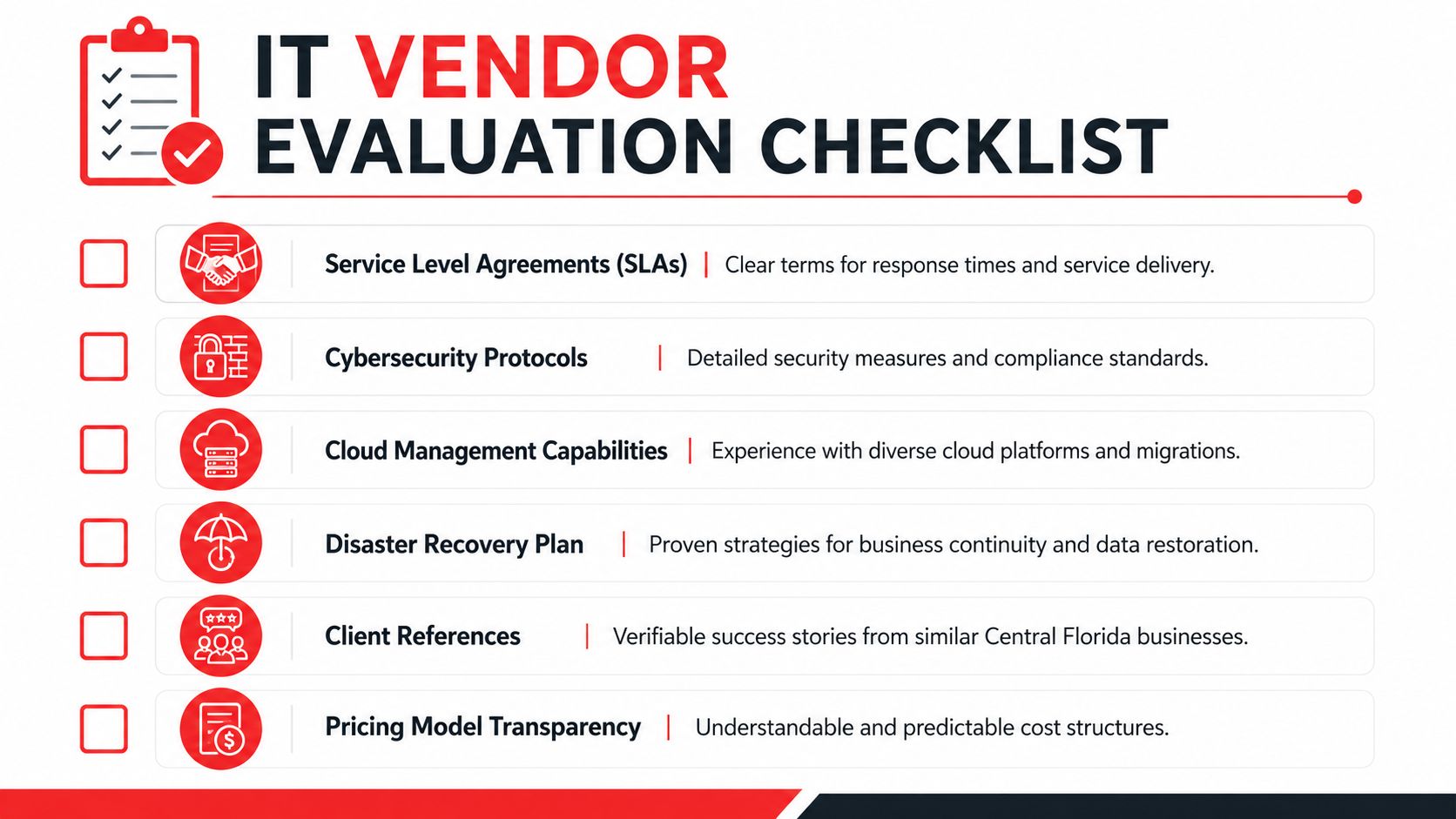
By the time you start taking meetings, several providers will sound polished. The useful question is whether they can explain their operating model under pressure. Ask how they handle after-hours alerts, failed backups, software vendor disputes, account compromise, internet outages, office moves, and leadership requests that conflict with security policy. Clear answers usually reflect a mature service model. Vague answers usually mean you will be coordinating the crisis yourself.
The short list to use in vendor meetings
Use a practical screening process. If you want a broader framework before issuing an RFP, this guide on how to choose a managed service provider is a useful companion.
In the meeting, press on six areas:
- Incident response: Ask who reviews security alerts after hours, who has authority to isolate a device or account, and how fast leadership gets notified.
- Compliance support: Ask how they document access, policy enforcement, audit evidence, retention controls, and user security training for regulated environments.
- Backup accountability: Ask how often backups are tested, how recovery is validated, and what systems fall outside the standard backup scope.
- Operational coverage: Confirm whether support extends to cloud apps, identity systems, firewalls, remote access, line-of-business platforms, and vendor coordination.
- Pricing boundaries: Require a plain definition of included work, billable project work, onsite charges, and after-hours exceptions.
- Strategic discipline: Ask whether they provide lifecycle planning, risk reviews, documentation updates, and quarterly recommendations tied to business risk.
One useful detail here is policy depth. For example, AI Video Detector's firewall recommendations show how filtering decisions can support a wider security program when they are based on actual business exposure instead of generic blocking rules.
RFP questions that expose weak providers quickly
Yes-or-no questions let providers hide behind broad claims. Use questions that force them to describe process, ownership, and limits.
- Describe your step-by-step response to a suspected account takeover discovered outside business hours. Who responds, who approves containment, and how is the client notified?
- What security controls do you standardize across endpoints, servers, Microsoft 365 or Google Workspace, firewalls, and remote access?
- How do you support clients that must meet HIPAA, client confidentiality requirements, insurance questionnaires, or documented security controls during audits?
- Which services are included in the recurring fee, and which events trigger project fees, emergency fees, or third-party consulting charges?
- What is your process for backup testing and recovery verification, and how often do you perform full restore tests for critical systems?
- Who owns communication with internet, telecom, software, and hardware vendors during an outage or application failure?
- What documentation do you maintain, how often is it updated, and who reviews it with business leadership?
- Give an example of a client situation where you had to balance uptime, compliance, and security risk. What trade-off did you recommend and why?
Strong providers answer with specifics. They can explain the difference between a security event and a support ticket, the limits of their scope, and the situations that require client approval.
That last point matters. In healthcare, legal, and industrial environments, the wrong provider is rarely exposed by routine password resets. The real test is whether they can reduce legal exposure, contain cyber incidents, and keep the business operating when the situation is unclear. If they cannot explain that in plain language, keep looking.
Taking the Next Step Toward Secure and Reliable IT
Choosing Central Florida IT support isn't a commodity decision anymore. It affects whether your staff can work without interruption, whether your client and patient data stays protected, and whether growth creates efficiency or chaos.
The businesses that get the best outcomes usually make the same shift. They stop buying reactive help and start buying operational discipline. That means live support, security monitoring, compliance awareness, pricing clarity, and a provider that understands the pace and risk profile of Central Florida industries.
If you're reviewing your current setup, start small. Pull your latest IT invoice, your cybersecurity insurance questionnaire, and your list of recurring user complaints into one meeting. Then ask whether your current provider is reducing those problems or just processing them.
For leaders that want a practical next step, it can also help to review focused resources outside the usual IT sales material. For example, these AI Video Detector firewall recommendations are a useful reminder that policy-level filtering decisions can support a broader security posture when they're tied to real business risk.
The right IT partner should make your environment calmer, more secure, and easier to manage. If that's not happening, the problem probably isn't your staff. It's your support model.
If you want a practical second opinion, Cyber Command, LLC offers Central Florida organizations a straightforward way to evaluate managed IT, co-managed IT, helpdesk coverage, and cybersecurity readiness. A short, no-obligation discussion can help you identify support gaps, pricing blind spots, and compliance risks before they turn into outages or audit problems.