Orlando Cybersecurity Company: Your 2026 Buyer’s Guide

You're probably in one of two situations right now. Your business has an IT person or outside IT firm that handles passwords, printers, Microsoft 365, and the occasional outage, and you're hoping that also means you're “covered” on security. Or you've already had a scare. A suspicious email. A locked account. An employee clicking something they shouldn't have. A client asking for security documentation you don't have ready.

That's where many Central Florida businesses hit the same wall. General IT support keeps systems running. It doesn't always give you the layered protection, monitoring, documentation, and response discipline needed when your firm handles sensitive client records, protected health information, financial data, or industrial operations. In Orlando, Kissimmee, Winter Park, Sanford, and Winter Springs, that gap shows up differently by industry, but the business risk is the same.

If you're trying to choose an Orlando cybersecurity company, the decision gets easier once you stop thinking in generic IT terms and start looking at operational fit. A law office doesn't buy security the same way an industrial service firm should. A dental practice doesn't need the same reporting format as an executive team reviewing risk. The right partner matches protection to your actual business model, not a canned package.

Table of Contents

Why Your Standard IT Guy Is Not Enough Anymore

A business owner in Orlando usually notices the problem at the worst time. It's late Friday. An employee reports strange login prompts. File access gets weird. Email starts bouncing. The IT provider can reset passwords and open a support ticket, but nobody can answer the harder questions. Was this phishing? Did someone get into the mailbox? What systems touched that account? What needs to be isolated first? Who documents this for compliance if customer or patient data was exposed?

That's not a criticism of honest IT generalists. It's a recognition that cybersecurity has become its own operating discipline.

Florida small businesses face five primary cybersecurity threats: ransomware, phishing and social engineering, data breaches, insider threats, and compliance failures, as outlined in Cyber Command's Orlando cybersecurity services overview. Those risks don't stay neatly inside the server closet. They spill into billing, scheduling, legal exposure, reputation, and client trust.

Where the gap shows up first

For professional services firms, the weakness is often documentation and control maturity. The office may have antivirus and backups, but no clear proof that email protections are layered, remediation is tracked, or access controls are reviewed in a way that stands up during an audit.

For industrial and field-service organizations, the blind spot is different. Many have both cyber and physical exposure, and local guidance around Orlando IT security services points to a layered stack that can include video surveillance and managed access control alongside intrusion detection. If your cybersecurity conversation never touches doors, cameras, plant access, or field operations, it's incomplete for that environment.

A provider who only waits for users to report problems is doing IT support. A provider who hunts for threats, contains incidents, and produces usable evidence for leadership is doing security.

The business decision underneath the technical one

When owners search for an Orlando cybersecurity company, they often compare line items instead of operating models. That's where bad fits happen.

A reactive vendor closes tickets. A security partner looks for weak signals before users notice them. A generic provider may talk about tools. A strong provider talks about containment, recovery, reporting, and how your office will function Monday morning after a bad weekend event.

If your business is in healthcare, legal, accounting, architecture, engineering, or industrial services, “good IT” isn't the bar anymore. You need someone who understands both the threat and the consequence of that threat inside your industry.

Building Your Cybersecurity Shopping List

A Winter Park law office gets hit with a mailbox takeover on Friday afternoon. By Monday, clients have received fake wire instructions, staff are locked out of cloud accounts, and leadership is asking a hard question: what security capabilities should have been in place before this happened?

That is the right way to build a buying list. Start with failure points your business can face, then map services to those risks.
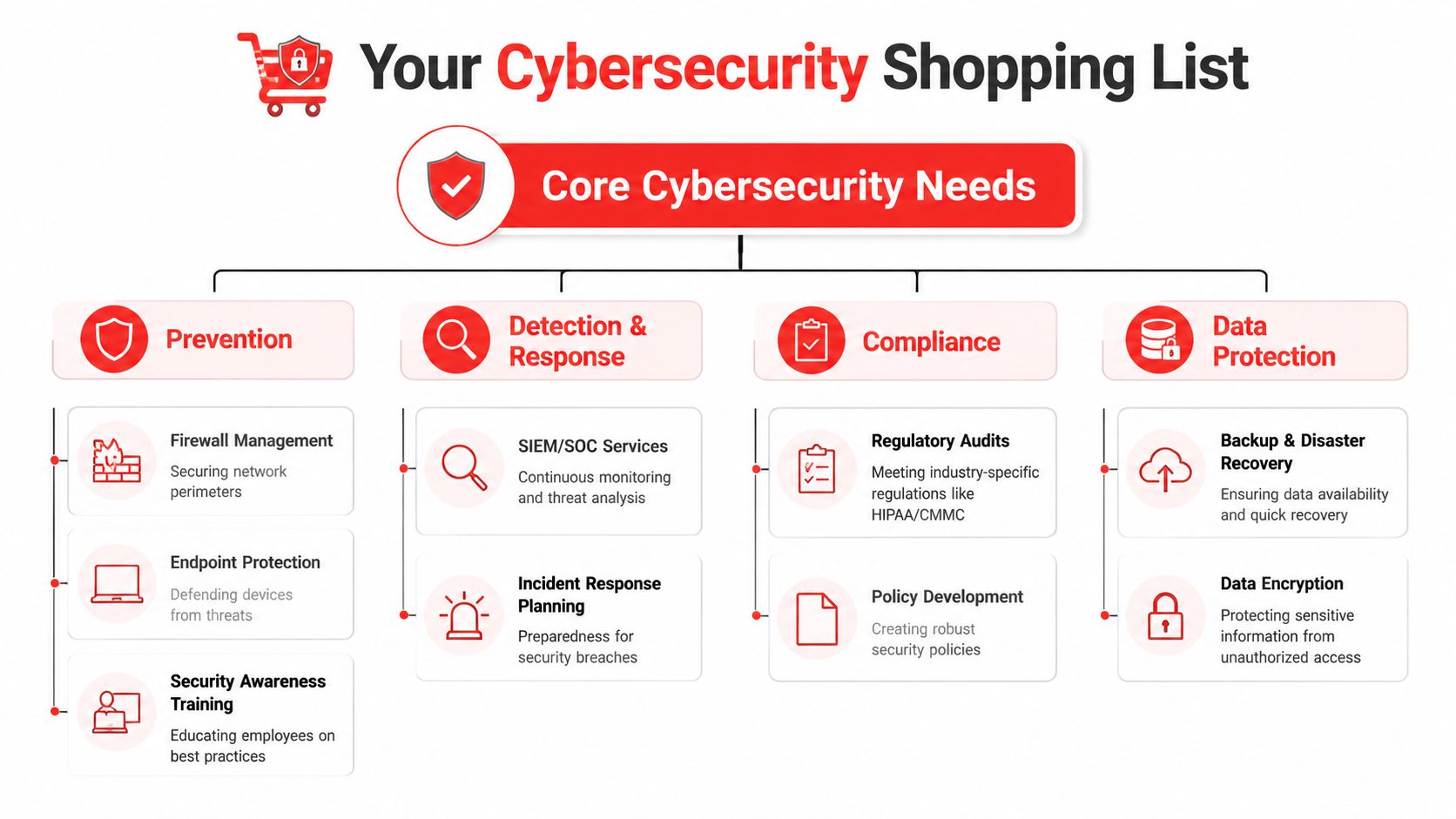
A flowchart infographic titled Your Cybersecurity Shopping List, outlining core security needs for businesses.

A useful reference is this security checklist graphic for managed protection planning. It reflects the categories a provider should be able to turn into daily operating discipline, not just a stack of tools.

What needs to be on the list

Start with the baseline controls that reduce avoidable incidents: firewall administration, endpoint protection, patch management, identity controls, and user awareness training. These are not glamorous purchases, but they cut down the number of routine openings attackers use.

Then look at detection and response. Orlando businesses often buy monitoring that creates alerts but does not create action. If your provider cannot investigate suspicious activity after hours, isolate a device, disable a compromised account, and document what happened, you have reporting, not response.

That gap matters fast. A compromised Microsoft 365 account can turn into invoice fraud. A laptop infection can reach shared files before anyone opens a help desk ticket. In industrial and field-service environments, the impact can extend beyond data. Remote access abuse, unmanaged shop-floor systems, and weak site access controls can affect production schedules, inventory systems, cameras, badge access, and field crews.

For regulated firms, the shopping list has to go further. Professional services companies in Orlando, including legal, accounting, engineering, and healthcare-adjacent practices, usually need security controls that also produce evidence. That means policy enforcement, access reviews, audit trails, retention settings, remediation records, and reporting leadership can hand to an auditor or client.

Hiring and staffing also affect this category. Teams that support regulated environments need people who understand controls, documentation, and compliance workflows, not just general IT support. That is one reason firms evaluating internal hires or outside help often review resources like GENTY recruitment for compliance.

Practical rule: if a provider can explain how they block threats but cannot show how they document controls, exceptions, and remediation, the program will struggle during audits and client security reviews.

Recovery belongs on the list too. Ask where backups live, how they are segmented from production, how often restores are tested, and who is responsible for declaring an incident and starting recovery. A backup job that shows green in a dashboard is not the same as a recovery process your team can execute under pressure.

One local option businesses evaluate in this category is Cyber Command, LLC, a Winter Springs-based managed IT and cybersecurity firm. The better question is not which logo appears on the proposal. It is whether the provider can cover prevention, active response, recovery, compliance support, and the physical-digital overlap many Central Florida industrial firms deal with in their daily operations.

The Orlando Cybersecurity Partner Evaluation Checklist

A provider can sound sharp in a sales meeting and still fall apart during a real incident. In Orlando, that gap shows up fast. A law firm dealing with client data, a CPA office answering security questionnaires, and a manufacturer with connected equipment all need different controls, different reporting, and different response plans.
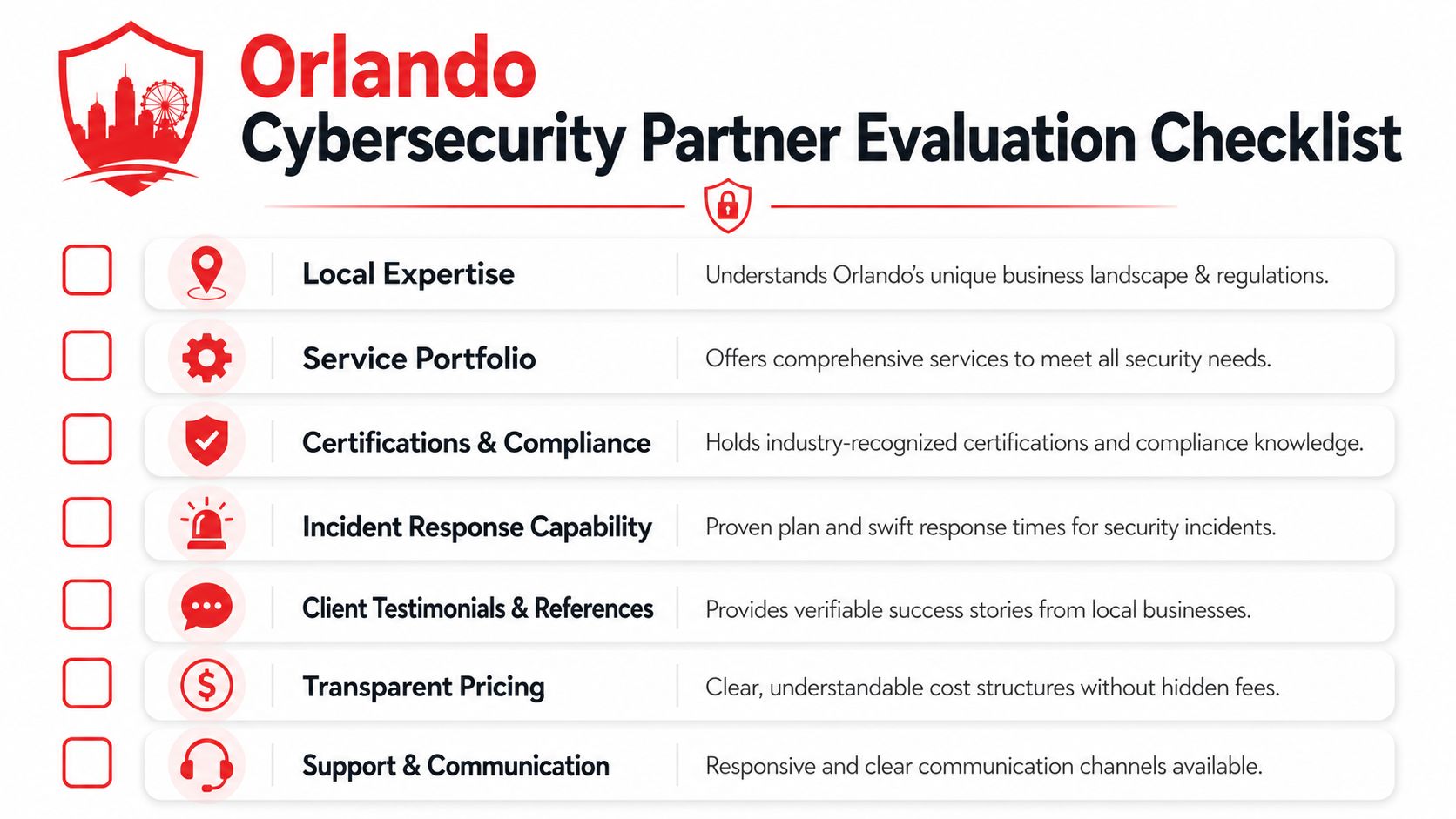
A checklist for evaluating an Orlando-based cybersecurity partner including key criteria like local expertise and pricing.

You will see plenty of polished sales material during your search, including a recognition graphic for Orlando cybersecurity services. Treat it as background, not proof. The actual test is whether the provider can explain how they protect your business, support your industry requirements, and operate under pressure.

What good looks like

Start with local support, but define what that means. For some Orlando businesses, local matters because an executive wants face-to-face incident briefings. For industrial firms in Central Florida, it can mean someone showing up when a network issue touches production, badge systems, cameras, or facility access. Cyber Command, LLC is one example of a Winter Springs-based firm businesses may evaluate. Whatever company is on your shortlist, ask where their team works from, what can be handled on-site, and what still depends on remote support.

Industry fit matters more than broad security language. Professional services firms need a provider that can deal with client confidentiality, policy enforcement, retention rules, access reviews, and audit evidence without turning every request into a custom project. Industrial and field-service firms need a team that understands the overlap between cyber risk and physical operations. If a ransomware event affects dispatch, warehouse access, connected equipment, or plant-floor systems, the response cannot stop at resetting passwords and reimaging laptops.

A strong operating model is visible in the details. Ask how they handle triage after hours, who has authority to isolate a device, how they document exceptions, and how often they review control drift. If the answer stays at the level of ticket queues and antivirus deployment, you are still looking at general IT support with security add-ons.

Reporting should match the audience. Owners and executives need plain-language updates on business risk, open issues, and what needs a decision. Office managers and operations leaders need status, responsibilities, and timelines. Technical contacts need enough detail to verify what was detected, what was contained, and what still needs work. One generic dashboard sent to everyone usually means the provider has not built a mature service model.

Red flags that should slow you down

Some warning signs are technical. Others are operational, and those are often the ones that hurt businesses most during an incident.

Evaluation area Good sign Red flag
Local support Clear explanation of on-site availability, travel coverage, and response expectations "We're local" with no service detail behind it
Industry fit Can discuss your compliance duties or operational constraints in plain language Uses the same pitch for law firms, medical offices, and industrial companies
Scope Defines what is monitored, responded to, documented, and excluded Broad promises with unclear ownership
Incident handling Can explain first-hour actions, approvals, communication flow, and containment options Tells you to open a ticket or call a general support line
Reporting Gives leadership, compliance, and technical teams different views Sends one generic report to every audience
Staffing Names who reviews alerts, who leads incidents, and how after-hours coverage works Relies on best-effort support or a vague shared queue

Some companies also need help on the internal side, especially when growth creates gaps in policy ownership, audit readiness, or regulatory documentation. If you are adding oversight roles or tightening governance, GENTY recruitment for compliance is a useful reference for what compliance-focused hiring should cover.

A practical rule applies here. If a provider cannot explain what happens in the first hour of a serious incident, they probably have a sales process that is more mature than their operations.

The right partner makes trade-offs clear. They will tell you where automation helps, where human review is safer, and where your industry requires more documentation or tighter process than a standard IT package provides.

Interview Questions That Reveal The Truth

A 2:13 a.m. alert hits on a Friday. A staff mailbox is sending phishing emails, or a plant workstation starts talking to a server it should never reach. The sales version of support sounds fine until that moment. Your questions should test what the provider will do under pressure, how they document it, and whether their process fits the way your Orlando business operates.

Questions about operations under pressure

Ask for a step-by-step answer. If they stay vague, press for names, timing, and approvals.

  1. What happens when a serious alert fires after business hours?
    Look for a real workflow. Who receives the alert first, who confirms whether it is real, who contacts your team, and what they can contain before your office opens again.

  2. What can you isolate automatically, and what still requires human approval?
    Good providers can explain where automation is safe and where it creates business risk. That matters for Orlando firms that cannot afford unnecessary disruption, especially medical practices, law offices, and industrial operations running fixed schedules or production windows.

  3. How do you reduce alert fatigue so real incidents are not buried?
    The useful answer is operational, not marketing language. Ask how they tune detections, who reviews noisy alerts, how often rules are adjusted, and what gets escalated to a human analyst. If they point to certifications, dashboards, or a cloud partner badge example, ask what changed in day-to-day response quality because of that relationship.

  4. Describe your onboarding process for a firm our size and industry.
    You want to hear more than agent deployment. A solid answer covers asset inventory, privileged access, email exposure, backup review, vendor access, remote work risk, and any compliance obligations tied to your business.

One short rule helps here. If they cannot describe the first hour clearly, they probably have not run enough incidents.

Questions about compliance and accountability

For professional services firms in Central Florida, weak providers get exposed fast. Law firms, accounting practices, wealth advisors, and healthcare groups all handle sensitive data, but they do not face the same documentation burden or client scrutiny. Ask questions that force the provider to separate security work from audit support.

  • What evidence do you provide for audits, cyber insurance reviews, or client security questionnaires?
  • How do you document remediation, exceptions, policy changes, and recurring risk issues?
  • Which compliance tasks do you handle directly, and which stay with our internal team or outside counsel?
  • How do you support mailbox security, account takeover prevention, and executive impersonation risk?
  • What reporting goes to ownership, and what reporting goes to the people handling day-to-day operations?

A serious provider will answer in plain language. They should know that a managing partner wants business impact and open risk decisions, while an office manager or internal IT contact needs task-level detail and deadlines.

Questions for industrial and hybrid environments

Orlando area manufacturers, logistics firms, field service companies, and facilities operators need a different line of questioning. Their risk is not limited to email and file access. It often crosses into badge systems, cameras, vendor remote access, plant-floor devices, and shared credentials on aging equipment.

Ask these directly:

  • How do you handle environments that include both office systems and operational equipment?
  • What is your process when a cyber event affects production, shipping, building access, or safety systems?
  • How do you work around legacy devices that cannot support standard security controls?
  • How do you review third-party remote access used by maintenance vendors or equipment providers?
  • What parts of the environment would you segment first, and why?

The right answer usually includes trade-offs. In industrial settings, immediate isolation can protect the network but interrupt operations. Sometimes that is the right call. Sometimes containment has to be staged around safety, production, and recovery reality. A provider that has worked in these environments will say that plainly.

Questions that expose misalignment early

A few business questions can save you months of frustration.

  • How do you balance tighter controls with the way our staff work?
  • What would you change in the first 90 days, and why those items first?
  • Based on what you have heard so far, where do you think our biggest risk sits today?
  • What habits or workflows would our team need to change for your security plan to work?

Clear answers matter more than polished ones. Good partners explain decisions, boundaries, and friction points before the contract is signed. That is how you tell whether you are buying real operational support or a nice presentation.

Decoding Pricing Contracts and Service Guarantees

A lot of cybersecurity contracts look simple until the first emergency, office change, or audit request. Then the exclusions start showing up.
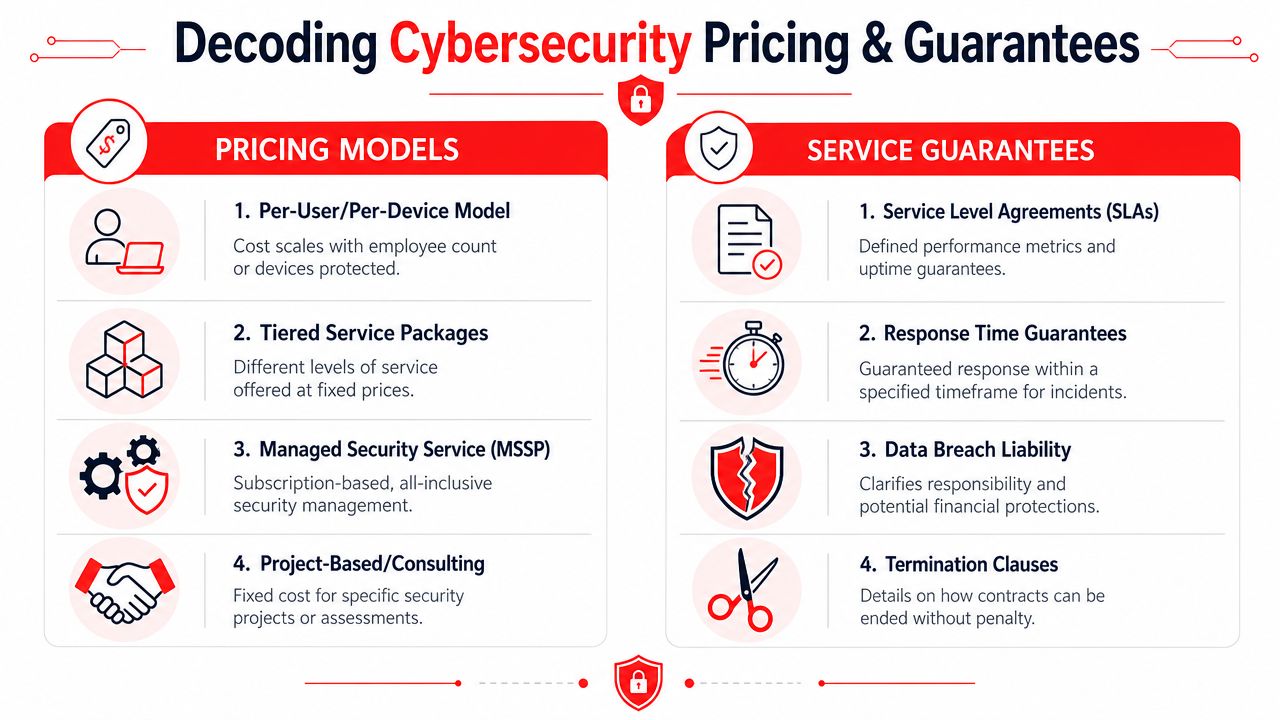
An infographic detailing various cybersecurity pricing models and service guarantees for businesses to consider when hiring providers.

If a provider highlights partner status or platform relationships, you may see visuals like this cloud partner badge example. Those badges can signal ecosystem familiarity, but they don't tell you how billing behaves when you need help.

How pricing models behave in the real world

Most proposals fall into a few patterns.

Per-user or per-device pricing is easy to understand. It can work well for stable office environments. The downside is that costs can become fragmented if key protections, remediation work, projects, or compliance tasks sit outside the recurring fee.

Tiered packages look tidy on paper, but they can create awkward decisions. A growing firm may discover that the package it bought doesn't include enough reporting depth, incident response support, or backup oversight.

All-inclusive managed service pricing offers more predictability if the scope is clearly written. That model is often a better fit for businesses that want fewer surprise bills and tighter alignment between support and security. But “all-inclusive” only means something if the exclusions are narrow and explicit.

Project-based consulting is useful for assessments, policy work, remediation planning, or one-time compliance efforts. It's usually not enough by itself for an ongoing threat environment.

What to read carefully before you sign

Read the service agreement like a crisis document, not a brochure.

  • Response terms: Does the contract distinguish between a general support issue and a security incident?
  • Remediation ownership: Who performs containment, cleanup, recovery, and user communication?
  • Licensing language: Are core protections bundled, or can the provider increase your cost later through add-on licensing?
  • Project exclusions: Office moves, infrastructure upgrades, major remediation, and audit preparation often trigger separate fees.
  • Termination terms: If the relationship goes sideways, how hard is it to leave with your documentation, configurations, and data intact?

The best contract language removes ambiguity before there's stress. The worst language sounds flexible until a real incident forces interpretation.

Service guarantees need the same scrutiny. A fast first response is useful, but it isn't the whole story. If the agreement says someone will “respond” quickly, ask what that word means. Acknowledging a ticket is not the same as beginning containment. Logging an alert is not the same as mobilizing action.

Also look for plain ownership language around backups, testing, compliance reporting, and third-party coordination. Many business owners assume these things are included because they were discussed in sales meetings. If they aren't written into the contract, treat them as uncertain.

A clean agreement doesn't have to be short. It has to be specific.

Seeing Success What The Right Partnership Looks Like

The difference between a vendor and the right partner usually shows up in ordinary business moments, not dramatic marketing stories.

A professional man and woman in business attire shaking hands in a modern office environment.

Three local scenarios that show the difference

A Kissimmee law firm gets asked for security documentation during a client review. The wrong provider talks about antivirus, firewalls, and generic best practices. The right one produces policy records, remediation evidence, access control documentation, and a clear explanation of how the firm's layered controls support audit readiness. That's why the compliance-first security stack matters for regulated SMBs. As noted in Cyber Command's Central Florida compliance-focused guidance, these firms don't need “hacking” services first. They need proof of security for regulators.

A Sanford-area industrial company is standardizing infrastructure across office and operational environments. The weak approach secures endpoints and email but ignores the physical side of risk. The stronger approach coordinates digital controls with facility access, surveillance awareness, and operational continuity. For firms with field crews, yards, equipment, and shop space, cybersecurity can't stop at the login screen.

An Orlando medical practice gets hit by a phishing attempt that reaches staff inboxes early in the day. Good security doesn't mean nobody ever clicks. It means the practice has layered defenses, staff awareness, response discipline, and recovery procedures that keep disruption contained. The office manager knows who to call. Leadership gets an explanation they can understand. The business keeps moving.

For advisory and professional service firms trying to improve client-facing trust while tightening internal process, this 2026 compliance guide for advisors offers a useful lens on how service expectations and compliance discipline increasingly overlap.

The best outcome isn't flashy. It's steadier operations, fewer surprises, cleaner audits, and less executive time spent chasing avoidable problems.


If you're evaluating an Orlando cybersecurity company and want a practical conversation about compliance, incident response, backup resilience, and industry-specific risk in Central Florida, Cyber Command, LLC is one local option to consider. The firm is headquartered in Winter Springs, Florida, has been operating since 2015, and provides managed IT and cybersecurity support with a dedicated 24/7/365 SOC for small and midsized businesses in the Orlando area.

Central Florida IT Support: A 2026 Buyer’s Guide

You're probably dealing with one of two problems right now.

Either your team is losing time to constant small IT issues. Password resets, flaky Wi-Fi, slow remote access, printers that fail when you need them most, software vendors blaming your network, and staff waiting around because nobody owns the problem. Or you've had a more serious scare. A suspicious login alert. A ransomware warning from your insurance broker. A compliance question from a client. A server outage during business hours when every minute felt expensive.

That's the point where “we just need someone to fix computers” stops being enough. In Central Florida, IT support has become a business continuity decision. For firms in Orlando, Winter Springs, and nearby cities, the key question isn't whether you can find help. It's whether the provider you choose can keep operations running, reduce security exposure, and support the way your industry operates.

Table of Contents

Why Your Central Florida Business Needs a New IT Strategy

A common Central Florida scenario looks like this. A practice manager in Orlando finds out the phones are up but the clinical system is crawling. A law office in Winter Springs can't open matter files before a client meeting. A field service company has crews waiting because someone can't connect to dispatch tools. In each case, the problem starts as “IT is down,” but the business impact is much larger. Revenue pauses, staff confidence drops, and leadership realizes there isn't a real plan.

A stressed businessman sits at his desk in an office while experiencing IT downtime at his computer.

Break-fix support fails in moments like this because it only reacts after damage has already started. It doesn't harden systems ahead of time, it doesn't monitor for suspicious behavior around the clock, and it usually doesn't connect technical work to business priorities like uptime, compliance, or vendor accountability.

The market around you has matured. Florida's Data Processing & Hosting Services industry reached $21.8 billion in 2026, expanded at an average annual rate of 6.2% since 2021, and includes nearly 6,000 firms, according to IBISWorld's Florida industry data on data processing and hosting services. That matters because it signals something bigger than vendor abundance. Businesses across the state are investing in managed infrastructure, cybersecurity support, cloud operations, and ongoing service models instead of waiting for the next outage.

What the old model gets wrong

Reactive support creates a bad incentive structure.

  • It waits for failure: You pay after disruption starts.
  • It rewards volume: More incidents can mean more billable work.
  • It hides risk: Security gaps often stay invisible until an audit, insurance review, or breach forces them into the open.

Practical rule: If your IT provider mostly shows up when something breaks, you don't have a strategy. You have a repair arrangement.

What a new strategy looks like

A stronger model treats Central Florida IT support as part operations, part risk management, and part planning. That means continuous monitoring, tested escalation paths, clear ownership of vendors and licenses, and security controls that fit your industry.

For business owners, the shift is simple. Stop asking, “Who can fix this?” Start asking, “Who can keep this from interrupting us again?”

Decoding IT Support Services What You Actually Get

A lot of business owners buy IT support without getting a clean explanation of what they're paying for. That's where confusion starts. One provider says “managed services.” Another says “helpdesk.” Another says “co-managed IT.” Those terms aren't interchangeable.

Break-fix versus managed services

The easiest comparison is car ownership.

Break-fix IT is like driving until the engine light flashes, then calling for a tow. You only spend money when there's a visible problem, but the downtime is expensive and the repair is always urgent.

Managed IT services are closer to a maintenance plan. Systems get monitored, patched, reviewed, and supported before small issues become business interruptions. You're paying for prevention, not just repair.

That difference changes everything. In a break-fix model, your provider's work begins when your staff is already blocked. In a managed model, the provider should be reducing the number of those disruptions in the first place.

The core services most SMBs should expect

If you're shopping for Central Florida IT support, these are the services that usually matter most:

  • Helpdesk support: Staff need a direct way to get help with login problems, device issues, software errors, and day-to-day troubleshooting.
  • Monitoring and maintenance: Servers, workstations, firewalls, backups, and key applications should be watched continuously, with routine patching and health checks.
  • Endpoint protection: Laptops and desktops need security controls, not just antivirus installed once and forgotten.
  • Vendor management: Someone should own the calls with your internet provider, line-of-business software company, copier vendor, and phone system support.
  • Backup and recovery coordination: Backups only matter if they're monitored and restoration is practical under pressure.

A provider that only resolves tickets is handling symptoms. A provider that documents systems, monitors trends, and fixes root causes is managing your environment.

Where co-managed IT fits

Some organizations have an internal IT employee or a small internal team, but they still need outside support. That's where co-managed IT makes sense.

A good co-managed arrangement doesn't replace your internal staff. It fills the gaps. That might mean after-hours coverage, cybersecurity operations, escalation support for complex infrastructure work, or project assistance during migrations and office changes.

Here's the practical test:

Situation Better fit
No in-house IT, constant interruptions, unclear security ownership Fully managed IT
One internal IT generalist who's overloaded Co-managed IT
Only calling someone when things break Break-fix, but with higher risk

The right model depends on how much internal ownership you already have. What doesn't work is paying for a premium label while still operating like a reactive shop.

The Non-Negotiable Features of Modern IT Support

A provider can sound polished in a sales call and still leave you exposed. The features that matter most aren't cosmetic. They directly affect how fast incidents get contained, how well your systems stay available, and whether your business can pass client or regulatory scrutiny.

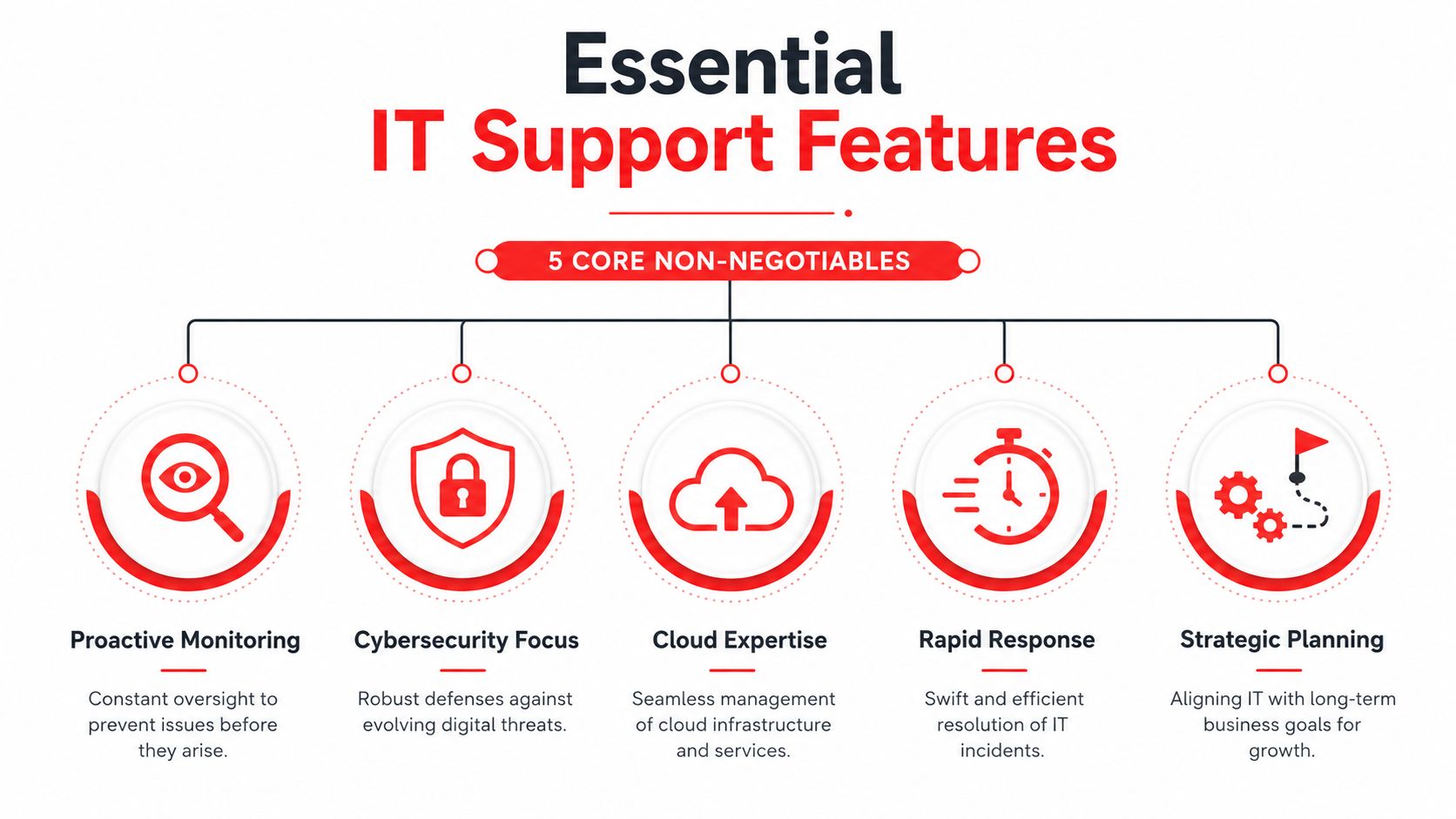
An infographic showing the five core non-negotiable features of professional IT support services for businesses.

Live support that exists after business hours

If your provider only answers during office hours, you're accepting a blind spot. Suspicious logins, failed backups, internet outages, and locked accounts don't politely wait for Monday morning.

Ask whether the helpdesk is live, who answers, and what happens at night, on weekends, and on holidays. You want a real operating model, not an answering service that creates a ticket and delays action.

A real SOC, not just security software

Many businesses buy tools and assume that means they have cybersecurity covered. They don't.

A Security Operations Center matters because software generates alerts, but people decide what those alerts mean and what to do next. If no one is actively reviewing behavior, investigating signs of compromise, and responding with urgency, your defenses are incomplete.

For organizations reviewing options such as managed IT security services in Orlando, the key question is whether the provider can do active threat hunting and incident response, not just install software and send reports.

Compliance knowledge tied to your industry

Compliance isn't a PDF policy sitting in a shared folder. It affects workstation setup, access controls, audit logging, vendor choices, user permissions, documentation, and how incidents get handled.

That's why security baselines matter. CIS Benchmarks are developed by over 500 global cybersecurity experts and provide guidance across 25+ vendor product families to reduce attack surface and support compliance mandates such as HIPAA and PCI DSS, as explained in BitLyft's overview of CIS Benchmarks. If a provider can't explain how they harden systems against common attack paths, they're not operating at a mature level.

Hardened configuration beats good intentions. Most avoidable security incidents start with weak defaults, poor permissions, or unmonitored change.

Flat-rate pricing that aligns incentives

Hourly billing sounds flexible until the invoice arrives after a bad month. A better model aligns the provider's incentives with yours. If they make more money when things break, you'll never get true prevention.

Predictable pricing also helps leadership make decisions faster. Security improvements, patching, documentation work, and user support stop feeling like optional extras when they're built into the agreement.

A local presence with operational accountability

Remote support handles a lot, but locality still matters. Offices relocate. Internet circuits fail. Equipment has to be deployed. Leadership teams want face-to-face planning conversations at times that matter.

A provider serving Orlando, Winter Springs, and surrounding Central Florida cities should understand the business environment, the pace of growth, and the practical demands of multi-site operations in the region.

One factual example is Cyber Command, LLC, which provides U.S.-based helpdesk, managed and co-managed IT, cloud services, and SOC-led cybersecurity support for organizations in Orlando and Winter Springs. That kind of operating model is worth looking for because it combines strategic planning with local service access.

Navigating IT Support Pricing Models in Central Florida

Most business owners don't mind paying for IT. They mind surprises. The pricing model you choose will shape not only cost, but also behavior, responsiveness, and how much risk gets ignored until it becomes expensive.

The three models you'll usually see

Hourly or break-fix is the simplest to understand. You call when something breaks, and you pay for labor. It can look cheaper on paper because there's no recurring commitment. The downside is that budgeting becomes unstable, preventive work often gets deferred, and no one has much reason to reduce future incidents.

Per-device pricing charges based on the number of laptops, desktops, servers, or network components. This can work in narrow environments, but it gets messy fast. Users often work across multiple devices, cloud apps, phones, and remote connections. Device counts don't always reflect actual support demand.

Per-user pricing tends to align better with how modern businesses operate. People, not just hardware, create support needs. A user may need identity management, email protection, endpoint support, software access, compliance controls, and helpdesk service across several systems.

The local benchmark that matters

In this market, enterprise-grade managed IT support for small and mid-sized businesses typically ranges from $119 to $189 per user per month, according to Central Florida managed IT pricing guidance from Kelley IT Support. That range reflects a broader shift toward proactive, all-inclusive service instead of ticket-driven support.

If you're comparing quotes for managed IT services in Orlando, use that range as a conversation starter, not as the only decision point. A lower price can still be expensive if it excludes after-hours support, project work, security monitoring, onboarding, reporting, or vendor management.

What to ask when the quote looks attractive

Cheap proposals often hide work in the margins. Ask specifically about these items:

  • After-hours support: Is it included or billed separately?
  • On-site visits: Are they part of the agreement?
  • Projects for covered systems: Are routine changes included?
  • Security stack: Does the price include monitoring, response, and compliance support, or just software licenses?
  • Reporting and planning: Will you get usable documentation and regular review meetings?

If the agreement is hard to explain in plain English, billing disputes are likely later.

The best pricing model is the one that gives you cost predictability and removes incentives for reactive chaos. You want the provider paid to keep things stable, not paid extra every time your staff loses a day to preventable issues.

Tailoring IT Support for Your Florida Industry

A Winter Park medical practice gets locked out of its scheduling system on Monday morning. A downtown Orlando law firm finds that a staff member shared the wrong case file from a synced folder. A manufacturer in Seminole County loses connectivity between the office and the shop floor during production. All three situations look like "IT problems" at first. They are not the same business risk, and they should not be supported the same way.

Central Florida IT support should match the way your business makes money, stores sensitive data, and handles downtime. Industry fit matters because the cost of failure is different in healthcare, legal, and industrial environments. The provider you choose should already understand those failure points and have controls in place before the first incident.

A professional man and woman discussing IT solutions on a tablet computer in a modern coffee shop.

Healthcare practices need compliance built in

Small and midsize healthcare practices usually operate with limited internal IT oversight. The owner or administrator is already carrying patient volume, staffing pressure, billing issues, and vendor coordination. Compliance work often gets pushed into the margins until an audit, ransomware event, or privacy complaint forces attention.

That creates a predictable mistake. Practices buy general support and assume compliance will somehow be covered.

It usually is not.

Healthcare IT support should include clear access controls, documented onboarding and termination procedures, audit logging, encrypted devices, backup validation, incident response, and guidance on business associate obligations. Patient intake forms, appointment reminders, website tracking scripts, and third-party plugins also deserve scrutiny. These Cincinnati HIPAA web design guidelines are a useful example of how privacy exposure can start on the public-facing side of the business, not just inside the EHR.

A good healthcare provider reduces operational risk and documentation risk at the same time. If you want a practical framework for screening providers, this guide on how to choose a managed service provider for regulated environments helps separate generic support firms from teams that can handle compliance pressure.

Ask direct questions:

  • Who owns HIPAA-related documentation support? Policies, risk reviews, vendor records, and incident records should not be an afterthought.
  • How are user permissions reviewed? Shared logins and stale accounts are still common in smaller practices.
  • What happens after a suspected breach? You need a defined response process, not improvised troubleshooting.
  • How are backups tested? A backup that has never been restored is not a control.

Legal firms need control over confidentiality

Law firms need disciplined systems that protect privileged information without slowing down billable work. That means secure email, file permissions that reflect matter access, mobile device controls, and remote access that does not create shortcuts around security.

The trade-off is usability versus control. If security gets in the way of attorneys, staff will route around it with personal email, unsanctioned file sharing, or local copies of sensitive documents. If controls are too loose, one mistaken share or compromised mailbox can create a client trust issue and a reporting issue at the same time.

A legal-focused IT provider should understand document retention, secure collaboration with outside counsel and clients, and the need for rapid support during filings, hearings, and closings. Fast ticket response matters, but confidentiality controls matter more.

Industrial teams need uptime that covers operations, not just office IT

Industrial and field-service companies in Central Florida usually run two environments at once. One side looks like standard business IT. The other includes warehouses, plant floors, dispatch systems, job sites, remote crews, shared terminals, and specialized equipment that cannot be treated like a front-office laptop fleet.

That split changes support priorities.

A provider serving industrial operations should be prepared to handle network segmentation, vendor coordination for equipment-connected systems, remote connectivity, rugged or shared devices, and recovery planning for production-impacting outages. The question is not whether they can reset passwords. The question is whether they can keep operations moving when an ISP fails, a workstation tied to production goes down, or a line-of-business application stops talking to the rest of the environment.

Generic office support often misses those dependencies. Businesses pay for that gap later in delayed shipments, idle labor, and preventable downtime.

The right fit is simple to define. Choose a provider that understands the systems your industry depends on, the compliance exposure you carry, and the true cost of a bad day.

Your Vendor Evaluation Checklist and RFP Questions

A ransomware alert at 6:40 p.m. on a Friday tests your provider faster than any sales presentation. A medical practice may need to protect patient data and keep Monday appointments intact. A law firm may need to confirm whether client files were exposed. An industrial company may need to decide whether to isolate a plant system before downtime spreads into shipping and payroll. Vendor evaluation should be built around those moments, because that is when weak processes become expensive.

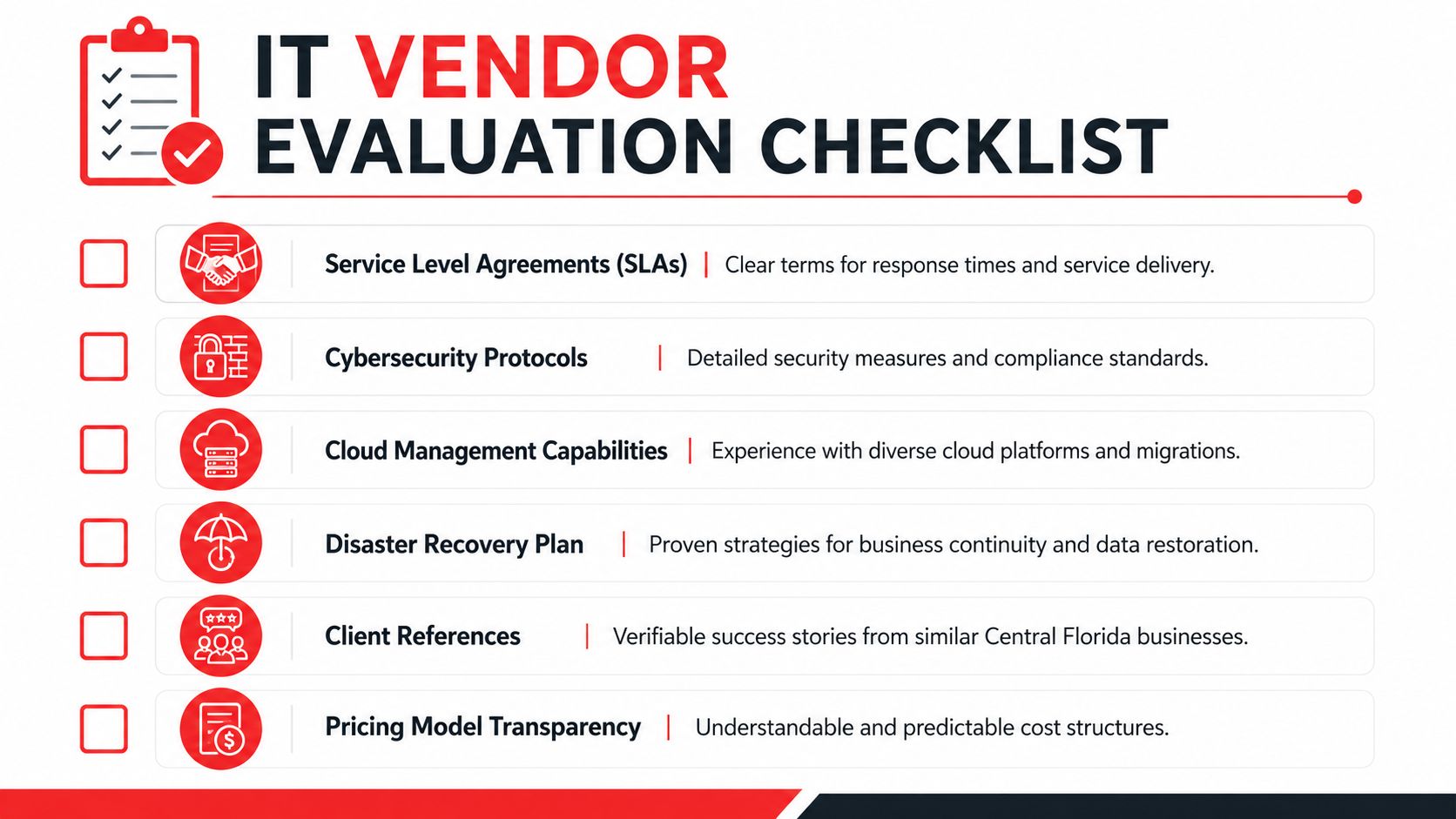
A checklist for evaluating IT vendors featuring key criteria like SLAs, cybersecurity, cloud capabilities, and pricing transparency.

By the time you start taking meetings, several providers will sound polished. The useful question is whether they can explain their operating model under pressure. Ask how they handle after-hours alerts, failed backups, software vendor disputes, account compromise, internet outages, office moves, and leadership requests that conflict with security policy. Clear answers usually reflect a mature service model. Vague answers usually mean you will be coordinating the crisis yourself.

The short list to use in vendor meetings

Use a practical screening process. If you want a broader framework before issuing an RFP, this guide on how to choose a managed service provider is a useful companion.

In the meeting, press on six areas:

  • Incident response: Ask who reviews security alerts after hours, who has authority to isolate a device or account, and how fast leadership gets notified.
  • Compliance support: Ask how they document access, policy enforcement, audit evidence, retention controls, and user security training for regulated environments.
  • Backup accountability: Ask how often backups are tested, how recovery is validated, and what systems fall outside the standard backup scope.
  • Operational coverage: Confirm whether support extends to cloud apps, identity systems, firewalls, remote access, line-of-business platforms, and vendor coordination.
  • Pricing boundaries: Require a plain definition of included work, billable project work, onsite charges, and after-hours exceptions.
  • Strategic discipline: Ask whether they provide lifecycle planning, risk reviews, documentation updates, and quarterly recommendations tied to business risk.

One useful detail here is policy depth. For example, AI Video Detector's firewall recommendations show how filtering decisions can support a wider security program when they are based on actual business exposure instead of generic blocking rules.

RFP questions that expose weak providers quickly

Yes-or-no questions let providers hide behind broad claims. Use questions that force them to describe process, ownership, and limits.

  1. Describe your step-by-step response to a suspected account takeover discovered outside business hours. Who responds, who approves containment, and how is the client notified?
  2. What security controls do you standardize across endpoints, servers, Microsoft 365 or Google Workspace, firewalls, and remote access?
  3. How do you support clients that must meet HIPAA, client confidentiality requirements, insurance questionnaires, or documented security controls during audits?
  4. Which services are included in the recurring fee, and which events trigger project fees, emergency fees, or third-party consulting charges?
  5. What is your process for backup testing and recovery verification, and how often do you perform full restore tests for critical systems?
  6. Who owns communication with internet, telecom, software, and hardware vendors during an outage or application failure?
  7. What documentation do you maintain, how often is it updated, and who reviews it with business leadership?
  8. Give an example of a client situation where you had to balance uptime, compliance, and security risk. What trade-off did you recommend and why?

Strong providers answer with specifics. They can explain the difference between a security event and a support ticket, the limits of their scope, and the situations that require client approval.

That last point matters. In healthcare, legal, and industrial environments, the wrong provider is rarely exposed by routine password resets. The real test is whether they can reduce legal exposure, contain cyber incidents, and keep the business operating when the situation is unclear. If they cannot explain that in plain language, keep looking.

Taking the Next Step Toward Secure and Reliable IT

Choosing Central Florida IT support isn't a commodity decision anymore. It affects whether your staff can work without interruption, whether your client and patient data stays protected, and whether growth creates efficiency or chaos.

The businesses that get the best outcomes usually make the same shift. They stop buying reactive help and start buying operational discipline. That means live support, security monitoring, compliance awareness, pricing clarity, and a provider that understands the pace and risk profile of Central Florida industries.

If you're reviewing your current setup, start small. Pull your latest IT invoice, your cybersecurity insurance questionnaire, and your list of recurring user complaints into one meeting. Then ask whether your current provider is reducing those problems or just processing them.

For leaders that want a practical next step, it can also help to review focused resources outside the usual IT sales material. For example, these AI Video Detector firewall recommendations are a useful reminder that policy-level filtering decisions can support a broader security posture when they're tied to real business risk.

The right IT partner should make your environment calmer, more secure, and easier to manage. If that's not happening, the problem probably isn't your staff. It's your support model.


If you want a practical second opinion, Cyber Command, LLC offers Central Florida organizations a straightforward way to evaluate managed IT, co-managed IT, helpdesk coverage, and cybersecurity readiness. A short, no-obligation discussion can help you identify support gaps, pricing blind spots, and compliance risks before they turn into outages or audit problems.

Orlando Managed IT Services: A 2026 Guide for Businesses

You're probably dealing with some version of the same problem many Central Florida business owners face. A computer freezes in the middle of a client deadline. A staff member can't access a shared file from home. Your line-of-business software runs slowly for no obvious reason. Then the invoice arrives from the last emergency IT fix, and once again the cost wasn't planned.

That's usually the point where owners start asking a better question. Not “Who can fix this one issue?” but “Why does IT keep getting in the way of work?”

For Orlando companies, that question matters more than it used to. Cloud systems are harder to manage, cyber risk keeps rising, and many businesses now depend on remote access, mobile staff, and nonstop uptime. The broader market reflects that shift. The U.S. managed services market is projected to reach USD $71.14 billion in 2026 and grow at an 11.01% CAGR to USD $119.92 billion by 2031, driven by cloud complexity and security demands in industries including professional services and healthcare, according to Mordor Intelligence's U.S. managed services market outlook.

For local owners, that trend isn't abstract. It shows up in how you budget, how you protect client data, and how quickly your team can get help when something breaks. That's where Orlando managed IT services become less of a convenience and more of an operating decision.

Table of Contents

Is Your IT Supporting or Slowing Your Orlando Business

A typical day starts with small delays. An employee logs in and waits too long for applications to load. Someone in accounting can't print to the office copier. A manager texts after hours because remote access stopped working right before payroll approval. None of those issues sounds catastrophic on its own. Together, they drain time, interrupt service, and chip away at trust inside the business.

A frustrated office worker stares at a computer screen showing a loading symbol, representing IT issues.

For a law office, that may mean delayed filings or missed client communication. For a dental practice, it may mean front-desk bottlenecks and frustration when schedules or imaging systems lag. For a construction or engineering firm, it can show up as file sync problems between field and office teams. The details change by industry, but the business impact is the same. Work slows down because systems aren't being managed with consistency.

The hidden cost of reactive support

The old habit is to call someone when something breaks. That feels cheaper until you look at the pattern. Problems repeat. Devices fall behind on updates. Backups exist, but nobody checks whether they can restore. Security settings vary from one user to another because no one owns standards.

Most businesses don't lose time from one dramatic outage. They lose it from dozens of smaller failures that nobody prevented.

Reactive support also makes budgeting harder. If your IT plan depends on emergencies, your costs are tied to disruption. That's a rough way to run any operation, especially in a market where labor, insurance, and compliance demands already put pressure on margins.

What a business owner actually needs

Most Orlando business owners don't need more jargon. They need someone watching the environment, keeping systems current, reducing avoidable issues, and giving clear answers when decisions have to be made. That's what managed services should do.

A real managed IT relationship changes the role of technology inside the business:

  • Stability first: Fewer recurring issues because someone handles maintenance before failure.
  • Security built in: Protection isn't bolted on after an incident. It's part of daily operations.
  • Clear budgeting: A predictable service model makes planning easier.
  • Business alignment: IT decisions support hiring, expansion, compliance, and client service.

When owners start looking at Orlando managed IT services through that lens, the conversation changes. IT stops being the thing that keeps interrupting the day and starts becoming part of how the business runs cleanly.

Beyond Break-Fix Support The Managed Services Model

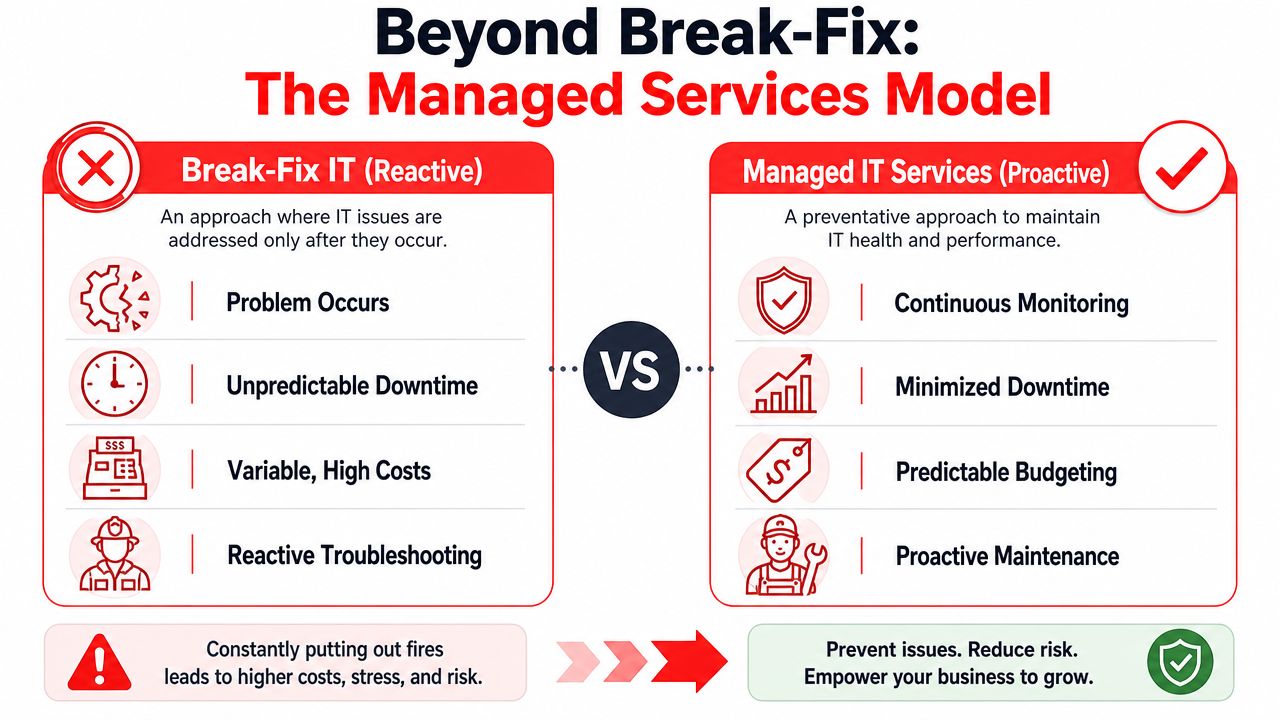
Break-fix IT works like calling a handyman after a pipe bursts. Managed services work like having a building superintendent who checks the plumbing, tests the pumps, and catches warning signs before tenants complain. That's the simplest way to understand the difference.

The break-fix model is reactive by design. A problem happens, someone opens a ticket, and the clock starts once damage is already done. Managed services reverse that order. The provider monitors systems, applies patches, reviews alerts, and handles routine support so that many issues never turn into business interruptions.

A comparison chart showing the differences between reactive break-fix IT and proactive managed IT services models.

What a true managed service includes

If you're evaluating providers, don't stop at “we offer support.” That phrase can mean almost anything. A usable managed service model usually includes several layers working together.

Area What it means in practice
Monitoring Systems are watched for failures, performance issues, and warning signs before users report them
Helpdesk Staff can reach a live support team for everyday issues like login problems, application errors, and device trouble
Patch management Operating systems and supported software are updated on a schedule instead of being ignored
Security operations Threat detection, response processes, and protective controls are part of the service
Backup oversight Backups are managed, reviewed, and tied to recovery planning
Advisory guidance Someone helps leadership make decisions about lifecycle planning, cloud changes, and risk

Plain-English definitions that matter

Some terms get thrown around so often they stop meaning anything. They shouldn't.

  • Proactive monitoring means your systems are being watched continuously for signs of trouble, not just checked after users complain.
  • 24/7/365 helpdesk means people can get help when they need it, including after hours if your operation doesn't stop at five o'clock.
  • vCIO guidance means a senior advisor helps connect IT decisions to business priorities such as expansion, office moves, compliance, or reducing operational drag.

Practical rule: If a provider can't explain their service in plain English, they probably can't explain your risks clearly either.

What doesn't work

A common mistake is buying a bundle of disconnected services and assuming that equals strategy. It doesn't. Monitoring without response planning leaves gaps. Security software without user standards creates inconsistency. Helpdesk support without documentation turns every issue into a fresh investigation.

Another weak model is “unlimited support” that often excludes the work businesses genuinely need, such as vendor coordination, covered projects, standards cleanup, or lifecycle planning. Ask what's included day to day, not just what sounds good in a proposal.

The managed services model works when it combines prevention, support, security, and planning into one operating system for the business. That's a true step beyond break-fix.

Essential IT Services for Central Florida Businesses

Central Florida businesses don't operate in a generic environment, so they shouldn't buy generic IT support. Orlando has multi-location firms, hybrid workforces, healthcare practices, professional services offices, and companies that need to stay operational through weather disruptions and fast growth. The service stack has to match that reality.

One of the clearest pressure points is distributed work. According to VikingCloud's 2026 cybersecurity statistics, 72% of business owners are concerned about future cybersecurity risks arising from hybrid or remote work environments. For Central Florida companies with satellite offices, field teams, or staff working between home and office, that concern is justified. Every remote login, unmanaged device, and rushed file-sharing habit increases risk if nobody is enforcing standards.

Services that matter more in this region

Disaster recovery isn't optional in Florida. If severe weather interrupts office access, your team still needs a way to answer clients, reach files, and continue core operations. That means backup and recovery planning has to go beyond “we have copies somewhere.” Recovery needs testing, documented priorities, and a practical order of restoration.

Cloud architecture also needs more thought than many businesses give it. Some companies moved quickly to cloud apps and remote access, then discovered they created a patchwork environment with weak permissions, duplicate tools, and no clear ownership. Businesses that want flexibility without chaos usually benefit from a structured cloud plan. If you're reviewing hosting and infrastructure options for specialized workloads, Flaex.ai's VPS setup guide offers a useful primer on where a virtual private server fits and when it doesn't.

What a solid local stack often includes

For many Orlando organizations, the essentials look like this:

  • Reliable helpdesk support: Staff need fast answers for common issues so internal friction doesn't build up.
  • Identity and access control: User accounts, permissions, and offboarding should be consistent across every system.
  • Backup and recovery planning: Not just data retention, but actual recovery sequencing and business continuity.
  • Secure networking for multiple locations: Branch offices, remote users, and mobile teams need the same baseline controls.
  • Cloud governance: Shared storage, collaboration tools, and hosted systems need structure, naming standards, and ownership.

A business with growth plans should also ask whether the provider can scale those services cleanly. Adding a new office, onboarding employees quickly, and standardizing devices should feel routine, not disruptive.

For companies sorting out cloud roadmaps, migrations, or cleanup, cloud services in Orlando can be part of a broader managed plan rather than a separate project that never connects back to support and security.

The right service mix isn't the longest list. It's the one that reduces friction for your staff and lowers risk for the business.

That's the practical test. If a service doesn't improve uptime, control, or resilience, it probably belongs outside the core package.

The Cybersecurity Imperative for Orlando SMBs

Many small and mid-sized businesses still think of cybersecurity as a separate purchase. They buy antivirus, put a firewall in place, and assume that's enough. It isn't. Security has to be part of how IT is managed every day, or the gaps show up fast.

The biggest risk isn't usually a movie-style attack. It's the combination of ordinary weaknesses. A reused password. A missed patch. A user with too much access. A suspicious login that no one reviews until damage is already done. That's why Orlando managed IT services have to include security operations, not just support tickets.

Why SMBs are exposed

The urgency is real. The 2025 Verizon Data Breach Investigations Report found that ransomware was involved in 88% of breaches affecting small and mid-sized businesses, compared with 39% in large organizations, as cited in this Central Florida SMB cybersecurity summary. If you run a smaller firm in Orlando, you can't assume attackers will overlook you because you aren't a large enterprise.

That's also why a Security Operations Center, or SOC, matters. In practical terms, a SOC is the team and process layer that watches for signs of compromise, investigates suspicious activity, and responds quickly when something doesn't look right.

What good security operations actually do

A provider can say “we take security seriously” all day. What matters is what happens operationally.

  • Active threat hunting: Analysts look for suspicious patterns instead of waiting for a full-blown incident.
  • Incident response: There's a documented process for containment, communication, and recovery when a threat is detected.
  • Continuous compliance support: Security controls are reviewed against the requirements that affect your business.
  • User and endpoint discipline: Devices, user access, and policy enforcement are managed consistently.

If your provider only talks about tools, ask who's reviewing alerts, who's making decisions during an incident, and who owns the recovery process.

That question usually separates mature providers from basic support shops.

AI, data handling, and the new risk layer

Another change business owners can't ignore is the rise of AI-enabled workflows. Teams are pasting data into assistants, summarizing documents, and experimenting with automation. That can improve productivity, but it also creates new data exposure if access rules and acceptable-use policies are weak. For leaders thinking through those risks, the AI data security guide for 2026 is a useful resource because it frames the issue around governance and data handling, not hype.

If you're reviewing what mature protection should look like in practice, cybersecurity services in Orlando should cover far more than endpoint software. The conversation should include monitoring, response, policy enforcement, recovery planning, and accountability.

Basic protection is better than nothing. It's not enough for a business that wants to stay operational after an attack. Security has to be active, staffed, and tied directly to daily IT management.

Tailored IT for Orlandos Key Industries

Industry-specific support matters because risk doesn't look the same across every business. A professional services firm prioritizes confidentiality, document access, and uptime during client deadlines. A medical practice has those same operational concerns plus patient data, device security, and heavier compliance pressure. The support model should reflect those differences.

The reason healthcare deserves special attention is simple. SentinelOne's 2026 cybersecurity statistics project that healthcare will face the highest breach costs globally, averaging USD $12.6 million per incident, according to SentinelOne's cybersecurity statistics page. For Orlando-area private practices, that isn't just a hospital problem. Smaller clinics, specialty offices, dentists, and med-spas still hold sensitive data and still need disciplined controls.

Professional services firms

Law offices, accounting practices, architecture firms, and engineering companies usually have lean internal operations. They may not have dedicated IT leadership, but they do have demanding workflows and sensitive client information.

Their biggest needs often include:

  • Document reliability: File storage, sharing permissions, and version control need to support fast collaboration without confusion.
  • Confidentiality controls: Access should follow job roles so sensitive records don't spread across the whole company.
  • Email and identity protection: Many client relationships run through email. That makes account security and suspicious-activity review especially important.
  • Uptime during deadlines: Tax filings, court dates, proposal deadlines, and submission windows don't move because a workstation failed.

A good provider for this type of business doesn't just “support computers.” They build a stable operating environment around client service and confidentiality.

Medical practices and wellness clinics

Private practices have a different pressure profile. Front-desk systems, scheduling, imaging, billing, and communication platforms all have to work together. If one part fails, patient flow and revenue both suffer.

Medical offices should expect their IT partner to address several basics well:

  • HIPAA-aware processes: Security and access decisions need to respect how patient information is stored, viewed, and shared.
  • Device oversight: Workstations, laptops, and connected clinical devices should be inventoried and managed with care.
  • Recovery planning: If a key system becomes unavailable, staff need a clear fallback process to keep serving patients.
  • Vendor coordination: Many practices rely on specialized software vendors. Someone has to coordinate support instead of forcing office staff to manage technical escalations.

In healthcare, slow systems aren't just annoying. They affect patient experience, staff stress, and the pace of care.

That same principle applies to veterinarians, orthodontists, and cosmetic practices. Their technology environments may be smaller than a hospital's, but the operational and privacy stakes are still high.

Industry fit isn't a marketing detail. It changes how support is delivered, what documentation matters, and which risks deserve the most attention.

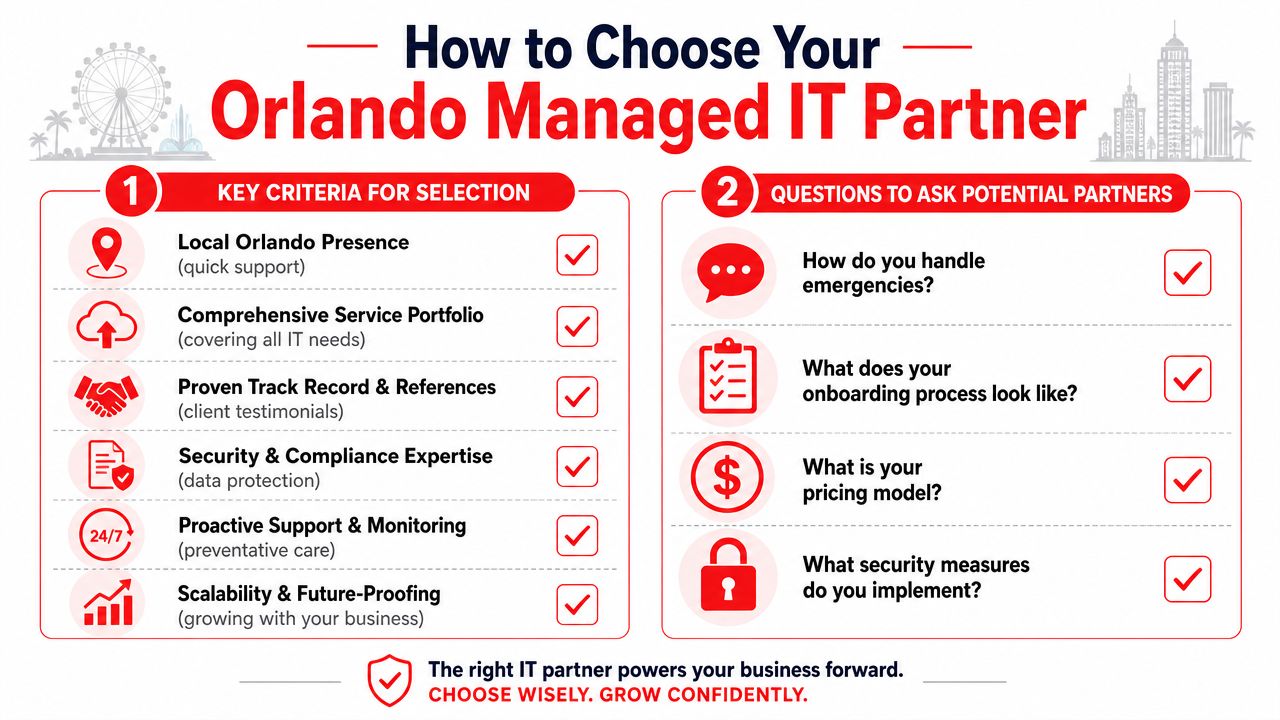
How to Choose Your Orlando Managed IT Partner

Choosing a provider gets easier when you stop thinking in terms of features and start thinking in terms of operating fit. You're not buying a list of services. You're choosing who will touch your systems, advise your team, and respond when something goes wrong.

In Orlando, pricing usually follows subscription models. Managed IT services commonly range from $100 to $300 per user per month, with monthly packages often around $1,500 to $3,000 for basic monitoring and $3,000 to $7,000 for fully managed networks including security and backup, according to this Orlando managed IT pricing overview. That range tells you what's normal locally, but price by itself won't tell you whether the service is structured well.

An infographic titled How to Choose Your Orlando Managed IT Partner listing key selection criteria and questions.

Questions that reveal the real service

Ask direct questions and listen for direct answers.

  • When an emergency happens, who responds? You want to know whether support is staffed, escalated clearly, and available when your business is open.
  • What's included in onboarding? A strong onboarding process should document users, systems, vendors, access, and major risks.
  • How do you handle security operations? Look for a concrete explanation of monitoring, investigation, and response.
  • What work is excluded? Many agreements often become murky on this matter.

One Orlando option, Cyber Command, LLC, provides fully managed and co-managed IT, cloud services, and a 24/7/365 U.S.-based helpdesk and SOC under a predictable pricing model. That type of operating structure is worth understanding when you compare providers because it speaks to staffing and accountability, not just features.

Review the SLA like an operator

A service level agreement matters because it defines what happens after the sales process ends. Don't skim it.

SLA area What to look for
Response expectations How quickly the provider acknowledges and starts working an issue
Coverage windows Whether support is tied to business hours or staffed around the clock
Escalation paths Who gets involved if an issue affects operations or security
Included services Which routine tasks are covered without surprise billing
Reporting Whether you'll receive usable visibility into support, risk, and recurring issues

If you want a practical framework before signing anything, how to choose a managed service provider is a useful checklist for evaluating service depth, pricing clarity, and operational fit.

A short buyer checklist

“Show me how you prevent recurring problems, not just how you close tickets.”

Use that as a filter. Then confirm these points:

  • Local understanding: The team should understand how Orlando businesses operate, including multi-site and compliance-heavy environments.
  • Budget clarity: Pricing should be understandable without hidden exclusions.
  • Security maturity: Protection should include process and response, not just software.
  • Scalability: The service should still work if you add staff, offices, or compliance requirements.

A provider is a fit when they reduce uncertainty, not when they offer mere promises of availability.

Your Next Step Toward Proactive IT Partnership

If your business is still handling IT one disruption at a time, you're paying for that approach in lost time, avoidable risk, and inconsistent service. The question isn't whether technology issues will happen. They will. The key question is whether someone is actively reducing the odds, responding quickly, and helping you make better decisions before problems turn into downtime.

That's what business owners should expect from Orlando managed IT services in 2026. Not a generic helpdesk. Not a patchwork of tools. A partner that combines daily support, security discipline, recovery readiness, and practical planning.

Screenshot from https://cybercommand.com

For many Central Florida companies, the right next step isn't a full technology overhaul. It's a focused conversation about where your current environment is creating friction. That might be support delays, weak documentation, inconsistent security controls, cloud sprawl, or uncertainty around recovery if a critical system fails.

A short strategy discussion can usually surface those gaps quickly. It also helps you separate real priorities from noise. If your current setup is working, that conversation should confirm it. If it isn't, you should leave with a clearer path forward and a more realistic view of what proactive support ought to look like.


If you want a practical review of your current environment, Cyber Command, LLC offers a straightforward starting point for Orlando businesses that need managed IT, co-managed support, or stronger cybersecurity operations. A short strategy call can help you identify where support is slowing the business, where risk is hiding, and what a more proactive model would look like.

Orlando Managed Service Provider: A Buyer’s Guide for 2026

A lot of Orlando business owners reach the same point the same way. A law office in downtown Orlando adds staff faster than its systems can keep up. A medical practice in Lake Nona starts worrying about phishing after a suspicious login alert. A multi-location professional services firm realizes its “IT guy” can reset passwords, but can't give leadership a clear answer on backup readiness, after-hours response, or compliance exposure.

That's usually when the search for an Orlando managed service provider starts. Not because the business wants to outsource inconvenience, but because leadership needs technology to become predictable.

The MSP model has grown well beyond outsourced helpdesk. The U.S. managed services market is projected to grow from $69.55 billion in 2025 to $116.25 billion by 2030, and the same analysis notes that 44.9% of MSPs offer disaster recovery services while 29.2% prioritize cybersecurity, which reflects a shift toward resilience rather than simple ticket handling (managed services market projections and service mix). That matters in Central Florida, where firms often need to balance growth, seasonal demand, compliance pressure, remote access, and real-world security risk at the same time.

If you're sorting through providers now, skip the generic promises. Focus on whether the provider can reduce downtime, control risk, and give you a cost model you can plan around. If you need a local starting point, this overview of IT support for small businesses in Orlando helps frame what a stronger support model should look like in practice.

Table of Contents

Is Your IT Keeping Up with Your Orlando Business

Growth exposes weak IT fast. A firm can tolerate a few annoying support issues when it has a small team in one office. Once it has client deadlines, cloud apps, remote users, compliance obligations, and sensitive data moving across multiple devices, small gaps become business problems.

A stressed businessman looking at an application not responding error on his computer screen in an office.

In Orlando, that pressure shows up in familiar ways. Healthcare practices need dependable access to records and systems. Accounting and legal teams need secure document handling and consistent workstation performance during deadline-heavy periods. Multi-site businesses across Central Florida need standardization, not a different support experience in every location.

What usually fails first isn't the hardware. It's the operating model. Support becomes reactive. Backups exist, but nobody in leadership knows whether recovery will work. Security tools are installed, but no one is actively watching for suspicious behavior after hours. Vendor sprawl grows, and no one owns the whole environment.

A good MSP relationship starts when the business stops asking, “Who fixes this?” and starts asking, “Who is accountable for keeping this stable and secure?”

That's why an Orlando managed service provider should be evaluated as a business partner, not a repair shop. The right provider helps you turn scattered IT activity into managed operations with defined response paths, clearer ownership, and fewer surprises.

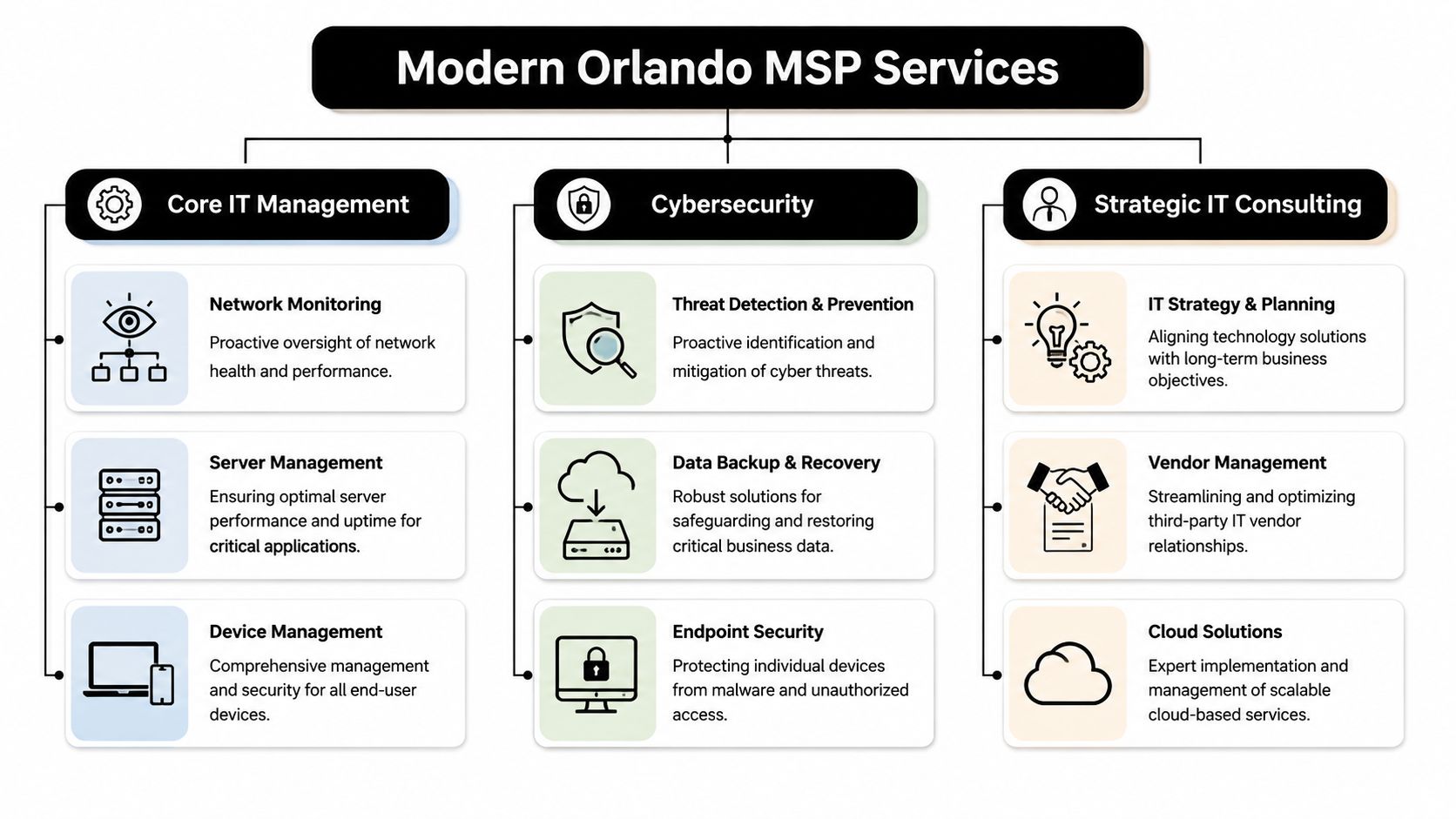
Beyond Helpdesk What a Modern Orlando MSP Delivers

A modern MSP should handle support, but support is the floor, not the ceiling. If all you're buying is ticket response, you're still managing too much risk internally.

A diagram illustrating IT services provided by a managed service provider in Orlando, including core IT, cybersecurity, and consulting.

The baseline is proactive operations

A competent Orlando managed service provider should continuously manage the often-overlooked parts of IT that create outages when neglected.

That includes:

  • Monitoring and alerting: Watching servers, endpoints, network health, storage, and key business systems so the team can respond before staff starts calling.
  • Patch and endpoint management: Keeping devices current, enforcing standards, and reducing the number of avoidable security gaps created by inconsistent updates.
  • Backup oversight: Not just running backups, but checking job success, retention, and recovery readiness.
  • Vendor coordination: Owning the handoff between your business and internet, cloud, software, telecom, and line-of-business vendors when issues cross systems.

For a busy office manager or administrator, that operational discipline matters more than technical jargon. It means fewer interruptions, fewer mystery failures, and less time spent chasing multiple vendors.

Security has to operate every day

Cybersecurity can't be bolted onto managed IT anymore. If a provider treats it as an optional add-on, you should assume the service model is behind where the market already is.

A stronger MSP will pair endpoint protection with log visibility, incident response playbooks, user access review, phishing defense, backup isolation, and escalation procedures that continue after the business day ends. If you want a practical example of what that operating layer can look like, UTMStack managed SIEM is a useful reference for understanding how centralized detection and response supports ongoing security operations.

Practical rule: If a provider says it offers “24/7 security,” ask what happens at 2:00 a.m. Who sees the alert, who investigates it, and who contacts your business?

A real answer should describe people, process, and decision paths. Anything softer than that is a sales phrase.

Compliance support should be operational

Central Florida businesses in healthcare, financial services, legal, and adjacent professional sectors often don't need a lecture on compliance. They need help turning compliance expectations into repeatable IT work.

That means an MSP should be ready to support activities such as:

  • Access control reviews: Confirming the right people have the right access, and removing stale accounts quickly.
  • Documentation: Maintaining asset records, network documentation, policies, and change history that leadership can review.
  • Evidence collection: Producing recurring reports, security records, and control documentation when audits or insurance questionnaires show up.
  • Risk reduction in daily workflows: Hardening endpoints, securing remote access, managing backups, and reducing single points of failure.

One Orlando-area option in this category is Cyber Command, LLC, which provides managed IT, co-managed IT, a 24/7 SOC, vendor management, and compliance support as part of its service model. That kind of integrated approach is what businesses should look for, whether they choose one provider or another.

Key Evaluation Criteria for Central Florida Businesses

The hardest part of buying managed IT isn't finding providers. It's separating polished sales language from operational maturity.

Maturity matters more than marketing

A useful benchmark comes from Orlando managed IT pricing guidance. It notes that roughly 150,000 to 200,000 firms call themselves MSPs, while only 5,000 to 10,000 are considered mature and certifiable, and it places common managed IT pricing around $100 to $300 per user per month depending on scope.

That gap matters. Plenty of firms can sell remote support, antivirus, and a monthly invoice. Far fewer can show mature service delivery with documented controls, recurring reporting, backup accountability, onboarding discipline, offboarding discipline, and vendor ownership.

When you evaluate providers, look for signs that they run a system, not a personality-driven operation.

Useful indicators include:

  • Documented processes: They can explain onboarding, escalation, patching, access changes, and incident response in plain language.
  • Recurring review structure: They don't disappear after contract signing. They schedule business reviews, roadmap discussions, and service reporting.
  • Service boundaries: They can tell you what's included, what triggers extra work, and how after-hours situations are handled.
  • Operational proof: They can show examples of reporting, standards, and change control without speaking in abstractions.

Local response still matters

A Central Florida business doesn't always need onsite support every week. It does need a provider that can show up when hands-on work matters.

That's especially true for:

  • Medical and dental offices dealing with workstations, printers, scanners, and office-specific workflows.
  • Professional firms that can't afford conference room failures, workstation issues before client meetings, or preventable office network outages.
  • Multi-location organizations that need one support standard across branches, not fragmented local fixes.

A local presence also tends to improve accountability. When leadership knows who owns the relationship, issues get escalated faster and planning conversations get more practical.

Ask for evidence of security operations

A lot of providers will say they do security. Ask what they run.

You want detail around monitoring, triage, endpoint standards, incident handling, identity controls, backup escalation, and reporting. If your business has regulated data, ask how they support security documentation and policy enforcement tied to your environment.

Healthcare organizations should also review current guidance before provider meetings. This checklist for navigating 2025 HIPAA requirements is a helpful way to frame the questions you should bring into the conversation.

Don't ask, “Do you do compliance?” Ask, “What reports, controls, and review processes will you own each month?”

That wording forces a clearer answer. It also reveals whether the provider understands regulated operations or just knows the vocabulary.

Decoding Orlando MSP Pricing and Hidden Costs

Pricing causes more confusion than almost any other part of the MSP buying process. The problem usually isn't that proposals are too detailed. It's that they're too simplified at the top and too vague in the fine print.

A person viewing software pricing models for businesses on a tablet device at a desk.

What Orlando pricing usually looks like

Verified Orlando market data shows recurring MSP pricing often falls into three bands: $1,500 to $3,000 per month for basic monitoring and remote help desk, $3,000 to $7,000 per month for fully managed networks with security and backup, and $120 to $200 per hour for ad hoc projects or after-hours emergencies.

Those numbers tell you something important. Orlando businesses aren't buying old-school break-fix support alone. They're budgeting for continuous support, security oversight, and continuity planning.

A second local pricing view puts common managed IT at $100 to $300 per user per month, especially when helpdesk, security monitoring, and mixed onsite and remote support are part of the service. It also argues that buyers should normalize proposals by service components such as endpoint protection, patch cadence, backups, vulnerability management, vendor administration, and incident response, rather than comparing only the headline fee (managed IT service pricing comparison guide).

If you want a deeper breakdown of how these models affect budgeting, this guide to managed IT services cost is a useful reference point.

Where simple pricing models break down

Per-user pricing is easy to quote. It's not always easy to apply fairly.

A law firm with mostly desk-based staff may fit a per-user model well. A business with shared workstations, field employees, rotating devices, multiple sites, and a mix of office and remote work usually won't. The same goes for companies with an internal IT manager that wants outside help for escalation, security operations, documentation, or vendor management.

Watch for these common pricing blind spots:

  • Shared-user environments: Front desk stations, exam rooms, kiosks, and conference devices can distort “per user” math.
  • After-hours needs: A proposal may sound complete until you ask how nights, weekends, and emergencies are billed.
  • Project labor exclusions: Many agreements cover support but not larger moves, remediation work, or changes outside routine administration.
  • Vendor coordination limits: Some providers will call vendors for you. Others treat that as billable consulting.
  • Multi-site complexity: A branch office with its own connectivity, hardware, and workflow needs often requires more support than a flat seat count suggests.

How to compare total cost of ownership

The cheapest monthly quote is often the most expensive operating decision.

Use this framework instead:

Comparison area What to examine What often gets missed
Service scope Helpdesk, patching, backup checks, security monitoring, vendor management Assumptions that “managed” means all of the above
Response model Business hours support, after-hours escalation, onsite availability Emergency work billed separately
Security depth Endpoint controls, incident response process, account protections, reporting Security tools sold without active review
Compliance readiness Documentation, policy support, evidence for audits or insurance Generic promises with no reporting cadence
Environment fit Multi-location support, hybrid staff, shared devices, co-managed workflows One-size-fits-all seat pricing

If your business has more than one location or more than one workflow, ask the provider to explain where the pricing model stops being simple.

That question alone can save you from buying a neat proposal that turns messy after onboarding.

Your Actionable Process for Choosing the Right Partner

A strong MSP selection process should look more like hiring a department leader than buying a utility. You're choosing who gets visibility into your systems, your users, your vendors, and your operational weak points.

Start with internal clarity

Before talking to providers, document what's failing today and what has to improve.

Write down:

  • Recurring pain points: Slow support, inconsistent vendors, poor remote access, backup uncertainty, user frustration, leadership blind spots.
  • Business priorities: Growth, office expansion, hybrid work, system modernization, insurance requirements, audit readiness.
  • Risk areas: Sensitive data, access sprawl, unsupported systems, weak offboarding, unclear recovery process.
  • Required outcomes: Faster response, stronger reporting, fewer vendors to manage, better security oversight, predictable monthly spend.

This step matters because vague requests produce vague proposals. If you ask for “managed IT,” you'll get broad packaging. If you ask for support tied to business objectives, you'll get a more useful conversation.

Run better provider meetings

Your first meeting shouldn't be a product demo. It should be an operating review.

Ask the provider to explain how they would take over your environment, standardize it, secure it, support your staff, and report back to leadership. If you want a practical selection framework before those conversations, this guide on how to choose a managed service provider is a solid checklist.

Use the meeting to test clarity. Mature providers usually answer directly. Less mature ones tend to hide behind generalities.

Here's a practical set of questions to bring.

Essential Questions for Vetting an Orlando MSP

Category Question to Ask Why It Matters
Onboarding How do you transition documentation, credentials, vendors, and support responsibility from the current setup? Weak transitions create outages and confusion in the first weeks.
Support model Who answers support requests, how are priorities set, and how do users escalate urgent issues? You need to know how staff will actually experience the service.
Security operations Who reviews alerts, what triggers investigation, and what happens outside normal business hours? This exposes whether security monitoring is active or mostly passive.
Backup and recovery How do you verify backups and how do you handle recovery testing and emergency restoration? Backup value depends on recoverability, not job completion alone.
Compliance What documentation and recurring reports do you provide for regulated environments? Many providers say they help with compliance but don't produce usable evidence.
Vendor management Which vendors will you coordinate with directly, and what's included in that responsibility? Leadership needs fewer handoffs, not more.
Onsite support When do you come onsite, how is it scheduled, and what work falls outside the agreement? This helps prevent billing surprises.
Reporting What will leadership receive each month or quarter? Good reporting turns IT from guesswork into managed accountability.
Standards What technical standards do you enforce across devices, accounts, and backups? Standardization is what reduces recurring incidents over time.
Strategic guidance Who helps us plan upgrades, risk reduction, and future changes? You need a roadmap, not just ticket closure.

Ask every provider the same core questions. That's how you compare operations instead of personalities.

Compare proposals like an operator

When final proposals arrive, don't line them up by monthly fee first. Line them up by accountability.

Review each proposal through four lenses:

  1. What is clearly included
    Look for precise language around support, security, onsite work, projects, and vendor coordination.

  2. What is excluded or capped
    Find the labor categories that trigger extra billing, especially after-hours support, remediation, office moves, and nonstandard devices.

  3. How the provider will report
    A better MSP relationship includes recurring visibility into issues, standards, risk items, and upcoming decisions.

  4. Whether the service model fits your business
    A provider can be competent and still be the wrong fit for a multi-site healthcare practice, a growing accounting firm, or a co-managed internal IT setup.

Check references with a business lens too. Don't just ask whether the provider is responsive. Ask whether they improved control, communication, and predictability after the first few months.

Finding Your Partner and Taking the Next Step

Choosing an Orlando managed service provider isn't really about outsourcing IT. It's about deciding who will own operational discipline across support, security, vendor coordination, and business continuity.

The right partner should make your environment easier to run. Staff should know where to go for help. Leadership should have better visibility. Compliance-related work should feel more organized. Security shouldn't depend on hope and scattered tools.

The strongest buying criteria are straightforward:

  • Local accountability when onsite work or direct communication matters
  • Security depth that goes beyond checkbox tooling
  • Transparent pricing with fewer hidden labor surprises
  • Documented process for support, reporting, and continuous improvement

If your current setup still feels reactive, it's probably time for a more structured model. A consultation with a qualified local provider can quickly show whether your issues are minor support gaps or signs that your business has outgrown its current IT approach.

Frequently Asked Questions about Orlando MSPs

What's the difference between fully managed IT and co-managed IT

Fully managed IT means the provider takes primary responsibility for day-to-day support, maintenance, and operational oversight. Co-managed IT means the provider works alongside your internal IT person or team. That model works well when you need added depth in security, after-hours coverage, documentation, or project support without replacing internal staff.

How long does onboarding usually take

The timeline depends on the condition of your current environment, how complete your documentation is, and whether you're changing tools, standards, or vendors during the transition. What matters most is that the provider has a structured onboarding process for access handoff, asset review, user communication, and support cutover.

Can an MSP support industry-specific software

Yes, if the provider is willing to learn your workflow and coordinate closely with the software vendor. For legal, accounting, healthcare, architecture, engineering, and similar firms, that usually means supporting the infrastructure around the application, documenting dependencies, handling escalations, and making sure updates or device changes don't break daily operations.


If you want a practical conversation about managed IT, cybersecurity, compliance readiness, and predictable support for your Central Florida organization, talk with Cyber Command, LLC. The goal isn't a hard sell. It's to help you understand what your business needs, where your current gaps are, and whether a more mature MSP model fits the way you operate.

Top 10 Benefits of Outsourcing IT Support for Central Florida Businesses in 2026

In the competitive markets of Central Florida, from Orlando to Winter Springs, small and mid-sized businesses face a critical choice. Do you continue managing information technology in-house, or do you gain a strategic advantage by partnering with a professional managed IT provider? As cyber threats evolve and technology demands increase, managing IT has become more than a full-time job; it's a specialized discipline requiring constant vigilance and deep expertise.

For professional services like law and accounting firms in Lake Mary, privately owned medical practices in Orlando, and industrial organizations across the region, the question isn't just about fixing problems when they break. It's about implementing proactive security, establishing predictable costs, and maintaining focus on core business growth. The reality is that for many businesses, internal IT management often becomes a reactive, costly, and distracting function that pulls resources away from revenue-generating activities. This is precisely why exploring the benefits of outsourcing IT support is no longer optional, it's a strategic necessity.

This article moves beyond generic advice to provide a clear, actionable guide. We will explore 10 crucial advantages of outsourcing your IT, detailing how a strategic partnership can convert your technology from a frustrating liability into a powerful business asset. We'll provide local context, practical examples, and a clear roadmap for making an informed decision, with a special focus on addressing the advanced cybersecurity concerns that keep Central Florida business owners up at night. You will learn how to achieve cost predictability, access enterprise-grade security, and empower your team to focus on what they do best.

1. 24/7/365 Proactive Monitoring and Support

One of the most significant benefits of outsourcing IT support is gaining around-the-clock protection for your business systems. Cyber threats and hardware failures don’t operate on a 9-to-5 schedule. An internal IT employee can only do so much, but a managed IT provider offers continuous, proactive monitoring of your servers, networks, and endpoints. This means potential issues are identified and often resolved before they can disrupt your operations.

For a medical practice in Orlando, this could mean an alert is triggered at 2 AM for an issue with the patient record system, and a technician resolves it before the office opens. For a law firm with offices in both Winter Park and Tampa, it means all locations are watched over by a single, unified team, ensuring consistent security and uptime. This constant vigilance is nearly impossible for most small and mid-sized businesses to achieve in-house without incurring massive payroll costs.

Putting Proactive Monitoring into Action

To make this benefit work for your business, you need a clear plan. Start by establishing strict Service Level Agreements (SLAs) that define response times for different types of incidents. Ensure the monitoring extends to all your critical business applications, not just standard network hardware.

Key Takeaway: True 24/7 support should involve live, U.S.-based technicians. When an emergency strikes, you need immediate help from experts who understand your setup, not a delayed response from an offshore call center. Companies like Cyber Command, LLC build their service model on providing this live, U.S.-based helpdesk support, which is critical for rapid incident resolution.

2. Cost Predictability and Flat-Rate Pricing Models

One of the most compelling benefits of outsourcing IT support is the ability to replace unpredictable, reactive repair bills with a fixed, transparent monthly cost. For businesses that have always operated on a break-fix model, IT expenses often feel like a series of unpleasant surprises. An unexpected server failure or a sudden cybersecurity incident can lead to massive invoices for emergency services, throwing an entire quarter's budget into disarray. A managed IT provider eliminates this volatility with an all-inclusive, flat-rate pricing structure.

A wooden desk with a laptop, stacked financial documents, an 'IT Budget' coin jar, and a calendar.

This model allows a business to treat IT as a predictable operational expense rather than a chaotic capital one. An accounting firm in Sanford can confidently forecast its technology spending for the entire year, while a multi-location medical practice can lock in consistent IT costs across all its clinics. For many small law firms that once paid $8,000 to $12,000 annually in sporadic, high-cost emergency support, moving to a managed service plan at $2,500 to $3,500 a month provides superior service for a predictable, budget-friendly fee. This financial stability is crucial for strategic growth.

Putting Flat-Rate Pricing into Action

To make this model successful, you must scrutinize the details of the agreement. Begin by requesting a detailed cost comparison that pits your current IT spending (including downtime and emergency fees) against the proposed managed service fees. Ensure the pricing explicitly covers all users, devices, and office locations to avoid scope creep and hidden charges. For an even better rate, ask about negotiating a pricing lock for a multi-year commitment. For more information on what to expect, our complete guide to managed IT services costs offers a deeper analysis.

Key Takeaway: The goal of flat-rate pricing is to align the IT provider’s success with your own. Unlike break-fix models where the provider profits from your problems, a managed services model incentivizes the provider to keep your systems running smoothly to maximize their own profitability. Companies like Cyber Command, LLC champion this transparent, all-inclusive pricing, ensuring you get predictable costs and proactive service without surprise invoices.

3. Access to Enterprise-Grade Security and Threat Detection

One of the most critical benefits of outsourcing IT support is gaining access to security tools and expertise once reserved for large corporations. Building an in-house Security Operations Center (SOC) with skilled analysts and advanced threat detection software is financially impossible for most small and mid-sized businesses. An outsourced provider democratizes this level of protection, offering a dedicated 24/7 SOC that actively hunts for threats like ransomware, manages compliance, and responds to incidents instantly.

Computer monitor displaying a cybersecurity interface with a blue shield, headphones, and notebook on a white desk.

For a dental practice in Kissimmee, this means protecting sensitive patient health information (PHI) from devastating ransomware attacks that could halt operations. A law firm in Orlando can safeguard privileged client communications and financial data from phishing scams designed to steal credentials. This access to an enterprise-grade security posture is a powerful advantage, ensuring that your most valuable digital assets are protected by a team of specialists around the clock, a capability that provides a significant competitive and operational edge.

Putting Enterprise Security into Action

To make this benefit a reality, you must be strategic in choosing and working with your IT partner. Begin by confirming their SOC analysts hold key certifications like CISSP, CEH, or GIAC. Ask for a threat hunting roadmap that details how they target threats specific to your industry, whether it's business email compromise in legal services or patient data exfiltration in healthcare. Ensure their endpoint protection covers all devices, including laptops, mobile phones, and any connected IoT equipment. Most importantly, verify their incident response SLAs to understand exactly how quickly threats are detected, contained, and neutralized.

Key Takeaway: A true security partner does more than just install antivirus software; they provide an active defense. You need a team that performs continuous threat hunting and offers rapid incident response. Companies like Cyber Command, LLC operate a dedicated 24/7 SOC to deliver this active protection, which is essential for any business serious about defending against modern cyber threats.

4. Reduced IT Infrastructure and Equipment Costs

One of the most immediate financial benefits of outsourcing IT support is the dramatic reduction in capital expenditures (CapEx). Buying, maintaining, and replacing servers, networking hardware, and security appliances represents a massive upfront cost. A quality managed IT provider absorbs these costs by using economies of scale, superior vendor pricing, and shared, high-end infrastructure. This allows your business to access enterprise-grade technology without the six-figure price tag.

For a growing accounting firm in Winter Park, this means avoiding a $50,000 server upgrade by moving to a secure, managed cloud environment. A multi-location industrial company with sites in Orlando and Tampa can standardize its entire network and security stack without buying duplicate hardware for each location, ensuring consistent performance and protection. This shift from unpredictable CapEx to a predictable operating expense (OpEx) is a core advantage for financial planning and business agility.

Putting Infrastructure Cost Reduction into Action

To fully realize these savings, you must be strategic. Start by conducting a complete audit of your current IT assets and their associated costs before you sign a managed services contract. This gives you a clear baseline for measuring ROI. Also, work with your provider to develop a multi-year technology roadmap that outlines a cloud migration strategy and hardware refresh cycles, ensuring there are no surprise expenses down the road.

Key Takeaway: True cost savings come from more than just avoiding hardware purchases. It’s about optimizing licenses, managing vendor relationships, and bundling services. A provider like Cyber Command, LLC integrates vendor and license management directly into their flat-rate pricing, ensuring you're not overpaying for software or dealing with multiple invoices. This vendor consolidation is a crucial, but often overlooked, part of reducing total IT spend.

5. Focus on Core Business Instead of IT Management

Every hour a business owner or key employee spends troubleshooting IT issues is an hour not spent on growing the company. One of the most practical benefits of outsourcing IT support is reclaiming that lost time. By handing over the complexities of technology management, your team can concentrate on core functions that drive revenue, serve clients, and innovate in your industry. This shift allows everyone, from architects to veterinarians, to dedicate their full attention to their professional expertise rather than wrestling with servers or password policies.

A doctor in a white coat consults with a client, reviewing documents at a desk with a laptop and gavel.

For a plastic surgeon in Orlando, this means more time focused on patient care and outcomes, not worrying if patient management software is secure and backed up correctly. For an accounting firm in Maitland, it means partners can spend their time on client financial strategy instead of managing software licenses during tax season. By entrusting your network to external experts through dedicated managed network services, your business can redirect its focus from IT complexities to strategic growth initiatives. The time savings are substantial; many business owners find they regain 5-10 hours per week previously lost to IT distractions.

Putting Focus into Action

To make this shift effective, you must clearly define what responsibilities are being outsourced. Start by documenting all routine IT tasks and pain points, then use that list to establish a clear scope of work with your provider. Schedule regular business review meetings with your IT partner to discuss strategy and performance, replacing chaotic, ad-hoc IT firefighting with structured planning. This ensures that IT decisions support your business goals, rather than disrupting them.

Key Takeaway: A true IT partner acts as an extension of your team, not just a helpdesk. They should understand your business objectives and proactively manage your technology to help you achieve them. Providers like Cyber Command, LLC emphasize a partnership mindset, working to align your IT infrastructure with your growth strategy, freeing you to do what you do best.

6. Scalability and Business Growth Support

One of the most powerful benefits of outsourcing IT support is the ability to scale your technology infrastructure in lockstep with your business ambitions. Growth often comes in unpredictable spurts, and an in-house IT department can quickly become a bottleneck. Outsourcing removes this barrier, allowing your business to expand without being constrained by IT capacity, hiring delays, or massive capital expenditures on new hardware that may sit underused. A managed service provider adjusts your support levels and resources on demand.

For an accounting firm in Central Florida expanding from one Orlando office to new locations in Kissimmee and Lake Mary, this means new users and sites are brought online quickly and securely. For a growing chain of veterinary clinics, it ensures that patient data systems remain unified and accessible across all sites without infrastructure delays. This agility is a key competitive advantage, allowing you to focus on capturing market opportunities rather than wrestling with technology limitations.

Putting Scalability into Action

To make scalability a reality, proactive planning with your provider is essential. Begin by communicating your 6 to 12-month growth plans during regular business reviews. Your service agreement should clearly outline provisions for adding users or locations, including any pricing adjustments. This ensures there are no surprises as you expand. Ask your provider to design an infrastructure roadmap that anticipates future needs for network capacity and cloud storage.

Key Takeaway: True scalability is about more than just adding users; it’s about growing securely and efficiently. Your IT partner should act as a strategic advisor, helping you plan for growth, not just react to it. Providers like Cyber Command, LLC work with multi-location businesses to create scalable, secure frameworks, ensuring that as you grow, your compliance and security posture strengthens right along with you.

7. Proactive Maintenance and Preventive Support

Relying on reactive IT support means you only fix problems after they have already caused costly downtime and disruption. One of the core benefits of outsourcing IT support is shifting to a proactive model where potential issues are identified and resolved before they impact your business. A managed IT provider implements a scheduled program of maintenance that includes regular patching, hardware health checks, and system optimization to prevent expensive emergency repairs. This approach moves your IT strategy from constantly fighting fires to achieving continuous improvement and stability.

For an accounting firm in Winter Park, this translates to regular database optimization that prevents slowdowns during the critical tax season. For a Central Florida medical spa, it means automated backup testing and disaster recovery drills are run monthly, ensuring patient data can be restored quickly after any incident. This preventive work is key to avoiding the major productivity losses and reputational damage associated with unexpected system failures, especially for organizations that depend on their technology for daily operations.

Putting Proactive Maintenance into Action

To see the real value of preventive support, you must formalize the process with your IT partner. Begin by requesting a detailed preventive maintenance schedule when you sign the contract, outlining all routine activities. Establish clear maintenance windows that minimize operational disruption, such as early mornings or weekends. You should also require monthly health reports that document the preventive actions taken and measure the reduction in unplanned downtime incidents over time. To learn more about this approach, read about Cyber Command's proactive IT management model.

Key Takeaway: Proactive maintenance isn't just about software updates; it’s a comprehensive strategy. Ask your provider if they use predictive analytics to forecast equipment replacement needs before a critical failure. Ensure their maintenance program includes regular, documented testing of your disaster recovery and backup systems to confirm they will work when you need them most.

8. Vendor and License Management with Cost Optimization

One of the less obvious but highly valuable benefits of outsourcing IT support is handing over the complex world of software vendors and licensing. A managed IT provider takes charge of your entire technology stack, from negotiating with vendors and managing renewals to ensuring license compliance. This service eliminates confusion, prevents costly over-licensing, and uses the provider's established relationships to secure better pricing than a small business could achieve on its own.

For an Orlando engineering firm, this could mean their managed service provider (MSP) renegotiates CAD software subscriptions, leveraging volume pricing to save thousands annually. A local law firm might discover they are over-licensed for Microsoft 365 by 25%, representing hundreds of dollars in wasted monthly spending. For a multi-location medical practice, an MSP can consolidate five different cloud services into two, streamlining operations and saving significant money while ensuring all software remains HIPAA compliant.

Putting Vendor and License Management into Action

To make this benefit a reality, you must be proactive with your IT partner. Request a complete software and licensing audit within the first 60 days of your engagement to establish a baseline. From there, set clear cost-reduction targets, such as aiming for a 15-20% savings on software spending within the first year. Ensure your contract explicitly includes ongoing vendor and license management as a core service, not an add-on.

Key Takeaway: Effective vendor management goes beyond just cutting costs; it's about optimizing your technology investment. Your IT partner should provide regular utilization reports to identify unused licenses and recommend software consolidations. Providers like Cyber Command, LLC include this as a standard part of their managed services, ensuring your tech stack is not only secure and functional but also cost-efficient.

9. Improved Compliance and Risk Management

Navigating the complex web of industry regulations is a major challenge for most businesses. Outsourcing IT support provides immediate access to experts who specialize in compliance, ensuring your organization meets strict requirements like HIPAA, PCI-DSS, and CMMC. Instead of dedicating internal resources to deciphering dense legal text, you gain a partner who implements the necessary security controls, documentation, and monitoring to protect sensitive data and avoid costly penalties. This is a key benefit of outsourcing IT support, as it shifts the burden of compliance from your team to dedicated professionals.

For a plastic surgery practice in Winter Park, this means confidently managing patient records knowing all HIPAA safeguards are in place and auditable. For a Central Florida accounting firm handling sensitive financial data, partnering with a managed service provider (MSP) ensures they meet industry standards for protecting client information and satisfy the strict requirements of their cyber liability insurance policy. An expert IT partner helps build client trust by demonstrating a serious commitment to data privacy and security.

Putting Compliance and Risk Management into Action

To make this benefit a reality, you must be strategic. Start by clearly communicating all relevant compliance requirements to your potential provider before signing an agreement. Ask for a detailed compliance roadmap that outlines how they will help you meet each regulation. Schedule quarterly reviews to assess your compliance posture and ensure your incident response plan includes specific procedures for breach notification as required by law. You can master cybersecurity compliance for IT managed services by taking a proactive approach with your provider.

Key Takeaway: Your provider's own compliance certifications are a direct reflection of their expertise. Look for providers with SOC 2 or other relevant attestations. This proves they not only talk about security and compliance but also subject their own operations to rigorous third-party audits. Companies like Cyber Command, LLC operate a dedicated Security Operations Center (SOC) focused on continuous compliance management, providing the documentation and audit support necessary to keep your business protected.

10. Fast Resolution Times and Professional Support Quality

Waiting for an IT issue to be fixed costs more than just your patience; it costs money in lost productivity. One of the core benefits of outsourcing IT support is gaining access to a team structured for speed and expertise. Managed IT providers offer significantly faster resolution times and a higher quality of professional support compared to an overwhelmed internal staffer or a reactive break-fix vendor. Their entire model is built on established incident response procedures, a deep bench of specialized technicians, and accountability measured through SLAs.

For an accounting firm in Orlando, this means a detailed ticket trail for every support request, creating a clear audit log for compliance. A law firm can establish a 15-minute SLA for critical issues, ensuring client communications are never missed due to a system outage. This professional approach transforms IT support from a frustrating bottleneck into a reliable business asset, minimizing the impact of technical issues on your customers and staff.

Putting Professional Support into Action

To get the most out of this benefit, you must be proactive in setting expectations. Start by negotiating specific SLAs that differentiate between standard and critical issues, and demand monthly service quality reports with metrics like first-contact resolution rates. Ensure your provider has clear escalation paths for urgent problems and that their support staff holds relevant certifications.

Key Takeaway: Speed and quality depend on clear communication and accountability. Insist on a U.S.-based helpdesk to eliminate language barriers and time zone delays that slow down troubleshooting. Companies like Cyber Command, LLC prioritize this by providing live, domestic support that improves first-contact resolution and gives your team direct access to experts, ensuring issues are solved quickly and correctly the first time.

Top 10 Benefits Comparison: Outsourced IT Support

Service Implementation complexity Resource requirements Expected outcomes Ideal use cases Key advantages
24/7/365 Proactive Monitoring and Support Medium–High: onboarding and integration required Continuous monitoring tools, U.S.-based helpdesk, alerting systems Reduced downtime; faster incident detection & response Multi-location organizations, healthcare, manufacturing Continuous coverage; immediate response; minimal after-hours risk
Cost Predictability and Flat-Rate Pricing Models Low–Medium: initial assessment and contract setup Pricing analysis, service scoping, contract negotiation Predictable monthly costs; simplified budgeting Small & mid-sized businesses, professional services, medical practices Budget certainty; eliminates surprise emergency bills; easier CFO approval
Access to Enterprise-Grade Security and Threat Detection High: SOC integration and advanced tooling 24/7 SOC, threat-hunting tools, skilled security analysts Lower breach risk; faster containment; compliance support Healthcare, finance, law firms, compliance-heavy orgs Enterprise security capabilities, active threat hunting, rapid IR
Reduced IT Infrastructure and Equipment Costs Medium: cloud migration and asset consolidation Cloud services, vendor/licensing management, migration planning Lower CapEx; OpEx model; improved cash flow Firms with limited capital, multi-location businesses Reduced hardware costs; vendor discounts; predictable replacement cycles
Focus on Core Business Instead of IT Management Low–Medium: responsibility transition and governance Account manager, SLAs, communication processes More staff time for core activities; higher productivity Professional services, medical practices, firms reliant on billable hours Frees leadership/staff to focus on revenue work; reduces burnout
Scalability and Business Growth Support Medium: planning for expansion and provisioning Cloud scalability, automated onboarding, provider capacity planning Rapid expansions; proportional cost scaling; faster launches Ambitious SMBs, multi-location rollouts, firms adding users/locations Scale on demand; avoids infrastructure delays and extra hires
Proactive Maintenance and Preventive Support Medium: routine schedules and monitoring required Patch management, monitoring tools, maintenance windows Fewer emergency repairs; improved stability & uptime Businesses where downtime is costly (law, accounting, healthcare) Prevents failures; extends equipment life; predictable maintenance
Vendor and License Management with Cost Optimization Low–Medium: audits and vendor negotiations Licensing tools, vendor relationships, contract management Lower licensing spend; improved compliance; fewer redundancies SMBs with many subscriptions, multi-location organizations 10–30% potential savings; consolidated subscriptions; reduced admin
Improved Compliance and Risk Management High: controls, documentation, and audits needed Compliance tooling, audit support, policy implementation Reduced regulatory risk; audit readiness; lower fines Healthcare, finance, law firms, any regulated business Continuous monitoring, documentation, breach notification support
Fast Resolution Times and Professional Support Quality Low–Medium: SLA definition and helpdesk setup Trained U.S.-based helpdesk, ticketing system, escalation paths Lower MTTR; higher first-contact resolution; better user experience All SMBs, especially client-facing and clinical operations Faster support, SLA accountability, clear communication

From IT Overhead to Strategic Advantage: Your Next Move

The decision to outsource your company's IT support is far more significant than simply finding someone to fix a broken computer. As we've explored, the real value lies in transforming your technology infrastructure from a reactive cost center into a proactive strategic asset. For businesses across Central Florida, from professional service firms in Orlando to medical practices in Winter Springs, the benefits of outsourcing IT support represent a clear path to greater efficiency, stronger security, and sustainable growth.

This journey is about moving beyond the break-fix cycle. It's about achieving predictable, flat-rate costs that eliminate surprise bills and allow for accurate budgeting. It involves gaining access to enterprise-grade cybersecurity tools and a 24/7 Security Operations Center (SOC) that your business could not justify building in-house. Most importantly, it’s about reclaiming your team’s focus, allowing them to concentrate on core business activities, client service, and innovation rather than managing software licenses or troubleshooting network downtime.

Making the Strategic Shift

The true takeaway is this: A quality IT partner does more than just manage technology; they manage risk and create opportunity. They bring specialized knowledge to the table, particularly for industries with strict compliance needs like healthcare (HIPAA) or finance (PCI-DSS). By handling proactive maintenance, vendor management, and infrastructure standardization, they build a resilient and scalable foundation for your business. This frees you from the capital expense and operational drag of maintaining complex IT systems yourself.

Choosing the right partner is the most critical step in this process. Your goal should be to find a provider who acts as an extension of your team, one who understands your specific industry challenges and local business environment. Once you've made that choice, it's equally important to know what great service looks like. Understanding how to evaluate the performance of your Managed Service Provider ensures your investment continues to deliver the strategic value you expect.

The right IT partnership isn't an expense; it's an investment in your company's resilience, security, and future growth potential.

Ultimately, the benefits of outsourcing IT support converge on a single, powerful outcome: competitive advantage. When your technology is stable, secure, and aligned with your business goals, you can serve clients better, operate more efficiently, and scale with confidence. You stop worrying about whether your backups will work and start thinking about how technology can open new markets or improve your service delivery. This strategic shift is not just available to large corporations; with the right local partner, it's a tangible reality for small and mid-sized businesses right here in Central Florida. Your next move isn't just about fixing IT, it's about building a better business.


Ready to turn your technology into a true business advantage? Cyber Command, LLC provides Central Florida businesses with fully managed IT services, compliance-focused cybersecurity, and 24/7 support from our U.S.-based SOC. Contact us today for a comprehensive IT assessment and discover how our proactive partnership can help you achieve your goals.