


A cyberattack isn't just a bad IT day for an accounting firm. It can end the business. A 2023 report from the National Cyber Security Alliance found that 60% of small businesses cease operations within six months following a cyberattack. For accounting firms, that risk cuts deeper because the data at stake includes tax records, bank details, and personal identifiers that clients can't readily replace.
That's the lens managing partners in Orlando, Winter Springs, and across Central Florida need to use. Cybersecurity for accounting firms isn't a technical side project. It's a client trust issue, a compliance issue, and a business continuity issue wrapped into one. If your firm gets hit during tax season, payroll week, or right before a filing deadline, the damage won't stay inside the server room. It reaches clients, staff, cash flow, and reputation immediately.
Small and mid-sized firms face a harder problem than larger organizations. You still have to meet the same core obligations, but you often don't have a security team, a compliance officer, or spare hours for policy work. That's why the right approach isn't trying to do everything at once. It's triage. Fix the highest-risk, highest-impact gaps first, then build outward in a controlled way.
This playbook is built for that reality. It focuses on practical cybersecurity concerns businesses in Central Florida need to address, with direct guidance for accounting firms that need clear priorities, not generic theory.
Table of Contents
- Introduction The Existential Threat to Your Firm's Survival
- Understanding Your Battlefield Risks and Regulations
- Building Your Fortress Core Technical Defenses
- The Human Firewall Policies and Training
- Planning for a Crisis Incident Response and Continuity
- Choosing Your Allies Vendor Risk and Security Partners
- Your 90-Day Implementation Roadmap
Introduction The Existential Threat to Your Firm's Survival
Accounting firms hold exactly the kind of information attackers want most. Tax returns. Payroll data. Banking details. Social Security numbers. Prior-year filings. In practical terms, your firm often stores a complete fraud kit for every client you serve.
That's why cybersecurity for accounting firms has to be treated as a survival function. The National Cyber Security Alliance reported that 60% of small businesses cease operations within six months following a cyberattack. For a firm built on recurring client relationships and confidentiality, a serious breach doesn't just create downtime. It can break trust faster than you can repair it.
In Central Florida, that risk is amplified by how many firms run lean. A partner or office manager often wears the operations hat, the technology hat, and part of the compliance hat. That structure is common in Orlando-area and Winter Springs practices. It also means security decisions get delayed until something forces action.
Practical rule: If a control protects client trust, keeps you operating during busy season, or reduces regulatory exposure, it belongs on the managing partner's agenda.
The right response isn't panic. It's prioritization. Most firms don't need a sprawling enterprise security program on day one. They need a short list of controls that close the most dangerous gaps first, especially around logins, staff behavior, backups, vendor oversight, and response planning.
That's the purpose of this Florida playbook. It treats cybersecurity as part of firm management, not as a technical hobby, and it focuses on what is effective when time, budget, and in-house expertise are limited.
Understanding Your Battlefield Risks and Regulations
Accounting firms don't get targeted by accident. They're targeted because the business model makes them attractive. You collect high-value personal and financial information, you exchange documents constantly, and you often run on tight seasonal deadlines that make staff more likely to click first and verify later.

Why accounting firms stay on the target list
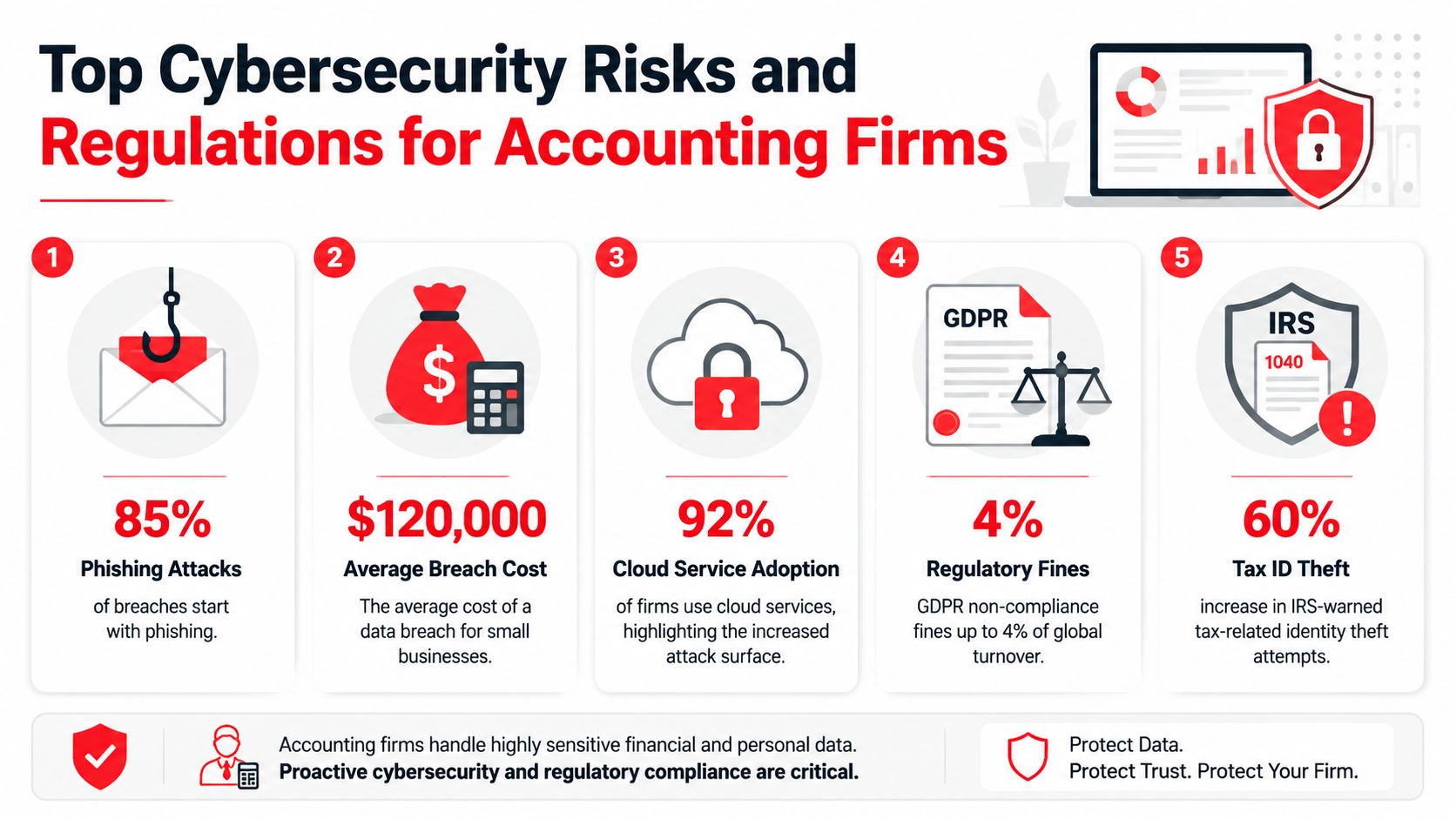
The 2023 Accounting Industry Index benchmarked data from over 15,000 firms and found that only 34% of accounting professionals feel "very confident" in their firm's ability to defend against modern cyber threats. The same index reported that the sector experienced a 47% increase in cyber incidents compared to the previous year. Those figures sit in the same sentence for a reason. Low confidence usually reflects real control gaps, not vague anxiety.
Attackers tend to exploit familiar weak points:
- Credential theft: Stolen usernames and passwords still open too many doors.
- Phishing: Staff receive messages that look routine, urgent, or tied to client work.
- Ransomware: Criminals lock systems at the worst possible time and pressure firms to pay.
- Legacy access paths: Older systems often keep password-only access alive in the background.
- Unreviewed vendors: A trusted outside provider can become the entry point.
AICPA benchmarks add another hard truth. 60% of accounting firm breaches originate from compromised credentials, which is why identity controls deserve priority over shiny new tools.
What the FTC Safeguards Rule means in practice
Most firms don't need more legal jargon. They need a plain-English translation of what regulators expect. The updated FTC Safeguards Rule requires accounting firms to assign security ownership, document risk, and enforce baseline controls. Specifically, it requires firms to designate a qualified individual, conduct a written risk assessment, and implement MFA, and non-compliance fines can reach up to $100,000 per violation according to this summary of the updated FTC Safeguards Rule requirements for accounting firms.
Here's what that means operationally:
| Requirement | What it means inside the firm |
|---|---|
| Qualified individual | One person owns the program. Not in theory. In writing. |
| Written risk assessment | You identify where client data lives, who touches it, and what can go wrong. |
| MFA | Password-only access is no longer acceptable for systems that access customer information. |
| Incident response plan | You need a documented plan before something happens, not after. |
| Encryption | Sensitive client data should be protected when stored and when transmitted. |
A lot of small firms freeze when they hear those requirements because they assume they need a full-time security leader. They usually don't. They do need named accountability, written decisions, and evidence that controls are operating.
The firms that struggle most aren't the ones that know the least. They're the ones that keep postponing obvious fixes because no one owns the deadline.
A local leadership view for Central Florida firms
For firms in Orlando, Winter Springs, and nearby Central Florida cities, the business issue is straightforward. If you handle sensitive financial information, regulators won't grade you on effort. They'll look at whether you assigned responsibility, documented risk, and implemented required safeguards.
That's why “we're too small to be a target” is one of the most expensive beliefs in this market. Small and mid-sized firms are often easier to compromise, especially when busy season pressure leads to exceptions, rushed onboarding, shared accounts, or unreviewed software access.
If you're a managing partner, ask these questions today:
- Who owns security decisions: Name the person.
- Where is your written risk assessment: If it isn't current, treat that as a gap.
- Which systems still allow password-only access: Those go to the top of the list.
- Can you show your incident plan: If not, you're relying on improvisation.
Cybersecurity for accounting firms starts with knowing the field you're operating on. The firms that get traction stop treating risk, compliance, and operations as separate conversations.
Building Your Fortress Core Technical Defenses
The fastest way to waste money on cybersecurity is to buy disconnected tools and hope they add up to a system. They usually don't. Good protection for an accounting firm starts with a stack of controls that work together, in a clear order, around identity, endpoints, data, and recovery.
Start with identity before you buy more tools
If attackers can log in as your staff, they can bypass a surprising amount of downstream security. That's why the first technical priority is identity control.
AICPA benchmarks indicate that 60% of accounting firm breaches originate from compromised credentials, yet firms with Multi-Factor Authentication enabled report a 99.9% reduction in successful account takeover attacks. That makes MFA the highest-value control most firms can deploy quickly.
The common mistakes are predictable:
- Partial rollout: MFA protects email but not remote access, portals, admin accounts, or finance systems.
- Fallback loopholes: A legacy app or emergency process still allows password-only access.
- Weak privilege design: Too many employees hold admin rights “just in case.”
- Shared access: Multiple people use the same login for convenience.
For firms using client portals or remote systems, the stronger model is a Zero Trust approach. Every access request is verified. Sessions don't get trusted just because they start inside the office. Data in motion should be encrypted with TLS 1.3, and data at rest should be protected with AES-256.
If your team needs a plain-language reference on perimeter controls and how they support the rest of your stack, this overview of firewalls for businesses is useful context.
Protect every endpoint and keep systems current
Every laptop, desktop, and server that touches client data is an endpoint. If even one device is unmanaged, it can become the easiest route into the firm. Accounting practices often run into trouble here because devices age out unevenly, staff work remotely, and patching gets deferred during busy periods.
The core controls are simple in concept:
- Endpoint detection and response: You need visibility into suspicious behavior on devices, not just basic antivirus.
- Automated patch management: Security updates can't depend on whether someone remembered to click later.
- Configuration control: Standardize allowed software, local admin rights, and device encryption.
- Asset inventory: Know which devices exist, who uses them, and whether they're still supported.
What doesn't work is the “set it and forget it” model. If patching is manual, exemptions pile up. If alerting goes nowhere, the tool becomes shelfware. If departing employees keep old devices or accounts, your attack surface remains unaddressed.
Encrypt data and control how it moves
Accounting firms transmit sensitive information constantly. Client documents move through portals, email, remote desktops, shared folders, and backup processes. Encryption matters here, but so does process discipline.
Use encryption as a baseline, not a talking point. Protect stored data. Protect transmitted data. Restrict where client files can be downloaded. Review whether staff are moving documents outside approved channels because “it's faster.”
A short checklist helps:
- Approved storage only: Keep client files in managed locations.
- Secure transit: Don't rely on ordinary attachment habits for sensitive records.
- Role-based access: Staff should only reach the data needed for their role.
- Session control: Idle sessions and unmanaged persistence create risk.
Security gets stronger when you remove exceptions. Most serious breaches in smaller firms start where a temporary workaround became permanent.
Backups must survive the attack
A backup only matters if it remains clean, reachable, and recoverable after the attacker hits your production environment. That's why standard local copies aren't enough for modern ransomware risk.
The stronger design uses immutable cloud backups, separated encryption key management, and a recovery environment you can activate quickly. If a criminal can encrypt your live data and your backup target at the same time, you don't have a recovery strategy. You have a second victim.
What works and what usually fails
The firms that get durable protection do a few things consistently well. They simplify. They standardize. They remove old access paths. They test recovery. They don't let convenience outrank risk on systems holding client data.
The firms that stay exposed tend to make the same trade-offs:
| What works | What fails |
|---|---|
| MFA everywhere important | MFA only on one or two systems |
| Managed endpoints with patching | Staff-managed devices and delayed updates |
| Encrypted approved workflows | Sensitive files moving through ad hoc channels |
| Immutable offsite backups | Single-location or always-mounted backups |
| Access based on role | Broad permissions that never get reviewed |
If you're building cybersecurity for accounting firms from the ground up, don't start with niche controls. Lock down identity. Standardize endpoints. Encrypt data. Make recovery real. That sequence does more to reduce practical risk than a long list of disconnected products ever will.
The Human Firewall Policies and Training
Technology can block a lot, but staff behavior still decides whether many attacks succeed. That's especially true in accounting firms, where employees process document requests, client messages, login prompts, and deadline-driven approvals all day long. A rushed click can undo a lot of technical protection.
The problem isn't abstract. 74% of breaches stem from human error in firms lacking formal training, yet 68% of small firms cut IT security budgets due to cost pressures. That gap explains why many smaller firms know what good security looks like but still don't build the habits that support it.
Why training deserves a budget line
When a firm cuts security spending, training is often one of the first items to go because it feels less tangible than software. That's a mistake. Employees are part of your control environment whether you train them or not.
Good training changes specific behaviors:
- Staff pause before opening unusual document requests
- Employees verify payment or account change instructions through a second channel
- New hires understand where client data may and may not be stored
- Managers know when to escalate suspicious activity instead of trying to solve it informally
For firms that need a practical starting point, this guide on boosting human security with cybersecurity awareness training covers the business case and the basics of building a repeatable program.
What a workable WISP looks like
A Written Information Security Plan sounds intimidating, but for most boutique firms it should be concise, current, and tied to how the office operates. If your WISP is long, generic, and disconnected from daily behavior, it won't help you during an audit or an incident.
A workable WISP should clearly answer:
| Question | What your plan should say |
|---|---|
| Who owns security | Name the responsible person and backup decision-maker |
| What data you protect | Tax records, payroll files, banking information, client identifiers |
| Where data lives | Endpoints, portals, cloud systems, backups, shared repositories |
| How access is controlled | MFA, role-based permissions, onboarding, offboarding |
| How staff are trained | Training cadence, phishing awareness, policy acknowledgment |
| What happens during an incident | Escalation path, containment steps, communications, recovery |
Small firms in Central Florida don't need a policy library that reads like a bank manual. They need a documented operating model that matches the actual firm.
Train for behavior not checkbox completion
Annual awareness slides alone won't do much. Staff retain what they practice, what leaders reinforce, and what ties directly to daily work.
Use short recurring sessions tied to real scenarios:
- Client impersonation emails: Show how attackers mimic common tax and bookkeeping requests.
- Credential prompts: Teach staff to slow down when systems ask for urgent reauthentication.
- Sensitive file handling: Clarify approved methods for sending, storing, and downloading client records.
- Incident reporting: Make it easy to report mistakes quickly, without fear of blame.
A useful training program makes employees faster at spotting abnormal behavior. A weak program only proves they attended a meeting.
The firms that improve here treat policy and training as operational tools. They don't bury them in compliance folders. They turn them into routines that support how the office works.
Planning for a Crisis Incident Response and Continuity
A firm usually discovers its incident response quality in the first hour of a breach. Not during policy review. Not during a vendor demo. In the first hour, when someone can't open files, login prompts start failing, inboxes show unusual activity, or a staff member reports a suspicious message they already clicked.
That's when improvisation becomes expensive.

What the first hours usually look like
In a typical accounting firm incident, the first signs don't arrive neatly. A user reports missing access. Someone else notices strange account behavior. A workstation slows down or locks up. Then leadership realizes this isn't a helpdesk issue. It's a business event.
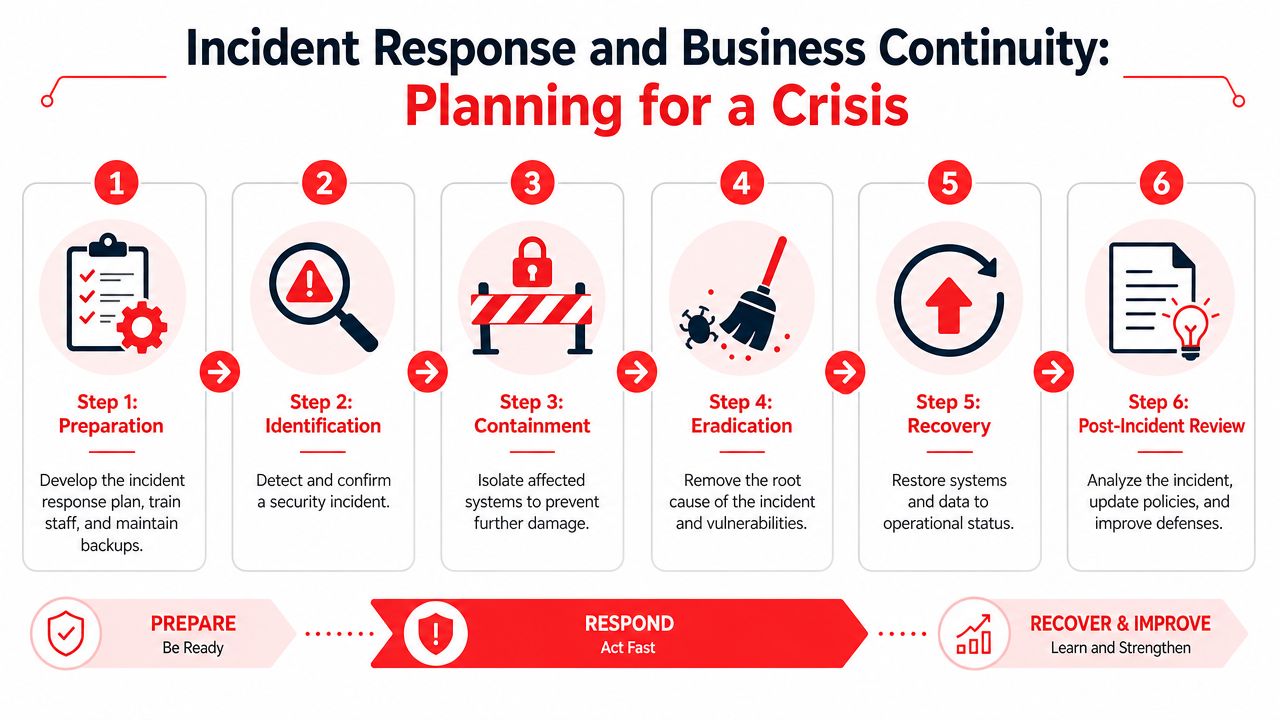
The first decisions matter more than the first explanations. You need to know who has authority to isolate systems, who contacts outside support, who manages internal communication, and who documents the sequence of events. If those roles aren't assigned in advance, people either freeze or step on each other.
A written playbook helps keep the first moves disciplined. If your firm wants examples of how to structure that response, these incident response playbooks provide a practical reference point.
The incident response plan your firm actually needs
An incident response plan for a smaller accounting firm doesn't need to be elaborate. It does need to be clear enough that your team can use it under stress.
Include these essentials:
Trigger conditions
Define what counts as a security incident, not just a technical problem.Response team roles
Assign leadership, technical coordination, legal or compliance input, and client communication responsibility.Containment authority
Decide in advance who can disable accounts, isolate devices, and suspend access.Evidence handling
Preserve logs, messages, and timelines. Don't wipe systems before the investigation starts.Communication rules
Staff should know what to say internally, what not to say externally, and who approves client messaging.Recovery checkpoints
Identify what must be restored first so the firm can resume critical operations.
Recovery depends on backup design not backup existence
Many firms learn an uncomfortable lesson: Having backups isn't the same as having recoverable backups. CISA statistics show that 30% of accounting firms that suffer a ransomware attack fail to recover their data without paying, compared to only 5% of those using immutable backups, which can guarantee a 95% data restoration success rate within 24 hours.
That gap exists because ransomware doesn't just target production data. It goes after reachable backups too. If your copies are always connected, stored in one location, or managed with the same compromised credentials, recovery can collapse quickly.
The better design includes:
- Immutable storage: Backups can't be altered or deleted during the retention period.
- Separated key control: Encryption keys aren't stored in the same place as the data.
- Geographic redundancy: One failure domain shouldn't take out all recovery options.
- Warm recovery environment: You can bring critical systems back online without rebuilding everything from scratch.
If you haven't tested restore speed, you don't know your recovery posture. You only know your backup marketing language.
Business continuity for an accounting firm comes down to one outcome. Can you keep serving clients after a cyber event without guessing your way through the process? The answer depends less on the document you wrote and more on whether your plan, backups, and team decisions line up under pressure.
Choosing Your Allies Vendor Risk and Security Partners
A lot of firms improve internal controls and still miss one of their biggest exposures. Vendors. Tax workflow software, document systems, cloud storage, billing platforms, and outside IT providers all sit somewhere in the path of client data. If one of them fails, your firm may still own the consequences.
The vendor risk paradox most firms miss
The common assumption is simple: if the vendor says it's secure, the risk belongs to the vendor. That's not how regulators and clients usually see it.
A 2026 NIST study found that 82% of small firms assume vendor compliance without verifying SOC 2 reports, while recent FTC enforcement penalized firms for inadequate vendor monitoring even when the breach occurred at a third-party provider. The lesson is blunt. Outsourcing a function doesn't outsource accountability.
That's the vendor risk paradox. You rely on outside platforms to run efficiently, but every vendor you add creates another path to your client data.
A simple way to score vendor risk
Most boutique accounting firms don't need a complex procurement framework. They do need a repeatable way to rank vendor exposure and review the right evidence.
Start by grouping vendors into three categories:
| Vendor tier | What to review |
|---|---|
| High exposure | Vendors that store or process sensitive client financial information. Review security reports, contract protections, access controls, and incident obligations. |
| Moderate exposure | Vendors that support workflows but have limited direct access to protected data. Review user access, retention terms, and support practices. |
| Low exposure | Vendors with little or no access to client information. Keep basic inventory and ownership records. |
For higher-risk vendors, ask practical questions:
- Can they show current independent security documentation
- Do contracts require notification if an incident affects your data
- Who at your firm approves access and reviews it periodically
- Can the vendor limit access based on role
- How quickly can access be removed if the relationship ends
A managing partner doesn't need to inspect every technical detail personally. But someone in the firm needs to verify, document, and revisit the answers.
When outside security support makes sense
Many small firms reach a point where internal ownership is still necessary, but internal execution isn't realistic. That's where outside support can help, especially when the provider can combine vendor oversight, endpoint management, incident handling, and compliance documentation under one operating model.
If you're evaluating options, look for practical depth rather than flashy promises. This overview of expert IT support and managed services gives a useful frame for what capable outside support should include.
For Central Florida firms, local response matters too. Cyber Command, LLC is one example of a managed IT and cybersecurity partner that supports organizations in Orlando and Winter Springs with 24/7 SOC coverage, vendor management, endpoint protection, and compliance-oriented operations. That kind of model can make sense when the firm needs ongoing execution, not just occasional advice.
Your 90-Day Implementation Roadmap
Most accounting firms don't need a perfect program in the next quarter. They need a credible one. The 2023 Accounting Industry Index found that only 34% of accounting professionals feel "very confident" in their firm's ability to defend against modern cyber threats. Confidence rises when leadership can see a plan, assign owners, and complete visible steps in sequence.
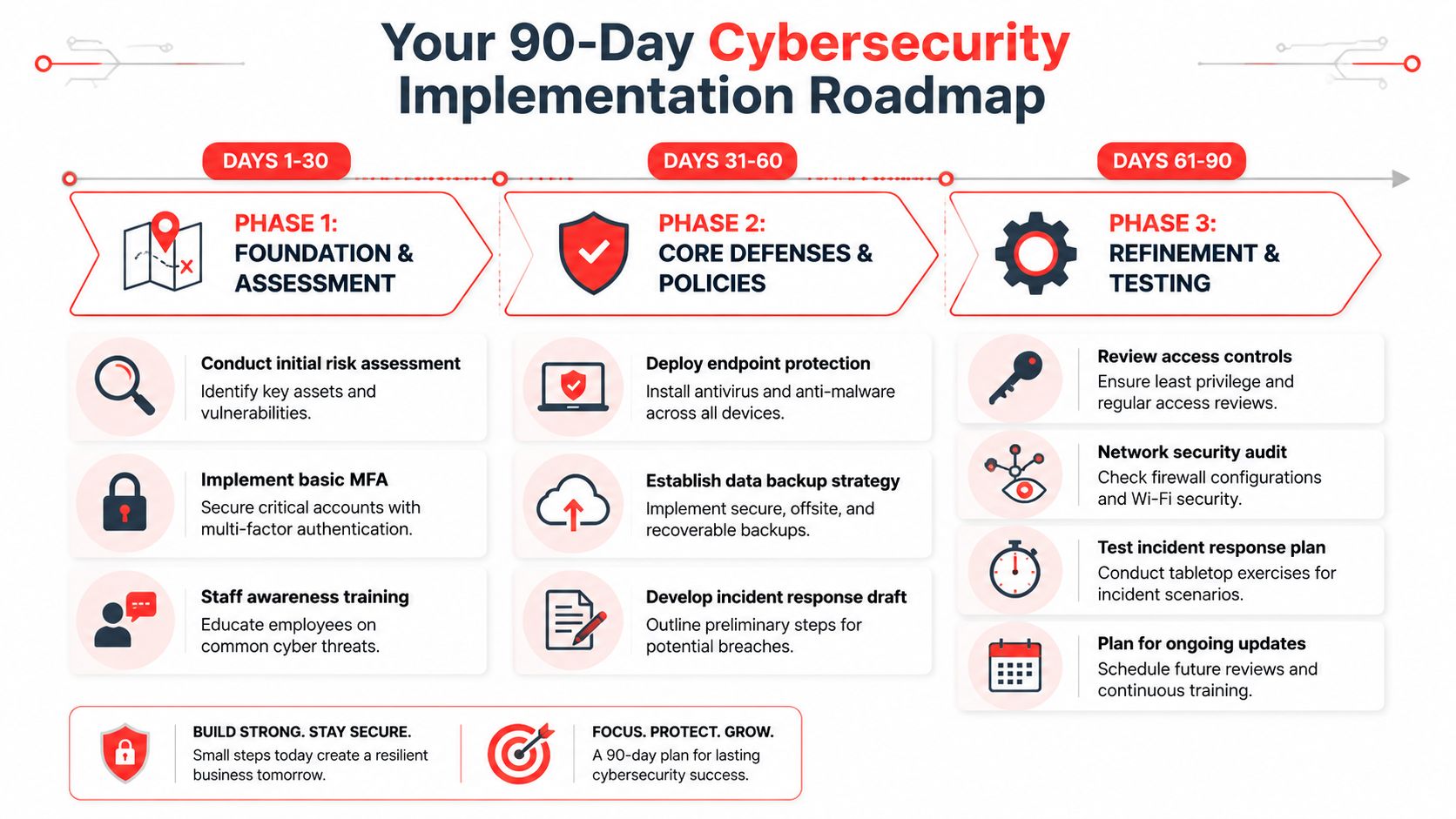
Days 1 to 30 contain the obvious risk
Start with the controls that reduce exposure fastest.
- Name the security owner: One person must coordinate decisions and deadlines.
- Conduct the initial risk assessment: Identify systems, data locations, users, and obvious gaps.
- Turn on MFA for critical systems: Prioritize email, remote access, portals, and admin accounts.
- Run staff awareness training: Focus on phishing, document handling, and reporting suspicious activity.
- Inventory vendors: Mark which ones touch sensitive client data.
Days 31 to 60 formalize controls
This phase turns urgent fixes into operating practice.
- Deploy managed endpoint protection: Cover firm devices consistently.
- Standardize patching: Remove manual update dependency.
- Document the WISP: Keep it tied to actual firm behavior.
- Establish the backup strategy: Make sure recovery copies are protected from ransomware.
- Draft the incident response plan: Assign roles and authority before you need them.
Days 61 to 90 test and tighten
The final phase proves whether the program works under real conditions.
- Review access rights: Remove excess privileges and old accounts.
- Audit network and remote access controls: Validate office, remote, and guest access paths.
- Test backup restoration: Confirm your team can recover important systems and data.
- Run a tabletop exercise: Walk through a realistic incident with leadership.
- Set recurring review dates: Security decays when no one owns the follow-up.
For a small firm in Central Florida, that roadmap is realistic. It respects the fact that you still have clients to serve, deadlines to hit, and a business to run. It also creates momentum. Once the first 90 days are complete, the firm usually has enough structure to improve without chaos.
If your accounting firm in Orlando, Winter Springs, or the broader Central Florida market needs help turning this triage plan into an operating program, Cyber Command, LLC can support the work with managed IT, 24/7 SOC coverage, compliance-focused security operations, and practical guidance designed for firms that don't have in-house cybersecurity staff.