Viruses in Linux: A 2026 Guide for Florida Businesses

Yes, Linux gets viruses, and it is now the most targeted platform for malware. In 2023, 54% of malware infections hit Linux endpoints, compared with 39% on Windows and 6% on Mac.

That should change how any business owner in Orlando thinks about servers, cloud apps, file storage, and even Linux workstations. If your website runs on Linux, your client portal sits on a Linux web server, or your office depends on a hosted database behind the scenes, the old belief that Linux is “safe by default” can leave you exposed at exactly the wrong layer.

For small and mid-sized firms in Central Florida, viruses in linux aren't just a technical issue. They can slow down scheduling systems at a dental office, expose case files at a law firm, or interrupt production reporting for an industrial company that relies on connected devices and remote access. The threat isn't theoretical anymore. It's operational, financial, and in many cases compliance-related.

The Linux Security Myth Has Been Busted

For years, business owners heard some version of the same advice: Linux doesn’t get viruses, or at least not in a way that matters to smaller companies. That advice aged badly.

Data analyzed by Comparitech from the Elastic Security 2023 Global Threat Report shows that Linux endpoints became the most targeted by malware for the first time in 2023, with 54% of all malware infections occurring on Linux endpoints. Windows accounted for 39%, and Mac for 6% in the same reporting, according to Comparitech’s analysis of Linux malware statistics.

A cracked metallic shield featuring the Linux penguin logo, symbolizing potential security breaches in a server room.

Why the myth lasted so long

The myth wasn’t completely irrational. Linux historically benefited from strong permission controls, faster patching cultures, and lower desktop market share. That made it a less attractive target for old-school consumer malware.

But business use changed. Linux now runs the systems attackers care about most: cloud workloads, web servers, containers, databases, and internet-facing applications. When a local accounting firm hosts a client document portal or a medical office uses a Linux-backed vendor platform, attackers don't care what operating system sits underneath. They care that the system holds sensitive data and supports a revenue-generating workflow.

What this means for Orlando businesses

A lot of smaller firms in Orlando and Winter Springs have Linux somewhere in the stack without thinking of themselves as “Linux businesses.” It may be the server your website uses, the appliance behind your firewall, the cloud VM hosting an internal application, or a specialized workstation in engineering or industrial operations.

That matters because security blind spots often start with assumptions. If leadership assumes Linux is naturally protected, patching slips, endpoint controls are inconsistent, logs go unread, and remote access settings stay looser than they should.

Practical rule: The most dangerous Linux system is the one your business depends on but nobody actively monitors.

A common mistake is treating Linux security as a one-time setup job. It isn’t. Attackers look for weak points that stay weak, such as stale software, exposed admin panels, and forgotten credentials. If you want a simple business explanation of how malicious code creates damage after it lands, this guide on how malicious code can cause damage is worth reviewing with both leadership and IT.

The business risk behind the myth

For legal, medical, and industrial firms, the direct issue isn’t whether an infection technically qualifies as a “virus,” “trojan,” or “worm.” The critical issue is what the attacker can do next.

That can include:

  • Interrupt operations: Applications slow down, crash, or become unreliable during business hours.
  • Expose regulated data: Client records, patient information, contracts, and financial files can be accessed or staged for theft.
  • Create hidden persistence: Attackers often leave behind remote access paths so they can return later.
  • Raise recovery costs: Cleanup usually requires more than deleting a file. Systems need review, isolation, restoration, and proof that the entry point is gone.

Linux isn’t insecure by design. But the idea that it’s immune has been decisively disproven. Businesses that still operate under that assumption are giving attackers extra time and easier access.

Common Linux Malware Your Business Cannot Ignore

Business owners don’t need a malware taxonomy lesson. They need to know what these threats do once they hit a server, workstation, or hosted application.

Trend Micro reported that webshell malware made up 49.6% of all detected Linux threat samples in 2022, making it the most common category in that reporting, as detailed in Trend Micro’s Linux Threat Landscape Report. That tells you something important. Attackers often aren’t trying to smash the door. They want a quiet way to come and go.
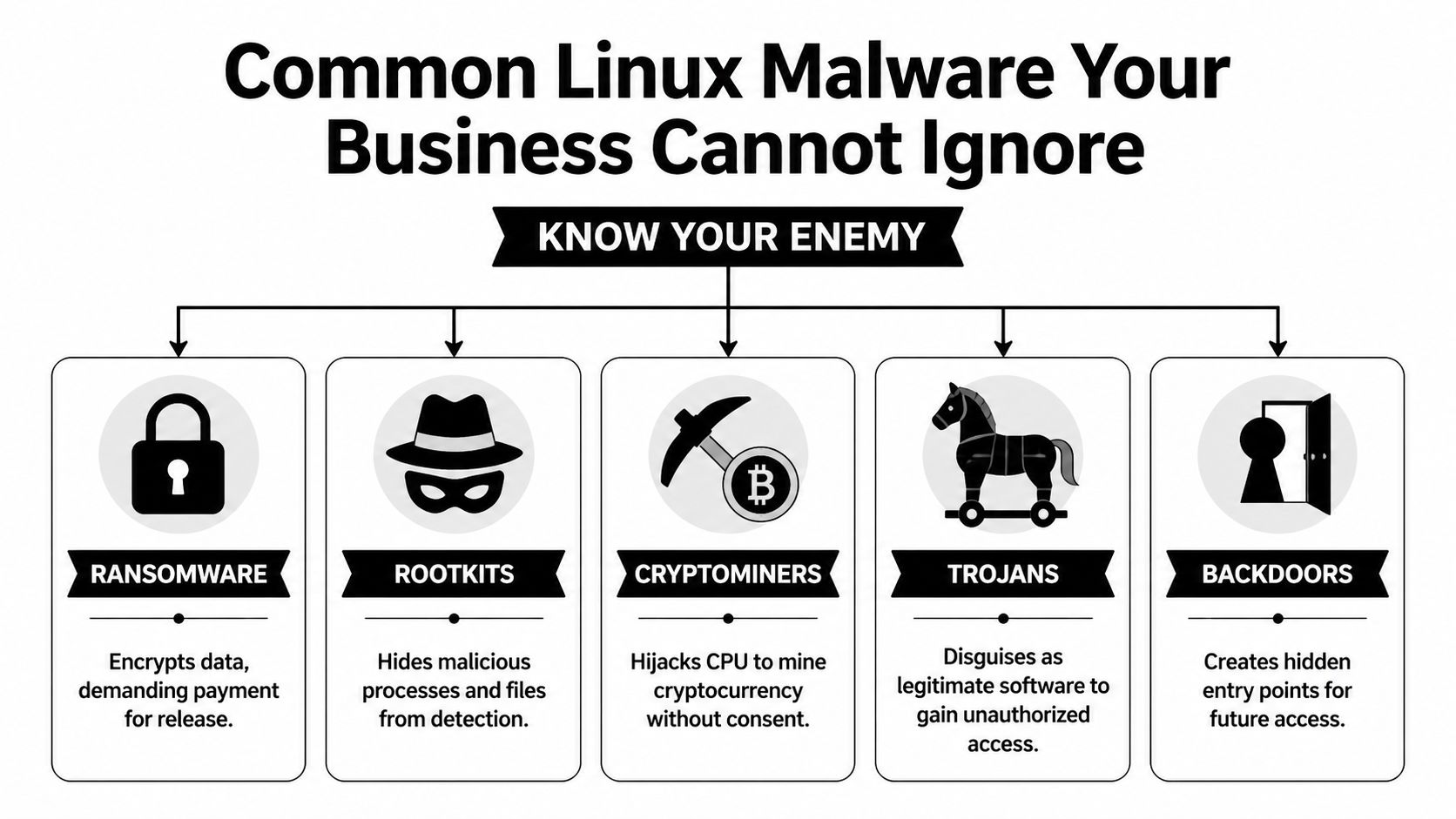
An infographic titled Common Linux Malware listing Ransomware, Rootkits, Cryptominers, Trojans, and Backdoors as common threats.

Webshells and backdoors

A webshell is like a hidden key under the doormat of your digital office. Attackers place a malicious script on a web server, then use it to keep remote access without needing to break in again each time.

For a law office, that can mean an attacker reaches the server hosting intake forms or document uploads. For a specialty clinic, it can mean access to a patient-facing portal or a web-connected scheduling tool. The initial compromise may look small, but the value is in persistence. Once attackers are in, they can browse files, move data, install more tools, or prepare a ransomware attack.

Backdoors serve a similar purpose. They create a covert way back into a system after the original weakness gets overlooked or partially fixed.

Trojans and disguised payloads

A trojan pretends to be legitimate software, script output, or an acceptable file while carrying malicious functionality. On Linux systems, that might show up as a fake admin utility, a modified package, or a script copied into a maintenance workflow that nobody questions because “it came from a vendor forum” or “it fixed the issue last time.”

The business danger is trust abuse. Trojans rely on users or admins running something they believe is safe.

That can lead to:

  • Credential theft: Stored keys, passwords, and tokens become accessible.
  • Unauthorized access: The trojan opens a control channel for later use.
  • Lateral movement: The attacker pivots from one system to another, especially in flat networks.

Ransomware on Linux

Ransomware on Linux often targets what matters most in business environments: servers, shared application hosts, databases, and storage tied to daily operations. If a Windows laptop gets hit, that’s serious. If the Linux server behind scheduling, billing, engineering data, or file access gets encrypted, the disruption is broader and harder to contain.

Attackers don’t pick the operating system first. They pick the business process they can afford to break.

For a medical office, downtime can affect scheduling, documentation access, and patient communications. For an architecture or engineering firm, project files and collaboration platforms can become unavailable at once. Industrial businesses may lose visibility into reporting or device management systems that support field operations.

Cryptominers and silent theft

Cryptominers don’t always announce themselves the way ransomware does. They hijack system resources to mine cryptocurrency, using your hardware and your cloud budget for someone else’s gain.

That makes them particularly dangerous for smaller firms because the symptoms are easy to misread. A server runs hot. CPU stays high. Cloud costs creep up. Web apps feel sluggish. Staff complain that systems are “just acting old.”

Rootkits and stealth tooling

Rootkits are designed to hide. They can mask malicious processes, conceal files, and make a compromised machine appear cleaner than it is. That’s why a quick visual check often isn’t enough after a suspected Linux infection.

Here’s the short version of what works and what doesn’t:

Threat type What attackers want What often fools businesses
Webshells Persistent remote access “The site still loads, so we must be fine”
Trojans Initial access and credential theft “It came from a trusted script or tool”
Ransomware Operational leverage and payment pressure “Backups exist, so impact will be small”
Cryptominers Long-term resource abuse “It’s probably just a performance issue”
Rootkits Stealth and persistence “Our basic checks didn’t find anything”

What to remember

If you’re evaluating viruses in linux from a business perspective, don’t focus on names first. Focus on effects.

  • Loss of control: Can someone else operate your server?
  • Loss of visibility: Can you still trust what the system is showing you?
  • Loss of availability: Can your team still work?
  • Loss of trust: Can clients, patients, or partners still rely on you?

Those are the questions that turn a technical infection into a business event.

How Cyberattacks Target Linux Systems in Florida Businesses

Most Linux compromises don’t start with movie-style hacking. They start with neglected basics.

The broad pattern is well established. The Linux malware overview on Wikipedia notes that the vast majority of Linux malware exploits unpatched vulnerabilities in common services like SSH and web servers, and that worms can spread across networks by finding outdated software or misconfigured access without any user interaction.

A modern server room with rows of racks and digital data visualizations over a blurred office background.

The Orlando law firm scenario

A small law firm may outsource website development, host a client intake portal in the cloud, and assume the vendor “handles security.” Months pass. A plugin or server-side component doesn’t get updated. An attacker finds the weakness, uploads a malicious script, and gains a foothold.

Nothing dramatic happens on day one. The website may still load. Staff may not see obvious signs. But the attacker now has a place to work from. They can browse directories, test permissions, and look for stored credentials that lead to file shares, databases, or email integrations.

This is why unpatched web servers are so dangerous. They often connect to systems with much more value than the public-facing website itself.

The medical office scenario

A medical practice in Winter Springs might use a Linux-based appliance, hosted portal, or secure transfer system to support patient operations. Remote access gets set up for convenience. SSH keys or admin credentials remain in place too long, or permissions become too broad after a vendor visit.

That creates a chain attackers like:

  1. Find the exposed service
  2. Use weak or stale access to get in
  3. Install persistence
  4. Expand from one machine to connected services
  5. Monetize the access through theft, extortion, or resource abuse

In healthcare-adjacent environments, the compliance problem lands quickly. Even if the first symptom is only a performance issue, leadership still has to ask whether regulated information was reachable during the compromise.

A Linux breach often starts as an IT issue and ends as a management issue.

The industrial and field-service scenario

Industrial firms around Central Florida often run a mix of office systems, remote devices, vendor-managed equipment, and aging network segments that were built for uptime rather than security visibility. Linux shows up in control systems, gateways, appliances, and monitoring platforms.

Attackers look for the easy opening. That may be a neglected web interface, old remote management method, or device that no one included in the patching schedule because it “never changes.” Once compromised, that system can become a stepping stone into more valuable parts of the environment.

This is one reason small businesses underestimate Linux risk. The vulnerable system may not be the one users log into every day. It may be an appliance, cloud instance, or edge device that provides background support for the rest of the operation.

Why cryptomining gets missed

Cryptomining malware deserves special attention because it behaves differently from ransomware. It doesn’t need to announce itself. It wants to stay unnoticed.

A business owner may see the symptoms as ordinary wear and tear:

  • Servers feel slow: Websites, portals, or internal apps respond poorly.
  • Cloud invoices climb: Consumption rises without a matching business reason.
  • Fans and heat increase: Hardware works harder than expected.
  • Support tickets pile up: Users report lag, but nobody sees a clear outage.

That’s why cryptominers are effective in small business environments. They hide inside normal frustration. Teams blame old equipment, software bloat, or internet problems while the attacker keeps consuming compute power in the background.

What actually works

The practical fixes aren’t glamorous, but they matter more than advanced theory:

  • Reliable patching: Keep SSH, web servers, frameworks, and packages current.
  • Tighter remote access: Review keys, accounts, and privileges regularly.
  • Segmentation: Don’t let one exposed Linux system talk freely to everything else.
  • Log review and monitoring: If nobody watches for abnormal behavior, persistence lasts longer.
  • Asset awareness: You can’t protect servers and appliances your business forgot it owned.

What doesn’t work is assuming Linux is “fine unless users click something bad.” Many Linux attacks don’t need user clicks at all. They exploit neglected services that sit online every hour of the day.

Signs of Infection and The Road to Recovery

By the time many businesses notice a Linux infection, the problem has already spread beyond the original entry point. The first sign usually isn’t a flashing warning. It’s a business complaint.

A website gets slower. A database takes too long to answer. File transfers drag. An application server suddenly uses far more resources than normal. In the case of cryptomining malware, that pattern is common. The threat can hijack CPU capacity and drive up electricity or cloud costs while looking like a generic performance issue, as described in this discussion of cryptomining malware on Linux servers and its hidden business impact.

Warning signs owners should take seriously

You don’t need to run Linux commands yourself to spot that something is wrong. You do need to know what symptoms deserve immediate escalation.

  • Unexpected slowdowns: A server that used to perform normally starts lagging without a clear business reason.
  • Unusual billing changes: Cloud or infrastructure costs rise while workload stays roughly the same.
  • Strange files or tasks: IT finds unfamiliar scripts, modified startup items, or unexplained scheduled jobs.
  • Outbound traffic spikes: Systems communicate in ways that don’t match normal business use.
  • Repeated account anomalies: Unexpected authentication prompts, failed logins, or privilege changes appear in admin reviews.

If your Linux server is “just slower lately,” treat that as a security question before you treat it as a hardware question.

Why cleanup is harder than most owners expect

A proper recovery effort usually includes containment, forensic review, malware removal, patching, credential resets, and verification that the attacker didn’t leave another access path behind. That’s why reactive cleanup gets expensive fast.

Tools such as rkhunter, chkrootkit, log analysis, and network review can help identify hidden processes, rootkits, persistence methods, and unusual connections. But these tools don’t make incident response simple. They produce clues. Someone still has to interpret the findings, separate signal from noise, and decide whether the system can be trusted again.

In many cases, rebuilding from a known-good state is safer than trying to clean an actively compromised machine in place.

Recovery is both technical and operational

Business owners often focus on restoring files. That matters, but it isn’t enough. You also have to answer harder questions:

Recovery question Why it matters
Was data accessed? This affects legal, client, and compliance obligations
Is the attacker still inside? A partial cleanup can leave the real problem untouched
Can we trust the backup? Backups may contain compromised files or configurations
What was the entry point? If you don’t fix it, the attacker may return

If the infection involved damaged or inaccessible files, it can help to consult trusted data recovery specialists alongside your security team, especially when the business is trying to determine whether critical records are recoverable before full restoration.

The hard truth about reactive security

Recovery always happens under pressure. Staff can’t work normally. Clients may be waiting. Leadership wants quick answers before the facts are fully known.

That’s the main problem with a reactive approach to viruses in linux. Even when you restore operations, you still spend time proving the environment is clean, closing the gap that allowed the infection, and documenting what happened for stakeholders. Prevention is cheaper mostly because it avoids the management chaos that follows a breach.

Building Your Proactive Defense Plan

The strongest Linux security programs aren’t built around one tool. They’re built around disciplined layers that close common gaps before malware has a chance to persist.

For a small or mid-sized business, the practical goal is simple: reduce easy paths in, reduce the damage if something gets through, and increase the chance of catching abnormal behavior early.
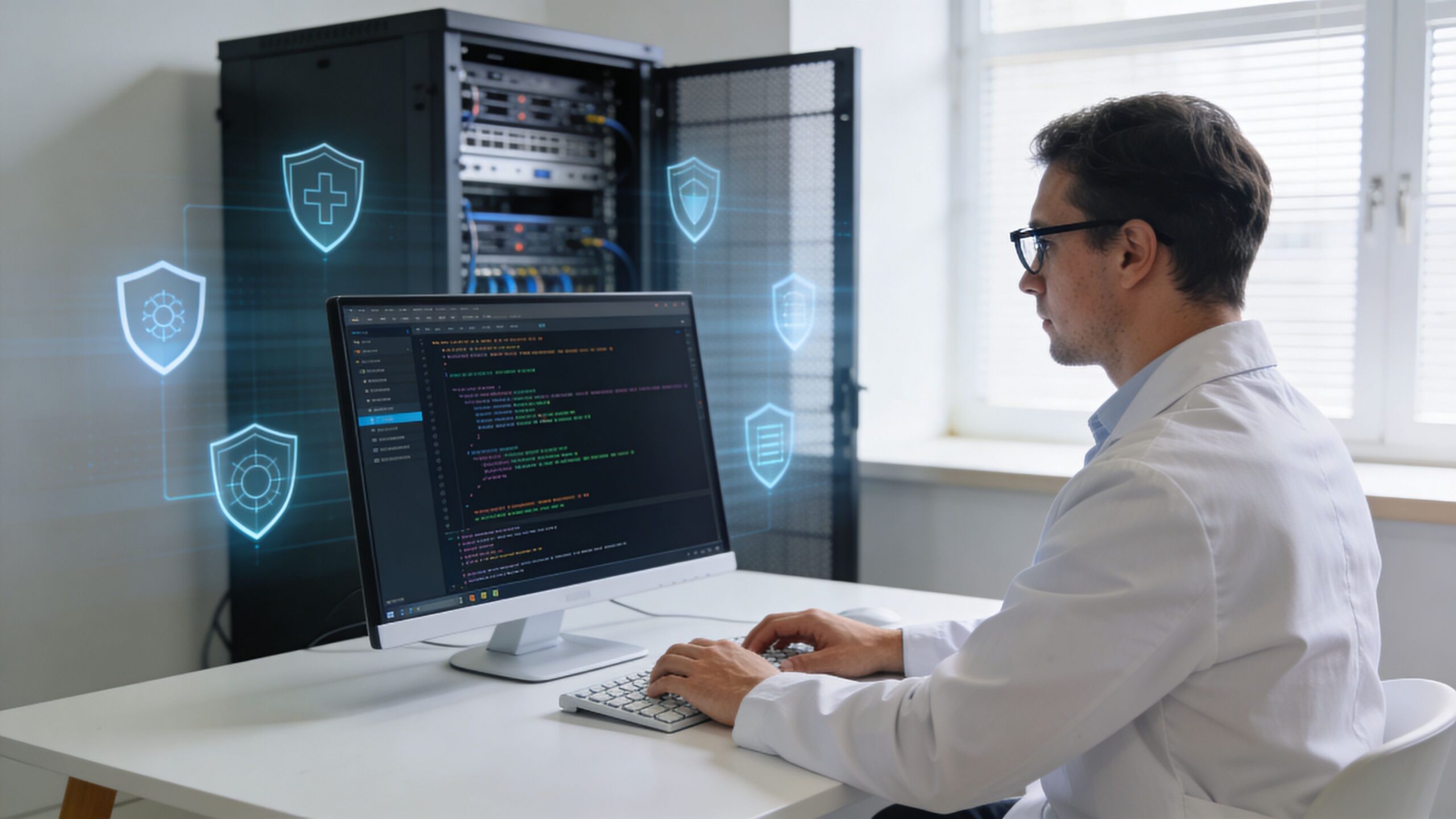
A professional IT specialist in a white lab coat monitors server security systems on a computer screen.

Start with patching discipline

Most Linux compromises seen in business environments trace back to systems that weren’t updated consistently enough. Patching sounds boring because it is repetitive. That’s also why it works.

A good patching program means:

  • Critical services stay current: SSH, web servers, application frameworks, and packages are reviewed on a defined schedule.
  • Internet-facing systems go first: Public websites, portals, VPN-adjacent systems, and cloud workloads get priority.
  • Exceptions are documented: If a device can’t be patched quickly, someone owns the risk and compensating controls.

What fails is “we update when we have time” or “the vendor said not to touch it.” Those aren’t strategies. They’re delay mechanisms.

Control access like it matters

Many Linux incidents become worse because the attacker inherits too much access from the first compromised account or service.

Use the principle of least privilege in a business way. People should only have access to the systems and functions they need. Admin rights should be narrow, reviewed, and separated from daily work when possible. SSH keys, service accounts, and remote support credentials need routine attention.

A simple access review often finds stale permissions that nobody meant to keep.

Security hardening is less about adding complexity and more about removing unnecessary trust.

Add visibility before you need it

Businesses often buy security tools they never operationalize. The result is dashboard security. Alerts exist, but nobody watches them well enough to act.

Useful visibility on Linux includes endpoint monitoring, centralized logs, alerting for unusual account behavior, and network review for suspicious outbound connections. In some environments, file integrity monitoring and scheduled malware scanning also make sense, especially on servers that handle uploads or sensitive records.

For teams that need user-side protection as well, this resource on how to avoid downloading malicious code is a practical companion to server hardening. It helps close the human side of the risk, which matters even in Linux-heavy environments.

Build defenses in layers

A workable defense plan usually includes a mix of these controls:

  1. Automated patching where appropriate
    Routine updates reduce the lifespan of known weaknesses.

  2. Endpoint protection and malware detection
    Linux hosts need monitoring too, especially servers with internet exposure and desktops used in hybrid work.

  3. Network boundaries
    Firewalls and segmentation help keep one compromised box from becoming everyone’s problem.

  4. Backup and restore discipline
    Backups should be tested, isolated appropriately, and reviewed as part of recovery planning.

  5. Configuration management
    Standardized builds reduce drift and make anomalies easier to spot.

Match the plan to the business

A medical practice doesn’t need the same Linux controls as a manufacturing firm, and an architecture office doesn’t need the same monitoring depth as a public-facing SaaS company. But every one of them needs ownership, repeatability, and accountability.

That’s the trade-off many small firms run into. The right controls are understandable. Maintaining them every week is the hard part.

Why a 24/7 Managed SOC is Your Best Defense in Orlando

Most small and mid-sized businesses know what they should do about Linux security. They struggle with who is going to do it consistently at the right depth.

That gap is where a managed security model becomes practical. Not because every business needs an enterprise-sized internal security department, but because Linux threats now affect the same systems that support revenue, service delivery, and compliance. If your firm relies on cloud servers, web apps, client portals, remote users, or specialized Linux-based devices, someone has to watch, patch, investigate, and respond without waiting for a crisis.

Why internal teams often miss Linux risk

In smaller organizations, Linux security tends to fall into one of three buckets:

  • Nobody owns it directly: The environment exists, but responsibility is diffuse.
  • A generalist handles it when time allows: Day-to-day support crowds out preventive work.
  • A vendor manages only their piece: Website host, software vendor, and local IT each assume someone else is covering the rest.

That model breaks under pressure. Malware doesn’t care about org charts. If a Linux web server leads to broader access, the business still owns the fallout.

This is also becoming more relevant on the workstation side. As Linux desktop adoption grows in professional services for cost and security reasons, the risk from threats such as EvilGNOME is expected to rise, which challenges the assumption of Linux desktops' fundamental safety and reinforces the need for endpoint protection on Linux workstations in hybrid environments, as discussed in Linux.com’s myth-busting look at Linux malware assumptions.

What a managed SOC changes

A 24/7 Security Operations Center changes the operating model from occasional maintenance to continuous oversight. For a business owner, that means fewer blind spots and faster decisions when something looks wrong.

The value isn’t just “more tools.” It’s coordinated execution:

  • systems get patched on schedule
  • endpoint alerts are reviewed
  • suspicious activity is investigated
  • credentials and access issues are escalated
  • incidents move from detection to containment without waiting for business hours

For Orlando-area firms, that matters because business risk doesn’t pause overnight. A compromised Linux host at 2 a.m. can still affect Monday morning operations.

What to look for in a provider

A managed provider should be judged on operating discipline, not marketing language. Use a checklist that ties services directly to Linux business risk.

Service Why It Matters for Linux Security Cyber Command's Approach
24/7 SOC monitoring Linux malware often persists quietly. Continuous review helps catch suspicious behavior sooner. 24/7/365 SOC with active threat hunting, incident response, and continuous monitoring
Patch management Unpatched SSH, web servers, and packages are common entry points. Proactive patching and vendor management for covered systems
Endpoint protection Linux servers and workstations need detection, not assumptions. Managed endpoint protection across business environments
Access control support Stale credentials and broad privileges increase blast radius. Help with account governance, standardized processes, and documented oversight
Compliance alignment Legal, medical, and financial firms need more than “it seems fixed.” Ongoing compliance support, reporting, and operational documentation
Recovery coordination Cleanup requires containment, restoration, and proof of control. Incident response and recovery support through an integrated service model
Strategic review Linux security fails when it becomes ad hoc. Network diagrams, QBRs, and roadmap alignment to business goals

Local fit matters more than many owners think

A provider that understands the realities of Orlando and Winter Springs businesses will frame Linux security in terms of uptime, vendor coordination, and compliance pressure, not just command-line fluency. Law firms need file confidentiality. Medical practices need operational continuity and attention to regulated data. Industrial companies need standardization across mixed environments.

Those are management problems with technical roots. The provider has to bridge both.

For companies comparing options, this overview of cyber security companies in Orlando is a useful starting point for evaluating local and regional support models.

What practical support should look like

If you’re outsourcing this function, ask whether the provider can handle the day-to-day realities that usually create exposure:

  • Can they monitor Linux systems after hours?
  • Will they patch and verify, not just recommend?
  • Do they help with vendor coordination when a hosted app is involved?
  • Can they support hybrid environments with Windows, Linux, cloud, and appliances together?
  • Will they give leadership clear reporting instead of raw technical noise?

Those questions matter more than whether the provider lists every security acronym on a website.

One workable model for SMBs

For organizations that don’t want to build a full internal security function, Cyber Command, LLC is one example of a U.S.-based managed IT and cybersecurity partner that offers 24/7/365 SOC operations, patching, endpoint protection, incident response, compliance support, and co-managed IT for businesses in Orlando, Winter Springs, and North Texas. That kind of model fits companies that need ongoing Linux security coverage but don’t have in-house capacity to manage prevention and response continuously.

The trade-off business owners need to decide on

You can run Linux security reactively, where problems get attention after users feel them. Or you can run it as an operational discipline, where patching, monitoring, access review, and response happen continuously in the background.

The first path feels cheaper until an infection touches billing, scheduling, file access, or regulated data.

The second path is usually the better business decision because it protects continuity. It also gives leadership something just as important: a clear line of responsibility.

If your business in Orlando or Winter Springs depends on Linux anywhere in the stack, viruses in linux should be treated as a current business risk, not an edge-case technical concern. The companies that handle this well usually do one thing consistently. They stop relying on assumptions and start relying on process.


If your business relies on Linux servers, cloud platforms, web applications, or hybrid workstations, a practical next step is to review your current exposure with Cyber Command, LLC. A focused conversation can help you identify where patching, endpoint coverage, access control, and 24/7 monitoring need to improve before a small weakness turns into an outage or compliance event.

A Guide to Disaster Recovery Test Plans

Let’s be honest: an untested disaster recovery plan isn’t a plan at all. It’s a collection of expensive assumptions. For any business, but especially those in areas prone to disruption, just hoping your recovery process will work when you need it most is a gamble you simply can’t afford.

A real, validated plan is the only thing standing between a minor hiccup and a business-ending catastrophe.

Why Untested Recovery Plans Can End Your Business

I’ve seen this happen more times than I can count: A mid-sized professional services firm in Orlando gets hit with a nasty ransomware attack on a Friday afternoon. The IT team feels secure; they have a DR plan and what they believe are reliable backups.

But when they try to kick off the recovery, the nightmare begins. The backups are corrupted. Key people are unreachable. The steps in the plan are vague or outdated. By Monday morning, they’re still dead in the water, bleeding revenue and losing client trust by the minute.

This isn’t just a scary story. It's the reality for businesses that treat their DR plan like a checkbox item instead of a living, breathing process. For companies across Central Florida—from law firms in Kissimmee to medical spas in Lake Nona handling sensitive patient data—the threats are constant. Hurricanes, power outages, and sophisticated cyberattacks are not a matter of "if" but "when."

An untested plan is just a stack of unproven theories. It’s like owning a fire extinguisher you’ve never checked; you only find out it’s empty when the flames are already climbing the walls.

The Domino Effect of a Failed Recovery

When a disaster hits and your untested plan crumbles, the consequences cascade with terrifying speed. We're not just talking about a few hours of downtime. The impact is far-reaching and can threaten the very survival of your business.

  • Catastrophic Data Loss: You assume your backups are good, but have you ever tried a full restore from them? We often find that untested backup systems fail due to configuration drift, silent data corruption, or simple software incompatibilities. In an age of rampant ransomware, this is no longer a technical issue—it's a fundamental cybersecurity vulnerability.
  • Crippling Downtime: Every single minute your systems are down translates directly to lost revenue, tanking productivity, and frustrated customers. A plan that looks great on paper might promise a four-hour recovery, but a single untested snag can stretch that into days or even weeks.
  • Major Compliance Fines: For regulated industries like healthcare or finance, data availability isn't just a good idea—it's a legal mandate. A failed recovery can trigger severe penalties under regulations like HIPAA, putting your organization in deep financial and legal trouble.
  • Damaged Reputation: Trust is your most valuable asset. Having to tell clients you’ve lost their data or can’t provide services is a conversation from which many businesses never recover.

A concerned IT professional working on a laptop displaying a backup failed error during a thunderstorm.

The Sobering Statistics Behind Untested Plans

The risks aren't just anecdotal. The data shows a frightening gap between having a plan and knowing for certain that it works.

A massive survey of over 3,400 organizations revealed that nearly 1 in 5 took more than a month to recover from a major IT disruption. That kind of prolonged downtime is a death sentence for most small or mid-sized businesses.

Even worse, among companies that actually have a DR plan, a shocking 7% never test them. Half of the rest test only once a year or less, which is nowhere near enough.

An untested plan fails over 60% of the time during a real crisis. In contrast, regularly tested plans provide the confidence and predictability needed to navigate disruptions effectively. This single practice is often the deciding factor between a swift recovery and a complete business failure.

The core problem is a lack of validation. You wouldn't send a team into a critical project without practice, and your business continuity is no different. Regular disaster recovery test plans are what transform your theoretical document into a proven, reliable roadmap.

To dig deeper into this, you can learn more about the good reasons to do yearly disaster recovery testing and how it builds true resilience. Without it, you’re just crossing your fingers and hoping for the best. And hope is not a strategy.

Choosing the Right DR Test for Your Orlando Business

Picking the right disaster recovery test isn't just a technical decision—it's a strategic one. Go too simple, and you're just checking a box, leaving dangerous blind spots in your plan. Go too complex too soon, and you risk burning out your team and your budget for a test that was doomed to fail.

For businesses here in Orlando and across Central Florida, the key is to match the test to your reality. Your operational needs, your specific cybersecurity risks, and your available resources are all part of the equation.

Not all DR tests are created equal, and they shouldn't be. A small law firm in Winter Park has vastly different needs than a multi-location healthcare provider managing sensitive patient data across the region. Let's dig into the main types so you can make a smart choice for your business.

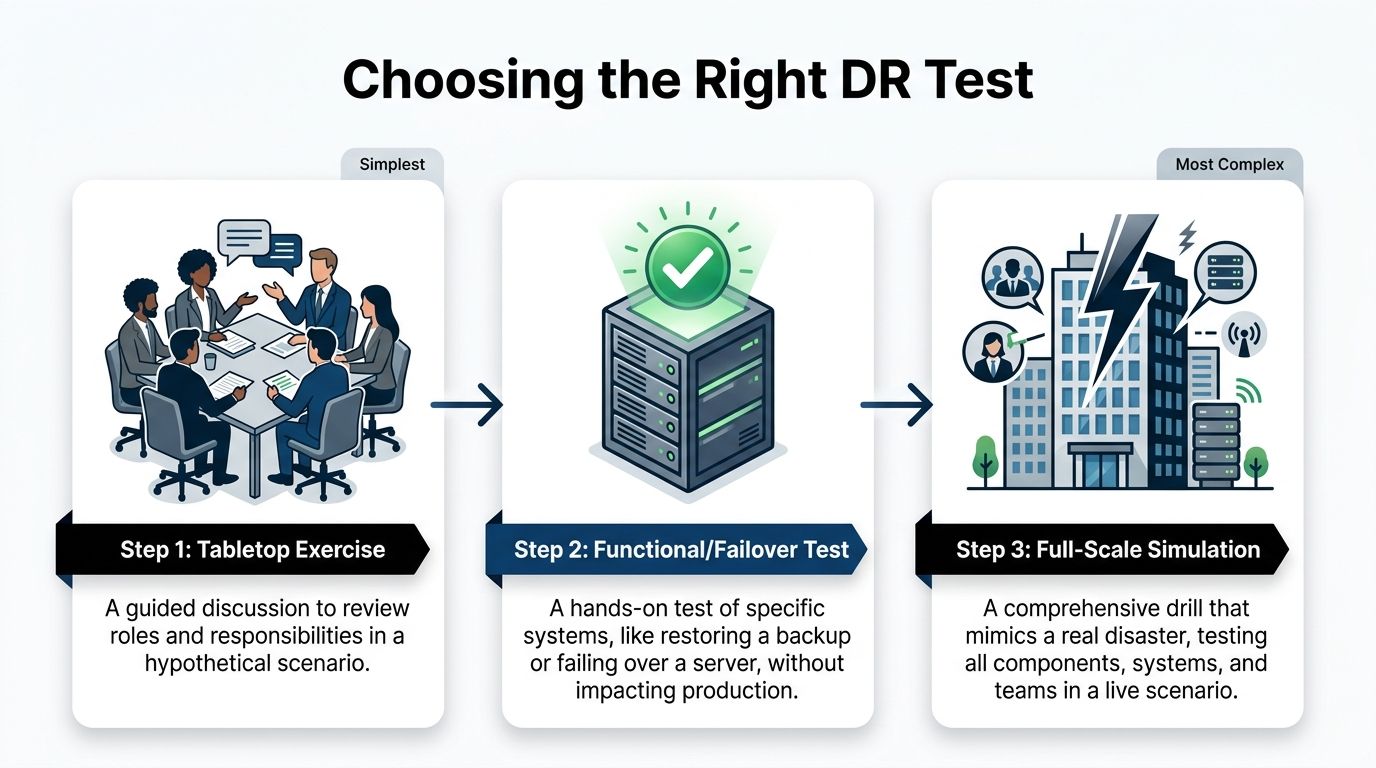
Tabletop Exercises: The Strategic Starting Point

A tabletop exercise is where your disaster recovery plan leaves the three-ring binder and enters the real world—or at least, a simulated one. Think of it as a guided strategy session where your team talks through a disaster scenario.

There’s no live system testing here. The entire focus is on communication, roles, and decision-making under pressure.

We might gather your key people and drop a scenario on them: "A severe thunderstorm has knocked out power to our Clermont office, and the backup generator just failed. The first call you get is from a frantic employee. What are the first three things you do, and who does them?"

The goal is to see if everyone knows their role and if the plan you wrote down actually holds up when people start asking questions. It’s a low-cost, low-risk way to find the big holes in your response before a real crisis does it for you. This is the perfect place for any business to start.

Functional and Failover Tests: The Technical Deep Dive

Once you've confirmed your people and processes are aligned with a tabletop, it's time to put the technology to the test. A functional test, also called a failover test, is a hands-on drill of a specific piece of your recovery plan.

Crucially, this is done in a way that doesn't touch your live production environment. You're testing individual components to make sure they work as advertised. Can you actually restore your client database from last night's backup? Does the failover to your secondary server happen as seamlessly as the sales pitch promised?

For an Orlando-based accounting firm, a functional test might mean restoring their primary bookkeeping software to a test server and confirming that all data from the last 24 hours is there. This is a direct test of their Recovery Point Objective (RPO) and Recovery Time Objective (RTO) without interrupting a single billable hour. It takes more technical resources, but it provides priceless proof that your critical systems can be recovered.

A common mistake we see is businesses investing in backup solutions but never testing the actual restore process. A functional test closes this dangerous gap, moving your plan from theory to proven capability.

Full-Scale Simulations: The Ultimate Reality Check

A full-scale simulation is the closest you can get to a real disaster without the actual disaster. This is the most comprehensive test you can run, activating your entire DR plan—people, systems, and communications—in a live-fire exercise.

This often involves taking production systems offline (briefly and in a controlled manner) to failover to your recovery site.

This test isn't for the faint of heart. It’s for mature organizations that have aced their tabletop and functional tests. For example, a logistics company with warehouses in Orlando and Tampa might run a full-scale simulation to test its ability to reroute all statewide operations and data processing to its DR site in Texas after a simulated hurricane warning.

While it's the most resource-intensive test, a full-scale simulation is the only way to truly validate your entire business continuity strategy under pressure. It's the ultimate test of resilience.

Which Disaster Recovery Test Is Right for You?

Choosing the right test depends on your maturity, resources, and goals. This table breaks down the three main types to help you decide.

Test Type Primary Goal Complexity and Resource Cost Best For
Tabletop Exercise Validate communication, roles, and decision-making processes. Low cost, minimal time commitment. All businesses, especially as a first step or annual refresher.
Functional/Failover Test Verify specific technical recovery capabilities, like backups or system failovers. Medium cost, requires technical staff and a test environment. Businesses with critical applications that need RTO/RPO validation.
Full-Scale Simulation Test the entire disaster recovery plan and business response in a live scenario. High cost, significant time and staff commitment. Organizations with mature DR plans and low tolerance for downtime.

Ultimately, these tests aren't mutually exclusive. They form a progression. Start with a tabletop to get your process right, move to functional tests to validate your tech, and work your way up to a full simulation to prove it all works together.

A great disaster recovery test starts long before the actual "disaster" is declared. It's built on a solid foundation of clear goals, defined roles, and a plan so detailed it reads like a movie script.

For busy professionals across Central Florida—whether you're managing a Winter Springs orthodontist’s office or you're a partner at an Orlando engineering firm—I've seen firsthand how skipping this prep work leads to a chaotic and useless test. It's not about checking a box; it's about building a roadmap that everyone can trust when the pressure is on.

Let's ditch the generic templates and build a real, actionable DR test plan that actually works for your business.

Define Your Goals and Success Metrics

Before you write a single line of your plan, you need to know what a "win" looks like. What does a successful test actually achieve? Vague goals like "test the backups" just won't cut it.

Your goals have to be tied to the two metrics that truly matter: your Recovery Time Objective (RTO) and your Recovery Point Objective (RPO).

  • RTO: This is your deadline. What's the absolute maximum time your most critical system can be down before it starts causing real pain to your business? Is it one hour for your patient scheduling software? Four hours for your core project management tool?
  • RPO: This is about data loss. How much data can you afford to lose forever? Can you live with losing 15 minutes of work, or does it need to be almost zero?

With these numbers, your primary test goal becomes crystal clear. For example: "Confirm we can restore our primary accounting server and its data to the DR site within our 2-hour RTO, with no more than 15 minutes of data loss (RPO)." Now that's a goal you can actually measure.

Assign Roles and Responsibilities

One of the most common reasons DR tests fail is confusion. When disaster strikes, real or simulated, people need to know their exact role. A plan without names attached to tasks is just a wish list.

Every critical action needs an owner. Key roles to assign include:

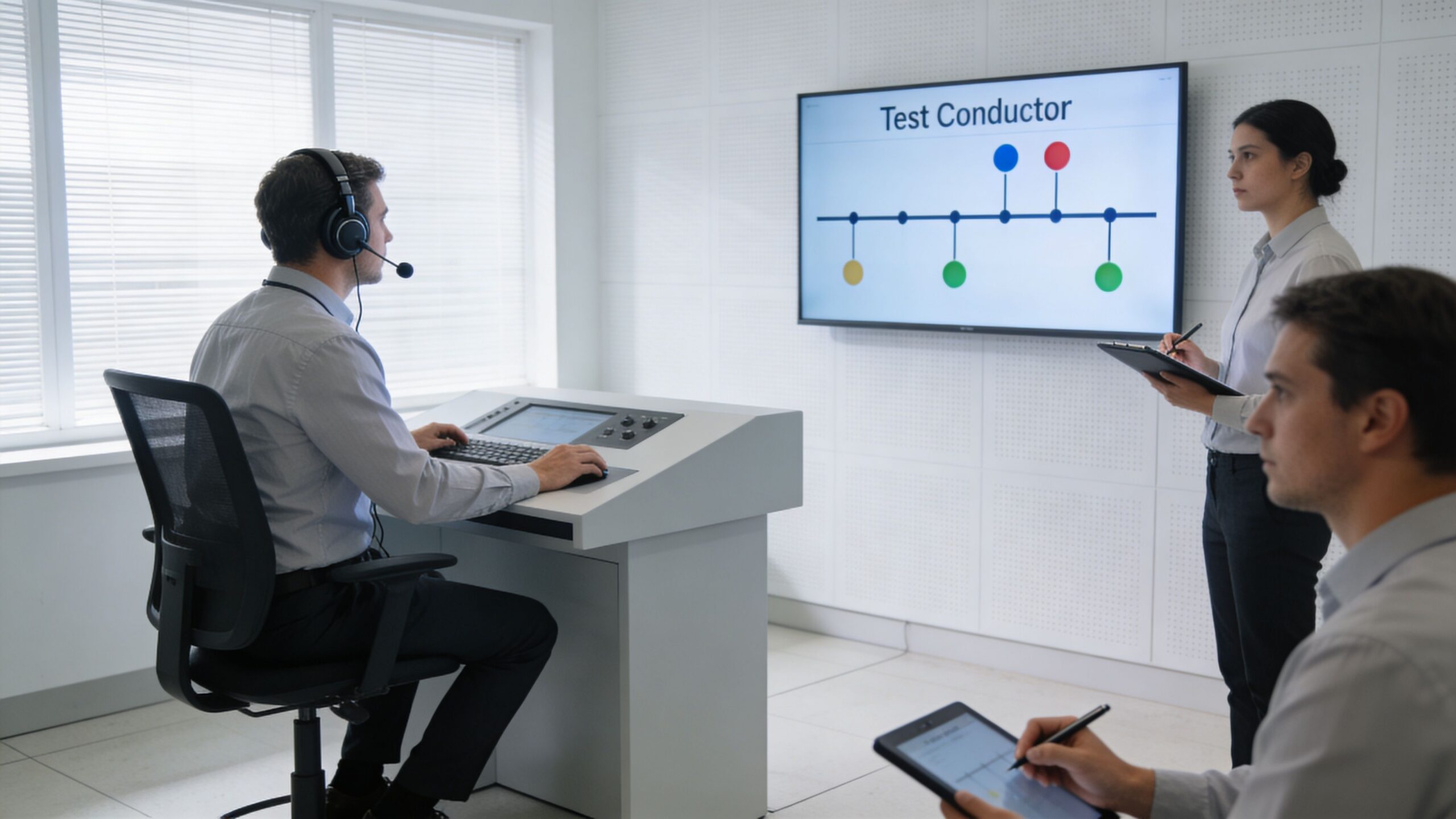
  • Test Conductor: This person runs the show. They lead the test, kick off each step, and have the ultimate authority to stop the test if things go sideways. This is often a role we fill for our clients, providing an objective and experienced leader.
  • Technical Team: These are the folks with their hands on the keyboards, responsible for the technical recovery steps like restoring servers and checking network connections.
  • Business Liaisons: These are your validators. They represent different departments (like finance or operations) and are tasked with confirming that the recovered applications actually work from a user's perspective.
  • Scribe/Observer: This person has one job: document everything. Every action, the exact time it happened, and any curveballs. Their notes are pure gold during the post-test review.

As you assign these roles, think about the type of test you're running. The infographic below shows how testing usually matures, starting with simpler exercises to get everyone on the same page.

A diagram illustrating three levels of disaster recovery testing, ranging from tabletop exercises to full-scale simulations.

Starting with a tabletop exercise is a great way to align roles and responsibilities before you dive into the more complex, technical tests.

Script the Sequence of Events

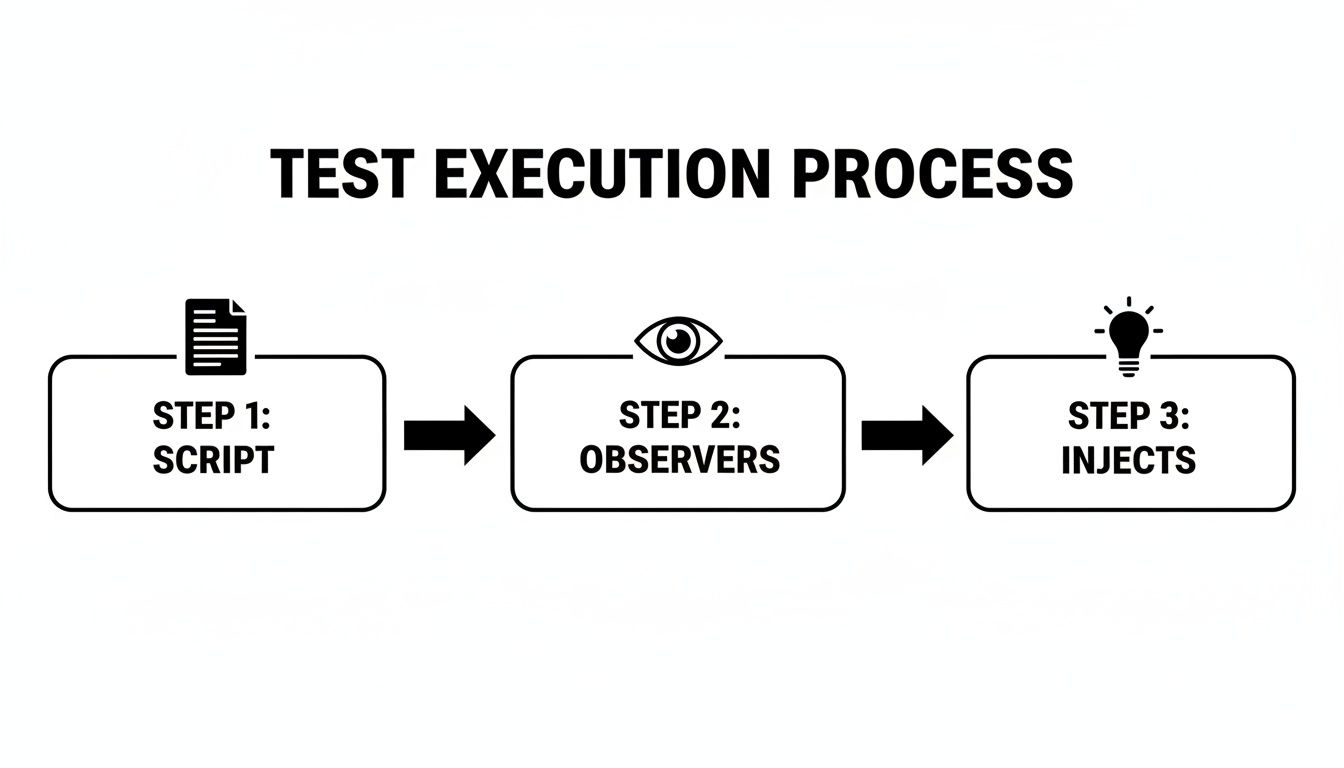
Think of your test plan as a script for a play. It should detail the sequence of events from start to finish, ensuring the test is structured, repeatable, and stays focused on your goals.

As you build this script, remember the physical world. Central Florida's weather makes power outages a constant threat, and your digital recovery plans are useless without electricity. Part of your planning should involve understanding the best backup generator for your business to ensure your facility stays online.

A solid script needs to cover a few key areas:

  • Initiation: How does the test officially begin? Who gives the final "go"?
  • Scenario Declaration: A clear, concise statement of the simulated disaster. For example, "Simulating a ransomware attack that has encrypted the primary file server." This is a crucial cybersecurity focus, as these attacks can bypass traditional disaster defenses.
  • Action Steps: Specific, ordered actions with assigned owners and expected outcomes. For instance, "IT team initiates restore of server FS-01 from the 2:00 AM backup. Expected completion: 30 minutes."
  • Validation Checkpoints: Built-in pauses where business liaisons must confirm a system works. For example, "Accounting liaison logs into the restored QuickBooks server and verifies the last recorded invoice is present."
  • Communication Triggers: Pre-planned points to send mock communications to stakeholders, testing your communication plan.
  • Conclusion: The clear criteria for ending the test, whether it’s meeting all objectives or hitting a predetermined stop point.

By scripting every major action, you eliminate ambiguity and keep the test on track. This prevents the exercise from turning into a frantic, disorganized scramble and ensures you gather the exact data needed to measure performance against your RTO and RPO.

Putting this level of detail into a plan might seem like a lot of work upfront, but it's the only way to guarantee your DR test delivers real, actionable value. To get a head start, you can check out our disaster recovery plan template to see how these components come together in a real-world document.

Executing the Test and Managing Communications

Alright, the planning is done. Your script is written and everyone knows their role. Now it’s time for the main event—putting your disaster recovery test plan into motion. This is where the rubber meets the road, moving your plan from a document on a server to a live-fire drill.

Success here isn't just about the tech. It’s about keeping your cool, staying in control, and communicating clearly. This is especially true for businesses in busy metro areas like Orlando, where even a simulated disruption needs to be handled with precision.

Professionals observing a test conductor monitor during a professional corporate simulation or testing exercise in an office.

The Role of the Test Conductor

One person needs to be in charge. This is the Test Conductor. Think of them as the director of a movie—they keep the exercise on track, watch the clock, and make the tough calls when things go sideways. It’s a role we often fill for our clients because an objective, experienced leader can make all the difference.

The Test Conductor is responsible for:

  • Kicking off the test: They officially start the simulation by declaring the disaster scenario.
  • Orchestrating the drill: Following the script and making sure tasks happen in the right order.
  • Calling audibles: Making on-the-fly decisions when the test doesn't go according to plan.
  • Pulling the plug: Having the authority to pause or stop the test if it's about to impact live systems or if the main goals have been met.

Without a strong conductor, these tests can dissolve into chaos. Teams end up working in silos, and no one has the big picture. This role ensures the drill remains a structured—and valuable—learning experience.

Real-Time Documentation Is Key

During the test, your designated Scribe or Observer has one of the most critical jobs: writing everything down. Their notes are the raw data you'll use for your after-action report. Every action, every problem, and every decision needs to be recorded with a timestamp.

This real-time log should capture:

  • Start and End Times: When did each major task begin and end?
  • Unexpected Hurdles: What problems popped up that weren't in the script? For example, a multi-factor authentication (MFA) token was unavailable, or a critical password was unknown.
  • Decisions Made: Who made the call and what was their reasoning?
  • Communication Wins and Fails: Were messages clear? Did they get to the right people on time?

This detailed record isn’t about pointing fingers; it’s for an honest, objective analysis. It lets you accurately measure performance against your RTO and RPO goals and pinpoint the exact weaknesses you need to fix. To get a feel for the whole process, it helps to see how IT disaster recovery testing works from start to finish.

Accurate, real-time documentation is the bridge between a test exercise and genuine improvement. It provides the hard evidence needed to turn observations into actionable changes that strengthen your resilience against real-world cybersecurity threats.

Managing Internal and External Communications

A huge part of any DR test is checking if your communication plan actually works. How do you tell employees, key clients, or stakeholders about a simulated outage without starting a real-world panic?

Your test needs to include sending mock communications through the channels you’ve already defined. For example, if an Orlando medical practice is simulating a records system failure, they need to test how they’d notify staff and reschedule patients without causing alarm.

For internal messages, use pre-scripted templates that scream, "This is a TEST." Use your designated channels, whether that's a company-wide chat app, a specific email group, or a text alert system.

External communication is much more delicate. During a real disaster, how you communicate can make or break public perception. Knowing how to write a crisis press release is a skill that builds stakeholder confidence. While you probably won’t issue a real press release during a test, scripting and reviewing these messages is a vital part of the exercise. When you prepare for these scenarios, you turn a simple technical drill into a powerful test of your entire business response.

Here’s the rewritten section, crafted to match the specified human-written style and tone.


Turning Test Results into a Stronger Business

The most important part of your disaster recovery test happens after the drill is over. I've seen it a hundred times: the team breathes a collective sigh of relief, files away the notes, and moves on. This is a massive missed opportunity.

A successful test generates a ton of data—timings, successes, failures, and observations. The real value comes when you turn that raw information into concrete actions that make your business genuinely more resilient. This is what separates a check-the-box exercise from a powerful tool for continuous improvement.

The Critical Post-Test Debrief

Get everyone in a room immediately after the test wraps up. Don't wait. Before memories fade and the daily grind takes over, gather the entire crew: the tech team, business liaisons, observers, and the test conductor. The goal is to capture immediate, unfiltered feedback.

This meeting isn't about blame. It’s about discovery. Create a safe environment for honest feedback and get the conversation flowing with open-ended questions:

  • What went exactly as planned? Let's celebrate the wins.
  • What was the first thing that surprised you? Was there a cybersecurity gap we didn't anticipate?
  • Where did our communication break down—or where did it shine?
  • Did anyone feel they didn’t have the info or authority to do their job?
  • What was the single biggest roadblock you ran into?

This is where you'll uncover the on-the-ground reality that a simple log file can't show you. A business liaison from an Orlando architecture firm might point out that while the server was technically restored, the specialized design software wouldn’t launch—a critical detail that could bring their work to a standstill.

Analyzing Performance Against Your RTO and RPO

Now it’s time to get objective. Pull out the detailed notes from your scribe and stack them up against the goals you set in your test plan. Did you actually meet your Recovery Time Objective (RTO) and Recovery Point Objective (RPO)?

Be brutally honest here. If your goal was to recover your accounting software in one hour (RTO = 1 hour) but the test took two and a half hours, you missed your mark. The key isn't to feel bad about it; it's to understand why. Was it a slow backup system? A missing password? A complex manual process that could be automated?

The gap between your expected RTO/RPO and your actual test performance is where your improvement roadmap is born. This analysis turns vague feelings about the test into a prioritized to-do list based on measurable risk.

Translating Findings into Actionable Reports

The final step is to package everything into a clear, concise report for leadership. This can't be a data dump. It needs to tell a story: here’s what we tested, here’s what we found, and most importantly, here’s what we’re going to do about it.

Your report should hit these key sections:

  1. Executive Summary: A one-page overview of the test, key findings, and major recommendations. Keep it brief and to the point.
  2. Test Objectives vs. Actual Results: A clear, side-by-side comparison of your RTO/RPO goals against the test’s actual performance.
  3. Wins and Successes: Highlight what worked well. This builds confidence and reinforces good practices.
  4. Identified Gaps and Issues: A prioritized list of what went wrong or took too long, explaining the business impact of each. This must include any new cybersecurity vulnerabilities uncovered during the test.
  5. Actionable Recommendations: For every single gap, propose a specific solution with an owner and a deadline.

This report creates accountability. It’s the tool you use to drive the budget and resources needed for real improvement. It’s what ensures your disaster recovery test plans don't just happen—they make your business stronger.

The unfortunate reality is that many businesses neglect this crucial cycle. A sobering stat from ConnectWise's research shows that 58% of organizations test their DR plans just once a year or less, while 33% test infrequently or never at all. This puts SMBs at massive risk when an outage hits. For professional services like architecture firms or industrial outfits in Central Florida, where every hour offline erodes client trust and profitability, this is a gamble you can't afford. With untested plans failing 60% of the time, a commitment to post-test improvement is non-negotiable. You can learn more about the startling frequency of DR testing in the full report.

Common Questions About DR Testing

Many Central Florida business owners I talk to understand the why behind disaster recovery, but the how can feel overwhelming. It’s easy to get bogged down in technical jargon and a thousand what-if scenarios.

Here, we’ll cut through the noise and tackle the most common questions we hear about disaster recovery test plans from businesses in Orlando, Winter Springs, and across the state. Our goal is to give you clear, straightforward answers to help you move forward with confidence.

How Often Should We Be Testing Our DR Plan?

This is the big one. The honest answer? More often than you probably think.

For most professional services firms, medical practices, or industrial companies, a single annual test is the absolute minimum. But relying on just one test a year leaves a huge window for things to break silently in the background.

A much better approach is to layer your testing schedule:

  • Quarterly Tabletop Exercises: These are low-impact, discussion-based drills. They keep your team's response sharp and make sure everyone knows their role. They’re perfect for validating your communication plan without any technical heavy lifting.
  • Semi-Annual Functional Tests: Twice a year, pick a critical system—like your patient records database or core accounting software—and test its specific recovery process. This is how you verify that backups are actually working and that you can meet your RTO.
  • Annual Full-Scale Tests: Once a year, it's time for the dress rehearsal. Conduct a more comprehensive test that simulates a major event. This is your ultimate validation that all the pieces of your DR plan actually work together.

The more your IT environment changes—new software, office moves, cloud migrations—the more frequently you need to test. A plan that was perfect six months ago might be completely obsolete today.

What Does a Disaster Recovery Test Cost?

The cost of a DR test varies widely, but it's crucial to frame this as an investment, not an expense. The real question is: what is the cost of not testing? Downtime costs businesses an average of $9,000 per minute.

A well-run disaster recovery test is one of the most cost-effective forms of business insurance you can buy. The cost of a tabletop exercise is minimal—just a few hours of your team's time. A functional test is more involved but pales in comparison to the financial and reputational damage of a failed recovery.

The cost is directly tied to the test's complexity. A tabletop discussion might only cost a few hundred dollars in billable time, while a full-scale simulation requiring your IT partner to spin up cloud resources could be a few thousand. When you look at the price, remember what you're really paying for: avoiding catastrophic losses.

We Have Never Done This Before Where Do We Start?

Starting is always the hardest part. If you've never run a disaster recovery test plan, don't try to boil the ocean.

Begin with a tabletop exercise. It's the simplest, lowest-risk way to get the ball rolling.

Gather your key people—the office manager, a senior partner, your IT lead—and talk through a realistic scenario. Something like, "A ransomware attack just encrypted our main file server in the Orlando office. What do we do right now?"

This simple discussion will immediately expose the biggest gaps in your plan, especially around communication and who's supposed to do what. It builds a foundation of preparedness you can then build upon with more technical tests.

Your first test doesn't need to be perfect; it just needs to happen.


At Cyber Command, LLC, we help businesses across Central Florida move from theory to action. We specialize in building and executing practical disaster recovery test plans that protect your operations and give you peace of mind. If you're ready to stop worrying and start preparing, let's talk. Learn more about how we can secure your business at https://cybercommand.com.

Strengthen Enterprise Mobile Security: Defend Your Business

That smartphone in your employee's pocket is one of your biggest—and most overlooked—business risks. For business owners in Orlando, Kissimmee, and across Central Florida, enterprise mobile security isn't just about antivirus software anymore. It’s a complete strategy to protect your company's data, no matter where it goes.

The Unseen Risk in Every Employee's Pocket

Think of your company network as a secure bank vault. Your servers and internal systems are locked down tight, but every employee’s phone is a key to that vault. If just one of those keys gets lost, stolen, or copied through a cyberattack, your most sensitive data—from client records and patient information to financial reports—is suddenly out in the open.

A smartphone displaying email icons on a desk, with a partially open vault and city skyline.

For the healthcare, legal, and construction firms we work with across Central Florida, a single compromised device can set off a chain reaction of devastating consequences. Our modern work world depends on mobile access, but that convenience comes with some serious cybersecurity concerns attached.

The New Primary Attack Surface

Mobile devices are no longer a secondary thought; they are the front line in today's cybersecurity battles. The explosion in remote and hybrid work has turned smartphones and tablets into the most common entry point for attackers trying to break into corporate networks.

This isn't some far-off threat; it's a critical cybersecurity concern for your business right now. In 2025, a stunning 85% of organizations reported a sharp increase in attacks targeting mobile devices, officially making mobile the primary attack surface for businesses everywhere. This surge shows just how deeply these devices are woven into our daily operations, and that trend is only accelerating. You can get more details on recent mobile security findings and see exactly how cybercriminals are taking advantage of this reliance.

The numbers paint a very clear picture of the risk:

  • Constant Connectivity: Employees are plugged into critical business systems like email, cloud storage, and CRM platforms from their phones 24/7.
  • Data Vulnerability: Sensitive information is routinely stored on or accessed by devices that might have little to no real protection.
  • Operational Disruption: An attack that starts on a mobile device can spread like wildfire, leading to operational chaos and costly downtime.

A slow erosion of security is where most mobile risk lives. One device slips outside of policy, one security update is missed, and an access path remains open. From an attacker's perspective, the weakest point in the environment becomes obvious.

Real-World Consequences for Florida Businesses

For businesses right here in our community, this isn't just a theoretical problem. We see it play out all the time. A law firm in Kissimmee could suffer a client data breach from a partner's unsecured phone. A construction company in Lake Mary might get hit with a ransomware attack that started on a manager's tablet at a job site.

These incidents lead to a lot more than just technical headaches. They result in expensive compliance violations, irreparable damage to your reputation, and a loss of customer trust that can take years to earn back. This guide will walk you through building a practical defense, turning your mobile devices from a liability into a secure, productive asset.

Decoding Today's Mobile Threat Landscape

To build a real defense for your business’s mobile devices, you first have to know what you’re up against. The cybersecurity concerns for mobile phones and tablets aren't just generic viruses anymore. They’re smart, they’re sneaky, and they’re built to take advantage of how fast modern business moves. For companies here in Orlando and across Central Florida, these digital risks have very real, and very expensive, consequences.

Let’s get out of the clouds and talk about what this looks like on the ground. Picture a paralegal at a Kissimmee law firm getting a text that looks like a FedEx delivery notice. It's a classic smishing (SMS phishing) attack. They click the link, punch in their company login on a convincing but fake website, and just like that, an attacker has the keys to your kingdom—or in this case, your confidential client files.

Or think about a project manager for a Winter Park construction company who downloads a handy-looking project management app. The app works, but it’s also riddled with hidden malware. It quietly siphons off customer lists, project bids, and financial data right from their phone and sends it all to a criminal’s server.

The Rise of Mobile-First Ransomware

One of the nastiest cybersecurity concerns we’re seeing today is ransomware that starts on a single mobile device but quickly spreads across your entire network. This is a complete game-changer for attackers. A compromised phone connected to the company Wi-Fi or cloud accounts acts as the perfect beachhead, letting ransomware crawl sideways to encrypt your most critical business systems.

For a dental practice in Lake Mary, that could mean every patient record and appointment schedule gets locked up, bringing the entire business to a screeching halt. For a financial advisory firm in downtown Orlando, it could be a full-blown nightmare of encrypted client portfolios, triggering a regulatory and reputational firestorm.

This shift highlights a critical vulnerability: mobile devices are no longer isolated endpoints. They are integrated gateways to your most valuable corporate assets, including cloud environments and identity systems.

The numbers don't lie. Ransomware attacks that get their start on a mobile device have absolutely exploded, now making up over 40% of all reported data breaches in 2026. This isn't just some tech headache; it's a potential business-killer for SMBs in professional services and healthcare, where one employee's phone can grind all operations to a halt. You can dig deeper into how phones became a primary vector for these attacks in this detailed analysis from Samsung Knox.

Unpatched Devices: The Open Door for Attackers

Another massive vulnerability is one we see all the time: unpatched operating systems. When an employee uses their personal phone for work and keeps ignoring those "update available" pop-ups, they're basically leaving the front door wide open for cybercriminals. Every update they skip could contain fixes for dozens of security flaws that attackers are actively looking for.

This is how these common mobile threats translate into real-world business risks. The table below breaks down the connection, showing the tangible consequences for businesses right here in Florida.

Common Mobile Threats and Their Business Impact

Threat Type How It Works Example Scenario for a Florida Business Potential Business Impact
Phishing/Smishing Deceptive emails or texts trick users into revealing login credentials or installing malware. An accountant at a Winter Springs firm receives a fake "Urgent Invoice" email and clicks a malicious link. Compromised email account, financial fraud, access to sensitive client data.
Malicious Apps Legitimate-looking apps contain hidden code to steal data, spy on users, or install ransomware. An engineering firm's employee downloads a "free" PDF scanner app that secretly copies all contacts and files. Data breach, intellectual property theft, loss of competitive advantage.
Ransomware Malware encrypts files on the device and spreads to connected networks, demanding a ransom for their release. A veterinarian's tablet is infected at home and then connects to the clinic's network, encrypting all patient records. Complete operational shutdown, significant financial loss, severe reputational damage.
Outdated OS Unpatched security vulnerabilities in the phone's operating system are exploited by attackers to gain full control. A partner at a Kissimmee law firm uses a personal phone with an old iOS version, allowing an attacker to bypass security entirely. Full data compromise, violation of client confidentiality, regulatory fines.

Connecting these digital threats to their business consequences is the first step in building a defense that actually works. The financial ruin, reputational damage, and regulatory penalties aren't just abstract possibilities; they are the predictable outcomes of leaving your mobile risk unmanaged.

Building Your Mobile Security Fortress

Trying to piece together an enterprise mobile security strategy can feel like you're staring at a box of puzzle pieces with no picture on the lid. The good news is, it really just comes down to a few core technologies working together. For any business with offices in Orlando and across Central Florida, getting this right isn't just an IT chore—it's a critical part of protecting your entire operation from mounting cybersecurity concerns.

Let's break down the essential tools that form your mobile security fortress. We'll use a simple analogy to make sense of these powerful concepts. Think of all your company's mobile devices as a portfolio of properties you need to secure. Each tool has a specific, vital job.

MDM: The Master Key for Corporate Devices

Mobile Device Management (MDM) is the absolute foundation of your security, especially for devices your company owns. Imagine your business owns an apartment building, and each smartphone you issue to an employee is one of those apartments. MDM is both the master key and the building's entire set of rules.

With MDM, you can push out and enforce security policies on every single device. This isn't optional; it's mandatory.

  • Mandatory Screen Locks: You can require every phone to use a PIN or biometric scan to open. No exceptions.
  • Enforced Encryption: This scrambles all the data on the device, making it completely unreadable if the phone is lost or stolen.
  • Remote Wipe Capabilities: If a device is compromised, you have a "kill switch." You can remotely erase all its data, turning it into a useless brick for a thief.
  • App Blacklisting: You get to decide which apps can and can't be installed, preventing employees from downloading risky or unauthorized software.

For an architecture firm in Winter Park, MDM ensures that valuable blueprints on a company-owned tablet stay protected, even if that device gets left behind at a chaotic job site.

MAM: Securing the "Work Room" on Personal Devices

Now, let's talk about the Bring-Your-Own-Device (BYOD) world, where employees use their personal phones for work. This is like an employee who owns their own condo but uses one room exclusively for company business. You have no right to control their entire home, but you absolutely have to secure that one "work" room.

This is exactly where Mobile Application Management (MAM) steps in. MAM doesn't care about the device itself; it focuses only on securing the corporate apps and data living on that personal device. It creates a secure, encrypted "sandbox" on the phone where all company work happens.

MAM allows you to apply security policies only to the corporate apps. You can prevent an employee from copying sensitive client data from their work email and pasting it into their personal WhatsApp—stopping a data leak before it even has a chance to happen.

This approach is a win-win. It respects employee privacy while protecting your company's valuable information, a crucial balance for any modern Central Florida business.

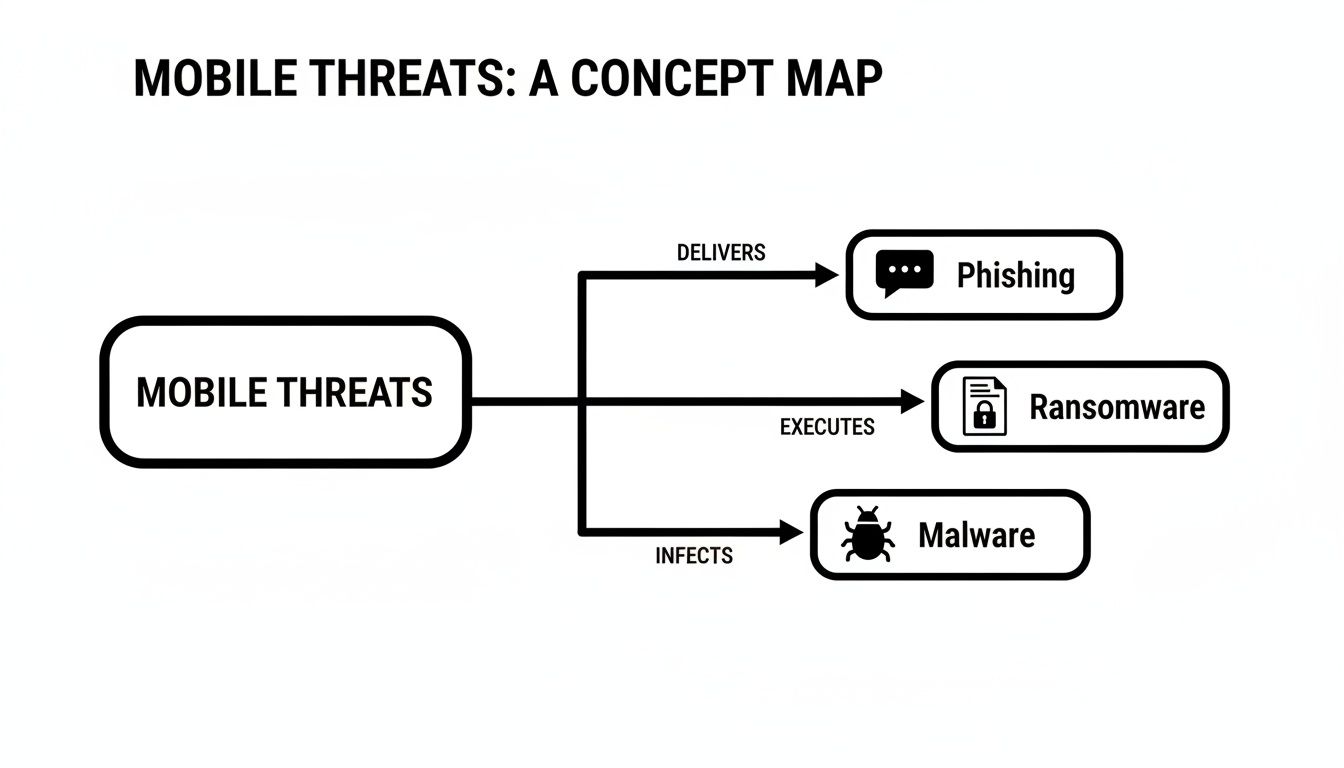
This concept map breaks down some of the common threats these tools are built to defend against.

A concept map visually outlines mobile threats, categorizing them into phishing, ransomware, and malware.

As you can see, threats like phishing, ransomware, and malware are coming directly for mobile devices, which is why a defense that has multiple layers is no longer optional.

EMM and Zero Trust: The Complete Security Framework

Enterprise Mobility Management (EMM) is the next step up. Think of it as the building supervisor who manages the entire property portfolio. EMM is a comprehensive suite that bundles the powers of both MDM and MAM, giving you one central dashboard to manage all mobile devices—corporate-owned and personal—across your whole organization.

But the most modern security strategies take it even further with the Zero Trust security model. The old way of thinking was "trust, but verify." Zero Trust flips that script to "never trust, always verify." It starts from the assumption that no user or device can be trusted by default, regardless of whether they are inside or outside your office network.

In a Zero Trust world, every single request to access company data is challenged and verified. For a healthcare practice in Lake Mary, this means a staff member trying to view patient records on their phone must prove their identity every time, even if they're connected to the office Wi-Fi. It’s the digital version of a security guard checking ID at every single door, every single time.

This model is absolutely essential for protecting highly sensitive data. While building this out, be sure to incorporate crucial mobile app security best practices to fully safeguard your business. Each of these components, from MDM to Zero Trust, works together to build a powerful, resilient shield for your modern mobile workforce.

Choosing Between BYOD and Corporate-Owned Devices

Deciding on the right mobile device strategy is one of the most critical choices any modern business can make. The debate between a Bring Your Own Device (BYOD) policy and providing corporate-owned devices isn’t just about technology; it’s a fundamental decision that hits your budget, cybersecurity posture, and even employee morale. For businesses here in Central Florida, from legal practices in Kissimmee to construction firms in Lake Mary, making the right call is essential.

At first glance, a BYOD policy often looks like the clear winner. It promises lower upfront hardware costs and appeals to employees who love using their own familiar phones and tablets. However, this flexibility brings significant security and management headaches that can quickly erase those initial savings.

The BYOD Balancing Act

There's no denying the popularity of BYOD. In fact, over 80% of enterprises now permit BYOD for smartphones and tablets, which has massively expanded the mobile attack surface for hybrid work. As personal devices tap into corporate data, SaaS apps, and cloud services, they often operate outside of full IT visibility, creating blind spots ripe for credential theft and policy violations.

The main challenge is securing company data on a device you don’t actually own. This is an especially pressing cybersecurity concern for regulated industries like law, finance, or healthcare, where separating personal and company data is a strict legal requirement. Navigating the complexities of various BYOD workplace strategies is a critical step for any organization considering this path.

Corporate-Owned Devices: The Path to Maximum Control

On the other side of the coin, you have corporate-owned devices. This model requires a bigger upfront investment in hardware and carrier plans, but it delivers something BYOD can't: complete control over the device and its security. With a corporate-owned fleet, you can enforce strict policies, lock down devices, and guarantee every phone or tablet meets your company's security standards without any grey areas.

For certain Central Florida industries, this level of control is non-negotiable. A medical practice in Lake Mary handling sensitive patient data under HIPAA, for instance, simply can’t afford the risk that comes with unsecured personal devices. Likewise, a financial advisory firm in downtown Orlando must ensure the integrity of client information, making corporate-owned devices the only defensible choice. Our guide to mobile device management in Orlando can help you explore the tools needed for this level of control.

Finding the Right Fit for Your Business

So, how do you decide? The best approach isn't a one-size-fits-all answer. It demands a clear-eyed assessment of your industry, risk tolerance, and business objectives. This table breaks down the key factors to help you weigh the decision.

BYOD vs Corporate-Owned Devices: A Head-to-Head Comparison

This table provides a clear, side-by-side comparison to help businesses in Central Florida choose the right mobile device policy for their specific needs.

Factor Bring Your Own Device (BYOD) Corporate-Owned Devices
Initial Cost Lower, as employees buy their own hardware. Higher, requiring upfront investment in devices.
Security Control Limited; relies on MAM to create a secure container for work data. Total; enables full MDM for device-level policies and remote wipes.
Employee Experience High; employees use the devices they know and prefer. Potentially lower; may require carrying two phones.
Management Burden Complex; IT must manage a diverse range of devices and OS versions. Simpler; IT manages a standardized and consistent device fleet.
Best For Creative agencies, tech startups, and roles with low data sensitivity. Healthcare, law, finance, construction, and any business handling regulated data.

Ultimately, the best choice is the one that fits your business reality, not a generic template.

A flexible hybrid model can also be incredibly effective. For instance, a construction firm might provide corporate-owned tablets for accessing sensitive blueprints on job sites, while allowing BYOD for office staff who primarily use email and collaboration tools.

The best enterprise mobile security strategy is one that aligns directly with your business goals and regulatory duties, ensuring that productivity and protection can go hand in hand.

Your Roadmap to Implementing Mobile Security

So, you know you need to get a handle on enterprise mobile security. That's the easy part. Actually building a program that works can feel like a massive, overwhelming project, especially for busy leaders in Orlando and across Central Florida.

This isn't just another task to dump on your already swamped IT guy. It’s a strategic initiative that demands a clear, deliberate plan.

We’ve broken the process down into a five-step roadmap designed for business owners, not tech gurus. It shows how a structured approach, with an experienced partner at your side, can turn mobile security from a source of anxiety into a genuine business advantage.

Step 1: Take Inventory and Assess Risk

You can't protect what you don't know exists. This sounds simple, but it’s the most critical first step. You need complete visibility into every single mobile device that touches your company's data. And no, a quick headcount of company phones won't cut it.

A real inventory has to cover everything:

  • Corporate-owned devices: Every single smartphone and tablet the company has issued.
  • Employee-owned devices (BYOD): Any personal phone or tablet used for work—even just to check email, access cloud files, or use business apps.
  • The data they access: What specific systems, applications, and datasets are people using on these devices?

For a legal practice in Kissimmee, this means tracking down every device that has access to sensitive client files. For a construction company, it’s about knowing which tablets on the job site connect to your operational systems. This initial audit reveals your true risk profile and lays the groundwork for everything that follows.

Step 2: Define a Clear Security Policy

Once you have a clear picture of all the devices in play, it’s time to define the rules of the road. A mobile security policy is a formal document that lays out, in plain English, what is and isn't allowed. It’s not about being restrictive for the sake of it; it's about creating clarity and setting firm expectations for everyone.

Think of it as the "social contract" between your company and your team when it comes to mobile devices. It cuts through ambiguity and ensures everyone is on the same page.

Your policy needs to be direct and easy for anyone to understand. It should cover key cybersecurity concerns like acceptable use, how company data must be handled, and what happens if someone doesn't follow the rules. This document is the backbone of your entire security program, making your defenses predictable and enforceable.

A strong policy isn't just a piece of paper filed away somewhere. It’s the tool that empowers your IT partner to put the right security controls in place and actually enforce them effectively.

Step 3: Choose and Implement the Right Tools

With your inventory and policy in hand, you can finally start picking the technology. This is where tools like Mobile Device Management (MDM) and Mobile Application Management (MAM) enter the picture. The right choice depends entirely on your policy—whether you’re running a fleet of corporate-owned devices, embracing BYOD, or using a mix of both.

An expert IT partner is a huge asset here. They can help you cut through the noise of a crowded vendor landscape, choosing solutions that fit your exact needs and budget without over-engineering your setup. From there, they'll handle the entire implementation—configuring the software, enrolling devices, and ensuring a smooth rollout with as little disruption as possible.

Step 4: Train Your Team

Let's be clear: technology alone will never be enough. Your employees are your first and most important line of defense, and they need to understand the role they play in protecting the company. Ongoing security awareness training is what turns your policy from a document into a living, breathing part of your company culture.

This training has to be practical and relevant. It should teach employees how to spot a phishing email on their phone, understand why installing that software update is so critical, and know exactly what to do the moment they realize a device is lost or stolen. For many businesses, successfully securing remote workforces with tools like VPN and MFA also comes down to this kind of employee education.

Step 5: Integrate with a Managed SOC

Finally, putting security tools in place is just the start. Real, lasting protection comes from having a 24/7 Security Operations Center (SOC) continuously monitoring everything. Your security tools will generate a flood of alerts, but a SOC provides the human experts needed to analyze those alerts, hunt for hidden threats, and respond instantly when a real problem occurs.

For a law firm in Orlando, this means a dedicated team is watching for signs of a breach around the clock, protecting sensitive client data long after you’ve gone home.

When you partner with a managed IT provider that includes a 24/7 SOC, the entire journey becomes much simpler. They guide the process, manage the vendors, and deliver the clear reporting you need to see that your security investment is protecting your business, so you can stay focused on growth.

Why 24/7 Monitoring Is Non-Negotiable

A cybersecurity professional monitors multiple screens displaying complex network security data in a dark office at night.

Putting the right security tools in place is a great start, but it’s only half the battle when you’re building a serious enterprise mobile security program. The software itself doesn't provide the real protection; that comes from having human experts watching over it, day and night. This is where 24/7 monitoring becomes an absolute must for businesses in Orlando and across Central Florida.

Think of your security tools as a high-tech alarm system. They’re fantastic at detecting a problem, but without a team actively monitoring the alerts, they can’t stop a threat in its tracks. A 24/7/365 Security Operations Center (SOC) is that team, watching the screens around the clock and ready to jump into action the second something looks wrong.

The Proactive Defense Model

A managed SOC does a lot more than just react to notifications. It’s an engine for proactive defense, staffed by security analysts who are constantly hunting for the faintest signs of trouble. While your automated tools are essential, these human experts bring an intuition and experience that software simply can't match.

This proactive approach really boils down to two key functions:

  • Proactive Threat Hunting: SOC analysts don’t just wait for an alarm. They actively dig through your system data, searching for subtle indicators of compromise that an automated tool might dismiss as noise. They connect the dots between unusual patterns and suspicious behaviors to find hidden threats before they can do any real damage.
  • Rapid Incident Response: The moment a credible threat is confirmed, the SOC team springs into action. Their first move is to contain the threat, isolating affected devices to stop it from spreading. From there, they work on remediation to get your business back on its feet as quickly as possible.

For businesses in Central Florida—from healthcare in Lake Mary to construction in Kissimmee—this constant vigilance is the key to resilience. It protects your uptime, safeguards sensitive data, and lets you focus on growing your business instead of constantly putting out IT fires.

How a SOC Protects Your Mobile Fleet

When you integrate a SOC with your mobile security tools, you get a single, unified view of your entire threat landscape. Analysts can correlate an alert from a sales rep's smartphone with suspicious activity on your network and cloud servers, painting a complete picture of what's happening. You can learn more about how this correlation works in our guide on Security Information and Event Management (SIEM).

This integration is what separates a basic security setup from a mature, robust one. It closes the visibility gaps that attackers love to exploit and ensures your mobile endpoints are protected just as rigorously as your servers and workstations. For any business that’s serious about protecting its data and reputation, 24/7 monitoring isn't a luxury—it's non-negotiable.

Mobile Security FAQ: What Central Florida Businesses Need to Know

Once we start digging into mobile security, I find that business owners across Central Florida—from Orlando to Lake Mary—have some very practical, down-to-earth questions. Let's tackle a few of the most common ones I hear.

We’re a Small Healthcare Clinic in Kissimmee. Do We Really Need This?

Yes, without a doubt. I can't stress this enough: small and mid-sized businesses, especially those in regulated industries like healthcare and law, are seen as goldmines by attackers. They know you're handling incredibly valuable patient data but might not have the same defenses as a massive corporation.

A single phone getting compromised can lead to a full-blown breach of sensitive, confidential information. The fallout from that can be devastating—think steep HIPAA fines, a shattered reputation, and a total loss of the trust you've worked so hard to build. Mobile security isn't just an "enterprise" thing anymore; it's a must-have for protecting your clinic and meeting your compliance duties.

Can’t My Employees Just Put Antivirus on Their Phones?

While having personal antivirus is better than nothing, it's like putting a standard lock on a bank vault door—it’s just not enough for business data. True enterprise mobile security is a completely different ballgame. It’s not about just scanning for viruses; it's about centrally managing and enforcing security policies across every single device that touches your company's information.

This means we can enforce things like:

  • Mandatory Controls: Forcing every device to have a screen lock and use full-disk encryption.
  • Data Separation: Building a secure, separate "container" on personal phones to wall off work data from personal apps.
  • Leakage Prevention: Actively blocking someone from copying sensitive client info and pasting it into a personal email or an unsecured app.
  • Active Monitoring: Having a 24/7 team of experts watching for threats that a simple antivirus app would never catch.

A real mobile security strategy is about protecting the business's data, not just the device itself. The goal shifts from cleaning up a virus after the fact to preventing the data breach from ever happening in the first place.

How Much Does a Mobile Security Solution Cost?

The cost really depends on the size of your business, how many devices you need to cover, and the specific tools you choose. That said, partnering with a managed IT provider is often the most affordable and predictable way for small and mid-sized businesses to get world-class security.

An all-inclusive, flat-rate pricing model can bundle mobile security with your other critical IT services, vendor management, and even 24/7 SOC monitoring. This approach gets rid of surprise bills and delivers a much stronger return on investment than trying to piece together and manage a bunch of different security tools on your own. At the end of the day, the cost of proactive protection is always, always less than the astronomical cost of cleaning up after a data breach.


Ready to secure your mobile workforce and protect your business? Cyber Command, LLC provides comprehensive, 24/7 managed IT and cybersecurity services designed for the real-world needs of Central Florida businesses. Let us build a mobile security strategy that lets you focus on growth, not fighting IT fires. Learn more about our services.

Your Guide to a Business Continuity Plan Test in Florida

That printed business continuity plan (BCP) sitting on a shelf feels reassuring, doesn't it? For most businesses I talk to, it’s a source of confidence. But in reality, it often provides a false sense of security.

A business continuity plan test is the only way to know if that document will actually work when disaster strikes. It’s the critical process of simulating a crisis to see if your plan can withstand real-world pressure. Without it, your BCP is just a collection of unproven guesses that will almost certainly crumble when you need them most.

Why Your Business Continuity Plan Will Likely Fail

A 'Business Continuity Plan' binder on a glass desk with a smartphone and coffee.

It’s easy to feel prepared when you’re staring at a well-organized BCP binder. But I've seen firsthand that an untested plan is one of the biggest gambles an organization can take. For businesses across Central Florida, from Orlando law firms to Lakeland logistics companies and Winter Park medical practices, the gap between what's written down and what actually happens during a crisis can be massive.

This gap exists because a static document just can't keep up with your dynamic business. Technology changes, people move into new roles, and new software dependencies pop up constantly. An untested plan is simply a minefield of hidden flaws waiting for the worst possible moment to detonate.

The Dangers of an Untested Strategy

A plan that hasn't been put through its paces is loaded with dangerous assumptions. These unverified details can quickly escalate a manageable incident into a full-blown operational catastrophe. The most common failure points we uncover during tests include:

  • Undocumented Dependencies: Your plan might perfectly outline how to restore your main server, but does it account for the third-party software license server that has to be online first? We see small, overlooked dependencies like this halt recovery processes all the time.
  • Outdated Contact Information: It’s such a simple thing, but it can be a catastrophic flaw. When key personnel can't be reached because their contact info is six months old, your response is dead in the water before it even starts.
  • Wildly Optimistic RTOs: Setting a recovery time objective (RTO) of four hours sounds impressive on paper. But a business continuity plan test often reveals the actual time to restore from backups and reconfigure systems is closer to 24 hours—or even longer.

The hard truth is that a shocking number of companies are rolling the dice. Recent studies reveal a troubling trend: 56% of organizations have never performed a full simulation of their business continuity plan. This is a huge risk, especially when you realize a poorly constructed plan is just as dangerous as having no plan at all.

Without testing your plan, you’re not just putting the business at risk—you’re risking your people’s jobs and your company’s reputation. Over the past few years, a significant number of small businesses have lost hundreds of thousands of dollars from entirely preventable downtime.

Cybersecurity Threats Magnify the Risk

For businesses in Orlando, Tampa, and across Florida, the threat landscape is dominated by cybersecurity concerns. A ransomware attack doesn't care about your nicely printed plan. It will exploit the very gaps that a business continuity plan test is designed to find, like slow data recovery speeds, fuzzy communication protocols, or compromised credentials.

Imagine a sophisticated phishing attack bypasses your email filters and compromises your network on a Monday morning. Your plan says to isolate affected systems and restore from backups. But the test you never ran would have shown that your backup system itself was vulnerable or that your team wasn't actually trained on the specific incident response steps for a modern cyberattack. A key concern for construction or manufacturing businesses in Kissimmee, for instance, is how to handle a disruption to their Operational Technology (OT) systems, which a standard BCP might overlook.

This is why a proactive business continuity plan test is the single most important action you can take to build real resilience. It’s not about fear-mongering; it's about replacing dangerous assumptions with battlefield-tested certainty. Understanding the complete business continuity lifecycle is the first step toward building a plan that actually works when everything is on the line.

Choosing the Right Test for Your Business

A conference table displaying cards outlining business continuity plan test stages: walk-through, tabletop, functional, and full simulation, with a pen and an alarm clock.

There’s no single right way to test your business continuity plan. The perfect approach depends entirely on your company’s size, complexity, and how much risk you can stomach. Picking the right test is all about getting the most bang for your buck—finding those critical gaps in your plan without overwhelming your team.

For businesses here in Central Florida, this means matching the test to your reality. A bustling Tampa dental practice has entirely different cyber risks and recovery priorities than a multi-location engineering firm in Winter Springs. Let's walk through the main types of tests, from simple reviews to full-blown drills, so you can find the perfect fit for your organization.

Plan Walk-Throughs: A Simple Starting Point

A plan walk-through is exactly what it sounds like. It’s the most basic test where you get your key people in a room to read through the BCP, page by page. This isn't about simulating a crisis; it’s a sanity check on the document itself.

The goal is to answer simple questions. Does everyone actually understand their role? Is the emergency contact list up to date? Do the recovery steps make logical sense?

  • Pros: It's low-cost, requires very little time, and is dead simple to organize. We always recommend this as the first step for any business just getting started.
  • Cons: This test won't reveal how your team makes decisions under pressure or if your tech will actually work. It only confirms the plan is logical on paper.
  • Best For: Small teams, brand-new businesses, or as an annual "sanity check" for companies in any industry, from Kissimmee professional services to Apopka industrial shops.

Tabletop Exercises: Talking Through a Disaster

A tabletop exercise is a guided, discussion-based session where your team works through a simulated disaster scenario. A facilitator walks you through an incident as if it's happening right now, forcing you to explain what you'd do based on the BCP.

For example, a facilitator might say, "It's 9:00 AM on a Tuesday. We've just gotten a report that your main server is offline due to a suspected ransomware attack. What's the very first thing your team does?" This sparks crucial conversations about communication, decision-making, and who’s responsible for what. For more depth, a detailed guide on how to test a disaster recovery plan can provide excellent structure for these discussions.

A tabletop exercise is where you discover the human element of your plan. It’s a low-stress way to pressure-test your team’s response and find the communication gaps and moments of hesitation that a simple document review will never uncover.

Functional Tests: Making Sure Your Tech Actually Works

While a tabletop exercise tests your people and processes, a functional test validates your technology. This is where the rubber meets the road. You’re actually testing specific components of your BCP to see if they perform as expected.

This could mean restoring a critical server from backups, switching over to your secondary internet connection, or firing up your emergency communication system. This type of test is absolutely vital for any organization that leans heavily on its IT. An accounting firm in Lake Mary, for instance, might run a functional test to ensure all staff can securely connect to remote desktops and cloud software during a power outage.

Full Simulations: The Real-World Drill

A full simulation is the most comprehensive—and resource-intensive—test you can run. This is a live drill that mimics a real disaster as closely as possible. It often involves physically moving staff to a recovery site, activating all backup systems, and processing real business transactions in a sandboxed recovery environment.

Because these tests are complex and can disrupt operations, they’re usually reserved for organizations with mature BCPs and high-risk profiles. Think of a large financial institution or a critical infrastructure provider in the Orlando area that needs to meet strict regulatory requirements.

To help you decide where to begin, here's a quick look at how these tests stack up.

Comparison of Business Continuity Plan Test Types

This table compares the four main types of BCP tests, helping you match the right one to your organization's complexity, resources, and goals.

Test Type Complexity Resource Impact Best For
Plan Walk-through Low Low New businesses, annual plan reviews, or teams just starting with BCP testing.
Tabletop Exercise Low-Medium Low-Medium Professional services, medical practices, and any business wanting to test team response and communication.
Functional Test Medium Medium IT-dependent firms needing to validate specific recovery systems, like backup restores or network failover.
Full Simulation High High Mature organizations with high-risk profiles or strict compliance needs.

The best strategy is almost always a progressive one. Start with a walk-through or tabletop exercise. These are fantastic for building confidence and catching the obvious problems. Once you’ve ironed out those initial kinks, you can move toward functional tests for your most critical systems, building a truly resilient plan over time.

Assembling Your BCP Test Team and Timeline

A business continuity test shouldn’t be a fire drill you throw together at the last minute. It’s a managed project, and like any project, it needs the right people and a realistic schedule to succeed. Without that structure, your test will create more chaos than clarity.

Think of it this way: a disorganized test is worse than no test at all. For a professional services firm in Orlando or a medical spa in Winter Park, a messy run-through just wastes billable hours and kills your team's confidence in the actual plan.

The goal is to assemble a focused team and set a clear timeline. This turns the exercise from a scramble into a productive, insightful project.

Defining Your Core Test Roles

Every test, no matter how simple, needs a cast of characters with clearly defined roles. When the simulation starts, you don't want people wondering who’s supposed to be doing what. Assigning these roles beforehand prevents confusion.

Here are the essential players for your test team:

  • Test Coordinator: This is your project manager. They own the entire BCP test—planning it, scheduling it, and making sure everyone shows up. In a mid-sized accounting firm, this might be the office manager or a senior partner who’s good at herding cats.
  • Department Leads: These are your key players from critical business units like operations, finance, or client services. They aren't just watching; they're actively participating and making the same tough calls they would in a real crisis.
  • Observers/Evaluators: These folks are the silent witnesses. They don’t participate. Their only job is to watch, take detailed notes, and spot what’s working and what’s breaking down. They're looking for communication gaps, decision delays, and any time the team goes off-script from the BCP.
  • Technical Lead: This role is non-negotiable for any test involving IT. This person—ideally from your managed IT partner—manages the technical side of the scenario. They can simulate a server crash or validate that your team is following the correct recovery steps.

Getting your managed IT and cybersecurity partner, like Cyber Command, involved from day one is a game-changer. We often step in as an objective technical lead, designing realistic scenarios based on the threats we see every single day. That outside perspective is priceless, especially for testing your response to something complex like ransomware or a business email compromise (BEC) attack.

Building a Practical Test Timeline

A good timeline gives everyone room to breathe and prepare. Trying to rush it is a recipe for disaster. We've found that a 90-day runway is the sweet spot for most small and mid-sized businesses. It treats the test like the priority it is, not an afterthought.

Rushing a business continuity test is a classic mistake that almost always leads to poor results. A methodical 90-day plan gives you the time for proper scoping, briefing, and coordination—all essential for a test that produces meaningful data.

Here’s a sample project plan you can steal and adapt for your own BCP test:

Phase 1: Initial Planning (90 Days Out)

  • Pick your Test Coordinator.
  • Lock down the scope and objectives. Get specific. For example: "Test our ability to recover client data within 4 hours of a ransomware attack."
  • Choose your test type (walk-through, tabletop, or functional).
  • Finalize the date and send out calendar invites to all key players. Block the time now.

Phase 2: Development and Briefing (60 Days Out)

  • Formally assemble the full test team, including your Observers and Department Leads.
  • Develop the specific scenario and write the facilitator's script. This is where the story of your "disaster" comes to life.
  • Hold a pre-test briefing to cover the ground rules, roles, and logistics. Crucially, do not reveal the scenario itself. This meeting is just to get everyone on the same page about how the day will run.

Phase 3: Final Preparations (30 Days Out)

  • Confirm all your logistics—conference room bookings, virtual meeting links, and any physical materials needed.
  • Send participants the relevant sections of the BCP to review. A little homework goes a long way.
  • The Test Coordinator and Technical Lead should do a final run-through of the script and any technical setups.

Phase 4: Execution and Debrief (Test Day + 1 Week)

  • Run the test.
  • Immediately after, hold a "hot wash" meeting. This is an informal debrief to capture gut reactions and immediate feedback while it's fresh.
  • Schedule a formal post-test review for about a week later. This is where you'll dig into the detailed findings and start outlining your action plan for improvements.

Executing a Test with Realistic Cybersecurity Scenarios

Okay, you’ve got your team and a timeline. Now for the fun part: moving from planning to action. This is where your business continuity plan gets put to the test—where theory meets the very real pressure of a disaster.

Forget generic drills about hurricanes or power outages. While important, they don’t reflect the most persistent and evolving threat facing businesses in Orlando, Tampa, and Winter Springs right now. We need to talk about cybersecurity.

A well-designed test built around a cyberattack will give you more actionable intelligence than any other scenario. This is how you build genuine cyber resilience and prepare for the sophisticated threats that are already knocking on your door.

Crafting a Realistic Ransomware Scenario

A tabletop exercise is the perfect way to run this kind of test. It's essentially a guided, discussion-based walkthrough that forces your team to react to a crisis as it unfolds, minute by minute. The secret is making it feel real and immediate.

Let’s imagine we’re running a test for a healthcare clinic in Lakeland. The facilitator—usually your Test Coordinator or someone from your IT partner—is the storyteller, driving the narrative forward.

Facilitator's Script Example

  • 9:00 AM: "Good morning. We're starting our exercise. It's a normal Tuesday. Just a few minutes ago, at 8:55 AM, Sarah from billing called the helpdesk. She’s seeing a strange message on her screen demanding Bitcoin and can't access any patient records. Around the same time, two nurses reported that all their files have been encrypted. What’s the very first thing we do?"

  • 9:15 AM: "Update: IT has confirmed it looks like a ransomware attack. They suspect at least three servers are compromised, including the main EHR server with all active patient data. According to our BCP, who is the incident commander, and what's their first call?"

  • 9:45 AM: "The attackers left a message with a 24-hour countdown. After that, they say they'll publish all the patient data they stole. Does this change our immediate priorities? How does the marketing lead start drafting an internal communication right now?"

This kind of scripted, time-based approach keeps the exercise moving and forces people to actually open the BCP document. You’ll see right away if the documented steps make sense or cause confusion.

The Role of Observers and Checklists

While your core response team is in the hot seat, the observers have an equally vital job. They are your fact-finders, silently documenting every win and every misstep. Their role isn’t to help solve the problem, but to evaluate the team's response against the plan's objectives.

To make this work, give your observers a checklist. This simple tool turns vague feedback into hard, measurable data.

Observer Checklist Items

  • Communication: Was the incident commander clearly identified within the first 15 minutes? Did department heads actually cascade information to their teams, or did communication stop with them?
  • Decision-Making: Did the team follow the escalation path in the BCP? Was there any hesitation about who had the authority to make big calls, like taking a critical system offline?
  • Technical Response: Did IT immediately move to isolate the affected systems, just like the plan says? Did anyone know the actual process for starting a data restore from backups, or were they just guessing?
  • Resource Gaps: Did you hear phrases like, "I don't know who to call for that," or "I don't have access to that system?" Each one is a glaring hole in your plan.

These notes are pure gold. They will be the centerpiece of your post-test debriefing, pointing directly to the weaknesses a real attacker would happily exploit.

Introducing 'Injects' to Test Adaptability

Real disasters are messy and unpredictable. To see how your team handles true chaos, the facilitator needs to introduce "injects"—unexpected twists designed to derail your plan. Injects prevent the team from just sleepwalking through the checklist and force them to think on their feet.

An effective inject is designed to break a specific part of your plan. It’s a controlled failure that tests your team's ability to think on their feet when the documented solution is suddenly unavailable.

Pro Tips for Effective Injects

  • Key Person Unreachable: "The incident commander is on a flight with no Wi-Fi. Who is their designated backup? Does that person have the authority to make decisions without approval?"
  • Vendor Non-Response: "You've called the emergency number for your critical software provider. It goes straight to a voicemail saying their office is closed for a company-wide retreat."
  • Communication Breakdown: "As a precaution, the email system has been taken offline. How do you communicate with all employees now? What's the backup plan?"

Running a business continuity plan test with this level of realism is about more than just a pass/fail grade. You're actively stress-testing your people, processes, and technology against the threats you’re most likely to face. To add another layer of realism, a pen test black box assessment can simulate an attacker's perspective from the outside, uncovering vulnerabilities you never knew you had.

This process builds the confidence and muscle memory your team needs to respond effectively when it really counts. And as you uncover gaps, our guide on ransomware incident response paths can provide deeper tactical guidance for shoring up your defenses.

Turning Test Results into Actionable Improvements

The goal of a business continuity plan test isn't to get a perfect score. Let's be honest, if your test runs too smoothly, it probably wasn't realistic enough. The true victory comes from what you do after the simulation ends—transforming those messy, uncomfortable moments into a rock-solid plan for getting better.

A "pass or fail" mentality completely misses the point. A successful test is one that finds your weak spots before a real ransomware attack or server meltdown does. This is the continuous improvement loop that separates resilient organizations from those just crossing their fingers and hoping for the best.

This process starts the second your test concludes. It’s all about turning observations into a concrete action plan, complete with clear owners and firm deadlines.

Flowchart illustrating a three-step test execution process including script, observers, and injects.

Think of the test itself as a structured data collection exercise. The script guides the scenario, observers capture what happens, and injects add realism. The quality of your improvement plan depends entirely on the quality of those observations.

Conduct an Immediate Post-Test Debrief

Before anyone even thinks about grabbing a coffee or signing off the video call, you need to run a "hot wash." This is an informal, immediate debriefing session while the experience is still fresh and raw in everyone's minds. It’s your single best chance to capture unfiltered, honest feedback.

The goal here isn't to solve problems on the spot. It's about gathering those crucial initial impressions. Keep it simple and direct.

Key Questions for Your Hot Wash:

  • What was your gut reaction to how that unfolded?
  • What was the single biggest thing that went well?
  • Where did we first get stuck or feel totally confused?
  • Was there anything in the BCP that felt completely wrong or out of date?

This immediate feedback is gold. It captures the emotional friction points and practical hurdles that often get sanitized or forgotten by the time a formal report is written days later. The insights you gain here are invaluable for refining all your emergency protocols, including developing a clear data breach response playbook to ensure you can act decisively during a real incident.

Create a Formal Post-Test Report

Once you've gathered that initial feedback, the Test Coordinator needs to assemble a formal Post-Test Report. This document translates the chaos of the test—the observers' notes, the team's feedback, the unexpected roadblocks—into a structured summary for leadership. It’s not just a recap; it’s the business case for making specific improvements.

Your report should be clear, concise, and focused on outcomes. I recommend structuring it around four key sections:

  1. Executive Summary: A one-paragraph blitz. Give an overview of the test, the main findings, and the highest-priority recommendations. Assume this is the only part a busy executive will read.
  2. Test Objectives vs. Outcomes: Did you meet your goals? If an objective was to "restore client data within 4 hours," state clearly whether you succeeded and by how much. Be blunt.
  3. What Went Well: Don't forget to acknowledge the successes. Did the team communicate clearly? Was the new backup system faster than expected? Celebrating wins builds momentum and morale for the next test.
  4. Areas for Improvement: This is the core of the report. List every identified gap, flaw, and moment of confusion, no matter how small.

The most critical part of your report isn't just listing problems—it's assigning ownership. Every single identified weakness must be converted into an action item with a specific person's name next to it and a realistic deadline.

Build Your Remediation and Action Plan

An "Areas for Improvement" list without names and dates is just a wish list. The final, and most important, step is to create a formal Remediation and Action Plan. This is often just a simple tracking document—a spreadsheet works perfectly—that turns findings into accountable tasks.

For each action item, you need to document a few key things:

  • The Finding: A clear, one-sentence description of the problem (e.g., "Emergency contact list was 6 months out of date.").
  • The Action: The specific task required to fix it (e.g., "HR will verify and update all contact information in the BCP.").
  • Owner: The single individual responsible for getting it done. Not a department, a person.
  • Deadline: The date the task must be completed by.

This simple document transforms your business continuity plan test from a one-off event into a living, breathing process. You run the test, find the gaps, assign the fixes, and then verify those fixes in your next test. This continuous loop is what builds true, lasting resilience.

Common Questions About BCP Testing

After guiding dozens of businesses in Orlando, Tampa, and Winter Springs through BCP tests, we've found the same questions pop up time and again. Let's tackle some of the most common ones we hear from business owners. My answers come from years of hands-on experience helping firms find and fix the weak spots in their plans.

How Often Should We Really Test Our Business Continuity Plan?

This is the number one question, and the answer isn't "as much as possible." It’s about being smart and consistent. For most small and mid-sized businesses, you don't need a disruptive, full-scale simulation every few months.

We recommend a simple tabletop exercise or a plan walk-through at least annually. This is your basic tune-up. It keeps the plan fresh in everyone's minds and is perfect for catching simple but critical errors, like an outdated contact list or a process that changed six months ago.

For your high-risk areas, especially cybersecurity, you need to be more aggressive. A functional test of your data backup and recovery systems should happen at least quarterly. A resource-heavy full-scale simulation? That’s typically only needed every 2-3 years, or after a major business change like moving offices or switching to a new core software platform.

The key is consistency. A drumbeat of smaller, focused tests will build more resilience over time than one massive, “all-hands” test that you only run every few years.

What’s the Biggest Mistake People Make During a Test?

Hands down, the single biggest mistake we see is "testing to succeed." It’s a natural impulse. You design a scenario that’s just a little too easy or predictable, ensuring the team can follow the plan without a single hiccup. Everyone high-fives, and you walk away with a dangerous false sense of security.

The whole point of a business continuity plan test is to find the cracks in the armor. Think of it as a controlled failure exercise. You have to be willing to make things a little messy to get real value.

  • Throw in some curveballs (injects). Introduce unexpected problems that aren't in the script. This forces the team to ditch the checklist and actually think on their feet.
  • Test the systems you’re nervous about, not just the ones you know are rock-solid. If you're not 100% sure your backup system will restore correctly, that's exactly what you need to test.
  • Foster a culture where finding a failure is a win. Uncovering a gap during a drill is infinitely better than discovering it at 2 AM during a real crisis.

A good test should feel a bit challenging, even a little chaotic. That’s how you find the hidden weaknesses a real disaster would exploit without mercy.

Can Our Managed IT Partner Run the Test for Us?

Not only can you, but you'll get far more out of the exercise if you bring in an outside expert. An experienced IT and cybersecurity partner acts as an objective referee, bringing a playbook of scenarios and insights learned from dozens of other businesses in your industry.

When we facilitate a BCP test for a client, we bring a level of realism that’s tough to replicate on your own. We design highly specific technical failure and cyberattack scenarios, like simulating a complete server crash, a sophisticated phishing attack that gets past your filters, or a business email compromise (BEC) incident that targets your finance department.

After the dust settles, our job is to translate the technical chaos into an actionable IT roadmap. We make sure the lessons from the test lead to tangible improvements—the right security controls, necessary hardware upgrades, and better processes—to genuinely strengthen your company's resilience.


Ready to move beyond theory and build a BCP you can actually count on? The team at Cyber Command specializes in creating and running realistic business continuity plan tests for organizations throughout Central Florida. We help you find and fix your weak spots before a real crisis does it for you. Let's build a more resilient future for your business, together. Contact us today for a consultation.