
July 14, 2026
Proactive IT Management Florida: Optimize Your Business Now
Optimize your business with proactive it management florida. Get 24/7 monitoring, robust security, and local support to cut downtime & costs for your Florida
If you’re running a law firm in Orlando, a medical practice in Winter Springs, or a financial office anywhere in Central Florida, you already know the pattern. Everything seems fine until the day your server slows down, staff can’t open files, phones start ringing, and someone says, “We need IT now.” That moment is expensive, disruptive, and usually avoidable.
That’s why proactive IT management in Florida has moved from a nice idea to a practical operating requirement. For firms that handle sensitive client records, payment data, patient information, and constant deadlines, reactive support leaves too much exposed. The crucial question isn’t whether you need support. It’s whether your IT approach prevents problems early enough to protect uptime, security, and budget control.
Table of Contents
- Why Florida Businesses Are Shifting to Proactive IT
- The Core Components of Proactive IT Management
- Tangible Business Benefits of a Proactive Strategy
- Unique IT Challenges for Central Florida Businesses
- A Checklist for Choosing Your Florida IT Partner
- Proactive IT Success Stories from Central Florida
- Your Proactive IT Management Questions Answered
Stuck on something like this right now?
Talk it through with a real US-based engineer, 24/7, no phone trees: (407) 587-0089.
Book a Free Strategy SessionWhy Florida Businesses Are Shifting to Proactive IT
A reactive model works right up until the day it doesn’t. In Central Florida, that failure usually happens at the worst time possible. A legal team loses access to case files before a filing deadline. An accounting office hits performance issues in the middle of client reporting. A healthcare practice can’t pull up records quickly enough at the front desk.
The old break-fix pattern creates two problems at once. First, you pay for the interruption itself. Second, you pay again for rushed remediation, emergency troubleshooting, and the internal distraction that follows. That’s why more owners are moving away from ticket-driven support and toward continuous oversight.
In 2025, more than 60% of small and mid-sized businesses in Orlando transitioned from traditional break-fix IT models to fully managed services, driven by demand for proactive maintenance and predictable costs, according to Cyber Command’s Orlando managed IT market analysis.
The break-fix model stops making sense
Break-fix support sounds efficient on paper because you only call when something breaks. In practice, it shifts all risk to the business. You don’t know when the next issue will hit, how much it will cost, or how much work will stall while people wait for answers.
For professional services firms, that delay is hard to absorb. Lawyers, accountants, and advisors sell trust, responsiveness, and accuracy. If systems are unstable, clients feel it immediately.
Practical rule: If your IT provider usually learns about problems from your staff, you’re still operating reactively.
What owners are really buying
Most Central Florida businesses aren’t buying “more IT.” They’re buying fewer surprises. They want systems monitored before users notice degradation. They want patching handled on a schedule instead of after a security scare. They want monthly spend they can forecast.
That shift matters in Florida because business continuity isn’t theoretical here. Local firms deal with weather disruptions, distributed work, mobile staff, and heavy dependence on cloud and line-of-business applications. A preventive operating model fits that reality better than emergency dispatch.
The Core Components of Proactive IT Management
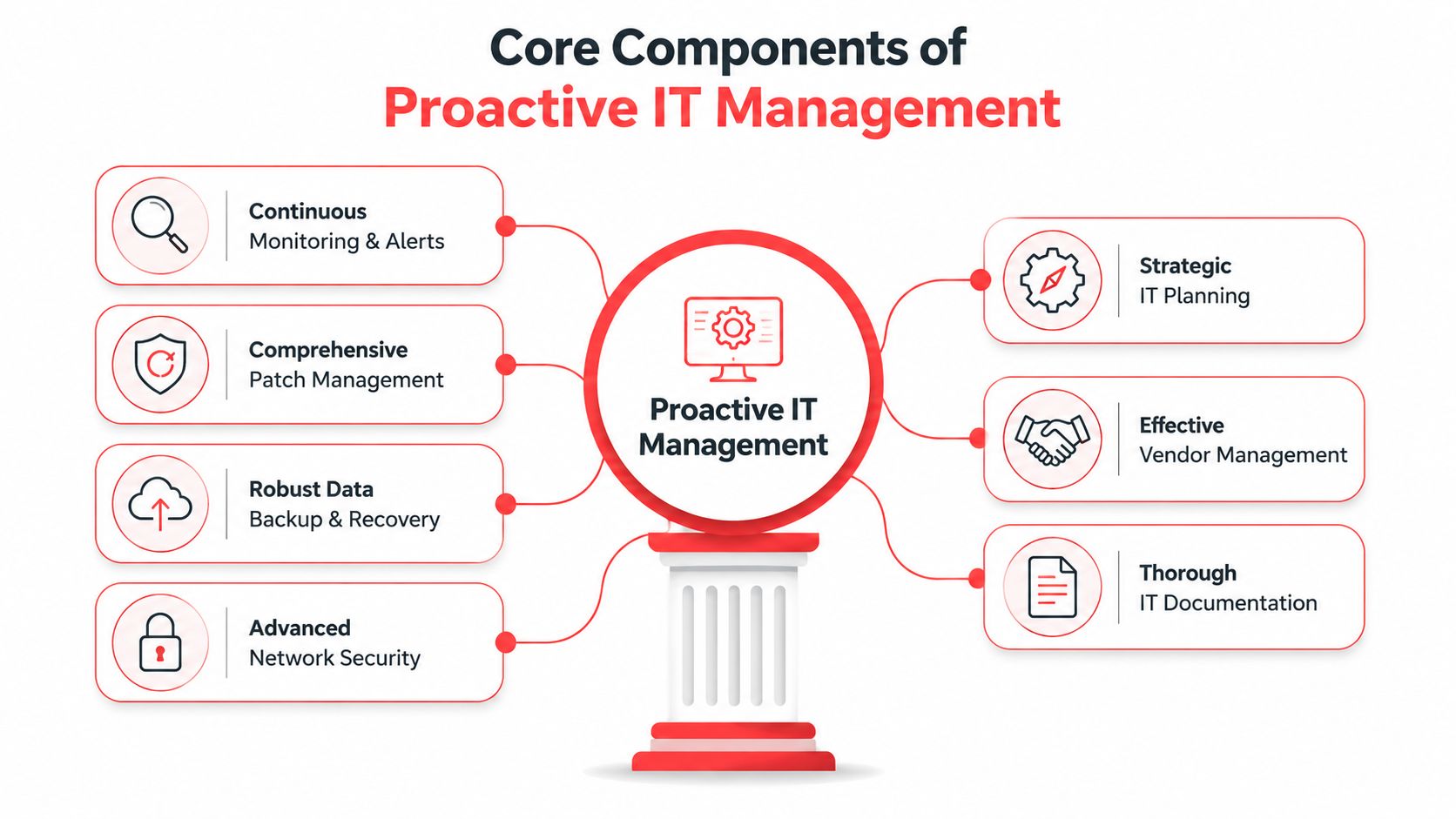
Proactive IT should be treated like preventative care. You don’t wait for a major failure before checking vital systems. You monitor, inspect, update, document, and test so small issues stay small.
What a real proactive model includes
A solid proactive IT management Florida program usually includes these six working parts:
- Continuous monitoring and alerting: Systems are watched for warning signs such as storage pressure, failed services, unusual endpoint behavior, backup issues, and hardware health concerns. The point is early detection, not better excuses after the outage.
- Patch management with discipline: Updates need scheduling, testing, approval paths, and exception handling. Random patching creates instability. No patching creates exposure.
- Endpoint and network security: Every workstation, laptop, and server needs protection that’s managed centrally. Security policies also need to reach the network layer, not just user devices.
- Verified backup and recovery: Backups don’t count unless they’re monitored and recoverable. Teams need proof that data can be restored when something goes wrong.
- Strategic planning and documentation: Good providers maintain network diagrams, asset records, lifecycle planning, and operating standards. That reduces confusion during urgent events.
- Vendor and license management: Someone needs to own renewals, support coordination, subscription visibility, and escalation with outside vendors. Otherwise, small administrative gaps become service interruptions.
A serious program also includes security operations. In Florida, a 24/7 Security Operations Center capable of active threat hunting is a critical technical specification for proactive IT, as described in Florida Department of Transportation cybersecurity guidance.
One practical sign of maturity is whether the provider can support cloud operations as part of the larger service model, not as a disconnected add-on. A simple example is documented cloud partnership capability such as this cloud services badge reference.

Why these components have to work together
Owners sometimes ask for one piece of the model, usually monitoring or backups, and assume that’s enough. It isn’t. Each component depends on the others.
A backup won’t save you from repeated endpoint compromise if patching and security controls are weak. Monitoring won’t help much if nobody owns response actions. Good documentation won’t matter if licenses lapse and critical services stop renewing.
Proactive IT works as a system. If one pillar is missing, the business feels it during stress.
For healthcare offices and professional services firms, this integrated approach matters because staff don’t have time to coordinate five different support contacts. They need one operating model that keeps devices secure, applications available, vendors aligned, and recovery options tested.
Tangible Business Benefits of a Proactive Strategy
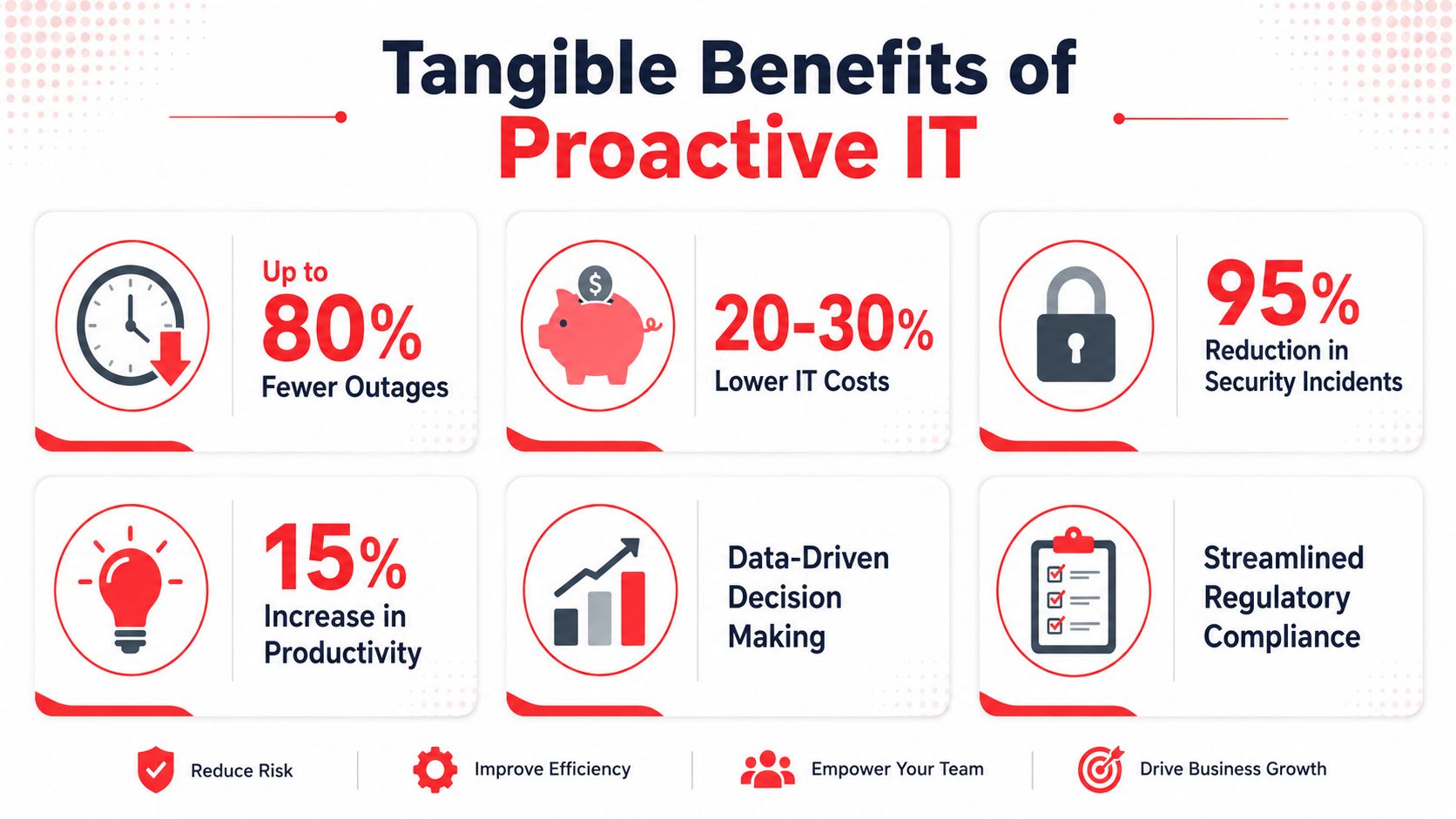
A proactive IT strategy earns its budget by reducing interruptions, tightening control over risk, and making costs easier to forecast.
Where the savings and stability come from
Reactive support is expensive in ways that rarely show up on the first invoice. The visible cost is the emergency ticket or after-hours call. The larger cost is lost staff time, delayed client work, exposed data, and leadership attention pulled away from revenue-producing decisions.
For Orlando-area law firms, medical practices, and financial offices, those losses add up quickly. A billing system outage can stall collections. A locked user account can delay patient intake. A missed patch or weak access control can create a compliance problem that takes far longer to fix than the original technical issue.
Industry analysis has long shown the same pattern. Businesses that standardize monitoring, patching, access control, and response procedures generally deal with fewer major disruptions and less surprise spending than companies that wait for something to break. That outcome is easy to understand in practice. Problems caught early cost less to resolve.
A provider should also show how security work supports business continuity, not just ticket volume. A simple way to assess that is to review their documented approach to cybersecurity controls and business risk reduction.
Here’s how the difference usually appears in day-to-day operations:
Business area
Reactive pattern
Proactive pattern
Downtime
Staff report failures after work is already interrupted
Systems are monitored for warning signs so many issues are handled before users feel them
Security
Patches, reviews, and permissions are addressed inconsistently
Vulnerabilities, endpoint health, and access changes follow a defined schedule
Budgeting
IT spend rises and falls with emergencies, replacements, and rushed projects
Monthly support costs are more predictable, with fewer surprise incidents
Leadership time
Owners and administrators get pulled into recurring escalations
Leadership spends less time mediating outages, vendor confusion, and user complaints
Why flat monthly service changes decision making
Predictable monthly pricing helps management make better decisions. It gives firms a baseline for budgeting, hiring, expansion, and compliance planning without guessing which technical problem will hit next quarter.
That does not mean every flat-rate agreement is a good deal. Central Florida firms with multiple offices, remote staff, heavy compliance requirements, or specialized software should read the service scope carefully. Pricing can look predictable on the surface while excluding after-hours response, vendor coordination, onboarding labor, compliance reporting, or project work tied to office moves and acquisitions.
That is where professional services and healthcare firms need a more disciplined review process. If a provider supports legal, financial, or clinical environments, they should explain how the agreement handles audit support, evidence retention, user access reviews, secure device standards, and incident response responsibilities. If those details are vague at the proposal stage, they usually become expensive later.
Clear scope matters as much as the monthly number.
Compliance readiness is another concrete benefit. When monitoring, logging, patching, and response tasks are already part of daily operations, firms spend less time scrambling before audits, insurance renewals, or client security reviews. In a market like Central Florida, where firms compete on trust as much as service quality, that operational discipline protects both margin and reputation.
Unique IT Challenges for Central Florida Businesses
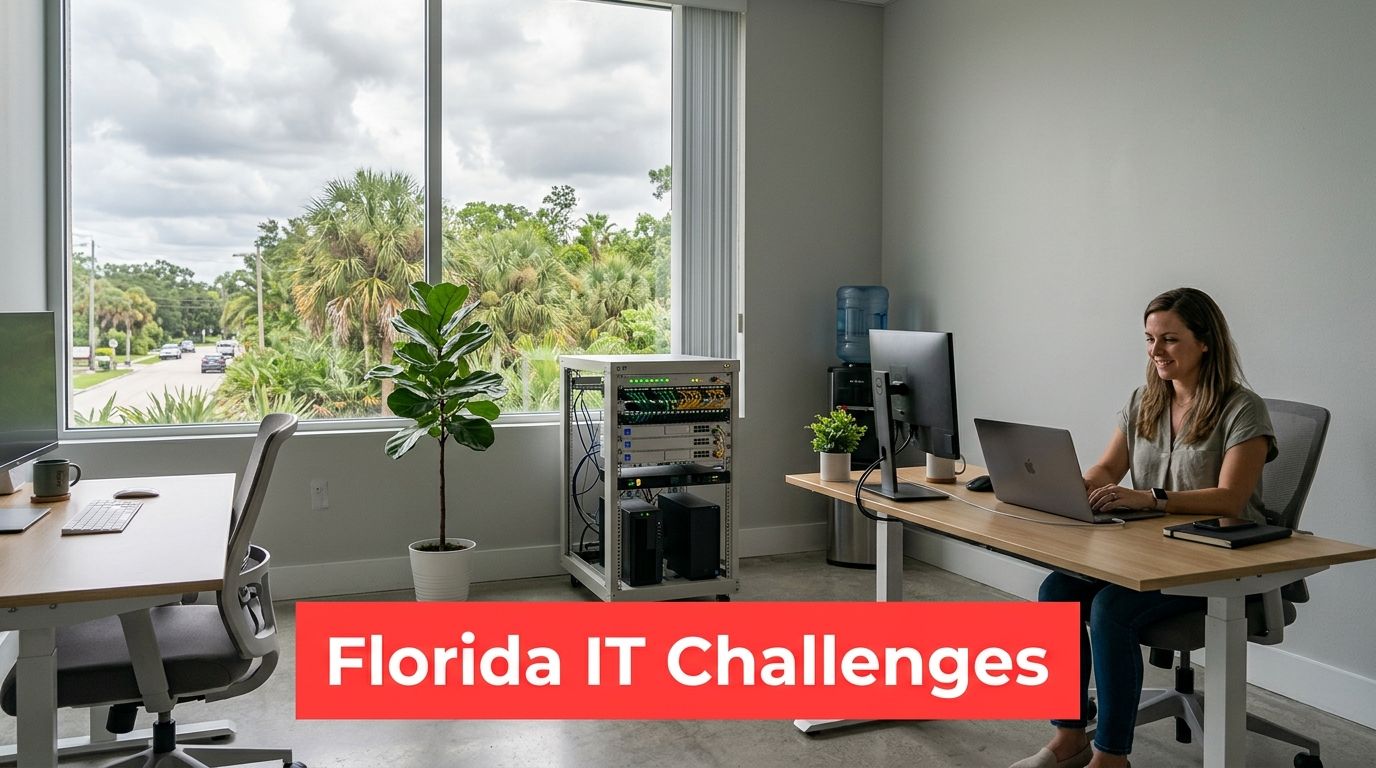
A law office in downtown Orlando, a medical practice in Lake Nona, and a wealth management firm in Winter Park can all lose a full day for different reasons. One gets locked out of a document system before court filings. One cannot access patient records at check-in. One loses email during a client reporting deadline. The common problem is not just downtime. It is the business impact of downtime in regulated environments where trust, deadlines, and records all matter at once.
Professional services face a different risk profile
For legal, accounting, architectural, and financial firms, technology failures hit revenue quickly. Attorneys lose billable time. CPAs miss filing windows. Financial advisors risk exposing client data or delaying sensitive communications. In Central Florida, where many firms compete for regional clients and referral relationships, even a short disruption can damage confidence.
Provider selection should reflect that reality. A firm supporting professional services should be able to explain, in plain language, how it handles access reviews, document security, email protection, logging, and incident documentation. For firms that process payment data or handle protected health information as part of their operation, the provider also needs a clear process for supporting applicable compliance obligations and after-hours response. Owners reviewing their exposure can use this cybersecurity risk visual reference as a simple starting point.
There is also a Florida-specific operational issue that generic IT advice often skips. Many professional services firms here run lean internal teams, use a mix of office and remote staff, and depend on cloud document platforms, VoIP, and line-of-business applications that must stay available during client-facing hours. That puts more pressure on identity management, vendor coordination, and recovery planning than a basic helpdesk model can usually support.
Healthcare firms need operational discipline, not just support
Private practices, dental groups, specialty clinics, and other healthcare organizations in Central Florida deal with a tighter margin for error. Front desk delays affect patient flow immediately. Exam room device issues slow care. Billing interruptions create backlog that can last for days after the original problem is fixed.
Security matters, but healthcare leaders also need consistency in routine IT operations. Shared workstations, frequent staff changes, connected medical devices, and specialized software create weak points if patching, account changes, backup checks, and endpoint standards are handled informally. I see this often in growing practices. The office adds providers, opens a second location, or changes an EHR-related workflow, but the underlying controls stay undocumented.
Weather risk adds another layer. Central Florida firms need tested remote access, verified backups, communication procedures, and a clear order of recovery before a storm disrupts power, internet access, or office access. Firms in healthcare and professional services usually cannot afford to figure that out during the event itself.
A Checklist for Choosing Your Florida IT Partner
A provider interview usually sounds fine until you ask who owns a failed backup, who reviews after-hours alerts, or who shows up in Orlando when a circuit is down and your office cannot function. That is where weak service models start to show. Florida firms in legal, financial, and healthcare settings need more than a friendly helpdesk. They need a partner with clear operating discipline.
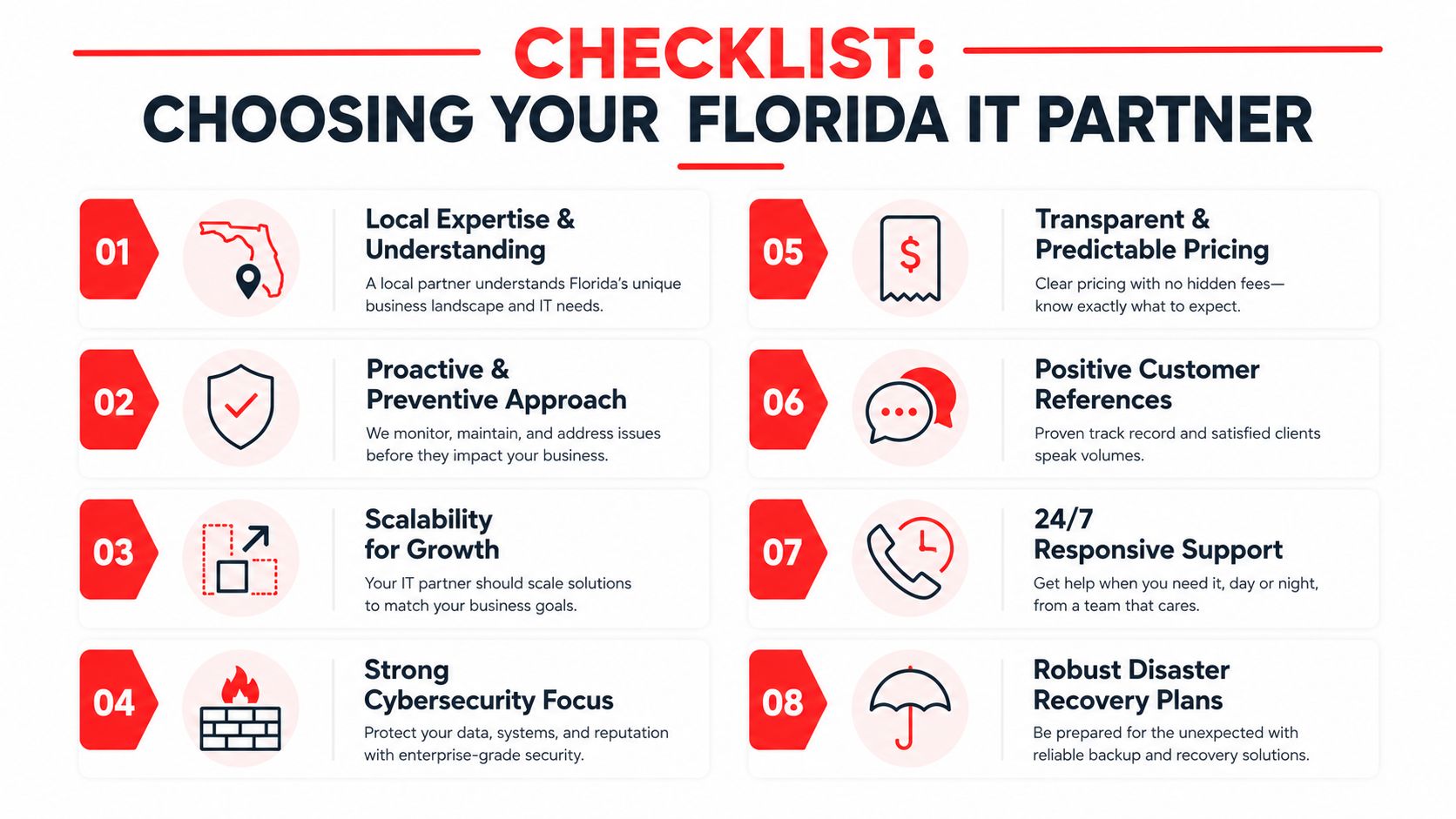
Questions worth asking before you sign
Use this checklist to separate polished sales language from an actual service model:
- Ask about active monitoring: What systems are monitored, who reviews alerts, and what triggers an automatic response versus a human escalation?
- Ask about detection and response: Proactive monitoring lowers exposure by catching abnormal activity earlier, but the important question is operational. Who investigates suspicious behavior at night, and what containment steps are included before your staff logs in the next morning?
- Ask about regulated environments: For law firms, financial firms, and healthcare practices, ask how they document changes, handle incidents, support audits, and protect shared workstations, client files, and line-of-business systems.
- Ask about local coverage: Can they provide on-site support in Central Florida for office moves, hardware failures, ISP issues, and location expansions?
- Ask about backups and recovery: How often are backups tested, who reviews failures, and how do they prove that recovery works for your actual systems, not just for a demo server?
- Ask about pricing scope: What is included in the monthly agreement, what counts as project work, and what commonly billed items surprise clients later?
What strong answers sound like
Strong answers are specific. A serious provider should be able to explain review cadence, patching standards, escalation paths, reporting, vendor coordination, and recovery priorities without speaking in generalities.
This matters more in Central Florida than many owners expect. A downtown Orlando law office, a multi-location accounting firm, and a specialty practice in healthcare all have different risk points, but they share the same business requirement. Systems need to stay available during business hours, security events need a documented response, and hurricane season needs a tested plan instead of a promise.
Ask one more practical question. What stays on your team, and what moves to theirs? In co-managed arrangements, that line must be written down early or tickets stall, updates get missed, and accountability gets blurry.
If you are comparing providers, use factual trust markers as one input, not the whole decision. Something as simple as a managed service provider industry recognition badge can help frame the discussion, but the ultimate test is whether the provider can show repeatable process. Cyber Command, LLC may fit organizations that need fully managed or co-managed IT, 24/7 support, vendor coordination, and security operations tied to day-to-day service delivery.

Decision filter: Choose the provider with the clearest process, the clearest scope, and the clearest ownership when something fails.
Proactive IT Success Stories from Central Florida
The value of proactive IT becomes clearer when you look at the kinds of operating problems local firms face.
A law office that needed tighter control
An Orlando-area law office had decent basic support, but the arrangement was reactive. Staff opened tickets after file access slowed down, after laptops missed updates, and after users noticed suspicious behavior. Nothing was coordinated, and nobody owned the bigger picture.
The change came when the firm moved to a model with centralized monitoring, routine patching, documented user controls, and around-the-clock security review. Partners stopped hearing about preventable issues from paralegals first. The office gained a more stable operating rhythm, and compliance conversations became easier because the environment was being managed continuously instead of explained retroactively.
For firms vetting service maturity, even small trust markers such as recognized service credentials can help frame the discussion, like this managed service provider industry badge.
A healthcare practice that needed consistency
A multi-provider healthcare practice in Central Florida had a different problem. Systems usually worked, but not consistently. A printer issue at check-in would linger. A workstation in an exam room would fall behind on updates. Shared credentials created confusion when access problems surfaced.
The practice didn’t need more scattered fixes. It needed standardization. Once device management, documentation, vendor coordination, and backup oversight were brought under one process, small interruptions became less frequent and less disruptive. Front-desk staff spent less time improvising workarounds, and leadership had a cleaner view of what the environment looked like.
These aren’t dramatic turnaround stories. That’s the point. Good proactive IT usually looks boring from the outside because problems stop becoming daily events.
Your Proactive IT Management Questions Answered
Fully managed or co-managed
If you don’t have internal IT staff, fully managed support usually makes more sense. The provider owns monitoring, maintenance, support, security operations, and vendor coordination. If you do have an internal IT person or small team, co-managed support can work well when responsibilities are clearly split. The key is avoiding overlap and gaps.
Is proactive IT worth it for a small office
Yes, especially if your business depends on always-available files, email, line-of-business apps, and secure client or patient data. Small firms usually feel outages harder because they have less staffing flexibility and fewer internal workarounds.
How should Florida businesses budget for this
Start with service scope, not price alone. Ask what’s included in support, monitoring, patching, security response, backup oversight, vendor management, and strategic planning. A cheaper agreement that excludes critical work often costs more later.
How does proactive IT help with hurricane readiness
It forces business continuity planning before the emergency. That includes verified backups, documented recovery priorities, remote access readiness, communication procedures, and clear responsibility during an outage. For Florida firms, that preparation matters as much as cybersecurity because a weather event can create both operational disruption and security risk at the same time.
If your business in Orlando or Winter Springs needs a more stable way to handle support, security, compliance, and continuity, Cyber Command, LLC is one option to evaluate. The firm provides fully managed and co-managed IT, 24/7 helpdesk support, SOC-backed cybersecurity operations, vendor management, and proactive service delivery for Central Florida organizations that want fewer surprises and clearer accountability.
This article is for general informational purposes only and is not legal, compliance, insurance, or other professional advice. Threats, technologies, and regulations change quickly; confirm current requirements with your own advisors before acting. See our full disclaimer.