Reliable IT Services Near Winter Park FL: Local Experts

IBM's 2025 Cost of a Data Breach Report put the global average breach cost at $4.88 million. For a Winter Park business owner, that number matters because it reframes IT from a repair expense into a risk and continuity decision.

A reactive support model can look affordable on paper. The invoice only shows up when something breaks. What it hides are the costs that usually hurt more: staff downtime, delayed client work, weak patching discipline, missed alerts after hours, backup failures discovered too late, and security gaps that stay open until an incident forces action.

That is the conversation around IT services near Winter Park FL in 2026. A local firm does not just need someone who can fix a printer or replace a failed workstation. It needs a predictable operating model for support, cybersecurity, compliance, and recovery. For many organizations, that means shifting from ad hoc repair to a flat-rate partner that handles monitoring, endpoint protection, patch management, secure access, backup oversight, and documented response procedures under one plan. Businesses evaluating managed IT support in Orlando and Winter Park should press on cost predictability and security coverage first.

The local business environment adds urgency. Census Reporter's Winter Park profile describes a compact city of 30,274 residents across 8.8 square miles. In a market like that, reputation travels fast, service interruptions are visible, and professional firms often compete on responsiveness and trust as much as price.

For law offices, accounting firms, medical practices, architecture studios, and nonprofits, IT decisions now affect billable time, audit readiness, cyber insurance posture, and client confidence. The goal is not more technology. The goal is fewer surprises, faster recovery, and a support budget that stays predictable while security requirements keep getting stricter.

Table of Contents

Why Your Winter Park Business Can No Longer Ignore IT Strategy

Cyber incidents and downtime now carry financial, legal, and operational consequences that many small and midsize businesses underestimate until the damage is already done.

That is why IT strategy belongs in the same conversation as budgeting, insurance, staffing, and compliance. For a Winter Park business, technology is tied directly to revenue collection, client communication, scheduling, records access, and day-to-day trust.

The old break-fix model assumed most problems were isolated hardware failures. A machine stopped working, someone called for help, and the issue was corrected. In 2026, the bigger risks are usually less visible. Weak identity controls, inconsistent patching, poor backup testing, unmanaged devices, and delayed threat detection can interrupt operations long before anyone opens a support ticket.

Winter Park businesses feel this sharply because many operate in professional services, healthcare, finance, and other trust-based fields. In those environments, an IT problem rarely stays an IT problem. It turns into missed appointments, delayed billing, client frustration, audit exposure, and pressure on staff who are already working on tight schedules.

Small geography doesn't mean small exposure

A compact market creates accountability. News travels fast, clients expect quick responses, and even a short outage can be noticed by far more people than owners expect.

A law office that loses document access for half a day may miss deadlines. A medical practice with unstable systems may slow intake, charting, and claims. A professional firm using weak email security may face account compromise that spreads into payment fraud or data exposure. Those costs do not show up neatly on a single invoice, which is one reason many businesses underinvest until an incident forces the issue.

Practical rule: If your provider mainly arrives after something breaks, you have a repair vendor, not an IT strategy.

A real strategy sets standards before problems happen. It defines how devices are secured, how access is approved, how backups are tested, how software is updated, how incidents are escalated, and what level of downtime the business can tolerate. That discipline matters because predictable operations usually cost less than repeated disruption.

For companies evaluating managed IT support for Orlando-area businesses, the question is not just who can respond to tickets. It is who is reducing the odds of downtime, limiting security exposure, and giving leadership a clearer, flatter cost structure instead of surprise repair bills.

What Modern Managed IT Services Actually Include

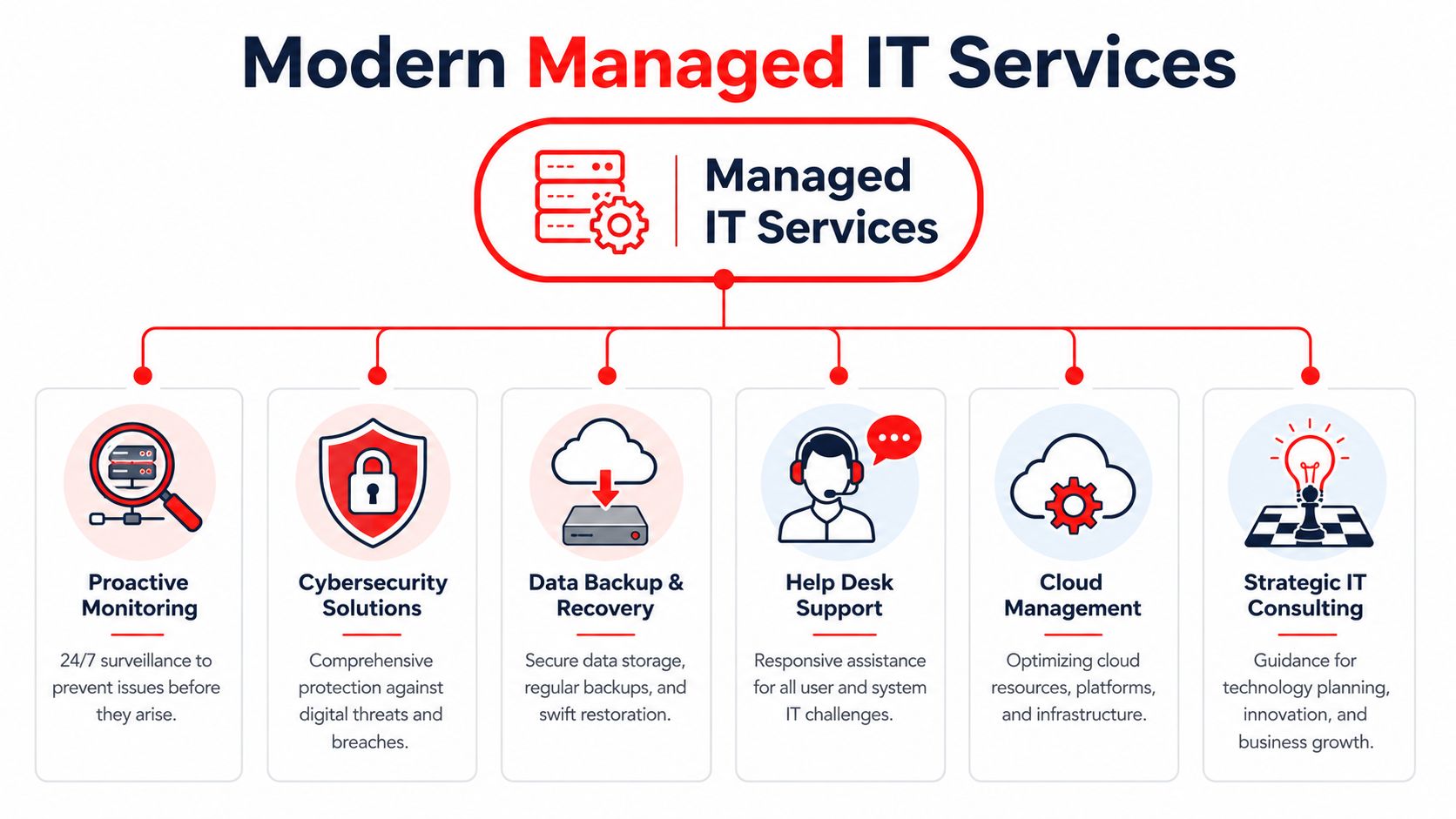
Managed IT should reduce business risk, standardize day-to-day operations, and give leadership a clearer monthly cost. If a provider mainly answers tickets and shows up after failures, the business is still carrying too much operational and security exposure.

A diagram outlining the six key components of modern managed IT services for businesses and organizations.

Support now includes operations, security, and accountability

For a Winter Park business in 2026, IT service means more than fixing laptops or resetting passwords. It means someone is watching systems, applying updates on schedule, enforcing access controls, checking backups, documenting standards, and responding before a small issue becomes downtime, data loss, or a compliance problem.

That operating model matters because security failures rarely start as dramatic events. They start with a missed patch, a weak login policy, a backup that was never tested, or an alert nobody reviewed.

Essential bundled components

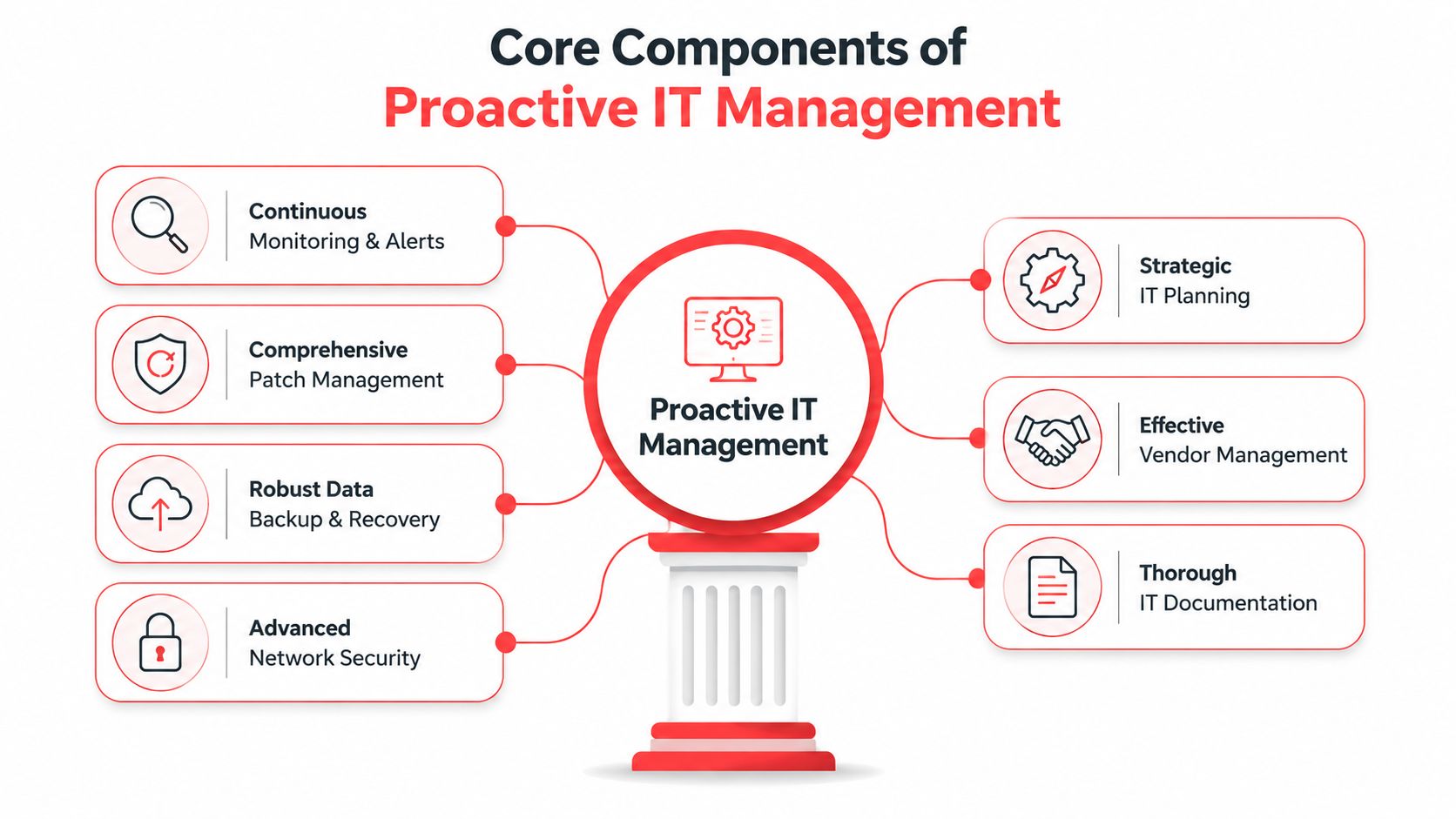
A strong managed IT agreement should combine these functions under one accountable team:

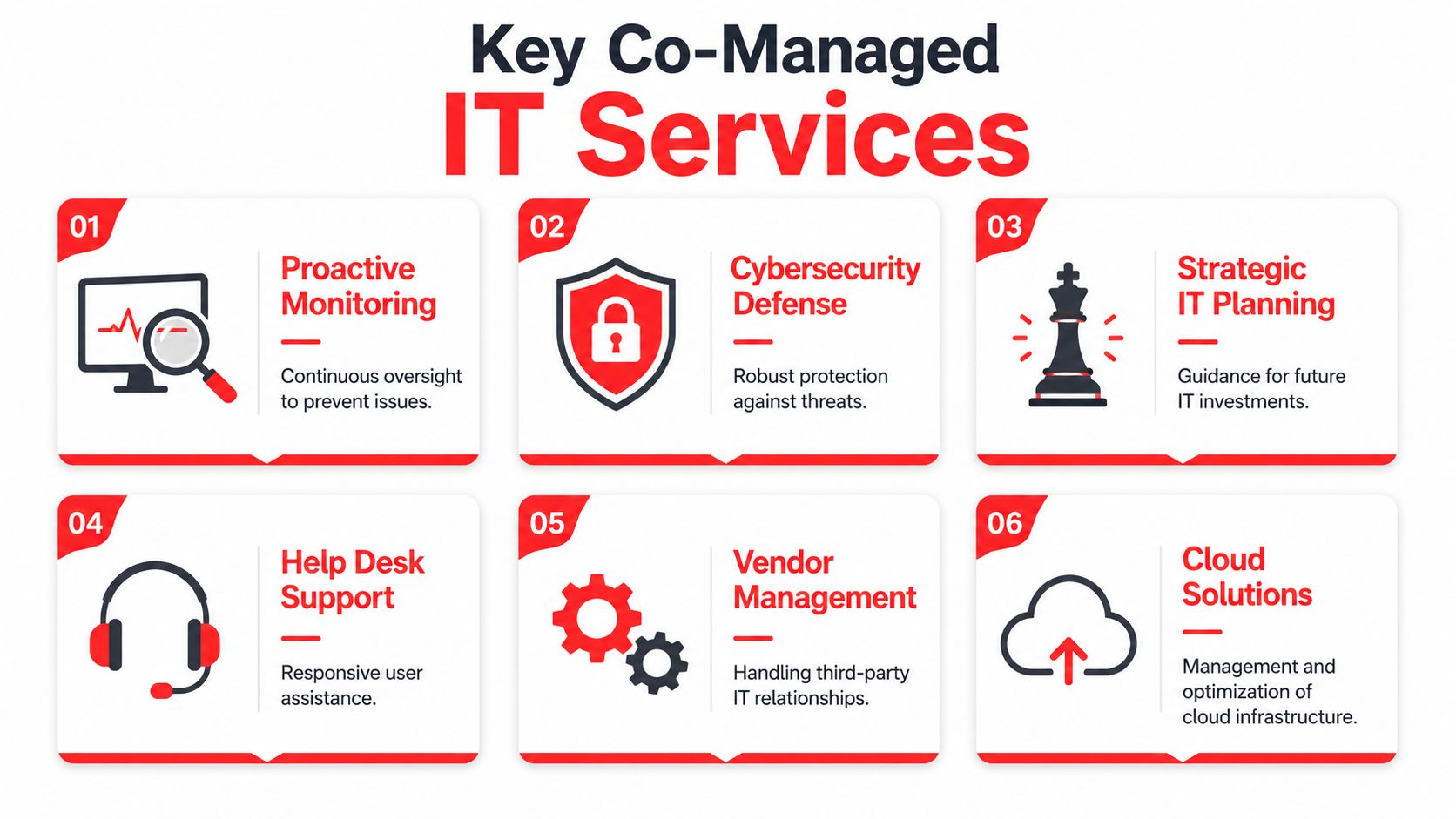
  • Continuous monitoring: Servers, endpoints, cloud systems, and network equipment are monitored for outages, performance issues, and suspicious activity.
  • Patch and maintenance management: Supported devices and business applications are updated on a defined schedule, with exceptions tracked instead of ignored.
  • Helpdesk and user support: Staff need fast resolution for access issues, software problems, device failures, and routine service requests.
  • Security administration: MFA, endpoint protection, firewall reviews, device policies, and user access controls should sit inside the service model, not as an afterthought.
  • Backup oversight and recovery readiness: Backups need verification, retention review, and restore testing so the business knows what can be recovered and how quickly.
  • Documentation and standards: Network details, vendor contacts, asset records, escalation paths, and approved configurations should be documented well enough that support does not depend on one person's memory.
  • Roadmap and budgeting guidance: Leadership needs advice on hardware lifecycle, licensing, risk reduction, and upcoming costs before they turn into urgent purchases.

The point is coordination. A business gets better results when the same provider can see ticket trends, patch status, security alerts, backup health, and aging equipment in one place.

That is also why growing firms start asking what a security operations center does for threat monitoring and incident response. Helpdesk support alone does not cover log review, active threat detection, or the discipline required to catch suspicious behavior outside business hours.

A pieced-together model usually costs more than it appears to. One company handles support. Another sells security software. A third person checks backups occasionally. When an incident hits, response slows down because ownership is split, documentation is incomplete, and nobody is responsible for the full chain of prevention, detection, and recovery.

The True Cost of IT Support Comparing Break-Fix and Flat-Rate Models

A lower hourly rate rarely means a lower IT cost.

The visible invoice is only part of the expense. Winter Park businesses also pay for downtime, stalled staff, delayed vendor response, missed patching, and security gaps that sit unresolved until they become an outage or an incident. Those costs do not show up neatly on a repair ticket, but they still hit payroll, client service, and compliance risk.

Why hourly IT can cost more than it appears

Break-fix support fits a narrow use case. It can work for a very small office with limited systems, little regulatory exposure, and a high tolerance for interruption.

That is not how most established firms operate in 2026.

A law office, medical practice, accounting firm, or multi-location service business depends on email, cloud apps, file access, phones, line-of-business software, remote logins, and secure records every day. In that setting, hourly support often creates a budgeting problem and an accountability problem at the same time. The provider is called after the failure. The business pays for the failure, the repair, and the lost time around it.

The hidden costs are usually operational:

  • Lost employee hours: Staff wait for issues to be diagnosed, scheduled, and resolved instead of doing billable or revenue-producing work.
  • Repeat problems: The same workstation, account, or configuration issue keeps returning because no one owns root-cause prevention.
  • Extra security labor: Patch cleanup, MFA enforcement, access reviews, and endpoint remediation become separate charges instead of routine work.
  • Vendor coordination time: Internet, phones, software, copier, and cloud providers still need someone to coordinate troubleshooting when the issue crosses systems.
  • After-hours exposure: Problems discovered late in the day can sit until the next business window, extending downtime and increasing risk.

Cheap hourly support becomes expensive fast when prevention is outside the agreement.

Flat-rate managed service changes the financial model. Instead of asking what one ticket will cost, owners can plan around a fixed monthly number and a defined scope of responsibility. That matters because predictable spend is not just a finance preference. It is what allows a business to budget for maintenance, security operations, lifecycle planning, and support without waiting for something to break first.

Break-Fix vs. Flat-Rate Managed IT

Feature Break-Fix Model (Hourly Rate) Flat-Rate Managed IT (Cyber Command)
Billing approach Variable, tied to incidents and labor time Predictable monthly pricing
Incentive structure Paid when something fails Paid to keep systems stable
Monitoring Often limited or separate Included as part of ongoing service
Patching and maintenance Frequently reactive Scheduled and standardized
Security oversight Commonly fragmented Integrated into daily operations
Budgeting Hard to forecast Easier to plan around
Vendor coordination Often billed separately or handled by client Typically part of managed relationship
Downtime exposure Higher when issues wait for discovery Lower when issues are caught early

Owners evaluating support contracts should understand how managed service pricing models work in practice before focusing on rate cards alone. The better question is straightforward. Does the agreement reduce interruptions, close security gaps, support compliance needs, and give the business a monthly cost it can plan around?

Why Your Business Needs a 24/7 Cybersecurity Shield

Cybersecurity isn't a software purchase. It's an operating discipline.

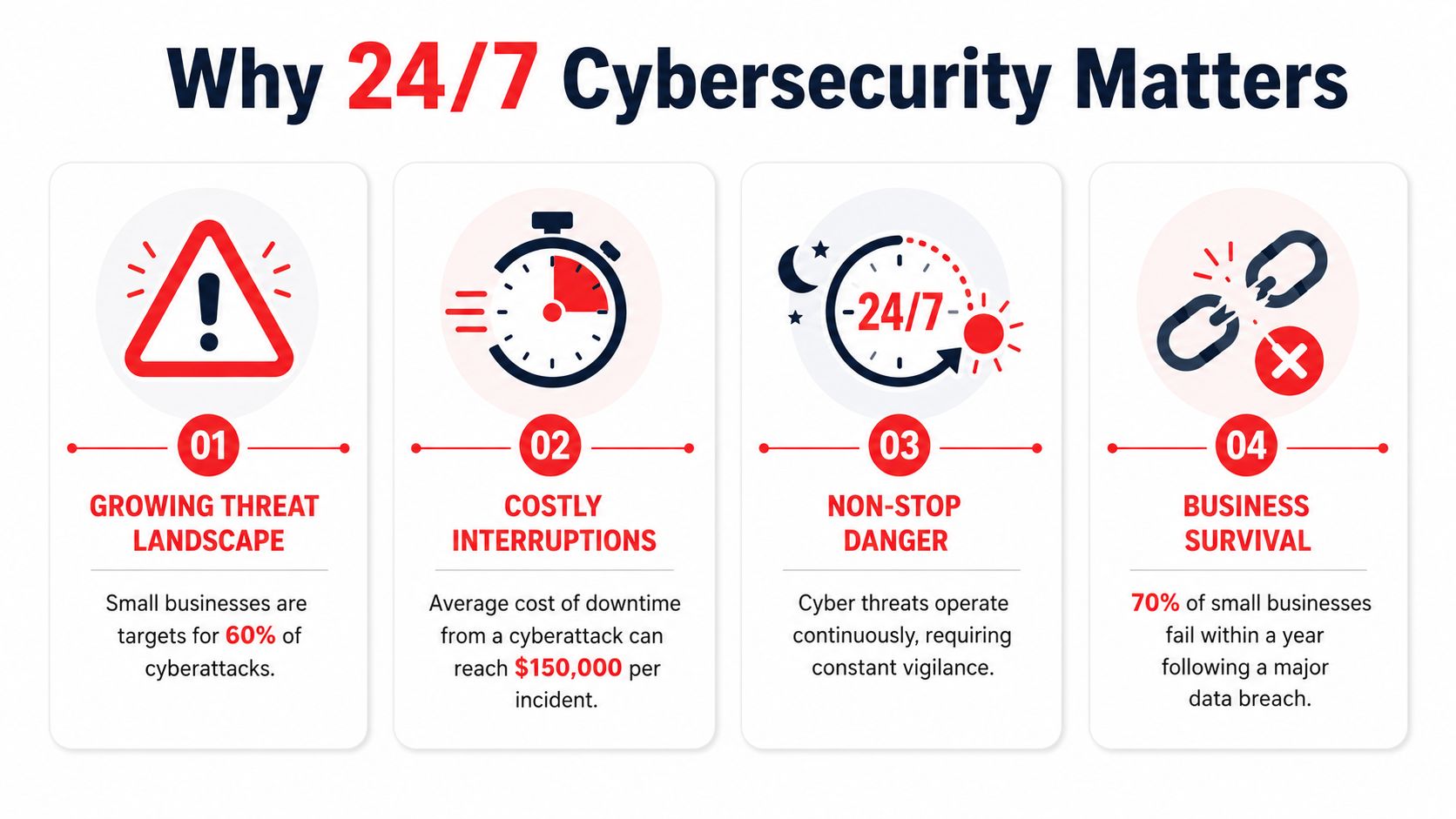
Many small and mid-sized businesses still assume antivirus, a firewall, and user training are enough. Those controls help, but they don't create active defense. Threats don't arrive only during office hours, and they rarely announce themselves in a way that a busy office manager can interpret correctly.

An infographic titled Why 24/7 Cybersecurity Matters, outlining four critical reasons businesses need constant protection.

A firewall alone is not a security program

What protects a business is a repeatable process for watching signals, reviewing suspicious activity, containing incidents, and documenting what happened. That's the practical value of a 24/7 security team or SOC model.

Imagine a security patrol for your digital property. Locks matter. Cameras matter. But if nobody is watching the feed, investigating anomalies, and responding when something is wrong, the business is still exposed.

A real security operating model should cover:

  • Alert review: Someone has to decide which events are noise and which need action.
  • Threat investigation: Suspicious logins, endpoint behavior, and account changes need human judgment.
  • Containment steps: Isolate an endpoint, disable access, preserve continuity, and stop spread.
  • Recovery coordination: Restore service cleanly and document what must change afterward.

What 24-7 protection changes operationally

The biggest benefit isn't abstract “peace of mind.” It's faster decision-making when something unusual happens.

Without constant coverage, a suspicious sign-in on a weekend might sit untouched until Monday. A compromised account might continue sending email, touching files, or creating downstream problems while no one is looking. Businesses don't need to understand every security detail, but they do need someone responsible for that watchfloor function.

Some managed providers build that into the service model. Cyber Command, LLC is one example described by the publisher as offering a 24/7/365 live, U.S.-based helpdesk, a dedicated 24/7 SOC, incident response, recovery, and continuous compliance support. For buyers, that kind of structure matters because it combines support and defense instead of splitting them across separate vendors.

If your support provider goes quiet after business hours, your risk doesn't.

This is especially important for firms that hold client records, financial data, patient information, contracts, or internal documents that would create legal and operational headaches if exposed or locked up.

Tailored IT for Winter Park's Professional and Medical Sectors

Winter Park doesn't have a generic business profile. Data USA identifies Professional, Scientific, and Technical Services as the city's largest industry, employing 2,591 people in 2024, with 5,671 businesses in the city and a listed technical-services wage figure of $114,150 in this Data USA profile for Winter Park. That concentration changes what local IT support should look like.

A support model built for light retail or occasional residential repair won't fit a law office, accounting firm, engineering practice, dental clinic, or med spa. These businesses depend on secure records, specialized applications, fast user support, and controlled access.

A modern, professional office workspace with a computer desk, ergonomic chair, and a view of lake scenery.

Professional firms need precision and documentation

A local legal or accounting office usually doesn't need flashy technology. It needs dependable systems and fewer surprises.

That means secure email, clean user onboarding and offboarding, controlled file access, documented device standards, and prompt support when a workflow stalls before a deadline. Firms that invest in visibility online should also think beyond IT alone. A practical resource on local SEO for lawyers is useful because client acquisition and operational reliability often intersect. If your intake systems, website forms, or email workflows are unstable, marketing gains get wasted.

Typical pressure points in professional services include:

  • Client confidentiality: Access needs to follow role, not convenience.
  • Document workflow: Shared files, version control, and remote access need consistency.
  • Calendar and communication uptime: Small failures create client-facing delays quickly.

Medical offices need reliability and control discipline

Privately owned medical and dental practices face a different daily rhythm. The front desk, scheduling, charting, imaging, billing, and secure communication all have to work together in real time.

In that environment, “we'll take a look later” is a bad answer. If exam room devices, practice systems, or access controls fail during operating hours, the issue affects patient experience immediately. These offices also need better documentation around who can access what, how devices are managed, and how data is protected.

The right provider for a practice isn't the one that talks most about hardware. It's the one that can keep clinical operations moving while maintaining control discipline.

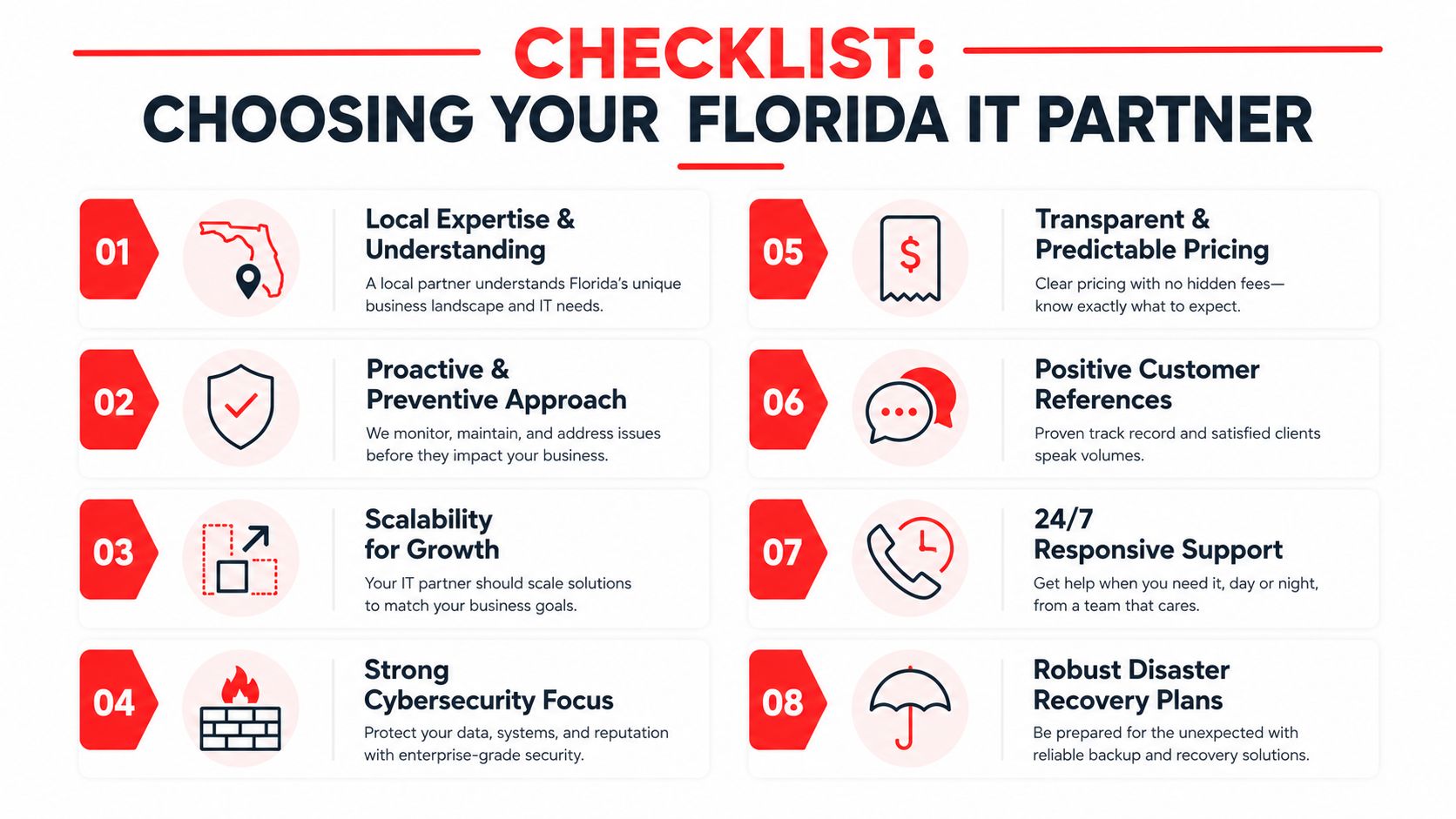
Your Checklist for Selecting the Right IT Partner

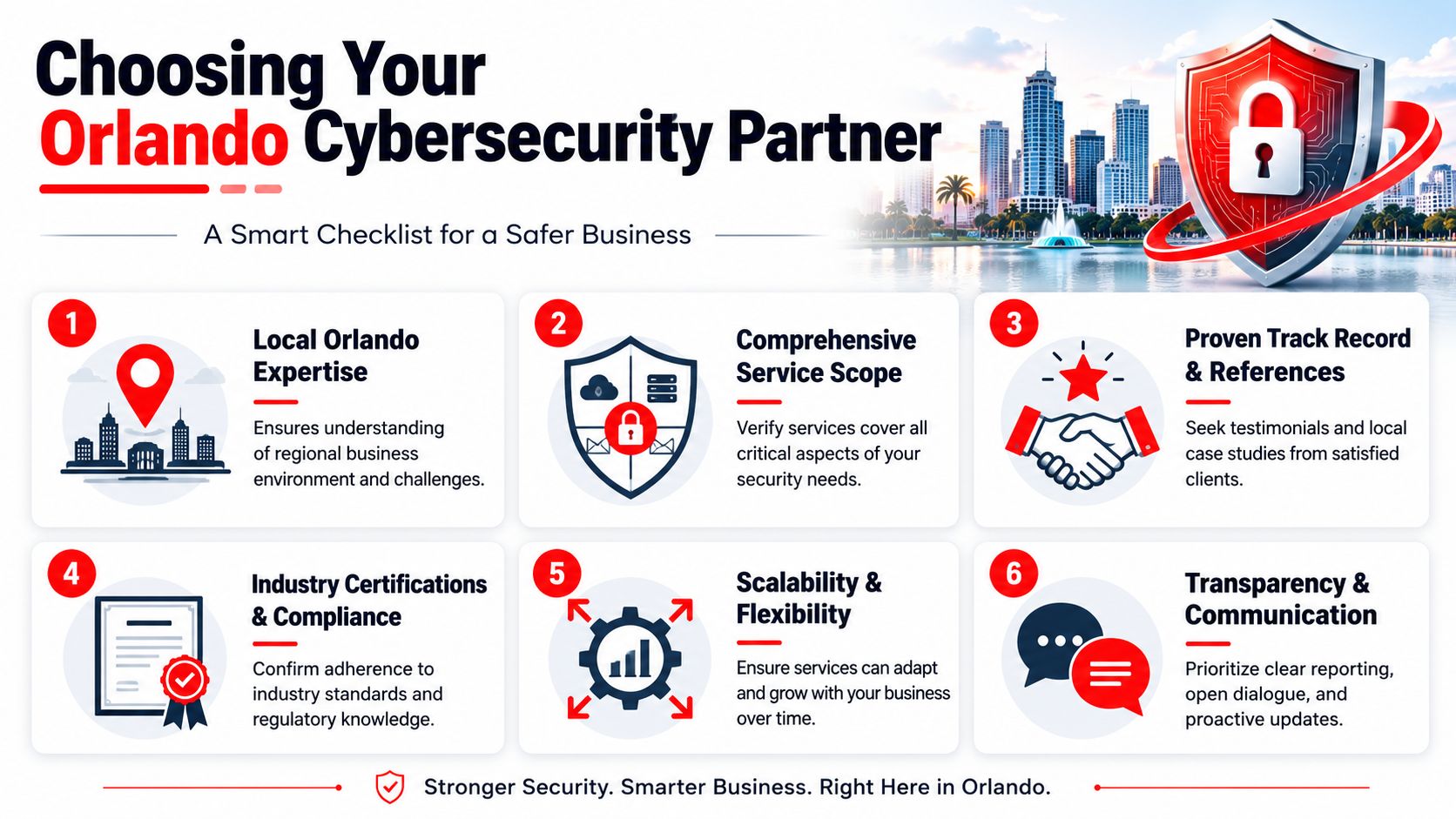
A provider can sound polished in a sales conversation and still run an undisciplined operation. The test isn't whether they promise responsive support. The test is whether they can show how support, standards, and accountability work.

The City of Winter Park's IT department describes technology design and selection, policy and standards development, and IT strategic planning as core IT responsibilities in this City of Winter Park information technology overview. That's a useful benchmark for private-sector buyers too. Mature providers don't just close tickets. They build a supportable environment.

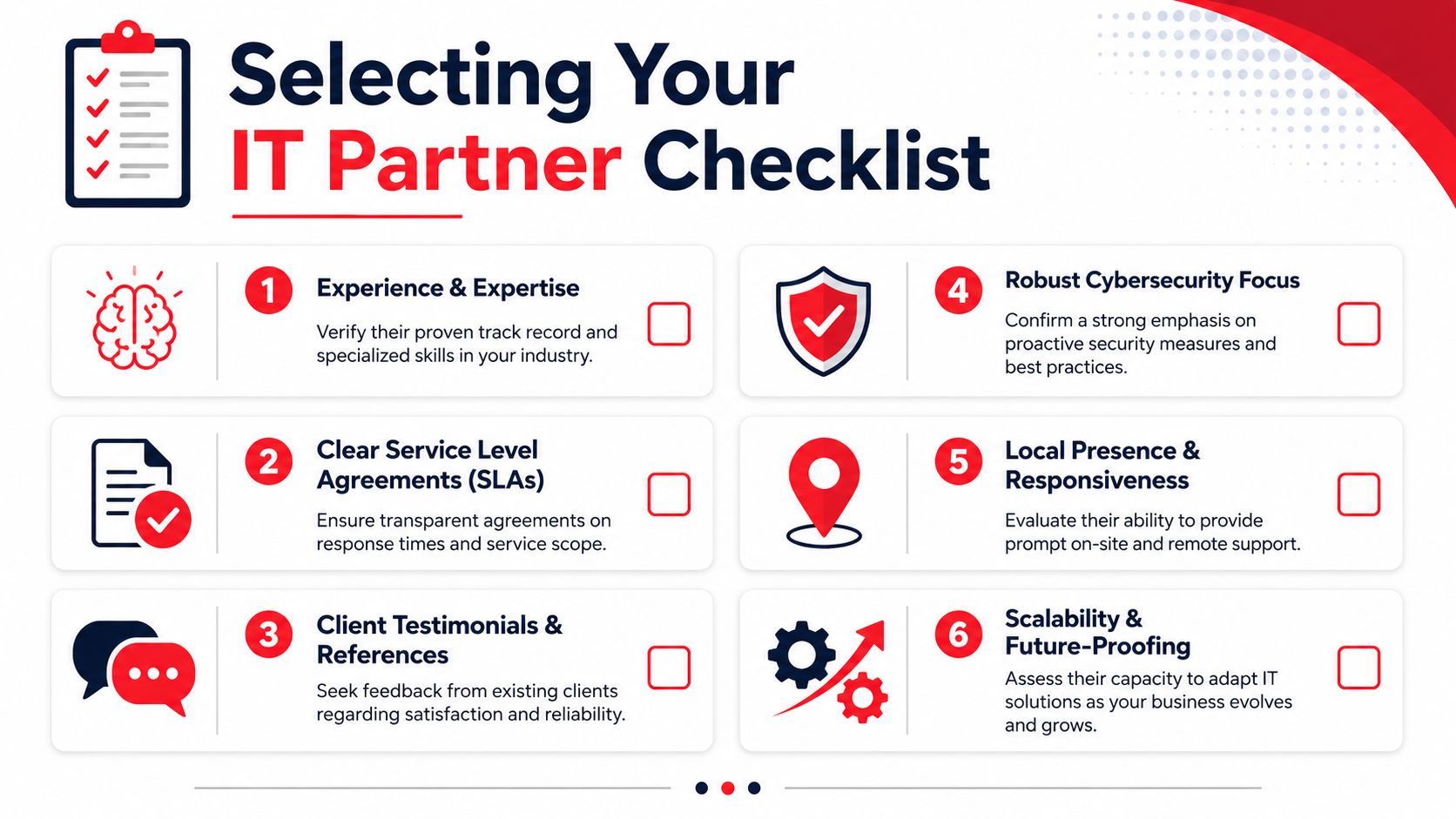
A checklist infographic illustrating six essential criteria to consider when selecting a reliable IT partner company.

What to ask before you sign anything

Use this list to filter providers quickly:

  • Ask for standards, not slogans: Can they show device baselines, patching routines, and escalation paths?
  • Review the SLA language: You want clarity on response expectations, after-hours handling, and what counts as covered work.
  • Check strategic involvement: Do they help with roadmap decisions, budgeting, and lifecycle planning, or only day-to-day incidents?
  • Verify security ownership: Ask who reviews alerts, manages endpoint controls, and coordinates incident response.
  • Look at onboarding discipline: Good onboarding includes documentation, account reviews, backup checks, and environment cleanup.
  • Confirm local practicality: If you need onsite support in the Winter Park area, ask how that is scheduled and documented.

Questions that expose weak providers quickly

Some questions force real answers:

Question What a strong answer sounds like
How do you reduce repeat issues? They talk about standards, root-cause work, and maintenance cadence.
What happens after hours? They describe a real process, not a voicemail box.
Who owns vendor management? They explain coordination responsibilities clearly.
How do you support regulated offices? They discuss documentation, controls, and audit readiness.

For medical groups reviewing internal workflows, a guide to medical practice technology is a useful companion read because it frames technology as part of patient operations, not just back-office infrastructure.

Your Questions Answered and Next Steps

Business owners usually reach the same final questions once they move past hourly pricing and generic support promises. The answers should be straightforward.

Frequently Asked Questions

Question Answer
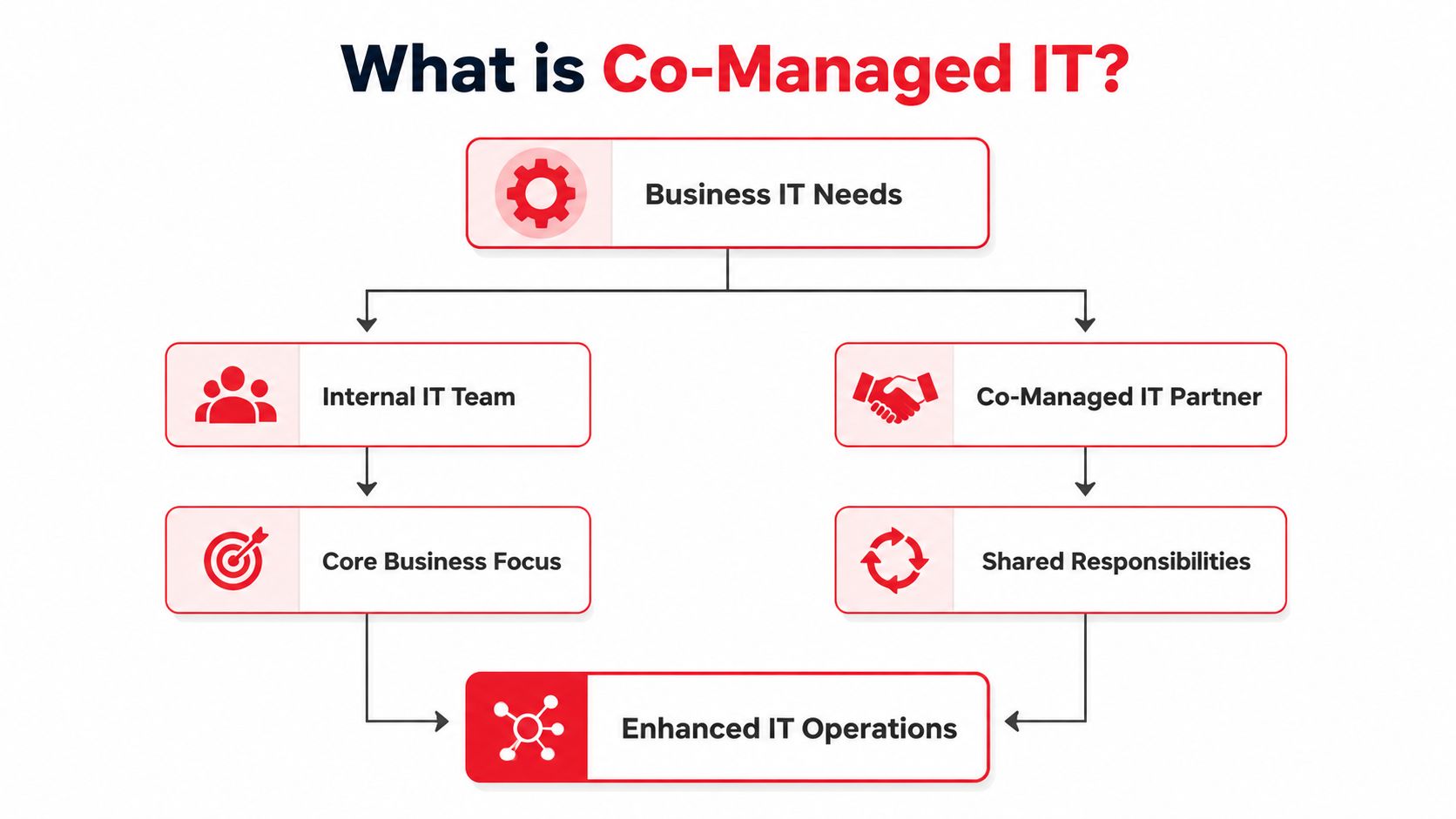
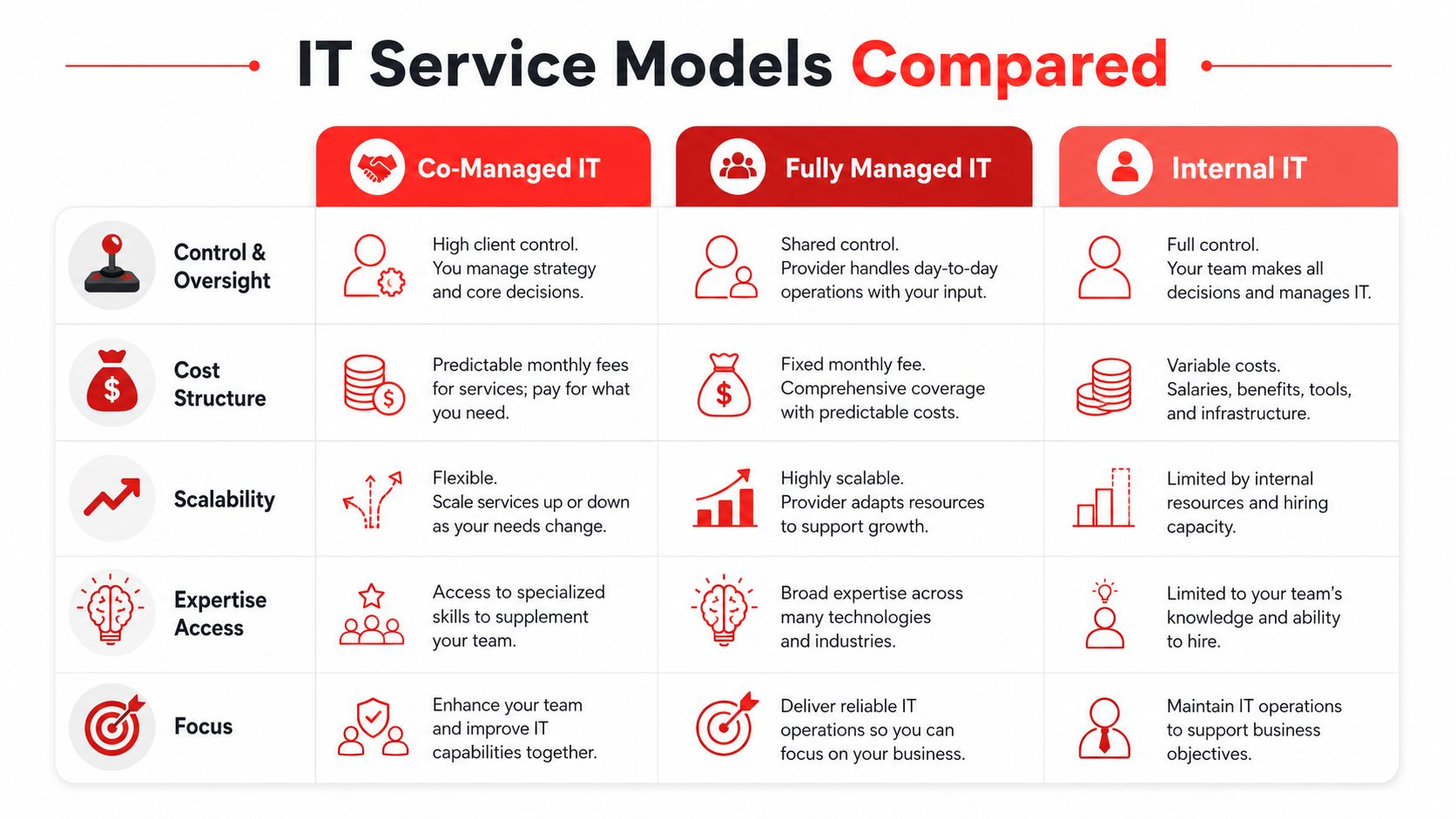
What's the difference between managed and co-managed IT? Managed IT means the provider takes primary responsibility for day-to-day support and operations. Co-managed IT means the provider works alongside your internal staff, usually covering gaps like after-hours support, security operations, projects, or specialized administration.
Do small firms really need cybersecurity beyond basic protection? If the business depends on email, cloud files, client data, remote access, or line-of-business applications, the answer is yes. The issue isn't company size. It's operational dependence and the need to keep systems trustworthy.
What should be included in onboarding? Documentation, account reviews, device inventory, backup validation, standards alignment, and clear escalation paths. If onboarding is mostly “send us your passwords,” that's a warning sign.
How should I evaluate price? Compare predictability, accountability, and operational coverage. A lower headline rate doesn't help if it excludes maintenance, after-hours response, security work, and vendor coordination.

A good provider should leave you with fewer unknowns, not more. You should know who handles alerts, how support gets escalated, what your monthly costs cover, and how your environment is being standardized over time.

For a Winter Park business, that's the practical benchmark for IT services near Winter Park FL. You need a partner that treats support, cybersecurity, planning, and cost control as one business function. If the service model is reactive, loosely documented, and vague about accountability, the true cost usually shows up later in downtime, staff disruption, and avoidable risk.


If you're evaluating options for managed IT and cybersecurity, Cyber Command, LLC is one place to start the conversation. Ask for a review of your current support model, what's covered after hours, how security incidents are handled, and whether your current setup gives you predictable costs or just delayed surprises.

Expert IT Support Near Lake Nona Orlando FL for Businesses

A lot of Lake Nona business owners hit the same wall at roughly the same moment. The firm adds staff, opens another suite, adopts more cloud apps, and suddenly the old approach to IT stops holding up. Tickets sit too long, onboarding drags, printers and Wi-Fi become recurring distractions, and cybersecurity starts feeling like a risk management problem instead of a technical one.

That's why IT Support Near Lake Nona Orlando FL has to be evaluated differently than generic “computer repair.” In a district built for business growth, professional services, healthcare-adjacent operations, and hybrid work, support has to protect uptime, reduce risk, and scale without creating chaos.

Table of Contents

Why Lake Nona Businesses Need More Than Just IT Support

A growing architecture office, dental practice, or advisory firm in Lake Nona usually doesn't fail because of one dramatic IT outage. It gets slowed down by smaller issues that pile up. New employees wait for device setup. Shared files get messy. Cloud logins break at the worst time. Vendors point fingers at each other when phones, internet, or business software don't work together.

That's the point where “call someone when something breaks” stops being enough. A business in a planned, fast-moving district needs support that can standardize systems before growth creates operational drag.

A professional team collaborates in an office, reviewing business growth data presented on a large monitor.

Growth changes the job of IT

Lake Nona isn't just another pocket of Orlando. According to the Lake Nona fact sheet, it spans 17 square miles and 11,000 acres (about 44 square kilometers) and has a median age of 37. The area also includes millions of square feet of residential and commercial development. That matters because more business density usually means more devices, more networks, more software vendors, and more points of failure.

In practical terms, IT support in this environment has to do more than reset passwords and replace hardware. It has to support business movement. Office expansions, hybrid staff, cloud migrations, compliance expectations, and vendor coordination all become part of the support function.

Practical rule: If your team loses time to recurring technical friction every week, you don't have a repair problem. You have an operations problem.

What works and what breaks down

Reactive support works for very small environments with low complexity. It doesn't work well once your business depends on real-time access to cloud files, secure remote access, stable wireless coverage, and fast user onboarding.

What tends to work better is a support model built around prevention, visibility, and ownership. That means someone is tracking device health, patching systems, documenting vendors, and spotting weak points before they interrupt the workday. Businesses looking for a stronger operating model often start with a more structured approach to local IT support for small business.

Common signs you've outgrown basic support include:

  • Frequent repeat issues: The same Wi-Fi, printing, or login problems keep returning.
  • Unclear accountability: Your internet provider, phone vendor, and software vendor each blame the other.
  • Slow employee setup: New hires can't be productive on day one.
  • Security anxiety: You're not sure who's watching alerts, handling patches, or validating backups.

Lake Nona businesses don't need more noise from IT. They need a support structure that keeps pace with growth.

The Spectrum of IT Support Models For Your Business

Not all IT support is the same, and many business owners compare options using the wrong criteria. They focus on hourly rates or ticket volume instead of the bigger questions. How predictable is the cost? How much downtime risk are you carrying? Who is responsible for prevention?

The right model depends on your internal capacity, regulatory exposure, and tolerance for disruption.

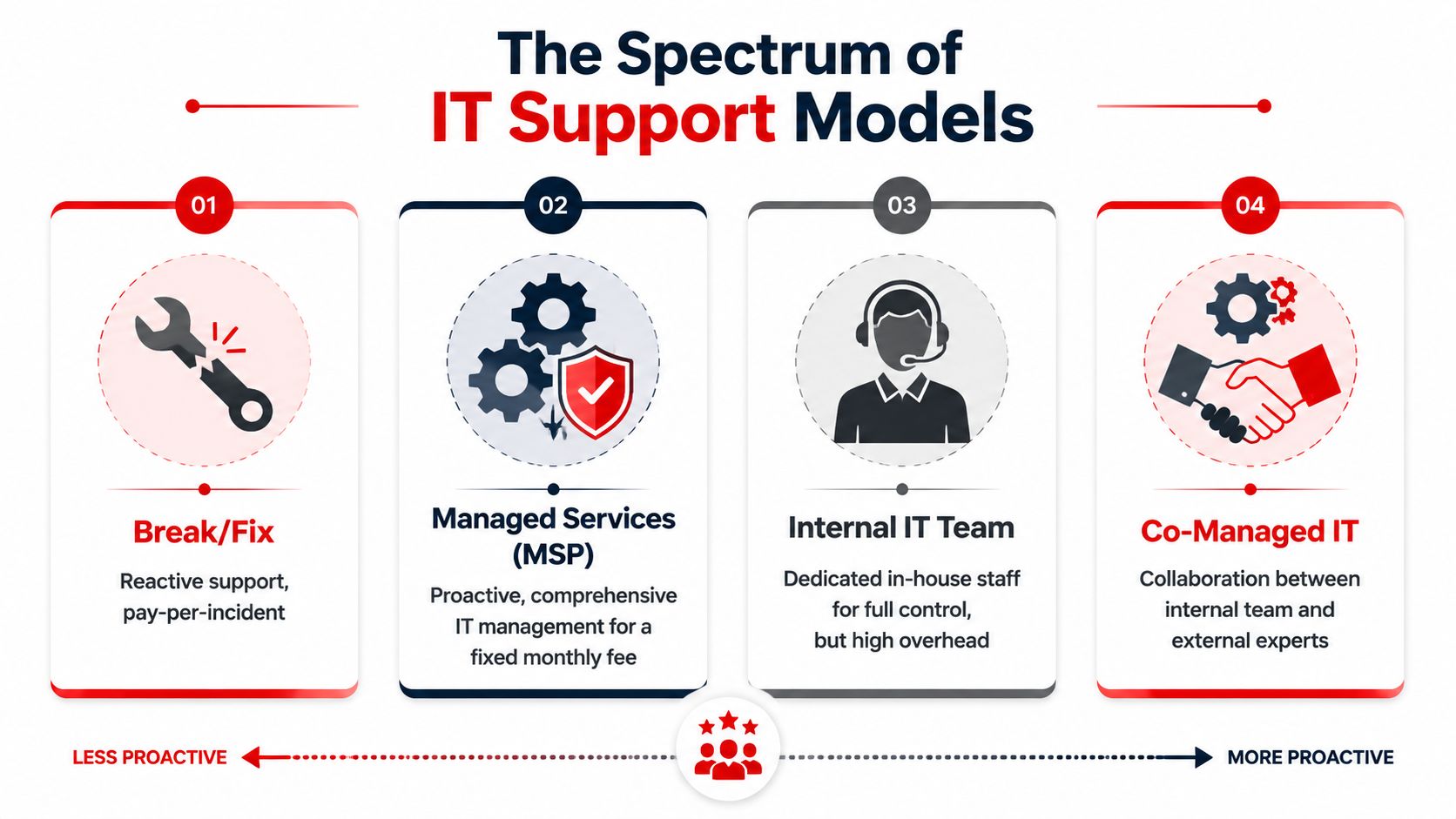
An infographic showing the four levels of IT support models, ranging from break-fix to co-managed IT.

Four common support models

Model How it works What it does well Where it falls short
Break-fix You call when something breaks Low commitment for very small environments Costs swing unpredictably, and problems are handled after impact
Managed services Ongoing support for users, devices, and systems on a monthly plan Better consistency, planning, and prevention Requires a provider with strong process discipline
Internal IT team In-house staff owns daily support and strategy Direct control and internal familiarity Hiring, coverage, and specialization can get expensive
Co-managed IT Internal staff shares responsibilities with an external partner Good fit for lean internal teams that need depth Success depends on clear role boundaries

What the Orlando market tells you

The local market has largely moved toward recurring support. One Orlando guide notes that most managed IT providers use tiered, per-user pricing ranging from $100 to $250 per user per month, which shows how standardized predictable monthly support has become in the area according to this Orlando IT support pricing guide.

That doesn't mean every monthly plan is equal. Some agreements only cover basic helpdesk activity. Others include patching, vendor management, reporting, cloud administration, security tooling, and strategic guidance. If you compare providers only on the monthly number, you can miss major differences in scope.

A practical way to choose

Start with your operating reality, not your ideal org chart.

  • Choose break-fix if: You have minimal technology dependence and can tolerate disruption.
  • Choose managed services if: You want one team accountable for user support, maintenance, and stability.
  • Choose internal IT if: You need dedicated in-house ownership and can support the overhead.
  • Choose co-managed IT if: You already have capable staff but need extra coverage, cybersecurity depth, or project help.

Most businesses don't switch models because of technology. They switch because the old model starts costing more in delays, confusion, and unmanaged risk than it saves in fees.

If you're benchmarking options, it helps to review what a mature managed IT support model in Orlando should include before comparing proposals.

Essential IT Services for Central Florida Professionals

Professional firms in Lake Nona usually need more than a generic helpdesk bundle. A law office, engineering group, accounting firm, or medical-adjacent practice depends on secure document access, stable communications, fast onboarding, and consistent vendor coordination. When any of those slip, billable work slows down.

That's why support should be judged by business outcomes, not by how many tools are included.

Support that matches a mixed work environment

Lake Nona businesses should be evaluated in the context of a fast-growing, master-planned district. They need support that can handle mixed-use offices, remote workers, and cloud apps across a growing footprint, not just generic computer repair, as reflected on the Lake Nona community site.

For most professional teams, that translates into a few essential service areas:

  • User support that removes friction: Fast resolution for login issues, device problems, printing failures, and software access keeps employees focused on client work.
  • Cloud administration that stays organized: Shared drives, email, identity controls, and permissions need structure, especially when teams collaborate across offices or from home.
  • Endpoint management that prevents drift: Devices should be patched, encrypted where appropriate, monitored, and replaced on a plan instead of on a panic basis.
  • Vendor management that reduces blame loops: Someone has to own the coordination between internet, line-of-business software, telecom, copier, and security vendors.

Fully managed vs co-managed in practice

Fully managed support makes sense when leadership wants one external team to own the day-to-day work. That usually includes helpdesk, device lifecycle planning, patching, account administration, and escalation management. It's often the cleanest route for firms with no internal IT bench.

Co-managed support fits a different scenario. Maybe you have one internal IT manager who knows the business well but can't cover everything. In that case, an outside partner can take on after-hours support, security operations, project work, documentation, or specialized engineering while the internal lead retains control of priorities.

A healthy support environment should give your team these advantages:

  1. Clear onboarding workflows so new hires don't start with missing access.
  2. Standard configurations so every workstation behaves predictably.
  3. Backup and recovery ownership so no one is guessing during an outage.
  4. Regular reporting so leadership can see patterns instead of relying on anecdotal complaints.

Good IT support disappears into the background. Employees don't think about it because systems keep working, access stays consistent, and issues are resolved before they spread.

That's the level most Central Florida professional firms are really trying to buy.

The Critical Role of 24/7 Cybersecurity and SOC

A lot of businesses still think cybersecurity means antivirus, a firewall, and some employee training. Those matter, but they don't answer the harder question. Who is watching your environment when something suspicious happens at night, on a weekend, or during a holiday?

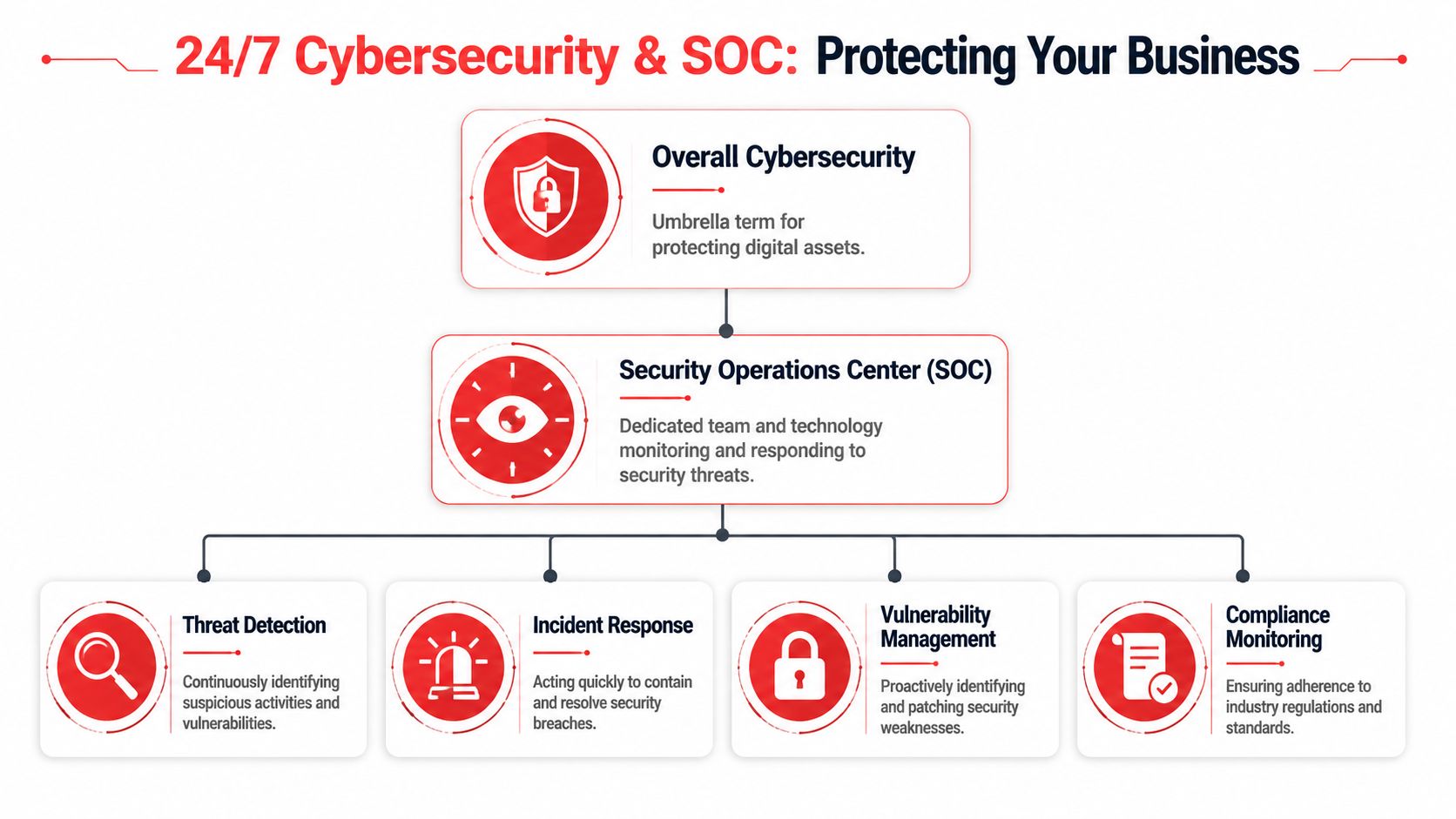
That's where a Security Operations Center, or SOC, changes the conversation. Think of it as a 24/7 security function that monitors activity, investigates alerts, and helps contain threats before they turn into a business interruption.

An organizational chart showing how a 24/7 Security Operations Center protects businesses and their digital assets.

Why continuous coverage matters

The Lake Nona and broader Orlando market can support 24/7/365 helpdesk coverage because local providers advertise round-the-clock emergency support. That matters because after-hours response reduces mean time to restore service for critical incidents, as described on this Orlando managed IT services page covering round-the-clock emergency support.

For a business owner, the point isn't technical elegance. It's continuity. If a user account is compromised, a critical system starts behaving abnormally, or a backup job fails before a Monday morning rush, waiting until standard office hours can multiply the damage.

What a SOC actually does

A capable SOC usually supports several functions at once:

  • Threat detection: Reviewing security events and separating real risks from routine noise.
  • Incident response: Containing compromised accounts, isolating affected systems, and coordinating recovery.
  • Vulnerability management: Flagging weak points so they can be patched or remediated.
  • Compliance support: Maintaining visibility into controls, changes, and risk areas that matter for regulated operations.

Email remains one of the most common entry points for business risk, which is why domain protection and message authentication deserve executive attention. If you want a clear operational overview, this guide to SPF, DKIM, DMARC, BIMI is useful for understanding how authenticated email reduces spoofing risk and improves trust in outbound communications.

The mistake many firms make

They buy security tools but not a response model. Tools can generate alerts all day. They can't decide business impact, call a user, coordinate containment, or document the chain of events for leadership.

A security stack without people and process is just a collection of alarms. Someone still has to decide what matters and what happens next.

Business owners evaluating IT Support Near Lake Nona Orlando FL should ask whether cybersecurity is built into operations or treated like a bolt-on product. If you need a plain-English explanation of that operating layer, this overview of what a Security Operations Center is is a helpful starting point.

Navigating Compliance and Industry Specific Needs

Lake Nona's business profile changes the compliance conversation. This isn't only about hospitals or large enterprise settings. A district anchored by serious healthcare infrastructure creates an ecosystem where medical practices, wellness brands, dental offices, legal firms, and financial professionals often handle sensitive information and can't afford loose controls.

That raises the bar for IT decisions.

Healthcare-grade resilience has broader value

Lake Nona is anchored by major healthcare infrastructure, including UCF Lake Nona Hospital, which signals that the surrounding business ecosystem includes organizations that handle sensitive data and require stronger uptime and resilience. That local context is clear on the UCF Lake Nona Hospital location page.

Even if your business isn't a hospital, you may still operate under similar pressures. A plastic surgery office has patient schedules and sensitive records. A law firm has confidential client documents. A financial office has identity and account information. In each case, downtime and sloppy access controls create risk that goes far beyond inconvenience.

What compliance-aware support looks like

Compliance-focused IT support usually shows up in operational discipline, not marketing language.

  • Access control: Staff should have the right access, not broad access.
  • Patch discipline: Systems need a consistent process for updates, especially for business-critical endpoints.
  • Audit readiness: Documentation, asset visibility, and change tracking should exist before anyone asks for them.
  • Recovery planning: Backups only matter if someone is responsible for validating that recovery will work.

This same mindset often applies to digital accessibility. If your organization serves the public online, leadership should also understand what compliant user access means on the web. This plain-language resource on what is ADA accessible is useful for framing accessibility as part of business responsibility rather than a design afterthought.

Industry nuance matters

A generic support provider may be fine for replacing a laptop or troubleshooting a printer. That's not the same as understanding how to secure exam-room devices, manage access for rotating staff, protect client records, or support a front desk that can't stop operating because a line-of-business app is unstable.

The best compliance conversations start with workflow. If support teams don't understand how your staff actually deliver services, they won't protect the right systems in the right order.

For Lake Nona businesses, “good enough” IT often isn't good enough for the risk profile.

How to Choose Your Lake Nona IT Partner

Most firms don't need the cheapest provider. They need the clearest operator. The wrong partner creates confusion during incidents, hides behind vague scope boundaries, and treats strategy like an upsell. The right one makes support predictable and accountability visible.

A simple interview process usually exposes the difference.

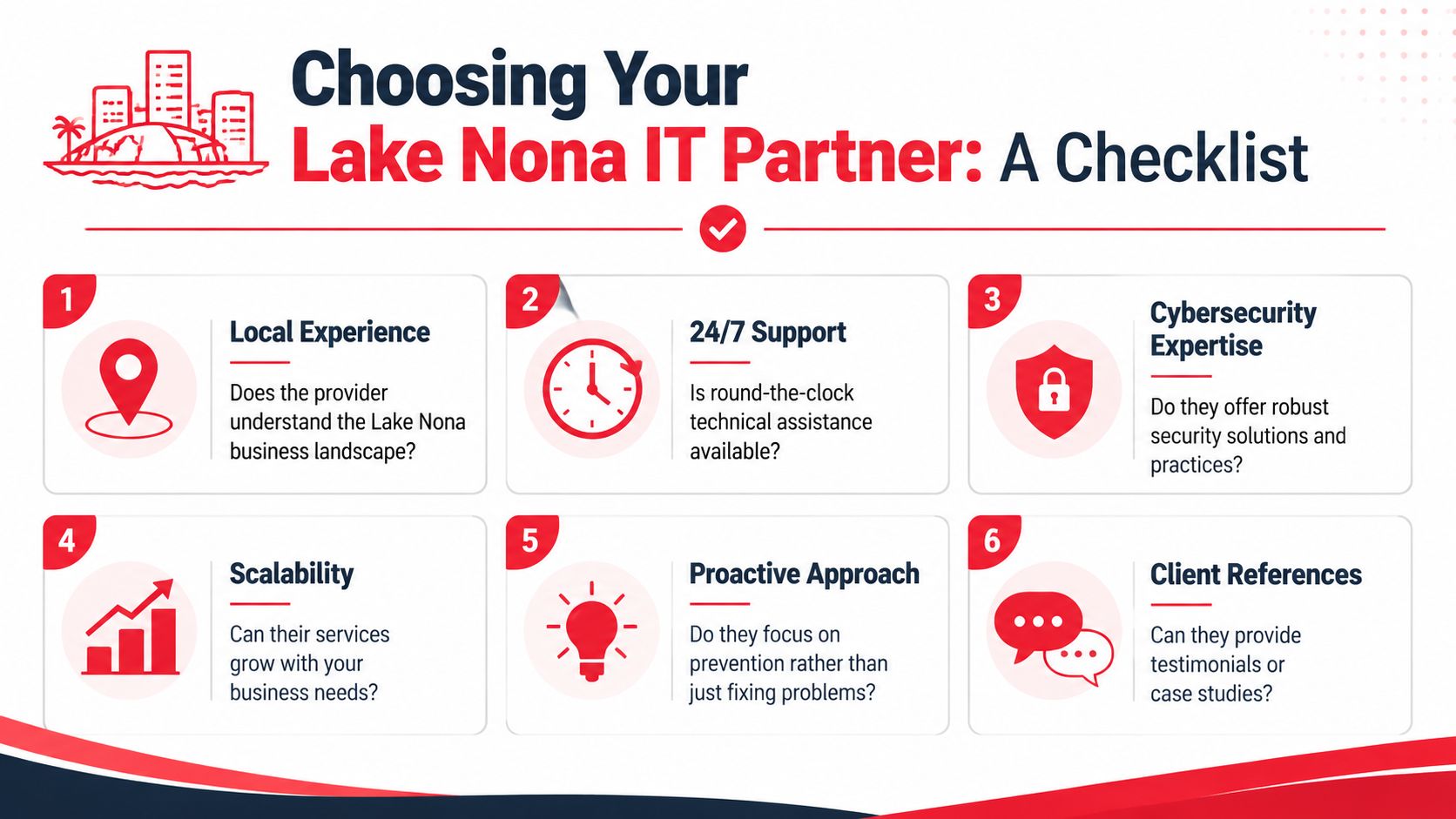
A checklist infographic outlining key factors for choosing an IT service provider in Lake Nona.

Questions worth asking in the first meeting

Use direct questions and listen for direct answers.

  • How do you handle response times? Ask what happens during routine issues, urgent outages, and after-hours incidents.
  • Can you support Lake Nona on site when needed? Remote support is important, but some problems still require hands-on work.
  • What's included in your monthly scope? You want clarity on helpdesk, patching, vendor management, cloud administration, and security responsibilities.
  • How do you report on system health and support activity? Good partners don't rely on verbal reassurance. They show patterns, open risks, and recurring issues.
  • How do you support growth? Ask how they handle onboarding, office moves, location expansion, and policy standardization.

Watch for weak answers

A provider may sound capable until you ask about process. That's where gaps show up.

Question area Strong signal Weak signal
Coverage Clear escalation path and after-hours process Vague promises to “be available”
Security Defined monitoring, response, and documentation practices Heavy focus on tools, little focus on action
Accountability Specific ownership for vendors and recurring issues Finger-pointing built into the model
Scalability Repeatable onboarding and standards Custom improvisation every time

Asset disposal is another overlooked topic. If a provider helps refresh devices or retire infrastructure, leadership should ask how data gets destroyed and documented. This practical data destruction guide from Reworx Recycling is a useful reference point for understanding what secure end-of-life handling should look like.

A final screening lens

Ask yourself whether the provider sounds like a technician for hire or an operational partner. One fixes isolated issues. The other reduces recurrence, improves resilience, and helps leadership make better technology decisions.

If your environment includes hybrid workers, cloud apps, sensitive data, and multiple vendors, your shortlist should be built around maturity, not just friendliness.

Partner with Cyber Command for Your Lake Nona Growth

Businesses in Lake Nona don't need generic support. They need a partner that understands uptime, risk, compliance pressure, and the operational reality of growing in a high-expectation business environment. That means responsive helpdesk coverage, disciplined cybersecurity, clear reporting, and a service model that supports both day-to-day stability and long-term growth.

Cyber Command, LLC fits that profile. The company serves Central Florida with a local presence, delivers 24/7/365 live, U.S.-based helpdesk support, and provides both fully managed and co-managed IT. Its model is built around predictable pricing, proactive prevention, transparent reporting, and a dedicated 24/7 SOC for threat hunting, incident response, recovery, and compliance support.

That combination matters for professional firms, private medical practices, financial teams, industrial organizations, and community-serving businesses that can't afford reactive IT. It also matters for leaders who are tired of unclear scope, vendor finger-pointing, and support that only shows up after productivity has already taken the hit.

Cyber Command also brings practical depth in the areas that typically create the most friction during growth: cloud services, vendor management, endpoint protection, patching, office changes, strategic planning, and support for businesses that need a more structured technology roadmap without building a large in-house department.

If you're evaluating IT Support Near Lake Nona Orlando FL, the standard should be simple. Your provider should help your team work without interruption, reduce avoidable risk, and give leadership clear accountability.


Cyber Command, LLC can help you build that kind of environment. If your business near Lake Nona needs managed IT, co-managed support, stronger cybersecurity, or a clearer plan for growth, contact Cyber Command, LLC for a no-obligation conversation about your current setup and where it needs to go next.

Managed IT Services for Nonprofits: A 2026 Guide

You’re trying to run programs, raise money, report to the board, protect donor trust, and keep staff productive. Then a laptop stops syncing before a campaign launch, the printer dies before an event, or someone clicks the wrong email and suddenly your week belongs to IT.

That’s the problem. In many nonprofits, technology still gets handled as an interruption instead of a strategy. A volunteer helps when they can. A staff member becomes the unofficial “computer person.” An outside technician gets called only when something breaks. It feels cheaper until it isn’t.

For nonprofits in Orlando, Winter Springs, and across Central Florida, the consequences of IT issues go beyond mere inconvenience. You’re often storing donor records, volunteer data, financial information, case notes, and grant documentation across multiple systems. If those systems are unstable or exposed, the damage hits your operations, your credibility, and your mission at the same time.

Your Mission is Too Important for IT Headaches

The most common nonprofit IT scene is painfully familiar. Your development director is preparing for a fundraising event. Finance needs reports. Program staff are in the field. Then your file access slows to a crawl, Microsoft 365 starts acting strange, or a staff member reports a suspicious login alert.

Now everyone stops doing the work they were hired to do.

A concerned woman sitting at her desk looking frustrated at her laptop displaying a system error message.

This is what I see over and over with nonprofit leadership. IT problems rarely arrive one at a time. They pile up. A slow server turns into missed deadlines. Weak password practices turn into security risk. One aging device turns into a pattern of staff downtime. The executive director ends up making technology decisions between meetings, often without enough visibility to know what’s urgent and what’s noise.

That approach doesn’t scale. It burns out staff and creates avoidable risk.

The real cost isn't the broken device

The greatest cost is the mission work that doesn’t happen while your team chases technology problems. When your program manager is troubleshooting Wi-Fi, they’re not serving clients. When your finance lead is manually patching reporting gaps between systems, they’re not improving stewardship. When your donor database and accounting tools don’t align, your reporting gets slower and your confidence drops.

Nonprofit leaders shouldn’t spend their best hours deciding which firewall alert matters or whether backups actually worked last night.

Managed it services for nonprofits fix that by moving technology out of crisis mode. Instead of waiting for things to fail, you put a team in place to watch, support, secure, and plan your systems continuously. That shift matters more than any single tool.

What good looks like

A strong IT partnership gives you three things nonprofit leaders usually don’t get from ad hoc support:

  • Consistency: Staff know where to go for help, and problems get tracked instead of forgotten.
  • Protection: Security monitoring, patching, backups, and access controls happen routinely.
  • Direction: Technology decisions support fundraising, compliance, and service delivery instead of reacting to the latest emergency.

If your team is still treating IT as a side job, it’s time to change the model.

What Are Managed IT Services A Plain-English Guide

Think of managed IT the same way you think about outsourced payroll or building maintenance. You don’t hire a full internal team to service the HVAC, monitor the alarm system, clean the building, and inspect every safety issue yourself. You hire specialists to handle it on an ongoing basis so the building stays usable.

IT should work the same way.

A managed service provider, or MSP, doesn’t just show up after something breaks. They take responsibility for keeping your systems healthy day to day. That usually includes helpdesk support, device management, security tools, software updates, network oversight, vendor coordination, and planning.

Break-fix is reactive. Managed IT is operational.

A lot of nonprofits still buy IT support the old way. Something fails, then they call someone. That’s called break-fix support. It sounds simple, but it creates three predictable problems:

  • Costs are erratic: You can’t budget well when support only appears during emergencies.
  • Issues linger: Small warning signs get ignored until they become outages.
  • No one owns the full picture: One person fixes email, another handles backups, someone else set up the donor platform years ago, and nobody has a complete map.

Managed IT replaces that with a standing relationship. You pay for ongoing support and oversight, not random rescue work.

If you want a practical overview of the service categories involved, this breakdown of what’s included in managed IT services is a useful reference.

What nonprofits usually get in a managed IT relationship

The value isn’t the label. It’s the actual operating support behind it.

Here’s what a nonprofit should expect:

  • Helpdesk support: Staff can call or submit tickets when laptops, email, printers, Microsoft 365, or line-of-business apps stop cooperating.
  • Monitoring: Servers, firewalls, workstations, and cloud systems get watched for performance issues and security alerts.
  • Patching and maintenance: Software updates and security fixes happen routinely instead of getting postponed until there’s a problem.
  • User access control: New hires, departing staff, and role changes get handled in a controlled way.
  • Vendor management: Someone deals with Microsoft, internet providers, phone vendors, and application support so your team doesn’t have to.
  • Strategic planning: Leadership gets guidance on refresh cycles, cloud decisions, compliance priorities, and budgeting.

The point is operational focus

Managed IT isn’t about buying more technology. It’s about giving your nonprofit a dependable operating model.

If your current setup depends on one helpful employee, one volunteer, or one outside technician who “knows the system,” you don’t have an IT strategy. You have a single point of failure.

For nonprofit executives, that distinction matters. You’re not shopping for gadgets. You’re deciding whether technology will support your mission predictably or keep disrupting it unpredictably.

How Managed IT Protects Your Mission Data and Budget

A ransomware hit does not care that your team serves families in Orlando or seniors in Winter Springs. If donor records are locked, payroll is delayed, or staff lose access to Microsoft 365 before a grant deadline, the mission stalls fast. That is the critical budget conversation.

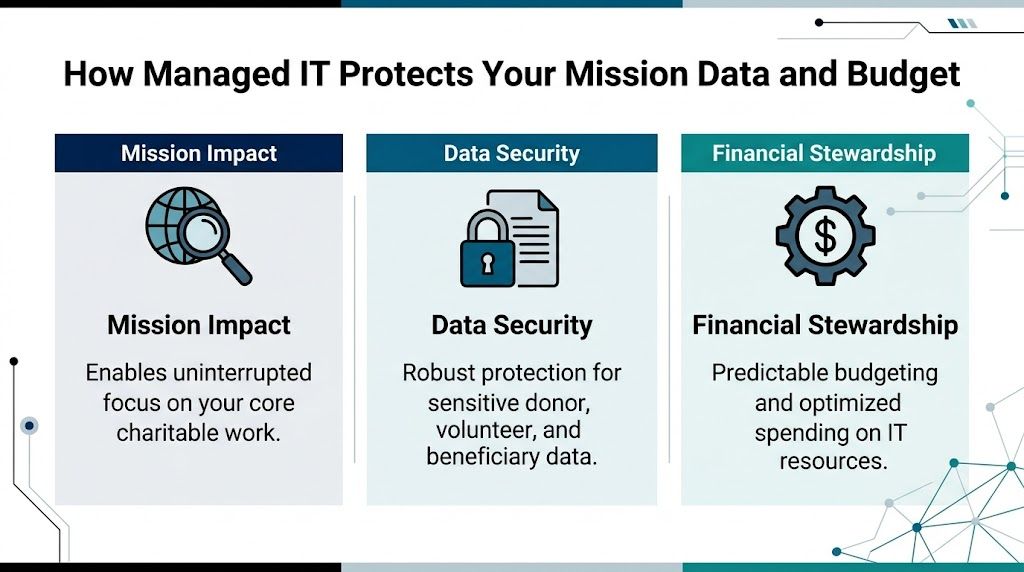
A graphic showing how managed IT services support nonprofits by improving mission impact, data security, and financial stewardship.

The budget case is stronger than many boards assume

Too many nonprofits treat IT as a cost to minimize instead of an operating function to control. That mindset gets expensive. The Andar report found that building and maintaining internal IT capacity can consume a meaningful share of overhead, while managed support often lowers cost and reduces disruption at the same time (Andar report on managed IT services for nonprofits).

The bigger advantage is predictability.

A fixed monthly service model is easier to budget, easier to explain to a finance committee, and easier to align with grant-funded capacity work than surprise invoices after an outage, phishing incident, or failed backup. For executive directors, that matters because technology spending should support planning, not force constant triage.

Good support protects staff time, not just systems

When support is consistent, employees stop building workarounds. They stop keeping files in personal drives, postponing updates, and wasting half a day trying to solve the same printer, email, or login problem again. Hours come back into the organization. Development teams can focus on fundraising. Program staff can focus on service delivery. Finance can close the month without fighting broken systems.

That is the operational return. It is measurable even when the board never sees it line by line.

Practical rule: If your nonprofit keeps paying for emergency fixes, you already have an IT budget. You are just spending it in the most wasteful way possible.

Cybersecurity protects trust first

Nonprofits hold donor data, employee records, payment information, and often sensitive client or beneficiary details. In Central Florida, that risk is amplified by storm disruptions, remote work, seasonal staffing changes, and a high volume of email-based fraud aimed at lean organizations. Attackers look for easy targets. Nonprofits often have too many of them.

Managed IT reduces that exposure by keeping basic controls in place every day. Devices get patched. User access gets reviewed. Suspicious activity gets investigated before it becomes a public incident. Staff get support when something looks wrong instead of guessing and clicking anyway.

If you want a nonprofit-specific benchmark, review this guide to cybersecurity for nonprofits and compare it against your current setup.

A 24/7 U.S.-based SOC is not a luxury

Threats show up at night, on weekends, and during holidays. Your provider needs people watching during those hours, not just software sending alerts into a queue. A 24/7 U.S.-based Security Operations Center gives your nonprofit active monitoring, faster investigation, and a real response path when something suspicious hits your systems at 2 a.m.

That local and always-on support matters even more for organizations in Orlando and Winter Springs that rely on hybrid staff, cloud apps, and small internal teams. If one person handles operations, finance, and vendor coordination, you do not have room for a slow response.

Compliance gets harder as systems pile up

Most nonprofits add tools one at a time. Microsoft 365, donor platforms, accounting software, volunteer management apps, payroll systems, file sharing, payment processing. Each purchase solves one problem. Over time, the organization ends up with fragmented access, inconsistent records, and weak oversight.

Managed IT should fix that.

A capable partner documents systems, standardizes user access, closes security gaps, and helps your team handle compliance requirements tied to donor data, payment processing, employee information, and grant reporting. For a broader small-organization view, this overview of effective cybersecurity solutions is worth reading alongside nonprofit-specific guidance.

What to fix first if money is tight

Do not try to modernize everything in one quarter. Start with the controls that reduce risk and protect daily operations fastest:

  • Lock down user accounts: Require strong authentication, remove old accounts, and limit access by role.
  • Protect every device: Laptops and desktops need monitoring, updates, and security tools that stay current.
  • Test backups: Recovery only counts if it works under pressure.
  • Document critical systems: Leadership should know what systems matter most, who owns them, and what happens if they fail.
  • Train staff regularly: Many incidents still start with a rushed click, a fake invoice, or a weak password.

The right managed IT partner protects more than hardware. It protects donor confidence, staff productivity, and your ability to keep serving the community without preventable interruptions.

Structuring Your Partnership Co-Managed vs Fully-Managed IT

Not every nonprofit needs the same IT model. Some have an internal IT manager who needs outside depth. Others have no dedicated IT staff at all and need a full operating partner. The mistake is assuming one model fits every organization.

The right choice depends on who owns day-to-day support, who makes technical decisions, and how much responsibility your internal team can realistically carry.

The two models in plain terms

Co-managed IT works when you already have an internal IT person or small team. The MSP fills gaps. That may include after-hours support, cybersecurity operations, vendor escalation, project help, documentation, and strategic planning.

Fully-managed IT means the outside provider handles the function as your primary IT team. Staff contact the MSP for support, and leadership relies on that partner for planning, maintenance, security, and oversight.

If your organization already has one capable internal IT lead, this guide to the advantages of co-managed IT services helps clarify where outside support can strengthen, not replace, that person.

Co-Managed vs. Fully-Managed IT for Nonprofits

Aspect Co-Managed IT Fully-Managed IT
Internal staff You already have someone in-house You have little or no internal IT capacity
Primary use case Augment internal strengths and cover gaps Outsource the full IT function
Helpdesk ownership Shared between internal staff and MSP MSP is the main helpdesk
Cybersecurity support MSP often handles advanced monitoring and response MSP typically owns both support and security operations
Best fit Larger nonprofits or multi-site organizations with existing IT staff Small and midsize nonprofits that need consistency and accountability
Main advantage Keeps internal knowledge while adding depth Reduces management burden on nonprofit leadership
Main challenge Requires clear roles and communication Requires strong trust in the provider’s process

Co-managed works well when your internal person is strong but overloaded. Fully-managed works well when leadership is tired of running IT by committee.

How pricing usually works

You don’t need to become an IT procurement expert, but you do need to understand the pricing logic before signing anything.

Common models include:

  • Per user pricing: A flat fee tied to each employee or supported user. This is often the cleanest model for nonprofits because it maps to staffing.
  • Per device pricing: Charges based on laptops, desktops, servers, and network gear. This can work, but it gets messy when users have multiple devices.
  • Tiered packages: Different service levels with different inclusions. Read these carefully. Cheap tiers often exclude the exact services nonprofits need most.

One verified case-study source notes extensive coverage can be priced in a flat-rate range of $100 to $150 per user per month in some engagements, while aligning support to needs assessment and service expectations (nonprofit IT support case study). Another verified source references flat-fee bundles in the $75 to $125 per user per month range for managed support with cybersecurity elements in certain scenarios (managed IT support for nonprofits growth article). Treat those as market examples, not automatic quotes.

What nonprofit leaders should insist on

Don’t just compare monthly numbers. Compare what’s included, who answers the phone, and whether security work is part of the service.

Ask these questions:

  • What is covered: Helpdesk only, or also patching, endpoint security, vendor management, reporting, and planning?
  • What is excluded: Projects, after-hours work, onboarding, cloud support, compliance help?
  • Who owns response: Is there a live helpdesk, or just a ticket queue?
  • How often will we review: Regular reporting and business reviews matter if you want accountability.

Technology shouldn’t crowd out growth work. If your nonprofit is also trying to expand donor engagement, this piece on effective digital marketing for nonprofits is a reminder that your systems need to support outreach, not slow it down.

My recommendation

Choose fully-managed IT if your executive team is still absorbing IT decisions by default. Choose co-managed IT if you have internal leadership that can own priorities and collaborate well with an outside team.

Either way, avoid vague contracts. If the provider can’t explain scope, escalation, reporting, and ownership in plain language, move on.

Choosing a Local Partner and Planning Your Transition

A nonprofit in Orlando should not wait for a server failure, a phishing incident, or a chaotic fundraising event to find out its IT provider cannot respond fast enough. By the time that happens, your staff is stalled, donor trust is at risk, and leadership is pulled into operational cleanup instead of mission work.

For Central Florida nonprofits, local fit matters because your operating reality is specific. You have hybrid staff, field work, events, shared offices, seasonal volunteers, and growing pressure to protect donor and client data. You also face real regional risks, from storm-related outages to targeted email attacks against organizations with lean internal controls. A provider that knows Orlando and Winter Springs will usually understand those pressures faster and plan for them better.

A professional business consultant discussing an MSP selection checklist on a tablet with a male client.

The checklist I’d use in Orlando and Winter Springs

Start with service delivery and risk ownership.

  1. Is the helpdesk live, U.S.-based, and available 24/7/365?
    Nonprofits do not operate on a neat 9 to 5 schedule. Evening events, weekend campaigns, and early staff hours require real coverage, not a ticket form and a promise.

  2. Is there a real security operations center watching your environment at all hours?
    Ask who reviews alerts, who investigates suspicious activity, and who contacts your team if something goes wrong overnight.

  3. Do they understand nonprofit operations?
    Grant requirements, board oversight, volunteer turnover, donor confidentiality, and tight budgets change how support should be delivered.

  4. Can they support the systems your organization depends on?
    Experience with platforms such as Blackbaud or Salesforce Nonprofit Cloud matters. If your donor system, finance tools, and Microsoft 365 environment do not line up, reporting gets messy and audit prep gets harder.

  5. Can they explain compliance support in plain English?
    If your organization handles health information, student records, payment data, or restricted donor information, the provider should be able to explain how they help you control access, retain records, and document changes.

Poor system alignment is a common nonprofit problem. Donor platforms, accounting tools, and staff access rules often grow separately. That creates avoidable audit issues, duplicate work, and blind spots leadership does not see until a review starts.

Ask about operating discipline, not just ticket resolution

A weak provider talks about closed tickets. A strong provider explains how they keep your organization stable, secure, and ready for an audit or board question.

Ask direct questions like these:

  • How do you document our systems, vendors, and admin access during onboarding?
  • Who owns vendor coordination when Microsoft, your internet provider, and your donor platform point fingers at each other?
  • How do you handle user access when staff, contractors, or volunteers leave?
  • What reports will leadership receive each month?
  • How do you prepare clients for compliance reviews, cyber insurance questionnaires, and board-level security questions?

If the answers are vague, keep looking.

For Central Florida organizations, I would also ask how the provider handles business continuity during hurricanes and extended outages. A local partner should already have a clear answer for backup access, remote work continuity, and communication during disruptions.

What a strong provider should offer

Choose a partner that can run the basics well and communicate clearly with nontechnical leaders.

A credible MSP should provide:

  • A defined onboarding plan: system review, account access audit, device inventory, vendor list, and a written transition schedule
  • Leadership reporting: recurring issues, user trends, security concerns, and clear recommendations
  • Active cybersecurity coverage: endpoint protection, patching, monitoring, incident response support, and user security guidance
  • Vendor management: one accountable team coordinating with your software, internet, phone, and cloud providers
  • On-site support when needed: remote service handles a lot, but local presence still matters for office moves, failed hardware, and hands-on troubleshooting

Cyber Command, LLC is one local example of the model to look for. The relevant benchmark is straightforward. A provider serving Orlando and Winter Springs should be able to offer a 24/7 U.S.-based helpdesk, around-the-clock security monitoring, and support options for either fully managed or co-managed IT.

How the transition should work

A good transition is structured and quiet.

Your new provider should begin with discovery, not disruption. They need to review users, devices, software, security settings, backup status, vendors, and any compliance obligations that affect your organization. After that, they should document the environment, confirm who has access to what, and identify immediate risks such as former staff accounts, missing backups, or unsupported devices.

Then they stabilize the environment before proposing bigger changes. That order matters. A nonprofit does not need a flashy redesign in week one. It needs fewer interruptions, clearer accountability, and lower risk.

Your staff also need a simple rollout. One support number. One support email. Clear instructions. No guessing.

What to avoid

Avoid providers that:

  • Write vague proposals with unclear limits and surprise charges
  • Treat cybersecurity as a separate add-on instead of part of day-to-day service
  • Struggle to explain escalation, response times, or after-hours support
  • Lack experience with nonprofit software and compliance expectations
  • Push major platform changes before they document your current environment
  • Rely fully on remote support with no practical local presence in Central Florida

The best transition is controlled, documented, and uneventful. That is what you want.

Real-World Impact A Central Florida Nonprofit Story

At 8:15 on a Monday morning, an Orlando nonprofit was already behind. A program manager could not get into a shared file. The operations lead was chasing a password reset. The executive director had a board update that pulled numbers from two systems that did not match. No single failure caused the problem. The issue was accumulated fragility.

That pattern is common across Central Florida nonprofits. Organizations in Orlando and Winter Springs often run on a mix of aging devices, nonprofit software that was never set up cleanly, and informal support from whoever has been helpful in the past. It keeps the lights on until it starts pulling staff attention away from the mission.

In this case, the nonprofit did not wait for a ransomware event or a major outage. Leadership made the right call earlier. They were tired of losing time to small disruptions, worried about donor and client data, and uneasy about what could happen after hours if no one was watching.

Before the switch

The problems were practical, not dramatic.

Staff had no consistent path for support, so basic issues sat too long. Leaders could not get a clear view of device health, account access, or recurring trouble spots. Security tools existed, but no one was actively reviewing alerts around the clock. Administrative staff kept acting as traffic control for vendors, logins, and software confusion instead of doing the work they were hired to do.

That kind of setup drains a nonprofit twice. It wastes payroll on avoidable interruptions, and it increases the chance that a preventable security issue turns into a mission problem.

What changed

The organization shifted to a managed IT model with a defined helpdesk, active monitoring, and ongoing security oversight. The immediate improvement was operational clarity. Staff knew where to go for help. Issues stopped bouncing between vendors. Leadership started getting direct answers instead of partial updates.

For a nonprofit handling donor records, financial systems, and sensitive community data, that matters. In Central Florida, threat activity is not theoretical, and compliance expectations do not disappear because an organization has a limited budget. A local partner with a 24/7 U.S.-based SOC and helpdesk gives nonprofit leaders something they rarely get from ad hoc support. Real accountability at all hours.

The biggest result was simple. Staff could focus on programs, fundraising, and service delivery instead of acting like part-time IT coordinators.

After the transition

Within the first phase, daily operations became steadier. Support requests moved through a clear process. Access and system ownership were better documented. Leadership had a clearer picture of risks, priorities, and next steps.

The executive director gained confidence grounded in facts. They knew who was responsible, what was being monitored, and how the organization would respond if something went wrong.

That is the significant value of managed it services for nonprofits. Fewer preventable disruptions. Better protection for donor and client information. More staff time returned to the mission.

If your nonprofit in Orlando or Winter Springs is still relying on scattered vendors, informal support, or guesswork on cybersecurity, fix that now. Your cause is too important for unstable systems.

If your nonprofit needs a clearer IT plan, a live U.S.-based helpdesk, or stronger cybersecurity support in Central Florida, talk with Cyber Command, LLC. They work with organizations in Orlando and Winter Springs on fully managed and co-managed IT, with 24/7 support and a dedicated SOC designed to reduce disruption and improve accountability.