


Your office closes at 6 PM, but your risk doesn't. A file server can lock up during a late-night deadline. A line-of-business app can fail before an early patient schedule. A ransomware alert can hit on a Saturday, when no one on your team knows whether to shut systems down, isolate devices, or wait for someone to call back.
That's the moment when most Orlando business owners find out what “24/7 support” really means.
Some providers offer after-hours availability in the narrowest sense. Someone answers. A ticket gets opened. You get a confirmation email. Actual repair waits until morning. For a password reset, that may be good enough. For a security event, line-of-business outage, or backup failure, it's not support. It's message taking.
Real 24/7 IT support in Orlando means live people can investigate, contain, remediate, and keep your business operating when the problem starts outside business hours. In Central Florida, where professional services firms, medical practices, financial offices, and industrial companies all rely on connected systems and fast response, that difference is operational, financial, and reputational.
Table of Contents
- Why a 2 AM System Crash Is Different in Orlando
- Beyond the Answering Service What 24/7 Support Really Means
- The Cybersecurity Imperative for Orlando Businesses
- What to Expect From Your 24/7 IT Partner
- Decoding Pricing and SLAs for Orlando IT Support
- Red Flags When Choosing an IT Support Provider
- Your Next Step Toward Secure Orlando Operations
Why a 2 AM System Crash Is Different in Orlando
An Orlando firm doesn't need to be a giant enterprise to suffer enterprise-grade consequences from after-hours downtime. A law office may be preparing filings before a morning deadline. A dental or medical practice may depend on schedules, imaging access, and secure records before the first patient arrives. A field-service or industrial company may have crews moving before sunrise and no tolerance for a failed VPN, offline dispatch system, or locked account.
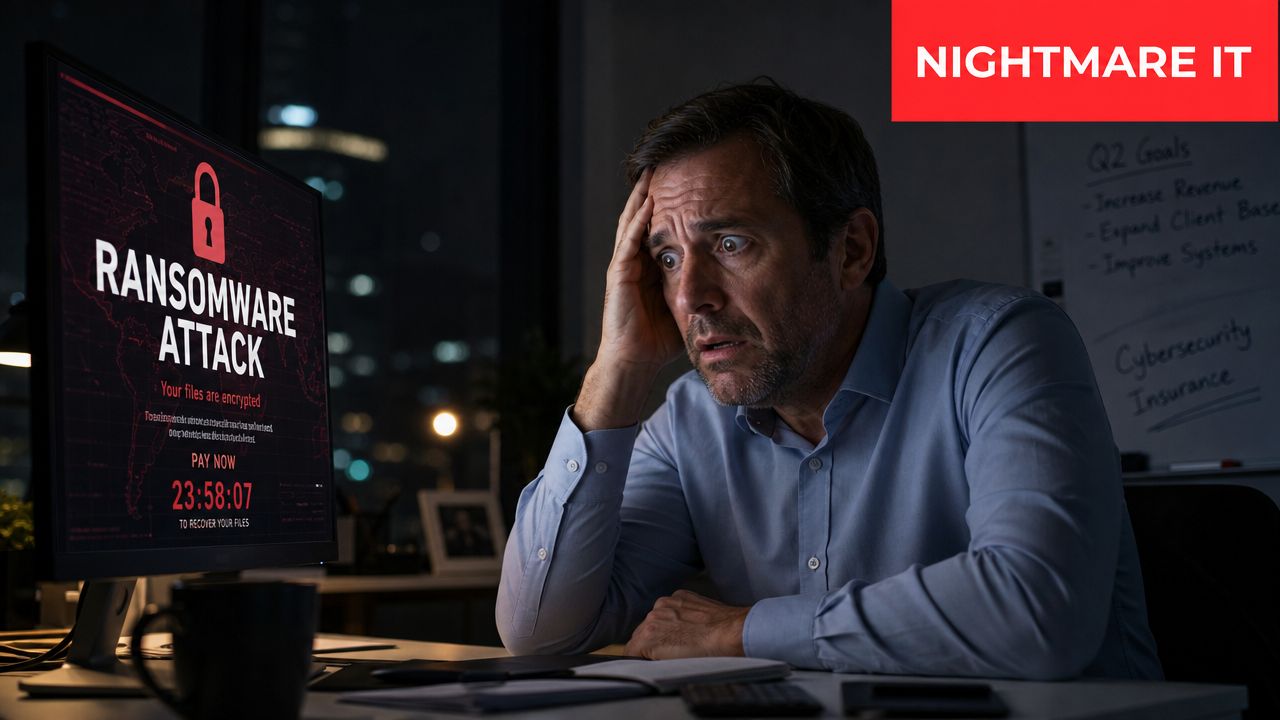

The first question at 2 AM is never “did someone answer?” It's “can someone fix this now?” If the answer is no, the business starts absorbing damage immediately. Staff lose productive hours. Leaders make rushed decisions. Security incidents spread while everyone waits for business hours.
The local reality
Central Florida businesses sit in a market that runs on constant movement. Clients expect responsiveness. Patients expect continuity. Vendors and employees work from multiple locations. That raises the stakes for backups, continuity planning, and overnight response. If your business depends on reliable recovery, your support model needs more than a phone tree. It needs tested data backup and recovery in Orlando.
The larger market is moving in the same direction. The global tech support services market is projected to grow from $73.1 billion in 2025 to $122.5 billion by 2035. For Orlando businesses, that points to a practical reality. Around-the-clock U.S.-based helpdesk and SOC coverage is becoming part of normal business resilience, not a luxury line item.
A provider's overnight value shows up in the first fifteen minutes of an incident, not in the marketing page that promised “always available.”
A 2 AM outage is different because it strips away assumptions. It reveals whether your provider has real operational depth, real escalation, and real authority to act when no one from your team is around to supervise.
Beyond the Answering Service What 24/7 Support Really Means
A lot of “24/7 support” offers availability without capability. That sounds harsh, but it's the cleanest way to describe the gap.
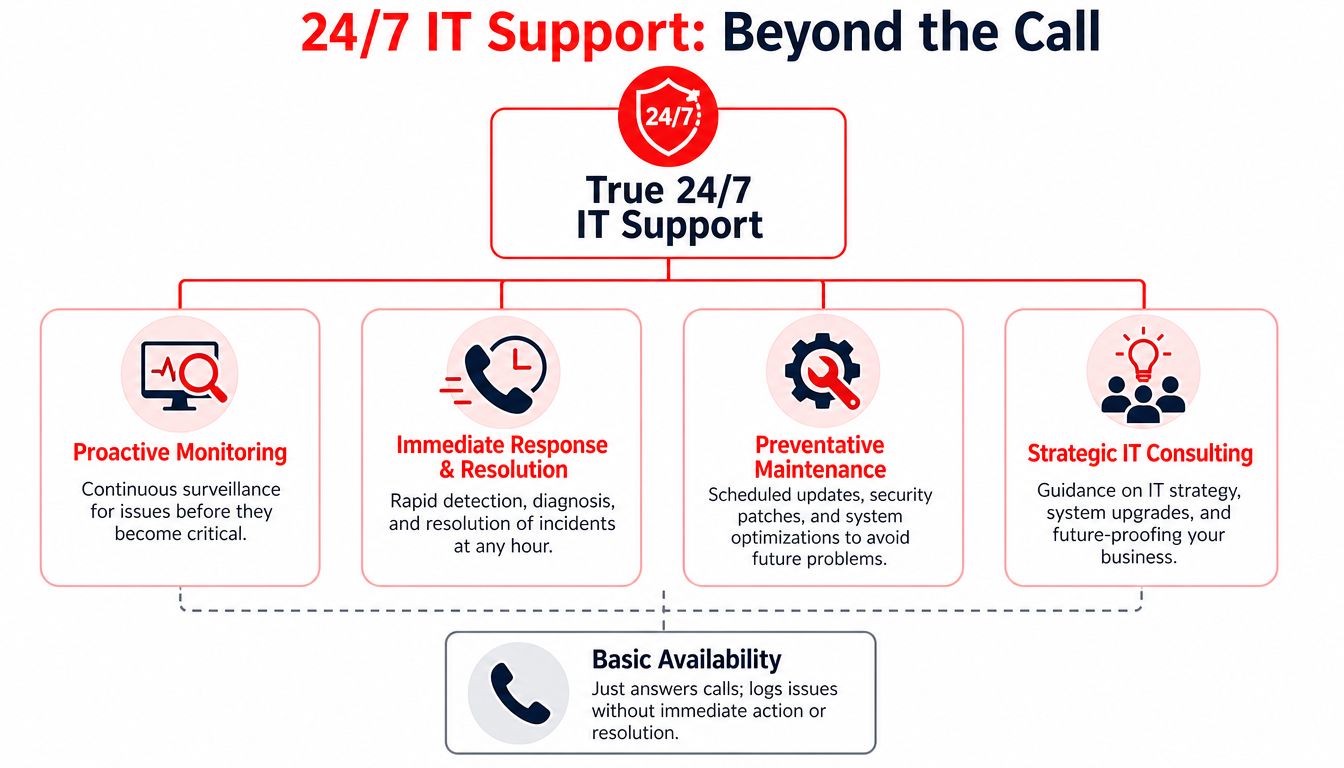
An answering service logs the problem. A true support operation diagnoses it, works the issue, escalates correctly, and stays with it until there's a path to recovery. The difference is similar to a doctor's answering line versus a staffed emergency room. One records the concern. The other treats the patient.

Availability is not capability
Orlando business owners should define 24/7 support in operational terms, not marketing terms. The baseline scope is broad. Comprehensive 24/7 IT support services cover eight domains: continuous IT support, multi-channel access, technology troubleshooting, routine maintenance, end-user assistance, incident management, performance reporting, and cybersecurity threat identification and response.
If any of those are missing after hours, the service isn't complete.
That matters because overnight incidents don't arrive neatly labeled. A user may report “the system is slow,” but the underlying problem could be storage saturation, a failed update, a security alert, or a network dependency that broke somewhere else. Logging a ticket doesn't solve any of that.
The three functions that matter overnight
A serious 24/7 model usually depends on three separate operating functions working together:
| Function | What it handles at 2 AM | What weak providers do instead |
|---|---|---|
| Helpdesk | User lockouts, access problems, app errors, urgent workflow interruptions | Take the call and defer action |
| NOC | Infrastructure monitoring, service failures, performance issues, device health | Wait for users to notice |
| SOC | Threat detection, containment, active response, security escalation | Send alerts with no remediation |
That last line is the one buyers miss. A helpdesk can be open all night and still leave you exposed if there's no Security Operations Center behind it. A SOC doesn't just watch dashboards. It investigates suspicious behavior, isolates affected endpoints when needed, and supports recovery decisions while the incident is still active.
Practical rule: If a provider says it offers 24/7 support, ask which overnight functions are staffed by live technicians and which are only monitored.
Here's what strong after-hours coverage usually includes:
- Live escalation authority: Overnight staff can take action, not just relay messages.
- Cross-functional handoff: Helpdesk, infrastructure, and security teams don't operate in silos.
- Documented procedures: Containment, communication, and recovery steps are defined before the incident.
- Human judgment: Automation helps, but high-risk events still need an experienced person making decisions.
For Central Florida companies, especially those serving regulated clients or handling sensitive records, 24/7 IT support in Orlando has to mean more than “someone picked up.” It has to mean the issue is being worked by people who know what to do next.
The Cybersecurity Imperative for Orlando Businesses
The business case for always-on support gets stronger when you look at Central Florida's industry mix. Orlando has tourism, healthcare, and a growing tech scene. One local cybersecurity guide describes that combination as a “target-rich environment”, and that's a useful phrase because it fits how attacks land on small and mid-sized firms. That same Orlando-focused source notes that 43% of cyberattacks target small businesses, and the average ransomware cost for SMBs is $26,000.
For a local owner, those numbers matter less as headlines and more as operating context. If you run a small law office, accounting firm, architecture group, engineering practice, dental office, med spa, or private clinic, you likely have sensitive data, limited in-house security staff, and business hours that don't match attacker behavior. That's why firms looking at cybersecurity services in Orlando shouldn't treat monitoring as separate from support.
Why Central Florida gets targeted
Attackers don't need a Fortune 500 logo to make money. They need reachable systems, valuable data, weak after-hours coverage, and a team that can be pressured into paying or rushing restoration.
Central Florida businesses often have exactly the combination that creates risk:
- Professional services firms hold contracts, financial records, privileged communications, and client files.
- Healthcare practices handle sensitive patient data and often depend on uninterrupted access to scheduling and clinical systems.
- Industrial and field-service organizations depend on connectivity, dispatch workflows, and reliable endpoint security across locations.
If your business can't tolerate a Monday morning surprise from something that started Saturday night, then cybersecurity can't be a business-hours function.
Industry specific coverage matters
Generic security packages are where many local companies get into trouble. A regulated office doesn't just need “good security.” It needs controls, response procedures, and reporting that fit the framework it answers to.
A practical buying standard is simple:
- Ask how after-hours incidents are contained.
- Ask whether a human investigates alerts or only forwards them.
- Ask how the provider supports compliance evidence and response documentation.
- Ask whether ransomware readiness is treated as backup hygiene, endpoint hardening, MFA discipline, and fast containment.
A generic after-hours helpdesk can reset passwords and reopen printers. It can't stand in for real security operations. For many Orlando businesses, especially those in regulated or trust-sensitive fields, that distinction is the difference between inconvenience and business interruption.
What to Expect From Your 24/7 IT Partner
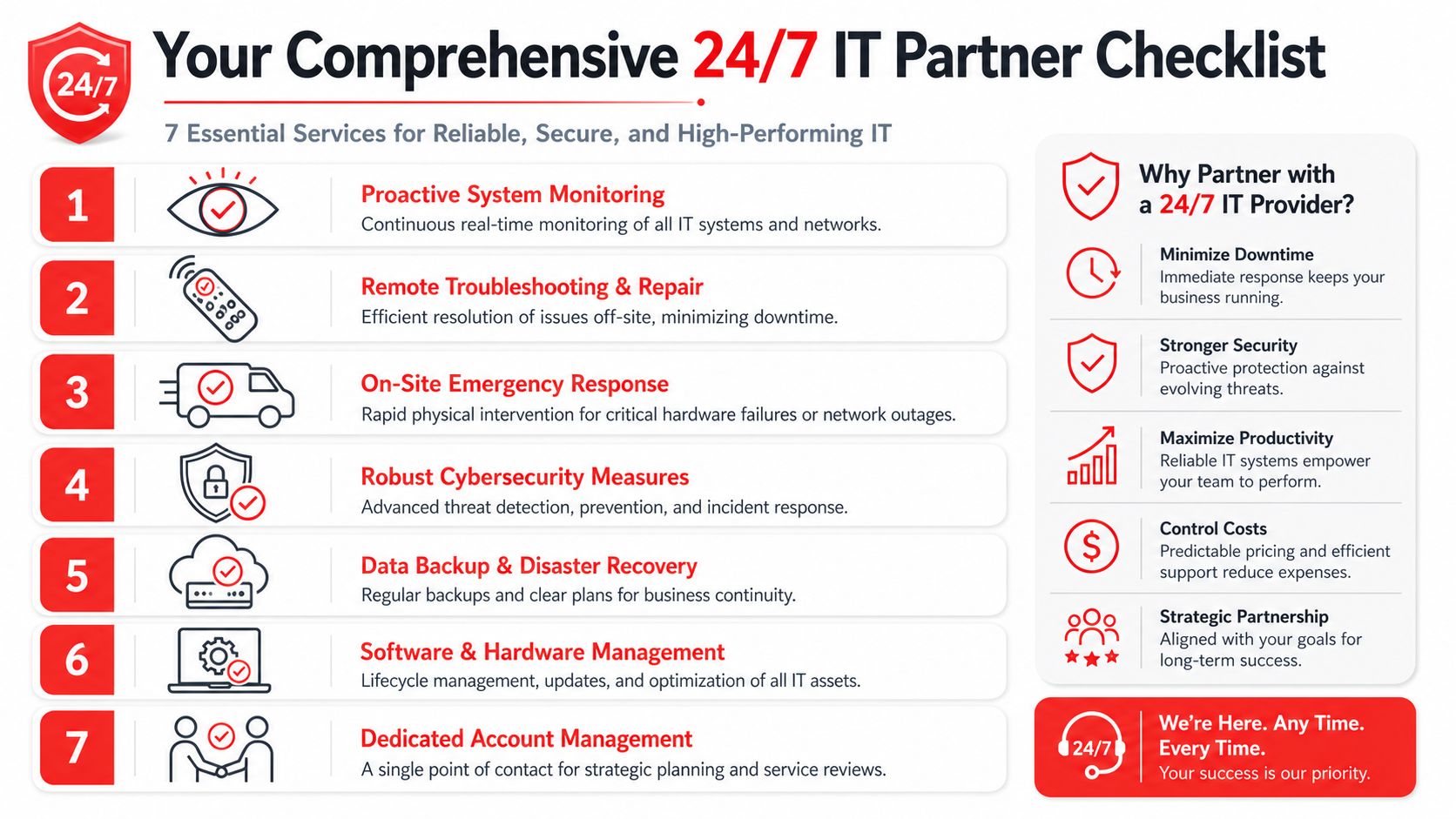
The strongest support relationships aren't built around ticket volume. They're built around prevention, fast judgment, and clear ownership. If your provider only becomes active after users complain, you're paying for reactive labor. A real partner works the environment continuously so issues are handled before staff feel them.

How proactive support works in practice
Modern support runs on telemetry. One technical explanation of this model describes using real-time health signals to catch anomalies such as a 10% increase in CPU usage or a 0.01% rise in hard-drive read errors. That matters because engineers can isolate the affected machine and correct the issue before users see a failure.
In practice, that means your provider should already know when:
- A server is trending toward failure
- A workstation update caused instability
- Remote access is degrading before morning login traffic starts
- A suspicious endpoint needs containment
- A backup job didn't complete cleanly
That's also where infrastructure support and security operations meet. The same overnight team that watches performance should know when performance degradation is really a symptom of compromise, not just a hardware hiccup.
What ownership should look like
Business owners should expect a 24/7 partner to own more than alerts. The work should include a repeatable operating model with people, documentation, and escalation paths in place.
A healthy relationship usually includes:
- Routine maintenance with teeth: Patching, system hygiene, and maintenance windows should reduce risk rather than just satisfy a checklist.
- Vendor coordination: Your team shouldn't spend a crisis bouncing between ISP support, software support, and device support.
- Remote repair first: Problems should be diagnosed and resolved quickly without waiting for a site visit when remote action is enough.
- Clear infrastructure visibility: Current diagrams, documented dependencies, and known recovery priorities matter when decisions need to be made fast.
A provider such as Cyber Command's network support in Orlando fits this model when the scope includes active monitoring, security response, infrastructure ownership, and after-hours escalation handled by live U.S.-based staff.
Overnight support should feel boring when it's working well. Users arrive in the morning and never know a device was isolated, an update was rolled back, or a service was restored before they logged in.
If you're evaluating 24/7 IT support in Orlando, expect evidence of process, not just promises of availability.
Decoding Pricing and SLAs for Orlando IT Support
Most Orlando businesses don't struggle with the idea of paying for support. They struggle with comparing proposals that sound similar but mean very different things in practice.
The cleanest way to evaluate pricing is to separate monthly managed coverage from one-off emergency work. If your agreement is mostly flat-rate and operationally complete, you can budget it. If the low monthly fee depends on billable exceptions, you'll discover the actual price during the worst week of the year.

What Orlando businesses usually pay
Local pricing tends to land in predictable bands. In Orlando, a 10 to 25 person office typically spends $1,500 to $3,500 per month for fully managed 24/7 IT services, while mid-sized companies with 25 to 100 employees usually spend $3,500 to $9,000 monthly. That same Orlando pricing analysis notes that an internal 24/7 help desk can cost over $295,000 annually, which is why outsourcing is usually the practical option for small and mid-sized firms.
There's an important detail in those numbers. The flat-rate model reflects a move away from reactive ticket billing and toward bundled support that can include licenses, vendor management, endpoint protection, patching, and disaster recovery. That's why quote comparisons have to go deeper than the monthly total.
Why resolution matters more than response
A fast response SLA can be nearly meaningless if the provider's only promise is to acknowledge the issue. Resolution is the metric that affects your operation.
When you review an SLA, compare these items:
| SLA item | What to look for | Why it matters |
|---|---|---|
| Response | How quickly a human engages the issue | Useful, but only the first step |
| Resolution | Whether the provider commits to actual remediation targets | Closer to business impact |
| Escalation | Who takes over after hours and what authority they have | Determines whether work starts immediately |
| Scope | What's included in the monthly agreement versus billed separately | Prevents surprise invoices |
Don't buy a short response-time promise if the provider can't explain overnight resolution workflow in plain language.
For Orlando firms in healthcare, finance, and other regulated sectors, the best SLA conversations get specific. Ask how the team isolates an endpoint after hours, how it communicates during an incident, and what gets handled immediately versus queued. That's where pricing and service quality finally connect.
Red Flags When Choosing an IT Support Provider
Sales language around 24/7 support is often polished. The ultimate test is whether the operating model holds up on a holiday weekend when a key system fails and no one from your office is around to translate, approve, or coordinate.
The clearest warning sign is simple. Some providers market 24/7 availability but only offer ticket acknowledgment or chatbot coverage overnight. True 24/7 performance requires a tested escalation path with live technicians who can resolve issues at 2 AM.
Questions that expose weak overnight coverage
Ask direct questions and push for direct answers.
- Who fixes the issue at night: Not who answers. Who can log in, investigate, and remediate?
- What is your escalation path: If the first overnight contact can't solve the issue, what happens next?
- Is security response separate from helpdesk coverage: A lot of providers blur this because the answer exposes a gap.
- Can you show your after-hours incident workflow in writing: Mature teams can.
If those answers get vague, you've learned something important.
Operational gaps that show up after signing
Some problems don't show up in the proposal. They show up three months later when support feels fragmented or strangely dependent on your internal staff.
Watch for these patterns:
- Hidden hourly work: The agreement sounds managed, but critical work gets carved out as project labor or emergency billing.
- No compliance fluency: A provider says it serves healthcare or finance but can't discuss framework-specific response expectations.
- Overseas-only overnight handoff: Time-zone coverage alone isn't the same as strong remediation depth and local accountability.
- Weak reporting: If you can't see what was prevented, patched, escalated, and closed, you're buying blind.
- No proof of containment readiness: A provider should be able to explain how a suspicious endpoint gets isolated and what happens next.
The wrong support partner creates work for your leadership team during incidents. The right one removes it.
A good provider won't be offended by hard questions. Serious buyers in Orlando should treat vendor selection like risk selection, because that's what it is.
Your Next Step Toward Secure Orlando Operations
Always-on support isn't about convenience. It's about whether your business can absorb an after-hours outage, security event, or infrastructure failure without losing control of the morning. That's why the phrase 24/7 IT support Orlando should mean more than “phone answered.” It should mean monitored systems, live remediation, active security operations, documented escalation, and pricing that doesn't fall apart when something serious happens.
For Central Florida, industry-specific service matters. Orlando, Winter Springs, and surrounding cities have different business mixes, but the common requirement is the same. Professional firms need continuity and trust. Medical practices need secure uptime and after-hours readiness. Industrial companies need reliable infrastructure and quick containment when something breaks. Broad city pages help with visibility, but practical guidance is strongest when support is tied to the industry risks those businesses face.
The strongest buying decision usually comes down to four questions:
- Is the service proactive, or mostly reactive
- Is there a real SOC behind the helpdesk
- Can live U.S.-based staff resolve issues after hours
- Are pricing and SLAs built around accountability
If the answer to any of those is fuzzy, keep looking.
Orlando businesses don't need more vague promises about peace of mind. They need an operating partner that can keep users productive, contain threats fast, and make after-hours problems smaller before they become public, expensive, or disruptive.
If you want a practical review of your current coverage, Cyber Command, LLC can map what you have today against what a real 24/7 operation should include, from overnight escalation and SOC response to backup readiness, compliance support, and predictable monthly service structure. A no-obligation conversation should leave you with a clearer technology roadmap, even if the first step is identifying the gaps that would matter most at 2 AM.