


Your office didn't plan to become an IT command center. But that's where many Orlando businesses end up.
A controller is waiting on a file sync issue. A practice manager needs help with a new employee setup. Someone's inbox is getting hammered with suspicious email. Your in-house IT lead is smart, committed, and completely buried in support tickets, vendor follow-up, patching, backup checks, and after-hours alerts. Strategic work keeps sliding to next month.
That's the point where many firms start looking at co-managed IT services in Orlando. Not because they want to replace their internal team, but because they need a practical way to improve security, protect uptime, and stop getting surprised by IT costs. In Central Florida, that pressure is showing up across professional services, healthcare, industrial firms, and multi-location operations.
Table of Contents
- Is Your Orlando Business Outgrowing Its IT Department
- What Exactly Are Co-Managed IT Services
- Co-Managed vs Fully Managed vs Internal IT
- Core Components of a Co-Managed Partnership
- Decoding Co-Managed IT Pricing in Orlando
- Industry-Specific IT Solutions for Central Florida
- Your Co-Managed IT Questions Answered
Is Your Orlando Business Outgrowing Its IT Department
A common Orlando scenario looks like this. A company hires one capable IT manager when it has a smaller office, fewer applications, and a simpler network. Then the business grows. It opens another location, moves more work into the cloud, adds compliance requirements, and starts expecting immediate support at all hours.
The workload changes faster than the staffing model.
In Central Florida, that pressure isn't happening in a slow market. Orlando, Miami, and Jacksonville are among the top metro areas in the U.S. for tech worker growth, with Florida ranking as the 6th highest state in tech worker expansion, which makes the region an active target for IT service providers serving local SMBs, according to this Florida tech worker growth reference. Growth is good for business. It's hard on small internal IT teams.
The signs show up before the failure
Most owners don't call for help because of one dramatic outage. They call when the pattern becomes obvious:
- Projects stall: Server cleanups, security improvements, cloud standardization, and documentation stay unfinished.
- Support turns reactive: The team spends all day answering interruptions and no time reducing them.
- After-hours coverage disappears: Nights, weekends, and vacation periods become risk windows.
- Cybersecurity gets fragmented: Email security, patching, endpoint protection, and response planning sit in different places with no one owning the full picture.
Practical rule: If your internal IT person is spending most of the week keeping the lights on, your business has already outgrown a one-layer support model.
Co-managed support is often the right next move because it doesn't force a false choice between total outsourcing and total in-house control. It gives your team backup, depth, and structure while keeping your business knowledge with the people who already understand your users and workflows.
For many owners, the right starting point is to compare that model against the daily demands they're already seeing in small business IT support in Orlando. If your internal team knows the business but doesn't have the bandwidth for round-the-clock operations and security, co-managed service usually fits better than a complete reset.
Why local businesses feel this first
Winter Springs firms, downtown Orlando offices, and multi-site companies across Central Florida often hit the same wall. Growth increases complexity long before it increases IT headcount. That's why co-managed IT isn't a luxury purchase. It's an operating model for companies that need to keep moving without burning out their internal staff.
What Exactly Are Co-Managed IT Services
Co-managed IT is a shared support model for companies that already have internal IT but need more depth, coverage, or specialized skill than their current team can provide on its own.
Your staff keeps control of priorities, user relationships, and business context. The outside partner takes ownership of clearly defined functions such as security monitoring, escalation support, cloud administration, backup oversight, or after-hours response. The point is not to hand off everything. The point is to close the gaps that create risk, delays, and burnout.
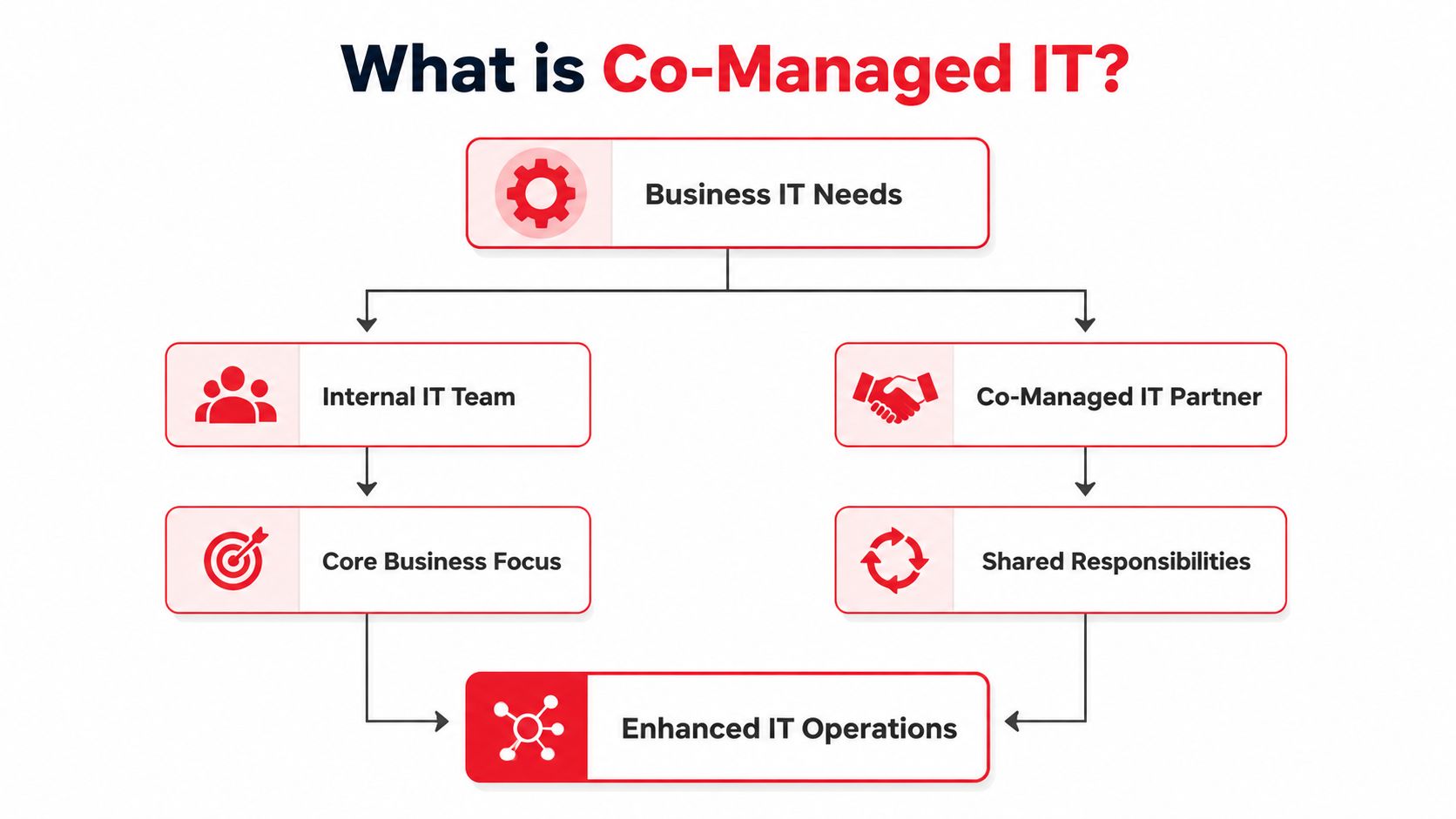

A good co-managed arrangement is structured, not informal. Roles are assigned in writing. Escalation paths are defined. Tool access, response expectations, security responsibilities, and reporting are agreed on before problems hit. If you want a broader baseline for what outside support can cover, review these managed IT services in Orlando and then compare that scope against what your internal team should still own.
How the model works in practice
In many Orlando businesses, internal IT handles the work that benefits from proximity and company knowledge. That usually includes employee onboarding, executive support, office moves, device standards, and department-specific issues.
The co-managed provider usually handles the work that requires continuous attention or higher specialization. That often includes security operations, advanced troubleshooting, infrastructure changes, patch oversight, backup monitoring, Microsoft 365 administration, and support outside normal business hours.
That split should be deliberate.
Weak co-managed relationships fail because the lines are blurry. The internal team assumes the provider is watching alerts. The provider assumes internal IT is handling them. Tickets stall, updates get missed, and nobody wants to own the gap during an outage or security event.
What businesses often miss before they sign
Many providers describe co-managed IT as flexible support, which is true but incomplete. A key question is what is included in the recurring monthly fee and what falls into project billing, onboarding charges, tool costs, after-hours labor, and security add-ons.
That matters more than the label.
A company may hear “co-managed” and expect broad support, then find out later that firewall work, cloud cleanup, identity hardening, compliance reporting, or server replacement planning sits outside the base agreement. That does not make the model wrong. It means the contract needs to be clear enough that your internal team is not forced to discover the boundaries during a problem.
What stays in house and what gets offloaded
In a healthy co-managed relationship, the division of labor is intentional.
Internal IT usually keeps:
- User relationships: Department preferences, executive communication, and day-to-day workflow knowledge.
- Business priorities: Which systems matter most, what can wait, and what supports revenue.
- Local decisions: Office hardware, hands-on troubleshooting, and coordination with leadership.
The co-managed partner usually takes on:
- Monitoring and response: Alerts, triage, and issue handling outside normal business hours.
- Security operations: Threat review, containment support, and policy enforcement.
- Advanced engineering: Escalations, infrastructure changes, and platform-level troubleshooting.
- Operational discipline: Documentation, patching oversight, reporting, and repeatable processes.
Good co-managed support removes work that drains your internal team without giving up the control your business still needs.
The business impact is straightforward. Internal IT spends less time firefighting. Leadership gets clearer accountability. Security and uptime improve because the support model matches the actual workload, not the headcount on paper.
Co-Managed vs Fully Managed vs Internal IT
These three models solve different business problems. Choosing the wrong one creates friction fast.
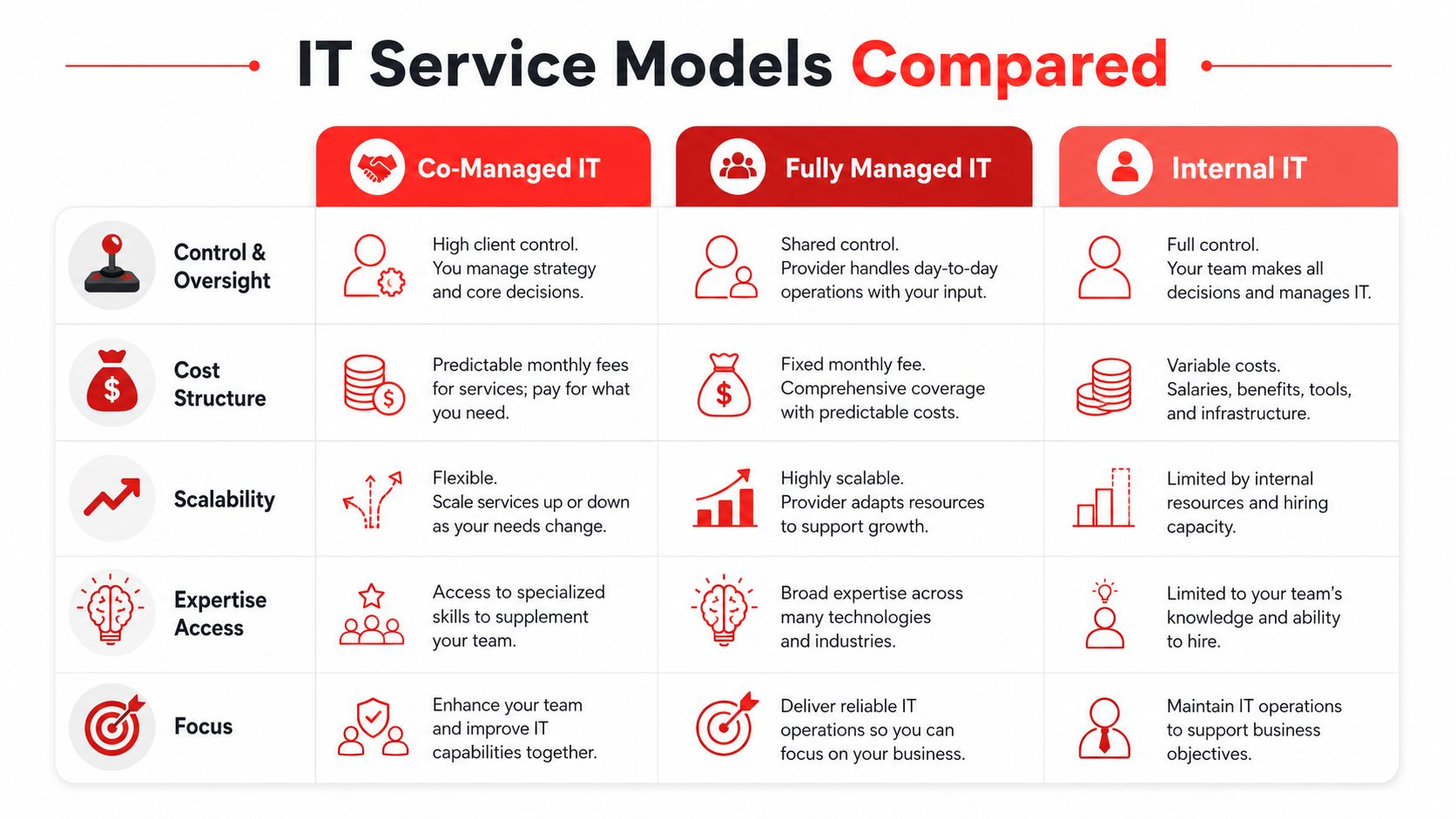
A company with no internal IT staff often does well with fully managed support. A company with a mature internal team and deep bench strength may stay mostly in house. But a large share of Orlando SMBs are in the middle. They have internal IT knowledge, but not enough coverage, specialization, or security depth to do everything well.
Where each model fits
Internal IT only gives you direct control. It also puts recruiting, retention, after-hours response, specialized cybersecurity, and documentation discipline on your payroll. That's manageable for some firms. It's a strain for most SMBs.
Fully managed IT works well when there's no internal team or when ownership wants one outside provider accountable for day-to-day support and operations. The trade-off is that some businesses miss having an internal person who knows their people, politics, and pace.
Co-managed IT is the hybrid. You keep the internal ownership and institutional knowledge. You add outside specialists, process, and continuous coverage where the business is exposed.
A practical side by side view
| Model | Best fit | Main strength | Main trade-off |
|---|---|---|---|
| Internal IT | Firms with broad in-house capability | Maximum direct control | Hard to scale specialized coverage |
| Fully managed IT | Firms without internal IT staff | One party owns daily operations | Can feel less embedded in the business |
| Co-managed IT | Firms with internal IT that needs support | Balanced control and expertise | Requires clear role definition |
Security is where the comparison becomes most obvious. Most SMBs can't justify hiring a full internal security leadership layer. Full-time CISO salaries range from $250,000 to over $350,000 annually, which is one reason co-managed and managed security models keep expanding, according to this cybersecurity managed services market projection. That same market is projected to reach $50.17 billion by 2034, driven by demand for services like 24/7 SOC access, proactive threat hunting, and continuous support.
That doesn't mean every Orlando business needs a formal CISO title. It means many need the security capabilities that usually sit under that role, without carrying the full internal cost structure.
The model that wins is the one that matches your current team shape, not the one that sounds most comprehensive on paper.
For companies weighing co-managed support against broader outsourcing, it helps to compare it to what's included in managed IT services in Orlando and then decide what should remain in-house. That exercise usually reveals whether your issue is lack of IT ownership, lack of capacity, or lack of security depth. Those are not the same problem, and they shouldn't get the same solution.
Core Components of a Co-Managed Partnership
A co-managed agreement only works when the scope is concrete. If the arrangement is fuzzy, your internal team still ends up carrying the burden while the outside provider waits for tickets.
The right partnership should define what gets watched, what gets patched, who answers after-hours issues, who owns vendor coordination, how cloud changes are handled, and what happens when a security event starts unfolding.
What the partnership should include
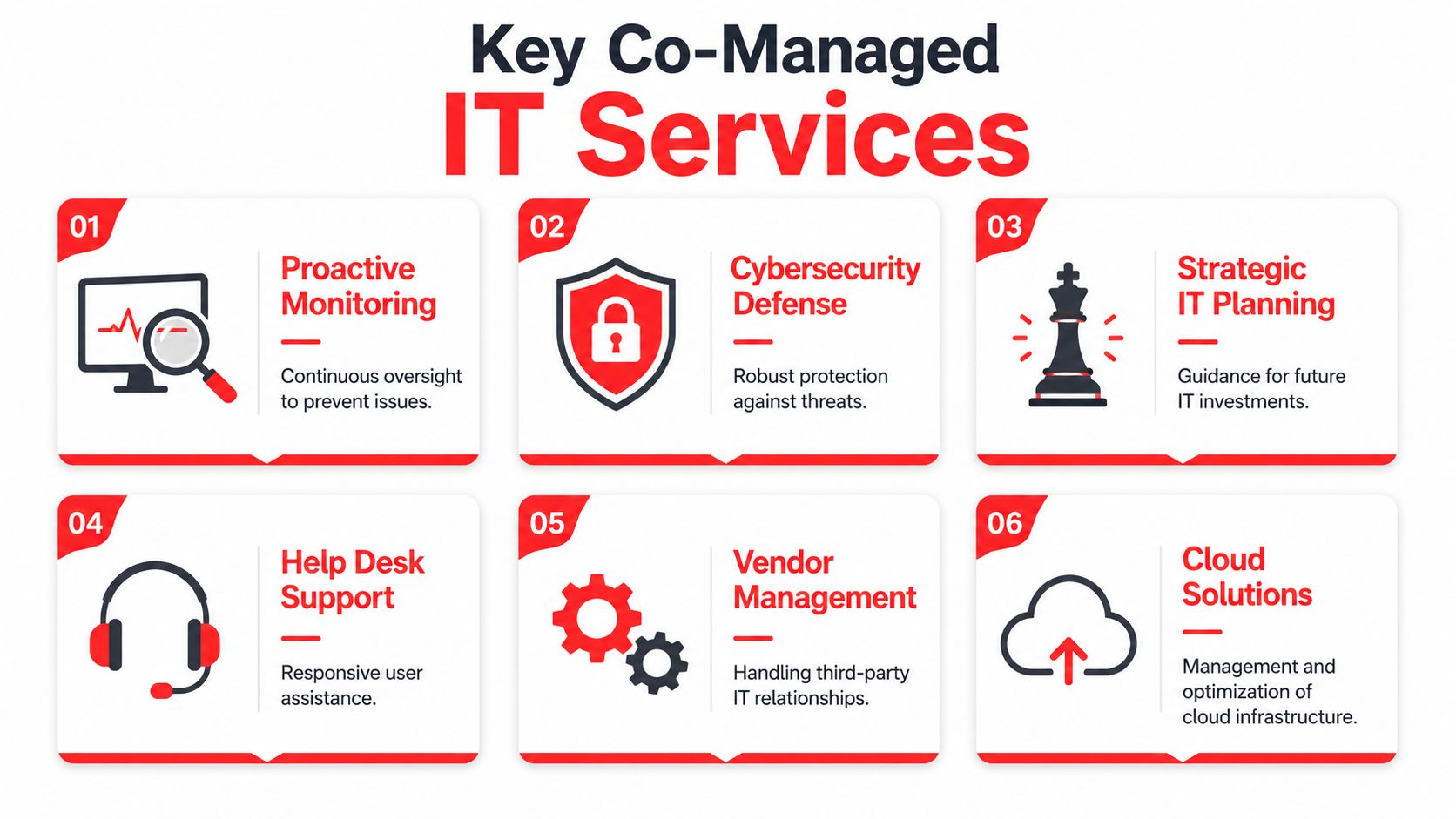
A practical co-managed plan usually includes these core elements:
- 24/7 help desk coverage: Users need a place to go when the internal lead is in a meeting, offline, or out of office.
- Security operations and threat review: Someone needs to watch for suspicious behavior, validate alerts, and act quickly when something is wrong.
- Patching and endpoint protection: This is basic operational hygiene, but it has to be done consistently.
- Cloud administration support: Shared platforms, permissions, identity controls, and environment changes need oversight.
- Vendor and license management: Internet providers, line-of-business software vendors, hardware renewals, and licensing issues all consume time.
- Business continuity support: Backup oversight and recovery planning matter because failure isn't always caused by malware. Sometimes it's deletion, bad updates, or hardware loss.
For backup and resilience planning, businesses often compare what's already covered in a co-managed scope with dedicated data backup and recovery in Orlando support. That's a useful line to draw because backup ownership is one of the first places co-managed agreements become unclear.
What good delivery looks like in practice
A weak provider sends reports. A useful provider reduces risk and friction.
That means your internal team should see fewer repeat issues, clearer escalation paths, cleaner documentation, and less interruption from routine maintenance work. Leaders should get reporting they can understand, not a dump of alert noise.
One example of a provider structure in this category is Cyber Command, LLC, which offers co-managed IT with 24/7/365 U.S.-based helpdesk, SOC support, vendor and license management, endpoint protection, patching, reporting, remote project work for covered systems, and reduced-rate office move support. The practical value in a model like that is the scope clarity. You can see what is operationally included before daily work starts spilling into side billing.
If a co-managed partner can't tell you exactly who handles patch failures, suspicious sign-ins, vendor tickets, and overnight alerts, the agreement is too loose.
The business outcome is simple. Your internal team keeps ownership of the environment while the outside team covers the operational layers that are hardest to staff consistently.
Decoding Co-Managed IT Pricing in Orlando
Many Orlando businesses get frustrated. They hear “fixed monthly pricing,” assume the budget is under control, and then get billed extra when the company moves offices, changes cloud architecture, or needs a network redesign.
That's not unusual. It's one of the most common points of disappointment in managed and co-managed relationships.
How pricing is usually structured
Most co-managed agreements in Orlando are built around a per-user or per-device flat monthly model. That approach can work well because it creates a predictable operating baseline for support, monitoring, maintenance, and security responsibilities that are part of the recurring scope.
The issue isn't the flat rate itself. The issue is what sits outside it.
Some providers include remote operational project work for covered systems. Others separate anything that looks like migration work, location changes, architecture cleanup, or major reconfiguration. On paper, both can still claim to offer fixed pricing. In practice, one is predictable and the other is only partially predictable.
Where the hidden fees show up
The biggest budget surprises usually come from “project work.” That can mean:
- Cloud migrations: Tenant cleanup, platform moves, permission redesign, and shared file restructuring
- Office relocations: Coordination with carriers, cabling vendors, hardware staging, and cutover planning
- Infrastructure redesign: Firewall changes, segmentation, wireless rebuilds, or multi-site standardization
- Compliance remediation: Documentation, policy alignment, and technical changes needed after a review
An independent Florida analysis found that 52% of SMBs face 20 to 40 percent in unexpected fees when MSPs bill for project work like cloud migrations or office relocations outside standard flat-rate agreements, according to this Florida MSP fee analysis.
That's the question to ask before signing: What exactly counts as project work, and what doesn't?
Ask for examples, not promises. “Do remote covered-system projects fall inside the monthly fee?” is a better question than “Is pricing fixed?”
If you're evaluating co managed IT services in Orlando, don't stop at the monthly number. Ask how they handle hybrid cloud changes, office moves, after-hours incidents, security remediation, and vendor coordination. A transparent partner will define those boundaries early. A vague one will leave them open until the invoice is due.
Industry-Specific IT Solutions for Central Florida
Central Florida businesses don't share one IT profile. A dental practice, an architecture firm, a law office, and a multi-location industrial company all rely on uptime. They don't face the same operational pressure.
That's why generic support models break down. The more your systems affect compliance, client trust, or field operations, the more your IT partner needs to understand your industry's risk pattern.
Central Florida's economy reflects that mix. Orange County highlights established sectors like travel and tourism and modeling and simulation, along with emerging industries such as life sciences, aerospace and defense, and semiconductors in this Orange County economic development overview. That diversity is one reason local IT strategy has to be more specific than “we support small business.”
Healthcare practices
Private medical, dental, orthodontic, and veterinary practices carry a hard combination of risk. They need systems that stay available during patient care, they need staff support that doesn't slow the front desk, and they need cybersecurity controls that align with compliance expectations.
A recent Orlando business report notes that population-driven demand is putting Central Florida healthcare systems under greater operational pressure, increasing the need for compliance-focused cybersecurity and 24/7 SOC protection for private medical, dental, and veterinary practices in this Central Florida healthcare technology report.
For those practices, co-managed support often works best when the internal office lead or IT point person keeps local control while the outside partner handles security monitoring, endpoint protection, policy support, and response coordination.
Professional services and industrial firms
Law firms, accounting groups, architecture practices, and engineering companies usually care about three things first. Data integrity. Reliable access. Fast user support.
Their teams can't afford a slow file platform, inconsistent permissions, or a help desk that doesn't understand priority users. In industrial and field-service settings, the challenge expands to standardizing devices, site connectivity, and access policies across office and field environments.
A good co-managed arrangement reflects that reality:
- Professional firms need documentation, secure collaboration, and consistent access control.
- Architecture and engineering teams need stable performance for large files and distributed work.
- Industrial operations need standardization across multiple locations and less dependence on one internal person.
- Growing Central Florida companies need security built into operations, not bolted on after an incident.
Your Co-Managed IT Questions Answered
Business owners usually ask the same questions near the end of this decision. That's a good sign. It means you're looking at operating fit, not just the quote.
Will we lose control
No, not if the arrangement is built correctly. Co-managed means your internal team still owns business priorities, approvals, and day-to-day context. The outside partner handles agreed operational and specialized functions.
If a provider wants to take over everything without clearly defining ownership, that's not co-managed. That's outsourcing under a different label.
Is my internal IT person being replaced
Usually the opposite happens. The internal lead becomes more valuable because they spend less time chasing routine issues and more time on planning, user alignment, and internal coordination.
That's one of the strongest reasons this model works. It removes routine tasks while preserving internal knowledge.
Is co-managed hard to roll out
It doesn't have to be. The cleanest onboarding starts with documentation, access review, scope boundaries, escalation paths, and communication rules. The messy transitions happen when roles are assumed instead of written down.
A solid rollout should answer these points early:
- Who handles what: Tickets, escalations, patch review, alerts, vendors, and project requests
- When support is active: Business hours, after-hours, weekends, and urgent response expectations
- How reporting works: What leadership sees, how often they see it, and who follows up
- What sits outside scope: Moves, migrations, redesigns, and exception billing
The smoother the onboarding, the less your staff has to guess where to go when something breaks.
When does co-managed make the most sense
It fits best when you already have some internal IT capability but can't justify building a full after-hours, cybersecurity, and advanced engineering bench in house. That's common in Orlando firms that are growing, adding locations, or carrying more compliance pressure than their original IT model was built to support.
If your business is trying to protect uptime, tighten cybersecurity, and stop getting surprised by project fees, a conversation with Cyber Command, LLC is a practical next step. They work with Orlando-area organizations that need co-managed and fully managed support, 24/7/365 helpdesk coverage, SOC-backed security operations, and predictable pricing boundaries. A short consultation can clarify what should stay with your internal team, what should be offloaded, and where hidden cost exposure is likely sitting today.