
April 26, 2026
Datto SaaS Protection: A Guide for Florida SMBs
Learn why Datto SaaS Protection is essential for Orlando & Winter Springs businesses. Our guide covers features, security, and how we protect your M365 data.
A lot of business owners in Orlando assume Microsoft 365 means their data is backed up. It usually doesn’t mean what they think it means. Your email may be hosted in the cloud, your files may sync across devices, and Microsoft’s platform may stay online, but none of that guarantees fast recovery when someone deletes the wrong folder, an employee account gets compromised, or ransomware hits SharePoint and Teams.
That misunderstanding causes expensive downtime. It also creates compliance trouble for firms that handle client records, financial files, patient communications, contracts, and internal HR documents. If your company relies on Microsoft 365 or Google Workspace every day, cloud convenience alone isn’t a backup strategy.
The Hidden Risk in Your Cloud Data
A downtown Orlando law office finishes a long day. A paralegal cleans up a Teams workspace, removes what looks like an old case folder, and realizes too late that it held current discovery documents. The firm assumes IT can just pull it back because everything is “in Microsoft 365.”
Then recovery turns messy. People start checking recycle bins, version history, user accounts, and retention settings. Partners are waiting. A filing deadline is close. Nobody cares that the data was in the cloud. They care whether it can be restored quickly and cleanly.

The same thing happens in healthcare practices across Winter Springs and greater Central Florida. A staff member deletes the wrong mailbox. A former employee wipes files before departing. A phishing attack leads to account misuse and content removal. In each case, the business owner assumed cloud storage and cloud backup were the same thing.
They’re not.
According to Datto’s Microsoft 365 SaaS protection overview, 87% of businesses suffered SaaS data loss in 2024. That number matters because it cuts through the common belief that cloud apps are self-protecting. They aren’t. They’re operational platforms, not full business continuity plans.
Where the misunderstanding starts
Most owners hear “redundant cloud infrastructure” and think “my data is safe.” What that usually means is the service provider protects platform availability. It doesn’t mean your business automatically has an independent, restorable copy of user data ready after deletion, corruption, or attack.
Practical rule: If your recovery plan depends on the same platform where the loss happened, you don’t have enough separation.
That gap matters even more for firms handling bookkeeping, tax records, and financial documents. If you want a grounded look at why accounting teams need dedicated backup discipline, this piece on protecting accounting data is worth reading.
What this looks like in a real business
- A law firm loses matter files: Teams and SharePoint content disappears, and staff burns billable time trying to reconstruct records.
- A medical office loses communications: Email, calendar, or file loss can disrupt patient coordination and create audit headaches.
- An accounting practice gets hit during busy season: One mistaken deletion can ripple into missed deadlines, client frustration, and manual rework.
The hidden risk isn’t that Microsoft 365 is unreliable. The hidden risk is assuming its standard protections match what your business needs when something goes wrong.
Stuck on something like this right now?
Talk it through with a real US-based engineer, 24/7, no phone trees: (407) 587-0089.
Book a Free Strategy SessionWhat Is Datto SaaS Protection
datto saas protection is a third-party backup platform built to create an independent copy of cloud application data. For a small business owner, the simplest way to think about it is this. Microsoft 365 or Google Workspace runs your day-to-day work. Datto SaaS Protection keeps a separate backup copy so you can recover that work when users, attackers, or policy mistakes cause loss.
That separation is the whole point.
Think of it as an off-site digital safe
If your office kept all client records in one room, you wouldn’t call that a disaster recovery plan. You’d want copies stored somewhere else. The same principle applies to cloud apps. Just because your data sits in a major cloud platform doesn’t mean you have an off-platform backup that’s easy to restore.
Datto SaaS Protection fills that gap by keeping backup data outside Microsoft’s and Google’s native environments. That matters when the problem starts inside the tenant itself, such as accidental deletion, account compromise, or a malicious insider.
What it protects in Microsoft 365
For Microsoft 365, Datto SaaS Protection covers the systems most small businesses depend on every day:
- Exchange Online: Mailboxes, email content, and related user data.
- OneDrive: Individual user files that often hold drafts, contracts, spreadsheets, and working documents.
- SharePoint: Shared document libraries, team sites, and the collaboration layer many firms now use as their file server.
- Teams: Team-related content that often includes files, conversations, and shared project information.
- Calendar, Contacts, and Tasks: Business coordination data that can be operationally critical.
This is why the product fits firms like attorneys, accountants, engineers, architects, dental groups, and private medical practices. Their important data isn’t sitting in one obvious folder anymore. It’s spread across mail, collaboration tools, shared libraries, and user storage.
What it means for Google Workspace users
Datto SaaS Protection also supports Google Workspace environments. If your firm runs Gmail, Google Drive, and shared calendars, the same business issue applies. Productivity in the cloud doesn’t remove the need for backup. It just changes where the backup risk lives.
What it protects you from
A backup product matters most when the loss event is mundane. That’s where many businesses get caught off guard.
- User mistakes: Someone deletes the wrong mailbox item, shared folder, or document set.
- Bad offboarding: A departing employee removes content from OneDrive or shared collaboration spaces.
- Ransomware impact: Encrypted or corrupted files spread through synced cloud storage and team repositories.
- Policy or admin error: Retention settings, account changes, or sync behavior create unexpected loss.
The businesses that recover fastest are usually the ones that prepared for boring mistakes, not just dramatic cyberattacks.
Why self-managed cloud tools often fall short
Many native platform tools are designed for operational retention, not straightforward backup and recovery. They can help in some scenarios, but they often require more interpretation, more manual work, and more familiarity with the platform’s moving parts than a business owner expects.
Datto SaaS Protection is different in a practical sense. It’s built around restore readiness. The value isn’t just that a copy exists. The value is that the copy is organized around recovering the item, user, or service you need without turning a bad morning into a week-long incident.
How Datto Architecture Safeguards Your Data
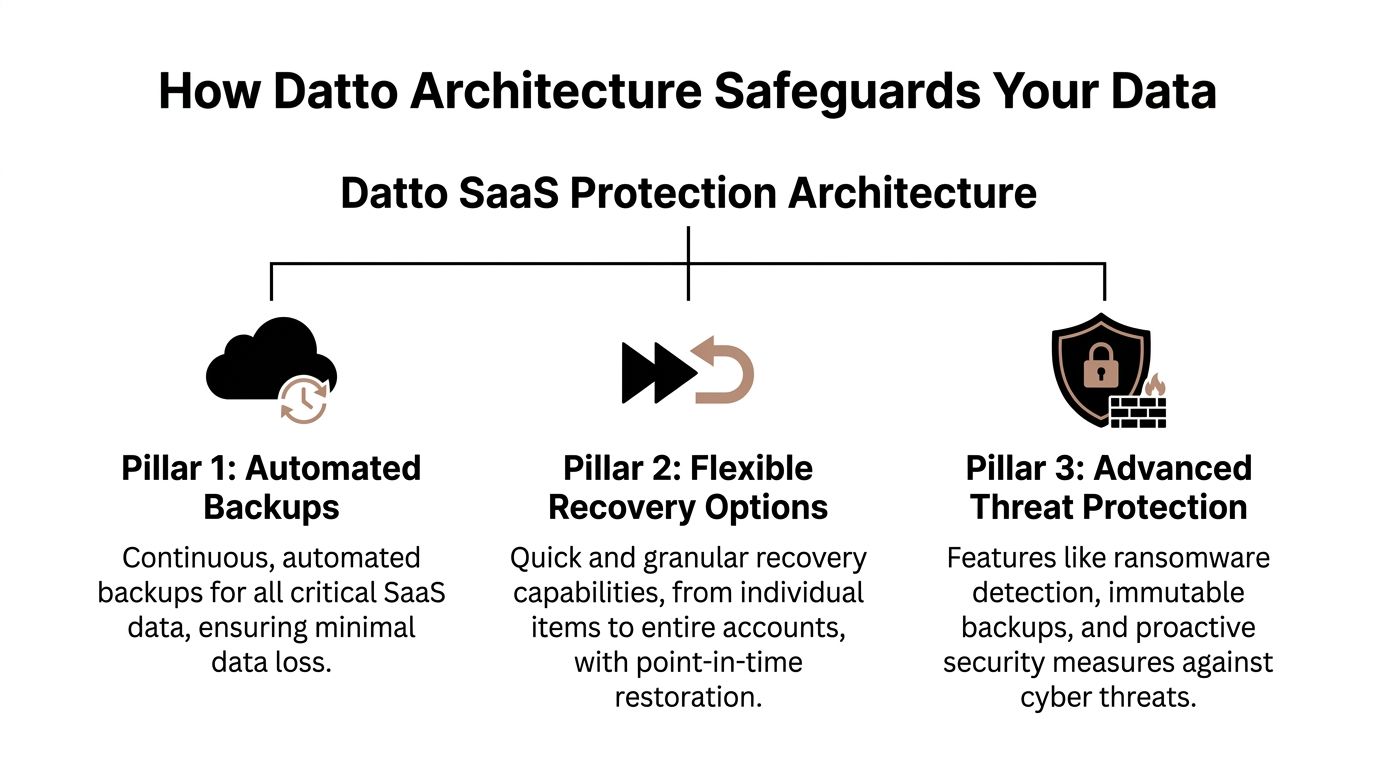
Datto SaaS Protection works because its architecture is built around three things businesses care about during an incident. Frequent backups. Flexible restore options. Storage separated from the production SaaS platform.
Automated backup cadence that limits the blast radius
According to the Datto SaaS Protection datasheet, Datto SaaS Protection implements 3x daily automated point-in-time backups at 8-hour intervals for a full suite of Microsoft 365 services, enabling recovery point objectives under 8 hours and reducing data loss exposure by 67% compared to once-daily solutions.
For a business owner, the takeaway is simple. If something bad happens at midday, you’re not looking back to yesterday’s backup and accepting a full day of lost work. The potential loss window is much tighter.
That matters in firms where data changes constantly. Law offices update matter files. Medical practices move files, messages, and schedules all day. Accounting and financial firms process documents under deadlines. In those environments, one backup at night leaves too much room for damage.
Point-in-time restores instead of broad, messy recovery
Point-in-time recovery means you’re not stuck with an all-or-nothing approach. You can restore data from a specific moment before the problem occurred. That sounds technical, but the business value is straightforward. You can target the damage.
If one user’s mailbox was compromised, you focus there. If one SharePoint library was encrypted, you restore that library. If a single Teams-related file set disappeared, you don’t have to touch the rest of the tenant.
Recovery should be precise. Broad restores create new problems, especially when teams are still working in the same environment.
This precision is where many native recovery workflows become frustrating. The data may still exist somewhere in the platform, but finding the right version, preserving the right structure, and restoring it without collateral confusion is another matter.
Security architecture that keeps backups independent
Datto’s architecture also matters because the backup copy is separate from the primary SaaS environment. If the production tenant is compromised, the backup doesn’t depend on that same environment staying trustworthy.
The datasheet also describes encryption protections including AES-256 at rest and TLS 1.2 in transit, along with SOC 2 Type II audited security. For regulated firms, that matters because backup isn’t only about recovery speed. It’s also about how backup data is protected while it’s stored and moved.
What this changes in daily operations
A sound SaaS backup architecture does more than help after a disaster. It changes how confidently a business can operate.
- During admin changes: You’re less exposed when accounts are modified, removed, or reassigned.
- During staff turnover: Offboarding becomes safer because accidental or intentional deletions are recoverable.
- During ransomware response: You have a cleaner path to restoration instead of relying only on whatever remains inside the affected tenant.
- During audits: You can show that business data has independent protection, not just platform availability.
For businesses reviewing broader resilience planning, this fits into a larger backup and disaster recovery strategy rather than acting as a standalone tool.
What does not work well
What tends to fail is assuming backup is handled because licenses are paid, files sync, or deleted items can sometimes be found. Sync is not backup. Retention is not the same as a clean restore path. Platform uptime is not the same as business recoverability.
Datto’s architecture is useful because it’s designed around the moment when those assumptions break.
Real-World Recovery Scenarios for Local Businesses
The value of backup becomes obvious only when something goes wrong. Until then, it can sound like another line item. These examples show where datto saas protection earns its keep.
Scenario one: Tax season ransomware at an accounting firm
A regional accounting firm is deep into deadline work. Staff members open SharePoint libraries all day, trade documents through Teams, and use Exchange for client requests. Then users start reporting that files won’t open and folder names look wrong.
The problem isn’t theoretical anymore. Work has stopped, clients are waiting, and the firm has to decide whether it can trust the live environment.
A clean restore path changes the response:
- IT identifies the affected SharePoint content and narrows the impact.
- The team selects a restore point from before the corruption event.
- Specific items or collections are restored instead of rebuilding everything from scratch.
- Staff returns to current work while security remediation continues.
Without a separate backup, firms often waste precious time trying to determine whether native retention, sync history, or recycle bin remnants are enough. During busy season, that uncertainty hurts.
Scenario two: Teams folder deletion at an Orlando law office
A paralegal in Orlando removes what appears to be an outdated channel folder tied to a closed matter. It isn’t closed. The folder contains current exhibits, correspondence exports, and draft filings linked to an active case team.
The problem with legal data loss isn’t just the missing content. It’s the context around that content. Folder structure, naming, and timing matter.
With Datto SaaS Protection, IT can locate the affected data set and restore the needed items to the correct state without forcing the entire matter workspace backward. That keeps the litigation team moving and reduces the chance of someone working from the wrong version.
In legal and professional services firms, a sloppy restore can be almost as disruptive as the original deletion.
Scenario three: OneDrive purge after a bad employee exit
A growing engineering firm in Central Florida offboards a project manager. Shortly afterward, leadership realizes critical working files are missing from that user’s OneDrive. The files include field notes, drafts, and project support records that never made it into the shared repository.
This is common in small and midsized businesses. Process discipline is uneven. Users save things locally, in OneDrive, in Teams, and in email attachments. When an employee leaves on bad terms, those habits become a risk.
A granular recovery process lets IT pull back the specific user data without improvising account workarounds or rushing to preserve licenses solely to keep access to old content.
Data protection compared
Feature
Microsoft 365 Native Retention
Datto SaaS Protection
Primary purpose
Built-in retention and recovery features inside the platform
Independent SaaS backup built for restoration
Backup separation
Recovery depends on Microsoft-native controls
Backup copy stored outside the production environment
Restore experience
Can require more manual interpretation and admin effort
Designed for targeted, point-in-time recovery
Best fit
Limited incidents and simpler environments
Businesses that need dependable recovery for operational and compliance reasons
Risk during major incidents
Higher reliance on the affected tenant’s native tools
Stronger separation when the tenant itself is part of the problem
Where business owners usually underestimate the problem
Most owners don’t think about restore granularity until they need it. They assume “we can recover it” means “we can recover exactly what we need, quickly, without disrupting everyone else.” Those are different things.
That’s why a written response process matters as much as the tool itself. If you don’t already have one, a solid disaster recovery plan template helps define who approves restores, what gets prioritized first, and how to document decisions during an incident.
What works and what doesn’t
What works is tight restore targeting, clear ownership, and a backup copy that isn’t tied to the same failure domain. What doesn’t work is improvising under pressure, especially when lawyers, doctors, accountants, and office managers are all waiting for different data sets at once.
In every scenario above, the technical issue starts small. The business issue grows fast.
Meeting Security and Compliance Demands
For many Central Florida businesses, backup is not only an operations issue. It’s a compliance issue. Medical practices, financial firms, law offices, and accounting teams all hold information that carries confidentiality, retention, and audit expectations.
When those businesses lose data, the fallout can go beyond downtime. You may need to prove what was protected, what remained recoverable, and what controls existed around the backup environment.

Why independent backup supports compliance
Native productivity platforms are built to help people work. Compliance requires something more disciplined. You need retention confidence, security controls around stored backup data, and a recovery process that can be explained to auditors, clients, or legal counsel.
Datto SaaS Protection supports that posture in a few practical ways:
- Independent backup copies: If the production tenant is altered, deleted, or compromised, your recoverable copy is still separate.
- Point-in-time recovery: You can restore data based on when the incident occurred instead of relying on a rough guess.
- Retention options: Backup retention helps with legal hold, historical lookup, and regulated recordkeeping needs.
- Audited security posture: SOC 2 Type II matters because regulated firms need vendors with documented control environments.
What regulated firms should pay attention to
A plastic surgery practice in Orlando, a dental office in Winter Springs, and a financial services firm all face different regulations. But they share one operational reality. They need to know sensitive data can be recovered without introducing new security issues.
That’s why the underlying security controls matter. The product’s documented use of encryption at rest and in transit, along with SOC 2 Type II audited controls, gives firms a more defensible answer than “our files were in the cloud.”
Backup that can’t be explained during an audit is weaker than it looks during a sales demo.
Compliance pressure shows up in ordinary workflows
You don’t need a breach headline to trigger compliance stress. Ordinary events can do it.
- Employee turnover: You may need access to prior communications and files after a staff departure.
- Disputes or record requests: Legal, HR, or client service teams may need older versions of documents or email.
- Incident review: Security teams need to know what was lost, when it changed, and what can be restored.
- Vendor review: Firms increasingly ask whether service providers use auditable controls around business data.
For healthcare, client confidentiality and continuity are inseparable. If a scheduling mailbox, patient document, or internal SharePoint library disappears, the issue isn’t only productivity. It’s whether your practice can still serve patients while preserving a defensible security posture.
Where businesses get exposed
The weak point is often not the attack itself. It’s the lack of an auditable recovery process. Many SMBs can say they use Microsoft 365. Fewer can say they maintain an independent backup with clear retention and controlled recovery. That difference matters when regulators, clients, or attorneys ask detailed questions after an incident.
MSP-Managed Protection vs A DIY Approach
Some businesses can buy a backup product and manage it internally. A few do it well. Most underestimate the operational work until the first restore request lands on a hectic morning.
The decision isn’t just “Can we turn this on?” A core question is whether your team can configure it, monitor it, document it, test it, and perform restores correctly under pressure.
What DIY looks like in practice
A self-managed setup sounds straightforward at first. Connect the tenant, assign licenses, and trust automation. But then real-world complications show up.
Someone has to handle:
- Role assignment and permissions: Especially when different people control Microsoft 365, security, and line-of-business systems.
- Restore testing: Not just whether a backup exists, but whether the right person can restore the right data cleanly.
- Offboarding and new users: User churn changes what needs protection and how licenses are tracked.
- Incident ownership: During a ransomware event, someone must decide what gets restored and when.
For smaller firms, this usually falls on the office manager, an internal IT generalist, or a business owner already wearing too many hats.
Co-managed environments are where friction shows up
According to Datto’s partner guidance, for businesses with co-managed IT environments, a common setup for multi-location SMBs, challenges can arise from permission conflicts during restores or lack of clear delegation, risks amplified by the fact that 68% of businesses have suffered SaaS data loss.
That’s a real issue for firms with a local admin, an outside consultant, and a business owner who assumes everybody is aligned. They often aren’t. One team controls Entra ID roles. Another handles cybersecurity. A third approves user changes. Then a restore is needed fast, and nobody is sure who has the right authority to act.
What an MSP-managed model does better
A managed approach works best when the business wants backup to be reliable without becoming a side job. The provider handles the operational burden that businesses tend to overlook.
That usually includes:
- Initial deployment and tenant connection
- Ongoing license and user coverage management
- Restore process ownership
- Coordination during cyber incidents
- Reporting and accountability
The worst time to define backup responsibilities is during a live restore request from a doctor, attorney, or managing partner.
A fair trade-off discussion
DIY can make sense if you already have mature internal IT leadership, clear restore procedures, and enough staff depth to test regularly. If you don’t, a self-managed model often creates silent risk. The product is present, but the process around it is weak.
For businesses weighing service models more broadly, this kind of evaluation fits the same decision framework used when choosing an IT partner. A practical reference is this managed service provider buyer’s guide.
What doesn’t work is half-owning the solution. If no one is clearly accountable for permissions, restores, and ongoing coverage, backup confidence tends to be more assumed than earned.
Deploying Datto with Cyber Command
Getting started with datto saas protection shouldn’t disrupt your staff or force a major migration project. The cleanest deployments usually begin with a simple review of your Microsoft 365 or Google Workspace environment, your retention expectations, and the types of data your business can’t afford to lose.
From there, the work is mostly operational discipline. Connect the tenant, confirm the right users and services are protected, validate retention settings, and document who approves restores. For regulated firms, that conversation should also include how backup fits into your broader security process, including incident response and recordkeeping.
Why the pricing model matters
One reason Datto SaaS Protection is easier to budget than some alternatives is its user-based pricing model. According to Cortavo’s comparison of Microsoft 365 native backup and Datto SaaS Protection, Datto SaaS Protection utilizes a predictable per-user pricing model, typically between $2-$3 per user/month. For a 50-user firm, this contrasts favorably with native backup options that charge for storage, where costs can be volatile and grow unexpectedly.
That matters for growing businesses in Orlando and Winter Springs because storage-based pricing can become difficult to forecast. Professional services firms often retain documents for long periods. Medical and dental practices accumulate records steadily. Predictable licensing is easier to plan around than variable backup storage bills.
What a smooth rollout looks like
A strong deployment usually follows this sequence:
- Environment review: Identify which SaaS data sets need protection and where risk is highest.
- Policy alignment: Match backup retention and recovery expectations to business and compliance needs.
- Tenant onboarding: Connect services, assign coverage, and verify backup scope.
- Restore planning: Define who can request, approve, and validate restores.
- Ongoing management: Keep user changes, reporting, and recovery readiness current.
What business owners should expect
You shouldn’t need to become a backup specialist to protect cloud data. You should expect clear scope, predictable billing, and a documented restore process that doesn’t depend on guesswork.
That’s the practical value of a managed deployment. You’re not just buying software. You’re putting a recovery system in place that can hold up when the pressure is real.
Frequently Asked Questions
How long does it take to deploy datto saas protection
Deployment time depends on your tenant size, user count, and how organized your Microsoft 365 or Google Workspace environment is. Smaller firms usually move faster because there are fewer admin layers and fewer exceptions to sort out. The main work is less about installation and more about confirming scope, permissions, and recovery expectations.
We already have an in-house IT person. Can this still work
Yes. This is common in co-managed environments. The key is defining who owns backup monitoring, who can authorize restores, and who handles communication during an incident. Problems usually come from unclear delegation, not from having too many capable people involved.
What happens if an employee leaves and we still need their data
That’s one of the most common reasons businesses adopt a dedicated SaaS backup platform. Former employee mailboxes, files, and collaboration data often need to remain recoverable for legal, operational, or compliance reasons. A separate backup strategy makes that easier than trying to preserve access through ad hoc account workarounds.
Is Microsoft 365 retention enough for a small business
For some low-risk situations, native retention may help. It is not the same as having an independent backup designed for targeted recovery. If your business depends on client records, shared matter files, patient communications, or regulated documents, relying only on built-in retention creates more risk than most owners realize.
Do we need this if we already have endpoint backup
Yes, because endpoint backup and SaaS backup solve different problems. Endpoint tools protect devices and local data. Datto SaaS Protection is built for cloud application data such as Exchange Online, OneDrive, SharePoint, Teams, and Google Workspace content. If your team works in the cloud every day, you need protection there too.
If your business in Orlando, Winter Springs, or anywhere in the U.S. relies on Microsoft 365 or Google Workspace, don’t wait for a deletion, ransomware event, or compliance review to find out where your backup gaps are. Cyber Command, LLC helps small and midsized organizations put managed SaaS backup, recovery planning, and security oversight in place with clear accountability and predictable support.
This article is for general informational purposes only and is not legal, compliance, insurance, or other professional advice. Threats, technologies, and regulations change quickly; confirm current requirements with your own advisors before acting. See our full disclaimer.