
Don’t Get Lost in the Clouds: A Guide to AWS Management


Why AWS Cloud Management Matters for Your Business
AWS cloud management is the practice of coordinating, governing, and automating your cloud resources so you can scale efficiently without losing control over costs, security, or compliance. Instead of choosing between innovation speed and operational control, effective AWS management gives you both.
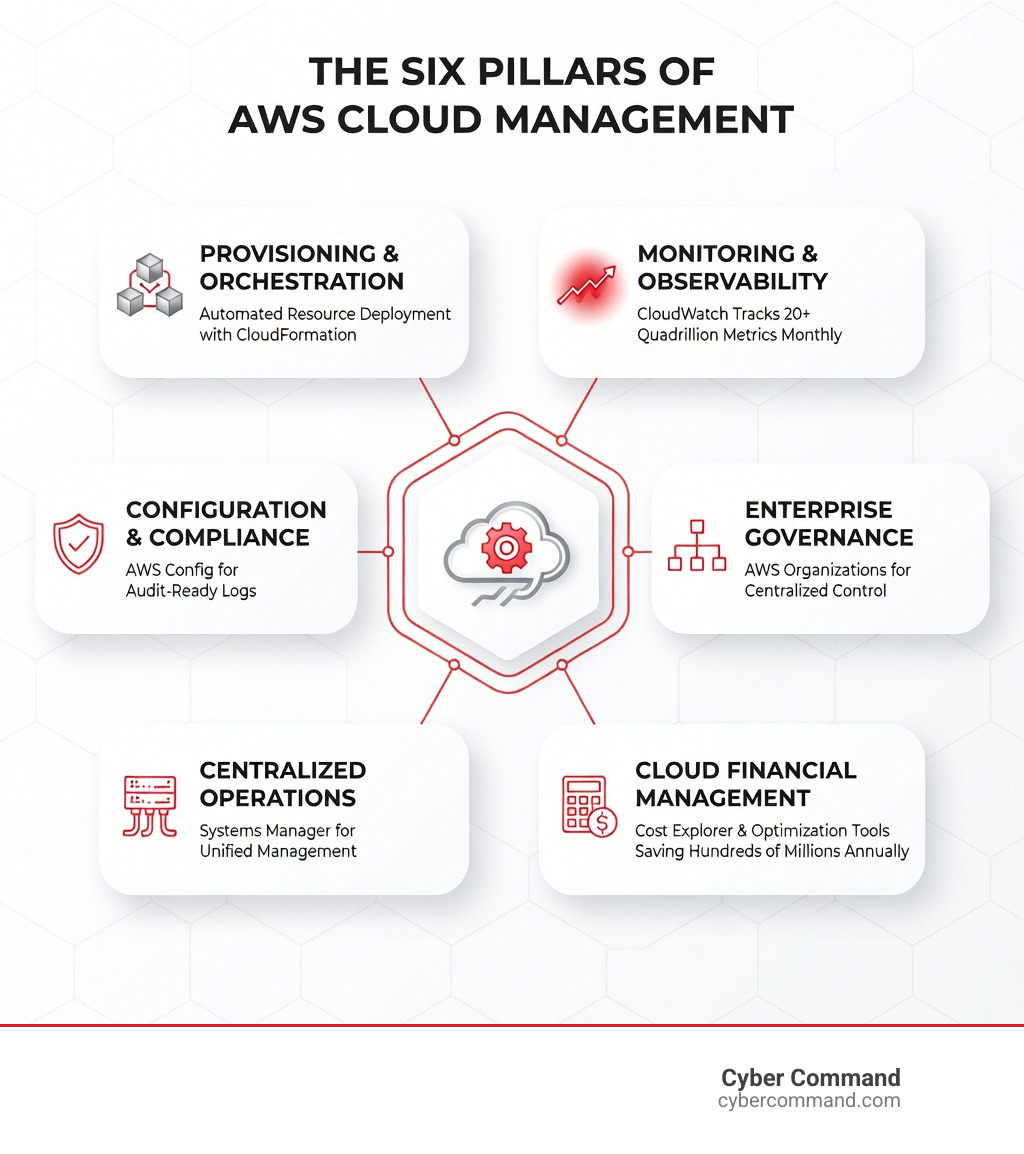
Key components of AWS cloud management:
- Provisioning and orchestration – Automate resource deployment with consistent policies
- Monitoring and observability – Track performance, costs, and health across your infrastructure
- Configuration and compliance – Maintain audit-ready logs and prevent configuration drift
- Enterprise governance – Apply centralized policies across multiple accounts and teams
- Operations management – Coordinate tasks from a single console for hybrid or multi-cloud environments
- Financial management – Optimize spending, set alerts, and eliminate waste
The stakes are high. According to recent industry data, $17.6 billion of global cloud spend was completely wasted in 2020 due to idle and over-provisioned resources. Organizations implementing proper AWS cloud management strategies can expect to save as much as 50% or more on their cloud bill.
Many businesses struggle with AWS billing confusion, unexpected costs, and the complexity of managing hundreds of services across multiple accounts. Without the right management approach, you’re essentially looking at the bill, saying “Wow, that’s a lot!” and paying it—month after month.
I’m Reade Taylor, founder of Cyber Command, and I’ve spent years helping businesses transform chaotic cloud environments into secure, cost-effective systems that support growth rather than drain budgets. Through my work at Cyber Command, I’ve implemented comprehensive AWS cloud management strategies that turn technology from a costly liability into a competitive advantage.
Find more about AWS cloud management:
What is AWS Cloud Management?
At its heart, AWS cloud management is about bringing order to the vast, sometimes overwhelming ecosystem of Amazon Web Services. It is a broad practice that coordinates, governs, and automates your efforts so your organization can innovate and scale its cloud workloads without the wheels falling off.
When we talk about management, we aren’t just talking about keeping the lights on. We are talking about using a single control plane to manage resources across AWS and even on-premises environments. With over 17 years of operational experience, AWS has built a suite of Cloud Services designed to handle the most dynamic resources at a massive scale.
Effective management involves:
- Resource Coordination: Ensuring that your compute, storage, and networking components work together seamlessly.
- Governance: Setting the “rules of the road” so that developers can move fast while staying within the guardrails of company policy.
- Automation: Moving away from manual clicks in the console to “infrastructure as code” and automated remediation.
For our clients in Florida and Texas, this means they don’t have to sacrifice agility for security. You can have a hybrid cloud setup that supports your local office in Orlando while leveraging the global reach of AWS, all managed through a unified Management and governance overview framework.
Core Pillars of AWS Management and Governance
To master AWS cloud management, we must look at the specific functional areas that keep your cloud healthy. AWS breaks these down into several key pillars that ensure your environment is not just running, but thriving.
Provisioning and Orchestration
This is where it all begins. You don’t want your team manually spinning up servers every time a new project starts. AWS CloudFormation gives developers and systems administrators an easy way to create and manage a collection of related AWS resources. By using templates, you can provision and update resources in an orderly and predictable fashion.
Monitoring and Observability
How do you know if your application is actually working? Amazon CloudWatch is the heavy lifter here, monitoring over 20 quadrillion metric observations each month. It provides data-driven insights and uses AI/ML to help us predict, detect, and resolve problems before your customers even notice them.
Configuration, Compliance, and Auditing
In a regulated world, you need to know exactly how your resources are configured at any given moment. AWS Config is a fully managed service that provides an AWS resource inventory, configuration history, and change notifications. It allows us to automate the evaluation of recorded configurations against desired configurations to ensure you stay compliant with standards like HIPAA or SOC 2.
We also use AWS service management tools to bridge the gap between cloud operations and traditional IT service management (ITSM), ensuring that your cloud evolution aligns with your established business processes.
Centralized Governance with AWS Organizations
As your business grows, one AWS account usually isn’t enough. You might have one for development, one for testing, and one for production. This is where What is AWS Organizations? becomes your best friend.
AWS Organizations helps us centrally manage and govern your environment as you scale. Here’s why it’s a game-changer for our Managed IT Services clients:
- Policy Enforcement: We use Service Control Policies (SCPs) to set the maximum available permissions for all accounts in your organization. If you want to ensure no one accidentally launches an expensive resource in a region you don’t use, SCPs are the way to do it.
- Account Grouping: We can organize accounts into Organizational Units (OUs). This allows us to apply different governance rules to a “Sandbox” environment versus a “Production” environment.
- Consolidated Billing: Instead of chasing down twenty different credit card statements, you get one bill for all your accounts. This also helps you qualify for volume discounts more easily.
- Resource Sharing: Through integration with AWS RAM, we can share central VPC subnets or standard images across the whole organization, reducing duplication and costs.
Operational Excellence through AWS Cloud Management Tools
Operational excellence is about running and monitoring systems to deliver business value, and continually improving processes and procedures. AWS Systems Manager is the “Swiss Army Knife” for this pillar.
Systems Manager provides a unified user interface so we can view operational data from multiple AWS services and automate tasks across your resources. Key features include:
- Explorer and OpsCenter: A customizable dashboard providing insights into the operational health of your environment. It aggregates data across accounts and regions to help us prioritize where action is needed.
- Patch Manager: Automatically selects and deploys operating system patches across large groups of Amazon EC2 instances or on-premises servers.
- Change Manager: Simplifies the way you request, approve, and implement operational changes. It even detects schedule conflicts with business events (like a big product launch) to prevent disruptions.
- Automation Runbooks: We use wiki-style runbooks to automate common IT tasks, like restarting a fleet of instances or creating a backup, ensuring consistency and reducing human error.
Optimizing Costs and Cloud Financial Management
Let’s talk about the elephant in the room: the bill. As we mentioned, the AWS billing system can be confusing. Many businesses treat it like a “black box”—the bill comes, they pay it, and they hope it doesn’t go up next month.
In AWS cloud management, we call the practice of financial accountability “FinOps.” The goal is to maximize the value of every dollar spent in the cloud. With $17.6 billion wasted globally on idle and over-provisioned resources, there is a massive opportunity for savings.
Comparing Native vs. Third-Party Optimization
While AWS provides excellent native tools like Cost Explorer and Trusted Advisor (which saves customers hundreds of millions every year), third-party SaaS tools can sometimes offer even deeper automation.
| Feature | AWS Native Tools | Third-Party SaaS Tools |
|---|---|---|
| Visibility | High (Cost Explorer) | Very High (Granular breakdown) |
| Rightsizing | Recommendations (Compute Optimizer) | Automated Implementation |
| Spot Instance Management | Manual/Basic | Fully Automated AI-driven |
| Waste Detection | Periodic Checks | Real-time Alerts & Deletion |
| Savings Potential | 20-30% | Up to 50% or more |
By combining our Cloud Computing Solutions with these advanced management strategies, we’ve seen organizations cut their AWS spend by 18-50% almost immediately.
Maximizing Efficiency with AWS Cloud Management Automation
Automation is the secret sauce that makes AWS cloud management sustainable. You cannot manually manage a modern cloud environment and expect to stay efficient.
- AWS Auto Scaling: This service monitors your applications and automatically adjusts capacity to maintain steady, predictable performance at the lowest possible cost. Whether you are using EC2, ECS, or DynamoDB, Auto Scaling ensures you aren’t paying for resources you aren’t using during off-peak hours.
- Rightsizing with AWS Compute Optimizer: Using machine learning to analyze historical utilization metrics, this tool recommends the optimal AWS resources for your workloads. It helps us find that “Goldilocks” zone—not too big, not too small, but just right.
- Spot Instances: For workloads that are fault-tolerant, using Spot Instances can save you up to 90% off the on-demand price. Automation tools can manage the “interruption” risk of Spot Instances by automatically switching to on-demand instances if capacity is taken back.
- Resource Lifecycle Management: We implement policies to automatically move old data to cheaper storage tiers (like S3 Glacier) or delete snapshots that are no longer needed. This is a critical part of a robust AWS Backup Disaster Recovery Complete Guide.
Security and Compliance Integration
Security is “Job Zero” at AWS. In the shared responsibility model, AWS manages the security of the cloud (the physical hardware and infrastructure), while you are responsible for security in the cloud (your data, configurations, and access).
Effective AWS cloud management integrates security directly into operations.
Key Security Tools for Management
- AWS Identity and Access Management: This is the foundation. We use IAM to ensure that only the right people have access to the right resources. We follow the “principle of least privilege,” meaning no one gets more access than they absolutely need.
- AWS CloudTrail: This service records every API call made in your account. It’s the “black box” of your cloud. If a resource is deleted or a setting is changed, CloudTrail tells us who did it, when, and from where.
- Amazon GuardDuty: A threat detection service that continuously monitors for malicious activity and unauthorized behavior. It uses machine learning to identify things like crypto-mining or unusual data access patterns.
- AWS Security Hub: This provides a comprehensive view of your security alerts and security posture across your accounts. It aggregates findings from GuardDuty, Inspector, and Macie into a single dashboard.
By integrating these tools, we create a proactive defense. For instance, we can set up AWS Ransomware Prevention protocols that automatically trigger an incident response if suspicious activity is detected, significantly limiting the “blast radius” of any potential threat.
Frequently Asked Questions about AWS Management
How can organizations reduce AWS costs by 50%?
Reducing costs by half usually requires a multi-pronged approach:
- Rightsizing: Moving over-provisioned instances to smaller, cheaper sizes.
- Scheduling: Turning off non-production environments (dev/test) during nights and weekends.
- Spot Instances: Utilizing excess AWS capacity for up to 90% savings.
- Savings Plans and Reserved Instances: Committing to a consistent amount of usage in exchange for lower rates.
- Automation: Using tools to identify and delete “zombie” resources like unattached EBS volumes or old snapshots.
What is the difference between AWS Config and CloudTrail?
Think of it this way: CloudTrail tells you “Who did what?” (the API call history), while AWS Config tells you “What does it look like now and what did it look like then?” (the configuration state). CloudTrail is an audit log of actions, while Config is an inventory and relationship mapper for your resources. You need both for full visibility.
Why is a multi-account strategy important for governance?
A multi-account strategy provides the best “isolation” for your business. It creates hard boundaries for security, preventing a breach in a dev account from affecting production. It also makes cost tracking much simpler, as you can see exactly what each department or project is spending without complex tagging. AWS Organizations makes managing this multi-account setup easy.
Conclusion
Navigating the AWS cloud doesn’t have to feel like wandering through a fog. With a strategic approach to AWS cloud management, you can gain the visibility, control, and cost-savings necessary to turn your cloud infrastructure into a high-performance engine for your business.
From Jacksonville to Plano, we see businesses struggle with the same challenges: rising costs, complex security requirements, and the need for constant innovation. The key is to stop treating the cloud as a series of manual tasks and start treating it as a managed, automated ecosystem.
At Cyber Command, we act as an extension of your team, providing the 24/7/365 U.S.-based support you need to maintain operational excellence. Whether you’re looking for IT Support Florida or need a partner to overhaul your global AWS strategy, we’re here to help you achieve a secure, optimized, and cost-effective cloud environment.
Don’t let cloud sprawl hold your business back. Let’s work together to implement a management strategy that lets you innovate faster while keeping your costs firmly on the ground.
Ready to take control of your cloud?
