


IBM's 2025 Cost of a Data Breach Report put the global average breach cost at $4.88 million. For a Winter Park business owner, that number matters because it reframes IT from a repair expense into a risk and continuity decision.
A reactive support model can look affordable on paper. The invoice only shows up when something breaks. What it hides are the costs that usually hurt more: staff downtime, delayed client work, weak patching discipline, missed alerts after hours, backup failures discovered too late, and security gaps that stay open until an incident forces action.
That is the conversation around IT services near Winter Park FL in 2026. A local firm does not just need someone who can fix a printer or replace a failed workstation. It needs a predictable operating model for support, cybersecurity, compliance, and recovery. For many organizations, that means shifting from ad hoc repair to a flat-rate partner that handles monitoring, endpoint protection, patch management, secure access, backup oversight, and documented response procedures under one plan. Businesses evaluating managed IT support in Orlando and Winter Park should press on cost predictability and security coverage first.
The local business environment adds urgency. Census Reporter's Winter Park profile describes a compact city of 30,274 residents across 8.8 square miles. In a market like that, reputation travels fast, service interruptions are visible, and professional firms often compete on responsiveness and trust as much as price.
For law offices, accounting firms, medical practices, architecture studios, and nonprofits, IT decisions now affect billable time, audit readiness, cyber insurance posture, and client confidence. The goal is not more technology. The goal is fewer surprises, faster recovery, and a support budget that stays predictable while security requirements keep getting stricter.
Table of Contents
- Why Your Winter Park Business Can No Longer Ignore IT Strategy
- What Modern Managed IT Services Actually Include
- The True Cost of IT Support Comparing Break-Fix and Flat-Rate Models
- Why Your Business Needs a 24/7 Cybersecurity Shield
- Tailored IT for Winter Park's Professional and Medical Sectors
- Your Checklist for Selecting the Right IT Partner
- Your Questions Answered and Next Steps
Why Your Winter Park Business Can No Longer Ignore IT Strategy
Cyber incidents and downtime now carry financial, legal, and operational consequences that many small and midsize businesses underestimate until the damage is already done.
That is why IT strategy belongs in the same conversation as budgeting, insurance, staffing, and compliance. For a Winter Park business, technology is tied directly to revenue collection, client communication, scheduling, records access, and day-to-day trust.
The old break-fix model assumed most problems were isolated hardware failures. A machine stopped working, someone called for help, and the issue was corrected. In 2026, the bigger risks are usually less visible. Weak identity controls, inconsistent patching, poor backup testing, unmanaged devices, and delayed threat detection can interrupt operations long before anyone opens a support ticket.
Winter Park businesses feel this sharply because many operate in professional services, healthcare, finance, and other trust-based fields. In those environments, an IT problem rarely stays an IT problem. It turns into missed appointments, delayed billing, client frustration, audit exposure, and pressure on staff who are already working on tight schedules.
Small geography doesn't mean small exposure
A compact market creates accountability. News travels fast, clients expect quick responses, and even a short outage can be noticed by far more people than owners expect.
A law office that loses document access for half a day may miss deadlines. A medical practice with unstable systems may slow intake, charting, and claims. A professional firm using weak email security may face account compromise that spreads into payment fraud or data exposure. Those costs do not show up neatly on a single invoice, which is one reason many businesses underinvest until an incident forces the issue.
Practical rule: If your provider mainly arrives after something breaks, you have a repair vendor, not an IT strategy.
A real strategy sets standards before problems happen. It defines how devices are secured, how access is approved, how backups are tested, how software is updated, how incidents are escalated, and what level of downtime the business can tolerate. That discipline matters because predictable operations usually cost less than repeated disruption.
For companies evaluating managed IT support for Orlando-area businesses, the question is not just who can respond to tickets. It is who is reducing the odds of downtime, limiting security exposure, and giving leadership a clearer, flatter cost structure instead of surprise repair bills.
What Modern Managed IT Services Actually Include
Managed IT should reduce business risk, standardize day-to-day operations, and give leadership a clearer monthly cost. If a provider mainly answers tickets and shows up after failures, the business is still carrying too much operational and security exposure.

Support now includes operations, security, and accountability
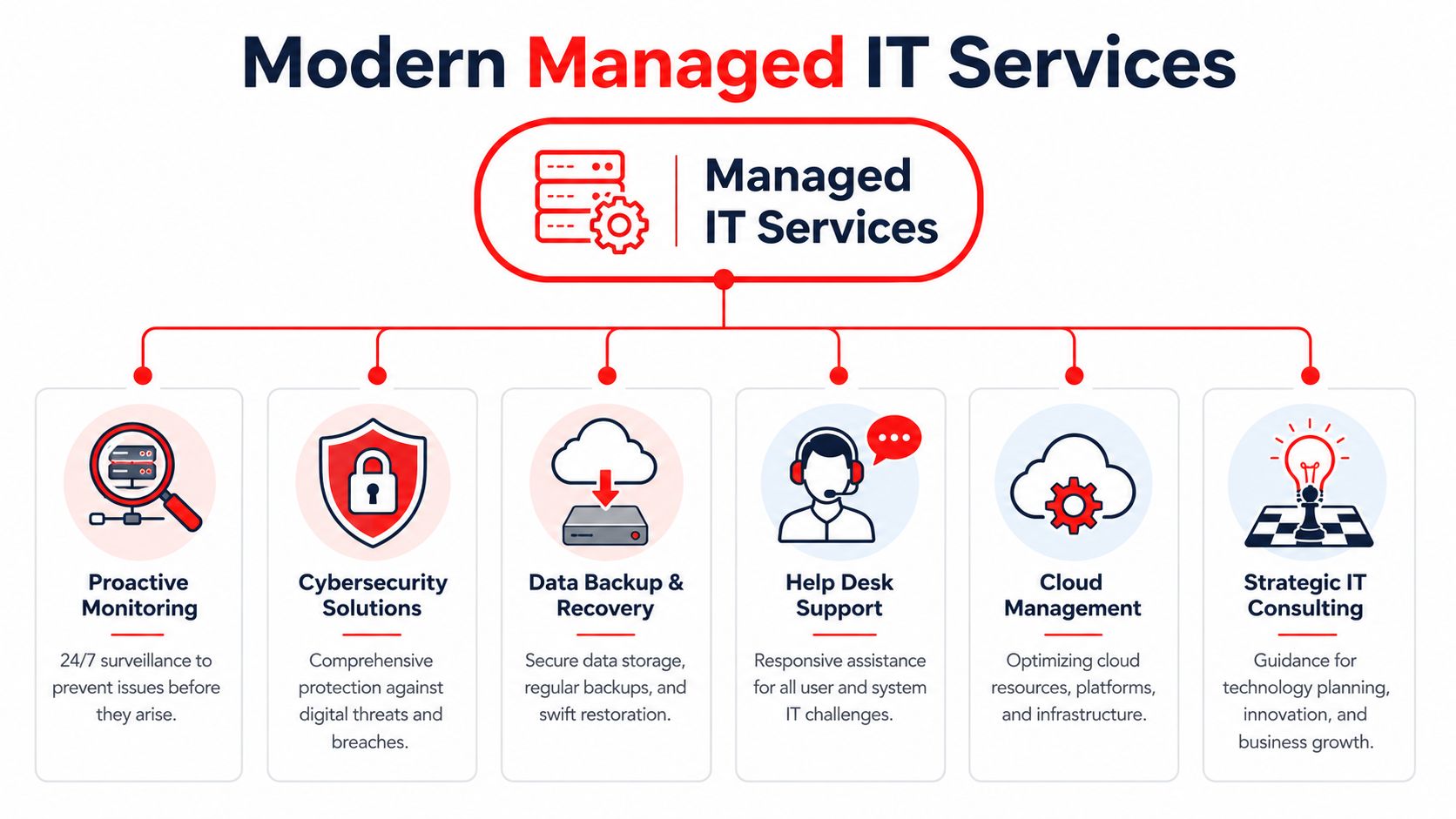
For a Winter Park business in 2026, IT service means more than fixing laptops or resetting passwords. It means someone is watching systems, applying updates on schedule, enforcing access controls, checking backups, documenting standards, and responding before a small issue becomes downtime, data loss, or a compliance problem.
That operating model matters because security failures rarely start as dramatic events. They start with a missed patch, a weak login policy, a backup that was never tested, or an alert nobody reviewed.
Essential bundled components
A strong managed IT agreement should combine these functions under one accountable team:
- Continuous monitoring: Servers, endpoints, cloud systems, and network equipment are monitored for outages, performance issues, and suspicious activity.
- Patch and maintenance management: Supported devices and business applications are updated on a defined schedule, with exceptions tracked instead of ignored.
- Helpdesk and user support: Staff need fast resolution for access issues, software problems, device failures, and routine service requests.
- Security administration: MFA, endpoint protection, firewall reviews, device policies, and user access controls should sit inside the service model, not as an afterthought.
- Backup oversight and recovery readiness: Backups need verification, retention review, and restore testing so the business knows what can be recovered and how quickly.
- Documentation and standards: Network details, vendor contacts, asset records, escalation paths, and approved configurations should be documented well enough that support does not depend on one person's memory.
- Roadmap and budgeting guidance: Leadership needs advice on hardware lifecycle, licensing, risk reduction, and upcoming costs before they turn into urgent purchases.
The point is coordination. A business gets better results when the same provider can see ticket trends, patch status, security alerts, backup health, and aging equipment in one place.
That is also why growing firms start asking what a security operations center does for threat monitoring and incident response. Helpdesk support alone does not cover log review, active threat detection, or the discipline required to catch suspicious behavior outside business hours.
A pieced-together model usually costs more than it appears to. One company handles support. Another sells security software. A third person checks backups occasionally. When an incident hits, response slows down because ownership is split, documentation is incomplete, and nobody is responsible for the full chain of prevention, detection, and recovery.
The True Cost of IT Support Comparing Break-Fix and Flat-Rate Models
A lower hourly rate rarely means a lower IT cost.
The visible invoice is only part of the expense. Winter Park businesses also pay for downtime, stalled staff, delayed vendor response, missed patching, and security gaps that sit unresolved until they become an outage or an incident. Those costs do not show up neatly on a repair ticket, but they still hit payroll, client service, and compliance risk.
Why hourly IT can cost more than it appears
Break-fix support fits a narrow use case. It can work for a very small office with limited systems, little regulatory exposure, and a high tolerance for interruption.
That is not how most established firms operate in 2026.
A law office, medical practice, accounting firm, or multi-location service business depends on email, cloud apps, file access, phones, line-of-business software, remote logins, and secure records every day. In that setting, hourly support often creates a budgeting problem and an accountability problem at the same time. The provider is called after the failure. The business pays for the failure, the repair, and the lost time around it.
The hidden costs are usually operational:
- Lost employee hours: Staff wait for issues to be diagnosed, scheduled, and resolved instead of doing billable or revenue-producing work.
- Repeat problems: The same workstation, account, or configuration issue keeps returning because no one owns root-cause prevention.
- Extra security labor: Patch cleanup, MFA enforcement, access reviews, and endpoint remediation become separate charges instead of routine work.
- Vendor coordination time: Internet, phones, software, copier, and cloud providers still need someone to coordinate troubleshooting when the issue crosses systems.
- After-hours exposure: Problems discovered late in the day can sit until the next business window, extending downtime and increasing risk.
Cheap hourly support becomes expensive fast when prevention is outside the agreement.
Flat-rate managed service changes the financial model. Instead of asking what one ticket will cost, owners can plan around a fixed monthly number and a defined scope of responsibility. That matters because predictable spend is not just a finance preference. It is what allows a business to budget for maintenance, security operations, lifecycle planning, and support without waiting for something to break first.
Break-Fix vs. Flat-Rate Managed IT
| Feature | Break-Fix Model (Hourly Rate) | Flat-Rate Managed IT (Cyber Command) |
|---|---|---|
| Billing approach | Variable, tied to incidents and labor time | Predictable monthly pricing |
| Incentive structure | Paid when something fails | Paid to keep systems stable |
| Monitoring | Often limited or separate | Included as part of ongoing service |
| Patching and maintenance | Frequently reactive | Scheduled and standardized |
| Security oversight | Commonly fragmented | Integrated into daily operations |
| Budgeting | Hard to forecast | Easier to plan around |
| Vendor coordination | Often billed separately or handled by client | Typically part of managed relationship |
| Downtime exposure | Higher when issues wait for discovery | Lower when issues are caught early |
Owners evaluating support contracts should understand how managed service pricing models work in practice before focusing on rate cards alone. The better question is straightforward. Does the agreement reduce interruptions, close security gaps, support compliance needs, and give the business a monthly cost it can plan around?
Why Your Business Needs a 24/7 Cybersecurity Shield
Cybersecurity isn't a software purchase. It's an operating discipline.
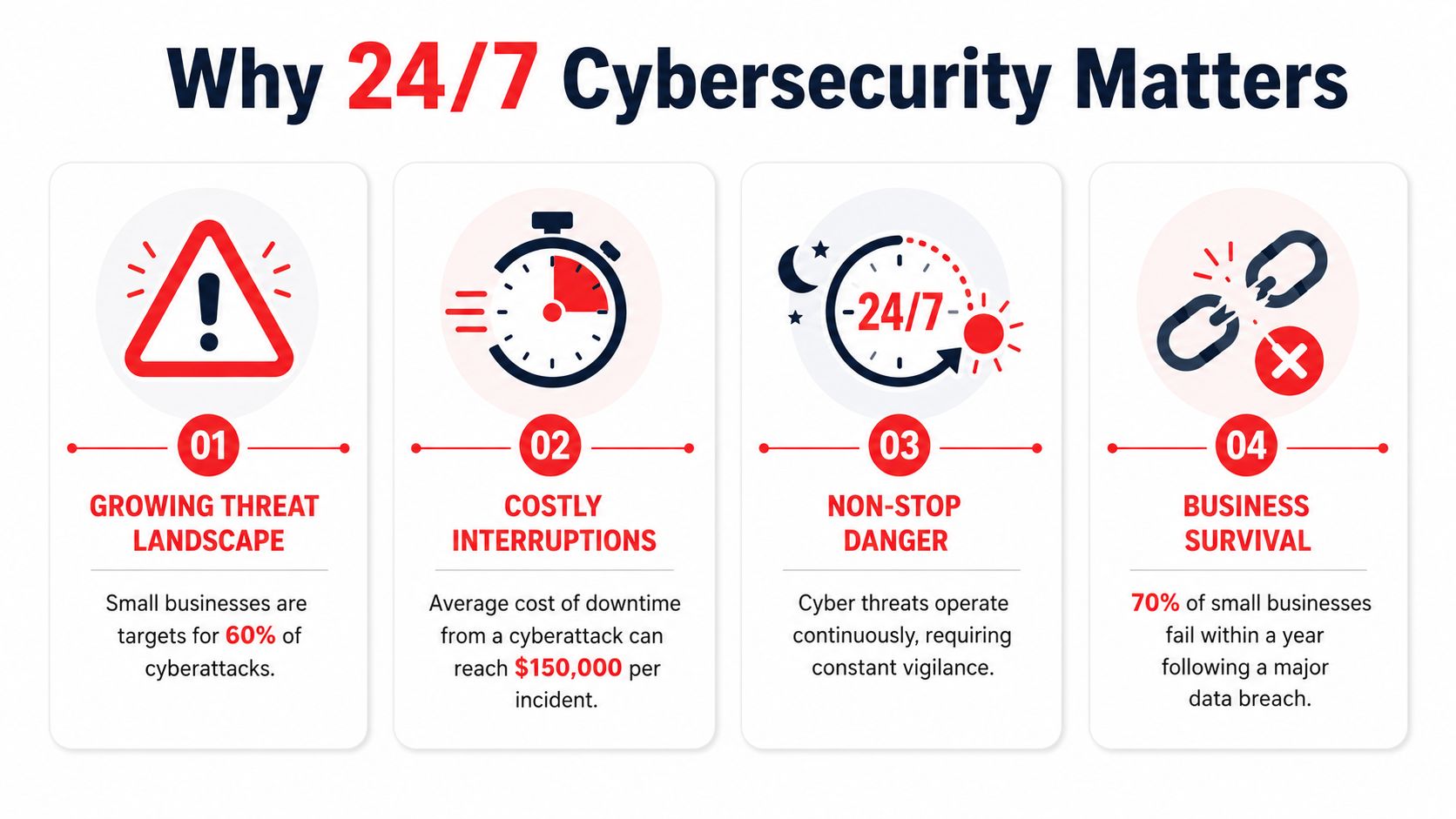
Many small and mid-sized businesses still assume antivirus, a firewall, and user training are enough. Those controls help, but they don't create active defense. Threats don't arrive only during office hours, and they rarely announce themselves in a way that a busy office manager can interpret correctly.
A firewall alone is not a security program
What protects a business is a repeatable process for watching signals, reviewing suspicious activity, containing incidents, and documenting what happened. That's the practical value of a 24/7 security team or SOC model.
Imagine a security patrol for your digital property. Locks matter. Cameras matter. But if nobody is watching the feed, investigating anomalies, and responding when something is wrong, the business is still exposed.
A real security operating model should cover:
- Alert review: Someone has to decide which events are noise and which need action.
- Threat investigation: Suspicious logins, endpoint behavior, and account changes need human judgment.
- Containment steps: Isolate an endpoint, disable access, preserve continuity, and stop spread.
- Recovery coordination: Restore service cleanly and document what must change afterward.
What 24-7 protection changes operationally
The biggest benefit isn't abstract “peace of mind.” It's faster decision-making when something unusual happens.
Without constant coverage, a suspicious sign-in on a weekend might sit untouched until Monday. A compromised account might continue sending email, touching files, or creating downstream problems while no one is looking. Businesses don't need to understand every security detail, but they do need someone responsible for that watchfloor function.
Some managed providers build that into the service model. Cyber Command, LLC is one example described by the publisher as offering a 24/7/365 live, U.S.-based helpdesk, a dedicated 24/7 SOC, incident response, recovery, and continuous compliance support. For buyers, that kind of structure matters because it combines support and defense instead of splitting them across separate vendors.
If your support provider goes quiet after business hours, your risk doesn't.
This is especially important for firms that hold client records, financial data, patient information, contracts, or internal documents that would create legal and operational headaches if exposed or locked up.
Tailored IT for Winter Park's Professional and Medical Sectors
Winter Park doesn't have a generic business profile. Data USA identifies Professional, Scientific, and Technical Services as the city's largest industry, employing 2,591 people in 2024, with 5,671 businesses in the city and a listed technical-services wage figure of $114,150 in this Data USA profile for Winter Park. That concentration changes what local IT support should look like.
A support model built for light retail or occasional residential repair won't fit a law office, accounting firm, engineering practice, dental clinic, or med spa. These businesses depend on secure records, specialized applications, fast user support, and controlled access.

Professional firms need precision and documentation
A local legal or accounting office usually doesn't need flashy technology. It needs dependable systems and fewer surprises.
That means secure email, clean user onboarding and offboarding, controlled file access, documented device standards, and prompt support when a workflow stalls before a deadline. Firms that invest in visibility online should also think beyond IT alone. A practical resource on local SEO for lawyers is useful because client acquisition and operational reliability often intersect. If your intake systems, website forms, or email workflows are unstable, marketing gains get wasted.
Typical pressure points in professional services include:
- Client confidentiality: Access needs to follow role, not convenience.
- Document workflow: Shared files, version control, and remote access need consistency.
- Calendar and communication uptime: Small failures create client-facing delays quickly.
Medical offices need reliability and control discipline
Privately owned medical and dental practices face a different daily rhythm. The front desk, scheduling, charting, imaging, billing, and secure communication all have to work together in real time.
In that environment, “we'll take a look later” is a bad answer. If exam room devices, practice systems, or access controls fail during operating hours, the issue affects patient experience immediately. These offices also need better documentation around who can access what, how devices are managed, and how data is protected.
The right provider for a practice isn't the one that talks most about hardware. It's the one that can keep clinical operations moving while maintaining control discipline.
Your Checklist for Selecting the Right IT Partner
A provider can sound polished in a sales conversation and still run an undisciplined operation. The test isn't whether they promise responsive support. The test is whether they can show how support, standards, and accountability work.
The City of Winter Park's IT department describes technology design and selection, policy and standards development, and IT strategic planning as core IT responsibilities in this City of Winter Park information technology overview. That's a useful benchmark for private-sector buyers too. Mature providers don't just close tickets. They build a supportable environment.
What to ask before you sign anything
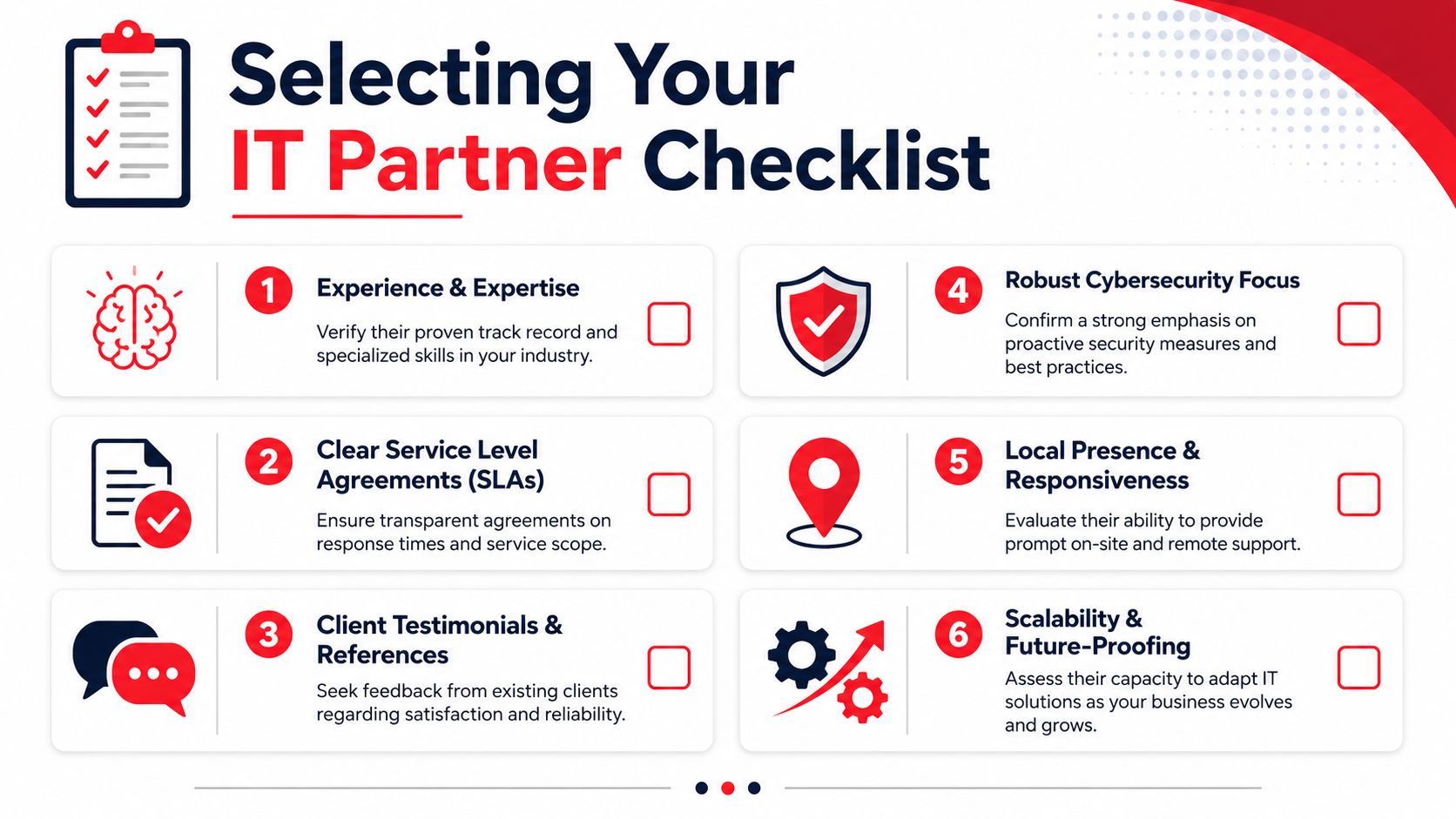
Use this list to filter providers quickly:
- Ask for standards, not slogans: Can they show device baselines, patching routines, and escalation paths?
- Review the SLA language: You want clarity on response expectations, after-hours handling, and what counts as covered work.
- Check strategic involvement: Do they help with roadmap decisions, budgeting, and lifecycle planning, or only day-to-day incidents?
- Verify security ownership: Ask who reviews alerts, manages endpoint controls, and coordinates incident response.
- Look at onboarding discipline: Good onboarding includes documentation, account reviews, backup checks, and environment cleanup.
- Confirm local practicality: If you need onsite support in the Winter Park area, ask how that is scheduled and documented.
Questions that expose weak providers quickly
Some questions force real answers:
| Question | What a strong answer sounds like |
|---|---|
| How do you reduce repeat issues? | They talk about standards, root-cause work, and maintenance cadence. |
| What happens after hours? | They describe a real process, not a voicemail box. |
| Who owns vendor management? | They explain coordination responsibilities clearly. |
| How do you support regulated offices? | They discuss documentation, controls, and audit readiness. |
For medical groups reviewing internal workflows, a guide to medical practice technology is a useful companion read because it frames technology as part of patient operations, not just back-office infrastructure.
Your Questions Answered and Next Steps
Business owners usually reach the same final questions once they move past hourly pricing and generic support promises. The answers should be straightforward.
Frequently Asked Questions
| Question | Answer |
|---|---|
| What's the difference between managed and co-managed IT? | Managed IT means the provider takes primary responsibility for day-to-day support and operations. Co-managed IT means the provider works alongside your internal staff, usually covering gaps like after-hours support, security operations, projects, or specialized administration. |
| Do small firms really need cybersecurity beyond basic protection? | If the business depends on email, cloud files, client data, remote access, or line-of-business applications, the answer is yes. The issue isn't company size. It's operational dependence and the need to keep systems trustworthy. |
| What should be included in onboarding? | Documentation, account reviews, device inventory, backup validation, standards alignment, and clear escalation paths. If onboarding is mostly “send us your passwords,” that's a warning sign. |
| How should I evaluate price? | Compare predictability, accountability, and operational coverage. A lower headline rate doesn't help if it excludes maintenance, after-hours response, security work, and vendor coordination. |
A good provider should leave you with fewer unknowns, not more. You should know who handles alerts, how support gets escalated, what your monthly costs cover, and how your environment is being standardized over time.
For a Winter Park business, that's the practical benchmark for IT services near Winter Park FL. You need a partner that treats support, cybersecurity, planning, and cost control as one business function. If the service model is reactive, loosely documented, and vague about accountability, the true cost usually shows up later in downtime, staff disruption, and avoidable risk.
If you're evaluating options for managed IT and cybersecurity, Cyber Command, LLC is one place to start the conversation. Ask for a review of your current support model, what's covered after hours, how security incidents are handled, and whether your current setup gives you predictable costs or just delayed surprises.