
June 18, 2026
Managed IT Services Near Kissimmee FL: 2026 Guide
Find the best managed IT services near Kissimmee, FL. Our 2026 guide helps Central FL SMBs evaluate providers, understand cybersecurity, and choose a partner.
If you run a business in Kissimmee, you’ve probably lived some version of this already. A front desk computer won’t log in on a busy morning. Email slows to a crawl right before client appointments. Someone clicks a fake invoice. Then your whole day shifts from serving customers to chasing an IT problem you didn’t plan for.
That’s the moment many owners realize they don’t need another “computer guy” on speed dial. They need a system. They need accountability. And they need support that prevents issues instead of waiting for a failure to become an emergency.
Table of Contents
- Beyond Break-Fix Support for Kissimmee Businesses
- What Are Managed IT Services and Why They Matter in Central Florida
- Core Managed IT Services Your Kissimmee Business Needs
- The High Cost of Cyber Threats and Downtime in Our Region
- How to Evaluate and Choose a Kissimmee IT Partner
- Red Flags to Watch For When Hiring an IT Provider
- Your Next Steps to Secure and Streamline Your IT
Beyond Break-Fix Support for Kissimmee Businesses
A law office near downtown Kissimmee doesn’t care whether the problem is a failing switch, a bad update, or a mailbox issue. They care that staff can’t access documents and clients are waiting. A private medical practice feels the same pressure when scheduling stalls. A multi-location service business feels it when one office goes down and everyone starts calling each other instead of working.
That old break-fix model sounds cheap until you’re the one paying for downtime, confusion, and repeated interruptions. It rewards delay. You wait until something breaks, then pay someone to react. That’s not an IT strategy. It’s a gamble.
Why the old model fails local businesses
Kissimmee businesses don’t operate in a slow, low-risk environment. Professional firms rely on secure files, phones, email, and line-of-business apps all day. Healthcare-adjacent practices need dependable systems and tighter control over sensitive information. Multi-location teams need consistency across every office, not one-off repairs.
Managed IT changes the relationship. Instead of calling after a failure, you hire a partner to monitor, maintain, secure, document, and support your environment continuously. That’s the practical shift behind the business benefits of outsourcing IT support. You stop buying random fixes and start buying stability.
Practical rule: If your business loses money, trust, or momentum every time technology hiccups, break-fix is already too expensive.
What business owners should want instead
You should want fewer surprises. You should want a clear monthly operating model. You should want someone watching backups, patching systems, responding to alerts, and answering users before small issues spread.
That’s what people usually mean when they search for Managed IT Services Near Kissimmee FL. They’re not looking for more jargon. They’re looking for operational control.
What Are Managed IT Services and Why They Matter in Central Florida
Managed IT services are ongoing outsourced IT operations. Consider it similar to maintaining a fleet vehicle. You don’t wait for the engine to seize before checking oil, replacing worn parts, or inspecting brakes. You maintain it on schedule because the cost of failure is higher than the cost of prevention.
That’s the difference between reactive support and managed support.
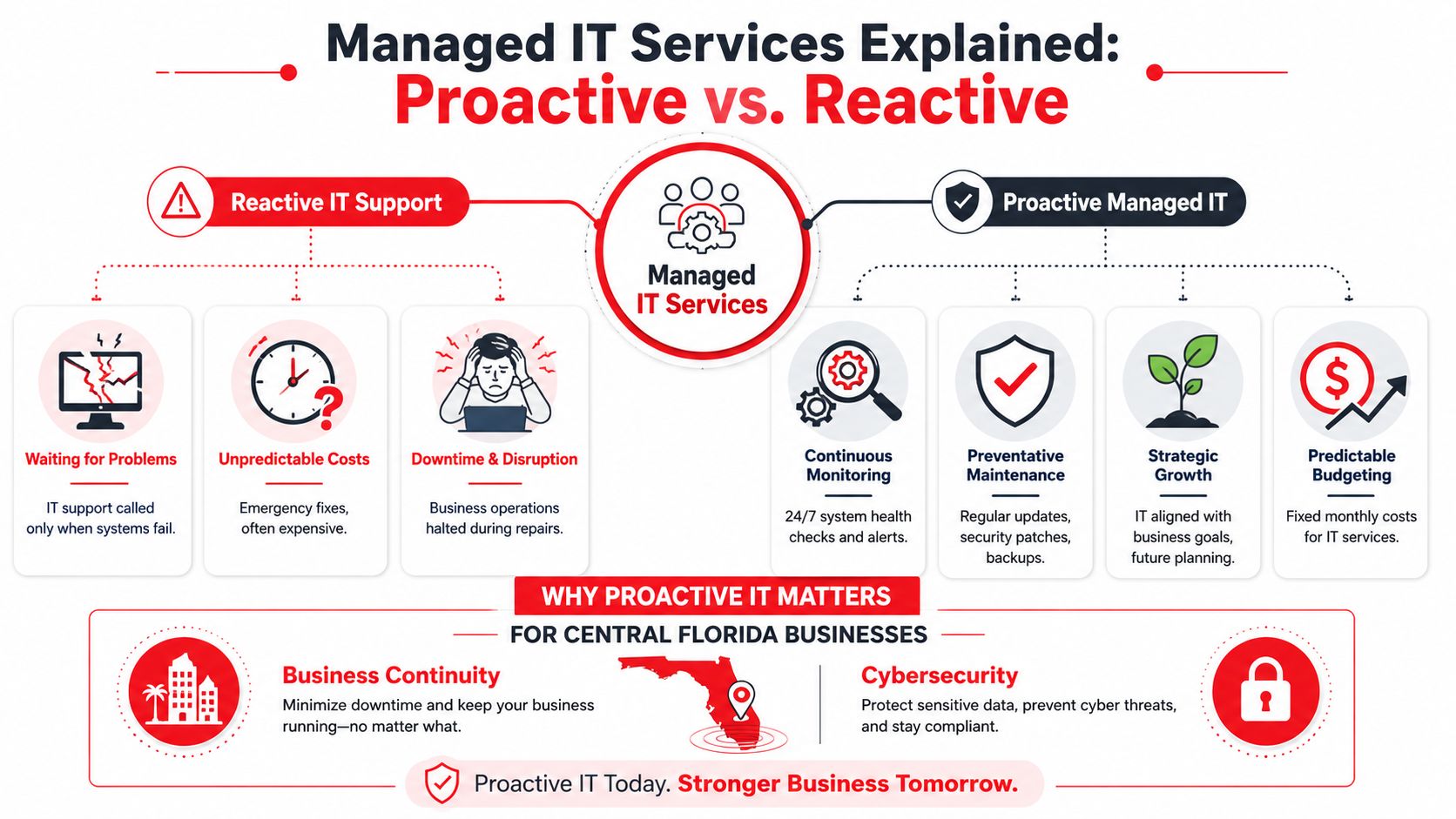
Reactive support versus managed support
A reactive provider typically shows up after the outage, infection, sync problem, or device failure. A managed provider works in the background every day to reduce the chance of those events, shorten response times when they happen, and keep systems aligned with business needs.
Here’s the cleanest way to separate the two:
Model
What it looks like
Business result
Break-fix IT
You call when something fails
Unplanned costs and recurring disruption
Managed IT
Ongoing monitoring, maintenance, support, and planning
More predictable operations and fewer avoidable incidents
A good MSP also gives you access to a broader team than most small businesses can hire internally. That matters if your business needs help desk support, cybersecurity oversight, cloud administration, backup monitoring, vendor coordination, and strategic planning at the same time.
Why this model is gaining ground in Florida
This isn’t a niche model anymore. A Florida-focused analysis reported a 25% rise in adoption of managed IT solutions by businesses across Florida in just one year, tied to demand for proactive monitoring, cloud support, and security services, especially in markets like Orlando and Kissimmee where businesses need always-on infrastructure (Florida managed IT adoption trend).
That tracks with what local business owners are dealing with every day. Central Florida firms aren’t just supporting office desktops. They’re supporting remote staff, mobile devices, cloud apps, location-to-location connectivity, digital records, and a growing list of cybersecurity obligations.
What managed IT should include at a business level
At a minimum, managed IT should give you:
- Predictable support coverage so staff know where to go when something breaks.
- Preventative maintenance so systems aren’t left drifting out of date.
- Security oversight so phishing, weak endpoints, and bad configurations don’t go unchecked.
- Strategic guidance so hardware, software, licensing, and upgrades follow a plan.
- Vendor management so someone owns the coordination when internet, phones, cloud apps, or line-of-business systems have issues.
Managed IT isn’t outsourced chaos. It’s outsourced discipline.
If you’re making your first major outsourcing decision, focus less on the label and more on the operating model. You want a provider that acts like an extension of management, not a repair shop.
Core Managed IT Services Your Kissimmee Business Needs
Most MSP proposals look similar on the surface. The difference is in what’s included, what’s monitored continuously, and what happens when something goes wrong at an inconvenient time. If you’re comparing providers, don’t ask for “IT support.” Ask for a real service stack.
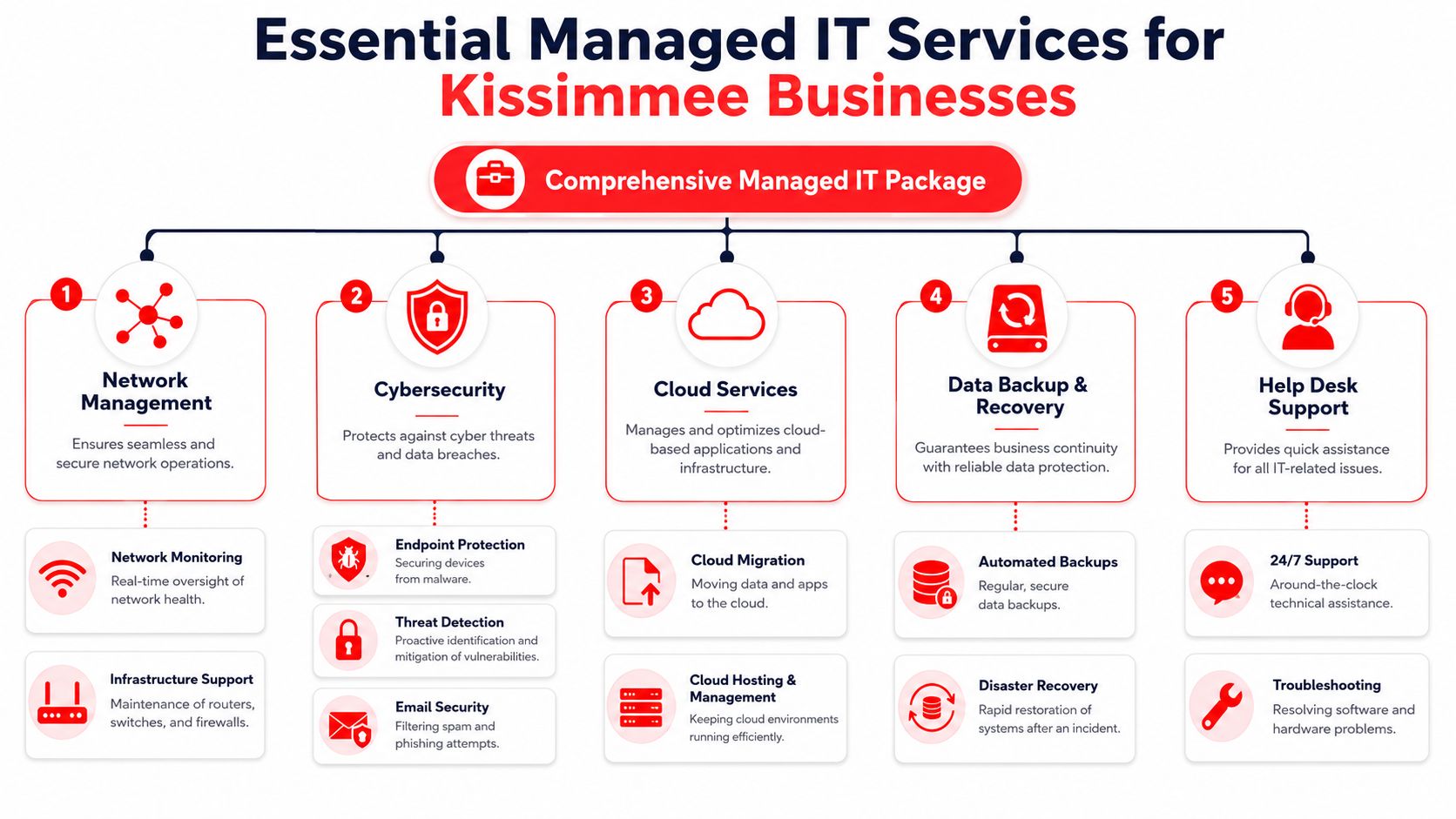
A mature setup for Central Florida SMBs should include 24x7x365 monitoring, automated patching, endpoint detection and response, and test-restored backup controls, with emergency response SLAs measured in minutes for critical incidents. If a provider can’t speak clearly about those basics, keep looking.
The non-negotiables
Here’s the shopping list I’d recommend for most Kissimmee businesses:
- 24/7 monitoring: Someone should be watching for outages, failed backups, hardware alerts, suspicious activity, and service degradation outside business hours.
- Automated patching: Manual update habits are inconsistent. Critical systems need structured patching, not best intentions.
- Endpoint detection and response: Antivirus alone isn’t enough. You need visibility into suspicious behavior on laptops, desktops, and servers.
- Backup with restore validation: A backup that hasn’t been tested is a hope, not a control.
- Help desk support: Your staff need a clear way to get issues resolved without wasting billable time.
- Network management: Firewalls, switches, wireless coverage, and site connectivity need regular oversight.
- Vendor coordination: Internet circuits, business apps, copier integrations, phones, and line-of-business vendors all create friction unless someone owns the relationship.
For a plain-English overview of what should be bundled, this breakdown of managed IT services and what’s typically included is useful.
Why cybersecurity can’t be an add-on
For law firms, accounting offices, dental practices, med spas, and specialty medical groups, security isn’t optional overhead. It’s part of how you protect revenue and reputation. If staff use email, store client data, share files, process payments, or work remotely, you have a security exposure whether you’ve planned for it or not.
A serious provider should address security in daily operations, not in a once-a-year presentation. That means policy enforcement, endpoint coverage, account protection, alert handling, backup review, and documented response procedures.
Don’t buy “support” without buying accountability for security controls.
What good support looks like in practice
A receptionist locked out of email needs a fast answer. A manager with a failed laptop needs a replacement path. A practice administrator needs confirmation that backups completed and can be restored. Owners need reporting that translates technical work into business risk and business progress.
That’s why the best managed services packages combine user support with infrastructure discipline. One without the other creates blind spots.
A provider can also support co-managed environments if you already have internal staff. For example, Cyber Command, LLC offers fully managed and co-managed IT, 24/7/365 helpdesk, cloud services, and a dedicated SOC model for organizations that need predictable support and cybersecurity accountability. That’s one operating model to compare against others when you evaluate options.
A quick reality check for local firms
If your current arrangement doesn’t include the items below, you’re probably under-covered:
- No backup restore testing
- No documented incident response path
- No asset inventory
- No patching accountability
- No after-hours monitoring
- No security reporting
- No owner-level technology planning
That’s not managed IT. That’s partial support dressed up as a service plan.
The High Cost of Cyber Threats and Downtime in Our Region
Downtime doesn’t just interrupt work. It drags employees into manual workarounds, delays client communication, and forces owners to stop leading the business so they can referee a technology problem. In professional services, that hurts trust. In healthcare-adjacent settings, it also disrupts scheduling, records access, and staff coordination.
The better question isn’t “How much does managed IT cost?” The better question is “What happens when your current setup fails at the worst possible time?”
Uptime matters because interruption is expensive
Managed IT services are associated with 99.99% uptime through round-the-clock monitoring and proactive issue resolution, according to an industry summary that also reported strong cost savings among MSP users (managed services uptime and cost savings data). That same source found that 50% saved 1%–24% on annual IT costs, 33% saved 25%–49%, and 13% saved more than 50%.
Those numbers matter because owners often assume proactive support costs more than reactive support. In many real-world environments, the opposite is true once you account for repeat failures, user downtime, rushed emergency work, and the lack of continuous oversight.
Why Kissimmee businesses should take this seriously
Local firms often run lean. They don’t have spare staff to absorb repeated outages. They don’t have time to rebuild machines after a preventable infection. They don’t have room for hand-wavy answers when email security, file access, or cloud systems fail.
Here’s where the risk gets sharper:
- Professional services firms hold sensitive client information and depend on responsiveness.
- Medical and wellness practices need system reliability, controlled access, and confidence in data handling.
- Multi-location businesses suffer cascading disruption when one weak link affects several sites.
- Owner-led SMBs lose focus fast when key systems become unstable.
If your business depends on technology to deliver service, downtime is no longer an IT issue. It’s an operating risk.
The companies that recover fastest usually aren’t the ones that scramble best. They’re the ones that prepared.
How to Evaluate and Choose a Kissimmee IT Partner
Most business owners make this decision with incomplete information. They compare monthly price, listen to a sales pitch, and hope support quality will sort itself out later. That’s backward. You need to inspect how the provider operates before you care about the quote.
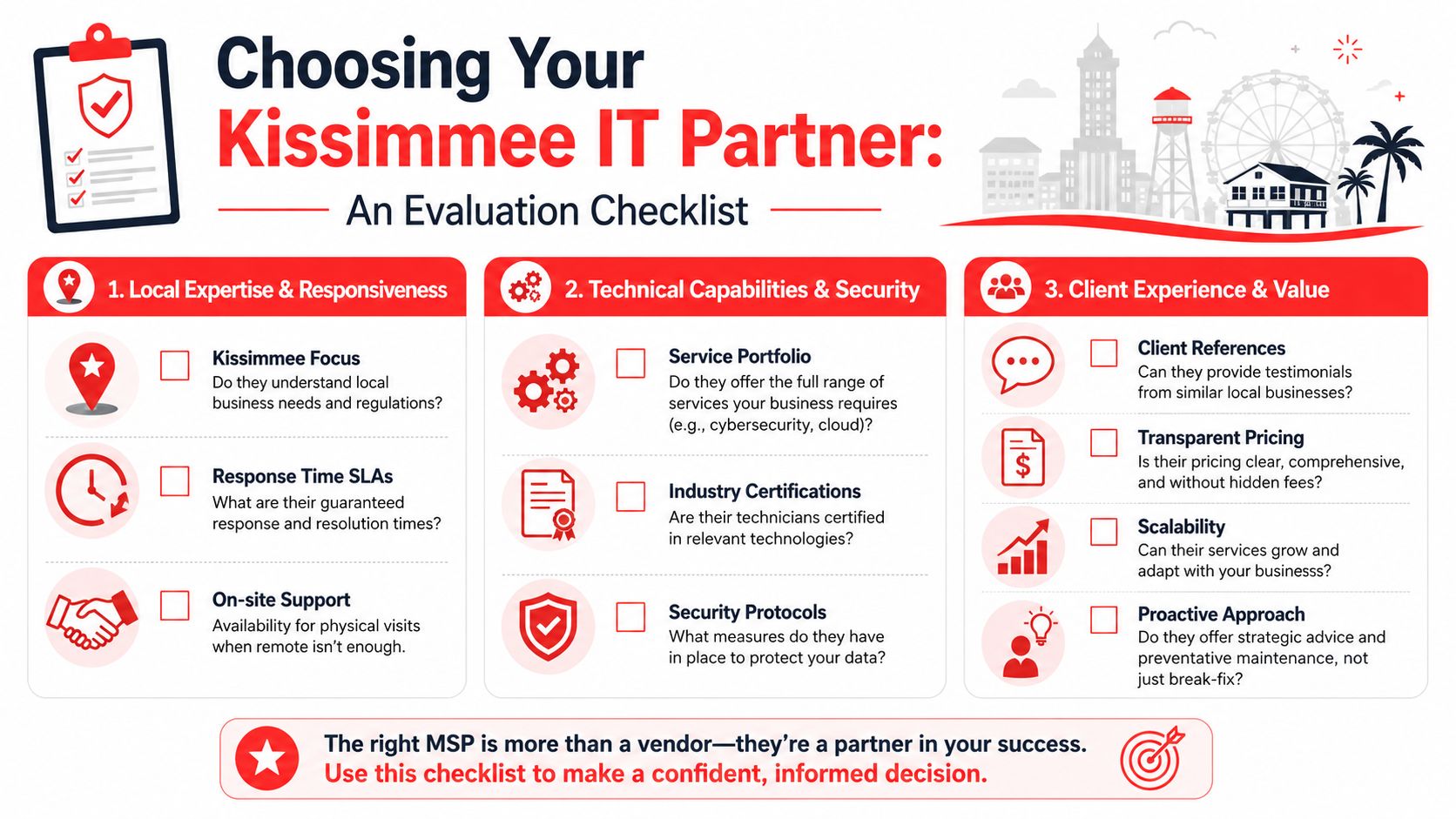
For businesses near Kissimmee, a practical benchmark is onboarding plus stabilization over roughly 10-12 weeks, during which the MSP inventories assets, normalizes configurations, and validates backup restore points (Kissimmee onboarding benchmark). If a provider promises instant perfection with no discovery phase, they’re selling confidence, not process.
Start with operating fit
Before you ask technical questions, answer these business questions:
-
Do they support businesses like yours?
A law office, dental practice, architecture firm, and multi-location field service company don’t use technology the same way. Your provider should understand your workflows, risk profile, and support expectations. -
Can they support both users and infrastructure?
Some firms are decent at help desk but weak on security and planning. Others are strong technically but slow with everyday user issues. You need both. -
Will they work as a partner or just a ticket queue?
A useful MSP helps with policy, planning, lifecycle decisions, and vendor wrangling. A weak one just closes tickets.
Questions you should ask in every meeting
Use blunt questions. You’re buying accountability.
- Response expectations: What happens when a critical incident hits after hours?
- Security operations: Who watches alerts, investigates suspicious activity, and coordinates containment?
- Backups: How do you verify backups can be restored?
- Documentation: Do you maintain asset records, configuration standards, and network documentation?
- Reporting: What do owners and managers receive each month?
- Escalation: Who owns communication during a serious outage?
- On-site support: When remote support isn’t enough, how do you handle physical visits in Central Florida?
- Vendor management: Will you deal directly with internet, phone, cloud, and software vendors?
If you want a structured buying framework, this guide on how to choose a managed service provider is a solid place to pressure-test your shortlist.
Pricing clarity matters more than a low quote
Cheap proposals create expensive surprises. If a provider prices the basics low and then charges extra for projects, security work, vendor coordination, after-hours response, or reporting, your budget will drift fast.
Look for clear answers on these points:
Pricing question
What you want to hear
What should worry you
What’s included monthly
Clear scope and support boundaries
Vague language and exceptions everywhere
What triggers extra fees
Specific, limited project exclusions
“It depends” on routine operational tasks
How is security handled
Included controls and defined responsibilities
Security treated as a separate afterthought
How are changes documented
Standard review and approval process
Informal, undocumented changes
Don’t ignore phones and communication systems
Many businesses treat voice systems as separate from IT until call quality drops, voicemail fails, or office moves expose a mess of dependencies. If your MSP will touch networking, user onboarding, wireless, and vendor coordination, your phone environment belongs in the conversation too. This expert guide to business phone systems is helpful if you’re sorting through how voice fits into a broader infrastructure decision.
Local presence still matters
Remote support solves a lot. It does not solve everything. Wiring issues, failed hardware, office moves, internet handoffs, and on-site user disruption still require a nearby team or a credible local response plan.
Ask a simple question: “When remote support fails, what happens next in Kissimmee?”
If the answer feels vague, assume the experience will be worse during a real incident.
Red Flags to Watch For When Hiring an IT Provider
Some providers make a decent first impression and still turn into a headache within months. The warning signs usually show up early if you know where to look.
The problems that should disqualify them
- Confusing pricing: If you can’t tell what’s covered, you can’t budget and you can’t hold them accountable.
- No clear security story: If they don’t talk about endpoint protection, monitoring, backup validation, and incident handling in practical terms, security probably isn’t embedded in the service.
- Weak reporting: If owners never get useful summaries, issues stay hidden until they become expensive.
- Slow or fuzzy escalation: You should know who responds, how incidents are prioritized, and how communication works during disruptions.
- No onboarding discipline: A provider that skips discovery, documentation, and standards normalization will inherit chaos and leave it in place.
- No local traction: If they can’t speak credibly about supporting businesses in Central Florida, on-site support may become a problem when you need it most.
Watch how they answer basic questions
The biggest red flag isn’t always the wrong answer. It’s the evasive answer.
If you ask how backups are tested and get a sales speech, that’s a problem. If you ask what happens after hours and they pivot to how friendly the help desk is, that’s a problem. If they treat cybersecurity like an optional line item for “later,” move on.
A strong provider sounds organized. A weak one sounds reassuring.
Your Next Steps to Secure and Streamline Your IT
You don’t need to solve everything in one week. You do need to stop drifting.
Start with a quick internal review. List your recurring issues, key systems, security concerns, remote access needs, vendor frustrations, and the workflows that hurt most when technology slows down. That gives you a business case, not just an IT wish list.
A simple decision path
- Step one: Identify your risk areas. Focus on downtime, user support gaps, backups, security exposure, and compliance pressure.
- Step two: Shortlist a small number of providers that fit your business model, not just your budget.
- Step three: Run each one through the evaluation questions above and compare how clearly they answer.
Then make the decision like an operator, not a shopper. Choose the firm that gives you confidence in process, coverage, accountability, and communication.
For most businesses, the right move isn’t hiring the cheapest support. It’s choosing a managed partner that reduces interruptions, tightens security, and gives your team a stable environment to work in every day.
If your business is weighing Managed IT Services Near Kissimmee FL and you want a provider that combines fully managed or co-managed IT, 24/7/365 helpdesk, cybersecurity oversight, and predictable support planning, Cyber Command, LLC is one option to consider. Their model is built around proactive maintenance, transparent reporting, and ongoing risk reduction for organizations that need dependable day-to-day support without building a full internal IT department.