
June 22, 2026
Expert Remote IT Support in Orlando, FL | 24/7 Solutions
Expert remote IT support in Orlando, FL for SMBs, medical, & professional firms. Get 24/7 cybersecurity, services, and pricing for Central FL businesses
Monday starts with a full waiting room in Lake Nona, a packed client calendar in Winter Park, or a production schedule that can’t slip in South Orlando. Then a login problem spreads to half the staff, email slows down, the line-of-business app stops syncing, and someone says, “IT is looking into it.”
That’s the moment many owners realize they’re not dealing with a one-off computer issue. They’re dealing with an operating model problem. If your business depends on systems, devices, cloud apps, internet access, and secure remote work, support can’t be occasional. It has to be built for the way your company runs.
That’s why Remote IT Support in Orlando FL has become more than a convenience. For many Central Florida companies, it’s the practical way to keep people productive, secure distributed work, and avoid the unpredictability of hiring, turnover, and emergency fixes.
Table of Contents
- Your Orlando Business Deserves Better Than IT Headaches
- What Remote IT Support Really Means for Your Business
- Why Remote Support Is Crucial for Central Florida Now
- The Pillars of Effective Remote IT Support
- Is Remote IT Support Right for Your Orlando Company
- Real-World Scenarios Solved by Orlando Remote Support
- Your Questions About Orlando IT Support Answered
Stuck on something like this right now?
Talk it through with a real US-based engineer, 24/7, no phone trees: (407) 587-0089.
Book a Free Strategy SessionYour Orlando Business Deserves Better Than IT Headaches
An accounting office in Winter Park doesn’t care whether a problem lives in a laptop, a cloud app, a firewall setting, or a permissions error. The firm cares that staff can’t work, clients are waiting, and deadlines don’t move.
A dental group has the same problem in a different form. The front desk sees slow systems. The provider sees chart access lag. The owner sees schedule disruption, unhappy patients, and lost time from a team that should be focused on care, not workarounds.
That’s why the old approach to IT breaks down so fast. Waiting until something fails, then calling someone to “take a look,” is expensive in the way that matters most. It interrupts revenue-generating work and forces your staff to become part-time troubleshooters.
Practical rule: If your team only hears from IT when something is broken, you don’t have support. You have cleanup.
In Orlando, there’s another issue. Hiring internal support isn’t always simple or predictable. The local market is active, and compensation is competitive. ZipRecruiter reported that remote tech support in Orlando averaged $40,589 yearly, with most workers earning between $35,000 and $43,900, while Glassdoor data for a similar remote support role in Orlando came in higher at $65,072 annually, which shows how much pay can vary by employer, title, and experience in this market (Orlando remote tech support pay data).
That gap matters for small and mid-sized businesses. If you try to build a full internal team, you’re not just paying salary. You’re managing recruiting, coverage, turnover, escalation depth, training, and after-hours gaps.
Remote support changes that equation. Done right, it gives you a standing IT function instead of a string of isolated fixes. The result is simpler operations, fewer interruptions, and a technology environment that supports growth instead of getting in the way.
What Remote IT Support Really Means for Your Business
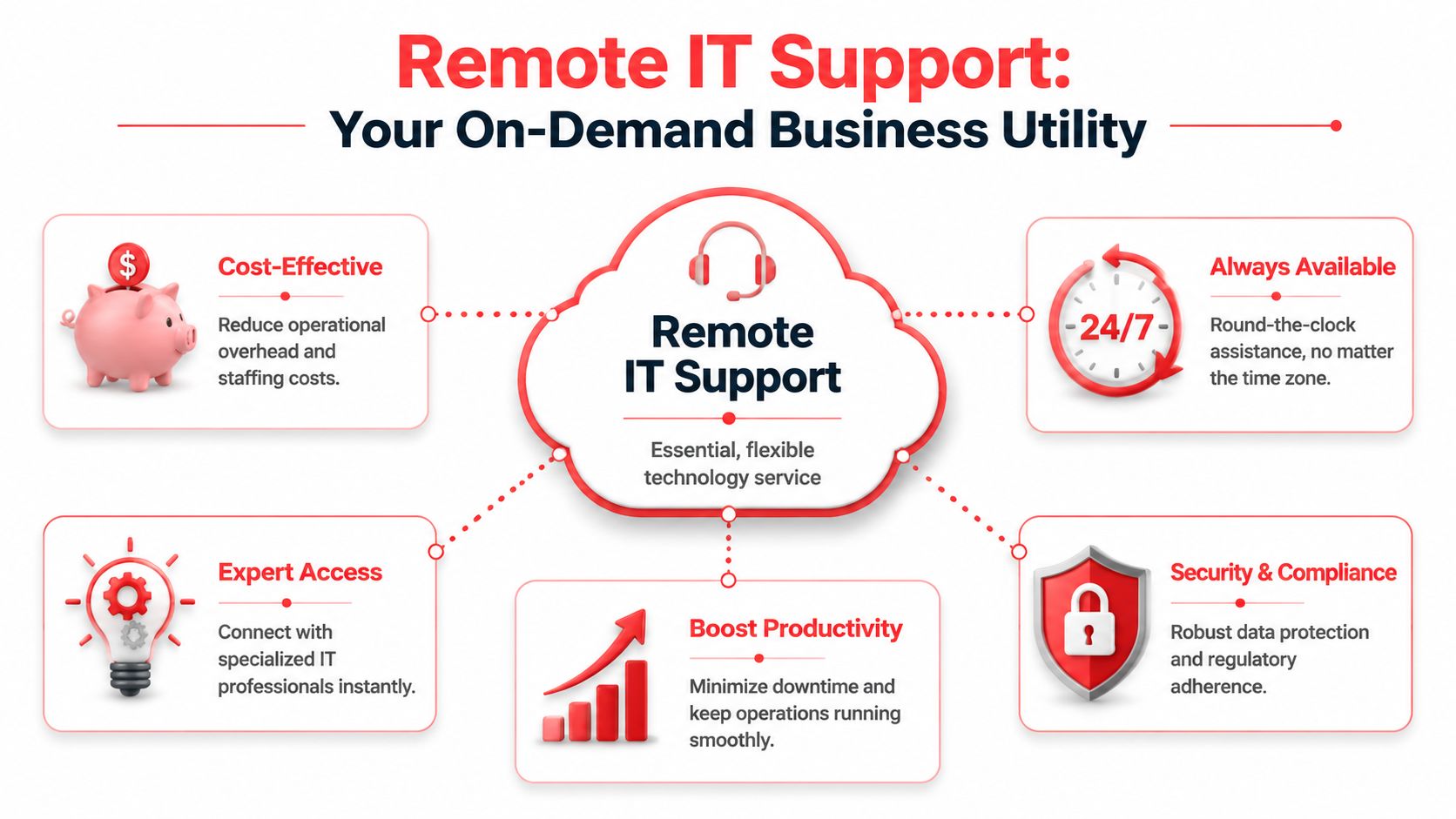
Remote IT support works best when approached as a utility. You expect power to be available, stable, and professionally managed in the background. Your technology support should work the same way.
It is not just remote troubleshooting
Many owners hear “remote support” and picture a technician logging in after a problem is reported. That’s only one small part of it.
Real remote support means someone is responsible for the health of your systems before users start submitting complaints. Devices need to be monitored. Patches need to be applied on schedule. Access needs to be controlled. Backups need to be checked. New hires need to be provisioned the right way. Departing staff need to be removed cleanly.
A lot of business communication systems have already moved this direction. If you want a useful non-IT example, Hosted Telecommunications on flexible work shows how business phone systems are now designed around mobility and consistent access rather than a fixed office setup. Support has to follow the same logic.
What a healthy remote support model includes
A dependable model usually has several moving parts working together:
- Proactive monitoring: Systems are watched for warning signs so the team can address issues before users feel them.
- Helpdesk coverage: Employees have a clear place to go for password resets, application problems, device issues, and everyday support needs.
- Endpoint management: Company laptops and desktops stay patched, secured, and standardized.
- Access control: User permissions match actual job roles, which reduces risk and avoids a mess of inherited access.
- Planning and guidance: Leadership gets advice on lifecycle decisions, security priorities, cloud changes, and budget timing.
Break-fix support doesn’t do this well because it only activates after pain is already visible. That model can still have a place for isolated one-time needs, but it’s a poor fit for firms that rely on uptime.
Good remote support lowers friction in small moments. Faster logins, stable apps, fewer repeat issues, cleaner onboarding. Those quiet wins are what keep a business moving.
For Orlando businesses, that matters because many teams are already split across offices, homes, job sites, and mobile devices. If support only works when everyone is under one roof, it no longer matches how the business operates.
Why Remote Support Is Crucial for Central Florida Now
The demand for remote support didn’t appear out of nowhere. Work changed. Risk changed. Business continuity expectations changed with it.
Hybrid work changed the support perimeter
A 2026 remote work roundup reported that about 22.8% of U.S. employees, or more than 36 million people, work remotely at least part of the time. The same source said 52% of workers in jobs that can be done offsite are on hybrid schedules and 27% are fully remote. It also reported that employers save an average of $11,000 per year per offsite worker through reduced real estate, turnover, and productivity gains (remote work statistics and business impact).
For an Orlando law office, engineering firm, or multi-location practice, those numbers explain why hybrid work hasn’t gone away. It works for a lot of businesses operationally. But it also creates a wider support footprint. Now you’re dealing with home networks, travel laptops, personal devices, remote login behavior, cloud permissions, and employees who need help without walking down the hall.
The same source adds the security side of the story. When remote work is a factor in a breach, incident costs average $1.07 million higher than office-based breaches. It also reported that 43% of offsite employees use personal devices while only 55% meet corporate security standards.
That doesn’t mean remote work is a mistake. It means unsupported remote work is a mistake.
Business continuity matters in Florida
Central Florida companies also have to think about disruption differently. Storm season, office closures, travel interruptions, and power issues don’t always take down the business if your systems are designed for remote access and cloud continuity. But if key access depends on a single office, a single server, or a single person with tribal knowledge, resilience is weak.
A practical support partner should already be thinking through questions like these:
- Can staff keep working from another location if the office is unavailable for a day or longer?
- Are critical files and apps reachable securely without improvised workarounds?
- Can support continue after hours if an issue starts late in the day and rolls into the evening?
- Do leaders know who owns incident response when a security event overlaps with an operations problem?
Contract structure matters too. If you’re evaluating providers, LicenseTrim’s managed services contract advice is worth reading because it highlights what buyers should look for in scope, exclusions, and accountability. Those details decide whether support feels smooth or turns into finger-pointing during a real problem.
In Central Florida, remote support isn’t just about convenience. It’s part of how companies stay open, secure, and responsive when work is distributed and interruptions are real.
The Pillars of Effective Remote IT Support
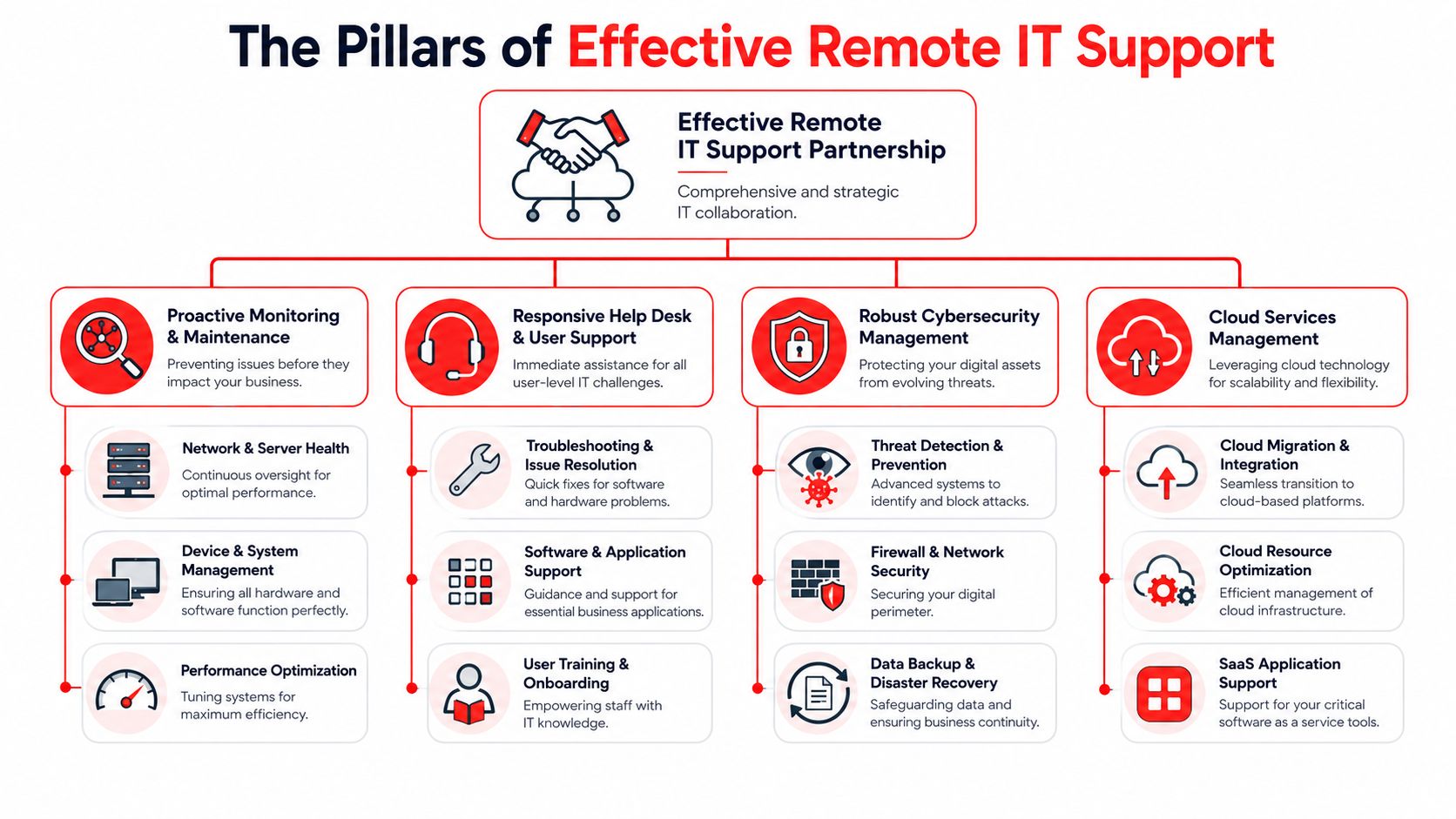
The phrase “remote IT support” gets used loosely. In practice, effective service has a few essential components. If one is missing, the client usually feels it through slower response, recurring issues, or unclear ownership.
A helpdesk that is actually available
Florida remote technical support listings commonly show coverage anchored to 8:30 AM to 5:00 PM ET Monday through Thursday and 8:30 AM to 4:30 PM ET Friday, which reflects the standard business-day model in the market (Florida remote technical support schedule norms). That’s workable for basic requests. It isn’t enough for every business.
If your team starts early, works late, serves clients across time zones, or depends on after-hours batch work, a problem at 5:15 PM is still a business problem. So is a phishing event on Saturday, a failed update overnight, or a Monday morning outage that started while no one was watching.
A strong support model includes:
- Live helpdesk access: Users can reach a real support team when they need help, not just leave a message.
- Clear triage: Urgent business-impacting issues move faster than routine requests.
- Documented workflows: Repeated issues are solved through standard processes, not heroics.
- Ticket visibility: Staff and leadership can see what was reported, what was done, and what still needs attention.
If you want a plain-English primer on why structure matters, this support ticket system guide is useful for understanding how requests should be categorized and tracked.
Security operations tied to support
Support and cybersecurity should not live in separate worlds. If a user reports a locked account, an unusual login prompt, or missing files, that might be a routine support issue. It might also be an active security event.
That’s where an integrated security operations function matters. A 24/7 SOC watches for suspicious behavior, investigates alerts, and helps contain problems before they spread. For a business owner, the actual value isn’t the acronym. It’s having one accountable team that can connect endpoint behavior, identity issues, patch status, and response steps without losing time in handoffs.
The fastest incident response usually comes from teams that already manage the environment day to day.
For Orlando companies that need this model, managed IT support in Orlando FL can include a combination of remote helpdesk, proactive maintenance, and security oversight. Cyber Command, LLC offers that kind of integrated approach through a U.S.-based helpdesk and a dedicated SOC, which fits businesses that want support and cyber response tied together instead of split apart.
Co-managed support and predictable billing
Not every company wants to outsource everything. Some have an internal IT manager who needs stronger tooling, after-hours coverage, or escalation support. That’s where co-managed IT makes sense.
It works well when the internal team knows the business well but needs outside depth for projects, endpoint standards, documentation, vendor coordination, or security operations. The internal lead keeps strategic control. The outside partner handles capacity and specialized coverage.
Pricing matters just as much as technical capability. Business owners usually prefer support that’s easy to budget and easy to understand. Hidden labor charges, project surprises for covered work, and unclear exclusions create tension fast.
A good arrangement should make these answers obvious:
- What is included every month
- How projects are scoped
- Which systems are covered
- What happens after hours
- How reporting and review meetings work
When those answers are clear, remote IT support becomes a management tool, not another source of uncertainty.
Is Remote IT Support Right for Your Orlando Company
A Lake Nona medical office, a Downtown law firm, and a manufacturer near the airport can all say they “need IT support,” but they do not need the same delivery model. The right fit depends on how your team works, what downtime costs you, which systems must stay available, and how much of your environment can be handled without a site visit.
For many Orlando companies, remote support covers far more than password resets and basic troubleshooting. It can handle user onboarding, Microsoft 365 administration, endpoint management, access control, patching, vendor coordination, backup checks, and after-hours response. Physical work still matters for cabling, firewall swaps, failing hardware, office moves, and anything that requires hands on equipment. A good provider is honest about that line instead of pretending every issue can be solved from a screen share.
Hiring pressure in the local market also affects the decision. Building an internal team takes time, and coverage gaps show up fast when one person owns everything from printers to security alerts. Remote support gives businesses a way to add depth sooner, especially if they need both day-to-day helpdesk work and a security team that can respond after hours. Cyber Command, LLC built its model around that reality with a U.S.-based 24/7 Helpdesk and SOC under one roof, which matters when an ordinary support issue turns into a security event at 9 p.m.
Where remote support fits best
Remote support tends to work well for Orlando businesses that depend on cloud apps, distributed staff, and predictable response times.
Some profiles stand out:
- Professional services firms: Attorneys, consultants, accountants, and similar teams lose money when email, document access, or line-of-business applications slow down. They usually need fast user support, tighter permissions, and cleaner device standards.
- Medical and dental practices: These offices deal with front-desk pressure, staff turnover, shared workstations, and secure access requirements. They benefit from disciplined account setup, endpoint oversight, and support that understands workflow interruptions.
- Industrial and field-service organizations: These companies often have a mix of office staff, warehouse or shop users, field personnel, and vendor-managed systems. Consistency matters more than fancy tooling.
- Multi-location businesses: Once each site starts handling printers, passwords, and local vendors differently, support costs rise and troubleshooting gets slower.
A simple test helps. If your staff still solves recurring issues by calling whoever “knows computers,” remote support is probably overdue.
Remote IT Support Use Cases for Orlando Industries
Industry Type
Primary Challenge
Remote IT Support Solution
Professional services
Email dependence, document access, permissions sprawl, deadline pressure
Remote helpdesk, identity and access control, endpoint management, secure cloud access, vendor coordination
Medical practices
Staff onboarding, secure user access, front-desk disruption, device consistency
Account provisioning, policy-based access, patching, endpoint protection, workflow-focused support
Industrial firms
Mixed office and field environments, aging equipment, site-to-site inconsistency
Standardized device management, remote troubleshooting, network oversight, backup review, escalation paths
Architecture and engineering
Large files, remote collaboration, software reliability, project continuity
Performance tuning, user support, cloud access planning, workstation standards, role-based permissions
Multi-location companies
Different processes by site, unclear ownership, uneven support quality
Centralized ticketing, standardized policies, reporting, shared documentation, remote-first support with site escalation
Community and public-facing organizations
Lean staffing, broad user needs, limited tolerance for outages
Helpdesk coverage, lifecycle planning, security basics, vendor management, predictable monthly support
Remote support is usually a strong fit if your business runs on SaaS platforms, standardized PCs, identity-based access, and documented processes. It is a weaker fit if your environment depends heavily on legacy line-of-business systems, specialized equipment with onsite dependencies, or frequent physical changes to infrastructure.
Business owners should also look at recovery expectations. If a storm closes the office, your team still needs access to files, email, and core applications from somewhere else. That is easier to support remotely when the environment includes tested backups and cloud-first continuity planning, such as cloud-based backup solutions for small business.
The practical answer for many Central Florida companies is a remote-first model with local onsite support available when needed. That gives you faster response for daily issues, better after-hours coverage, and fewer payroll surprises than trying to build every layer in-house.
Real-World Scenarios Solved by Orlando Remote Support
Problems rarely start as disasters. In Orlando offices, they usually begin as a locked account, a suspicious login, a new hire with no access, or a storm warning that forces everyone to work somewhere else by noon.

What these situations look like on the ground
A dental office in Winter Springs opens Monday morning and sees signs that a weekend phishing click may have exposed a Microsoft 365 account. The underlying issue is not just the bad click. It is how fast someone can confirm what happened, lock down the affected account, check for suspicious forwarding rules or sign-ins, and determine whether patient data or scheduling systems were touched. In a remote-first model with a 24/7 U.S.-based Helpdesk tied directly to a SOC, the response path is already defined. That shortens the time between detection and containment.
A Downtown Orlando engineering firm brings on several remote employees in one month. If onboarding is handled ad hoc, one person gets the wrong file access, another uses an unmanaged personal laptop, and a third waits half a day for line-of-business application setup. Good remote support turns that into a repeatable process. Devices are prepared in advance, accounts are created with the right permissions, security policies are applied before first login, and users know exactly where to get help. For professional services firms, that means billable work starts sooner and access mistakes are less likely.
Industrial companies around the Orlando area run into a different version of the same problem. The office team may be remote-ready, but the plant, warehouse, or shop floor still depends on a few critical systems that cannot fail during production hours. Remote support helps by catching workstation issues, VPN failures, access problems, and security alerts early, while onsite work is reserved for hardware replacement or network changes. That lowers downtime without sending someone across town for every ticket.
Healthcare and medical practices feel the pressure fastest. If a physician cannot reach the EHR, or front desk staff lose access to scheduling and phones, the problem becomes operational within minutes. Remote support matters here because triage has to be disciplined. User lockouts, printer issues, application slowness, and signs of account compromise cannot all sit in the same queue. The right support team separates routine requests from incidents that affect patient flow, compliance, or protected data.
Then there is the Central Florida weather problem. A storm system does not need to cause major damage to interrupt business. It only needs to keep staff out of the office, knock out internet at one site, or expose the fact that files and line-of-business apps were never set up for remote access. Companies that plan for this usually pair remote support with cloud-based backup solutions for small business so file recovery and business continuity are tested before the next disruption, not improvised during it.
These are the situations where remote support proves its value. Not in a sales demo, but on a Monday morning when a law office cannot access shared documents, a medical practice has a security concern, or a manufacturer cannot afford to wait until tomorrow for a response.
For many Orlando businesses, the strongest model is not helpdesk alone. It is support, monitoring, and security working together, with local onsite help available when the issue is physical. That is how daily IT problems stay small, security events get handled faster, and leadership gets more predictable operations instead of recurring surprises.
Your Questions About Orlando IT Support Answered
Buying support is partly a technical decision and partly a trust decision. Most owners ask the same practical questions before they move forward.
Common decision-stage questions
What if we need someone on-site in Orlando?
Remote-first support doesn’t mean on-site work never happens. It means the provider solves what can be solved quickly and remotely, then dispatches or coordinates hands-on work when the issue involves physical hardware, office moves, cabling, or equipment replacement.
How fast should response be when systems are down?
You should expect clear triage, not a generic queue. A full outage, security issue, or major workflow interruption should move immediately. Routine requests like printer setup or access changes should still be handled promptly, but they shouldn’t compete with business-critical incidents.
Is a small company too small for this model?
No. Small teams often benefit the most because they feel interruptions more sharply. If five people lose access, you may have just lost a large share of your working capacity for the day.
What does all-inclusive pricing mean?
It should mean your monthly service covers defined support, management, and monitoring work without nickel-and-diming for normal activity. The important part is the written scope. You want a provider that clearly explains what’s covered, what counts as a separate project, and what reporting you’ll receive.
How do we judge whether our security is strong enough?
Start with basics. Endpoint control, patching, backups, account protections, staff awareness, and a response plan matter more than buzzwords. If you need a practical baseline, these cybersecurity best practices for small businesses are a useful place to start.
Can remote support work if we already have internal IT?
Yes. Many Orlando companies use co-managed support so internal staff can focus on business-facing priorities while an outside partner handles monitoring, after-hours coverage, escalation, and specialized security work.
If your team is tired of recurring outages, unclear ownership, and support that only appears after something breaks, it may be time for a different model. Cyber Command, LLC works with Central Florida businesses that need reliable remote IT support, 24/7 helpdesk coverage, and security operations tied to day-to-day support. If you want a practical review of your current setup, a conversation about coverage gaps is a sensible next step.
This article is for general informational purposes only and is not legal, compliance, insurance, or other professional advice. Threats, technologies, and regulations change quickly; confirm current requirements with your own advisors before acting. See our full disclaimer.