
IT Consulting in Orlando FL: Your 2026 Business Guide


Tuesday at 9:07 a.m., your office is already behind. A proposal has to go out. Someone can't get into Microsoft 365. The copier won't scan to email. Your line-of-business app is crawling. Then a staff member forwards a suspicious message that looks like it came from a vendor. Now you're not dealing with “an IT issue.” You're dealing with lost revenue, operational drag, and possible security exposure.
That's why business owners start looking into IT consulting in Orlando FL. Not because they want more tech. They want fewer interruptions, cleaner accountability, and a way to stop guessing whether their systems are safe.
If you run a law firm, medical practice, engineering office, field-service company, or multi-location professional services business in Central Florida, your technology stack is already tied to client trust. The wrong partner keeps you in a loop of tickets, patches, and excuses. The right partner gives you stability, visibility, and a plan.
Is Your IT a Business Asset or a Liability
A lot of Orlando businesses still treat IT like plumbing. If something breaks, call somebody. If email comes back up, problem solved. That approach worked when systems were simpler and cyber risk was lower. It doesn't work now.
Orlando's economy is built around office-heavy and knowledge-based work, and the city market report places Orlando at about 320,742 residents in 2023 while describing a regional labor market with high concentrations of office-based and knowledge-economy activity. For those businesses, IT isn't overhead. It's the operating engine. The same report also notes the broader U.S. IT consulting sector is projected by IBISWorld to reach $821.2 billion in 2026, with 502,000 businesses nationwide and 2.9% CAGR from 2021 to 2026. That tells you the market is mature, standardized, and far past the “guy who fixes computers” era according to the City of Orlando market report.
What liability looks like in practice
You feel it before you can describe it:
- Staff lose momentum when logins fail, printers drop, or shared files become unreliable.
- Leadership loses confidence because every month brings a new surprise invoice or another “urgent” system issue.
- Security becomes reactive when nobody is consistently reviewing alerts, access controls, backups, and endpoint health.
- Growth slows down because opening a second office, onboarding new hires, or adding software feels risky.
That's not a technology problem. It's a management problem.
Practical rule: If your provider mostly appears after things break, you don't have a strategy. You have a repair service.
What an asset looks like
A business asset supports uptime, protects revenue, and reduces uncertainty. That means your IT partner should be preventing common failures, standardizing tools, documenting vendors, and tightening security controls before they become expensive incidents.
For many businesses, one of the biggest shifts is moving from manual security work to process-driven operations. If you want a useful primer on that, this guide to automating cyber security operations is worth reading because it frames the issue correctly. Security can't depend on whether someone remembered to check something that day.
If your current setup creates stress every week, your IT is acting like a liability. Call it what it is and fix it.
What IT Consulting Actually Means for Your Orlando Business
Most business owners hear “IT consulting” and think of projects, migrations, or a specialist who shows up for a meeting and hands over a report. That's too narrow.
In the Orlando market, the concentration of established IT firms points to demand for integrated advisory and operational delivery, not just one-off project work. Businesses need strategic partners who can manage the full stack, especially when they don't have deep internal engineering teams as reflected by local provider concentration in Orlando.
Break-fix is a mechanic. Consulting is a decision system.
Break-fix support is simple. Something fails. You call. You pay. The provider restores service and leaves. That model is built around incidents.
Real IT consulting works more like an outsourced technology leadership function. Some people call it a Virtual CIO model. I care less about the label than the behavior. A good consulting partner asks questions like:
- What systems are critical to revenue?
- Where is your real operational risk?
- Which vendors own parts of your workflow?
- What happens if one employee account gets compromised?
- Can you open another location without chaos?
- Are you buying tools that fit your team?
That's a business conversation, not a helpdesk script.
What a strong consulting relationship should include
A useful Orlando IT consulting partner should do three things at once.
First, they should stabilize day-to-day operations. Users need support. Devices need patching. Backups need oversight. Software needs license management.
Second, they should reduce risk deliberately. That means access control, endpoint security, response planning, vendor review, and clear accountability around compliance-sensitive systems.
Third, they should plan ahead. New hires, office moves, cloud changes, workflow automation, and software renewals shouldn't be handled as emergencies.
The fastest way to overspend on IT is to make every decision under pressure.
What to stop buying
Stop buying “support” with no roadmap.
Stop buying “consulting” that never touches execution.
Stop buying “monitoring” if nobody can explain what happens when a real alert hits.
If your provider can't connect technology choices to uptime, security, staffing efficiency, and budget control, they aren't consulting. They're just adjacent to your problems.
Core IT Consulting Services Your Business Needs
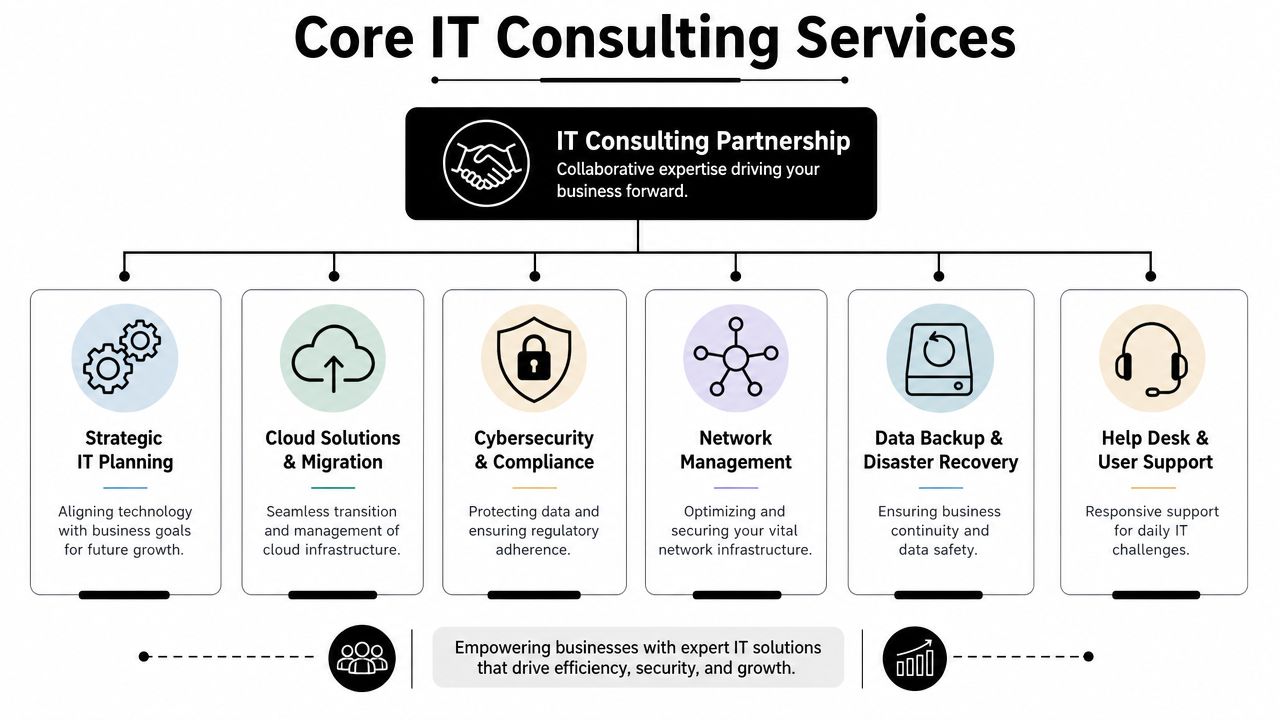
A serious IT consulting relationship isn't one service. It's a stack. Each piece supports a business outcome. When one piece is missing, the whole thing gets weaker.
The foundation services
These are the essential elements. If a provider is weak here, the rest is just marketing.
- Managed endpoint support. Laptops, desktops, mobile devices, updates, antivirus, and user issues need consistent control.
- Network management. Firewalls, switches, Wi-Fi, remote access, and office connectivity should be documented and maintained.
- Backup and disaster recovery. Backups aren't useful if nobody verifies recoverability and ownership.
- Help desk coverage. Your staff need a clear path to resolution when tools stop working.
A lot of firms discover they need a fuller managed environment after comparing piecemeal support with a dedicated managed IT support team in Orlando. The difference is structure. Covered systems, documented workflows, and named responsibilities beat ad hoc troubleshooting every time.
The strategic layer
Consulting effectively earns its keep.
A provider should help you decide what to standardize, what to retire, what to move to the cloud, and what to lock down. They should also map technology spending to business priorities instead of letting every department buy disconnected tools.
Use this quick test:
| Question | Weak provider answer | Strong provider answer |
|---|---|---|
| Why are we using this platform? | “That's what most clients use.” | “It fits your workflow, support model, and security needs.” |
| What's our biggest IT risk? | “Cybersecurity in general.” | “Account compromise, vendor sprawl, and undocumented dependencies.” |
| What should we change this quarter? | “Let us audit and get back to you.” | “Standardize access, tighten backup oversight, and clean up devices first.” |
The security layer
Cybersecurity isn't a bolt-on. It has to sit inside daily operations. That includes endpoint protection, identity controls, alert review, patching, privileged access management, and response readiness.
If your environment includes development workflows, integrations, or custom platforms, a structured DevOps IT security assessment can help expose risk that basic support vendors usually miss. Many firms talk about security but only understand office IT. That gap matters.
Strong security work is boring by design. Policies are clear, devices are current, access is controlled, and surprises become rare.
The growth layer
Cloud planning, vendor management, automation, co-managed support, and AI-related advisory belong here. These services matter once the basics are under control. Don't buy “innovation” from a provider who still struggles to keep your users supported and your systems documented.
One practical example is Cyber Command, LLC, which offers managed and co-managed IT, cloud services, DevOps support, AI consulting, and a 24/7/365 U.S.-based helpdesk plus SOC. That kind of model makes sense for businesses that need both operational coverage and strategic input without building a large internal team.
Tailoring IT Support for Central Florida Industries
Generic IT support sounds fine until your business hits a sector-specific problem. Then the cracks show fast.
Orlando has plenty of IT providers, but buyers still struggle to find useful guidance on what support should look like for different business types, especially when comparing a medical practice to a multi-site professional services firm as seen in Orlando provider listings and market positioning.

Professional services firms need control, not gadgetry
Law firms, accounting firms, architecture firms, and engineering practices usually don't need exotic infrastructure. They need consistency.
Their risk profile is built around confidential files, email, document retention, client deadlines, and staff who are billable by the hour. Every minute spent fighting VPN access, file shares, Outlook, or PDF workflow issues costs money twice. Once in payroll, once in lost billing opportunity.
For these firms, I'd prioritize:
- Identity and email security because account compromise is often the fastest path to real damage.
- Document access controls so staff only reach what they should.
- Reliable remote work tools for partners, field staff, and client-facing professionals.
- Vendor discipline so you don't end up with scattered subscriptions and zero ownership.
If you operate in this category, specialized IT support for professional services is a more useful benchmark than a generic MSP checklist.
Healthcare practices need operational reliability with compliance discipline
Medical, dental, ortho, med spa, and veterinary offices live in a different world. Scheduling systems, imaging tools, EMR access, front-desk workflows, e-prescribing dependencies, and patient communications all create risk.
The wrong IT partner tends to focus on devices and ignore workflow sensitivity. That's a mistake. A clinic doesn't just need protected endpoints. It needs systems that stay available during patient hours and staff who understand what can't go down at the wrong moment.
If your IT provider treats your practice like a normal office, expect avoidable disruption.
A healthcare-focused approach should emphasize user access discipline, secure vendor coordination, backup review, workstation standardization, and fast response when line-of-business applications fail.
Industrial and field-service firms need connectivity across moving parts
Construction, logistics, service dispatch, light industrial, and multi-site operations have a different challenge. Their risk isn't only in the office. It sits in trucks, job sites, tablets, mobile phones, remote supervisors, and weak handoffs between field and admin teams.
A provider who only understands desks and conference rooms will miss the actual work.
For these firms, the right consulting model usually centers on:
- Mobile device management for phones and tablets in the field.
- Secure access to cloud apps without creating password chaos.
- Site-to-office coordination so estimates, photos, work orders, and approvals move cleanly.
- Procurement and lifecycle planning for rugged devices and replacement timing.
Industry fit matters more than provider size. I'd rather see a smaller firm that understands your workflow than a larger one that gives every client the same stack and same script.
Decoding IT Support Pricing Flat-Rate vs Break-Fix
Many Orlando businesses get burned when they ask for “cost-effective IT,” get a vague quote, and assume they're comparing the same thing. They usually aren't.
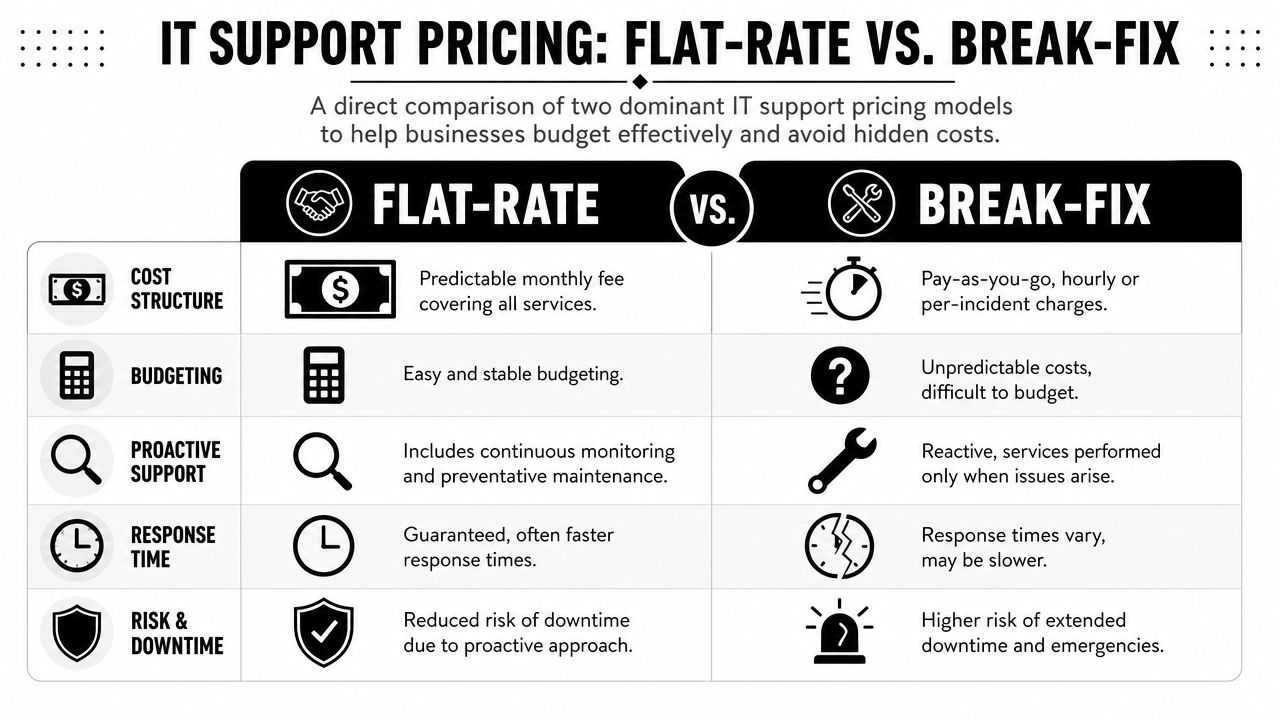
Local market commentary shows a real gap between what buyers want and what many firms explain. Businesses want predictable spend, but pricing is often vague. Understanding the tradeoffs between flat-rate support and other models matters more as cyber pressure and technology change keep accelerating as reflected in Orlando market positioning for SMB IT services.
Break-fix looks cheap until you use it
Break-fix means you pay when something goes wrong. That sounds flexible. It's unstable.
The provider gets paid when your systems fail, when users can't work, and when neglected issues finally explode into urgent projects. Their financial incentive is tied to incidents. Your business goal is fewer incidents. That's a bad alignment from day one.
Here's the hidden cost table most owners never see:
| Issue | Break-fix impact | Flat-rate impact |
|---|---|---|
| Surprise outages | Extra invoice plus downtime | Covered under an ongoing service model |
| Deferred maintenance | Easy to postpone | Usually part of routine service |
| Security reviews | Often separate or inconsistent | More likely built into the operating model |
| Budget planning | Reactive | Predictable |
Flat-rate support aligns incentives better
Flat-rate support isn't automatically good. Plenty of providers underdeliver. But the model itself makes more business sense.
If the monthly service is fixed, the provider wins by keeping your systems healthy, reducing noise, and standardizing your environment. That's what you want too. Stable systems, fewer interruptions, and fewer ugly billing surprises.
Cheap hourly support often becomes expensive leadership time.
What to ask when you review pricing
Don't just ask for the monthly number. Ask what's inside it.
- Covered systems. Which devices, users, locations, and platforms are included?
- Security scope. Are endpoint tools, alert handling, and access controls part of the service?
- Projects versus support. What counts as routine work and what triggers extra billing?
- Vendor management. Will they coordinate with your internet, software, printer, and telecom providers?
- Reporting. Do you get plain-language accountability or just invoices and ticket counts?
The right pricing model isn't the one with the lowest entry point. It's the one that gives you dependable service, defined scope, and a budget you can effectively use.
Your Vetting Checklist for Orlando IT Providers
Most IT sales meetings are designed to keep you passive. Nice slide deck. Broad promises. Lots of words like smooth, strategic, and secure. That's useless unless you know how to press for specifics.
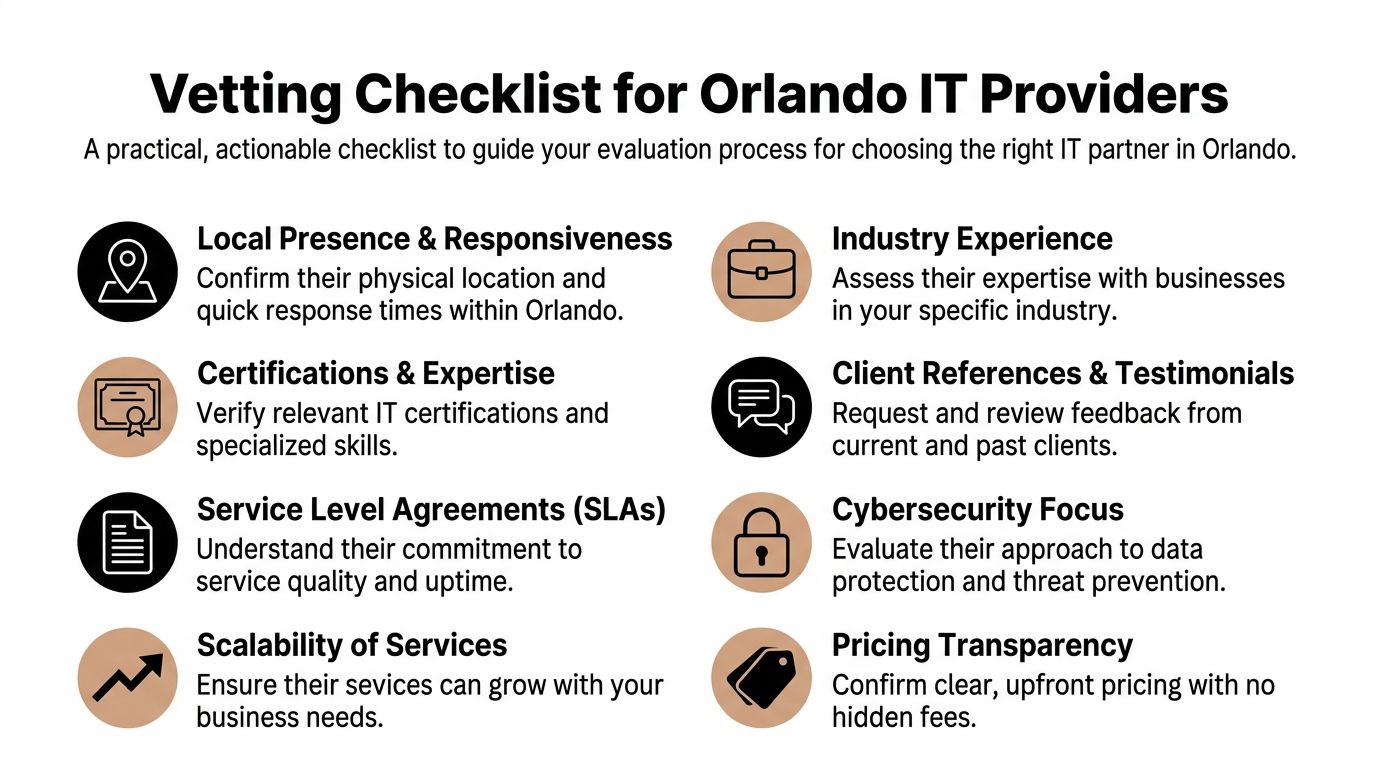
Use a checklist and lead the conversation.
The questions that expose weak providers
Ask these plainly and wait for direct answers.
How does onboarding work?
If they can't explain discovery, documentation, access review, device standardization, and transition ownership, expect a messy start.What happens when a security alert fires after hours?
You want a real response path, not “someone gets notified.”What's included in the monthly agreement and what gets billed separately?
This reveals whether the pricing is disciplined or deliberately vague.Who owns vendor coordination?
Somebody has to deal with internet providers, software vendors, copier companies, phone systems, and cloud platforms.How do you support businesses in my industry?
If the answer sounds generic, they probably don't.What do your reports show? Ticket counts aren't strategy. You need visibility into risk, recurring issues, asset status, and action items.
For a more detailed framework, this guide on how to choose a managed service provider is useful because it forces comparison beyond surface-level sales language.
What to verify, not just ask
Claims are easy. Proof is harder.
- Local relevance. Ask for current Central Florida references in businesses similar to yours.
- Technical depth. Ask who handles cloud, compliance-sensitive systems, and escalations.
- Staffing stability. If you rely on outside augmentation, learn how they find the right tech staffing partner or internal talent mix to support continuity.
- Documentation discipline. If they don't document environments well, every issue takes longer.
Good providers answer hard questions without getting defensive. Weak ones pivot back to marketing language.
Red flags I wouldn't ignore
Here are the ones that matter most:
- Everything is “custom” but nobody can define scope.
- They talk mostly about tools and not about business workflows.
- They promise fast response but avoid talking about actual resolution ownership.
- They can't explain your industry risks in plain English.
- They sell security as an add-on instead of an operating standard.
You're not hiring a vendor to sound smart. You're hiring a partner to reduce operational risk.
Taking the Next Step With Your IT Partner
The main decision isn't whether you need support. You already do. The decision is whether you want a vendor who reacts to tickets or a partner who helps run technology as a business function.
That distinction matters in Orlando because the local market supports both subscription-style managed services and premium advisory work. Local pricing examples show service packages starting at $750 per month, onboarding that can be operational in 1 to 2 weeks after signing, and enterprise-tier consulting rates that can range from $175 to $350 per hour based on Orlando IT consulting market examples. For most small and midsized firms, that points to a simple conclusion. Predictable monthly support usually makes more sense than paying premium hourly rates for fragmented expertise.
The standard I'd use
Choose a partner that can do five things well:
- Keep users productive
- Reduce cyber risk consistently
- Give you predictable costs
- Handle vendors without drama
- Translate technology decisions into business outcomes
If a provider can't do all five, keep looking.
What a practical next move looks like
Don't start with a giant transformation project. Start with an honest review of what's fragile.
List your core applications. Identify where downtime hurts revenue. Review how staff access systems. Check whether anyone officially owns backups, vendor documentation, and after-hours response. Then compare that against the provider conversations you're having.
The right Orlando IT consulting partner should make your environment calmer, cleaner, and easier to manage. That's the job. Not more noise. Not more acronyms. Not another year of patchwork support.
If you want a partner that approaches IT as an operational and security discipline, not a ticket queue, talk with Cyber Command, LLC. They work with Central Florida organizations that need managed or co-managed IT, 24/7/365 U.S.-based helpdesk coverage, cybersecurity support, and predictable flat-rate service built around uptime, accountability, and business continuity.