
A Guide to HIPAA Security Risk Assessment for Florida Businesses

If your healthcare practice, law firm, or accounting business in Orlando, Kissimmee, or anywhere in Central Florida handles patient data, a HIPAA Security Risk Assessment is more than just a compliance checkbox—it’s your first line of defense against crippling cyberattacks. It’s a methodical process for finding the weak spots in how you handle electronic Protected Health Information (ePHI) before a hacker does.
A proper SRA is the difference between preventing a breach and trying to recover from one that could easily put you out of business.
Why Your Practice Needs a HIPAA Security Risk Assessment

For healthcare providers and the professional services that support them—from law firms in Lake Mary to accounting firms handling medical billing—a single data breach can trigger staggering fines, instantly destroy client trust, and grind your operations to a halt.
In today's cyber threat-heavy environment, the HIPAA Security Risk Assessment (SRA) isn't optional. It’s a core business strategy for survival. This is especially true for businesses in bustling Central Florida, which cybercriminals see as prime targets for ransomware and data theft. The SRA forces you to take an honest look at your cybersecurity posture and answer the tough questions about who can access your data and how it’s being protected.
To get started, it helps to understand what an SRA actually involves. At its core, the process breaks down into a few key areas, each with a specific goal.
Here’s a quick overview of what a comprehensive SRA looks at:
Core Components of a HIPAA Security Risk Assessment
| Component | What It Means for Your Business | Example Action |
|---|---|---|
| Asset & Data Identification | Finding every single place ePHI is stored, received, maintained, or transmitted. | Inventorying all servers, workstations, laptops, mobile devices, and cloud services that touch client or patient data. |
| Threat & Vulnerability Analysis | Identifying potential cyber threats (like ransomware) and vulnerabilities (like unpatched software) that could compromise your ePHI. | Running a vulnerability scan on your network to find outdated software or weak configurations that hackers exploit. |
| Risk Likelihood & Impact Scoring | Determining the probability of a cyber threat exploiting a vulnerability and the potential damage it could cause. | Scoring the risk of a phishing attack as “High Likelihood” with a “High Impact” due to lack of staff training. |
| Control Implementation Review | Assessing the effectiveness of your current security controls (firewalls, antivirus, access policies) and identifying gaps. | Reviewing user access logs to ensure former employees no longer have access to sensitive records. |
| Remediation & Action Plan | Creating a prioritized, actionable plan to address the identified risks and strengthen your cyber defenses. | Creating a project to implement multi-factor authentication on all remote access points within the next 90 days. |
This table gives you a snapshot, but the real work is in the details. A thorough SRA dives deep into each of these components, creating a clear picture of your business’s unique risk profile.
The Real-World Cyber Threats Facing Florida Businesses
These threats aren’t just abstract concepts from an IT textbook; they are daily realities for businesses here. For a dental clinic in Orlando, a law firm in Winter Springs, or an accounting practice in Lake Nona, the risks are tangible and diverse. These aren't just tech headaches; they are serious business risks that threaten your bottom line and reputation.
Common cybersecurity threats we see every day include:
- Ransomware Attacks: A single malicious email can encrypt all your client and patient files, locking you out of your own business until a hefty ransom is paid. We’ve seen this paralyze Central Florida businesses, and it’s devastating.
- Insider Threats: It could be a disgruntled employee, but more often it’s a well-meaning but careless staff member who accidentally exposes thousands of sensitive records with one wrong click on a fraudulent link.
- Phishing Campaigns: Those tricky emails designed to fool your team into revealing passwords or installing malware are becoming increasingly sophisticated and are the number one entry point for most cyberattacks.
Effectively protecting your data means having the right cybersecurity controls in place, and a proper SRA is designed to identify exactly which ones you need. This includes fundamentals like secure messaging for healthcare to prevent data leakage through everyday communications.
The point of a risk assessment isn't to find someone to blame. It’s to find your vulnerabilities before an attacker does. It’s about proactive defense, not reactive cleanup.
The Financial and Reputational Costs of Non-Compliance
The financial penalties for HIPAA violations are severe, and they are only getting worse. The U.S. Department of Health and Human Services (HHS) is actively pursuing organizations that fail to perform an adequate risk assessment.
In 2025, for example, the OCR ramped up HIPAA enforcement, issuing fines totaling over $6.6 million against healthcare organizations. Some of those penalties reached as high as $3 million per violation. A close look at these cases reveals a clear pattern: the fines were overwhelmingly linked to inadequate risk assessments, weak technical safeguards, and the fallout from ransomware incidents.
Beyond the direct financial hit from fines, the reputational damage from a breach can be irreversible. Clients and patients trust you with their most sensitive information. Breaking that trust can lead to a mass exodus and do permanent harm to your brand. A thorough HIPAA SRA is your primary tool for proving due diligence and protecting the very foundation of your business.
Mapping Your Data and Defining Your Scope

Before you can even think about identifying threats, the first real, hands-on part of any HIPAA security risk assessment is figuring out exactly what you need to protect. This means creating a complete and accurate inventory of every single system, device, and piece of software that creates, receives, maintains, or transmits electronic Protected Health Information (ePHI).
This isn't just about your main server. It’s a full accounting of your entire data ecosystem.
For a busy law firm in Orlando representing healthcare clients or a dental practice in Winter Springs, ePHI pops up in more places than you'd ever guess. One of the most common and dangerous assumptions we see is when a business thinks they know where all their sensitive data lives. The goal here is to move from assumption to certainty, leaving no digital stone unturned.
This whole process is called "scoping," and it creates the foundation for your entire risk assessment. Without a clearly defined scope, you're guaranteed to have blind spots, leaving you exposed to risks you didn’t even know you had.
Creating Your ePHI Inventory
Think of your business as a network of data points. Your job is to map every single point where ePHI could possibly reside or pass through. I won't lie—this isn't a quick task, but it's absolutely vital. A detailed inventory becomes your single source of truth for the rest of the assessment.
This inventory should be a living document, tracking not just the asset itself but also who's responsible for it, its physical location, and the kind of ePHI it handles.
Be sure to include these common—and often overlooked—assets:
- Primary Systems: This is the low-hanging fruit—your Electronic Health Record (EHR), Practice Management System, case management software, billing platforms, and client communication portals.
- Workstations and Servers: Every desktop, laptop, and server, whether it's a physical box in a closet or a virtual machine in the cloud, needs to be on your list.
- Mobile Devices: This is a big one. You have to account for company-owned tablets and phones, plus any personal devices staff use under a BYOD (Bring Your Own Device) policy.
- Cloud Services: Document all of them. From Office 365 and Google Workspace to specialized cloud-based imaging software, legal discovery platforms, and backup services like iDrive or Backblaze.
- Medical and Diagnostic Equipment: Modern dental chairs, X-ray machines, and other diagnostic tools are often connected to your network and store ePHI. Don't forget them.
- Removable Media: It's easy to forget about the humble external hard drive, USB flash drive, and even old backup tapes. They all count.
Your inventory is more than just a list; it’s a map that shows how data flows through your organization. This map is crucial for understanding your risk exposure and is one of the first documents an auditor will ask to see.
A Practical Checklist for Florida Businesses
Let's make this tangible. Imagine a multi-location specialist practice with offices in Orlando and Winter Park, or an accounting firm with clients across Central Florida. Their inventory process would need to be meticulous.
Here is a sample checklist to get you started on the right foot:
- Identify All Physical Locations: List every office, clinic, and administrative site.
- Document All Hardware:
- List all servers by name, model, and function (e.g., "ORL-DC01 – Domain Controller").
- Inventory every workstation and laptop, noting the primary user.
- Catalog all network gear like firewalls, switches, and wireless access points.
- Map Your Software and Applications:
- List all applications that handle ePHI (e.g., "Dentrix," "QuickBooks," "Clio," "Solutionreach").
- Include cloud services and note the vendor (e.g., "Microsoft 365 for email," "iDrive for backups").
- Track All Data Storage:
- Where are your primary data and backups stored? On-site server? In the cloud? A hybrid model?
- Are you using any file-sharing services like Dropbox or OneDrive? Get them on the list.
This systematic approach ensures you build a complete picture from the start. For a deeper dive into the regulatory side of things, our guide on compliance mapping for GDPR and HIPAA offers more context on how these frameworks intersect.
Once you’ve completed this critical first step, you'll have a definitive scope for your HIPAA security risk assessment. From there, you can move forward to identifying threats and vulnerabilities with confidence.
Identifying Threats and Current Security Gaps
Now that you know where all your sensitive patient data lives, it's time for the hard question: "What could possibly go wrong?" This is the real meat of your HIPAA security risk assessment. It’s about methodically listing out every potential threat that could jeopardize the confidentiality, integrity, or availability of your ePHI.
This isn't about conjuring up a doomsday list. It’s a grounded, pragmatic exercise to understand the specific cybersecurity dangers your business faces. For businesses in Orlando, Winter Springs, and across Central Florida, these threats are a unique blend of digital, human, and even environmental risks.
You need to think far beyond just hackers. Let's get real about the scenarios that are relevant right here in our region.
Cataloging Threats Relevant to Central Florida
Threats tend to fall into three main buckets. Let’s break them down with some examples that will feel all too familiar to any Florida business owner.
- Natural Threats: These are the big, environmental factors completely out of your control. For us, the most obvious one is a hurricane. A Category 3 storm can knock out power for days, making servers inaccessible, or worse, flooding could physically destroy your on-premise hardware.
- Human Threats: These can be malicious, but more often, they’re accidental. Sure, a disgruntled former employee might try to walk out with a client list. But it's far more common for a well-meaning accountant or paralegal, who hasn't been properly trained, to click on a sophisticated phishing email and hand a cybercriminal the keys to your entire network.
- Environmental Threats: This category covers failures in the infrastructure that supports your business. Think about a long-term power outage from a nearby construction accident, an HVAC system failing and cooking your server room, or a simple burst pipe flooding your office over a holiday weekend.
The reality of the situation is grim. The healthcare sector and its business associates have become the number one target for cybercriminals because medical information is incredibly valuable on the black market.
Healthcare data breaches have skyrocketed, with the industry now accounting for 79% of all reported breaches. Shockingly, 67% of these breaches involve medical information, and 34% are the result of unauthorized access or disclosure of PHI.
This is exactly why a thorough threat analysis isn't just a box to check—it’s fundamental to protecting your business. You can also explore our detailed guide on how to conduct a cyber security risk assessment for a broader look at this process.
Documenting Your Existing Security Controls
After you've identified all the ways things could go wrong, the next step is to take an honest look at what you’re already doing to stop them. This means creating a detailed inventory of your current security controls—the safeguards you have in place right now.
This is where you document your cyber defenses. It’s an honest, no-blame inventory of your current security posture. This baseline is absolutely essential for spotting your true vulnerabilities.
Your list of controls should cover the three key areas mandated by the HIPAA Security Rule.
Technical Safeguards
These are the technology-based controls you use to protect ePHI. Your documentation should be specific:
- Access Controls: Do you use unique user IDs for every single staff member? What’s your documented policy for emergency access?
- Firewalls and Antivirus: What models are you using? Are the subscriptions and definitions current? Are you using modern Endpoint Detection and Response (EDR)?
- Encryption: Is the data on laptops and servers encrypted at rest? Is data encrypted when it's transmitted, like via email or to a cloud backup service?
- Audit Controls: Do your systems actually log user activity? Who is responsible for reviewing these logs, and how often does it happen?
Physical Safeguards
These are the real-world measures that protect your physical location and devices from unauthorized access.
- Facility Access: Are your server rooms and file storage areas kept locked? Do you use key cards, an alarm system, or just a simple key?
- Workstation Security: Are all workstations password-protected and set to auto-lock? Do you have a firm policy against leaving PHI visible on screens in public or client areas?
- Device and Media Controls: How do you track company-owned laptops and tablets? What is your exact process for securely wiping and disposing of old computers or hard drives?
Administrative Safeguards
These are the crucial policies, procedures, and human-focused actions that govern your security.
- Security & Training: Do you conduct regular security awareness training for all staff? Is there a formal, documented process for granting and revoking access for new hires and terminated employees?
- Contingency Plan: What is your documented plan for responding to a data breach, ransomware attack, or natural disaster? Have you ever tested it?
- Business Associate Agreements (BAAs): Do you have signed, current BAAs with all vendors who handle your ePHI? This includes your IT provider, cloud backup service, and even your shredding company.
By systematically cataloging your threats and then documenting your existing controls, you paint a clear, unvarnished picture of your security reality. This process will shine a light on where your defenses are strong and, more importantly, expose the critical gaps that need your immediate attention.
Analyzing and Prioritizing Your Security Risks
You’ve done the heavy lifting—you've mapped out where your ePHI lives, cataloged potential threats, and taken stock of your existing defenses. Now it's time to turn that raw data into a focused action plan. This is where you move from a long, overwhelming list of potential problems to a prioritized roadmap for fixing what matters most.
For a business here in Central Florida, this means getting specific. What’s the real-world risk of a ransomware attack on that unpatched server in your Orlando office versus a physical break-in at your satellite clinic in Winter Springs? One might sound more dramatic, but a methodical analysis will show you exactly which one poses the greater threat to your client and patient data.
This analysis all comes down to scoring each risk, a process that brings objective clarity to your decision-making.
This process flow shows how you connect the dots—from just identifying threats to documenting your existing security controls, which sets the stage for a proper risk analysis.
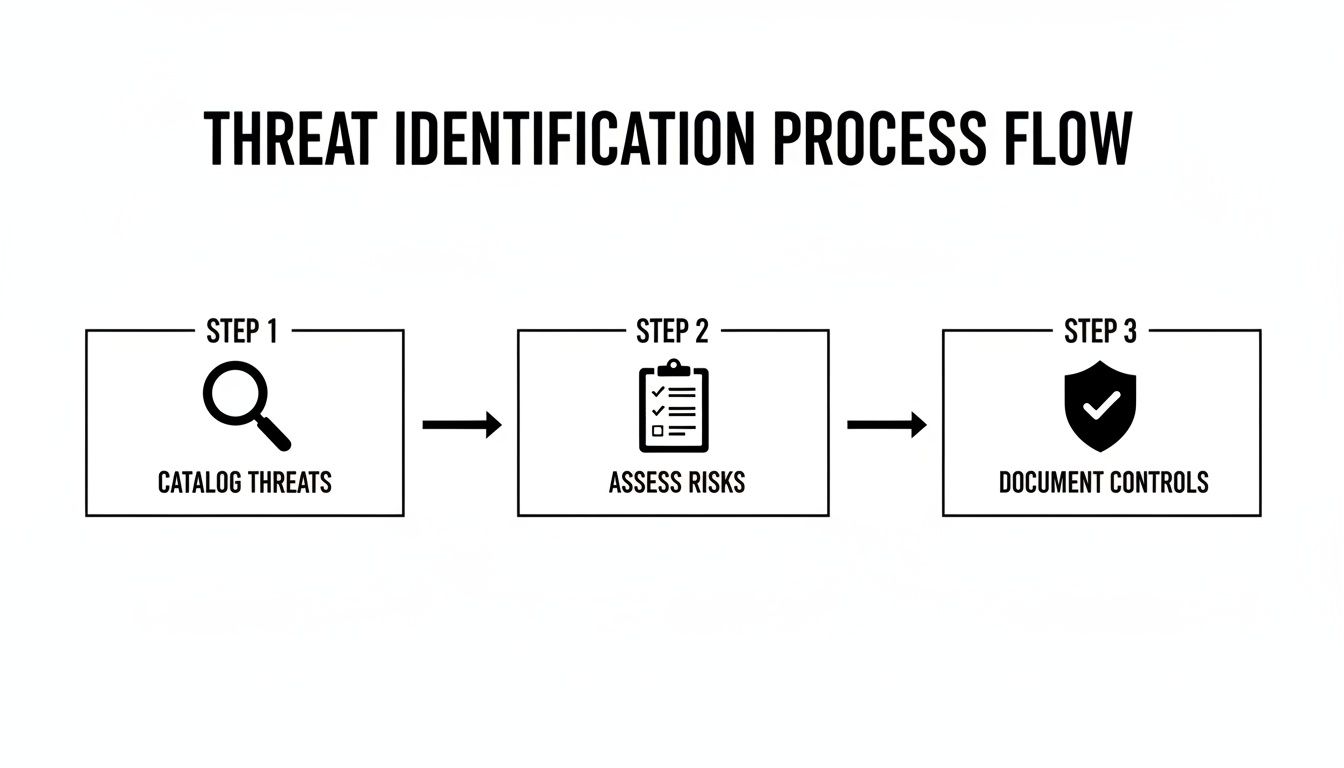
The key takeaway here? Documenting your controls is just as critical as finding threats. Your defenses provide the context you need to accurately assess just how vulnerable you really are.
A Simple Method for Scoring Your Risks
To properly analyze risk, you need to look at two key factors for every threat and vulnerability pair you've identified:
- Likelihood: How probable is it that this threat will actually happen and exploit this specific vulnerability?
- Impact: If it does happen, what’s the damage? Think about your operations, finances, reputation, and, most importantly, client safety and trust.
By assigning a simple score to each of these—say, on a scale of 1 (Low) to 5 (High)—you can calculate an overall risk score. A quick multiplication (Likelihood x Impact) gives you a number that instantly tells you where to focus your resources.
For example, an unpatched server vulnerable to a known ransomware strain might have a Likelihood of 4 (Likely) and an Impact of 5 (Critical). That gives it a high-priority risk score of 20. On the other hand, a power surge in an office with good surge protectors might have a Likelihood of 2 (Unlikely) and an Impact of 2 (Minor), for a low-priority risk score of 4.
This simple math transforms vague worries into objective data points, forming the backbone of your remediation strategy.
To make this even clearer, here is a simple matrix you can use to quantify and prioritize risks based on their calculated scores.
Sample Risk Scoring Matrix
| Impact Level | Likelihood Level | Risk Score (Impact x Likelihood) | Priority Level |
|---|---|---|---|
| Minor (1-2) | Unlikely (1-2) | 1-4 | Low |
| Moderate (3) | Possible (3) | 5-12 | Medium |
| Major (4) | Likely (4) | 15-16 | High |
| Critical (5) | Very Likely (5) | 20-25 | Critical |
This scoring matrix gives you a visual guide to translate your scores into clear action priorities. A score of 20 is an urgent "fix now" problem, while a score of 4 can be addressed later.
Building Your Risk Register
All this critical analysis needs to be meticulously documented in a Risk Register. This isn't just internal paperwork; it's a foundational document you'll show HIPAA auditors to prove your due diligence. Think of it as the central nervous system of your entire security program.
A well-built risk register proves you have a formal, repeatable process for identifying, analyzing, and managing cyber threats.
At a minimum, your register should include these columns for each identified risk:
- Risk ID: A unique number for easy tracking.
- Threat & Vulnerability: A clear description (e.g., "Ransomware infection due to lack of staff phishing training").
- Existing Controls: What protections do you already have in place?
- Likelihood Score: Your assigned probability rating.
- Impact Score: Your assigned damage rating.
- Overall Risk Score: The calculated score (Likelihood x Impact).
- Priority Level: High, Medium, or Low, based on the final score.
Your Risk Register is the definitive record of your HIPAA security risk assessment findings. It's the evidence that proves you didn't just go through the motions—it shows you understood the findings and are prepared to act on them.
This documentation is what separates a "check-the-box" exercise from a genuine, defensible security strategy. One of the first things an auditor will ask is, "Show me your risk analysis." Your Risk Register is the answer. By analyzing and documenting risks this way, you create the clear, prioritized roadmap you need for the final and most important phase: remediation.
Creating Your Remediation and Monitoring Plan

Finishing your risk register isn't the end of the road. Honestly, it’s just the beginning. The whole point of a HIPAA security risk assessment is to drive real, tangible action that actually makes you more secure. This is where you turn that prioritized list of findings into a Corrective Action Plan (CAP).
For a law firm in Winter Springs or an accounting firm in Orlando that serves healthcare clients, this CAP is your documented promise to fix cybersecurity holes. It's the exact proof an auditor will demand to see that you took the assessment seriously and are actively protecting client data.
From Risk Score to Actionable Task
Your remediation plan needs to directly tackle the high- and critical-priority items you identified. Each task has to be crystal clear, measurable, and assigned to a specific person with a firm deadline. Vague goals are the enemy of effective security.
Let's walk through a common, high-risk scenario we see all the time. Your assessment uncovers that staff are reusing weak passwords and there's no robust access control beyond a simple username and password.
- Finding: No multi-factor authentication (MFA) in place for remote access or cloud apps holding ePHI.
- Risk Score: Critical (25).
- Remediation Task: Implement and enforce MFA for all staff.
- Owner: IT Manager / Managed IT Partner.
- Timeline: 30 days for implementation, 45 days for full staff adoption and training.
This level of detail turns a finding into a real project. It’s no longer just a problem; it's a solution with a deadline and a clear owner. You can learn more about how vital this one control is by exploring the role of MFA in strengthening identity and access management.
Building Your Corrective Action Plan
Your CAP needs to be a formal document. It doesn't have to be overly complex, but it must be clear. This becomes a cornerstone of your HIPAA compliance documentation.
Here's how to structure it effectively:
- Prioritize by Score: Hit your critical-risk items first, then high, then medium. Low-risk items can be formally documented as "risk accepted" or scheduled for later if resources are tight.
- Define Specific Actions: Ditch vague goals like "improve password security." Get specific with actions like "Implement a 12-character minimum password policy and deploy a password manager for all users."
- Assign Ownership and Deadlines: Every single task needs a name and a date next to it. This creates accountability and stops things from falling through the cracks.
- Allocate Resources: Does a task need a budget for new software? Does it require scheduling staff for training? Document these requirements upfront so there are no surprises.
Critically, your remediation plan must also include detailed secure data destruction policies for any device that holds data. Tossing an old server or an ex-employee's laptop without certified data wiping is a massive, often-overlooked vulnerability that can lead to a ruinously expensive breach.
Your HIPAA Security Risk Assessment is not a one-time project. It’s the beginning of a continuous cycle of assessment, remediation, and monitoring. The goal is to make cybersecurity a part of your business’s DNA, not just an annual event.
Shifting to Continuous Monitoring and Vigilance
The biggest mistake a Central Florida business can make is to file the assessment away and forget about it for a year. Cyber threats don't work on an annual schedule, and neither should your security posture.
Your risk assessment must be a living document, revisited annually at a minimum, and anytime a significant change occurs in your business.
Significant changes that should immediately trigger a reassessment include:
- Switching to a new EHR or case management system.
- Opening a new office in a nearby city like Kissimmee or Sanford.
- Migrating your data to a new cloud provider.
- A major shift to remote work for your staff.
This is exactly where having a dedicated managed security partner becomes a game-changer. Instead of just a periodic check-up, a partner like Cyber Command provides 24/7/365 continuous monitoring. We integrate the principles of your risk assessment into our daily operations, turning a yearly snapshot into a constant, vigilant security function that actively hunts for threats and manages vulnerabilities in real time.
Even with a clear roadmap, the HIPAA security risk assessment can feel like a maze. For businesses in Orlando, Winter Springs, and across Central Florida, we find owners often have the same handful of questions. Getting straight answers is the first step toward building a security program you can actually feel confident in.
Let's tackle the most common questions we hear every day. Our goal is to give you straightforward, practical answers that skip the jargon and give you clarity right now.
How Often Do I Need a HIPAA Security Risk Assessment?
HIPAA’s official rulebook uses the dangerously vague term "periodic" for assessments. In a world of constant cyber threats and intense regulatory scrutiny, that's not a word you want to build your security on. The clear industry standard and best practice is this: you need to conduct a comprehensive SRA at least once per year.
But thinking of it as just an annual chore is a huge mistake. A risk assessment has to be a living, breathing process. You're also required to perform one after any significant change in your business.
What counts as a "significant change"? Think of things like:
- Switching to a new Electronic Health Record (EHR) or legal practice management system.
- Migrating your client data to a different cloud provider.
- Opening a new office, whether it's in Sanford or Kissimmee.
- A major shift in how your team works, like moving to a remote or hybrid model.
Think of the annual SRA as your in-depth annual physical. The updates after major changes are the necessary follow-up appointments. For genuine security fitness, we recommend supplementing this with quarterly vulnerability scans. This ensures your defenses are always current, not just a snapshot from months ago.
Can We Do the Risk Assessment Ourselves?
Technically, yes, you can conduct a HIPAA security risk assessment in-house. But honestly, for most businesses, it's an incredibly risky path. This isn't just an IT checklist; it demands a deep, specialized understanding of both complex cybersecurity principles and the fine print of HIPAA regulations.
For a small dental practice, mid-sized law firm, or accounting business, the odds of missing a critical vulnerability or misinterpreting a specific rule are sky-high. An incomplete or flawed assessment creates a false sense of security and simply won't hold up under the scrutiny of an official OCR audit.
Partnering with a specialized cybersecurity provider like us brings a few immediate advantages:
- Objectivity: An outside partner gives you an unbiased, unvarnished look at your security posture, free from internal politics or the "we've always done it this way" blind spots.
- Expertise: You get access to certified professionals who live and breathe security and compliance. We come armed with advanced tools and a ton of experience from working with hundreds of other businesses.
- Efficiency: A dedicated team can get the assessment done far more quickly and thoroughly than an internal employee who is already juggling ten other responsibilities. In the long run, this saves you both time and money.
Ultimately, outsourcing provides true peace of mind that your assessment is comprehensive, defensible, and will actually make your business safer.
What’s the Biggest Mistake Businesses Make with the SRA?
The single most common and costly mistake we see is treating the risk assessment as a "check-the-box" exercise. It's shocking how many businesses go through the motions, get a final report, and then promptly file it away in a drawer to gather dust.
This completely misses the point. The entire purpose of the assessment is to generate a prioritized, actionable remediation plan to fix the cybersecurity gaps you just paid to uncover.
Your final report isn't the finish line; it’s the starting block. An auditor's first question will be, "Show me your risk assessment." Their very next question will be, "Now show me your corrective action plan and the proof that you're working on it."
An assessment without a documented, active follow-up plan is effectively worthless in the eyes of regulators and provides zero real-world security benefits.
Do These Rules Apply the Same to a Small Practice?
Yes, absolutely. This is a critical point of confusion we clear up for small business owners all the time. HIPAA's Security Rule applies to all "Covered Entities" and their "Business Associates," regardless of size. This includes medical practices, law firms handling PHI, and accounting businesses that see patient data.
While the rule has some room for scalability—meaning a small clinic doesn't need the exact same massive security infrastructure as a large hospital system—the core requirements are non-negotiable for everyone. The mandate to conduct a thorough and accurate risk assessment is universal.
In reality, cybercriminals often view small businesses as softer targets precisely because they assume they have fewer security resources. OCR fines are not scaled down for small businesses, and a major data breach can be an extinction-level event for a small medical spa or law firm in Central Florida. A proper HIPAA security risk assessment isn't just about compliance; it's your single most effective cyber defense.
Navigating the complexities of a HIPAA Security Risk Assessment can be a significant challenge, but you don't have to go it alone. Cyber Command provides the expertise and continuous oversight to ensure your Central Florida business is not only compliant but also resilient against modern cyber threats. We turn the assessment from a one-time task into an ongoing, vigilant security function. Contact us today to learn how our managed IT and cybersecurity services can protect your practice.
