
Orlando Managed Service Provider: Buyer’s Guide 2026


You're probably staring at three MSP quotes right now, all of them saying they “proactively protect” your business, all of them claiming to be local, and none of them making it clear who owns what when your internal team is already stretched thin. That's the trap in Orlando right now. The market is crowded, the sales language sounds similar, and the differences only show up after the contract is signed, when an outage, a failed backup, or a compliance request exposes what the provider can't prove.
Table of Contents
- What an Orlando Managed Service Provider Actually Does for Your Business
- Understanding Orlando MSP Pricing Models and What You Should Expect to Pay
- Your MSP Evaluation Checklist and the KPIs That Separate Quality Providers
- Co-Managed vs Fully Managed IT and How to Define the Right Scope
- Compliance Evidence and Cybersecurity Requirements for Florida Verticals
- Your 90-Day Onboarding Timeline and Next Steps to Get Started
What an Orlando Managed Service Provider Actually Does for Your Business
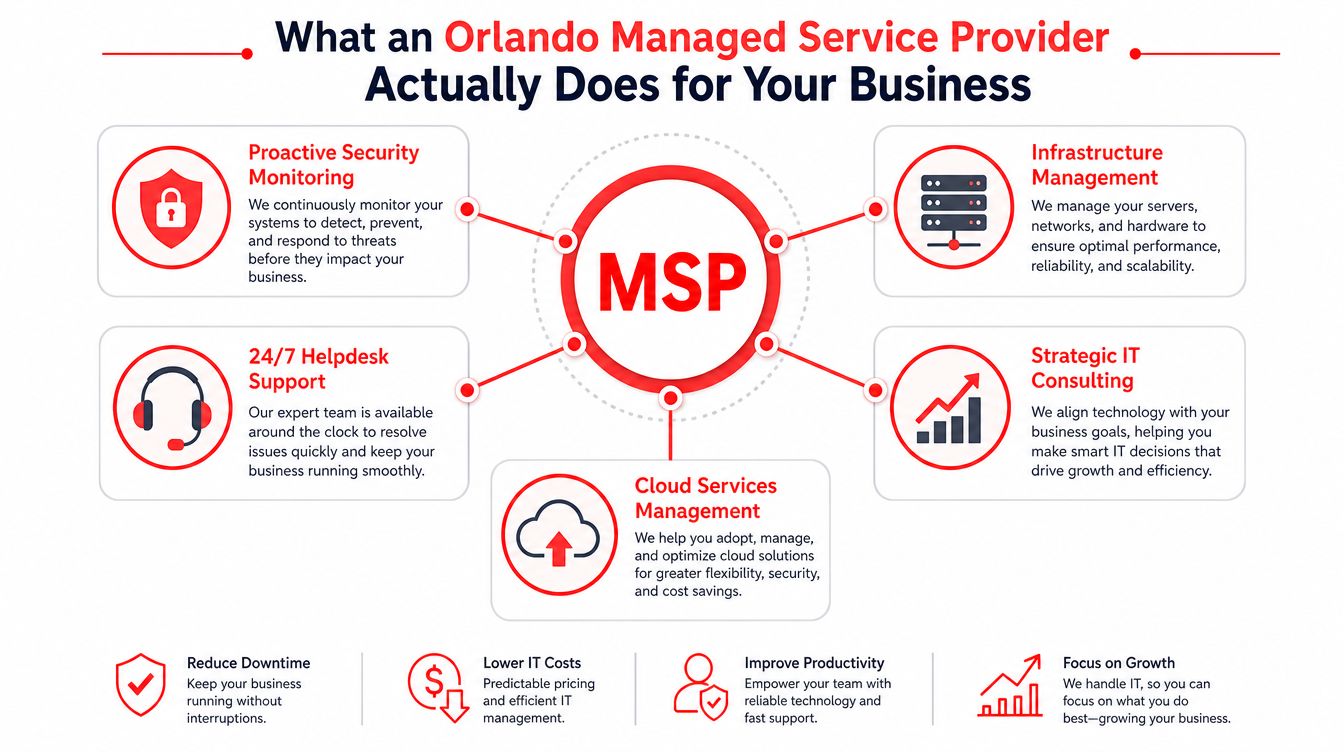
A lot of owners in Central Florida think they're buying “IT support.” That's too vague. A real Orlando managed service provider is closer to an outsourced operations layer for your technology, one that keeps systems monitored, patched, backed up, and escalated before the business feels the damage.
One of the clearest ways to see it is to compare the MSP model with break-fix support. Break-fix waits for something to fail, then charges you to repair it. Managed services are built around continuous coverage, security, and documented response, which is why the modern model fits businesses that need uptime and predictability instead of surprise invoices. Orlando pricing data shows that monthly managed support usually lands in recurring bands, not one-off rescue work, which reinforces that this is an ongoing operating function, not an emergency hotline.
The job is broader than helpdesk tickets
The best providers don't just answer phones. They manage monitoring, patching, endpoint protection, backup validation, vendor coordination, and escalation so your staff isn't wasting time chasing five different technology vendors. That matters because the core loss isn't the ticket itself, it's the interruption to finance, sales, patient intake, job scheduling, or legal work while your team waits for someone to own the problem.
Practical rule: if the provider can't tell you who owns monitoring, patching, backups, and after-hours response, you're still running break-fix with a monthly bill attached.
Local presence matters too. In Orlando and Winter Springs, you're not just buying remote support, you're buying the ability to get someone on-site when the issue can't be solved through a headset. You also want a partner that understands how Florida businesses think about continuity, security, and service documentation, because those conversations get very different once your business handles regulated data or runs multiple locations.
What you should expect from the relationship
The provider should also help with technology planning, not just maintenance. That means roadmaps, vendor management, and a clean escalation path when software, cloud services, and devices all collide at once. If you're evaluating scope, a useful reference point is this breakdown of what services are typically included in managed IT, because the important question isn't whether an MSP says it “does everything.” The important question is whether those services are written into the contract and measured in practice.
Understanding Orlando MSP Pricing Models and What You Should Expect to Pay
Orlando buyers get burned when they compare monthly fees without comparing scope. A low number looks good until you find out backups are extra, after-hours support is excluded, security is billed separately, and every project turns into a change order. Read pricing as an operating model, not a headline.
The Orlando market data puts recurring managed support into three broad bands. Basic monitoring and remote help desk commonly sit in the $1,500 to $3,000 per month range. Fully managed networks with security and backup usually fall in the $3,000 to $7,000 per month range. Ad hoc projects and after-hours emergencies are commonly billed at $120 to $200 per hour. That spread tells you something important. Most Orlando MSPs are built to sell predictable monthly support, while premium labor is reserved for exceptions.
Read the quote by scope, not by label
The words “managed IT” do not tell you much on their own. What matters is what is included in the base fee. A mature provider should clearly define license management, patching, backup validation, security monitoring, device support, and reporting. If those items are missing, the quote is not cheap, it is incomplete.
Hard truth: the cheapest proposal is often the one that leaves the most expensive work outside the contract.
The pricing model also matters operationally. Per-user pricing can work well for staff-heavy service businesses. Per-device pricing can be better when equipment count matters more than headcount. Flat-rate agreements still need to show where exceptions live, because hidden fees usually show up in after-hours support, on-site visits, onboarding, project work, and vendor escalations. If you want a cleaner budget, use this no-surprise IT pricing guide for Orlando as a reference point for how transparent agreements should be structured.
Orlando MSP Pricing Tiers at a Glance
| Service Tier | Monthly Cost Range | What's Included | Best For |
|---|---|---|---|
| Basic monitoring and remote help desk | $1,500 to $3,000 | Monitoring, remote support, limited response coverage | Smaller teams that need dependable baseline support |
| Fully managed network with security and backup | $3,000 to $7,000 | Broader management, security, backup validation, continuous coverage | SMBs that need day-to-day IT ownership |
| Ad hoc projects and after-hours emergencies | $120 to $200 per hour | Emergency work, special projects, off-hours escalation | Exceptions, migrations, urgent remediation |
Your MSP Evaluation Checklist and the KPIs That Separate Quality Providers
Orlando has a deep provider pool, so the core challenge is not finding an MSP. It is separating polished sales talk from an operation that can keep your business running when users start opening tickets and the pressure rises. The market is crowded enough that you should expect significant differences in process maturity, not just personality or price.
Start with the reporting. A serious provider should be able to show monthly trends for uptime, MTTA/MTTR, first-contact resolution, SLA compliance, update success rate, backup success rate, and security-incident frequency. Those measures tell you whether the provider is preventing outages, resolving issues quickly, and catching degradation before users feel it. If a provider only wants to talk about ticket volume or response speed, that is not enough.
MTTR definition and resolution tracking guidance should be part of the conversation, because response time alone does not tell you whether the work is getting finished.
Ask for proof, not promises
Ask for a sample report before you sign anything. Do not accept “we'll send that after onboarding.” Ask how tickets are segmented by severity, how backups are tested, how failed updates are tracked, and how repeat incidents are handled. A provider that cannot show this is usually relying on staff memory instead of process.
- Verify response targets: Ask for the SLA language that defines critical, high, and routine incidents.
- Check resolution tracking: Confirm that the provider measures MTTR, not just first response.
- Demand backup evidence: Require backup success reporting and recovery validation, not just backup setup.
- Review escalation logic: Make sure the provider explains who takes over when the first technician cannot solve it.
- Ask for security handling details: Verify how alerts are triaged and who is responsible for follow-up.
A quick response is nice. A fast, correct resolution is what keeps your business open.
I would also push for documentation on live human coverage and on-site response inside the Orlando metro, because response promises are easy to say and hard to enforce. Ask for documented SLA compliance and a sustained uptime target that is clearly defined in the contract, not buried in a sales deck. Buyers get burned when the contract sounds strong but the reporting never proves it.
What disqualifies a provider fast
Watch for vague answers on backups, unclear ownership of patching, weak reporting, and any reluctance to talk about repeat incidents. Those are signs the provider is measuring activity, not outcomes. If they cannot explain how they prevent the same problem from coming back, they are not mature enough to manage your environment.
Co-Managed vs Fully Managed IT and How to Define the Right Scope
A lot of Orlando businesses already have someone handling internal IT, even if that person is buried under too many roles. That changes the buying decision completely. You're not choosing whether to have IT support, you're choosing where the boundary sits between your staff and the provider.
Co-managed works when your team keeps control
In a co-managed model, your internal IT lead owns business context, user relationships, and strategic priorities. The MSP handles monitoring, patching, security response, backup oversight, and after-hours coverage. That structure works well when you already have someone who knows the environment but needs extra hands, deeper coverage, or a stronger security layer.
Fully managed works when you want one owner
In a fully managed model, the MSP becomes the operating owner for the whole IT function. That's cleaner when your internal team is too small, too reactive, or too specialized to cover the full stack. It also reduces handoffs, which is useful when a business has multiple locations or a regulated workflow that can't tolerate confusion about who closes the loop.
Define the boundary in writing before the first ticket ever opens.
That means spelling out ownership by function, not by vague phrases. Who patches endpoints? Who validates backups? Who handles user onboarding? Who owns the cloud stack? Who gets called after hours? If two teams can answer the same ticket, neither one really owns it. That's where finger-pointing starts and productivity dies.
A good engagement document should also define escalation paths and reporting lines. Internal staff should not be waiting on an MSP to ask basic questions, and the MSP should not be guessing whether a change needs approval. If you're a multi-location business or a regulated practice, the goal is coordination, not duplication. A clean co-managed setup prevents duplicate spend and gives you a way to keep strategic knowledge in-house while outsourcing the heavy operational lift.
Compliance Evidence and Cybersecurity Requirements for Florida Verticals
Generic cybersecurity language is where buyers get fooled. “We protect your data” means nothing unless the provider can show how it proves recovery, logs incidents, and documents controls for the specific requirements of your industry. For Orlando businesses that live under compliance pressure, evidence matters more than slogans.
A useful benchmark is the larger managed services market itself. The U.S. market is projected to grow from $69.55 billion in 2025 to $116.25 billion by 2030, a projected gain of $46.70 billion over five years (market projection). In the same analysis, 44.9% of providers offer disaster recovery services and 29.2% prioritize cybersecurity, which shows how far the category has moved toward continuity and risk reduction. Buyers should assume the bar is no longer basic helpdesk support.
Demand evidence that auditors and insurers can use
For regulated environments, ask for a sample compliance report. Ask what backup recovery testing looks like, how often it's documented, and how the provider proves a restore works. Ask what records are available for audit prep, offboarding hygiene, and incident handling. If the answer is only a verbal reassurance, keep walking.
Healthcare practices need HIPAA-aligned controls. Financial firms need documentation that supports audit readiness. Law firms need evidence that reflects confidentiality and retention obligations. Contractors tied to aerospace-adjacent work need stronger process discipline around security frameworks and vendor oversight.
Best question to ask: “Show me the report, the test result, and the person responsible for closing the gap.”
The contrarian point is simple. A cheaper MSP can cost more if it can't prove recoverability, if it buries service exceptions, or if it reports security activity without usable evidence. One Orlando buyer guide pushes exactly this kind of diligence, asking buyers to verify backup recovery testing and documentation for regulated environments. That's the right instinct. If the provider can't show you measurable resilience, the pricing conversation is already incomplete.
Your 90-Day Onboarding Timeline and Next Steps to Get Started
The first 90 days tell you whether the provider is disciplined or just good at sales. A clean onboarding process should feel structured, visible, and a little relentless. If it feels improvised, the rest of the relationship probably will too.
Month one is discovery and baseline setting
Week one should focus on discovery, documentation, and a system audit. The provider should map users, devices, critical applications, backup dependencies, and recurring pain points. By the end of that phase, you should know what's being monitored, what's missing, and what risks were sitting in plain sight.
Weeks two through four should shift into tool deployment and training. Monitoring agents go in, security controls get tightened, access is reviewed, and backup systems are validated. Your staff should know how to open tickets, what counts as an emergency, and who responds after hours.
Month two should show early operational gains
The second month is where the provider should establish performance baselines and begin optimization. That means cleaning up noisy alerts, fixing weak points, and reducing repeat issues that were hiding in the old environment. You want proof that the MSP isn't just collecting data, it's using it.
Month three should end with a real review
By month three, the provider should deliver a business review with trends, open risks, and a clear plan for the next quarter. This is the moment to judge whether they're improving uptime, response consistency, and ticket quality. If they can't discuss the metrics with specifics, they're not managing, they're observing.
If you're vetting a provider now, bring your current contracts, a list of critical systems, your compliance obligations, and a summary of the last six months of recurring issues. That gives the MSP enough context to tell you whether a co-managed setup or a fully managed model makes more sense. Cyber Command, LLC provides fully managed and co-managed IT, 24/7 live helpdesk, security monitoring, backup and recovery, and compliance support for Orlando and Winter Springs businesses, so it's a practical option to include in that conversation if you want a local partner that works from a clear scope.
If you want an Orlando MSP conversation that starts with scope, evidence, and accountability instead of buzzwords, talk with Cyber Command, LLC. They support fully managed and co-managed IT, cybersecurity, and 24/7 helpdesk operations for Central Florida businesses, and you can review their approach directly at Cyber Command, LLC.