
Data Backup and Recovery in Orlando FL Guide

A lot of Orlando owners don't worry about backup until the day they can't open QuickBooks, the shared drive won't mount, or a storm knocks power around just long enough to corrupt something important. The pattern is common. Operations stop first, then the questions start. What was backed up, where is it, how long will restore take, and who's responsible for getting the business moving again?
That's why Data Backup and Recovery in Orlando FL shouldn't sit in the “IT maintenance” bucket. It belongs in the same category as payroll continuity, client communication, and revenue protection. In Central Florida, weather risk, ransomware exposure, and industry compliance all collide with one practical issue: how fast you can restore the systems your team uses.
Table of Contents
- The Threat Is Local An Introduction to Data Risk in Orlando
- Why Orlando Businesses Need a Resilient Recovery Strategy
- Defining Success Your Recovery Time and Point Objectives
- Comparing Backup and Recovery Models for Your Business
- Meeting Compliance Needs in Orlando's Key Industries
- How to Choose a Data Recovery Partner in Orlando
- Conclusion Building Your Business Resilience Plan
The Threat Is Local An Introduction to Data Risk in Orlando
A summer afternoon storm rolls across Orlando. Power flickers. Your office internet comes back, but the server doesn't. Or it's Monday morning, your front desk logs in, and a ransom note replaces access to scheduling, documents, and billing. In both situations, the first mistake many companies make is assuming backup equals recovery.
It doesn't.

A critical question is how long restoration takes, how much data you lose, and whether the restored environment is clean, complete, and usable. A backup that exists but hasn't been tested is just a theory. A cloud copy that takes too long to pull back down may protect the file, but it may still fail the business.
According to Unitrends' 2025 backup and recovery survey, only about 40% of organizations could recover lost public-cloud data within hours, while around 30% expected it to take days. For an Orlando business, that gap can turn a manageable disruption into cancelled appointments, missed deadlines, delayed payments, and a lot of client frustration.
What failure looks like in practice
A few examples come up again and again in real environments:
- Operations stop before leadership gets a clear answer. Staff can't work, but nobody knows whether restore will take minutes, hours, or most of the week.
- Critical apps depend on more than files. Restoring a folder isn't the same as restoring a line-of-business database, permissions, and application dependencies.
- Cyber incidents change the rules. If ransomware touched the environment, you can't just restore blindly. You need to know the backup is usable and not contaminated.
Backups protect data. Recovery protects the business.
Why Orlando changes the discussion
Local context matters. Orlando businesses often run lean teams, depend on shared systems, and serve customers who expect immediate response. Medical practices can't lose access to patient schedules. Law offices can't stall document access during active matters. Multi-site service companies can't send crews out blind.
That's why a practical backup strategy starts with a business question, not a storage question. If your systems disappear this afternoon, how long can you afford to operate without them?
Why Orlando Businesses Need a Resilient Recovery Strategy
A resilient recovery plan isn't a luxury item for large enterprises. It's basic operational protection for any Orlando company that relies on digital systems to take payments, deliver service, communicate with customers, or meet compliance duties.
Three risks drive the need for it locally: weather, cyberattacks, and ordinary mistakes.
Weather hits faster than most plans account for
Central Florida firms don't need a direct hurricane strike to have a bad day. Severe thunderstorms, power instability, and localized flooding are enough to knock systems sideways, especially if everything depends on a single site or a cloud restore that takes too long.
A cited Central Florida weather-related analysis states that industrial firms in the region average 4.2 hours of downtime per storm event due to recovery delays. That's discussed in this Orlando backup and disaster recovery overview. Even if your company isn't industrial, the lesson applies. If the business needs immediate access to files, scheduling, ERP, or dispatch data, cloud-only recovery can become a bottleneck when speed matters most.
Cyber risk makes backup part of security
Ransomware recovery isn't only about having copies of data. It's about having clean copies, isolated copies, and a process for restoring without rebuilding chaos. Good backup architecture limits damage. Bad backup architecture preserves the mess somewhere else.
That's also why a backup discussion should include incident response. If your team hasn't thought through isolation, restore order, and communication, this practical guide on how to recover from a ransomware attack is worth reviewing before you're in the middle of one.
Practical rule: If a provider talks more about storage size than restore process, ask harder questions.
Human error is still the daily threat
Not every outage starts with weather or a criminal. Files get deleted. Shared folders get overwritten. A sync job removes the wrong version. An employee saves data in the wrong place and assumes “the cloud” handles the rest. Small incidents happen more often than dramatic ones, and they still cost time and money.
That's where layered design matters most. Many businesses benefit from combining local recovery speed with off-site resilience. If you're comparing service structures, this overview of reliable corporate data backups is a useful outside reference because it frames backup as a continuity function, not just a storage expense.
What a resilient plan actually changes
A solid recovery strategy helps owners control four outcomes:
| Business issue | Weak backup approach | Resilient recovery approach |
|---|---|---|
| Daily disruption | Restore process is unclear | Restore steps are documented |
| Storm outage | Recovery depends on one path | Recovery has local and off-site options |
| Ransomware event | Backups may be affected or unverified | Copies are protected and recovery is planned |
| Cost control | Downtime costs are discovered mid-incident | Downtime tolerance is defined in advance |
For Orlando businesses, that last point matters. The actual ROI of backup isn't the backup itself. It's the downtime you avoid, the client trust you keep, and the decisions you don't have to make under pressure.
Defining Success Your Recovery Time and Point Objectives
Most owners hear technical terms like RTO and RPO and tune out. That's a mistake, because these two terms determine whether your backup plan matches your actual business.
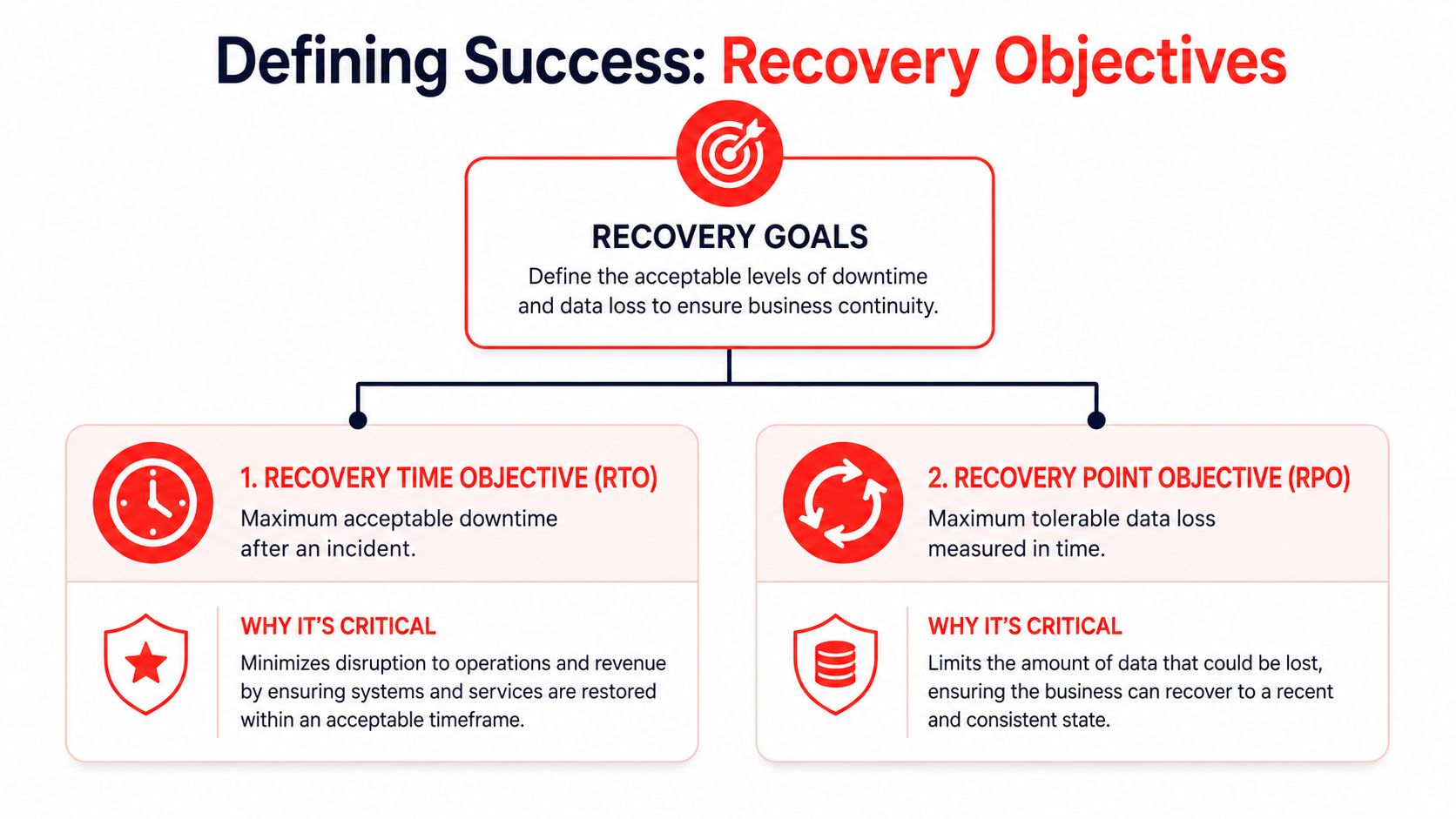
Recovery Time Objective (RTO) is the maximum downtime you can tolerate after an incident.
Recovery Point Objective (RPO) is the maximum data loss you can tolerate, measured in time.
If those targets aren't defined first, the rest of the backup conversation turns into guesswork.
Two Orlando examples that make this simple
Take a law firm. If attorneys lose access to case files, document systems, email history, and calendars, the office may grind to a halt almost immediately. That business usually needs a short RTO. It may also need a tight RPO because recreated legal work is expensive and sometimes impossible.
Now take a small marketing agency. It still needs backup, but it may tolerate a longer downtime window for some systems, and it may accept a bit more data loss in non-critical creative folders if that keeps costs reasonable.
Neither answer is automatically right. The point is that the business decides what “acceptable” means.
Start with business pain, not technology
A useful way to define recovery goals is to ask these questions in order:
What system stops revenue?
If it goes down, which app or dataset immediately disrupts billing, appointments, service delivery, or client commitments?What data can't be recreated?
Some files are inconvenient to lose. Others carry legal, medical, financial, or contractual consequences.What must come back first?
Restore priority matters. Email, shared files, line-of-business applications, and phones don't all have equal weight.How long can each department work manually?
Front desk, finance, operations, and leadership often have very different thresholds.
Don't ask, “What backup package should we buy?” Ask, “How much downtime and data loss can each core process survive?”
A simple planning table
| Area | Questions to answer |
|---|---|
| Revenue | What interruption immediately delays money coming in? |
| Client service | What outage damages trust fastest? |
| Compliance | What records must stay available and restorable? |
| Internal workflow | What can staff work around temporarily? |
These targets give your IT team or provider something concrete to engineer against. Without them, it's easy to overpay for the wrong protection or underprotect the systems that matter most.
Comparing Backup and Recovery Models for Your Business
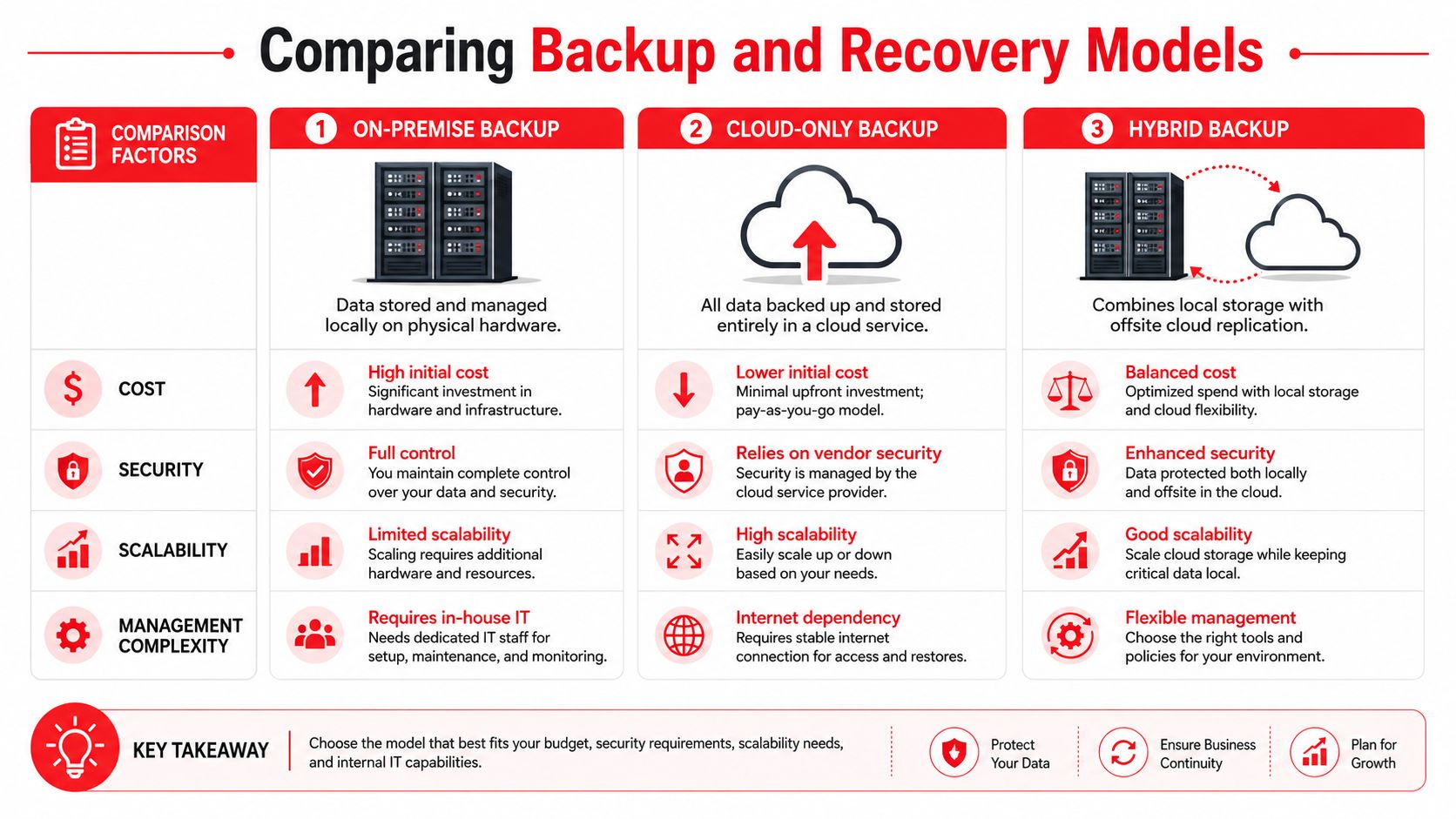
Most Orlando businesses end up choosing among three models: on-premise, cloud-only, and hybrid. Each has a place. The right choice depends on how fast you need to restore, how much local risk you carry, and how much operational complexity you're willing to manage.
On-premise backup
With on-premise backup, data is stored locally on hardware you control. That usually means faster restores for deleted files, virtual servers, and local application data.
The trade-off is obvious. If the office has a fire, flood issue, major hardware failure, or theft event, your backup may sit in the same blast radius as production systems.
Works well when:
- You need fast local restores
- You have stable internal IT oversight
- Most workloads live on-site
Breaks down when:
- The office itself becomes unavailable
- Backup hardware isn't monitored closely
- Testing gets skipped
Cloud-only backup
Cloud-only models reduce dependency on local hardware and provide off-site protection by default. That's attractive for small teams that don't want to maintain backup infrastructure.
The catch is recovery speed. Full restores can be slower than many owners expect, especially for larger environments or internet-dependent recovery during a broader disruption. For businesses evaluating cloud architecture choices, CloudConsultingFirms' Azure guide gives useful context on how cloud environments are structured, which helps when backup planning has to align with broader infrastructure decisions.
Hybrid backup
Hybrid backup combines local backup for fast recovery with off-site replication for disaster resilience. For many Orlando companies, this is the most practical model because it addresses both common incidents and site-wide disruption.
A hybrid approach usually makes sense when the business can't wait on a full cloud restore but also can't afford to keep every copy in one building.
A fast local restore solves today's outage. An off-site copy protects the business if the building itself is the problem.
Side-by-side view
| Model | Main advantage | Main limitation | Best fit |
|---|---|---|---|
| On-premise | Fast local recovery | Weak against site-wide disaster | Single-site operations with strong internal control |
| Cloud-only | Strong off-site resilience | Slower full recovery in some cases | Small environments with higher downtime tolerance |
| Hybrid | Balances speed and resilience | More planning and management | Most SMBs with uptime requirements |
For small and midsize companies that want managed help with both backup and ongoing protection, Cyber Command, LLC offers backup and recovery as part of its Orlando managed IT and cloud services. That kind of arrangement can make sense when the business wants one team responsible for backup monitoring, recovery planning, and security coordination instead of splitting those duties across multiple parties.
If you're also exploring architecture options for a smaller environment, this primer on cloud-based backup solutions for small business is a good next read.
Meeting Compliance Needs in Orlando's Key Industries
Compliance changes the backup conversation because “we have copies somewhere” isn't enough. Regulated and confidentiality-heavy businesses need backup systems that preserve access, retention, integrity, and audit readiness.
In Orlando, that issue shows up most clearly in medical and professional service firms.
Non-dental medical practices need more than generic healthcare backup
Plastic surgeons, medspas, orthodontic groups, and similar private practices often get sold broad “healthcare backup” packages that don't match their operational reality. They need scheduling continuity, patient record availability, secure retention, controlled access, and a recovery method that supports clinical work without long delays.
A 2025 report found that 68% of non-dental medical practices in Central Florida face backup failures during audits, often due to generic cloud strategies that lack the on-site redundancy and specific retention approach these environments need. That finding is summarized in this Central Florida medical backup discussion.
That's a serious warning for private practices. If an audit tests recovery and the restore process fails, the problem isn't theoretical anymore.
Professional services face a different kind of exposure
Law firms, accounting firms, architecture offices, and engineering firms may not live under the same medical rules, but they still carry real obligations. Client confidentiality, document retention, version control, and matter-based access all shape what a backup system has to do.
For these firms, the practical risks usually look like this:
- Confidential files spread across too many locations
- Email and document systems with no tested restore order
- Retention handled informally instead of by policy
- No clean separation between archived data and active work
Compliance requires process, not just storage
The businesses that handle this well treat backup as part of governance. They document what is protected, who can access it, how it's encrypted, how restores are tested, and what evidence they can produce when a client, auditor, or insurer asks.
If your company is moving toward broader trust and control documentation, this guide to a faster SOC 2 audit is a helpful reference because it reinforces the need for documented controls rather than informal assumptions.
Regulators and clients don't care that a backup job said “successful” if nobody can prove the data restores correctly.
For Orlando firms in regulated or sensitive industries, the right backup design is tied to workflow. That means planning around the actual way your practice or office operates, not buying a generic compliance label and hoping it fits.
How to Choose a Data Recovery Partner in Orlando
Choosing a backup provider shouldn't feel like buying storage. You're selecting the team that may be responsible for getting your business back online during a bad day. That requires more scrutiny than most proposals receive.
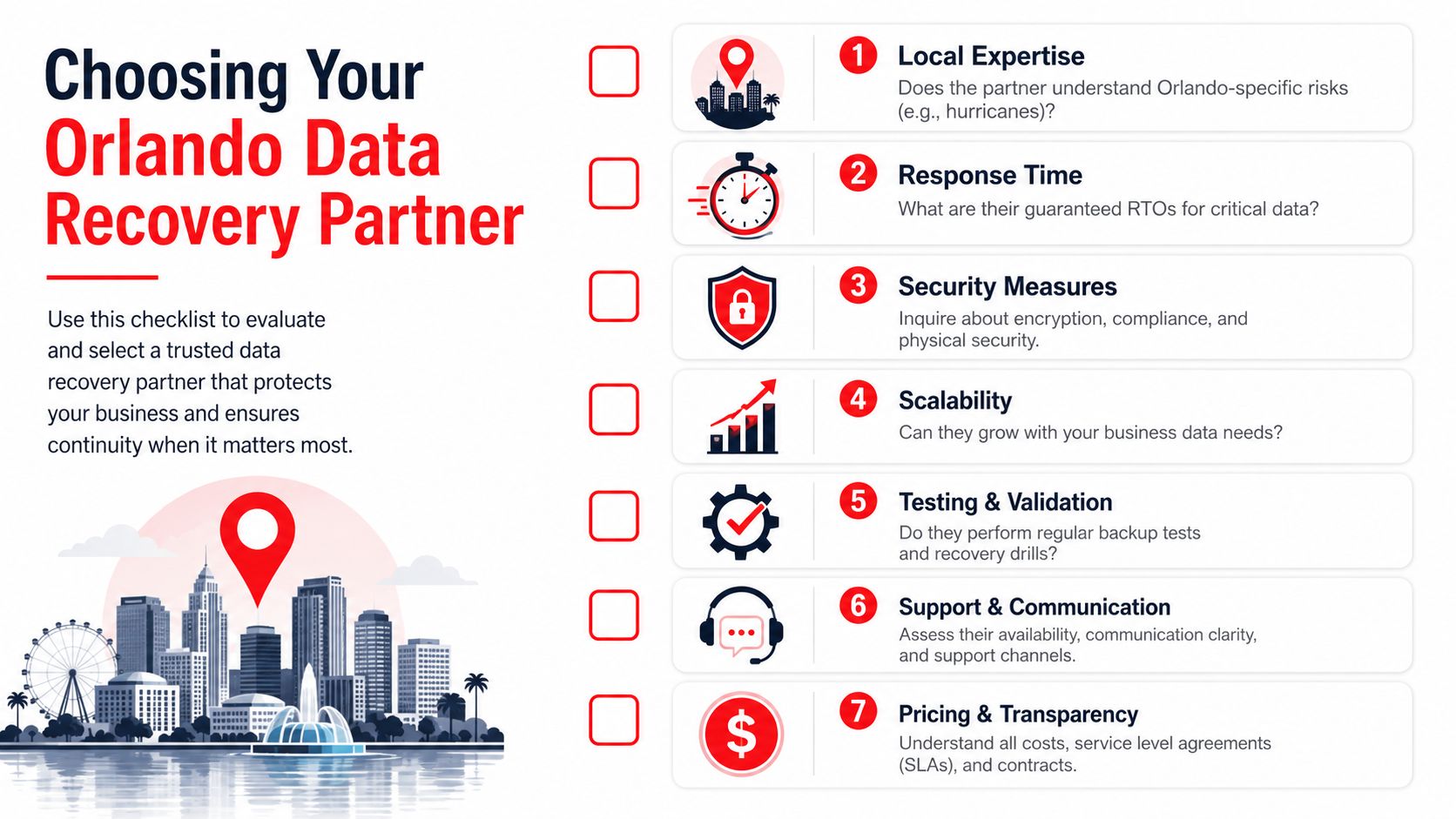
The fastest way to evaluate a partner is to ask for evidence, not promises.
The questions that matter most
Florida Tech's IT backup policy is a useful benchmark because it treats backup as a governed process. It requires documented, encrypted, and regularly tested controls, with testing intervals as frequent as every 2 years for essential systems, as detailed in Florida Tech's IT data backup policy.
That policy language points to the right questions:
- Show me the testing record. Don't accept “we monitor backups daily” as proof that full recovery works.
- How are backups protected? Ask about encryption at rest, encryption in transit, and separation from production access.
- What restores are included? File restores, server restores, cloud application restores, and disaster events aren't the same service.
- What's the escalation path? During an outage, who owns communication, triage, validation, and business updates?
Red flags owners often miss
Some warning signs don't appear until you ask detailed questions.
| What you hear | What it may really mean |
|---|---|
| “Everything is backed up.” | Scope may be vague or incomplete |
| “Recovery is easy.” | No tested timeline has been documented |
| “It's all in the cloud.” | Full restore speed may be weak |
| “We can help with compliance.” | They may mean storage, not evidence and process |
Use a local lens
An Orlando provider should understand local business conditions. That includes storm-related interruptions, multi-site connectivity issues, local industry mix, and the fact that many SMBs don't have internal IT staff available to coordinate recovery.
Ask practical questions like these:
- Who answers after hours if a restore fails?
- Can they prioritize critical systems instead of restoring everything blindly?
- Do they document dependencies between servers, apps, users, and locations?
- How do they handle a recovery event that starts as a security incident?
Assume nothing. Demand proof of testing.
A credible partner won't dodge those questions. They'll welcome them, because mature backup service is built on documentation, repeatable process, and clear accountability.
Conclusion Building Your Business Resilience Plan
Good backup strategy isn't about collecting copies of data. It's about deciding how your Orlando business keeps operating when systems fail, weather interferes, or an attack forces hard choices fast.
The companies that recover well usually do four things right. They identify their real operational risks. They define acceptable downtime and data loss before shopping for technology. They choose a recovery model that fits how the business works. And they work with a partner who can show evidence of testing, security controls, and recovery discipline.
That's the shift in thinking. Data Backup and Recovery in Orlando FL isn't a product category. It's an uptime and risk-management decision tied directly to client service, compliance, and cash flow.
If you haven't reviewed your plan recently, start with a simple audit:
- List your critical systems in order of business impact.
- Write down your downtime tolerance for each one.
- Confirm where backups live and who can restore them.
- Request proof of testing instead of status screenshots.
- Review your recovery playbook for weather and cyber events.
If your team needs a template for that last step, this resource on disaster recovery test plans can help you turn backup assumptions into a documented process.
Waiting until after a failed restore is the most expensive time to discover gaps. A practical review now is cheaper, calmer, and far easier on your staff and customers.
If you want help evaluating your current backup posture, recovery objectives, or compliance fit, talk with Cyber Command, LLC. They work with Central Florida organizations on managed IT, cybersecurity, backup, recovery, and ongoing resilience planning so owners can make decisions based on tested capability instead of guesswork.