
Managed IT Support in Orlando FL: Your 2026 Guide

Your office opens at 8. By 8:07, the phones are already lit up because the practice management system won't sync, one employee can't access shared files, and a phishing email made it into an inbox that handles customer payments. If you run a medical practice in Winter Park, a law firm downtown, a hospitality group near the attractions, or a field-service company dispatching crews across Central Florida, that kind of morning doesn't feel unusual. It feels expensive.
That's why managed IT support in Orlando, FL has shifted from a nice-to-have to an operating requirement for many small and mid-sized businesses. The issue usually isn't just “computers.” It's whether your systems stay available, your staff stays productive, your client data stays protected, and your business can keep moving when weather, growth, turnover, and cyber risk all hit at once.
Why Orlando Businesses Are Moving to Managed IT Support
A lot of Orlando business owners hit the same wall. They grow past the point where one smart office manager, a part-time consultant, or an occasional break-fix technician can keep things stable. The company adds remote staff, opens another location, moves more work into Microsoft 365 or cloud applications, and suddenly technology stops being a background utility. It becomes a daily operational dependency.
That pressure is especially visible in Central Florida. A hospitality business may need systems working late at night and through weekends. A healthcare office can't tolerate downtime when schedules, records, and communications all depend on connected systems. A professional services firm may only need one bad outage during a filing deadline to realize that “we'll call someone if something breaks” is no longer a plan.
Orlando is not a beginner market
The local market reflects that reality. Orlando has an established managed services ecosystem, with over 300 IT managed services companies in the area, and some providers have served Central Florida businesses since 1999 while supporting organizations with 20–2,000 employees, according to Orlando managed services market coverage. That tells you two things. First, the need is real and long-standing. Second, buyers have options, which means choosing the right provider matters more than choosing the idea of managed services.
For owners sorting through those options, it helps to start with a business-first lens instead of a tool-first one. A local Orlando IT consulting partner should be able to connect technology decisions to uptime, security, staffing pressure, compliance, and expansion plans. If they can't do that, they're probably selling tasks, not support.
Practical rule: If your revenue depends on systems being available every day, IT is part of operations, not overhead.
What pushes businesses to make the switch
Managed IT support usually becomes attractive when one or more of these problems starts repeating:
- Recurring downtime: The same Wi-Fi issue, server issue, login issue, or application issue keeps coming back.
- Security anxiety: Staff sees suspicious emails, passwords are inconsistent, and nobody is confident patching is happening on time.
- Growth friction: New hires, new devices, and new software keep getting added without standards.
- Vendor chaos: Internet, phones, software, cloud apps, printers, and line-of-business tools all have different support paths.
- No real ownership: Problems get fixed, but nobody is accountable for prevention.
That's the shift. Orlando businesses aren't just buying technical support. They're buying steadier operations, clearer accountability, and fewer unpleasant surprises.
Decoding Managed IT Support A Plain-English Guide
Managed IT support is often explained with technical language that makes it sound more complicated than it is. In plain English, it means a provider takes ongoing responsibility for maintaining, securing, monitoring, and supporting your technology environment instead of waiting for things to fail.
The easiest analogy is property management.
If you own a commercial building, a good property manager doesn't wait for the roof to cave in, the AC to fail, and the parking lot lights to go dark before doing anything. They inspect, schedule maintenance, coordinate vendors, respond to issues, and keep the building usable. Break-fix IT is the opposite. It's calling a handyman after a pipe bursts.
Break-fix reacts. Managed support maintains.
That distinction matters because reactive support rewards delay. Problems stay invisible until users feel them. By then, the business is already paying through lost time, staff frustration, missed work, or exposure to a security incident.
For Florida businesses, the biggest operational advantage comes from proactive management, including continuous monitoring, automatic patching, and incident response, because those controls shorten the window between a vulnerability and its fix and lower exposure to outages and security incidents, as noted in this review of proactive managed IT for Florida businesses.
A simple comparison makes the model clearer:
| Approach | What triggers action | Business impact |
|---|---|---|
| Break-fix IT | Something breaks | Work stops first, support starts second |
| Managed IT support | Monitoring, maintenance schedules, alerts, user needs | Problems are reduced earlier and handled more systematically |
What this looks like in day-to-day operations
In practice, managed support usually includes a mix of behind-the-scenes maintenance and visible user help.
- Monitoring systems: Tools watch endpoints, servers, network devices, and core services for signs of trouble.
- Applying patches: Operating systems and business applications get updated before known issues sit open for too long.
- Handling user tickets: Staff gets help with logins, devices, application errors, and routine support requests.
- Managing vendors: Someone coordinates with internet providers, software vendors, and hardware support when issues cross boundaries.
- Improving infrastructure: The environment gets standardized so one-off fixes don't pile up.
For businesses where guest experience or on-site connectivity matters, network management becomes a major part of the value. If you want a plain-language look at how providers approach solving Wi-Fi challenges with managed networks, that framework is useful because it ties performance and reliability back to operational needs, not just hardware.
Managed IT support works best when it prevents the ticket you never wanted to open in the first place.
The Building Blocks of Comprehensive Managed IT Services
A mature managed IT program isn't one tool or one technician. It's a stack of operating disciplines that work together. If one layer is missing, the rest of the environment gets weaker. Good providers know that uptime and security come from coverage, not from a single product.
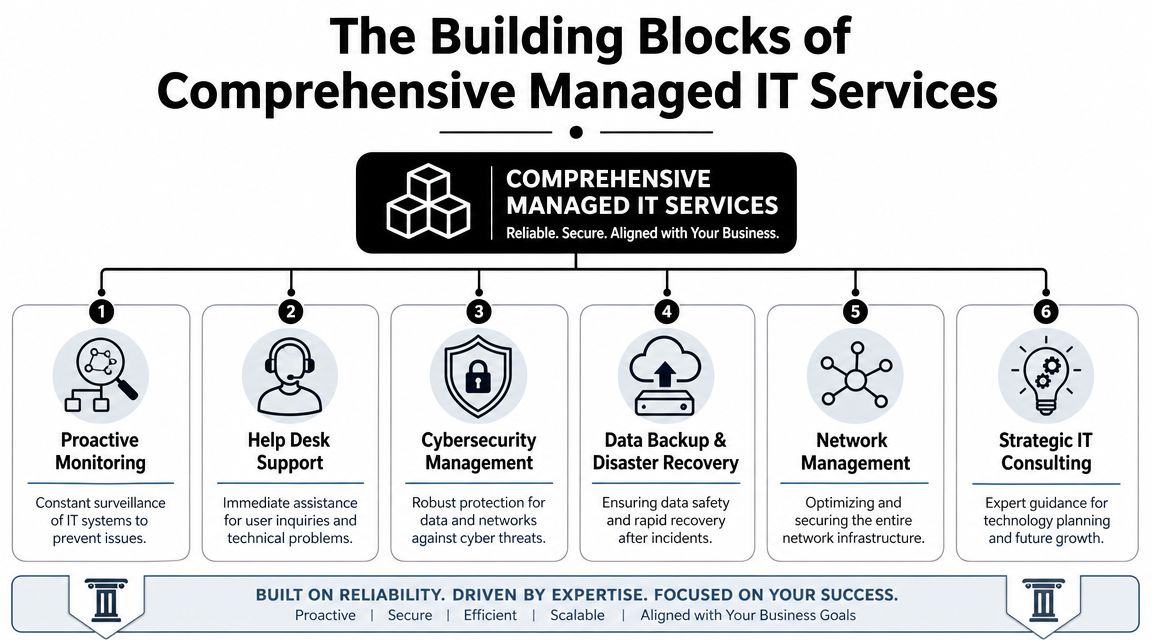
A technically mature managed IT support stack should include 24/7 monitoring, helpdesk response, cybersecurity, cloud services, backup and disaster recovery, and network management, because those are the core controls that reduce downtime by detecting failures and threats before users feel them, according to this overview of managed IT services in Orlando.
The six capabilities that matter most
Here's what each layer does for the business.
- Proactive monitoring: This is the early warning system. It watches for failing hardware, unhealthy services, storage issues, unusual behavior, and performance degradation before someone in accounting or front-desk operations notices.
- Help desk support: Employees need a place to go when they're blocked. Good help desk support restores momentum. Bad help desk support becomes another bottleneck.
- Cybersecurity management: This covers endpoint protection, security controls, policy enforcement, alert review, and response processes. Security isn't a side add-on anymore. It's part of core operations.
- Backup and disaster recovery: Backups are the seatbelt. Recovery planning is the airbag. One without the other isn't enough.
- Network management: Switches, firewalls, wireless, remote connectivity, and segmentation all shape how stable and secure the business feels from the user side.
- Strategic IT planning: Without planning, businesses drift into a patchwork environment of old devices, duplicate software, and unsupported workarounds.
What works and what usually fails
A common mistake is buying a low-cost package that watches alerts but doesn't create ownership. Monitoring without action is just noise. Another is focusing only on ticket response while ignoring standards, documentation, patching, and lifecycle planning.
The better model is integrated support. For example, a provider may manage cloud platforms, endpoint standards, security policy, backup health, and user support as one operating system for the business. If you want a broader view of how providers package those layers, this breakdown of managed IT service solutions is useful as a reference point.
Co-managed support is often the right middle ground
Some Orlando businesses already have internal IT. That doesn't mean fully outsourced support is the only option. Co-managed IT can split responsibilities cleanly.
| Business need | Internal IT keeps | MSP handles |
|---|---|---|
| Strategic ownership | Business-specific systems, leadership alignment, internal priorities | Supplemental expertise, coverage, tooling |
| Daily operations | Select applications or site-specific processes | Monitoring, patching, support overflow, security operations |
| Growth support | Project direction | Implementation help, standardization, vendor coordination |
One example in the market is Cyber Command, LLC, which offers fully managed and co-managed IT, cloud services, a 24/7 SOC, and live U.S.-based helpdesk support for organizations that need operational coverage as well as cybersecurity accountability. That kind of model fits businesses that want both strategic control and stronger day-to-day execution.
IT Support for Orlando's Key Industries
The right managed IT model depends heavily on the business you run. Orlando isn't one industry. It's a mix of healthcare practices, law and accounting firms, hospitality operations, industrial companies, and field-service organizations with very different risk profiles.

Healthcare practices and clinics
Privately owned medical practices, dental offices, orthodontists, med spas, and veterinary groups usually need more than generic support. They need stable systems, secure communications, controlled access, dependable backups, and clear procedures for handling sensitive information.
In this setting, unmanaged devices and inconsistent updates are a problem. So is informal access. If employees share credentials, use personal devices loosely, or bypass secure file handling because it's faster, the organization creates risk every day. A good MSP puts guardrails around that behavior with device management, patching discipline, secure remote access, and documented recovery procedures.
If a healthcare office can't explain how it protects access, updates devices, and restores data after an incident, it's relying on luck.
Law firms, accountants, and other professional services
Professional services firms live on trust. Client files, financial documents, legal records, tax data, contracts, and email history all need protection. But security alone isn't enough. These firms also need consistency. One unavailable file share during a deadline can create client-facing damage that has nothing to do with malware.
For these businesses, the strongest managed support model usually includes:
- Access control: Staff should only reach the systems and files they need.
- Device standards: Every laptop, workstation, and remote setup should follow the same baseline.
- Vendor management: Line-of-business applications often involve outside software vendors, and someone needs to coordinate support.
- Reliable support response: Partners and billable staff can't spend half a day troubleshooting their own tools.
Hospitality and extended-hour operations
Orlando's tourism economy creates a special wrinkle. A business may advertise around-the-clock guest service while its IT provider only staffs live help during ordinary office hours. That mismatch matters when a front desk, payment flow, wireless network, or connected device issue appears late at night.
Hospitality groups, entertainment venues, and some healthcare operations should evaluate support based on actual business hours, not marketing language. “24/7 monitoring” and “someone will call you back in the morning” aren't the same thing.
Industrial and field-service companies
Industrial firms and field-service organizations usually care about practical reliability. Can technicians connect from the road? Can office and warehouse systems stay synchronized? Can new locations and new users be brought online without custom improvisation every time?
Those businesses benefit most from standardization. The goal isn't glamorous technology. It's repeatable setups, dependable connectivity, secure remote access, and documentation that survives staff turnover. In these environments, mature managed IT support in Orlando, FL often becomes the glue between office operations, mobile work, and vendor-heavy infrastructure.
Managed IT Pricing in Orlando and Your Return on Investment
Most business owners ask the right question first. What does this cost?
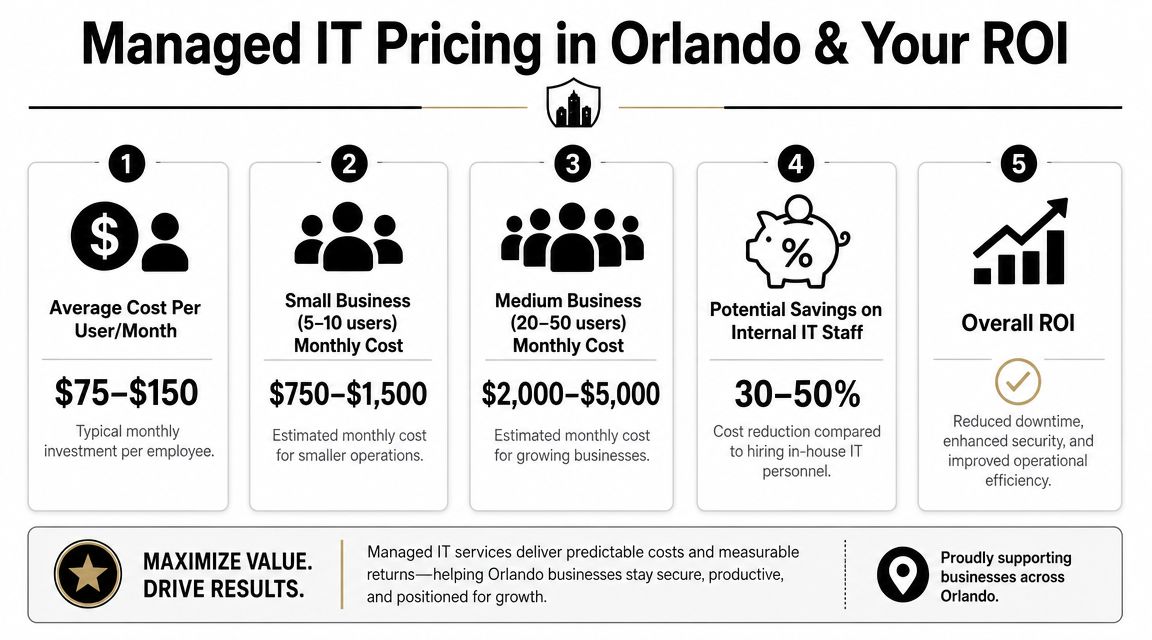
In Orlando, the market has fairly visible pricing bands. Clutch's May 2026 rankings show that basic monitoring and remote help desk typically cost $1,500–$3,000 per month, while fully managed networks with security and backup usually range from $3,000–$7,000 per month. Ad hoc or after-hours work commonly falls between $120–$200 per hour, according to Orlando MSP pricing data on Clutch. That pricing structure also shows how managed IT is usually sold. It's an ongoing operational service, not a one-time cleanup.
What the monthly fee is really buying
The wrong way to evaluate managed services is to compare the monthly fee against the cost of doing nothing. Doing nothing has a cost. It just shows up in scattered places.
Think about the hidden line items:
- Employee downtime: Staff waits on login issues, slow systems, broken wireless, and application errors.
- Leadership distraction: Owners and managers get pulled into vendor calls and support escalations.
- Security exposure: Delayed patching, weak endpoint control, and poor response processes raise operational risk.
- Unplanned labor: After-hours emergencies often cost more and arrive at the worst time.
- Technology drift: Every exception becomes harder to support later.
A better way to judge ROI
For most SMBs, return on investment from managed IT doesn't come from one dramatic event. It comes from fewer disruptions, cleaner systems, faster support resolution, and a more predictable operating model. It also comes from shifting IT spend out of random emergency charges and into a recurring service structure that leadership can budget for.
A useful buying question is not “What is the cheapest support package?” It's “What failures am I still paying for if I choose a thinner package?”
If you're comparing service models and trying to understand what's typically included versus billed separately, this guide to managed IT services pricing is a practical place to start. The details matter. A low sticker price can become expensive if after-hours work, projects, remediation, or onsite needs constantly trigger extra charges.
Cheap IT is often just delayed spending.
A Practical Checklist for Evaluating Orlando IT Providers
Once you start interviewing providers, the conversation can get slippery fast. Every firm says it's responsive. Every firm says it takes security seriously. The way to cut through that is to ask operational questions that are hard to answer vaguely.
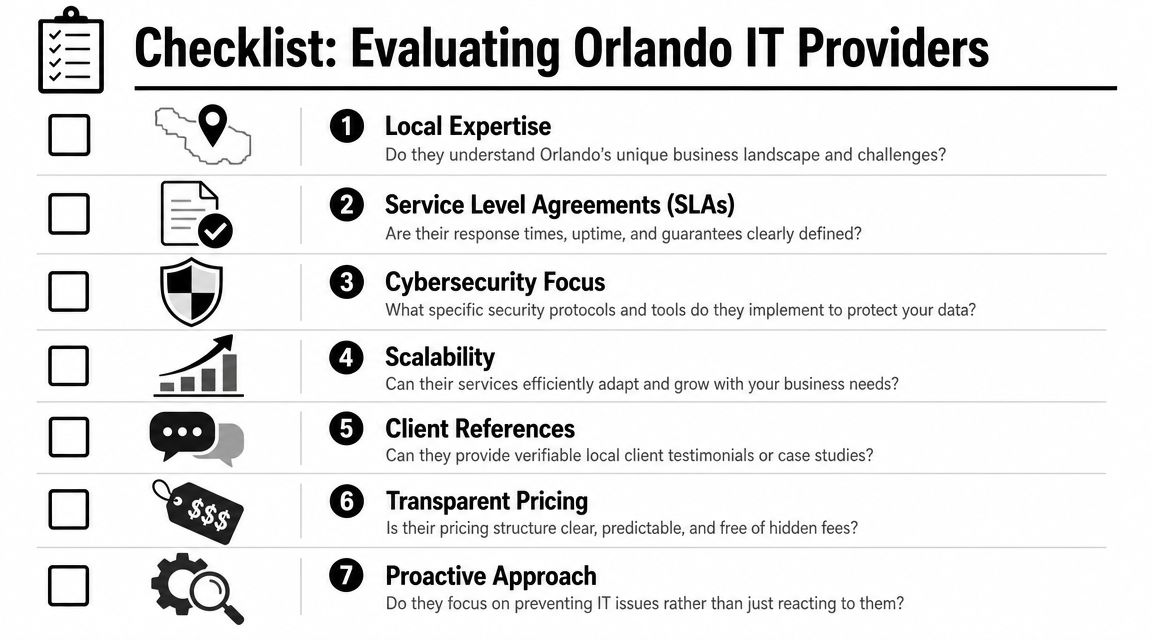
A critical issue in Orlando is the gap between 24/7 monitoring and 24/7 support. Many local providers highlight uptime and monitoring, yet their posted business hours may still be weekday office hours, which can leave hospitality, healthcare, and extended-hour businesses without live help when they require it, as discussed in this overview of Orlando IT service availability.
Questions that expose the real service model
Ask these directly:
- Who answers after hours: Is live help desk support staffed nights, weekends, and holidays, or are alerts queued for escalation?
- How are critical issues defined: What qualifies as urgent, and what response commitment applies on a Saturday evening?
- What is included in security: Are patching, endpoint protection, firewall oversight, and incident response part of the agreement or separate services?
- How do you support my industry: Can the provider speak clearly about legal confidentiality, healthcare data handling, or multi-site operational needs without resorting to generic language?
- What happens during onboarding: Will they document systems, standardize devices, remove old risk, and coordinate vendors, or will they just take over the existing mess?
What to look for in the answers
Good answers are specific. Weak answers sound polished but avoid details.
| Ask about | Strong answer sounds like | Weak answer sounds like |
|---|---|---|
| Support coverage | Clear staffing model, escalation path, defined response expectations | “We're always available if needed” |
| Security operations | Named controls, review process, ownership model | “We take security very seriously” |
| Pricing | Included scope, exclusions, project rules, after-hours policy | “It depends on the situation” |
| Local fit | Familiarity with Orlando business patterns and operating hours | Generic SMB talking points |
Use the checklist before you sign
A provider relationship is easier to start than to unwind. That's why a buying framework helps. This 2026 MSP buyer's guide is useful for structuring your evaluation process and comparing providers on service model, accountability, and pricing clarity, not just sales presentation.
One more practical test. Ask who owns vendor coordination when the problem crosses systems. If the internet provider blames the firewall vendor, the software vendor blames the workstation, and your staff is stuck in the middle, somebody needs to lead the issue to resolution. If the MSP won't own that process, you still own the chaos.
Orlando Managed IT FAQs
How disruptive is onboarding
A competent onboarding process shouldn't feel like ripping out your entire environment on day one. It should feel like an orderly takeover. The provider should inventory systems, review admin access, map vendors, confirm backup status, standardize endpoint controls, and identify immediate risks first.
The biggest disruption usually comes from cleaning up years of inconsistency. Old devices, shared passwords, unknown software, and undocumented vendor relationships slow things down. That isn't a reason to avoid onboarding. It's the reason to do it carefully.
We already have an IT person. Can we still use managed support
Yes. For many organizations, co-managed support is the practical model. Internal IT keeps business context, internal relationships, and strategic ownership. The MSP adds coverage, tools, escalation support, and specialized security or infrastructure help.
That setup works well when internal staff is overloaded with support tickets and routine maintenance. It also works when leadership wants stronger operational discipline without forcing a small in-house team to cover every specialty.
How does support work for businesses with multiple Central Florida locations
Multi-location support works best when the provider standardizes the environment instead of treating each office like a separate island. That means common device baselines, shared documentation, coordinated vendor management, and a consistent support path for users whether they're in Orlando, Winter Springs, Kissimmee, or another nearby city.
The key is central visibility with local responsiveness. Businesses with more than one office don't need different IT philosophies by location. They need one operating model that can absorb growth.
What should we prepare before talking to a provider
Bring the basics:
- Current pain points: Repeated outages, ticket delays, security concerns, vendor issues
- Business realities: Operating hours, compliance pressure, remote staff, growth plans
- Technology snapshot: Devices, servers, cloud apps, internet providers, line-of-business software
- Decision criteria: Budget expectations, coverage requirements, support expectations
That conversation goes faster when the business owner explains where downtime hurts most. For one company it's scheduling. For another it's billing, intake, dispatch, or file access. Managed support works best when the technical plan follows the operational truth.
If you're evaluating Cyber Command, LLC, start with the practical questions in this guide. Ask about live after-hours support, co-managed options, cybersecurity operations, onboarding, and pricing scope. A good MSP conversation should leave you with clearer operational answers, not more jargon.