
Orlando Managed IT Services: A 2026 Guide for Businesses

You're probably dealing with some version of the same problem many Central Florida business owners face. A computer freezes in the middle of a client deadline. A staff member can't access a shared file from home. Your line-of-business software runs slowly for no obvious reason. Then the invoice arrives from the last emergency IT fix, and once again the cost wasn't planned.
That's usually the point where owners start asking a better question. Not “Who can fix this one issue?” but “Why does IT keep getting in the way of work?”
For Orlando companies, that question matters more than it used to. Cloud systems are harder to manage, cyber risk keeps rising, and many businesses now depend on remote access, mobile staff, and nonstop uptime. The broader market reflects that shift. The U.S. managed services market is projected to reach USD $71.14 billion in 2026 and grow at an 11.01% CAGR to USD $119.92 billion by 2031, driven by cloud complexity and security demands in industries including professional services and healthcare, according to Mordor Intelligence's U.S. managed services market outlook.
For local owners, that trend isn't abstract. It shows up in how you budget, how you protect client data, and how quickly your team can get help when something breaks. That's where Orlando managed IT services become less of a convenience and more of an operating decision.
Table of Contents
- Is Your IT Supporting or Slowing Your Orlando Business
- Beyond Break-Fix Support The Managed Services Model
- Essential IT Services for Central Florida Businesses
- The Cybersecurity Imperative for Orlando SMBs
- Tailored IT for Orlandos Key Industries
- How to Choose Your Orlando Managed IT Partner
- Your Next Step Toward Proactive IT Partnership
Is Your IT Supporting or Slowing Your Orlando Business
A typical day starts with small delays. An employee logs in and waits too long for applications to load. Someone in accounting can't print to the office copier. A manager texts after hours because remote access stopped working right before payroll approval. None of those issues sounds catastrophic on its own. Together, they drain time, interrupt service, and chip away at trust inside the business.

For a law office, that may mean delayed filings or missed client communication. For a dental practice, it may mean front-desk bottlenecks and frustration when schedules or imaging systems lag. For a construction or engineering firm, it can show up as file sync problems between field and office teams. The details change by industry, but the business impact is the same. Work slows down because systems aren't being managed with consistency.
The hidden cost of reactive support
The old habit is to call someone when something breaks. That feels cheaper until you look at the pattern. Problems repeat. Devices fall behind on updates. Backups exist, but nobody checks whether they can restore. Security settings vary from one user to another because no one owns standards.
Most businesses don't lose time from one dramatic outage. They lose it from dozens of smaller failures that nobody prevented.
Reactive support also makes budgeting harder. If your IT plan depends on emergencies, your costs are tied to disruption. That's a rough way to run any operation, especially in a market where labor, insurance, and compliance demands already put pressure on margins.
What a business owner actually needs
Most Orlando business owners don't need more jargon. They need someone watching the environment, keeping systems current, reducing avoidable issues, and giving clear answers when decisions have to be made. That's what managed services should do.
A real managed IT relationship changes the role of technology inside the business:
- Stability first: Fewer recurring issues because someone handles maintenance before failure.
- Security built in: Protection isn't bolted on after an incident. It's part of daily operations.
- Clear budgeting: A predictable service model makes planning easier.
- Business alignment: IT decisions support hiring, expansion, compliance, and client service.
When owners start looking at Orlando managed IT services through that lens, the conversation changes. IT stops being the thing that keeps interrupting the day and starts becoming part of how the business runs cleanly.
Beyond Break-Fix Support The Managed Services Model
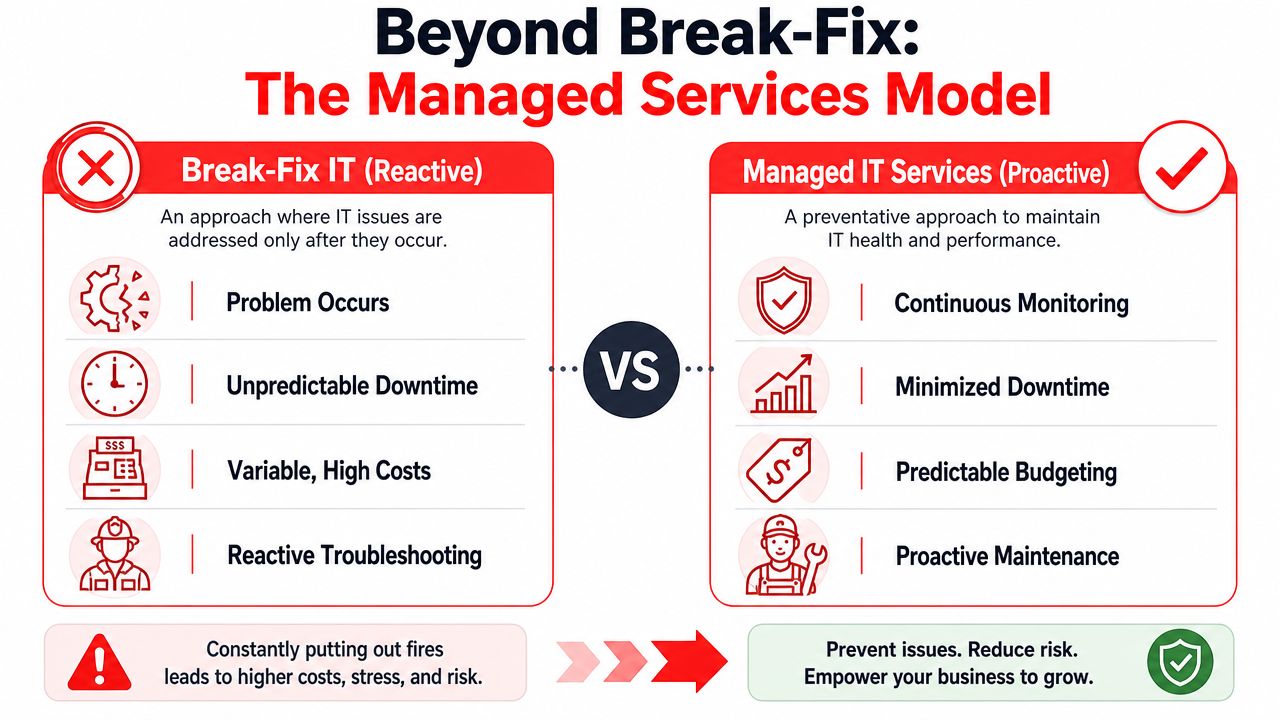
Break-fix IT works like calling a handyman after a pipe bursts. Managed services work like having a building superintendent who checks the plumbing, tests the pumps, and catches warning signs before tenants complain. That's the simplest way to understand the difference.
The break-fix model is reactive by design. A problem happens, someone opens a ticket, and the clock starts once damage is already done. Managed services reverse that order. The provider monitors systems, applies patches, reviews alerts, and handles routine support so that many issues never turn into business interruptions.
What a true managed service includes
If you're evaluating providers, don't stop at “we offer support.” That phrase can mean almost anything. A usable managed service model usually includes several layers working together.
| Area | What it means in practice |
|---|---|
| Monitoring | Systems are watched for failures, performance issues, and warning signs before users report them |
| Helpdesk | Staff can reach a live support team for everyday issues like login problems, application errors, and device trouble |
| Patch management | Operating systems and supported software are updated on a schedule instead of being ignored |
| Security operations | Threat detection, response processes, and protective controls are part of the service |
| Backup oversight | Backups are managed, reviewed, and tied to recovery planning |
| Advisory guidance | Someone helps leadership make decisions about lifecycle planning, cloud changes, and risk |
Plain-English definitions that matter
Some terms get thrown around so often they stop meaning anything. They shouldn't.
- Proactive monitoring means your systems are being watched continuously for signs of trouble, not just checked after users complain.
- 24/7/365 helpdesk means people can get help when they need it, including after hours if your operation doesn't stop at five o'clock.
- vCIO guidance means a senior advisor helps connect IT decisions to business priorities such as expansion, office moves, compliance, or reducing operational drag.
Practical rule: If a provider can't explain their service in plain English, they probably can't explain your risks clearly either.
What doesn't work
A common mistake is buying a bundle of disconnected services and assuming that equals strategy. It doesn't. Monitoring without response planning leaves gaps. Security software without user standards creates inconsistency. Helpdesk support without documentation turns every issue into a fresh investigation.
Another weak model is “unlimited support” that often excludes the work businesses genuinely need, such as vendor coordination, covered projects, standards cleanup, or lifecycle planning. Ask what's included day to day, not just what sounds good in a proposal.
The managed services model works when it combines prevention, support, security, and planning into one operating system for the business. That's a true step beyond break-fix.
Essential IT Services for Central Florida Businesses
Central Florida businesses don't operate in a generic environment, so they shouldn't buy generic IT support. Orlando has multi-location firms, hybrid workforces, healthcare practices, professional services offices, and companies that need to stay operational through weather disruptions and fast growth. The service stack has to match that reality.
One of the clearest pressure points is distributed work. According to VikingCloud's 2026 cybersecurity statistics, 72% of business owners are concerned about future cybersecurity risks arising from hybrid or remote work environments. For Central Florida companies with satellite offices, field teams, or staff working between home and office, that concern is justified. Every remote login, unmanaged device, and rushed file-sharing habit increases risk if nobody is enforcing standards.
Services that matter more in this region
Disaster recovery isn't optional in Florida. If severe weather interrupts office access, your team still needs a way to answer clients, reach files, and continue core operations. That means backup and recovery planning has to go beyond “we have copies somewhere.” Recovery needs testing, documented priorities, and a practical order of restoration.
Cloud architecture also needs more thought than many businesses give it. Some companies moved quickly to cloud apps and remote access, then discovered they created a patchwork environment with weak permissions, duplicate tools, and no clear ownership. Businesses that want flexibility without chaos usually benefit from a structured cloud plan. If you're reviewing hosting and infrastructure options for specialized workloads, Flaex.ai's VPS setup guide offers a useful primer on where a virtual private server fits and when it doesn't.
What a solid local stack often includes
For many Orlando organizations, the essentials look like this:
- Reliable helpdesk support: Staff need fast answers for common issues so internal friction doesn't build up.
- Identity and access control: User accounts, permissions, and offboarding should be consistent across every system.
- Backup and recovery planning: Not just data retention, but actual recovery sequencing and business continuity.
- Secure networking for multiple locations: Branch offices, remote users, and mobile teams need the same baseline controls.
- Cloud governance: Shared storage, collaboration tools, and hosted systems need structure, naming standards, and ownership.
A business with growth plans should also ask whether the provider can scale those services cleanly. Adding a new office, onboarding employees quickly, and standardizing devices should feel routine, not disruptive.
For companies sorting out cloud roadmaps, migrations, or cleanup, cloud services in Orlando can be part of a broader managed plan rather than a separate project that never connects back to support and security.
The right service mix isn't the longest list. It's the one that reduces friction for your staff and lowers risk for the business.
That's the practical test. If a service doesn't improve uptime, control, or resilience, it probably belongs outside the core package.
The Cybersecurity Imperative for Orlando SMBs
Many small and mid-sized businesses still think of cybersecurity as a separate purchase. They buy antivirus, put a firewall in place, and assume that's enough. It isn't. Security has to be part of how IT is managed every day, or the gaps show up fast.
The biggest risk isn't usually a movie-style attack. It's the combination of ordinary weaknesses. A reused password. A missed patch. A user with too much access. A suspicious login that no one reviews until damage is already done. That's why Orlando managed IT services have to include security operations, not just support tickets.
Why SMBs are exposed
The urgency is real. The 2025 Verizon Data Breach Investigations Report found that ransomware was involved in 88% of breaches affecting small and mid-sized businesses, compared with 39% in large organizations, as cited in this Central Florida SMB cybersecurity summary. If you run a smaller firm in Orlando, you can't assume attackers will overlook you because you aren't a large enterprise.
That's also why a Security Operations Center, or SOC, matters. In practical terms, a SOC is the team and process layer that watches for signs of compromise, investigates suspicious activity, and responds quickly when something doesn't look right.
What good security operations actually do
A provider can say “we take security seriously” all day. What matters is what happens operationally.
- Active threat hunting: Analysts look for suspicious patterns instead of waiting for a full-blown incident.
- Incident response: There's a documented process for containment, communication, and recovery when a threat is detected.
- Continuous compliance support: Security controls are reviewed against the requirements that affect your business.
- User and endpoint discipline: Devices, user access, and policy enforcement are managed consistently.
If your provider only talks about tools, ask who's reviewing alerts, who's making decisions during an incident, and who owns the recovery process.
That question usually separates mature providers from basic support shops.
AI, data handling, and the new risk layer
Another change business owners can't ignore is the rise of AI-enabled workflows. Teams are pasting data into assistants, summarizing documents, and experimenting with automation. That can improve productivity, but it also creates new data exposure if access rules and acceptable-use policies are weak. For leaders thinking through those risks, the AI data security guide for 2026 is a useful resource because it frames the issue around governance and data handling, not hype.
If you're reviewing what mature protection should look like in practice, cybersecurity services in Orlando should cover far more than endpoint software. The conversation should include monitoring, response, policy enforcement, recovery planning, and accountability.
Basic protection is better than nothing. It's not enough for a business that wants to stay operational after an attack. Security has to be active, staffed, and tied directly to daily IT management.
Tailored IT for Orlandos Key Industries
Industry-specific support matters because risk doesn't look the same across every business. A professional services firm prioritizes confidentiality, document access, and uptime during client deadlines. A medical practice has those same operational concerns plus patient data, device security, and heavier compliance pressure. The support model should reflect those differences.
The reason healthcare deserves special attention is simple. SentinelOne's 2026 cybersecurity statistics project that healthcare will face the highest breach costs globally, averaging USD $12.6 million per incident, according to SentinelOne's cybersecurity statistics page. For Orlando-area private practices, that isn't just a hospital problem. Smaller clinics, specialty offices, dentists, and med-spas still hold sensitive data and still need disciplined controls.
Professional services firms
Law offices, accounting practices, architecture firms, and engineering companies usually have lean internal operations. They may not have dedicated IT leadership, but they do have demanding workflows and sensitive client information.
Their biggest needs often include:
- Document reliability: File storage, sharing permissions, and version control need to support fast collaboration without confusion.
- Confidentiality controls: Access should follow job roles so sensitive records don't spread across the whole company.
- Email and identity protection: Many client relationships run through email. That makes account security and suspicious-activity review especially important.
- Uptime during deadlines: Tax filings, court dates, proposal deadlines, and submission windows don't move because a workstation failed.
A good provider for this type of business doesn't just “support computers.” They build a stable operating environment around client service and confidentiality.
Medical practices and wellness clinics
Private practices have a different pressure profile. Front-desk systems, scheduling, imaging, billing, and communication platforms all have to work together. If one part fails, patient flow and revenue both suffer.
Medical offices should expect their IT partner to address several basics well:
- HIPAA-aware processes: Security and access decisions need to respect how patient information is stored, viewed, and shared.
- Device oversight: Workstations, laptops, and connected clinical devices should be inventoried and managed with care.
- Recovery planning: If a key system becomes unavailable, staff need a clear fallback process to keep serving patients.
- Vendor coordination: Many practices rely on specialized software vendors. Someone has to coordinate support instead of forcing office staff to manage technical escalations.
In healthcare, slow systems aren't just annoying. They affect patient experience, staff stress, and the pace of care.
That same principle applies to veterinarians, orthodontists, and cosmetic practices. Their technology environments may be smaller than a hospital's, but the operational and privacy stakes are still high.
Industry fit isn't a marketing detail. It changes how support is delivered, what documentation matters, and which risks deserve the most attention.
How to Choose Your Orlando Managed IT Partner
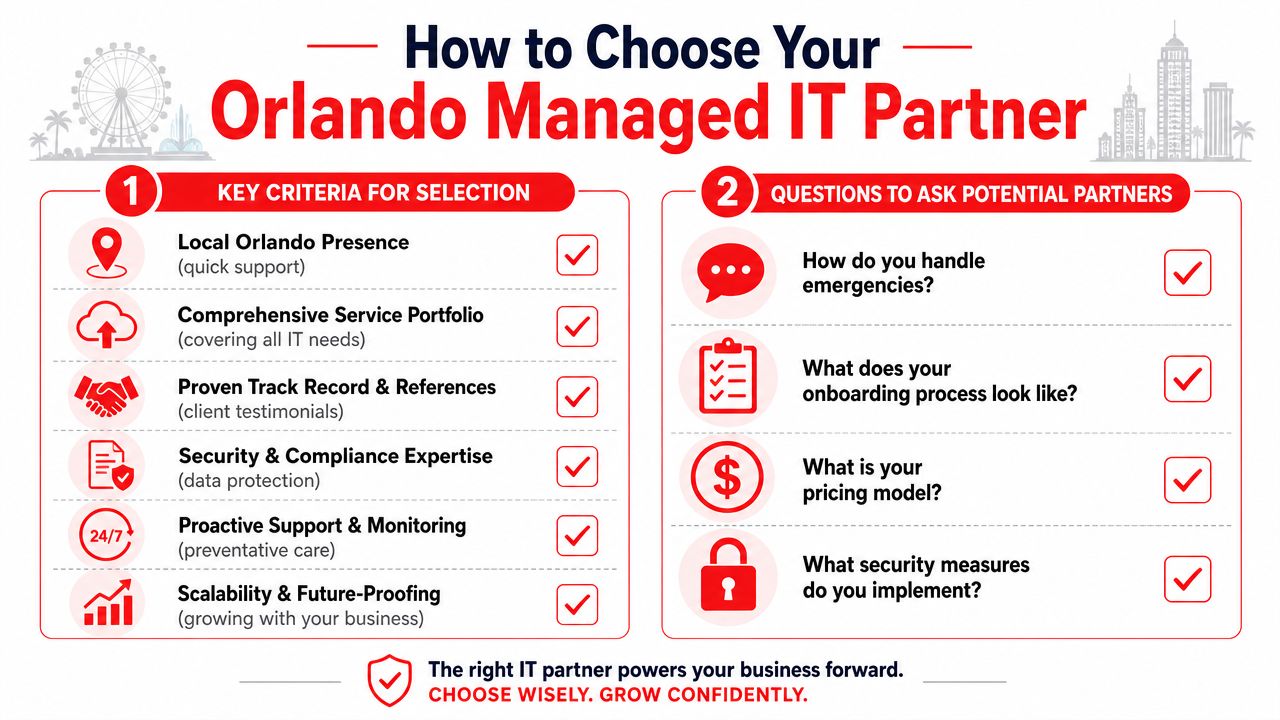
Choosing a provider gets easier when you stop thinking in terms of features and start thinking in terms of operating fit. You're not buying a list of services. You're choosing who will touch your systems, advise your team, and respond when something goes wrong.
In Orlando, pricing usually follows subscription models. Managed IT services commonly range from $100 to $300 per user per month, with monthly packages often around $1,500 to $3,000 for basic monitoring and $3,000 to $7,000 for fully managed networks including security and backup, according to this Orlando managed IT pricing overview. That range tells you what's normal locally, but price by itself won't tell you whether the service is structured well.
Questions that reveal the real service
Ask direct questions and listen for direct answers.
- When an emergency happens, who responds? You want to know whether support is staffed, escalated clearly, and available when your business is open.
- What's included in onboarding? A strong onboarding process should document users, systems, vendors, access, and major risks.
- How do you handle security operations? Look for a concrete explanation of monitoring, investigation, and response.
- What work is excluded? Many agreements often become murky on this matter.
One Orlando option, Cyber Command, LLC, provides fully managed and co-managed IT, cloud services, and a 24/7/365 U.S.-based helpdesk and SOC under a predictable pricing model. That type of operating structure is worth understanding when you compare providers because it speaks to staffing and accountability, not just features.
Review the SLA like an operator
A service level agreement matters because it defines what happens after the sales process ends. Don't skim it.
| SLA area | What to look for |
|---|---|
| Response expectations | How quickly the provider acknowledges and starts working an issue |
| Coverage windows | Whether support is tied to business hours or staffed around the clock |
| Escalation paths | Who gets involved if an issue affects operations or security |
| Included services | Which routine tasks are covered without surprise billing |
| Reporting | Whether you'll receive usable visibility into support, risk, and recurring issues |
If you want a practical framework before signing anything, how to choose a managed service provider is a useful checklist for evaluating service depth, pricing clarity, and operational fit.
A short buyer checklist
“Show me how you prevent recurring problems, not just how you close tickets.”
Use that as a filter. Then confirm these points:
- Local understanding: The team should understand how Orlando businesses operate, including multi-site and compliance-heavy environments.
- Budget clarity: Pricing should be understandable without hidden exclusions.
- Security maturity: Protection should include process and response, not just software.
- Scalability: The service should still work if you add staff, offices, or compliance requirements.
A provider is a fit when they reduce uncertainty, not when they offer mere promises of availability.
Your Next Step Toward Proactive IT Partnership
If your business is still handling IT one disruption at a time, you're paying for that approach in lost time, avoidable risk, and inconsistent service. The question isn't whether technology issues will happen. They will. The key question is whether someone is actively reducing the odds, responding quickly, and helping you make better decisions before problems turn into downtime.
That's what business owners should expect from Orlando managed IT services in 2026. Not a generic helpdesk. Not a patchwork of tools. A partner that combines daily support, security discipline, recovery readiness, and practical planning.
For many Central Florida companies, the right next step isn't a full technology overhaul. It's a focused conversation about where your current environment is creating friction. That might be support delays, weak documentation, inconsistent security controls, cloud sprawl, or uncertainty around recovery if a critical system fails.
A short strategy discussion can usually surface those gaps quickly. It also helps you separate real priorities from noise. If your current setup is working, that conversation should confirm it. If it isn't, you should leave with a clearer path forward and a more realistic view of what proactive support ought to look like.
If you want a practical review of your current environment, Cyber Command, LLC offers a straightforward starting point for Orlando businesses that need managed IT, co-managed support, or stronger cybersecurity operations. A short strategy call can help you identify where support is slowing the business, where risk is hiding, and what a more proactive model would look like.