
April 30, 2026
What Is Active Directory and How It Works: 2026 Guide
Discover what is active directory and how it works in our 2026 guide. We explain AD for SMBs, covering security, use cases, & Azure AD for Florida businesses.
On Monday morning, your front desk manager can’t log in. A remote employee in Winter Springs can open email but not the shared drive. A former staff member still appears to have access to an old folder with client records. Nobody is sure which passwords control what, or who approved the current setup.
That kind of confusion is common in small and mid-sized businesses. It shows up in Orlando accounting firms during tax season, in medical practices trying to protect patient data, and in industrial offices where field staff, office staff, and vendors all need different access. At first it feels like an IT inconvenience. In reality, it’s an operations problem and a security problem at the same time.
When leaders ask what is active directory and how it works, they usually aren’t asking for a server manual. They’re asking a business question: how do we control who gets in, what they can reach, and how to keep that organized as the company grows?
The Hidden Chaos in Your Business Network
An Orlando firm can get away with informal access management for a while. One employee knows the file server password. Another person sets up laptops by hand. A manager calls IT whenever a new hire needs access to QuickBooks, the printer, a shared folder, and remote VPN. It works, until it doesn’t.
The trouble starts when the business adds people, locations, devices, and compliance requirements. A law office needs tighter matter-based access. A dental group needs screen lock rules on every workstation. An engineering company needs the right software on the right machines without someone walking desk to desk.
That is where Active Directory, usually shortened to AD, changes the game. It gives a business one central system for identity, access, and policy control across a Windows network. Instead of managing users and computers one by one, IT can manage them from one place.
This isn’t a niche technology. Over 90% of Fortune 1,000 companies rely on Microsoft Active Directory as their primary corporate network access management tool according to ONLC’s overview of Active Directory.
Active Directory matters because it turns access management from a collection of one-off fixes into a controlled business system.
For a non-technical manager, the practical value is simple:
- Faster onboarding: New hires get the right access without a chain of manual requests.
- Cleaner offboarding: Former employees lose access in a controlled way.
- Less guesswork: Permissions can follow job role, department, or location.
- Stronger security: The business can enforce rules centrally instead of hoping each device is configured correctly.
Without that structure, access drifts over time. People collect permissions they no longer need. Shared passwords linger. Old laptops keep outdated settings. That’s the hidden chaos most businesses don’t notice until an audit, an outage, or a ransomware event forces the issue.
Stuck on something like this right now?
Talk it through with a real US-based engineer, 24/7, no phone trees: (407) 587-0089.
Book a Free Strategy SessionWhat Is Active Directory The Blueprint of Your Digital Office
The easiest way to understand Active Directory is to stop thinking of it as a technical product and start thinking of it as the blueprint of your digital office.
A physical office has employees, departments, rooms, locked cabinets, badges, printers, and policies. Your digital office has the same needs. People need access to some things and not others. Devices need standard settings. Shared resources need structure. AD keeps that organized.
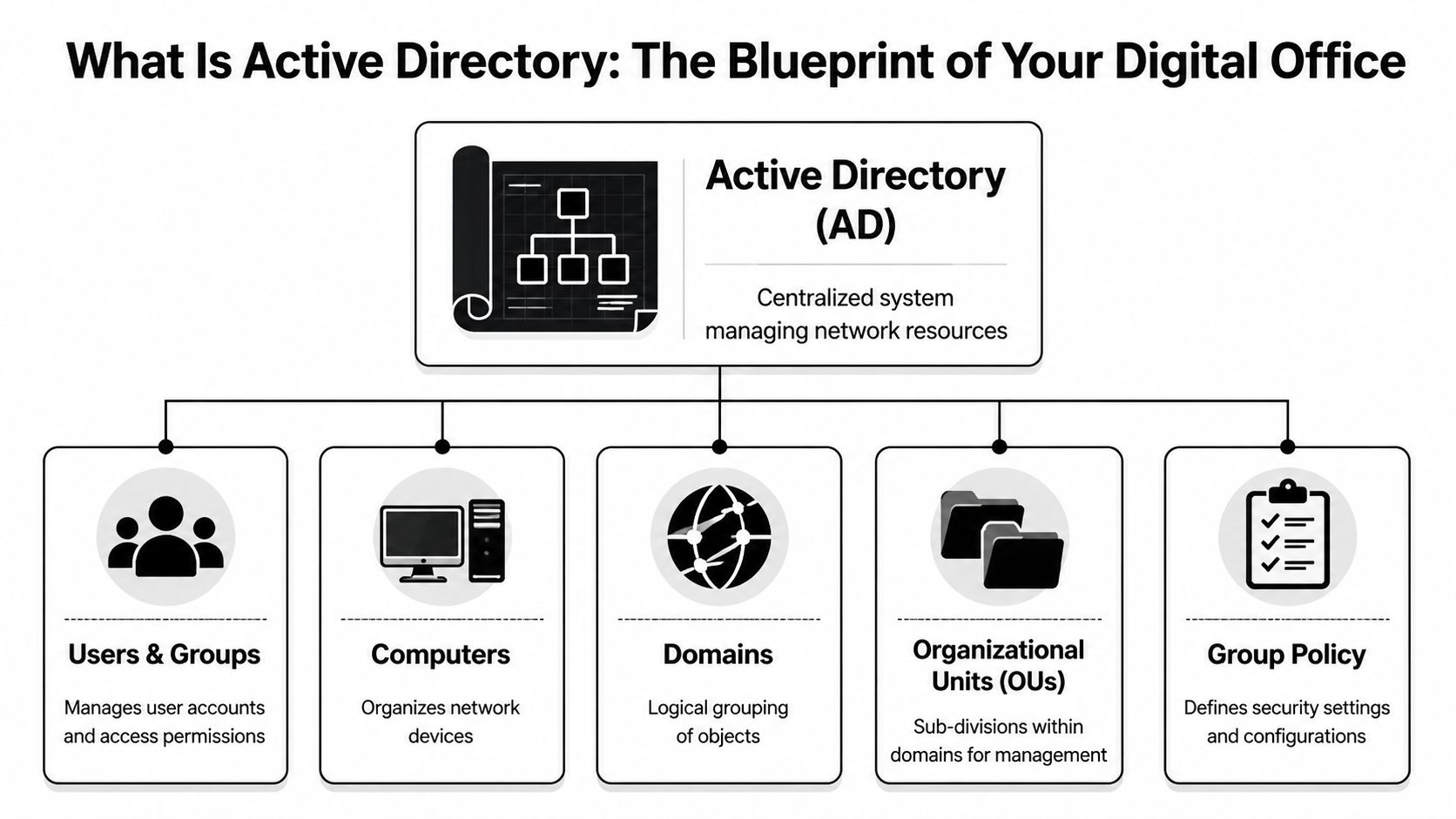
The database behind the system
Active Directory is a directory service database. The database file is called NTDS.dit. It stores directory information about the business’s digital environment, such as user accounts, groups, computers, and other network objects.
According to MiniOrange’s explanation of Active Directory, NTDS.dit stores all directory data and can scale to manage millions of objects. The same source notes that AD uses a hierarchy of forest, domains, and Organizational Units (OUs), and that this structure is replicated across Domain Controllers to support consistency and uptime.
If those terms sound abstract, use this model:
AD term
Plain-English analogy
What it means for your business
Forest
The entire corporate campus
The top-level boundary for the directory
Domain
A major building or division
A main administrative and security boundary
OU
Departments or suites within the building
A way to organize users and devices for management
Domain Controller
The secure records office
A server that stores and processes directory data
A city planner model that actually makes sense
Think of AD like a city planner for your network.
The forest is the whole city. It contains the overall identity structure. The domains are neighborhoods. A company might have one domain for the whole business, or more in a larger environment. OUs are the individual buildings, floors, or departments inside those neighborhoods.
That structure matters because it lets IT apply rules in the right place. The accounting OU can get one set of policies. The front desk can get another. A branch office can be managed differently from headquarters.
Here are the objects AD commonly organizes:
- Users: Employee accounts, admin accounts, shared service accounts
- Groups: Collections of users who need the same access
- Computers: Desktops, laptops, and some servers joined to the domain
- Printers and shared folders: Network resources people need to find and use
Practical lens: If you can describe a business role, a department, or a location, Active Directory can usually mirror that structure so access follows the organization instead of personal memory.
Why business leaders should care
This structure isn’t about elegance. It’s about control.
If a medical practice has ten exam room PCs, a front office, billing staff, and a practice manager, AD gives IT a way to place those users and computers into logical containers and manage them centrally. If a professional services firm opens a second office, AD can keep access consistent without rebuilding everything from scratch.
For a manager, the big takeaway is this: Active Directory is the system that answers, in one place, who your people are in the network, what devices they use, and how rules are applied across the business.
How Active Directory Works The Digital Gatekeeper
If the previous section answered what Active Directory is, this part answers what is active directory and how it works in day-to-day business life.
The simplest explanation is that AD acts like the security desk and badge system for your digital office. Every time someone tries to sign in or open a protected resource, AD helps decide two things: who they are, and what they’re allowed to do.

Authentication means proving identity
Authentication is the first checkpoint. A user enters a username and password, and Active Directory checks whether those credentials are valid.
In Windows environments, this often involves protocols such as Kerberos or NTLM. You don’t need to memorize the protocol names. The useful mental model is that Kerberos works like a digital passport process. The employee proves identity once, receives trusted proof, and then uses that proof to request access to approved services.
That first check happens through Active Directory Domain Services, often called AD DS, running on Domain Controllers. Those are the servers that process identity requests against the directory database.
Authorization means deciding what happens next
Passing the identity check doesn’t mean someone should see everything. That would be a disaster.
Authorization is the second checkpoint. AD looks at the user’s group memberships and assigned permissions to determine what they can access. One employee may open the accounting share but not HR files. A physician may reach clinical systems that the front desk can’t. A plant manager may use a production server that office staff should never touch.
Here is the simplest way to separate the two:
- Authentication: Are you really who you claim to be?
- Authorization: Now that we know who you are, what are you allowed to open, use, or change?
Why single sign-on feels so useful
One reason people like Active Directory is single sign-on, or SSO. That means users sign in once and can then access multiple approved resources without entering passwords over and over.
For a busy office, that reduces friction. For IT, it centralizes control. For security teams, it creates a clearer identity trail than a patchwork of separate local accounts.
This matters well beyond private business. If you’re comparing identity models across industries, SamSearch has a useful primer on understanding IAM in government contracting, which helps frame why centralized identity and access controls matter when compliance and accountability are high.
A healthy AD environment should make secure access feel boring. Employees log in, get what they need, and don’t need workarounds.
What happens when someone logs in
A non-technical manager can think of the sequence like this:
- Step one: The employee enters credentials on a company device.
- Step two: The Domain Controller checks those credentials.
- Step three: AD confirms the user’s role through groups and policies.
- Step four: The user gets access to approved resources like shared drives, printers, apps, or remote services.
If that sequence is well designed, employees barely notice it. If it’s messy, the business feels it immediately through lockouts, failed app access, risky workarounds, and support calls.
Organizing Your Digital Workplace with Group Policy
Many business leaders understand user accounts. The part that often feels mysterious is Group Policy.
Group Policy is best thought of as a set of company rules that Windows devices follow automatically. Instead of asking staff to configure settings themselves, or asking IT to touch every machine by hand, administrators can push standards from the center.
What Group Policy looks like in real life
A Winter Springs medical practice might need every exam room computer to lock automatically after a short period of inactivity. That protects patient information when someone steps away between appointments. Rather than setting that manually on each device, IT can apply the rule through Group Policy to the right OU.
A law office can use Group Policy to control who can use USB storage on certain machines. That’s helpful when client documents shouldn’t leave the office on removable media. An accounting firm can map shared drives automatically so staff don’t have to guess where returns, templates, or archived files live.
Group Policy can also standardize practical settings such as:
- Screen lock behavior: Useful for front desks, nurse stations, and shared work areas
- Printer deployment: Helpful when each office or department has assigned printers
- Software rollout: Important when engineers, accountants, or designers need the same tools
- Security settings: Password policies, firewall settings, and device restrictions
Why managers should care about GPOs
Group Policy Objects, usually called GPOs, are where Active Directory shifts from organization to enforcement.
Without GPOs, two employees with the same role may have two very different device setups. One machine might have the right settings. Another might be missing updates, allow risky behavior, or connect to the wrong resources. In regulated industries, that inconsistency creates exposure.
Manager takeaway: Group Policy turns “our policy says” into “our systems enforce.”
For a multi-location architecture or engineering firm, this can save huge amounts of effort. New CAD software can be deployed to the engineering group instead of being installed manually one workstation at a time. Shared settings can follow the department, not the memory of whichever technician handled the last setup.
Where businesses get confused
A common misunderstanding is that Group Policy is only for highly technical enterprises. It isn’t. Even smaller firms benefit when they stop treating every computer like a one-off exception.
Another confusion point is scope. Group Policy doesn’t replace every security product or every cloud setting. But in an on-premises Windows environment, it remains one of the most powerful ways to create consistency.
A good rule of thumb is this: if your business has repeated device settings, repeated access rules, or repeated compliance requirements, Group Policy should probably be part of the answer.
Top Active Directory Security Risks for Florida Businesses
Active Directory is valuable for the same reason it’s dangerous when poorly managed. It centralizes identity and access. In security terms, that makes it a high-value target.
If an attacker compromises AD, they often don’t stop with one user account. They use that foothold to move through the environment, escalate privileges, and reach systems that were supposed to be protected. For a professional services firm in Orlando, that could mean client records. For a medical office, it could mean systems tied to patient care and sensitive data. For an industrial company, it could mean production disruption and business downtime.

The big risk is centralization without discipline
According to Delinea’s overview of Active Directory risks, Microsoft reports that over 80% of corporate breaches involve a compromised Active Directory, and CISA alerts in 2025 highlighted AD misconfigurations in 40% of reported security incidents.
Those numbers matter because they point to a pattern. Attackers don’t always need a dramatic zero-day exploit. Often they win by finding weak passwords, stale admin privileges, poor segmentation, or systems that no one has hardened properly.
Common ways attackers abuse AD
Here are the risks non-technical leaders should understand in plain language:
- Weak passwords: If a user or service account has an easy-to-guess password, an attacker can gain an initial foothold and start probing the environment.
- Over-privileged accounts: Staff sometimes have more rights than their role requires. That makes a single compromised account more dangerous.
- Misconfigurations: A setting that seems minor can expose unnecessary access paths.
- Unpatched Domain Controllers: If core identity servers fall behind on updates, attackers have a larger opening.
- Poor offboarding: Old accounts and forgotten permissions create hidden entry points.
What a Golden Ticket attack means in business terms
You may hear security teams mention a Golden Ticket attack. The technical details matter to defenders, but the business meaning is what leaders need to grasp.
A Golden Ticket attack is the kind of AD abuse that can let an attacker create trusted access inside the environment. In plain English, it can amount to forging a high-trust badge in your building’s security system. Once that happens, ordinary security boundaries become far less reliable.
If your business relies on AD, identity security isn’t a side project. It’s part of business continuity.
Why Florida SMBs should treat this as an executive issue
Central Florida firms often run lean IT teams. That’s especially true in law, accounting, private healthcare, and owner-led industrial operations. The result is that AD may exist, but nobody is reviewing permissions, watching Domain Controllers closely, or testing whether controls still match the business.
That gap becomes dangerous during ransomware events. Attackers use AD because it helps them spread. They identify who has power, what machines trust each other, and how to reach backups, file shares, or line-of-business systems.
One practical safeguard is stronger identity verification. This matters alongside AD, not instead of it. Cyber Command has a useful article on the role of MFA in strengthening identity and access management, especially for businesses trying to reduce the impact of stolen credentials.
The executive checklist
A manager doesn’t need to run PowerShell to ask good questions. Start with these:
Question
Why it matters
Who has administrative rights today?
Excess privilege increases blast radius
Are former employees fully removed?
Stale accounts create exposure
Are Domain Controllers monitored closely?
They are central to identity trust
Are Group Policies reviewed regularly?
Old policies can weaken security or break operations
Is MFA used where appropriate?
It helps reduce credential-driven compromise
If you can’t get clear answers, that’s not a paperwork issue. It’s a risk signal.
On-Premises AD vs Cloud-Native Azure AD
Many business leaders ask about Active Directory only after another question appears: should we keep our traditional setup, move to the cloud, or run both?
The old name Azure Active Directory is now Microsoft Entra ID. Even so, many people still say Azure AD, so you’ll hear both names. The important distinction is that traditional on-premises Active Directory and cloud-native Entra ID are related, but they are not the same thing.
The difference in plain English
On-premises AD runs in your environment on Windows servers called Domain Controllers. It is well suited to office networks, Windows device management, legacy applications, shared drives, and environments where local control matters.
Entra ID is Microsoft’s cloud identity platform. It is designed for cloud applications, remote access, Microsoft 365, and modern identity workflows. It shines when users work from anywhere and when the business depends more on SaaS than local servers.
Most SMBs don’t live entirely in one world or the other. They often end up in a hybrid model, with local AD still handling some legacy needs while Entra ID supports cloud apps and remote identity.
Migration is where strategy meets reality
Projects often get messy. Moving from on-prem AD to the cloud isn’t just flipping a switch.
According to Quest’s guidance on Active Directory, 35% of projects encounter significant issues due to schema mismatches or Group Policy translation failures, which can lead to downtime and cost overruns. That helps explain why so many migration projects stall in the middle, especially when older apps or custom policies are involved.
A business may assume that if email is already in Microsoft 365, the rest of identity migration will be easy. Often it isn’t. Old organizational structures, inherited permissions, login dependencies, and line-of-business software can complicate the move.
For organizations already deep in the Microsoft stack, Cyber Command’s page on Microsoft 365 support and management is useful context because identity decisions often follow the broader cloud productivity strategy.
When each model makes sense
The right answer depends on how your business operates.
Feature
On-Premises Active Directory
Azure Active Directory (Entra ID)
Primary use case
Office-based Windows networks and legacy resources
Cloud apps, remote work, Microsoft 365 identity
Infrastructure
Requires local servers and Domain Controllers
Delivered as a cloud service
Device management style
Strong for domain-joined Windows environments
Strong for cloud-first and remote scenarios
Best fit
Businesses with file servers, legacy apps, and site-based operations
Businesses using SaaS heavily with distributed users
Management burden
More hands-on server and policy administration
Less local server overhead, but still needs governance
Common challenge
Hardware, patching, and local infrastructure upkeep
App compatibility, role design, and migration planning
A practical decision guide
A professional services firm with a central office, a local file server, and several legacy applications may still need on-prem AD for now. A newer business running mostly cloud apps may lean hard toward Entra ID. A medical or industrial organization often lands in the middle because some systems remain tied to local infrastructure.
Don’t treat identity migration like a branding update. It is an access-control redesign that affects operations, security, and user experience.
If you’re evaluating what is active directory and how it works in your own company, the better question may be: which identity model matches our applications, our locations, our compliance needs, and our risk tolerance right now?
How Cyber Command Manages and Secures Your AD
Active Directory rewards discipline and punishes neglect. That’s why many Central Florida businesses need more than occasional break-fix help. They need a partner that treats identity infrastructure as an operational and security priority.
Cyber Command supports organizations in Orlando, Winter Springs, and beyond with managed and co-managed IT built around uptime, accountability, and prevention. In an AD environment, that means getting the fundamentals right first. Clean user lifecycle management, well-structured OUs, tightly controlled administrative access, and Group Policy that reflects real business needs instead of years of accumulated exceptions.
What strong AD management looks like
Good management isn’t just about keeping users logged in. It includes active oversight of the systems that hold trust across the network. That means monitoring Domain Controllers, reviewing privilege levels, tightening access paths, and aligning identity controls with the way the business works.
Cyber Command also brings a security layer through its 24/7 SOC, which is important because AD attacks don’t always begin with obvious alarms. Threat hunting, incident response, and continuous review help catch suspicious identity activity earlier, before a compromised account turns into a wider event.
For organizations balancing on-prem systems with cloud platforms, governance matters as much as technology. CloudConsultingFirms.com offers a helpful overview of multi-cloud governance best practices, and that broader governance mindset applies directly when identity spans local infrastructure, Microsoft 365, and other cloud services.
Why this matters during change
AD often becomes most fragile during transitions. Office moves, mergers, cloud projects, staffing changes, and application rollouts can all expose weak assumptions in identity design.
That is why migration planning matters. Businesses weighing modernization can review Cyber Command’s guidance on how to successfully migrate applications from on-premises to cloud, especially where access dependencies and user disruption are concerns.
The primary value is that leaders don’t have to choose between security and usability. With the right management approach, AD becomes a stable foundation instead of a hidden liability.
Frequently Asked Questions About Active Directory
Does a small business need Active Directory
Not every small business needs full on-premises AD. But if you have multiple employees, shared files, company-managed PCs, compliance requirements, or role-based access needs, some form of centralized identity management becomes important quickly. For many firms, the question isn’t whether to centralize identity. It’s which platform fits best.
Is Active Directory only for Windows
Traditional Active Directory is primarily built for Windows domain networks. That’s where it is strongest. Businesses with mixed environments can still use it, but planning gets more important when Macs, Linux systems, cloud apps, and mobile devices are all part of daily operations.
What is the first step to securing Active Directory
Start with visibility. Identify who has admin rights, which accounts are stale, how Group Policy is structured, and whether Domain Controllers are monitored and patched. If leadership can’t get a clean answer on those basics, the environment needs review.
Is Microsoft Entra ID the same as Active Directory
No. They are related but different systems. Traditional AD is on-premises directory infrastructure. Entra ID is a cloud identity platform. Many businesses use both during a hybrid phase.
What confuses managers most about AD
Usually this: they think it’s just for login. It isn’t. AD affects onboarding, offboarding, file access, remote work, device control, security policy, and incident impact. It’s one of the few IT systems that touches nearly every employee and every critical business process.
If your business in Orlando, Winter Springs, or anywhere in the U.S. needs help untangling identity sprawl, securing Active Directory, or planning a move to a modern cloud or hybrid model, Cyber Command, LLC can help you assess the current environment, reduce risk, and build a more reliable foundation for growth.
This article is for general informational purposes only and is not legal, compliance, insurance, or other professional advice. Threats, technologies, and regulations change quickly; confirm current requirements with your own advisors before acting. See our full disclaimer.