
Viruses in Linux: A 2026 Guide for Florida Businesses


Yes, Linux gets viruses, and it is now the most targeted platform for malware. In 2023, 54% of malware infections hit Linux endpoints, compared with 39% on Windows and 6% on Mac.
That should change how any business owner in Orlando thinks about servers, cloud apps, file storage, and even Linux workstations. If your website runs on Linux, your client portal sits on a Linux web server, or your office depends on a hosted database behind the scenes, the old belief that Linux is “safe by default” can leave you exposed at exactly the wrong layer.
For small and mid-sized firms in Central Florida, viruses in linux aren't just a technical issue. They can slow down scheduling systems at a dental office, expose case files at a law firm, or interrupt production reporting for an industrial company that relies on connected devices and remote access. The threat isn't theoretical anymore. It's operational, financial, and in many cases compliance-related.
The Linux Security Myth Has Been Busted
For years, business owners heard some version of the same advice: Linux doesn’t get viruses, or at least not in a way that matters to smaller companies. That advice aged badly.
Data analyzed by Comparitech from the Elastic Security 2023 Global Threat Report shows that Linux endpoints became the most targeted by malware for the first time in 2023, with 54% of all malware infections occurring on Linux endpoints. Windows accounted for 39%, and Mac for 6% in the same reporting, according to Comparitech’s analysis of Linux malware statistics.

Why the myth lasted so long
The myth wasn’t completely irrational. Linux historically benefited from strong permission controls, faster patching cultures, and lower desktop market share. That made it a less attractive target for old-school consumer malware.
But business use changed. Linux now runs the systems attackers care about most: cloud workloads, web servers, containers, databases, and internet-facing applications. When a local accounting firm hosts a client document portal or a medical office uses a Linux-backed vendor platform, attackers don't care what operating system sits underneath. They care that the system holds sensitive data and supports a revenue-generating workflow.
What this means for Orlando businesses
A lot of smaller firms in Orlando and Winter Springs have Linux somewhere in the stack without thinking of themselves as “Linux businesses.” It may be the server your website uses, the appliance behind your firewall, the cloud VM hosting an internal application, or a specialized workstation in engineering or industrial operations.
That matters because security blind spots often start with assumptions. If leadership assumes Linux is naturally protected, patching slips, endpoint controls are inconsistent, logs go unread, and remote access settings stay looser than they should.
Practical rule: The most dangerous Linux system is the one your business depends on but nobody actively monitors.
A common mistake is treating Linux security as a one-time setup job. It isn’t. Attackers look for weak points that stay weak, such as stale software, exposed admin panels, and forgotten credentials. If you want a simple business explanation of how malicious code creates damage after it lands, this guide on how malicious code can cause damage is worth reviewing with both leadership and IT.
The business risk behind the myth
For legal, medical, and industrial firms, the direct issue isn’t whether an infection technically qualifies as a “virus,” “trojan,” or “worm.” The critical issue is what the attacker can do next.
That can include:
- Interrupt operations: Applications slow down, crash, or become unreliable during business hours.
- Expose regulated data: Client records, patient information, contracts, and financial files can be accessed or staged for theft.
- Create hidden persistence: Attackers often leave behind remote access paths so they can return later.
- Raise recovery costs: Cleanup usually requires more than deleting a file. Systems need review, isolation, restoration, and proof that the entry point is gone.
Linux isn’t insecure by design. But the idea that it’s immune has been decisively disproven. Businesses that still operate under that assumption are giving attackers extra time and easier access.
Common Linux Malware Your Business Cannot Ignore
Business owners don’t need a malware taxonomy lesson. They need to know what these threats do once they hit a server, workstation, or hosted application.
Trend Micro reported that webshell malware made up 49.6% of all detected Linux threat samples in 2022, making it the most common category in that reporting, as detailed in Trend Micro’s Linux Threat Landscape Report. That tells you something important. Attackers often aren’t trying to smash the door. They want a quiet way to come and go.
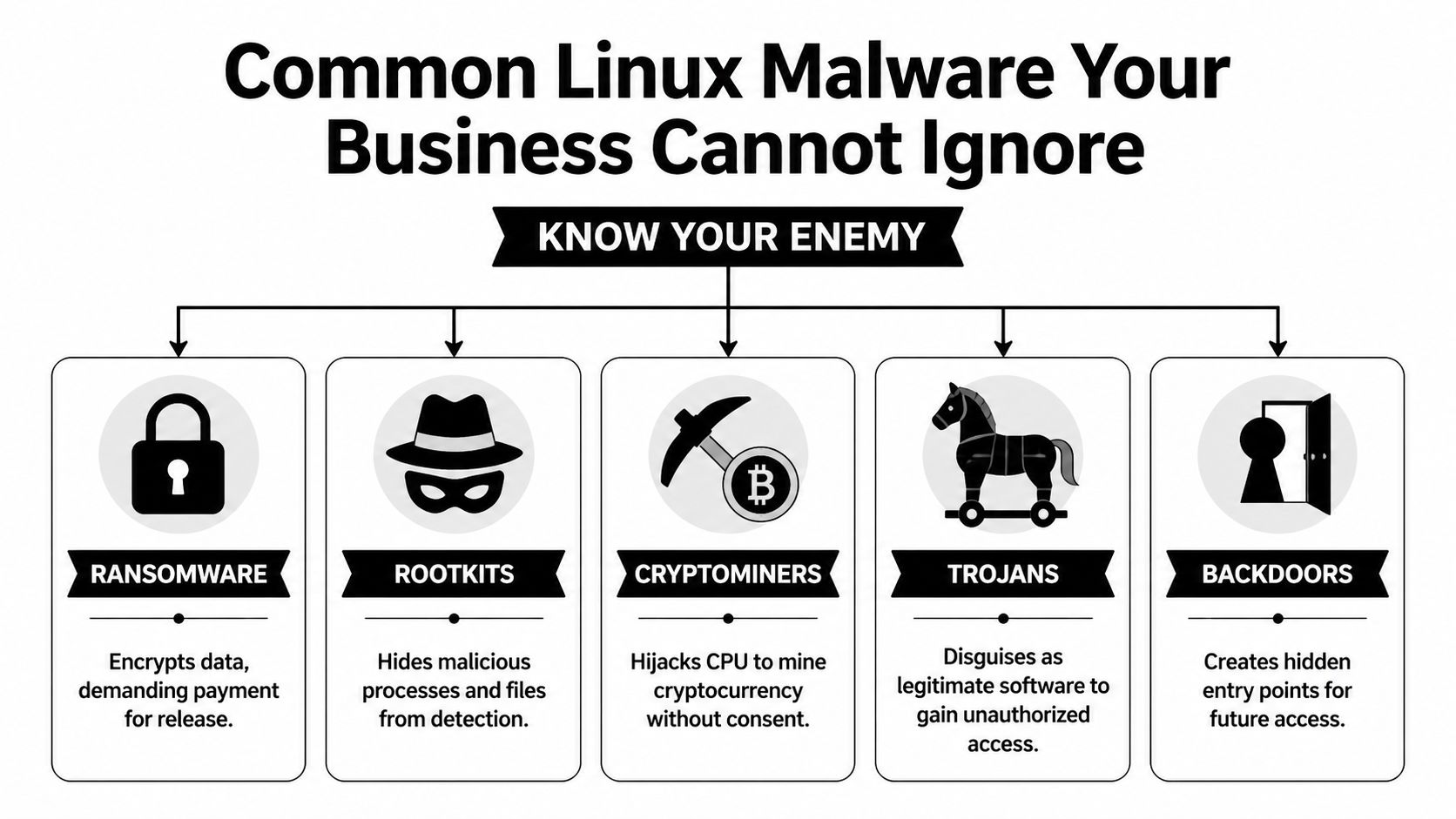
Webshells and backdoors
A webshell is like a hidden key under the doormat of your digital office. Attackers place a malicious script on a web server, then use it to keep remote access without needing to break in again each time.
For a law office, that can mean an attacker reaches the server hosting intake forms or document uploads. For a specialty clinic, it can mean access to a patient-facing portal or a web-connected scheduling tool. The initial compromise may look small, but the value is in persistence. Once attackers are in, they can browse files, move data, install more tools, or prepare a ransomware attack.
Backdoors serve a similar purpose. They create a covert way back into a system after the original weakness gets overlooked or partially fixed.
Trojans and disguised payloads
A trojan pretends to be legitimate software, script output, or an acceptable file while carrying malicious functionality. On Linux systems, that might show up as a fake admin utility, a modified package, or a script copied into a maintenance workflow that nobody questions because “it came from a vendor forum” or “it fixed the issue last time.”
The business danger is trust abuse. Trojans rely on users or admins running something they believe is safe.
That can lead to:
- Credential theft: Stored keys, passwords, and tokens become accessible.
- Unauthorized access: The trojan opens a control channel for later use.
- Lateral movement: The attacker pivots from one system to another, especially in flat networks.
Ransomware on Linux
Ransomware on Linux often targets what matters most in business environments: servers, shared application hosts, databases, and storage tied to daily operations. If a Windows laptop gets hit, that’s serious. If the Linux server behind scheduling, billing, engineering data, or file access gets encrypted, the disruption is broader and harder to contain.
Attackers don’t pick the operating system first. They pick the business process they can afford to break.
For a medical office, downtime can affect scheduling, documentation access, and patient communications. For an architecture or engineering firm, project files and collaboration platforms can become unavailable at once. Industrial businesses may lose visibility into reporting or device management systems that support field operations.
Cryptominers and silent theft
Cryptominers don’t always announce themselves the way ransomware does. They hijack system resources to mine cryptocurrency, using your hardware and your cloud budget for someone else’s gain.
That makes them particularly dangerous for smaller firms because the symptoms are easy to misread. A server runs hot. CPU stays high. Cloud costs creep up. Web apps feel sluggish. Staff complain that systems are “just acting old.”
Rootkits and stealth tooling
Rootkits are designed to hide. They can mask malicious processes, conceal files, and make a compromised machine appear cleaner than it is. That’s why a quick visual check often isn’t enough after a suspected Linux infection.
Here’s the short version of what works and what doesn’t:
| Threat type | What attackers want | What often fools businesses |
|---|---|---|
| Webshells | Persistent remote access | “The site still loads, so we must be fine” |
| Trojans | Initial access and credential theft | “It came from a trusted script or tool” |
| Ransomware | Operational leverage and payment pressure | “Backups exist, so impact will be small” |
| Cryptominers | Long-term resource abuse | “It’s probably just a performance issue” |
| Rootkits | Stealth and persistence | “Our basic checks didn’t find anything” |
What to remember
If you’re evaluating viruses in linux from a business perspective, don’t focus on names first. Focus on effects.
- Loss of control: Can someone else operate your server?
- Loss of visibility: Can you still trust what the system is showing you?
- Loss of availability: Can your team still work?
- Loss of trust: Can clients, patients, or partners still rely on you?
Those are the questions that turn a technical infection into a business event.
How Cyberattacks Target Linux Systems in Florida Businesses
Most Linux compromises don’t start with movie-style hacking. They start with neglected basics.
The broad pattern is well established. The Linux malware overview on Wikipedia notes that the vast majority of Linux malware exploits unpatched vulnerabilities in common services like SSH and web servers, and that worms can spread across networks by finding outdated software or misconfigured access without any user interaction.

The Orlando law firm scenario
A small law firm may outsource website development, host a client intake portal in the cloud, and assume the vendor “handles security.” Months pass. A plugin or server-side component doesn’t get updated. An attacker finds the weakness, uploads a malicious script, and gains a foothold.
Nothing dramatic happens on day one. The website may still load. Staff may not see obvious signs. But the attacker now has a place to work from. They can browse directories, test permissions, and look for stored credentials that lead to file shares, databases, or email integrations.
This is why unpatched web servers are so dangerous. They often connect to systems with much more value than the public-facing website itself.
The medical office scenario
A medical practice in Winter Springs might use a Linux-based appliance, hosted portal, or secure transfer system to support patient operations. Remote access gets set up for convenience. SSH keys or admin credentials remain in place too long, or permissions become too broad after a vendor visit.
That creates a chain attackers like:
- Find the exposed service
- Use weak or stale access to get in
- Install persistence
- Expand from one machine to connected services
- Monetize the access through theft, extortion, or resource abuse
In healthcare-adjacent environments, the compliance problem lands quickly. Even if the first symptom is only a performance issue, leadership still has to ask whether regulated information was reachable during the compromise.
A Linux breach often starts as an IT issue and ends as a management issue.
The industrial and field-service scenario
Industrial firms around Central Florida often run a mix of office systems, remote devices, vendor-managed equipment, and aging network segments that were built for uptime rather than security visibility. Linux shows up in control systems, gateways, appliances, and monitoring platforms.
Attackers look for the easy opening. That may be a neglected web interface, old remote management method, or device that no one included in the patching schedule because it “never changes.” Once compromised, that system can become a stepping stone into more valuable parts of the environment.
This is one reason small businesses underestimate Linux risk. The vulnerable system may not be the one users log into every day. It may be an appliance, cloud instance, or edge device that provides background support for the rest of the operation.
Why cryptomining gets missed
Cryptomining malware deserves special attention because it behaves differently from ransomware. It doesn’t need to announce itself. It wants to stay unnoticed.
A business owner may see the symptoms as ordinary wear and tear:
- Servers feel slow: Websites, portals, or internal apps respond poorly.
- Cloud invoices climb: Consumption rises without a matching business reason.
- Fans and heat increase: Hardware works harder than expected.
- Support tickets pile up: Users report lag, but nobody sees a clear outage.
That’s why cryptominers are effective in small business environments. They hide inside normal frustration. Teams blame old equipment, software bloat, or internet problems while the attacker keeps consuming compute power in the background.
What actually works
The practical fixes aren’t glamorous, but they matter more than advanced theory:
- Reliable patching: Keep SSH, web servers, frameworks, and packages current.
- Tighter remote access: Review keys, accounts, and privileges regularly.
- Segmentation: Don’t let one exposed Linux system talk freely to everything else.
- Log review and monitoring: If nobody watches for abnormal behavior, persistence lasts longer.
- Asset awareness: You can’t protect servers and appliances your business forgot it owned.
What doesn’t work is assuming Linux is “fine unless users click something bad.” Many Linux attacks don’t need user clicks at all. They exploit neglected services that sit online every hour of the day.
Signs of Infection and The Road to Recovery
By the time many businesses notice a Linux infection, the problem has already spread beyond the original entry point. The first sign usually isn’t a flashing warning. It’s a business complaint.
A website gets slower. A database takes too long to answer. File transfers drag. An application server suddenly uses far more resources than normal. In the case of cryptomining malware, that pattern is common. The threat can hijack CPU capacity and drive up electricity or cloud costs while looking like a generic performance issue, as described in this discussion of cryptomining malware on Linux servers and its hidden business impact.
Warning signs owners should take seriously
You don’t need to run Linux commands yourself to spot that something is wrong. You do need to know what symptoms deserve immediate escalation.
- Unexpected slowdowns: A server that used to perform normally starts lagging without a clear business reason.
- Unusual billing changes: Cloud or infrastructure costs rise while workload stays roughly the same.
- Strange files or tasks: IT finds unfamiliar scripts, modified startup items, or unexplained scheduled jobs.
- Outbound traffic spikes: Systems communicate in ways that don’t match normal business use.
- Repeated account anomalies: Unexpected authentication prompts, failed logins, or privilege changes appear in admin reviews.
If your Linux server is “just slower lately,” treat that as a security question before you treat it as a hardware question.
Why cleanup is harder than most owners expect
A proper recovery effort usually includes containment, forensic review, malware removal, patching, credential resets, and verification that the attacker didn’t leave another access path behind. That’s why reactive cleanup gets expensive fast.
Tools such as rkhunter, chkrootkit, log analysis, and network review can help identify hidden processes, rootkits, persistence methods, and unusual connections. But these tools don’t make incident response simple. They produce clues. Someone still has to interpret the findings, separate signal from noise, and decide whether the system can be trusted again.
In many cases, rebuilding from a known-good state is safer than trying to clean an actively compromised machine in place.
Recovery is both technical and operational
Business owners often focus on restoring files. That matters, but it isn’t enough. You also have to answer harder questions:
| Recovery question | Why it matters |
|---|---|
| Was data accessed? | This affects legal, client, and compliance obligations |
| Is the attacker still inside? | A partial cleanup can leave the real problem untouched |
| Can we trust the backup? | Backups may contain compromised files or configurations |
| What was the entry point? | If you don’t fix it, the attacker may return |
If the infection involved damaged or inaccessible files, it can help to consult trusted data recovery specialists alongside your security team, especially when the business is trying to determine whether critical records are recoverable before full restoration.
The hard truth about reactive security
Recovery always happens under pressure. Staff can’t work normally. Clients may be waiting. Leadership wants quick answers before the facts are fully known.
That’s the main problem with a reactive approach to viruses in linux. Even when you restore operations, you still spend time proving the environment is clean, closing the gap that allowed the infection, and documenting what happened for stakeholders. Prevention is cheaper mostly because it avoids the management chaos that follows a breach.
Building Your Proactive Defense Plan
The strongest Linux security programs aren’t built around one tool. They’re built around disciplined layers that close common gaps before malware has a chance to persist.
For a small or mid-sized business, the practical goal is simple: reduce easy paths in, reduce the damage if something gets through, and increase the chance of catching abnormal behavior early.

Start with patching discipline
Most Linux compromises seen in business environments trace back to systems that weren’t updated consistently enough. Patching sounds boring because it is repetitive. That’s also why it works.
A good patching program means:
- Critical services stay current: SSH, web servers, application frameworks, and packages are reviewed on a defined schedule.
- Internet-facing systems go first: Public websites, portals, VPN-adjacent systems, and cloud workloads get priority.
- Exceptions are documented: If a device can’t be patched quickly, someone owns the risk and compensating controls.
What fails is “we update when we have time” or “the vendor said not to touch it.” Those aren’t strategies. They’re delay mechanisms.
Control access like it matters
Many Linux incidents become worse because the attacker inherits too much access from the first compromised account or service.
Use the principle of least privilege in a business way. People should only have access to the systems and functions they need. Admin rights should be narrow, reviewed, and separated from daily work when possible. SSH keys, service accounts, and remote support credentials need routine attention.
A simple access review often finds stale permissions that nobody meant to keep.
Security hardening is less about adding complexity and more about removing unnecessary trust.
Add visibility before you need it
Businesses often buy security tools they never operationalize. The result is dashboard security. Alerts exist, but nobody watches them well enough to act.
Useful visibility on Linux includes endpoint monitoring, centralized logs, alerting for unusual account behavior, and network review for suspicious outbound connections. In some environments, file integrity monitoring and scheduled malware scanning also make sense, especially on servers that handle uploads or sensitive records.
For teams that need user-side protection as well, this resource on how to avoid downloading malicious code is a practical companion to server hardening. It helps close the human side of the risk, which matters even in Linux-heavy environments.
Build defenses in layers
A workable defense plan usually includes a mix of these controls:
Automated patching where appropriate
Routine updates reduce the lifespan of known weaknesses.Endpoint protection and malware detection
Linux hosts need monitoring too, especially servers with internet exposure and desktops used in hybrid work.Network boundaries
Firewalls and segmentation help keep one compromised box from becoming everyone’s problem.Backup and restore discipline
Backups should be tested, isolated appropriately, and reviewed as part of recovery planning.Configuration management
Standardized builds reduce drift and make anomalies easier to spot.
Match the plan to the business
A medical practice doesn’t need the same Linux controls as a manufacturing firm, and an architecture office doesn’t need the same monitoring depth as a public-facing SaaS company. But every one of them needs ownership, repeatability, and accountability.
That’s the trade-off many small firms run into. The right controls are understandable. Maintaining them every week is the hard part.
Why a 24/7 Managed SOC is Your Best Defense in Orlando
Most small and mid-sized businesses know what they should do about Linux security. They struggle with who is going to do it consistently at the right depth.
That gap is where a managed security model becomes practical. Not because every business needs an enterprise-sized internal security department, but because Linux threats now affect the same systems that support revenue, service delivery, and compliance. If your firm relies on cloud servers, web apps, client portals, remote users, or specialized Linux-based devices, someone has to watch, patch, investigate, and respond without waiting for a crisis.
Why internal teams often miss Linux risk
In smaller organizations, Linux security tends to fall into one of three buckets:
- Nobody owns it directly: The environment exists, but responsibility is diffuse.
- A generalist handles it when time allows: Day-to-day support crowds out preventive work.
- A vendor manages only their piece: Website host, software vendor, and local IT each assume someone else is covering the rest.
That model breaks under pressure. Malware doesn’t care about org charts. If a Linux web server leads to broader access, the business still owns the fallout.
This is also becoming more relevant on the workstation side. As Linux desktop adoption grows in professional services for cost and security reasons, the risk from threats such as EvilGNOME is expected to rise, which challenges the assumption of Linux desktops' fundamental safety and reinforces the need for endpoint protection on Linux workstations in hybrid environments, as discussed in Linux.com’s myth-busting look at Linux malware assumptions.
What a managed SOC changes
A 24/7 Security Operations Center changes the operating model from occasional maintenance to continuous oversight. For a business owner, that means fewer blind spots and faster decisions when something looks wrong.
The value isn’t just “more tools.” It’s coordinated execution:
- systems get patched on schedule
- endpoint alerts are reviewed
- suspicious activity is investigated
- credentials and access issues are escalated
- incidents move from detection to containment without waiting for business hours
For Orlando-area firms, that matters because business risk doesn’t pause overnight. A compromised Linux host at 2 a.m. can still affect Monday morning operations.
What to look for in a provider
A managed provider should be judged on operating discipline, not marketing language. Use a checklist that ties services directly to Linux business risk.
| Service | Why It Matters for Linux Security | Cyber Command's Approach |
|---|---|---|
| 24/7 SOC monitoring | Linux malware often persists quietly. Continuous review helps catch suspicious behavior sooner. | 24/7/365 SOC with active threat hunting, incident response, and continuous monitoring |
| Patch management | Unpatched SSH, web servers, and packages are common entry points. | Proactive patching and vendor management for covered systems |
| Endpoint protection | Linux servers and workstations need detection, not assumptions. | Managed endpoint protection across business environments |
| Access control support | Stale credentials and broad privileges increase blast radius. | Help with account governance, standardized processes, and documented oversight |
| Compliance alignment | Legal, medical, and financial firms need more than “it seems fixed.” | Ongoing compliance support, reporting, and operational documentation |
| Recovery coordination | Cleanup requires containment, restoration, and proof of control. | Incident response and recovery support through an integrated service model |
| Strategic review | Linux security fails when it becomes ad hoc. | Network diagrams, QBRs, and roadmap alignment to business goals |
Local fit matters more than many owners think
A provider that understands the realities of Orlando and Winter Springs businesses will frame Linux security in terms of uptime, vendor coordination, and compliance pressure, not just command-line fluency. Law firms need file confidentiality. Medical practices need operational continuity and attention to regulated data. Industrial companies need standardization across mixed environments.
Those are management problems with technical roots. The provider has to bridge both.
For companies comparing options, this overview of cyber security companies in Orlando is a useful starting point for evaluating local and regional support models.
What practical support should look like
If you’re outsourcing this function, ask whether the provider can handle the day-to-day realities that usually create exposure:
- Can they monitor Linux systems after hours?
- Will they patch and verify, not just recommend?
- Do they help with vendor coordination when a hosted app is involved?
- Can they support hybrid environments with Windows, Linux, cloud, and appliances together?
- Will they give leadership clear reporting instead of raw technical noise?
Those questions matter more than whether the provider lists every security acronym on a website.
One workable model for SMBs
For organizations that don’t want to build a full internal security function, Cyber Command, LLC is one example of a U.S.-based managed IT and cybersecurity partner that offers 24/7/365 SOC operations, patching, endpoint protection, incident response, compliance support, and co-managed IT for businesses in Orlando, Winter Springs, and North Texas. That kind of model fits companies that need ongoing Linux security coverage but don’t have in-house capacity to manage prevention and response continuously.
The trade-off business owners need to decide on
You can run Linux security reactively, where problems get attention after users feel them. Or you can run it as an operational discipline, where patching, monitoring, access review, and response happen continuously in the background.
The first path feels cheaper until an infection touches billing, scheduling, file access, or regulated data.
The second path is usually the better business decision because it protects continuity. It also gives leadership something just as important: a clear line of responsibility.
If your business in Orlando or Winter Springs depends on Linux anywhere in the stack, viruses in linux should be treated as a current business risk, not an edge-case technical concern. The companies that handle this well usually do one thing consistently. They stop relying on assumptions and start relying on process.
If your business relies on Linux servers, cloud platforms, web applications, or hybrid workstations, a practical next step is to review your current exposure with Cyber Command, LLC. A focused conversation can help you identify where patching, endpoint coverage, access control, and 24/7 monitoring need to improve before a small weakness turns into an outage or compliance event.
