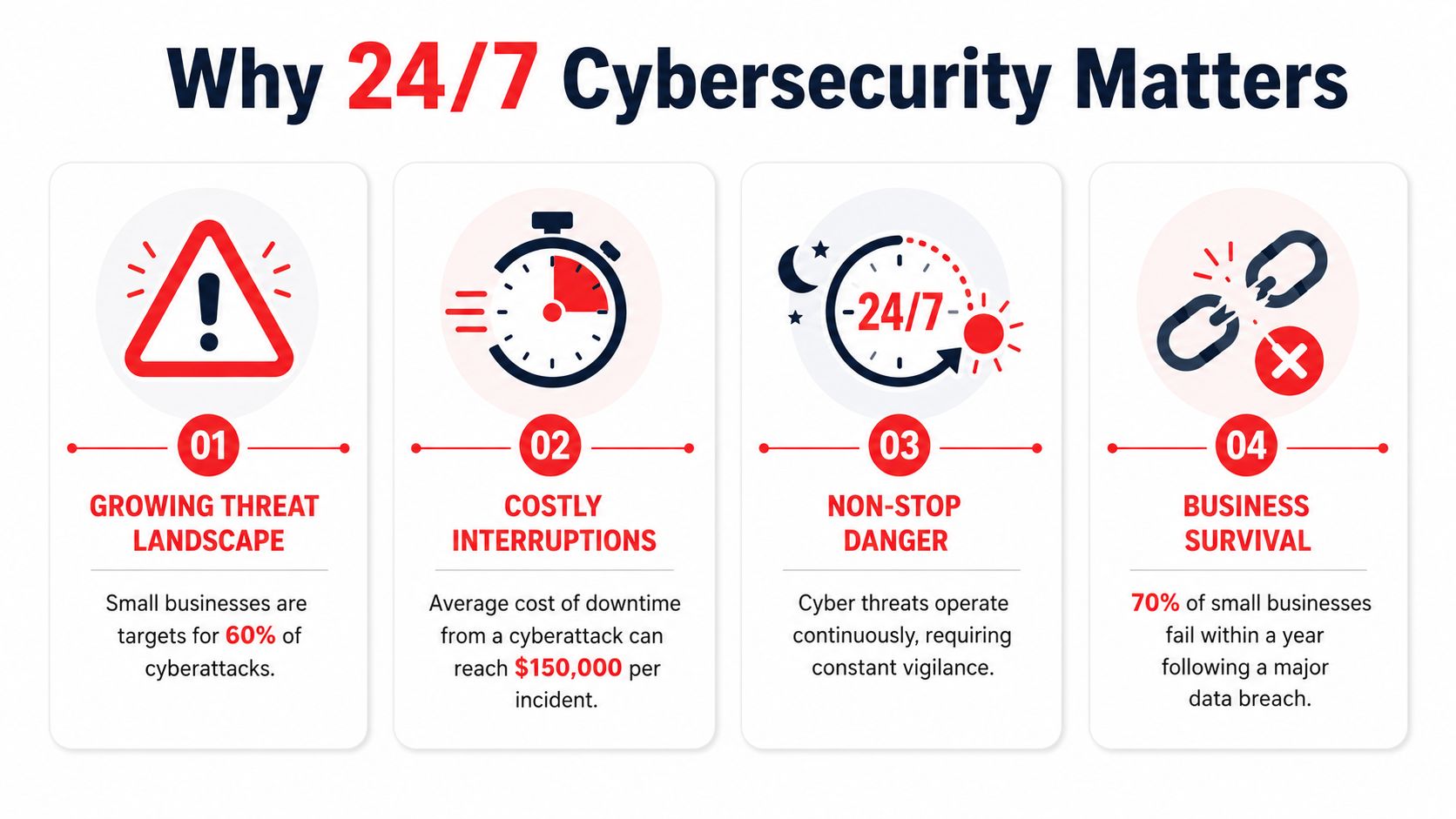
Viruses in Linux: A 2026 Guide for Florida Businesses

Yes, Linux gets viruses, and it is now the most targeted platform for malware. In 2023, 54% of malware infections hit Linux endpoints, compared with 39% on Windows and 6% on Mac.

That should change how any business owner in Orlando thinks about servers, cloud apps, file storage, and even Linux workstations. If your website runs on Linux, your client portal sits on a Linux web server, or your office depends on a hosted database behind the scenes, the old belief that Linux is “safe by default” can leave you exposed at exactly the wrong layer.

For small and mid-sized firms in Central Florida, viruses in linux aren't just a technical issue. They can slow down scheduling systems at a dental office, expose case files at a law firm, or interrupt production reporting for an industrial company that relies on connected devices and remote access. The threat isn't theoretical anymore. It's operational, financial, and in many cases compliance-related.

The Linux Security Myth Has Been Busted

For years, business owners heard some version of the same advice: Linux doesn’t get viruses, or at least not in a way that matters to smaller companies. That advice aged badly.

Data analyzed by Comparitech from the Elastic Security 2023 Global Threat Report shows that Linux endpoints became the most targeted by malware for the first time in 2023, with 54% of all malware infections occurring on Linux endpoints. Windows accounted for 39%, and Mac for 6% in the same reporting, according to Comparitech’s analysis of Linux malware statistics.

A cracked metallic shield featuring the Linux penguin logo, symbolizing potential security breaches in a server room.

Why the myth lasted so long

The myth wasn’t completely irrational. Linux historically benefited from strong permission controls, faster patching cultures, and lower desktop market share. That made it a less attractive target for old-school consumer malware.

But business use changed. Linux now runs the systems attackers care about most: cloud workloads, web servers, containers, databases, and internet-facing applications. When a local accounting firm hosts a client document portal or a medical office uses a Linux-backed vendor platform, attackers don't care what operating system sits underneath. They care that the system holds sensitive data and supports a revenue-generating workflow.

What this means for Orlando businesses

A lot of smaller firms in Orlando and Winter Springs have Linux somewhere in the stack without thinking of themselves as “Linux businesses.” It may be the server your website uses, the appliance behind your firewall, the cloud VM hosting an internal application, or a specialized workstation in engineering or industrial operations.

That matters because security blind spots often start with assumptions. If leadership assumes Linux is naturally protected, patching slips, endpoint controls are inconsistent, logs go unread, and remote access settings stay looser than they should.

Practical rule: The most dangerous Linux system is the one your business depends on but nobody actively monitors.

A common mistake is treating Linux security as a one-time setup job. It isn’t. Attackers look for weak points that stay weak, such as stale software, exposed admin panels, and forgotten credentials. If you want a simple business explanation of how malicious code creates damage after it lands, this guide on how malicious code can cause damage is worth reviewing with both leadership and IT.

The business risk behind the myth

For legal, medical, and industrial firms, the direct issue isn’t whether an infection technically qualifies as a “virus,” “trojan,” or “worm.” The critical issue is what the attacker can do next.

That can include:

  • Interrupt operations: Applications slow down, crash, or become unreliable during business hours.
  • Expose regulated data: Client records, patient information, contracts, and financial files can be accessed or staged for theft.
  • Create hidden persistence: Attackers often leave behind remote access paths so they can return later.
  • Raise recovery costs: Cleanup usually requires more than deleting a file. Systems need review, isolation, restoration, and proof that the entry point is gone.

Linux isn’t insecure by design. But the idea that it’s immune has been decisively disproven. Businesses that still operate under that assumption are giving attackers extra time and easier access.

Common Linux Malware Your Business Cannot Ignore

Business owners don’t need a malware taxonomy lesson. They need to know what these threats do once they hit a server, workstation, or hosted application.

Trend Micro reported that webshell malware made up 49.6% of all detected Linux threat samples in 2022, making it the most common category in that reporting, as detailed in Trend Micro’s Linux Threat Landscape Report. That tells you something important. Attackers often aren’t trying to smash the door. They want a quiet way to come and go.

An infographic titled Common Linux Malware listing Ransomware, Rootkits, Cryptominers, Trojans, and Backdoors as common threats.

Webshells and backdoors

A webshell is like a hidden key under the doormat of your digital office. Attackers place a malicious script on a web server, then use it to keep remote access without needing to break in again each time.

For a law office, that can mean an attacker reaches the server hosting intake forms or document uploads. For a specialty clinic, it can mean access to a patient-facing portal or a web-connected scheduling tool. The initial compromise may look small, but the value is in persistence. Once attackers are in, they can browse files, move data, install more tools, or prepare a ransomware attack.

Backdoors serve a similar purpose. They create a covert way back into a system after the original weakness gets overlooked or partially fixed.

Trojans and disguised payloads

A trojan pretends to be legitimate software, script output, or an acceptable file while carrying malicious functionality. On Linux systems, that might show up as a fake admin utility, a modified package, or a script copied into a maintenance workflow that nobody questions because “it came from a vendor forum” or “it fixed the issue last time.”

The business danger is trust abuse. Trojans rely on users or admins running something they believe is safe.

That can lead to:

  • Credential theft: Stored keys, passwords, and tokens become accessible.
  • Unauthorized access: The trojan opens a control channel for later use.
  • Lateral movement: The attacker pivots from one system to another, especially in flat networks.

Ransomware on Linux

Ransomware on Linux often targets what matters most in business environments: servers, shared application hosts, databases, and storage tied to daily operations. If a Windows laptop gets hit, that’s serious. If the Linux server behind scheduling, billing, engineering data, or file access gets encrypted, the disruption is broader and harder to contain.

Attackers don’t pick the operating system first. They pick the business process they can afford to break.

For a medical office, downtime can affect scheduling, documentation access, and patient communications. For an architecture or engineering firm, project files and collaboration platforms can become unavailable at once. Industrial businesses may lose visibility into reporting or device management systems that support field operations.

Cryptominers and silent theft

Cryptominers don’t always announce themselves the way ransomware does. They hijack system resources to mine cryptocurrency, using your hardware and your cloud budget for someone else’s gain.

That makes them particularly dangerous for smaller firms because the symptoms are easy to misread. A server runs hot. CPU stays high. Cloud costs creep up. Web apps feel sluggish. Staff complain that systems are “just acting old.”

Rootkits and stealth tooling

Rootkits are designed to hide. They can mask malicious processes, conceal files, and make a compromised machine appear cleaner than it is. That’s why a quick visual check often isn’t enough after a suspected Linux infection.

Here’s the short version of what works and what doesn’t:

Threat type What attackers want What often fools businesses
Webshells Persistent remote access “The site still loads, so we must be fine”
Trojans Initial access and credential theft “It came from a trusted script or tool”
Ransomware Operational leverage and payment pressure “Backups exist, so impact will be small”
Cryptominers Long-term resource abuse “It’s probably just a performance issue”
Rootkits Stealth and persistence “Our basic checks didn’t find anything”

What to remember

If you’re evaluating viruses in linux from a business perspective, don’t focus on names first. Focus on effects.

  • Loss of control: Can someone else operate your server?
  • Loss of visibility: Can you still trust what the system is showing you?
  • Loss of availability: Can your team still work?
  • Loss of trust: Can clients, patients, or partners still rely on you?

Those are the questions that turn a technical infection into a business event.

How Cyberattacks Target Linux Systems in Florida Businesses

Most Linux compromises don’t start with movie-style hacking. They start with neglected basics.

The broad pattern is well established. The Linux malware overview on Wikipedia notes that the vast majority of Linux malware exploits unpatched vulnerabilities in common services like SSH and web servers, and that worms can spread across networks by finding outdated software or misconfigured access without any user interaction.

A modern server room with rows of racks and digital data visualizations over a blurred office background.

The Orlando law firm scenario

A small law firm may outsource website development, host a client intake portal in the cloud, and assume the vendor “handles security.” Months pass. A plugin or server-side component doesn’t get updated. An attacker finds the weakness, uploads a malicious script, and gains a foothold.

Nothing dramatic happens on day one. The website may still load. Staff may not see obvious signs. But the attacker now has a place to work from. They can browse directories, test permissions, and look for stored credentials that lead to file shares, databases, or email integrations.

This is why unpatched web servers are so dangerous. They often connect to systems with much more value than the public-facing website itself.

The medical office scenario

A medical practice in Winter Springs might use a Linux-based appliance, hosted portal, or secure transfer system to support patient operations. Remote access gets set up for convenience. SSH keys or admin credentials remain in place too long, or permissions become too broad after a vendor visit.

That creates a chain attackers like:

  1. Find the exposed service
  2. Use weak or stale access to get in
  3. Install persistence
  4. Expand from one machine to connected services
  5. Monetize the access through theft, extortion, or resource abuse

In healthcare-adjacent environments, the compliance problem lands quickly. Even if the first symptom is only a performance issue, leadership still has to ask whether regulated information was reachable during the compromise.

A Linux breach often starts as an IT issue and ends as a management issue.

The industrial and field-service scenario

Industrial firms around Central Florida often run a mix of office systems, remote devices, vendor-managed equipment, and aging network segments that were built for uptime rather than security visibility. Linux shows up in control systems, gateways, appliances, and monitoring platforms.

Attackers look for the easy opening. That may be a neglected web interface, old remote management method, or device that no one included in the patching schedule because it “never changes.” Once compromised, that system can become a stepping stone into more valuable parts of the environment.
This is one reason small businesses underestimate Linux risk. The vulnerable system may not be the one users log into every day. It may be an appliance, cloud instance, or edge device that provides background support for the rest of the operation.

Why cryptomining gets missed

Cryptomining malware deserves special attention because it behaves differently from ransomware. It doesn’t need to announce itself. It wants to stay unnoticed.

A business owner may see the symptoms as ordinary wear and tear:

  • Servers feel slow: Websites, portals, or internal apps respond poorly.
  • Cloud invoices climb: Consumption rises without a matching business reason.
  • Fans and heat increase: Hardware works harder than expected.
  • Support tickets pile up: Users report lag, but nobody sees a clear outage.

That’s why cryptominers are effective in small business environments. They hide inside normal frustration. Teams blame old equipment, software bloat, or internet problems while the attacker keeps consuming compute power in the background.

What actually works

The practical fixes aren’t glamorous, but they matter more than advanced theory:

  • Reliable patching: Keep SSH, web servers, frameworks, and packages current.
  • Tighter remote access: Review keys, accounts, and privileges regularly.
  • Segmentation: Don’t let one exposed Linux system talk freely to everything else.
  • Log review and monitoring: If nobody watches for abnormal behavior, persistence lasts longer.
  • Asset awareness: You can’t protect servers and appliances your business forgot it owned.

What doesn’t work is assuming Linux is “fine unless users click something bad.” Many Linux attacks don’t need user clicks at all. They exploit neglected services that sit online every hour of the day.

Signs of Infection and The Road to Recovery

By the time many businesses notice a Linux infection, the problem has already spread beyond the original entry point. The first sign usually isn’t a flashing warning. It’s a business complaint.

A website gets slower. A database takes too long to answer. File transfers drag. An application server suddenly uses far more resources than normal. In the case of cryptomining malware, that pattern is common. The threat can hijack CPU capacity and drive up electricity or cloud costs while looking like a generic performance issue, as described in this discussion of cryptomining malware on Linux servers and its hidden business impact.

Warning signs owners should take seriously

You don’t need to run Linux commands yourself to spot that something is wrong. You do need to know what symptoms deserve immediate escalation.

  • Unexpected slowdowns: A server that used to perform normally starts lagging without a clear business reason.
  • Unusual billing changes: Cloud or infrastructure costs rise while workload stays roughly the same.
  • Strange files or tasks: IT finds unfamiliar scripts, modified startup items, or unexplained scheduled jobs.
  • Outbound traffic spikes: Systems communicate in ways that don’t match normal business use.
  • Repeated account anomalies: Unexpected authentication prompts, failed logins, or privilege changes appear in admin reviews.

If your Linux server is “just slower lately,” treat that as a security question before you treat it as a hardware question.

Why cleanup is harder than most owners expect

A proper recovery effort usually includes containment, forensic review, malware removal, patching, credential resets, and verification that the attacker didn’t leave another access path behind. That’s why reactive cleanup gets expensive fast.

Tools such as rkhunter, chkrootkit, log analysis, and network review can help identify hidden processes, rootkits, persistence methods, and unusual connections. But these tools don’t make incident response simple. They produce clues. Someone still has to interpret the findings, separate signal from noise, and decide whether the system can be trusted again.

In many cases, rebuilding from a known-good state is safer than trying to clean an actively compromised machine in place.

Recovery is both technical and operational

Business owners often focus on restoring files. That matters, but it isn’t enough. You also have to answer harder questions:

Recovery question Why it matters
Was data accessed? This affects legal, client, and compliance obligations
Is the attacker still inside? A partial cleanup can leave the real problem untouched
Can we trust the backup? Backups may contain compromised files or configurations
What was the entry point? If you don’t fix it, the attacker may return

If the infection involved damaged or inaccessible files, it can help to consult trusted data recovery specialists alongside your security team, especially when the business is trying to determine whether critical records are recoverable before full restoration.

The hard truth about reactive security

Recovery always happens under pressure. Staff can’t work normally. Clients may be waiting. Leadership wants quick answers before the facts are fully known.

That’s the main problem with a reactive approach to viruses in linux. Even when you restore operations, you still spend time proving the environment is clean, closing the gap that allowed the infection, and documenting what happened for stakeholders. Prevention is cheaper mostly because it avoids the management chaos that follows a breach.

Building Your Proactive Defense Plan

The strongest Linux security programs aren’t built around one tool. They’re built around disciplined layers that close common gaps before malware has a chance to persist.

For a small or mid-sized business, the practical goal is simple: reduce easy paths in, reduce the damage if something gets through, and increase the chance of catching abnormal behavior early.

A professional IT specialist in a white lab coat monitors server security systems on a computer screen.

Start with patching discipline

Most Linux compromises seen in business environments trace back to systems that weren’t updated consistently enough. Patching sounds boring because it is repetitive. That’s also why it works.

A good patching program means:

  • Critical services stay current: SSH, web servers, application frameworks, and packages are reviewed on a defined schedule.
  • Internet-facing systems go first: Public websites, portals, VPN-adjacent systems, and cloud workloads get priority.
  • Exceptions are documented: If a device can’t be patched quickly, someone owns the risk and compensating controls.

What fails is “we update when we have time” or “the vendor said not to touch it.” Those aren’t strategies. They’re delay mechanisms.

Control access like it matters

Many Linux incidents become worse because the attacker inherits too much access from the first compromised account or service.

Use the principle of least privilege in a business way. People should only have access to the systems and functions they need. Admin rights should be narrow, reviewed, and separated from daily work when possible. SSH keys, service accounts, and remote support credentials need routine attention.

A simple access review often finds stale permissions that nobody meant to keep.

Security hardening is less about adding complexity and more about removing unnecessary trust.

Add visibility before you need it

Businesses often buy security tools they never operationalize. The result is dashboard security. Alerts exist, but nobody watches them well enough to act.

Useful visibility on Linux includes endpoint monitoring, centralized logs, alerting for unusual account behavior, and network review for suspicious outbound connections. In some environments, file integrity monitoring and scheduled malware scanning also make sense, especially on servers that handle uploads or sensitive records.

For teams that need user-side protection as well, this resource on how to avoid downloading malicious code is a practical companion to server hardening. It helps close the human side of the risk, which matters even in Linux-heavy environments.

Build defenses in layers

A workable defense plan usually includes a mix of these controls:

  1. Automated patching where appropriate
    Routine updates reduce the lifespan of known weaknesses.

  2. Endpoint protection and malware detection
    Linux hosts need monitoring too, especially servers with internet exposure and desktops used in hybrid work.

  3. Network boundaries
    Firewalls and segmentation help keep one compromised box from becoming everyone’s problem.

  4. Backup and restore discipline
    Backups should be tested, isolated appropriately, and reviewed as part of recovery planning.

  5. Configuration management
    Standardized builds reduce drift and make anomalies easier to spot.

Match the plan to the business

A medical practice doesn’t need the same Linux controls as a manufacturing firm, and an architecture office doesn’t need the same monitoring depth as a public-facing SaaS company. But every one of them needs ownership, repeatability, and accountability.

That’s the trade-off many small firms run into. The right controls are understandable. Maintaining them every week is the hard part.

Why a 24/7 Managed SOC is Your Best Defense in Orlando

Most small and mid-sized businesses know what they should do about Linux security. They struggle with who is going to do it consistently at the right depth.

That gap is where a managed security model becomes practical. Not because every business needs an enterprise-sized internal security department, but because Linux threats now affect the same systems that support revenue, service delivery, and compliance. If your firm relies on cloud servers, web apps, client portals, remote users, or specialized Linux-based devices, someone has to watch, patch, investigate, and respond without waiting for a crisis.

Why internal teams often miss Linux risk

In smaller organizations, Linux security tends to fall into one of three buckets:

  • Nobody owns it directly: The environment exists, but responsibility is diffuse.
  • A generalist handles it when time allows: Day-to-day support crowds out preventive work.
  • A vendor manages only their piece: Website host, software vendor, and local IT each assume someone else is covering the rest.

That model breaks under pressure. Malware doesn’t care about org charts. If a Linux web server leads to broader access, the business still owns the fallout.

This is also becoming more relevant on the workstation side. As Linux desktop adoption grows in professional services for cost and security reasons, the risk from threats such as EvilGNOME is expected to rise, which challenges the assumption of Linux desktops' fundamental safety and reinforces the need for endpoint protection on Linux workstations in hybrid environments, as discussed in Linux.com’s myth-busting look at Linux malware assumptions.

What a managed SOC changes

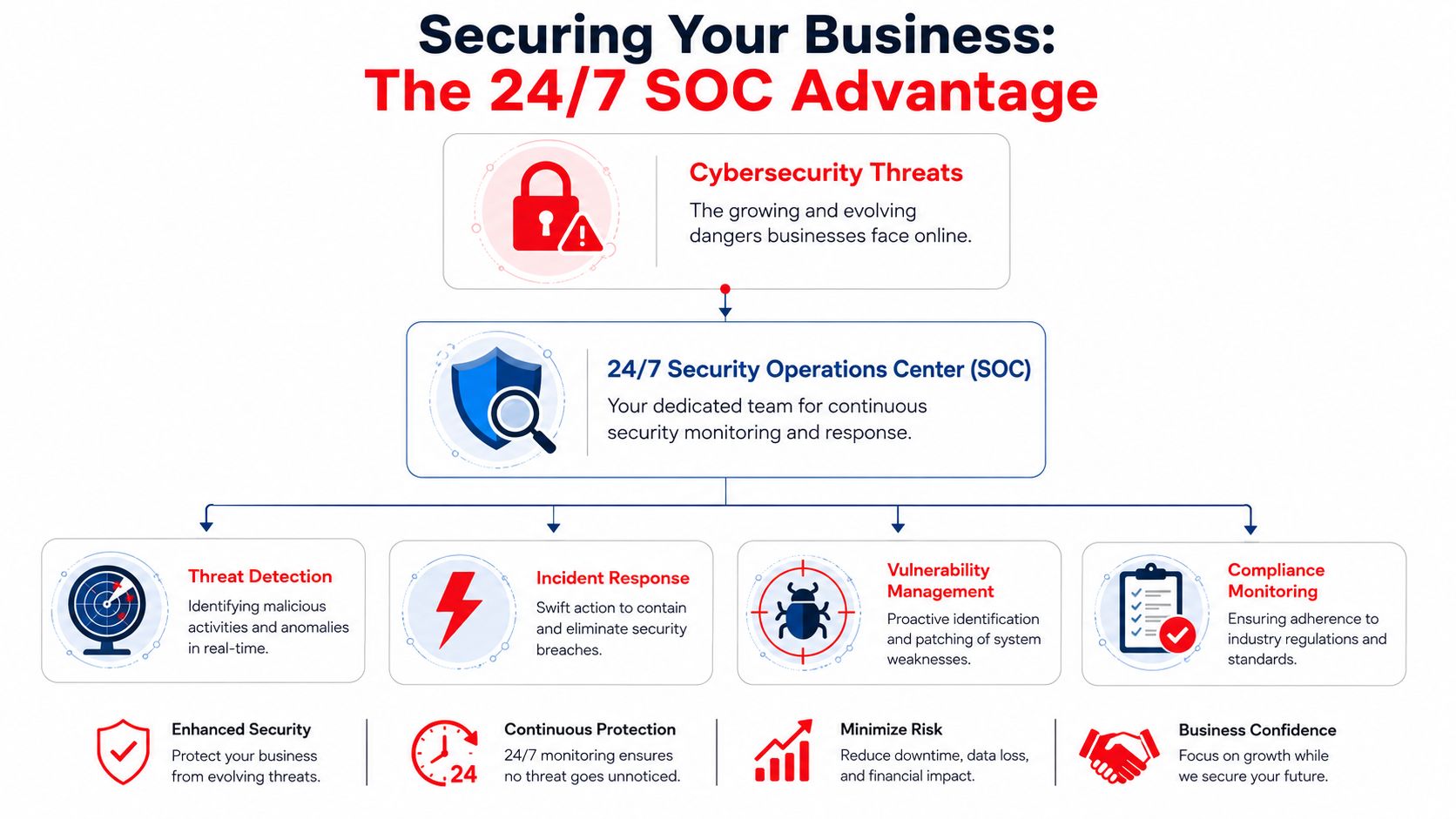
A 24/7 Security Operations Center changes the operating model from occasional maintenance to continuous oversight. For a business owner, that means fewer blind spots and faster decisions when something looks wrong.

The value isn’t just “more tools.” It’s coordinated execution:

  • systems get patched on schedule
  • endpoint alerts are reviewed
  • suspicious activity is investigated
  • credentials and access issues are escalated
  • incidents move from detection to containment without waiting for business hours

For Orlando-area firms, that matters because business risk doesn’t pause overnight. A compromised Linux host at 2 a.m. can still affect Monday morning operations.

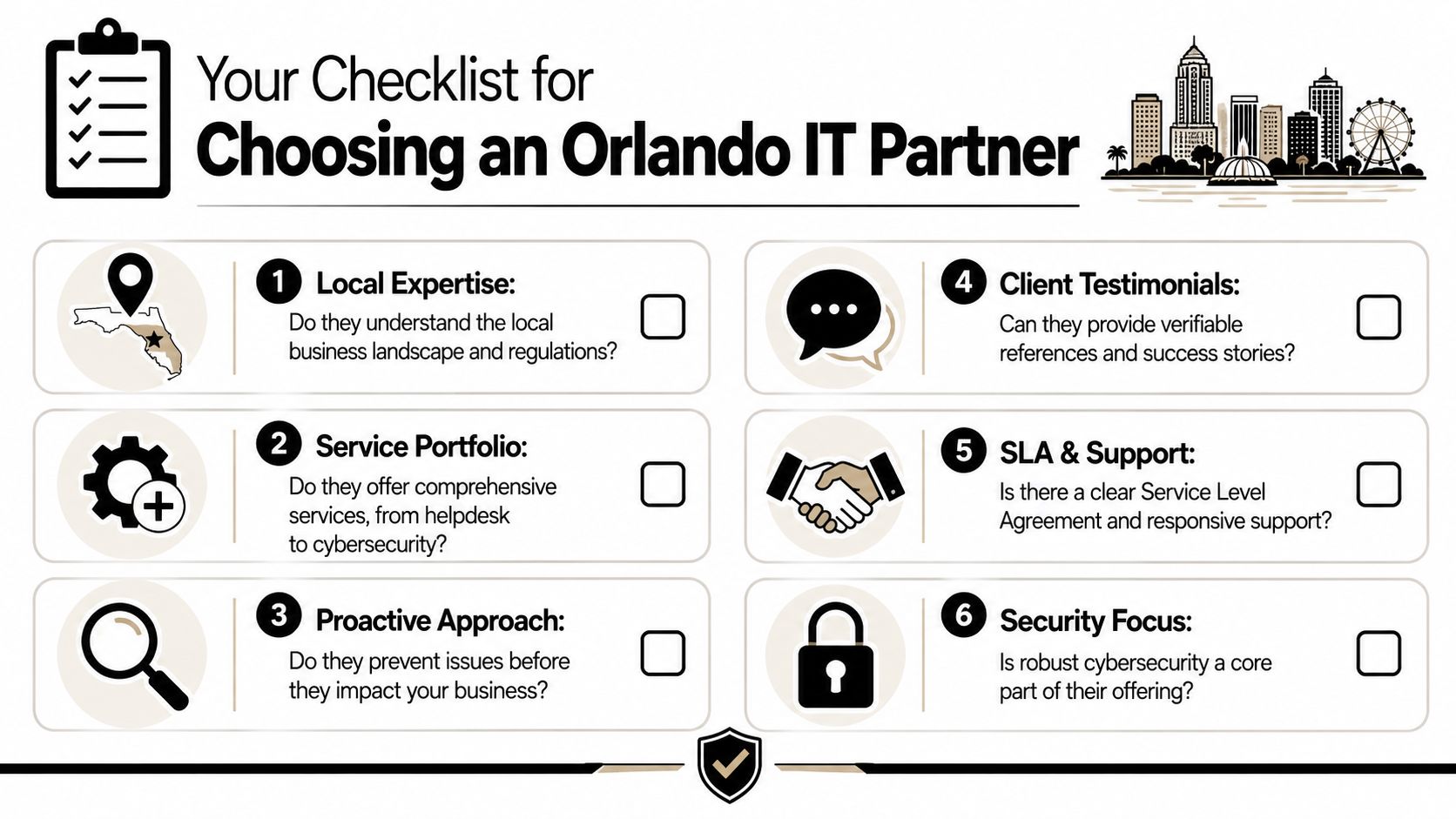
What to look for in a provider

A managed provider should be judged on operating discipline, not marketing language. Use a checklist that ties services directly to Linux business risk.

Service Why It Matters for Linux Security Cyber Command's Approach
24/7 SOC monitoring Linux malware often persists quietly. Continuous review helps catch suspicious behavior sooner. 24/7/365 SOC with active threat hunting, incident response, and continuous monitoring
Patch management Unpatched SSH, web servers, and packages are common entry points. Proactive patching and vendor management for covered systems
Endpoint protection Linux servers and workstations need detection, not assumptions. Managed endpoint protection across business environments
Access control support Stale credentials and broad privileges increase blast radius. Help with account governance, standardized processes, and documented oversight
Compliance alignment Legal, medical, and financial firms need more than “it seems fixed.” Ongoing compliance support, reporting, and operational documentation
Recovery coordination Cleanup requires containment, restoration, and proof of control. Incident response and recovery support through an integrated service model
Strategic review Linux security fails when it becomes ad hoc. Network diagrams, QBRs, and roadmap alignment to business goals

Local fit matters more than many owners think

A provider that understands the realities of Orlando and Winter Springs businesses will frame Linux security in terms of uptime, vendor coordination, and compliance pressure, not just command-line fluency. Law firms need file confidentiality. Medical practices need operational continuity and attention to regulated data. Industrial companies need standardization across mixed environments.

Those are management problems with technical roots. The provider has to bridge both.

For companies comparing options, this overview of cyber security companies in Orlando is a useful starting point for evaluating local and regional support models.

What practical support should look like

If you’re outsourcing this function, ask whether the provider can handle the day-to-day realities that usually create exposure:

  • Can they monitor Linux systems after hours?
  • Will they patch and verify, not just recommend?
  • Do they help with vendor coordination when a hosted app is involved?
  • Can they support hybrid environments with Windows, Linux, cloud, and appliances together?
  • Will they give leadership clear reporting instead of raw technical noise?

Those questions matter more than whether the provider lists every security acronym on a website.

One workable model for SMBs

For organizations that don’t want to build a full internal security function, Cyber Command, LLC is one example of a U.S.-based managed IT and cybersecurity partner that offers 24/7/365 SOC operations, patching, endpoint protection, incident response, compliance support, and co-managed IT for businesses in Orlando, Winter Springs, and North Texas. That kind of model fits companies that need ongoing Linux security coverage but don’t have in-house capacity to manage prevention and response continuously.

The trade-off business owners need to decide on

You can run Linux security reactively, where problems get attention after users feel them. Or you can run it as an operational discipline, where patching, monitoring, access review, and response happen continuously in the background.

The first path feels cheaper until an infection touches billing, scheduling, file access, or regulated data.

The second path is usually the better business decision because it protects continuity. It also gives leadership something just as important: a clear line of responsibility.

If your business in Orlando or Winter Springs depends on Linux anywhere in the stack, viruses in linux should be treated as a current business risk, not an edge-case technical concern. The companies that handle this well usually do one thing consistently. They stop relying on assumptions and start relying on process.


If your business relies on Linux servers, cloud platforms, web applications, or hybrid workstations, a practical next step is to review your current exposure with Cyber Command, LLC. A focused conversation can help you identify where patching, endpoint coverage, access control, and 24/7 monitoring need to improve before a small weakness turns into an outage or compliance event.

Datto SaaS Protection: A Guide for Florida SMBs

A lot of business owners in Orlando assume Microsoft 365 means their data is backed up. It usually doesn’t mean what they think it means. Your email may be hosted in the cloud, your files may sync across devices, and Microsoft’s platform may stay online, but none of that guarantees fast recovery when someone deletes the wrong folder, an employee account gets compromised, or ransomware hits SharePoint and Teams.

That misunderstanding causes expensive downtime. It also creates compliance trouble for firms that handle client records, financial files, patient communications, contracts, and internal HR documents. If your company relies on Microsoft 365 or Google Workspace every day, cloud convenience alone isn’t a backup strategy.

The Hidden Risk in Your Cloud Data

A downtown Orlando law office finishes a long day. A paralegal cleans up a Teams workspace, removes what looks like an old case folder, and realizes too late that it held current discovery documents. The firm assumes IT can just pull it back because everything is “in Microsoft 365.”

Then recovery turns messy. People start checking recycle bins, version history, user accounts, and retention settings. Partners are waiting. A filing deadline is close. Nobody cares that the data was in the cloud. They care whether it can be restored quickly and cleanly.

A distressed man sits at a computer desk looking at a screen displaying a folder deleted notification.

The same thing happens in healthcare practices across Winter Springs and greater Central Florida. A staff member deletes the wrong mailbox. A former employee wipes files before departing. A phishing attack leads to account misuse and content removal. In each case, the business owner assumed cloud storage and cloud backup were the same thing.

They’re not.

According to Datto’s Microsoft 365 SaaS protection overview, 87% of businesses suffered SaaS data loss in 2024. That number matters because it cuts through the common belief that cloud apps are self-protecting. They aren’t. They’re operational platforms, not full business continuity plans.

Where the misunderstanding starts

Most owners hear “redundant cloud infrastructure” and think “my data is safe.” What that usually means is the service provider protects platform availability. It doesn’t mean your business automatically has an independent, restorable copy of user data ready after deletion, corruption, or attack.

Practical rule: If your recovery plan depends on the same platform where the loss happened, you don’t have enough separation.

That gap matters even more for firms handling bookkeeping, tax records, and financial documents. If you want a grounded look at why accounting teams need dedicated backup discipline, this piece on protecting accounting data is worth reading.

What this looks like in a real business

  • A law firm loses matter files: Teams and SharePoint content disappears, and staff burns billable time trying to reconstruct records.
  • A medical office loses communications: Email, calendar, or file loss can disrupt patient coordination and create audit headaches.
  • An accounting practice gets hit during busy season: One mistaken deletion can ripple into missed deadlines, client frustration, and manual rework.

The hidden risk isn’t that Microsoft 365 is unreliable. The hidden risk is assuming its standard protections match what your business needs when something goes wrong.

What Is Datto SaaS Protection

datto saas protection is a third-party backup platform built to create an independent copy of cloud application data. For a small business owner, the simplest way to think about it is this. Microsoft 365 or Google Workspace runs your day-to-day work. Datto SaaS Protection keeps a separate backup copy so you can recover that work when users, attackers, or policy mistakes cause loss.

That separation is the whole point.

Think of it as an off-site digital safe

If your office kept all client records in one room, you wouldn’t call that a disaster recovery plan. You’d want copies stored somewhere else. The same principle applies to cloud apps. Just because your data sits in a major cloud platform doesn’t mean you have an off-platform backup that’s easy to restore.

Datto SaaS Protection fills that gap by keeping backup data outside Microsoft’s and Google’s native environments. That matters when the problem starts inside the tenant itself, such as accidental deletion, account compromise, or a malicious insider.

What it protects in Microsoft 365

For Microsoft 365, Datto SaaS Protection covers the systems most small businesses depend on every day:

  • Exchange Online: Mailboxes, email content, and related user data.
  • OneDrive: Individual user files that often hold drafts, contracts, spreadsheets, and working documents.
  • SharePoint: Shared document libraries, team sites, and the collaboration layer many firms now use as their file server.
  • Teams: Team-related content that often includes files, conversations, and shared project information.
  • Calendar, Contacts, and Tasks: Business coordination data that can be operationally critical.

This is why the product fits firms like attorneys, accountants, engineers, architects, dental groups, and private medical practices. Their important data isn’t sitting in one obvious folder anymore. It’s spread across mail, collaboration tools, shared libraries, and user storage.

What it means for Google Workspace users

Datto SaaS Protection also supports Google Workspace environments. If your firm runs Gmail, Google Drive, and shared calendars, the same business issue applies. Productivity in the cloud doesn’t remove the need for backup. It just changes where the backup risk lives.

What it protects you from

A backup product matters most when the loss event is mundane. That’s where many businesses get caught off guard.

  • User mistakes: Someone deletes the wrong mailbox item, shared folder, or document set.
  • Bad offboarding: A departing employee removes content from OneDrive or shared collaboration spaces.
  • Ransomware impact: Encrypted or corrupted files spread through synced cloud storage and team repositories.
  • Policy or admin error: Retention settings, account changes, or sync behavior create unexpected loss.

The businesses that recover fastest are usually the ones that prepared for boring mistakes, not just dramatic cyberattacks.

Why self-managed cloud tools often fall short

Many native platform tools are designed for operational retention, not straightforward backup and recovery. They can help in some scenarios, but they often require more interpretation, more manual work, and more familiarity with the platform’s moving parts than a business owner expects.

Datto SaaS Protection is different in a practical sense. It’s built around restore readiness. The value isn’t just that a copy exists. The value is that the copy is organized around recovering the item, user, or service you need without turning a bad morning into a week-long incident.

How Datto Architecture Safeguards Your Data

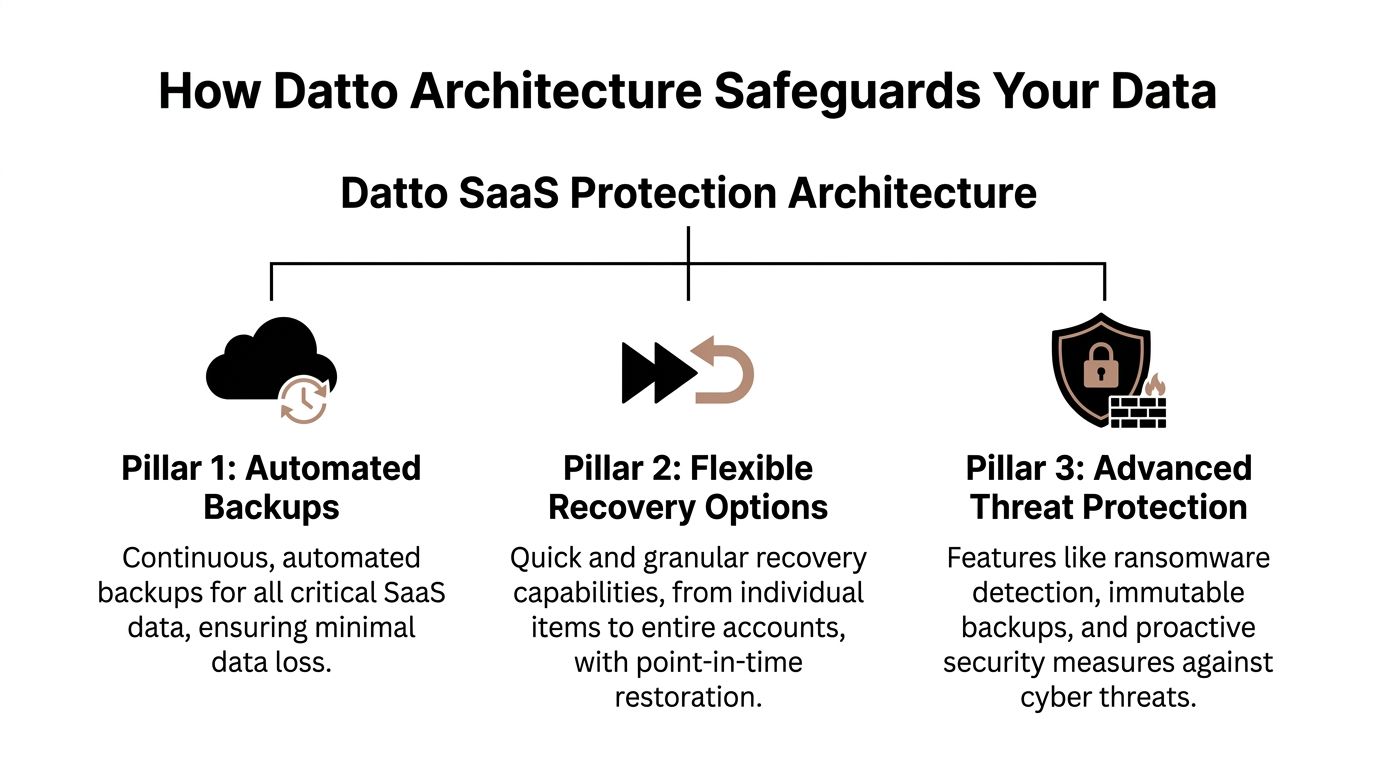
Datto SaaS Protection works because its architecture is built around three things businesses care about during an incident. Frequent backups. Flexible restore options. Storage separated from the production SaaS platform.

A diagram outlining the three core pillars of Datto SaaS Protection architecture for securing cloud data.

Automated backup cadence that limits the blast radius

According to the Datto SaaS Protection datasheet, Datto SaaS Protection implements 3x daily automated point-in-time backups at 8-hour intervals for a full suite of Microsoft 365 services, enabling recovery point objectives under 8 hours and reducing data loss exposure by 67% compared to once-daily solutions.

For a business owner, the takeaway is simple. If something bad happens at midday, you’re not looking back to yesterday’s backup and accepting a full day of lost work. The potential loss window is much tighter.

That matters in firms where data changes constantly. Law offices update matter files. Medical practices move files, messages, and schedules all day. Accounting and financial firms process documents under deadlines. In those environments, one backup at night leaves too much room for damage.

Point-in-time restores instead of broad, messy recovery

Point-in-time recovery means you’re not stuck with an all-or-nothing approach. You can restore data from a specific moment before the problem occurred. That sounds technical, but the business value is straightforward. You can target the damage.

If one user’s mailbox was compromised, you focus there. If one SharePoint library was encrypted, you restore that library. If a single Teams-related file set disappeared, you don’t have to touch the rest of the tenant.

Recovery should be precise. Broad restores create new problems, especially when teams are still working in the same environment.
This precision is where many native recovery workflows become frustrating. The data may still exist somewhere in the platform, but finding the right version, preserving the right structure, and restoring it without collateral confusion is another matter.

Security architecture that keeps backups independent

Datto’s architecture also matters because the backup copy is separate from the primary SaaS environment. If the production tenant is compromised, the backup doesn’t depend on that same environment staying trustworthy.

The datasheet also describes encryption protections including AES-256 at rest and TLS 1.2 in transit, along with SOC 2 Type II audited security. For regulated firms, that matters because backup isn’t only about recovery speed. It’s also about how backup data is protected while it’s stored and moved.

What this changes in daily operations

A sound SaaS backup architecture does more than help after a disaster. It changes how confidently a business can operate.

  • During admin changes: You’re less exposed when accounts are modified, removed, or reassigned.
  • During staff turnover: Offboarding becomes safer because accidental or intentional deletions are recoverable.
  • During ransomware response: You have a cleaner path to restoration instead of relying only on whatever remains inside the affected tenant.
  • During audits: You can show that business data has independent protection, not just platform availability.

For businesses reviewing broader resilience planning, this fits into a larger backup and disaster recovery strategy rather than acting as a standalone tool.

What does not work well

What tends to fail is assuming backup is handled because licenses are paid, files sync, or deleted items can sometimes be found. Sync is not backup. Retention is not the same as a clean restore path. Platform uptime is not the same as business recoverability.

Datto’s architecture is useful because it’s designed around the moment when those assumptions break.

Real-World Recovery Scenarios for Local Businesses

The value of backup becomes obvious only when something goes wrong. Until then, it can sound like another line item. These examples show where datto saas protection earns its keep.

Scenario one: Tax season ransomware at an accounting firm

A regional accounting firm is deep into deadline work. Staff members open SharePoint libraries all day, trade documents through Teams, and use Exchange for client requests. Then users start reporting that files won’t open and folder names look wrong.

The problem isn’t theoretical anymore. Work has stopped, clients are waiting, and the firm has to decide whether it can trust the live environment.
A clean restore path changes the response:

  1. IT identifies the affected SharePoint content and narrows the impact.
  2. The team selects a restore point from before the corruption event.
  3. Specific items or collections are restored instead of rebuilding everything from scratch.
  4. Staff returns to current work while security remediation continues.

Without a separate backup, firms often waste precious time trying to determine whether native retention, sync history, or recycle bin remnants are enough. During busy season, that uncertainty hurts.

Scenario two: Teams folder deletion at an Orlando law office

A paralegal in Orlando removes what appears to be an outdated channel folder tied to a closed matter. It isn’t closed. The folder contains current exhibits, correspondence exports, and draft filings linked to an active case team.

The problem with legal data loss isn’t just the missing content. It’s the context around that content. Folder structure, naming, and timing matter.

With Datto SaaS Protection, IT can locate the affected data set and restore the needed items to the correct state without forcing the entire matter workspace backward. That keeps the litigation team moving and reduces the chance of someone working from the wrong version.

In legal and professional services firms, a sloppy restore can be almost as disruptive as the original deletion.

Scenario three: OneDrive purge after a bad employee exit

A growing engineering firm in Central Florida offboards a project manager. Shortly afterward, leadership realizes critical working files are missing from that user’s OneDrive. The files include field notes, drafts, and project support records that never made it into the shared repository.

This is common in small and midsized businesses. Process discipline is uneven. Users save things locally, in OneDrive, in Teams, and in email attachments. When an employee leaves on bad terms, those habits become a risk.

A granular recovery process lets IT pull back the specific user data without improvising account workarounds or rushing to preserve licenses solely to keep access to old content.

Data protection compared

Feature Microsoft 365 Native Retention Datto SaaS Protection
Primary purpose Built-in retention and recovery features inside the platform Independent SaaS backup built for restoration
Backup separation Recovery depends on Microsoft-native controls Backup copy stored outside the production environment
Restore experience Can require more manual interpretation and admin effort Designed for targeted, point-in-time recovery
Best fit Limited incidents and simpler environments Businesses that need dependable recovery for operational and compliance reasons
Risk during major incidents Higher reliance on the affected tenant’s native tools Stronger separation when the tenant itself is part of the problem

Where business owners usually underestimate the problem

Most owners don’t think about restore granularity until they need it. They assume “we can recover it” means “we can recover exactly what we need, quickly, without disrupting everyone else.” Those are different things.

That’s why a written response process matters as much as the tool itself. If you don’t already have one, a solid disaster recovery plan template helps define who approves restores, what gets prioritized first, and how to document decisions during an incident.

What works and what doesn’t

What works is tight restore targeting, clear ownership, and a backup copy that isn’t tied to the same failure domain. What doesn’t work is improvising under pressure, especially when lawyers, doctors, accountants, and office managers are all waiting for different data sets at once.

In every scenario above, the technical issue starts small. The business issue grows fast.

Meeting Security and Compliance Demands

For many Central Florida businesses, backup is not only an operations issue. It’s a compliance issue. Medical practices, financial firms, law offices, and accounting teams all hold information that carries confidentiality, retention, and audit expectations.

When those businesses lose data, the fallout can go beyond downtime. You may need to prove what was protected, what remained recoverable, and what controls existed around the backup environment.

A professional man reviewing data security reports on a holographic screen in a modern office environment.
Why independent backup supports compliance

Native productivity platforms are built to help people work. Compliance requires something more disciplined. You need retention confidence, security controls around stored backup data, and a recovery process that can be explained to auditors, clients, or legal counsel.

Datto SaaS Protection supports that posture in a few practical ways:

  • Independent backup copies: If the production tenant is altered, deleted, or compromised, your recoverable copy is still separate.
  • Point-in-time recovery: You can restore data based on when the incident occurred instead of relying on a rough guess.
  • Retention options: Backup retention helps with legal hold, historical lookup, and regulated recordkeeping needs.
  • Audited security posture: SOC 2 Type II matters because regulated firms need vendors with documented control environments.

What regulated firms should pay attention to

A plastic surgery practice in Orlando, a dental office in Winter Springs, and a financial services firm all face different regulations. But they share one operational reality. They need to know sensitive data can be recovered without introducing new security issues.

That’s why the underlying security controls matter. The product’s documented use of encryption at rest and in transit, along with SOC 2 Type II audited controls, gives firms a more defensible answer than “our files were in the cloud.”

Backup that can’t be explained during an audit is weaker than it looks during a sales demo.

Compliance pressure shows up in ordinary workflows

You don’t need a breach headline to trigger compliance stress. Ordinary events can do it.

  • Employee turnover: You may need access to prior communications and files after a staff departure.
  • Disputes or record requests: Legal, HR, or client service teams may need older versions of documents or email.
  • Incident review: Security teams need to know what was lost, when it changed, and what can be restored.
  • Vendor review: Firms increasingly ask whether service providers use auditable controls around business data.

For healthcare, client confidentiality and continuity are inseparable. If a scheduling mailbox, patient document, or internal SharePoint library disappears, the issue isn’t only productivity. It’s whether your practice can still serve patients while preserving a defensible security posture.

Where businesses get exposed

The weak point is often not the attack itself. It’s the lack of an auditable recovery process. Many SMBs can say they use Microsoft 365. Fewer can say they maintain an independent backup with clear retention and controlled recovery. That difference matters when regulators, clients, or attorneys ask detailed questions after an incident.

MSP-Managed Protection vs A DIY Approach

Some businesses can buy a backup product and manage it internally. A few do it well. Most underestimate the operational work until the first restore request lands on a hectic morning.

The decision isn’t just “Can we turn this on?” A core question is whether your team can configure it, monitor it, document it, test it, and perform restores correctly under pressure.

What DIY looks like in practice

A self-managed setup sounds straightforward at first. Connect the tenant, assign licenses, and trust automation. But then real-world complications show up.

Someone has to handle:

  • Role assignment and permissions: Especially when different people control Microsoft 365, security, and line-of-business systems.
  • Restore testing: Not just whether a backup exists, but whether the right person can restore the right data cleanly.
  • Offboarding and new users: User churn changes what needs protection and how licenses are tracked.
  • Incident ownership: During a ransomware event, someone must decide what gets restored and when.

For smaller firms, this usually falls on the office manager, an internal IT generalist, or a business owner already wearing too many hats.

Co-managed environments are where friction shows up

According to Datto’s partner guidance, for businesses with co-managed IT environments, a common setup for multi-location SMBs, challenges can arise from permission conflicts during restores or lack of clear delegation, risks amplified by the fact that 68% of businesses have suffered SaaS data loss.

That’s a real issue for firms with a local admin, an outside consultant, and a business owner who assumes everybody is aligned. They often aren’t. One team controls Entra ID roles. Another handles cybersecurity. A third approves user changes. Then a restore is needed fast, and nobody is sure who has the right authority to act.

What an MSP-managed model does better

A managed approach works best when the business wants backup to be reliable without becoming a side job. The provider handles the operational burden that businesses tend to overlook.

That usually includes:

  • Initial deployment and tenant connection
  • Ongoing license and user coverage management
  • Restore process ownership
  • Coordination during cyber incidents
  • Reporting and accountability

The worst time to define backup responsibilities is during a live restore request from a doctor, attorney, or managing partner.

A fair trade-off discussion

DIY can make sense if you already have mature internal IT leadership, clear restore procedures, and enough staff depth to test regularly. If you don’t, a self-managed model often creates silent risk. The product is present, but the process around it is weak.

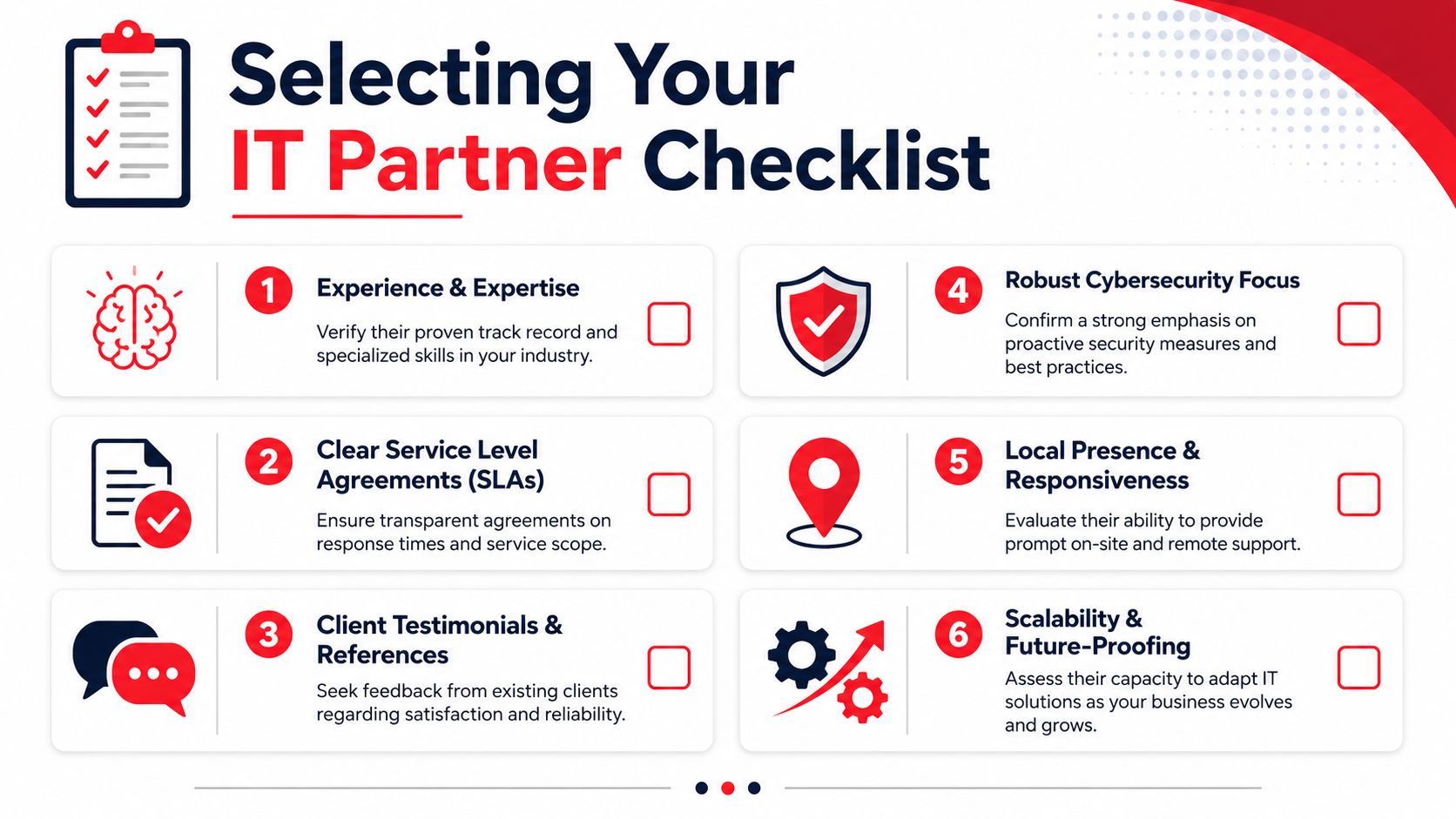
For businesses weighing service models more broadly, this kind of evaluation fits the same decision framework used when choosing an IT partner. A practical reference is this managed service provider buyer’s guide.

What doesn’t work is half-owning the solution. If no one is clearly accountable for permissions, restores, and ongoing coverage, backup confidence tends to be more assumed than earned.

Deploying Datto with Cyber Command

Getting started with datto saas protection shouldn’t disrupt your staff or force a major migration project. The cleanest deployments usually begin with a simple review of your Microsoft 365 or Google Workspace environment, your retention expectations, and the types of data your business can’t afford to lose.

From there, the work is mostly operational discipline. Connect the tenant, confirm the right users and services are protected, validate retention settings, and document who approves restores. For regulated firms, that conversation should also include how backup fits into your broader security process, including incident response and recordkeeping.

Why the pricing model matters

One reason Datto SaaS Protection is easier to budget than some alternatives is its user-based pricing model. According to Cortavo’s comparison of Microsoft 365 native backup and Datto SaaS Protection, Datto SaaS Protection utilizes a predictable per-user pricing model, typically between $2-$3 per user/month. For a 50-user firm, this contrasts favorably with native backup options that charge for storage, where costs can be volatile and grow unexpectedly.

That matters for growing businesses in Orlando and Winter Springs because storage-based pricing can become difficult to forecast. Professional services firms often retain documents for long periods. Medical and dental practices accumulate records steadily. Predictable licensing is easier to plan around than variable backup storage bills.

What a smooth rollout looks like

A strong deployment usually follows this sequence:

  1. Environment review: Identify which SaaS data sets need protection and where risk is highest.
  2. Policy alignment: Match backup retention and recovery expectations to business and compliance needs.
  3. Tenant onboarding: Connect services, assign coverage, and verify backup scope.
  4. Restore planning: Define who can request, approve, and validate restores.
  5. Ongoing management: Keep user changes, reporting, and recovery readiness current.

What business owners should expect

You shouldn’t need to become a backup specialist to protect cloud data. You should expect clear scope, predictable billing, and a documented restore process that doesn’t depend on guesswork.

That’s the practical value of a managed deployment. You’re not just buying software. You’re putting a recovery system in place that can hold up when the pressure is real.

Frequently Asked Questions

How long does it take to deploy datto saas protection

Deployment time depends on your tenant size, user count, and how organized your Microsoft 365 or Google Workspace environment is. Smaller firms usually move faster because there are fewer admin layers and fewer exceptions to sort out. The main work is less about installation and more about confirming scope, permissions, and recovery expectations.

We already have an in-house IT person. Can this still work

Yes. This is common in co-managed environments. The key is defining who owns backup monitoring, who can authorize restores, and who handles communication during an incident. Problems usually come from unclear delegation, not from having too many capable people involved.

What happens if an employee leaves and we still need their data

That’s one of the most common reasons businesses adopt a dedicated SaaS backup platform. Former employee mailboxes, files, and collaboration data often need to remain recoverable for legal, operational, or compliance reasons. A separate backup strategy makes that easier than trying to preserve access through ad hoc account workarounds.

Is Microsoft 365 retention enough for a small business

For some low-risk situations, native retention may help. It is not the same as having an independent backup designed for targeted recovery. If your business depends on client records, shared matter files, patient communications, or regulated documents, relying only on built-in retention creates more risk than most owners realize.

Do we need this if we already have endpoint backup

Yes, because endpoint backup and SaaS backup solve different problems. Endpoint tools protect devices and local data. Datto SaaS Protection is built for cloud application data such as Exchange Online, OneDrive, SharePoint, Teams, and Google Workspace content. If your team works in the cloud every day, you need protection there too.


If your business in Orlando, Winter Springs, or North Texas relies on Microsoft 365 or Google Workspace, don’t wait for a deletion, ransomware event, or compliance review to find out where your backup gaps are. Cyber Command, LLC helps small and midsized organizations put managed SaaS backup, recovery planning, and security oversight in place with clear accountability and predictable support.

HIPAA Compliance Experts: Your 2026 Hiring Guide

You own a small practice. You already wear too many hats. In a single week, you might review payroll, approve a software invoice, answer a patient complaint, and decide whether an old laptop should stay in service one more year.

Then someone asks a simple question: “Are we HIPAA compliant?”

For many owners in Orlando, Winter Springs, Plano, and the rest of North Texas, that question lands hard because the actual issue isn’t paperwork. It’s whether your practice can keep operating after a security incident, an audit request, or a vendor mistake. That’s why hiring hipaa compliance experts matters. Not as a box to check, but as a way to reduce chaos, assign responsibility, and turn compliance into a managed process instead of a recurring fire drill.

Why Hiring HIPAA Compliance Experts is a Survival Skill

A dentist in Orlando doesn’t usually wake up thinking about OCR investigations. They think about schedule gaps, insurance reimbursements, and whether the practice management system will stay up all day. Then an employee clicks the wrong email, a shared login gets abused, or a patient asks for records and the office realizes nobody is sure what the response process is.

That’s when HIPAA stops feeling theoretical.

A concerned dentist wearing a lab coat sits at his desk looking at a computer screen.

The risk is real, and it isn’t limited to large hospital systems. HIPAA violation trends show escalating enforcement. In 2020, the OCR imposed a record $13.5 million in fines amid thousands of investigations. By August 2025, nearly 400 breaches had already impacted 30 million individuals, and cumulative penalties since 2003 exceeded $161 million. For small practices, fines can range from $141 to $2.1 million annually depending on severity, according to HIPAA enforcement and breach statistics compiled by Compliancy Group.

Small practices feel this differently than enterprise organizations do. A large system may absorb disruption with internal counsel, an IT department, and a compliance office. A private dental office, med spa, veterinary clinic, or specialty physician group usually can’t. If the owner is also the final decision-maker for software, vendors, staffing, and finance, a breach becomes a business continuity problem immediately.

Compliance and cybersecurity are now the same operational conversation

Most owners still separate “HIPAA” from “cybersecurity.” In practice, that split causes trouble. If your team uses weak access controls, shares accounts, stores files in the wrong place, or can’t tell whether a vendor touches protected data, you don’t have a compliance issue on one side and a security issue on the other. You have one operational risk with two consequences: exposure and enforcement.

Practical rule: If a control protects patient data, it belongs in both your security plan and your compliance program.

That’s why a good expert doesn’t hand you a binder and disappear. They help you identify where patient data lives, who can access it, which vendors touch it, how your team is trained, and what happens after hours if something looks wrong.

If you want a simple way to sanity-check your starting point, a comprehensive HIPAA compliance checklist can help you spot obvious gaps before you start interviewing vendors.

What survival actually looks like

For a small practice or professional office, survival means four things:

  • You know your risks: Not in broad terms, but system by system and workflow by workflow.
  • Your staff knows what to do: Especially front desk, billing, and support roles that handle sensitive data every day.
  • Your vendors are controlled: Cloud software, billing firms, answering services, and IT tools all create exposure if nobody owns the relationship.
  • You can respond fast: Nights, weekends, and holidays count too.

That’s the value of hipaa compliance experts. They reduce uncertainty. And for small organizations, uncertainty is usually the most expensive part.

What a HIPAA Compliance Expert Actually Does

The phrase “HIPAA expert” gets thrown around so often that it stops meaning much. For a small practice, the better question is this: what work should this person or firm perform that lowers your risk and makes your operation easier to manage?

The job is broader than policy writing and narrower than magic. Good experts build a repeatable compliance system around your real workflow, your software stack, and your staff behavior.

A diagram illustrating the six key responsibilities of a HIPAA compliance expert in healthcare settings.

They start with risk analysis

If a vendor can’t explain how they conduct and update a formal risk analysis, you’re not talking to a serious compliance partner. The Office for Civil Rights has consistently identified failure to conduct a proper risk analysis as a top HIPAA violation, most entities in the 2016-2017 audits failed this requirement, and in 2024 OCR launched a dedicated enforcement initiative targeting this provision, as noted in HIPAA violation case analysis from HIPAA Journal.

That matters because many firms still sell “assessments” that are really short questionnaires. A real risk analysis looks at where protected health information is created, stored, transmitted, and accessed. It examines workstations, cloud systems, remote access, email workflows, user permissions, vendor dependencies, and physical handling of records or devices.

A real expert should also show you how the output turns into action. If the report says laptops need stronger safeguards or user access is too broad, there should be an owner, a priority, and a timeline.

They help assign real internal accountability

A lot of practices assume an outside expert can “be HIPAA” for them. That isn’t how this works. An external partner can guide, document, monitor, and support. But someone inside the organization still needs authority to make decisions, approve changes, and hold people accountable.

If you’re unclear on what that internal ownership should look like, the HIPAA Privacy Officer role is a useful reference point because it clarifies responsibilities that many small practices leave vague.

The best outside partner strengthens internal ownership. They don’t replace it.

That also applies beyond healthcare. Law firms, accounting firms, and architecture practices may not all be covered entities in the same way, but they still handle sensitive data, rely on vendors, and need a named decision-maker for privacy and security issues.

They connect policy to operations

Most failed compliance programs have documents. What they don’t have is follow-through.

An expert should help with:

  • Policy and procedure development: Documents should match how your office operates, not how a template assumes it operates.
  • Business associate oversight: If a vendor handles protected data, someone needs to review that relationship, confirm obligations, and track agreements.
  • Technical safeguard alignment: Access controls, endpoint protection, patching, encryption choices, and monitoring must support the policy set.
  • Audit readiness: Your evidence has to be organized before anyone asks for it.

For organizations that need to tie HIPAA work into a broader governance effort, compliance mapping across business frameworks helps clarify how overlapping obligations affect operations.

They stay involved after the assessment

Many one-time consultants often fall short. They identify problems, deliver a report, and leave the practice owner holding a list of unresolved issues. That model can create awareness, but awareness alone doesn’t harden systems or train employees.

A stronger partner usually provides ongoing monitoring, recurring reviews, incident support, and evidence management. They revisit the environment after changes such as a new EHR module, a new location, a vendor switch, or a major staffing shift.

In short, hipaa compliance experts should do more than explain the rules. They should turn those rules into routines your office can sustain.

How to Identify and Vet True HIPAA Experts

Not every IT company that says “we do HIPAA” knows how to support a small practice. Some are good at infrastructure but weak on policy. Some are strong on paperwork but can’t guide a real incident. Some know hospital environments but don’t understand a five-provider dental group, a veterinary clinic, or a law office without internal IT staff.

You need a vetting process that exposes those gaps before you sign.

Start with fit, not branding

Begin with firms that understand your size and operating model. A practice with one office manager, rotating support staff, outsourced billing, and a handful of cloud apps needs a different partner than a regional health system.

Local relevance matters too. In Central Florida and North Texas, owners often need someone who can talk plainly, coordinate with existing vendors, and support a mix of older systems and newer cloud platforms without turning every project into a consulting engagement.

A practical shortlist usually comes from three places:

  1. Peer referrals: Ask owners of similar practices who they trust and why.
  2. Industry adjacency: Your EHR reseller, legal counsel, or insurance advisor may know who’s credible and who creates cleanup work.
  3. Technical depth checks: Review whether the firm discusses risk analysis, incident response, vendor oversight, and training with any specificity.

Training is a non-negotiable test

One of the easiest ways to spot weak vendors is to ask how they train staff. If the answer is “we do annual HIPAA training” and nothing else, keep looking.

Human error accounts for over 80% of HIPAA breaches, and 54% of healthcare organizations identify staff education as the most effective mitigation strategy, according to research on HIPAA breaches and training effectiveness available through PubMed Central. Support staff are often the highest-risk group, which means front-desk workflows, scheduling, billing, intake, and records handling deserve more attention than generic slide decks usually provide.

A serious expert should describe role-specific training, documented completion, follow-up for missed sessions, and some way to check whether people understood the material.

If a vendor treats training like a yearly formality, they’re telling you exactly how they’ll handle the rest of your compliance program.

Use a simple scorecard

Don’t rely on chemistry alone. Use a written scorecard and force each vendor into clear pass or fail decisions.

Vetting Criteria What to Look For Pass/Fail
Industry fit Experience with practices similar to yours, such as dental, veterinary, specialty medical, or professional services
Risk analysis method A documented process that goes beyond a checklist and leads to remediation actions
Training approach Role-specific staff education, documentation, and follow-up for support staff and new hires
Incident response readiness Clear after-hours process, named roles, and evidence preservation steps
Vendor management Ability to identify vendors touching sensitive data and organize agreement tracking
Policy practicality Policies tailored to your workflow instead of generic templates
Technical competence Ability to explain access controls, endpoint safeguards, patching, and monitoring in plain language
Ongoing support model Recurring reviews, support after onboarding, and a defined cadence for updates
Reporting quality Clear action plans, ownership, due dates, and executive-level summaries
Communication style Direct answers, no jargon fog, and willingness to explain trade-offs

Watch for the common failure patterns

Weak vendors often reveal themselves in the sales process. Look for these signals:

  • Template dependence: They talk about documents more than workflows.
  • No operating detail: They can define HIPAA terms but can’t explain what happens during a Saturday night incident.
  • Overpromising: They imply they can “make you compliant” without discussing your staff responsibilities.
  • No remediation discipline: They find issues but have no process for closing them.
  • Hospital bias: Their examples and service model assume a much larger organization than yours.

Ask for proof without demanding fairy tales

You may not get named case studies, and that’s fine. You can still ask for evidence. Request redacted samples of risk registers, policy review workflows, incident runbooks, or training records. Ask how they coordinate with office managers, practice administrators, and outside software vendors.

The right partner won’t hide behind buzzwords. They’ll show you how work gets done, who does it, and what happens when something goes wrong.

Questions That Reveal a Vendor's True Capabilities

By the time you’re interviewing finalists, most of them will sound competent. They’ll all say they understand HIPAA. They’ll all mention cybersecurity. They’ll all tell you they’re responsive.

That’s why the interview has to move from claims to operating detail.

A professional man and woman having a business meeting in a modern, bright office setting.

A 2025 HIPAA Journal survey on compliance maturity found that many organizations still lack a dedicated HIPAA Privacy Officer with real authority, and many provide training less than annually. That tells you where to press. Ask vendors how they address those maturity gaps in small organizations where the owner, office manager, and outside IT provider all share pieces of responsibility.

Ask questions that force process answers

These questions work because weak vendors answer them vaguely.

  • Walk me through your exact process if we suspect a breach at 10 PM on a Saturday.
    A strong answer includes alerting, triage, containment, evidence preservation, decision authority, and communication steps. A weak answer leans on “we’ll assess the situation” and never gets specific.

  • How do you help us assign internal authority for privacy and security decisions?
    Strong vendors explain roles, escalation paths, and who owns approvals. Weak ones act as if outsourcing removes the need for internal accountability.

  • How do you tailor training for front desk, billing, providers, and managers?
    Good answers mention job function, practical examples, retraining, and documentation. Bad answers reduce everything to annual compliance content.

  • How do you review our vendors that touch sensitive information?
    Strong answers include inventorying vendors, reviewing contracts or agreements, documenting risk, and escalating issues. Weak answers say vendor compliance is “mostly on the vendor.”

A capable partner can describe actions in order. A sales-led vendor stays abstract.

Ask how they mature a small practice over time

One of the best questions is simple: What will our program look like in six to twelve months if this engagement goes well?

A real expert should talk about maturity, not just deliverables. They should describe what gets standardized, what gets documented, what gets reviewed regularly, and what your staff will be doing differently. They should also acknowledge the trade-offs. Small practices can’t do everything at once. Good partners know how to prioritize.

If you want a broader framework for evaluating service providers before you sign, these questions to ask before hiring managed IT services are useful because they expose response discipline, ownership, and accountability.

Listen for honesty about limitations

Trust is built through such transparency. Strong vendors will tell you where they need cooperation from your office, where another specialist may be needed, and what they won’t promise. That’s a good sign.

Weak vendors usually do one of two things. They either overstate what they can solve alone, or they dodge specifics by saying every situation is unique. Of course every environment is unique. That’s not an answer.

The right interview questions don’t just test knowledge. They test whether the vendor has a real operating model.

Budgeting for Compliance in Orlando and North Texas

Most owners don’t need a lecture on why security matters. They need to know what this will cost, what model makes sense, and whether the spend will stay predictable.

That’s where the market gets messy. Small practices often talk to two very different kinds of vendors. One offers one-time consulting, usually centered on an assessment and a packet of documents. The other offers an ongoing service model that combines compliance work with operational security support.

For small private practices, that distinction matters a lot. According to analysis of HIPAA consulting options for smaller organizations, 60% cite limited expertise as their top barrier, many consultants are geared toward large hospitals, and outsourced compliance-as-a-service on a flat-rate model can cut breach risk by 40% more than one-off consulting projects.

What you’re really paying for

You’re not just paying for forms, meetings, or a risk assessment. You’re paying for continuity and follow-through.

A one-time consultant may be the right fit if you already have internal IT, someone accountable for compliance, and the discipline to manage remediation yourself. Many small offices don’t. In those environments, a flat-rate or recurring support model usually makes more sense because the work doesn’t stop after the report is delivered.

The practical cost drivers are usually:

  • Environment complexity: Number of users, devices, offices, and software platforms
  • Vendor sprawl: Billing firms, cloud systems, phone vendors, scanning tools, and remote support providers
  • Support expectations: Whether you need periodic guidance or active ongoing security involvement
  • Documentation maturity: Clean environments cost less to govern than messy ones

Why predictable pricing matters more in smaller markets

In Orlando and North Texas, many practices operate with tight administrative teams. They don’t want surprise project bills every time a vendor changes, an employee leaves, or a risk review uncovers work that should have been done months ago.

That’s why many owners prefer providers that bundle recurring support into a steady monthly structure. It’s easier to budget, easier to manage, and less likely to leave known issues unresolved because nobody approved another statement of work.

If you’re comparing managed support options in Central Florida, this overview of why businesses need managed IT support in Orlando is a useful way to think about predictable service models beyond break-fix support.

Cheap compliance usually becomes expensive remediation.

The right budget decision isn’t the lowest line item. It’s the model that your office can sustain.

Your First 90 Days with a HIPAA Compliance Partner

A good engagement should feel calmer by the end of the first few weeks, not more confusing. You should see structure show up quickly. Not perfection, but structure.

Days 1 through 30

The first month should focus on discovery and clarity. Your new partner should inventory systems, map where sensitive information lives, review user access, identify key vendors, and collect the policies and agreements you already have.

Expect a lot of questions. That’s a good sign. The fastest way to fail an engagement is for the vendor to assume they already understand your workflow.

You should also expect a clear list of immediate risks. Not ten pages of theory. A practical set of issues with priorities, owners, and next actions.

Days 31 through 60

This period should move from findings to remediation. Access issues get tightened. outdated processes get rewritten. Staff training gets scheduled. Vendor relationships that touch sensitive information get reviewed and organized.

This is also when a strong partner starts separating “important” from “urgent.” Small practices can’t fix everything at once, so sequencing matters. The point is to reduce meaningful risk fast while building habits your team can maintain.

Progress in the first 90 days should be visible in calendars, task lists, approvals, and staff behavior. Not just in documents.

Days 61 through 90

By the end of the third month, you should be operating from a new baseline. Staff should know who to contact with questions. Leadership should know what remains open. Evidence should be easier to find. Your partner should have a recurring review rhythm in place so compliance doesn’t drift.

For a law firm or small medical practice, this is usually the moment where the mental load drops. You’re no longer wondering whether anything is being managed. You can see the process, the owners, the cadence, and the gaps that still need work.

That’s what a useful compliance partnership changes. It replaces uncertainty with accountability.


If your practice in Central Florida or North Texas needs a partner that can combine managed IT, cybersecurity operations, and ongoing compliance support without forcing you into reactive project work, Cyber Command, LLC is built for that role. The team supports organizations that need predictable pricing, live U.S.-based helpdesk coverage, 24/7 SOC support, and practical guidance that fits real business operations, not enterprise theory.

Local IT Support for Small Business: Your 2026 Guide

Your office opens at 8. By 8:07, your staff can't access email, the printer queue is jammed, and one employee says a suspicious login prompt just appeared on their screen. If you're running a law firm in downtown Orlando, a medical practice in Winter Springs, or a light industrial company supporting jobs across Central Florida, that isn't just an IT problem. It interrupts billing, scheduling, patient communication, and trust.

A lot of small businesses are still trying to manage technology with a mix of internal guesswork, old vendors, and last-minute repair calls. That model usually holds until it doesn't. Then the owner gets pulled into decisions they shouldn't have to make, under pressure, without clear visibility into risk, downtime, or cost.

The better approach is local it support for small business built around prevention, accountability, and fast response when something physical breaks. For Orlando-area companies especially, local matters. You need someone who understands your business, your vendors, your compliance pressure, and the fact that waiting until tomorrow is often not an option.

Why Local IT Support Is a Strategic Asset Not an Expense

An Orlando business owner rarely says, "I want to buy more IT." They usually say, "I need my team working, my files accessible, my systems secure, and my costs under control." That is the core function of IT support. It isn't about gadgets. It's about keeping the business operational.

A stressed businessman sits at his office desk while a technician arrives to provide repair assistance.

The market has already moved in that direction. A striking 27% of small businesses operate without any dedicated IT support, while 39% rely on external IT contractors, making outside support the most common solution according to small business IT support statistics compiled by Fuse Technology Group. That should tell you two things. First, many firms are still exposed. Second, outsourcing support is no longer unusual. It's standard.

What owners get wrong about IT cost

The common mistake is treating IT as a line item to minimize instead of a business function to stabilize. That leads to delayed upgrades, skipped patching, weak backups, and unmanaged devices. On paper, that can look cheaper for a while.

In practice, the business pays elsewhere:

  • Staff time gets wasted when employees troubleshoot basic issues instead of serving clients.
  • Revenue gets delayed when email, line-of-business apps, or shared files go down.
  • Security risk grows when no one owns patching, endpoint protection, or backup verification.
  • Leadership gets distracted because the owner becomes the default escalation point.

Practical rule: If your team only talks to IT when something is already broken, you don't have an IT strategy. You have an interruption pattern.

Why local changes the equation

A local partner brings more than geography. They bring context. An Orlando accounting firm, a private dental practice, and a field-service company may all use Microsoft 365, cloud storage, firewalls, and endpoint tools. They do not have the same workflows, vendor stack, or risk tolerance.

Good local support should help you:

  • Reduce downtime through monitoring, maintenance, and faster on-site response
  • Improve security posture with patching, endpoint controls, and incident response planning
  • Coordinate vendors so your internet provider, software reps, phone system, copier company, and cloud platforms don't all point fingers at each other
  • Plan technology around growth so new hires, new offices, and new software don't create chaos

For small businesses in Central Florida, that shift is the difference between reactive support and operational resilience. The business outcome matters more than the technical label. If your systems stay available, your risk is lower, and your team can work without friction, IT has become an asset.

In-House vs Break-Fix vs Managed Local IT Support

Most small businesses end up choosing between three models. They often compare them by monthly price alone, which is the wrong filter. The better question is this: which model gives you reliable support, predictable cost, and enough structure to grow without increasing risk?

A simple analogy helps. In-house IT is like hiring a full-time chef. You get dedicated attention, but one person can't be an expert in every cuisine. Break-fix support is like ordering takeout only when everyone's already hungry. It solves the immediate pain, but nothing is planned. Managed local IT support is closer to a meal-prep service designed around your needs. It's ongoing, repeatable, and built to prevent problems before they hit the table.

IT support models at a glance

Attribute Break-Fix (Reactive) In-House IT Staff Managed IT Services (Proactive)
Primary model Call when something breaks Dedicated internal employee or team Ongoing outside partner with monitoring and support
Budget predictability Low. Costs spike during outages or projects Moderate to low. Payroll, tools, benefits, coverage gaps Higher when pricing is flat-rate and scoped clearly
Response pattern Reactive only Depends on staffing depth and availability Preventive maintenance plus user support
Coverage breadth Usually narrow and issue-specific Can be limited by one person's skillset Broader across helpdesk, security, cloud, vendors, and planning
On-site availability Depends on schedule Available if physically present Available based on local provider coverage
Strategic planning Rare Sometimes, if the staff member has time Usually part of the relationship through reviews and roadmaps
Best fit Very small firms with minimal dependence on tech Larger companies that can justify full-time headcount SMBs that need mature support without building a full department

What works and what doesn't

Break-fix can still make sense for very small operations with simple needs. If you have a handful of users, no compliance pressure, and low reliance on line-of-business systems, it may feel sufficient. The weakness is obvious once you rely on cloud apps, shared files, VoIP, remote access, or any regulated data. Problems are handled after impact, not before.

In-house support can work well when the company is large enough to support proper staffing. The problem for many SMBs is coverage. One internal admin may know your environment well, but that doesn't guarantee depth in Microsoft 365 security, firewall policy, backup validation, identity management, vendor coordination, and strategic planning. It also doesn't solve vacation days, after-hours issues, or turnover.

Managed local IT support tends to fit the gap most Orlando-area SMBs are trying to solve. They need enterprise-grade capability without building an enterprise department.

Why proactive support supports growth

Technology adoption has become a growth issue, not just an efficiency issue. Small businesses that are high adopters of technology platforms, meaning 6 or more, saw 84% profit increases and 82% sales growth according to the U.S. Chamber of Commerce analysis on technology platforms and small business growth. The practical takeaway is straightforward. Businesses grow when they can use more systems confidently and securely.

That requires more than someone answering tickets. It requires a support model that can standardize devices, manage user access, secure cloud tools, and keep the environment stable as the business adds software.

One useful distinction here is operational design. If you're comparing providers, it helps to choose IT support wisely by understanding the distinctions between a helpdesk and a service desk. That difference affects how requests get handled, how incidents are prioritized, and whether your provider only fixes issues or also manages services in a structured way.

A reactive vendor restores yesterday. A proactive partner prepares next quarter.

A better decision filter

When evaluating your options, don't ask only, "What's the monthly fee?" Ask:

  • Who owns prevention
  • Who coordinates vendors
  • Who handles security operations
  • Who can be on-site when hardware or cabling fails
  • Who gives leadership a roadmap instead of a pile of tickets

Those answers usually tell you more than any quote sheet.

The Anatomy of Comprehensive Local IT Services

A 20-person law firm in Orlando rarely loses a full day to one dramatic IT failure. It loses time in smaller cuts. A partner cannot open a client file from SharePoint. MFA locks out a new hire before a hearing. A copier scan workflow breaks and intake staff start using personal email to keep work moving. In a medical office or light industrial shop, the pattern is similar. The interruption starts small, then spreads into delayed appointments, missed billable work, and avoidable risk.

That is what local it support for small business has to address. A real service model covers user support, device and cloud administration, security operations, vendor coordination, and planning. Owners who want a practical benchmark can review what strong local IT support providers near you should cover.

A diagram illustrating the anatomy of comprehensive local IT services, including proactive management, reactive support, and strategic consulting.

The helpdesk protects productive hours

Staff judge IT by the first interaction. If password resets take half a day, Outlook profiles break repeatedly, printers fail without ownership, or laptop setups drag into week two, confidence drops fast.

Good helpdesk work resolves common issues quickly and documents the pattern behind them. For professional services firms, every delay can hit billable utilization. For medical practices, front-desk friction affects scheduling, intake, and patient communication. For industrial firms in Central Florida and North Texas, one workstation or wireless issue can slow dispatch, inventory updates, or shop-floor reporting.

Response matters. Resolution matters more.

A ticket queue by itself is not a service model. Small businesses need a team that can fix the issue, identify whether it points to a larger problem, and stop the repeat.

Preventive operations reduce avoidable outages

Owners often notice this layer only after they have lived without it. Routine monitoring, patching, backup checks, device standards, and maintenance windows do quiet work that keeps users out of trouble.

The goal is simple. Fewer preventable failures and faster recovery when something does break.

That usually includes:

  • Endpoint patching for laptops, desktops, and servers
  • Monitoring and alerting for degraded services, storage issues, failed backups, and hardware health
  • Backup verification so recovery is tested instead of assumed
  • Asset and lifecycle tracking for warranty status, aging equipment, and replacement timing
  • Documentation such as network maps, ISP details, admin access records, and vendor contacts

For a plain-language security baseline, Top Cybersecurity Tips for Small Businesses covers several controls many firms still handle inconsistently, especially around updates, user access, and staff awareness.

Cloud and identity management shape day-to-day control

Cloud support is not just mailbox administration. It affects onboarding speed, remote access, file governance, and how safely staff can work from a client site, branch office, or exam room.

For small businesses, that usually means Microsoft 365 administration, SharePoint and OneDrive structure, group and permission design, cloud backup oversight, mobile device management, and support for line-of-business apps run by outside vendors. In a law office, poor permission design can expose client matters to the wrong team. In a medical practice, weak account controls can create privacy problems and staff lockouts at the same time. In an industrial environment, broad access rights can expose systems that field users never needed in the first place.

Cloud platforms drift quickly without standards. Files spread across personal drives, former staff keep access longer than they should, and no one is sure which application owns the record. Clean identity and cloud administration fix that.

Security operations have to sit inside the support model

Security cannot live in a separate folder while the support team handles everything else. User devices, email, cloud identities, backups, and vendor access all connect. If no one owns that connection, gaps stay open.

A mature local provider should define who handles:

  • Endpoint protection on workstations and servers
  • Identity controls including MFA, privileged access, and account review
  • Threat monitoring for suspicious sign-ins, malware activity, and risky changes
  • Incident response so containment, investigation, and recovery have a clear process
  • Compliance support for firms handling regulated or sensitive information

This matters more in the sectors that get overlooked by generic SMB advice. Medical practices have privacy and availability pressure. Professional services firms hold confidential client data that attackers can monetize quickly. Industrial firms often run older systems, vendor-connected equipment, and flat networks that create practical security trade-offs.

Vendor and license management close expensive gaps

This is one of the most undervalued parts of a strong IT partnership. Small businesses usually rely on multiple outside vendors: internet providers, phone systems, EHR platforms, legal software, accounting tools, copier vendors, security cameras, building access systems, and cloud apps. When something fails, the owner should not have to decide who is responsible.

A good IT partner keeps vendor records current, knows contract terms, tracks renewals, and pushes the right provider when support stalls. The same goes for software licensing. Many firms overpay for unused seats, under-license critical tools, or let admin accounts pile up because nobody is reviewing the stack. That is wasted money and unnecessary risk.

Strategy turns support into an operating advantage

The highest-value IT conversations are usually about decisions, not tickets. Replace the server or retire it. Standardize on one firewall platform or keep a mixed environment. Keep co-managed IT in-house or hand off security monitoring. Spend this quarter on wireless upgrades, backup improvements, or identity controls first.

That is where recurring reviews, budgeting, project sequencing, and risk discussions matter. Cyber Command, LLC is one example of a local provider built around that broader model. The company offers 24/7/365 U.S.-based helpdesk, managed and co-managed IT, cloud services, a dedicated SOC, and vendor management for organizations in Orlando, Winter Springs, and Plano.

The firms that get the most value from local IT support do not buy isolated fixes. They build an operating model that keeps users productive, reduces avoidable downtime, and gives leadership a clearer view of risk, cost, and next-step priorities.

Why Proximity Matters for Uptime and Security

Some IT problems can be solved remotely in minutes. Others can't. If a switch fails, a firewall locks up, a circuit goes down, a cable is damaged, or a workstation in a clinical or production setting needs physical attention, location matters immediately.

A friendly technician carrying a laptop walks into a modern cafe to provide local IT support services.

According to Join Homebase's review of small business IT support, local providers can typically deliver hands-on assistance within 2 to 4 hours, compared with 24 to 48 hours for national providers, and the same source notes benchmarked downtime costs for small businesses at $5,600 per minute. Even if your own loss rate is lower than that benchmark, the business logic still stands. Waiting a day or two for physical support is expensive.

Physical issues don't care about remote promises

National providers often present a polished remote support model. That can work for software issues and routine user support. It breaks down when the problem lives in the office.

Examples include:

  • Network hardware failure in a server closet
  • Bad cabling or patch panel issues after an office move or renovation
  • Internet handoff problems requiring coordination with the ISP on-site
  • Printer and scanner issues tied to workflows in legal, medical, or administrative environments
  • Local device deployment for new hires or acquisitions

For a medical office, delayed on-site response can disrupt patient flow. For a law firm, it can stall access to document systems during deadlines. For industrial businesses, even a localized outage can interrupt operations, scheduling, or shipping.

Local providers understand local operating conditions

A Central Florida business has different continuity concerns than a company in another region. Summer storms, hurricane planning, power instability, and multi-site coordination across Orlando, Winter Springs, and surrounding areas all affect infrastructure choices.

A nearby team can help you make practical decisions such as:

  • Where backup internet makes sense
  • How to stage power protection for critical systems
  • Which systems need local failover procedures
  • What should be documented before storm season
  • How to prioritize recovery after a site event

North Texas firms face a different set of pressures, especially when distributed operations, warehouse environments, or industrial systems are involved. Proximity helps because the provider isn't building a generic playbook from a distance. They can evaluate the actual site and business process.

If you're assessing options, it's worth reviewing what to look for in local IT support providers near you for expert help. The best local firms don't just say they're nearby. They define what on-site support includes, when it applies, and how it ties into the broader service model.

When the issue is physical, "remote first" can quickly become "remote only." That's a problem if your business depends on a real office, real devices, and real uptime.

Security improves when the provider knows the environment

Security isn't only a cloud problem. Physical presence improves security too. Local teams can verify how network equipment is stored, who has access to shared spaces, whether retired devices are handled correctly, and whether office changes introduced risk without anyone noticing.

That matters for regulated firms and for businesses with low internal IT maturity. You don't want a provider learning your environment from ticket notes alone. You want them to know how the business runs.

Finding Your IT Partner Without Hidden Costs

The monthly fee matters, but it isn't the whole cost. Small businesses get into bad IT relationships when they compare quotes line by line and ignore what's excluded, what stays reactive, and what gets billed later as "extra."

The right way to evaluate local it support for small business is through total cost of ownership, not just sticker price. A cheaper plan that excludes security work, vendor coordination, documentation, project labor, or on-site support can cost more over the life of the relationship.

Flat-rate is useful only if the scope is real

A flat monthly price is attractive because it reduces surprise billing. That's one reason managed services have become the default choice for many SMBs. But "flat-rate" only works if the service agreement is explicit.

You should know:

  • Which users, devices, and locations are covered
  • Whether cybersecurity tooling is included
  • What counts as project work
  • How after-hours issues are handled
  • Whether vendor management is part of the service
  • What reporting you receive each month or quarter

The financial case for proactive support is strong when the service is preventive. Infradapt's discussion of small business IT support states that proactive managed IT services can yield 40-60% cost savings over reactive break-fix models, and the same source notes that unpatched systems are exploited in 60% of cyberattacks on small businesses. That tells you where hidden costs usually come from: preventable incidents.

The overlooked budget leak is vendor and license sprawl

One of the most expensive patterns in small business IT isn't dramatic. It's quiet. Over time, companies add Microsoft licenses, industry software seats, backup tools, e-signature platforms, phone systems, cloud storage subscriptions, security add-ons, and one-off SaaS products. A few users leave, one department changes software, another office keeps an old tool alive, and nobody audits the stack.

That creates several problems at once:

  • Duplicate software that different teams use for the same job
  • Unused licenses that keep renewing
  • Poor negotiating power with vendors because nobody negotiates from a full view of spend
  • Security blind spots when unknown apps still hold company data
  • Support confusion because responsibility is spread across too many vendors

A good local provider should help review those agreements and rationalize what stays, what goes, and what should be renegotiated. If you're trying to understand what drives pricing, this guide on key factors influencing IT managed service pricing is a practical starting point because it moves the conversation beyond hourly rates.

Questions worth asking in the first meeting

Don't ask only, "What do you charge?" Ask questions that expose operating maturity.

  1. How do you onboard a new client

    Listen for asset discovery, documentation, baseline security review, admin access cleanup, and backup validation.

  2. What do you do proactively every month

    You want specifics. Monitoring, patch review, security review, vendor follow-up, lifecycle planning, and reporting.

  3. How do you handle vendor management

    Ask whether they coordinate with your internet provider, copier company, cloud vendors, VoIP provider, and software support teams.

  4. What visibility will I get as an owner

    You should receive understandable reporting, not just raw ticket exports.

  5. What's included in cybersecurity

    Get clear on endpoint protection, response processes, user access controls, and whether security monitoring is built in or sold separately.

  6. When do you come on-site

    This answer should be direct. Vague language usually means inconsistent field support.

Buyer guidance: If a provider makes pricing sound simple by leaving out responsibility, you're the one who'll pay later.

What a healthy proposal looks like

A strong proposal usually reads clearly. It defines coverage, assumptions, exclusions, response approach, strategic cadence, and responsibilities on both sides. It doesn't force the owner to decode hidden labor categories.

Clarity is part of the service. If the contract is murky, the relationship usually will be too.

Common Mistakes to Avoid When Choosing IT Support

A lot of bad IT decisions don't look bad at the start. The provider seems responsive, the price looks lower, and the owner feels relieved to hand off the problem. The trouble shows up later, when the business realizes it bought a ticket queue instead of an operating partner.

A businesswoman wearing a blazer looking concerned while reviewing an IT service contract at her desk.

Red flags that deserve immediate scrutiny

  • They talk only about response time

    Fast replies matter, but they don't replace prevention, documentation, planning, or security operations. A provider can answer quickly and still leave your environment messy.

  • Their billing model stays vague

    If you can't tell what's covered, you'll end up approving add-ons during stressful moments. That's when budgets get distorted.

  • They ignore strategic reviews

Small businesses still need roadmap conversations. Without them, old hardware lingers, cloud sprawl grows, and risk accumulates.

  • They don't address vendor management

    This is a bigger issue than many owners realize. A local IT partner can often audit and consolidate software and vendor agreements to recover 10-30% of IT spending, based on the analysis highlighted by SRS Networks on local IT support benefits. If a provider doesn't touch this area, they may be overlooking one of the easiest ways to reduce waste.

  • They have no meaningful local presence

    If everything depends on remote support or third-party dispatch, your "local" relationship may be local in name only.

The biggest mistake is choosing for comfort, not capability

Owners often choose the familiar shop that has "always helped us out." That history has value, but loyalty shouldn't replace standards. Your business today probably depends on cloud identity, endpoint security, compliance controls, vendor coordination, and documented recovery planning in ways it didn't a few years ago.

What worked when you had six employees and one office may not work when you have multiple software platforms, remote users, and customer data spread across several systems.

A provider who only fixes what's visible will miss the risks that matter most.

Watch for misalignment with your industry

For professional services, the issue is usually workflow interruption and document access. For medical practices, it's privacy, continuity, and vendor-heavy systems. For industrial firms, it's uptime across locations, field devices, and infrastructure consistency.

A provider doesn't need to specialize only in your vertical, but they do need to understand the operating reality of it. If their questions stay generic, their service probably will too.

Your Checklist for Securing the Right Local IT Partner

A good decision here should make the next few years calmer, not just the next few weeks easier. You're not only hiring someone to resolve tickets. You're choosing who will influence uptime, security, vendor relationships, budgeting, and the pace at which your business can adopt new tools safely.

Use this checklist to pressure-test the fit.

Core requirements for any Central Florida SMB

  • Local response capability

    Confirm they can provide real on-site support in your area, not just remote assistance plus outsourced dispatch.

  • Clear service scope

    Make sure the agreement defines covered users, devices, locations, security tools, and project boundaries.

  • Proactive operating model

    Ask what they monitor, patch, review, document, and report on regularly.

  • Cybersecurity ownership

    Verify who handles endpoint protection, access controls, incident response coordination, and recovery steps.

  • Vendor and license management

    Ask whether they will review software licenses, SaaS subscriptions, ISP relationships, and support renewals.

  • Executive visibility

    Require reporting that a business owner can understand without translating technical jargon.

Industry-specific checks

Professional services firms

  • Document workflow support

    Confirm experience supporting file-heavy environments, Microsoft 365, secure sharing, and access controls for attorneys, accountants, architects, and engineers.

  • Deadline-aware support

    Ask how they handle issues that affect billable time, client communication, and court or filing deadlines.

Medical and dental practices

  • Compliance readiness

    Verify familiarity with healthcare-related security and privacy requirements, including whether they can support compliance documentation and vendor coordination.

  • Clinical workflow awareness

    Make sure they understand scheduling systems, imaging or specialty applications, and the impact of downtime on patient operations.

Industrial and field-service organizations

  • Multi-site consistency

    Ask how they standardize devices, networks, and support across offices, shops, or remote facilities.

  • Operational resilience

    Confirm they can support shared infrastructure, remote users, and line-of-business systems tied to production, dispatch, or service delivery.

Questions to ask before signing

This article pairs well with these first questions to ask before you hire managed IT services, especially if you're comparing multiple local providers.

Bring these questions into the meeting:

  • What will you fix in the first 30 days
  • What risks do you expect to find during onboarding
  • How do you communicate during an active incident
  • Who owns vendor escalations
  • What does a quarterly review include
  • How do you recommend technology changes without overselling

What the right fit feels like

The right partner doesn't just sound technical. They sound organized. They ask about your workflows, your risk tolerance, your vendors, and your growth plans. They explain trade-offs plainly. They don't hide behind jargon, and they don't make every recommendation feel like a sales event.

That combination matters more than polish. Small businesses need support that is local, proactive, and accountable. When that relationship is in place, technology stops pulling leadership into daily disruption and starts supporting the business the way it should.


Cyber Command, LLC supports organizations in Orlando, Winter Springs, and North Texas with managed IT, co-managed IT, cloud services, 24/7/365 U.S.-based helpdesk, and cybersecurity operations designed around uptime and accountability. If you're evaluating local IT support for small business and want a practical conversation about your current risks, vendor sprawl, and support gaps, you can learn more at Cyber Command, LLC.

Co-managed IT Solutions: Your Guide for Florida & Texas

A lot of business owners in Orlando and Plano are in the same spot right now. The company has grown, the staff depends on cloud apps, every location needs stable Wi-Fi and secure access, and the internal IT person or small team is buried in tickets. They’re resetting passwords, dealing with printer issues, chasing software vendors, and answering after-hours calls when they should be planning security improvements or infrastructure upgrades.

That strain gets worse in regulated industries. A medical practice can’t afford patching delays. A law firm can’t shrug off email compromise. An architecture or engineering firm can’t have project files locked up by ransomware because endpoint protection was inconsistent. When the team is always reacting, important work slips. The business feels that in downtime, stress, and missed opportunities.

The Modern IT Challenge for Growing Businesses

A familiar pattern shows up in growing firms across Central Florida. The office opens at 8, users are already waiting on support, and the one person who knows the environment is trying to juggle urgent requests with larger priorities like MFA rollout, firewall review, backup testing, and vendor renewals. By noon, the plan for the day is gone.

That’s not a staffing failure. It’s a capacity problem.

For many small and midsized organizations, internal IT carries a wide job description that mixes helpdesk, systems administration, purchasing, user training, compliance support, and cybersecurity oversight. Those roles don’t scale cleanly when the business adds locations, hires quickly, or takes on stricter client and regulatory requirements.

Reactive work crowds out strategic work

The issue isn’t that your internal team lacks skill. It’s that routine support work keeps winning because the pain is immediate. A partner can wait on a roadmap update. A locked account can’t.

Common signs the model is breaking down:

  • Security tasks keep getting postponed because user issues always come first.
  • After-hours alerts land on the same person who already handled the workday queue.
  • Vendor sprawl grows unnoticed with separate contacts, renewals, and licensing rules.
  • Documentation lives in someone’s head instead of a shared operational system.
  • Compliance preparation feels rushed every time an audit, insurance review, or client questionnaire appears.

About 60% of businesses now use managed or co-managed IT services to reduce costs and improve efficiency, according to industry reporting on co-managed IT adoption. That number makes sense on the ground. Businesses aren’t moving this direction because it sounds modern. They’re doing it because the old model of “let our one or two IT people handle everything” stops working at a certain level of growth and risk.

Practical rule: If your internal IT lead spends more time clearing backlog than improving security posture, you don’t have an effort problem. You have a support model problem.

For regulated businesses, governance starts to matter. Security controls, documentation, access reviews, retention policies, and audit readiness need a playbook, not just good intentions. If you’re tightening processes around regulated data or internal controls, the modern playbook for corporate compliance is a useful reference for framing what “organized” should look like.

Co-managed IT enters here as reinforcement. It doesn’t replace the people who know your staff, workflows, software quirks, and business priorities. It gives them depth, coverage, and specialized support where the pressure is highest.

Defining Co-Managed IT A Partnership Model

Co-managed IT works best when you think of your internal IT lead as the general contractor for your technology environment. That person knows the building. They know where the wiring is messy, which systems are fragile, which users need extra support, and what the business can or can’t tolerate during a change window.

A co-managed partner plays the role of specialized subcontractors. One team brings cybersecurity depth. Another handles infrastructure monitoring. Another supports cloud operations, patching, backup verification, and escalation when an issue is more complex than a routine ticket.

A professional man and woman discussing IT solutions in front of a digital screen display.

What the internal team should keep

The internal side should usually retain the work that depends on business context and local ownership.

That often includes:

  • User relationship management such as onboarding coordination, executive support, and department-specific workflows
  • Application knowledge for line-of-business software, internal approvals, and process exceptions
  • Technology decision-making tied to budgets, leadership priorities, and business timing
  • On-site tasks that require physical presence, local judgment, or direct access to equipment

This is why co-managed IT usually feels better to internal teams than full outsourcing. They don’t lose control. They gain support.

What the external partner should own

The partner should take work that benefits from scale, specialization, or round-the-clock operations.

That commonly includes:

  1. 24/7 monitoring and alert response so critical issues don’t sit overnight.
  2. Security operations support such as endpoint oversight, incident response assistance, and threat detection.
  3. Patch management and maintenance that can run consistently without depending on one person’s calendar.
  4. Backup and recovery oversight so restore readiness is checked, not assumed.
  5. Project depth for cloud changes, infrastructure refreshes, and major migrations.

RSM notes that co-managed IT gives organizations access to enterprise-grade risk management, including continuous system health monitoring, automated network assessments, and compliance expertise for frameworks like HIPAA, without the cost of hiring all of that talent internally, as described in RSM’s overview of co-managed IT services.

Co-managed IT fails when both sides think they own the same task, or worse, when both sides think the other one owns it.

That’s why the service model matters more than the label. “Co-managed” isn’t a feature. It’s an operating structure. The best arrangements document who handles Tier 1 tickets, who touches security tools, who approves changes, who manages vendors, and who gets called first when a critical system goes down.

For a busy owner, the outcome is simple. Your internal IT person remains the trusted operator who understands your business. The outside partner gives that person a bench of specialists, better tooling, and after-hours coverage without forcing you into a fully outsourced model.

Choosing Your Support Model Co-Managed vs Fully Managed vs In-House

Every support model has a place. The wrong one usually shows up when the business grows faster than the technology structure around it.

Nearly 90% of SMBs either work with MSPs for co-managed IT or plan to, driven by the need for scalable support without adding more full-time hires, according to JumpCloud’s MSP trends summary. That doesn’t mean every company should choose the same model. It means leaders are actively looking for an advantage.

A comparison chart outlining the differences between In-House, Co-Managed, and Fully Managed IT support models.

Where each model fits

An in-house team fits companies that want maximum control and already have enough depth to cover support, infrastructure, security, documentation, vacations, and growth. That can work well, but it gets expensive and fragile if too much knowledge sits with too few people.

A fully managed IT model fits organizations that don’t want to build an internal IT function or don’t need one. That’s often a good option when the company wants a single outside partner to own support and operations end to end. If you’re weighing that route, this overview of fully managed IT support is a useful baseline for comparison.

Co-managed IT fits the middle. It’s often the sweet spot for firms that already have some IT capability but need more capacity, stronger security, or specialized depth without rebuilding the entire department.
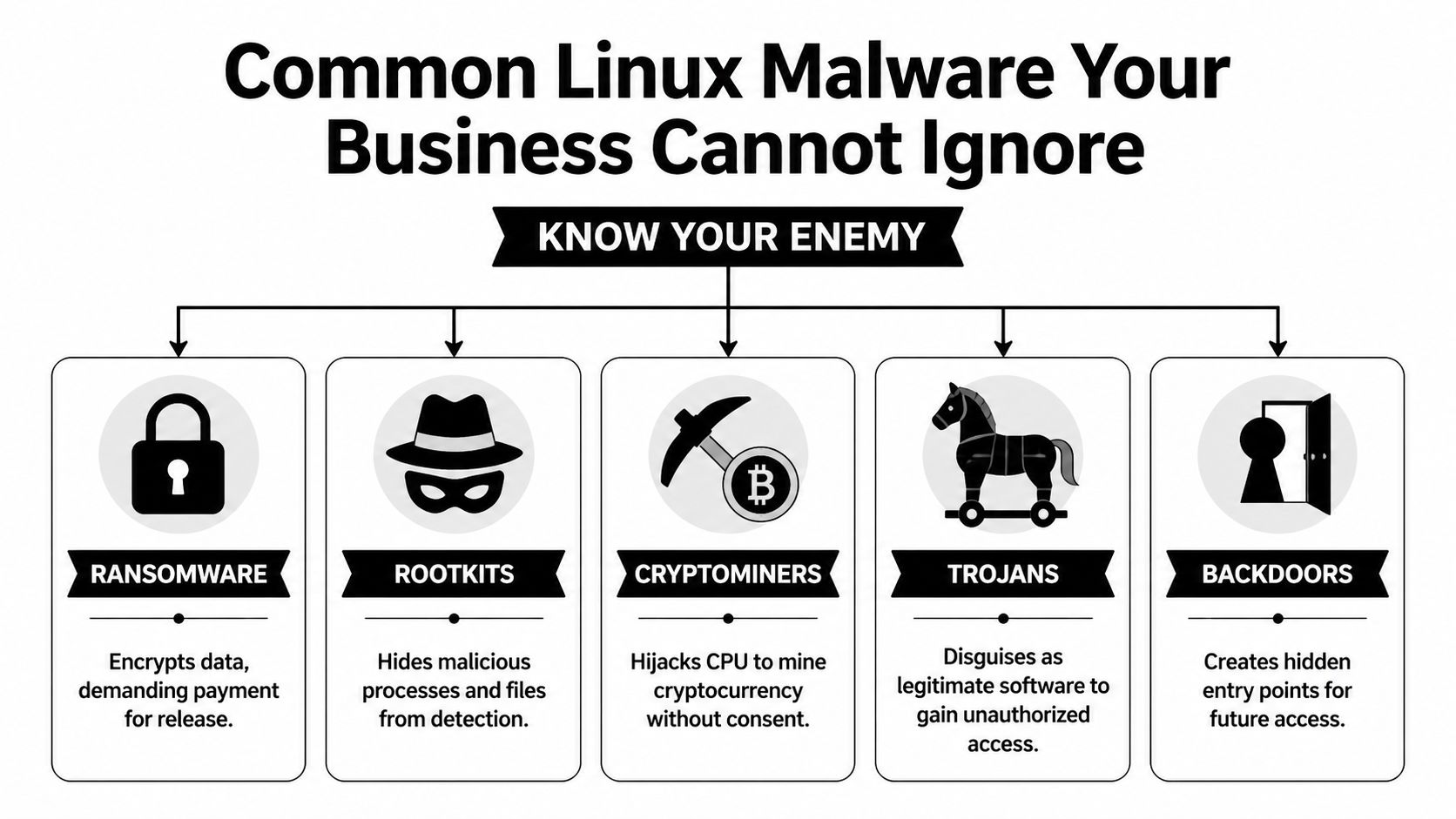
IT Support Model Comparison

Factor In-House IT Team Fully Managed IT (MSP) Co-Managed IT (Hybrid)
Control Highest direct control Lower day-to-day internal control Shared control with defined ownership
Staffing burden Business handles hiring, retention, coverage Provider handles staffing Shared staffing model
Specialized expertise Depends on current team Broad provider bench Broad provider bench plus internal context
After-hours support Hard to sustain with small teams Usually included in provider model Added without replacing internal staff
Best fit Large enough team with broad skill coverage Businesses wanting complete outsourcing Businesses with internal IT that need leverage

The sweet spot for regulated firms

Co-managed IT makes the most sense when the business already has someone who understands the environment but doesn’t have enough time or specialist coverage to handle everything well.

That’s common in:

  • Law firms where staff need quick support, document access must stay reliable, and security incidents can become client trust issues fast
  • Medical practices that need HIPAA-aware processes, dependable patching, and minimal disruption to scheduling and clinical workflows
  • Accounting and financial firms where compliance pressure, phishing risk, and seasonal workload spikes can overwhelm a small internal team
  • Multi-location organizations that need standards across sites without hiring a full internal bench

Trade-offs leaders should be honest about

A fully internal model gives you tight control, but it can leave the company exposed when a key person is out, leaves, or gets buried.

A fully managed model simplifies accountability, but some organizations don’t want to hand over all local context, application nuance, or user relationships.

Co-managed IT solves a lot of that, but only when the division of labor is explicit. If ownership is vague, the partnership can create friction instead of relief.

For many firms in Orlando and Plano, the real question isn’t “Should we outsource IT?” It’s “Which responsibilities should stay close to the business, and which should be handled by specialists?”

That’s the decision framework that produces a support model you can live with.

Core Services in a Co-Managed IT Solution

A good co-managed agreement doesn’t stop at “extra hands.” It defines operating support that lowers risk, improves consistency, and gives your internal team room to focus on work the business notices.

A diverse professional team collaborates on co-managed IT solutions in a modern office meeting room setting.

Helpdesk overflow and escalation

This is often the first pain point a business feels. Your internal person becomes the catch-all for everything, from account access to device setup to application troubleshooting.

Co-managed helpdesk support changes that by splitting the queue. Routine requests can go to the partner, while escalations and business-specific issues stay with the internal team. That keeps the on-site lead from spending the whole week in reactive mode.

For a professional services firm, this matters because user interruption is expensive even when the issue is small. Fast response protects billable time.

Security operations and endpoint protection

Co-managed IT solutions create real risk reduction. Small internal teams usually can’t run continuous threat monitoring, investigate suspicious alerts after hours, or maintain the same security discipline every day while also handling regular support.

A partner can support:

  • Endpoint protection oversight across laptops, desktops, and servers
  • Threat detection and response when alerts require immediate review
  • Patching cadence management so vulnerabilities don’t wait for a free afternoon
  • Backup verification and recovery coordination when something goes wrong
  • Policy alignment for access control, device standards, and user risk reduction

For regulated industries, this isn’t just about stopping malware. It’s about proving that security operations are deliberate, documented, and repeatable.

Compliance support and risk management

Owners frequently underestimate co-management's value. Compliance work isn’t one document or one annual check. It’s a series of operational habits.

The strongest providers help internal teams maintain those habits by supporting system reviews, security controls, change logging, patch documentation, backup oversight, and audit readiness. That’s especially useful for medical, financial, and industrial organizations that can’t afford to improvise around HIPAA, CMMC, or similar requirements.

Vendor management and licensing control

Many businesses have a hidden IT tax. It lives in vendor overlap, unclear renewals, duplicate software, unmanaged licenses, and finger-pointing between telecom, internet, software, and hardware providers.

A co-managed partner can centralize that process. Instead of your office manager, controller, or internal IT lead chasing every renewal and support line, the partner helps maintain ownership records, standardizes contacts, and pushes vendors toward resolution.

This is less glamorous than cybersecurity, but it’s operationally important. Clean vendor management reduces delay during outages and improves budgeting.

Field observation: The businesses that run IT smoothly usually aren’t the ones with the most tools. They’re the ones with clear documentation, consistent ownership, and fewer unmanaged exceptions.

Documentation, network diagrams, and operational visibility

If only one person knows how the environment works, you don’t have resilience. You have dependency.

Strong co-managed relationships improve documentation around assets, dependencies, network layout, access standards, and change history. That matters during troubleshooting, onboarding, cyber response, insurance reviews, and growth planning.

Examples of useful operational artifacts include:

  1. Network diagrams that show how locations, firewalls, wireless, and critical systems connect
  2. Asset inventories that identify what’s deployed, where it lives, and who supports it
  3. Escalation maps so users and leaders know who owns what
  4. Change records that reduce confusion after updates or outages

Strategic planning and business alignment

The best co-managed IT solutions don’t just absorb tickets. They create space for roadmap work.

That can include cloud planning, lifecycle planning, infrastructure standardization, budgeting, and quarterly reviews of open risks and upcoming projects. This is also the right place to mention one factual example from the market. Cyber Command, LLC offers co-managed IT that includes monitoring, ticket handling, patch management, vendor management, network diagrams, QBRs, and continuous security support for internal teams that need added depth.

When this layer is missing, IT becomes a utility that only gets attention when something breaks. When it’s present, IT starts supporting growth decisions before they turn into operational problems.

Calculating the ROI of Co-Managed IT

Business owners usually ask the right question. Not “What features are included?” but “What does this change financially and operationally?”

That’s the right lens.

According to Adams Brown’s review of co-managed IT benefits, co-managed models can produce a 20-35% TCO reduction by shifting from reactive fixes to proactive prevention, while also enabling internal teams to complete strategic initiatives 40% faster. Those two outcomes belong together. The savings don’t come only from paying a provider instead of hiring. They come from reducing interruption, limiting avoidable incidents, and freeing skilled staff to work on projects that move the business forward.

Where the return actually shows up

Most ROI in co-managed IT comes from four areas.

  • Less downtime: Problems are caught earlier, handled faster, or prevented through monitoring and maintenance.
  • Lower disruption from security events: Better visibility and response reduce the chance that a small issue becomes a business crisis.
  • Stronger use of internal talent: Your internal team spends less time on repetitive support and more time on improvements.
  • More predictable budgeting: The company trades surprise effort and scattered vendor costs for a clearer operating model.

If you want a budgeting framework before comparing proposals, this guide to managed IT services cost is a practical place to start.

A simple ROI lens for owners

You don’t need a complicated spreadsheet to evaluate co-managed IT. Start with questions like these:

ROI Area What to examine
Support efficiency Are high-value employees waiting on basic support?
Security exposure Are patching, monitoring, and backup checks being handled consistently?
Internal capacity Is your IT lead improving systems or just clearing backlog?
Vendor overhead How much leadership or admin time goes into managing providers and renewals?

If the current model creates repeated delays, owner escalations, and preventable risk, then the cost of staying put is already high, even if it doesn’t show up neatly in one invoice.

The risk that can erase the return

There’s one trap that ruins otherwise good co-managed partnerships. Poor role design.

If the provider thinks your internal staff owns user communication, but your internal staff thinks the provider owns it, people wait. If change approval, after-hours escalation, or patching authority isn’t explicit, important work stalls or gets duplicated.

That’s why service design matters as much as technical capability.

A workable shared SLA structure should define:

  • Who receives the initial ticket
  • Which tickets stay internal
  • Which issues escalate to the partner
  • Who approves security and infrastructure changes
  • How after-hours incidents are handled
  • What reporting is reviewed monthly or quarterly

The fastest way to lose ROI in a co-managed model is to pay for support that no one fully operationalized.

Done right, co-managed IT turns IT from a pressure point into an efficiency layer. Done loosely, it becomes one more vendor relationship to manage. The difference is in scope clarity, process ownership, and disciplined review.

Your Vendor Evaluation Checklist for Central Florida and Plano

Most businesses don’t pick the wrong provider because the sales pitch sounded good. They pick the wrong provider because they didn’t pressure-test the operating model.

That mistake matters. An estimated 25-40% of co-managed engagements fail because roles, escalation paths, and shared SLAs weren’t clearly defined, according to Meriplex’s discussion of co-managed versus fully outsourced MSP models.

A professional man in a suit reviews a vendor evaluation checklist on a tablet at a sunny desk.

Questions that reveal how the partnership will really work

Ask these before you sign anything:

  • Who owns the ticket queue by category? Don’t accept “we’ll work that out later.” Get examples.
  • How do after-hours incidents get escalated? Especially for security alerts, internet outages, and line-of-business application failures.
  • What compliance experience do you have in my industry? A medical practice, law firm, and industrial company don’t face the same requirements.
  • How do you document the environment? Ask whether network diagrams, asset records, and change tracking are part of the service.
  • Who manages third-party vendors? You want a provider that reduces finger-pointing, not one that adds another layer to it.
  • How is success reviewed? Monthly reporting and quarterly review meetings should be standard.

For businesses that want to pressure-test the broader supplier exposure side, this primer on expert vendor risk assessment is a useful companion to technical due diligence.

Sample SLA language to ask for

You don’t need legal-grade wording in the first conversation, but you do need operational clarity. Ask a provider to show examples of how they define:

  1. Shared responsibility matrix
    Which tasks belong to internal IT, the MSP, or both?

  2. Escalation path by severity
    Who gets notified first, and when does an issue move from service desk to engineering or security?

  3. Change approval process
    What can the provider act on directly, and what requires internal approval?

  4. Reporting cadence
    What metrics, risk items, and project updates are reviewed on a regular schedule?

Local and industry fit matters

For Orlando, Winter Springs, and Plano businesses, local relevance is more than a nice extra. It affects response, communication, and judgment.

Look for a provider that understands:

  • Multi-location support realities for practices, firms, and distributed offices
  • Regulated workflows in healthcare, finance, and public-facing organizations
  • Local presence and on-site response expectations when remote support isn’t enough
  • U.S.-based helpdesk and security operations expectations if your leadership wants tighter communication and accountability

If you’re comparing options side by side, this checklist for comparing IT managed services options can help structure the evaluation.

Red flags you shouldn’t ignore

A few warning signs tend to predict future friction:

  • They talk tools before process.
  • They can’t explain where your internal team stays in control.
  • They avoid detailed SLA examples.
  • They treat compliance as an add-on conversation instead of an operating requirement.

  • They don’t ask how your business operates.

A good co-managed partner should sound like an operator. They should care about ownership, handoffs, business constraints, and accountability, not just technology categories.

Empowering Your Team for Strategic Growth

The strongest case for co-managed IT isn’t that it gives you more tickets closed. It’s that it lets your internal team operate at the precise level your business needs.

When routine support, monitoring, patching, documentation, and security operations are handled in a disciplined shared model, your internal IT lead can spend more time on planning, standardization, and business alignment. That changes the conversation from “Why does IT always feel behind?” to “What should we improve next?”
For firms in Central Florida and North Texas, that matters because growth creates technical complexity fast. New staff, new software, new compliance demands, and new attack surface all arrive before most businesses are ready for them.

Co-managed IT solutions work when they protect what’s valuable about your in-house knowledge while adding the specialized depth that small teams rarely have on their own. The result isn’t less ownership. It’s increased effectiveness.

Frequently Asked Questions About Co-Managed IT Solutions

Is co-managed IT only for larger companies

No. It often fits small and midsized businesses that already have an internal IT person or a lean team but need more coverage, security depth, or project support.

Does co-managed IT replace internal staff

It shouldn’t. The healthiest model keeps internal ownership for business-specific decisions and user context, while the external partner handles agreed support, monitoring, security, and specialized work.

Is co-managed IT a good fit for healthcare and legal firms

Yes, often very much so. Those environments usually need stronger cybersecurity, consistent documentation, and support for compliance-related processes without building a large internal department.

What should happen during onboarding

The provider should document systems, define responsibilities, build escalation paths, align ticket ownership, and confirm what gets reviewed regularly. If those items feel vague, stop and clarify them before service begins.

What makes co-managed IT solutions fail

Most failures trace back to unclear roles, weak communication, and SLAs that never became day-to-day operating rules.


If your team is stretched thin and you need a co-managed IT structure that supports security, compliance, and day-to-day accountability, Cyber Command, LLC is one option to evaluate for organizations in Orlando, Winter Springs, and Plano. The company provides co-managed IT, cybersecurity, U.S.-based helpdesk, and 24/7 operational support designed to work alongside internal teams rather than replace them.

Data Center Disaster Recovery Guide for Florida SMBs

June in Central Florida changes how business owners think. One day you are focused on payroll, patient flow, client deadlines, or a vendor issue. The next day, a storm track shifts, schools start sending alerts, and someone in the office asks whether the servers are protected if power goes out for longer than expected.

For many small and mid-sized companies, that question still gets answered with a backup drive, a few cloud apps, and a lot of hope. That is not data center disaster recovery. That is partial preparation.

A real recovery plan assumes two things at once. First, Florida brings physical risk. Hurricanes, flooding, utility instability, and building access problems can take systems offline even when your office itself survives. Second, cyber risk does not pause for weather. Medical practices, law firms, accounting firms, engineering teams, and multi-location service businesses are all targets because they depend on data, deadlines, and client trust.

If your operations rely on a server closet, a small on-prem stack, a colocation rack, or a mix of local infrastructure and cloud software, you need a plan that tells your team what happens next when something fails. Not a binder on a shelf. A usable, tested process.

Why Your Florida Business Needs a Real DR Plan Now

A typical Central Florida scenario is not dramatic at first. A business owner in Orlando watches the forecast, moves a few appointments, tells staff to take laptops home, and assumes that if the office is closed for a day or two, work can resume shortly after the storm passes.

Then problems show up.

Power does not return on schedule. Internet service is unstable across part of the region. A file server shuts down hard. A virtual machine comes back corrupted. Someone cannot access the practice management platform. Another employee realizes the backup job has been failing. If the business also gets hit with a phishing-driven ransomware event during the same period, the disruption stops being an inconvenience and becomes a survival issue.

A professional man watches a severe storm from his office while monitoring hurricane data on computer screens.

Downtime gets expensive fast

For small and mid-sized firms, the damage usually starts before anyone uses the word disaster. Staff cannot work. Clients cannot get answers. Revenue pauses while costs keep running.

The financial side is not abstract. The average cost of IT downtime reaches $5,600 per minute, which can escalate to over $300,000 per hour for mid-sized firms. For data-intensive businesses, daily losses can run into the millions (Systnet disaster recovery statistics).

That is why data center disaster recovery cannot be treated as a “big company” problem. A dental practice with digital imaging, a law office with document management, or an architecture firm with project files can all be knocked flat by the same issue. They just feel it in different ways.

Practical view: If your team cannot access the systems that produce revenue, schedule work, or satisfy compliance, you already have a disaster scenario. The building does not need to be underwater.

Florida risk is physical and cyber at the same time

Hurricanes get the attention because they are visible. The less visible problem is that most businesses have stacked dependencies. Battery backups, local storage, ISP handoffs, firewall appliances, hypervisors, Microsoft 365, line-of-business apps, vendor portals, and remote access all have to work together.

If one weak point fails, the whole business can stall.

That is why companies reviewing their continuity posture often start with broader IT support maturity first, not just backup software. A useful place to frame that conversation is this guide to business IT support in Florida, because recovery only works when the rest of the environment is documented, maintained, and monitored.

A real DR plan answers basic but urgent questions clearly. Which systems come back first? Who approves failover? Where do clean backups live? How do employees keep working if the office is closed? How do you know the outage is a storm problem and not an active breach?

If those answers are vague, the plan is not ready.

Assessing Your Risks and Defining Recovery Goals

Most businesses start in the wrong place. They shop for backup tools before they decide what matters.

The better approach is simpler. Identify the processes that must keep running, then map the systems behind them. That is the beginning of a Business Impact Analysis, or BIA.

Infographic

Start with business functions, not hardware

A Winter Springs law firm usually does not care about “the hypervisor” in the abstract. It cares about document access, time entry, billing, email, and client communications. An Orlando dental group cares about imaging, scheduling, claims, and patient records. An engineering office cares about CAD files, project folders, version control, and secure remote access.

Write those business functions down first.

Then ask these questions:

  1. What stops revenue immediately if it goes offline?
  2. What creates legal or compliance exposure if data is unavailable?
  3. What can wait until later in the day or the next business day?
  4. What depends on something else behind the scenes?

That last question is where many SMB plans break down. A cloud app may still depend on local identity services, internet routing, or a workstation image your staff can use.

Put RTO and RPO into plain English

Two recovery terms matter more than the rest.

RTO, or Recovery Time Objective, means how long you can tolerate a system being down.

RPO, or Recovery Point Objective, means how much data loss you can tolerate.

Here is the plain-English version:

Business example What matters most
Dental scheduling platform Low RTO. You need it back quickly so the day does not collapse.
Client file repository for a law firm Low RTO and low RPO. You need fast access and very little data loss.
Marketing website Higher RTO. It matters, but it is not usually the first system to restore.
Archived historical files Higher RTO and often a more flexible RPO.

A lot of owners initially say everything is critical. It almost never is. If everything is Tier 1, nothing is prioritized.

Tip: If losing a system for four hours means canceled appointments, missed deadlines, or staff standing idle, it belongs near the top of the recovery list.

Use a tiered model to control cost

A practical tiering model keeps spending aligned with business impact. A tiered approach to recovery can reduce unnecessary infrastructure spending by 30-40%. By classifying applications into mission-critical (Tier 1, RTO 0-4 hours), business-essential (Tier 2, RTO 12-24 hours), and non-urgent (Tier 3), organizations can align recovery costs with business impact (LightEdge on successful disaster recovery planning).

That matters for SMBs because overspending on low-priority recovery is common. So is underspending on the systems that keep the business alive.

A sensible breakdown often looks like this:

  • Tier 1 systems: Core line-of-business apps, identity services, key file systems, critical databases, secure remote access.
  • Tier 2 systems: Reporting tools, internal collaboration platforms, departmental apps, secondary integrations.
  • Tier 3 systems: Archive workloads, test environments, old reference repositories, non-urgent internal tools.

A simple risk review catches blind spots

The BIA should also identify threats, not just priorities. In Central Florida, that means looking at both local weather and routine operational failures.

Consider whether your business is exposed to:

  • Hurricane-related disruption: Power loss, building closure, flooding, ISP outage, delayed vendor access.
  • Cyber events: Ransomware, account compromise, malicious encryption, backup tampering.
  • Technical failures: Failed storage, bad patches, expired certificates, hardware faults, replication issues.
  • Human error: Accidental deletion, misconfiguration, improper shutdowns, missed alerts.

Many teams handle this work as part of a broader cyber security risk assessment, because the same systems that affect security also affect recovery.

Once you know what the business cannot live without, your data center disaster recovery plan becomes much easier to design. You stop buying vague protection and start defining what must be restored, in what order, and how fast.

Choosing the Right Recovery Architecture for Your Budget

At this stage, many Florida SMBs overspend, underspend, or buy the wrong kind of protection entirely.

The right data center disaster recovery architecture is not the one with the most features. It is the one that restores the right systems, in the right order, at a cost your business will sustain year after year.

A professional man and woman discussing disaster recovery architecture strategies in a modern office environment.

Three common models SMBs consider

Most small and mid-sized businesses evaluate some version of these options.

Model What it looks like Where it works Where it fails
On-prem backups only Local NAS, backup appliance, USB rotation, server images in the office Fast restores for small mistakes and isolated file loss Weak against building loss, flood, fire, major theft, or ransomware that reaches local storage
Hybrid-cloud recovery Local backup plus replicated offsite or cloud-based recovery copies Strong balance of speed, resilience, and cost Requires good design, testing, and retention planning
Fully managed DRaaS Replication and failover managed through a service provider Helpful for firms that need outside expertise and clear runbooks Can become expensive if every workload is treated like a top-priority workload

On-prem only still has a place. It is useful for fast file restores, quick VM rollbacks, and local operational recovery. But by itself, it is often not enough in Florida. If your office or local facility is unreachable, your local backups may be unreachable too.

A fully managed DRaaS model can solve a lot of operational headaches. It can also create unnecessary spend if you apply it broadly to low-priority systems that do not need near-immediate recovery.

That is why the hybrid approach tends to make the most sense for many SMBs.

Why hybrid fits Central Florida better than enterprise playbooks

Enterprise guidance often assumes you can fund distant secondary sites, duplicate infrastructure, and complex multi-cloud orchestration. Most local SMBs do not need that. They need a plan that restores critical services quickly without forcing enterprise-grade complexity into a mid-market budget.

For SMBs in hurricane-prone regions like Florida, a hybrid-cloud DR strategy can be significantly more cost-effective than enterprise-level options. This approach helps reduce reactive recovery costs by up to 40% while achieving aggressive RTOs under 4 hours without the high price tag of traditional geographically distant sites (Encor Advisors on data center disaster recovery).

That statement matches what works in practice.

A good hybrid design usually includes:

  • Fast local recovery for deleted files, failed patches, and day-to-day restore events.
  • Offsite or cloud-based copies that stay isolated enough to survive a building issue or widespread compromise.
  • Air-gapped or logically separated backups so ransomware cannot encrypt the same systems meant to save you.
  • Priority-based replication so Tier 1 systems recover first.

Key takeaway: Fastest is not always best. The best architecture is the one that restores your most important systems first without forcing you to pay premium recovery costs for everything else.

What works for different Florida SMB profiles

A few examples make the trade-offs clearer.

Professional services firms

Law offices, accounting firms, and architecture studios usually need document systems, line-of-business apps, and secure remote work to recover quickly. They often do well with a hybrid setup that keeps recent local copies for speed and hardened cloud recovery for larger events.

These firms should be cautious about overcommitting to all-cloud recovery if their file workflows are heavy, latency-sensitive, or tightly tied to local identity and printing.

Medical and dental practices

Practices need scheduling, imaging, chart access, secure communication, and compliance-aware recovery procedures. In these environments, “we have backups” is not enough. The backup chain has to support a clean restore path for the applications staff use all day.

Hybrid often wins here too. It supports rapid local restoration for common incidents and offsite recovery if the office cannot operate.

Industrial and multi-location businesses

These organizations often have a different pain point. Power instability, site connectivity, and location-specific operational dependencies matter as much as cyber risk. They may need partial local survivability at one site even if failover happens elsewhere.

Architecture choices depend on physical environment too

Recovery planning is not only about software. Rack layout, power protection, cooling, and physical handling still matter. For businesses evaluating facility constraints or expansion planning, resources that explain how modern data centers are physically structured can help leadership understand why site conditions affect resilience, not just capacity.

A weak environment can undermine a strong backup strategy. Poor cabinet power planning, no documented dependencies, and no clean shutdown procedure can turn a recoverable outage into a messy rebuild.

Tools, staffing, and management overhead matter

The architecture decision is also a staffing decision.

If your internal team is small, every extra moving part increases operational risk. Replication jobs, storage retention, immutable backup settings, runbook maintenance, hypervisor configuration, Microsoft 365 backup, database consistency checks, and restore testing all need owners.

That is why some firms use managed options selectively. They keep direct control over certain systems and outsource the recovery stack for others. Cyber Command, LLC is one example of a provider that offers virtualized disaster recovery, cloud-based failover, and DRaaS as part of managed or co-managed IT operations. That model fits businesses that want predictable support around both infrastructure and security without building a full internal recovery function.

If you are sorting through those choices, this guide to cloud disaster recovery options is a useful next step because it frames recovery architecture as a business decision, not a product checklist.

The important point is simple. Do not buy recovery around the loudest threat. Buy it around your operations. In Central Florida, that usually means planning for a storm-driven outage, a localized power problem, and a security event all within the same design.

Building Your Incident Response and Failover Playbook

A recovery platform can be solid and still fail under pressure if nobody knows who does what in the first hour.

That is why your data center disaster recovery plan needs a playbook, not just technology. When ransomware hits, a host fails, or your office loses power, people need a sequence. They need contacts, decisions, escalation rules, and communication templates that already exist before the incident starts.

A professional team collaborating in a modern office space while reviewing a data center failover playbook presentation.

The first hour determines the rest of the outage

Most SMB incidents go sideways for one reason. People start improvising.

Someone restarts the wrong server. Someone else reconnects a suspected infected device. A manager sends a vague all-staff message. Meanwhile, nobody has confirmed whether the problem is hardware failure, internet loss, or active encryption.

That confusion is expensive. Recent data shows that 34% of organizations hit by ransomware take over a month to recover their data, up from 24% just two years prior. With security breaches being a leading cause of outages, a rapid, playbook-driven response is critical (Secureframe disaster recovery statistics).

What your playbook should contain

A workable playbook does not need to be long. It needs to be usable.

Include these elements:

  • Decision authority: Name the person who can declare a DR event, approve failover, and authorize outside communications.
  • Technical ownership: List who checks backups, who validates the scope, who handles network isolation, and who coordinates restore order.
  • Contact paths: Keep current numbers for leadership, IT, security, critical vendors, internet providers, line-of-business app support, and facility contacts.
  • System priority list: Put Tier 1, Tier 2, and Tier 3 systems in recovery order.
  • Communication templates: Pre-write staff updates, client notices, and vendor escalation messages.
  • Evidence handling: If the event may involve a breach, preserve logs and timeline notes before systems get changed.

A practical first-60-minute checklist

Here is the format I recommend for SMBs.

Minutes 0 to 15

Confirm what happened before anyone starts “fixing” it.

  • Identify the symptom: Is it outage, encryption, corrupted data, inaccessible internet, or failed authentication?
  • Check blast radius: One user, one site, one application, or the whole environment?
  • Freeze unnecessary changes: Stop ad hoc restarts and random reconnects until someone leads the response.

Minutes 15 to 30

Contain the problem and preserve recovery options.

  • Isolate affected systems if compromise is suspected.
  • Verify backup status and the last known good restore point.
  • Escalate to security responders if there are indicators of ransomware or account compromise.

Minutes 30 to 60

Choose the path and communicate it.

  • Declare the incident level: Operational issue or true disaster event.
  • Start failover or restore actions for the systems already marked as highest priority.
  • Send a controlled internal update so staff know what they can and cannot do.

Tip: Your first communication to staff should reduce risk, not just share information. Tell them whether to stay off VPN, avoid opening email, switch to alternate systems, or report specific symptoms.

Database and application specifics matter

Generic backup language is not enough for application-heavy environments. If your business depends on SQL-based software, medical systems, billing platforms, or custom line-of-business apps, your playbook should spell out what “restored” means.

That includes service order, dependency checks, and data validation.

For teams that want a technical refresher on one part of that process, this guide on backing up your MySQL database is a useful example of why database-aware backup procedures matter more than copying files.

The SOC role during a cyber-driven outage

In a ransomware or suspicious outage scenario, the recovery team and the security team must work together. If you restore too early without containment, you can reintroduce the same threat into clean systems.

Many plans fail in the field at this point. They focus on restoring systems but not on proving those systems are safe to restore.

A 24/7 SOC helps by handling tasks that SMBs often cannot do alone:

  • Threat hunting across endpoints and identity systems
  • Containment guidance so infected assets are isolated correctly
  • Alert correlation to separate a hardware outage from a breach
  • Recovery coordination so restore actions do not destroy evidence or reopen the incident

A useful playbook balances both. It tells your staff how to keep the business moving while your technical team verifies that the recovery path is clean.

Testing Your Plan and Staying Compliant

An untested recovery plan is worse than an incomplete one. At least an incomplete plan makes people cautious. An untested plan makes them confident for no reason.

That false confidence shows up in meetings all the time. A company says it has backups, documented procedures, and recovery targets. Then the first live test reveals expired credentials, missing dependencies, bad replication assumptions, or a restore sequence nobody has ever performed.

Testing turns documentation into something usable

Recovery plans fail in small ways before they fail in big ways.

A tabletop exercise can reveal role confusion. A restore drill can expose application dependencies. A full failover simulation can uncover networking gaps, timing issues, and communication breakdowns that were invisible on paper.

Best practice dictates full-scale DR testing must occur at least annually. However, managed IT providers that implement quarterly recovery drills can reduce actual recovery time by 40-60% compared to firms relying on manual procedures and less frequent testing (Serverion on cloud disaster recovery planning).

That is the practical case for testing more often than the minimum. The goal is not to impress an auditor. The goal is to remove surprises before a real event does it for you.

A realistic SMB testing rhythm

Most SMBs do not need dramatic, all-day simulations every month. They do need a schedule.

A workable approach looks like this:

  • Quarterly tabletop exercises: Leadership, IT, and key department heads walk through a ransomware event, a storm outage, or a server failure.
  • Quarterly restore drills: Recover a file set, a VM, a database, or a critical SaaS dataset and validate the result.
  • Annual full-scale test: Simulate a real failover for the highest-priority systems and measure recovery against target recovery times.

Use each test to answer a few direct questions:

Test question Why it matters
Did the team meet the intended restore order Priorities often drift after system changes
Was the recovered data usable A successful restore that breaks the app still fails the business
Did staff know who approved each action Delays often come from decision bottlenecks, not technology
Were communications clear Confused employees create secondary problems during outages

Compliance reality: Auditors and insurers care less about promises than proof. Meeting notes, test records, screenshots, exception logs, and remediation follow-ups carry more weight than a policy document alone.

Compliance is tied to recoverability

If you operate in healthcare, legal, financial, or public-facing environments, recovery is not just an uptime issue. It affects privacy, record access, and operational integrity.

A documented testing program supports several things at once:

  • Evidence for auditors that controls are real and maintained
  • Stronger insurer conversations because your firm can show tested procedures
  • Cleaner vendor oversight when third-party systems are part of the recovery chain
  • Lower operational chaos because staff practice decisions before a live event

Good testing also forces one healthy discipline. It keeps the environment documented. Every time a team runs a drill, it finds outdated contacts, changed applications, forgotten dependencies, or undocumented exceptions. That is not failure. That is the value of the exercise.

If a plan has not been tested since the last server upgrade, office move, line-of-business app change, or security stack change, assume the plan is partially wrong. Then fix it before hurricane season, before the next phishing campaign, and before the next compliance review.

Making Resilience Your Competitive Advantage in Florida

The strongest Florida businesses do not treat data center disaster recovery as an insurance expense they hope never to use. They treat it as operational discipline.

Clients notice when your firm stays available during regional disruption. Patients notice when scheduling and records remain accessible. Staff notice when they get clear instructions instead of confusion. Referral partners notice when your systems keep working while other firms scramble.

Resilience is built from decisions, not products

The pattern is consistent.

First, identify the business functions that matter. Then define realistic recovery targets. After that, choose an architecture that fits both your risk and your budget. Finally, test it often enough that your team trusts the process because they have already used it.

That is what turns a backup strategy into resilience.

In Florida, the plan has to match local reality

A Central Florida business does not need a copy-and-paste enterprise template. It needs a plan built for storms, power loss, remote work interruptions, and cyber threats that can arrive on the same week.

The cost of getting this wrong can be existential. According to research, a significant majority of companies that suffered a data center outage for an extended period filed for bankruptcy within one year. This highlights the existential threat of inadequate DR planning. As noted earlier, that is why recovery planning belongs in core business strategy, not a back-burner IT project.

The companies that come through disruption well usually have the same habits. They know what must come back first. They know who makes the call. They know where the clean backups are. They know the plan has been tested. And they have support in place before the emergency starts.

If you can say those things with confidence, resilience becomes a business advantage. If you cannot, the time to fix it is now, while the skies are still clear.


If your business in Orlando, Winter Springs, or the surrounding Central Florida market needs a practical disaster recovery plan, Cyber Command, LLC can help you assess risks, define recovery priorities, and build a recovery process that fits your environment, compliance needs, and budget.

Top 10 Benefits of Outsourcing IT Support for Central Florida Businesses in 2026

In the competitive markets of Central Florida, from Orlando to Winter Springs, small and mid-sized businesses face a critical choice. Do you continue managing information technology in-house, or do you gain a strategic advantage by partnering with a professional managed IT provider? As cyber threats evolve and technology demands increase, managing IT has become more than a full-time job; it's a specialized discipline requiring constant vigilance and deep expertise.

For professional services like law and accounting firms in Lake Mary, privately owned medical practices in Orlando, and industrial organizations across the region, the question isn't just about fixing problems when they break. It's about implementing proactive security, establishing predictable costs, and maintaining focus on core business growth. The reality is that for many businesses, internal IT management often becomes a reactive, costly, and distracting function that pulls resources away from revenue-generating activities. This is precisely why exploring the benefits of outsourcing IT support is no longer optional, it's a strategic necessity.

This article moves beyond generic advice to provide a clear, actionable guide. We will explore 10 crucial advantages of outsourcing your IT, detailing how a strategic partnership can convert your technology from a frustrating liability into a powerful business asset. We'll provide local context, practical examples, and a clear roadmap for making an informed decision, with a special focus on addressing the advanced cybersecurity concerns that keep Central Florida business owners up at night. You will learn how to achieve cost predictability, access enterprise-grade security, and empower your team to focus on what they do best.

1. 24/7/365 Proactive Monitoring and Support

One of the most significant benefits of outsourcing IT support is gaining around-the-clock protection for your business systems. Cyber threats and hardware failures don’t operate on a 9-to-5 schedule. An internal IT employee can only do so much, but a managed IT provider offers continuous, proactive monitoring of your servers, networks, and endpoints. This means potential issues are identified and often resolved before they can disrupt your operations.

For a medical practice in Orlando, this could mean an alert is triggered at 2 AM for an issue with the patient record system, and a technician resolves it before the office opens. For a law firm with offices in both Winter Park and Tampa, it means all locations are watched over by a single, unified team, ensuring consistent security and uptime. This constant vigilance is nearly impossible for most small and mid-sized businesses to achieve in-house without incurring massive payroll costs.

Putting Proactive Monitoring into Action

To make this benefit work for your business, you need a clear plan. Start by establishing strict Service Level Agreements (SLAs) that define response times for different types of incidents. Ensure the monitoring extends to all your critical business applications, not just standard network hardware.

Key Takeaway: True 24/7 support should involve live, U.S.-based technicians. When an emergency strikes, you need immediate help from experts who understand your setup, not a delayed response from an offshore call center. Companies like Cyber Command, LLC build their service model on providing this live, U.S.-based helpdesk support, which is critical for rapid incident resolution.

2. Cost Predictability and Flat-Rate Pricing Models

One of the most compelling benefits of outsourcing IT support is the ability to replace unpredictable, reactive repair bills with a fixed, transparent monthly cost. For businesses that have always operated on a break-fix model, IT expenses often feel like a series of unpleasant surprises. An unexpected server failure or a sudden cybersecurity incident can lead to massive invoices for emergency services, throwing an entire quarter's budget into disarray. A managed IT provider eliminates this volatility with an all-inclusive, flat-rate pricing structure.

A wooden desk with a laptop, stacked financial documents, an 'IT Budget' coin jar, and a calendar.

This model allows a business to treat IT as a predictable operational expense rather than a chaotic capital one. An accounting firm in Sanford can confidently forecast its technology spending for the entire year, while a multi-location medical practice can lock in consistent IT costs across all its clinics. For many small law firms that once paid $8,000 to $12,000 annually in sporadic, high-cost emergency support, moving to a managed service plan at $2,500 to $3,500 a month provides superior service for a predictable, budget-friendly fee. This financial stability is crucial for strategic growth.

Putting Flat-Rate Pricing into Action

To make this model successful, you must scrutinize the details of the agreement. Begin by requesting a detailed cost comparison that pits your current IT spending (including downtime and emergency fees) against the proposed managed service fees. Ensure the pricing explicitly covers all users, devices, and office locations to avoid scope creep and hidden charges. For an even better rate, ask about negotiating a pricing lock for a multi-year commitment. For more information on what to expect, our complete guide to managed IT services costs offers a deeper analysis.

Key Takeaway: The goal of flat-rate pricing is to align the IT provider’s success with your own. Unlike break-fix models where the provider profits from your problems, a managed services model incentivizes the provider to keep your systems running smoothly to maximize their own profitability. Companies like Cyber Command, LLC champion this transparent, all-inclusive pricing, ensuring you get predictable costs and proactive service without surprise invoices.

3. Access to Enterprise-Grade Security and Threat Detection

One of the most critical benefits of outsourcing IT support is gaining access to security tools and expertise once reserved for large corporations. Building an in-house Security Operations Center (SOC) with skilled analysts and advanced threat detection software is financially impossible for most small and mid-sized businesses. An outsourced provider democratizes this level of protection, offering a dedicated 24/7 SOC that actively hunts for threats like ransomware, manages compliance, and responds to incidents instantly.

Computer monitor displaying a cybersecurity interface with a blue shield, headphones, and notebook on a white desk.

For a dental practice in Kissimmee, this means protecting sensitive patient health information (PHI) from devastating ransomware attacks that could halt operations. A law firm in Orlando can safeguard privileged client communications and financial data from phishing scams designed to steal credentials. This access to an enterprise-grade security posture is a powerful advantage, ensuring that your most valuable digital assets are protected by a team of specialists around the clock, a capability that provides a significant competitive and operational edge.

Putting Enterprise Security into Action

To make this benefit a reality, you must be strategic in choosing and working with your IT partner. Begin by confirming their SOC analysts hold key certifications like CISSP, CEH, or GIAC. Ask for a threat hunting roadmap that details how they target threats specific to your industry, whether it's business email compromise in legal services or patient data exfiltration in healthcare. Ensure their endpoint protection covers all devices, including laptops, mobile phones, and any connected IoT equipment. Most importantly, verify their incident response SLAs to understand exactly how quickly threats are detected, contained, and neutralized.

Key Takeaway: A true security partner does more than just install antivirus software; they provide an active defense. You need a team that performs continuous threat hunting and offers rapid incident response. Companies like Cyber Command, LLC operate a dedicated 24/7 SOC to deliver this active protection, which is essential for any business serious about defending against modern cyber threats.

4. Reduced IT Infrastructure and Equipment Costs

One of the most immediate financial benefits of outsourcing IT support is the dramatic reduction in capital expenditures (CapEx). Buying, maintaining, and replacing servers, networking hardware, and security appliances represents a massive upfront cost. A quality managed IT provider absorbs these costs by using economies of scale, superior vendor pricing, and shared, high-end infrastructure. This allows your business to access enterprise-grade technology without the six-figure price tag.

For a growing accounting firm in Winter Park, this means avoiding a $50,000 server upgrade by moving to a secure, managed cloud environment. A multi-location industrial company with sites in Orlando and Tampa can standardize its entire network and security stack without buying duplicate hardware for each location, ensuring consistent performance and protection. This shift from unpredictable CapEx to a predictable operating expense (OpEx) is a core advantage for financial planning and business agility.

Putting Infrastructure Cost Reduction into Action

To fully realize these savings, you must be strategic. Start by conducting a complete audit of your current IT assets and their associated costs before you sign a managed services contract. This gives you a clear baseline for measuring ROI. Also, work with your provider to develop a multi-year technology roadmap that outlines a cloud migration strategy and hardware refresh cycles, ensuring there are no surprise expenses down the road.

Key Takeaway: True cost savings come from more than just avoiding hardware purchases. It’s about optimizing licenses, managing vendor relationships, and bundling services. A provider like Cyber Command, LLC integrates vendor and license management directly into their flat-rate pricing, ensuring you're not overpaying for software or dealing with multiple invoices. This vendor consolidation is a crucial, but often overlooked, part of reducing total IT spend.

5. Focus on Core Business Instead of IT Management

Every hour a business owner or key employee spends troubleshooting IT issues is an hour not spent on growing the company. One of the most practical benefits of outsourcing IT support is reclaiming that lost time. By handing over the complexities of technology management, your team can concentrate on core functions that drive revenue, serve clients, and innovate in your industry. This shift allows everyone, from architects to veterinarians, to dedicate their full attention to their professional expertise rather than wrestling with servers or password policies.

A doctor in a white coat consults with a client, reviewing documents at a desk with a laptop and gavel.

For a plastic surgeon in Orlando, this means more time focused on patient care and outcomes, not worrying if patient management software is secure and backed up correctly. For an accounting firm in Maitland, it means partners can spend their time on client financial strategy instead of managing software licenses during tax season. By entrusting your network to external experts through dedicated managed network services, your business can redirect its focus from IT complexities to strategic growth initiatives. The time savings are substantial; many business owners find they regain 5-10 hours per week previously lost to IT distractions.

Putting Focus into Action

To make this shift effective, you must clearly define what responsibilities are being outsourced. Start by documenting all routine IT tasks and pain points, then use that list to establish a clear scope of work with your provider. Schedule regular business review meetings with your IT partner to discuss strategy and performance, replacing chaotic, ad-hoc IT firefighting with structured planning. This ensures that IT decisions support your business goals, rather than disrupting them.

Key Takeaway: A true IT partner acts as an extension of your team, not just a helpdesk. They should understand your business objectives and proactively manage your technology to help you achieve them. Providers like Cyber Command, LLC emphasize a partnership mindset, working to align your IT infrastructure with your growth strategy, freeing you to do what you do best.

6. Scalability and Business Growth Support

One of the most powerful benefits of outsourcing IT support is the ability to scale your technology infrastructure in lockstep with your business ambitions. Growth often comes in unpredictable spurts, and an in-house IT department can quickly become a bottleneck. Outsourcing removes this barrier, allowing your business to expand without being constrained by IT capacity, hiring delays, or massive capital expenditures on new hardware that may sit underused. A managed service provider adjusts your support levels and resources on demand.

For an accounting firm in Central Florida expanding from one Orlando office to new locations in Kissimmee and Lake Mary, this means new users and sites are brought online quickly and securely. For a growing chain of veterinary clinics, it ensures that patient data systems remain unified and accessible across all sites without infrastructure delays. This agility is a key competitive advantage, allowing you to focus on capturing market opportunities rather than wrestling with technology limitations.

Putting Scalability into Action

To make scalability a reality, proactive planning with your provider is essential. Begin by communicating your 6 to 12-month growth plans during regular business reviews. Your service agreement should clearly outline provisions for adding users or locations, including any pricing adjustments. This ensures there are no surprises as you expand. Ask your provider to design an infrastructure roadmap that anticipates future needs for network capacity and cloud storage.

Key Takeaway: True scalability is about more than just adding users; it’s about growing securely and efficiently. Your IT partner should act as a strategic advisor, helping you plan for growth, not just react to it. Providers like Cyber Command, LLC work with multi-location businesses to create scalable, secure frameworks, ensuring that as you grow, your compliance and security posture strengthens right along with you.

7. Proactive Maintenance and Preventive Support

Relying on reactive IT support means you only fix problems after they have already caused costly downtime and disruption. One of the core benefits of outsourcing IT support is shifting to a proactive model where potential issues are identified and resolved before they impact your business. A managed IT provider implements a scheduled program of maintenance that includes regular patching, hardware health checks, and system optimization to prevent expensive emergency repairs. This approach moves your IT strategy from constantly fighting fires to achieving continuous improvement and stability.

For an accounting firm in Winter Park, this translates to regular database optimization that prevents slowdowns during the critical tax season. For a Central Florida medical spa, it means automated backup testing and disaster recovery drills are run monthly, ensuring patient data can be restored quickly after any incident. This preventive work is key to avoiding the major productivity losses and reputational damage associated with unexpected system failures, especially for organizations that depend on their technology for daily operations.

Putting Proactive Maintenance into Action

To see the real value of preventive support, you must formalize the process with your IT partner. Begin by requesting a detailed preventive maintenance schedule when you sign the contract, outlining all routine activities. Establish clear maintenance windows that minimize operational disruption, such as early mornings or weekends. You should also require monthly health reports that document the preventive actions taken and measure the reduction in unplanned downtime incidents over time. To learn more about this approach, read about Cyber Command's proactive IT management model.

Key Takeaway: Proactive maintenance isn't just about software updates; it’s a comprehensive strategy. Ask your provider if they use predictive analytics to forecast equipment replacement needs before a critical failure. Ensure their maintenance program includes regular, documented testing of your disaster recovery and backup systems to confirm they will work when you need them most.

8. Vendor and License Management with Cost Optimization

One of the less obvious but highly valuable benefits of outsourcing IT support is handing over the complex world of software vendors and licensing. A managed IT provider takes charge of your entire technology stack, from negotiating with vendors and managing renewals to ensuring license compliance. This service eliminates confusion, prevents costly over-licensing, and uses the provider's established relationships to secure better pricing than a small business could achieve on its own.

For an Orlando engineering firm, this could mean their managed service provider (MSP) renegotiates CAD software subscriptions, leveraging volume pricing to save thousands annually. A local law firm might discover they are over-licensed for Microsoft 365 by 25%, representing hundreds of dollars in wasted monthly spending. For a multi-location medical practice, an MSP can consolidate five different cloud services into two, streamlining operations and saving significant money while ensuring all software remains HIPAA compliant.

Putting Vendor and License Management into Action

To make this benefit a reality, you must be proactive with your IT partner. Request a complete software and licensing audit within the first 60 days of your engagement to establish a baseline. From there, set clear cost-reduction targets, such as aiming for a 15-20% savings on software spending within the first year. Ensure your contract explicitly includes ongoing vendor and license management as a core service, not an add-on.

Key Takeaway: Effective vendor management goes beyond just cutting costs; it's about optimizing your technology investment. Your IT partner should provide regular utilization reports to identify unused licenses and recommend software consolidations. Providers like Cyber Command, LLC include this as a standard part of their managed services, ensuring your tech stack is not only secure and functional but also cost-efficient.

9. Improved Compliance and Risk Management

Navigating the complex web of industry regulations is a major challenge for most businesses. Outsourcing IT support provides immediate access to experts who specialize in compliance, ensuring your organization meets strict requirements like HIPAA, PCI-DSS, and CMMC. Instead of dedicating internal resources to deciphering dense legal text, you gain a partner who implements the necessary security controls, documentation, and monitoring to protect sensitive data and avoid costly penalties. This is a key benefit of outsourcing IT support, as it shifts the burden of compliance from your team to dedicated professionals.

For a plastic surgery practice in Winter Park, this means confidently managing patient records knowing all HIPAA safeguards are in place and auditable. For a Central Florida accounting firm handling sensitive financial data, partnering with a managed service provider (MSP) ensures they meet industry standards for protecting client information and satisfy the strict requirements of their cyber liability insurance policy. An expert IT partner helps build client trust by demonstrating a serious commitment to data privacy and security.

Putting Compliance and Risk Management into Action

To make this benefit a reality, you must be strategic. Start by clearly communicating all relevant compliance requirements to your potential provider before signing an agreement. Ask for a detailed compliance roadmap that outlines how they will help you meet each regulation. Schedule quarterly reviews to assess your compliance posture and ensure your incident response plan includes specific procedures for breach notification as required by law. You can master cybersecurity compliance for IT managed services by taking a proactive approach with your provider.

Key Takeaway: Your provider's own compliance certifications are a direct reflection of their expertise. Look for providers with SOC 2 or other relevant attestations. This proves they not only talk about security and compliance but also subject their own operations to rigorous third-party audits. Companies like Cyber Command, LLC operate a dedicated Security Operations Center (SOC) focused on continuous compliance management, providing the documentation and audit support necessary to keep your business protected.

10. Fast Resolution Times and Professional Support Quality

Waiting for an IT issue to be fixed costs more than just your patience; it costs money in lost productivity. One of the core benefits of outsourcing IT support is gaining access to a team structured for speed and expertise. Managed IT providers offer significantly faster resolution times and a higher quality of professional support compared to an overwhelmed internal staffer or a reactive break-fix vendor. Their entire model is built on established incident response procedures, a deep bench of specialized technicians, and accountability measured through SLAs.

For an accounting firm in Orlando, this means a detailed ticket trail for every support request, creating a clear audit log for compliance. A law firm can establish a 15-minute SLA for critical issues, ensuring client communications are never missed due to a system outage. This professional approach transforms IT support from a frustrating bottleneck into a reliable business asset, minimizing the impact of technical issues on your customers and staff.

Putting Professional Support into Action

To get the most out of this benefit, you must be proactive in setting expectations. Start by negotiating specific SLAs that differentiate between standard and critical issues, and demand monthly service quality reports with metrics like first-contact resolution rates. Ensure your provider has clear escalation paths for urgent problems and that their support staff holds relevant certifications.

Key Takeaway: Speed and quality depend on clear communication and accountability. Insist on a U.S.-based helpdesk to eliminate language barriers and time zone delays that slow down troubleshooting. Companies like Cyber Command, LLC prioritize this by providing live, domestic support that improves first-contact resolution and gives your team direct access to experts, ensuring issues are solved quickly and correctly the first time.

Top 10 Benefits Comparison: Outsourced IT Support

Service Implementation complexity Resource requirements Expected outcomes Ideal use cases Key advantages
24/7/365 Proactive Monitoring and Support Medium–High: onboarding and integration required Continuous monitoring tools, U.S.-based helpdesk, alerting systems Reduced downtime; faster incident detection & response Multi-location organizations, healthcare, manufacturing Continuous coverage; immediate response; minimal after-hours risk
Cost Predictability and Flat-Rate Pricing Models Low–Medium: initial assessment and contract setup Pricing analysis, service scoping, contract negotiation Predictable monthly costs; simplified budgeting Small & mid-sized businesses, professional services, medical practices Budget certainty; eliminates surprise emergency bills; easier CFO approval
Access to Enterprise-Grade Security and Threat Detection High: SOC integration and advanced tooling 24/7 SOC, threat-hunting tools, skilled security analysts Lower breach risk; faster containment; compliance support Healthcare, finance, law firms, compliance-heavy orgs Enterprise security capabilities, active threat hunting, rapid IR
Reduced IT Infrastructure and Equipment Costs Medium: cloud migration and asset consolidation Cloud services, vendor/licensing management, migration planning Lower CapEx; OpEx model; improved cash flow Firms with limited capital, multi-location businesses Reduced hardware costs; vendor discounts; predictable replacement cycles
Focus on Core Business Instead of IT Management Low–Medium: responsibility transition and governance Account manager, SLAs, communication processes More staff time for core activities; higher productivity Professional services, medical practices, firms reliant on billable hours Frees leadership/staff to focus on revenue work; reduces burnout
Scalability and Business Growth Support Medium: planning for expansion and provisioning Cloud scalability, automated onboarding, provider capacity planning Rapid expansions; proportional cost scaling; faster launches Ambitious SMBs, multi-location rollouts, firms adding users/locations Scale on demand; avoids infrastructure delays and extra hires
Proactive Maintenance and Preventive Support Medium: routine schedules and monitoring required Patch management, monitoring tools, maintenance windows Fewer emergency repairs; improved stability & uptime Businesses where downtime is costly (law, accounting, healthcare) Prevents failures; extends equipment life; predictable maintenance
Vendor and License Management with Cost Optimization Low–Medium: audits and vendor negotiations Licensing tools, vendor relationships, contract management Lower licensing spend; improved compliance; fewer redundancies SMBs with many subscriptions, multi-location organizations 10–30% potential savings; consolidated subscriptions; reduced admin
Improved Compliance and Risk Management High: controls, documentation, and audits needed Compliance tooling, audit support, policy implementation Reduced regulatory risk; audit readiness; lower fines Healthcare, finance, law firms, any regulated business Continuous monitoring, documentation, breach notification support
Fast Resolution Times and Professional Support Quality Low–Medium: SLA definition and helpdesk setup Trained U.S.-based helpdesk, ticketing system, escalation paths Lower MTTR; higher first-contact resolution; better user experience All SMBs, especially client-facing and clinical operations Faster support, SLA accountability, clear communication

From IT Overhead to Strategic Advantage: Your Next Move

The decision to outsource your company's IT support is far more significant than simply finding someone to fix a broken computer. As we've explored, the real value lies in transforming your technology infrastructure from a reactive cost center into a proactive strategic asset. For businesses across Central Florida, from professional service firms in Orlando to medical practices in Winter Springs, the benefits of outsourcing IT support represent a clear path to greater efficiency, stronger security, and sustainable growth.

This journey is about moving beyond the break-fix cycle. It's about achieving predictable, flat-rate costs that eliminate surprise bills and allow for accurate budgeting. It involves gaining access to enterprise-grade cybersecurity tools and a 24/7 Security Operations Center (SOC) that your business could not justify building in-house. Most importantly, it’s about reclaiming your team’s focus, allowing them to concentrate on core business activities, client service, and innovation rather than managing software licenses or troubleshooting network downtime.

Making the Strategic Shift

The true takeaway is this: A quality IT partner does more than just manage technology; they manage risk and create opportunity. They bring specialized knowledge to the table, particularly for industries with strict compliance needs like healthcare (HIPAA) or finance (PCI-DSS). By handling proactive maintenance, vendor management, and infrastructure standardization, they build a resilient and scalable foundation for your business. This frees you from the capital expense and operational drag of maintaining complex IT systems yourself.

Choosing the right partner is the most critical step in this process. Your goal should be to find a provider who acts as an extension of your team, one who understands your specific industry challenges and local business environment. Once you've made that choice, it's equally important to know what great service looks like. Understanding how to evaluate the performance of your Managed Service Provider ensures your investment continues to deliver the strategic value you expect.

The right IT partnership isn't an expense; it's an investment in your company's resilience, security, and future growth potential.

Ultimately, the benefits of outsourcing IT support converge on a single, powerful outcome: competitive advantage. When your technology is stable, secure, and aligned with your business goals, you can serve clients better, operate more efficiently, and scale with confidence. You stop worrying about whether your backups will work and start thinking about how technology can open new markets or improve your service delivery. This strategic shift is not just available to large corporations; with the right local partner, it's a tangible reality for small and mid-sized businesses right here in Central Florida. Your next move isn't just about fixing IT, it's about building a better business.


Ready to turn your technology into a true business advantage? Cyber Command, LLC provides Central Florida businesses with fully managed IT services, compliance-focused cybersecurity, and 24/7 support from our U.S.-based SOC. Contact us today for a comprehensive IT assessment and discover how our proactive partnership can help you achieve your goals.

How to Choose a Managed Service Provider in Central Florida

It’s tempting to jump right into Googling managed service providers, but the best place to start your search is actually by looking inward. Before you ever get on a call with a potential IT partner, you need a solid internal audit of where your technology stands today, what your goals are, and what a "win" actually looks like for your business.

This foundational work creates a ‘needs scorecard’ that becomes your North Star, ensuring you pick a partner who solves your real problems, not just one with a flashy services list.

Defining Your Business Needs Before You Search

A professional reviews a 'Needs Scorecard' on a tablet, with a laptop and security documents.

Before you start comparing providers, you need a crystal-clear picture of what your business actually requires. Skipping this self-assessment is like shopping for a car without knowing if you need a commuter sedan or a heavy-duty truck. It's the single biggest reason partnerships fail.

There's a reason the U.S. managed services market is projected to hit $128.07 billion in 2025 and $162.52 billion by 2030. Businesses are realizing they can't go it alone, especially with cyber threats up 300% since 2020. Yet, a painful 60% of SMBs end up regretting their choice, often because they picked a cheap vendor and got slammed with slow responses and hidden fees.

Conduct an Honest Internal Audit

Start with an honest, no-blame look at your current IT situation. The goal here isn't to point fingers; it's to create a tangible list of pain points and strategic goals that an MSP can solve.

What are the recurring IT headaches that drain your team's productivity? Is your current setup holding you back from growing or scaling effectively? What are your most significant cybersecurity fears?

Here are a couple of real-world examples for Central Florida businesses:

  • A law firm in Orlando might realize their current IT support is painfully slow, leading to lost billable hours. Their top need is lightning-fast, expert support, but their biggest concern is protecting sensitive client data from a ransomware attack that could cripple their reputation.
  • An architecture firm in Winter Park with teams across multiple job sites could be struggling with file sync and collaboration. Their main priority is standardizing their infrastructure to make teamwork seamless and secure, especially when sharing large, proprietary design files.

Pinpoint Industry-Specific Requirements

Your industry brings a unique set of IT and security demands to the table. A generic, one-size-fits-all MSP will almost certainly miss something critical, leaving you exposed to both compliance violations and cyber threats.

For professional services like accounting or legal practices in Central Florida, this means drilling down on compliance and data protection. Does your business handle financial data that falls under PCI-DSS or medical information governed by HIPAA? Any potential MSP must have proven experience here. Breaches are not just a technical problem; they are a business-ending event.

Similarly, a construction or manufacturing business in Sanford might be more concerned with securing operational technology (OT) and ensuring the integrity of their supply chain. Your scorecard has to reflect these non-negotiable industry standards. To get a head start, check out our guide on the first 8 questions to ask before you hire managed IT services.

The most crucial part of this process is to be specific. Instead of saying "we need better security," write down "we need a partner to manage our firewall, provide 24/7 threat monitoring to prevent ransomware, and ensure we are compliant with HIPAA regulations."

This level of detail is your best filter. It also helps you think holistically about your operations. For instance, you might realize your front desk is overwhelmed, which leads you to ask, "Do I Need A Virtual Receptionist" to offload administrative work. This ensures your final MSP choice is a true strategic partner, not just another vendor.

How to Vet an MSP's Cybersecurity and Compliance Chops

A man works at a computer, analyzing a cybersecurity dashboard with a map and security features.

Let’s get straight to the point: if you get this part wrong, nothing else matters. Evaluating an MSP's security capabilities is the most critical part of your decision. We’re not talking about just installing antivirus software. We’re talking about a deep, multi-layered security framework that protects your business from every angle, 24/7. This isn't just about preventing problems—it's about ensuring your business can actually survive one.

For any business in Central Florida, whether you’re a financial firm in Orlando, a medical practice in Kissimmee, or a real estate agency in Lake Mary, the question isn't if you'll be targeted, but when. Your MSP needs to be a fortress, not a flimsy gate.

Look for Active Threat Hunting, Not Just "Monitoring"

A lot of providers will tell you they offer "monitoring." Be careful with that term. Often, it just means they get an automated alert after something bad has already happened. In today's threat landscape, that’s not nearly good enough.

Cyber threats are designed to be stealthy. They lurk in your network for weeks or months, quietly gathering data before they strike. A passive system will miss them entirely until it's too late. What you need is a partner who performs active threat hunting.

This means they have a dedicated team inside a 24/7/365 Security Operations Center (SOC) who are constantly digging through your network logs, looking for anomalies and indicators of compromise. They aren't waiting for an alarm; they are proactively hunting for the digital footprints of an attacker before a breach occurs.

A top-tier MSP doesn't just manage alerts; they hunt for adversaries. Their SOC team should be using advanced tools and human expertise to identify suspicious behavior that automated systems might miss, neutralizing threats like ransomware or data exfiltration in their earliest stages.

This proactive stance is what separates a true security partner from a basic IT vendor. It’s the difference between finding a smoldering match and dealing with a raging inferno.

Nail Down the Incident Response Plan

When a security incident happens—especially something as devastating as ransomware—every second counts. The most important question you can ask a potential MSP is not just if they have an incident response plan, but how quickly it will get you back up and running.

You need specifics. Vague promises of "we'll handle it" are a huge red flag.

Ask them directly:

  • What is your guaranteed response time once we declare a cybersecurity incident?
  • What is your exact process for isolating infected systems to stop the spread of malware?
  • How fast can you restore our critical data and systems from backups to get us operational again? What is your recovery time objective (RTO)?
  • Can you share a real-world, anonymized example of how you handled a ransomware attack for a client in a regulated industry like healthcare or finance?

Their answers should be confident, clear, and detailed. For a busy law firm in Orlando, being down for even a day could mean tens of thousands in lost billable hours and serious reputational damage. The MSP's plan has to be built for speed and effectiveness.

Do They Speak Your Compliance Language?

For many industries, compliance isn't just a good idea—it's a legal requirement with crippling financial penalties for getting it wrong. This is especially true for businesses in Central Florida's growing healthcare, finance, and legal sectors.

A private medical practice in Kissimmee or Oviedo, for instance, lives and dies by HIPAA regulations. The MSP you choose must have documented, proven experience managing HIPAA-compliant environments. This covers everything from securing patient data (ePHI) with encryption to providing reports that will stand up to a federal audit.

Likewise, if you’re an accounting or financial services firm in downtown Orlando handling credit card information, you must be PCI-DSS compliant. Your MSP needs to show you exactly how their services will help you meet and maintain these standards. A failure here doesn't just risk a data breach; it puts your entire business on the line. To get a better handle on this, you can master cybersecurity compliance for IT managed services with our detailed guide.

Let's put some real numbers on this. A stunning 85% of small and mid-sized businesses see their cybersecurity posture improve after partnering with a specialized MSP, slashing threat detection times from days to mere minutes. With HIPAA compliance fines averaging $1.5 million per violation, the right partner is critical. A top-tier MSP can reduce breach costs by 40% on average through services like continuous SOC monitoring and rapid incident response, offering true 24/7 protection. You can explore the research behind these powerful managed services market findings.

Decoding Service Level Agreements and Support Models

The Service Level Agreement (SLA) is where an MSP puts their promises in writing. But let’s be honest, the real story is always buried in the fine print. Learning to spot the difference between a real guarantee and a vague promise is what separates a great IT partnership from a frustrating one.

When your network is down and your team is at a standstill, you don't care about uptime percentages. You care about how fast you can get back to work. That’s why you need to ignore the fluff and focus on two things: guaranteed response times and, far more importantly, resolution times.

Response Time vs. Resolution Time

Don't let an MSP fool you with a fast response time. It’s a classic sales tactic. A "four-hour response" guarantee sounds great, but it often just means they’ll open your ticket and say "we got it" within that window. It says absolutely nothing about when they’ll actually fix the problem.

A resolution time guarantee is what really matters. This is the MSP’s commitment to actually solving the issue and getting your systems back online within a specific, promised timeframe. In a real-world crisis, the difference is night and day.

Let’s walk through a scenario I’ve seen play out dozens of times:

  • The Problem: A busy law firm in Winter Park has a complete server outage at 10 AM on a Tuesday. They can't access client files, track billable hours, or even send an email. Every single minute of downtime is costing them money and damaging their reputation.
  • MSP A (Response-Based SLA): Promises a 4-hour response. They log the ticket at 10:05 AM and maybe assign a technician around 1:30 PM. The actual work to fix the outage might not even start until late afternoon.
  • MSP B (Resolution-Based SLA): Guarantees a 15-minute resolution for critical failures. By 10:15 AM, their team is already actively working on the problem. The firm is back online before lunch.

For any business where time is money, the choice is obvious. You're not paying for a ticket acknowledgment; you're paying for a fix. This is a non-negotiable part of choosing a managed service provider who understands what it takes to keep a business running.

The true measure of an SLA isn't how fast an MSP says "we got your ticket." It's how fast they get your business back up and running when a critical system fails. Always push for clear, guaranteed resolution times for different types of problems.

Examining the Support Model

Beyond the written SLA, you need to dig into the support model itself. When you call for help, who are you actually talking to? Is it a faceless overseas call center agent reading from a script, or a dedicated, U.S.-based team that actually knows your business?

Ask any potential MSP these direct questions:

  • Is your helpdesk staffed by your own full-time, U.S.-based employees?
  • Will we have a dedicated account manager or technical lead who understands our environment?
  • How do you handle on-site support for issues that can't be fixed remotely?

For businesses in Central Florida, a local presence is a massive advantage. Having a provider with offices and engineers in the Orlando area means they can dispatch a technician for rapid on-site support when a physical server fails or a network switch dies. That local knowledge and fast response capability provides a layer of security that a remote-only provider simply can't match.

The Importance of Transparent Reporting

A great SLA is meaningless if the MSP can't prove they’re meeting it. The best providers aren't afraid of transparency; they embrace it. They’ll give you regular, easy-to-read reports that show exactly what you're paying for, with clear metrics on uptime, ticket response times, and resolution times.

This is what creates accountability and builds trust. The global managed services market is expected to surpass $500 billion by 2026, but the quality of service from one provider to the next varies wildly. The best MSPs can slash resolution times to under 15 minutes for critical issues, a stark contrast to the industry average of four hours.

That’s because only a small fraction, maybe 5-10%, of the 150,000+ MSPs out there are mature enough to handle compliance-heavy industries. These are the providers delivering proactive support that can boost uptime by 35% for businesses with multiple locations. You can read more about these industry-defining MSP statistics and trends to see what separates the top-tier from the rest.

Understanding Pricing Models and Total Cost of Ownership

Trying to compare MSP quotes can feel like you're being intentionally confused. A low monthly fee looks great on paper, but it's often a Trojan horse for hidden charges that will blow up your IT budget. To pick the right managed service provider, you have to look past the sticker price and figure out the true Total Cost of Ownership (TCO).

The Per-Device and Per-User Models

You'll almost certainly run into two common pricing models: per-device and per-user. In a per-device plan, you're charged a flat fee for every piece of hardware the MSP manages—servers, desktops, firewalls, you name it. It's straightforward, but the costs can balloon quickly as your business adds more gear.

The per-user model is often a better fit for modern offices, charging a single fee for each employee, no matter how many devices they use (think desktop, laptop, and phone). The problem is, both models often get packaged into tiers, where the stuff you actually need—like robust 24/7 cybersecurity monitoring—is locked away in the most expensive plans.

The Problem with "Cheaper" Tiers and Break-Fix

Many providers, especially those dangling a low introductory rate, lean on a tiered or "break-fix" model. It looks like a bargain until something actually goes wrong. With this setup, basic monitoring might be included, but any real work—fixing a server outage, cleaning up a malware infection, or even just setting up a new hire—gets billed at a steep hourly rate.

This creates a massive conflict of interest. The provider only makes good money when your technology is broken. They are paid to react to problems, not to prevent them. For any business in Orlando that relies on being operational, this is a recipe for disaster.

A pricing model that relies on hourly billing for emergencies means the MSP profits from your downtime. A true partner’s profitability should be tied to keeping you up and running, not billing you for fires they should have prevented.

Think about it. A single cybersecurity incident, like a ransomware attack, can easily rack up thousands in hourly remediation fees, and that's before you even calculate the cost of lost business. Suddenly, that "cheaper" plan is astronomically expensive. For businesses across Central Florida facing a constant barrage of cyber threats, this reactive model is a gamble you can't afford to take.

The All-Inclusive, Flat-Rate Advantage

The most predictable and business-friendly model is the all-inclusive, flat-rate plan. It’s simple: you pay one fixed monthly fee that covers everything. We’re talking unlimited 24/7 support, on-site visits, comprehensive cybersecurity with a SOC, and strategic IT planning.

This is the model that aligns an MSP's goals directly with yours. Their profit margin depends on keeping your systems secure, stable, and running so smoothly that you have fewer reasons to call them. It forces them to be proactive—constantly patching systems, hunting for threats, and optimizing your network to stop problems before they start. For a professional services firm in Winter Park, this means your IT spend is a predictable line item, and you get the peace of mind that you're covered, no matter what.

Calculating the True Total Cost of Ownership

To make a real apples-to-apples comparison, you have to dig deeper than the monthly quote and calculate the TCO. This means sniffing out all the potential "hidden" costs that come with a cut-rate plan.

Here are the questions you need to ask every potential provider to uncover the real cost:

  • Are on-site visits included in the flat fee, or are they billed separately?
  • What’s your hourly rate for work that you consider "out of scope"?
  • Are software licenses for security tools (like EDR and 24/7 SOC monitoring) and productivity suites (like Microsoft 365) part of the deal?
  • Is vendor management included? If our internet goes down, will you sit on the phone with the provider for us?
  • What are the potential costs if we suffer a security breach under your plan?

The true cost of a cheap MSP isn't on their invoice. It's the cost of downtime, the lost productivity when your team is dead in the water, and the massive financial and reputational hit from a security breach they should have prevented. A predictable, all-inclusive model might have a higher monthly fee, but its TCO is almost always lower because it insures you against the catastrophic costs of failure.

Making The Final Choice With Confidence

You’ve done the hard work—the research, the calls, the demos. Now you're at the finish line with a shortlist of managed service providers. It’s time to make the final call.

This decision is about more than just finding the cheapest vendor. You’re choosing a strategic partner who will have keys to your entire technology kingdom. It’s a choice you need to make with confidence, based on a clear picture of their technical skills, security posture, and long-term value.

Making an objective, data-driven choice is the only way to go. Relying on gut feelings alone can be a recipe for disaster. This is where a decision matrix comes in. It’s a simple tool that turns a complex choice into a clear, quantifiable comparison, helping you see past the sales pitch and focus on what truly matters.

Create Your MSP Decision Matrix

Start by creating a simple table to score your finalists. In the first column, list out your non-negotiable criteria. Then, add a column for each of your top MSP candidates. As you go, score each provider on a scale of 1 to 5 (with 1 being poor and 5 being excellent) for every single criterion.

Your criteria should be tailored to your business, but here’s a solid starting point:

  • Cybersecurity & Compliance: How well do they meet your security needs? Do they have a 24/7 SOC? Do they have proven experience with regulations like HIPAA or PCI, which is critical for medical practices in Kissimmee or finance firms in Orlando?
  • SLA & Support Model: Did they provide a clear, guaranteed resolution time? Is their support team U.S.-based and knowledgeable, or did you get bounced around?
  • Technical & Industry Expertise: Do they actually get the challenges your industry faces, whether you're a law firm in Orlando or a construction company in Sanford?
  • Local Presence: How critical is fast, on-site support for your operations? A local Central Florida team can be a massive advantage when things go wrong.
  • Cultural Fit: Did their team feel like an extension of yours? Was communication proactive and clear, or did you have to chase them down for answers?

This matrix is your best defense against letting one factor, like a low price, overshadow more critical elements like security or the quality of their support.

This is how you turn a subjective process into an objective decision. The table below gives you a template to start with. Just copy it into a spreadsheet and fill it out for your top contenders.

MSP Decision Matrix Template

Evaluation Criteria Provider A Score Provider B Score Provider C Score Notes
Cybersecurity & Compliance
SLA & Support Quality
Technical Expertise
Industry Experience
Local Presence & On-Site Support
Pricing & Value
Cultural Fit & Communication
Reference Check Feedback
Total Score

Once you've scored each provider, the numbers will often reveal a clear winner, making your final choice much easier and more defensible.

Don’t Ignore The Human Element

It’s easy to get lost in the weeds of technical specs and service lists, but remember: you’re hiring a team, not just a service. These people will have deep access to your most sensitive data and business operations. A strong cultural fit is non-negotiable for a successful long-term partnership.

Think back on your interviews and reference checks. Did the provider feel like a team you could trust in a crisis? Their communication style has to align with yours. If you value proactive updates and strategic guidance, an MSP that only calls when something breaks will be a constant source of frustration.

The right MSP should feel like a natural extension of your team. Their success is tied to your success, and this partnership mentality should be evident in every interaction, from the initial sales call to the final contract review.

This is where having a local presence can really make a difference. An MSP with offices in the Orlando area is more than just a name on a support ticket; they’re part of your community. That often translates to a more personal and accountable partnership.

For a deeper dive into vetting providers, our complete 2026 MSP buyer's guide offers an even more detailed framework for making the right choice.

This flowchart breaks down a core pricing decision: whether you need the budget stability of a flat-rate model or are comfortable with variable hourly billing.

A flowchart guiding MSP pricing decisions: choose per-hour or flat-rate based on cost predictability.

The key takeaway is that if budget predictability is a priority, you should lean toward a flat-rate model. It aligns the MSP's goals with yours by incentivizing uptime and efficiency, not billable hours.

The Final Steps Before You Sign

Once your decision matrix points to a clear winner, there are just a couple of final hurdles before you make it official. Don't skip these.

  1. Review the Master Service Agreement (MSA): Go through the contract line by line, preferably with your legal counsel. Make sure everything you discussed—from resolution time guarantees to what’s included in the flat rate—is clearly documented. Pay close attention to the terms for ending the contract.
  2. Plan the Onboarding Process: A professional MSP will have a structured, documented onboarding plan. Ask them to walk you through it. What’s the timeline? What information do they need from you? A chaotic transition is the first red flag of a disorganized partner.

As you finalize your choice, you might also find that providers specializing in specific environments are a better fit. For instance, this guide on choosing an AWS managed service provider is a great resource if your business relies heavily on Amazon’s infrastructure.

By following this structured process, you can be confident that you're not just buying a service. You’re investing in a partnership that will protect your business and support its growth for years to come.

Frequently Asked Questions About Choosing an MSP

As you start seriously comparing managed service providers, you'll find that a few key questions come up again and again. Getting clear, honest answers is critical before you sign any contract. Let's tackle the questions we hear most from businesses right here in Central Florida.

What Is the Difference Between Co-Managed and Fully Managed IT?

This is one of the first big decisions you'll make, and the right choice boils down to what you already have in-house. It’s about deciding if you need a full-time partner to run the show or a specialist to back up your existing team.

Fully managed IT is exactly what it sounds like. You're handing over the keys to your entire IT operation to the MSP. They become your IT department, handling everything from the 24/7 helpdesk and cybersecurity to long-term technology planning. This is the go-to choice for businesses that don't have (or want) an internal IT person on the payroll.

Co-managed IT, on the other hand, is all about partnership. Your current IT staff keeps handling their day-to-day duties, but the MSP comes in to act as a force multiplier. They fill the gaps, providing tools and expertise your team might not have. For example, your team handles user tickets while the MSP manages complex server infrastructure and provides 24/7 SOC-level cybersecurity monitoring.

We see this a lot with growing businesses in Central Florida. The co-managed model lets them keep their trusted in-house expert while plugging into enterprise-grade security and a deep bench of specialists—something that would be impossible to hire for directly. It's a game-changer.

How Important Is a Local Presence for an MSP in a City Like Orlando?

While it’s true that a good MSP can fix most problems remotely, a local presence becomes absolutely critical when things go physically wrong. You simply can't reboot a fried server from a thousand miles away.

Having an MSP with engineers in the Orlando or Kissimmee area means they can get a technician on-site in a hurry, slashing the downtime that costs you money. A local provider also just gets it—they understand the regional business climate, the challenges, and even the traffic patterns that affect response times.

Beyond emergencies, there's real value in being able to sit across the table for a strategic meeting. It builds a stronger, more accountable partnership when you can look your technology partner in the eye. Knowing that expert help is just a short drive down I-4 provides a level of peace of mind you can't get from a call center on the other side of the country.

Why Should I Choose a Flat-Rate Model Over a Cheaper Per-Hour Option?

The break-fix, or per-hour, model seems cheaper on the surface, but it creates a fundamental conflict of interest. With that model, the IT provider only gets paid when your technology breaks. Their business model literally depends on your problems.

A predictable, all-inclusive flat-rate model completely flips that dynamic. It aligns the MSP’s financial success directly with yours. They make a profit by keeping your systems running so smoothly that you have fewer reasons to call them. This proactive mindset is a win-win.

  • Higher uptime because their goal is prevention, not reaction.
  • Better security because they are highly motivated to stop threats before they can cause a billable emergency.
  • A predictable monthly IT budget that eliminates surprise invoices for after-hours work or disaster recovery.

At the end of the day, a flat-rate plan means you're investing in uptime and resilience, not paying for downtime and chaos.

What Should I Expect During the Onboarding Process?

A well-structured onboarding process is the sign of a truly professional MSP. It shouldn't feel chaotic or disruptive. A mature provider will have a documented plan to get you from kickoff to fully supported without a hitch.

  • Deep-Dive Discovery: It all starts with a thorough audit. The MSP's team will map out and document your entire technology environment—every server, workstation, software license, and user account.

  • Agent Deployment & System Takeover: Next, they'll quietly install their remote monitoring and security agents on all your devices. This is how they gain the visibility needed to proactively manage your network.

  • Documentation Handover: You should receive a comprehensive set of documents, including network diagrams. This becomes the blueprint for your entire IT infrastructure.

  • Team Introduction & Training: The MSP should meet with your staff to explain how to get support, introduce them to key contacts, and set clear expectations for the partnership.

  • First Strategic Review: The process isn't complete until you've had your first strategic business review. This meeting confirms that your technology roadmap is aligned with your business goals right from day one.


If you're a business in Orlando, Kissimmee, or anywhere in Central Florida looking for a true IT partner, not just another vendor, Cyber Command, LLC is ready to help. Our all-inclusive, flat-rate model and 24/7 U.S.-based support team are designed to give you peace of mind and measurable results. Learn more about how we can protect and grow your business at https://cybercommand.com.

Essential Backup Services for Small Business Data Protection

Here in Florida, backup services aren't just an IT best practice—they’re a core part of business survival. It’s easy to think it won’t happen to you, but from a sudden ransomware attack freezing your Orlando operations to a hurricane physically wiping out your Winter Springs office, relying on luck is not a strategy.

A proper backup plan is what ensures you can get back to your critical data and keep serving clients, no matter what disaster comes your way.

Why Backups Are a Lifeline for Florida Businesses

A man works on a laptop next to a data storage device as rain falls outside a window.

Imagine your Orlando accounting firm gets hit with ransomware right in the middle of tax season. Suddenly, years of client financials, tax records, and sensitive communications are gone—locked behind an encryption wall. This isn't some far-fetched Hollywood scenario.

In reality, small and medium-sized businesses face nearly four times as many data breaches as large corporations. Cybercriminals see smaller firms as easy, lucrative targets, gambling that they lack robust cybersecurity and, more importantly, a solid recovery plan.

But for Central Florida businesses, the threats don't stop there. Beyond the digital dangers that affect everyone, we have localized disasters to worry about. A severe storm can knock out power for days or cause flooding that destroys on-site servers, hard drives, and any other hardware in its path. That USB drive you keep next to the main computer? It offers zero protection when the office is under a foot of water.

The Dual Threats to Central Florida Firms

This unique mix of digital and physical risks makes a comprehensive backup strategy an absolute necessity. Without one, you're exposed on two fronts. A real plan for backup services for small business has to address both threats by creating secure, redundant copies of your data in geographically separate locations.

This dual protection is non-negotiable for professional services, where data is the entire business:

  • Legal Practices: Attorneys in Kissimmee or Lake Mary are responsible for confidential case files and client data. A breach or total loss doesn't just halt work—it can trigger malpractice claims and destroy a firm's reputation overnight.
  • Financial Firms: Accountants and financial advisors in Altamonte Springs manage irreplaceable records. Losing that data could cripple their ability to function and bring on serious regulatory penalties.
  • Medical and Dental Offices: A Winter Park medical spa or dental practice holds sensitive patient health information (PHI). A data loss event not only disrupts patient care but also opens the door to massive HIPAA fines.

A robust backup plan is your first and last line of defense. It stops being an IT cost and becomes an indispensable investment in business survival and operational continuity.

Ultimately, these services create a safety net that protects your client relationships, your reputation, and your bottom line. The ability to restore operations quickly after a data loss event is what separates a minor hiccup from a business-ending catastrophe.

Getting a handle on what you truly need is the first step, and our comprehensive guide to business IT support in Florida can provide even more valuable context. A well-designed backup strategy means you can keep serving your clients with confidence, no matter what comes your way.

Decoding Your Data Recovery Needs

Before you can even look at backup services, you need to answer two gut-check questions about your business. Forget the technical jargon for a moment. This is about defining your absolute, must-have survival requirements when a data disaster strikes. Get these right, and you’ll be able to have a meaningful conversation with any IT provider.

The first question is simple but critical: how much data can you afford to lose and recreate from scratch? This is your Recovery Point Objective (RPO). Think of it as hitting the ‘rewind button’ for your business data.

Imagine your Orlando legal practice processes client payments and case updates all day long. If your system crashes at 4 PM, an RPO of 24 hours means you lose everything from that day. Every payment, every document, every billable minute. Is your team prepared to manually re-enter a full day's work? For most, that’s a hard no, which pushes them toward a much smaller RPO—maybe an hour, or even just a few minutes.

Defining Your Downtime Tolerance

The second question gets to the heart of business continuity: how long can your business afford to be completely shut down? This is your Recovery Time Objective (RTO). It’s the countdown clock for getting your systems back online after they fail.

Could your Winter Springs dental office survive being down for a whole day? That means no access to patient schedules, no new appointments, and no way to view medical records. The cost of canceled appointments, idle staff, and the hit to your reputation adds up fast. For businesses where every minute of downtime bleeds money and erodes client trust, a low RTO—measured in minutes, not days—is non-negotiable.

Together, RPO and RTO are the twin pillars of any serious backup strategy. They translate fuzzy ideas about data loss into hard business numbers, defining your tolerance for loss and downtime. They are the foundation for choosing the right solution.

Getting this right has never been more important. The global market for backup services is on track to explode past $60 billion by 2033, a surge driven by relentless cyberattacks and the sheer volume of data we all create. With compliance rules in sectors like healthcare and finance getting stricter, having a solid backup plan isn't optional. You can find more detailed market analysis on Data Insights Market.

Key Concepts Beyond RPO and RTO

Once you have your RPO and RTO dialed in, a few other concepts are vital for building a truly resilient defense.

  • Data Retention Policies: These are the rules that dictate how long you’re legally or operationally required to keep data. An accounting firm in Altamonte Springs, for example, might need to hold financial records for seven years to satisfy tax laws, while a medical spa in Lake Nona has to follow strict HIPAA rules for patient data. Your backup strategy needs to enforce these rules without anyone having to think about it.
  • Encryption: This is your data’s digital vault. Encryption scrambles your data, making it completely unreadable to anyone who doesn't have the key. It's an absolute must-have cybersecurity feature that protects your information whether it’s "at rest" (sitting on a server) or "in transit" (moving across the internet to the cloud).
  • Image-Based vs. File-Level Backups: This is a big one. A file-level backup is great for grabbing individual files and folders. But an image-based backup takes a complete snapshot of an entire server—the operating system, all your applications, the settings, and every last piece of data. If you lose a spreadsheet, a file-level backup will save the day. But if your main server crashes? Only an image-based backup can bring it back to life quickly, which can make a world of difference to your RTO.

And what happens if, despite all these precautions, you face a catastrophic failure? Knowing that professional data recovery services exist is a good fallback. But with a solid plan built on these principles, you make it far less likely you'll ever need to make that call. Now you’re equipped to ask the right questions and have a productive conversation with any potential IT partner.

Comparing Backup Models for Your Business

Once you know what a data disaster would cost you, the next step is picking the right backup model to prevent it. Not all backups are the same, and the best choice for a business involves a careful balance between recovery speed, security, and budget. Whether you’re an architect in Sanford or an accountant in Winter Park, let’s break down the common approaches to find your perfect fit.

The most basic method is a Local Backup. This is probably what you think of first: copying your data to an external hard drive or a local Network Attached Storage (NAS) device. The main advantage here is speed. Restoring a file or even an entire server is incredibly fast because the data is already on your network.

But there’s a massive catch. Since your backup hardware is in the same building as your computers, it's exposed to the exact same risks. A fire, flood, or even a simple theft that takes out your main equipment will almost certainly destroy your backups, too.

The Rise of Cloud and Hybrid Solutions

This is exactly why Cloud Backups have become so popular. Instead of storing data locally, this model encrypts your files and sends them over the internet to a secure, off-site data center. For any Central Florida business, this is a game-changer. It offers real protection from localized disasters like hurricanes. If your office is flooded or you lose power for days, your data is still safe and accessible from anywhere.

The growth in this space is staggering. The global cloud backup market is expected to explode from $6.99 billion in 2025 to a massive $51.57 billion by 2034. This trend means that enterprise-grade data protection, once out of reach for small businesses, is now affordable and accessible. In fact, U.S. National Institute of Standards and Technology (NIST) data shows that 75% of businesses have already adopted cloud backups for precisely this reason.

This chart helps you visualize which backup model fits best by weighing your tolerance for data loss against your tolerance for downtime.

A flowchart explaining backup needs: assess risk, tolerable data loss, and downtime for solutions.

The key takeaway is simple: the less data you can afford to lose and the less downtime you can handle, the more you need a robust, multi-layered solution.

That brings us to what many consider the gold standard: the Hybrid Backup. This strategy combines the best of both worlds. It creates a local backup for speed and a cloud backup for disaster-proofing. With a hybrid model, you get lightning-fast restores for everyday hiccups (like an accidentally deleted file) while keeping a complete, secure copy off-site for a major catastrophe.

To help you see the trade-offs at a glance, here’s a quick comparison of the main backup strategies.

Comparison of Business Backup Models

Backup Model Primary Benefit Key Weakness Best For
Local Fast, on-site recovery Vulnerable to local disasters Quick file restores, non-critical data
Cloud Disaster-proof, accessible anywhere Slower restores, internet-dependent Disaster recovery, remote teams
Hybrid Combines speed and safety More complex, slightly higher cost Businesses needing both speed and DR

This table makes it clear that while local and cloud backups have their place, a hybrid approach offers the most comprehensive protection for a business that can't afford to be offline.

Beyond Backup with Disaster Recovery as a Service

Finally, for businesses that need the ultimate safety net, there’s Disaster Recovery as a Service (DRaaS). This goes far beyond just saving your files; it’s like having a complete "standby office" ready to go in the cloud. DRaaS doesn't just back up your data—it replicates your entire IT environment, including your servers, applications, and network settings.

If a disaster takes your primary office offline, DRaaS allows you to "failover" and run your entire business from that cloud environment. Your team can keep working, and your clients won't even notice a disruption.

For a busy law firm in Maitland or a medical practice in Kissimmee where any downtime is unacceptable, DRaaS transforms backup from a simple data archive into a true business continuity solution. You can explore our complete guide on cloud disaster recovery options to see how this works in practice.

As you weigh these options, looking at what the market offers, like the 7 best backup solutions for small business, can provide valuable context. Ultimately, the right choice will align perfectly with your operations, budget, and how much risk you're willing to take.

Meeting Cybersecurity and Compliance Demands

For most professional services here in Central Florida, a backup service is about so much more than just getting your files back after a glitch. It's a fundamental cybersecurity and compliance requirement. A modern backup strategy isn't just a safety net; it must directly combat the relentless cybersecurity threats and strict industry rules that define how businesses in Orlando, Winter Springs, and Apopka operate. Getting this wrong can lead to crippling fines, client lawsuits, and a hit to your reputation from which you might never recover.

Your backups must do more than just restore data. They are a critical component of your cybersecurity posture, proving that data was protected, kept confidential, and never compromised. This is where your backup plan, security defenses, and compliance obligations all come together.

Targeted Advice for Central Florida Industries

Different industries face unique cyber threats and regulatory pressures. For a law firm in Kissimmee, the top priority might be client confidentiality and producing tamper-proof records for legal discovery. A dental practice in Lake Mary, on the other hand, is laser-focused on HIPAA and protecting Patient Health Information (PHI) from ransomware. A one-size-fits-all approach to backup services simply doesn't work.

Let’s dig into the specific cybersecurity needs for a few key sectors right here in our community:

  • Legal and Accounting Firms: For any business in Orlando or Maitland where client data is the crown jewel, protection is everything. This demands backups that are not only encrypted but also immutable. An immutable backup is a write-once, read-many version of your data that cannot be changed, deleted, or even encrypted by a ransomware attack. It creates a perfect, untouchable archive you can count on for recovery and as legal proof against cyber tampering.
  • Medical, Dental, and Wellness Practices: Any practice that touches PHI, from a Winter Park plastic surgeon to a Clermont dentist, operates under the strict rules of HIPAA. Your backup solution must have end-to-end encryption for all data, whether it's being sent over the network or just sitting on a server. Just as important, your IT partner must be willing to sign a formal Business Associate Agreement (BAA)—a legal contract that makes them accountable for helping you protect that patient data from cyber threats.

A well-designed backup plan is also one of the most powerful weapons in your cybersecurity arsenal. If your business becomes a target, your backups will be the deciding factor between a minor headache and a full-blown catastrophe.

Your Ultimate Defense Against Ransomware

Ransomware is one of the most terrifying threats facing small businesses today. Cybercriminals know that smaller firms in cities like Ocoee and Sanford often lack the fortress-like defenses of giant corporations, which puts a target on their backs. A successful attack can lock you out of your entire business—your files, your software, your client records—while demanding a huge payment for their return.

In this scenario, a modern backup system is not just a recovery tool; it's your get-out-of-jail-free card. Paying the ransom is a risky gamble that funds criminal enterprises and offers no guarantee you'll get your data back. A clean, tested, and isolated backup makes the ransom demand irrelevant.

This is where the concept of an air-gapped backup becomes absolutely essential. An air-gapped backup is one that is physically or logically disconnected from your live network. Since it isn't connected, ransomware that infects your main systems can't spread to and encrypt your backups. It creates a digital firewall between your live environment and your recovery data.

By combining immutability with air-gapped storage, you build a fortress around your data. Even if a sophisticated attack gets past your frontline defenses, you can confidently restore your systems from an uncompromised copy. This is the difference between a swift, controlled recovery that takes hours and a business-crippling disaster that drags on for weeks. For a small business, this cybersecurity capability is a lifeline.

You can get more details on how to navigate complex rules by checking out our guide on compliance mapping for GDPR and HIPAA.

Choosing the Right IT Partner in Orlando

Two businessmen shake hands over a laptop and SLA document with a modern cityscape in the background.

The right backup technology is only half the battle. Without a skilled partner managing, monitoring, and testing it, even the best software is just an expensive, unused insurance policy. For a small business in Orlando, choosing a managed IT and cybersecurity partner is one of the most critical decisions you can make for your operational resilience.

This isn't about hiring a company to just fix computers. It’s about finding a team you can genuinely trust to protect your most valuable asset—your data. The difference between a true partner and a simple vendor becomes painfully obvious during a crisis. A proactive partner turns a potential catastrophe into a manageable incident, while a reactive one leaves you scrambling when every second of downtime costs you money and erodes client trust.

Exposing the Dangerous 'Confidence Gap'

Imagine you run a small dental practice here in Orlando, where patient records are your absolute lifeline. You have backups in place, so you feel secure. But then a shocking reality hits: even when backup services for small business are active, they're often untested and unreliable when you need them most.

A recent study projected that in 2025, only 15% of businesses will test their backups daily, with many settling for weekly checks that leave gaping holes in their defenses. This feeds directly into the growing 'Confidence Gap' plaguing organizations. Over 60% of businesses believe they can recover from downtime in a few hours, but only 35% actually pull it off.

For professional services in Central Florida—accountants, lawyers, or medical spas—this overconfidence is a terribly costly gamble. Every minute your systems are down means missed appointments and lost revenue, especially as cybercriminals increasingly target SMBs. You can read more about these critical data backup trends on TPx.

This gap between feeling protected and being protected is where businesses fail. A true partner closes that gap with proof, not promises. They operate on the principle that a backup that has never been tested isn't a backup at all—it's just a hope.

Critical Questions to Vet Your IT Partner

To avoid falling into the confidence gap, you need to ask tough, specific questions that reveal a provider’s real capabilities. Forget the sales pitch and zero in on the operational details that matter during an actual disaster. A trustworthy partner will have clear, immediate answers.

Use this checklist to vet any potential managed IT provider:

  • Recovery Testing: "Do you perform automated, daily restore tests, and can you provide the reports to prove it?" This is the single most important question. Manual or weekly tests are simply not enough in today's threat landscape.
  • Guaranteed SLAs: "What are your guaranteed RTO and RPO metrics in the Service Level Agreement (SLA)?" If they can’t put their recovery promises in writing, you should walk away.
  • Support Availability: "Is your support team available 24/7/365, and are they based in the U.S.?" When a crisis hits at 2 AM on a Saturday, you need immediate help from experts, not a ticket in an overseas queue.
  • Cybersecurity Focus: "How do your backup services integrate with a broader cybersecurity strategy to protect against threats like ransomware?" A modern provider should speak fluently about immutable backups, air-gapping, and proactive threat detection.
  • Pricing Model: "Is your pricing a predictable, flat-rate fee, or am I going to be charged extra for emergency support and projects?" Hidden fees and hourly billing for disaster recovery can be financially devastating.

A provider’s hesitation or inability to answer these questions directly is a major red flag. True partners operate with complete transparency because their processes are built to withstand scrutiny.

The Value of a Local Orlando Partner

In a world of remote everything, the value of having a local partner can't be overstated. While most IT issues can be resolved from afar, some crises demand an immediate, on-the-ground presence. This is especially true here in Central Florida, where a hurricane or major power outage can cause physical hardware damage that no remote session can fix.

Having a partner with a physical presence in the Orlando area means they can provide rapid, hands-on support when you need it most. They can be at your office to replace failed servers, restore network connectivity, or manage on-site recovery efforts. This local expertise and rapid response capability can dramatically shorten your downtime, turning a potentially business-ending event into a well-managed recovery.

Frequently Asked Questions About Backup Services

When you're looking into backup services, a lot of practical questions come up. As a business owner here in Orlando or Winter Springs, you need straight answers to make the right call. Here are a few of the most common questions we get, with the kind of no-nonsense answers we'd give you over coffee.

How Much Should My Small Business Budget for Backup Services?

It's the first question on everyone's mind, and the honest answer is: it depends. The cost is tied to how much data you have, the type of solution you need, and how fast you need to be back up and running (your RTO).

A basic file backup can be cheap, but a fully managed service with Disaster Recovery (DRaaS) and a guaranteed uptime SLA is a bigger investment—though it often comes with a predictable, flat monthly fee. The real question isn't what it costs, but what it saves. For a professional service firm in Central Florida, a single day of downtime can easily blow past the entire annual cost of a rock-solid backup plan. It's an investment that pays for itself the first time you need it.

Is Google Drive or Dropbox Good Enough for Business Backup?

We get this one a lot. While services like Google Drive and Dropbox are fantastic for sharing and syncing files, they are absolutely not true business backup solutions. They're built for convenience, not for continuity.

Think of it this way: file-sync tools are like a spare tire, while a true backup is a full roadside assistance plan. They lack critical cybersecurity features for business survival, like full system image backups, robust ransomware protection that stops criminals from encrypting your synced files, automated recovery testing, and contractually guaranteed recovery times.

For a medical practice or law firm, they also fall short of compliance standards like HIPAA. A dedicated business backup service is your safety net, designed for one thing: getting your entire business back on its feet, fast.

My Business Is Very Small. Do I Really Need a Managed Service?

Yes, without a doubt. Cybercriminals have gotten wise—they actively hunt for small businesses, betting that they've cut corners on security. A single ransomware attack is a business-ending event for many, yet an astonishing 68% of small companies still use outdated backup methods that leave the door wide open.

DIY backups might feel cheaper upfront, but you're taking a huge gamble on human error, untested restores, and painfully slow recovery. A managed service provider takes that entire burden off your shoulders. We monitor, manage, and test your backups daily. It’s our job to make sure that when disaster strikes—and it’s a matter of when, not if—your data is safe and your business is ready to recover. That peace of mind is priceless.


At Cyber Command, LLC, we believe your backup strategy should be a core strength, not a hidden liability. Our managed IT and cybersecurity services for businesses in Orlando and across Central Florida ensure your data is always protected, tested, and ready for anything. Secure your business's future and schedule a consultation with our team today.

Why Mean Time to Resolution Is Your Most Critical Business Metric

When a critical server crashes at your Orlando medical practice or a ransomware attack paralyzes your Tampa law firm, every second of downtime is a direct financial drain. This is where Mean Time to Resolution (MTTR) comes in.

It’s the total time from the moment a digital problem is first detected until your business is completely back to normal. A low MTTR means you recover faster, protecting your revenue and reputation.

To help you get a quick handle on this metric, here's a simple breakdown.

MTTR at a Glance

Component Description Business Impact
Detection The moment an alert is triggered or a problem is reported. Starts the clock on downtime costs.
Response The time it takes for your team to begin actively working on the issue. A slow response prolongs the problem and its financial impact.
Diagnosis The process of identifying the root cause of the incident. Inaccurate diagnosis leads to wasted effort and extended outages.
Repair & Recovery The actions taken to fix the issue and restore full functionality. This is the hands-on work that gets your business back online.
Verification Confirming that the fix works and the system is stable and secure again. Prevents recurring issues and ensures the problem is truly solved.

Essentially, MTTR measures the entire lifecycle of an incident, from the first warning sign to the final "all clear." It's one of the most honest indicators of your IT team's effectiveness and your business's overall resilience against cyber security threats.

Your Business Is Leaking Money Until an Incident Is Resolved

Imagine a pipe bursts in your office. You wouldn't just turn off the water main and call it a day. You'd have to repair the pipe, dry the carpets, and make sure the space is safe and operational again.

A cybersecurity incident or IT failure works the same way. The clock is ticking, and a slow response means more damage, higher costs, and greater disruption. The longer it takes to resolve, the more it hurts your bottom line.

For businesses across Central Florida, from legal offices in Orlando to industrial firms in Tampa, this "damage" takes many forms:

  • Lost Revenue: Every minute your systems are down is a minute you can't serve clients, process payments, or conduct business.
  • Wasted Productivity: Your team is left unable to work, grinding operations to a halt while the payroll clock keeps ticking.
  • Damaged Reputation: Unresolved cyber security issues quickly erode client trust, especially in industries like healthcare and finance where data security is everything.

The True Cost of Slow Resolutions

A slow incident response creates a domino effect. What starts as a minor network hiccup can quickly escalate into a full-blown operational crisis if you don't jump on it fast. A common concern for businesses is a phishing attack leading to a ransomware event, which can shut down operations for days or weeks if not handled swiftly.

That's why mean time to resolution isn’t just some IT statistic to track on a dashboard; it’s a direct measure of your business's ability to absorb a hit and get back on its feet.

To truly grasp the financial impact, think about the importance of digital analytics efficiency. Just like in analytics, every moment of inefficiency in your IT response translates directly into real, tangible costs.

A high MTTR is a symptom of a reactive, break-fix IT strategy. It’s a red flag that your business is vulnerable to long periods of disruption, creating unpredictable costs and operational chaos that can kill growth and hand your competitors an advantage.

This is why getting a handle on your MTTR is a competitive necessity. It forces you to shift from just fixing problems to building a resilient operational framework. For a deeper look at building this kind of resilience, our guide on business continuity and disaster recovery services offers some valuable insights.

Ultimately, a lower MTTR means less money leaked, more client trust retained, and a stronger, more resilient business.

Deconstructing the Incident Response Timeline

To really get a handle on Mean Time to Resolution, you have to look at the entire incident lifecycle, not just one piece of it. Think of it like a fire department responding to an emergency. Their clock doesn't start when they begin spraying water. It starts the second the alarm rings and only stops when the fire is completely out, the smoke has cleared, and the building is safe to re-enter.

That same all-encompassing view applies to your business's IT and cybersecurity incidents. MTTR isn't just about the time spent on the "fix." It’s the full story, tracking every single step from the moment an alert pops up until your business is 100% back to normal.

The Four Stages of Incident Resolution

The journey from initial alert to full recovery can be broken down into four distinct stages. Delays in any one of these will drag down your overall MTTR, costing you time and money.

  1. Detection: This is the starting gun. It’s the moment an issue is first spotted, whether it’s an automated alert from a security tool, an error message flashing on a screen, or an employee reporting they can’t get into a critical system.

  2. Diagnosis: Once the alert is acknowledged, the real investigation begins. Your IT team or managed services provider digs in to figure out what’s happening, how bad it is, and what caused it. Is this a minor network hiccup or the start of a full-blown ransomware attack? Getting this diagnosis right is crucial for an effective response.

  3. Remediation: This is the hands-on "fix" phase where the plan of action is executed. It could involve anything from restoring data from a backup and patching a vulnerability to isolating an infected device to prevent a cyber threat from spreading. This is what most people think of as the entire resolution process, but it's only one part of the timeline.

  4. Resolution and Verification: This is the final, and arguably most important, stage. After a fix is in place, the team has to confirm that everything is stable, secure, and working as expected. This isn't just about making sure the problem is gone; it’s about making sure it won't pop right back up and that business can truly resume without a hitch.

Every second that ticks by during these stages has a financial impact. This flow shows how costs mount from the initial problem until your operations are fully recovered.

Flowchart illustrating the incident cost flow from initial alert to downtime loss and resolution recovery.

As you can see, downtime is the painful, expensive gap between the incident and its final resolution. Every minute you can shave off that time is money saved.

More Than Just a Technical Fix

It's easy to get MTTR confused with other metrics, but the difference is critical. For example, Mean Time to Detect (MTTD) only measures that first stage—how long it takes to know a problem exists. A low MTTD is great, but it’s just one piece of the puzzle. Similarly, Mean Time to Acknowledge (MTTA) only tracks how quickly your team starts working on a ticket.

True resolution isn't just about a technical repair; it's about complete business recovery. The MTTR clock only stops when your operations are 100% back to normal, ensuring genuine business continuity.

This is what makes Mean Time to Resolution the gold standard. It measures the complete timeline from alert to full incident closure. That’s why it’s a lifeline for any organization that depends on uptime and accountability. The math is straightforward: if you had 4 incidents that resulted in a total of 20 hours of downtime, your MTTR is 5 hours (20 hours / 4 incidents).

A well-defined timeline helps you spot bottlenecks in your process. If your diagnosis phase is always dragging on, it’s a red flag that you might need better monitoring tools or more experienced technicians on deck. By understanding each step, you can start building a much more effective response. For more information, check out our guide on crafting your incident response plan for max efficiency.

Alright, let’s move from theory to practice. Knowing what Mean Time to Resolution is conceptually is one thing, but actually calculating it for your business is where the rubber meets the road. This simple calculation gives you a brutally honest, data-driven look at how well your business weathers a storm.

It’s the first step in moving from a reactive, fire-fighting IT process to a proactive operational advantage.

The formula itself is refreshingly simple. You just take the total time spent resolving all incidents over a set period and divide it by the number of incidents you had in that same timeframe.

MTTR = Total Time of All Incidents ÷ Number of Incidents

This gives you a single, powerful number—the average time it takes your business to get back on its feet after something breaks. It’s the baseline you’ll use to measure improvement and hold your IT team or provider accountable.

Putting the MTTR Formula into Practice

Let's walk through a real-world scenario. Imagine an industrial firm here in Orlando has a rough month and gets hit with three separate IT incidents that grind their operations to a halt.

  • Incident 1: Ransomware Attack: A nasty cyberattack encrypts their main server, making files inaccessible. From the moment it was detected to the point where the system was fully restored from backups and verified secure, the total downtime was 48 hours.
  • Incident 2: Network Outage: A hardware failure took down the network across their entire office. The team managed to get it resolved in 6 hours.
  • Incident 3: Critical Software Bug: A bug in their core operational software stopped all order processing. It took 10 hours to get the fix deployed and working correctly.

To figure out their MTTR for the month, we just add up the resolution times and divide by the number of incidents.

Total Time = 48 hours + 6 hours + 10 hours = 64 hours
Number of Incidents = 3

MTTR = 64 hours ÷ 3 incidents = 21.33 hours

For this company, it took an average of over 21 hours to fix each problem. As a business owner, that number should be a massive red flag. It shows a serious vulnerability; when things go wrong, the pain is long and expensive. For another business, five incidents taking 4, 12, 6, 9, and 9 hours respectively would result in an 8-hour MTTR—a much healthier baseline that many SMBs can use to gauge their helpdesk's performance.

Why You Must Segment MTTR by Severity

While an overall MTTR is a great starting point, it doesn't paint the whole picture. Lumping a minor printer jam in with a catastrophic data breach will seriously skew your data and can mask major cyber security risks hiding in plain sight.

A truly effective analysis means you have to segment your incidents by their severity.

Think about a law firm in Tampa. They should have drastically different expectations for fixing different types of problems.

  • Critical (Severity 1): A system-wide outage, a data breach, or a ransomware attack. The business is at a complete standstill.
  • High (Severity 2): A key application is down, or a whole department can't work.
  • Medium (Severity 3): A single user is impacted, or a non-critical feature isn't working right.
  • Low (Severity 4): A minor inconvenience with an easy workaround, like a quirky printer.

You can't afford to wait 24 hours to address a data breach, but you also wouldn't expect a printer jam to be fixed in 15 minutes. By calculating a separate MTTR for each severity level, you get a much clearer, more realistic view of your team's response capabilities. This practice is a core function of effective IT service management software, which helps automate all this tracking and reporting for you.

This segmented approach lets you set realistic targets. Your goal for a critical incident might be an MTTR of under 4 hours, while an MTTR of 48 hours for low-priority issues could be perfectly fine. It empowers you to stop treating every problem with the same five-alarm-fire urgency and start focusing your resources where they truly matter—on the threats that pose the biggest risk to your business.

What Is a Good MTTR in Your Industry

Once you start calculating your Mean Time to Resolution, the next question is always the same: "So, what's a good number?"

The honest answer? There’s no magic number that works for every business. A "good" MTTR is all about context—specifically, the severity of the problem and the industry you’re in.

Think of it this way: a total system outage at a busy Orlando law firm is a five-alarm fire. Every minute of downtime costs real money and client trust. But a slow printer at an industrial facility in Winter Springs? That's an annoyance, not a full-blown crisis. A one-size-fits-all MTTR target is just not practical.

A much smarter approach is to set different MTTR goals based on an incident's severity. This lets you focus your energy where it matters most: on the critical cyber security threats that can stop your business cold.

Benchmarks for Cybersecurity Incidents

In the high-stakes world of cybersecurity, MTTR isn't just a metric; it’s a direct measure of your defense. Speed is everything. For Central Florida businesses, especially those in finance, legal, or healthcare that handle sensitive data, knowing the industry benchmarks is the first step in figuring out if you're prepared.

Here's what the security world expects:

  • Critical Vulnerabilities: Elite security teams aim to crush critical threats—like a zero-day exploit or active ransomware attack—within 24 to 72 hours. This is the gold standard for mature, proactive security.
  • High-Risk Compliance Issues: For regulatory findings, frameworks like NIST SP 800-53 might give you a window of 30 to 90 days for remediation.

It's critical to see these numbers as the absolute maximum time you have, not a goal to aim for. As you'll find in expert cybersecurity guides, while a framework might allow 30 days, the real industry leaders resolve these issues in a fraction of that time. That’s how they demonstrate a truly superior security posture.

The gap between an acceptable MTTR and an excellent one is often the difference between just surviving an attack and stopping it before it does real damage. Elite security teams don't just meet compliance deadlines; they race against the clock to neutralize threats in hours, not days.

Getting those urgent threats resolved in under an hour—that's what separates a reactive IT department from a strategic security partner.

Why Your Industry Matters

What counts as a "good" MTTR changes dramatically depending on what your business does. A delay that’s a minor headache for one company can be a catastrophe for another.

Let's look at a few local examples here in Central Florida:

  • A Medical Practice in Lakeland: If their patient record system goes down due to a cyberattack, it hits their revenue and patient trust instantly. For them, a critical MTTR of under 2-4 hours is a must.
  • An Orlando Law Firm: Their case management software is their lifeline. If a data breach occurs, projects grind to a halt and client confidentiality is at risk. They must set an MTTR of 4-8 hours for high-severity issues.
  • A Local Industrial Distributor in Tampa: A server outage that takes down their inventory system could throw their entire supply chain into chaos. Their target MTTR for a critical failure has to be as close to zero as possible to avoid a logistical nightmare.

At the end of the day, defining a "good" mean time to resolution means looking at your own operations, risks, and what you can't afford to lose. The goal is to set benchmarks that protect your revenue, your reputation, and your relationships. This is how you turn response time into a real business advantage—and it’s a key benefit of working with a 24/7 managed security provider.

Proven Strategies to Lower Your MTTR

Five glass blocks display IT security and operations concepts: 24/7 SOC, Incident Plan, Automation, Maintenance, and Training.

Knowing your Mean Time to Resolution is the first step, but actually lowering it is how you build a more resilient—and profitable—business. A high MTTR is more than just a bad score; it’s a flashing red light signaling inefficiencies that are costing you money, client trust, and productive hours.

The good news? This isn't some abstract goal. Bringing that number down is entirely achievable with the right game plan. Each of the following strategies is designed to shrink the incident lifecycle, slash downtime, and protect your bottom line, whether you're a medical practice in Lakeland or a law firm in Orlando.

Implement a 24/7 Security Operations Center

Cyberattacks don’t punch a clock. A threat that pops up at 2 a.m. can cause catastrophic damage long before your team even sips their morning coffee. A 24/7 Security Operations Center (SOC) is your answer to this, eliminating that dangerous after-hours blind spot with around-the-clock monitoring and response.

Think of a SOC as your company’s dedicated security watchdog, staffed by experts who are actively hunting for threats. When an incident occurs, they respond in moments, not hours. This immediate action drastically shortens the detection and remediation stages of an incident.

For Central Florida businesses, this means:

  • No More After-Hours Delays: An alert at midnight gets handled right then and there, stopping a minor issue from snowballing into a full-blown crisis by morning.
  • Active Threat Hunting: A good SOC doesn’t just sit and wait for alarms. They proactively search for signs of compromise, stopping attackers in their tracks.
  • Expert Response on Tap: You get immediate access to cybersecurity pros who know exactly how to contain and neutralize threats, putting a serious dent in your mean time to resolution.

Develop a Clear and Practiced Incident Response Plan

When a crisis hits, chaos is your worst enemy. Without a clear plan, teams panic, people make mistakes, and precious time is vaporized. An Incident Response Plan (IRP) is your playbook, telling your team exactly what to do, who to call, and which steps to take during a security incident or IT failure.

It’s like a fire drill for your digital assets. A well-practiced IRP transforms a frantic, disorganized reaction into a swift, coordinated response because everyone knows their role.

An IRP is more than a document—it's muscle memory for your entire organization. By defining roles and standardizing procedures, you remove the guesswork and hesitation that inflates your MTTR.

This plan can't just collect dust on a shelf. It needs to be a living document that you test and update regularly. The goal is to make the response process so familiar that it becomes second nature.

Leverage Automation for Detection and Containment

Humans can only move so fast, but in cybersecurity, speed is everything. Automation gives you a critical edge. Modern security tools can automatically detect and contain many threats far faster than any human ever could.

This is an absolute game-changer for reducing mean time to resolution. For instance, Security Orchestration, Automation, and Response (SOAR) platforms can automate routine tasks like quarantining an infected laptop or blocking a malicious IP address the second it's detected.

This automation frees up your technical team to focus on the more complex parts of the puzzle, like root cause analysis and recovery. To effectively lower your MTTR, you have to find ways to speed up every part of your response. For example, reducing system latency is a critical piece of the puzzle, and there are plenty of proven tips for faster systems that can make a real difference.

Adopt Proactive IT Maintenance

Honestly, the fastest way to resolve an incident is to prevent it from ever happening. A reactive, break-fix approach to IT is a surefire recipe for a high MTTR. Proactive maintenance flips the script—it involves regularly updating systems, patching vulnerabilities, and monitoring performance to catch problems before they cause downtime.

For example, consistent patch management closes the very security gaps attackers love to exploit. At the same time, performance monitoring can spot the tell-tale signs of hardware failure long before a server actually crashes. This preventative mindset is a core principle of effective managed IT services.

It shifts your IT from a cost center that’s always fighting fires to a strategic asset that maintains stability and uptime. This is especially vital for industries like professional services and healthcare, where any disruption can have serious financial and reputational consequences.

Provide Continuous Security Awareness Training

Your employees can be either your weakest security link or your first line of defense. The choice often comes down to training. Phishing attacks, which are behind a massive number of security breaches, succeed by tricking a single, unsuspecting employee.

Ongoing security awareness training teaches your team how to spot and report suspicious activity. When an employee in your Tampa office flags a phishing email instead of clicking on it, they’ve stopped an incident before it even began. This drastically reduces the number of incidents your team needs to resolve in the first place, directly improving your security posture and keeping that MTTR nice and low.

Turn Your MTTR into a Competitive Advantage

A bright office desk with a laptop displaying an upward trend graph and an MTTR competitive advantage plaque.

For business owners in Orlando and across Central Florida, Mean Time to Resolution shouldn’t be just another IT metric gathering dust in a report. Think of it as your company’s pulse. It tells you exactly how resilient and efficient you are when things go wrong, directly impacting your bottom line.

A high MTTR is a hidden vulnerability, a constant drain on your team’s time and your company’s resources. But a low MTTR? That’s a serious competitive advantage.

The secret is ditching the reactive, break-fix mindset for good. Instead of just fixing problems as they pop up, a proactive partnership builds a technology strategy designed for prevention and lightning-fast resolution. This move turns IT from an unpredictable expense into an asset that drives stability and growth.

All the strategies we've covered—from having a 24/7 SOC to a clear incident response plan—aren’t just standalone tactics. They all work together, forming a mature operational strategy that keeps your business running smoothly.

From Hidden Risk to Powerful Asset

This is exactly where Cyber Command’s services make a real, measurable impact on your business. Our entire approach is built to systematically drive your mean time to resolution down by tackling the root causes of delays and inefficiency.

Here’s how our services directly deliver on the strategies that matter:

  • 24/7/365 SOC: Our Security Operations Center provides the constant watchfulness needed to slash detection and response times. We neutralize cyber threats before they can cause costly disruptions.
  • Proactive Managed IT: We don't wait around for things to break. Through proactive maintenance, patching, and monitoring, we prevent many incidents from ever happening in the first place—the best way to keep your MTTR as low as possible.
  • Transparent Reporting: We believe in results you can see. Our business-focused reports show you exactly how your MTTR is improving, giving you predictable costs and a clear return on your investment.

For professional service firms and medical practices across Central Florida, this isn't just about managing tickets; it's about managing risk. A low MTTR means protected client data, uninterrupted service delivery, and solid business continuity—the very foundation of trust and profitability.

The goal is to stop firefighting and start building. When you partner with Cyber Command, you get a technology roadmap that’s fully aligned with your business goals. We handle the uptime, security, and accountability so you can focus on growth.

Ready to turn your MTTR from a vulnerability into your next competitive advantage? Contact Cyber Command today to schedule a consultation. Let’s build a technology strategy that delivers predictable costs, clear communication, and measurable results for your Orlando or North Texas business.

Your MTTR Questions, Answered

Here are a few of the most common questions we get from business owners across Central Florida about Mean Time to Resolution.

Does a Low MTTR Really Impact My Small Business Bottom Line?

You better believe it. For any small business in cities like Orlando or Tampa, every single minute of downtime is a direct hit to your wallet. It's lost revenue, stalled productivity, and a potential black eye on your reputation. A low mean time to resolution isn't just a tech metric; it's about getting your business back on its feet faster to stop the bleeding.

Think about a professional services firm—like a law or accounting practice. Faster resolution isn't just about convenience; it’s about maintaining client service, protecting incredibly sensitive data from cyber security threats, and upholding the trust you've worked so hard to build. That’s how you protect your competitive edge.

Can I Improve MTTR Without a Dedicated IT Department?

Yes, and honestly, this is where partnering with a managed IT services provider becomes a game-changer. Many small and mid-sized businesses, especially privately owned medical practices or law firms in Florida, simply don't have the resources for a deep in-house IT bench. That's okay. Partnering with a provider gives you instant access to a 24/7 Security Operations Center (SOC) and an expert helpdesk.

This co-managed or fully managed model delivers the tools, processes, and people you need to dramatically reduce your MTTR—all without the massive overhead and expense of building a full internal team from scratch.

How Often Should My Business Report On MTTR?

While you should be tracking MTTR constantly behind the scenes, formal reporting on a monthly or quarterly basis is usually the sweet spot. This rhythm is frequent enough to let you spot trends, see the real-world impact of new strategies like cybersecurity awareness training, and catch recurring issues that might point to a bigger, underlying problem.

This approach keeps everyone in the loop and provides a consistent, data-driven look at how your IT and security posture is improving. It's about making sure your technology is actively supporting your business goals, not holding them back.


Ready to transform your mean time to resolution from a hidden risk into a powerful business asset? The team at Cyber Command, LLC provides the proactive partnership and 24/7 support needed to keep your Central Florida business secure and resilient. Schedule your consultation today.