
Navigating AWS DR Strategies and Scenarios for Uninterrupted Operations


Why AWS Backup Disaster Recovery is Essential for Business Continuity
AWS backup disaster recovery is a critical strategy for protecting your business against data loss and downtime when disaster strikes. Whether you’re facing natural disasters, technical failures, or cyberattacks, having the right recovery plan in place determines how quickly you can get back to business.
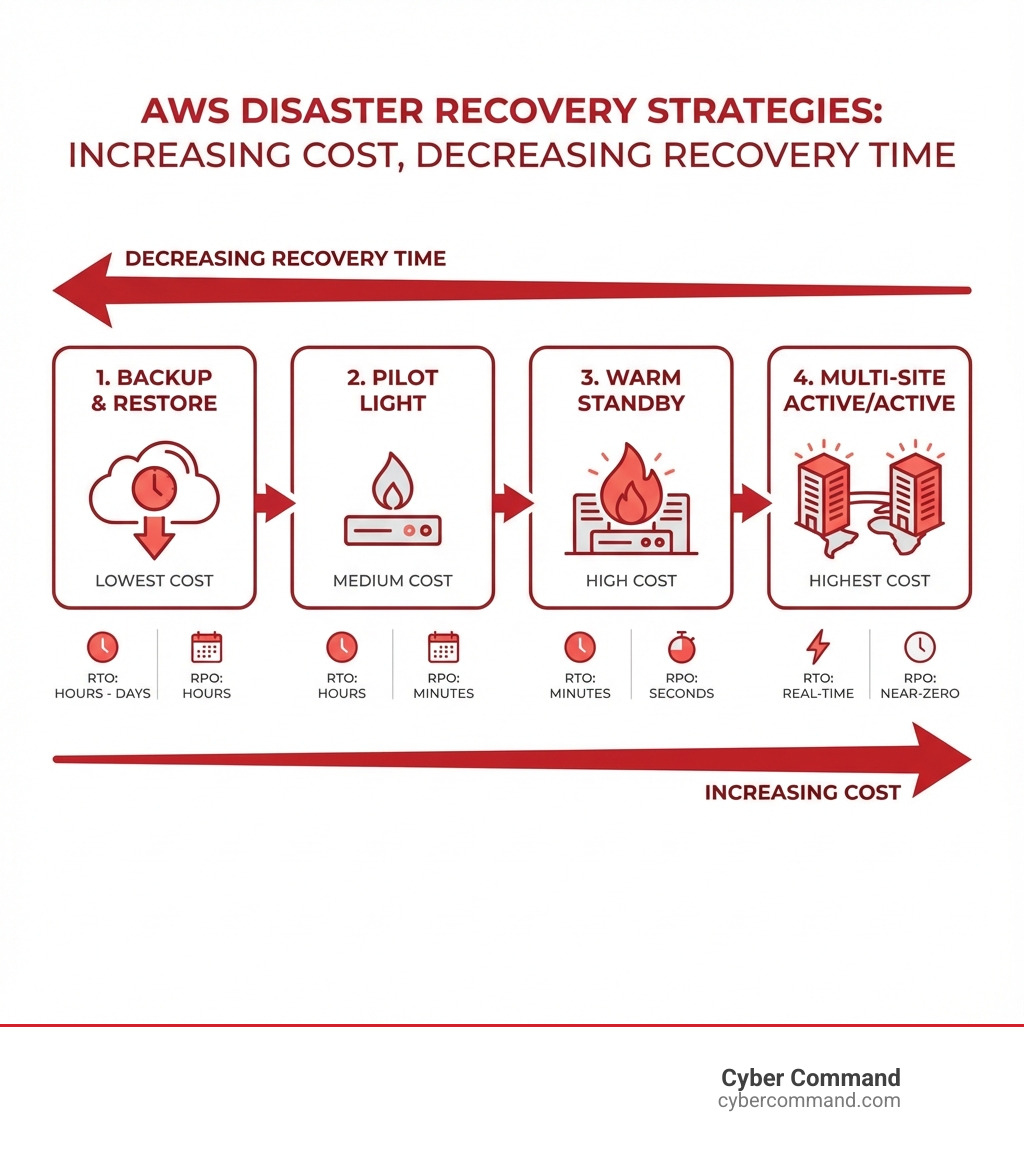
Quick Answer: AWS offers four main disaster recovery strategies, each with different recovery times and costs:
- Backup and Restore – Lowest cost, longest recovery time (hours to days)
- Pilot Light – Core systems ready, medium recovery time (minutes to hours)
- Warm Standby – Scaled-down live environment, faster recovery (minutes)
- Multi-Site Active/Active – Full redundant systems, near-instant recovery (seconds)
Your choice depends on two key factors: Recovery Time Objective (RTO) – how long your business can survive without systems running, and Recovery Point Objective (RPO) – how much data loss you can tolerate.
The good news? Disaster recovery in the cloud is fundamentally different from traditional on-premises approaches. You no longer need expensive secondary data centers or complex tape backup systems. AWS provides built-in redundancy through multiple Availability Zones within regions, cross-region replication, and managed services like AWS Backup that centralize and automate protection across your entire infrastructure.
The challenge many business leaders face isn’t understanding that disaster recovery matters – it’s knowing which strategy fits their budget while still protecting their operations. Spending too much on DR resources you don’t need wastes money. Spending too little leaves you vulnerable to catastrophic downtime that could cost far more than the protection itself.
I’m Reade Taylor, Founder and CEO of Cyber Command, and I’ve spent years helping businesses steer these exact decisions, building secure, disaster-resilient technology ecosystems that protect operations without breaking the budget. Throughout my career implementing aws backup disaster recovery solutions for organizations of all sizes, I’ve seen how the right strategy transforms technology from a liability into a competitive advantage.
Understanding the Core AWS Disaster Recovery Strategies
When it comes to safeguarding your digital assets, AWS provides a spectrum of disaster recovery (DR) strategies. These approaches range from simple backup solutions to fully redundant, active environments, each with distinct trade-offs in terms of cost, complexity, and recovery objectives. Our goal is to help you choose the strategy that aligns perfectly with your business’s unique needs for RTO and RPO.
The primary disaster recovery strategies offered by AWS are broadly categorized into four main approaches, as outlined in the AWS documentation on disaster recovery options in the cloud. These strategies vary significantly in how quickly they can restore operations and how much data might be lost, directly impacting their cost and complexity. It’s a classic balancing act: faster recovery and less data loss generally mean higher costs.
A crucial consideration when designing your DR plan is whether to deploy within a single AWS Region across multiple Availability Zones (AZs) or to leverage a multi-Region approach. AWS Regions are geographically separate areas, each containing multiple isolated locations known as Availability Zones. Multi-AZ deployments protect against localized failures within a Region, ensuring high availability. However, for protection against broader, regional outages, a multi-Region strategy becomes essential. This decision heavily influences the chosen DR strategy and its associated RTO/RPO.
At Cyber Command, we understand that a robust Cloud DR strategy is about more than just technology; it’s about business continuity. Let’s dig into the four main strategies:
| Strategy | Cost | Complexity | RTO (Recovery Time Objective) | RPO (Recovery Point Objective) |
|---|---|---|---|---|
| Backup and Restore | Lowest | Low | Hours to Days | Hours to Days |
| Pilot Light | Medium | Medium | Minutes to Hours | Minutes to Hours |
| Warm Standby | High | High | Minutes | Seconds to Minutes |
| Multi-Site Active/Active | Highest | Highest | Seconds to Near-Zero | Near-Zero |
Backup and Restore
The Backup and Restore strategy is the most cost-effective and least complex of the four. It involves regularly backing up your data and system configurations, then restoring them in a new environment when a disaster occurs. While it offers the lowest cost, it also typically results in the longest RTO and RPO. This strategy is suitable for less critical workloads that can tolerate significant downtime and some data loss.
This approach is excellent for mitigating against data loss or corruption, whether due to human error, malicious activity, or a localized outage. For instance, if an accidental deletion or data corruption occurs, we can revert to a previous backup. AWS services like Amazon S3 provide highly durable and scalable storage for backups, allowing us to store multiple copies of data. For long-term archiving and further cost savings, we can leverage Amazon Glacier or Amazon Glacier Deep Archive. Additionally, S3 object versioning helps protect against accidental overwrites or deletions.
We often recommend this strategy as a foundational element of any Data Backup and Disaster Recovery plan, even for critical systems, as it provides a safety net against data integrity issues that replication alone might not catch.
Pilot Light
The Pilot Light strategy represents a step up in terms of recovery speed and cost. In this approach, we keep a minimal version of our core infrastructure running in a secondary AWS Region. This “pilot light” is just enough to keep critical services and data synchronized, but not enough to handle full production traffic. When a disaster strikes, we “light up” the remaining infrastructure, scaling up resources like Amazon EC2 Auto Scaling groups and provisioning additional capacity.
Data replication is continuous, ensuring that the recovery site has a relatively up-to-date copy of your data. Services like Amazon RDS can replicate databases to the standby Region. The RTO for a Pilot Light strategy is faster than Backup and Restore, typically ranging from minutes to hours, because the core components are already deployed and waiting. This balance of cost and recovery speed makes it a popular choice for many businesses.
Warm Standby
Moving further along the spectrum, the Warm Standby strategy maintains a scaled-down, but fully functional, replica of your production environment in a secondary Region. This environment is “always-on” and ready to take on traffic, though at a reduced capacity. It continuously receives live data replication from the primary site, meaning its RPO is significantly lower than Pilot Light, often in the seconds to minutes range.
When a disaster occurs, we simply scale up the resources in the standby environment to handle full production loads. Traffic redirection is managed using services like Amazon Route 53 or AWS Global Accelerator, which can quickly reroute user requests to the recovery site. The Warm Standby strategy offers a much faster RTO, often within minutes, but comes with a higher ongoing cost due to the continuously running infrastructure. It’s ideal for critical applications that require quick recovery with minimal disruption.
Multi-Site Active/Active
The most robust and expensive of the DR strategies is Multi-Site Active/Active. In this setup, your application is fully deployed and actively serving traffic from two or more AWS Regions simultaneously. This means that if one Region experiences a disaster, the other Region(s) can seamlessly continue to operate without any downtime or data loss for users. The RTO is near-zero, and the RPO is also near-zero, as data is constantly replicated and synchronized across all active sites.
Achieving this level of resilience requires careful consideration of data consistency. Services like Amazon Aurora global databases, which can replicate to secondary regions with typical latency of under a second, and Amazon DynamoDB global tables, which enable reads and writes from every deployed Region, are key enablers. Traffic is load-balanced across the active Regions, and failover is essentially automatic and transparent to the end-user. While this strategy offers unparalleled resilience, its complexity and cost are the highest, making it suitable for mission-critical applications that cannot tolerate any downtime.
Centralizing Protection with AWS Backup for Disaster Recovery
Managing backups across a diverse AWS environment can be a daunting task. Different services have their own backup mechanisms, retention policies, and restoration processes. This is where AWS Backup steps in as a game-changer for aws backup disaster recovery. It’s a fully managed service that centralizes and automates backup processes across multiple AWS services, simplifying what used to be a complex, fragmented operation.
With AWS Backup, we gain a unified view where we can configure, schedule, and monitor backups for a wide array of resources, including Amazon EBS volumes, Amazon EC2 instances, Amazon RDS databases (including Aurora), Amazon DynamoDB tables, and Amazon EFS file systems, among others. This centralized approach means we can define backup policies once and apply them consistently across our entire AWS footprint, ensuring all critical data is protected according to our specified RTO and RPO objectives.
AWS Backup acts as an orchestration layer, integrating seamlessly with other AWS services like Amazon CloudWatch for monitoring, AWS CloudTrail for auditing, AWS Identity and Access Management (IAM) for granular permissions, and AWS Organizations for enterprise-wide policy management. This powerful integration simplifies the implementation of our Backup and Disaster Recovery Solutions, enabling us to focus on our business rather than the intricacies of backup management.

Key Features for Compliance and Security
Beyond mere centralization, AWS Backup provides robust features specifically designed to bolster compliance and security for your backups. This is particularly vital in today’s landscape where data breaches and ransomware attacks are constant threats.
- AWS Backup Audit Manager: This feature helps us create audit frameworks and generate reports to demonstrate compliance with regulatory requirements. It allows us to continuously evaluate our backup policies and ensure they align with our defined controls, making compliance much less of a headache.
- AWS Backup Vault Lock: To prevent accidental or malicious deletion of backups, AWS Backup Vault Lock enforces a write-once, read-many (WORM) configuration. Once applied, policies like retention periods cannot be modified or deleted, even by the root account. This is a critical defense against ransomware, where attackers might try to delete backups to force a ransom payment.
- Securing Backup Vaults: Following best practices for securing backups in AWS is paramount. We can implement Organizations Service Control Policies (SCPs) to prevent backup vaults from being deleted or shared with unauthorized AWS accounts. This layered security ensures that our backups are not only available but also protected from compromise.
Leveraging AWS Backup for cross-region aws backup disaster recovery
For true disaster resilience, especially against regional outages, simply backing up within the same Region isn’t enough. AWS Backup addresses this with powerful cross-Region and cross-account backup capabilities, significantly enhancing our aws backup disaster recovery strategy.
- Cross-Region Backups: AWS Backup allows us to automatically copy backups from our primary Region to a designated recovery Region. This means that even if an entire AWS Region becomes unavailable, our critical data is safe and accessible in another geographical location. This capability is fundamental for achieving lower RTO and RPO in the face of widespread disasters.
- Cross-Account Backups: For an added layer of security and isolation, AWS Backup supports copying backups to separate AWS accounts. This strategy isolates our backups from potential compromises in the primary production account. If a production account were ever breached, the backups in a separate, isolated account would remain secure and available for recovery. This is a critical best practice for preventing single points of failure and enhancing overall resilience.
By leveraging AWS Organizations, we can define and manage backup policies at the organizational level, ensuring that these cross-Region and cross-account backup configurations are automatically applied across all relevant AWS accounts and Regions within our enterprise. This streamlines management and ensures consistent protection across our entire cloud footprint.
Automating and Implementing Your DR Plan
A well-defined disaster recovery plan is only as good as its execution. In the cloud, manual intervention during a disaster is slow, error-prone, and can significantly increase your RTO. This is why automation is the bedrock of an effective aws backup disaster recovery strategy. Our approach to IT Disaster Recovery Planning emphasizes automating as much of the detection, restoration, and failover process as possible.
Automation not only minimizes human error but also drastically reduces recovery times, helping us meet stringent RTO and RPO objectives. It ensures that our Disaster Recovery Plan can be executed swiftly and reliably when it matters most.
Implementing an aws backup disaster recovery plan with IaC
Infrastructure as Code (IaC) is indispensable for building resilient and repeatable DR solutions on AWS. Instead of manually configuring resources in a recovery Region, IaC allows us to define our entire infrastructure (servers, networks, databases, etc.) in code.
- AWS CloudFormation and AWS Cloud Development Kit (AWS CDK) are powerful tools that enable us to provision and manage AWS resources consistently across accounts and Regions. This means that if we need to redeploy our workload in a recovery Region, we can do so quickly and accurately from our code, eliminating the risk of configuration drift and manual errors.
- Using IaC also supports the concept of “golden AMIs”. These are pre-configured, hardened virtual machine images that include our operating system, applications, and security settings. By maintaining golden AMIs and deploying them via IaC, we ensure that our restored environment is identical to our production environment, accelerating recovery and reducing post-recovery issues. IaC is crucial for reliably deploying and redeploying workloads in a recovery Region, reducing recovery times.
Automating Detection, Failover, and Restore
The ability to automatically detect a disaster and initiate recovery processes is paramount for achieving low RTOs. AWS provides a suite of services that can be orchestrated for intelligent automation:
- Amazon EventBridge and AWS Lambda: EventBridge can monitor various AWS services and AWS Health events (which alert us to AWS-side issues that might impact our services). When a predefined event occurs (e.g., increased error rates, service disruptions), EventBridge can trigger an AWS Lambda function. Lambda functions are perfect for executing lightweight, serverless code that can initiate recovery actions, such as launching new EC2 instances, restoring databases, or updating DNS records.
- CloudWatch Alarms: We can configure CloudWatch Alarms based on metrics (e.g., CPU utilization, network traffic, application-specific KPIs) to detect anomalies. These alarms can then trigger EventBridge rules or Amazon Simple Notification Service (SNS) alerts to notify our teams or initiate automated recovery workflows.
- AWS Step Functions: For more complex, multi-step recovery processes, AWS Step Functions allows us to define visual workflows that orchestrate multiple Lambda functions, AWS services, and even human approvals. This ensures that our recovery steps are executed in the correct order, with built-in error handling and retries, creating a robust and auditable automation pipeline.
By combining these services, we can build sophisticated automation that not only detects issues but also automatically restores data, provisions infrastructure, and manages failover, significantly reducing the impact of a disaster.
Accelerating Recovery with AWS Elastic Disaster Recovery (DRS)
While AWS Backup excels at point-in-time backups and centralized management, some scenarios demand continuous replication and near-instant recovery for entire servers or applications, regardless of their original location. This is where AWS Elastic Disaster Recovery (AWS DRS) shines.
AWS DRS is a powerful service designed to minimize downtime and data loss by continuously replicating server-hosted applications and databases from any source into AWS. This means we can use an AWS Region as a disaster recovery target for on-premises servers, servers running in other cloud environments, or even EC2 instances within AWS.
- Continuous Block-Level Replication: AWS DRS works by continuously replicating data at the block level from the source server to a low-cost staging area in our target AWS Region. This ensures that the recovery point objective (RPO) can be reduced to seconds, as data changes are captured almost in real-time.
- Minimal RTO/RPO: When a disaster strikes, AWS DRS enables us to launch fully provisioned recovery instances in our target AWS Region within minutes (RTO). It automatically converts our source servers to run natively on AWS, ensuring compatibility and quick boot-up.
- On-Premises to AWS DR: One of the key strengths of AWS DRS is its ability to facilitate hybrid cloud disaster recovery. It allows organizations to protect their on-premises workloads by replicating them to the AWS Cloud, eliminating the need for a costly secondary physical data center. We can then leverage the scalability and resilience of AWS for recovery.
While AWS DRS offers impressive capabilities for rapid recovery, it’s important to consider its limitations. The continuous replication can incur ongoing costs for the staging area and data transfer. Also, while it handles server replication efficiently, the overall application recovery might still require orchestration of other AWS services (like database restoration or network configuration) if not part of the replicated server. Therefore, a comprehensive aws backup disaster recovery plan often involves a combination of AWS DRS for critical server replication and AWS Backup for broader data protection. You can learn more about this service in the AWS Elastic Disaster Recovery documentation or our dedicated page on AWS DRS.
Best Practices for a Resilient AWS DR Strategy
Building a robust aws backup disaster recovery strategy is an ongoing process that requires careful planning, implementation, and continuous validation. Based on the AWS Well-Architected Framework, particularly the AWS Well-Architected Reliability Pillar, we adhere to several best practices to ensure our clients’ systems are resilient and can withstand unforeseen events.
Here are key steps we follow:
- Define RTO and RPO: This is the starting point for any DR plan. We work with our clients to clearly define their Recovery Time Objective (RTO) – the maximum acceptable delay between service interruption and restoration, and Recovery Point Objective (RPO) – the maximum acceptable amount of data loss. These objectives directly inform the choice of DR strategy and the AWS services used.
- Use Multi-AZ and Multi-Region Deployments: For high availability within a Region, we deploy across multiple Availability Zones. For protection against broader regional disasters, we implement multi-Region architectures. This layered approach ensures resilience at different scales of failure.
- Implement Robust Failover Mechanisms: Whether automatic or manual, failover mechanisms must be well-tested and reliable. We use services like Amazon Route 53, AWS Global Accelerator, and AWS Application Recovery Controller (ARC) to efficiently redirect traffic to recovery environments.
- Ensure Data Replication and Point-in-Time Recovery: Continuous data replication is vital for low RPO, but it’s equally important to implement point-in-time backups to protect against logical corruption or accidental data deletion that replication might otherwise propagate. Services like AWS Backup, S3 Cross-Region Replication (CRR), and database-specific features (e.g., RDS point-in-time recovery) are key.
- Regularly Test Your DR Plan: A DR plan is theoretical until it’s tested. We conduct regular Disaster Recovery Testing to validate our RTO and RPO, identify any gaps, and ensure our teams are proficient in executing the plan. This includes simulating various disaster scenarios and performing actual failovers and failbacks.
- Automate Everything Possible: From detection to restoration and failover, automation reduces human error and speeds up recovery. We leverage IaC, Lambda, EventBridge, and Step Functions to orchestrate complex recovery workflows.
- Secure Your Backups: Backups are only useful if they are secure and immutable. We implement strong access controls, encryption, cross-account replication, and features like AWS Backup Vault Lock to protect our backup data from unauthorized access or deletion.
- Manage Configuration Drift: In a DR scenario, consistency is key. We use IaC and configuration management tools to ensure that our recovery environment remains consistent with our production environment, preventing unexpected issues during failover.
- Monitor and Alert: Proactive monitoring of our AWS environment and DR systems is essential for early detection of potential issues or actual disaster events. We use Amazon CloudWatch and AWS Health to provide comprehensive visibility and trigger alerts.
By integrating these best practices, we help our clients build an aws backup disaster recovery strategy that is not just a reactive measure, but a proactive component of their overall business resilience.
Conclusion
Navigating the complexities of aws backup disaster recovery is no small feat, but it’s an indispensable journey for any business operating in the cloud. We’ve explored the four primary AWS DR strategies—Backup and Restore, Pilot Light, Warm Standby, and Multi-Site Active/Active—each offering a distinct balance of cost, complexity, RTO, and RPO. We’ve seen how AWS Backup centralizes and automates backup processes, offering critical features like Audit Manager and Vault Lock for compliance and security, and enabling powerful cross-Region and cross-account replication for improved resilience.
Furthermore, the power of automation through Infrastructure as Code (IaC) with AWS CloudFormation and AWS CDK, alongside services like Amazon EventBridge, AWS Lambda, and AWS Step Functions, is crucial for streamlining detection, restore, and failover processes. For those requiring continuous replication and rapid recovery for entire servers, AWS Elastic Disaster Recovery (DRS) provides a robust solution.
The key takeaway is that a truly resilient aws backup disaster recovery strategy isn’t a one-time setup; it’s a continuous commitment to defining objectives, implementing appropriate technologies, rigorously testing, and constantly refining your plan. This proactive approach ensures that your business can not only survive a disaster but also emerge stronger, with minimal disruption to operations.
At Cyber Command, we pride ourselves on being an extension of your business, offering proactive, 24/7/365 U.S.-based support. We understand the unique challenges faced by organizations in Florida and Texas, and our expertise in cloud resilience helps you build a future-proof infrastructure. Don’t leave your business vulnerable to unforeseen events.
Partner with us to build your comprehensive DR strategy with our expert solutions. Let us help you transform your aws backup disaster recovery plan from a necessity into a strategic advantage, ensuring your uninterrupted operations and peace of mind.
