Business IT Solutions Orlando: A 2026 Guide for SMBs

If you're running a law office in Orlando, a dental practice in Winter Springs, or a growing accounting firm anywhere in Central Florida, you're probably feeling the same pressure from three directions at once. Staff need fast support. Clients expect secure handling of sensitive data. And every technology decision seems to come with hidden costs that weren't obvious when the contract was signed.
That's why the search for business IT solutions in Orlando has changed. Owners aren't just looking for someone to fix a printer or reboot a server anymore. They want predictable costs, clear accountability, stronger cybersecurity, and help navigating compliance without hiring a full internal IT department.
Table of Contents
- Why Orlando Businesses Are Rethinking IT in 2026
- What Are Business IT Solutions
- Choosing IT Support for the Central Florida Market
- How Orlando IT Services Are Priced
- How to Select the Right Orlando IT Partner
- Your Roadmap to a Secure and Efficient Future
Why Orlando Businesses Are Rethinking IT in 2026
A few years ago, many small businesses treated IT as a repair service. Something broke, someone called, and the meter started running. That model feels cheaper until a file share goes down in the middle of a workday, email access stalls, or a compliance question lands on an owner's desk with no one clearly accountable for the answer.
That shift is already visible in the local market. In 2025, more than 60% of small and mid-sized businesses in Orlando transitioned from break-fix IT models to managed services, driven by predictable costs, proactive maintenance, and reduced downtime, according to Cyber Command's Orlando managed IT market overview.
What changed wasn't just technology. Business expectations changed. Owners now expect IT to support operations the same way accounting supports finance or legal supports contracts. They want systems monitored before users complain, security controls applied before an incident spreads, and budgets they can plan around.
The pressure is operational, not theoretical
For professional services firms, downtime interrupts billable work. For medical practices, it creates anxiety around privacy, documentation, and access to patient information. For finance teams, one weak login process can create a serious exposure point.
Practical rule: If your current IT setup only becomes visible when something fails, you're still buying repairs, not operational support.
That's also why city and industry targeting matters in Central Florida. Orlando firms don't all face the same risks. A veterinary clinic, architecture office, and boutique law firm may all need secure access, backups, and support, but the compliance pressure and workflow design are different. Businesses in Orlando and Winter Springs usually benefit more from industry-aware support than from broad promises about “fully managed” service.
A useful comparison point is how other markets are framing technology planning around business outcomes rather than tickets. The discussion on Atlanta business IT strategy is helpful because it treats IT as a planning discipline, not just a support line. That same mindset applies in Central Florida, especially for firms that can't afford disruption but also can't justify a large in-house team.
What Are Business IT Solutions
Most owners hear a stack of terms from providers that sound similar but solve very different problems. Managed IT. Helpdesk. SOC. Cloud. Co-managed IT. If those all blur together, decision-making gets harder than it needs to be.
The simplest way to think about business IT solutions is this: they're the systems, services, and operating processes that keep your technology usable, secure, and aligned with the way your business runs.
The core services most businesses actually use
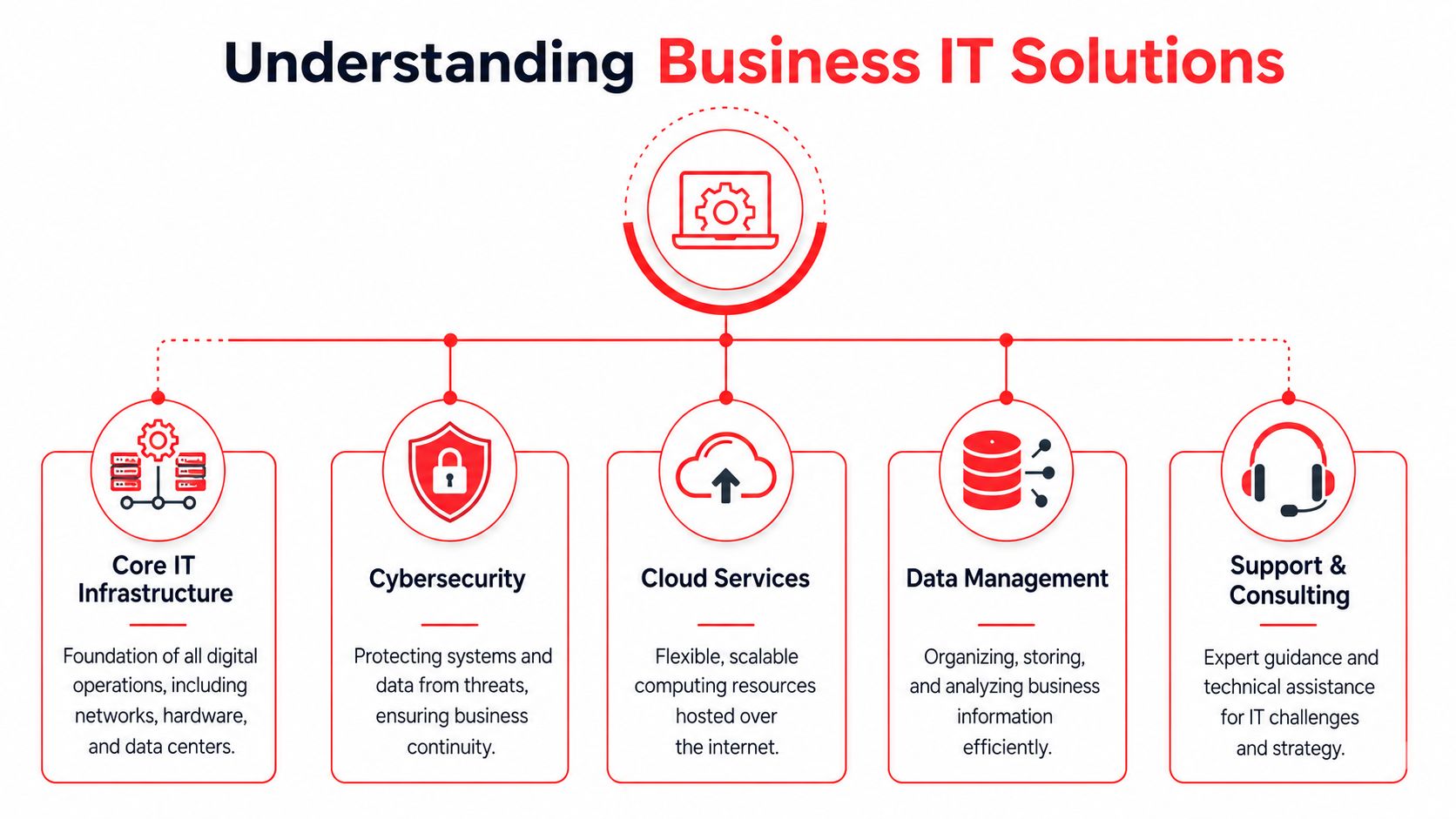
Managed IT services are the broad operating layer. Think of them as a property manager for your technology environment. They cover routine maintenance, endpoint oversight, patching, network health, account support, and issue response.
Helpdesk support is the front line your staff interacts with. When an employee can't log in, loses access to a shared file, or has trouble with a workstation, helpdesk is where that gets handled. Done well, this isn't just reactive. It's paired with monitoring so small issues get caught before they become outages. 24/7/365 live helpdesk support integrated with real-time system monitoring preempts 85% of potential downtime events, causes a 30% increase in operational uptime for mid-sized businesses, and enables response times under 15 minutes, based on this Orlando managed IT services analysis.
A Security Operations Center, or SOC, is the digital security detail. It monitors alerts, investigates suspicious behavior, and helps contain threats before they spread through the business.
Cloud services are the flexible off-site workspace and storage layer. They can support file access, application hosting, backup, disaster recovery, and secure remote work.
Data management is less flashy, but it matters. Businesses need clear rules for where information lives, who can access it, how long it's retained, and how it's recovered.
Support and consulting tie all of this to business decisions. That includes planning upgrades, budgeting replacements, documenting systems, and deciding what should stay in-house versus what should be outsourced.
How these services work together
A mistake I see often is buying these pieces separately without an operating model behind them. One vendor handles backups, another handles support, and no one owns the full picture. When a problem hits, each party points somewhere else.
That's why lifecycle discipline matters. If you're trying to standardize devices, warranty planning, replacement timing, and disposal, this guide on managing the IT asset lifecycle is worth reading alongside your support discussions. Hardware age, patch status, and documentation quality directly affect support quality.
Here's the practical version:
| IT function | What it should do for the business |
|---|---|
| Managed IT | Keep systems stable and maintained |
| Helpdesk | Resolve user issues quickly and consistently |
| SOC | Watch for threats and support incident response |
| Cloud | Improve access, flexibility, and recovery options |
| Data management | Protect critical records and reduce confusion |
| Consulting | Connect technology decisions to business goals |
Good business IT solutions in Orlando don't just provide tools. They assign responsibility.
If you already have internal IT, the right answer may not be full outsourcing. Co-managed support can let your internal team keep strategic control while an external partner handles monitoring, escalation coverage, and routine maintenance. That model only works, though, when roles are documented clearly.
Choosing IT Support for the Central Florida Market
A generic support package rarely fits the way Central Florida businesses operate. A medical spa in Winter Springs, a legal practice in downtown Orlando, and a multi-office accounting firm may all buy “managed IT,” but they shouldn't buy the exact same service design.

Why local context matters
Central Florida businesses often need two things at once. They need remote efficiency for everyday support, and they need a provider that understands when local presence matters for onboarding, office moves, network changes, or urgent on-site troubleshooting.
That's especially true for firms with regulated data or specialized workflows. Law offices need defensible access controls and clean document handling. Dental, orthodontic, veterinary, and other private medical practices need practical HIPAA-aligned processes. Architecture and engineering firms often need stable file access, workstation consistency, and support that doesn't interrupt production work.
The security side isn't abstract either. In Central Florida, the five primary cybersecurity threats identified for small businesses are ransomware, phishing and social engineering, data breaches, insider threats, and compliance failures, according to Cyber Command's Orlando cybersecurity services overview. Those risks affect day-to-day operations differently depending on the industry, but they all require tighter identity controls, better backups, and reliable patching.
The compliance to cost problem
Many Orlando-area firms often find themselves in a difficult position when providers say they offer “compliance support,” but don't explain what that includes, what stays billable, and what still falls on the business owner.
That gap is especially serious for smaller healthcare organizations. Industry data shows that 61% of small healthcare practices lack a dedicated compliance officer, yet most Orlando MSP marketing only lists compliance support as a generic feature, leaving a real compliance-to-cost gap for practices trying to meet HIPAA expectations without enterprise budgets, based on this Orlando IT services guide.
If you're a small practice, don't ask whether compliance is “included.” Ask which tasks are included, which documents are maintained, who owns training coordination, and who responds when an audit request arrives.
What works in practice is narrower and more honest than most marketing copy. Small firms usually need a fixed monthly support model for core operations, then a clear list of compliance-related activities that are operationally included versus separately scoped. That prevents the ugly surprise where monthly support is affordable, but every policy review, security training cycle, or risk-assessment task triggers a new invoice.
For Orlando and Winter Springs businesses, that's often the dividing line between useful support and expensive ambiguity.
How Orlando IT Services Are Priced
Pricing gets too much attention in the wrong way. Most owners start by asking, “What does managed IT cost?” A better question is, “What operating risk am I still carrying after I sign this agreement?”
In the Orlando market, managed services commonly show up as per-user pricing, tiered monthly packages, or broader flat-rate agreements that bundle support, monitoring, and security. The exact structure matters less than whether the contract matches the way your business works.
The pricing models you'll see most often
Some providers price per user. That model can work well when each employee uses a similar stack of devices, applications, and support resources. It gets less clean when you have shared workstations, specialized production devices, or a mix of office and field roles.
Others use tiered flat-rate packages. Those can be easier to budget, but only if the inclusions are specific. “Unlimited support” sounds strong until you learn project work, after-hours requests, vendor coordination, or security remediation are treated separately.
You'll also still see hourly or project-based billing around migrations, office expansions, or cleanup work. That's not necessarily bad. It becomes a problem when the business is effectively paying a monthly fee for visibility, then paying again for the work needed to keep things healthy.
A visual cost reference can help frame the conversation. This managed IT cost graphic for Orlando businesses is useful as a budgeting prompt, but the real test is whether the proposal maps to business outcomes.
What to evaluate besides the monthly fee
Security is one of the clearest examples. Orlando small businesses that integrate a 24/7 Security Operations Center into their IT strategy experience a 60–75% reduction in successful cyber incidents compared to reactive security measures, according to Cyber Command's small business IT support research for Orlando.
That means a higher monthly fee may still be the lower-cost option if it includes real threat monitoring, patch discipline, and incident response support.
When reviewing a quote, look for these decision points:
- Response accountability: Are response expectations documented, or just implied?
- Security scope: Does the agreement include meaningful protection, or only basic antivirus and alert forwarding?
- Vendor handling: Will the provider coordinate with your line-of-business software vendors, internet provider, and copier or phone contacts when issues overlap?
- Documentation: Are network diagrams, inventory, and access records maintained as part of service?
- Change management: What happens when you add staff, open another office, or replace major equipment?
A cheap proposal often shifts labor and risk back onto your team. A well-priced proposal makes responsibilities explicit and reduces uncertainty.
How to Select the Right Orlando IT Partner
Most disappointing IT relationships don't fail because the provider lacked technical skill. They fail because ownership was vague. No one knew who managed the software vendor, who approved security changes, who documented the environment, or who was supposed to communicate with leadership before a small issue became a recurring one.
That's even more important for multi-location businesses. While 78% of multi-location SMBs report that fragmented vendor management causes 30% more downtime, Orlando-specific content often ignores how local IT teams should retain visibility and governance when integrating with an MSP, as noted in this analysis of co-managed IT and vendor management gaps.
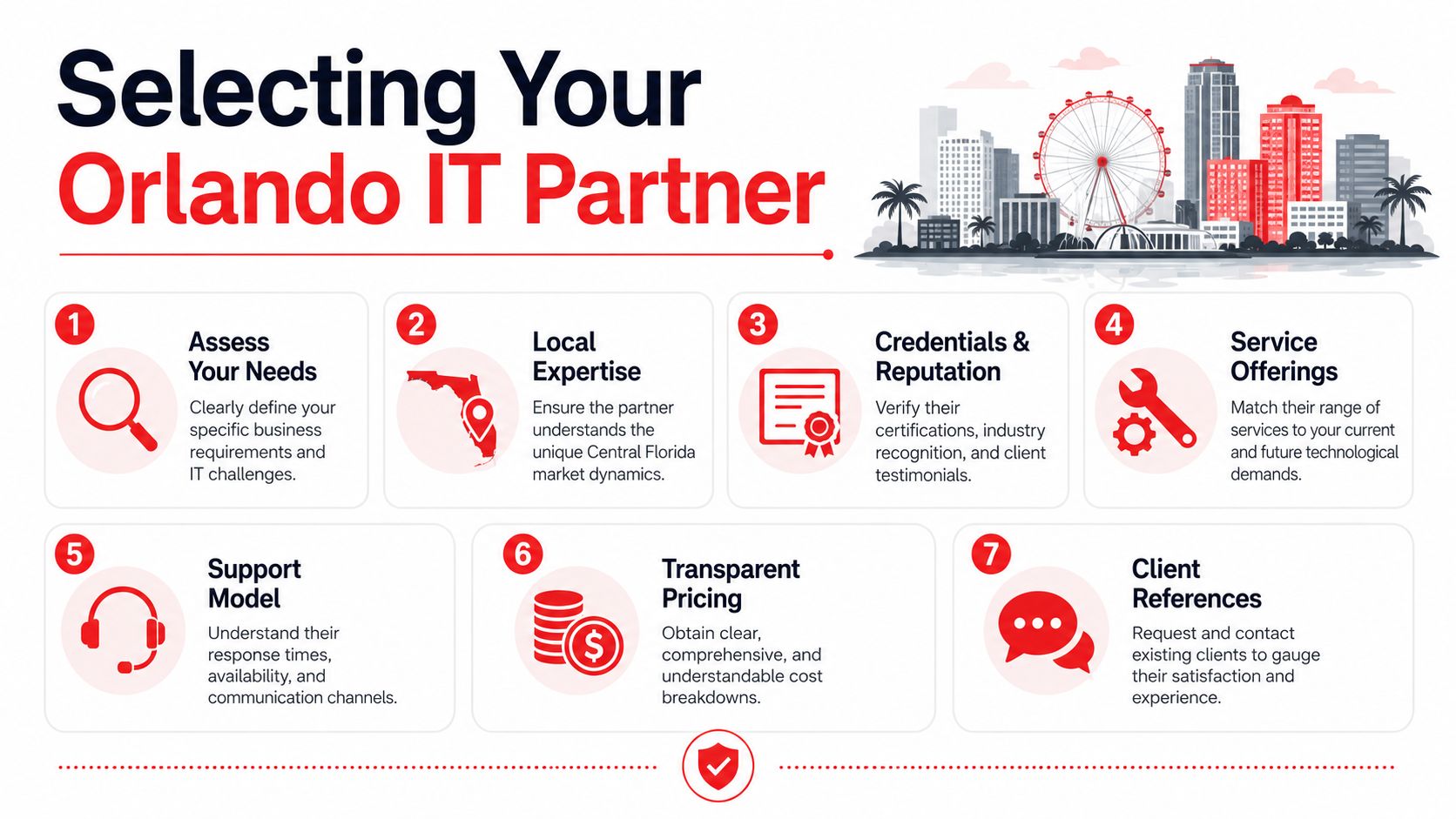
A practical vetting checklist
Don't evaluate a provider on friendliness alone. Evaluate them on operating clarity.
- Local presence: Ask how they support Orlando and Winter Springs businesses when an issue requires hands-on work. “We serve the area” isn't the same as having local response capability.
- Industry fit: If you're in legal, healthcare, accounting, architecture, engineering, or another professional service field, ask how they handle access control, retention concerns, and regulated data workflows in firms like yours.
- Security operations: Ask what happens after an alert appears. Monitoring without investigation is just noise.
- Documentation ownership: Confirm who maintains system documentation, asset records, and credential procedures.
- Leadership cadence: Find out whether you get regular reviews, not just ticket updates.
- Co-managed boundaries: If you have internal IT, define who owns escalations, vendor coordination, patch approval, and user provisioning.
One factual example in the market is Cyber Command, LLC, which offers managed and co-managed IT, 24/7/365 helpdesk, cloud services, vendor management, patching, and SOC-backed cybersecurity for organizations in Orlando and Winter Springs. That matters only if those capabilities align with your internal gaps. The brand name matters less than the operating model.
A reputation marker can help during screening, but it shouldn't replace due diligence. This Orlando managed service provider recognition graphic is the kind of asset you might see in a proposal. Treat it as supporting context, not proof of fit.
Questions that reveal how a provider really works
Use direct questions. The answers will tell you more than a polished sales deck.
- When our line-of-business software vendor says the issue is “the network,” who takes ownership of troubleshooting?
- If we keep internal IT staff, what decisions stay with us and what decisions move to you?
- How do you document admin access, hardware inventory, and changes to the environment?
- What security controls are standard, and which ones require separate scoping?
- How do you handle new office openings, relocations, and onboarding waves?
- How often do you review strategy, risks, and recurring issues with leadership?
The right provider doesn't resist these questions. They answer them clearly, in plain language, and without hiding behind broad phrases like “fully covered.”
For multi-location firms in Central Florida, governance matters as much as support speed. Your internal team should never lose visibility just because an outside partner is handling the day-to-day workload.
Your Roadmap to a Secure and Efficient Future
A good IT transition shouldn't feel like handing over the keys and hoping for the best. It should feel structured. The first weeks should produce clarity, then stabilization, then a rhythm of prevention and planning.
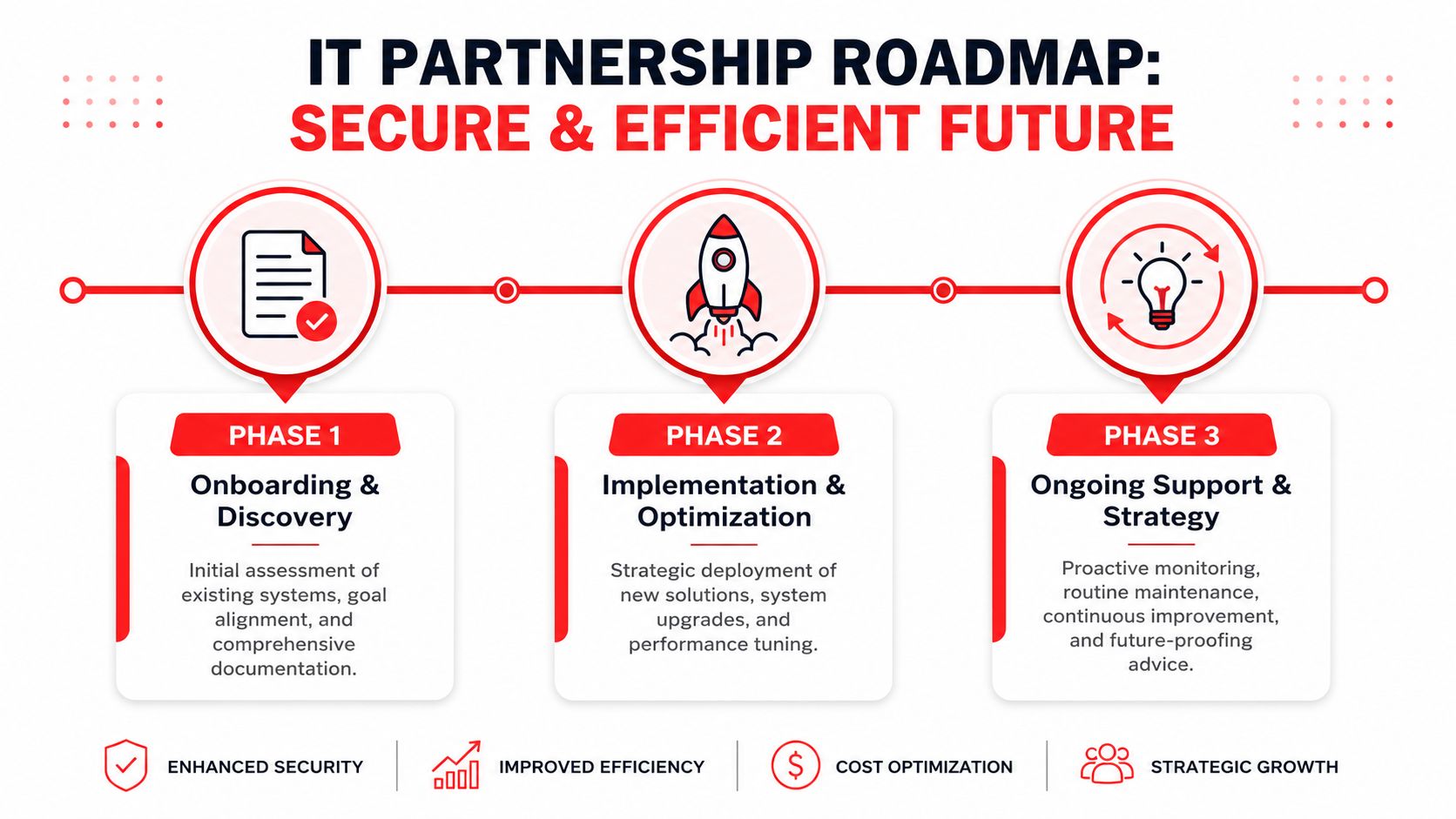
Phase one assessment and audit
The first phase is discovery. A capable IT partner documents the environment, reviews access, evaluates device health, checks backup status, and identifies obvious risk areas. This is also when they should learn your workflows, not just your hardware.
If you're in a regulated business, this phase needs to include policy and process review, not just technical inventory. Compliance trouble often starts where operations and technology drift apart.
Phase two onboarding and stabilization
Immediate risk reduction begins. Monitoring tools are deployed, support channels are established, gaps in documentation are corrected, and unresolved problems from the old setup start getting cleaned up.
Patching deserves special attention here. The fastest-growing method of cyberattack entry in Central Florida over the last year was through exploitable, unpatched vulnerabilities, which means SMBs need strict scheduled patching rather than ad-hoc updates, according to this Central Florida small business cybersecurity review.
A useful visual reference for the security side of this transition is this cybersecurity operations illustration for Orlando businesses.
Scheduled patching, tested backups, and controlled access aren't glamorous. They are the work that keeps a normal Tuesday normal.
Phase three proactive management and optimization
Once the environment is stable, the relationship should become more strategic. That includes reviewing recurring issues, planning hardware refreshes, tightening access controls, refining backup and recovery procedures, and aligning technology spending to business priorities.
For Orlando-area firms, IT begins to pay back leadership attention. Owners spend less time chasing support issues. Managers stop acting as the go-between for vendors. Staff get consistent support. Risk decisions become visible instead of accidental.
That's what strong business IT solutions in Orlando should do. Not create dependency. Create operational confidence.
If your business needs a partner that can support daily operations, tighten cybersecurity, and close the gap between compliance demands and real-world budgets, Cyber Command, LLC is one option to evaluate. The firm works with organizations in Orlando and Winter Springs on managed IT, co-managed IT, 24/7 helpdesk, SOC-backed security, cloud services, and vendor management, with an emphasis on predictable pricing and proactive support.