
July 1, 2026
Small Business IT Support in Orlando FL: A 2026 Guide
Find the best small business IT support in Orlando, FL. This 2026 guide covers pricing, security, and compliance for professional, medical, and financial firms.
Your team is trying to serve clients, close work, and keep operations moving. Instead, someone is chasing printer issues, a shared drive keeps dropping, remote access feels fragile, and every phishing email raises the same question: are we protected, or just hoping nothing happens?
That’s the point where many Orlando business owners realize they don’t have an IT problem. They have a focus problem. Technology has started stealing time from revenue, compliance, and customer service. For legal offices, accounting firms, architecture groups, engineering teams, and private medical practices across Central Florida, that distraction gets expensive fast because the systems behind the business aren’t optional. They’re the business.
Small Business IT Support in Orlando FL works best when it’s built around risk, uptime, and accountability. That means more than a helpdesk. It means clear ownership of patching, backups, security monitoring, vendor coordination, and the compliance controls your industry lives under.
Table of Contents
- Why Orlando Businesses Are Outsourcing Their IT in 2026
- Beyond the Helpdesk What Comprehensive IT Support Includes
- Choosing Your IT Support Model and Pricing Structure
- The Modern Threat Landscape Securing Your Business with a 24/7 SOC
- Meeting Compliance Demands for Orlando’s Professional Services
- The Advantage of Local IT Support and Rapid Response SLAs
- How to Choose the Right Orlando IT Partner
Stuck on something like this right now?
Talk it through with a real US-based engineer, 24/7, no phone trees: (407) 587-0089.
Book a Free Strategy SessionWhy Orlando Businesses Are Outsourcing Their IT in 2026
A growing company in Orlando usually hits the same wall. Headcount rises, client files multiply, more people work remotely, and the old approach to IT starts cracking. The office manager becomes the unofficial tech lead, passwords live in spreadsheets, and every outage turns into a scramble.
Growth is creating IT strain
Florida is adding businesses at an exceptional pace. Florida had 667,031 new business applications filed in 2023, while 27% of small businesses operate with no dedicated IT support and 39% rely on ad-hoc solutions, according to Florida small business statistics. That combination creates a visible gap in Orlando, Winter Park, Kissimmee, Maitland, and Lake Nona. Companies are opening faster than their internal systems are maturing.
For business owners, that gap shows up in ordinary ways. New staff don’t get onboarded cleanly. Internet issues linger because no one owns the root cause. Security settings are inconsistent across laptops. Vendor invoices stack up without anyone checking whether the services still match the business.
Practical rule: If your team is still deciding who handles IT every time something breaks, you don’t have an IT strategy. You have recurring interruption.
Why ad hoc support stops working
Reactive support feels cheaper until you count the hidden costs. Staff lose billable time. Leaders delay projects because they don’t trust the systems under them. Security becomes a checklist instead of an operating discipline.
That’s why outsourced support has become a strategic move rather than a convenience purchase. A managed partner takes ownership of the maintenance cadence, the monitoring discipline, and the decision-making framework. Instead of waiting for a failure, they’re expected to prevent one.
For many Central Florida firms, that shift is the difference between operating and scaling. A useful overview of that transition appears in this breakdown of the benefits of outsourcing IT support, especially for small and midsized teams that need reliable coverage without building a full internal department.
Outsourcing also works well when the business has specialized compliance pressure. Law firms, financial practices, and medical offices don’t just need someone who can reset passwords. They need someone who can tie technology decisions back to confidentiality, retention, access control, and audit readiness.
Beyond the Helpdesk What Comprehensive IT Support Includes
Too many owners think IT support means a ticket queue. That’s only a small piece of the job. Real support is an operating model that reduces preventable problems and gives leadership a clear line of sight into systems, risks, and priorities.
What a modern support agreement should cover
At minimum, small businesses need five fundamentals: reliable network infrastructure, cybersecurity protection, data backup solutions, help desk support, and regular system maintenance, as outlined in this guide on small business IT fundamentals. If one of those is weak, the rest of the environment becomes unstable.
A capable managed support arrangement usually includes:
- Helpdesk coverage: Users need a defined path for everyday issues such as login failures, device problems, email access, and line-of-business application trouble.
- Patching and maintenance: Workstations, servers, and core systems need regular updates, validation, and follow-up. Missing patches is one of the fastest ways to turn a routine environment into a risky one.
- Monitoring and alerting: Someone should know a disk is filling up, a backup failed, or a critical service stopped before your staff discovers it during a workday.
- Backup verification: Backup isn’t the same as recovery. Good support includes testing, validation, and a recovery plan tied to business impact.
- Vendor management: Internet providers, application vendors, phone systems, copier vendors, and cloud subscriptions all create operational friction when no one owns coordination.
A lot of firms also need a documented path for file recovery. When an employee overwrites a folder or a storage device fails, it helps to understand what professional recover lost data options look like before the issue becomes urgent.
Why Orlando still needs hands-on infrastructure skill
Orlando businesses are not all cloud-native, and that matters. A ZDNet report found that 63% of Orlando SMBs still use internal servers, and only 25% of small businesses have in-house IT, according to this Orlando small business IT support analysis. That means local providers still need to understand physical hardware, line-of-business applications tied to local servers, network closets, firewall changes, and aging infrastructure that can’t easily be “migrated later.”
Good IT support looks a lot like building maintenance. You don’t hire it only to mop up a flood. You hire it to inspect the pipes, fix weak valves, and stop the burst from happening.
This is where many break-fix arrangements fail. They can respond to symptoms, but they usually don’t own prevention. For firms with internal servers, compliance obligations, or specialized software, that distinction matters. You need technicians who can work across endpoints, network paths, backup chains, and physical equipment without treating every incident like a one-off.
Choosing Your IT Support Model and Pricing Structure
The right IT model depends on how much ownership you want to keep, how mature your internal team is, and how much financial predictability matters to the business. Most Orlando companies end up evaluating three options.
The three models most Orlando businesses consider
Some organizations want to hand off nearly everything. Others already have an internal administrator and just need deeper bench strength, after-hours coverage, or security oversight. A few still prefer to pay only when something breaks, although that model creates the most uncertainty.
Here’s the practical comparison.
Model
Best For
Pricing Structure
Key Benefit
Fully managed
Businesses that want to outsource day-to-day IT ownership
Recurring flat monthly fee
Clear accountability across support, maintenance, and strategy
Co-managed
Companies with an internal IT person or lean internal team
Shared monthly scope, sometimes with project-based add-ons
Fills gaps in coverage, specialization, and after-hours response
Per-hour or flat-rate block support
Very small teams with limited immediate needs
Variable hourly billing or prepaid labor blocks
Flexible entry point without full managed commitment
A fully managed model fits firms that don’t want to supervise IT operations themselves. The provider handles support, maintenance, documentation, vendor coordination, and escalation paths. This works well for offices where leadership wants one accountable partner rather than several disconnected service contacts.
Co-managed IT is different. It works best when an internal employee knows the business well but can’t do everything. That person might manage daily systems while an outside partner handles cybersecurity operations, backup oversight, complex infrastructure changes, and vacation or after-hours coverage.
What predictable pricing actually protects you from
Variable billing often looks simple on paper and frustrating in real life. Every ticket raises a cost question. Necessary maintenance gets postponed because no one wants another invoice. Strategic work competes with emergency labor.
Predictable monthly pricing changes the conversation. It lets owners budget IT as an operating function instead of treating every issue like a surprise expense. It also removes the incentive to avoid calling for help when a problem is still small.
When reviewing proposals, ask these questions:
- What is included every month. Support, monitoring, patching, vendor calls, reporting, and backup oversight should be spelled out.
- What is excluded. Projects, after-hours work, licensing, cloud spend, and hardware should be identified clearly.
- Who owns escalation. If a server issue crosses into an application problem, someone still needs to drive the resolution.
- How are strategy reviews handled. A provider should help plan refresh cycles, risk reduction, and process improvements, not just answer tickets.
Cyber Command, LLC is one example of a provider model built around fully managed and co-managed IT with predictable pricing, U.S.-based helpdesk coverage, and ongoing reporting. That structure tends to suit small businesses that need stable costs and clear ownership more than open-ended hourly arrangements.
The Modern Threat Landscape Securing Your Business with a 24/7 SOC
Basic antivirus is no longer a security strategy. It’s one control. That matters because most small businesses don’t get attacked through dramatic movie-style hacks. They get exposed through missed patches, weak identity controls, suspicious sign-ins, malicious attachments, and normal-looking activity that nobody investigates in time.
What a SOC does that antivirus does not
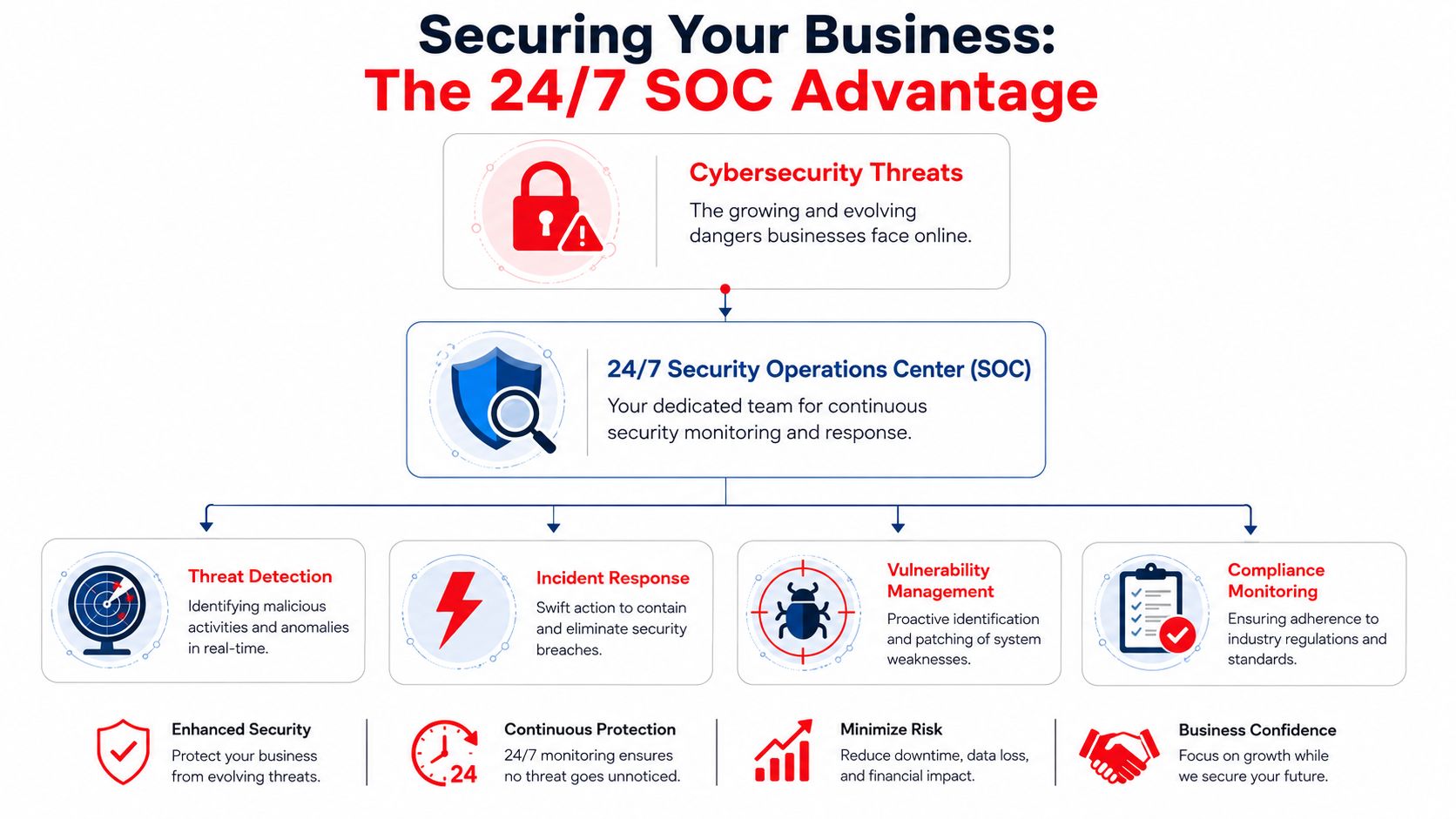
A Security Operations Center, or SOC, is the function responsible for continuous monitoring, investigation, and response. It watches for suspicious behavior, correlates signals from across systems, and acts before a small issue becomes a business event. If you want a plain-language overview, this explanation of what a Security Operations Center is is a useful reference.
The business case is strong. Orlando small businesses that integrate a 24/7 SOC into their IT strategy see a 60–75% reduction in successful cyber incidents, according to this report on engineering IT and security operations. That improvement comes from proactive threat hunting and automated patching rather than waiting for end users to notice something is wrong.
A good SOC doesn’t just generate alerts. It helps answer practical questions:
- Is this login normal or suspicious
- Did this file change belong to approved work or malicious activity
- Are patches reaching critical systems quickly enough
- Does this device still meet access standards
- What needs to be isolated now
What strong protection looks like in practice
For small and midsized businesses, the most effective stack is usually boring on purpose. It relies on disciplined execution, not flashy promises.
Security improves when someone is watching the environment continuously, not when the business buys one more isolated product.
The controls that matter most include:
- Identity and access management: Limit who can reach what, require stronger authentication, and review access when staff roles change.
- Automated patching: Critical systems shouldn’t sit exposed while people debate maintenance windows.
- Endpoint monitoring: Laptops and desktops need active observation, not just periodic scans.
- Log correlation and investigation: Security signals only matter when a trained team can connect them into a meaningful picture.
- Zero-Trust enforcement: Access should be earned by device posture, user identity, and context rather than assumed because someone is “inside” the network.
For legal, financial, and medical organizations, this is about more than threat prevention. It’s also about client trust. When confidential records, payment data, or protected health information are involved, delayed detection can become a legal and reputational problem very quickly.
Meeting Compliance Demands for Orlando’s Professional Services
Generic IT advice often misses the hardest part of supporting professional firms. Law offices, accounting practices, dentists, med spas, architecture firms, and engineering teams don’t just need stable devices and internet. They need environments that support confidentiality, retention, restricted access, defensible processes, and evidence that controls are being followed.

Why professional services need a different IT conversation
There’s a real market gap here. A significant gap exists because 25% of small businesses lack any IT support, and most Orlando guidance focuses on generic infrastructure instead of compliance needs such as HIPAA and Florida Bar rules, as noted in this discussion of small businesses with no IT support. That’s exactly why so many professional-service firms feel underserved. The advice they find usually stops at “use strong passwords and back up your files.”
That isn’t enough when your work involves privileged legal communication, tax records, medical charts, imaging systems, treatment plans, or engineering documentation tied to regulated contracts. These firms need an IT partner that understands the difference between convenience and control.
A useful visual reference for documenting internal governance is this guide to policy management compliance. It helps frame the operational side of compliance, which is where many small firms struggle most.

The controls that matter most
Compliance-focused IT support should help with the daily mechanics behind policy, not just the policy itself.
- Access control: Staff should only have access to the systems and records necessary for their role.
- Encryption and secure handling: Sensitive data needs protection in storage, in transit, and during backup.
- Audit-ready reporting: If a regulator, insurer, or client asks what controls are in place, you should be able to answer without rebuilding the story from scratch.
- Retention and disposal practices: Data can’t live forever in random folders. There should be clear rules for keeping, archiving, and retiring records.
- Backup and recovery discipline: A backup system has to align with how quickly the firm needs to resume work after an incident.
Field note: In professional services, the biggest compliance weakness usually isn’t the lack of a policy. It’s the gap between the written policy and what employees actually do on Monday morning.
For Orlando firms in legal, financial, and medical sectors, that’s the essential value of specialized IT support. It turns compliance from a stressful annual project into a documented operating routine.
The Advantage of Local IT Support and Rapid Response SLAs
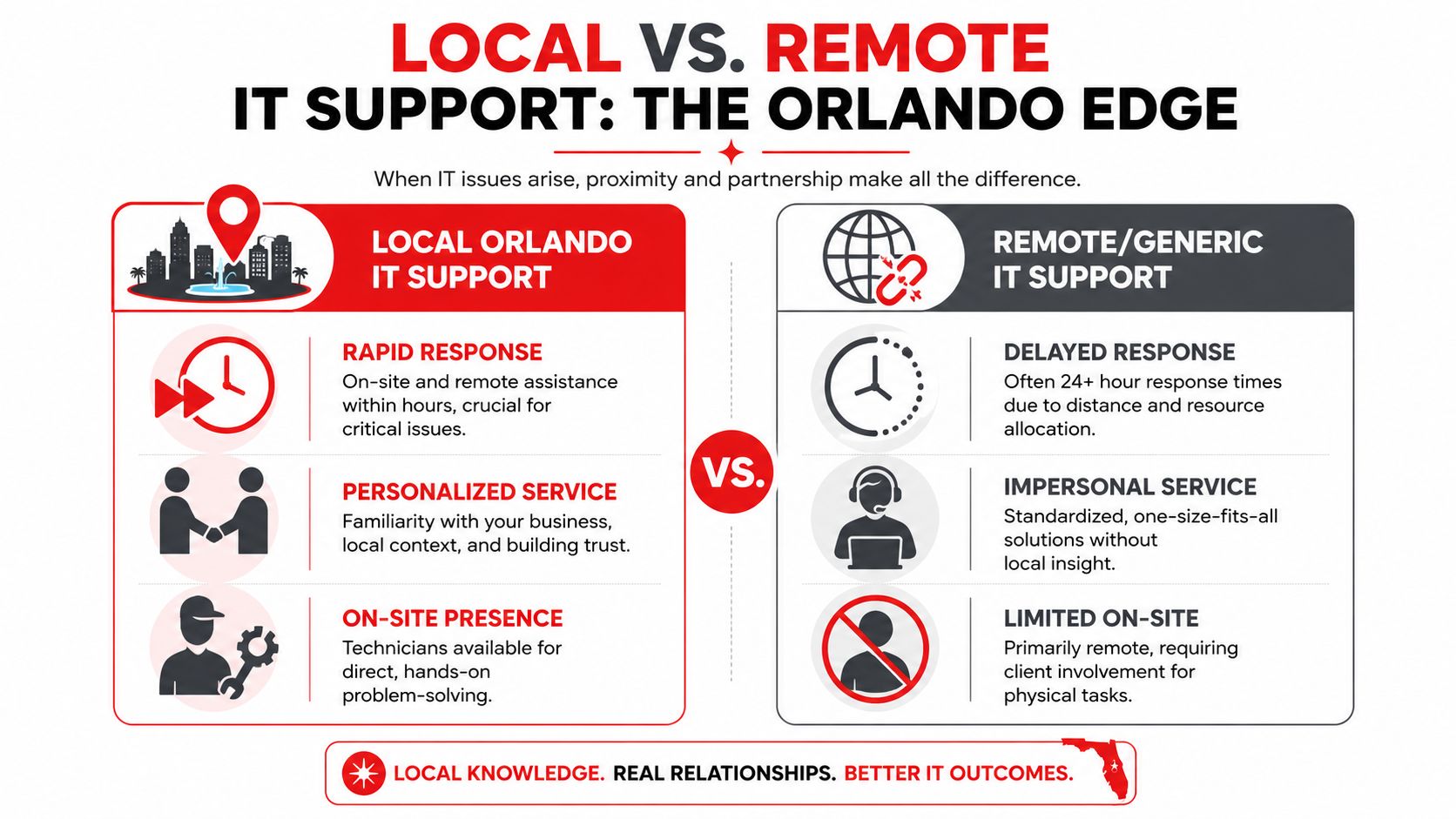
A local partner isn’t just a convenience. It changes the outcome when something physical breaks, when a network issue needs hands-on work, or when your team can’t afford to explain the business from scratch to a distant call center.
Speed matters when systems are down
The timing difference is substantial. Local Orlando IT providers offer on-site response within 2 to 4 hours, while national providers average 24 to 48 hours. Downtime can cost small businesses $5,600 per minute, according to this analysis of local IT support for small business. If a practice management server fails, a switch dies, or a firewall needs physical replacement, that gap matters immediately.
For an accounting office in tax season or a dental clinic with a full schedule, “someone will look at it tomorrow” isn’t service. It’s lost production, staff frustration, and client disruption.
What local partnership changes day to day
Local support also improves the routine work that never makes headlines.
- Better context: A nearby team understands your offices, your workflows, and the local realities of multi-site operations across Central Florida cities.
- Stronger accountability: It’s harder to hide behind ticket language when technicians can show up, inspect the issue, and own the fix.
- Less client-side burden: Your staff shouldn’t have to act as remote hands for every physical problem.
- Cleaner communication: U.S.-based helpdesk support with actual operational context reduces the back-and-forth that slows resolution.
A nearby provider also tends to fit businesses that need occasional in-person planning, office moves, hardware lifecycle work, and network assessments. Those aren’t edge cases for small businesses. They’re normal operating needs.
How to Choose the Right Orlando IT Partner
Choosing an IT provider shouldn’t feel like buying a generic utility. The right partner will affect uptime, staff productivity, audit readiness, cybersecurity posture, vendor coordination, and how calmly your business handles change. That deserves a better process than comparing monthly fees alone.
Questions worth asking before you sign
Use the first meeting to test how the provider thinks, not just what they sell.
-
What experience do you have with businesses like mine
Industry familiarity matters. A law office, CPA firm, dental practice, and engineering group all depend on technology differently. -
How do you handle security monitoring and incident response
Don’t settle for “we install protection.” Ask who monitors alerts, who investigates suspicious activity, and what happens after hours. -
What does onboarding look like
A serious provider should document systems, review risk, identify gaps, and create a transition plan without disrupting operations. -
What reporting will I receive
Owners should see ticket trends, recurring issues, asset visibility, patch status, backup health, and open risks in language they can act on. -
What is included in the monthly fee, and what triggers extra charges
This question prevents frustration later. Good agreements are clear about support, projects, licensing, after-hours work, and third-party vendor interaction. -
How do you support compliance requirements
If your firm deals with regulated data, the answer should include documentation, access controls, reporting, backups, and policy alignment.
Ask providers to explain how they’d handle one realistic outage in your business. Their answer will tell you more than a brochure ever will.
What good partnerships look like in the field
The strongest providers make operations quieter. They reduce friction, not just ticket counts.
Consider a few common Orlando-area examples:
-
A Winter Springs engineering firm had an internal technical employee who knew the applications well but needed backup on infrastructure, patching discipline, and after-hours security coverage. A co-managed model fit because it added process and monitoring without removing internal ownership where it still made sense.
-
An Orlando law practice needed tighter controls around document access, user offboarding, and backup verification. The improvement didn’t come from one dramatic change. It came from better permissions, consistent review habits, and clearer documentation tied to client confidentiality.
-
A Lake Nona medical office needed support that understood both user issues and the operational importance of scheduling systems, imaging access, and protected records. The winning provider wasn’t the cheapest one. It was the one that could explain recovery priorities, security monitoring, and day-to-day accountability in plain English.
The pattern is consistent. Good IT partners don’t bury owners in jargon. They connect technical work to business risk, staff productivity, and compliance reality.
If you’re evaluating Small Business IT Support in Orlando FL, the right choice usually comes down to five things: response speed, security maturity, compliance understanding, pricing clarity, and whether the provider takes ownership before problems become emergencies.
If your business in Orlando, Winter Park, Kissimmee, Maitland, Lake Nona, or nearby Central Florida cities needs a clearer IT strategy, Cyber Command, LLC is one option to evaluate. The firm provides managed IT, co-managed IT, 24/7/365 U.S.-based helpdesk, cybersecurity operations, and compliance-focused support for professional, financial, industrial, and community organizations. A practical next step is to review your current support model, identify where risk and downtime are still being handled reactively, and compare that against a partner built for prevention, accountability, and local response.
Get updates like this in your inbox
Plain-English alerts when something like this breaks, and the occasional guide. No sales sequences; unsubscribe with one click.
This article is for general informational purposes only and is not legal, compliance, insurance, or other professional advice. Threats, technologies, and regulations change quickly; confirm current requirements with your own advisors before acting. See our full disclaimer.