Cloud Architecture Orlando: Your SMB Guide for 2026

Your servers don't care that it's hurricane season, and your team doesn't care that remote access “usually works” until it doesn't. If you're running a business in Orlando, Winter Park, Kissimmee, or anywhere in Central Florida, the underlying problem is rarely the cloud itself, it's the pressure of keeping operations stable, secure, and reachable when your in-house IT bench is thin and operational continuity is critical.
Cloud architecture Orlando is no longer a niche phrase for large enterprises. Worldwide end-user spending on public cloud services is forecast to reach $723.4 billion in 2025, up from $595.7 billion in 2024, a 21.5% year-over-year increase, and 96% of companies are expected to use public cloud services by 2025 (cloud computing statistics). For Orlando businesses, that means cloud architecture has become the baseline for continuity and growth, not a future project.
Table of Contents
- Is Your IT Ready for Orlando's Next Challenge?
- What Cloud Architecture Means for Your Florida Business
- Choosing the Right Blueprint Common Architecture Patterns
- Securing Your Cloud The Cybersecurity and Compliance Checklist
- From On-Premise to Orlando Cloud A Phased Migration Plan
- The Local Partner Advantage for Your Cloud Architecture
Is Your IT Ready for Orlando's Next Challenge?
A lot of Orlando owners know the feeling. The server room gets too hot, a backup job fails, and someone only notices the risk when remote staff can't reach a file share or a client portal starts slowing down. The business isn't failing because the team is careless, it's failing because the old setup was never built for constant access, fast recovery, or clean scaling.
Cloud architecture matters because it gives you a design for continuity, not just a place to store data. For a small business in Orlando, a key test is whether your environment can keep working through a power outage, a sudden spike in demand, or a remote employee connecting from outside the office without creating a security gap.
Why local businesses feel the pain first
Orlando SMBs usually do not have the luxury of overbuilt infrastructure. They need systems that support client work, payroll, scheduling, claims, or field service without adding more headcount to manage them. Cloud architecture becomes practical at this point, because it turns infrastructure into a managed operating model instead of a pile of hardware.
Practical rule: if your team can't explain how quickly critical systems come back after a failure, the architecture is already doing too much guessing.
The bigger issue is that growth often exposes the weakest link. A small firm can survive a clunky setup for a while, but once staff, locations, or compliance obligations expand, that same setup starts creating delays, manual workarounds, and support tickets that never seem to end.
What a better setup changes
A well-planned cloud environment does more than host apps. It supports remote access, faster deployment, and easier recovery when something breaks. That matters for Orlando businesses that need uptime and security without hiring a large internal IT team.
The right design also makes trade-offs clearer. A local office may keep some systems close to home for control, while moving other workloads into a flexible environment that is easier to support and recover. For a broader look at scaled infrastructure design, the guide to hyperscale for data center operators is a useful background reference.
What Cloud Architecture Means for Your Florida Business
Think of cloud architecture as the blueprint for your company's digital building. It defines where systems live, how users connect, how data moves, and what happens when something fails. Without that blueprint, the business ends up with separate tools that may work on their own but don't work well together.
A public cloud is the closest match to a shared office building. You get access to shared infrastructure, but your own environment is still partitioned and controlled. That works well for many startups, retailers, and service firms that need speed and flexibility more than deep hardware ownership.
A private cloud looks more like a custom-built headquarters. It offers more control over governance and data handling, which matters for a law office in Lake Nona or a medical practice that needs tighter control around sensitive records and workflows.
A hybrid cloud combines both. It's often the most realistic path for Orlando SMBs that want to keep some workloads close to home while moving others into a more flexible environment. That can help when a business has legacy applications, special compliance needs, or mixed teams that don't all need the same level of access.
For readers who want a broader explanation of scaled infrastructure design, the guide to hyperscale for data center operators is a useful background reference. The important point for an SMB, though, is simpler, your cloud model should match your risk, your workload, and your staff's ability to operate it.
Choosing between public, private, and hybrid
The right model usually comes down to three questions. Where does your data need to live. Who needs access. How much operational control do you need day to day.
Use this filter: if the business needs speed and shared efficiency, public cloud often fits. If it needs tighter control and predictable governance, private or hybrid tends to make more sense.
Don't pick the model that sounds most advanced. Pick the one your team can manage under pressure, because the cleanest architecture is the one people can support when nobody's available to improvise.
Choosing the Right Blueprint Common Architecture Patterns
The model matters, but the internal pattern matters too. A business can run on cloud and still choose an architecture that makes updates painful, outages harder to isolate, and cost control more difficult than it should be. That's why cloud architecture Orlando decisions should include the shape of the application, not just the hosting location.
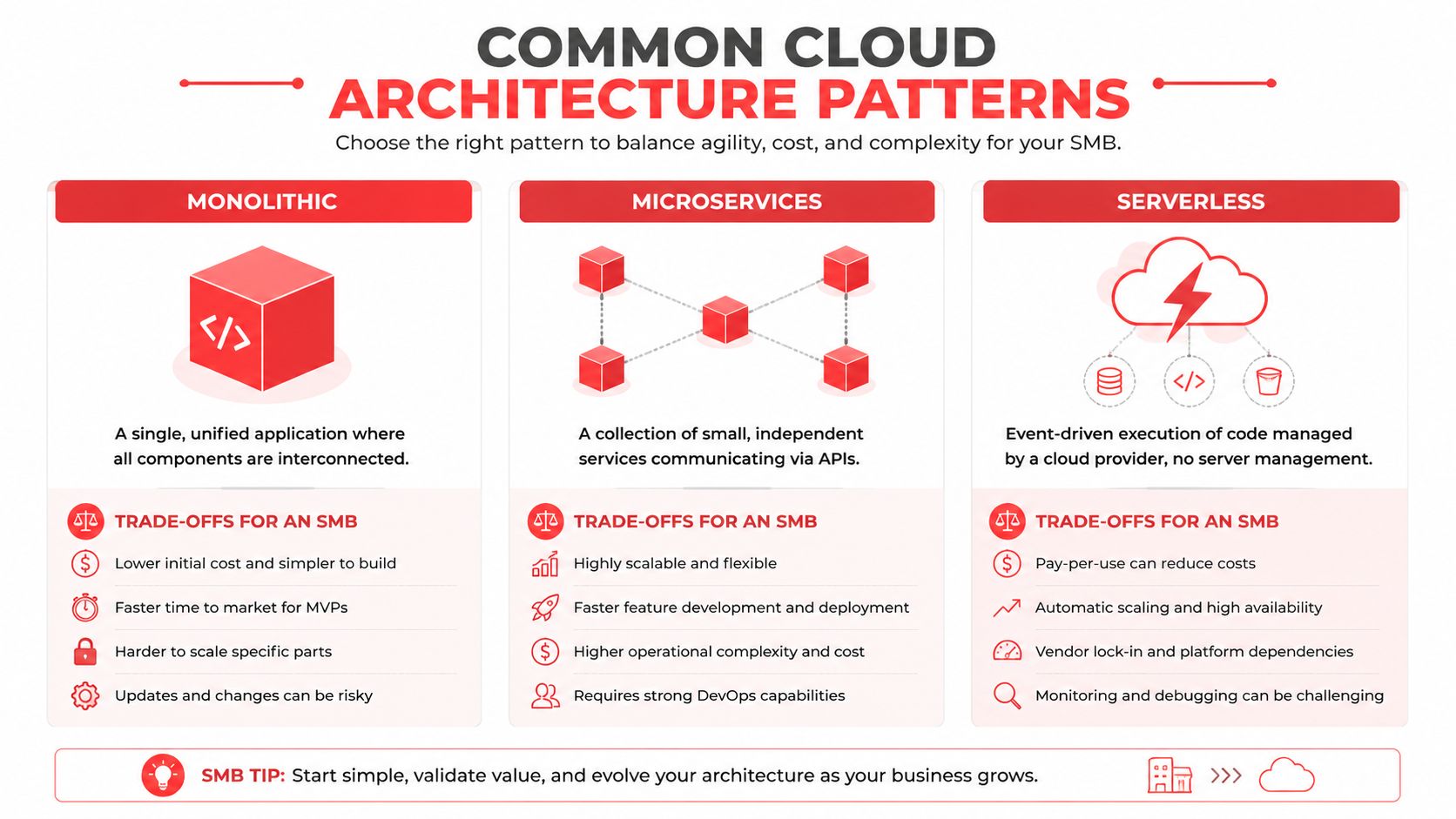
A strong design distributes traffic across multiple instances with load balancing, keeps databases highly available with clustering, and uses auto-scaling so resources match current demand (Stanford cloud architecture principles). That pattern reduces failure impact, improves uptime during spikes, and avoids paying for capacity you don't need all the time.
Pattern comparison for SMB decision-making
| Pattern | Best For | Pros | Cons |
|---|---|---|---|
| Monolithic | Smaller teams that need simple deployment and a single codebase | Easier to start, simpler support model, fewer moving parts | Harder to update one function at a time, failures can affect the whole app |
| Microservices | Growing teams that need separate components and more flexibility | Better isolation, easier scaling of individual services, cleaner change control | More coordination, more monitoring, more integration work |
| Serverless | Event-driven tasks, bursty workloads, and low-admin workflows | Minimal server management, can fit variable demand well | Less control over runtime details, design must be disciplined to avoid sprawl |
The right choice isn't theoretical. A professional services firm that mostly runs document workflows and client portals may not need the complexity of microservices. A multi-location business with growing digital services may prefer it if it can support the operational overhead. Serverless is useful for targeted tasks, but it's not a free pass to ignore architecture discipline.
Load, cost, and resilience trade-offs
Monolithic systems can be perfectly valid when the business wants fewer parts to manage. The risk is that every change touches the same block of code, so updates carry more blast radius. Microservices reduce that blast radius, but they only help if the team can monitor dependencies and trace failures quickly.
Best fit rule: if your staff is small and your change rate is moderate, start with the simplest pattern that can still support uptime goals. Complexity should be earned, not assumed.
The internal reference image at https://cybercommand.com/wp-content/uploads/2025/11/AWS1-300×297.png can help internal stakeholders visualize that trade-off, but the decision itself should still come from workload behavior, support capacity, and recovery goals. Cloud architecture works best when the design matches the people who'll operate it after launch.
Securing Your Cloud The Cybersecurity and Compliance Checklist
Cloud doesn't remove cybersecurity risk. It changes where the risk shows up. For Florida small businesses, the main threats are ransomware, phishing, data breaches, insider threats, and compliance failures (Florida cybersecurity threats). A weak cloud design doesn't solve those problems, it can make them faster to spread.
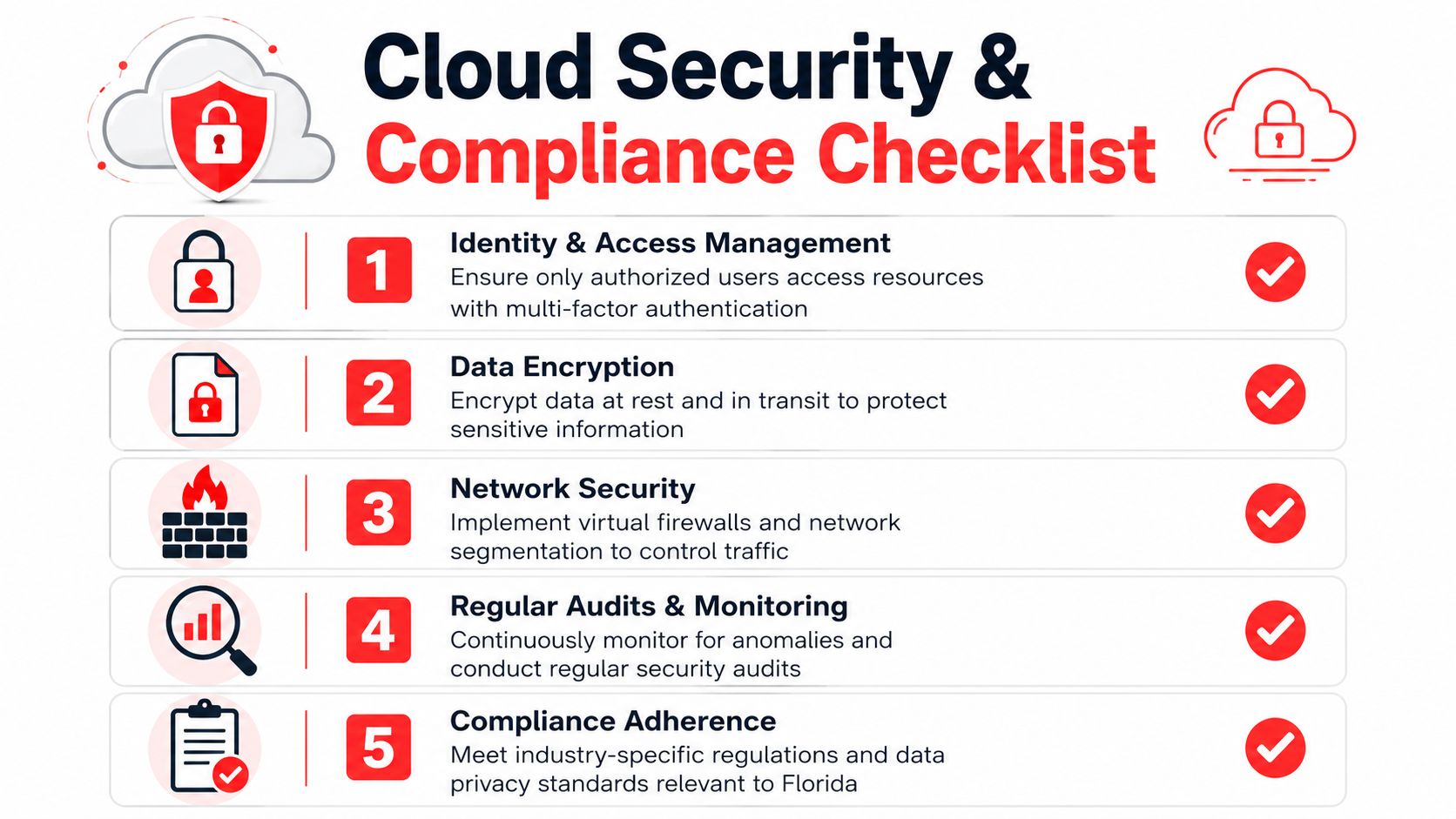
The best cloud plans reduce exposure by design. That means offline backups, endpoint detection, access control, and clear monitoring. It also means building for regulated workflows, because HIPAA, PCI-DSS, and similar expectations don't disappear just because the data lives in the cloud.
The controls that matter first
A Central Florida security source says multifactor authentication on email and remote access is the single highest-return control, and it also emphasizes scheduled patching, tested backups, a written incident response plan, and ongoing security awareness training (Central Florida cybersecurity guidance). That lines up with what works in the field, because most compromise paths begin with human access or an unpatched system.
For Orlando small businesses, a practical baseline also includes strong password policies, regular updates and patching, secured Wi-Fi, data backup solutions, basic security awareness training, antivirus or anti-malware, and multi-factor authentication for critical accounts (Orlando small business security basics). None of that is flashy. It's just what keeps the business running when someone clicks the wrong link.
What good cloud security looks like in practice
The federal small-business guidance is equally direct, use separate user accounts, restrict admin rights to trusted IT staff, keep Wi-Fi secure and encrypted, use multi-factor authentication, encrypt devices, and isolate payment systems from less secure internet use (FCC cybersecurity guidance). Those controls are easy to dismiss until a breach shows how much damage one shared password can cause.
Operational insight: if backups have never been restored, they're a hope, not a control.
The internal image at https://cybercommand.com/wp-content/uploads/2025/11/Top-Clutch-Cybersecurity-Company-Orlando-2025-768×829.png can support an internal review conversation, but the actual security questions should be blunt. Who can log in. How is access reviewed. How fast can you recover. What gets monitored after hours. That's the kind of cloud architecture that helps a Florida business stay open and stay defensible.
From On-Premise to Orlando Cloud A Phased Migration Plan
A cloud move goes wrong when people treat it like a switch. It's really a series of decisions about workload fit, recovery goals, performance needs, and support ownership. For an Orlando SMB, the safest path is phased migration, not a rushed full cutover.
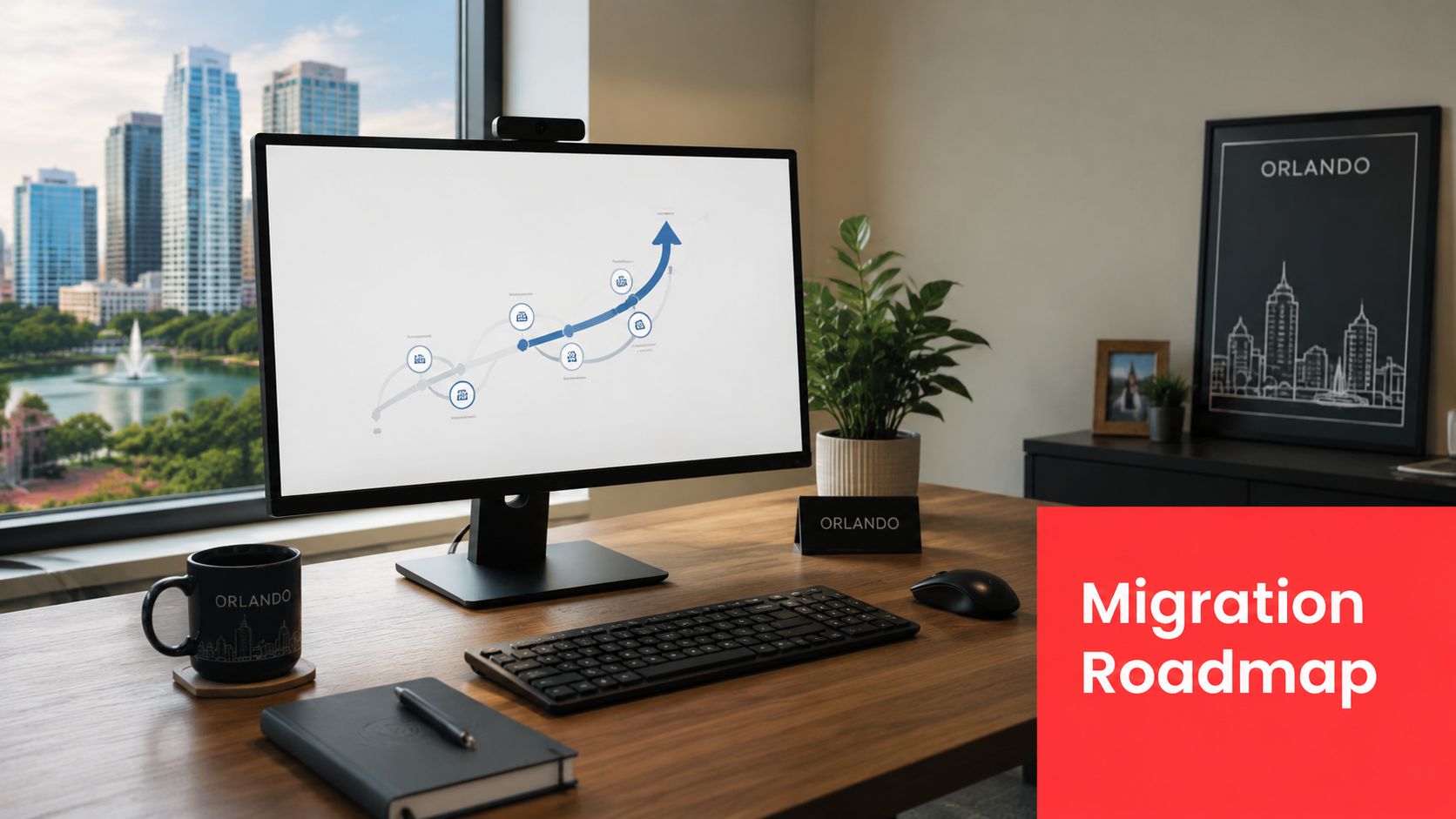
The first step is discovery. Map what you run, which systems are customer-facing, what depends on what, and where bottlenecks are. That gives you a clean list of workloads to move, keep, or retire instead of guessing based on habit.
Capacity planning before cutover
Capacity planning should model CPU, memory, storage I/O, and network bandwidth against real workloads, then validate the design with load testing (Oracle cloud adoption guidance). That matters because the architecture has to meet actual peak demand, not just average demand on a quiet Tuesday.
This is also where many SMBs miss the mark. They move a system to the cloud, assume the provider will handle performance automatically, and then discover that application behavior, data placement, or network design is the actual limiter. Cloud gives you elasticity, but it doesn't excuse planning.
Choosing the provider and the region
At the provider level, the choice should be based on operational fit, support model, and how your workloads behave under load. The more important question for a Central Florida business is where your users are and how close the environment needs to be to them. Lower latency usually matters when you serve local staff, customers, or patient workflows that depend on responsiveness.
A phased plan usually looks like this.
- Assess the current stack. Identify critical apps, hidden dependencies, and the systems that can't tolerate downtime.
- Define workload priorities. Move the least risky systems first so the team learns the process without endangering core operations.
- Test before production. Validate performance, backup, and failover behavior before asking users to depend on the new setup.
- Monitor continuously. Watch logs, access patterns, and utilization so you can adjust before users feel a problem.
That sequence keeps migration tied to business readiness, not enthusiasm. If the plan is sound, the move becomes a controlled change, not a nervous weekend.
The Local Partner Advantage for Your Cloud Architecture
A cloud setup can look solid on paper and still become hard to run once it meets day-to-day business demands in Orlando. The hardest part of cloud architecture Orlando is often not the design itself, it is keeping it reliable, secure, and supportable with a small internal team. The labor market becomes a significant factor here. Robert Half lists a Network/Cloud Architect in Orlando at $136,603 to $201,495, and says employers typically want 5 or more years of experience plus skills in routing, switching, network security, wireless networking, and large-scale projects (Robert Half Orlando role profile). That points to the gap many SMBs have to close.
For many organizations, the problem is not whether they understand cloud in theory. The problem is whether they can design, monitor, patch, secure, and recover it without putting a senior architect on staff. A managed service partner helps fill that gap by handling the technical depth, the support process, and the regular review cycle that keeps the environment from drifting.
Why partnership often beats headcount
A local team is easier to reach, easier to brief, and easier to hold accountable when something needs attention now. That matters for Orlando businesses that care about response times, compliance, and practical business continuity rather than abstract infrastructure ownership.
Cyber Command, LLC is one option in that model. It provides managed IT, cloud services, and cybersecurity support with a focus on proactive operations and recovery. A partner like that can be more realistic than building an internal cloud team from scratch, especially when the environment needs steady oversight instead of occasional tuning. The managed services model is meant to fit small businesses that need consistent execution, not just project work.
Learn more about a cloud partner approach can help frame that decision.
Bottom line: for many SMBs, the goal is not owning the cloud stack outright. It is having a cloud environment that stays secure, predictable, and supportable as the business grows.
The practical choice is straightforward. Build a cloud architecture your team can maintain, or keep paying the hidden cost of disruption, recovery, and patchwork fixes. If you want a next step, talk with Cyber Command, LLC about a cloud architecture review, a security baseline, and a phased migration plan that fits your Orlando business.