IT Security Services in Orlando FL: A 2026 Business Guide

You're probably not reading this because security is a hobby. You're reading it because something already happened, or almost did. A suspicious Microsoft 365 login. A fake invoice that looked real enough to fool accounting. A cyber insurance renewal that suddenly asks for proof of MFA, patching, and incident logging. Or a competitor in Orlando gets hit, and you realize your business would have a hard time answering one simple question: if an attack starts at 4:30 p.m. on a Friday, who takes over?

That's where most small and mid-sized companies in Central Florida get stuck. They've bought some tools, they have an IT person or provider, and they assume that means they're covered. In practice, that often means they have partial coverage, weak documentation, and no clear incident-response path. If you need a useful baseline before talking to a provider, this 2024 digital security guide is a solid plain-English refresher on the habits and controls that reduce avoidable risk.

Table of Contents

Why Orlando Businesses Must Prioritize Cybersecurity

A typical Orlando security scare doesn't start with a movie-style breach alert. It starts with a person. Someone in accounting gets an email that looks like it came from a vendor. A manager gets a password-reset prompt that appears normal. A front-desk employee clicks a link because the message mentions a missed shipment or a payroll issue.

That matters locally because Orlando's business mix creates a very specific risk profile. A local threat assessment says the area is shaped by high-value tourism infrastructure, dense hospitality and entertainment activity, a growing technology sector, and significant federal-contractor presence tied to nearby defense installations, and it identifies social engineering and phishing as the highest-volume initial access vector across sectors in Orlando's market (Orlando cybersecurity threat landscape analysis).

Why local context changes the security plan

A law office in Winter Springs doesn't face the same exposure as a restaurant group near the attractions corridor. A medical practice with several locations doesn't have the same attack surface as an engineering firm handling client drawings and bid documents. But they all share one problem: staff still interact with email, cloud apps, mobile devices, payment workflows, and outside vendors every day.

That's why generic “we have antivirus” thinking fails. The core issue isn't just malware. It's whether your business can:

  • Spot suspicious behavior early: Before a phish turns into account takeover.
  • Contain access quickly: Before one compromised user reaches file shares, email, and finance systems.
  • Document what happened: So you can answer insurance, legal, and compliance questions later.
  • Keep operating: Even while investigation and recovery are underway.

Orlando businesses don't need abstract cybersecurity theory. They need a response model that works when a real employee clicks the wrong thing during a normal workday.

What owners usually underestimate

Business owners often focus on prevention and overlook operations. They ask whether a provider installs protections. They don't ask what happens after detection, who is watching alerts after hours, or how evidence gets preserved if a claim, audit, or dispute follows.

That's the practical reason to prioritize cybersecurity in Orlando. The threat is local, the attack path is usually human, and the business impact shows up in downtime, missed revenue, disrupted scheduling, and stressful compliance cleanup.

Understanding Your Defensive Layers What Are IT Security Services

Most business owners hear “IT security services” and think of one product. That's the wrong model. Security works more like building protection. You don't secure a facility with only a front-door lock. You use locks, cameras, alarms, badge access, guard procedures, and incident logs that all work together.

For Orlando-area businesses, the meaningful stack goes beyond antivirus or general IT support. Local market guidance points to a layered stack that includes intrusion detection, firewall hardening, managed access control, video surveillance, and continuous monitoring, reflecting the reality that many organizations here have both cyber and physical exposure.

A diagram illustrating IT security strategy using a castle metaphor with five distinct defensive layers.

Your business as a castle

Think of your environment in layers:

  • Outer wall: Your firewall and network controls. These filter and restrict traffic before it reaches internal systems.
  • Moat and drawbridge: Access control. This includes MFA, role-based access, account policies, and joiner-mover-leaver discipline.
  • Inner keep: Endpoint security on laptops, desktops, and mobile devices where staff work.
  • Treasury: Data protection. Backups, retention, encryption policies, and permission boundaries around sensitive files.
  • Watchtower: Monitoring and response. Someone has to review alerts, investigate anomalies, and act fast.

A lot of businesses buy pieces of this but never integrate them. That creates blind spots. The firewall may log a strange connection, the endpoint may show unusual activity, and the access system may record a suspicious login, but if nobody correlates those events, the incident gets investigated too late.

What a real layered stack looks like

A workable security program usually includes a mix of controls and ongoing services:

  1. Preventive controls such as hardened firewalls, MFA, email filtering, and endpoint protections.
  2. Detective controls such as centralized logging, intrusion detection, and user activity review.
  3. Response controls such as isolation procedures, account lockouts, escalation paths, and recovery steps.
  4. Evidence controls such as incident logs, patch records, and access documentation.

If you're reviewing your environment, a formal vulnerability assessment process is often the fastest way to identify which layer is weak first.

Practical rule: If a provider can only name products, but can't explain how alerts move from detection to containment to documentation, you're not looking at a mature security service.

There's also a newer human-side challenge. Staff are no longer just spotting fake emails. They're seeing manipulated images, voice clips, and synthetic media used in fraud attempts. Training employees to question unusual requests matters more than ever, and resources on spotting AI-created media can help teams sharpen that judgment.

The Core Security Services Every Orlando Business Needs

A Monday morning ransomware event rarely starts with dramatic warnings. It starts with a locked laptop, a failed login, a phone call from accounting, and a manager trying to decide whether the issue is isolated or spreading. The businesses that recover fastest usually have three things in place before that moment: active monitoring, a response plan people can execute under pressure, and documentation that stands up to insurer and auditor questions.

A professional IT specialist working on cyber security monitoring tasks in a modern server room environment.

Continuous monitoring and a real SOC

Monitoring matters when alerts lead to action. Orlando businesses with after-hours operations, remote staff, or customer-facing systems need someone reviewing suspicious activity outside normal business hours and deciding what requires containment now versus investigation later.

For owners and operations leaders, the business case is straightforward. Faster review cuts downtime. Faster containment limits how many devices, accounts, or locations get pulled into the same incident. It also reduces the chaos that follows when leadership has no clear timeline or owner.

Ask direct questions. Who reviews alerts at 2 a.m.? What events trigger human escalation? How quickly can the provider isolate a device or disable a compromised account? If those answers are vague, the service probably looks better on paper than it performs in practice.

Incident response that holds up under pressure

A provider should be able to explain the first few hours of an incident in plain language. That includes who makes decisions, how evidence is preserved, when leadership is notified, and what records are created for insurance, legal review, and compliance.

A usable incident response function should include:

  • Containment actions: isolate endpoints, disable accounts, block malicious traffic, and restrict lateral movement
  • Evidence handling: preserve logs, endpoint data, and change records so the business can support a claim or investigation
  • Recovery priorities: restore line-of-business systems in the right order instead of bringing everything back at once
  • Executive communication: give leadership a clear status update, current risk, and next actions without technical clutter

Many service agreements fall short. They cover alerting but not response labor, or they promise help during an incident without defining what help entails. Before signing, review the scope as carefully as the tools.

A strong provider also proves its work after the fact. You should be able to get incident timelines, remediation records, and policy evidence without chasing multiple teams. That paper trail matters when cyber insurance carriers or regulators ask for proof, not assurances.

Firewall management, endpoint protection, and vulnerability scanning

Firewall and endpoint controls need ongoing care. Rules drift after office moves, vendor access requests, cloud changes, and staffing turnover. Laptops miss patches. Remote devices fall outside normal review. One neglected system is often enough to create an entry point.

That is why routine scanning and remediation review belong in the core service set. A provider should show what was found, what was fixed, what remains open, and who owns the exception if something cannot be remediated quickly. Fivenines security scanning offers a useful example of the kind of visibility businesses should expect from a scanning program.

This work also affects budgeting. If you want a clearer view of how recurring security tasks and exception handling influence monthly costs, this breakdown of key factors influencing IT managed service pricing helps frame the discussion.

Phishing resistance and user controls

Email remains one of the cheapest ways to get into a business. Training helps, but annual presentations are not enough. Staff need short, repeated guidance on login prompts, payment changes, shared file requests, MFA fatigue attacks, and messages that create urgency.

User controls matter just as much as awareness. Security teams should be enforcing MFA, limiting local admin rights, reviewing risky sign-ins, and tightening access when roles change. Training without those controls leaves too much to individual judgment.

Cyber Command, LLC is one Orlando-area provider offering services such as EDR, SOC monitoring, firewall management, and MFA within managed IT and cybersecurity support. The larger point applies to any provider you consider. Choose one that can show response procedures, compliance evidence, and a clear path from detection to containment to recovery.

Decoding IT Security Pricing Predictability vs Hidden Fees

Security pricing gets messy fast because providers package services in different ways. One charges by user. Another charges by device. Another wraps most services into a flat monthly agreement but bills separately for projects or after-hours work. If you don't pin this down early, the “cheaper” proposal can become the expensive one.

The labor market explains part of this. The Bureau of Labor Statistics reports a median annual wage of $124,910 for information security analysts in May 2024, with employment projected to grow 29% from 2024 to 2034 and about 16,000 openings each year on average (BLS information security analyst outlook). For Orlando businesses, that helps explain why outsourced security has become standard. Hiring one internal security person is hard enough. Building round-the-clock coverage internally is a different level of cost and complexity.

Comparing common pricing models

Pricing Model How It Works Best For Potential Downside
Per-user Monthly fee based on employee count Office-centric firms with predictable staffing Shared devices, servers, and site systems may not fit neatly
Per-device Fee tied to laptops, desktops, servers, and sometimes network gear Environments where asset counts are stable and tightly managed Costs can creep as devices, locations, and special systems get added
Flat-rate One recurring fee covering an agreed service scope Businesses that want budgeting stability and broad coverage You must review scope carefully to see what's included versus excluded

What to watch for in proposals

The issue isn't only price. It's cost predictability.

Look closely at these pressure points:

  • After-hours response: Is emergency work included, limited, or separately billed?
  • Projects and changes: Are office moves, migrations, or remediation tasks covered?
  • Security stack components: Does the monthly fee include monitoring, response, reporting, and training, or just the software licenses?
  • Compliance support: Will the provider help produce evidence for insurance and audits, or only deploy tools?

A broader breakdown of these trade-offs is covered in this guide to managed service pricing factors.

The practical buying decision

Per-user pricing can work well for a smaller professional office. Per-device pricing can fit firms with stable infrastructure and fewer swings in headcount. Flat-rate models usually make the most sense when leadership cares about budget consistency, broad accountability, and avoiding a surprise invoice during a bad month.

If you're buying IT Security Services in Orlando FL, ask a blunt question: what will I still get billed for when something goes wrong? That answer tells you more than the base monthly number.

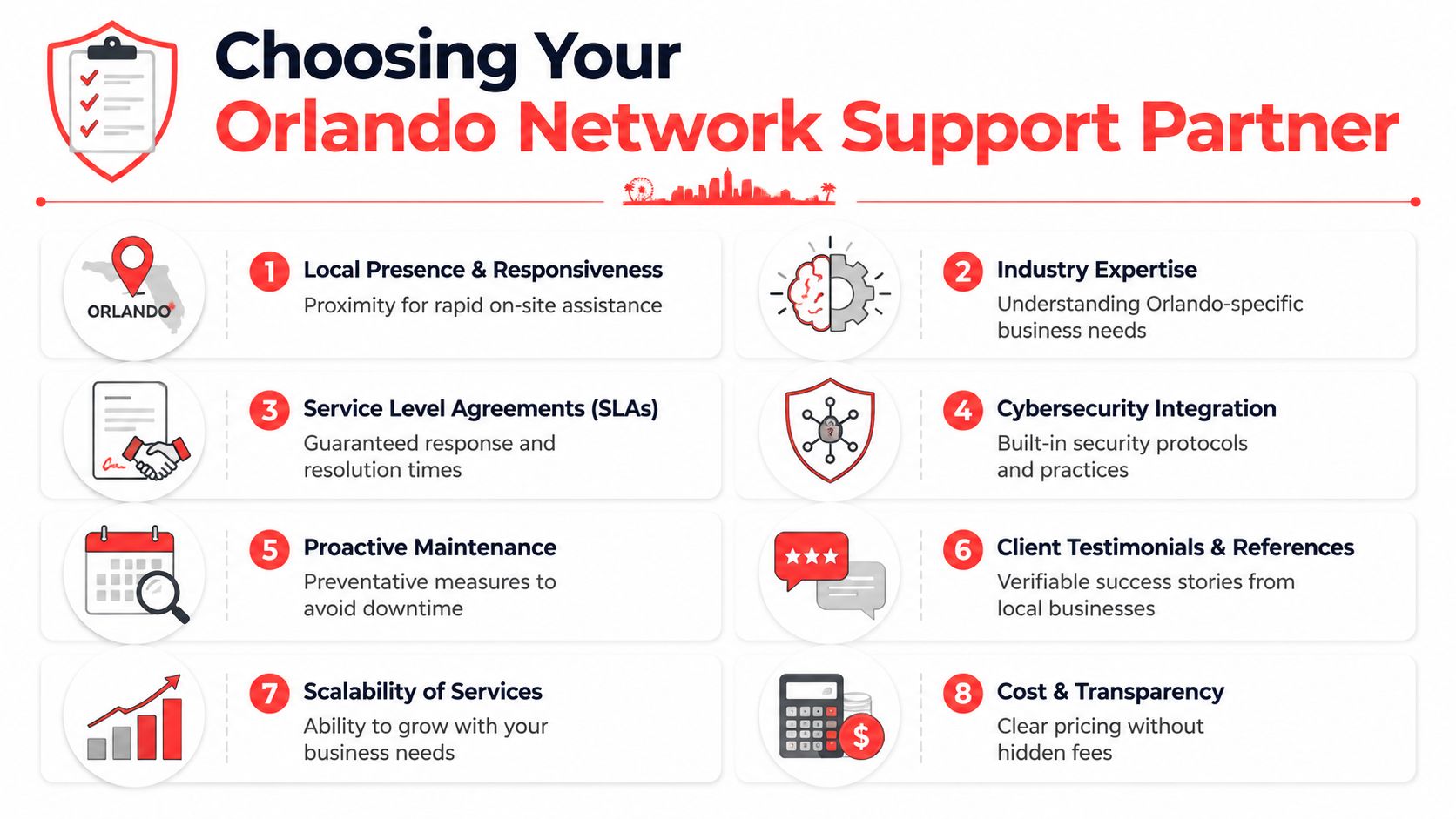
Choosing Your Orlando Security Partner Key Questions to Ask

Most providers can give you a service list. Fewer can give you evidence. That difference matters more now because cyber insurance, audits, and vendor reviews increasingly require proof that controls exist and are being maintained. For Orlando firms in professional services and healthcare, documentation such as patching records, MFA enforcement, and incident logs is often more valuable than a polished security brochure (compliance evidence and cyber insurance guidance).

An infographic outlining six key factors to consider when choosing a security partner in Orlando, Florida.

Ask for proof, not promises

A provider may say they “support compliance.” That phrase means nothing unless they can show what they produce and how often they produce it.

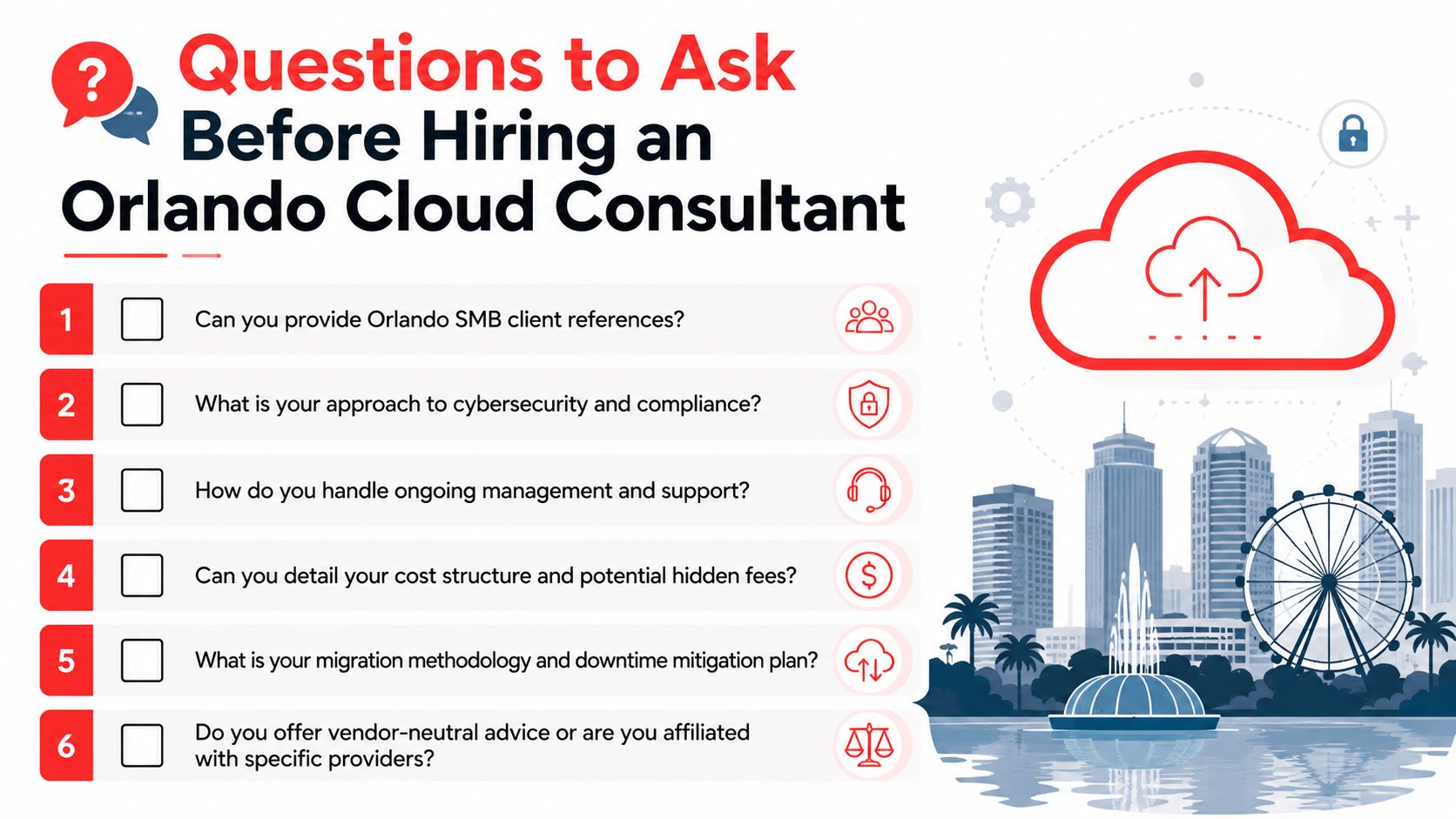
Ask these questions directly:

  • Can you provide patching records? You need evidence that systems were updated, not just a verbal assurance.
  • How do you verify MFA enforcement? Ask how they document protected accounts and exception handling.
  • What incident logs do you retain? You want to know what's recorded, where it's stored, and who can access it.
  • What happens during ransomware containment? Listen for a step-by-step answer, not vague reassurance.
  • Who is staffed after hours? Clarify whether response is live and operational, or only on-call escalation.

Evaluate response maturity

A mature provider should be able to walk you through the first day of an incident in plain English. Not every answer needs to be highly technical. It does need to be coherent.

Look for signs of operational maturity:

  1. Clear triage path: Who reviews alerts first, who escalates, and who contacts your leadership team.
  2. Defined containment authority: Whether they can disable accounts, isolate endpoints, or block traffic immediately.
  3. Recovery discipline: Whether they prioritize business-critical systems rather than restoring everything at once.
  4. Documentation habits: Whether every major action is timestamped and preserved.

What good answers sound like: “Here's how we contain, document, recover, and report.”
Weak answers sound like: “We monitor things and let you know.”

Local fit still matters

Remote monitoring is standard. Local presence still matters when hardware fails, offices move, physical access systems tie into IT, or leadership wants in-person incident coordination. In Central Florida, that matters more than many buyers expect because many businesses run across offices, clinics, warehouses, or public-facing locations.

If you need a vetting framework before interviews, this guide on how to choose a managed service provider gives a useful starting point.

Industry-Specific Security Needs in Central Florida

Different industries buy security for different reasons. A law firm is protecting confidential client matters and billable time. A healthcare practice is protecting patient data and continuity of care. A multi-location operator is trying to secure users, networks, and devices across several sites without losing visibility.

Professional services firms

Law firms, accounting practices, architecture groups, and engineering firms usually depend on a mix of email, cloud files, document workflows, and client communication. Their biggest risk isn't just malware. It's unauthorized access to sensitive records, impersonation of trusted contacts, and silent account misuse that goes unnoticed until a client asks questions.

The most useful controls here are:

  • Strong access policies: Limit who can reach financial records, client folders, and partner accounts.
  • Centralized logging: Make it possible to investigate who accessed what and when.
  • Email and identity protection: Reduce exposure to impersonation and account takeover.
  • Evidence-ready reporting: Support insurance questionnaires, vendor due diligence, and client security reviews.

For these firms, security has to protect reputation as much as systems.

Healthcare practices

Medical, dental, veterinary, and elective-care practices have a different operating problem. They can't tolerate much downtime at the front desk, in scheduling, or in clinical systems. Their risk sits at the intersection of privacy, operations, and staff workflow.

Priorities usually include:

  • MFA and account controls: Especially for email, remote access, and administrative accounts.
  • Patch discipline: Clinical and office systems need a documented update process.
  • Incident logging: Investigations need records, not memory.
  • Recovery planning: Staff should know how the practice operates if one application is unavailable.

A healthcare office doesn't need unnecessary complexity. It needs consistent controls that staff can follow on a busy day.

Industrial and multi-location businesses

Industrial firms, field-service businesses, and operators with several sites face a wider attack surface. They may have office users, warehouse devices, cameras, access systems, shared workstations, and site-to-site connectivity. That means security can't live only on desktops.

These organizations often benefit most from:

  • Network segmentation: Separate business systems, site infrastructure, and sensitive resources.
  • Managed access control: Control physical and logical entry together where possible.
  • Continuous monitoring across locations: See problems centrally instead of waiting for a site manager to report them.
  • Standardized policy enforcement: Keep onboarding, patching, and device handling consistent across every office.

The common mistake is treating each site as its own island. Centralized visibility usually matters more than adding one more point product.

Frequently Asked Questions About IT Security

What's the difference between an MSP and an MSSP

A general managed service provider usually handles broad IT needs such as support, devices, user administration, and infrastructure upkeep. A managed security provider focuses more specifically on threat monitoring, incident response, containment, and security operations. Some firms combine both. What matters is whether they can show a real security workflow, not just general IT support with a security label.

My business is small. Do we really need this level of protection

Yes, but the level of complexity should match the business. A small firm doesn't need enterprise sprawl. It does need strong account security, endpoint protection, backup discipline, logging, and a defined response process. Small companies are often hit through ordinary channels such as phishing, reused passwords, and unmanaged devices. Basic maturity beats expensive chaos.

Smaller businesses usually don't need more tools first. They need fewer gaps.

How long does onboarding usually take

That depends on how organized your current environment is. Clean user records, documented devices, and known vendors make onboarding smoother. The core issue isn't speed alone. It's whether the provider can discover unknown assets, close obvious holes, and establish reporting without interrupting the business. A rushed onboarding that skips documentation usually creates problems later.

What should happen in the first hour of a suspected incident

The provider should confirm the alert, assess scope, start containment, preserve evidence, and communicate clearly with decision-makers. If they can't clearly explain those steps, they probably haven't operationalized response. During a real event, clarity matters more than marketing language.


If your business needs IT Security Services in Orlando FL, the next step isn't buying another standalone tool. It's getting a provider to show you how they monitor, respond, document, and support compliance in practice. Cyber Command, LLC works with Central Florida organizations that want predictable support, 24/7 coverage, and security operations tied to uptime, recovery, and accountability.

Co Managed IT Services in Orlando FL: Boost Your Business

Your office manager is fielding password reset requests. Your internal IT lead is chasing a server alert. A vendor needs access approval. Someone in accounting is worried about a suspicious email. Meanwhile, your business still has to run.

That's the situation many Orlando companies are in. They already have an internal IT person or a small team, but the workload has outgrown what that team can realistically cover during business hours, after hours, and during projects. The gap usually shows up in cybersecurity first. Monitoring slips. Documentation gets stale. Patch cycles drift. Strategic work gets delayed because daily support keeps winning.

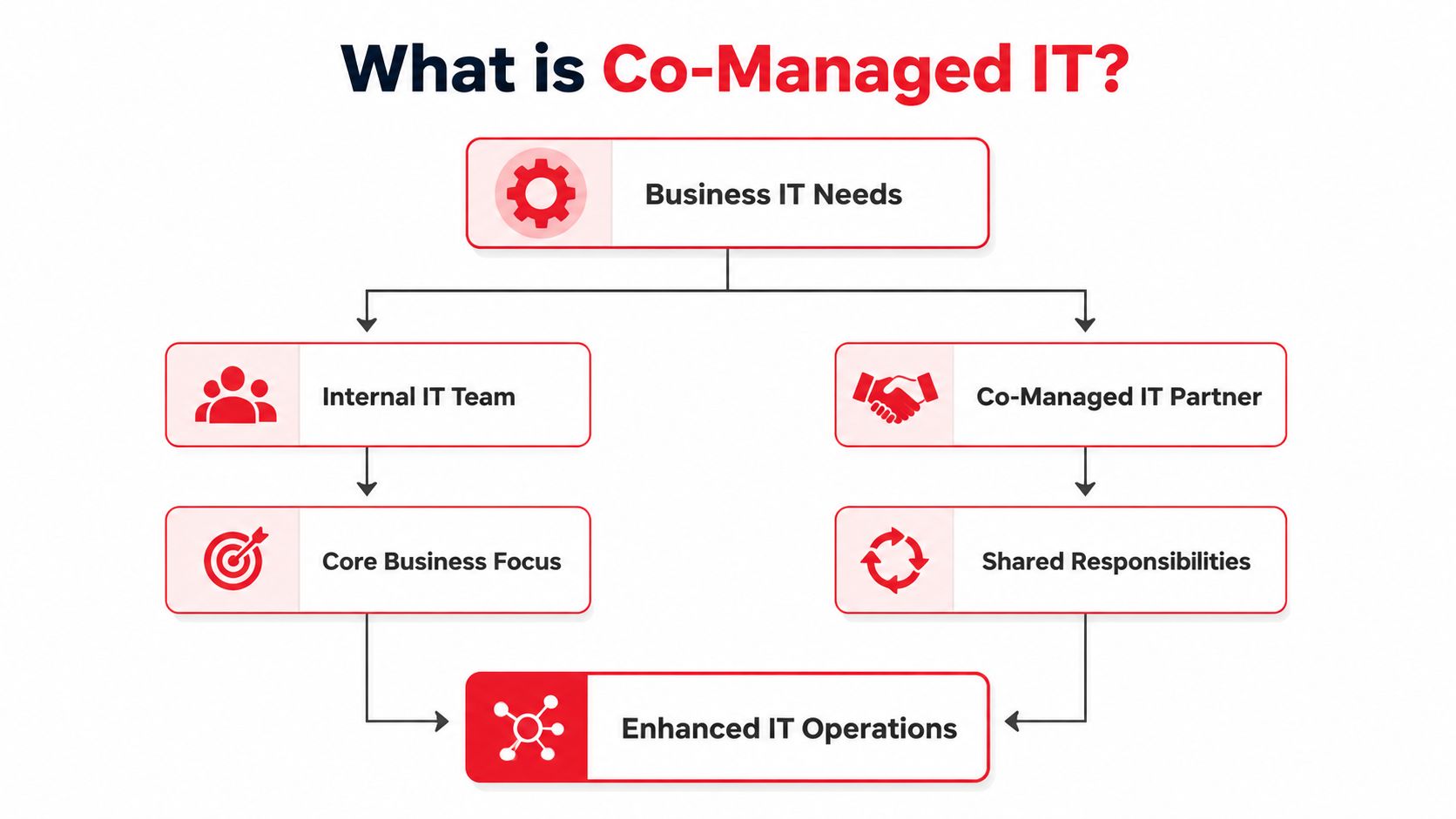
That's where co-managed IT services in Orlando, FL fit. It's not about replacing your people. It's about giving them reinforcement, specialized coverage, and a structure that keeps support and security from depending on one or two overloaded staff members.

Table of Contents

What Exactly Are Co-Managed IT Services

Think of co-managed IT as a co-pilot for your internal IT function. Your business still has someone in the pilot seat. They know your users, your line-of-business systems, your workflow quirks, and the political reality of how decisions get made inside your company. The outside partner adds lift where small teams usually get stretched thin.

That matters because co-managed IT is a hybrid operating model, not a full replacement for internal staff. In Orlando-focused guidance, the model is described as working “alongside your internal team, not replace it,” while the in-house team keeps control of core systems and strategy and the external provider takes on defined work such as overflow support, monitoring, license tracking, and related responsibilities. The same guidance also frames 24/7 monitoring, shared cybersecurity responsibility, and rapid response as standard parts of co-managed arrangements for businesses that need after-hours protection and continuity coverage, as explained in Orlando co-managed IT guidance.

An IT professional reviewing system performance metrics and AI-driven insights on a large monitor in an office.

How it differs from other IT models

A fully outsourced arrangement usually shifts nearly everything to the provider. That can work for companies with no internal IT presence, but it's often a poor fit when you already have capable staff and want to keep institutional knowledge in-house.

A purely internal model gives you maximum direct control, but it also creates obvious risk if your environment depends on a very small team. Vacation coverage, after-hours incidents, specialized cybersecurity tasks, and project overload can all bottleneck quickly.

Co-managed IT sits in the middle:

  • Internal team keeps ownership: They remain the primary stewards of business priorities, user relationships, and core technology decisions.
  • Provider adds capacity: Overflow tickets, maintenance routines, monitoring, and specialist escalation don't have to stack up on one person's desk.
  • Security becomes shared: Instead of asking one internal generalist to do everything, you spread responsibility across roles and processes.

Practical rule: If your internal IT person spends most of the week reacting, you don't have a staffing problem alone. You have an operating model problem.

What this looks like in day-to-day practice

In a healthy co-managed setup, your internal lead might own business applications, local process decisions, and executive communication. The outside partner may cover patching, endpoint oversight, documentation support, backup checks, help desk overflow, and security monitoring. That split is often what allows the internal team to stop living in triage mode.

For Orlando businesses evaluating options, co-managed IT solutions are usually most useful when the goal is predictable support coverage without adding full internal headcount. It works especially well when leadership wants more resilience but doesn't want to hand over strategy or lose internal control.

The Co-Managed Shared Responsibility Model

The most important design choice in co-management is shared operational ownership. Your internal team still controls core systems. The outside partner supplies specialized coverage such as cybersecurity monitoring, endpoint protection, vulnerability management, incident response, and project overflow. Orlando and broader Florida service descriptions consistently frame co-managed IT this way, with provider-side support commonly focused on help desk augmentation, security management, and proactive maintenance, as noted in managed IT coverage for Orlando.

A comparison chart showing traditional internal IT versus a co-managed IT partnership responsibility model.

That structure works because it removes a common failure point. When everything depends on a small internal team alone, one sick day, one resignation, or one urgent project can slow both support and security at the same time.

A practical division of responsibility

The cleanest co-managed relationships are explicit. They don't rely on assumptions.

IT Function Internal Team Usually Owns Co-Managed Partner Usually Owns
Business IT strategy Priorities, budgeting input, executive alignment Technical recommendations, roadmap support
End-user support VIP users, business-context issues, local workflow support Overflow tickets, after-hours coverage, Tier 2 and Tier 3 escalation
Core systems Final approval over critical systems and standards Maintenance execution, monitoring, remediation assistance
Cybersecurity operations Internal policy decisions, risk acceptance, business communication Monitoring, endpoint protection, vulnerability management, incident response support
Projects Internal sponsorship, change approval, business coordination Specialized engineering, deployment support, project overflow
Vendor coordination Business relationship ownership Technical coordination, troubleshooting, licensing and service administration

Where companies get this wrong

Some businesses say they want co-management, but what they want is emergency labor. That usually fails. If the provider is only called when something is already broken, the internal team still carries the full burden of prevention, process, and accountability.

The better approach is to assign recurring responsibility in advance.

  • Security tasks need named owners: If nobody clearly owns alert review, patch cadence, vulnerability follow-up, and backup verification, those jobs drift.
  • Escalation paths need to be written down: Your staff should know when an issue stays in-house and when it moves to the partner.
  • Strategy and operations should be separated: Internal leadership can keep strategic control while the outside team handles repeatable technical execution.

Shared ownership doesn't mean blurred ownership. It means both sides know exactly where they step in.

What strong co-management feels like

A good partnership doesn't create turf battles. Your internal team shouldn't feel replaced, and your provider shouldn't be guessing.

The healthiest version looks like this: your internal staff handles what requires business context, trust, and day-to-day familiarity. The external team handles what requires scale, after-hours coverage, specialist depth, or tool-heavy operational work. That's usually where Orlando businesses see the biggest relief.

Is Co-Management Right for Your Orlando Business

At 8:15 on a Monday, your internal IT lead is resetting passwords for new hires, chasing a backup alert from the weekend, and fielding a call from leadership about cyber insurance requirements. By noon, critical project work is already off track.

That is usually the clearest sign that co-management deserves a serious look.

Co-managed IT fits Orlando businesses that already have capable internal staff but need more coverage, stronger security follow-through, or operational support across multiple offices, teams, or schedules. The decision should come from workload, risk, and accountability gaps, not just ticket count. If your team knows the business well but keeps getting pulled away from higher-value work, a shared model often makes more sense than replacing them or expecting them to do everything.

A practical way to judge fit is to look at where the strain shows up first.

Professional services firms

Law offices, accounting firms, architecture teams, and engineering practices usually run on a mix of confidential data, deadline pressure, and small internal IT teams. In these environments, one experienced IT manager often becomes the default owner for everything. User issues, vendor coordination, onboarding, laptop failures, application access, and security questions all land on the same desk.

That setup creates a predictable problem. The person who should be improving standards, reviewing risks, and planning ahead spends the day clearing interruptions.

Co-management works well here when the internal lead keeps control of business priorities, key applications, and stakeholder communication, while the outside team handles recurring support and security operations. That division is especially useful for firms trying to tighten small business cybersecurity best practices without adding another full-time hire.

Common signs of fit include:

  • Sensitive client or case data: Security work needs consistent follow-up, not merely as an afterthought.
  • One-person dependency: Vacation coverage, after-hours issues, and security review should not depend on a single employee.
  • Compliance pressure: Internal teams often need outside help documenting controls, reviewing backups, and keeping routine tasks on schedule.

Multi-location businesses

Orlando companies with offices in places like Downtown Orlando, Winter Park, Lake Mary, or elsewhere in Central Florida often run into a scale problem before they run into a staffing problem. Each site starts making local exceptions. Workstation builds vary. Access requests get handled differently by office. Support quality depends on who answers first.

Internal IT can usually see the drift. The issue is having enough time and process discipline to correct it across every location.

A co-managed model gives the internal team a way to keep policy control while using outside support to enforce standards, document procedures, and keep monitoring consistent. That matters for cybersecurity because inconsistent account management, patch timing, and endpoint handling create gaps attackers tend to exploit first.

Multi-location growth usually adds operational risk before it adds headcount.

This is a strong fit when leadership wants consistency across sites but does not want to build a larger internal support bench just to maintain it.

Field-service and industrial organizations

Field-service companies, contractors, distributors, and industrial firms usually judge IT by uptime, remote access, and speed of recovery. Office productivity still matters, but daily operations often depend on devices in trucks, temporary worksites, warehouses, and shared field environments.

Internal IT teams in these businesses get stretched in a different way. They are pulled toward urgent support issues while longer-cycle work, such as device lifecycle planning, secure remote access, backup validation, and deployment standards, keeps slipping.

Co-management helps when the outside team owns repeatable operational work and after-hours coverage, while internal staff stay focused on the systems and workflows that require business context. That can reduce risk without taking authority away from the people who know the environment best.

A practical fit often includes:

  • Remote and mobile users: Access requests, device setup, and support do not need to bottleneck with one internal technician.
  • Higher uptime expectations: Shared coverage improves response continuity when issues happen outside normal business hours.
  • Projects that keep getting delayed: Site rollouts, hardware refreshes, and infrastructure cleanup move faster when internal staff are not carrying every task themselves.

Co-management is usually the right move when your internal IT team is trusted, overextended, and too valuable to spend all week reacting.

Strategic Benefits for Cybersecurity and Growth

The biggest mistake business owners make is evaluating co-managed IT as if it's just a support contract. It's not. At its best, it's a way to tighten control over cybersecurity while giving your internal team room to work on the business instead of constantly reacting to it.

For Orlando organizations with internal IT staff, the stronger benchmark is always-on security and fixed-budget support, not break/fix service. Orlando market descriptions highlight 24/7 monitoring, preventative maintenance, and layered defenses across email, web applications, remote access, mobile internet, and network perimeters, with those controls intended to detect, prevent, and recover from ransomware, advanced malware, zero-day exploitation, and other automated threats. The same guidance points buyers toward measurable control coverage such as monitoring breadth, response time, backup and recovery readiness, and patch or vulnerability cadence, as outlined in managed IT services for Orlando businesses.

A strategic infographic highlighting five key benefits of cybersecurity and growth for business operations.

Security maturity improves

Most internal teams in small and midsized companies are broad generalists. They know a little about everything because they have to. That's useful for daily support, but cybersecurity is a discipline that punishes inconsistency.

A co-managed relationship can improve your operating posture because it gives security work a defined process instead of letting it compete with every other task on the help desk list.

  • Monitoring becomes continuous: Someone is responsible for watching, escalating, and following through.
  • Patch and vulnerability work gets rhythm: It stops being “when we get time” and starts becoming part of the service model.
  • Incident handling gets clearer: Roles are established before a security event happens, not during it.

Internal IT gets time back

The less visible benefit is focus. Your internal IT leader usually knows what the business should fix next. They often just can't get to it because support noise and security admin consume the week.

That's why many Orlando businesses pair co-management with internal process work. The provider handles recurring operational duties. The internal team regains time to improve line-of-business applications, department workflows, onboarding processes, device standards, and policy enforcement.

For companies looking to strengthen this side of the equation, cybersecurity best practices for small businesses can help frame what to measure beyond simple ticket closure.

A mature IT environment isn't the one with the fewest alerts. It's the one where alerts, changes, backups, and patching all have clear ownership and follow-through.

How to Select and Implement a Co-Managed Partnership in Orlando

Buying co-management the wrong way creates friction fast. Businesses often start by comparing providers before they've defined what they want to keep in-house. That usually leads to vague proposals, duplicated effort, and a rocky first few months.

The better path is operationally simple. Decide the division of labor first. Then choose the partner that can work inside it.

A six-step infographic detailing how to select and implement a co-managed IT partnership in Orlando, Florida.

A useful lens here is implementation economics. Much of the market explains the model but skips the practical question of how to phase co-management without disrupting an existing internal team. That gap is especially important for companies with one or two internal IT staff who need predictable coverage, and the most useful buyer question is often what co-managed IT replaces, what stays in-house, and what the first 90 days should include, as discussed in co-managed IT implementation planning.

Choose the operating model before the provider

Start with a short internal inventory. Not a technical audit. An ownership audit.

Write down which responsibilities must stay internal because they depend on business judgment, executive trust, or deep application familiarity. Then list the work your team struggles to cover consistently.

That list usually includes a mix of:

  • After-hours support: Alerts and urgent issues that don't wait for business hours.
  • Security operations: Monitoring, vulnerability follow-up, endpoint oversight, and response coordination.
  • Project overflow: Migrations, rollouts, refreshes, and cleanup work that keep getting delayed.
  • Administrative load: Vendor coordination, documentation upkeep, user lifecycle tasks, and license management.

If a provider tries to skip this conversation, that's a red flag. Co-management only works when the boundaries are deliberate.

What to ask during evaluation

The right questions are operational, not flashy. You're trying to learn how the provider works with internal IT, not how polished the sales process sounds.

Ask questions like these:

  1. How do you divide work with an existing internal IT manager?
  2. Which security functions do you own directly, and which remain client-owned?
  3. How do you handle escalation after hours?
  4. What does onboarding look like when tools and documentation already exist?
  5. How do you report on coverage, outstanding risks, and unresolved dependencies?

A few practical warning signs show up quickly.

  • Vague role definitions: If everything sounds flexible, nothing is assigned.
  • No transition discipline: If the provider can't explain access control, documentation review, and communication cadence, onboarding will be messy.
  • Ticket-only mindset: If the conversation stays centered on reactive support, the security and governance side is probably underdeveloped.

For buyers comparing options, how to choose a managed service provider is a useful framework for structuring interviews and avoiding soft promises.

What the first 90 days should look like

The first phase shouldn't feel dramatic. If it does, the partnership probably started without enough planning.

A solid implementation usually follows this pattern:

Phase What should happen
Initial handoff Access is reviewed, communication channels are set, emergency contacts are confirmed
Environment review Existing tools, documentation, coverage gaps, and support workflows are assessed
Responsibility alignment Both sides confirm who owns support tiers, patching, vendor communication, projects, and security tasks
Tool rationalization Overlapping platforms and redundant processes are reduced where appropriate
Operational rollout Overflow support, monitoring, escalation, and recurring tasks move into the new model
Review cycle Leadership and IT meet to evaluate service fit, unresolved risks, and process changes

The first 90 days should reduce ambiguity first. Efficiency comes after that.

Florida market guidance also notes that managed and co-managed services commonly bundle 24/7 help desk, cybersecurity, cloud services, and flat-fee support into one service line, with flat-fee per-user pricing described as a common approach. That's why cost discussions should focus less on hourly rates and more on what operational coverage is included.

In practice, one option businesses may consider is Cyber Command, LLC, which provides co-managed IT, 24/7 helpdesk, cloud services, and cybersecurity support for organizations that want shared coverage rather than full replacement. The key question isn't who sounds biggest. It's who can work cleanly with your internal team.

Frequently Asked Questions About Co-Managed IT Services

Will we lose control of our IT strategy

A well-run co-managed arrangement keeps decision-making with your business and your internal IT lead. Your team should still set priorities, approve changes, and decide what matters most to operations. The outside partner handles the work you assign, whether that is after-hours support, security monitoring, project delivery, or specialized technical tasks.

If a provider cannot define that boundary clearly, expect confusion later.

Is co-managed IT more expensive than hiring another technician

It depends on the gap you need to close.

One technician can help with day-to-day tickets. That usually does not solve after-hours coverage, security operations, cloud administration, vacation coverage, or project backlog. Co-management often costs more than a single salary on paper, but it can cost less than building a full internal bench with multiple specialties.

For Orlando businesses, that trade-off matters. A healthcare office, manufacturer, or multi-location professional services firm may need broader coverage than one hire can reasonably provide.

How do we avoid conflict with our existing IT person

Start with written ownership. Define who handles Tier 1 support, vendor escalations, patching, identity management, endpoint security, backups, and emergency response. Then make sure both sides use the same ticketing and escalation rules.

This is usually where partnerships succeed or fail.

Internal IT should not feel replaced. They should get relief from repetitive support work, better access to security expertise, and time to focus on business systems, user needs, and planning. That shared responsibility model works best when the provider respects your internal team's context and authority.

What does co-managed IT actually replace

It usually replaces coverage gaps and reactive firefighting. It can also reduce dependence on one person who carries too much undocumented knowledge, too many admin rights, or too many after-hours calls.

In cybersecurity, that matters. Shared coverage can improve patch discipline, alert response, log review, access control, phishing response, and recovery planning. Your internal team still owns the business decisions. The partner adds capacity and specialized execution.

Is this only for larger companies

No. Co-management often fits small and midsized businesses that already have an internal IT generalist or a lean IT manager. Those teams usually do not need a full replacement. They need depth in a few areas and consistent backup when workload spikes.

That is common in Central Florida. A growing construction firm may need support across job sites and the office. A medical practice may need tighter security oversight and less downtime. A hospitality group may need broader hours of support than an internal team can cover alone.
What should we expect from pricing conversations

Expect pricing to center on users, devices, locations, service hours, and included responsibilities. Ask what is covered in the monthly fee, what counts as project work, what happens after hours, and which security services are included versus optional.

Ask one more question. Who is accountable when something is missed?

A usable proposal should spell out response expectations, escalation paths, security duties, and tool ownership. Clear pricing without clear responsibility still creates risk.

If your team is stretched thin and you want a practical co-managed model that strengthens cybersecurity without replacing internal IT, Cyber Command, LLC is one option to evaluate. The firm works with organizations in Central Florida that need shared support, 24/7 coverage, and a clearer division of operational responsibility so internal staff can focus on the business.

IT Help Desk Services in Orlando FL: A Business Guide

Monday starts with three separate tickets before 8:30 a.m. A receptionist cannot log in. A lawyer cannot open a case file from home. A practice manager sees a suspicious email and has no idea whether to delete it or report it. By lunch, what looked like routine tech friction has turned into lost billable time, delayed patient scheduling, and a possible security incident.

That is the true test of IT help desk services in Orlando FL. A help desk is not just there to reset passwords and clear printer queues. It sits at the point where employee productivity, cybersecurity response, and compliance exposure meet. If after-hours support only means someone answers the phone and promises a callback, the business still carries the risk.

For Orlando companies in legal, medical, finance, and other regulated fields, "24/7 help desk" needs a tighter definition. Owners should ask who is working after hours, what issues can be resolved on first contact, what gets escalated to security personnel, and how user-reported problems are documented for audit and compliance purposes. A missed ticket can mean more than downtime. It can mean delayed breach response, poor access control, or gaps in record handling that create liability later.

Buyers also need to separate a help desk from a broader service management function. If you need a clearer framework, compare help desk and service desk. The distinction affects staffing, escalation paths, reporting, and cost. In practice, the right Orlando provider should be able to explain how frontline support connects to endpoint management, identity controls, vendor coordination, and security operations without hiding behind vague SLA language.

Local businesses should expect a measured support operation, not informal break-fix work dressed up as managed service. The firms that perform well usually have clear ticket ownership, defined escalation rules, and response commitments that match the cost and risk of the environment they support. That is what protects uptime.

Table of Contents

Core Help Desk Capabilities for Orlando Businesses

A Monday morning outage in an Orlando office rarely starts as an IT problem. It starts as a business problem. Staff cannot sign in, a doctor cannot access schedules, a law firm cannot open client files, or a finance team cannot reach cloud apps before a deadline. The help desk is the function that decides whether that disruption lasts ten minutes or half the day.

A flowchart detailing how Orlando IT help desk services resolve business technical issues and improve productivity.

What a modern help desk does

A capable help desk handles repetitive work that carries real operational risk when it sits unresolved. That includes password resets, account lockouts, Microsoft 365 errors, printer failures, VPN access, Wi-Fi issues, new user setup, terminated user offboarding, and ticket triage. It also means recognizing when a routine support request is not routine at all.

That distinction matters more than many owners expect. A user who reports a locked account may need a password reset. They may also be the first sign of a compromised login, suspicious sign-in attempts, or an attack moving across the environment. A provider advertising 24/7 help desk support should be able to tell you how those signals are identified, documented, and escalated without delay.

Process is where strong teams separate themselves from call-answering services. Good help desks categorize tickets, track backlog, measure first response and resolution trends, and route work to the right technical level fast. Weak ones rely on inboxes, memory, and whichever technician happens to be free.

Practical rule: If a provider cannot show how tickets are prioritized, escalated, and reviewed, expect slower resolution, more repeat issues, and more security blind spots.

Some Orlando businesses need co-managed support instead of full outsourcing. That is often the right fit when an internal IT manager can handle vendors, projects, and planning but needs frontline coverage, after-hours support, or access to deeper engineering and security staff. In that model, the help desk reduces user noise so internal IT can focus on systems that affect revenue, compliance, and growth.

What Orlando buyers should expect

At a minimum, buyers should expect:

  • Remote support for common user issues so simple problems are fixed quickly without waiting for a site visit.
  • On-site support for physical problems such as failed hardware, office connectivity issues, damaged cabling, or device replacement.
  • User lifecycle management for onboarding, offboarding, access changes, and permission reviews.
  • Defined escalation paths from frontline support to senior engineers and security personnel.
  • Reporting that leadership can use including recurring issue patterns, unresolved backlog, and ticket trends by department or location.
  • Awareness of compliance-sensitive workflows for medical, legal, and financial environments where a missed ticket can become a security or audit problem.

Many owners also blur the line between a help desk and a broader service desk. If you want a clear framework, this guide explains how to compare help desk and service desk in practical terms.

For Orlando businesses, the standard should be higher than “someone picks up the phone.” The help desk should protect productivity, catch early security signals, and support the compliance pressures that come with handling client records, patient data, financial information, and multi-office operations across Central Florida.

Flat-Rate vs Reactive IT Support Pricing Models

Cost matters, but the bigger issue is how the pricing model shapes behavior. Some support models reward prevention. Others make money when problems keep happening.

Why break-fix still appeals to some owners

Reactive support sounds simple. If something breaks, you call. If nothing breaks, you don't pay. For very small firms with limited systems, that can feel financially safe.

It often isn't operationally safe. Break-fix providers usually have no built-in incentive to standardize your environment, improve documentation, tighten user access, or reduce recurring tickets. They get paid when the phone rings.

Here's the common pattern:

Feature Predictable Flat-Rate (Managed) Reactive Break-Fix (Hourly)
Billing style Fixed monthly operating expense Variable charges when issues occur
Budgeting Easier to forecast Harder to forecast
Provider incentive Prevent issues and reduce noise Respond after issues happen
Coverage scope Often broader and process-driven Usually narrower and event-driven
Strategic value Better fit for planning and standardization Better fit for occasional troubleshooting
After-hours expectations Often built into service model Often limited or billed separately

Break-fix also creates a subtle management problem. Staff start delaying tickets because they know every call may trigger cost discussions. That means issues sit longer, users invent workarounds, and security concerns may go unreported.

Why managed pricing changes behavior

A managed model usually puts support into a monthly service structure tied to users, scope, and included services. According to a 2026 Orlando IT pricing guide, most managed IT providers in the market use tiered per-user pricing ranging from $100 to $250 per user per month. That same guide notes a 50-user firm could be looking at roughly $5,000 to $12,500 per month before add-ons.

That range matters because it gives Orlando businesses a practical budgeting benchmark. It also reflects how modern support is packaged. Help desk, cybersecurity, cloud management, and around-the-clock support are often bundled into one managed relationship.

The best flat-rate agreements don't just cap cost. They remove hesitation. Employees report issues sooner, managers stop approving every support event, and the provider has a reason to reduce recurring problems.

Not every flat-rate plan is equal. Some exclude projects, vendor coordination, or after-hours work. Some cover only covered devices or only remote support. Read the scope carefully.

For Orlando businesses with compliance concerns, multiple locations, or lean internal staff, predictable managed pricing is usually the safer operating model because it aligns support with uptime rather than emergencies.

Integrating Your Help Desk with Cybersecurity and a SOC

A payroll clerk in Orlando reports a login prompt that looks slightly off. Ten minutes later, a partner at a law firm cannot access a shared folder. An accounts payable user says a browser tab keeps reopening after they clicked an email link. Those are not ordinary help desk tickets until proven otherwise. They are early signs of account compromise, malware, or unauthorized access.

A diagram illustrating a six-step workflow integrating IT help desk services with cybersecurity and SOC operations.

For many Orlando businesses, the help desk is the first place a security incident becomes visible. That matters because speed changes the outcome. If a frontline technician resets a password without checking for suspicious sign-in activity, or closes a “missing files” ticket before asking whether files were encrypted, the business loses containment time. In healthcare, legal, and financial firms, that delay can turn an isolated event into a reportable incident.

The practical question is not whether your help desk offers security. The question is whether the help desk can identify security signals fast enough, classify them correctly, and hand them to the right people without confusion.

Frontline technicians do not need to perform forensic analysis. They do need clear intake rules, escalation thresholds, and access to the same ticketing and alert context used by the security team. A useful primer on Security+ exam preparation outlines the fundamentals behind incident response, access control, and threat handling. Those basics should already show up in day-to-day help desk operations.

A workable model usually follows this path:

  1. A user, endpoint tool, or monitoring system flags suspicious activity.
  2. The help desk records the issue with enough detail to separate routine support from a possible security event.
  3. Tickets that involve unusual logins, phishing clicks, privilege changes, missing data, or endpoint alerts are escalated immediately.
  4. The SOC reviews indicators, confirms scope, and starts containment steps.
  5. The help desk supports user-facing remediation such as device isolation, password resets, MFA re-enrollment, or application access recovery.
  6. Leadership receives a clear status update that explains business impact, required decisions, and compliance exposure.

That handoff has to be operational, not theoretical. Ask whether the help desk and security team share tools, notes, and escalation playbooks. Ask who owns an incident when a ticket starts as “my laptop is slow” and ends with evidence of malware. Ask what happens after hours if a staff member in a medical practice reports suspicious access to a patient file system, or if a finance employee triggers a fraud alert during month-end processing.

If the answers are vague, expect delays.

A provider can answer phones around the clock and still fail at security response. What matters is whether suspicious tickets reach a staffed investigation function with authority to contain threats. This explanation of what a security operations center is gives a clear definition of the SOC's role inside a modern support environment.

There is also a cost trade-off. Integrating help desk and security operations usually costs more than basic user support alone, but it reduces the odds of paying for downtime, emergency cleanup, legal review, and client notification after a preventable incident. For regulated Orlando firms, that is usually the better bet. A help desk that treats cybersecurity as someone else's job creates risk at the exact point where incidents are first reported.

Understanding SLAs and Help Desk Response Times

At 2:13 a.m., your overnight manager cannot access the line-of-business system, remote staff start opening duplicate tickets, and no one on your side knows whether this is a login issue, a server failure, or the first sign of a security event. “24/7 support” only matters if your SLA spells out who takes ownership at that hour, what they are allowed to do, and how fast they act.

What matters is the service level agreement, or SLA. It defines response targets, severity levels, escalation rules, communication expectations, and after-hours coverage. For Orlando businesses in legal, medical, and financial services, that document also affects compliance exposure. A delayed response to an access problem can turn into missed filings, interrupted patient scheduling, or staff working around controls in ways that create audit risk.

An infographic titled SLAs Explained showing five key components of IT service level agreements for support.

The difference between availability and action

A provider can answer the phone all night and still leave your issue sitting in a queue. Buyers need to know whether after-hours coverage means a trained technician with access to your systems, or a dispatcher who promises a callback at sunrise.

Ask direct questions:

  • Who handles overnight calls, and what can that person do?
  • How are priorities assigned for outages, locked accounts, email issues, and suspected security incidents?
  • Which systems are covered after hours for active troubleshooting or recovery?
  • When does leadership get updated if the issue affects revenue, patient care, client deadlines, or regulated data?
  • What happens if the ticket changes scope from user support to a possible security incident?

A weak SLA gives you a timestamped acknowledgment. A useful SLA gives you a defined path to containment, recovery, and status updates.

If you want a practical benchmark for how commitments are typically written, these service level agreement examples help clarify what should appear in the contract and what should not be left to sales language.

Response time and resolution time are not the same promise

Response time tells you when work starts. Resolution time tells you when the user, system, or workflow is restored. That gap matters.

I have seen businesses buy support based on a fast first-response target, then learn later that low-priority tickets linger for days and high-priority tickets bounce between teams because no one defined ownership well. Orlando firms with compliance obligations should press on both points. If an attorney cannot reach a document system, a physician loses access to a charting tool, or a finance team member gets locked out during close, the business impact starts long before the ticket is formally “resolved.”

One metric worth reviewing is mean time to resolution for help desk performance. It shows whether the provider consistently restores productivity in a reasonable window, not just whether they acknowledge tickets quickly.

Strong SLAs usually include:

  • Severity-based triage that pushes outages and access failures ahead of minor requests
  • Named escalation paths for infrastructure, application, and security issues
  • Clear communication intervals during active incidents
  • Coverage definitions for nights, weekends, holidays, and on-site needs
  • Reporting that shows trends so recurring problems get fixed at the root

There is a cost trade-off here. Tighter SLAs, after-hours engineering coverage, and real escalation capacity usually cost more than basic business-hours support. For firms where downtime affects billable work, patient flow, financial operations, or regulated data, paying less for a vague SLA often becomes the more expensive decision.

Industry-Specific IT Support Needs in Central Florida

A generic help desk can reset passwords and troubleshoot Outlook. That's not enough for businesses that carry compliance burdens, client confidentiality obligations, or uptime-sensitive operations. In Central Florida, the support model should fit the industry.

Legal and financial firms

A law office in Orlando doesn't just need users back online. It needs document access controlled properly, email risk managed, and remote attorneys able to reach case files without exposing client data. Support has to respect confidentiality while moving fast under deadline pressure.

Financial firms face a similar reality. When staff handle sensitive client records, onboarding and offboarding become security controls, not just administrative tasks. The help desk should understand how permission changes, device issues, and suspicious email reports affect client trust and regulatory exposure.

For legal and finance teams, the worst support mistake isn't slow troubleshooting. It's casual handling of access, identity, and sensitive files.

Medical and dental practices

Privately owned practices across Orlando, Winter Park, and nearby communities often operate with lean administrative teams. When exam-room devices, scheduling platforms, or billing workflows fail, patient flow gets disrupted immediately.

A medical or dental office needs support that treats PHI protection, account access, and endpoint security as part of daily operations. That means technicians should know when an issue is merely inconvenient and when it may create compliance risk. A password reset for a front-desk employee is routine. A former employee account that still has access to records is not.

The same principle applies to medical spas, orthodontics, veterinary clinics, and specialty practices. They may not have internal IT leadership, but they still carry serious data-handling responsibilities.

Industrial and field service organizations

Industrial firms and field-service companies have a different pressure point. Their teams often depend on stable connectivity between office staff, dispatchers, field users, and shared business systems. Support must keep remote access reliable and standardize equipment so a single failure doesn't ripple across scheduling, inventory, or operations.

These organizations also need practical support for mobile users. A field employee with account sync problems or VPN trouble can lose access to critical job information fast. In that environment, the help desk has to understand business continuity, not just endpoint troubleshooting.

One option in this category is Cyber Command, LLC, which provides managed and co-managed IT, 24/7/365 U.S.-based help desk, cloud services, and SOC-backed cybersecurity for organizations in Orlando and nearby markets. The relevant point isn't branding. It's the operating model: businesses with compliance needs, multiple sites, or mobile workforces usually need a provider that can combine frontline support, security escalation, and strategic guidance in one relationship.

A provider that works well for a small office with basic desktop support may be the wrong fit for a practice handling regulated data or a company supporting crews in the field.

Evaluating Onboarding and Long-Term IT Partnership

A help desk contract can look good on paper and still fail in practice if onboarding is sloppy. Most support problems start before the first ticket. Poor documentation, missing asset visibility, unclear permissions, and half-finished vendor handoffs create confusion that shows up later as delays and finger-pointing.

What solid onboarding looks like

Good onboarding is structured. The provider should discover your environment, inventory key systems, document vendor relationships, deploy support tooling, review user access, and establish escalation contacts. Staff should know where to call, how to submit requests, and what to expect when something is urgent.

Look for signs of discipline:

  • Environment discovery that maps users, devices, and business-critical systems.
  • Documentation standards for accounts, vendors, network layout, and support procedures.
  • Security review of access, endpoint coverage, and obvious exposure points.
  • End-user communication so employees know how support works.

If onboarding feels improvised, long-term support usually will too.

What long-term partnership looks like

After onboarding, the relationship should mature into reporting, planning, and accountability. That includes ticket trend reviews, recurring issue analysis, user lifecycle process improvements, and security posture discussions with business leadership.

A provider that acts like a partner won't just close tickets. They'll tell you where the environment is fragile, where users are losing time, and where policy or infrastructure needs attention. This guide on how to choose a managed service provider is useful because it frames the evaluation around operational fit, communication, and long-term reliability rather than just headline features.

Good support feels calmer over time. Fewer surprises, better documentation, cleaner handoffs, and clearer accountability.

If every month brings the same unresolved patterns, you don't have a partner. You have outsourced chaos.

A Final Checklist for Choosing Your Orlando IT Provider

A law office loses access to its document system at 7:10 p.m. A medical practice flags a suspicious login after hours. A finance team sees email account lockouts on payroll day. In each case, the sales promise of "24/7 help desk" stops being marketing copy and becomes an operating test.

A checklist guide for businesses in Orlando to evaluate and choose the right managed IT provider services.

Use this checklist before you sign:

  • Define after-hours support in plain terms. Ask whether nights, weekends, and holidays are staffed by technicians who can fix issues, or by an answering service that only opens a ticket.
  • Get the SLA in writing. Review response targets, escalation rules, outage handling, and who owns communication during a security event.
  • Test the security handoff. If a user reports a phishing click, malware alert, or suspicious login, ask what happens in the first 15 minutes and who is responsible after that.
  • Check industry fit. Orlando healthcare groups, law firms, and financial companies have different compliance exposure, retention requirements, and tolerance for downtime.
  • Review onboarding discipline. A provider should be able to explain how they document users, systems, vendors, access, and recovery procedures before support starts.
  • Ask for reporting that drives decisions. You should see ticket patterns, repeat issues, aging requests, security concerns, and recommendations tied to business risk.
  • Clarify coverage scope. Ask what is covered remotely, when onsite work is included, how emergencies are triaged, and what costs extra.

Good answers are specific. Weak answers sound polished but stay vague on ownership, timing, and accountability.

One more point matters in Central Florida. Weather events, distributed workforces, and multi-location operations put pressure on support teams fast. The provider you choose should be able to handle user issues, security escalation, and communication with leadership without losing control of the process.
If a provider cannot explain how support, cybersecurity, and compliance work together, keep looking. Fast ticket closure alone is not enough.

If you're evaluating IT help desk services in Orlando FL and want a provider that combines managed IT, co-managed support, cybersecurity, and around-the-clock operational coverage, Cyber Command, LLC is one option to consider. Their model is built around U.S.-based 24/7/365 help desk support, transparent reporting, predictable pricing, and SOC-backed security support for Central Florida businesses that need more than break-fix response.

Cybersecurity Services in Orlando FL: An SMB’s Guide 2026

On a normal Tuesday in Orlando, the problem rarely looks dramatic at first. A controller gets an email that appears to be from a vendor. The logo is right. The tone is familiar. The request is urgent, but not unusual. Someone hesitates for ten seconds, clicks anyway, and now your day is no longer about customers, staffing, or cash flow.

That's how a lot of cyber incidents start for small and mid-sized businesses. Not with a movie-scene hack. With an ordinary business process that got exploited.

If you run a law firm in Winter Park, a dental practice in Dr. Phillips, an engineering firm near downtown, or a multi-location service business across Central Florida, cybersecurity isn't a side issue anymore. It's part of keeping operations stable, protecting client trust, and making sure one bad click doesn't turn into a week of disruption.

The Growing Need for Cybersecurity in Central Florida

A Central Florida business can lose a normal workday in under an hour. An employee opens a convincing vendor email. A Microsoft 365 login gets captured. Mailbox rules forward messages discreetly. Then accounting, customer communication, and approvals start slipping out of your control.

That pattern shows up here because Orlando businesses run on speed, trust, and connected systems. Professional services firms pass sensitive files back and forth all day. Medical and dental offices depend on scheduling platforms, patient data, and insurance workflows. Construction, property management, and field-service companies rely on mobile devices, email approvals, and third-party apps to keep jobs moving. Each connection helps the business run. Each one also creates another place to secure.

The pressure is not limited to large enterprises. The Cybersecurity and Infrastructure Security Agency has repeatedly warned that phishing, stolen credentials, and known but unpatched weaknesses remain common entry points across U.S. organizations, including small and midsize companies, as described in CISA guidance on reducing cyber risk for businesses. For Orlando owners, that translates into a practical question. If a password gets reused, a laptop misses patches, or a fake payment request reaches the wrong person, how long would operations stay stable?

What this looks like on the ground

In this market, the first sign of trouble is usually ordinary business activity:

  • A vendor message that sends AP to a fake payment portal
  • A cloud account takeover that redirects client emails without anyone noticing
  • A remote employee device that never got basic hardening or monitoring
  • A file-sharing app adopted by one department without any security review

These are process failures as much as technical failures.

That matters in Orlando because many companies sit inside larger supply chains. A law office may handle closing documents for real estate deals. A medical practice may depend on billing vendors, imaging platforms, and patient communication tools. An accounting firm may connect directly into client financial systems. One weak control inside your company can turn into delayed payments, client notifications, contract issues, or downtime that spills into someone else's operation too.

Good cybersecurity services reduce that operational drag. They close the easy gaps first, then add monitoring, response, and testing where the business risk is real. If you want a plain-English view of how a monitored security team works day to day, this overview of a security operations center is a useful starting point. If your business depends heavily on cloud software, this SaaS penetration testing guide is worth reviewing as well.

Practical rule: If your team uses email, cloud apps, shared files, and online payments to serve customers, cybersecurity belongs in daily operations, not a drawer labeled IT.

Decoding Cybersecurity Services What You Actually Get

Most owners hear terms like SOC, MDR, EDR, and SIEM and tune out. Fair enough. The jargon is awful. What matters is what those services do inside your business.

In Orlando, the market has clearly moved beyond old break-fix support. Local provider listings now commonly promote 24/7/365 monitoring, SOC support, advanced detection, and related capabilities, and those same listings show at least 21 cybersecurity companies in the city, which points to a mature local market for specialized services, according to Orlando cybersecurity provider listings.

An infographic titled Decoding Cybersecurity Services explaining SOC, MDR, EDR, and SIEM roles in business security protection.

The core layers that matter

Think of cybersecurity services as a building, not a single product.

Patching and hardening are the foundation. If operating systems, browsers, line-of-business apps, firewalls, and cloud settings stay sloppy, every other control has to work harder. This is the unglamorous work that prevents known weaknesses from sitting open for months.

EDR sits on the devices themselves. Laptops, desktops, and servers generate the clues analysts need to spot suspicious behavior. Good endpoint tooling doesn't just say “malware found.” It shows process activity, suspicious scripts, privilege misuse, and signs that an attacker is trying to move laterally.

SIEM acts as the collection and correlation layer. It pulls logs from multiple systems into one place so someone can connect dots that users won't see. A single failed login isn't interesting. The same identity showing odd authentication behavior, mailbox changes, and suspicious endpoint events at once is very interesting.

SOC is the team watching those signals around the clock. If you want a plain-English explanation of that function, this overview of what a security operations center is is useful. The key point is simple: tools generate alerts, but people investigate, triage, escalate, and coordinate response.

Where MDR fits

MDR, or managed detection and response, is what turns monitoring into action. This is the layer that says, “We saw something bad, we investigated it, and here's what happens next.”

That usually includes:

  • Threat hunting to look for suspicious patterns before a full incident is obvious
  • Alert triage so your team isn't buried in noise
  • Containment guidance when a device, identity, or account needs immediate action
  • Incident coordination so legal, compliance, leadership, and operations don't work from different assumptions

The real question isn't whether your business has security software installed. It's whether someone is responsible for watching, interpreting, and acting on what that software reports.

What works and what doesn't

What works is a stack with ownership. Patch discipline. Endpoint visibility. Centralized logging. A real escalation path. Someone answering the phone after hours.

What doesn't work is buying a handful of tools because they looked good in a sales demo, then assuming coverage exists. That's how companies end up with antivirus, a firewall, a cloud app subscription, and no actual response capability.

If your company builds or sells software, application-layer testing belongs in the conversation too. A practical resource is this SaaS penetration testing guide, which helps separate a checkbox test from an assessment that surfaces business risk.

Why Orlando Businesses Are a Prime Target

A lot of Orlando companies assume attackers only care about big brands, hospital systems, or companies with national visibility. In practice, mid-sized firms and growing local businesses are often easier to monetize. They move money, store sensitive records, rely on email, and usually have less internal security depth than an enterprise.

That matters in Central Florida because the local economy is tightly connected. A private medical practice depends on billing vendors and cloud software. A law firm shares documents with clients, courts, and outside consultants. A contractor, property manager, or tourism supplier may touch payment data, scheduling systems, and vendor portals every day. If one company gets compromised, the problem rarely stays contained to that one company.

An infographic highlighting four key economic reasons why Orlando businesses are targeted by cyber threats.

Why the local economy raises risk

Orlando has the kind of business mix criminals look for because it creates many points of entry and many ways to get paid.

  • Professional services firms hold contracts, wire instructions, tax records, litigation files, and privileged communications
  • Healthcare practices and support organizations deal with protected information, insurance workflows, and strict downtime tolerance
  • Hospitality, attractions, and tourism vendors handle reservations, payment activity, seasonal staffing, and a high volume of third-party relationships
  • Construction, real estate, and field-service companies rely on mobile access, project-based collaboration, and fast invoice approval cycles
  • Public sector and nonprofit organizations often face budget pressure while still managing sensitive constituent, donor, or operational data

Here is the trade-off I see all the time. The faster a business needs to move, the more trust it extends across email, shared files, vendor requests, and remote access. Speed helps revenue. It also gives attackers more room to blend in with normal work.

Why Orlando businesses get singled out

Many local companies sit in the middle of larger business processes without looking like obvious targets. That makes them attractive.

An accounting firm can be used to redirect funds. A specialty clinic can be pressured because downtime affects patient care. An engineering or architecture firm can expose project documents, credentials, or municipal data. A tourism-related supplier may have enough payment volume and partner access to make a compromise profitable within hours.

Attackers also know that regional businesses often depend on a small number of key people. One controller. One office manager. One outsourced IT contact. One operations lead who approves urgent requests from a phone between meetings. That concentration creates single points of failure, especially around identity, approvals, and account recovery.

In Orlando, the target is often the company that keeps business moving for someone else.

The practical takeaway is simple. Risk here is driven by interconnected operations, third-party trust, and the cost of downtime. A good security program should reflect that reality with stronger identity controls, tighter vendor access, documented approval workflows, and a response plan that matches how the business operates.

Cybersecurity Needs for Key Orlando Industries

A generic “we do cybersecurity” pitch isn't very helpful in this market. A law office, private medical practice, and field-service company don't have the same risk profile, even if they all use Microsoft 365, mobile devices, and cloud storage.

For Orlando's regulated industries, providers increasingly emphasize layered email defense and compliance hardening. Local services commonly include DMARC, DKIM, and SPF alongside vulnerability assessments and related controls, according to Orlando cybersecurity service examples for compliance-focused firms.

Digital cybersecurity overlay featuring tourism, technology, and healthcare symbols over a scenic Orlando city landscape.

Professional services

Law firms, accounting firms, architecture groups, and engineering practices usually care about three things most. Confidentiality, uptime, and clean documentation.

A breach here isn't just a technical failure. It can create client notification issues, reputational damage, billing delays, and ugly questions about due diligence. Email security matters a lot because so much work moves through file shares, approvals, invoice requests, and document review.

For these firms, the most practical controls tend to be:

  • Identity protection around email, cloud apps, and privileged accounts
  • Authenticated email to reduce spoofing and impersonation risk
  • Endpoint visibility on every laptop used by staff and partners
  • Audit-friendly reporting that shows what was found and what got remediated

Healthcare and private practices

Medical spas, dentists, orthodontists, veterinarians, surgical groups, and specialty clinics have a difficult mix. They need convenience for staff, a smooth patient experience, and stronger handling around sensitive information.

A lot of smaller practices don't have deep internal IT maturity. That doesn't reduce risk. It raises the importance of straightforward controls that people can maintain. A good provider in this setting should be able to translate technical findings into operational steps. Which account needs MFA. Which workstation needs replacement. Which backup process needs testing. Which vendor access should be restricted.

A flashy security stack doesn't help if the front desk still shares credentials or if backups can't support real recovery.

In healthcare-adjacent environments, “compliant” and “recoverable” are not the same thing. You need both.

Industrial and field-service organizations

This group gets overlooked. Contractors, logistics firms, specialty manufacturers, and field-service operators often have a blend of office systems, mobile staff, vendor portals, and sometimes older infrastructure that can't be ripped out.

Their risk is usually less about one giant database and more about business interruption. If dispatch fails, job data disappears, or mobile access gets compromised, revenue slows immediately. These firms benefit from standardization more than almost any other segment. Consistent endpoint controls, clear remote-access rules, practical backup strategy, and segmentation where needed.

A field-service company doesn't need enterprise theater. It needs stable systems, fewer exceptions, and a provider who understands that downtime in the office can still stop work in the field.

Understanding Pricing and Engagement Models

Most Orlando business owners don't struggle with the idea that security matters. They struggle with buying it sensibly.

The old break-fix model felt cheap until something failed. Then the invoices piled up, decisions got rushed, and every major problem became an unplanned project. Cybersecurity doesn't fit that model well because a lot of the value comes from continuous prevention, monitoring, and response before visible failure occurs.

Fully managed vs co-managed

Here's the practical comparison:

Engagement model Best fit What you're paying for
Fully managed Businesses without internal IT depth Day-to-day support, security operations, patching, vendor coordination, and a single point of accountability
Co-managed Companies with internal IT staff who need reinforcement Shared responsibility, outside expertise, added monitoring, escalation support, and coverage for gaps

With fully managed IT and security, the appeal is predictability. You're usually trying to convert chaos into a consistent operating expense. That matters for SMBs because budgeting improves when support, monitoring, and routine maintenance aren't billed like emergencies.

With co-managed support, the benefit is amplified effectiveness. Your internal team may know the business well but still need help with after-hours response, advanced security tooling, documentation discipline, or compliance-related work.

What to watch for in proposals

Not all “managed security” offers are structured the same way. Two proposals can look similar and be very different in practice.

Ask whether pricing includes:

  • 24/7 monitoring or only business-hours review
  • Incident response coordination or just alert forwarding
  • Endpoint tooling and licensing or separate line items
  • Vulnerability remediation guidance or only reports
  • Vendor and license management or a handoff back to you
  • Onsite support expectations when something urgent happens locally

If pricing looks low, check what got excluded. Cheap security often means you bought software and a dashboard, not real accountability.

How to Choose the Right Orlando Cybersecurity Partner

Choosing a provider shouldn't feel like shopping for office supplies. This is closer to interviewing a long-term operating partner. The right firm will shape how your business handles incidents, recovers from disruptions, passes audits, and supports growth.

For Orlando SMBs, a strong technical benchmark is a 24/7 SOC paired with EDR and SIEM, because that combination supports continuous monitoring and reduces dwell time during fast-moving attacks, as described in this overview of Orlando SMB cybersecurity benchmarks.

A checklist for choosing an Orlando cybersecurity partner, highlighting six key factors for business security.

Questions worth asking before you sign

A provider should be able to answer these clearly, without hiding behind buzzwords.

  • Who watches alerts after hours
    If something suspicious happens on Friday night, does a real analyst review it, or does your team learn about it Monday morning?

  • What does escalation look like
    Ask who gets contacted, how quickly, and what actions they're authorized to take.

  • How do you handle vulnerability work
    A useful baseline is understanding the difference between scanning and actual analysis. This guide on what a vulnerability assessment is is a helpful reference before those conversations.

  • Can you support forensic readiness
    This is one of the most overlooked areas for smaller firms. If you have a breach, can the provider preserve logs, support evidence collection, and coordinate with legal counsel without making the situation worse?

Signs you're buying the wrong relationship

Some red flags are easy to spot once you know what to look for.

Warning sign Why it matters
They only talk about tools Tools matter, but ownership and response matter more
Reporting is vague If you can't see actions, risks, and trends, you can't manage outcomes
Everything becomes a project Constant change orders usually mean weak planning or narrow coverage
No clear local response model Orlando businesses often need practical support, not just remote ticket handling

One example in the market is Cyber Command, LLC, which states that it provides Orlando-area managed IT and cybersecurity services including a 24/7 SOC, endpoint protection, compliance support, and co-managed or fully managed models. That isn't a recommendation by itself. It's the type of service description you should compare against other providers in the area to see who offers clear accountability, not just a broad list of products.

Ask your future provider one uncomfortable question: “If we have a breach, what do you do in the first hour?” If the answer is fuzzy, keep looking.

From Protection to Partnership A New Approach to IT

The businesses that handle cyber risk well usually stop treating IT as a repair shop. They treat it like an operating function tied to resilience, compliance, and growth.

That changes the relationship. Instead of calling someone when printers break or laptops fail, you build a model where backups are planned, access is reviewed, documentation stays current, and incidents have an actual playbook. If you're revisiting your internal standards, this piece on scalable IT process documentation is a practical resource because mature security depends on repeatable processes, not tribal knowledge.

Partnership also means recovery, not just prevention. If your provider can't speak clearly about restore priorities, communication flow, and business continuity, the relationship is incomplete. A useful starting point is understanding backup and disaster recovery in business terms, not just technical terms.

Good cybersecurity services give you fewer surprises. Better ones give you confidence that the business can absorb problems and keep moving.

Frequently Asked Questions

Business owners usually ask the same small set of questions once the buzzwords are out of the way. Here are direct answers.

With the human element involved in 68% of breaches, cyber insurance carriers are paying close attention to controls like MFA and patch discipline, according to the Orlando cyber insurance and security posture discussion. That's one reason “insurance-ready” security has become a useful framing for SMBs.

Question Answer
Do very small businesses in Orlando really need cybersecurity services? Yes. Smaller firms often have fewer internal controls, fewer staff to catch suspicious activity, and less margin for downtime. Attackers know that.
Is antivirus enough if we already have Microsoft 365 and a firewall? No. Basic tooling helps, but it doesn't replace monitoring, response, identity controls, patch discipline, and recovery planning.
What should we prioritize first? Start with identity security, endpoint protection, patching, backup verification, and a clear response process. Those controls usually provide the most practical reduction in business risk.
Do we need a local Orlando provider? Not always, but local context helps. Businesses with compliance pressure, multiple offices, or onsite support needs usually benefit from a partner who understands the Central Florida market and can respond practically.
Can cybersecurity services help with cyber insurance? They can. Providers that document MFA, access controls, patching, backups, and recovery readiness make underwriting conversations easier and can help you answer carrier questions with evidence.
What's the difference between IT support and cybersecurity support? IT support keeps systems working. Cybersecurity support focuses on reducing risk, detecting suspicious activity, responding to incidents, and proving controls are in place. Strong providers combine both.

The biggest mistake is waiting until something breaks to define expectations. Security works better when the roles, tools, and response steps are decided before the first incident lands in someone's inbox.


If your business needs a clearer plan for Cybersecurity Services in Orlando FL, Cyber Command, LLC is one option to evaluate for fully managed or co-managed IT, 24/7 security operations, and business continuity support in Central Florida. The right next step isn't buying more tools. It's getting a practical view of your risks, your operational dependencies, and what a workable response model should look like for your company.
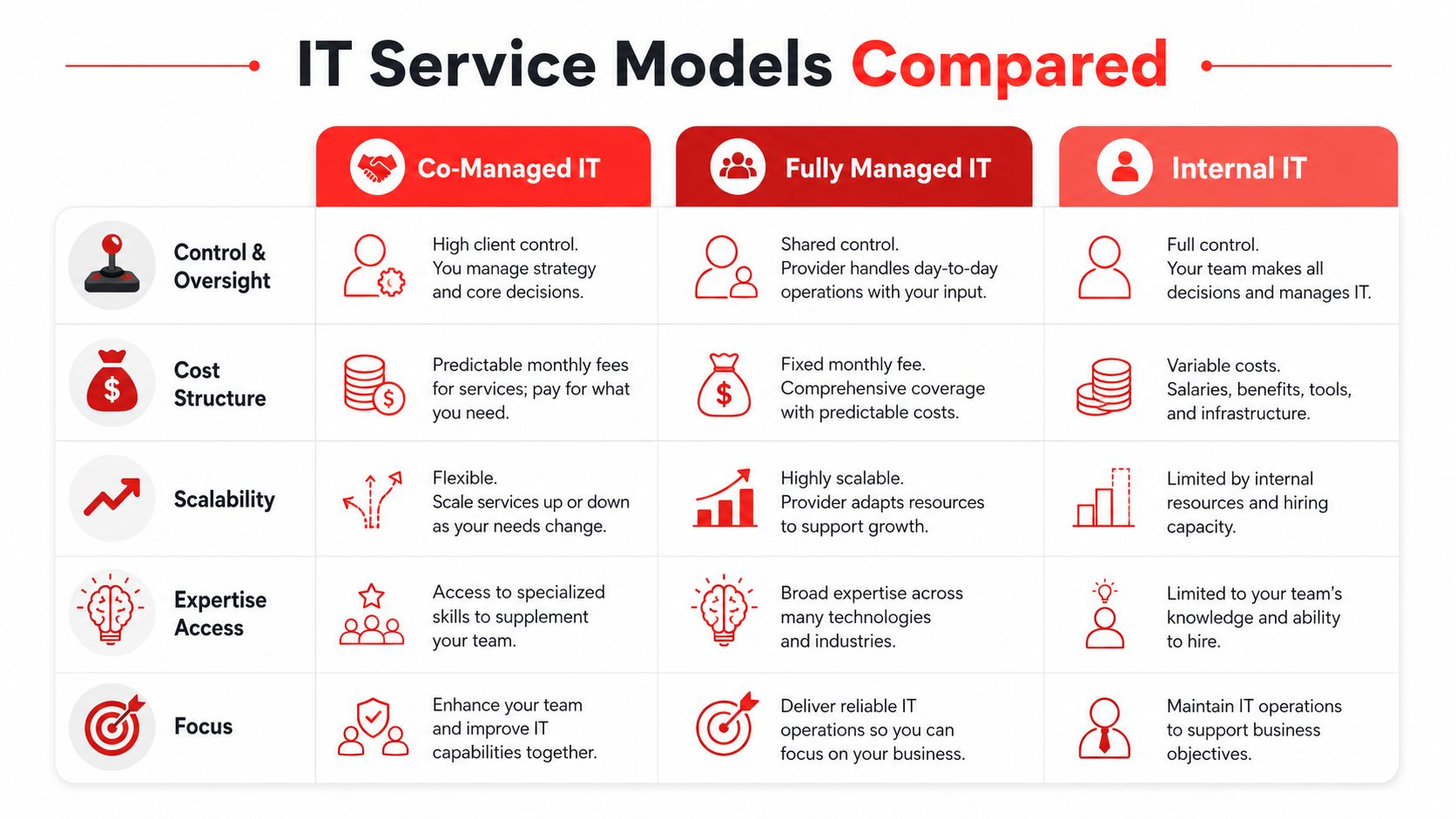
Local IT Support for Small Business: Your 2026 Guide

Your office opens at 8. By 8:07, your staff can't access email, the printer queue is jammed, and one employee says a suspicious login prompt just appeared on their screen. If you're running a law firm in downtown Orlando, a medical practice in Winter Springs, or a light industrial company supporting jobs across Central Florida, that isn't just an IT problem. It interrupts billing, scheduling, patient communication, and trust.

A lot of small businesses are still trying to manage technology with a mix of internal guesswork, old vendors, and last-minute repair calls. That model usually holds until it doesn't. Then the owner gets pulled into decisions they shouldn't have to make, under pressure, without clear visibility into risk, downtime, or cost.

The better approach is local it support for small business built around prevention, accountability, and fast response when something physical breaks. For Orlando-area companies especially, local matters. You need someone who understands your business, your vendors, your compliance pressure, and the fact that waiting until tomorrow is often not an option.

Why Local IT Support Is a Strategic Asset Not an Expense

An Orlando business owner rarely says, "I want to buy more IT." They usually say, "I need my team working, my files accessible, my systems secure, and my costs under control." That is the core function of IT support. It isn't about gadgets. It's about keeping the business operational.

A stressed businessman sits at his office desk while a technician arrives to provide repair assistance.

The market has already moved in that direction. A striking 27% of small businesses operate without any dedicated IT support, while 39% rely on external IT contractors, making outside support the most common solution according to small business IT support statistics compiled by Fuse Technology Group. That should tell you two things. First, many firms are still exposed. Second, outsourcing support is no longer unusual. It's standard.

What owners get wrong about IT cost

The common mistake is treating IT as a line item to minimize instead of a business function to stabilize. That leads to delayed upgrades, skipped patching, weak backups, and unmanaged devices. On paper, that can look cheaper for a while.

In practice, the business pays elsewhere:

  • Staff time gets wasted when employees troubleshoot basic issues instead of serving clients.
  • Revenue gets delayed when email, line-of-business apps, or shared files go down.
  • Security risk grows when no one owns patching, endpoint protection, or backup verification.
  • Leadership gets distracted because the owner becomes the default escalation point.

Practical rule: If your team only talks to IT when something is already broken, you don't have an IT strategy. You have an interruption pattern.

Why local changes the equation

A local partner brings more than geography. They bring context. An Orlando accounting firm, a private dental practice, and a field-service company may all use Microsoft 365, cloud storage, firewalls, and endpoint tools. They do not have the same workflows, vendor stack, or risk tolerance.

Good local support should help you:

  • Reduce downtime through monitoring, maintenance, and faster on-site response
  • Improve security posture with patching, endpoint controls, and incident response planning
  • Coordinate vendors so your internet provider, software reps, phone system, copier company, and cloud platforms don't all point fingers at each other
  • Plan technology around growth so new hires, new offices, and new software don't create chaos

For small businesses in Central Florida, that shift is the difference between reactive support and operational resilience. The business outcome matters more than the technical label. If your systems stay available, your risk is lower, and your team can work without friction, IT has become an asset.

In-House vs Break-Fix vs Managed Local IT Support

Most small businesses end up choosing between three models. They often compare them by monthly price alone, which is the wrong filter. The better question is this: which model gives you reliable support, predictable cost, and enough structure to grow without increasing risk?

A simple analogy helps. In-house IT is like hiring a full-time chef. You get dedicated attention, but one person can't be an expert in every cuisine. Break-fix support is like ordering takeout only when everyone's already hungry. It solves the immediate pain, but nothing is planned. Managed local IT support is closer to a meal-prep service designed around your needs. It's ongoing, repeatable, and built to prevent problems before they hit the table.

IT support models at a glance

Attribute Break-Fix (Reactive) In-House IT Staff Managed IT Services (Proactive)
Primary model Call when something breaks Dedicated internal employee or team Ongoing outside partner with monitoring and support
Budget predictability Low. Costs spike during outages or projects Moderate to low. Payroll, tools, benefits, coverage gaps Higher when pricing is flat-rate and scoped clearly
Response pattern Reactive only Depends on staffing depth and availability Preventive maintenance plus user support
Coverage breadth Usually narrow and issue-specific Can be limited by one person's skillset Broader across helpdesk, security, cloud, vendors, and planning
On-site availability Depends on schedule Available if physically present Available based on local provider coverage
Strategic planning Rare Sometimes, if the staff member has time Usually part of the relationship through reviews and roadmaps
Best fit Very small firms with minimal dependence on tech Larger companies that can justify full-time headcount SMBs that need mature support without building a full department

What works and what doesn't

Break-fix can still make sense for very small operations with simple needs. If you have a handful of users, no compliance pressure, and low reliance on line-of-business systems, it may feel sufficient. The weakness is obvious once you rely on cloud apps, shared files, VoIP, remote access, or any regulated data. Problems are handled after impact, not before.

In-house support can work well when the company is large enough to support proper staffing. The problem for many SMBs is coverage. One internal admin may know your environment well, but that doesn't guarantee depth in Microsoft 365 security, firewall policy, backup validation, identity management, vendor coordination, and strategic planning. It also doesn't solve vacation days, after-hours issues, or turnover.

Managed local IT support tends to fit the gap most Orlando-area SMBs are trying to solve. They need enterprise-grade capability without building an enterprise department.

Why proactive support supports growth

Technology adoption has become a growth issue, not just an efficiency issue. Small businesses that are high adopters of technology platforms, meaning 6 or more, saw 84% profit increases and 82% sales growth according to the U.S. Chamber of Commerce analysis on technology platforms and small business growth. The practical takeaway is straightforward. Businesses grow when they can use more systems confidently and securely.

That requires more than someone answering tickets. It requires a support model that can standardize devices, manage user access, secure cloud tools, and keep the environment stable as the business adds software.

One useful distinction here is operational design. If you're comparing providers, it helps to choose IT support wisely by understanding the distinctions between a helpdesk and a service desk. That difference affects how requests get handled, how incidents are prioritized, and whether your provider only fixes issues or also manages services in a structured way.

A reactive vendor restores yesterday. A proactive partner prepares next quarter.

A better decision filter

When evaluating your options, don't ask only, "What's the monthly fee?" Ask:

  • Who owns prevention
  • Who coordinates vendors
  • Who handles security operations
  • Who can be on-site when hardware or cabling fails
  • Who gives leadership a roadmap instead of a pile of tickets

Those answers usually tell you more than any quote sheet.

The Anatomy of Comprehensive Local IT Services

A 20-person law firm in Orlando rarely loses a full day to one dramatic IT failure. It loses time in smaller cuts. A partner cannot open a client file from SharePoint. MFA locks out a new hire before a hearing. A copier scan workflow breaks and intake staff start using personal email to keep work moving. In a medical office or light industrial shop, the pattern is similar. The interruption starts small, then spreads into delayed appointments, missed billable work, and avoidable risk.

That is what local it support for small business has to address. A real service model covers user support, device and cloud administration, security operations, vendor coordination, and planning. Owners who want a practical benchmark can review what strong local IT support providers near you should cover.

A diagram illustrating the anatomy of comprehensive local IT services, including proactive management, reactive support, and strategic consulting.

The helpdesk protects productive hours

Staff judge IT by the first interaction. If password resets take half a day, Outlook profiles break repeatedly, printers fail without ownership, or laptop setups drag into week two, confidence drops fast.

Good helpdesk work resolves common issues quickly and documents the pattern behind them. For professional services firms, every delay can hit billable utilization. For medical practices, front-desk friction affects scheduling, intake, and patient communication. For industrial firms in Central Florida and North Texas, one workstation or wireless issue can slow dispatch, inventory updates, or shop-floor reporting.

Response matters. Resolution matters more.

A ticket queue by itself is not a service model. Small businesses need a team that can fix the issue, identify whether it points to a larger problem, and stop the repeat.

Preventive operations reduce avoidable outages

Owners often notice this layer only after they have lived without it. Routine monitoring, patching, backup checks, device standards, and maintenance windows do quiet work that keeps users out of trouble.

The goal is simple. Fewer preventable failures and faster recovery when something does break.

That usually includes:

  • Endpoint patching for laptops, desktops, and servers
  • Monitoring and alerting for degraded services, storage issues, failed backups, and hardware health
  • Backup verification so recovery is tested instead of assumed
  • Asset and lifecycle tracking for warranty status, aging equipment, and replacement timing
  • Documentation such as network maps, ISP details, admin access records, and vendor contacts

For a plain-language security baseline, Top Cybersecurity Tips for Small Businesses covers several controls many firms still handle inconsistently, especially around updates, user access, and staff awareness.

Cloud and identity management shape day-to-day control

Cloud support is not just mailbox administration. It affects onboarding speed, remote access, file governance, and how safely staff can work from a client site, branch office, or exam room.

For small businesses, that usually means Microsoft 365 administration, SharePoint and OneDrive structure, group and permission design, cloud backup oversight, mobile device management, and support for line-of-business apps run by outside vendors. In a law office, poor permission design can expose client matters to the wrong team. In a medical practice, weak account controls can create privacy problems and staff lockouts at the same time. In an industrial environment, broad access rights can expose systems that field users never needed in the first place.

Cloud platforms drift quickly without standards. Files spread across personal drives, former staff keep access longer than they should, and no one is sure which application owns the record. Clean identity and cloud administration fix that.

Security operations have to sit inside the support model

Security cannot live in a separate folder while the support team handles everything else. User devices, email, cloud identities, backups, and vendor access all connect. If no one owns that connection, gaps stay open.

A mature local provider should define who handles:

  • Endpoint protection on workstations and servers
  • Identity controls including MFA, privileged access, and account review
  • Threat monitoring for suspicious sign-ins, malware activity, and risky changes
  • Incident response so containment, investigation, and recovery have a clear process
  • Compliance support for firms handling regulated or sensitive information

This matters more in the sectors that get overlooked by generic SMB advice. Medical practices have privacy and availability pressure. Professional services firms hold confidential client data that attackers can monetize quickly. Industrial firms often run older systems, vendor-connected equipment, and flat networks that create practical security trade-offs.

Vendor and license management close expensive gaps

This is one of the most undervalued parts of a strong IT partnership. Small businesses usually rely on multiple outside vendors: internet providers, phone systems, EHR platforms, legal software, accounting tools, copier vendors, security cameras, building access systems, and cloud apps. When something fails, the owner should not have to decide who is responsible.

A good IT partner keeps vendor records current, knows contract terms, tracks renewals, and pushes the right provider when support stalls. The same goes for software licensing. Many firms overpay for unused seats, under-license critical tools, or let admin accounts pile up because nobody is reviewing the stack. That is wasted money and unnecessary risk.

Strategy turns support into an operating advantage

The highest-value IT conversations are usually about decisions, not tickets. Replace the server or retire it. Standardize on one firewall platform or keep a mixed environment. Keep co-managed IT in-house or hand off security monitoring. Spend this quarter on wireless upgrades, backup improvements, or identity controls first.

That is where recurring reviews, budgeting, project sequencing, and risk discussions matter. Cyber Command, LLC is one example of a local provider built around that broader model. The company offers 24/7/365 U.S.-based helpdesk, managed and co-managed IT, cloud services, a dedicated SOC, and vendor management for organizations in Orlando, Winter Springs, and Plano.

The firms that get the most value from local IT support do not buy isolated fixes. They build an operating model that keeps users productive, reduces avoidable downtime, and gives leadership a clearer view of risk, cost, and next-step priorities.

Why Proximity Matters for Uptime and Security

Some IT problems can be solved remotely in minutes. Others can't. If a switch fails, a firewall locks up, a circuit goes down, a cable is damaged, or a workstation in a clinical or production setting needs physical attention, location matters immediately.

A friendly technician carrying a laptop walks into a modern cafe to provide local IT support services.

According to Join Homebase's review of small business IT support, local providers can typically deliver hands-on assistance within 2 to 4 hours, compared with 24 to 48 hours for national providers, and the same source notes benchmarked downtime costs for small businesses at $5,600 per minute. Even if your own loss rate is lower than that benchmark, the business logic still stands. Waiting a day or two for physical support is expensive.

Physical issues don't care about remote promises

National providers often present a polished remote support model. That can work for software issues and routine user support. It breaks down when the problem lives in the office.

Examples include:

  • Network hardware failure in a server closet
  • Bad cabling or patch panel issues after an office move or renovation
  • Internet handoff problems requiring coordination with the ISP on-site
  • Printer and scanner issues tied to workflows in legal, medical, or administrative environments
  • Local device deployment for new hires or acquisitions

For a medical office, delayed on-site response can disrupt patient flow. For a law firm, it can stall access to document systems during deadlines. For industrial businesses, even a localized outage can interrupt operations, scheduling, or shipping.

Local providers understand local operating conditions

A Central Florida business has different continuity concerns than a company in another region. Summer storms, hurricane planning, power instability, and multi-site coordination across Orlando, Winter Springs, and surrounding areas all affect infrastructure choices.

A nearby team can help you make practical decisions such as:

  • Where backup internet makes sense
  • How to stage power protection for critical systems
  • Which systems need local failover procedures
  • What should be documented before storm season
  • How to prioritize recovery after a site event

North Texas firms face a different set of pressures, especially when distributed operations, warehouse environments, or industrial systems are involved. Proximity helps because the provider isn't building a generic playbook from a distance. They can evaluate the actual site and business process.

If you're assessing options, it's worth reviewing what to look for in local IT support providers near you for expert help. The best local firms don't just say they're nearby. They define what on-site support includes, when it applies, and how it ties into the broader service model.

When the issue is physical, "remote first" can quickly become "remote only." That's a problem if your business depends on a real office, real devices, and real uptime.

Security improves when the provider knows the environment

Security isn't only a cloud problem. Physical presence improves security too. Local teams can verify how network equipment is stored, who has access to shared spaces, whether retired devices are handled correctly, and whether office changes introduced risk without anyone noticing.

That matters for regulated firms and for businesses with low internal IT maturity. You don't want a provider learning your environment from ticket notes alone. You want them to know how the business runs.

Finding Your IT Partner Without Hidden Costs

The monthly fee matters, but it isn't the whole cost. Small businesses get into bad IT relationships when they compare quotes line by line and ignore what's excluded, what stays reactive, and what gets billed later as "extra."

The right way to evaluate local it support for small business is through total cost of ownership, not just sticker price. A cheaper plan that excludes security work, vendor coordination, documentation, project labor, or on-site support can cost more over the life of the relationship.

Flat-rate is useful only if the scope is real

A flat monthly price is attractive because it reduces surprise billing. That's one reason managed services have become the default choice for many SMBs. But "flat-rate" only works if the service agreement is explicit.

You should know:

  • Which users, devices, and locations are covered
  • Whether cybersecurity tooling is included
  • What counts as project work
  • How after-hours issues are handled
  • Whether vendor management is part of the service
  • What reporting you receive each month or quarter

The financial case for proactive support is strong when the service is preventive. Infradapt's discussion of small business IT support states that proactive managed IT services can yield 40-60% cost savings over reactive break-fix models, and the same source notes that unpatched systems are exploited in 60% of cyberattacks on small businesses. That tells you where hidden costs usually come from: preventable incidents.

The overlooked budget leak is vendor and license sprawl

One of the most expensive patterns in small business IT isn't dramatic. It's quiet. Over time, companies add Microsoft licenses, industry software seats, backup tools, e-signature platforms, phone systems, cloud storage subscriptions, security add-ons, and one-off SaaS products. A few users leave, one department changes software, another office keeps an old tool alive, and nobody audits the stack.

That creates several problems at once:

  • Duplicate software that different teams use for the same job
  • Unused licenses that keep renewing
  • Poor negotiating power with vendors because nobody negotiates from a full view of spend
  • Security blind spots when unknown apps still hold company data
  • Support confusion because responsibility is spread across too many vendors

A good local provider should help review those agreements and rationalize what stays, what goes, and what should be renegotiated. If you're trying to understand what drives pricing, this guide on key factors influencing IT managed service pricing is a practical starting point because it moves the conversation beyond hourly rates.

Questions worth asking in the first meeting

Don't ask only, "What do you charge?" Ask questions that expose operating maturity.

  1. How do you onboard a new client

    Listen for asset discovery, documentation, baseline security review, admin access cleanup, and backup validation.

  2. What do you do proactively every month

    You want specifics. Monitoring, patch review, security review, vendor follow-up, lifecycle planning, and reporting.

  3. How do you handle vendor management

    Ask whether they coordinate with your internet provider, copier company, cloud vendors, VoIP provider, and software support teams.

  4. What visibility will I get as an owner

    You should receive understandable reporting, not just raw ticket exports.

  5. What's included in cybersecurity

    Get clear on endpoint protection, response processes, user access controls, and whether security monitoring is built in or sold separately.

  6. When do you come on-site

    This answer should be direct. Vague language usually means inconsistent field support.

Buyer guidance: If a provider makes pricing sound simple by leaving out responsibility, you're the one who'll pay later.

What a healthy proposal looks like

A strong proposal usually reads clearly. It defines coverage, assumptions, exclusions, response approach, strategic cadence, and responsibilities on both sides. It doesn't force the owner to decode hidden labor categories.

Clarity is part of the service. If the contract is murky, the relationship usually will be too.

Common Mistakes to Avoid When Choosing IT Support

A lot of bad IT decisions don't look bad at the start. The provider seems responsive, the price looks lower, and the owner feels relieved to hand off the problem. The trouble shows up later, when the business realizes it bought a ticket queue instead of an operating partner.

A businesswoman wearing a blazer looking concerned while reviewing an IT service contract at her desk.

Red flags that deserve immediate scrutiny

  • They talk only about response time

    Fast replies matter, but they don't replace prevention, documentation, planning, or security operations. A provider can answer quickly and still leave your environment messy.

  • Their billing model stays vague

    If you can't tell what's covered, you'll end up approving add-ons during stressful moments. That's when budgets get distorted.

  • They ignore strategic reviews

Small businesses still need roadmap conversations. Without them, old hardware lingers, cloud sprawl grows, and risk accumulates.

  • They don't address vendor management

    This is a bigger issue than many owners realize. A local IT partner can often audit and consolidate software and vendor agreements to recover 10-30% of IT spending, based on the analysis highlighted by SRS Networks on local IT support benefits. If a provider doesn't touch this area, they may be overlooking one of the easiest ways to reduce waste.

  • They have no meaningful local presence

    If everything depends on remote support or third-party dispatch, your "local" relationship may be local in name only.

The biggest mistake is choosing for comfort, not capability

Owners often choose the familiar shop that has "always helped us out." That history has value, but loyalty shouldn't replace standards. Your business today probably depends on cloud identity, endpoint security, compliance controls, vendor coordination, and documented recovery planning in ways it didn't a few years ago.

What worked when you had six employees and one office may not work when you have multiple software platforms, remote users, and customer data spread across several systems.

A provider who only fixes what's visible will miss the risks that matter most.

Watch for misalignment with your industry

For professional services, the issue is usually workflow interruption and document access. For medical practices, it's privacy, continuity, and vendor-heavy systems. For industrial firms, it's uptime across locations, field devices, and infrastructure consistency.

A provider doesn't need to specialize only in your vertical, but they do need to understand the operating reality of it. If their questions stay generic, their service probably will too.

Your Checklist for Securing the Right Local IT Partner

A good decision here should make the next few years calmer, not just the next few weeks easier. You're not only hiring someone to resolve tickets. You're choosing who will influence uptime, security, vendor relationships, budgeting, and the pace at which your business can adopt new tools safely.

Use this checklist to pressure-test the fit.

Core requirements for any Central Florida SMB

  • Local response capability

    Confirm they can provide real on-site support in your area, not just remote assistance plus outsourced dispatch.

  • Clear service scope

    Make sure the agreement defines covered users, devices, locations, security tools, and project boundaries.

  • Proactive operating model

    Ask what they monitor, patch, review, document, and report on regularly.

  • Cybersecurity ownership

    Verify who handles endpoint protection, access controls, incident response coordination, and recovery steps.

  • Vendor and license management

    Ask whether they will review software licenses, SaaS subscriptions, ISP relationships, and support renewals.

  • Executive visibility

    Require reporting that a business owner can understand without translating technical jargon.

Industry-specific checks

Professional services firms

  • Document workflow support

    Confirm experience supporting file-heavy environments, Microsoft 365, secure sharing, and access controls for attorneys, accountants, architects, and engineers.

  • Deadline-aware support

    Ask how they handle issues that affect billable time, client communication, and court or filing deadlines.

Medical and dental practices

  • Compliance readiness

    Verify familiarity with healthcare-related security and privacy requirements, including whether they can support compliance documentation and vendor coordination.

  • Clinical workflow awareness

    Make sure they understand scheduling systems, imaging or specialty applications, and the impact of downtime on patient operations.

Industrial and field-service organizations

  • Multi-site consistency

    Ask how they standardize devices, networks, and support across offices, shops, or remote facilities.

  • Operational resilience

    Confirm they can support shared infrastructure, remote users, and line-of-business systems tied to production, dispatch, or service delivery.

Questions to ask before signing

This article pairs well with these first questions to ask before you hire managed IT services, especially if you're comparing multiple local providers.

Bring these questions into the meeting:

  • What will you fix in the first 30 days
  • What risks do you expect to find during onboarding
  • How do you communicate during an active incident
  • Who owns vendor escalations
  • What does a quarterly review include
  • How do you recommend technology changes without overselling

What the right fit feels like

The right partner doesn't just sound technical. They sound organized. They ask about your workflows, your risk tolerance, your vendors, and your growth plans. They explain trade-offs plainly. They don't hide behind jargon, and they don't make every recommendation feel like a sales event.

That combination matters more than polish. Small businesses need support that is local, proactive, and accountable. When that relationship is in place, technology stops pulling leadership into daily disruption and starts supporting the business the way it should.


Cyber Command, LLC supports organizations in Orlando, Winter Springs, and North Texas with managed IT, co-managed IT, cloud services, 24/7/365 U.S.-based helpdesk, and cybersecurity operations designed around uptime and accountability. If you're evaluating local IT support for small business and want a practical conversation about your current risks, vendor sprawl, and support gaps, you can learn more at Cyber Command, LLC.

What Is a HIPAA Officer? A 2026 Guide for FL Businesses

TL;DR: A HIPAA Officer is the person your practice designates to own HIPAA compliance under federal law, and HIPAA requires covered entities and business associates to designate a Security Officer under 45 CFR 164.308. In practice, that role may be split into Privacy and Security functions, handled by one person, or outsourced in part to a qualified partner, especially when a small Florida practice needs technical protection for ePHI without building a full in-house compliance team.

You might be running a dental office in Orlando, a med spa in Winter Springs, or a specialty clinic somewhere in Central Florida and assuming your EHR vendor, copier lease company, and IT guy have compliance covered. They don't. Software helps. Vendors matter. But HIPAA still expects your practice to designate someone who owns the work.

That is the answer to what is a hipaa officer. It's not a ceremonial title and it's not just an IT assignment. It's the person responsible for making sure patient information is handled lawfully, securely, and consistently across the business.

Your Practice's First Line of Defense Against HIPAA Fines

Monday morning in a busy Orlando practice often starts the same way. The front desk wants to use a new texting app, a provider needs records sent to a specialist, and someone assumes the EHR vendor or IT company already approved the process. That is usually the moment a compliance gap shows up.

HIPAA problems start small. A form goes to the wrong inbox. A former employee still has access. A vendor gets connected to systems before anyone checks the contract or security controls. Without clear ownership, those gaps turn into patterns.

The role is mandatory, not optional

HIPAA requires covered entities to designate a Security Officer under 45 CFR 164.308. For a small practice, that requirement matters because responsibility has to sit with a named person, even if parts of the work are handled by outside specialists.

Owners often assign HIPAA to whoever handles computers. That creates blind spots. Technical safeguards matter, but HIPAA compliance also includes policies, training, vendor oversight, incident response, and daily decisions about how staff use and disclose patient information. If you want a practical view of how these duties connect across regulations and business operations, this HIPAA and GDPR compliance mapping guide for businesses is a useful reference.

A good HIPAA program has an owner.

That owner does not need to personally configure firewalls, review logs, or run endpoint detection tools. In many Florida practices, the better model is internal accountability paired with outsourced technical security. The practice keeps decision-making authority with a Privacy or HIPAA lead, and a managed IT or SOC partner handles the security operations the office cannot run in-house.

Why owners should care now

The financial risk gets attention, but day-to-day disruption is usually what hurts first. One privacy complaint, one lost laptop, or one bad vendor decision can force a scramble through policies, access records, training logs, and business associate agreements. If that documentation is scattered or outdated, the practice has a much harder time defending its decisions.

A designated HIPAA Officer helps prevent that mess by keeping a few things under control:

  • Accountability: One person tracks policies, decisions, and follow-through.
  • Operational discipline: Staff know who approves new tools, reviews workflows, and answers privacy questions.
  • Documentation: Risk assessments, training records, vendor files, and incident notes stay current enough to use when you need them.
  • Coordination with outside experts: Your managed IT or SOC partner can handle technical safeguards, but someone inside the practice still has to set priorities, approve access, and make sure the work matches HIPAA requirements.

Public-facing systems also create exposure. If your website collects appointment requests, intake details, or any health-related information, you need to understand what HIPAA compliant web design requires before a marketing tool turns into a privacy issue.

What works and what fails

What works is straightforward. Assign the role to someone with authority. Give that person time to do the job. Back them with outside security support if your practice does not have internal technical depth.

What usually fails is predictable:

  • The title-only assignment: The office manager gets the role, but no training, no time, and no authority to enforce changes.
  • The IT-only approach: Systems are patched and monitored, but patient complaints, disclosure rules, and staff behavior get little attention.
  • The binder-on-a-shelf program: Policies exist, but access reviews, vendor checks, and incident preparation never happen in practice.

Ownership is the first line of defense.

The Two Faces of Compliance Privacy vs Security Officer

Most small practices use the term HIPAA Officer as if it means one job. In reality, it usually covers two different functions. That distinction matters because privacy problems and security problems don't start the same way, and they aren't fixed by the same person.

The Privacy Officer protects patient rights and controls how PHI is used and disclosed. The Security Officer protects electronic PHI and focuses on the systems, access, and safeguards that keep it secure.

A comparison chart outlining the distinct roles and responsibilities of HIPAA Privacy Officers versus HIPAA Security Officers.

What each role is really doing

Think of the Privacy Officer as the person who governs who should see patient information and why. Think of the Security Officer as the person who makes sure unauthorized people can't get to electronic data in the first place.

The distinction isn't academic. The Privacy Officer deals with patient requests, disclosures, notices, and internal misuse. The Security Officer deals with access controls, monitoring, recovery planning, and technical risk.

According to Atlan's explanation of the HIPAA Privacy Officer role, the Privacy Officer focuses on patient rights and minimum necessary standards, which can reduce data exposure risk by 70%. The Security Officer handles technical safeguards for ePHI, including disaster recovery and vendor due diligence, and HHS data cited there shows a 25% drop in violations for audited entities with dedicated officers.

HIPAA Privacy Officer vs Security Officer Key Differences

Responsibility Area HIPAA Privacy Officer HIPAA Security Officer
Primary focus Patient rights and lawful PHI use Protection of electronic PHI
Typical issues handled Improper disclosures, access requests, privacy complaints Unauthorized access, weak controls, system safeguards
Main workflows Notices, consent handling, minimum necessary, staff privacy practices Risk management, access control, recovery planning, security oversight
Daily mindset Who should access this information, and under what rules How do we prevent, detect, and respond to threats against ePHI
Common owner in a small practice Practice administrator or office manager IT leader, security lead, or outsourced security partner

Can one person do both

Yes. HIPAA allows one person to serve both roles, and many smaller clinics do exactly that.

But legal permission isn't the same as practical effectiveness. One person can hold both titles if they have time, authority, and enough range to handle privacy operations and technical security oversight. In many small practices, that's where the model breaks.

A strong Privacy Officer can still struggle with patching, access reviews, logging, disaster recovery, and vendor-side security controls.

That's why many practices split the work. An internal leader owns the privacy side because they understand patient workflows and staff behavior. A technical partner supports or fills the security side because ePHI protection requires tools, monitoring, and operational discipline that most front-office teams don't have.

If your practice is also juggling multiple regulatory frameworks, it helps to think in terms of mapped controls rather than isolated checklists. This guide on compliance mapping for businesses is useful because it shows how overlapping obligations can be organized without duplicating effort.

Where practices get confused

The usual confusion points look like this:

  • They assume privacy equals security: It doesn't. A clean notice of privacy practices won't stop unauthorized remote access.
  • They assign the role by title, not capability: The most senior admin isn't always the right person for security oversight.
  • They ignore overlap: These roles are distinct, but they still have to work together when a breach, complaint, or vendor issue crosses both domains.

A practice that treats both roles as one vague compliance bucket usually ends up weak in both.

Core Responsibilities and Daily Tasks of Your HIPAA Officer

Monday starts with a staff member asking to text a patient from a personal phone, a terminated employee still showing as active in a cloud app, and a vendor questionnaire sitting unanswered in someone’s inbox. That is what HIPAA oversight looks like in a real practice. It is not a yearly policy exercise. It is daily operational control over how PHI is handled, where the practice is exposed, and who is responsible for fixing it.

A professional HIPAA officer working on a risk assessment digital form using dual monitors and a tablet.

A good HIPAA Officer keeps the practice out of avoidable trouble by turning broad regulatory requirements into repeatable habits. In a small Florida practice, that usually means one internal owner handles policy, workforce behavior, and patient-facing privacy issues, while a managed IT or SOC partner carries much of the technical security workload. That split works well if ownership is clear.

Administrative safeguards in real life

The administrative side is where many problems start. Staff take shortcuts. Old procedures linger. Vendors get access without much scrutiny. The HIPAA Officer has to stop that drift before it becomes normal.

Typical responsibilities include:

  • Policy ownership: Maintain and update policies for access, sanctions, remote work, mobile devices, records retention, and incident response.
  • Workforce training: Make sure new hires get trained, annual refreshers are completed, and problem areas are addressed after mistakes or close calls.
  • Vendor oversight: Track Business Associate Agreements, review vendor access, and challenge whether a vendor needs PHI at all.
  • Incident intake: Give staff a simple reporting path for suspicious emails, misdirected records, unauthorized access, and verbal or written disclosures.
  • Workflow review: Approve, deny, or redesign office processes that create unnecessary exposure.

This work requires judgment. If the front desk wants to use a consumer messaging app because patients respond faster, the answer cannot be based on convenience alone. Someone has to weigh speed against disclosure risk, documentation requirements, and whether there is an approved alternative.

Security tasks usually sit with a technical lead or outside partner

Security oversight is more than buying antivirus and checking a box on a risk assessment. It requires follow-through. Systems have to be configured correctly, monitored, updated, and reviewed on a schedule the practice can maintain.

For many small practices, the Security Officer function is shared. An internal leader remains accountable, but the technical work is often handled by a managed IT provider or SOC partner that can execute it. That arrangement is practical because the tasks are specialized and recurring:

  • Access reviews: Verify who can access the EHR, billing platform, email, cloud storage, imaging systems, and remote support tools.
  • MFA enforcement: Require multi-factor authentication for email, remote access, cloud applications, and privileged accounts.
  • Patch and vulnerability management: Apply updates on schedule, track exceptions, and document systems that cannot be patched immediately.
  • Audit log review: Look for unusual login activity, after-hours access, repeated failures, privilege changes, and excessive chart access.
  • Encryption and secure transmission: Confirm protections for endpoints, backups, email, file transfers, and any workflow that moves ePHI outside the core system.
  • Remediation tracking: Assign fixes, set deadlines, and verify that open security issues do not sit unresolved for months.

The trade-off is simple. Outsourcing the technical side gives a small practice access to tools, monitoring, and security staff it would not hire in-house. It does not transfer responsibility away from the practice owner. Someone internal still has to review reports, approve priorities, and make sure the vendor is doing the work promised.

The risk assessment matters because it sets the remediation agenda. If it identifies weak remote access, unmanaged devices, or broad user permissions, those issues need owners, deadlines, and follow-up.

Physical safeguards still create real exposure

Cybersecurity gets more attention, but physical controls still cause privacy failures in medical offices.

A HIPAA Officer should routinely check:

  1. Workstation placement: Front-desk screens, exam room laptops, and shared work areas should not expose PHI to patients or visitors.
  2. Device handling: Laptops, tablets, phones, and removable media need inventory control, secure storage, and clear rules for transport.
  3. Office access: Server closets, records storage, and back-office areas should not be open to anyone who wanders past reception.
  4. Paper disposal: Printed schedules, labels, intake forms, and old media need secure destruction procedures.
  5. Fax workflows: Staff need a standard process for confirming numbers, handling misdirected transmissions, and using a proper HIPAA compliant fax cover sheet.

Paper still creates incidents. So do unsecured screens and unattended devices.

What this role looks like on a real schedule

The work has a cadence. If no one owns that cadence, small issues pile up until they become findings, complaints, or reportable incidents.

Cadence Typical HIPAA Officer tasks
Daily Answer staff questions, triage incidents, approve or reject risky workflow requests, coordinate with IT on urgent security issues
Weekly Review onboarding and offboarding access changes, check open remediation items, follow up on vendor questions, confirm reported issues were closed
Monthly Review logs and access reports, confirm backup and patch status with the technical partner, update the risk register, review policy exceptions
Quarterly Test selected controls, review workforce training gaps, assess vendor risk items, and confirm business associate documentation is current
Annually Run formal training, perform or coordinate the risk assessment, refresh policies, test response procedures, and report status to practice leadership

A practice does not need a full-time executive to do all of this. It does need clear authority, scheduled time, documented decisions, and technical support that is competent enough to handle the security side properly.

Building Your HIPAA Officer Profile A Job Description Template

Most small practices don't need a polished corporate posting. They need a usable internal document that defines who owns the work and what success looks like. If you skip that step, the role becomes vague fast.

The hiring market also explains why many practices hesitate to build this in-house. According to Accountable's 2026 salary overview for HIPAA Compliance Officers, projected pay averages $41–$70 per hour, with mid-career professionals earning $105,000–$130,000 annually.

A professional woman working on a laptop displaying a HIPAA officer job description document in an office setting.

What to look for in the right person

A strong HIPAA Officer for a medical practice usually has a mixed skill set. Pure compliance knowledge isn't enough. Pure IT knowledge isn't enough either.

Look for someone who can handle:

  • Healthcare workflow judgment: They understand front desk, billing, referrals, records handling, and vendor coordination.
  • Policy discipline: They can write, update, and enforce procedures without turning every task into bureaucracy.
  • Incident judgment: They can separate a minor operational mistake from a reportable event that needs escalation.
  • Communication under pressure: They can train staff, challenge bad habits, and document decisions clearly.

For many practices, the best internal candidate is an operations-minded administrator with enough authority to enforce policy. If the same person lacks technical depth, that's not disqualifying. It just means the security function may need outside support.

Sample HIPAA Officer job description

Use this as a starting point and tailor it to your practice.

Position title: HIPAA Officer
Reports to: Practice Owner, Managing Partner, or Executive Administrator
Role summary: Own the practice's HIPAA privacy and security program, including policy management, workforce training, incident coordination, vendor oversight, and compliance documentation.

Key responsibilities

  • Policy management: Maintain and update HIPAA-related policies, procedures, notices, and documentation.
  • Training oversight: Coordinate onboarding and annual HIPAA training for all workforce members.
  • Risk coordination: Lead or coordinate periodic risk assessments and track remediation items.
  • Incident response: Receive reports of suspected privacy or security incidents, document findings, and escalate as needed.
  • Vendor management: Review Business Associate relationships and maintain agreement records.
  • Audit readiness: Organize evidence, logs, training records, and policy acknowledgments for internal review or regulatory inquiry.

Required capabilities

  • Experience in medical practice operations, healthcare administration, compliance, or information security.
  • Working knowledge of the HIPAA Privacy Rule, Security Rule, and breach response obligations.
  • Ability to manage confidential information with discretion.
  • Strong writing, training, and documentation skills.

Preferred setup for small practices

  • Internal ownership of privacy workflows and staff accountability.
  • External technical support for ePHI safeguards, monitoring, and remediation.

What to avoid in the job description

A weak posting usually fails in one of three ways:

  • It's too broad: It says "ensure HIPAA compliance" but doesn't define duties.
  • It's too technical: It reads like a security engineer role and ignores patient-facing privacy responsibilities.
  • It's too junior: It assigns major accountability to someone with no authority to enforce anything.

The better approach is clarity. Define the role, the reporting line, and the boundary between internal duties and outside technical support.

The HIPAA Officer's Critical Role During a Data Breach

A breach rarely starts with certainty. It starts with confusion.

A staff member notices unusual email activity. A billing user can't access files. A laptop goes missing. A vendor reports suspicious access. In those first hours, the practice doesn't need panic. It needs a person who knows what to do next.

The first moves after discovery

The HIPAA Officer acts like the incident coordinator. Not because they perform every technical step personally, but because they make sure the practice responds in a controlled order.

That usually means:

  1. Confirming the event: Is this an actual incident, a suspected breach, or a false alarm?
  2. Containing exposure: Disable accounts, isolate devices, revoke access, and preserve evidence.
  3. Starting documentation immediately: Who found it, when, what systems were involved, and what actions were taken.

The biggest mistake small practices make is informal response. Someone reboots a machine, deletes an email, or calls a vendor before basic facts are documented. That makes investigation harder and can damage the record you may later need.

In a breach, undocumented action is almost as dangerous as delayed action.

The notification clock matters

Once a breach is confirmed, the HIPAA Officer has to drive the legal and operational response together. That includes deciding who needs to be informed internally, what outside specialists need to be engaged, and whether patient notification obligations are triggered.

Under the verified guidance on HIPAA officer duties, breach investigations include notification requirements that must be met within 60 days when applicable. That deadline sounds generous until you realize the work involved. The practice has to identify affected data, determine scope, gather facts, prepare notices, and keep a defensible record of how conclusions were reached.

A prepared office can move through that process. An unprepared office loses time arguing about basic ownership.

What a competent response looks like

A capable HIPAA Officer should already have these pieces lined up before a breach happens:

Response element Why it matters
Incident response plan Staff know who to call and what not to do
Contact list Legal, IT, vendors, and leadership can be activated fast
Evidence process Logs, screenshots, and device details are preserved
Decision record The practice can explain why it classified the event the way it did
Patient communication workflow Notices can be drafted and approved without chaos

If your practice doesn't already have those basics written down, this guide to crafting your incident response plan for max efficiency is a practical place to start.

The officer's job after the immediate crisis

The work doesn't end when systems are restored.

The HIPAA Officer should also lead the post-incident review. That means identifying the root cause, updating policies, retraining staff if needed, and making sure the same weakness doesn't stay in place. If a stolen device exposed a gap in encryption policy, the answer isn't just replacing the laptop. It's fixing the control failure behind it.

In a strong practice, the breach response creates better discipline afterward. In a weak one, everyone moves on as soon as operations resume.

Smart Compliance for Small Practices in Orlando and Winter Springs

Small practices in Central Florida usually don't have the budget or workload to justify a full-time privacy professional plus a full-time security leader. But they still face the same HIPAA obligations and many of the same attack paths as larger organizations.

That's why the smartest setup for many local practices is a hybrid model. Keep policy and patient-facing accountability inside the practice. Push technical security execution to a qualified outside partner.

A receptionist using a tablet displaying HIPAA compliance software at a professional medical practice front desk.

Why internal-only often breaks down

A small office manager can absolutely own privacy operations. They usually understand intake, scheduling, records requests, disclosures, and staff behavior better than anyone external ever will.

What they usually can't do alone is sustain technical enforcement across every endpoint, cloud app, backup process, login path, and vendor connection.

The practical problem is maintenance. Systems need patching, logs need review, remote access needs control, and incident activity needs fast response. Those are ongoing operational duties, not occasional checklists.

According to the verified data from Indeed's HIPAA Privacy Officer job description resource, 70% of breaches at small entities are due to unpatched systems. That is exactly the kind of issue a policy-minded internal officer can't reliably solve without technical support.

The hybrid model that works

For many practices, the cleanest division of labor looks like this:

  • Internal Privacy Officer

    • Manages policies, notices, staff accountability, and patient-facing privacy issues
    • Owns training coordination and workflow discipline
    • Approves vendors from an operational standpoint
  • External Security support

    • Handles technical safeguards for ePHI
    • Manages patching, monitoring, access security, endpoint protection, and response support
    • Documents technical controls and remediation work

This model lines up with HIPAA's allowance for business associates to support security functions. It also reflects how small practices operate. The people closest to patients handle privacy decisions. The people with tools and technical depth handle security operations.

The right outsourced security partner doesn't replace your internal owner. They make that owner effective.

What to expect from a capable outside partner

An outside technical partner should do more than fix printers and reset passwords. For HIPAA support, you want a partner that can support disciplined security operations.

Ask practical questions:

  • Do they manage patching on a defined schedule
  • Can they support logging, endpoint protection, and incident response
  • Will they document assets, systems, and remediation steps
  • Do they understand Business Associate obligations
  • Can they support a small practice without forcing enterprise complexity

If you're comparing local options, this roundup of cyber security companies in Orlando is a useful starting point because it frames the market through service depth, not just generic MSP language.

A workable structure for a Central Florida practice

A dentist in Winter Springs, a veterinary group in Orlando, and a plastic surgery office in Central Florida may all land on slightly different staffing models. But the structure that tends to work is consistent:

Function Best owner for many small practices
Patient privacy questions Internal administrator or compliance lead
Policy enforcement Internal leadership
Risk assessment coordination Shared between internal lead and external technical support
Patch management and monitoring External security partner
Incident escalation Shared, with technical response support outside the practice

What doesn't work is pretending one overwhelmed employee can do both jobs at a high level without help. Small practices stay compliant when they divide responsibility realistically.

Turn HIPAA Compliance into a Competitive Advantage

A HIPAA Officer is a control point for the whole practice. The role keeps privacy decisions from becoming guesswork and keeps security obligations from getting ignored until something breaks.

For small medical businesses in Orlando and Winter Springs, the practical answer usually isn't building a large internal compliance department. It's choosing clear ownership. One person inside the practice should own the privacy program and day-to-day accountability. Technical security should be handled with the depth and consistency that ePHI protection demands.

Patients may never ask who your HIPAA Officer is. They will notice the outcome. They notice when records are handled professionally, when communication feels controlled, and when your office runs like patient data matters.

That trust has business value. A practice that protects information well looks organized, credible, and safe to work with. In a competitive local market, that's not just compliance. It's reputation.


If your practice in Orlando, Winter Springs, or North Texas needs help building a realistic HIPAA security program around your existing operations, Cyber Command, LLC can support the technical side with managed IT, 24/7 SOC coverage, incident response, patching, and compliance-focused security operations that fit small and midsize organizations.

10 Business Continuity Plan Examples for 2026

Your Business Stops. What's the Next Move?

A hurricane warning hits Orlando. Staff start texting about school closures, road conditions, and whether the office will open tomorrow. Or a ransomware alert lands on a screen in the middle of a normal workday, and suddenly nobody can open files, process invoices, or access patient records. In that moment, most businesses learn whether they have a real continuity plan or just a folder with good intentions.

That gap is bigger than most owners think. Only 61% of businesses globally have a business continuity plan, and just 26% have an actual disaster recovery plan in place, according to business continuity statistics compiled by Invenio IT. Confidence is high, but preparation often isn't. For small and mid-sized businesses in Central Florida, that disconnect is dangerous. Hurricanes, power loss, vendor outages, and cyber incidents don't wait for a convenient week.

Good business continuity plan examples don't read like policy manuals. They tell your team exactly who makes decisions, which systems come back first, how clients get updated, and what work continues manually when technology fails. They also reflect local reality. An Orlando law firm doesn't face the same disruption profile as a Winter Springs dental office, and neither should use a generic template copied from a large enterprise.

The strongest plans also assume that internal teams will need help. During a real incident, someone has to investigate alerts, isolate devices, restore backups, coordinate vendors, and document what happened. That's where a managed IT and cybersecurity partner matters. A partner like Cyber Command gives businesses in Central Florida and North Texas the missing operational layer between a written plan and an executed recovery.

Below are 10 practical business continuity plan examples built around the kinds of risks local businesses face.

1. Ransomware Attack Recovery Plan for Professional Services Firms

Law firms, CPA firms, architects, and engineering offices all share the same weakness. They hold high-value data, rely heavily on file access, and usually can't afford much downtime.

A ransomware continuity plan for professional services starts with a blunt assumption. If one workstation is encrypted, the issue may already be broader than one workstation. The first actions should be isolation, evidence preservation, backup validation, and client communication control. Not everyone should speak for the firm.

A leather binder labeled Client Files sits on a desk next to a laptop with a lock icon.

What works in practice

The firms that recover best usually define roles ahead of time:

  • IT lead: Isolates endpoints, disables compromised accounts, and coordinates forensic review.
  • Managing partner or owner: Makes business decisions on client service and authority to activate the plan.
  • Compliance or legal contact: Reviews reporting obligations and documentation.
  • Client communications owner: Sends controlled updates so staff don't improvise.

Many generic business continuity plan examples fall short here. They talk about "restore from backup" as if that's one click. In reality, you need to know which file sets matter first, where the clean backups live, how you verify integrity, and which systems can't be trusted until the investigation is complete.

Practical rule: If your backup restore procedure hasn't been tested by restoring actual client matter files, financial workpapers, or project drawings, you don't know if recovery will work.

A strong ransomware plan also documents where regulated or sensitive data lives. Shared drives, Microsoft 365, local desktops, line-of-business apps, and cloud document systems all need to be mapped before an incident.

Cyber Command's guidance on ransomware incident response paths to effective recovery fits directly into this type of plan because the main challenge isn't only stopping the attack. It's restoring trustworthy operations without making the damage worse.

Common trade-off

Shutting down broad access quickly can interrupt billable work for more people than necessary. Waiting too long can spread the damage. For professional services firms, the better choice is usually fast containment with a short-term manual workflow, especially when client confidentiality is at stake.

2. Managed IT Provider Failover Plan for Medical Practices

A medical practice has a different threshold for disruption. If the phones are down and the EHR is unavailable, the issue isn't just inconvenience. Patient care, scheduling, billing, and documentation all start to break at once.

The most useful healthcare continuity plans build a bridge between digital failure and safe manual operation. The Santa Cruz long-term care continuity template is a strong example because it requires immediate assessment of medical records, purchasing contracts, major equipment, pharmaceuticals, and staffing before deciding whether care can continue onsite or needs to shift elsewhere. You can see that structure in the Santa Cruz Health continuity plan template.

What the plan should contain

For a dental office, veterinary clinic, med spa, or orthodontic practice, the failover plan should answer five operational questions fast:

  • Patient access: How do staff confirm today's appointments if the scheduling system is unavailable?
  • Clinical records: How do providers access essential patient information in a HIPAA-conscious way?
  • Treatment flow: Which procedures continue, and which get postponed?
  • Payments: How are charges documented if the normal billing platform is down?
  • Escalation: Who calls the EHR vendor, managed IT provider, and telecom support?

Printed downtime procedures still matter here. So do local copies of critical contacts. A surprising number of small practices store emergency information only inside the same systems that fail during an outage.

Buckland Medical Practice offers another practical signal. Its continuity planning assumed operations might need to continue at 25% staff capacity during a pandemic response, with annual review by the practice manager and offsite hard and electronic copies of the plan. That kind of staffing assumption, shown in the Buckland Medical Practice business continuity plan, is useful even outside healthcare because it forces leaders to define minimum viable operations.

Keep printed downtime instructions in treatment areas, not just at the front desk. Clinical teams need them where care happens.

What doesn't work

A medical office can't rely on "call IT and wait." The plan has to spell out manual charting, paper timekeeping, patient notification, and EHR vendor escalation. In Central Florida, where storms can combine power, internet, and staffing issues in the same day, a managed IT failover plan needs both cyber and operational thinking.

3. Multi-Location Network Synchronization Plan for Distributed Teams

When a business has offices in Orlando, Winter Springs, and Plano, continuity stops being a single-site question. It becomes a coordination problem.

A multi-location synchronization plan needs to document which office can absorb which work, which systems are cloud-based, which are site-dependent, and what breaks if one location loses internet or local infrastructure. Many distributed teams assume Microsoft 365 or a cloud file platform solves the problem by itself. It doesn't. Shared access helps, but only if identity, endpoint access, permissions, and communication paths all still function.

The mistake most teams make

They map systems, but not dependencies.

If the Orlando office loses connectivity during a storm, can the Plano team answer phones, access current files, and continue work without relying on a line-of-business app that still routes through the affected site? If staff can log in remotely, do they also have the right VPN or identity controls? If one office becomes the temporary hub, who approves the change?

A useful plan should name:

  • Primary and backup operating site: Which office takes over first.
  • Critical applications by dependency: Which apps rely on local servers, cloud services, telecom, or a specific ISP.
  • Cross-site role transfers: Which tasks move to another office and who owns them.
  • Communication path: How location leads coordinate if email or Teams is unstable.

This is one of the most practical business continuity plan examples for firms with growth plans, because expansion often creates hidden complexity. One office may still host legacy file shares. Another may hold the better internet connection. A third may have the only employee who understands a niche process.

What mature teams measure

Databarracks reporting, cited by Revenue Memo, found that businesses with tested BCPs are 2.5x more likely to recover quickly from disasters. The same summary notes that 90% maintain established communication plans and 74% experience fewer disruptions in tested environments, as shown in these business continuity statistics from Revenue Memo.

That lines up with what works on the ground. Multi-location resilience depends less on having a binder and more on rehearsing cross-site takeover, access control, and communication handoffs.

4. Cloud Service Provider Dependency Recovery Plan

At 8:15 a.m. on a Monday in Orlando, staff sign into Microsoft 365 and get nowhere. Email is down. Shared files do not load. The accounting team cannot reach QuickBooks Online. For a business that runs almost everything in the cloud, a vendor outage now looks like a company-wide interruption.

That is why a cloud service provider dependency recovery plan has to do more than name your SaaS tools. It should identify which provider failure stops revenue, which team leader makes the call to switch to offline procedures, how long the business can operate without each platform, and what Cyber Command does during the outage. In Central Florida, that planning matters even more during hurricane season, when a regional power or internet issue can hit your office at the same time a cloud platform is unstable.

A server unit on a wooden desk with two floating cloud icons connected by glowing cables.

What belongs in the plan

A useful cloud dependency plan should cover five practical areas:

  • Application tiering: Separate systems that stop payroll, scheduling, dispatch, patient communication, or billing from tools that can wait a day.
  • Offline operating method: Define how staff handle appointments, approvals, service tickets, and customer communication if the platform is unavailable.
  • Data export schedule: Record which reports, contact lists, financial records, and job data are copied out of the platform, how often, and where they are stored securely.
  • Vendor escalation path: Include support portals, account reps, status pages, and the internal decision-maker who pushes the escalation.
  • Recovery and reconciliation: State how offline work gets entered back into the cloud system after service returns, and who checks for missed records or duplicate entries.

The trade-off is straightforward. Standardizing on one cloud ecosystem keeps administration simpler and usually lowers support costs. It also creates concentration risk. If identity, email, file storage, and workflow tools all sit with one provider, a single outage can freeze large parts of the business.

For many small and midsize companies, the answer is not multi-cloud everywhere. That often adds cost, training overhead, and more failure points. A better fit is usually one primary cloud stack, independent backups, documented exports, and a tested manual fallback. Cyber Command can help businesses build that model through its approach to cloud business continuity and disaster recovery, with clear recovery roles for both the client and the MSP during provider-side incidents.

Monitoring also matters. If your team relies on a provider's public status page alone, response starts late. Cyber Command should be tied into alerting, login failure patterns, backup verification, and log review through tools such as Security Incident and Event Management (SIEM) systems. That gives leadership a faster way to tell the difference between a provider outage, an identity problem, and a local connectivity issue.

The best plans are tested against a real scenario. For example, if a Winter Springs medical office loses access to its cloud scheduling and messaging platform for six hours, the plan should show how front-desk staff confirm appointments, how clinicians document visits, how managers communicate with patients, and how Cyber Command validates data integrity before normal operations resume. That level of detail turns a generic template into a working recovery plan.

5. Cybersecurity Incident Response and Data Breach Recovery Plan

At 8:10 a.m. on a Monday, an Orlando accounting firm can still answer phones, send a few emails, and log into parts of its system, while an attacker is already pulling mailbox data and client files in the background. That is what makes breach response different from a straight outage. Operations may continue just long enough to create bigger legal, financial, and reputational damage.

A usable breach recovery plan sits inside the business continuity plan because the company has to do two jobs at once. It has to contain the incident and keep critical services running. For Central Florida businesses, that usually means deciding which client-facing functions stay online, which systems get isolated, who approves outside counsel or cyber insurance notice, and when Cyber Command takes control of technical containment and evidence preservation.

The practical model

The best plans do not treat every alert the same. They define severity levels, decision authority, evidence rules, and communications steps before an incident starts. A minor malware event should not trigger the same response as suspected data exfiltration from Microsoft 365, a compromised admin account, or a ransomware detonation on a file server.

That structure prevents two expensive mistakes. Teams either dismiss a breach as "an IT issue" and lose valuable time, or they escalate every noisy alert and exhaust staff.

Detection matters just as much as documentation. If the first sign of a breach is a user complaint or a locked account, response is already behind. Continuous log review and escalation workflows supported by Security Incident and Event Management (SIEM) systems give Cyber Command and leadership a faster way to separate suspicious behavior from confirmed business risk.

For a Winter Springs law office or healthcare-adjacent practice, the plan should spell out four tracks that run in parallel. One track contains the threat. Another preserves evidence for forensics, insurance, and possible regulatory review. A third keeps priority business functions running through known-clean devices, alternate credentials, or temporary manual workarounds. The fourth manages communication with employees, customers, legal counsel, and carriers so nobody sends premature or inaccurate statements.

A breach plan fails when it focuses on notification deadlines and ignores the harder operational question: how will the business serve clients while investigators are still determining scope?

What doesn't work

Many SMBs assign one internal manager to coordinate IT, legal review, vendor outreach, staff instructions, and customer communication. In practice, that breaks down fast. During a real incident, leadership needs an outside partner to handle containment, forensic coordination, log preservation, recovery sequencing, and documentation while ownership stays focused on business decisions.

Generic breach templates also miss local operating realities. In Central Florida, a company may already be dealing with storm disruptions, remote staff, or office closures when a cyber event hits. The plan should account for that overlap. If internet access is unstable, if key staff are working from home, or if a hurricane watch is already affecting office operations, Cyber Command needs predefined authority to isolate systems, approve fallback workflows, and coordinate recovery without waiting on a full in-person response team.

6. Network Outage Contingency Plan for Industrial and Field-Service Operations

Industrial and field-service businesses don't just lose convenience when the network drops. They lose dispatch visibility, inventory flow, job updates, equipment telemetry, and often the ability to coordinate crews in the field.

This plan has to be built around degraded operations. Not ideal operations.

A laptop showing an incident response checklist on a wooden meeting table with an evidence drive.

What the field needs first

If a dispatch system or WAN circuit fails, the team should already know which information lives locally on devices and which procedures switch to voice and paper. That means preloading route details, customer contacts, equipment notes, and service instructions onto laptops or tablets before crews leave the office.

For industrial firms with multiple facilities, vendor dependency also enters the picture fast. CloudOrbis highlights a poorly served area in many continuity examples: third-party vendor dependency management for multi-location industrial operations, including contingency SLAs, network diagram mapping, and quarterly review discipline in these business continuity plan examples focused on vendor risk.

That gap is real in practice. Field-service organizations often know their primary ISP and software vendors, but they haven't documented fallback process owners, alternate routing, or how long each site can function without central systems.

What a realistic outage plan includes

  • Offline dispatch packet: Daily schedule, addresses, contact names, and job priorities.
  • Communication fallback: Group SMS, radio, cellular voice trees, and site-level call scripts.
  • Bandwidth triage: Which systems stay up if connectivity is degraded.
  • Local operations mode: How each facility receives, completes, and records work when the central platform is unavailable.

The trade-off is speed versus consistency. Manual workarounds keep crews moving, but they create reconciliation work later. That's acceptable. Total stoppage is usually worse.

For North Texas manufacturers and Central Florida service businesses, the best continuity plans assume at least one future outage will involve both connectivity and cybersecurity concerns at the same time.

7. Email and Communication System Failover Plan

Most businesses don't notice how much operational logic lives inside email until Exchange, Microsoft 365, Teams, Slack, or the phone system goes unavailable.

Approvals stall. Customer updates stop. Internal confusion spreads faster than the original outage.

The plan that actually helps

An email and communication failover plan should be short, obvious, and rehearsed. Staff shouldn't need a 30-page document to know what to do when inboxes won't load.

At minimum, define:

  • Primary alert method: Who sends the first outage notice and through what non-email channel.
  • Alternate channels: SMS groups, personal email, a backup messaging app, or voice bridge.
  • Client communication trigger: Which outages require customer-facing status updates.
  • Archived access process: How leaders retrieve critical prior communications if the system is unavailable.
  • Phone fallback: Cellular routing, alternate answering procedures, or emergency voicemail updates.

This is one area where tested communication discipline matters as much as technology. Databarracks data summarized by Revenue Memo notes that 90% of organizations with tested continuity plans maintain established communication plans. That's one reason communication planning deserves its own entry among business continuity plan examples, even though many companies bury it inside a larger IT document.

What I see go wrong

Teams overbuild technical failover and underbuild communication ownership. Nobody knows who drafts the first customer message. Sales sends one thing, operations sends another, and support waits for direction.

If your team can't tell employees and customers what's happening within the first phase of an outage, the technical recovery will feel slower than it is.

For local businesses around Orlando and Winter Springs, communication outages often overlap with weather disruption. That makes mobile-first communication planning more important than desktop-first assumptions.

8. Compliance and Regulatory Reporting Recovery Plan

A continuity plan for regulated work has a different purpose. It isn't only about restoring systems. It's about preserving evidence, deadlines, and defensible records while systems are impaired.

Law firms, CPA firms, healthcare groups, and financial organizations need a compliance recovery layer that says who documents what, where records are stored during an outage, and how filing obligations are tracked if the normal workflow platform is unavailable.

The discipline regulated firms need

This plan should identify every compliance-dependent process that can't "wait until systems come back."" Think audit trails, patient access logs, legal hold records, document retention, and required submissions tied to a calendar.

Good planning here usually includes:

  • Manual documentation templates: Incident logs, access logs, filing records, and exception approvals.
  • Regulatory calendar backup: An offline or independently accessible version of critical deadlines.
  • Escalation sequence: Compliance officer, outside counsel, managed IT/security lead, and business owner.
  • System-of-record fallback: Where the temporary authoritative record lives while primary systems are unavailable.

Many businesses assume compliance resumes after IT recovers. That's backwards. The organization has to maintain a defensible process during the disruption itself.

One practical way to improve this is to align continuity tasks with control mapping. Cyber Command's approach to compliance mapping for businesses a guide on GDPR and HIPAA is useful because it turns abstract obligations into operational steps tied to systems, data, and owners.

What works better than generic templates

The best compliance continuity plans don't just cite frameworks. They connect actual business systems to actual obligations. In a healthcare office, that means documenting downtime charting and audit preservation. In an accounting firm, it means preserving client workpaper integrity and approval history even if the normal platform is unavailable.

9. Vendor and Third-Party Dependency Management Plan

A vendor outage can shut down your business even when your own network is healthy. Payment processor issues, telecom disruptions, SaaS failures, and security tool outages all fit here.

This is one of the most neglected business continuity plan examples because many SMBs treat vendors as fixed utilities instead of operational dependencies that need oversight and fallback.

What to document before the outage

Start with a simple truth. Your continuity plan is only as strong as the vendors behind your critical services.

Map each critical vendor by business function, not by invoice category. That means identifying which partner supports payments, internet, cloud identity, endpoint protection, backup, phones, line-of-business software, and physical access. Then assign an internal owner for each relationship.

CloudOrbis points out that many continuity examples still underserve multi-location industrial and field-service organizations that need better vendor contingency planning, including QBR-driven review and failover alignment with network diagrams. That observation matters well beyond industrial firms because the same problem shows up in professional services and healthcare.

A practical vendor continuity plan should include:

  • Escalation path: Named contacts, after-hours support route, and contract reference.
  • Fallback vendor or workaround: Not every service needs a second vendor, but every critical function needs a backup path.
  • Dependency notes: Which internal systems fail if that vendor is unavailable.
  • Review schedule: Vendor risk shouldn't be reviewed only during renewal month.

Trade-offs worth making

Dual-vendor strategies sound attractive, but they add cost and administration. For many SMBs, the better move is selective redundancy. Keep true backup options for the few vendors whose outage would stop revenue, care delivery, or security operations.

In practical terms, that's where an MSP/MSSP like Cyber Command becomes part of the continuity plan itself. A good partner doesn't just fix tickets. They maintain vendor relationships, document dependencies, run reviews, and help leaders avoid finding out during a crisis that nobody knows who owns the problem.

10. Physical Facility Disruption and Disaster Recovery Plan

For Central Florida businesses, facility disruption planning can't be generic. Hurricanes, flooding, prolonged utility problems, and building access issues are operational realities. The same goes for severe weather events affecting North Texas locations.

A physical disruption plan should answer a hard question quickly. If the building is unusable tomorrow, what work continues, from where, on which systems, and under whose authority?

The local version of the plan

The best plans separate life safety from business recovery, then reconnect them in sequence. Evacuation and accountability come first. Operational relocation comes next.

That means documenting:

  • People protection: Evacuation routes, emergency contacts, and accountability checks.
  • Alternate work location: Remote work, temporary office, or another branch.
  • Critical facility systems: Power, HVAC, telecom, networking, access control, and any equipment that can't sit idle.
  • Records and insurance access: Offsite copies of key documents and claim contacts.
  • Public communication: Customer updates, vendor notifications, and reopening messaging.

Databarracks data summarized by Revenue Memo notes that software failures, cybersecurity incidents, networks, and human error all contribute heavily to unplanned downtime. Physical disruption plans need to account for that overlap. A hurricane doesn't just close a building. It can also trigger ISP failure, remote access strain, and security gaps as staff connect from everywhere at once.

If the event damages the property itself, organizations often need outside support such as commercial restoration services while IT and security teams focus on restoring operations.

What doesn't work in Florida

A plan that assumes everyone will work from home is incomplete. Staff may lose power, internet, or safe access at the same time. The better approach is tiered continuity: remote where possible, alternate site for essential roles, manual fallback where necessary, and managed IT/security coordination throughout.

Comparison of 10 Business Continuity Plan Examples

Plan Implementation complexity Resource requirements Expected outcomes Ideal use cases Key advantages
Ransomware Attack Recovery Plan for Professional Services Firms High, specialized IR workflows and regulatory steps Immutable backups, forensic partners, legal/compliance and trained IT staff Fast, compliant data restoration and regulated breach notification Law firms, CPA firms, architectural and engineering consultancies Preserves client trust and compliance; clear decision frameworks
Managed IT Provider Failover Plan for Medical Practices Medium, HIPAA-focused failover and manual workflows EHR vendor coordination, printed templates, staff training, secondary connectivity Continued patient care, maintained HIPAA compliance, reduced cancellations Dental offices, clinics, veterinary and medical spas Protects patient safety and billing continuity; clear escalation
Multi-Location Network Synchronization Plan for Distributed Teams High, multi-site replication and complex networking Multi-region cloud or on-prem infra, network engineers, monitoring tools Geographic redundancy, seamless failover, consistent access across sites Multi-office professional services, regional operations, distributed teams Scalable redundancy; supports business growth and flexibility
Cloud Service Provider Dependency Recovery Plan Medium, vendor procedures plus local backup processes Backup storage, extraction scripts, SLA docs, vendor contacts Reduced single-provider risk, faster recovery with local failsafes Any cloud-dependent orgs, especially accounting/finance Clear vendor escalation paths and local backup protection
Cybersecurity Incident Response and Data Breach Recovery Plan High, 24/7 SOC integration and forensic coordination SIEM/SOC, forensic partners, legal/comms teams, incident playbooks Rapid detection, containment, regulatory reporting and remediation All industries; critical for healthcare, finance, professional services Limits breach impact and improves long-term resilience
Network Outage Contingency Plan for Industrial and Field-Service Operations Medium, local segmentation and offline app support Mobile hotspots, MDM, offline-capable apps, field training Continued field operations, equipment safety, reduced dispatch loss HVAC/plumbing, manufacturing, utilities, field service orgs Enables offline work and protects revenue and safety
Email and Communication System Failover Plan Low–Medium, alternate channels and failover rules Backup mailboxes, SMS/status page, VoIP cellular backup, contact lists Maintained stakeholder communication; minimal disruption Distributed teams and client-facing organizations Quick to implement and low cost; preserves critical communications
Compliance and Regulatory Reporting Recovery Plan Medium, manual reporting and regulatory coordination Regulatory contacts, filing templates, compliance/legal expertise Meets filing deadlines, preserves audit trails, avoids penalties Financial services, accounting firms, law firms, regulated entities Protects regulatory standing and demonstrates good-faith efforts
Vendor and Third-Party Dependency Management Plan Medium, mapping, SLAs and contract workarounds Vendor SLAs, alternative vendors/contracts, monitoring and reviews Reduced vendor single points of failure and faster escalation Organizations dependent on SaaS, payment processors, telecoms Improves vendor accountability and continuity options
Physical Facility Disruption and Disaster Recovery Plan Medium–High, logistics, alternate sites and safety procedures Alternative facilities, remote-work infra, insurance, emergency supplies Employee safety, business resumption from alternate locations All facility-based organizations, especially in disaster-prone regions Protects people and enables operational recovery with insurance support

From Plan to Resilience Your Next Steps

These business continuity plan examples show a pattern. The plans that hold up in real incidents aren't the longest. They're the clearest, the most tested, and the most connected to how the business runs.

That's especially true for small and mid-sized businesses in Orlando, Winter Springs, and the surrounding Central Florida market. Most don't have a deep internal bench for security operations, infrastructure recovery, compliance interpretation, vendor escalation, and user support all at once. During a disruption, the owner, office manager, or operations lead often becomes the default incident commander whether they're ready or not.

That's why a continuity plan can't stop at documentation. It has to define execution.

A usable plan identifies your critical services, your minimum operating mode, your communication chain, your recovery priorities, and your external support structure. It also reflects the kinds of incidents you're likely to face. For Central Florida organizations, that includes hurricanes and facility access problems. For nearly everyone, it now also includes ransomware, cloud outages, vendor disruptions, and account compromise.

The preparedness gap is still wide. According to continuity data summarized by Invenio IT, only 30% of small firms have a BCP strategy, compared with 54% of mid-sized firms and 73% of large corporations. The same source notes that 44% of businesses have no disaster recovery plan at all, and organizations with tested BCPs are more likely to recover quickly, as outlined in these business continuity statistics for SMBs and larger firms. That gap isn't just a planning issue. It's a capacity issue. Smaller organizations often know they need a plan, but they don't have the time or internal depth to build and test one properly.

Testing is where the full value appears. A tabletop exercise exposes unclear authority. A backup restore test exposes weak assumptions. A communication drill shows whether staff know where to look when email is down. A vendor review often uncovers that nobody has after-hours escalation details. None of that is failure. That's exactly what testing is supposed to reveal.

The other shift business owners need to make is viewing cybersecurity as part of continuity, not a separate project. Security monitoring, endpoint protection, identity controls, backup validation, cloud architecture, and user training all feed directly into uptime and recoverability. If your security stack is weak, your continuity plan is weak. If your continuity plan ignores cyber, it's already outdated.

Cyber Command becomes critical. A managed IT and cybersecurity partner shouldn't be a name buried in your vendor list. The right partner becomes part of the operating model. Cyber Command helps organizations build plans around actual systems and business processes, not generic templates. The team supports 24/7 SOC monitoring, incident response, backup and recovery planning, cloud resilience, compliance alignment, vendor management, and ongoing testing. That gives business owners something more useful than a document. It gives them a response capability.

If you're in Orlando, Winter Springs, or managing a multi-location operation that includes North Texas, now is the time to review your current plan critically. Can your team operate if your office is closed? If Microsoft 365 is unavailable? If a user opens the wrong attachment? If a key vendor goes dark? If the answer depends on improvisation, the plan isn't ready yet.

Resilience isn't built during the crisis. It's built before it, then proven during it.


If your business needs an effective continuity plan, Cyber Command, LLC can help you build it, test it, and support it when con…com) can help you build it, test it, and support it when conditions turn against you. From Orlando and Winter Springs to North Texas, Cyber Command delivers managed IT, 24/7 SOC protection, incident response, cloud resilience, compliance support, and vendor coordination designed for organizations that need uptime without guesswork.

A Guide to Managed IT Services Orlando FL for 2026

For businesses here in Central Florida, the term “managed IT services” gets thrown around a lot. But what does it actually mean? Think of it as putting a dedicated team of tech and security experts on your staff, handling everything from cybersecurity to helpdesk support, all for one predictable monthly fee. The goal is to keep your systems running smoothly and securely, always.

Why Orlando Businesses Need Managed IT Services

In Orlando’s fast-paced, competitive market, your technology is the engine that drives your business forward. But keeping that engine tuned up can be a massive drain on your time and money, especially if you’re a small or mid-sized company.

Let's be honest, the old way of doing things—waiting for a server to crash or a laptop to die and then frantically calling for help—just doesn't cut it anymore. That "break-fix" model is a recipe for disaster. A single server outage or security breach can bring your entire operation to a standstill, costing you money and damaging the trust you’ve built with your clients.

This is why the sharpest businesses across Central Florida are making the switch to a proactive model. It’s like hiring a property manager for your digital assets. Instead of just calling a plumber after a pipe bursts and floods the office, your manager is constantly checking the pipes, looking for weak spots, and fixing them before they can cause a catastrophe. That’s the kind of forward-thinking approach every business needs in 2026.

Supporting Central Florida's Core Industries

Every industry has its own unique pressures and tech headaches. A law firm in Downtown Orlando has entirely different compliance worries than a medical practice in Lake Nona or an engineering group in Winter Springs. A real IT partner understands these local nuances and has the specialized knowledge to address them.

  • Healthcare and Medical Practices: If you run a dental office, med spa, or clinic anywhere from Winter Park to Kissimmee, you know that HIPAA compliance isn't a suggestion—it's the law. A data breach can lead to severe fines and loss of patient trust. Managed IT services provide the hardened security, encrypted communications, and 24/7 monitoring you absolutely must have to protect sensitive patient information (ePHI).

  • Professional Services: Law firms, accounting groups, and engineering companies in cities like Maitland and Altamonte Springs live and die by the confidentiality of their client data. A managed services provider rolls out advanced cybersecurity—including endpoint detection and response (EDR) and email encryption—to guard against data breaches and keep that client trust intact.

  • Technology and Service Companies: As your tech-focused business grows, your IT needs get exponentially more complex. A managed partner brings the expertise needed to support that growth, ensuring your infrastructure—whether in the cloud or on-premise—can handle the new demand without stuttering on performance or security.

When you partner with a provider that truly understands the local Central Florida landscape, you get more than just tech support; you get a strategic ally. It’s about giving you the peace of mind to stop worrying about your technology and get back to what you do best—running your business.

What's Actually Included in a Managed IT Plan?

When you sign on for managed IT services in Orlando, what are you really getting? It’s more than just an IT guy on speed dial. You're bringing a full team of experts into your business to keep everything running smoothly, securely, and efficiently.

A good managed IT plan isn't about just fixing what breaks; it's about making sure things don't break in the first place. It’s a fundamental shift in strategy.

This image really drives home the difference. Instead of waiting for a fire and then scrambling to put it out (reactive), you have a team building a fireproof shield around your business (proactive).

Concept map illustrating the difference between Reactive IT responding to failures and Proactive IT preventing business issues.

That proactive shield is the core value we deliver, and it’s built on a few key services that all work together to keep you online and focused on your business.

Let’s take a look at the two main approaches to IT support and how they stack up.

Traditional IT Support vs Managed IT Services

Feature Traditional IT Support Managed IT Services
Approach Reactive (Break-Fix) Proactive and Strategic
Goal Fix problems as they occur Prevent problems from happening
Cost Unpredictable hourly rates Predictable monthly fee
Incentive More problems mean more billing Aligned with your uptime and success
Security Basic, often an afterthought Advanced, continuous monitoring
Downtime Frequent and costly Minimized through prevention
Expertise Limited to available technician Access to a full team of specialists
Budgeting Difficult and inconsistent Simple and predictable

The table makes it clear: the old break-fix model just doesn't cut it anymore. A proactive, managed approach is the only way to truly protect your business and turn technology into an asset.

On-Demand Expert Support and Monitoring

Think of these as the foundation of your IT strategy. This is the first line of defense for your team and the constant oversight that keeps your digital operations humming along.

  • 24/7/365 U.S.-Based Helpdesk: It’s 7 PM on a Friday and a key employee can’t access a critical file. Instead of waiting until Monday morning, they can pick up the phone and talk to a live, U.S.-based technician who knows your system and can fix the issue on the spot. Productivity doesn't stop, no matter the day or time.
  • Proactive Network Monitoring: We act as a digital watchtower for your network. Our systems are constantly looking for early signs of trouble—a server getting too hot, a strange spike in traffic, a failing hard drive—and we step in to fix it before it can cause a crash or a breach.

This constant vigilance is what separates managed services from traditional IT support. It’s having a team that’s always looking out for you, making sure small hiccups don’t turn into expensive disasters.

Advanced Security and Strategic IT

Beyond day-to-day support, a true managed services partner delivers advanced security and strategic advice to protect your business and fuel its growth. This is where you see the biggest long-term return, especially if you’re in a regulated industry like a law firm in Downtown Orlando or a dental practice in Lake Nona.

A dedicated Security Operations Center (SOC) is your organization's team of digital guards. This specialized unit actively hunts for cyber threats around the clock, using advanced tools to detect and neutralize attacks before they can inflict damage.

For most small and mid-sized businesses, building an in-house SOC is simply out of reach financially. This is where a partnership shines. In the world of managed IT services in Orlando FL, local providers are known for their rapid response and deep security expertise.

Top local firms often maintain perfect client satisfaction scores by resolving critical issues in under 15 minutes—a level of agility that larger, national providers can't match. You can see how local focus impacts service by checking out Orlando-area IT provider rankings on Clutch.co.

This security blanket is often paired with strategic services designed for growth.

  • Cloud Services and Platform Engineering: Need to move your old servers to a secure cloud environment? Or maybe you need custom software integrations to make your workflow more efficient. Your IT partner handles the entire process, giving you the power to scale your business up or down without huge capital investments in hardware.
  • Co-Managed IT: Already have an in-house IT person or a small team? Co-managed IT offers the best of both worlds. Your internal staff can focus on high-value, business-specific projects while we handle the time-consuming 24/7 monitoring, security, and helpdesk tickets. It’s the perfect way to prevent burnout and fill in any knowledge gaps.

Understanding Managed Services Pricing and Value

For many Orlando business owners, IT expenses feel like a constant, unpleasant surprise. One minute things are fine, and the next you're staring at a massive, unexpected invoice for an emergency server repair. It’s a reactive, chaotic cycle.

Managed services completely changes that dynamic by introducing one simple, powerful concept to your IT budget: predictability. The whole financial model is built around a flat-rate, all-inclusive monthly fee.

This approach finally lets you budget for technology with confidence. Instead of lurching from one expensive crisis to the next, you pay a single, consistent fee. That fee covers everything from daily helpdesk calls to sophisticated cybersecurity monitoring, turning IT from a volatile cost center into a stable, strategic investment in your company's uptime and growth.

Think about it: with the old break-fix model, an IT company makes more money when your technology breaks. A managed IT partner, on the other hand, is financially motivated to keep those problems from ever happening. Our success is directly tied to your stability.

The All-Inclusive Value Proposition

A quality managed services plan isn't just about fixing things—it's about bundling all the critical IT functions that would be incredibly expensive to piece together on your own. This is especially true for small and mid-sized businesses trying to compete in busy Central Florida markets like Winter Park, Kissimmee, and the greater Orlando area.

A truly all-inclusive plan rolls all the essentials into one fee:

  • Unlimited Remote Support: Your team gets the help they need, right when they need it, without you ever having to worry about an hourly bill.
  • Proactive Maintenance and Patching: We keep every server, computer, and network device updated and secured, which dramatically cuts down your risk of a breach or frustrating downtime.
  • Vendor Management: Tired of spending hours on the phone with your internet or software provider? We take that off your plate and handle it for you.
  • Endpoint Security and Licensing: All the essential security software and the licenses that go with it are included, which simplifies your overhead and reduces hidden costs.

This consolidated model gives you a much clearer picture of your technology's real cost. For a deeper dive into how these plans are structured, check out our guide on managed IT services pricing. It gives you a framework for comparing proposals and making sure you're getting real value.

Comparing Costs: In-House vs. Outsourced

When you're looking at managed it services orlando fl, it’s not enough to compare the monthly fee to your old break-fix bills. You have to compare it to the true cost of hiring an in-house IT team.

Hiring just one qualified IT professional in Orlando can easily cost over $80,000 a year once you factor in salary, benefits, training, and tools. And that one person simply can't be an expert in everything from cybersecurity to cloud infrastructure.

A partnership with a managed services provider gives you access to an entire team of specialists—helpdesk technicians, cybersecurity analysts, cloud engineers, and strategic advisors—often for a fraction of what you'd pay a single full-time hire.

The return on investment becomes even clearer when you look at proactive prevention. Shifting from reactive firefighting to a model driven by a 24/7 Security Operations Center (SOC) and diligent patching prevents disasters before they happen. In 2023, the average cost of a single data breach for a U.S. business was a staggering $4.45 million.

A flat-fee structure gives SMBs access to enterprise-grade security and support without the massive overhead, often leading to 25-40% in cost savings compared to building an internal team. The results are measurable; we often see clients reduce their IT support tickets by as much as 60% because issues are prevented, freeing up everyone to focus on growing the business.

Fortifying Your Business with Advanced Cybersecurity

For any business in Central Florida, strong cybersecurity isn’t just an IT line item—it’s a basic requirement for staying in business. As cyber threats get more aggressive, having a multi-layered defense system is no longer a nice-to-have. This is especially true for companies in Orlando and the surrounding cities like Winter Park, Kissimmee, and Lake Mary, which are becoming prime targets for cybercriminals.

A man at a desk works on three computer monitors displaying cybersecurity locks and network graphs.

A real cybersecurity partner does more than just install antivirus software. It’s about building a robust, proactive shield around your entire digital operation. This means deploying advanced tools and strategies designed to hunt for, find, and shut down threats before they can damage your finances or reputation. This is where partnering for managed it services orlando fl becomes a game-changing business decision.

Cybersecurity for Regulated Industries

Certain industries live under a microscope when it comes to protecting sensitive data. For these businesses, a data breach isn't just an inconvenience; it can lead to crippling fines, lawsuits, and a complete collapse of client trust. A specialized managed services provider gets these unique pressures.

For healthcare providers in Orlando, from dental offices to specialized clinics, HIPAA compliance is a constant concern. Protecting patient data (ePHI) takes more than just secure servers. It requires non-stop monitoring and a ready-to-go response plan, which is exactly what a 24/7 Security Operations Center (SOC) provides. This team is your dedicated digital guard, always watching for any hint of unauthorized access or suspicious activity that could compromise patient privacy.

Likewise, law and accounting firms in places like Kissimmee and Winter Park handle incredibly sensitive client files. A breach could expose legal strategies, financial records, or personal data, causing irreparable harm. Advanced security isn't optional; it's essential to:

  • Secure Client Communications: Encrypting emails and file transfers to stop them from being intercepted.
  • Prevent Data Breaches: Putting strong firewalls and access controls in place to keep the wrong people out.
  • Ensure Business Continuity: Creating solid backup and disaster recovery plans to get you back up and running fast after an incident.

Unpacking Advanced Security Concepts

Understanding the tools that keep you safe is the first step to appreciating a real cybersecurity partnership. While the technology is complex, the ideas behind it are pretty straightforward.

A modern defense strategy is built on active threat hunting, not passive waiting. This means proactively searching for indicators of compromise within your network rather than just waiting for an alarm to go off.

This proactive approach is powered by several critical technologies working together:

  • Endpoint Detection and Response (EDR): Think of this as a high-tech security guard for every single computer and server you own. It doesn't just block known viruses; it watches for suspicious behavior. If an employee's computer suddenly starts trying to encrypt files it shouldn't touch, EDR spots this strange activity and can automatically isolate that device to stop an attack dead in its tracks.
  • Security Information and Event Management (SIEM): Your network generates millions of activity logs every day—a needle-in-a-haystack problem. A SIEM system acts like a master detective, collecting and analyzing all this data from your firewalls, servers, and computers in one place. It spots patterns and connects dots a human might miss, helping the SOC see a coordinated attack as it happens.
  • Incident Response: When an attack does get through, you need a clear, practiced plan. Incident response is the playbook that guides your cybersecurity team to contain the threat, kick the attacker out of your system, and get your operations back to normal with minimal disruption.

These services form a complete security shield that is vital for operating safely in 2026 and beyond. To further protect your business from digital threats, check out these valuable Cybersecurity Tips For Small Businesses. You can also learn more about the specific technologies that power a strong defense in our article on the top cybersecurity tools for managed services.

How To Choose Your Orlando IT Partner

Picking the right managed IT partner is one of the most important decisions you'll make for your business. It directly impacts your security, your team's efficiency, and your bottom line. So, with every provider in town claiming to be the best, how do you cut through the marketing hype and find a genuine partner for your Orlando-area company?

The secret is to look past the slick sales pitch. Focus on transparency, proven expertise, and a real commitment to helping your business succeed.

Two smiling professionals in an office reviewing a digital checklist on a tablet, with a map behind them.

The stakes have never been higher. Orlando's economy is booming—it grew by a remarkable 5.9% in 2022 alone. This growth is driven by industries like healthcare, tourism, tech, and manufacturing that all depend on a solid IT backbone.

For the small and mid-sized businesses that make up our community—law offices, accounting practices, engineering firms, and other professional services—the pressure is even greater. You need enterprise-grade IT, but often without the luxury of a large in-house IT department. You can learn more about the importance of managed IT for Orlando's top industries to see just how critical this is.

Your Vendor Selection Checklist

A methodical approach is your best defense against locking into a bad partnership. As you evaluate providers offering managed IT services in Orlando FL, you need to ask tough, specific questions.

We've put together this checklist to help you vet any potential IT partner. Use it to ensure you cover all the critical areas before signing a contract.

Vendor Selection Checklist

Category Key Question Why It Matters
Response & Availability What are your guaranteed response times for critical, high, and normal priority issues, and do you have a local Orlando presence for on-site support? When your business is down, every second counts. You need a partner who responds instantly and has a local Central Florida team that can get to your office fast for emergencies or hardware failures.
Industry Expertise Can you provide case studies or references from businesses in my specific industry (e.g., law, healthcare, engineering)? A provider who gets the unique compliance and workflow needs of your industry—like HIPAA for a Kissimmee medical practice or data security for a Winter Park law firm—will deliver far better and more relevant solutions.
Security & Compliance How do you protect our business from ransomware and other cyber threats? Describe your Security Operations Center (SOC) and incident response process. Their answer should be detailed and confident. Vague responses about "firewalls and antivirus" are a huge red flag. They must be able to prove how they'll protect your data—your most valuable asset.
Proactive Strategy What is your process for creating a technology roadmap, and how often will we meet to review strategy and performance? A true partner is always looking ahead. They should be meeting with you regularly (think Quarterly Business Reviews) to align technology with your business goals, not just fixing things as they break.
Pricing & Contracts Is your pricing all-inclusive, or are there extra charges for projects, on-site visits, or specific support requests? What are the terms for ending the contract? Hidden fees can absolutely wreck your budget. Demand a clear, transparent, flat-rate pricing model. You need to know exactly what you’re paying for and have a clear exit path if the partnership isn't working out.

This checklist is your starting point for a serious conversation and will help you quickly filter out the providers who don't measure up.

Digging Deeper for a True Partnership

Going through a checklist is essential, but the process doesn't stop there. The best IT partners will welcome your toughest questions and give you straightforward, transparent answers. As you evaluate your options, it helps to have some background knowledge on how the industry works. For a solid overview, this guide on understanding Managed Service Providers (MSPs) and their business models is a great resource.

Look for a provider who listens more than they talk during your initial meetings. Are they asking smart questions about your business goals, your pain points, and your growth plans? Or are they just pushing a pre-packaged solution?

A partner invests the time to understand your unique situation before proposing a solution. They should feel like an extension of your own leadership team—a strategic advisor whose goal is to use technology to help you win in the competitive Central Florida market.

That right there is the defining difference between a simple vendor and a valued partner.

Common Questions About Managed IT Services

If you're an Orlando business owner exploring managed IT, you've probably got a few key questions on your mind. Getting straight answers is the first step toward finding the right technology partner, so let's tackle some of the most common questions we hear from local businesses.

Are Managed IT Services Affordable for My Small Business?

This is probably the number one question we get, and the answer surprises a lot of people: yes, it's not only affordable, but it's often more cost-effective than you'd think. There’s a persistent myth that outsourced IT is a luxury reserved for big corporations, but the reality is quite the opposite.

Think of it this way: instead of paying the high, fixed salary of an in-house IT person (plus benefits, training, and vacation time), you get an entire team of specialists for a single, predictable monthly fee. This model typically saves small businesses 25-40% compared to hiring internally. An all-inclusive plan gives Orlando SMBs access to enterprise-level tools and expertise without the enterprise price tag.

We Already Have an IT Person. How Does Co-Managed IT Work?

Co-managed IT isn't about replacing your internal expert; it's about empowering them. It’s a strategic partnership that’s become incredibly popular with Central Florida businesses that have a great IT person on staff but need to scale up their capabilities.

Your internal expert gets to focus on the high-impact projects that drive your business forward, while we handle the time-consuming (but critical) day-to-day tasks that can lead to burnout. This includes things like:

  • 24/7/365 helpdesk support for your entire team.
  • Constant network and security monitoring.
  • Systematic patching and software updates.
  • Advanced cybersecurity defense.

This team-based approach lets your key employee shine, fills any expertise gaps (especially around complex cybersecurity), and guarantees your business has deep support around the clock.

What Local Industries Do You Specialize In?

Our team has deep roots in the industries that form the backbone of Orlando's economy. We've built our managed IT services in Orlando FL to specifically address the unique operational and regulatory challenges that businesses here face every day.

We have extensive experience partnering with professional services like law, accounting, and engineering firms; financial services companies with strict compliance requirements; and privately owned medical and dental practices that need robust HIPAA security. We understand the unique pressures of your sector.

How Quickly Can I Expect Help if I Have an IT Problem?

When something breaks, you need it fixed—fast. We get that. Downtime costs money and damages your reputation, which is why a rapid response isn't just a goal; it's a core part of our promise. Our 24/7/365, U.S.-based live helpdesk is always on standby to minimize any disruption.

And because we’re local to Orlando, we can provide fast on-site support when a problem needs a hands-on solution. The best providers in this market are known for resolving critical issues in under 15 minutes—a standard we are committed to meeting and exceeding for our partners.


Ready to stop worrying about IT issues and focus on growing your business? The team at Cyber Command, LLC provides the proactive support and strategic guidance your Orlando business needs to thrive. Learn more about our partnership approach.

How to Choose a Managed Service Provider in Central Florida

It’s tempting to jump right into Googling managed service providers, but the best place to start your search is actually by looking inward. Before you ever get on a call with a potential IT partner, you need a solid internal audit of where your technology stands today, what your goals are, and what a "win" actually looks like for your business.

This foundational work creates a ‘needs scorecard’ that becomes your North Star, ensuring you pick a partner who solves your real problems, not just one with a flashy services list.

Defining Your Business Needs Before You Search

A professional reviews a 'Needs Scorecard' on a tablet, with a laptop and security documents.

Before you start comparing providers, you need a crystal-clear picture of what your business actually requires. Skipping this self-assessment is like shopping for a car without knowing if you need a commuter sedan or a heavy-duty truck. It's the single biggest reason partnerships fail.

There's a reason the U.S. managed services market is projected to hit $128.07 billion in 2025 and $162.52 billion by 2030. Businesses are realizing they can't go it alone, especially with cyber threats up 300% since 2020. Yet, a painful 60% of SMBs end up regretting their choice, often because they picked a cheap vendor and got slammed with slow responses and hidden fees.

Conduct an Honest Internal Audit

Start with an honest, no-blame look at your current IT situation. The goal here isn't to point fingers; it's to create a tangible list of pain points and strategic goals that an MSP can solve.

What are the recurring IT headaches that drain your team's productivity? Is your current setup holding you back from growing or scaling effectively? What are your most significant cybersecurity fears?

Here are a couple of real-world examples for Central Florida businesses:

  • A law firm in Orlando might realize their current IT support is painfully slow, leading to lost billable hours. Their top need is lightning-fast, expert support, but their biggest concern is protecting sensitive client data from a ransomware attack that could cripple their reputation.
  • An architecture firm in Winter Park with teams across multiple job sites could be struggling with file sync and collaboration. Their main priority is standardizing their infrastructure to make teamwork seamless and secure, especially when sharing large, proprietary design files.

Pinpoint Industry-Specific Requirements

Your industry brings a unique set of IT and security demands to the table. A generic, one-size-fits-all MSP will almost certainly miss something critical, leaving you exposed to both compliance violations and cyber threats.

For professional services like accounting or legal practices in Central Florida, this means drilling down on compliance and data protection. Does your business handle financial data that falls under PCI-DSS or medical information governed by HIPAA? Any potential MSP must have proven experience here. Breaches are not just a technical problem; they are a business-ending event.

Similarly, a construction or manufacturing business in Sanford might be more concerned with securing operational technology (OT) and ensuring the integrity of their supply chain. Your scorecard has to reflect these non-negotiable industry standards. To get a head start, check out our guide on the first 8 questions to ask before you hire managed IT services.

The most crucial part of this process is to be specific. Instead of saying "we need better security," write down "we need a partner to manage our firewall, provide 24/7 threat monitoring to prevent ransomware, and ensure we are compliant with HIPAA regulations."

This level of detail is your best filter. It also helps you think holistically about your operations. For instance, you might realize your front desk is overwhelmed, which leads you to ask, "Do I Need A Virtual Receptionist" to offload administrative work. This ensures your final MSP choice is a true strategic partner, not just another vendor.

How to Vet an MSP's Cybersecurity and Compliance Chops

A man works at a computer, analyzing a cybersecurity dashboard with a map and security features.

Let’s get straight to the point: if you get this part wrong, nothing else matters. Evaluating an MSP's security capabilities is the most critical part of your decision. We’re not talking about just installing antivirus software. We’re talking about a deep, multi-layered security framework that protects your business from every angle, 24/7. This isn't just about preventing problems—it's about ensuring your business can actually survive one.

For any business in Central Florida, whether you’re a financial firm in Orlando, a medical practice in Kissimmee, or a real estate agency in Lake Mary, the question isn't if you'll be targeted, but when. Your MSP needs to be a fortress, not a flimsy gate.

Look for Active Threat Hunting, Not Just "Monitoring"

A lot of providers will tell you they offer "monitoring." Be careful with that term. Often, it just means they get an automated alert after something bad has already happened. In today's threat landscape, that’s not nearly good enough.

Cyber threats are designed to be stealthy. They lurk in your network for weeks or months, quietly gathering data before they strike. A passive system will miss them entirely until it's too late. What you need is a partner who performs active threat hunting.

This means they have a dedicated team inside a 24/7/365 Security Operations Center (SOC) who are constantly digging through your network logs, looking for anomalies and indicators of compromise. They aren't waiting for an alarm; they are proactively hunting for the digital footprints of an attacker before a breach occurs.

A top-tier MSP doesn't just manage alerts; they hunt for adversaries. Their SOC team should be using advanced tools and human expertise to identify suspicious behavior that automated systems might miss, neutralizing threats like ransomware or data exfiltration in their earliest stages.

This proactive stance is what separates a true security partner from a basic IT vendor. It’s the difference between finding a smoldering match and dealing with a raging inferno.

Nail Down the Incident Response Plan

When a security incident happens—especially something as devastating as ransomware—every second counts. The most important question you can ask a potential MSP is not just if they have an incident response plan, but how quickly it will get you back up and running.

You need specifics. Vague promises of "we'll handle it" are a huge red flag.

Ask them directly:

  • What is your guaranteed response time once we declare a cybersecurity incident?
  • What is your exact process for isolating infected systems to stop the spread of malware?
  • How fast can you restore our critical data and systems from backups to get us operational again? What is your recovery time objective (RTO)?
  • Can you share a real-world, anonymized example of how you handled a ransomware attack for a client in a regulated industry like healthcare or finance?

Their answers should be confident, clear, and detailed. For a busy law firm in Orlando, being down for even a day could mean tens of thousands in lost billable hours and serious reputational damage. The MSP's plan has to be built for speed and effectiveness.

Do They Speak Your Compliance Language?

For many industries, compliance isn't just a good idea—it's a legal requirement with crippling financial penalties for getting it wrong. This is especially true for businesses in Central Florida's growing healthcare, finance, and legal sectors.

A private medical practice in Kissimmee or Oviedo, for instance, lives and dies by HIPAA regulations. The MSP you choose must have documented, proven experience managing HIPAA-compliant environments. This covers everything from securing patient data (ePHI) with encryption to providing reports that will stand up to a federal audit.

Likewise, if you’re an accounting or financial services firm in downtown Orlando handling credit card information, you must be PCI-DSS compliant. Your MSP needs to show you exactly how their services will help you meet and maintain these standards. A failure here doesn't just risk a data breach; it puts your entire business on the line. To get a better handle on this, you can master cybersecurity compliance for IT managed services with our detailed guide.

Let's put some real numbers on this. A stunning 85% of small and mid-sized businesses see their cybersecurity posture improve after partnering with a specialized MSP, slashing threat detection times from days to mere minutes. With HIPAA compliance fines averaging $1.5 million per violation, the right partner is critical. A top-tier MSP can reduce breach costs by 40% on average through services like continuous SOC monitoring and rapid incident response, offering true 24/7 protection. You can explore the research behind these powerful managed services market findings.

Decoding Service Level Agreements and Support Models

The Service Level Agreement (SLA) is where an MSP puts their promises in writing. But let’s be honest, the real story is always buried in the fine print. Learning to spot the difference between a real guarantee and a vague promise is what separates a great IT partnership from a frustrating one.

When your network is down and your team is at a standstill, you don't care about uptime percentages. You care about how fast you can get back to work. That’s why you need to ignore the fluff and focus on two things: guaranteed response times and, far more importantly, resolution times.

Response Time vs. Resolution Time

Don't let an MSP fool you with a fast response time. It’s a classic sales tactic. A "four-hour response" guarantee sounds great, but it often just means they’ll open your ticket and say "we got it" within that window. It says absolutely nothing about when they’ll actually fix the problem.

A resolution time guarantee is what really matters. This is the MSP’s commitment to actually solving the issue and getting your systems back online within a specific, promised timeframe. In a real-world crisis, the difference is night and day.

Let’s walk through a scenario I’ve seen play out dozens of times:

  • The Problem: A busy law firm in Winter Park has a complete server outage at 10 AM on a Tuesday. They can't access client files, track billable hours, or even send an email. Every single minute of downtime is costing them money and damaging their reputation.
  • MSP A (Response-Based SLA): Promises a 4-hour response. They log the ticket at 10:05 AM and maybe assign a technician around 1:30 PM. The actual work to fix the outage might not even start until late afternoon.
  • MSP B (Resolution-Based SLA): Guarantees a 15-minute resolution for critical failures. By 10:15 AM, their team is already actively working on the problem. The firm is back online before lunch.

For any business where time is money, the choice is obvious. You're not paying for a ticket acknowledgment; you're paying for a fix. This is a non-negotiable part of choosing a managed service provider who understands what it takes to keep a business running.

The true measure of an SLA isn't how fast an MSP says "we got your ticket." It's how fast they get your business back up and running when a critical system fails. Always push for clear, guaranteed resolution times for different types of problems.

Examining the Support Model

Beyond the written SLA, you need to dig into the support model itself. When you call for help, who are you actually talking to? Is it a faceless overseas call center agent reading from a script, or a dedicated, U.S.-based team that actually knows your business?

Ask any potential MSP these direct questions:

  • Is your helpdesk staffed by your own full-time, U.S.-based employees?
  • Will we have a dedicated account manager or technical lead who understands our environment?
  • How do you handle on-site support for issues that can't be fixed remotely?

For businesses in Central Florida, a local presence is a massive advantage. Having a provider with offices and engineers in the Orlando area means they can dispatch a technician for rapid on-site support when a physical server fails or a network switch dies. That local knowledge and fast response capability provides a layer of security that a remote-only provider simply can't match.

The Importance of Transparent Reporting

A great SLA is meaningless if the MSP can't prove they’re meeting it. The best providers aren't afraid of transparency; they embrace it. They’ll give you regular, easy-to-read reports that show exactly what you're paying for, with clear metrics on uptime, ticket response times, and resolution times.

This is what creates accountability and builds trust. The global managed services market is expected to surpass $500 billion by 2026, but the quality of service from one provider to the next varies wildly. The best MSPs can slash resolution times to under 15 minutes for critical issues, a stark contrast to the industry average of four hours.

That’s because only a small fraction, maybe 5-10%, of the 150,000+ MSPs out there are mature enough to handle compliance-heavy industries. These are the providers delivering proactive support that can boost uptime by 35% for businesses with multiple locations. You can read more about these industry-defining MSP statistics and trends to see what separates the top-tier from the rest.

Understanding Pricing Models and Total Cost of Ownership

Trying to compare MSP quotes can feel like you're being intentionally confused. A low monthly fee looks great on paper, but it's often a Trojan horse for hidden charges that will blow up your IT budget. To pick the right managed service provider, you have to look past the sticker price and figure out the true Total Cost of Ownership (TCO).

The Per-Device and Per-User Models

You'll almost certainly run into two common pricing models: per-device and per-user. In a per-device plan, you're charged a flat fee for every piece of hardware the MSP manages—servers, desktops, firewalls, you name it. It's straightforward, but the costs can balloon quickly as your business adds more gear.

The per-user model is often a better fit for modern offices, charging a single fee for each employee, no matter how many devices they use (think desktop, laptop, and phone). The problem is, both models often get packaged into tiers, where the stuff you actually need—like robust 24/7 cybersecurity monitoring—is locked away in the most expensive plans.

The Problem with "Cheaper" Tiers and Break-Fix

Many providers, especially those dangling a low introductory rate, lean on a tiered or "break-fix" model. It looks like a bargain until something actually goes wrong. With this setup, basic monitoring might be included, but any real work—fixing a server outage, cleaning up a malware infection, or even just setting up a new hire—gets billed at a steep hourly rate.

This creates a massive conflict of interest. The provider only makes good money when your technology is broken. They are paid to react to problems, not to prevent them. For any business in Orlando that relies on being operational, this is a recipe for disaster.

A pricing model that relies on hourly billing for emergencies means the MSP profits from your downtime. A true partner’s profitability should be tied to keeping you up and running, not billing you for fires they should have prevented.

Think about it. A single cybersecurity incident, like a ransomware attack, can easily rack up thousands in hourly remediation fees, and that's before you even calculate the cost of lost business. Suddenly, that "cheaper" plan is astronomically expensive. For businesses across Central Florida facing a constant barrage of cyber threats, this reactive model is a gamble you can't afford to take.

The All-Inclusive, Flat-Rate Advantage

The most predictable and business-friendly model is the all-inclusive, flat-rate plan. It’s simple: you pay one fixed monthly fee that covers everything. We’re talking unlimited 24/7 support, on-site visits, comprehensive cybersecurity with a SOC, and strategic IT planning.

This is the model that aligns an MSP's goals directly with yours. Their profit margin depends on keeping your systems secure, stable, and running so smoothly that you have fewer reasons to call them. It forces them to be proactive—constantly patching systems, hunting for threats, and optimizing your network to stop problems before they start. For a professional services firm in Winter Park, this means your IT spend is a predictable line item, and you get the peace of mind that you're covered, no matter what.

Calculating the True Total Cost of Ownership

To make a real apples-to-apples comparison, you have to dig deeper than the monthly quote and calculate the TCO. This means sniffing out all the potential "hidden" costs that come with a cut-rate plan.

Here are the questions you need to ask every potential provider to uncover the real cost:

  • Are on-site visits included in the flat fee, or are they billed separately?
  • What’s your hourly rate for work that you consider "out of scope"?
  • Are software licenses for security tools (like EDR and 24/7 SOC monitoring) and productivity suites (like Microsoft 365) part of the deal?
  • Is vendor management included? If our internet goes down, will you sit on the phone with the provider for us?
  • What are the potential costs if we suffer a security breach under your plan?

The true cost of a cheap MSP isn't on their invoice. It's the cost of downtime, the lost productivity when your team is dead in the water, and the massive financial and reputational hit from a security breach they should have prevented. A predictable, all-inclusive model might have a higher monthly fee, but its TCO is almost always lower because it insures you against the catastrophic costs of failure.

Making The Final Choice With Confidence

You’ve done the hard work—the research, the calls, the demos. Now you're at the finish line with a shortlist of managed service providers. It’s time to make the final call.

This decision is about more than just finding the cheapest vendor. You’re choosing a strategic partner who will have keys to your entire technology kingdom. It’s a choice you need to make with confidence, based on a clear picture of their technical skills, security posture, and long-term value.

Making an objective, data-driven choice is the only way to go. Relying on gut feelings alone can be a recipe for disaster. This is where a decision matrix comes in. It’s a simple tool that turns a complex choice into a clear, quantifiable comparison, helping you see past the sales pitch and focus on what truly matters.

Create Your MSP Decision Matrix

Start by creating a simple table to score your finalists. In the first column, list out your non-negotiable criteria. Then, add a column for each of your top MSP candidates. As you go, score each provider on a scale of 1 to 5 (with 1 being poor and 5 being excellent) for every single criterion.

Your criteria should be tailored to your business, but here’s a solid starting point:

  • Cybersecurity & Compliance: How well do they meet your security needs? Do they have a 24/7 SOC? Do they have proven experience with regulations like HIPAA or PCI, which is critical for medical practices in Kissimmee or finance firms in Orlando?
  • SLA & Support Model: Did they provide a clear, guaranteed resolution time? Is their support team U.S.-based and knowledgeable, or did you get bounced around?
  • Technical & Industry Expertise: Do they actually get the challenges your industry faces, whether you're a law firm in Orlando or a construction company in Sanford?
  • Local Presence: How critical is fast, on-site support for your operations? A local Central Florida team can be a massive advantage when things go wrong.
  • Cultural Fit: Did their team feel like an extension of yours? Was communication proactive and clear, or did you have to chase them down for answers?

This matrix is your best defense against letting one factor, like a low price, overshadow more critical elements like security or the quality of their support.

This is how you turn a subjective process into an objective decision. The table below gives you a template to start with. Just copy it into a spreadsheet and fill it out for your top contenders.

MSP Decision Matrix Template

Evaluation Criteria Provider A Score Provider B Score Provider C Score Notes
Cybersecurity & Compliance
SLA & Support Quality
Technical Expertise
Industry Experience
Local Presence & On-Site Support
Pricing & Value
Cultural Fit & Communication
Reference Check Feedback
Total Score

Once you've scored each provider, the numbers will often reveal a clear winner, making your final choice much easier and more defensible.

Don’t Ignore The Human Element

It’s easy to get lost in the weeds of technical specs and service lists, but remember: you’re hiring a team, not just a service. These people will have deep access to your most sensitive data and business operations. A strong cultural fit is non-negotiable for a successful long-term partnership.

Think back on your interviews and reference checks. Did the provider feel like a team you could trust in a crisis? Their communication style has to align with yours. If you value proactive updates and strategic guidance, an MSP that only calls when something breaks will be a constant source of frustration.

The right MSP should feel like a natural extension of your team. Their success is tied to your success, and this partnership mentality should be evident in every interaction, from the initial sales call to the final contract review.

This is where having a local presence can really make a difference. An MSP with offices in the Orlando area is more than just a name on a support ticket; they’re part of your community. That often translates to a more personal and accountable partnership.

For a deeper dive into vetting providers, our complete 2026 MSP buyer's guide offers an even more detailed framework for making the right choice.

This flowchart breaks down a core pricing decision: whether you need the budget stability of a flat-rate model or are comfortable with variable hourly billing.

A flowchart guiding MSP pricing decisions: choose per-hour or flat-rate based on cost predictability.

The key takeaway is that if budget predictability is a priority, you should lean toward a flat-rate model. It aligns the MSP's goals with yours by incentivizing uptime and efficiency, not billable hours.

The Final Steps Before You Sign

Once your decision matrix points to a clear winner, there are just a couple of final hurdles before you make it official. Don't skip these.

  1. Review the Master Service Agreement (MSA): Go through the contract line by line, preferably with your legal counsel. Make sure everything you discussed—from resolution time guarantees to what’s included in the flat rate—is clearly documented. Pay close attention to the terms for ending the contract.
  2. Plan the Onboarding Process: A professional MSP will have a structured, documented onboarding plan. Ask them to walk you through it. What’s the timeline? What information do they need from you? A chaotic transition is the first red flag of a disorganized partner.

As you finalize your choice, you might also find that providers specializing in specific environments are a better fit. For instance, this guide on choosing an AWS managed service provider is a great resource if your business relies heavily on Amazon’s infrastructure.

By following this structured process, you can be confident that you're not just buying a service. You’re investing in a partnership that will protect your business and support its growth for years to come.

Frequently Asked Questions About Choosing an MSP

As you start seriously comparing managed service providers, you'll find that a few key questions come up again and again. Getting clear, honest answers is critical before you sign any contract. Let's tackle the questions we hear most from businesses right here in Central Florida.
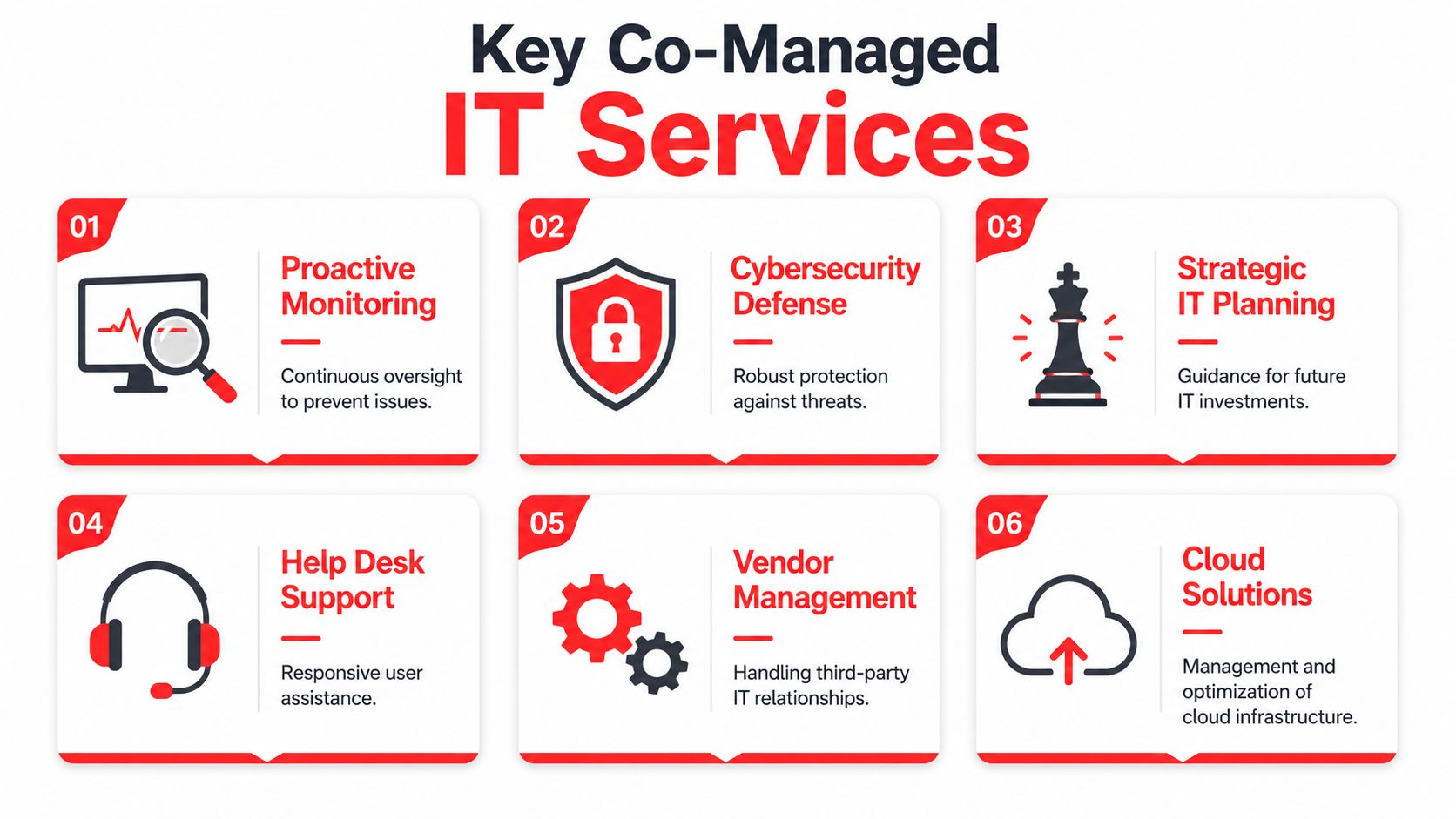
What Is the Difference Between Co-Managed and Fully Managed IT?

This is one of the first big decisions you'll make, and the right choice boils down to what you already have in-house. It’s about deciding if you need a full-time partner to run the show or a specialist to back up your existing team.

Fully managed IT is exactly what it sounds like. You're handing over the keys to your entire IT operation to the MSP. They become your IT department, handling everything from the 24/7 helpdesk and cybersecurity to long-term technology planning. This is the go-to choice for businesses that don't have (or want) an internal IT person on the payroll.

Co-managed IT, on the other hand, is all about partnership. Your current IT staff keeps handling their day-to-day duties, but the MSP comes in to act as a force multiplier. They fill the gaps, providing tools and expertise your team might not have. For example, your team handles user tickets while the MSP manages complex server infrastructure and provides 24/7 SOC-level cybersecurity monitoring.

We see this a lot with growing businesses in Central Florida. The co-managed model lets them keep their trusted in-house expert while plugging into enterprise-grade security and a deep bench of specialists—something that would be impossible to hire for directly. It's a game-changer.
How Important Is a Local Presence for an MSP in a City Like Orlando?

While it’s true that a good MSP can fix most problems remotely, a local presence becomes absolutely critical when things go physically wrong. You simply can't reboot a fried server from a thousand miles away.

Having an MSP with engineers in the Orlando or Kissimmee area means they can get a technician on-site in a hurry, slashing the downtime that costs you money. A local provider also just gets it—they understand the regional business climate, the challenges, and even the traffic patterns that affect response times.

Beyond emergencies, there's real value in being able to sit across the table for a strategic meeting. It builds a stronger, more accountable partnership when you can look your technology partner in the eye. Knowing that expert help is just a short drive down I-4 provides a level of peace of mind you can't get from a call center on the other side of the country.

Why Should I Choose a Flat-Rate Model Over a Cheaper Per-Hour Option?

The break-fix, or per-hour, model seems cheaper on the surface, but it creates a fundamental conflict of interest. With that model, the IT provider only gets paid when your technology breaks. Their business model literally depends on your problems.

A predictable, all-inclusive flat-rate model completely flips that dynamic. It aligns the MSP’s financial success directly with yours. They make a profit by keeping your systems running so smoothly that you have fewer reasons to call them. This proactive mindset is a win-win.

  • Higher uptime because their goal is prevention, not reaction.
  • Better security because they are highly motivated to stop threats before they can cause a billable emergency.
  • A predictable monthly IT budget that eliminates surprise invoices for after-hours work or disaster recovery.

At the end of the day, a flat-rate plan means you're investing in uptime and resilience, not paying for downtime and chaos.

What Should I Expect During the Onboarding Process?

A well-structured onboarding process is the sign of a truly professional MSP. It shouldn't feel chaotic or disruptive. A mature provider will have a documented plan to get you from kickoff to fully supported without a hitch.

  • Deep-Dive Discovery: It all starts with a thorough audit. The MSP's team will map out and document your entire technology environment—every server, workstation, software license, and user account.

  • Agent Deployment & System Takeover: Next, they'll quietly install their remote monitoring and security agents on all your devices. This is how they gain the visibility needed to proactively manage your network.

  • Documentation Handover: You should receive a comprehensive set of documents, including network diagrams. This becomes the blueprint for your entire IT infrastructure.

  • Team Introduction & Training: The MSP should meet with your staff to explain how to get support, introduce them to key contacts, and set clear expectations for the partnership.

  • First Strategic Review: The process isn't complete until you've had your first strategic business review. This meeting confirms that your technology roadmap is aligned with your business goals right from day one.


If you're a business in Orlando, Kissimmee, or anywhere in Central Florida looking for a true IT partner, not just another vendor, Cyber Command, LLC is ready to help. Our all-inclusive, flat-rate model and 24/7 U.S.-based support team are designed to give you peace of mind and measurable results. Learn more about how we can protect and grow your business at https://cybercommand.com.

Why Mean Time to Resolution Is Your Most Critical Business Metric

When a critical server crashes at your Orlando medical practice or a ransomware attack paralyzes your Tampa law firm, every second of downtime is a direct financial drain. This is where Mean Time to Resolution (MTTR) comes in.

It’s the total time from the moment a digital problem is first detected until your business is completely back to normal. A low MTTR means you recover faster, protecting your revenue and reputation.

To help you get a quick handle on this metric, here's a simple breakdown.

MTTR at a Glance

Component Description Business Impact
Detection The moment an alert is triggered or a problem is reported. Starts the clock on downtime costs.
Response The time it takes for your team to begin actively working on the issue. A slow response prolongs the problem and its financial impact.
Diagnosis The process of identifying the root cause of the incident. Inaccurate diagnosis leads to wasted effort and extended outages.
Repair & Recovery The actions taken to fix the issue and restore full functionality. This is the hands-on work that gets your business back online.
Verification Confirming that the fix works and the system is stable and secure again. Prevents recurring issues and ensures the problem is truly solved.

Essentially, MTTR measures the entire lifecycle of an incident, from the first warning sign to the final "all clear." It's one of the most honest indicators of your IT team's effectiveness and your business's overall resilience against cyber security threats.

Your Business Is Leaking Money Until an Incident Is Resolved

Imagine a pipe bursts in your office. You wouldn't just turn off the water main and call it a day. You'd have to repair the pipe, dry the carpets, and make sure the space is safe and operational again.

A cybersecurity incident or IT failure works the same way. The clock is ticking, and a slow response means more damage, higher costs, and greater disruption. The longer it takes to resolve, the more it hurts your bottom line.

For businesses across Central Florida, from legal offices in Orlando to industrial firms in Tampa, this "damage" takes many forms:

  • Lost Revenue: Every minute your systems are down is a minute you can't serve clients, process payments, or conduct business.
  • Wasted Productivity: Your team is left unable to work, grinding operations to a halt while the payroll clock keeps ticking.
  • Damaged Reputation: Unresolved cyber security issues quickly erode client trust, especially in industries like healthcare and finance where data security is everything.

The True Cost of Slow Resolutions

A slow incident response creates a domino effect. What starts as a minor network hiccup can quickly escalate into a full-blown operational crisis if you don't jump on it fast. A common concern for businesses is a phishing attack leading to a ransomware event, which can shut down operations for days or weeks if not handled swiftly.

That's why mean time to resolution isn’t just some IT statistic to track on a dashboard; it’s a direct measure of your business's ability to absorb a hit and get back on its feet.

To truly grasp the financial impact, think about the importance of digital analytics efficiency. Just like in analytics, every moment of inefficiency in your IT response translates directly into real, tangible costs.

A high MTTR is a symptom of a reactive, break-fix IT strategy. It’s a red flag that your business is vulnerable to long periods of disruption, creating unpredictable costs and operational chaos that can kill growth and hand your competitors an advantage.

This is why getting a handle on your MTTR is a competitive necessity. It forces you to shift from just fixing problems to building a resilient operational framework. For a deeper look at building this kind of resilience, our guide on business continuity and disaster recovery services offers some valuable insights.

Ultimately, a lower MTTR means less money leaked, more client trust retained, and a stronger, more resilient business.

Deconstructing the Incident Response Timeline

To really get a handle on Mean Time to Resolution, you have to look at the entire incident lifecycle, not just one piece of it. Think of it like a fire department responding to an emergency. Their clock doesn't start when they begin spraying water. It starts the second the alarm rings and only stops when the fire is completely out, the smoke has cleared, and the building is safe to re-enter.

That same all-encompassing view applies to your business's IT and cybersecurity incidents. MTTR isn't just about the time spent on the "fix." It’s the full story, tracking every single step from the moment an alert pops up until your business is 100% back to normal.

The Four Stages of Incident Resolution

The journey from initial alert to full recovery can be broken down into four distinct stages. Delays in any one of these will drag down your overall MTTR, costing you time and money.

  1. Detection: This is the starting gun. It’s the moment an issue is first spotted, whether it’s an automated alert from a security tool, an error message flashing on a screen, or an employee reporting they can’t get into a critical system.

  2. Diagnosis: Once the alert is acknowledged, the real investigation begins. Your IT team or managed services provider digs in to figure out what’s happening, how bad it is, and what caused it. Is this a minor network hiccup or the start of a full-blown ransomware attack? Getting this diagnosis right is crucial for an effective response.

  3. Remediation: This is the hands-on "fix" phase where the plan of action is executed. It could involve anything from restoring data from a backup and patching a vulnerability to isolating an infected device to prevent a cyber threat from spreading. This is what most people think of as the entire resolution process, but it's only one part of the timeline.

  4. Resolution and Verification: This is the final, and arguably most important, stage. After a fix is in place, the team has to confirm that everything is stable, secure, and working as expected. This isn't just about making sure the problem is gone; it’s about making sure it won't pop right back up and that business can truly resume without a hitch.

Every second that ticks by during these stages has a financial impact. This flow shows how costs mount from the initial problem until your operations are fully recovered.

Flowchart illustrating the incident cost flow from initial alert to downtime loss and resolution recovery.

As you can see, downtime is the painful, expensive gap between the incident and its final resolution. Every minute you can shave off that time is money saved.

More Than Just a Technical Fix

It's easy to get MTTR confused with other metrics, but the difference is critical. For example, Mean Time to Detect (MTTD) only measures that first stage—how long it takes to know a problem exists. A low MTTD is great, but it’s just one piece of the puzzle. Similarly, Mean Time to Acknowledge (MTTA) only tracks how quickly your team starts working on a ticket.

True resolution isn't just about a technical repair; it's about complete business recovery. The MTTR clock only stops when your operations are 100% back to normal, ensuring genuine business continuity.

This is what makes Mean Time to Resolution the gold standard. It measures the complete timeline from alert to full incident closure. That’s why it’s a lifeline for any organization that depends on uptime and accountability. The math is straightforward: if you had 4 incidents that resulted in a total of 20 hours of downtime, your MTTR is 5 hours (20 hours / 4 incidents).

A well-defined timeline helps you spot bottlenecks in your process. If your diagnosis phase is always dragging on, it’s a red flag that you might need better monitoring tools or more experienced technicians on deck. By understanding each step, you can start building a much more effective response. For more information, check out our guide on crafting your incident response plan for max efficiency.

Alright, let’s move from theory to practice. Knowing what Mean Time to Resolution is conceptually is one thing, but actually calculating it for your business is where the rubber meets the road. This simple calculation gives you a brutally honest, data-driven look at how well your business weathers a storm.

It’s the first step in moving from a reactive, fire-fighting IT process to a proactive operational advantage.

The formula itself is refreshingly simple. You just take the total time spent resolving all incidents over a set period and divide it by the number of incidents you had in that same timeframe.

MTTR = Total Time of All Incidents ÷ Number of Incidents

This gives you a single, powerful number—the average time it takes your business to get back on its feet after something breaks. It’s the baseline you’ll use to measure improvement and hold your IT team or provider accountable.

Putting the MTTR Formula into Practice

Let's walk through a real-world scenario. Imagine an industrial firm here in Orlando has a rough month and gets hit with three separate IT incidents that grind their operations to a halt.

  • Incident 1: Ransomware Attack: A nasty cyberattack encrypts their main server, making files inaccessible. From the moment it was detected to the point where the system was fully restored from backups and verified secure, the total downtime was 48 hours.
  • Incident 2: Network Outage: A hardware failure took down the network across their entire office. The team managed to get it resolved in 6 hours.
  • Incident 3: Critical Software Bug: A bug in their core operational software stopped all order processing. It took 10 hours to get the fix deployed and working correctly.

To figure out their MTTR for the month, we just add up the resolution times and divide by the number of incidents.

Total Time = 48 hours + 6 hours + 10 hours = 64 hours
Number of Incidents = 3

MTTR = 64 hours ÷ 3 incidents = 21.33 hours

For this company, it took an average of over 21 hours to fix each problem. As a business owner, that number should be a massive red flag. It shows a serious vulnerability; when things go wrong, the pain is long and expensive. For another business, five incidents taking 4, 12, 6, 9, and 9 hours respectively would result in an 8-hour MTTR—a much healthier baseline that many SMBs can use to gauge their helpdesk's performance.

Why You Must Segment MTTR by Severity

While an overall MTTR is a great starting point, it doesn't paint the whole picture. Lumping a minor printer jam in with a catastrophic data breach will seriously skew your data and can mask major cyber security risks hiding in plain sight.

A truly effective analysis means you have to segment your incidents by their severity.

Think about a law firm in Tampa. They should have drastically different expectations for fixing different types of problems.
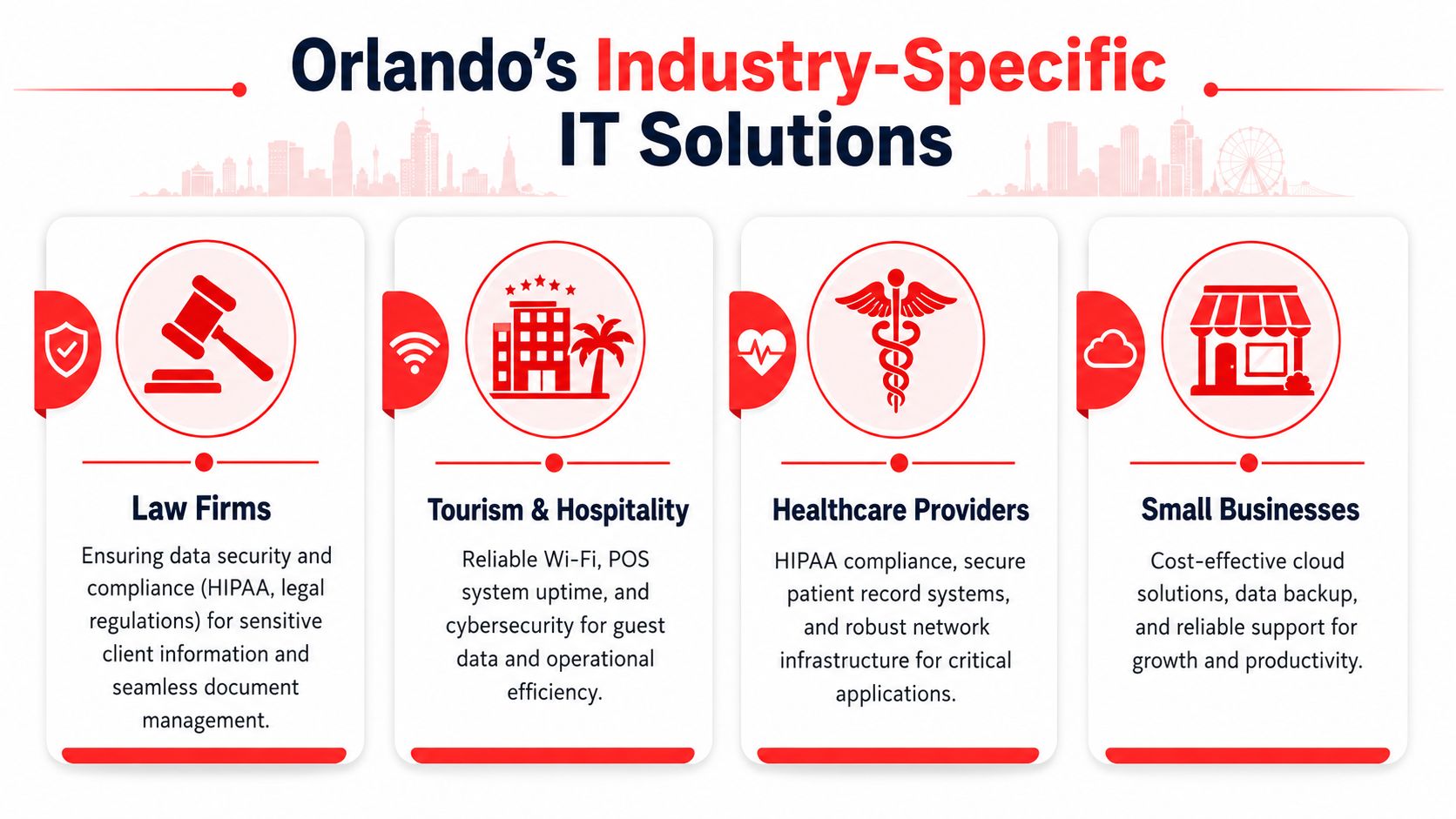
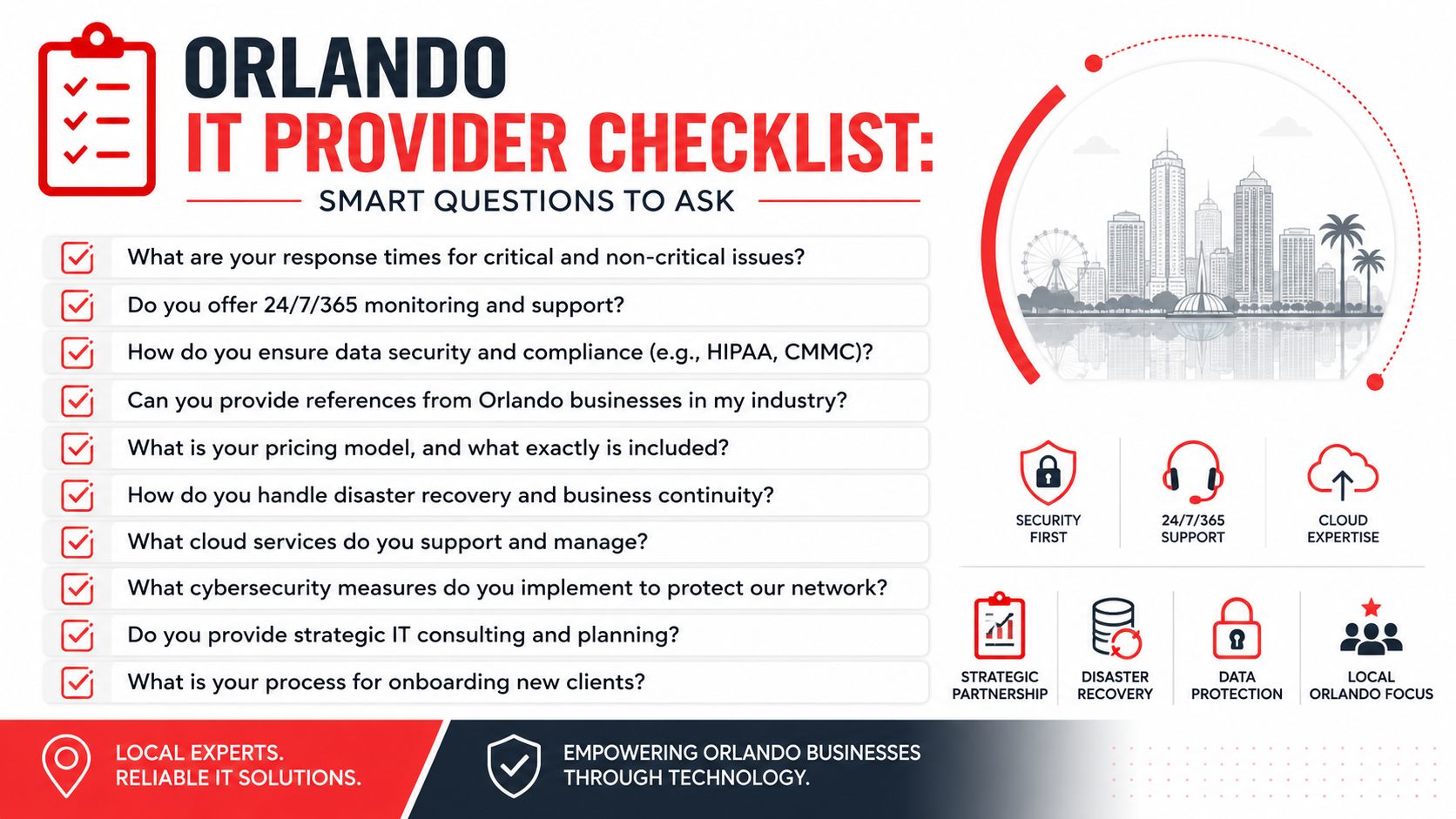
  • Critical (Severity 1): A system-wide outage, a data breach, or a ransomware attack. The business is at a complete standstill.
  • High (Severity 2): A key application is down, or a whole department can't work.
  • Medium (Severity 3): A single user is impacted, or a non-critical feature isn't working right.
  • Low (Severity 4): A minor inconvenience with an easy workaround, like a quirky printer.

You can't afford to wait 24 hours to address a data breach, but you also wouldn't expect a printer jam to be fixed in 15 minutes. By calculating a separate MTTR for each severity level, you get a much clearer, more realistic view of your team's response capabilities. This practice is a core function of effective IT service management software, which helps automate all this tracking and reporting for you.

This segmented approach lets you set realistic targets. Your goal for a critical incident might be an MTTR of under 4 hours, while an MTTR of 48 hours for low-priority issues could be perfectly fine. It empowers you to stop treating every problem with the same five-alarm-fire urgency and start focusing your resources where they truly matter—on the threats that pose the biggest risk to your business.

What Is a Good MTTR in Your Industry

Once you start calculating your Mean Time to Resolution, the next question is always the same: "So, what's a good number?"

The honest answer? There’s no magic number that works for every business. A "good" MTTR is all about context—specifically, the severity of the problem and the industry you’re in.

Think of it this way: a total system outage at a busy Orlando law firm is a five-alarm fire. Every minute of downtime costs real money and client trust. But a slow printer at an industrial facility in Winter Springs? That's an annoyance, not a full-blown crisis. A one-size-fits-all MTTR target is just not practical.

A much smarter approach is to set different MTTR goals based on an incident's severity. This lets you focus your energy where it matters most: on the critical cyber security threats that can stop your business cold.

Benchmarks for Cybersecurity Incidents

In the high-stakes world of cybersecurity, MTTR isn't just a metric; it’s a direct measure of your defense. Speed is everything. For Central Florida businesses, especially those in finance, legal, or healthcare that handle sensitive data, knowing the industry benchmarks is the first step in figuring out if you're prepared.

Here's what the security world expects:

  • Critical Vulnerabilities: Elite security teams aim to crush critical threats—like a zero-day exploit or active ransomware attack—within 24 to 72 hours. This is the gold standard for mature, proactive security.
  • High-Risk Compliance Issues: For regulatory findings, frameworks like NIST SP 800-53 might give you a window of 30 to 90 days for remediation.

It's critical to see these numbers as the absolute maximum time you have, not a goal to aim for. As you'll find in expert cybersecurity guides, while a framework might allow 30 days, the real industry leaders resolve these issues in a fraction of that time. That’s how they demonstrate a truly superior security posture.

The gap between an acceptable MTTR and an excellent one is often the difference between just surviving an attack and stopping it before it does real damage. Elite security teams don't just meet compliance deadlines; they race against the clock to neutralize threats in hours, not days.

Getting those urgent threats resolved in under an hour—that's what separates a reactive IT department from a strategic security partner.

Why Your Industry Matters

What counts as a "good" MTTR changes dramatically depending on what your business does. A delay that’s a minor headache for one company can be a catastrophe for another.

Let's look at a few local examples here in Central Florida:

  • A Medical Practice in Lakeland: If their patient record system goes down due to a cyberattack, it hits their revenue and patient trust instantly. For them, a critical MTTR of under 2-4 hours is a must.
  • An Orlando Law Firm: Their case management software is their lifeline. If a data breach occurs, projects grind to a halt and client confidentiality is at risk. They must set an MTTR of 4-8 hours for high-severity issues.
  • A Local Industrial Distributor in Tampa: A server outage that takes down their inventory system could throw their entire supply chain into chaos. Their target MTTR for a critical failure has to be as close to zero as possible to avoid a logistical nightmare.

At the end of the day, defining a "good" mean time to resolution means looking at your own operations, risks, and what you can't afford to lose. The goal is to set benchmarks that protect your revenue, your reputation, and your relationships. This is how you turn response time into a real business advantage—and it’s a key benefit of working with a 24/7 managed security provider.

Proven Strategies to Lower Your MTTR

Five glass blocks display IT security and operations concepts: 24/7 SOC, Incident Plan, Automation, Maintenance, and Training.

Knowing your Mean Time to Resolution is the first step, but actually lowering it is how you build a more resilient—and profitable—business. A high MTTR is more than just a bad score; it’s a flashing red light signaling inefficiencies that are costing you money, client trust, and productive hours.

The good news? This isn't some abstract goal. Bringing that number down is entirely achievable with the right game plan. Each of the following strategies is designed to shrink the incident lifecycle, slash downtime, and protect your bottom line, whether you're a medical practice in Lakeland or a law firm in Orlando.

Implement a 24/7 Security Operations Center

Cyberattacks don’t punch a clock. A threat that pops up at 2 a.m. can cause catastrophic damage long before your team even sips their morning coffee. A 24/7 Security Operations Center (SOC) is your answer to this, eliminating that dangerous after-hours blind spot with around-the-clock monitoring and response.

Think of a SOC as your company’s dedicated security watchdog, staffed by experts who are actively hunting for threats. When an incident occurs, they respond in moments, not hours. This immediate action drastically shortens the detection and remediation stages of an incident.

For Central Florida businesses, this means:

  • No More After-Hours Delays: An alert at midnight gets handled right then and there, stopping a minor issue from snowballing into a full-blown crisis by morning.
  • Active Threat Hunting: A good SOC doesn’t just sit and wait for alarms. They proactively search for signs of compromise, stopping attackers in their tracks.
  • Expert Response on Tap: You get immediate access to cybersecurity pros who know exactly how to contain and neutralize threats, putting a serious dent in your mean time to resolution.

Develop a Clear and Practiced Incident Response Plan

When a crisis hits, chaos is your worst enemy. Without a clear plan, teams panic, people make mistakes, and precious time is vaporized. An Incident Response Plan (IRP) is your playbook, telling your team exactly what to do, who to call, and which steps to take during a security incident or IT failure.

It’s like a fire drill for your digital assets. A well-practiced IRP transforms a frantic, disorganized reaction into a swift, coordinated response because everyone knows their role.

An IRP is more than a document—it's muscle memory for your entire organization. By defining roles and standardizing procedures, you remove the guesswork and hesitation that inflates your MTTR.

This plan can't just collect dust on a shelf. It needs to be a living document that you test and update regularly. The goal is to make the response process so familiar that it becomes second nature.

Leverage Automation for Detection and Containment

Humans can only move so fast, but in cybersecurity, speed is everything. Automation gives you a critical edge. Modern security tools can automatically detect and contain many threats far faster than any human ever could.

This is an absolute game-changer for reducing mean time to resolution. For instance, Security Orchestration, Automation, and Response (SOAR) platforms can automate routine tasks like quarantining an infected laptop or blocking a malicious IP address the second it's detected.

This automation frees up your technical team to focus on the more complex parts of the puzzle, like root cause analysis and recovery. To effectively lower your MTTR, you have to find ways to speed up every part of your response. For example, reducing system latency is a critical piece of the puzzle, and there are plenty of proven tips for faster systems that can make a real difference.

Adopt Proactive IT Maintenance

Honestly, the fastest way to resolve an incident is to prevent it from ever happening. A reactive, break-fix approach to IT is a surefire recipe for a high MTTR. Proactive maintenance flips the script—it involves regularly updating systems, patching vulnerabilities, and monitoring performance to catch problems before they cause downtime.

For example, consistent patch management closes the very security gaps attackers love to exploit. At the same time, performance monitoring can spot the tell-tale signs of hardware failure long before a server actually crashes. This preventative mindset is a core principle of effective managed IT services.

It shifts your IT from a cost center that’s always fighting fires to a strategic asset that maintains stability and uptime. This is especially vital for industries like professional services and healthcare, where any disruption can have serious financial and reputational consequences.

Provide Continuous Security Awareness Training

Your employees can be either your weakest security link or your first line of defense. The choice often comes down to training. Phishing attacks, which are behind a massive number of security breaches, succeed by tricking a single, unsuspecting employee.

Ongoing security awareness training teaches your team how to spot and report suspicious activity. When an employee in your Tampa office flags a phishing email instead of clicking on it, they’ve stopped an incident before it even began. This drastically reduces the number of incidents your team needs to resolve in the first place, directly improving your security posture and keeping that MTTR nice and low.

Turn Your MTTR into a Competitive Advantage

A bright office desk with a laptop displaying an upward trend graph and an MTTR competitive advantage plaque.

For business owners in Orlando and across Central Florida, Mean Time to Resolution shouldn’t be just another IT metric gathering dust in a report. Think of it as your company’s pulse. It tells you exactly how resilient and efficient you are when things go wrong, directly impacting your bottom line.

A high MTTR is a hidden vulnerability, a constant drain on your team’s time and your company’s resources. But a low MTTR? That’s a serious competitive advantage.

The secret is ditching the reactive, break-fix mindset for good. Instead of just fixing problems as they pop up, a proactive partnership builds a technology strategy designed for prevention and lightning-fast resolution. This move turns IT from an unpredictable expense into an asset that drives stability and growth.

All the strategies we've covered—from having a 24/7 SOC to a clear incident response plan—aren’t just standalone tactics. They all work together, forming a mature operational strategy that keeps your business running smoothly.

From Hidden Risk to Powerful Asset

This is exactly where Cyber Command’s services make a real, measurable impact on your business. Our entire approach is built to systematically drive your mean time to resolution down by tackling the root causes of delays and inefficiency.

Here’s how our services directly deliver on the strategies that matter:

  • 24/7/365 SOC: Our Security Operations Center provides the constant watchfulness needed to slash detection and response times. We neutralize cyber threats before they can cause costly disruptions.
  • Proactive Managed IT: We don't wait around for things to break. Through proactive maintenance, patching, and monitoring, we prevent many incidents from ever happening in the first place—the best way to keep your MTTR as low as possible.
  • Transparent Reporting: We believe in results you can see. Our business-focused reports show you exactly how your MTTR is improving, giving you predictable costs and a clear return on your investment.

For professional service firms and medical practices across Central Florida, this isn't just about managing tickets; it's about managing risk. A low MTTR means protected client data, uninterrupted service delivery, and solid business continuity—the very foundation of trust and profitability.

The goal is to stop firefighting and start building. When you partner with Cyber Command, you get a technology roadmap that’s fully aligned with your business goals. We handle the uptime, security, and accountability so you can focus on growth.

Ready to turn your MTTR from a vulnerability into your next competitive advantage? Contact Cyber Command today to schedule a consultation. Let’s build a technology strategy that delivers predictable costs, clear communication, and measurable results for your Orlando or North Texas business.

Your MTTR Questions, Answered

Here are a few of the most common questions we get from business owners across Central Florida about Mean Time to Resolution.

Does a Low MTTR Really Impact My Small Business Bottom Line?

You better believe it. For any small business in cities like Orlando or Tampa, every single minute of downtime is a direct hit to your wallet. It's lost revenue, stalled productivity, and a potential black eye on your reputation. A low mean time to resolution isn't just a tech metric; it's about getting your business back on its feet faster to stop the bleeding.

Think about a professional services firm—like a law or accounting practice. Faster resolution isn't just about convenience; it’s about maintaining client service, protecting incredibly sensitive data from cyber security threats, and upholding the trust you've worked so hard to build. That’s how you protect your competitive edge.

Can I Improve MTTR Without a Dedicated IT Department?

Yes, and honestly, this is where partnering with a managed IT services provider becomes a game-changer. Many small and mid-sized businesses, especially privately owned medical practices or law firms in Florida, simply don't have the resources for a deep in-house IT bench. That's okay. Partnering with a provider gives you instant access to a 24/7 Security Operations Center (SOC) and an expert helpdesk.

This co-managed or fully managed model delivers the tools, processes, and people you need to dramatically reduce your MTTR—all without the massive overhead and expense of building a full internal team from scratch.

How Often Should My Business Report On MTTR?

While you should be tracking MTTR constantly behind the scenes, formal reporting on a monthly or quarterly basis is usually the sweet spot. This rhythm is frequent enough to let you spot trends, see the real-world impact of new strategies like cybersecurity awareness training, and catch recurring issues that might point to a bigger, underlying problem.

This approach keeps everyone in the loop and provides a consistent, data-driven look at how your IT and security posture is improving. It's about making sure your technology is actively supporting your business goals, not holding them back.


Ready to transform your mean time to resolution from a hidden risk into a powerful business asset? The team at Cyber Command, LLC provides the proactive partnership and 24/7 support needed to keep your Central Florida business secure and resilient. Schedule your consultation today.