Cloud Services in Orlando, FL: Expert Guide for 2026

Your office server is aging out. Remote staff need reliable access to files and line-of-business apps. Your cyber insurance renewal asks harder questions than it did last year. Meanwhile, every provider says they offer “the cloud,” but very few explain what that means for a law office in downtown Orlando, a medical practice in Winter Park, or a finance team supporting multiple locations across Central Florida.

That's where most cloud conversations go wrong. Business owners get broad promises about flexibility and lower costs, but they don't get practical guidance on compliance, security operations, migration risk, or billing surprises. For many Orlando companies, the primary issue isn't whether cloud services matter. It's whether the move will be secure, predictable, and aligned with how the business functions.

A useful cloud strategy starts with local reality. Central Florida firms often need secure remote access, dependable uptime, industry-specific controls, and a partner who can support users without turning every issue into a project. That applies whether you run a dental group, accounting practice, architecture firm, engineering office, veterinary clinic, or multi-site professional services business.

Table of Contents

Is Your Orlando Business Ready for the Cloud

A common Central Florida scenario looks like this. A growing firm has a server in a back office closet, a few business-critical apps that only “really work” on-site, and staff who split time between the office, home, and client locations. Every time a storm rolls through, every time internet service blips, and every time someone clicks the wrong email, leadership gets reminded how fragile that setup can be.

The problem usually doesn't show up as one dramatic failure. It shows up in smaller operational drag. Employees wait on file access. Managers worry about whether backups are valid. Ownership keeps approving one-off fixes instead of moving to a design that supports the business.

That's why Cloud Services in Orlando FL should be viewed as a business decision, not a hardware replacement project. The cloud changes how your team accesses systems, how security controls are enforced, how disaster recovery works, and how monthly IT costs are managed.

Businesses usually don't move to the cloud because they love new infrastructure. They move because the old model keeps creating risk, delay, and avoidable cost.

For law firms, the pressure tends to center on confidentiality and secure document access. For accounting and financial teams, it's controlled access, retention, and audit readiness. For medical offices in Orlando and Winter Park, it's secure availability of patient information and dependable workflows for front desk, billing, and clinical staff.

Three signs tell me a company is ready:

  • Operations are outgrowing the office server model: Staff need access from multiple locations or devices, and the current setup creates friction.
  • Security expectations have changed: Insurance, client demands, or internal leadership now require stronger controls than the current environment can support easily.
  • The business needs predictability: Leadership wants fewer surprise outages, fewer surprise projects, and a clearer monthly operating model.

If any of those sound familiar, cloud adoption isn't a trend exercise. It's a move toward a more resilient operating model.

Decoding the Cloud A Simple Guide for Business Leaders

Cloud terms get overcomplicated fast. Business owners don't need jargon. They need a practical way to understand what they're buying and how much responsibility stays on their side.
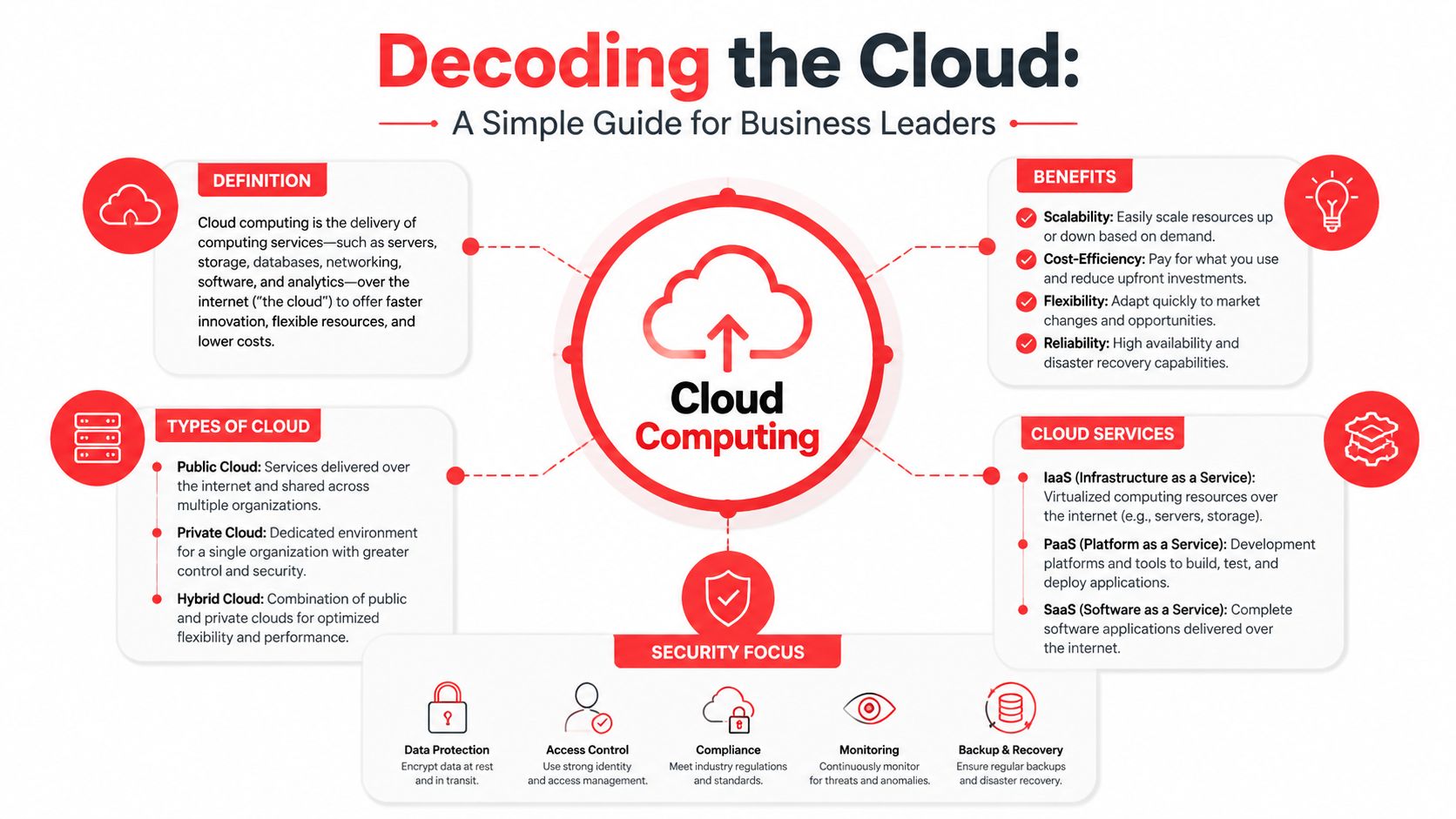
An infographic titled Decoding the Cloud explaining cloud computing, its benefits, types, services, and security practices.

What cloud infrastructure actually means

Cloud infrastructure is a mix of physical and virtualized resources such as servers, storage, networking, virtualization, and security controls. Those components enable on-demand self-service, resource pooling, and rapid elasticity, so businesses can provision computing resources without human interaction for each request and scale as demand changes, as outlined in Microsoft's cloud infrastructure definition.

In plain English, that means you don't have to buy every piece of hardware before you need it. You consume computing capacity as a service. Your team gets access to systems and data without tying business continuity to one piece of equipment in one building.

The restaurant analogy for cloud services

The easiest way to understand service models is to think about dining.

  • Infrastructure as a Service: You're given a kitchen and ingredients, but you still do most of the cooking. This works for businesses that need flexibility and custom environments.
  • Platform as a Service: The kitchen is partly prepared for you. Core setup is handled, and your team focuses more on building and running applications.
  • Software as a Service: You sit down and order the meal. The application is ready to use, and the provider handles most of the underlying complexity.

The trade-off is control versus simplicity. More control usually means more responsibility for configuration, maintenance, and security. More simplicity can reduce overhead, but it may limit customization.

Practical rule: If your team has low internal IT capacity, don't choose a cloud model that assumes deep in-house administration.

Which deployment model fits your business

Deployment model matters just as much as service model.

A public cloud setup is shared infrastructure with logical separation between customers. It's often a strong fit when scalability and speed matter more than owning every layer.

A private cloud environment gives a business more isolation and potentially more custom control. Some regulated workflows benefit from that, but it usually requires tighter management discipline.

A hybrid cloud model combines cloud resources with some retained on-premise systems. This can be the right middle ground for firms that need to phase migration, support a legacy application, or handle a specific compliance concern carefully.

Here's the practical filter I use for Orlando business leaders:

Business situation Likely fit Main caution
Growing office with remote staff and common business apps Public or hybrid Don't assume default settings equal security
Professional firm with sensitive records and older apps Hybrid Legacy app dependencies can slow migration
Medical or financial workflow with strict access controls Private or hybrid Compliance design matters more than marketing terms

A good cloud conversation should leave you with clearer responsibilities, not more confusion.

Cybersecurity and Compliance for Orlando Professionals

For professional, medical, and financial firms, cloud security can't be bolted on after the migration. The architecture has to start with compliance, access control, logging, recovery planning, and user behavior. If those pieces are treated as optional add-ons, the business ends up paying for the decision later.
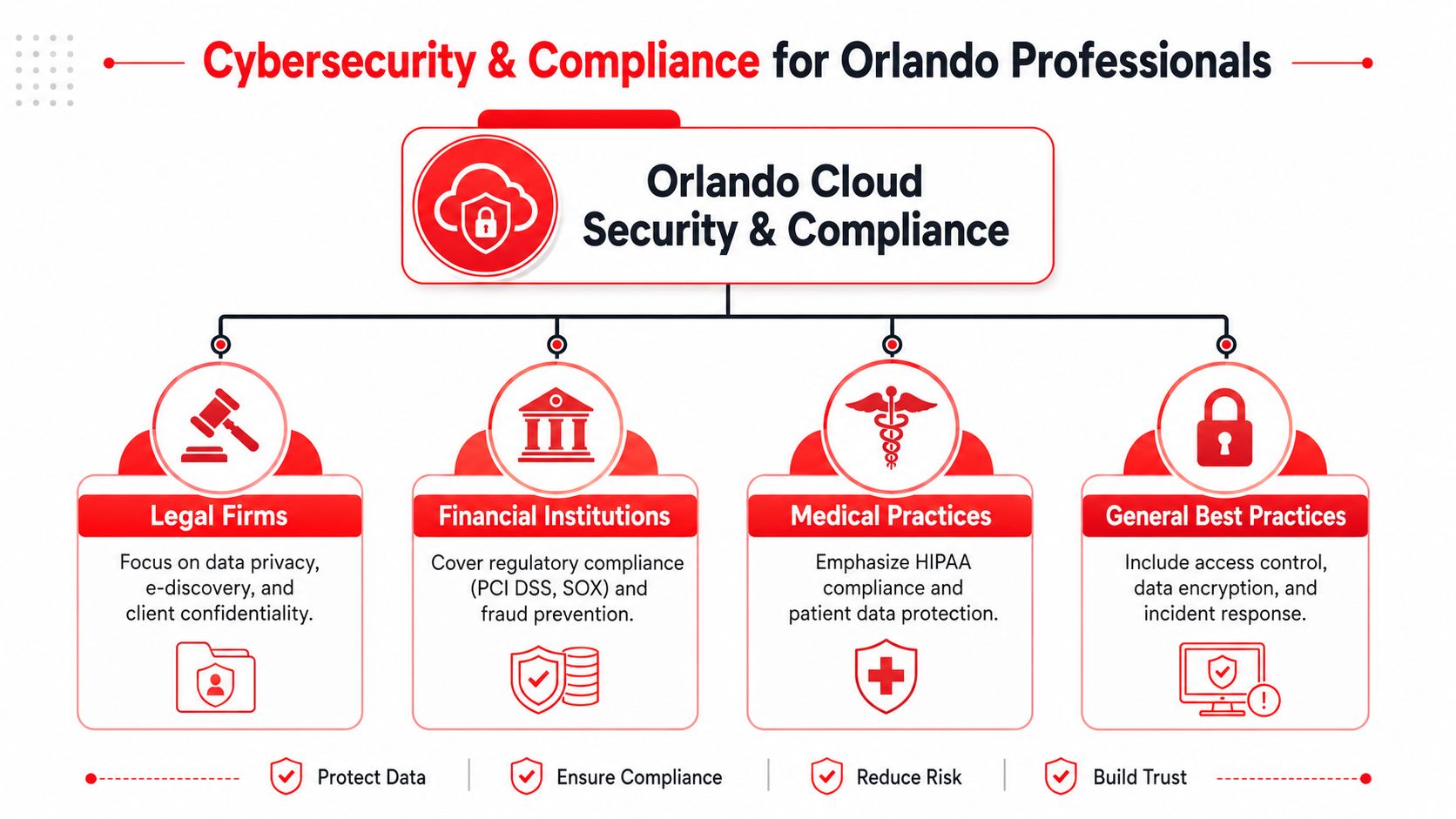
A diagram outlining cybersecurity and compliance services tailored for professional industries in Orlando, Florida.

Why regulated firms need a different cloud design

This is a real sticking point in Central Florida. A 2025 Gartner report cited in Orlando cloud provider analysis found that 68% of small professional firms in Central Florida delay cloud migration due to uncertainty about aligning with compliance frameworks like HIPAA and FLSA. That hesitation makes sense. Many provider pages talk about migration and uptime in generic terms, but they don't explain how the environment should be configured for legal, medical, or financial data.

For a medical office, HIPAA isn't just about where data sits. It affects access decisions, audit capability, encryption, vendor oversight, recovery procedures, and workforce training. For firms dealing with government-adjacent requirements, CMMC-related expectations make documentation and control maturity more important. Even when a company isn't formally audited today, clients and insurers may still expect those disciplines.

A compliance-first approach means asking design questions early:

  • Who can access what: Role-based access should match actual job duties, not convenience.
  • How data is protected: Encryption should cover data at rest and in transit.
  • What gets logged: Audit trails need to show who accessed sensitive information and when.
  • How incidents are handled: The provider should explain detection, escalation, containment, and recovery in plain language.

What to demand from a compliance-first environment

Orlando businesses need robust cloud data security practices that include strong encryption, analytics to monitor encryption effectiveness, integrated network security controls, and virtualization techniques that improve protection. Those measures help reduce unauthorized access, phishing exposure, and ransomware risk, while supporting compliance frameworks such as HIPAA and CMMC, according to guidance on cloud data security for Orlando businesses.

That sounds technical, but the buying questions are straightforward.

  • Encryption coverage: Ask whether sensitive data is encrypted both in storage and during transmission.
  • Identity controls: Require multi-layered access governance, not just passwords.
  • Security operations: Confirm whether someone is actively reviewing threats or only reacting to tickets.
  • Help desk awareness: Front-line support staff should know how to recognize and escalate suspicious activity.
  • Business continuity: Recovery planning should exist before a failure, not after one.

If your organization handles protected health information, start with HIPAA compliance experts who can map security controls to day-to-day workflows rather than treating compliance like a paperwork exercise.

The cheapest cloud environment often becomes the most expensive one once rework, compliance gaps, and incident response enter the picture.

Industry focus across Central Florida

Different industries in Central Florida need different cloud decisions.

Law firms in Orlando often need secure document access, retention discipline, and confidentiality controls that work for partners, staff, and outside collaborators. Accounting firms and financial organizations typically care about controlled permissions, secure file exchange, business continuity, and consistent device standards across offices. Medical practices in Orlando and Winter Park need reliable access for clinicians and staff without exposing patient information through weak onboarding, poor access cleanup, or unmanaged endpoints.

Healthcare and finance businesses in Orlando, Winter Park, and Lake Mary often require cloud strategy and migration support that includes 24/7 monitoring so users can securely access business systems through online platforms rather than relying on local equipment, as described in Central Florida cloud services guidance.

The pattern is simple. Generic cloud hosting isn't enough for regulated work. Businesses in these sectors need a design that treats security, compliance, and continuity as the baseline.

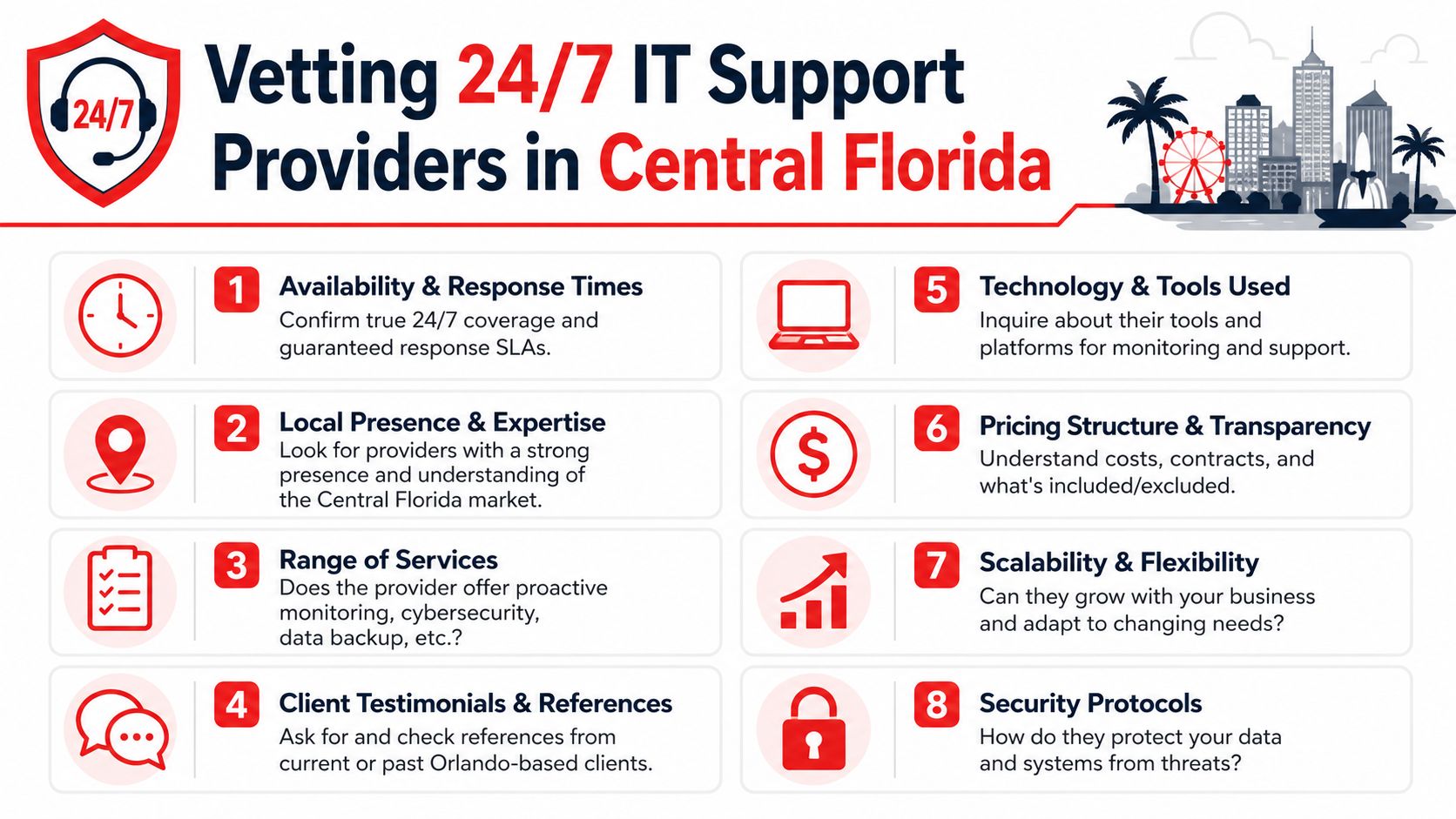
How to Vet and Choose an Orlando Cloud Partner

Most providers sound similar until you ask operational questions. That's when the difference between polished marketing and dependable service starts to show.

The difference between monitoring and active defense

A provider may say they offer security monitoring. That can mean anything from alert forwarding to full incident investigation. For a business owner, the important question is whether qualified staff are watching, investigating, and responding around the clock.

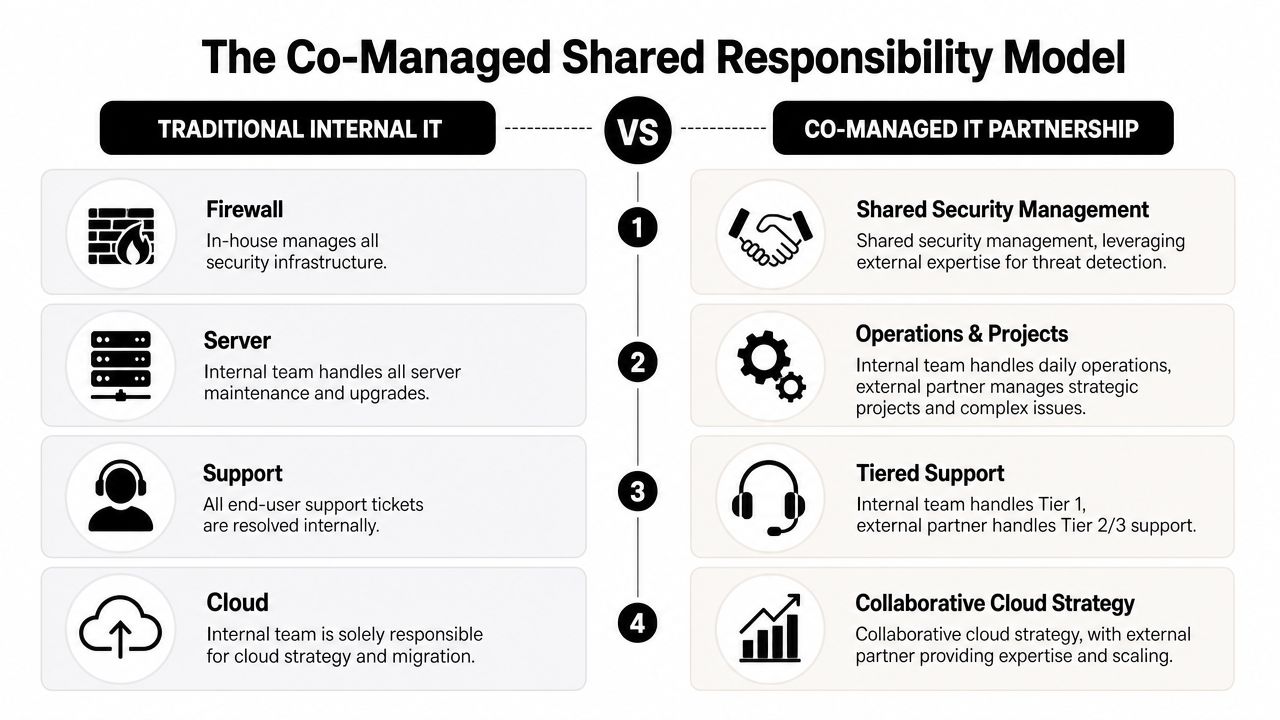
You also need to know how the provider works with your internal staff. Some companies want full outsourcing. Others need co-managed support because they already have an internal administrator or operations lead. Both can work. Problems start when responsibilities are vague.

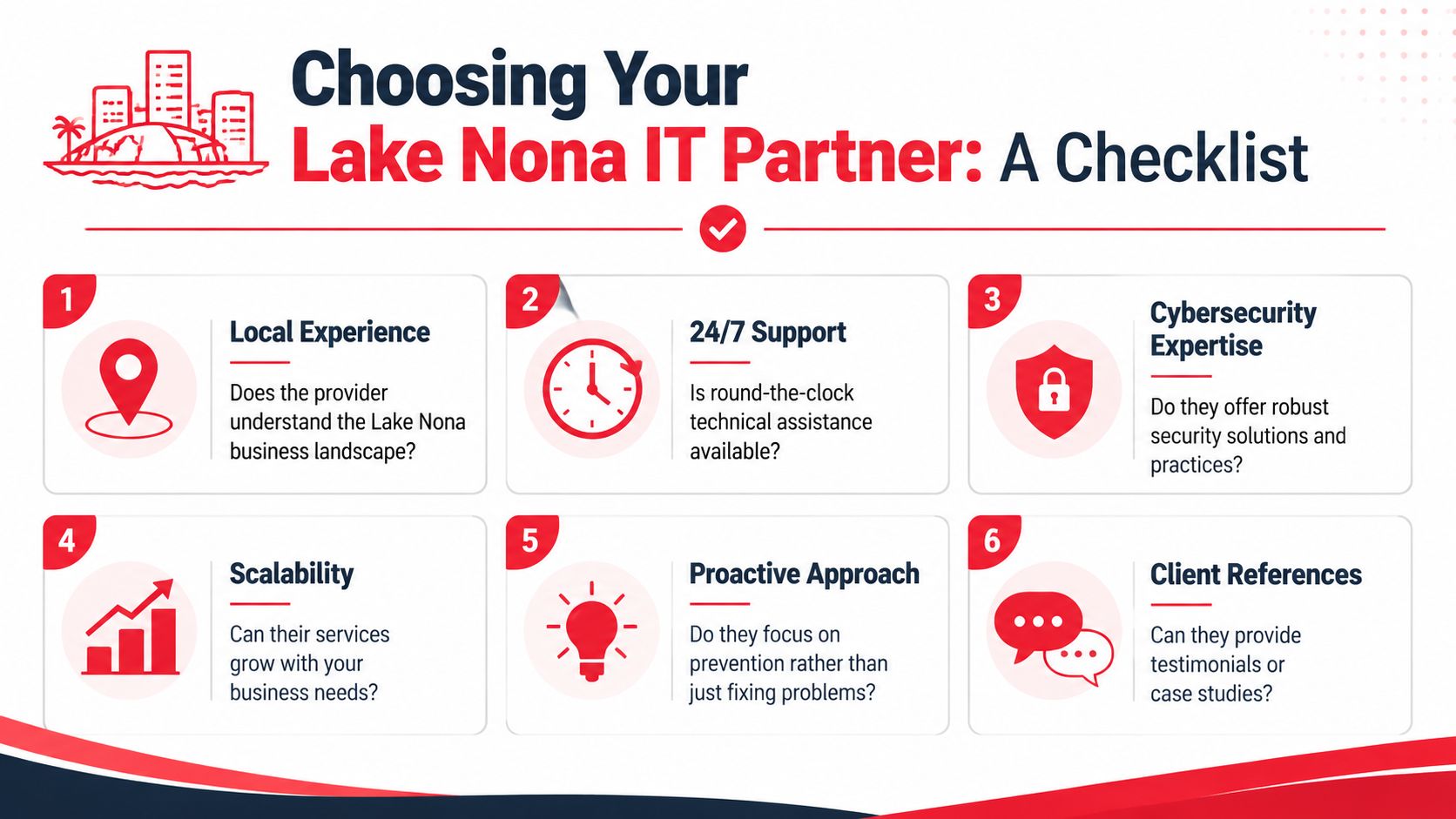
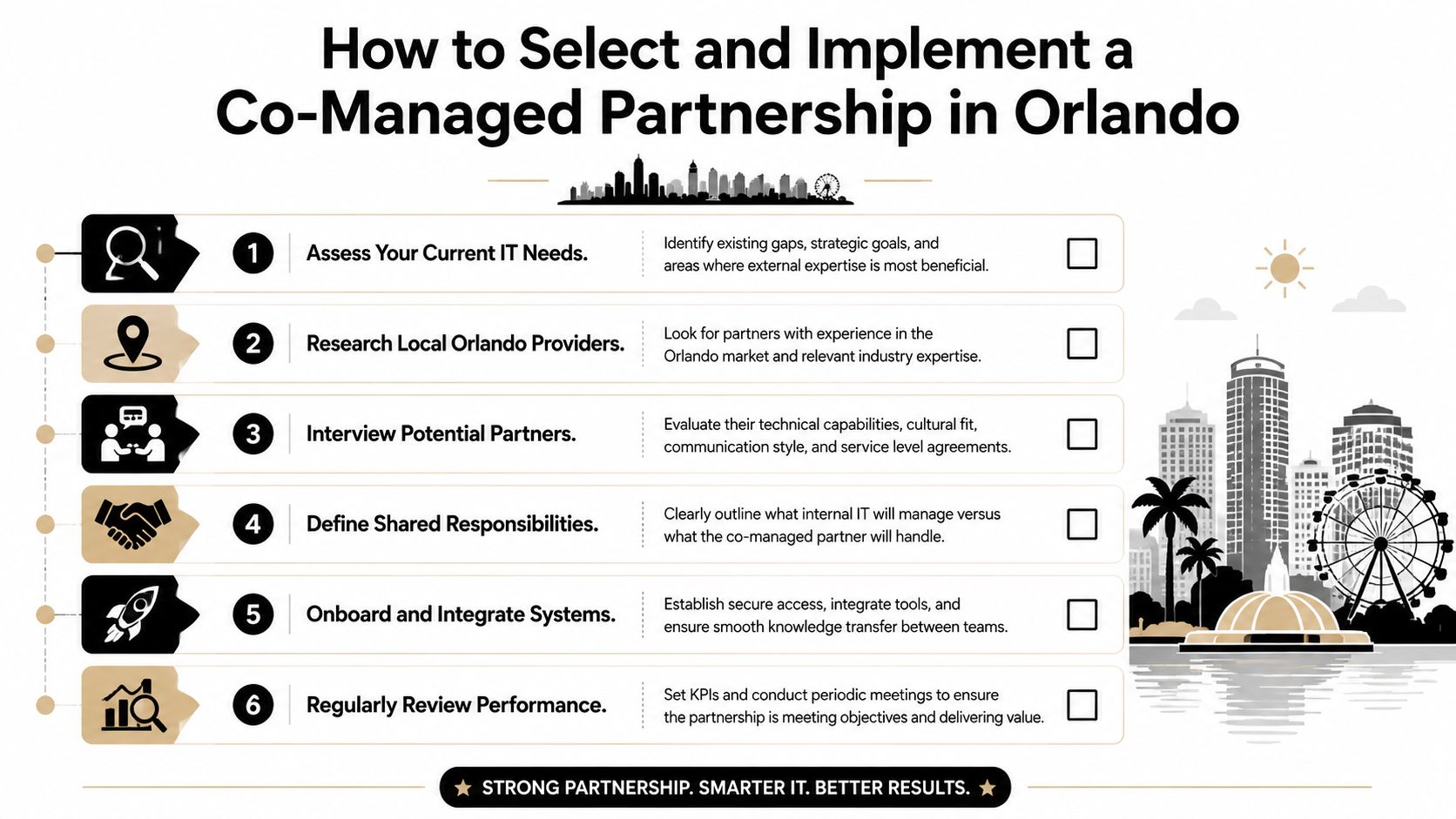
One Orlando option in this category is Cyber Command's guidance on choosing a managed service provider, which reflects a co-managed and fully managed approach with U.S.-based support and SOC-backed operations. The broader lesson is what matters. Ask every provider to define exactly who handles alerts, endpoint issues, user onboarding, vendor coordination, compliance reporting, and after-hours response.

Questions that expose pricing risk

Opaque billing is one of the biggest cloud problems for multi-location businesses. A 2026 study on Orlando managed IT pricing reported that 74% of Orlando SMBs with multi-location operations experienced unexpected cloud security bills in 2025 because critical SOC services were bundled under vague managed IT fees instead of transparent, flat-rate packages.

That happens when a proposal hides key security functions behind broad wording. A quote may sound complete, but incident response, threat hunting, compliance reporting, or after-hours work may still be billed separately.

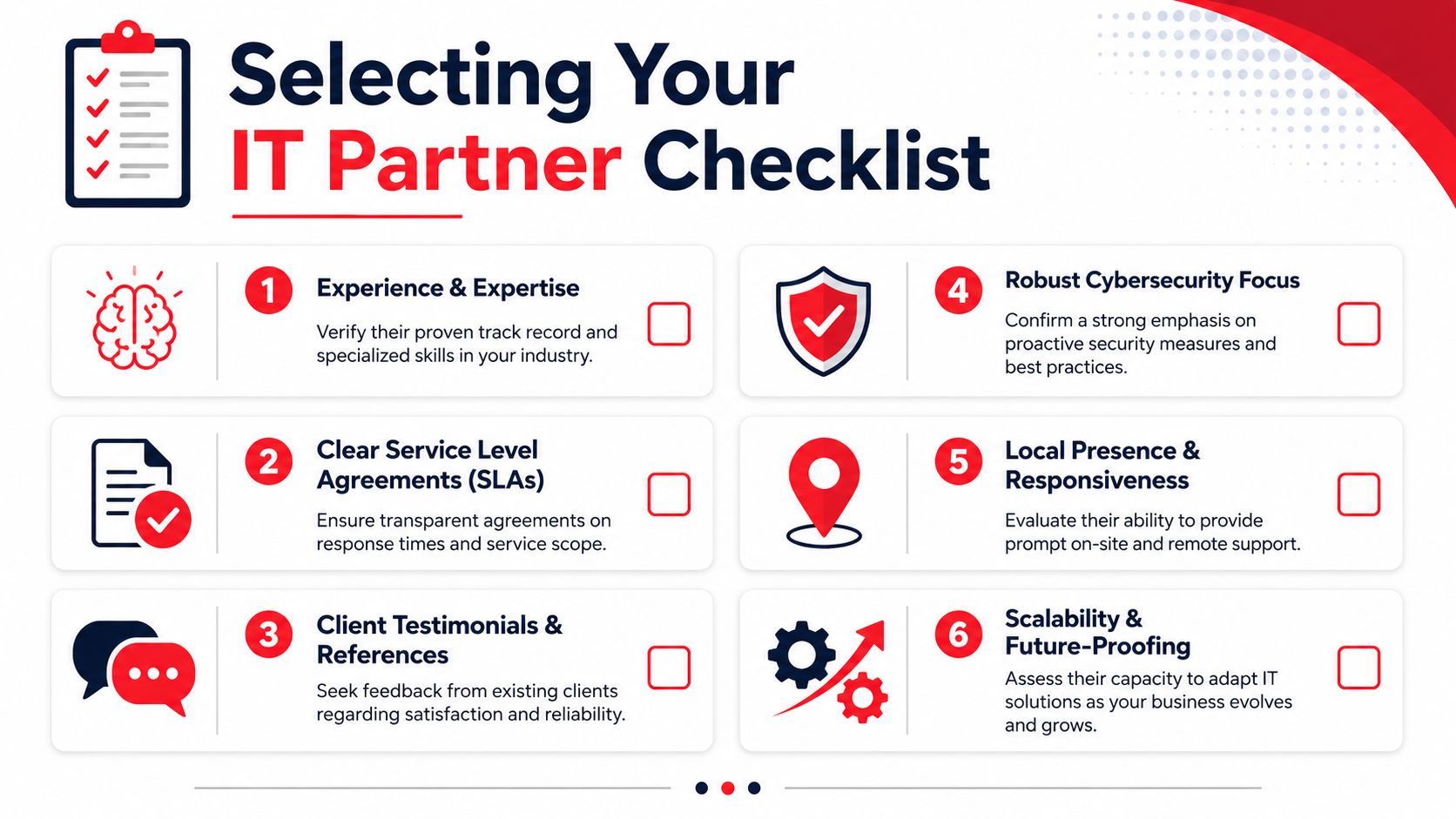
Use this checklist before signing anything:

Evaluation Criteria What to Look For Red Flags
24/7 SOC coverage Clear explanation of who monitors, investigates, and responds after hours “We get alerts” with no staffing details
Compliance support Specific discussion of audit logs, encryption, access reviews, and policy alignment Generic claims about being secure
Co-managed flexibility Defined handoff between your staff and provider Confusion over who owns what
Pricing model Written scope showing what is included monthly Vague bundled fees or “as needed” security work
Onboarding process Documented migration, testing, user communication, and cutover plan No structured rollout methodology
Reporting Regular review cadence with actionable findings Reports that list alerts but no decisions
Local responsiveness Named escalation paths and support expectations for Central Florida businesses Sales access is easy, support access is unclear

Ask providers to show the line between included service, optional enhancement, and emergency billable work. If they can't explain it clearly, billing won't get clearer later.

A strong Orlando cloud partner should reduce uncertainty, not introduce more of it.

Your Cloud Migration and Onboarding Checklist

Migration projects fail when leadership treats them as a file transfer. A good move is an operational change project with technical, security, and user adoption components.
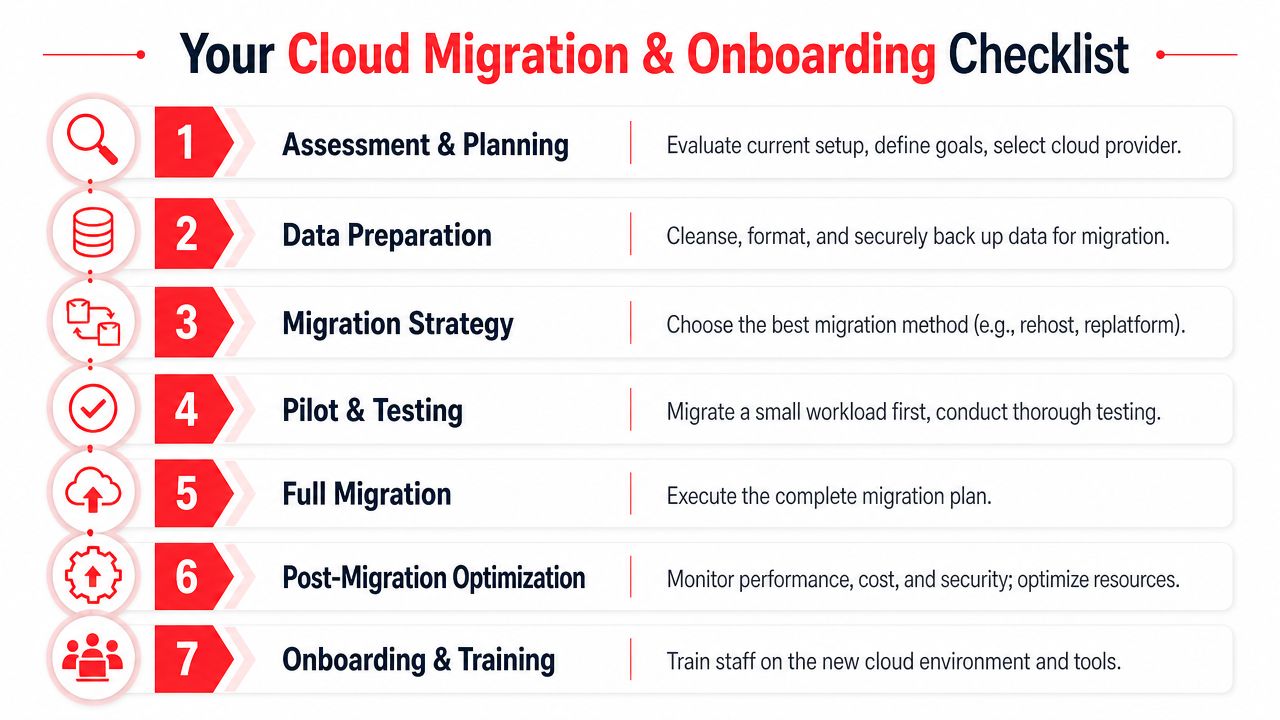
A checklist infographic detailing seven steps for successful cloud migration and onboarding for businesses.

Before migration starts

Start with an inventory. You need a working list of applications, shared data, user groups, devices, vendors, and dependencies. Many businesses discover during migration that one neglected workstation, one specialty app, or one shared mailbox controls a surprisingly important workflow.

Then define success in business terms. Faster remote access, fewer outages, simpler user onboarding, stronger compliance controls, and better cost visibility are all valid goals. “Move to the cloud” is not a goal. It's a method.

A practical prep list includes:

  1. Document critical systems: Identify what the business cannot operate without.
  2. Clean up access: Remove stale accounts and review privileged users before moving anything.
  3. Validate backups: Make sure rollback and recovery plans are real, not assumed.

For companies that want better recovery discipline before or during migration, cloud-based backup solutions for small business can be part of the foundation.

During the move

Don't move everything at once unless there's a compelling reason. Pilot a limited workload first. Test login flows, permissions, printing, file access, mobile access, and any workflow that touches accounting, scheduling, records, or client communications.

The best migration plans also define who approves each phase. Leadership should know when cutover happens, what users will notice, where to report problems, and how rollback decisions get made if a critical issue appears.

A clean migration is usually boring from the user's perspective. That's the goal.

After cutover

Post-migration work is where long-term value gets locked in.

  • Train users on the new workflow: Staff need short, role-based instruction, not a flood of generic documentation.
  • Review permissions again: New platforms often expose old access mistakes.
  • Tune cost and performance: Rightsize what you provisioned once actual usage is visible.
  • Set review rhythm: Schedule operational and security reviews so drift doesn't build unnoticed.

Cloud onboarding isn't finished when systems are live. It's finished when users can work reliably, leadership has visibility, and the environment is stable enough to support growth.

Understanding Cloud Pricing Models in Central Florida

Business owners usually hear cloud pricing described as flexibility. That's partly true. It's also where budget surprises start if no one explains the model clearly.

A professional man reviewing financial projections on a tablet computer in a bright modern office workspace.

Where pricing gets complicated

Most cloud environments mix variable consumption with service labor. Consumption may include compute, storage, backup, bandwidth, or other resource usage. Service labor may include administration, security oversight, compliance work, user support, and project changes.

That's why the proposal matters more than the headline price.

Broad market momentum also explains why pricing conversations are intensifying. The global cloud services market statistics project the market at $943.65 billion in 2026, growing to $1,707.13 billion by 2033, with the U.S. market valued at $282.62 billion in 2026. Cloud adoption isn't slowing down, which means providers have every reason to package services aggressively. Buyers need to slow the sales process down enough to inspect the cost structure.

What a business owner should look for in a quote

A few common pricing models show up in practice:

  • Pay-as-you-go: Flexible, but monthly bills can move around based on usage and support events.
  • Reserved capacity: Better when workloads are stable and predictable, but less forgiving if needs change.
  • Discounted excess capacity models: Useful for noncritical or interruptible workloads, but a poor fit for core business systems.
  • Flat-rate managed service packaging: Easier for budgeting when the scope is clearly defined and security operations are included.

The right answer depends on your risk tolerance. If your business values strict monthly predictability, variable consumption with loosely defined support may create more finance friction than technical benefit. If you have a highly seasonal workload, some variability may be acceptable.

Review every quote with these questions in mind:

  • What fluctuates monthly?
  • What security work is included?
  • What happens after hours?
  • What work becomes billable project labor?

Cloud pricing should help you plan. If the quote creates ambiguity, it's not ready.

Your Next Step Towards a Secure Cloud Foundation

Cloud decisions in Central Florida aren't just about modernizing infrastructure. They affect how your staff works, how your data is protected, how audits are handled, and how confidently you can budget for IT operations.

The Orlando market has the underlying infrastructure to support serious cloud adoption. The Orlando data center market overview notes that the region features over 20 physical data centers and total colocation capacity exceeding 129,000 square feet, giving local businesses a strong foundation for reliability and connectivity. That matters for firms that want local relevance without falling back into server-room thinking.

If you're evaluating Cloud Services in Orlando FL, keep the priorities in the right order. Start with business goals. Build around compliance and cybersecurity. Demand pricing clarity. Choose a partner that can support both the migration and the long-term operating model.

The businesses that get this right don't just “move to the cloud.” They create a more resilient way to run the company.


If you're ready to evaluate secure, compliant, and cost-predictable cloud options, Cyber Command, LLC can help you assess your current environment, identify migration risks, and map a cloud strategy that fits how your Orlando business operates.
Managed IT Services in Orlando FL: Your 2026 Guide

Your office opens at 8. By 8:12, someone can't print. By 8:20, your practice management system is lagging. By 9:00, a staff member forwards a suspicious email and asks, “Is this real?” You're not running a technology company, but technology now controls how fast you invoice, serve clients, protect records, and stay compliant.

That's where many Central Florida businesses are right now. The company is growing, the team is busy, and the old approach to IT support isn't keeping up. You call when something breaks. You hope backups work. You assume your security stack is enough. Then one outage, one ransomware attempt, or one failed audit reminder turns IT from a background function into a business risk.

For Orlando businesses, managed IT isn't just about outsourced support anymore. It's about uptime, security, accountability, and choosing the right operating model for how your business runs.

Table of Contents

Is Your Orlando Business Outgrowing Its IT

A lot of owners in Orlando, Winter Springs, and nearby Central Florida cities don't notice the turning point at first. Revenue improves. Headcount grows. Maybe you add a second location, hire remote staff, or start relying on more cloud apps. Then little problems become daily friction.

A professional woman in an office looks frustrated while waiting for a loading icon on her computer screen.

One downtown office might deal with file access delays every afternoon when everyone is in the same system. A dental group in Winter Park may worry whether front-desk workstations, imaging systems, and patient communications are protected the way they should be. A growing accounting firm may have no clear answer when a client asks how their data is secured or how quickly systems can be restored after an incident.

That's the sign you've outgrown ad hoc support. It's not just that things break. It's that your business now depends on technology behaving predictably.

When break fix starts hurting the business

Reactive IT feels cheaper until it starts interrupting payroll, intake, billing, scheduling, and client communication. The hidden cost is management attention. Owners, office managers, and operations leads end up chasing vendors, approving emergency work, and making decisions without a roadmap.

You don't have an IT problem when a laptop fails. You have an IT problem when every failure turns into an executive interruption.

Managed IT Services in Orlando FL make sense when technology stops being a side function and becomes part of your delivery model. If your staff can't work when the network slows down, if compliance questions keep landing on your desk, or if cybersecurity headlines feel uncomfortably relevant, you're already there.

What growing companies usually need next

At this stage, most businesses aren't looking for more tickets. They need structure:

  • Reliable support: People need fast answers when they're blocked.
  • Preventive maintenance: Systems need patching, monitoring, and routine review before issues spread.
  • Clear accountability: Someone should own the environment, vendor coordination, and follow-through.
  • Security that's active: Not just alerts. Actual response.
  • Planning discipline: Decisions about renewals, cloud changes, office moves, and compliance shouldn't happen in a rush.

That shift is less about buying IT and more about building operational resilience.

Defining Managed IT Services for Central Florida Businesses

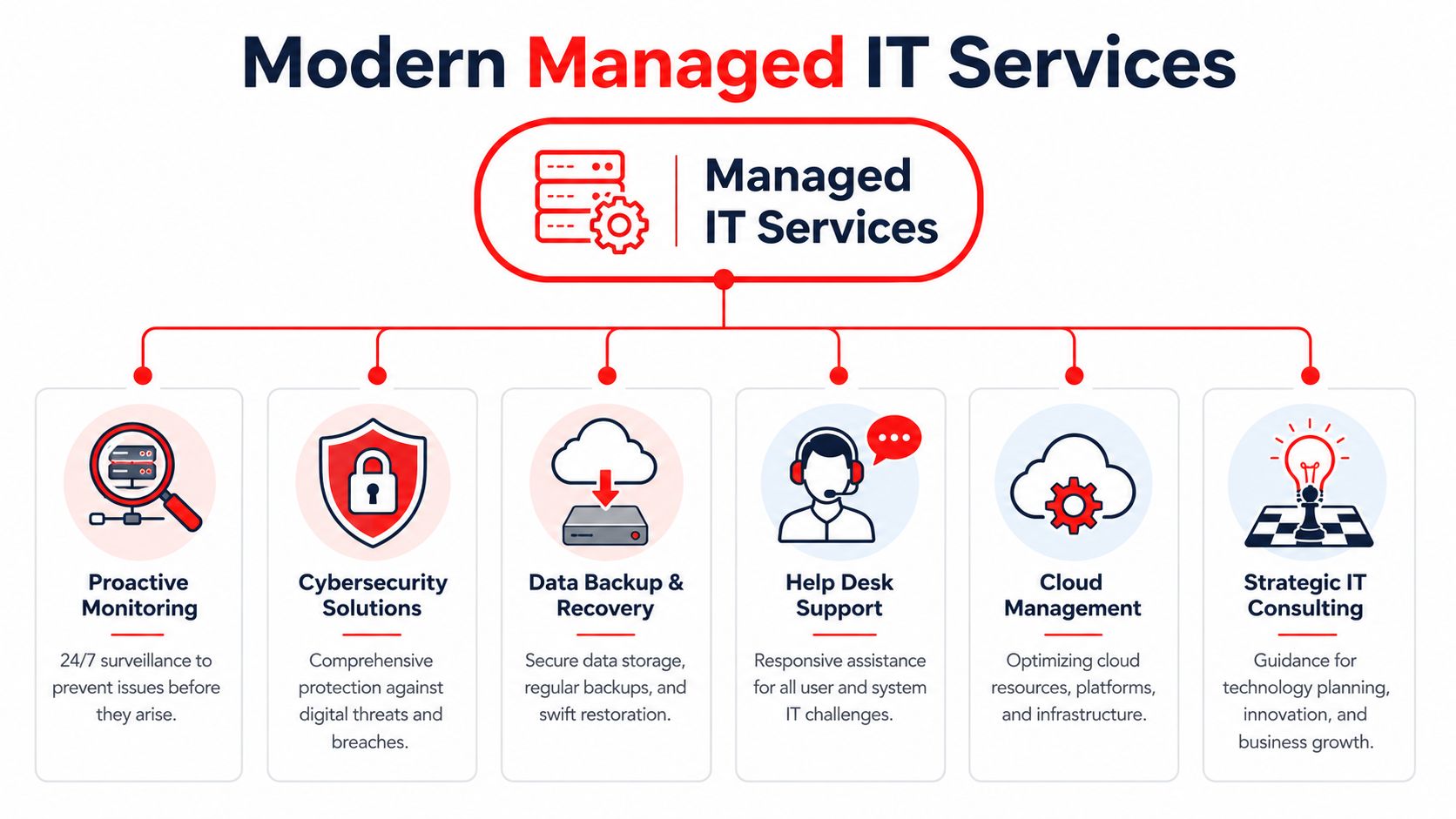
Managed IT services are often described too loosely. For a Central Florida business, the practical definition is simpler. It's an ongoing operating partnership where a provider helps keep your systems available, secure, supported, and aligned with how your company works. That's very different from calling someone after an outage.

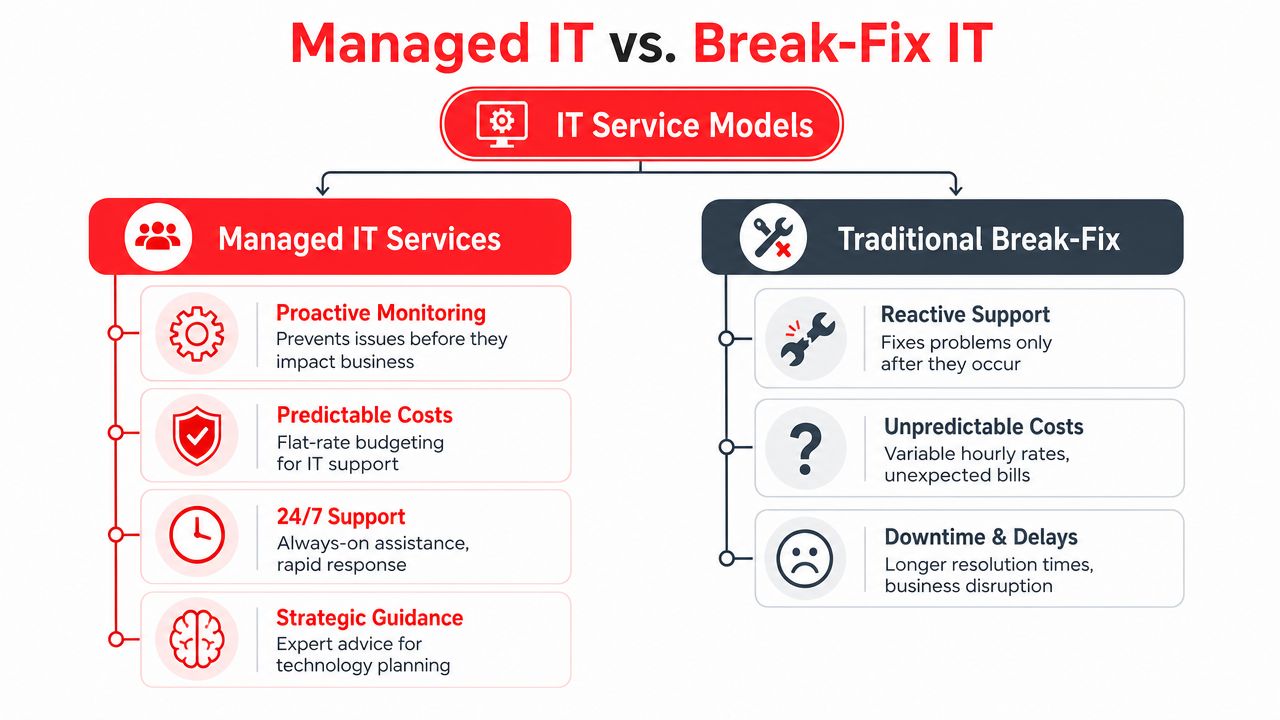
A comparison chart outlining the key differences between proactive Managed IT Services and reactive Traditional Break-Fix IT models.

What managed IT actually includes

A complete managed services agreement should cover more than a helpdesk. At minimum, Orlando businesses should expect:

  • User support: Day-to-day issue resolution for staff, including remote help and escalation.
  • System monitoring: Devices, servers, and network assets watched continuously so small faults don't become outages.
  • Patch and endpoint management: Routine updates, protection, and policy enforcement across workstations and servers.
  • Cloud administration: Oversight for productivity platforms, identity controls, and access policies.
  • Vendor and license management: Coordination with internet, software, telecom, and line-of-business vendors so your team isn't stuck in the middle.
  • Documentation: Network diagrams, standards, inventory, and recovery information that make the environment manageable.
  • Strategic guidance: Budgeting, lifecycle planning, and quarterly review of business priorities against technical risk.

A weaker provider usually leads with “we fix issues quickly.” A mature provider explains how they reduce the number of issues in the first place.

Why the market keeps moving this way

Businesses aren't adopting managed services because it sounds modern. They're doing it because reactive support creates operational drag, especially once cloud systems, compliance requirements, and cybersecurity risks start stacking up.

The managed services market data from Fortune Business Insights states that the global managed services market was valued at USD 330.4 billion in 2025 and is projected to reach USD 1,118.2 billion by 2034. The same source notes that only 5,000–10,000 of the world's 150,000–200,000 providers meet verifiable maturity standards. For an Orlando business owner, that matters. It means the label “MSP” doesn't tell you much by itself.

Practical rule: Don't buy managed IT based on the service name. Buy it based on operating depth, security capability, and proof of process.

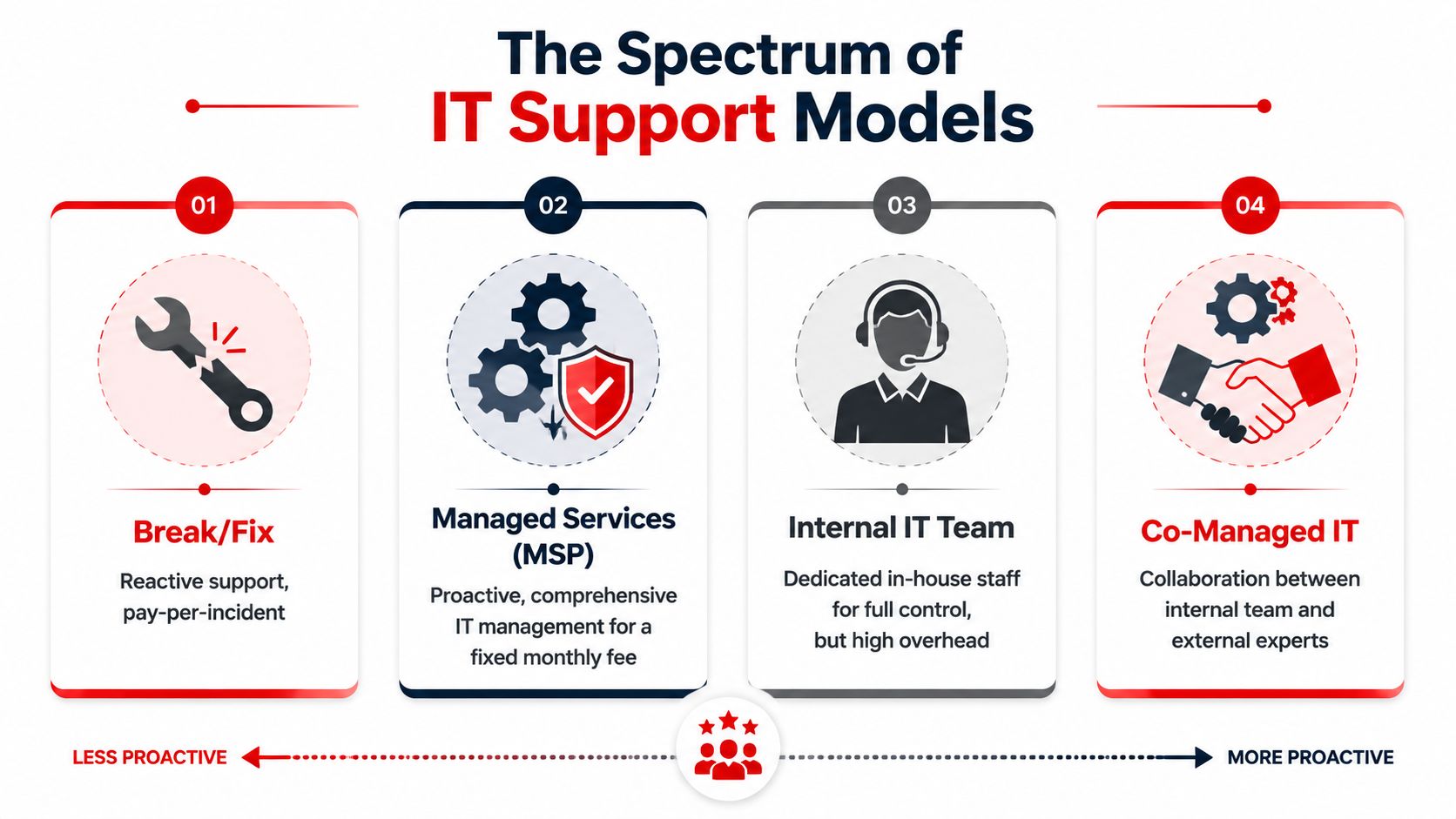
That's also where the local decision gets more nuanced. A good fit for a single-office professional firm may not be the right fit for a multi-location healthcare group or a field-service company with internal technical staff. Some businesses need fully managed support. Others need co-managed support, where an outside team handles monitoring, security operations, and escalation while internal staff retain control over selected systems and vendors.

Cyber Command, LLC is one example of that broader model. It provides fully managed and co-managed IT, 24/7/365 U.S.-based helpdesk, cloud support, vendor management, and SOC-backed security operations for organizations in Orlando and Winter Springs.

The Business Case Uptime Security and Compliance

Most owners don't buy managed IT because they want a cleaner network closet or nicer reports. They buy it because they want the business to keep running. The strongest case for managed services is operational. Your staff stays productive, your risk posture improves, and compliance work stops getting treated like a last-minute project.

Uptime is an operational issue, not a technical vanity metric

Downtime hits payroll, scheduling, intake, quoting, patient flow, dispatch, and customer communication. It also creates a second layer of damage because your team starts building workarounds. People save files in the wrong place, delay updates, and avoid systems they no longer trust.

The Orlando managed IT benchmark data shows that 24/7/365 live helpdesk support combined with real-time system monitoring preempts 85% of potential downtime events, resulting in a 30% increase in operational uptime for mid-sized businesses. That same benchmark ties performance to SLA-driven protocols with response times under 15 minutes.

If a provider can't explain how it detects issues before users report them, you're still buying reactive support with a nicer label.

Security monitoring is not the same as active defense

Many Orlando businesses are often misled. They hear “monitoring” and assume someone is actively watching for attacker behavior. Often, that isn't what they're getting. They're getting tools that generate alerts, not a staffed security function that investigates, contains, and responds.

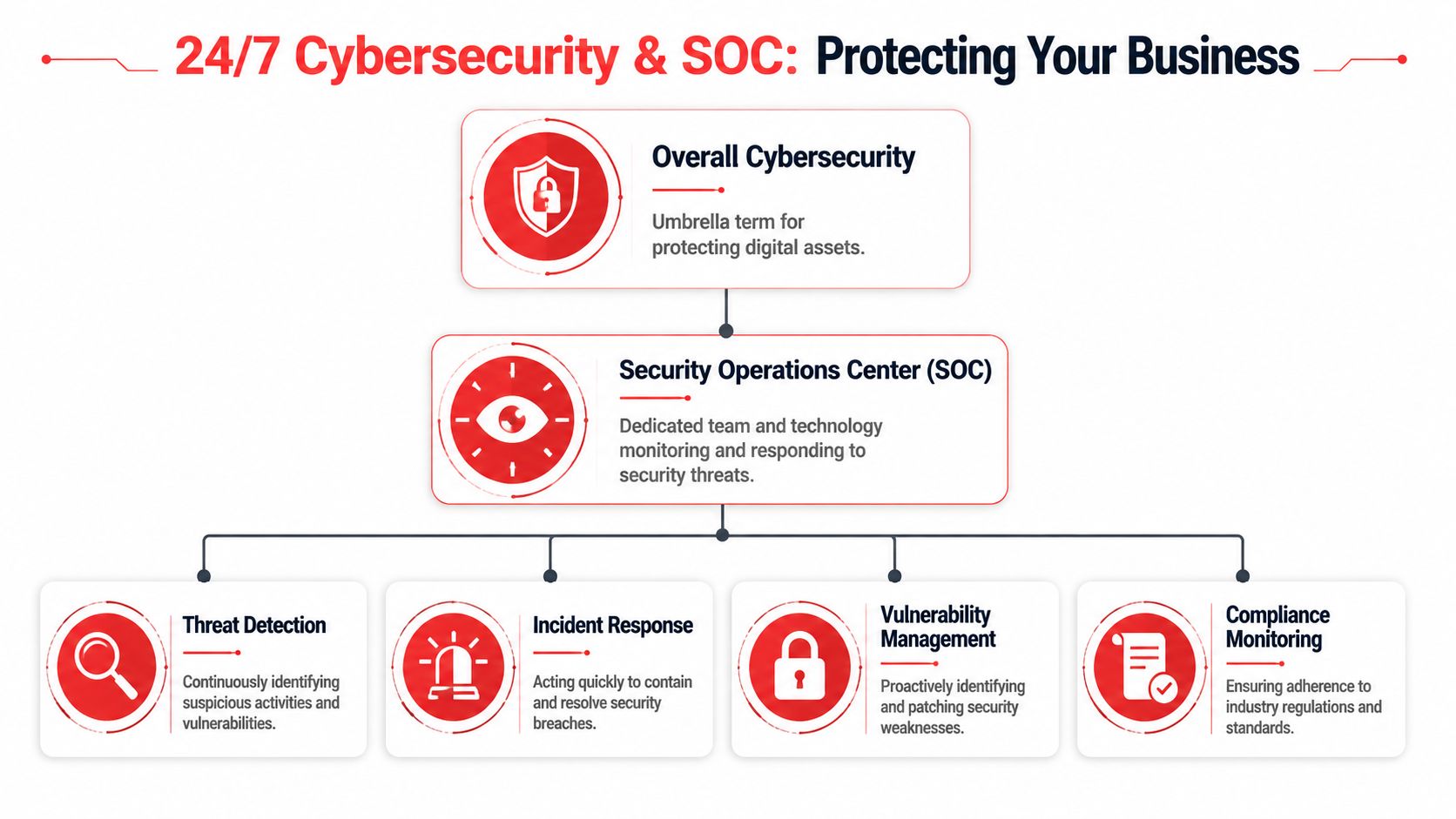
For law firms, medical practices, and finance-related businesses, that gap matters because attackers don't behave like routine malware anymore. They move laterally, abuse valid credentials, and hide inside normal user activity. That's why true SOC-backed security matters. A real security operations function doesn't just collect events. It hunts, validates, escalates, and coordinates response.

Monitoring tells you something may be wrong. A security operations center determines whether an attacker is actually in your environment and what to do next.

Compliance needs continuous execution

Compliance-heavy businesses often think in terms of annual checklists. That approach fails because compliance is tied to daily controls. Are devices patched? Are user permissions reviewed? Are logs retained? Are backup and recovery processes documented? Is there a response path for suspicious activity?

For a privately owned medical practice, a legal office handling sensitive records, or a financial services firm managing confidential documents, the right managed IT partner turns compliance into operating discipline. That includes consistent patching, endpoint control, documented configurations, access review support, and repeatable reporting.

What doesn't work is buying a generic “cyber package” and assuming that solves governance. It doesn't. Security tools without process leave gaps. Policy without enforcement does the same.

Tailored IT Solutions for Orlandos Key Industries

Managed IT only works when it matches the business model. Orlando isn't one market with one operating profile. A law office near downtown has different exposure than a med spa in Winter Park, a hospitality group serving visitors, or a field-service company with technicians moving across sites.

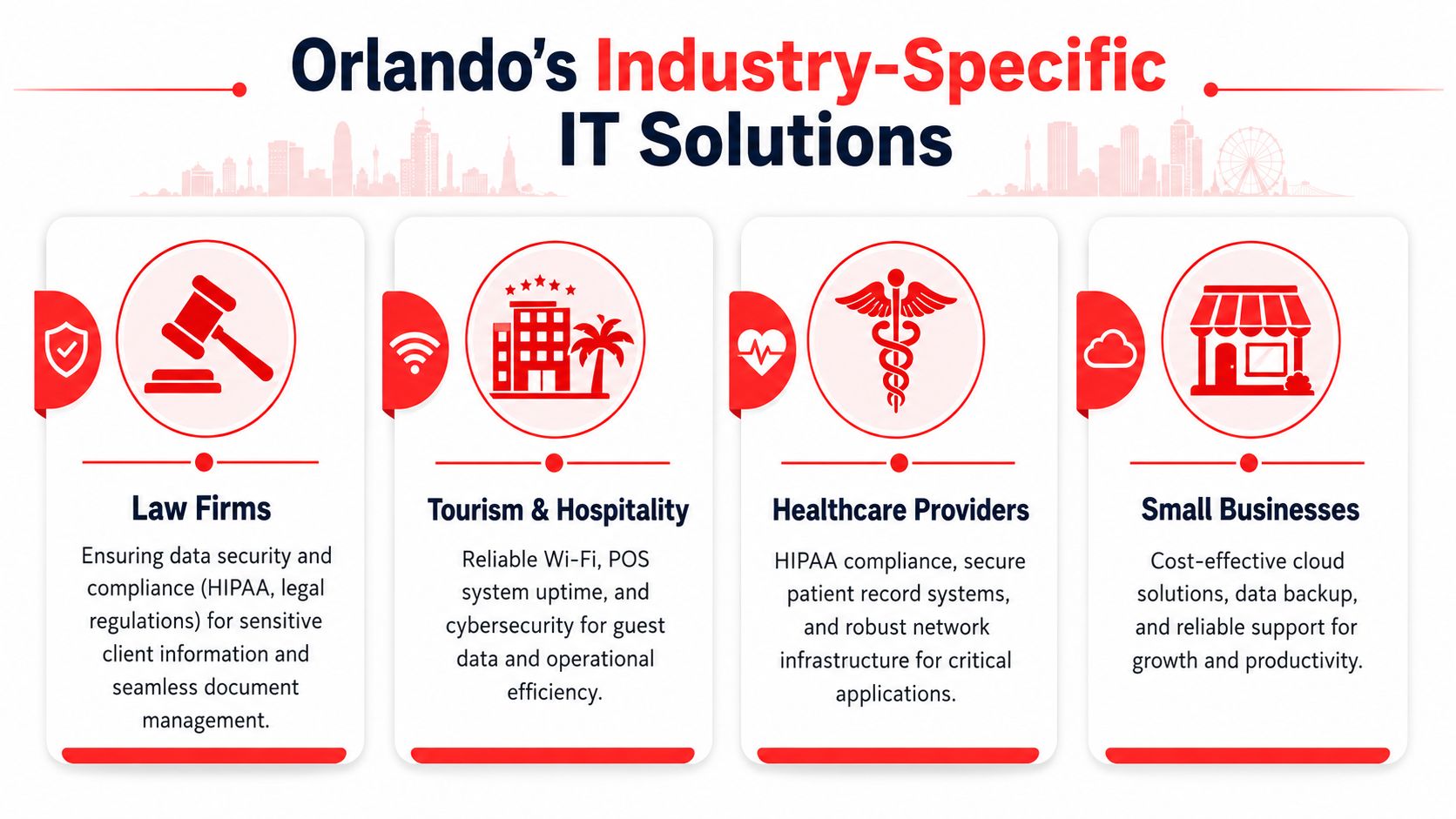
An infographic detailing industry-specific IT solutions in Orlando for law firms, hospitality, healthcare, and small businesses.

Professional services and legal offices

A legal or accounting practice usually needs three things from IT. First, staff must reach files and line-of-business systems without delay. Second, the firm needs clear control over who can access sensitive documents. Third, leadership needs confidence that a security incident won't become a client trust issue.

That often means tighter identity controls, documented device standards, secure remote access, dependable backup oversight, and support that understands the cost of delay during deadlines. In these environments, “mostly working” is not acceptable. If the document system slows down before a filing deadline or tax cutoff, revenue work stops.

Healthcare and privately owned practices

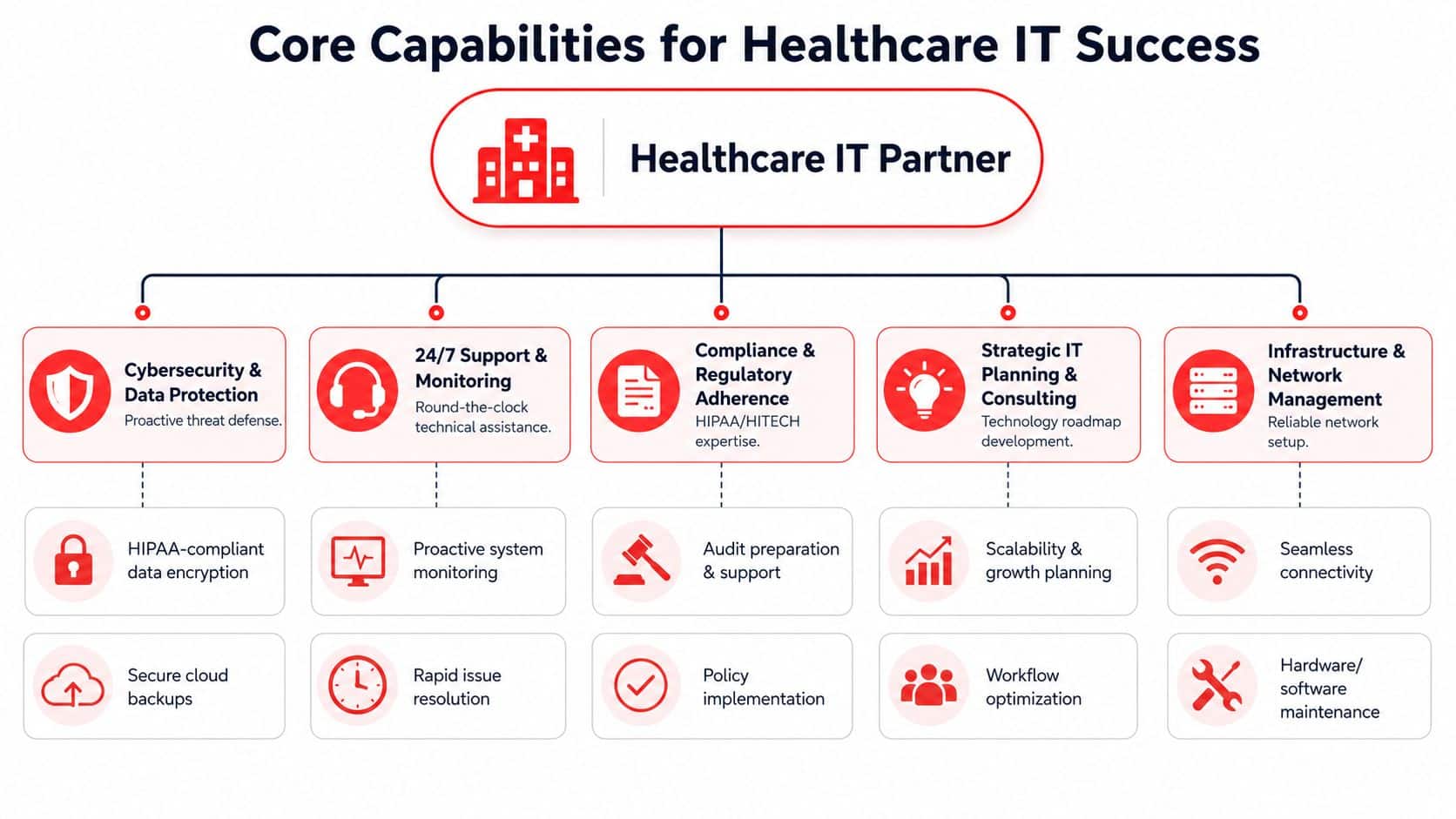
Small healthcare organizations in Central Florida often have lean administrative teams and very little tolerance for disruption. A dentist, orthodontist, veterinarian, plastic surgeon, or med spa may rely on a mix of imaging, scheduling, billing, and patient communication systems that all have to work together.

What they need isn't generic IT. They need compliance-aware workflows, device security, controlled access to patient information, and support that can separate a routine issue from a privacy event. They also need clarity on whether the provider offers real co-management if the practice works with an internal operations lead or outside application consultant.

The Florida co-managed IT findings report that 64% of multi-site SMBs in Florida require a hybrid co-managed IT model, while 78% of Orlando MSPs only market fully managed options. That gap is especially relevant for regional clinics, franchise-style operations, and growing healthcare groups that want predictable support but still need internal control over some decisions.

Hospitality field service and multi location operations

Hospitality and tourism create a different support profile in Orlando. Guest-facing systems can't go down during peak periods. Wi-Fi, point-of-sale continuity, and front-desk operations affect both revenue and reputation. Businesses serving visitors also deal with irregular support patterns, extended hours, and a higher expectation for immediate response.

If you operate in that environment, it helps to review a more specialized hospitality IT solutions guide for Orlando businesses. The same logic applies to field-service and industrial companies. They often need standardization across office and remote environments, stronger vendor coordination, and a support structure that can handle both back-office systems and site-specific constraints.

A multi-location company rarely needs less IT control. It needs clearer division of responsibility.

For these businesses, co-managed support can be the better fit. Internal staff may own business applications, local relationships, or site workflows. The outside partner handles monitoring, security operations, documentation, escalation, patching, and after-hours support. That split tends to work well when leadership wants resilience without giving up visibility.

Understanding Managed IT Services Pricing Models

Pricing gets most of the attention, but structure matters more than the base number. Two quotes can look similar and produce very different results. The core question is what behavior the pricing model encourages.

What Orlando businesses usually see in quotes

The Orlando managed IT pricing data shows that managed IT services in Orlando typically range from $100–$300 per user per month. The same source states that all-inclusive flat-rate packages can reduce administrative overhead by 25%, help SMBs predict IT spend with 95% accuracy, and that proactive monitoring can reduce monthly IT incidents by up to 70%.

That lines up with what works in practice. When support, maintenance, and oversight are fragmented across line items, businesses spend too much time arguing about scope. Every issue becomes a billing decision. Every project request becomes a surprise.

Managed IT Pricing Models Compared

Model How It Works Best For Predictability
Per-user A monthly fee is tied to each supported employee account Offices where each staff member uses a similar set of systems and support needs Good if scope is clearly defined
Per-device Billing is based on workstations, servers, and other managed assets Environments where equipment counts matter more than user counts Mixed, because users often touch multiple systems
All-inclusive flat rate A broader monthly agreement bundles support, monitoring, maintenance, and defined services Businesses that want stable budgeting and fewer scope disputes High when the agreement is written clearly
Break-fix or hourly You pay when something breaks or a project appears Very small environments with low complexity and high tolerance for disruption Low

A flat-rate model usually produces better operational behavior because the provider has reason to prevent problems instead of waiting for billable incidents. That doesn't mean every flat-rate proposal is good. Some exclude onboarding, after-hours support, licensing coordination, vendor management, or security response.

Use a quote review process that asks what is included, what triggers extra charges, how after-hours work is handled, and whether strategic reviews are part of the agreement. If you want a deeper breakdown of how to evaluate scope, this managed IT services cost guide is a useful starting point.

Cheap IT support often becomes expensive the first time you need urgent after-hours help, vendor coordination, or real incident response.

Your Buyers Checklist Questions to Ask Any Orlando IT Provider

Most businesses ask the wrong opening question. They ask, “What do you charge?” before they ask, “How do you operate?” In Orlando's market, that leads buyers into weak agreements that sound complete but leave out the capabilities that matter when something serious happens.

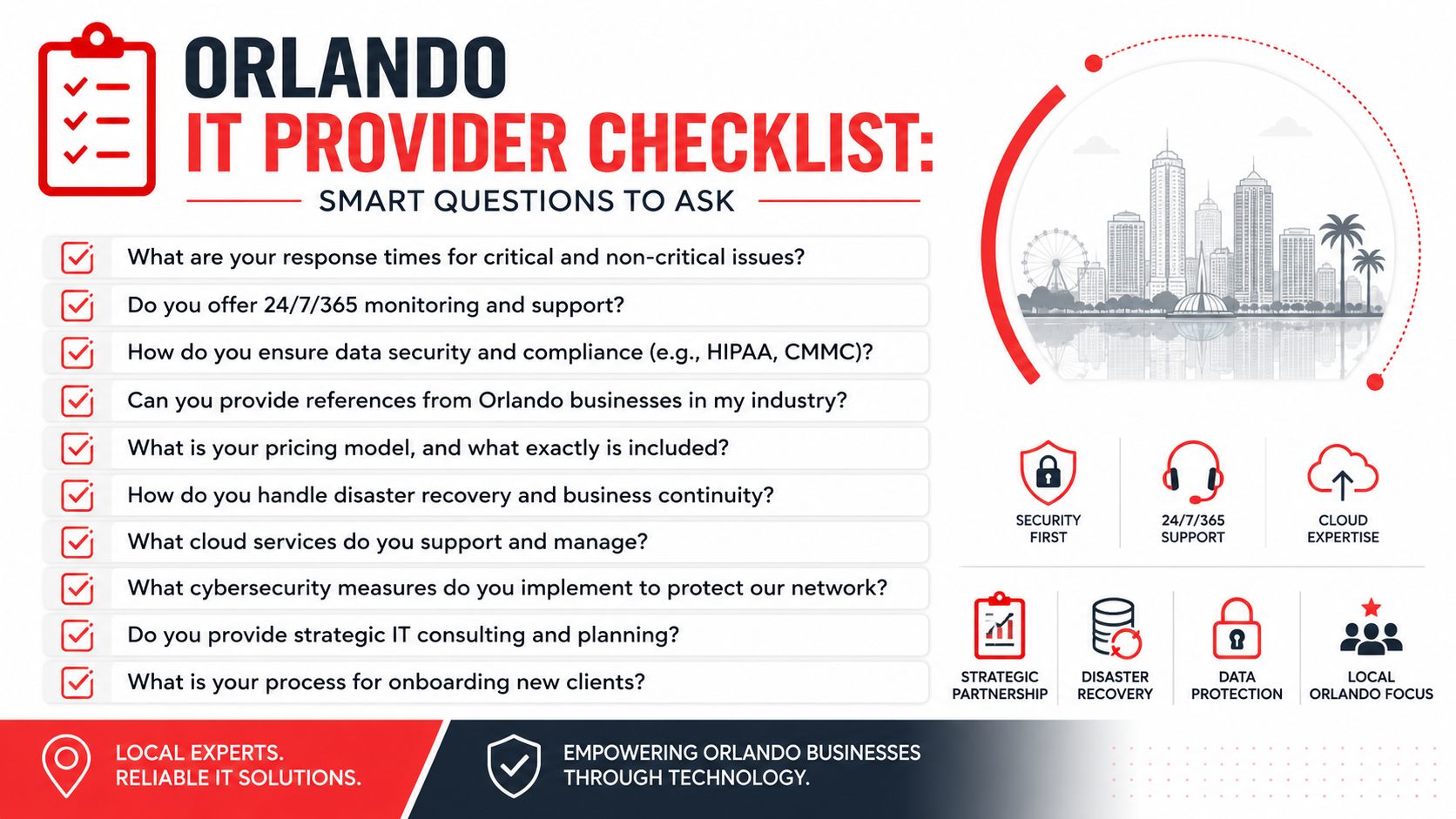
A checklist of smart questions for businesses looking to hire a managed IT service provider in Orlando.

The biggest gap to investigate is security depth. The Orlando security gap data states that 68% of successful breaches in SMBs occurred because passive monitoring tools failed to detect active attacker behavior, and 73% of Orlando MSPs' marketing materials do not explicitly mention SOC-backed incident response. That's the difference between having alerts and having defense.

Questions that expose shallow service delivery

Ask direct questions and listen for process, not slogans.

  • How is your SOC structured? Ask whether incident response is backed by live analysts around the clock or whether the provider mainly relies on automated alerting.
  • What happens when suspicious behavior is detected at night or on a weekend? You want a response path, not a vague statement about notification.
  • Is your helpdesk staffed by your own U.S.-based team? Support quality drops when escalation paths are fragmented or outsourced without ownership.
  • What do you patch, how often, and how do you verify it? A provider should explain routine execution, exceptions, and reporting.
  • Can you show a sample QBR or technology roadmap? If they can't show structured planning, the relationship may stay ticket-driven.
  • Who handles vendor coordination? Internet, telecom, software, and line-of-business vendors shouldn't all bounce your staff around during an outage.

Questions that clarify fit for your business model

Buyers should now get more specific about business structure.

  1. How do you support co-managed environments? If you already have internal IT, ask who owns security tooling, who handles escalations, and who approves change.
  2. How do you document the environment? You should expect diagrams, standards, recovery information, and clear ownership records.
  3. How do you support multi-location operations? Ask how they standardize devices, user policies, and support workflows across offices.
  4. How do you handle onboarding? A mature provider should have a sequence for assessment, stabilization, access control, documentation, and communication.
  5. How do you support compliance-sensitive industries? The answer should connect daily controls to your operating reality, not just name regulations.

If you want a more detailed evaluation framework, review this guide to choosing a managed service provider.

If a provider can't describe who does what during a security event, you're not evaluating a managed service. You're evaluating a promise.

The right buyer behavior is simple. Push past the brochure. Ask for examples of process. Ask who responds, who owns the outcome, and what your team should expect in the first ninety days. Mature providers answer plainly.

Partnering for Growth Your Next Step to Secure IT

The right managed IT relationship changes how a business runs. It reduces disruption, tightens accountability, and gives leadership a clearer view of risk. For Orlando companies, that matters because growth usually increases complexity faster than it increases internal IT capacity.

The key decision isn't whether to outsource everything. It's whether your current model supports uptime, security, and compliance without constant executive involvement. Some businesses need fully managed support because they don't have internal capacity. Others need co-managed support because they want outside depth while keeping selected control in house. The important part is choosing a partner that can operate in the model your business needs.

Managed IT Services in Orlando FL should do more than answer tickets. They should help you prevent downtime, close security gaps, support compliance, and give your team room to grow without dragging leadership back into daily technical firefighting.


If you want a practical review of your current environment, Cyber Command, LLC can help you assess whether you need fully managed support or a co-managed model, identify gaps between basic monitoring and true SOC-backed security, and map out a more predictable path for uptime, compliance, and growth.

Expert Remote IT Support in Orlando, FL | 24/7 Solutions

Monday starts with a full waiting room in Lake Nona, a packed client calendar in Winter Park, or a production schedule that can't slip in South Orlando. Then a login problem spreads to half the staff, email slows down, the line-of-business app stops syncing, and someone says, “IT is looking into it.”

That's the moment many owners realize they're not dealing with a one-off computer issue. They're dealing with an operating model problem. If your business depends on systems, devices, cloud apps, internet access, and secure remote work, support can't be occasional. It has to be built for the way your company runs.

That's why Remote IT Support in Orlando FL has become more than a convenience. For many Central Florida companies, it's the practical way to keep people productive, secure distributed work, and avoid the unpredictability of hiring, turnover, and emergency fixes.

Table of Contents

Your Orlando Business Deserves Better Than IT Headaches

An accounting office in Winter Park doesn't care whether a problem lives in a laptop, a cloud app, a firewall setting, or a permissions error. The firm cares that staff can't work, clients are waiting, and deadlines don't move.

A dental group has the same problem in a different form. The front desk sees slow systems. The provider sees chart access lag. The owner sees schedule disruption, unhappy patients, and lost time from a team that should be focused on care, not workarounds.

That's why the old approach to IT breaks down so fast. Waiting until something fails, then calling someone to “take a look,” is expensive in the way that matters most. It interrupts revenue-generating work and forces your staff to become part-time troubleshooters.

Practical rule: If your team only hears from IT when something is broken, you don't have support. You have cleanup.

In Orlando, there's another issue. Hiring internal support isn't always simple or predictable. The local market is active, and compensation is competitive. ZipRecruiter reported that remote tech support in Orlando averaged $40,589 yearly, with most workers earning between $35,000 and $43,900, while Glassdoor data for a similar remote support role in Orlando came in higher at $65,072 annually, which shows how much pay can vary by employer, title, and experience in this market (Orlando remote tech support pay data).

That gap matters for small and mid-sized businesses. If you try to build a full internal team, you're not just paying salary. You're managing recruiting, coverage, turnover, escalation depth, training, and after-hours gaps.

Remote support changes that equation. Done right, it gives you a standing IT function instead of a string of isolated fixes. The result is simpler operations, fewer interruptions, and a technology environment that supports growth instead of getting in the way.

What Remote IT Support Really Means for Your Business

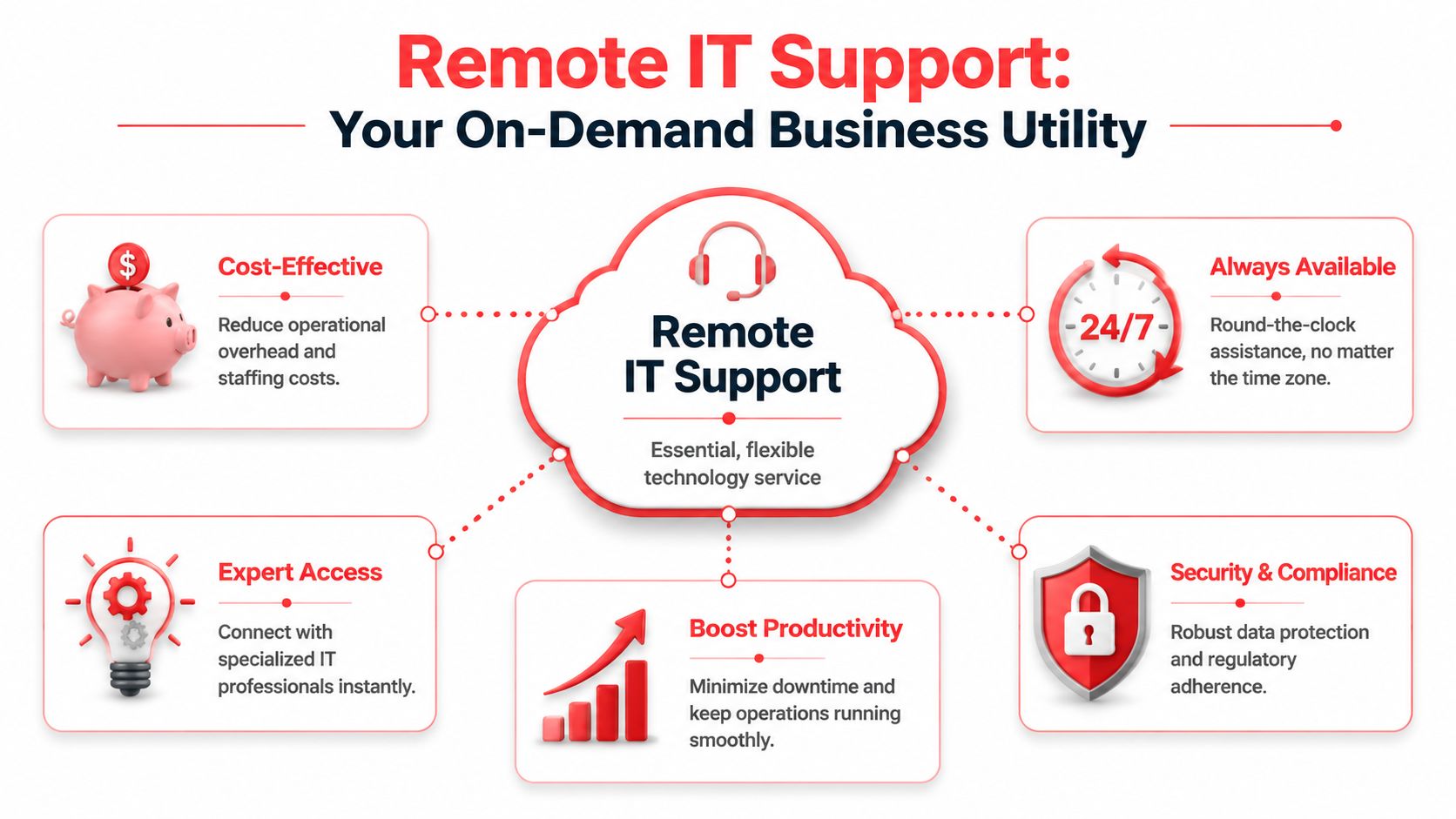
Remote IT support works best when approached as a utility. You expect power to be available, stable, and professionally managed in the background. Your technology support should work the same way.

It is not just remote troubleshooting

Many owners hear “remote support” and picture a technician logging in after a problem is reported. That's only one small part of it.

Real remote support means someone is responsible for the health of your systems before users start submitting complaints. Devices need to be monitored. Patches need to be applied on schedule. Access needs to be controlled. Backups need to be checked. New hires need to be provisioned the right way. Departing staff need to be removed cleanly.

A diagram illustrating the benefits of remote IT support services including cost-effectiveness, 24/7 availability, expert access, and security.

A lot of business communication systems have already moved this direction. If you want a useful non-IT example, Hosted Telecommunications on flexible work shows how business phone systems are now designed around mobility and consistent access rather than a fixed office setup. Support has to follow the same logic.

What a healthy remote support model includes

A dependable model usually has several moving parts working together:

  • Proactive monitoring: Systems are watched for warning signs so the team can address issues before users feel them.
  • Helpdesk coverage: Employees have a clear place to go for password resets, application problems, device issues, and everyday support needs.
  • Endpoint management: Company laptops and desktops stay patched, secured, and standardized.
  • Access control: User permissions match actual job roles, which reduces risk and avoids a mess of inherited access.
  • Planning and guidance: Leadership gets advice on lifecycle decisions, security priorities, cloud changes, and budget timing.

Break-fix support doesn't do this well because it only activates after pain is already visible. That model can still have a place for isolated one-time needs, but it's a poor fit for firms that rely on uptime.

Good remote support lowers friction in small moments. Faster logins, stable apps, fewer repeat issues, cleaner onboarding. Those quiet wins are what keep a business moving.

For Orlando businesses, that matters because many teams are already split across offices, homes, job sites, and mobile devices. If support only works when everyone is under one roof, it no longer matches how the business operates.
Why Remote Support Is Crucial for Central Florida Now

The demand for remote support didn't appear out of nowhere. Work changed. Risk changed. Business continuity expectations changed with it.

Hybrid work changed the support perimeter

A 2026 remote work roundup reported that about 22.8% of U.S. employees, or more than 36 million people, work remotely at least part of the time. The same source said 52% of workers in jobs that can be done offsite are on hybrid schedules and 27% are fully remote. It also reported that employers save an average of $11,000 per year per offsite worker through reduced real estate, turnover, and productivity gains (remote work statistics and business impact).

For an Orlando law office, engineering firm, or multi-location practice, those numbers explain why hybrid work hasn't gone away. It works for a lot of businesses operationally. But it also creates a wider support footprint. Now you're dealing with home networks, travel laptops, personal devices, remote login behavior, cloud permissions, and employees who need help without walking down the hall.

The same source adds the security side of the story. When remote work is a factor in a breach, incident costs average $1.07 million higher than office-based breaches. It also reported that 43% of offsite employees use personal devices while only 55% meet corporate security standards.

That doesn't mean remote work is a mistake. It means unsupported remote work is a mistake.

Business continuity matters in Florida

Central Florida companies also have to think about disruption differently. Storm season, office closures, travel interruptions, and power issues don't always take down the business if your systems are designed for remote access and cloud continuity. But if key access depends on a single office, a single server, or a single person with tribal knowledge, resilience is weak.

A practical support partner should already be thinking through questions like these:

  • Can staff keep working from another location if the office is unavailable for a day or longer?
  • Are critical files and apps reachable securely without improvised workarounds?
  • Can support continue after hours if an issue starts late in the day and rolls into the evening?
  • Do leaders know who owns incident response when a security event overlaps with an operations problem?

Contract structure matters too. If you're evaluating providers, LicenseTrim's managed services contract advice is worth reading because it highlights what buyers should look for in scope, exclusions, and accountability. Those details decide whether support feels smooth or turns into finger-pointing during a real problem.

In Central Florida, remote support isn't just about convenience. It's part of how companies stay open, secure, and responsive when work is distributed and interruptions are real.

The Pillars of Effective Remote IT Support

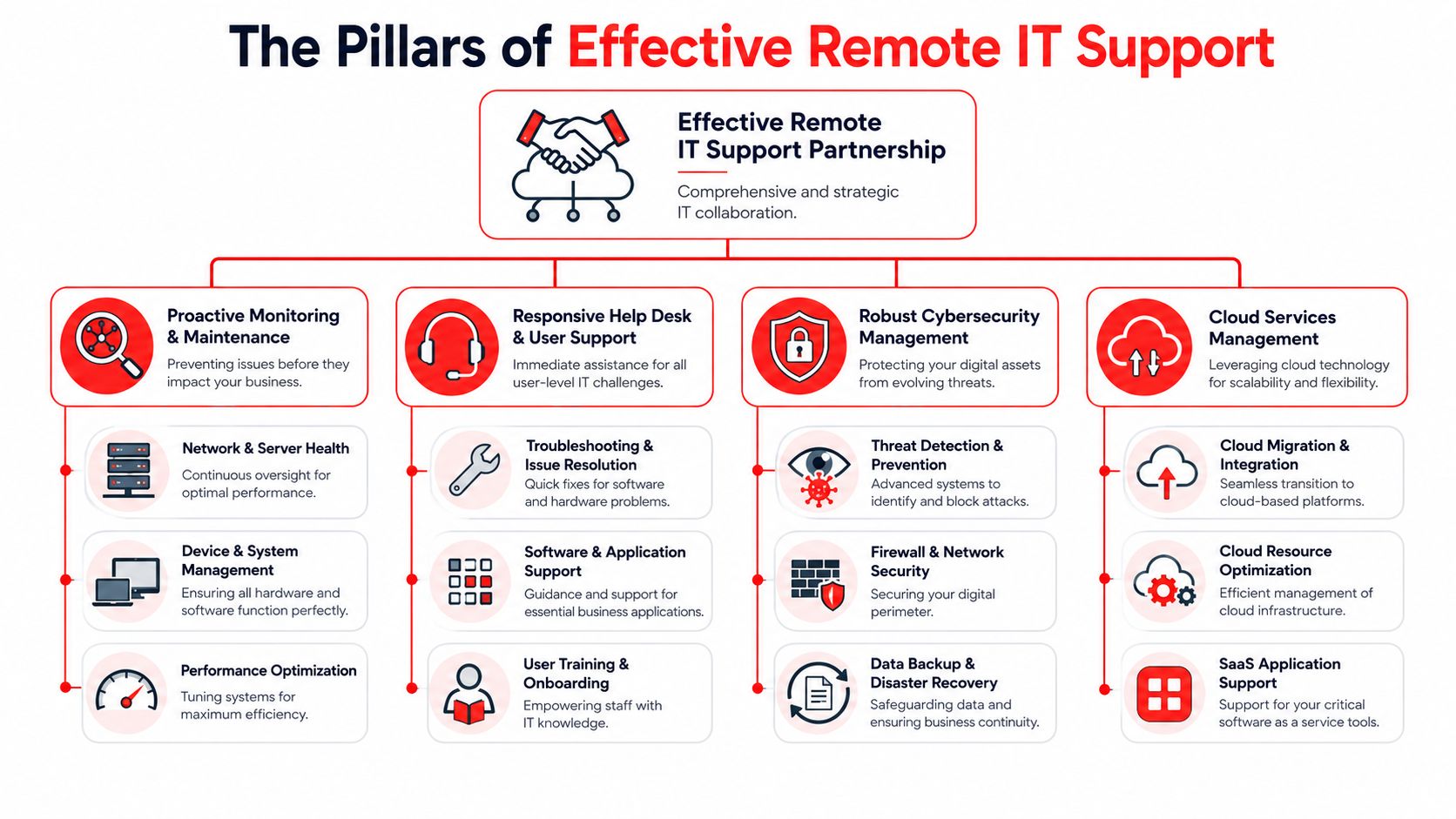
The phrase “remote IT support” gets used loosely. In practice, effective service has a few essential components. If one is missing, the client usually feels it through slower response, recurring issues, or unclear ownership.

An infographic showing the four key pillars of effective remote IT support services for modern business.

A helpdesk that is actually available

Florida remote technical support listings commonly show coverage anchored to 8:30 AM to 5:00 PM ET Monday through Thursday and 8:30 AM to 4:30 PM ET Friday, which reflects the standard business-day model in the market (Florida remote technical support schedule norms). That's workable for basic requests. It isn't enough for every business.

If your team starts early, works late, serves clients across time zones, or depends on after-hours batch work, a problem at 5:15 PM is still a business problem. So is a phishing event on Saturday, a failed update overnight, or a Monday morning outage that started while no one was watching.

A strong support model includes:

  • Live helpdesk access: Users can reach a real support team when they need help, not just leave a message.
  • Clear triage: Urgent business-impacting issues move faster than routine requests.
  • Documented workflows: Repeated issues are solved through standard processes, not heroics.
  • Ticket visibility: Staff and leadership can see what was reported, what was done, and what still needs attention.

If you want a plain-English primer on why structure matters, this support ticket system guide is useful for understanding how requests should be categorized and tracked.

Security operations tied to support

Support and cybersecurity should not live in separate worlds. If a user reports a locked account, an unusual login prompt, or missing files, that might be a routine support issue. It might also be an active security event.

That's where an integrated security operations function matters. A 24/7 SOC watches for suspicious behavior, investigates alerts, and helps contain problems before they spread. For a business owner, the actual value isn't the acronym. It's having one accountable team that can connect endpoint behavior, identity issues, patch status, and response steps without losing time in handoffs.

The fastest incident response usually comes from teams that already manage the environment day to day.

For Orlando companies that need this model, managed IT support in Orlando FL can include a combination of remote helpdesk, proactive maintenance, and security oversight. Cyber Command, LLC offers that kind of integrated approach through a U.S.-based helpdesk and a dedicated SOC, which fits businesses that want support and cyber response tied together instead of split apart.

Co-managed support and predictable billing

Not every company wants to outsource everything. Some have an internal IT manager who needs stronger tooling, after-hours coverage, or escalation support. That's where co-managed IT makes sense.

It works well when the internal team knows the business well but needs outside depth for projects, endpoint standards, documentation, vendor coordination, or security operations. The internal lead keeps strategic control. The outside partner handles capacity and specialized coverage.

Pricing matters just as much as technical capability. Business owners usually prefer support that's easy to budget and easy to understand. Hidden labor charges, project surprises for covered work, and unclear exclusions create tension fast.

A good arrangement should make these answers obvious:

  • What is included every month
  • How projects are scoped
  • Which systems are covered
  • What happens after hours
  • How reporting and review meetings work

When those answers are clear, remote IT support becomes a management tool, not another source of uncertainty.

Is Remote IT Support Right for Your Orlando Company

A Lake Nona medical office, a Downtown law firm, and a manufacturer near the airport can all say they “need IT support,” but they do not need the same delivery model. The right fit depends on how your team works, what downtime costs you, which systems must stay available, and how much of your environment can be handled without a site visit.

For many Orlando companies, remote support covers far more than password resets and basic troubleshooting. It can handle user onboarding, Microsoft 365 administration, endpoint management, access control, patching, vendor coordination, backup checks, and after-hours response. Physical work still matters for cabling, firewall swaps, failing hardware, office moves, and anything that requires hands on equipment. A good provider is honest about that line instead of pretending every issue can be solved from a screen share.

Hiring pressure in the local market also affects the decision. Building an internal team takes time, and coverage gaps show up fast when one person owns everything from printers to security alerts. Remote support gives businesses a way to add depth sooner, especially if they need both day-to-day helpdesk work and a security team that can respond after hours. Cyber Command, LLC built its model around that reality with a U.S.-based 24/7 Helpdesk and SOC under one roof, which matters when an ordinary support issue turns into a security event at 9 p.m.

Where remote support fits best

Remote support tends to work well for Orlando businesses that depend on cloud apps, distributed staff, and predictable response times.

Some profiles stand out:

  • Professional services firms: Attorneys, consultants, accountants, and similar teams lose money when email, document access, or line-of-business applications slow down. They usually need fast user support, tighter permissions, and cleaner device standards.
  • Medical and dental practices: These offices deal with front-desk pressure, staff turnover, shared workstations, and secure access requirements. They benefit from disciplined account setup, endpoint oversight, and support that understands workflow interruptions.
  • Industrial and field-service organizations: These companies often have a mix of office staff, warehouse or shop users, field personnel, and vendor-managed systems. Consistency matters more than fancy tooling.
  • Multi-location businesses: Once each site starts handling printers, passwords, and local vendors differently, support costs rise and troubleshooting gets slower.

A simple test helps. If your staff still solves recurring issues by calling whoever “knows computers,” remote support is probably overdue.

Remote IT Support Use Cases for Orlando Industries

Industry Type Primary Challenge Remote IT Support Solution
Professional services Email dependence, document access, permissions sprawl, deadline pressure Remote helpdesk, identity and access control, endpoint management, secure cloud access, vendor coordination
Medical practices Staff onboarding, secure user access, front-desk disruption, device consistency Account provisioning, policy-based access, patching, endpoint protection, workflow-focused support
Industrial firms Mixed office and field environments, aging equipment, site-to-site inconsistency Standardized device management, remote troubleshooting, network oversight, backup review, escalation paths
Architecture and engineering Large files, remote collaboration, software reliability, project continuity Performance tuning, user support, cloud access planning, workstation standards, role-based permissions
Multi-location companies Different processes by site, unclear ownership, uneven support quality Centralized ticketing, standardized policies, reporting, shared documentation, remote-first support with site escalation
Community and public-facing organizations Lean staffing, broad user needs, limited tolerance for outages Helpdesk coverage, lifecycle planning, security basics, vendor management, predictable monthly support

Remote support is usually a strong fit if your business runs on SaaS platforms, standardized PCs, identity-based access, and documented processes. It is a weaker fit if your environment depends heavily on legacy line-of-business systems, specialized equipment with onsite dependencies, or frequent physical changes to infrastructure.

Business owners should also look at recovery expectations. If a storm closes the office, your team still needs access to files, email, and core applications from somewhere else. That is easier to support remotely when the environment includes tested backups and cloud-first continuity planning, such as cloud-based backup solutions for small business.

The practical answer for many Central Florida companies is a remote-first model with local onsite support available when needed. That gives you faster response for daily issues, better after-hours coverage, and fewer payroll surprises than trying to build every layer in-house.

Real-World Scenarios Solved by Orlando Remote Support

Problems rarely start as disasters. In Orlando offices, they usually begin as a locked account, a suspicious login, a new hire with no access, or a storm warning that forces everyone to work somewhere else by noon.

A concerned professional man in a blue shirt working on a computer in his office.

What these situations look like on the ground

A dental office in Winter Springs opens Monday morning and sees signs that a weekend phishing click may have exposed a Microsoft 365 account. The underlying issue is not just the bad click. It is how fast someone can confirm what happened, lock down the affected account, check for suspicious forwarding rules or sign-ins, and determine whether patient data or scheduling systems were touched. In a remote-first model with a 24/7 U.S.-based Helpdesk tied directly to a SOC, the response path is already defined. That shortens the time between detection and containment.

A Downtown Orlando engineering firm brings on several remote employees in one month. If onboarding is handled ad hoc, one person gets the wrong file access, another uses an unmanaged personal laptop, and a third waits half a day for line-of-business application setup. Good remote support turns that into a repeatable process. Devices are prepared in advance, accounts are created with the right permissions, security policies are applied before first login, and users know exactly where to get help. For professional services firms, that means billable work starts sooner and access mistakes are less likely.

Industrial companies around the Orlando area run into a different version of the same problem. The office team may be remote-ready, but the plant, warehouse, or shop floor still depends on a few critical systems that cannot fail during production hours. Remote support helps by catching workstation issues, VPN failures, access problems, and security alerts early, while onsite work is reserved for hardware replacement or network changes. That lowers downtime without sending someone across town for every ticket.

Healthcare and medical practices feel the pressure fastest. If a physician cannot reach the EHR, or front desk staff lose access to scheduling and phones, the problem becomes operational within minutes. Remote support matters here because triage has to be disciplined. User lockouts, printer issues, application slowness, and signs of account compromise cannot all sit in the same queue. The right support team separates routine requests from incidents that affect patient flow, compliance, or protected data.

Then there is the Central Florida weather problem. A storm system does not need to cause major damage to interrupt business. It only needs to keep staff out of the office, knock out internet at one site, or expose the fact that files and line-of-business apps were never set up for remote access. Companies that plan for this usually pair remote support with cloud-based backup solutions for small business so file recovery and business continuity are tested before the next disruption, not improvised during it.

These are the situations where remote support proves its value. Not in a sales demo, but on a Monday morning when a law office cannot access shared documents, a medical practice has a security concern, or a manufacturer cannot afford to wait until tomorrow for a response.

For many Orlando businesses, the strongest model is not helpdesk alone. It is support, monitoring, and security working together, with local onsite help available when the issue is physical. That is how daily IT problems stay small, security events get handled faster, and leadership gets more predictable operations instead of recurring surprises.

Your Questions About Orlando IT Support Answered

Buying support is partly a technical decision and partly a trust decision. Most owners ask the same practical questions before they move forward.

Common decision-stage questions

What if we need someone on-site in Orlando?
Remote-first support doesn't mean on-site work never happens. It means the provider solves what can be solved quickly and remotely, then dispatches or coordinates hands-on work when the issue involves physical hardware, office moves, cabling, or equipment replacement.

How fast should response be when systems are down?
You should expect clear triage, not a generic queue. A full outage, security issue, or major workflow interruption should move immediately. Routine requests like printer setup or access changes should still be handled promptly, but they shouldn't compete with business-critical incidents.

Is a small company too small for this model?
No. Small teams often benefit the most because they feel interruptions more sharply. If five people lose access, you may have just lost a large share of your working capacity for the day.

What does all-inclusive pricing mean?
It should mean your monthly service covers defined support, management, and monitoring work without nickel-and-diming for normal activity. The important part is the written scope. You want a provider that clearly explains what's covered, what counts as a separate project, and what reporting you'll receive.

How do we judge whether our security is strong enough?
Start with basics. Endpoint control, patching, backups, account protections, staff awareness, and a response plan matter more than buzzwords. If you need a practical baseline, these cybersecurity best practices for small businesses are a useful place to start.

Can remote support work if we already have internal IT?
Yes. Many Orlando companies use co-managed support so internal staff can focus on business-facing priorities while an outside partner handles monitoring, after-hours coverage, escalation, and specialized security work.


If your team is tired of recurring outages, unclear ownership, and support that only appears after something breaks, it may be time for a different model. Cyber Command, LLC works with Central Florida businesses that need reliable remote IT support, 24/7 helpdesk coverage, and security operations tied to day-to-day support. If you want a practical review of your current setup, a conversation about coverage gaps is a sensible next step.

Expert 24 7 IT Support in Orlando FL for Businesses 2026

It's late. A file server stops responding, remote staff can't access shared documents, and the person who normally handles IT is off the clock. On another weekend, an inbox fills with suspicious login alerts and no one is sure whether it's noise or the start of a real compromise. Those moments are when businesses find out whether they have actual 24/7 coverage or just a phone number that forwards to voicemail.

For many Orlando businesses, after-hours IT problems aren't rare edge cases. Law firms work against court deadlines. Medical practices can't afford disruption around patient data and scheduling. Industrial and field-service companies depend on systems that have to stay available before dawn, after close, and during weekends. In that environment, 24 7 IT Support in Orlando FL isn't a convenience feature. It's part of business continuity, security, and client trust.

The mistake is assuming every provider means the same thing when they say “24/7 support.” They don't. Some answer tickets around the clock. Some monitor systems. Some can isolate a security incident and drive recovery. Those are very different service models, and the difference shows up when something serious happens outside normal business hours. If you're weighing whether to outsource, augment an internal team, or replace break-fix support entirely, it helps to start with the operational reality rather than the marketing label.

Teams evaluating outsourced support often begin with broad business reasons like the benefits of outsourcing IT support. The more important question comes next. What kind of 24/7 support are you buying?

Table of Contents

Your Business Never Sleeps Why Should Your IT Support

At 9:40 PM, your card processor stops syncing, a manager cannot log in remotely, and an overnight security alert hits the same inbox no one checks until morning. That is when the gap between daytime IT support and real after-hours coverage stops being theoretical.

Business systems do not pause at 5 PM. Orlando companies depend on cloud platforms, remote access, mobile devices, line-of-business apps, and vendor integrations that stay live around the clock. Security threats follow the same schedule. They do not wait for your office to reopen.

The operational risk is not just inconvenience. It is stalled revenue, missed service windows, delayed approvals, frustrated staff, and a longer window for an attacker to move from one compromised account to a larger incident.

The cost of waiting until morning

A failed payroll batch at night still affects employees in the morning. A down remote connection still blocks work. A suspicious login that sits untouched for eight hours gives an attacker time to test permissions, spread laterally, or encrypt data.

That is why after-hours support should be tied to business impact, not office hours.

If your company depends on technology outside the workday, it needs response coverage outside the workday too. That does not always mean staffing a full internal night shift. It does mean having a provider that can do more than answer the phone and create a ticket. The business benefits of outsourcing IT support are real, but only if the support model matches your actual risk.

Many Orlando owners get caught in the middle. They know a daytime-only vendor leaves gaps. They also know hiring enough internal staff for nights, weekends, vacations, and security escalation is expensive and hard to maintain.

Orlando businesses need coverage that matches real operations

In this market, plenty of companies run beyond standard office hours. Hospitality, healthcare, logistics, field services, law firms with deadlines, and multi-location offices all create after-hours dependency on IT. Even businesses that consider themselves "daytime operations" still rely on backups, endpoint protection, cloud authentication, patching, and alert monitoring overnight.

That is the detail buyers miss. A provider can advertise 24/7 helpdesk availability and still leave you exposed after hours if no one is actively monitoring alerts, investigating suspicious activity, or authorized to contain an incident.

For Orlando firms, the practical question is simple. If a system outage or security event starts tonight, who is working the problem before your team gets back to the office tomorrow? If the answer is "someone will see it in the morning," you do not have 24/7 operational support. You have delayed response with a nicer label.

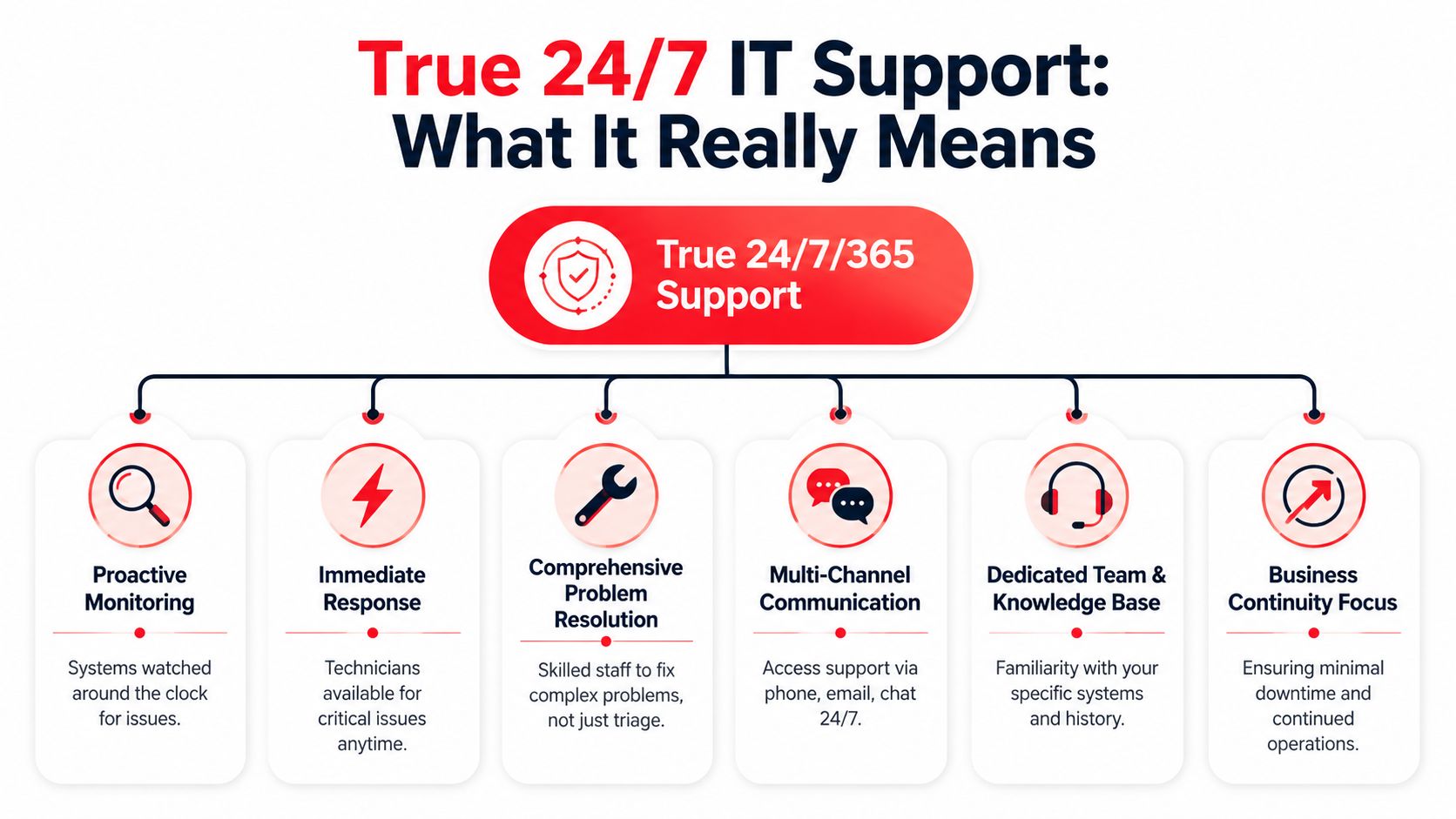
Beyond an Answering Service What Is True 24/7 Support

A lot of providers say they offer around-the-clock support. That phrase sounds reassuring until you ask what happens during a real incident.

A diagram illustrating the essential components of true 24/7/365 IT support services for businesses.

The difference that matters during a real incident

There's a major gap between 24/7 helpdesk availability and 24/7 operational coverage. Buyers often assume “24/7” means guaranteed restoration, but service levels and recovery responsibilities can vary a lot by contract, as noted in this Orlando managed service provider overview.

The easiest way to think about it is this:

  • An answering service model can log the issue, send an alert, and maybe start basic triage.
  • A real operations model can investigate, contain, remediate, escalate, coordinate with vendors, and stay on the issue until the business is stable.

That's the difference between a fire alarm and a fire department. The alarm tells you something is wrong. The fire department shows up with equipment, people, process, and authority to act.

A provider that answers the phone at 2 AM isn't automatically a provider that can resolve a ransomware event at 2 AM.

What true coverage looks like in practice

Operational 24/7 support usually includes several layers working together. One team handles user issues. Another monitors infrastructure and endpoints. A security function watches for signs of compromise, investigates alerts, and responds when something crosses from nuisance to incident. If a cloud platform, line-of-business application, or internet provider is involved, someone also has to coordinate that vendor chain.

A strong model usually includes:

  • Continuous monitoring: Systems, endpoints, and critical services are watched for failures, unusual activity, and early warning signs.
  • Immediate technician response: Critical issues don't sit in a queue waiting for normal office hours.
  • Real incident handling: The team can do more than reset passwords and reopen tickets.
  • Escalation paths: There's clarity about who owns what during outages, security events, and restoration work.
  • Coverage across holidays and weekends: Not just message-taking, but decision-making and action.

If you want a useful technical baseline for the security side of this, review what a Security Operations Center does. That's where a lot of “24/7” promises either become real or fall apart.

The practical question for an Orlando business owner isn't “Do you offer 24/7?” It's “Who is watching, who is responding, and who stays accountable until the incident is contained and the business is running again?”

The Business Case For Always-On IT in Orlando

A professional team working in a modern office with a view of the Orlando city skyline.

Always-on IT support matters because it protects outcomes that business owners already care about. Revenue continuity. Client confidence. Operational stability. Fewer disruptions that force staff into manual workarounds.

Professional services and regulated work

For law firms, accounting firms, architecture groups, engineering practices, and financial offices, technology interruptions quickly become client-service problems. Missed document access, unreliable email, and delayed remote connectivity can derail billable work and create compliance headaches. Strong 24/7 support lowers that exposure by keeping an eye on systems after hours and acting before small issues grow into next-day emergencies.

Cybersecurity also hits differently in professional services. These firms often hold sensitive contracts, financial records, legal files, and private client communications. They don't just need a helpdesk. They need disciplined patching, endpoint oversight, alert review, and an incident process that doesn't stop when the office closes.

Medical and operational environments

Privately owned medical practices face a different version of the same pressure. Scheduling, communications, protected health information, imaging access, and connected devices all depend on stable systems. If a workstation is encrypted or a critical application becomes unavailable, the issue isn't only technical. It affects patient flow, staff workload, and privacy obligations.

Industrial firms, logistics operations, and field-service companies need uptime for another reason. Their teams move on fixed schedules and often depend on dispatching, inventory systems, job records, and mobile communication. When those systems fail, crews lose time immediately and office teams start patching together workarounds.

Strong 24/7 support doesn't just shorten outages. It reduces the number of situations that turn into outages in the first place.

A lot of Orlando business owners still think of IT support as ticket handling. That's too narrow. In practice, the value sits in proactive monitoring, disciplined maintenance, faster containment during security events, and someone owning the issue from first alert to restored operation. That's what protects trust. Clients may never notice the patching schedule or after-hours alert review, but they absolutely notice when your systems stay available and your team stays responsive.

Core Features of a Comprehensive 24/7 IT Partnership

The phrase “managed services” covers a wide range of quality. Some plans are barely more than reactive support with a monthly invoice. Others provide the operational depth businesses need.

Industry guidance describes 24/7 support as coverage available “every single day of the week, including nights, weekends, and holidays,” and one Orlando guide says most managed IT providers charge $100 to $250 per user per month for that level of service in the local market, according to this 24/7 IT support pricing and coverage reference. If you're paying for an always-on model, these are the basics that should be on the table.

What should be included

  • Live helpdesk coverage: Users should reach an actual support function around the clock by phone, email, or ticket. After-hours support shouldn't be limited to “we'll notify someone.”
  • Monitoring with action behind it: Alerting only matters if someone is accountable for investigating and responding.
  • Patch and endpoint discipline: A provider should routinely maintain supported systems so known weaknesses don't sit untouched.
  • Documented incident response: During a serious outage or security event, roles need to be defined before the incident starts.
  • Vendor coordination: If internet, cloud, line-of-business software, or telecom is part of the problem, your provider should manage the back-and-forth instead of leaving your staff in the middle.
  • Reporting and roadmap visibility: You should know what was fixed, what remains risky, and what needs attention next quarter.

For many businesses, communications support is part of this picture too. If your phone system is cloud-based, voice reliability becomes part of operations, not a separate afterthought. A practical reference point is this overview of VoIP telephone service, because support quality often depends on how well IT and business communications are managed together.

What to pin down before signing

Not every contract includes the same scope, even when the pricing looks similar. Ask for clarity on these points:

Area What to confirm
After-hours incidents Who responds, what triggers action, and what counts as emergency work
Security events Whether the provider only alerts or also investigates and contains
Covered systems Which devices, cloud apps, servers, and network components are included
Projects and changes What's included in recurring service versus billed separately
Recovery responsibility Who owns restoration steps, vendor coordination, and communication during an outage

One local option in this category is managed IT support in Orlando FL, where the service model includes 24/7 monitoring, patching, and helpdesk coverage. Whether you choose that route or another provider, the important part is matching the contract to the operational risk your business carries.

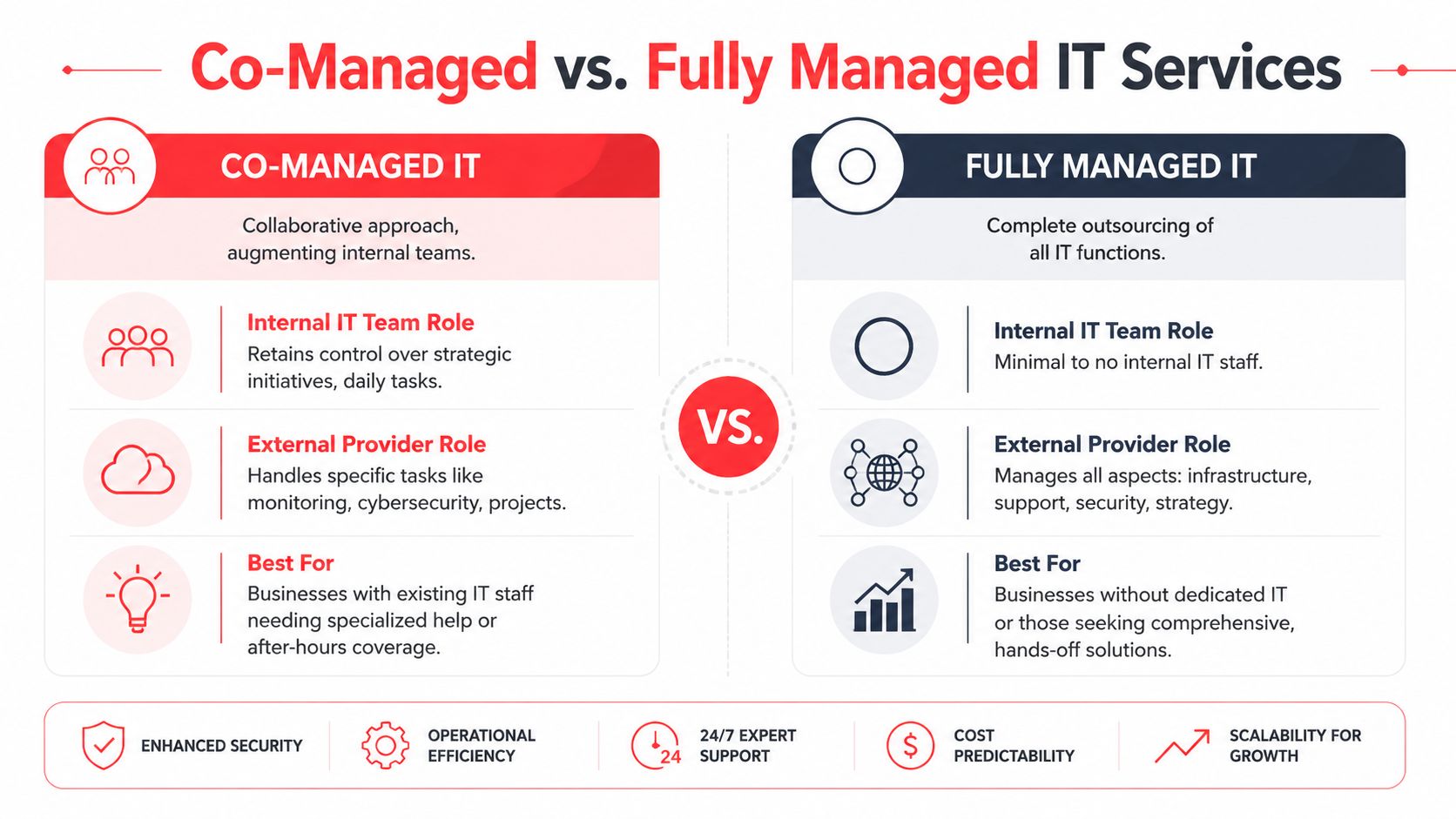
Co-Managed vs Fully Managed IT Which Model Is Right for You

Some companies need a partner to supplement internal IT. Others need a complete outsourced department. The right answer depends less on company size than on coverage gaps, leadership expectations, and how much operational responsibility the internal team can realistically carry.

A comparison chart outlining the differences between co-managed and fully managed IT service models for businesses.

An Orlando market reference frames the issue well. Break-fix support is commonly priced near $150 per hour, and the key decision becomes which mix of human support and automation produces measurable uptime, as discussed in this Orlando IT support cost comparison.

When co-managed makes sense

Co-managed IT fits businesses that already have in-house staff but don't have enough bench strength for full coverage.

That often looks like this:

  • A small internal team handles daily support but needs after-hours monitoring and escalation.
  • Leadership wants strategic control in-house while outsourcing patching, security operations, vendor management, or project overflow.
  • The existing technician is overloaded and needs backup for vacations, major incidents, or specialist work.

This model works well when the internal team is competent but capacity is the problem. It tends to fail when leadership expects one internal person and one outside provider to function like an integrated 24/7 department without clear ownership.

When fully managed is the better fit

Fully managed IT works better when the business wants one accountable partner handling infrastructure, support, security, and routine administration.

A fully managed model usually fits if:

  • There is little or no internal IT staff
  • The owner or office manager is tired of coordinating vendors
  • Security, uptime, and support need a formal process rather than ad hoc response
  • The business wants predictable operating costs instead of surprise hourly invoices

Choose co-managed if you need reinforcement. Choose fully managed if you need ownership.

What doesn't work well is trying to simulate 24/7 coverage with daytime staff plus occasional emergency calls. That approach looks cheaper until nights, weekends, and security incidents expose the gap.

How to Vet 24/7 IT Support Providers in Central Florida

A lot of Orlando business owners hear "24/7 support" and assume it means someone is actively watching systems, investigating security alerts, and coordinating response at 2:00 a.m. That assumption causes expensive mistakes. Some providers offer after-hours call coverage. Fewer offer true around-the-clock operations.

An infographic titled Vetting 24/7 IT Support Providers in Central Florida with eight numbered key evaluation criteria.

Central Florida has plenty of IT talent, but staffing depth alone does not prove service quality. What matters is whether the provider has enough trained people, enough documented process, and enough after-hours authority to act without waiting for the next business day.

Questions that expose weak coverage

Ask questions that force the provider to describe what happens overnight, on weekends, and during a security event.

  • Who is working after hours: Is it a staffed service desk, a rotating on-call technician, or an answering service that takes messages?
  • What happens during a critical incident: Who owns the response, who makes decisions, and who updates your leadership team?
  • What happens when a security alert fires overnight: Does a security team investigate it, or does it sit in a queue until morning?
  • What tools and access do after-hours staff have: Can they isolate a device, disable an account, restart a failed service, or only open a ticket?
  • How do they handle vendor coordination: Will they work directly with your internet provider, cloud providers, phone vendor, and line-of-business software support teams?
  • What is outside the agreement: After-hours support often sounds broad until an outage, security issue, or onsite need falls outside scope.
  • How current is their documentation: Night and weekend response breaks down fast when the provider has incomplete network maps, stale passwords, or no escalation notes.

Vague answers are a warning sign.

What strong provider answers sound like

A capable provider speaks in process, roles, and timing. They should be able to tell you who receives alerts, who investigates them, who can approve containment steps, and how communication works if the issue affects payroll, phones, remote access, or customer-facing systems.

Look for specifics such as:

  1. A defined after-hours staffing model with named functions, not a generic promise that someone is available.
  2. Separate handling for user support and security events so a suspicious login or endpoint alert does not get treated like a password reset.
  3. Clear incident severity rules so business outages and active threats move to the front of the line.
  4. Documented escalation paths for cloud outages, internet failures, server issues, and account compromise.
  5. Regular reporting and review so repeat incidents get fixed at the root, not reopened every few weeks.

The best answers also include limits. Good providers know what they can remediate remotely, what requires client approval, and what requires onsite work. That honesty matters because false confidence is dangerous during an outage.

Ask for the operating model. "We answer the phone 24/7" is not the same as "we monitor, investigate, escalate, and respond 24/7."

Local presence still has value in Central Florida. It helps with onsite recovery, hardware failures, vendor handoffs, and communication during a messy incident. But local presence is only part of the picture. For a business that depends on uptime and secure access, the critical test is whether the provider can do more than answer calls after hours. They need to keep operating when your staff is asleep.

Frequently Asked Questions About Orlando IT Support

What cybersecurity threats should Orlando businesses expect

Most small and mid-sized businesses deal with a familiar set of risks. Suspicious login activity, phishing-driven account compromise, malware, unauthorized remote access attempts, and vulnerable endpoints are common concerns. The exact threat mix varies by industry, but the practical issue is the same. Someone needs to review alerts, validate what's real, and act fast when something crosses the line from annoyance to incident.

How is a SOC different from a helpdesk during an incident

A helpdesk is built to support users and restore routine functionality. A SOC is built to monitor, investigate, contain, and coordinate response during security events. If a user can't print, the helpdesk is usually the right first stop. If an account shows unusual activity or multiple systems start behaving abnormally, a security operations function should take the lead.

What happens during onboarding

A solid onboarding process starts with discovery. The provider gathers documentation, reviews users and devices, maps critical systems, checks administrative access, and identifies immediate risks. Then they standardize support processes, monitoring, endpoint controls, escalation contacts, and communication rules. Good onboarding reduces confusion later because the support team already knows your environment before the first major issue lands.

Can 24/7 support help with industry-specific software

Yes, if the provider is willing to support the business process around the software, not just the workstation it runs on. That can include coordinating with the application vendor, validating access paths, documenting dependencies, and helping your team recover operations when the software is affected by a broader outage. The key is to ask upfront which applications are in scope and what the provider's responsibility is when the vendor owns part of the fix.


If your business needs more than after-hours answering and wants real accountability for uptime, security, and incident response, talk with Cyber Command, LLC. They provide U.S.-based managed IT, co-managed support, and 24/7/365 security operations for organizations in Orlando and Central Florida, and a consultation can help you determine whether your current support model matches your operational risk.

IT Support Near Altamonte Springs FL: A 2026 Buyer’s Guide

Your office opens at 8. By 8:17, someone can't print, a shared folder won't load, and a manager is forwarding a suspicious email asking for a wire transfer review. Your current IT person says they'll “take a look soon.” That's not support. That's drift.

If you're shopping for IT Support Near Altamonte Springs FL, the critical issue isn't whether a provider can reset passwords or reboot a firewall. It's whether they can keep your business operating, secure, and accountable when something goes wrong after hours, during a cyber event, or in the middle of a growth push. Most providers sell reassuring phrases. Few explain what those phrases mean in practice.

This matters more in Central Florida than many owners realize. Altamonte Springs isn't an isolated suburb. It operates inside a large regional business environment where speed, compliance, and uptime directly affect revenue, client trust, and staff productivity.

Table of Contents

Why Altamonte Springs Businesses Need Strategic IT

A frustrated office worker sitting at a desk with his hands on his face before a computer error.

A lot of local businesses are running with a patchwork setup. One outside technician. One office manager who “handles tech stuff.” One cloud app no one fully owns. It works until it doesn't, and then the whole company feels it.

That approach is too fragile for the market you're operating in. Altamonte Springs sits inside the Orlando, Kissimmee, Sanford metro area, which had an estimated population of about 2.7 million in 2024 and is part of one of Florida's largest business markets, according to regional Altamonte Springs IT market context. In plain English, your firm is competing in a serious operating environment. Clients expect responsiveness. Employees expect systems to work. Regulators and insurers expect discipline.

IT now affects every department

Professional services firms depend on document access, email continuity, and secure client communication. Medical and dental offices depend on stable line-of-business systems and privacy controls. Architecture, engineering, and field-service companies depend on file availability, device management, and vendor coordination.

Practical rule: If your business stops earning when your systems stop working, IT is a leadership issue, not a side task.

That's why helpful frameworks like Cloudvara IT support insights resonate with small business owners. They push the conversation beyond “who can fix my computers” and toward service reliability, planning, and fit.

Local growth requires a support model that scales

If your company has outgrown ad hoc support, start by assessing whether you need a provider that can own helpdesk, security, vendor management, and planning in one motion. Businesses comparing options often benefit from looking at resources on local IT support for small business because the core decision isn't technical. It's operational.

You need an IT partner that treats uptime, security, and accountability as part of your business model. If a provider can't talk clearly about those three areas, keep looking.

Beyond Break-Fix Understanding Your IT Support Options

The wrong service model creates constant friction. Not because the provider is malicious, but because you hired a plumber when you needed a facilities team.

Break-fix is cheap until it isn't

Break-fix support means you call when something breaks. That can work for a very small office with low complexity, low compliance pressure, and high tolerance for downtime. The problem is simple. Break-fix providers get paid when things fail.

That model creates bad incentives for a growing business. There's little reason for long-term planning, patch discipline, asset standards, or user training if the agreement only starts after the outage.

A law office with shared files, remote access, and frequent email attachments usually outgrows break-fix quickly. A medical practice with multiple devices and specialized applications should skip it entirely. Downtime there isn't an inconvenience. It's operational damage.

Managed and co-managed models fit most growing firms

Managed IT services are the better fit when you want someone responsible for day-to-day technology health. That includes helpdesk, device oversight, updates, monitoring, vendor coordination, and routine maintenance. This model fits firms that don't want to build a full in-house team.

Co-managed IT works when you already have internal staff but need depth, after-hours coverage, project support, or cybersecurity muscle. A controller, operations lead, or in-house technician may know the business well, but still need outside support for escalations and continuous coverage.

Security-focused support matters when your exposure is bigger than your helpdesk. If your staff handles sensitive data, financial records, patient information, contracts, or privileged communications, basic desktop support isn't enough. You need a provider that can explain how incidents are detected, triaged, contained, and recovered.

A good provider doesn't just describe services. They define responsibility boundaries.

One useful way to think through service delivery is to review how remote monitoring and management platforms support operations. If you're evaluating how enterprise-grade support environments are structured, this overview to evaluate Superops RMM for enterprises helps frame what mature service tooling is supposed to enable. The tool itself isn't the point. The point is visibility, consistency, and accountability.

Pick the model that matches your business risk, not your smallest monthly quote.

Decoding IT Support Costs and Finding True Value

Most business owners ask the wrong first question. They ask, “What's your monthly rate?” They should ask, “What exactly stops being included the moment something difficult happens?”

A comparison chart outlining the pros and cons of different IT support cost models for businesses.

Headline pricing hides scope decisions

A major problem in the local market is that many providers advertise flat-rate, month-to-month, or predictable pricing without clearly spelling out scope. One local source that addresses this directly notes that costs can still vary by business size and may include one-time setup fees or extra monthly charges for specific services. It also makes the more important point that flat-rate IT isn't automatically cheaper if the contract excludes remediation, compliance work, or major projects. A total-cost-of-ownership comparison is more valuable than a headline monthly number, as explained in this Altamonte Springs managed IT pricing discussion.

That's the part many owners miss. “Flat-rate” can still mean:

  • Onboarding isn't included. You pay to document, standardize, and clean up what should have been handled at the start.
  • After-hours work is extra. The contract sounds broad until a weekend outage appears.
  • Projects sit outside the agreement. Infrastructure changes, compliance remediation, or system upgrades become separate invoices.
  • Security is partial. Basic antivirus may be included, while more serious protections and response support are not.

Ask for total cost of ownership not a teaser rate

Don't compare vendors on monthly price alone. Compare them on total cost of ownership over the life of the relationship.

Use these filters:

  1. What is covered every month. Helpdesk, patching, endpoint protection, vendor management, reporting, backups, and routine admin work should be clearly defined.
  2. What triggers extra billing. Ask for examples, not slogans.
  3. What happens during a bad month. If an outage, migration, or security issue appears, does the provider stay engaged under the agreement or flip into project billing?
  4. What gets standardized. Mature providers usually reduce chaos by enforcing supported devices, documented processes, and clear ownership.

Cheap IT support often becomes expensive the first time you need urgency, security work, or cross-vendor coordination.

A strong pricing conversation should feel almost uncomfortably specific. If it doesn't, you're probably being sold a package, not a support outcome.

The Real Security Threats Facing Central Florida Businesses

A lot of small and mid-sized businesses still treat cybersecurity as a technical add-on. That's outdated. If your company uses email, cloud apps, remote logins, stored client data, or online payments, you already have meaningful exposure.

An organizational chart showing major cyber threats in Central Florida, including phishing, ransomware, insider threats, and data breaches.

The threat isn't abstract

The FBI's Internet Crime Complaint Center reported about $12.5 billion in losses in 2023, a reminder that ransomware, business email compromise, and related incidents aren't edge cases for SMBs. That figure appears in this Altamonte Springs cyber risk discussion. The lesson for local businesses is straightforward. A provider saying “we offer 24/7 support” tells you almost nothing by itself.

A CPA firm can be hit through an email impersonation attempt. A dental office can lose access to scheduling and patient records. An engineering firm can have sensitive files exposed through poor access control. In each case, the first business question is the same. Who notices, who responds, who coordinates recovery, and who owns communication?

Security has to include response and recovery

Basic helpdesk support and real security operations are not the same thing. Good cybersecurity support should include a documented response path, not just protective software on endpoints.

Look for evidence of:

  • Incident triage. Someone has to review alerts, determine whether the event is real, and prioritize action.
  • Containment steps. A compromised device or account must be isolated fast.
  • Backup validation. Backups aren't useful if no one has confirmed they can be restored.
  • Patch and endpoint discipline. Many attacks exploit neglected systems and unmanaged devices.
  • User controls. Access should match job roles, and departures should trigger prompt offboarding.

If a provider can't explain their incident workflow in plain language, they won't perform well when your staff is stressed and your phones are ringing.

Local owners should also expect guidance on practical controls for staff behavior, access, and recovery readiness. This resource on cybersecurity best practices for small businesses is useful because it frames security as a business operations discipline, not just an IT purchase.

What matters most is clarity. When an employee clicks the wrong link at 9:40 p.m., you need more than a voicemail box and a dashboard. You need a team with a documented plan.

Your Checklist for Choosing the Right IT Partner

Sales calls are easy. Accountability is harder. The fastest way to separate polished marketing from real capability is to ask operational questions and insist on direct answers.

Questions that expose weak providers fast

Start with response structure. Not promises. Structure.

Ask how they handle a Friday night outage, a Monday morning login failure across multiple users, or a suspected compromised email account. A serious provider should describe triage, escalation, communication, and next actions without hiding behind vague “best effort” language.

A practical benchmark in this market is 24/7 live coverage because after-hours incidents still need immediate triage. Local job postings in Altamonte Springs explicitly expect night, weekend, and on-call coverage for service operations, which reflects how support demand is structured around continuous availability, as shown in this Altamonte Springs IT support supervisor posting.

Then ask about onboarding. Weak firms treat onboarding like paperwork. Strong firms use it to map systems, identify risk, standardize devices, review vendors, and establish support boundaries.

What you want to hear: “Here's how we take ownership, document your environment, and reduce uncertainty in the first phase.”

Also ask how they report. If you never receive meaningful updates on recurring issues, security posture, asset health, and planning priorities, you're not in a managed relationship. You're in a ticket queue.

IT Provider Vetting Checklist

Question Category Question to Ask What a Good Answer Looks Like
Response Model Do you provide live after-hours triage or just an answering service? Clear explanation of who answers, who escalates, and what happens during nights and weekends
Incident Handling What happens if we suspect a compromised account? A documented workflow for triage, containment, communication, and recovery
Onboarding What do you review during transition? Systems documentation, user access, device standards, vendor handoff, and risk review
Pricing Scope What is not included in the monthly agreement? Specific exclusions with examples, not vague contract language
Reporting How do you show accountability over time? Regular reporting, issue trends, planning reviews, and documented recommendations
Security Who owns patching, endpoint protection, and backup checks? Named responsibilities and a clear cadence for ongoing oversight
Strategic Fit How do you align IT decisions with business goals? Roadmap thinking, budgeting input, lifecycle planning, and operational context
Team Depth If our main contact is unavailable, who steps in? Shared documentation, escalation paths, and team-based coverage

If you want another set of criteria before signing anything, this guide on how to choose a managed service provider is worth reviewing alongside your shortlist.

A trustworthy provider won't get annoyed by hard questions. They'll welcome them.

Partnering for Growth The Cyber Command Advantage

The right IT partner does four things well. They make costs understandable. They reduce avoidable downtime. They bring real security operations to the table. They show their work through reporting and planning.

What a real partner looks like

That standard is what you should apply to any provider you consider. For businesses that need one firm to combine managed IT, co-managed support, cybersecurity coverage, vendor management, and strategic planning, Cyber Command, LLC is one example of that model. Based on the publisher information provided, the company offers 24/7/365 U.S.-based helpdesk, managed and co-managed IT, cloud services, a dedicated SOC, reporting, and predictable pricing structured around proactive support.

Screenshot from https://cybercommand.com

That doesn't mean every business needs the same stack or the same agreement. It does mean your next IT relationship should be judged by operational clarity, not sales language. If a provider can't define what happens during onboarding, after-hours incidents, security events, and major changes, they're not ready to support a growing Central Florida business.

The strongest outcome isn't “having IT covered.” It's having a partner that helps your business stay available, secure, and easier to run.


If you're evaluating Cyber Command, LLC, start with a direct conversation about your current risks, your support gaps, and what's included in ongoing service. A good fit should leave you with clearer accountability, fewer surprises, and a practical path to stronger uptime and security.

Reliable IT Services Near Winter Park FL: Local Experts

IBM's 2025 Cost of a Data Breach Report put the global average breach cost at $4.88 million. For a Winter Park business owner, that number matters because it reframes IT from a repair expense into a risk and continuity decision.

A reactive support model can look affordable on paper. The invoice only shows up when something breaks. What it hides are the costs that usually hurt more: staff downtime, delayed client work, weak patching discipline, missed alerts after hours, backup failures discovered too late, and security gaps that stay open until an incident forces action.

That is the conversation around IT services near Winter Park FL in 2026. A local firm does not just need someone who can fix a printer or replace a failed workstation. It needs a predictable operating model for support, cybersecurity, compliance, and recovery. For many organizations, that means shifting from ad hoc repair to a flat-rate partner that handles monitoring, endpoint protection, patch management, secure access, backup oversight, and documented response procedures under one plan. Businesses evaluating managed IT support in Orlando and Winter Park should press on cost predictability and security coverage first.

The local business environment adds urgency. Census Reporter's Winter Park profile describes a compact city of 30,274 residents across 8.8 square miles. In a market like that, reputation travels fast, service interruptions are visible, and professional firms often compete on responsiveness and trust as much as price.

For law offices, accounting firms, medical practices, architecture studios, and nonprofits, IT decisions now affect billable time, audit readiness, cyber insurance posture, and client confidence. The goal is not more technology. The goal is fewer surprises, faster recovery, and a support budget that stays predictable while security requirements keep getting stricter.

Table of Contents

Why Your Winter Park Business Can No Longer Ignore IT Strategy

Cyber incidents and downtime now carry financial, legal, and operational consequences that many small and midsize businesses underestimate until the damage is already done.

That is why IT strategy belongs in the same conversation as budgeting, insurance, staffing, and compliance. For a Winter Park business, technology is tied directly to revenue collection, client communication, scheduling, records access, and day-to-day trust.

The old break-fix model assumed most problems were isolated hardware failures. A machine stopped working, someone called for help, and the issue was corrected. In 2026, the bigger risks are usually less visible. Weak identity controls, inconsistent patching, poor backup testing, unmanaged devices, and delayed threat detection can interrupt operations long before anyone opens a support ticket.

Winter Park businesses feel this sharply because many operate in professional services, healthcare, finance, and other trust-based fields. In those environments, an IT problem rarely stays an IT problem. It turns into missed appointments, delayed billing, client frustration, audit exposure, and pressure on staff who are already working on tight schedules.

Small geography doesn't mean small exposure

A compact market creates accountability. News travels fast, clients expect quick responses, and even a short outage can be noticed by far more people than owners expect.

A law office that loses document access for half a day may miss deadlines. A medical practice with unstable systems may slow intake, charting, and claims. A professional firm using weak email security may face account compromise that spreads into payment fraud or data exposure. Those costs do not show up neatly on a single invoice, which is one reason many businesses underinvest until an incident forces the issue.

Practical rule: If your provider mainly arrives after something breaks, you have a repair vendor, not an IT strategy.

A real strategy sets standards before problems happen. It defines how devices are secured, how access is approved, how backups are tested, how software is updated, how incidents are escalated, and what level of downtime the business can tolerate. That discipline matters because predictable operations usually cost less than repeated disruption.

For companies evaluating managed IT support for Orlando-area businesses, the question is not just who can respond to tickets. It is who is reducing the odds of downtime, limiting security exposure, and giving leadership a clearer, flatter cost structure instead of surprise repair bills.

What Modern Managed IT Services Actually Include

Managed IT should reduce business risk, standardize day-to-day operations, and give leadership a clearer monthly cost. If a provider mainly answers tickets and shows up after failures, the business is still carrying too much operational and security exposure.

A diagram outlining the six key components of modern managed IT services for businesses and organizations.

Support now includes operations, security, and accountability

For a Winter Park business in 2026, IT service means more than fixing laptops or resetting passwords. It means someone is watching systems, applying updates on schedule, enforcing access controls, checking backups, documenting standards, and responding before a small issue becomes downtime, data loss, or a compliance problem.

That operating model matters because security failures rarely start as dramatic events. They start with a missed patch, a weak login policy, a backup that was never tested, or an alert nobody reviewed.

Essential bundled components

A strong managed IT agreement should combine these functions under one accountable team:

  • Continuous monitoring: Servers, endpoints, cloud systems, and network equipment are monitored for outages, performance issues, and suspicious activity.
  • Patch and maintenance management: Supported devices and business applications are updated on a defined schedule, with exceptions tracked instead of ignored.
  • Helpdesk and user support: Staff need fast resolution for access issues, software problems, device failures, and routine service requests.
  • Security administration: MFA, endpoint protection, firewall reviews, device policies, and user access controls should sit inside the service model, not as an afterthought.
  • Backup oversight and recovery readiness: Backups need verification, retention review, and restore testing so the business knows what can be recovered and how quickly.
  • Documentation and standards: Network details, vendor contacts, asset records, escalation paths, and approved configurations should be documented well enough that support does not depend on one person's memory.
  • Roadmap and budgeting guidance: Leadership needs advice on hardware lifecycle, licensing, risk reduction, and upcoming costs before they turn into urgent purchases.

The point is coordination. A business gets better results when the same provider can see ticket trends, patch status, security alerts, backup health, and aging equipment in one place.

That is also why growing firms start asking what a security operations center does for threat monitoring and incident response. Helpdesk support alone does not cover log review, active threat detection, or the discipline required to catch suspicious behavior outside business hours.

A pieced-together model usually costs more than it appears to. One company handles support. Another sells security software. A third person checks backups occasionally. When an incident hits, response slows down because ownership is split, documentation is incomplete, and nobody is responsible for the full chain of prevention, detection, and recovery.

The True Cost of IT Support Comparing Break-Fix and Flat-Rate Models

A lower hourly rate rarely means a lower IT cost.

The visible invoice is only part of the expense. Winter Park businesses also pay for downtime, stalled staff, delayed vendor response, missed patching, and security gaps that sit unresolved until they become an outage or an incident. Those costs do not show up neatly on a repair ticket, but they still hit payroll, client service, and compliance risk.

Why hourly IT can cost more than it appears

Break-fix support fits a narrow use case. It can work for a very small office with limited systems, little regulatory exposure, and a high tolerance for interruption.

That is not how most established firms operate in 2026.

A law office, medical practice, accounting firm, or multi-location service business depends on email, cloud apps, file access, phones, line-of-business software, remote logins, and secure records every day. In that setting, hourly support often creates a budgeting problem and an accountability problem at the same time. The provider is called after the failure. The business pays for the failure, the repair, and the lost time around it.

The hidden costs are usually operational:

  • Lost employee hours: Staff wait for issues to be diagnosed, scheduled, and resolved instead of doing billable or revenue-producing work.
  • Repeat problems: The same workstation, account, or configuration issue keeps returning because no one owns root-cause prevention.
  • Extra security labor: Patch cleanup, MFA enforcement, access reviews, and endpoint remediation become separate charges instead of routine work.
  • Vendor coordination time: Internet, phones, software, copier, and cloud providers still need someone to coordinate troubleshooting when the issue crosses systems.
  • After-hours exposure: Problems discovered late in the day can sit until the next business window, extending downtime and increasing risk.

Cheap hourly support becomes expensive fast when prevention is outside the agreement.

Flat-rate managed service changes the financial model. Instead of asking what one ticket will cost, owners can plan around a fixed monthly number and a defined scope of responsibility. That matters because predictable spend is not just a finance preference. It is what allows a business to budget for maintenance, security operations, lifecycle planning, and support without waiting for something to break first.

Break-Fix vs. Flat-Rate Managed IT

Feature Break-Fix Model (Hourly Rate) Flat-Rate Managed IT (Cyber Command)
Billing approach Variable, tied to incidents and labor time Predictable monthly pricing
Incentive structure Paid when something fails Paid to keep systems stable
Monitoring Often limited or separate Included as part of ongoing service
Patching and maintenance Frequently reactive Scheduled and standardized
Security oversight Commonly fragmented Integrated into daily operations
Budgeting Hard to forecast Easier to plan around
Vendor coordination Often billed separately or handled by client Typically part of managed relationship
Downtime exposure Higher when issues wait for discovery Lower when issues are caught early

Owners evaluating support contracts should understand how managed service pricing models work in practice before focusing on rate cards alone. The better question is straightforward. Does the agreement reduce interruptions, close security gaps, support compliance needs, and give the business a monthly cost it can plan around?

Why Your Business Needs a 24/7 Cybersecurity Shield

Cybersecurity isn't a software purchase. It's an operating discipline.

Many small and mid-sized businesses still assume antivirus, a firewall, and user training are enough. Those controls help, but they don't create active defense. Threats don't arrive only during office hours, and they rarely announce themselves in a way that a busy office manager can interpret correctly.

An infographic titled Why 24/7 Cybersecurity Matters, outlining four critical reasons businesses need constant protection.

A firewall alone is not a security program

What protects a business is a repeatable process for watching signals, reviewing suspicious activity, containing incidents, and documenting what happened. That's the practical value of a 24/7 security team or SOC model.

Imagine a security patrol for your digital property. Locks matter. Cameras matter. But if nobody is watching the feed, investigating anomalies, and responding when something is wrong, the business is still exposed.

A real security operating model should cover:

  • Alert review: Someone has to decide which events are noise and which need action.
  • Threat investigation: Suspicious logins, endpoint behavior, and account changes need human judgment.
  • Containment steps: Isolate an endpoint, disable access, preserve continuity, and stop spread.
  • Recovery coordination: Restore service cleanly and document what must change afterward.

What 24-7 protection changes operationally

The biggest benefit isn't abstract “peace of mind.” It's faster decision-making when something unusual happens.

Without constant coverage, a suspicious sign-in on a weekend might sit untouched until Monday. A compromised account might continue sending email, touching files, or creating downstream problems while no one is looking. Businesses don't need to understand every security detail, but they do need someone responsible for that watchfloor function.

Some managed providers build that into the service model. Cyber Command, LLC is one example described by the publisher as offering a 24/7/365 live, U.S.-based helpdesk, a dedicated 24/7 SOC, incident response, recovery, and continuous compliance support. For buyers, that kind of structure matters because it combines support and defense instead of splitting them across separate vendors.

If your support provider goes quiet after business hours, your risk doesn't.

This is especially important for firms that hold client records, financial data, patient information, contracts, or internal documents that would create legal and operational headaches if exposed or locked up.

Tailored IT for Winter Park's Professional and Medical Sectors

Winter Park doesn't have a generic business profile. Data USA identifies Professional, Scientific, and Technical Services as the city's largest industry, employing 2,591 people in 2024, with 5,671 businesses in the city and a listed technical-services wage figure of $114,150 in this Data USA profile for Winter Park. That concentration changes what local IT support should look like.

A support model built for light retail or occasional residential repair won't fit a law office, accounting firm, engineering practice, dental clinic, or med spa. These businesses depend on secure records, specialized applications, fast user support, and controlled access.

A modern, professional office workspace with a computer desk, ergonomic chair, and a view of lake scenery.

Professional firms need precision and documentation

A local legal or accounting office usually doesn't need flashy technology. It needs dependable systems and fewer surprises.

That means secure email, clean user onboarding and offboarding, controlled file access, documented device standards, and prompt support when a workflow stalls before a deadline. Firms that invest in visibility online should also think beyond IT alone. A practical resource on local SEO for lawyers is useful because client acquisition and operational reliability often intersect. If your intake systems, website forms, or email workflows are unstable, marketing gains get wasted.

Typical pressure points in professional services include:

  • Client confidentiality: Access needs to follow role, not convenience.
  • Document workflow: Shared files, version control, and remote access need consistency.
  • Calendar and communication uptime: Small failures create client-facing delays quickly.

Medical offices need reliability and control discipline

Privately owned medical and dental practices face a different daily rhythm. The front desk, scheduling, charting, imaging, billing, and secure communication all have to work together in real time.

In that environment, “we'll take a look later” is a bad answer. If exam room devices, practice systems, or access controls fail during operating hours, the issue affects patient experience immediately. These offices also need better documentation around who can access what, how devices are managed, and how data is protected.

The right provider for a practice isn't the one that talks most about hardware. It's the one that can keep clinical operations moving while maintaining control discipline.

Your Checklist for Selecting the Right IT Partner

A provider can sound polished in a sales conversation and still run an undisciplined operation. The test isn't whether they promise responsive support. The test is whether they can show how support, standards, and accountability work.

The City of Winter Park's IT department describes technology design and selection, policy and standards development, and IT strategic planning as core IT responsibilities in this City of Winter Park information technology overview. That's a useful benchmark for private-sector buyers too. Mature providers don't just close tickets. They build a supportable environment.

A checklist infographic illustrating six essential criteria to consider when selecting a reliable IT partner company.

What to ask before you sign anything

Use this list to filter providers quickly:

  • Ask for standards, not slogans: Can they show device baselines, patching routines, and escalation paths?
  • Review the SLA language: You want clarity on response expectations, after-hours handling, and what counts as covered work.
  • Check strategic involvement: Do they help with roadmap decisions, budgeting, and lifecycle planning, or only day-to-day incidents?
  • Verify security ownership: Ask who reviews alerts, manages endpoint controls, and coordinates incident response.
  • Look at onboarding discipline: Good onboarding includes documentation, account reviews, backup checks, and environment cleanup.
  • Confirm local practicality: If you need onsite support in the Winter Park area, ask how that is scheduled and documented.

Questions that expose weak providers quickly

Some questions force real answers:

Question What a strong answer sounds like
How do you reduce repeat issues? They talk about standards, root-cause work, and maintenance cadence.
What happens after hours? They describe a real process, not a voicemail box.
Who owns vendor management? They explain coordination responsibilities clearly.
How do you support regulated offices? They discuss documentation, controls, and audit readiness.

For medical groups reviewing internal workflows, a guide to medical practice technology is a useful companion read because it frames technology as part of patient operations, not just back-office infrastructure.

Your Questions Answered and Next Steps

Business owners usually reach the same final questions once they move past hourly pricing and generic support promises. The answers should be straightforward.

Frequently Asked Questions

Question Answer
What's the difference between managed and co-managed IT? Managed IT means the provider takes primary responsibility for day-to-day support and operations. Co-managed IT means the provider works alongside your internal staff, usually covering gaps like after-hours support, security operations, projects, or specialized administration.
Do small firms really need cybersecurity beyond basic protection? If the business depends on email, cloud files, client data, remote access, or line-of-business applications, the answer is yes. The issue isn't company size. It's operational dependence and the need to keep systems trustworthy.
What should be included in onboarding? Documentation, account reviews, device inventory, backup validation, standards alignment, and clear escalation paths. If onboarding is mostly “send us your passwords,” that's a warning sign.
How should I evaluate price? Compare predictability, accountability, and operational coverage. A lower headline rate doesn't help if it excludes maintenance, after-hours response, security work, and vendor coordination.

A good provider should leave you with fewer unknowns, not more. You should know who handles alerts, how support gets escalated, what your monthly costs cover, and how your environment is being standardized over time.

For a Winter Park business, that's the practical benchmark for IT services near Winter Park FL. You need a partner that treats support, cybersecurity, planning, and cost control as one business function. If the service model is reactive, loosely documented, and vague about accountability, the true cost usually shows up later in downtime, staff disruption, and avoidable risk.


If you're evaluating options for managed IT and cybersecurity, Cyber Command, LLC is one place to start the conversation. Ask for a review of your current support model, what's covered after hours, how security incidents are handled, and whether your current setup gives you predictable costs or just delayed surprises.

Expert IT Support Near Lake Nona Orlando FL for Businesses

A lot of Lake Nona business owners hit the same wall at roughly the same moment. The firm adds staff, opens another suite, adopts more cloud apps, and suddenly the old approach to IT stops holding up. Tickets sit too long, onboarding drags, printers and Wi-Fi become recurring distractions, and cybersecurity starts feeling like a risk management problem instead of a technical one.

That's why IT Support Near Lake Nona Orlando FL has to be evaluated differently than generic “computer repair.” In a district built for business growth, professional services, healthcare-adjacent operations, and hybrid work, support has to protect uptime, reduce risk, and scale without creating chaos.

Table of Contents

Why Lake Nona Businesses Need More Than Just IT Support

A growing architecture office, dental practice, or advisory firm in Lake Nona usually doesn't fail because of one dramatic IT outage. It gets slowed down by smaller issues that pile up. New employees wait for device setup. Shared files get messy. Cloud logins break at the worst time. Vendors point fingers at each other when phones, internet, or business software don't work together.

That's the point where “call someone when something breaks” stops being enough. A business in a planned, fast-moving district needs support that can standardize systems before growth creates operational drag.

A professional team collaborates in an office, reviewing business growth data presented on a large monitor.

Growth changes the job of IT

Lake Nona isn't just another pocket of Orlando. According to the Lake Nona fact sheet, it spans 17 square miles and 11,000 acres (about 44 square kilometers) and has a median age of 37. The area also includes millions of square feet of residential and commercial development. That matters because more business density usually means more devices, more networks, more software vendors, and more points of failure.

In practical terms, IT support in this environment has to do more than reset passwords and replace hardware. It has to support business movement. Office expansions, hybrid staff, cloud migrations, compliance expectations, and vendor coordination all become part of the support function.

Practical rule: If your team loses time to recurring technical friction every week, you don't have a repair problem. You have an operations problem.

What works and what breaks down

Reactive support works for very small environments with low complexity. It doesn't work well once your business depends on real-time access to cloud files, secure remote access, stable wireless coverage, and fast user onboarding.

What tends to work better is a support model built around prevention, visibility, and ownership. That means someone is tracking device health, patching systems, documenting vendors, and spotting weak points before they interrupt the workday. Businesses looking for a stronger operating model often start with a more structured approach to local IT support for small business.

Common signs you've outgrown basic support include:

  • Frequent repeat issues: The same Wi-Fi, printing, or login problems keep returning.
  • Unclear accountability: Your internet provider, phone vendor, and software vendor each blame the other.
  • Slow employee setup: New hires can't be productive on day one.
  • Security anxiety: You're not sure who's watching alerts, handling patches, or validating backups.

Lake Nona businesses don't need more noise from IT. They need a support structure that keeps pace with growth.

The Spectrum of IT Support Models For Your Business

Not all IT support is the same, and many business owners compare options using the wrong criteria. They focus on hourly rates or ticket volume instead of the bigger questions. How predictable is the cost? How much downtime risk are you carrying? Who is responsible for prevention?

The right model depends on your internal capacity, regulatory exposure, and tolerance for disruption.

An infographic showing the four levels of IT support models, ranging from break-fix to co-managed IT.

Four common support models

Model How it works What it does well Where it falls short
Break-fix You call when something breaks Low commitment for very small environments Costs swing unpredictably, and problems are handled after impact
Managed services Ongoing support for users, devices, and systems on a monthly plan Better consistency, planning, and prevention Requires a provider with strong process discipline
Internal IT team In-house staff owns daily support and strategy Direct control and internal familiarity Hiring, coverage, and specialization can get expensive
Co-managed IT Internal staff shares responsibilities with an external partner Good fit for lean internal teams that need depth Success depends on clear role boundaries

What the Orlando market tells you

The local market has largely moved toward recurring support. One Orlando guide notes that most managed IT providers use tiered, per-user pricing ranging from $100 to $250 per user per month, which shows how standardized predictable monthly support has become in the area according to this Orlando IT support pricing guide.

That doesn't mean every monthly plan is equal. Some agreements only cover basic helpdesk activity. Others include patching, vendor management, reporting, cloud administration, security tooling, and strategic guidance. If you compare providers only on the monthly number, you can miss major differences in scope.

A practical way to choose

Start with your operating reality, not your ideal org chart.

  • Choose break-fix if: You have minimal technology dependence and can tolerate disruption.
  • Choose managed services if: You want one team accountable for user support, maintenance, and stability.
  • Choose internal IT if: You need dedicated in-house ownership and can support the overhead.
  • Choose co-managed IT if: You already have capable staff but need extra coverage, cybersecurity depth, or project help.

Most businesses don't switch models because of technology. They switch because the old model starts costing more in delays, confusion, and unmanaged risk than it saves in fees.

If you're benchmarking options, it helps to review what a mature managed IT support model in Orlando should include before comparing proposals.

Essential IT Services for Central Florida Professionals

Professional firms in Lake Nona usually need more than a generic helpdesk bundle. A law office, engineering group, accounting firm, or medical-adjacent practice depends on secure document access, stable communications, fast onboarding, and consistent vendor coordination. When any of those slip, billable work slows down.

That's why support should be judged by business outcomes, not by how many tools are included.

Support that matches a mixed work environment

Lake Nona businesses should be evaluated in the context of a fast-growing, master-planned district. They need support that can handle mixed-use offices, remote workers, and cloud apps across a growing footprint, not just generic computer repair, as reflected on the Lake Nona community site.

For most professional teams, that translates into a few essential service areas:

  • User support that removes friction: Fast resolution for login issues, device problems, printing failures, and software access keeps employees focused on client work.
  • Cloud administration that stays organized: Shared drives, email, identity controls, and permissions need structure, especially when teams collaborate across offices or from home.
  • Endpoint management that prevents drift: Devices should be patched, encrypted where appropriate, monitored, and replaced on a plan instead of on a panic basis.
  • Vendor management that reduces blame loops: Someone has to own the coordination between internet, line-of-business software, telecom, copier, and security vendors.

Fully managed vs co-managed in practice

Fully managed support makes sense when leadership wants one external team to own the day-to-day work. That usually includes helpdesk, device lifecycle planning, patching, account administration, and escalation management. It's often the cleanest route for firms with no internal IT bench.

Co-managed support fits a different scenario. Maybe you have one internal IT manager who knows the business well but can't cover everything. In that case, an outside partner can take on after-hours support, security operations, project work, documentation, or specialized engineering while the internal lead retains control of priorities.

A healthy support environment should give your team these advantages:

  1. Clear onboarding workflows so new hires don't start with missing access.
  2. Standard configurations so every workstation behaves predictably.
  3. Backup and recovery ownership so no one is guessing during an outage.
  4. Regular reporting so leadership can see patterns instead of relying on anecdotal complaints.

Good IT support disappears into the background. Employees don't think about it because systems keep working, access stays consistent, and issues are resolved before they spread.

That's the level most Central Florida professional firms are really trying to buy.

The Critical Role of 24/7 Cybersecurity and SOC

A lot of businesses still think cybersecurity means antivirus, a firewall, and some employee training. Those matter, but they don't answer the harder question. Who is watching your environment when something suspicious happens at night, on a weekend, or during a holiday?

That's where a Security Operations Center, or SOC, changes the conversation. Think of it as a 24/7 security function that monitors activity, investigates alerts, and helps contain threats before they turn into a business interruption.

An organizational chart showing how a 24/7 Security Operations Center protects businesses and their digital assets.

Why continuous coverage matters

The Lake Nona and broader Orlando market can support 24/7/365 helpdesk coverage because local providers advertise round-the-clock emergency support. That matters because after-hours response reduces mean time to restore service for critical incidents, as described on this Orlando managed IT services page covering round-the-clock emergency support.

For a business owner, the point isn't technical elegance. It's continuity. If a user account is compromised, a critical system starts behaving abnormally, or a backup job fails before a Monday morning rush, waiting until standard office hours can multiply the damage.

What a SOC actually does

A capable SOC usually supports several functions at once:

  • Threat detection: Reviewing security events and separating real risks from routine noise.
  • Incident response: Containing compromised accounts, isolating affected systems, and coordinating recovery.
  • Vulnerability management: Flagging weak points so they can be patched or remediated.
  • Compliance support: Maintaining visibility into controls, changes, and risk areas that matter for regulated operations.

Email remains one of the most common entry points for business risk, which is why domain protection and message authentication deserve executive attention. If you want a clear operational overview, this guide to SPF, DKIM, DMARC, BIMI is useful for understanding how authenticated email reduces spoofing risk and improves trust in outbound communications.

The mistake many firms make

They buy security tools but not a response model. Tools can generate alerts all day. They can't decide business impact, call a user, coordinate containment, or document the chain of events for leadership.

A security stack without people and process is just a collection of alarms. Someone still has to decide what matters and what happens next.

Business owners evaluating IT Support Near Lake Nona Orlando FL should ask whether cybersecurity is built into operations or treated like a bolt-on product. If you need a plain-English explanation of that operating layer, this overview of what a Security Operations Center is is a helpful starting point.

Navigating Compliance and Industry Specific Needs

Lake Nona's business profile changes the compliance conversation. This isn't only about hospitals or large enterprise settings. A district anchored by serious healthcare infrastructure creates an ecosystem where medical practices, wellness brands, dental offices, legal firms, and financial professionals often handle sensitive information and can't afford loose controls.

That raises the bar for IT decisions.

Healthcare-grade resilience has broader value

Lake Nona is anchored by major healthcare infrastructure, including UCF Lake Nona Hospital, which signals that the surrounding business ecosystem includes organizations that handle sensitive data and require stronger uptime and resilience. That local context is clear on the UCF Lake Nona Hospital location page.

Even if your business isn't a hospital, you may still operate under similar pressures. A plastic surgery office has patient schedules and sensitive records. A law firm has confidential client documents. A financial office has identity and account information. In each case, downtime and sloppy access controls create risk that goes far beyond inconvenience.

What compliance-aware support looks like

Compliance-focused IT support usually shows up in operational discipline, not marketing language.

  • Access control: Staff should have the right access, not broad access.
  • Patch discipline: Systems need a consistent process for updates, especially for business-critical endpoints.
  • Audit readiness: Documentation, asset visibility, and change tracking should exist before anyone asks for them.
  • Recovery planning: Backups only matter if someone is responsible for validating that recovery will work.

This same mindset often applies to digital accessibility. If your organization serves the public online, leadership should also understand what compliant user access means on the web. This plain-language resource on what is ADA accessible is useful for framing accessibility as part of business responsibility rather than a design afterthought.

Industry nuance matters

A generic support provider may be fine for replacing a laptop or troubleshooting a printer. That's not the same as understanding how to secure exam-room devices, manage access for rotating staff, protect client records, or support a front desk that can't stop operating because a line-of-business app is unstable.

The best compliance conversations start with workflow. If support teams don't understand how your staff actually deliver services, they won't protect the right systems in the right order.

For Lake Nona businesses, “good enough” IT often isn't good enough for the risk profile.

How to Choose Your Lake Nona IT Partner

Most firms don't need the cheapest provider. They need the clearest operator. The wrong partner creates confusion during incidents, hides behind vague scope boundaries, and treats strategy like an upsell. The right one makes support predictable and accountability visible.

A simple interview process usually exposes the difference.

A checklist infographic outlining key factors for choosing an IT service provider in Lake Nona.

Questions worth asking in the first meeting

Use direct questions and listen for direct answers.

  • How do you handle response times? Ask what happens during routine issues, urgent outages, and after-hours incidents.
  • Can you support Lake Nona on site when needed? Remote support is important, but some problems still require hands-on work.
  • What's included in your monthly scope? You want clarity on helpdesk, patching, vendor management, cloud administration, and security responsibilities.
  • How do you report on system health and support activity? Good partners don't rely on verbal reassurance. They show patterns, open risks, and recurring issues.
  • How do you support growth? Ask how they handle onboarding, office moves, location expansion, and policy standardization.

Watch for weak answers

A provider may sound capable until you ask about process. That's where gaps show up.

Question area Strong signal Weak signal
Coverage Clear escalation path and after-hours process Vague promises to “be available”
Security Defined monitoring, response, and documentation practices Heavy focus on tools, little focus on action
Accountability Specific ownership for vendors and recurring issues Finger-pointing built into the model
Scalability Repeatable onboarding and standards Custom improvisation every time

Asset disposal is another overlooked topic. If a provider helps refresh devices or retire infrastructure, leadership should ask how data gets destroyed and documented. This practical data destruction guide from Reworx Recycling is a useful reference point for understanding what secure end-of-life handling should look like.

A final screening lens

Ask yourself whether the provider sounds like a technician for hire or an operational partner. One fixes isolated issues. The other reduces recurrence, improves resilience, and helps leadership make better technology decisions.

If your environment includes hybrid workers, cloud apps, sensitive data, and multiple vendors, your shortlist should be built around maturity, not just friendliness.

Partner with Cyber Command for Your Lake Nona Growth

Businesses in Lake Nona don't need generic support. They need a partner that understands uptime, risk, compliance pressure, and the operational reality of growing in a high-expectation business environment. That means responsive helpdesk coverage, disciplined cybersecurity, clear reporting, and a service model that supports both day-to-day stability and long-term growth.

Cyber Command, LLC fits that profile. The company serves Central Florida with a local presence, delivers 24/7/365 live, U.S.-based helpdesk support, and provides both fully managed and co-managed IT. Its model is built around predictable pricing, proactive prevention, transparent reporting, and a dedicated 24/7 SOC for threat hunting, incident response, recovery, and compliance support.

That combination matters for professional firms, private medical practices, financial teams, industrial organizations, and community-serving businesses that can't afford reactive IT. It also matters for leaders who are tired of unclear scope, vendor finger-pointing, and support that only shows up after productivity has already taken the hit.

Cyber Command also brings practical depth in the areas that typically create the most friction during growth: cloud services, vendor management, endpoint protection, patching, office changes, strategic planning, and support for businesses that need a more structured technology roadmap without building a large in-house department.

If you're evaluating IT Support Near Lake Nona Orlando FL, the standard should be simple. Your provider should help your team work without interruption, reduce avoidable risk, and give leadership clear accountability.


Cyber Command, LLC can help you build that kind of environment. If your business near Lake Nona needs managed IT, co-managed support, stronger cybersecurity, or a clearer plan for growth, contact Cyber Command, LLC for a no-obligation conversation about your current setup and where it needs to go next.

Healthcare IT Services in Orlando FL: Your 2026 Guide

Monday starts with a full schedule. By mid-morning, the front desk is restarting a workstation, a provider is waiting on the EHR to load, someone in billing can't access a shared folder, and your office manager is wondering whether your current setup would hold up during an audit or a breach.

That's the daily IT struggle in a lot of Orlando practices. The technology usually works, until it doesn't. And when it slips, patient flow slows down with it. A lagging chart, a dropped connection during telehealth, or a failed login at check-in doesn't feel like an “IT issue” to your staff. It feels like a disruption to care.

That pressure is part of a much bigger local picture. Healthcare isn't a side industry in Central Florida. It's one of the region's core economic engines, accounting for 12.8% of all employment, with over 193,100 workers in private education and healthcare services as of November 2024. The sector also added 1,700 jobs over the prior year, which is one reason technology support for clinics, specialty groups, and multi-site practices keeps becoming more important in Orlando's business environment (Orlando healthcare employment data).

For a practice manager, that reality creates a simple question. If healthcare operations are getting more digital, more regulated, and more dependent on uptime, who is making sure your systems are ready every day?

That's where specialized healthcare IT services come in. Not as a break-fix vendor you call after something fails, but as an operating partner that keeps systems stable, secures patient data, and reduces the drag technology puts on your team. If you're evaluating local options, it helps to understand what managed IT support in Orlando FL should do for a healthcare organization, beyond fixing printers and resetting passwords.

Table of Contents

Introduction The Daily IT Struggle in Orlando Healthcare

It is 8:07 a.m. The first patients are checking in, the fax queue is stuck, one exam room cannot print labels, and a provider is locked out after a password reset hit the wrong phone. Nobody in the office has time to sort out whether the problem starts with the EHR, the wireless network, a workstation, or an account setting. The schedule still has to move.

That is the daily strain in many Orlando practices. The issue usually is not one major outage. It is a chain of small technical failures that slow intake, interrupt clinical staff, and create risk around protected health information. In a busy private practice, even minor friction shows up fast in patient wait times, staff frustration, and missed documentation.

Orlando adds its own pressure. Practices often serve a mix of year round residents, seasonal patients, tourists, and multilingual households. Telehealth, patient portals, mobile devices, remote access, and scanned records all have to work reliably across that mix. That creates more points to secure, more workflows to support, and more ways for a small problem to become a reportable one if nobody is watching the environment closely.

I see the same pattern often. A practice may have decent tools but weak control over how they are configured, who has access, what gets logged, and how fast the team can prove what happened after an incident. HIPAA trouble usually starts there. Not with a missing policy binder, but with ordinary operational gaps such as shared accounts, stale user access, untested backups, or no clear incident response path.

Dense healthcare markets also attract more attention from attackers. A private practice does not need to look like a hospital system to be targeted. It only needs email, patient data, payment workflows, and a staff that is trying to move quickly. Compliance resilience comes from documented controls, tested recovery steps, and support that can respond under pressure, not from saying the environment is "HIPAA compliant" and stopping there.

That is why many practices benefit from a healthcare-focused approach to managed IT support in Orlando FL. The goal is not just to fix tickets. It is to reduce interruption, tighten access, support telehealth and front-office workflows, and give the practice evidence that its controls hold up when someone asks hard questions.

For teams dealing with data exchange and connected systems, the OMOPHub guide for health developers is also a useful reference point. Interoperability can improve care and efficiency, but it also raises the bar for identity management, vendor oversight, and audit readiness inside the practice.

What Exactly Are Healthcare IT Services

Healthcare IT services aren't just computer support for a medical office. They're the systems, processes, and oversight that keep your practice running securely and consistently when clinical work depends on technology.

A simple way to think about it is this: a general IT vendor fixes isolated problems. A healthcare IT partner manages a living environment where downtime, privacy mistakes, and workflow friction all have business consequences. In a practice, that environment includes clinical applications, staff devices, internet connectivity, user access, backups, cybersecurity controls, and the procedures people follow when something goes wrong.

Three jobs healthcare IT has to do well

First, it protects electronic protected health information. That means controlling who can access data, how devices are secured, how information is transmitted, and what gets recorded for review later. Security in healthcare can't be bolted on after a problem. It has to be built into daily operations.

Second, it supports compliance execution. Many practices struggle in this area. HIPAA isn't just a policy binder or an annual checkbox. It shows up in account management, password and MFA discipline, device encryption, vendor oversight, backup handling, incident response, and documentation. If those controls aren't operationalized, “HIPAA compliant” is just a marketing phrase.

Third, it keeps the office productive. Fast logins, stable EHR access, reliable printing, working integrations, and consistent support responses all affect patient throughput. Staff members don't care what category a problem falls into. They care whether they can room the patient, chart accurately, and move to the next appointment without a delay.

Practical rule: In healthcare, every technical issue is also a workflow issue.

Interoperability is part of that picture too. Many practices now have to connect data across clinical, billing, and reporting workflows. If you want a solid primer on how those connections are approached in modern health environments, the OMOPHub guide for health developers gives useful context without reducing the topic to buzzwords.

What this looks like in the real world

A good healthcare IT service model usually covers work such as:

  • User and device management: Provisioning staff accounts, securing laptops and workstations, and removing access quickly when roles change.
  • Application support: Keeping clinical and business applications reachable and stable, especially systems tied to scheduling, charting, billing, and communications.
  • Security operations: Monitoring suspicious activity, hardening endpoints, managing updates, and responding when something looks wrong.
  • Policy-backed operations: Turning compliance expectations into actual procedures your team can follow under pressure.
  • Vendor coordination: Working with internet providers, line-of-business software vendors, imaging systems, phone providers, and cloud services so your staff doesn't have to quarterback every issue.

The best way to judge Healthcare IT Services in Orlando FL is not by how many tools a provider lists. Judge them by whether they reduce interruptions, tighten control over patient data, and give your practice proof that critical systems are being watched before your staff notices a problem.

The Core Capabilities Your Practice Needs to Thrive

The strongest healthcare IT environments aren't built around one miracle product. They're built around a set of operational capabilities that work together. If one of these areas is weak, the rest of the setup usually gets exposed sooner or later.

A diagram outlining core IT capabilities for healthcare organizations, including cybersecurity, 24/7 support, compliance, and infrastructure management.

Why reactive support fails in healthcare

Reactive support sounds cheaper until you look at what it leaves out. A technician can fix a failed workstation after a complaint comes in, but that doesn't help when the root cause is an unpatched device, a storage issue, unstable connectivity, or a login policy that keeps locking out staff.

Healthcare offices need support that notices conditions early. In Orlando healthcare environments, the most valuable technical baseline is a 24/7 monitoring stack that combines EHR availability monitoring, encryption, MFA, and audit logging because downtime interrupts care workflows and weak authentication or unencrypted data raises HIPAA exposure. That stack isn't a premium add-on. It's foundational.

The controls that matter most

A practice doesn't need every advanced security feature on day one. It does need the right controls in the right places.

  • Continuous monitoring: Someone has to watch for service degradation, suspicious activity, and failed processes before a provider discovers them during clinic hours.
  • Encryption and MFA: These are basic protections for devices, accounts, and sensitive data. If access control is loose, everything else becomes harder to defend.
  • Audit logging: When an incident happens, your team needs a trail. Without logs, it's harder to understand what happened, who was affected, and what needs to be reported.
  • Backup and recovery discipline: Backups only matter if they're usable. Testing recovery matters more than claiming recovery exists.
  • Patch and endpoint management: Many small practices own the tools but lack the discipline to keep every endpoint consistently updated and protected.

For practices trying to understand how regulators look at accountability after a failure, this guide to HIPAA enforcement for practices is a useful complement to technical planning.

If a provider says your environment is secure but can't show how backups are tested, how MFA is enforced, and how logs are reviewed, they're selling reassurance, not resilience.

A mature partner should also be able to support the compliance side operationally. That includes evidence of control reviews, documented procedures, and practical guidance from teams that specialize in HIPAA compliance experts, not just generic business IT.

Operational support your staff will feel

The best healthcare IT work is often invisible to clinicians. Staff notice the absence of friction.

A capable partner should help your office with the parts of technology that shape daily throughput:

Capability What it changes for the practice
EHR support Keeps chart access stable and shortens the time staff spend guessing whether the issue is local or vendor-side
Help desk coverage Gives front desk, billing, and clinical staff a clear place to go when something breaks
Network management Reduces dropped sessions, printing delays, wireless dead zones, and device conflicts
License and vendor management Prevents renewal surprises, orphaned accounts, and finger-pointing between providers
Disaster recovery planning Gives leadership a documented path for outages, ransomware events, weather disruptions, and office-level failures

What works is layered and boring in the best way. Monitoring, identity controls, endpoint discipline, tested backups, and responsive support. What doesn't work is buying scattered security tools without clear ownership, documented processes, or anyone accountable for the outcome.

Why a Local Orlando Partner Is a Strategic Advantage

At 7:45 a.m., your front desk cannot print intake forms, one provider cannot reach the EHR, and a telehealth patient is waiting in the virtual room. In that moment, the value of a local IT partner is not marketing language. It is response time, onsite judgment, and a team that understands how a healthcare office in Orlando runs.

A professional man and woman shaking hands in a high-rise office overlooking the Orlando city skyline.

Orlando is a crowded healthcare market. Private practices compete for patients, staff, and referral relationships while handling a high volume of sensitive data across EHRs, patient portals, mobile devices, imaging systems, and telehealth platforms. That raises the bar for IT support. The job is not only to keep systems running. It is to keep care moving, protect patient information, and show that your practice can stand up to scrutiny after an incident or audit.

Florida law adds pressure to the response process. Under the Florida Information Protection Act, certain breaches affecting Florida residents trigger notification duties on a short timeline. A provider that works with Orlando medical practices should already build that clock into its incident handling, documentation, and escalation process instead of figuring it out in the middle of an event.

Local presence also matters for issues that remote support cannot fix quickly. A failed firewall, unstable office Wi-Fi, a damaged switch after a storm, poor cabling in a new suite, or exam-room devices that keep dropping off the network usually require hands-on work. Waiting for a distant provider to dispatch a subcontractor slows recovery and creates confusion about ownership.

There is also a practical difference in how local teams plan for Orlando operations. Many practices here support multilingual patient communication, satellite offices, and telehealth workflows that depend on reliable connectivity and predictable device performance. A partner who works in this market sees those patterns early and designs around them. That includes better wireless coverage in waiting areas, cleaner network segmentation for clinical and guest traffic, and support procedures that match how front-desk and clinical staff use technology.

Good local support is not about geography for its own sake. It is about accountability.

A nearby healthcare IT partner can usually offer:

  • Faster onsite recovery: Hardware failures, office moves, and network outages get handled by a team that can arrive, assess the problem, and coordinate the fix directly.
  • Stronger compliance follow-through: Incident response, access reviews, and policy enforcement are tied to Florida timelines and how your practice documents decisions.
  • Better coordination across offices and vendors: Internet providers, copier vendors, phone systems, building management, and clinical software issues often overlap. Local teams can work those problems without making your staff play middleman.
  • More realistic resilience planning: Orlando practices need continuity plans for storms, internet outages, and location-specific disruptions, not generic disaster recovery templates.

If you are comparing providers, this is a good point to review how to choose a managed service provider for a healthcare practice and test whether the firm can support your office under real operating pressure.

For Healthcare IT Services in Orlando FL, local knowledge is a strategic filter. It helps a practice move beyond basic ticket resolution and build an IT environment that supports patient care, holds up under compliance review, and recovers faster when something goes wrong.

Decoding Pricing and Engagement Models

A practice signs an IT agreement because the monthly fee looks reasonable. Three months later, a phishing incident hits, after-hours support is billable, vendor calls are out of scope, and backup testing was never included. That is how a low quote turns into a clinical disruption.

Price matters. Scope matters more.

A chart illustrating different pricing models for healthcare IT services, including hourly, fixed-fee, and managed services.

In Orlando, healthcare IT pricing usually falls into three patterns: hourly support, project work, and recurring managed services. Managed service agreements for private practices are often priced per user or per device per month, but the key difference is not the billing format. It is whether the agreement covers the security, support, and oversight your staff expects during a normal week and during a bad one.

How the main pricing models differ

Here is the practical difference between the common engagement models:

Model Best fit Main trade-off
Hourly support Small offices with infrequent issues and in-house oversight Monthly costs stay low until problems stack up, then spending and downtime become unpredictable
Project-based work EHR migrations, office openings, network refreshes, remediation projects Good for defined change, but it does not provide day-to-day monitoring, access control, or incident handling
Managed services Practices that need ongoing support, security management, compliance documentation, and predictable operations Higher recurring spend, but clearer accountability and fewer gaps between tasks

Hourly support can work for a very small practice with simple systems and a staff member who already owns the vendor relationships. In healthcare, that setup breaks down fast. A locked account, failed workstation, or internet outage affects scheduling, charting, billing, and patient communication at the same time.

Project-based work solves a different problem. It is useful when the scope is clear, such as opening a second location, replacing aging firewall hardware, or cleaning up years of deferred maintenance after an acquisition. It should not be confused with ongoing IT management.

Managed services usually fit healthcare operations better because they align with how risk shows up in a practice. Security alerts, user changes, patching, backup verification, device failures, and telehealth support do not happen as one-time events. They are continuous responsibilities. If you are reviewing proposals, this guide to choosing a managed service provider for a healthcare practice helps clarify what should be included before you sign.

What a predictable contract should include

A strong agreement defines responsibility in plain language. It should answer who handles what, how fast they respond, what is included each month, and what triggers extra charges.

Look for these elements in the scope:

  • Support coverage: Business hours, after-hours response, escalation paths, and whether onsite visits are included or billed separately.
  • Security services: Endpoint protection, patching, identity and access management, email security, monitoring, and documented response procedures.
  • Compliance support: Risk-related documentation, audit support, policy enforcement tasks, and evidence that controls are reviewed instead of just installed.
  • Vendor coordination: The IT partner should work directly with your internet carrier, phone provider, copier vendor, cloud applications, and line-of-business software support.
  • Backup and recovery expectations: Backup monitoring, test restores, recovery objectives, and who owns recovery during an outage.
  • Routine strategic work: Quarterly reviews, lifecycle planning, budgeting guidance, and recommendations tied to patient flow and staff productivity, not just hardware age.

One point gets missed in a lot of healthcare contracts. Telehealth support is not just a camera and a laptop. Orlando practices often serve patients with different language needs, device comfort levels, and internet reliability. If your agreement covers backend systems but ignores patient-facing workflow support, your staff will absorb that friction every day.

The best pricing model is the one that matches how your practice operates. A cheaper contract that excludes security, coordination, or recovery planning is usually more expensive once downtime, compliance pressure, and staff disruption are counted.
Your Checklist for Vetting Healthcare IT Providers

Most practices ask weak questions during vendor selection. “Do you support HIPAA?” is too broad. “Do you offer cybersecurity?” is barely a filter. Every provider knows how to answer yes.
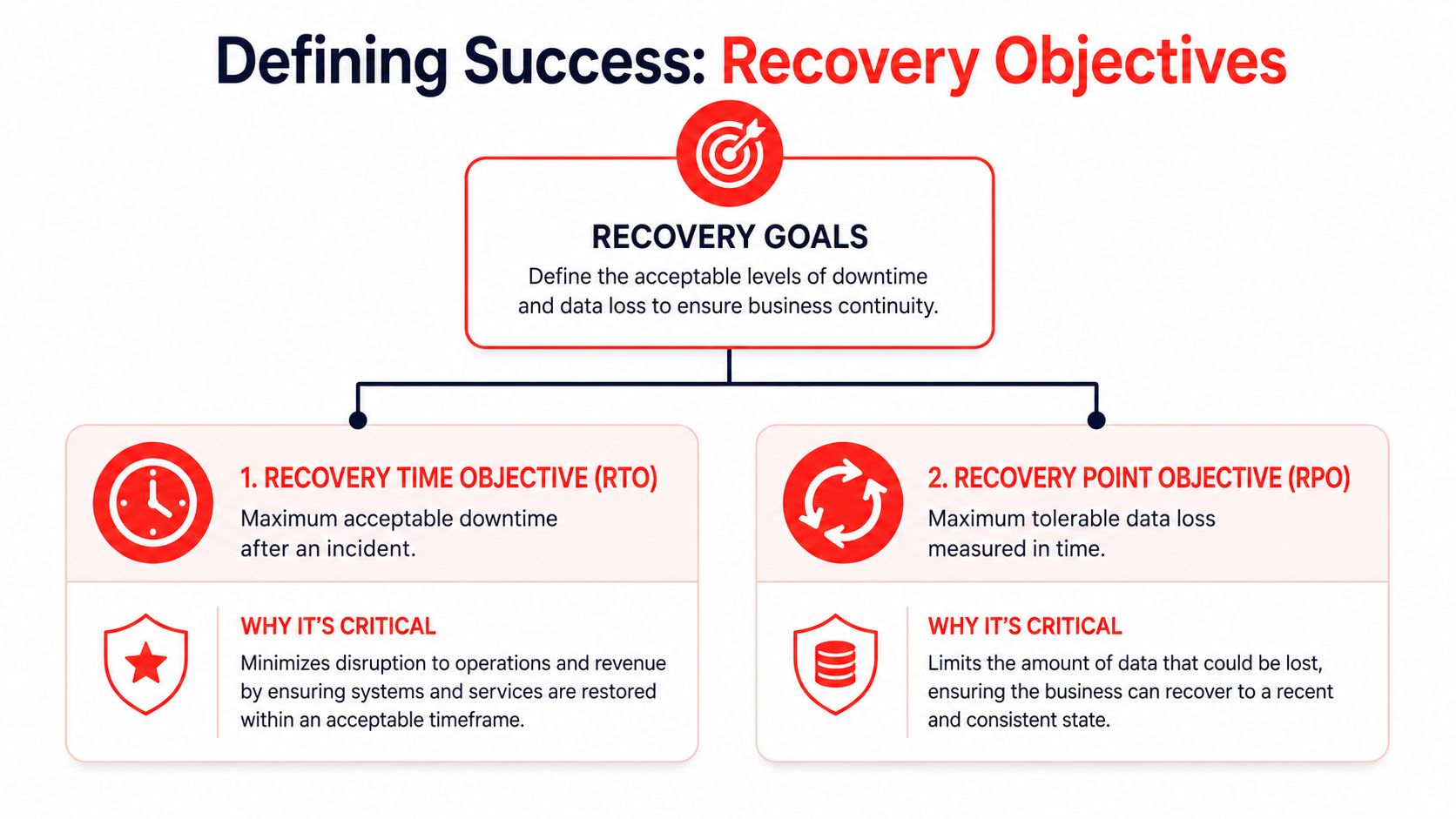
The better approach is to ask questions that reveal process maturity, not marketing polish. You want evidence that the provider can support a clinical business under real pressure, not just maintain a server and close tickets.
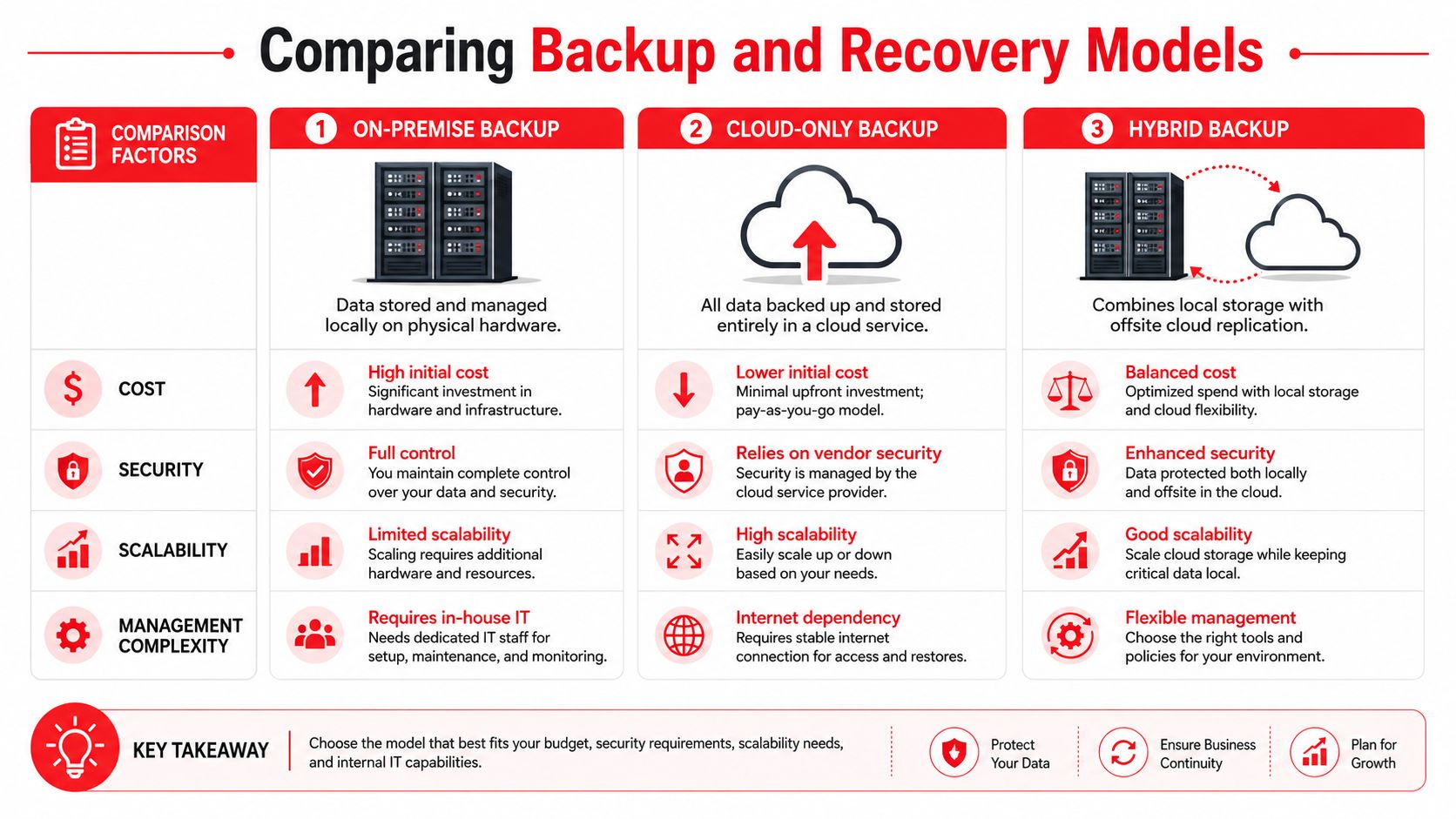
An infographic checklist for evaluating and vetting professional healthcare IT service partners for medical practices.
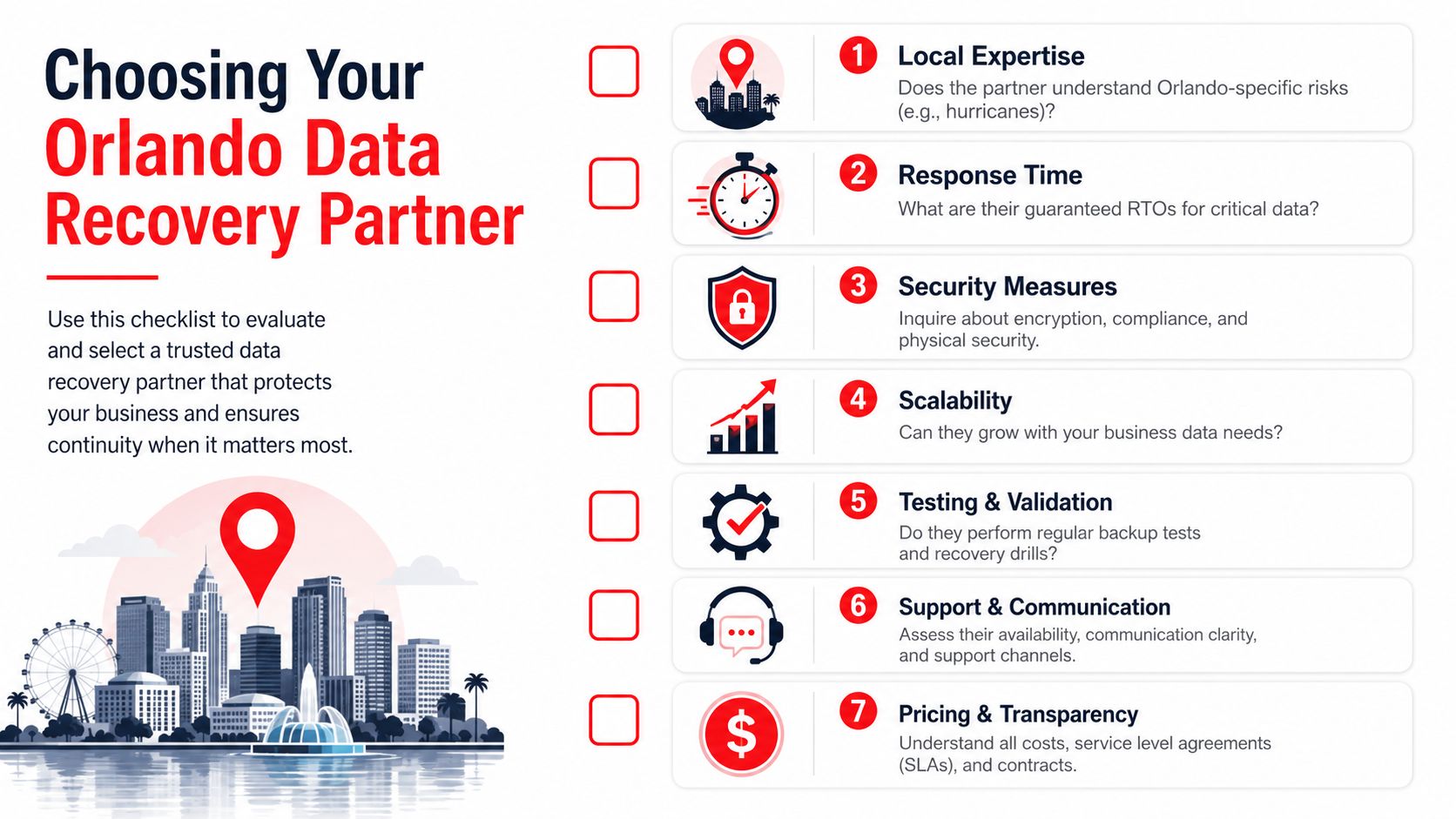
One issue deserves much more attention in Orlando practices than it usually gets. Your IT partner should be able to support telehealth readiness and digital inclusion for underserved populations. Research notes that about 24 million people in the U.S. live in “digital deserts”, which matters if your patients face barriers around devices, internet access, or digital literacy (digital access and telehealth equity research). A provider that only thinks about backend uptime can still leave your patient-facing workflows weak.

Questions that expose real preparedness

Use questions that require specifics.

  • Ask about backup testing: “How do you test backups, how often do you verify recoverability, and what would you show me as evidence?”
  • Ask about identity controls: “How do you enforce MFA, review user access, and remove stale accounts when staff leave?”
  • Ask about patch discipline: “Who owns patching for workstations, laptops, and network devices, and how do you track exceptions?”
  • Ask about incident response: “What is your documented process if a ransomware event locks up user devices on a clinic day?”
  • Ask about logging and visibility: “What audit trails are collected, who reviews them, and how would you investigate suspicious access?”

A reliable provider should be able to answer operational questions without switching into vague sales language.

Good answers are concrete. They describe workflows, ownership, evidence, and timelines. Weak answers lean on broad phrases like “best practices,” “enterprise-grade,” or “fully compliant” without showing how those claims are proven.

Questions most practices forget to ask

Some of the most important vendor questions aren't technical at all. They sit at the intersection of compliance, staffing, and patient access.

Consider asking:

  • Telehealth support: “How do you help us reduce failed virtual visits caused by patient-side access issues?”
  • Workflow fit: “Can you support hybrid operations where staff move between in-office care, remote admin work, and follow-up communication?”
  • Documentation maturity: “What recurring reviews do you conduct for risk, recovery readiness, and policy alignment?”
  • Staff turnover resilience: “If our office manager left next month, what documentation would let the next person step in without chaos?”
  • Vendor governance: “How do you manage the third parties that touch our systems, data, or communications?”

Many providers fall short. They can talk about antivirus, help desk, and firewalls. They struggle when asked how technology choices affect no-shows, patient communication, remote follow-up, and access for patients who aren't digitally fluent.

“HIPAA-ready” isn't the finish line. The real test is whether the provider can keep your practice stable during outages, staffing changes, and patient workflow disruptions.

A simple scorecard for final decisions

Before you sign, score each provider across a few categories. Keep it simple and use plain language.

Evaluation area What to look for
Healthcare fit Clear experience supporting regulated workflows, not just generic office IT
Security maturity Monitoring, identity controls, patching, and incident response with evidence behind them
Operational clarity Defined ownership, reporting, escalation paths, and documented procedures
Local support strength Ability to respond onsite when physical systems or office infrastructure are involved
Patient workflow awareness Understanding of telehealth, communication, and access barriers that affect real care delivery
Pricing transparency Clear inclusions, exclusions, and response expectations

The goal isn't to find a provider with the slickest pitch. It's to find one that can prove readiness, communicate clearly, and support the way your practice serves patients.

Conclusion The Right IT Is an Investment in Your Practice

Good healthcare IT doesn't just keep computers running. It protects patient trust, stabilizes staff workflows, and gives leadership confidence that the practice can keep operating through disruptions.

That's the core value of specialized Healthcare IT Services in Orlando FL. You're not buying a generic support desk. You're putting structure around cybersecurity, compliance, uptime, vendor management, and recovery. Done well, that reduces stress across the office because people stop improvising around fragile systems.

The strongest choice usually comes down to a few things. Does the provider understand healthcare operations, not just technology? Can they support Orlando's local compliance and response realities? Can they prove how they monitor, secure, document, and recover your environment? And can they support patient-facing workflows, including telehealth readiness, rather than focusing only on the back office?

If the answer to those questions is unclear, keep asking. A serious partner won't be annoyed by detailed due diligence. They'll welcome it.

The right IT relationship should help your practice run cleaner, safer, and with fewer surprises. That makes it an operational investment, not overhead.


If you want a practical next step, Cyber Command, LLC can help you evaluate where your current setup is strong, where it's exposed, and what a more resilient support model could look like for your Orlando healthcare practice. A focused assessment can give you clarity on security, uptime, compliance readiness, and day-to-day support without forcing a rushed decision.

Data Backup and Recovery in Orlando FL Guide

A lot of Orlando owners don't worry about backup until the day they can't open QuickBooks, the shared drive won't mount, or a storm knocks power around just long enough to corrupt something important. The pattern is common. Operations stop first, then the questions start. What was backed up, where is it, how long will restore take, and who's responsible for getting the business moving again?

That's why Data Backup and Recovery in Orlando FL shouldn't sit in the “IT maintenance” bucket. It belongs in the same category as payroll continuity, client communication, and revenue protection. In Central Florida, weather risk, ransomware exposure, and industry compliance all collide with one practical issue: how fast you can restore the systems your team uses.

Table of Contents

The Threat Is Local An Introduction to Data Risk in Orlando

A summer afternoon storm rolls across Orlando. Power flickers. Your office internet comes back, but the server doesn't. Or it's Monday morning, your front desk logs in, and a ransom note replaces access to scheduling, documents, and billing. In both situations, the first mistake many companies make is assuming backup equals recovery.

It doesn't.

A dramatic lightning strike illuminates the dark, stormy sky over the Orlando city skyline and lake.

A critical question is how long restoration takes, how much data you lose, and whether the restored environment is clean, complete, and usable. A backup that exists but hasn't been tested is just a theory. A cloud copy that takes too long to pull back down may protect the file, but it may still fail the business.

According to Unitrends' 2025 backup and recovery survey, only about 40% of organizations could recover lost public-cloud data within hours, while around 30% expected it to take days. For an Orlando business, that gap can turn a manageable disruption into cancelled appointments, missed deadlines, delayed payments, and a lot of client frustration.

What failure looks like in practice

A few examples come up again and again in real environments:

  • Operations stop before leadership gets a clear answer. Staff can't work, but nobody knows whether restore will take minutes, hours, or most of the week.
  • Critical apps depend on more than files. Restoring a folder isn't the same as restoring a line-of-business database, permissions, and application dependencies.
  • Cyber incidents change the rules. If ransomware touched the environment, you can't just restore blindly. You need to know the backup is usable and not contaminated.

Backups protect data. Recovery protects the business.

Why Orlando changes the discussion

Local context matters. Orlando businesses often run lean teams, depend on shared systems, and serve customers who expect immediate response. Medical practices can't lose access to patient schedules. Law offices can't stall document access during active matters. Multi-site service companies can't send crews out blind.

That's why a practical backup strategy starts with a business question, not a storage question. If your systems disappear this afternoon, how long can you afford to operate without them?

Why Orlando Businesses Need a Resilient Recovery Strategy

A resilient recovery plan isn't a luxury item for large enterprises. It's basic operational protection for any Orlando company that relies on digital systems to take payments, deliver service, communicate with customers, or meet compliance duties.

Three risks drive the need for it locally: weather, cyberattacks, and ordinary mistakes.

Weather hits faster than most plans account for

Central Florida firms don't need a direct hurricane strike to have a bad day. Severe thunderstorms, power instability, and localized flooding are enough to knock systems sideways, especially if everything depends on a single site or a cloud restore that takes too long.

A cited Central Florida weather-related analysis states that industrial firms in the region average 4.2 hours of downtime per storm event due to recovery delays. That's discussed in this Orlando backup and disaster recovery overview. Even if your company isn't industrial, the lesson applies. If the business needs immediate access to files, scheduling, ERP, or dispatch data, cloud-only recovery can become a bottleneck when speed matters most.

Cyber risk makes backup part of security

Ransomware recovery isn't only about having copies of data. It's about having clean copies, isolated copies, and a process for restoring without rebuilding chaos. Good backup architecture limits damage. Bad backup architecture preserves the mess somewhere else.

That's also why a backup discussion should include incident response. If your team hasn't thought through isolation, restore order, and communication, this practical guide on how to recover from a ransomware attack is worth reviewing before you're in the middle of one.

Practical rule: If a provider talks more about storage size than restore process, ask harder questions.

Human error is still the daily threat

Not every outage starts with weather or a criminal. Files get deleted. Shared folders get overwritten. A sync job removes the wrong version. An employee saves data in the wrong place and assumes “the cloud” handles the rest. Small incidents happen more often than dramatic ones, and they still cost time and money.

That's where layered design matters most. Many businesses benefit from combining local recovery speed with off-site resilience. If you're comparing service structures, this overview of reliable corporate data backups is a useful outside reference because it frames backup as a continuity function, not just a storage expense.

What a resilient plan actually changes

A solid recovery strategy helps owners control four outcomes:

Business issue Weak backup approach Resilient recovery approach
Daily disruption Restore process is unclear Restore steps are documented
Storm outage Recovery depends on one path Recovery has local and off-site options
Ransomware event Backups may be affected or unverified Copies are protected and recovery is planned
Cost control Downtime costs are discovered mid-incident Downtime tolerance is defined in advance

For Orlando businesses, that last point matters. The actual ROI of backup isn't the backup itself. It's the downtime you avoid, the client trust you keep, and the decisions you don't have to make under pressure.

Defining Success Your Recovery Time and Point Objectives

Most owners hear technical terms like RTO and RPO and tune out. That's a mistake, because these two terms determine whether your backup plan matches your actual business.

Recovery Time Objective (RTO) is the maximum downtime you can tolerate after an incident.
Recovery Point Objective (RPO) is the maximum data loss you can tolerate, measured in time.

If those targets aren't defined first, the rest of the backup conversation turns into guesswork.

A diagram outlining recovery objectives including Recovery Time Objective and Recovery Point Objective for business continuity planning.

Two Orlando examples that make this simple

Take a law firm. If attorneys lose access to case files, document systems, email history, and calendars, the office may grind to a halt almost immediately. That business usually needs a short RTO. It may also need a tight RPO because recreated legal work is expensive and sometimes impossible.

Now take a small marketing agency. It still needs backup, but it may tolerate a longer downtime window for some systems, and it may accept a bit more data loss in non-critical creative folders if that keeps costs reasonable.

Neither answer is automatically right. The point is that the business decides what “acceptable” means.

Start with business pain, not technology

A useful way to define recovery goals is to ask these questions in order:

  1. What system stops revenue?
    If it goes down, which app or dataset immediately disrupts billing, appointments, service delivery, or client commitments?

  2. What data can't be recreated?
    Some files are inconvenient to lose. Others carry legal, medical, financial, or contractual consequences.

  3. What must come back first?
    Restore priority matters. Email, shared files, line-of-business applications, and phones don't all have equal weight.

  4. How long can each department work manually?
    Front desk, finance, operations, and leadership often have very different thresholds.

Don't ask, “What backup package should we buy?” Ask, “How much downtime and data loss can each core process survive?”

A simple planning table

Area Questions to answer
Revenue What interruption immediately delays money coming in?
Client service What outage damages trust fastest?
Compliance What records must stay available and restorable?
Internal workflow What can staff work around temporarily?

These targets give your IT team or provider something concrete to engineer against. Without them, it's easy to overpay for the wrong protection or underprotect the systems that matter most.

Comparing Backup and Recovery Models for Your Business

Most Orlando businesses end up choosing among three models: on-premise, cloud-only, and hybrid. Each has a place. The right choice depends on how fast you need to restore, how much local risk you carry, and how much operational complexity you're willing to manage.

A comparison chart showing on-premise, cloud-only, and hybrid backup models regarding cost, security, scalability, and management.

On-premise backup

With on-premise backup, data is stored locally on hardware you control. That usually means faster restores for deleted files, virtual servers, and local application data.

The trade-off is obvious. If the office has a fire, flood issue, major hardware failure, or theft event, your backup may sit in the same blast radius as production systems.

Works well when:

  • You need fast local restores
  • You have stable internal IT oversight
  • Most workloads live on-site

Breaks down when:

  • The office itself becomes unavailable
  • Backup hardware isn't monitored closely
  • Testing gets skipped

Cloud-only backup

Cloud-only models reduce dependency on local hardware and provide off-site protection by default. That's attractive for small teams that don't want to maintain backup infrastructure.

The catch is recovery speed. Full restores can be slower than many owners expect, especially for larger environments or internet-dependent recovery during a broader disruption. For businesses evaluating cloud architecture choices, CloudConsultingFirms' Azure guide gives useful context on how cloud environments are structured, which helps when backup planning has to align with broader infrastructure decisions.

Hybrid backup

Hybrid backup combines local backup for fast recovery with off-site replication for disaster resilience. For many Orlando companies, this is the most practical model because it addresses both common incidents and site-wide disruption.

A hybrid approach usually makes sense when the business can't wait on a full cloud restore but also can't afford to keep every copy in one building.

A fast local restore solves today's outage. An off-site copy protects the business if the building itself is the problem.

Side-by-side view

Model Main advantage Main limitation Best fit
On-premise Fast local recovery Weak against site-wide disaster Single-site operations with strong internal control
Cloud-only Strong off-site resilience Slower full recovery in some cases Small environments with higher downtime tolerance
Hybrid Balances speed and resilience More planning and management Most SMBs with uptime requirements

For small and midsize companies that want managed help with both backup and ongoing protection, Cyber Command, LLC offers backup and recovery as part of its Orlando managed IT and cloud services. That kind of arrangement can make sense when the business wants one team responsible for backup monitoring, recovery planning, and security coordination instead of splitting those duties across multiple parties.

If you're also exploring architecture options for a smaller environment, this primer on cloud-based backup solutions for small business is a good next read.

Meeting Compliance Needs in Orlando's Key Industries

Compliance changes the backup conversation because “we have copies somewhere” isn't enough. Regulated and confidentiality-heavy businesses need backup systems that preserve access, retention, integrity, and audit readiness.

In Orlando, that issue shows up most clearly in medical and professional service firms.

Non-dental medical practices need more than generic healthcare backup

Plastic surgeons, medspas, orthodontic groups, and similar private practices often get sold broad “healthcare backup” packages that don't match their operational reality. They need scheduling continuity, patient record availability, secure retention, controlled access, and a recovery method that supports clinical work without long delays.

A 2025 report found that 68% of non-dental medical practices in Central Florida face backup failures during audits, often due to generic cloud strategies that lack the on-site redundancy and specific retention approach these environments need. That finding is summarized in this Central Florida medical backup discussion.

That's a serious warning for private practices. If an audit tests recovery and the restore process fails, the problem isn't theoretical anymore.

Professional services face a different kind of exposure

Law firms, accounting firms, architecture offices, and engineering firms may not live under the same medical rules, but they still carry real obligations. Client confidentiality, document retention, version control, and matter-based access all shape what a backup system has to do.

For these firms, the practical risks usually look like this:

  • Confidential files spread across too many locations
  • Email and document systems with no tested restore order
  • Retention handled informally instead of by policy
  • No clean separation between archived data and active work

Compliance requires process, not just storage

The businesses that handle this well treat backup as part of governance. They document what is protected, who can access it, how it's encrypted, how restores are tested, and what evidence they can produce when a client, auditor, or insurer asks.

If your company is moving toward broader trust and control documentation, this guide to a faster SOC 2 audit is a helpful reference because it reinforces the need for documented controls rather than informal assumptions.

Regulators and clients don't care that a backup job said “successful” if nobody can prove the data restores correctly.

For Orlando firms in regulated or sensitive industries, the right backup design is tied to workflow. That means planning around the actual way your practice or office operates, not buying a generic compliance label and hoping it fits.

How to Choose a Data Recovery Partner in Orlando

Choosing a backup provider shouldn't feel like buying storage. You're selecting the team that may be responsible for getting your business back online during a bad day. That requires more scrutiny than most proposals receive.

The fastest way to evaluate a partner is to ask for evidence, not promises.

A checklist for businesses in Orlando to evaluate and select a reliable data recovery partner.

The questions that matter most

Florida Tech's IT backup policy is a useful benchmark because it treats backup as a governed process. It requires documented, encrypted, and regularly tested controls, with testing intervals as frequent as every 2 years for essential systems, as detailed in Florida Tech's IT data backup policy.

That policy language points to the right questions:

  • Show me the testing record. Don't accept “we monitor backups daily” as proof that full recovery works.
  • How are backups protected? Ask about encryption at rest, encryption in transit, and separation from production access.
  • What restores are included? File restores, server restores, cloud application restores, and disaster events aren't the same service.
  • What's the escalation path? During an outage, who owns communication, triage, validation, and business updates?

Red flags owners often miss

Some warning signs don't appear until you ask detailed questions.

What you hear What it may really mean
“Everything is backed up.” Scope may be vague or incomplete
“Recovery is easy.” No tested timeline has been documented
“It's all in the cloud.” Full restore speed may be weak
“We can help with compliance.” They may mean storage, not evidence and process

Use a local lens

An Orlando provider should understand local business conditions. That includes storm-related interruptions, multi-site connectivity issues, local industry mix, and the fact that many SMBs don't have internal IT staff available to coordinate recovery.

Ask practical questions like these:

  1. Who answers after hours if a restore fails?
  2. Can they prioritize critical systems instead of restoring everything blindly?
  3. Do they document dependencies between servers, apps, users, and locations?
  4. How do they handle a recovery event that starts as a security incident?

Assume nothing. Demand proof of testing.

A credible partner won't dodge those questions. They'll welcome them, because mature backup service is built on documentation, repeatable process, and clear accountability.

Conclusion Building Your Business Resilience Plan

Good backup strategy isn't about collecting copies of data. It's about deciding how your Orlando business keeps operating when systems fail, weather interferes, or an attack forces hard choices fast.

The companies that recover well usually do four things right. They identify their real operational risks. They define acceptable downtime and data loss before shopping for technology. They choose a recovery model that fits how the business works. And they work with a partner who can show evidence of testing, security controls, and recovery discipline.

That's the shift in thinking. Data Backup and Recovery in Orlando FL isn't a product category. It's an uptime and risk-management decision tied directly to client service, compliance, and cash flow.

If you haven't reviewed your plan recently, start with a simple audit:

  • List your critical systems in order of business impact.
  • Write down your downtime tolerance for each one.
  • Confirm where backups live and who can restore them.
  • Request proof of testing instead of status screenshots.
  • Review your recovery playbook for weather and cyber events.

If your team needs a template for that last step, this resource on disaster recovery test plans can help you turn backup assumptions into a documented process.

Waiting until after a failed restore is the most expensive time to discover gaps. A practical review now is cheaper, calmer, and far easier on your staff and customers.


If you want help evaluating your current backup posture, recovery objectives, or compliance fit, talk with Cyber Command, LLC. They work with Central Florida organizations on managed IT, cybersecurity, backup, recovery, and ongoing resilience planning so owners can make decisions based on tested capability instead of guesswork.

Co Managed IT Services in Orlando FL: Boost Your Business

Your office manager is fielding password reset requests. Your internal IT lead is chasing a server alert. A vendor needs access approval. Someone in accounting is worried about a suspicious email. Meanwhile, your business still has to run.

That's the situation many Orlando companies are in. They already have an internal IT person or a small team, but the workload has outgrown what that team can realistically cover during business hours, after hours, and during projects. The gap usually shows up in cybersecurity first. Monitoring slips. Documentation gets stale. Patch cycles drift. Strategic work gets delayed because daily support keeps winning.

That's where co-managed IT services in Orlando, FL fit. It's not about replacing your people. It's about giving them reinforcement, specialized coverage, and a structure that keeps support and security from depending on one or two overloaded staff members.

Table of Contents

What Exactly Are Co-Managed IT Services

Think of co-managed IT as a co-pilot for your internal IT function. Your business still has someone in the pilot seat. They know your users, your line-of-business systems, your workflow quirks, and the political reality of how decisions get made inside your company. The outside partner adds lift where small teams usually get stretched thin.

That matters because co-managed IT is a hybrid operating model, not a full replacement for internal staff. In Orlando-focused guidance, the model is described as working “alongside your internal team, not replace it,” while the in-house team keeps control of core systems and strategy and the external provider takes on defined work such as overflow support, monitoring, license tracking, and related responsibilities. The same guidance also frames 24/7 monitoring, shared cybersecurity responsibility, and rapid response as standard parts of co-managed arrangements for businesses that need after-hours protection and continuity coverage, as explained in Orlando co-managed IT guidance.

An IT professional reviewing system performance metrics and AI-driven insights on a large monitor in an office.

How it differs from other IT models

A fully outsourced arrangement usually shifts nearly everything to the provider. That can work for companies with no internal IT presence, but it's often a poor fit when you already have capable staff and want to keep institutional knowledge in-house.

A purely internal model gives you maximum direct control, but it also creates obvious risk if your environment depends on a very small team. Vacation coverage, after-hours incidents, specialized cybersecurity tasks, and project overload can all bottleneck quickly.

Co-managed IT sits in the middle:

  • Internal team keeps ownership: They remain the primary stewards of business priorities, user relationships, and core technology decisions.
  • Provider adds capacity: Overflow tickets, maintenance routines, monitoring, and specialist escalation don't have to stack up on one person's desk.
  • Security becomes shared: Instead of asking one internal generalist to do everything, you spread responsibility across roles and processes.

Practical rule: If your internal IT person spends most of the week reacting, you don't have a staffing problem alone. You have an operating model problem.

What this looks like in day-to-day practice

In a healthy co-managed setup, your internal lead might own business applications, local process decisions, and executive communication. The outside partner may cover patching, endpoint oversight, documentation support, backup checks, help desk overflow, and security monitoring. That split is often what allows the internal team to stop living in triage mode.

For Orlando businesses evaluating options, co-managed IT solutions are usually most useful when the goal is predictable support coverage without adding full internal headcount. It works especially well when leadership wants more resilience but doesn't want to hand over strategy or lose internal control.

The Co-Managed Shared Responsibility Model

The most important design choice in co-management is shared operational ownership. Your internal team still controls core systems. The outside partner supplies specialized coverage such as cybersecurity monitoring, endpoint protection, vulnerability management, incident response, and project overflow. Orlando and broader Florida service descriptions consistently frame co-managed IT this way, with provider-side support commonly focused on help desk augmentation, security management, and proactive maintenance, as noted in managed IT coverage for Orlando.

A comparison chart showing traditional internal IT versus a co-managed IT partnership responsibility model.

That structure works because it removes a common failure point. When everything depends on a small internal team alone, one sick day, one resignation, or one urgent project can slow both support and security at the same time.

A practical division of responsibility

The cleanest co-managed relationships are explicit. They don't rely on assumptions.

IT Function Internal Team Usually Owns Co-Managed Partner Usually Owns
Business IT strategy Priorities, budgeting input, executive alignment Technical recommendations, roadmap support
End-user support VIP users, business-context issues, local workflow support Overflow tickets, after-hours coverage, Tier 2 and Tier 3 escalation
Core systems Final approval over critical systems and standards Maintenance execution, monitoring, remediation assistance
Cybersecurity operations Internal policy decisions, risk acceptance, business communication Monitoring, endpoint protection, vulnerability management, incident response support
Projects Internal sponsorship, change approval, business coordination Specialized engineering, deployment support, project overflow
Vendor coordination Business relationship ownership Technical coordination, troubleshooting, licensing and service administration

Where companies get this wrong

Some businesses say they want co-management, but what they want is emergency labor. That usually fails. If the provider is only called when something is already broken, the internal team still carries the full burden of prevention, process, and accountability.

The better approach is to assign recurring responsibility in advance.

  • Security tasks need named owners: If nobody clearly owns alert review, patch cadence, vulnerability follow-up, and backup verification, those jobs drift.
  • Escalation paths need to be written down: Your staff should know when an issue stays in-house and when it moves to the partner.
  • Strategy and operations should be separated: Internal leadership can keep strategic control while the outside team handles repeatable technical execution.

Shared ownership doesn't mean blurred ownership. It means both sides know exactly where they step in.

What strong co-management feels like

A good partnership doesn't create turf battles. Your internal team shouldn't feel replaced, and your provider shouldn't be guessing.

The healthiest version looks like this: your internal staff handles what requires business context, trust, and day-to-day familiarity. The external team handles what requires scale, after-hours coverage, specialist depth, or tool-heavy operational work. That's usually where Orlando businesses see the biggest relief.

Is Co-Management Right for Your Orlando Business

At 8:15 on a Monday, your internal IT lead is resetting passwords for new hires, chasing a backup alert from the weekend, and fielding a call from leadership about cyber insurance requirements. By noon, critical project work is already off track.

That is usually the clearest sign that co-management deserves a serious look.

Co-managed IT fits Orlando businesses that already have capable internal staff but need more coverage, stronger security follow-through, or operational support across multiple offices, teams, or schedules. The decision should come from workload, risk, and accountability gaps, not just ticket count. If your team knows the business well but keeps getting pulled away from higher-value work, a shared model often makes more sense than replacing them or expecting them to do everything.

A practical way to judge fit is to look at where the strain shows up first.

Professional services firms

Law offices, accounting firms, architecture teams, and engineering practices usually run on a mix of confidential data, deadline pressure, and small internal IT teams. In these environments, one experienced IT manager often becomes the default owner for everything. User issues, vendor coordination, onboarding, laptop failures, application access, and security questions all land on the same desk.

That setup creates a predictable problem. The person who should be improving standards, reviewing risks, and planning ahead spends the day clearing interruptions.

Co-management works well here when the internal lead keeps control of business priorities, key applications, and stakeholder communication, while the outside team handles recurring support and security operations. That division is especially useful for firms trying to tighten small business cybersecurity best practices without adding another full-time hire.

Common signs of fit include:

  • Sensitive client or case data: Security work needs consistent follow-up, not merely as an afterthought.
  • One-person dependency: Vacation coverage, after-hours issues, and security review should not depend on a single employee.
  • Compliance pressure: Internal teams often need outside help documenting controls, reviewing backups, and keeping routine tasks on schedule.

Multi-location businesses

Orlando companies with offices in places like Downtown Orlando, Winter Park, Lake Mary, or elsewhere in Central Florida often run into a scale problem before they run into a staffing problem. Each site starts making local exceptions. Workstation builds vary. Access requests get handled differently by office. Support quality depends on who answers first.

Internal IT can usually see the drift. The issue is having enough time and process discipline to correct it across every location.

A co-managed model gives the internal team a way to keep policy control while using outside support to enforce standards, document procedures, and keep monitoring consistent. That matters for cybersecurity because inconsistent account management, patch timing, and endpoint handling create gaps attackers tend to exploit first.

Multi-location growth usually adds operational risk before it adds headcount.

This is a strong fit when leadership wants consistency across sites but does not want to build a larger internal support bench just to maintain it.

Field-service and industrial organizations

Field-service companies, contractors, distributors, and industrial firms usually judge IT by uptime, remote access, and speed of recovery. Office productivity still matters, but daily operations often depend on devices in trucks, temporary worksites, warehouses, and shared field environments.

Internal IT teams in these businesses get stretched in a different way. They are pulled toward urgent support issues while longer-cycle work, such as device lifecycle planning, secure remote access, backup validation, and deployment standards, keeps slipping.

Co-management helps when the outside team owns repeatable operational work and after-hours coverage, while internal staff stay focused on the systems and workflows that require business context. That can reduce risk without taking authority away from the people who know the environment best.

A practical fit often includes:

  • Remote and mobile users: Access requests, device setup, and support do not need to bottleneck with one internal technician.
  • Higher uptime expectations: Shared coverage improves response continuity when issues happen outside normal business hours.
  • Projects that keep getting delayed: Site rollouts, hardware refreshes, and infrastructure cleanup move faster when internal staff are not carrying every task themselves.

Co-management is usually the right move when your internal IT team is trusted, overextended, and too valuable to spend all week reacting.

Strategic Benefits for Cybersecurity and Growth

The biggest mistake business owners make is evaluating co-managed IT as if it's just a support contract. It's not. At its best, it's a way to tighten control over cybersecurity while giving your internal team room to work on the business instead of constantly reacting to it.

For Orlando organizations with internal IT staff, the stronger benchmark is always-on security and fixed-budget support, not break/fix service. Orlando market descriptions highlight 24/7 monitoring, preventative maintenance, and layered defenses across email, web applications, remote access, mobile internet, and network perimeters, with those controls intended to detect, prevent, and recover from ransomware, advanced malware, zero-day exploitation, and other automated threats. The same guidance points buyers toward measurable control coverage such as monitoring breadth, response time, backup and recovery readiness, and patch or vulnerability cadence, as outlined in managed IT services for Orlando businesses.

A strategic infographic highlighting five key benefits of cybersecurity and growth for business operations.

Security maturity improves

Most internal teams in small and midsized companies are broad generalists. They know a little about everything because they have to. That's useful for daily support, but cybersecurity is a discipline that punishes inconsistency.

A co-managed relationship can improve your operating posture because it gives security work a defined process instead of letting it compete with every other task on the help desk list.

  • Monitoring becomes continuous: Someone is responsible for watching, escalating, and following through.
  • Patch and vulnerability work gets rhythm: It stops being “when we get time” and starts becoming part of the service model.
  • Incident handling gets clearer: Roles are established before a security event happens, not during it.

Internal IT gets time back

The less visible benefit is focus. Your internal IT leader usually knows what the business should fix next. They often just can't get to it because support noise and security admin consume the week.

That's why many Orlando businesses pair co-management with internal process work. The provider handles recurring operational duties. The internal team regains time to improve line-of-business applications, department workflows, onboarding processes, device standards, and policy enforcement.

For companies looking to strengthen this side of the equation, cybersecurity best practices for small businesses can help frame what to measure beyond simple ticket closure.

A mature IT environment isn't the one with the fewest alerts. It's the one where alerts, changes, backups, and patching all have clear ownership and follow-through.

How to Select and Implement a Co-Managed Partnership in Orlando

Buying co-management the wrong way creates friction fast. Businesses often start by comparing providers before they've defined what they want to keep in-house. That usually leads to vague proposals, duplicated effort, and a rocky first few months.

The better path is operationally simple. Decide the division of labor first. Then choose the partner that can work inside it.

A six-step infographic detailing how to select and implement a co-managed IT partnership in Orlando, Florida.

A useful lens here is implementation economics. Much of the market explains the model but skips the practical question of how to phase co-management without disrupting an existing internal team. That gap is especially important for companies with one or two internal IT staff who need predictable coverage, and the most useful buyer question is often what co-managed IT replaces, what stays in-house, and what the first 90 days should include, as discussed in co-managed IT implementation planning.

Choose the operating model before the provider

Start with a short internal inventory. Not a technical audit. An ownership audit.

Write down which responsibilities must stay internal because they depend on business judgment, executive trust, or deep application familiarity. Then list the work your team struggles to cover consistently.

That list usually includes a mix of:

  • After-hours support: Alerts and urgent issues that don't wait for business hours.
  • Security operations: Monitoring, vulnerability follow-up, endpoint oversight, and response coordination.
  • Project overflow: Migrations, rollouts, refreshes, and cleanup work that keep getting delayed.
  • Administrative load: Vendor coordination, documentation upkeep, user lifecycle tasks, and license management.

If a provider tries to skip this conversation, that's a red flag. Co-management only works when the boundaries are deliberate.

What to ask during evaluation

The right questions are operational, not flashy. You're trying to learn how the provider works with internal IT, not how polished the sales process sounds.

Ask questions like these:

  1. How do you divide work with an existing internal IT manager?
  2. Which security functions do you own directly, and which remain client-owned?
  3. How do you handle escalation after hours?
  4. What does onboarding look like when tools and documentation already exist?
  5. How do you report on coverage, outstanding risks, and unresolved dependencies?

A few practical warning signs show up quickly.

  • Vague role definitions: If everything sounds flexible, nothing is assigned.
  • No transition discipline: If the provider can't explain access control, documentation review, and communication cadence, onboarding will be messy.
  • Ticket-only mindset: If the conversation stays centered on reactive support, the security and governance side is probably underdeveloped.

For buyers comparing options, how to choose a managed service provider is a useful framework for structuring interviews and avoiding soft promises.

What the first 90 days should look like

The first phase shouldn't feel dramatic. If it does, the partnership probably started without enough planning.

A solid implementation usually follows this pattern:

Phase What should happen
Initial handoff Access is reviewed, communication channels are set, emergency contacts are confirmed
Environment review Existing tools, documentation, coverage gaps, and support workflows are assessed
Responsibility alignment Both sides confirm who owns support tiers, patching, vendor communication, projects, and security tasks
Tool rationalization Overlapping platforms and redundant processes are reduced where appropriate
Operational rollout Overflow support, monitoring, escalation, and recurring tasks move into the new model
Review cycle Leadership and IT meet to evaluate service fit, unresolved risks, and process changes

The first 90 days should reduce ambiguity first. Efficiency comes after that.

Florida market guidance also notes that managed and co-managed services commonly bundle 24/7 help desk, cybersecurity, cloud services, and flat-fee support into one service line, with flat-fee per-user pricing described as a common approach. That's why cost discussions should focus less on hourly rates and more on what operational coverage is included.

In practice, one option businesses may consider is Cyber Command, LLC, which provides co-managed IT, 24/7 helpdesk, cloud services, and cybersecurity support for organizations that want shared coverage rather than full replacement. The key question isn't who sounds biggest. It's who can work cleanly with your internal team.

Frequently Asked Questions About Co-Managed IT Services

Will we lose control of our IT strategy

A well-run co-managed arrangement keeps decision-making with your business and your internal IT lead. Your team should still set priorities, approve changes, and decide what matters most to operations. The outside partner handles the work you assign, whether that is after-hours support, security monitoring, project delivery, or specialized technical tasks.

If a provider cannot define that boundary clearly, expect confusion later.

Is co-managed IT more expensive than hiring another technician

It depends on the gap you need to close.

One technician can help with day-to-day tickets. That usually does not solve after-hours coverage, security operations, cloud administration, vacation coverage, or project backlog. Co-management often costs more than a single salary on paper, but it can cost less than building a full internal bench with multiple specialties.

For Orlando businesses, that trade-off matters. A healthcare office, manufacturer, or multi-location professional services firm may need broader coverage than one hire can reasonably provide.

How do we avoid conflict with our existing IT person

Start with written ownership. Define who handles Tier 1 support, vendor escalations, patching, identity management, endpoint security, backups, and emergency response. Then make sure both sides use the same ticketing and escalation rules.

This is usually where partnerships succeed or fail.

Internal IT should not feel replaced. They should get relief from repetitive support work, better access to security expertise, and time to focus on business systems, user needs, and planning. That shared responsibility model works best when the provider respects your internal team's context and authority.

What does co-managed IT actually replace

It usually replaces coverage gaps and reactive firefighting. It can also reduce dependence on one person who carries too much undocumented knowledge, too many admin rights, or too many after-hours calls.

In cybersecurity, that matters. Shared coverage can improve patch discipline, alert response, log review, access control, phishing response, and recovery planning. Your internal team still owns the business decisions. The partner adds capacity and specialized execution.

Is this only for larger companies

No. Co-management often fits small and midsized businesses that already have an internal IT generalist or a lean IT manager. Those teams usually do not need a full replacement. They need depth in a few areas and consistent backup when workload spikes.

That is common in Central Florida. A growing construction firm may need support across job sites and the office. A medical practice may need tighter security oversight and less downtime. A hospitality group may need broader hours of support than an internal team can cover alone.

What should we expect from pricing conversations

Expect pricing to center on users, devices, locations, service hours, and included responsibilities. Ask what is covered in the monthly fee, what counts as project work, what happens after hours, and which security services are included versus optional.

Ask one more question. Who is accountable when something is missed?

A usable proposal should spell out response expectations, escalation paths, security duties, and tool ownership. Clear pricing without clear responsibility still creates risk.

If your team is stretched thin and you want a practical co-managed model that strengthens cybersecurity without replacing internal IT, Cyber Command, LLC is one option to evaluate. The firm works with organizations in Central Florida that need shared support, 24/7 coverage, and a clearer division of operational responsibility so internal staff can focus on the business.