
Cloud Services in Orlando, FL: Expert Guide for 2026

Your office server is aging out. Remote staff need reliable access to files and line-of-business apps. Your cyber insurance renewal asks harder questions than it did last year. Meanwhile, every provider says they offer “the cloud,” but very few explain what that means for a law office in downtown Orlando, a medical practice in Winter Park, or a finance team supporting multiple locations across Central Florida.
That's where most cloud conversations go wrong. Business owners get broad promises about flexibility and lower costs, but they don't get practical guidance on compliance, security operations, migration risk, or billing surprises. For many Orlando companies, the primary issue isn't whether cloud services matter. It's whether the move will be secure, predictable, and aligned with how the business functions.
A useful cloud strategy starts with local reality. Central Florida firms often need secure remote access, dependable uptime, industry-specific controls, and a partner who can support users without turning every issue into a project. That applies whether you run a dental group, accounting practice, architecture firm, engineering office, veterinary clinic, or multi-site professional services business.
Table of Contents
- Is Your Orlando Business Ready for the Cloud
- Decoding the Cloud A Simple Guide for Business Leaders
- Cybersecurity and Compliance for Orlando Professionals
- How to Vet and Choose an Orlando Cloud Partner
- Your Cloud Migration and Onboarding Checklist
- Understanding Cloud Pricing Models in Central Florida
- Your Next Step Towards a Secure Cloud Foundation
Is Your Orlando Business Ready for the Cloud
A common Central Florida scenario looks like this. A growing firm has a server in a back office closet, a few business-critical apps that only “really work” on-site, and staff who split time between the office, home, and client locations. Every time a storm rolls through, every time internet service blips, and every time someone clicks the wrong email, leadership gets reminded how fragile that setup can be.
The problem usually doesn't show up as one dramatic failure. It shows up in smaller operational drag. Employees wait on file access. Managers worry about whether backups are valid. Ownership keeps approving one-off fixes instead of moving to a design that supports the business.
That's why Cloud Services in Orlando FL should be viewed as a business decision, not a hardware replacement project. The cloud changes how your team accesses systems, how security controls are enforced, how disaster recovery works, and how monthly IT costs are managed.
Businesses usually don't move to the cloud because they love new infrastructure. They move because the old model keeps creating risk, delay, and avoidable cost.
For law firms, the pressure tends to center on confidentiality and secure document access. For accounting and financial teams, it's controlled access, retention, and audit readiness. For medical offices in Orlando and Winter Park, it's secure availability of patient information and dependable workflows for front desk, billing, and clinical staff.
Three signs tell me a company is ready:
- Operations are outgrowing the office server model: Staff need access from multiple locations or devices, and the current setup creates friction.
- Security expectations have changed: Insurance, client demands, or internal leadership now require stronger controls than the current environment can support easily.
- The business needs predictability: Leadership wants fewer surprise outages, fewer surprise projects, and a clearer monthly operating model.
If any of those sound familiar, cloud adoption isn't a trend exercise. It's a move toward a more resilient operating model.
Decoding the Cloud A Simple Guide for Business Leaders
Cloud terms get overcomplicated fast. Business owners don't need jargon. They need a practical way to understand what they're buying and how much responsibility stays on their side.
What cloud infrastructure actually means
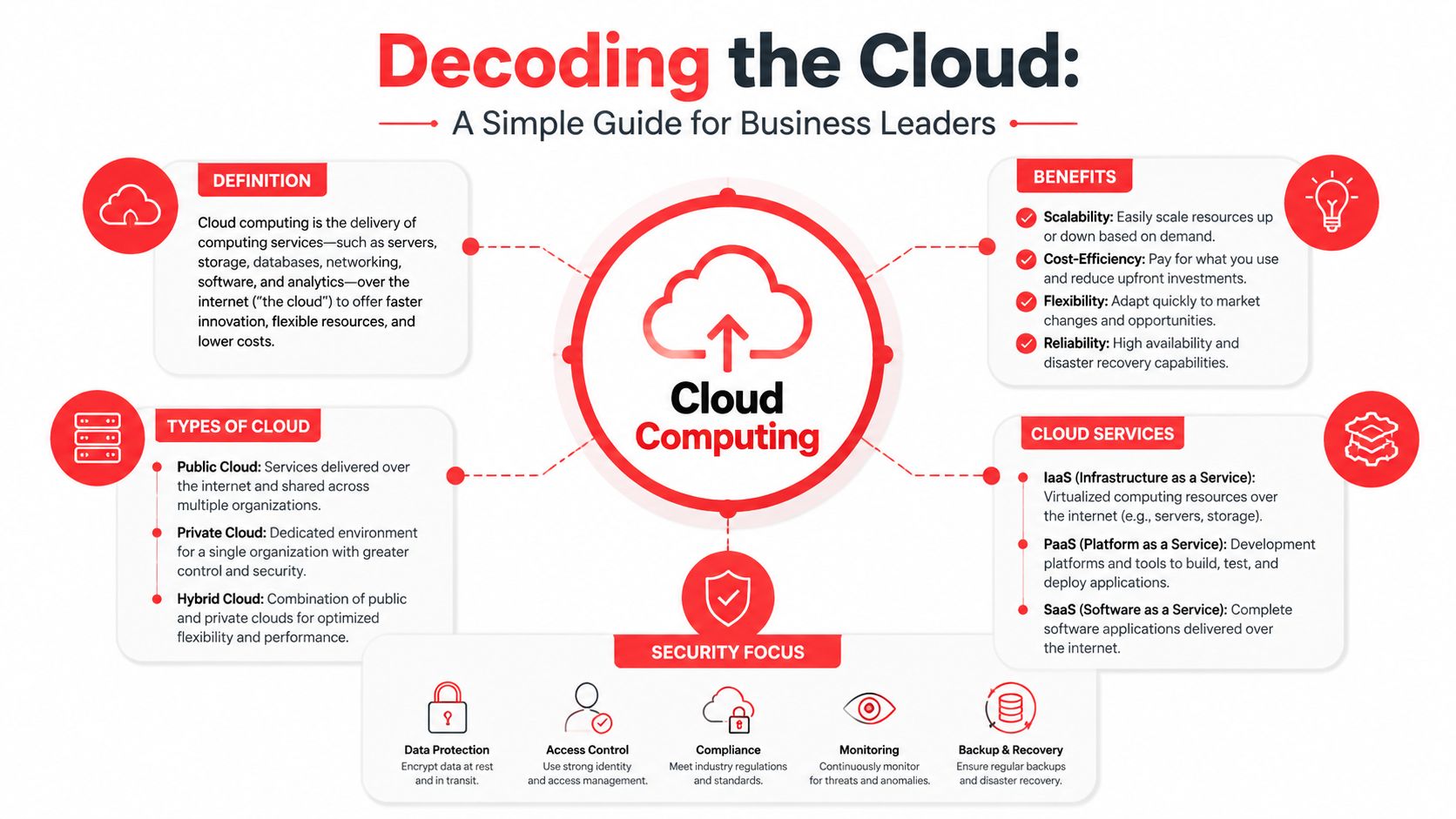
Cloud infrastructure is a mix of physical and virtualized resources such as servers, storage, networking, virtualization, and security controls. Those components enable on-demand self-service, resource pooling, and rapid elasticity, so businesses can provision computing resources without human interaction for each request and scale as demand changes, as outlined in Microsoft's cloud infrastructure definition.
In plain English, that means you don't have to buy every piece of hardware before you need it. You consume computing capacity as a service. Your team gets access to systems and data without tying business continuity to one piece of equipment in one building.
The restaurant analogy for cloud services
The easiest way to understand service models is to think about dining.
- Infrastructure as a Service: You're given a kitchen and ingredients, but you still do most of the cooking. This works for businesses that need flexibility and custom environments.
- Platform as a Service: The kitchen is partly prepared for you. Core setup is handled, and your team focuses more on building and running applications.
- Software as a Service: You sit down and order the meal. The application is ready to use, and the provider handles most of the underlying complexity.
The trade-off is control versus simplicity. More control usually means more responsibility for configuration, maintenance, and security. More simplicity can reduce overhead, but it may limit customization.
Practical rule: If your team has low internal IT capacity, don't choose a cloud model that assumes deep in-house administration.
Which deployment model fits your business
Deployment model matters just as much as service model.
A public cloud setup is shared infrastructure with logical separation between customers. It's often a strong fit when scalability and speed matter more than owning every layer.
A private cloud environment gives a business more isolation and potentially more custom control. Some regulated workflows benefit from that, but it usually requires tighter management discipline.
A hybrid cloud model combines cloud resources with some retained on-premise systems. This can be the right middle ground for firms that need to phase migration, support a legacy application, or handle a specific compliance concern carefully.
Here's the practical filter I use for Orlando business leaders:
| Business situation | Likely fit | Main caution |
|---|---|---|
| Growing office with remote staff and common business apps | Public or hybrid | Don't assume default settings equal security |
| Professional firm with sensitive records and older apps | Hybrid | Legacy app dependencies can slow migration |
| Medical or financial workflow with strict access controls | Private or hybrid | Compliance design matters more than marketing terms |
A good cloud conversation should leave you with clearer responsibilities, not more confusion.
Cybersecurity and Compliance for Orlando Professionals
For professional, medical, and financial firms, cloud security can't be bolted on after the migration. The architecture has to start with compliance, access control, logging, recovery planning, and user behavior. If those pieces are treated as optional add-ons, the business ends up paying for the decision later.
Why regulated firms need a different cloud design
This is a real sticking point in Central Florida. A 2025 Gartner report cited in Orlando cloud provider analysis found that 68% of small professional firms in Central Florida delay cloud migration due to uncertainty about aligning with compliance frameworks like HIPAA and FLSA. That hesitation makes sense. Many provider pages talk about migration and uptime in generic terms, but they don't explain how the environment should be configured for legal, medical, or financial data.
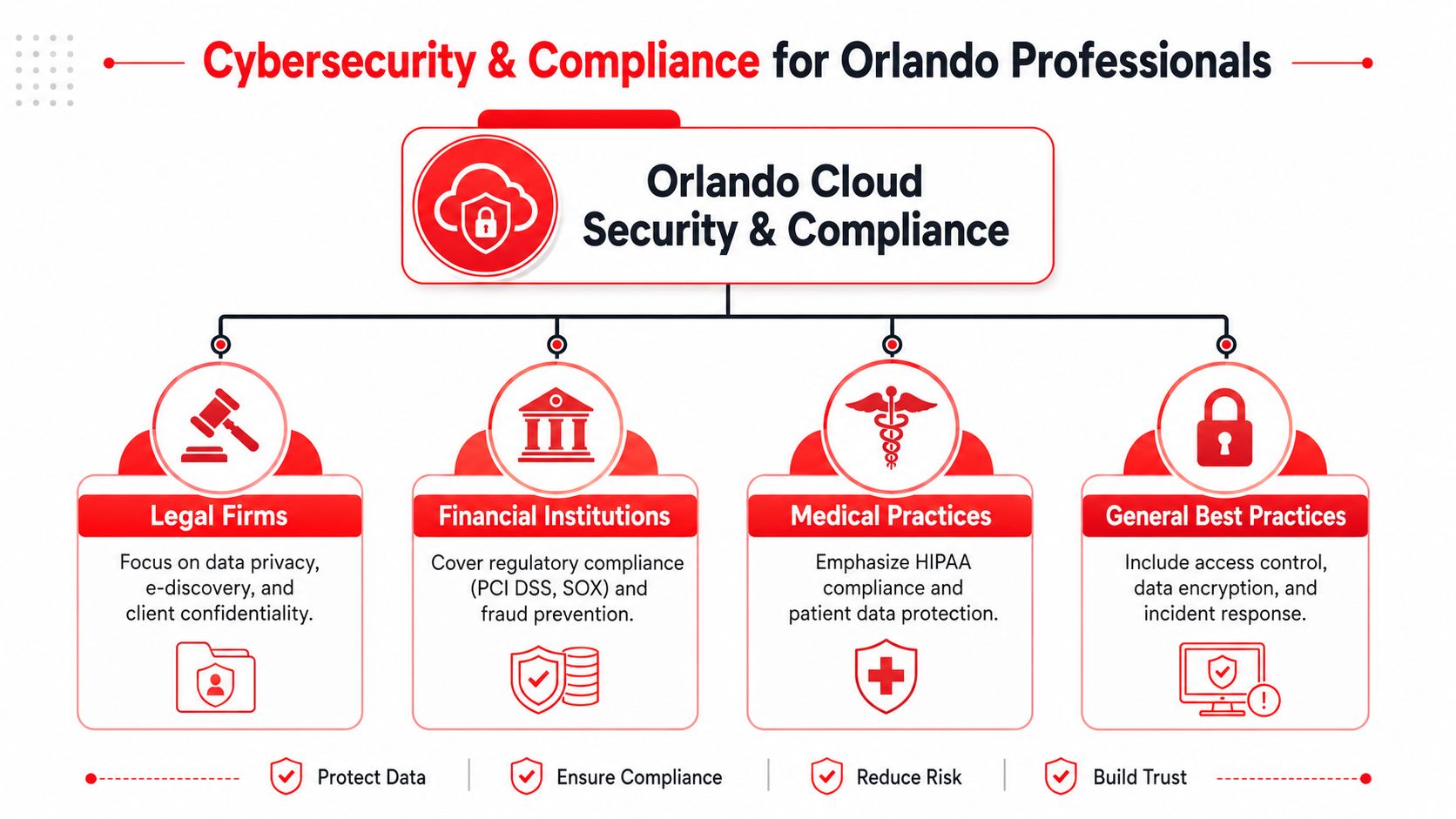
For a medical office, HIPAA isn't just about where data sits. It affects access decisions, audit capability, encryption, vendor oversight, recovery procedures, and workforce training. For firms dealing with government-adjacent requirements, CMMC-related expectations make documentation and control maturity more important. Even when a company isn't formally audited today, clients and insurers may still expect those disciplines.
A compliance-first approach means asking design questions early:
- Who can access what: Role-based access should match actual job duties, not convenience.
- How data is protected: Encryption should cover data at rest and in transit.
- What gets logged: Audit trails need to show who accessed sensitive information and when.
- How incidents are handled: The provider should explain detection, escalation, containment, and recovery in plain language.
What to demand from a compliance-first environment
Orlando businesses need robust cloud data security practices that include strong encryption, analytics to monitor encryption effectiveness, integrated network security controls, and virtualization techniques that improve protection. Those measures help reduce unauthorized access, phishing exposure, and ransomware risk, while supporting compliance frameworks such as HIPAA and CMMC, according to guidance on cloud data security for Orlando businesses.
That sounds technical, but the buying questions are straightforward.
- Encryption coverage: Ask whether sensitive data is encrypted both in storage and during transmission.
- Identity controls: Require multi-layered access governance, not just passwords.
- Security operations: Confirm whether someone is actively reviewing threats or only reacting to tickets.
- Help desk awareness: Front-line support staff should know how to recognize and escalate suspicious activity.
- Business continuity: Recovery planning should exist before a failure, not after one.
If your organization handles protected health information, start with HIPAA compliance experts who can map security controls to day-to-day workflows rather than treating compliance like a paperwork exercise.
The cheapest cloud environment often becomes the most expensive one once rework, compliance gaps, and incident response enter the picture.
Industry focus across Central Florida
Different industries in Central Florida need different cloud decisions.
Law firms in Orlando often need secure document access, retention discipline, and confidentiality controls that work for partners, staff, and outside collaborators. Accounting firms and financial organizations typically care about controlled permissions, secure file exchange, business continuity, and consistent device standards across offices. Medical practices in Orlando and Winter Park need reliable access for clinicians and staff without exposing patient information through weak onboarding, poor access cleanup, or unmanaged endpoints.
Healthcare and finance businesses in Orlando, Winter Park, and Lake Mary often require cloud strategy and migration support that includes 24/7 monitoring so users can securely access business systems through online platforms rather than relying on local equipment, as described in Central Florida cloud services guidance.
The pattern is simple. Generic cloud hosting isn't enough for regulated work. Businesses in these sectors need a design that treats security, compliance, and continuity as the baseline.
How to Vet and Choose an Orlando Cloud Partner
Most providers sound similar until you ask operational questions. That's when the difference between polished marketing and dependable service starts to show.
The difference between monitoring and active defense
A provider may say they offer security monitoring. That can mean anything from alert forwarding to full incident investigation. For a business owner, the important question is whether qualified staff are watching, investigating, and responding around the clock.
You also need to know how the provider works with your internal staff. Some companies want full outsourcing. Others need co-managed support because they already have an internal administrator or operations lead. Both can work. Problems start when responsibilities are vague.
One Orlando option in this category is Cyber Command's guidance on choosing a managed service provider, which reflects a co-managed and fully managed approach with U.S.-based support and SOC-backed operations. The broader lesson is what matters. Ask every provider to define exactly who handles alerts, endpoint issues, user onboarding, vendor coordination, compliance reporting, and after-hours response.
Questions that expose pricing risk
Opaque billing is one of the biggest cloud problems for multi-location businesses. A 2026 study on Orlando managed IT pricing reported that 74% of Orlando SMBs with multi-location operations experienced unexpected cloud security bills in 2025 because critical SOC services were bundled under vague managed IT fees instead of transparent, flat-rate packages.
That happens when a proposal hides key security functions behind broad wording. A quote may sound complete, but incident response, threat hunting, compliance reporting, or after-hours work may still be billed separately.
Use this checklist before signing anything:
| Evaluation Criteria | What to Look For | Red Flags |
|---|---|---|
| 24/7 SOC coverage | Clear explanation of who monitors, investigates, and responds after hours | “We get alerts” with no staffing details |
| Compliance support | Specific discussion of audit logs, encryption, access reviews, and policy alignment | Generic claims about being secure |
| Co-managed flexibility | Defined handoff between your staff and provider | Confusion over who owns what |
| Pricing model | Written scope showing what is included monthly | Vague bundled fees or “as needed” security work |
| Onboarding process | Documented migration, testing, user communication, and cutover plan | No structured rollout methodology |
| Reporting | Regular review cadence with actionable findings | Reports that list alerts but no decisions |
| Local responsiveness | Named escalation paths and support expectations for Central Florida businesses | Sales access is easy, support access is unclear |
Ask providers to show the line between included service, optional enhancement, and emergency billable work. If they can't explain it clearly, billing won't get clearer later.
A strong Orlando cloud partner should reduce uncertainty, not introduce more of it.
Your Cloud Migration and Onboarding Checklist
Migration projects fail when leadership treats them as a file transfer. A good move is an operational change project with technical, security, and user adoption components.
Before migration starts
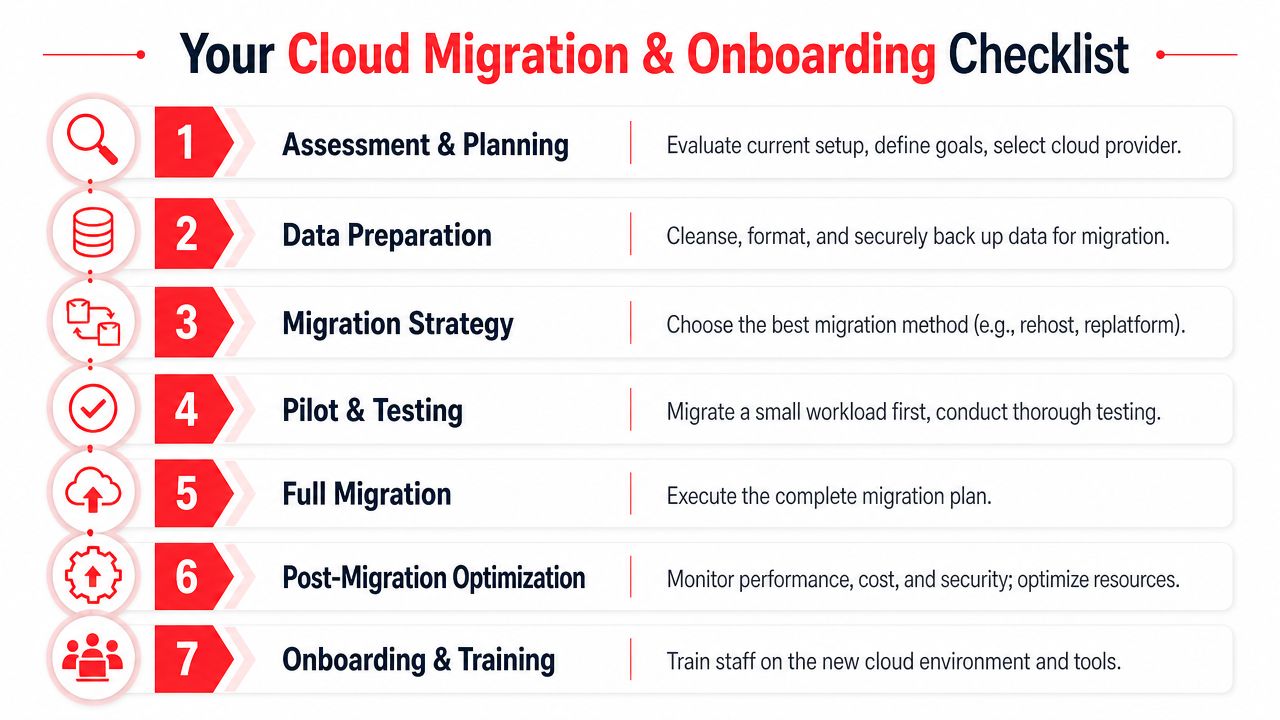
Start with an inventory. You need a working list of applications, shared data, user groups, devices, vendors, and dependencies. Many businesses discover during migration that one neglected workstation, one specialty app, or one shared mailbox controls a surprisingly important workflow.
Then define success in business terms. Faster remote access, fewer outages, simpler user onboarding, stronger compliance controls, and better cost visibility are all valid goals. “Move to the cloud” is not a goal. It's a method.
A practical prep list includes:
- Document critical systems: Identify what the business cannot operate without.
- Clean up access: Remove stale accounts and review privileged users before moving anything.
- Validate backups: Make sure rollback and recovery plans are real, not assumed.
For companies that want better recovery discipline before or during migration, cloud-based backup solutions for small business can be part of the foundation.
During the move
Don't move everything at once unless there's a compelling reason. Pilot a limited workload first. Test login flows, permissions, printing, file access, mobile access, and any workflow that touches accounting, scheduling, records, or client communications.
The best migration plans also define who approves each phase. Leadership should know when cutover happens, what users will notice, where to report problems, and how rollback decisions get made if a critical issue appears.
A clean migration is usually boring from the user's perspective. That's the goal.
After cutover
Post-migration work is where long-term value gets locked in.
- Train users on the new workflow: Staff need short, role-based instruction, not a flood of generic documentation.
- Review permissions again: New platforms often expose old access mistakes.
- Tune cost and performance: Rightsize what you provisioned once actual usage is visible.
- Set review rhythm: Schedule operational and security reviews so drift doesn't build unnoticed.
Cloud onboarding isn't finished when systems are live. It's finished when users can work reliably, leadership has visibility, and the environment is stable enough to support growth.
Understanding Cloud Pricing Models in Central Florida
Business owners usually hear cloud pricing described as flexibility. That's partly true. It's also where budget surprises start if no one explains the model clearly.

Where pricing gets complicated
Most cloud environments mix variable consumption with service labor. Consumption may include compute, storage, backup, bandwidth, or other resource usage. Service labor may include administration, security oversight, compliance work, user support, and project changes.
That's why the proposal matters more than the headline price.
Broad market momentum also explains why pricing conversations are intensifying. The global cloud services market statistics project the market at $943.65 billion in 2026, growing to $1,707.13 billion by 2033, with the U.S. market valued at $282.62 billion in 2026. Cloud adoption isn't slowing down, which means providers have every reason to package services aggressively. Buyers need to slow the sales process down enough to inspect the cost structure.
What a business owner should look for in a quote
A few common pricing models show up in practice:
- Pay-as-you-go: Flexible, but monthly bills can move around based on usage and support events.
- Reserved capacity: Better when workloads are stable and predictable, but less forgiving if needs change.
- Discounted excess capacity models: Useful for noncritical or interruptible workloads, but a poor fit for core business systems.
- Flat-rate managed service packaging: Easier for budgeting when the scope is clearly defined and security operations are included.
The right answer depends on your risk tolerance. If your business values strict monthly predictability, variable consumption with loosely defined support may create more finance friction than technical benefit. If you have a highly seasonal workload, some variability may be acceptable.
Review every quote with these questions in mind:
- What fluctuates monthly?
- What security work is included?
- What happens after hours?
- What work becomes billable project labor?
Cloud pricing should help you plan. If the quote creates ambiguity, it's not ready.
Your Next Step Towards a Secure Cloud Foundation
Cloud decisions in Central Florida aren't just about modernizing infrastructure. They affect how your staff works, how your data is protected, how audits are handled, and how confidently you can budget for IT operations.
The Orlando market has the underlying infrastructure to support serious cloud adoption. The Orlando data center market overview notes that the region features over 20 physical data centers and total colocation capacity exceeding 129,000 square feet, giving local businesses a strong foundation for reliability and connectivity. That matters for firms that want local relevance without falling back into server-room thinking.
If you're evaluating Cloud Services in Orlando FL, keep the priorities in the right order. Start with business goals. Build around compliance and cybersecurity. Demand pricing clarity. Choose a partner that can support both the migration and the long-term operating model.
The businesses that get this right don't just “move to the cloud.” They create a more resilient way to run the company.
If you're ready to evaluate secure, compliant, and cost-predictable cloud options, Cyber Command, LLC can help you assess your current environment, identify migration risks, and map a cloud strategy that fits how your Orlando business operates.
