
IT Help Desk Services in Orlando FL: A Business Guide

Monday starts with three separate tickets before 8:30 a.m. A receptionist cannot log in. A lawyer cannot open a case file from home. A practice manager sees a suspicious email and has no idea whether to delete it or report it. By lunch, what looked like routine tech friction has turned into lost billable time, delayed patient scheduling, and a possible security incident.
That is the true test of IT help desk services in Orlando FL. A help desk is not just there to reset passwords and clear printer queues. It sits at the point where employee productivity, cybersecurity response, and compliance exposure meet. If after-hours support only means someone answers the phone and promises a callback, the business still carries the risk.
For Orlando companies in legal, medical, finance, and other regulated fields, "24/7 help desk" needs a tighter definition. Owners should ask who is working after hours, what issues can be resolved on first contact, what gets escalated to security personnel, and how user-reported problems are documented for audit and compliance purposes. A missed ticket can mean more than downtime. It can mean delayed breach response, poor access control, or gaps in record handling that create liability later.
Buyers also need to separate a help desk from a broader service management function. If you need a clearer framework, compare help desk and service desk. The distinction affects staffing, escalation paths, reporting, and cost. In practice, the right Orlando provider should be able to explain how frontline support connects to endpoint management, identity controls, vendor coordination, and security operations without hiding behind vague SLA language.
Local businesses should expect a measured support operation, not informal break-fix work dressed up as managed service. The firms that perform well usually have clear ticket ownership, defined escalation rules, and response commitments that match the cost and risk of the environment they support. That is what protects uptime.
Table of Contents
- Core Help Desk Capabilities for Orlando Businesses
- Flat-Rate vs Reactive IT Support Pricing Models
- Integrating Your Help Desk with Cybersecurity and a SOC
- Understanding SLAs and Help Desk Response Times
- Industry-Specific IT Support Needs in Central Florida
- Evaluating Onboarding and Long-Term IT Partnership
- A Final Checklist for Choosing Your Orlando IT Provider
Core Help Desk Capabilities for Orlando Businesses
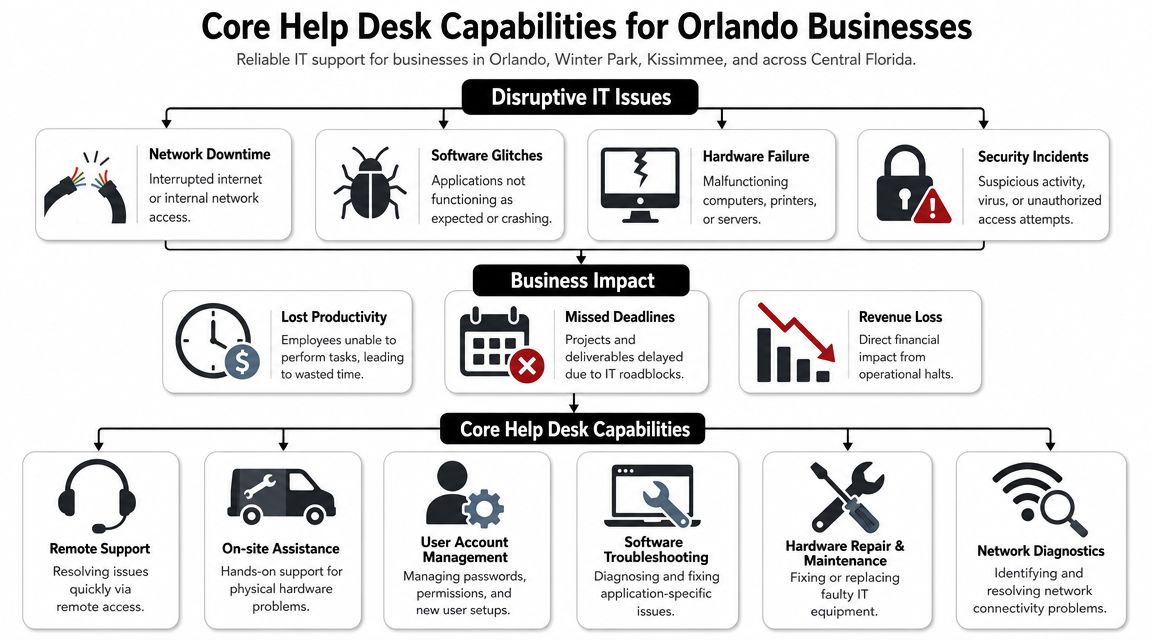
A Monday morning outage in an Orlando office rarely starts as an IT problem. It starts as a business problem. Staff cannot sign in, a doctor cannot access schedules, a law firm cannot open client files, or a finance team cannot reach cloud apps before a deadline. The help desk is the function that decides whether that disruption lasts ten minutes or half the day.
What a modern help desk does
A capable help desk handles repetitive work that carries real operational risk when it sits unresolved. That includes password resets, account lockouts, Microsoft 365 errors, printer failures, VPN access, Wi-Fi issues, new user setup, terminated user offboarding, and ticket triage. It also means recognizing when a routine support request is not routine at all.
That distinction matters more than many owners expect. A user who reports a locked account may need a password reset. They may also be the first sign of a compromised login, suspicious sign-in attempts, or an attack moving across the environment. A provider advertising 24/7 help desk support should be able to tell you how those signals are identified, documented, and escalated without delay.
Process is where strong teams separate themselves from call-answering services. Good help desks categorize tickets, track backlog, measure first response and resolution trends, and route work to the right technical level fast. Weak ones rely on inboxes, memory, and whichever technician happens to be free.
Practical rule: If a provider cannot show how tickets are prioritized, escalated, and reviewed, expect slower resolution, more repeat issues, and more security blind spots.
Some Orlando businesses need co-managed support instead of full outsourcing. That is often the right fit when an internal IT manager can handle vendors, projects, and planning but needs frontline coverage, after-hours support, or access to deeper engineering and security staff. In that model, the help desk reduces user noise so internal IT can focus on systems that affect revenue, compliance, and growth.
What Orlando buyers should expect
At a minimum, buyers should expect:
- Remote support for common user issues so simple problems are fixed quickly without waiting for a site visit.
- On-site support for physical problems such as failed hardware, office connectivity issues, damaged cabling, or device replacement.
- User lifecycle management for onboarding, offboarding, access changes, and permission reviews.
- Defined escalation paths from frontline support to senior engineers and security personnel.
- Reporting that leadership can use including recurring issue patterns, unresolved backlog, and ticket trends by department or location.
- Awareness of compliance-sensitive workflows for medical, legal, and financial environments where a missed ticket can become a security or audit problem.
Many owners also blur the line between a help desk and a broader service desk. If you want a clear framework, this guide explains how to compare help desk and service desk in practical terms.
For Orlando businesses, the standard should be higher than “someone picks up the phone.” The help desk should protect productivity, catch early security signals, and support the compliance pressures that come with handling client records, patient data, financial information, and multi-office operations across Central Florida.
Flat-Rate vs Reactive IT Support Pricing Models
Cost matters, but the bigger issue is how the pricing model shapes behavior. Some support models reward prevention. Others make money when problems keep happening.
Why break-fix still appeals to some owners
Reactive support sounds simple. If something breaks, you call. If nothing breaks, you don't pay. For very small firms with limited systems, that can feel financially safe.
It often isn't operationally safe. Break-fix providers usually have no built-in incentive to standardize your environment, improve documentation, tighten user access, or reduce recurring tickets. They get paid when the phone rings.
Here's the common pattern:
| Feature | Predictable Flat-Rate (Managed) | Reactive Break-Fix (Hourly) |
|---|---|---|
| Billing style | Fixed monthly operating expense | Variable charges when issues occur |
| Budgeting | Easier to forecast | Harder to forecast |
| Provider incentive | Prevent issues and reduce noise | Respond after issues happen |
| Coverage scope | Often broader and process-driven | Usually narrower and event-driven |
| Strategic value | Better fit for planning and standardization | Better fit for occasional troubleshooting |
| After-hours expectations | Often built into service model | Often limited or billed separately |
Break-fix also creates a subtle management problem. Staff start delaying tickets because they know every call may trigger cost discussions. That means issues sit longer, users invent workarounds, and security concerns may go unreported.
Why managed pricing changes behavior
A managed model usually puts support into a monthly service structure tied to users, scope, and included services. According to a 2026 Orlando IT pricing guide, most managed IT providers in the market use tiered per-user pricing ranging from $100 to $250 per user per month. That same guide notes a 50-user firm could be looking at roughly $5,000 to $12,500 per month before add-ons.
That range matters because it gives Orlando businesses a practical budgeting benchmark. It also reflects how modern support is packaged. Help desk, cybersecurity, cloud management, and around-the-clock support are often bundled into one managed relationship.
The best flat-rate agreements don't just cap cost. They remove hesitation. Employees report issues sooner, managers stop approving every support event, and the provider has a reason to reduce recurring problems.
Not every flat-rate plan is equal. Some exclude projects, vendor coordination, or after-hours work. Some cover only covered devices or only remote support. Read the scope carefully.
For Orlando businesses with compliance concerns, multiple locations, or lean internal staff, predictable managed pricing is usually the safer operating model because it aligns support with uptime rather than emergencies.
Integrating Your Help Desk with Cybersecurity and a SOC
A payroll clerk in Orlando reports a login prompt that looks slightly off. Ten minutes later, a partner at a law firm cannot access a shared folder. An accounts payable user says a browser tab keeps reopening after they clicked an email link. Those are not ordinary help desk tickets until proven otherwise. They are early signs of account compromise, malware, or unauthorized access.
For many Orlando businesses, the help desk is the first place a security incident becomes visible. That matters because speed changes the outcome. If a frontline technician resets a password without checking for suspicious sign-in activity, or closes a “missing files” ticket before asking whether files were encrypted, the business loses containment time. In healthcare, legal, and financial firms, that delay can turn an isolated event into a reportable incident.
The practical question is not whether your help desk offers security. The question is whether the help desk can identify security signals fast enough, classify them correctly, and hand them to the right people without confusion.
Frontline technicians do not need to perform forensic analysis. They do need clear intake rules, escalation thresholds, and access to the same ticketing and alert context used by the security team. A useful primer on Security+ exam preparation outlines the fundamentals behind incident response, access control, and threat handling. Those basics should already show up in day-to-day help desk operations.
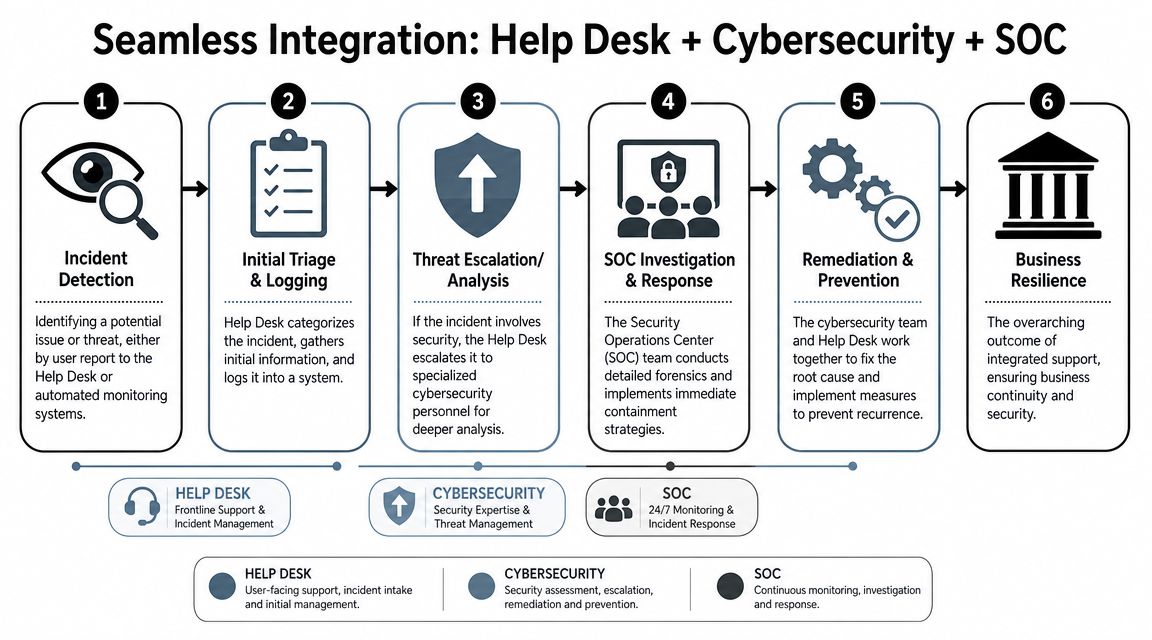
A workable model usually follows this path:
- A user, endpoint tool, or monitoring system flags suspicious activity.
- The help desk records the issue with enough detail to separate routine support from a possible security event.
- Tickets that involve unusual logins, phishing clicks, privilege changes, missing data, or endpoint alerts are escalated immediately.
- The SOC reviews indicators, confirms scope, and starts containment steps.
- The help desk supports user-facing remediation such as device isolation, password resets, MFA re-enrollment, or application access recovery.
- Leadership receives a clear status update that explains business impact, required decisions, and compliance exposure.
That handoff has to be operational, not theoretical. Ask whether the help desk and security team share tools, notes, and escalation playbooks. Ask who owns an incident when a ticket starts as “my laptop is slow” and ends with evidence of malware. Ask what happens after hours if a staff member in a medical practice reports suspicious access to a patient file system, or if a finance employee triggers a fraud alert during month-end processing.
If the answers are vague, expect delays.
A provider can answer phones around the clock and still fail at security response. What matters is whether suspicious tickets reach a staffed investigation function with authority to contain threats. This explanation of what a security operations center is gives a clear definition of the SOC's role inside a modern support environment.
There is also a cost trade-off. Integrating help desk and security operations usually costs more than basic user support alone, but it reduces the odds of paying for downtime, emergency cleanup, legal review, and client notification after a preventable incident. For regulated Orlando firms, that is usually the better bet. A help desk that treats cybersecurity as someone else's job creates risk at the exact point where incidents are first reported.
Understanding SLAs and Help Desk Response Times
At 2:13 a.m., your overnight manager cannot access the line-of-business system, remote staff start opening duplicate tickets, and no one on your side knows whether this is a login issue, a server failure, or the first sign of a security event. “24/7 support” only matters if your SLA spells out who takes ownership at that hour, what they are allowed to do, and how fast they act.
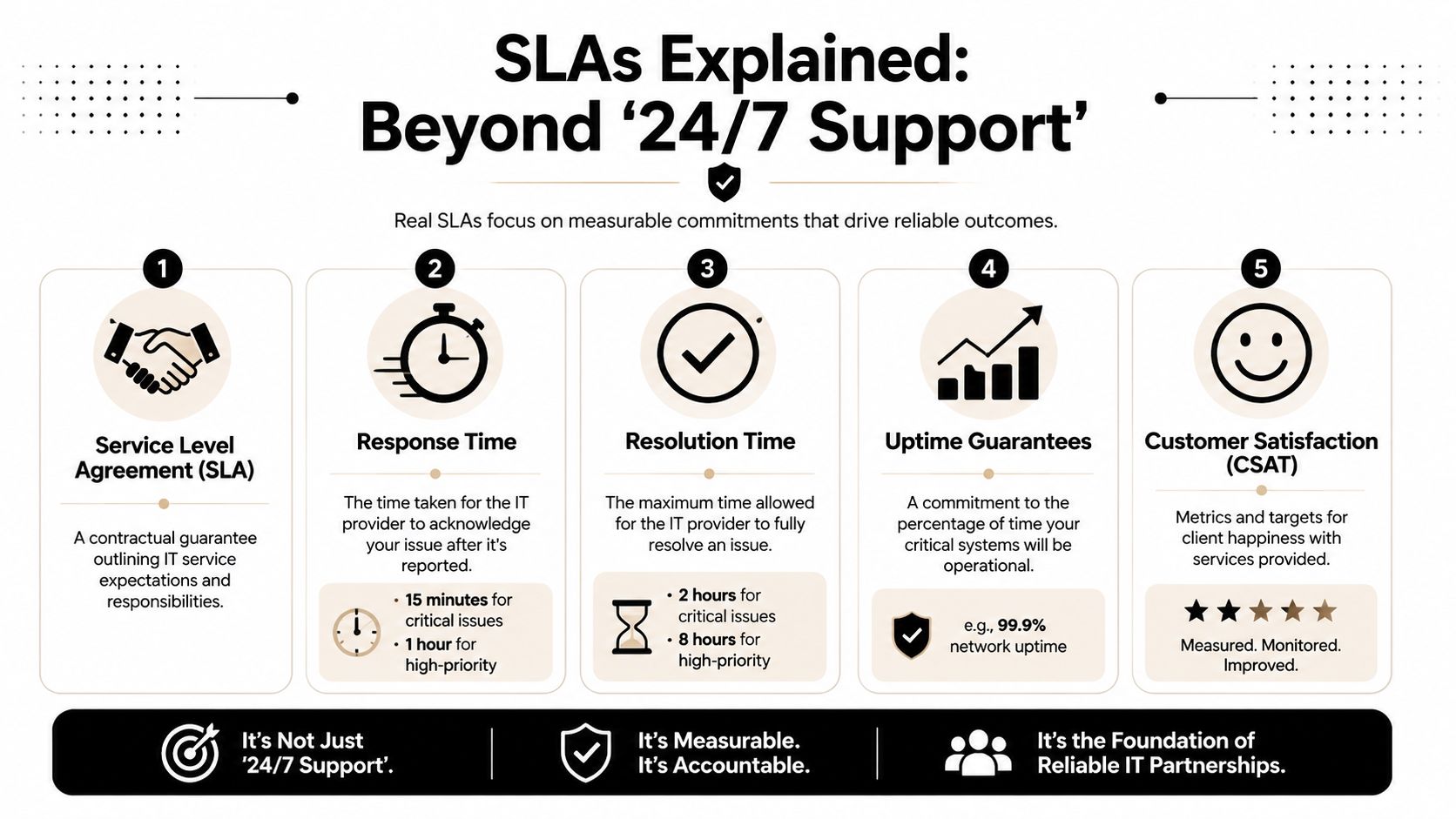
What matters is the service level agreement, or SLA. It defines response targets, severity levels, escalation rules, communication expectations, and after-hours coverage. For Orlando businesses in legal, medical, and financial services, that document also affects compliance exposure. A delayed response to an access problem can turn into missed filings, interrupted patient scheduling, or staff working around controls in ways that create audit risk.
The difference between availability and action
A provider can answer the phone all night and still leave your issue sitting in a queue. Buyers need to know whether after-hours coverage means a trained technician with access to your systems, or a dispatcher who promises a callback at sunrise.
Ask direct questions:
- Who handles overnight calls, and what can that person do?
- How are priorities assigned for outages, locked accounts, email issues, and suspected security incidents?
- Which systems are covered after hours for active troubleshooting or recovery?
- When does leadership get updated if the issue affects revenue, patient care, client deadlines, or regulated data?
- What happens if the ticket changes scope from user support to a possible security incident?
A weak SLA gives you a timestamped acknowledgment. A useful SLA gives you a defined path to containment, recovery, and status updates.
If you want a practical benchmark for how commitments are typically written, these service level agreement examples help clarify what should appear in the contract and what should not be left to sales language.
Response time and resolution time are not the same promise
Response time tells you when work starts. Resolution time tells you when the user, system, or workflow is restored. That gap matters.
I have seen businesses buy support based on a fast first-response target, then learn later that low-priority tickets linger for days and high-priority tickets bounce between teams because no one defined ownership well. Orlando firms with compliance obligations should press on both points. If an attorney cannot reach a document system, a physician loses access to a charting tool, or a finance team member gets locked out during close, the business impact starts long before the ticket is formally “resolved.”
One metric worth reviewing is mean time to resolution for help desk performance. It shows whether the provider consistently restores productivity in a reasonable window, not just whether they acknowledge tickets quickly.
Strong SLAs usually include:
- Severity-based triage that pushes outages and access failures ahead of minor requests
- Named escalation paths for infrastructure, application, and security issues
- Clear communication intervals during active incidents
- Coverage definitions for nights, weekends, holidays, and on-site needs
- Reporting that shows trends so recurring problems get fixed at the root
There is a cost trade-off here. Tighter SLAs, after-hours engineering coverage, and real escalation capacity usually cost more than basic business-hours support. For firms where downtime affects billable work, patient flow, financial operations, or regulated data, paying less for a vague SLA often becomes the more expensive decision.
Industry-Specific IT Support Needs in Central Florida
A generic help desk can reset passwords and troubleshoot Outlook. That's not enough for businesses that carry compliance burdens, client confidentiality obligations, or uptime-sensitive operations. In Central Florida, the support model should fit the industry.
Legal and financial firms
A law office in Orlando doesn't just need users back online. It needs document access controlled properly, email risk managed, and remote attorneys able to reach case files without exposing client data. Support has to respect confidentiality while moving fast under deadline pressure.
Financial firms face a similar reality. When staff handle sensitive client records, onboarding and offboarding become security controls, not just administrative tasks. The help desk should understand how permission changes, device issues, and suspicious email reports affect client trust and regulatory exposure.
For legal and finance teams, the worst support mistake isn't slow troubleshooting. It's casual handling of access, identity, and sensitive files.
Medical and dental practices
Privately owned practices across Orlando, Winter Park, and nearby communities often operate with lean administrative teams. When exam-room devices, scheduling platforms, or billing workflows fail, patient flow gets disrupted immediately.
A medical or dental office needs support that treats PHI protection, account access, and endpoint security as part of daily operations. That means technicians should know when an issue is merely inconvenient and when it may create compliance risk. A password reset for a front-desk employee is routine. A former employee account that still has access to records is not.
The same principle applies to medical spas, orthodontics, veterinary clinics, and specialty practices. They may not have internal IT leadership, but they still carry serious data-handling responsibilities.
Industrial and field service organizations
Industrial firms and field-service companies have a different pressure point. Their teams often depend on stable connectivity between office staff, dispatchers, field users, and shared business systems. Support must keep remote access reliable and standardize equipment so a single failure doesn't ripple across scheduling, inventory, or operations.
These organizations also need practical support for mobile users. A field employee with account sync problems or VPN trouble can lose access to critical job information fast. In that environment, the help desk has to understand business continuity, not just endpoint troubleshooting.
One option in this category is Cyber Command, LLC, which provides managed and co-managed IT, 24/7/365 U.S.-based help desk, cloud services, and SOC-backed cybersecurity for organizations in Orlando and nearby markets. The relevant point isn't branding. It's the operating model: businesses with compliance needs, multiple sites, or mobile workforces usually need a provider that can combine frontline support, security escalation, and strategic guidance in one relationship.
A provider that works well for a small office with basic desktop support may be the wrong fit for a practice handling regulated data or a company supporting crews in the field.
Evaluating Onboarding and Long-Term IT Partnership
A help desk contract can look good on paper and still fail in practice if onboarding is sloppy. Most support problems start before the first ticket. Poor documentation, missing asset visibility, unclear permissions, and half-finished vendor handoffs create confusion that shows up later as delays and finger-pointing.
What solid onboarding looks like
Good onboarding is structured. The provider should discover your environment, inventory key systems, document vendor relationships, deploy support tooling, review user access, and establish escalation contacts. Staff should know where to call, how to submit requests, and what to expect when something is urgent.
Look for signs of discipline:
- Environment discovery that maps users, devices, and business-critical systems.
- Documentation standards for accounts, vendors, network layout, and support procedures.
- Security review of access, endpoint coverage, and obvious exposure points.
- End-user communication so employees know how support works.
If onboarding feels improvised, long-term support usually will too.
What long-term partnership looks like
After onboarding, the relationship should mature into reporting, planning, and accountability. That includes ticket trend reviews, recurring issue analysis, user lifecycle process improvements, and security posture discussions with business leadership.
A provider that acts like a partner won't just close tickets. They'll tell you where the environment is fragile, where users are losing time, and where policy or infrastructure needs attention. This guide on how to choose a managed service provider is useful because it frames the evaluation around operational fit, communication, and long-term reliability rather than just headline features.
Good support feels calmer over time. Fewer surprises, better documentation, cleaner handoffs, and clearer accountability.
If every month brings the same unresolved patterns, you don't have a partner. You have outsourced chaos.
A Final Checklist for Choosing Your Orlando IT Provider
A law office loses access to its document system at 7:10 p.m. A medical practice flags a suspicious login after hours. A finance team sees email account lockouts on payroll day. In each case, the sales promise of "24/7 help desk" stops being marketing copy and becomes an operating test.
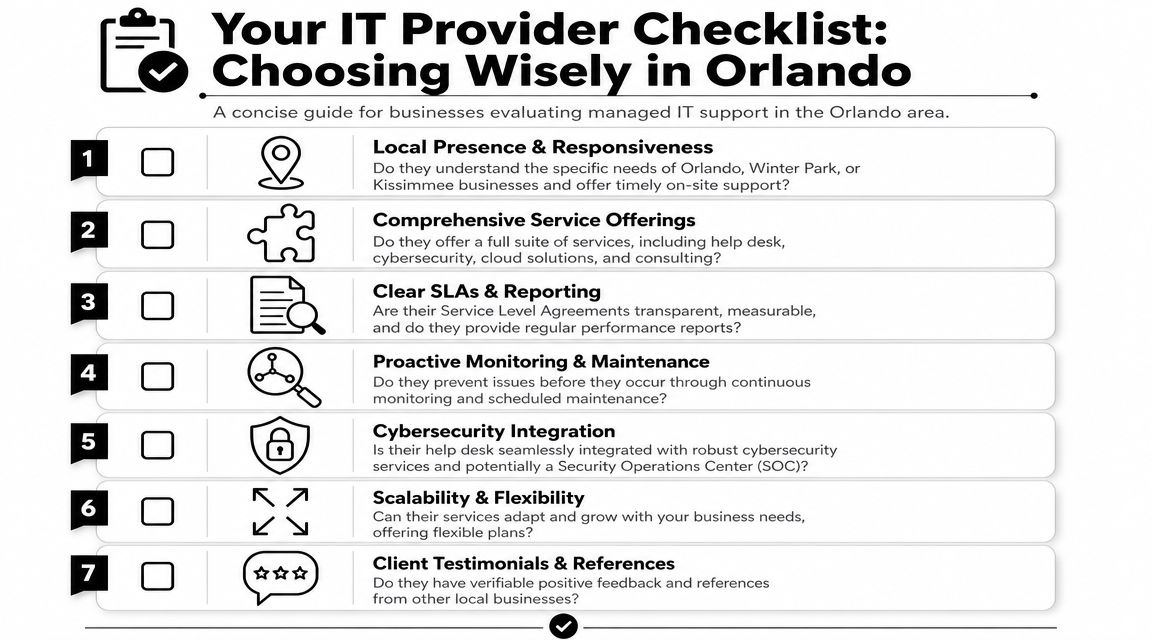
Use this checklist before you sign:
- Define after-hours support in plain terms. Ask whether nights, weekends, and holidays are staffed by technicians who can fix issues, or by an answering service that only opens a ticket.
- Get the SLA in writing. Review response targets, escalation rules, outage handling, and who owns communication during a security event.
- Test the security handoff. If a user reports a phishing click, malware alert, or suspicious login, ask what happens in the first 15 minutes and who is responsible after that.
- Check industry fit. Orlando healthcare groups, law firms, and financial companies have different compliance exposure, retention requirements, and tolerance for downtime.
- Review onboarding discipline. A provider should be able to explain how they document users, systems, vendors, access, and recovery procedures before support starts.
- Ask for reporting that drives decisions. You should see ticket patterns, repeat issues, aging requests, security concerns, and recommendations tied to business risk.
- Clarify coverage scope. Ask what is covered remotely, when onsite work is included, how emergencies are triaged, and what costs extra.
Good answers are specific. Weak answers sound polished but stay vague on ownership, timing, and accountability.
One more point matters in Central Florida. Weather events, distributed workforces, and multi-location operations put pressure on support teams fast. The provider you choose should be able to handle user issues, security escalation, and communication with leadership without losing control of the process.
If a provider cannot explain how support, cybersecurity, and compliance work together, keep looking. Fast ticket closure alone is not enough.
If you're evaluating IT help desk services in Orlando FL and want a provider that combines managed IT, co-managed support, cybersecurity, and around-the-clock operational coverage, Cyber Command, LLC is one option to consider. Their model is built around U.S.-based 24/7/365 help desk support, transparent reporting, predictable pricing, and SOC-backed security support for Central Florida businesses that need more than break-fix response.
