
Decoding the Dollars: Your Guide to Managed IT Services Pricing


Why Understanding Managed IT Services Cost Matters for Your Business
Managed it services cost is a top question for business owners exploring IT outsourcing. In 2025, small to medium-sized businesses can expect to pay anywhere from $100 to $400 per user per month for managed IT services, depending on the scope of services, infrastructure complexity, and provider experience.
Quick Answer: What Does Managed IT Services Cost?
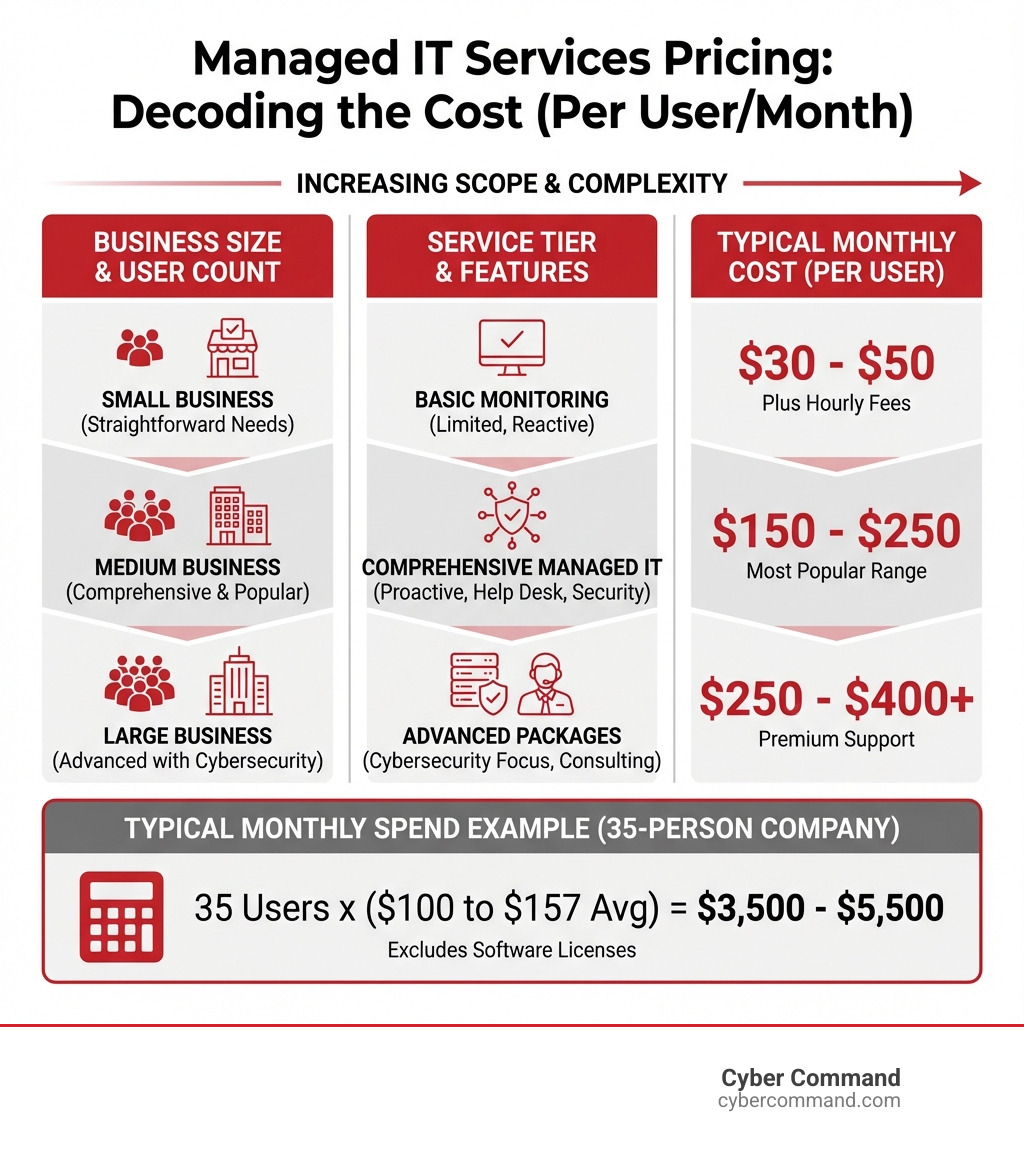
- Basic monitoring-only services: $30-$50 per user/month (limited value, often requires additional hourly fees)
- Small to medium business (straightforward needs): $50-$150 per user or device/month
- Comprehensive managed IT (most popular for SMBs): $150-$250 per user/month
- Advanced packages with cybersecurity & consulting: $250-$400+ per user/month
- Per-device pricing: $100-$400/server, $50-$100/workstation, $30-$75/firewall
- Typical monthly spend for a 35-person company: $3,500-$5,500 (excluding software licenses)
Getting a straightforward answer on IT support costs can be frustrating. The reality is that pricing for managed IT services depends on many moving parts: your company size, service needs, compliance requirements, and IT complexity all play a role.
Comparing Managed Service Providers (MSPs) is difficult because prices are rarely listed upfront. This isn’t a lack of transparency; it’s because there’s no standardized “part number” for managed IT services agreements. What one provider calls “comprehensive support” can differ drastically from another’s.
The good news? Understanding the common pricing models and key cost factors empowers you to make informed decisions and find the right IT partner for your business.
The shift from reactive to proactive IT matters. The average cost of downtime was $1,467 per minute in 2022, and 46% of organizations working with an MSP save 25% or more on IT costs annually. Moving from a “break-fix” model to a proactive managed services approach helps prevent costly disasters before they happen.
This guide will walk you through pricing models, cost factors, hidden fees, and calculating ROI. By the end, you’ll know what questions to ask potential providers and how to evaluate their value.
I’m Reade Taylor, Founder and CEO of Cyber Command. With a background starting at IBM Internet Security Systems, I’ve dedicated my career to providing transparent, proactive IT support. I’ve seen too many businesses struggle with managed it services cost due to incomplete information, which is why I’m committed to clarifying this process.
Understanding Common Managed IT Services Pricing Models
When we talk about managed it services cost, it’s important to understand how MSPs structure their fees. Unlike the old “break-fix” model, modern MSPs use a subscription model with predictable monthly fees. This consistency is a huge benefit for budgeting, ensuring you’re not hit with unexpected bills. These models make your IT spending predictable, a significant advantage for any business.

Let’s explore the most common pricing models. For a deeper dive, visit our page on IT Managed Services Pricing Models.
Per-User Pricing
With per-user pricing, you pay a flat monthly fee for each employee the MSP supports. This fee typically covers all their devices, including desktops, laptops, tablets, and smartphones.
- Pros: This model is simple and highly scalable. As your team grows or shrinks, your IT costs adjust accordingly. It’s ideal for companies with a mobile workforce, remote employees, or staff who use multiple devices. It also makes budgeting straightforward.
- Cons: If your employees share workstations or use few devices, this model might be less cost-effective than per-device pricing.
- Average cost: In our service areas like Florida and Texas, per-user charges generally range from $150-$300 per user/month, depending on the services included. Advanced packages can go up to $400 per user per month.
Per-Device Pricing
Per-device pricing bases the monthly fee on the number and type of IT assets the MSP manages. Each server, workstation, firewall, or switch is assigned a specific cost.
- Pros: This model is advantageous for businesses where many devices are shared by fewer employees, like in manufacturing. It’s also suitable for managing specialized equipment.
- Cons: Costs can add up quickly if your employees use multiple devices each, potentially making it more expensive than a per-user model. Tracking a frequently changing inventory can also be complex.
- Average costs: Expect ranges like $100-400 per server, $50-100 per workstation, $30-75 per firewall, and $15-40 per switch per month. Find more details at Managed IT Services Monthly Cost.
Comparing the two, the better option depends on your business. A company with many shared devices might prefer per-device, while a business with remote employees using multiple devices would benefit from a per-user model.
Tiered & All-Inclusive (Flat-Rate) Pricing
Tiered pricing offers packages (e.g., Bronze, Silver, Gold) with progressively broader services at different price points.
- Tiered Packages: These allow businesses to choose a service level that fits their budget and needs. A basic tier might cover monitoring and helpdesk, while a premium tier adds advanced cybersecurity, strategic consulting, and 24/7 support. Tiered packages can range from $3,000-$6,000 per month.
- All-Inclusive (Flat-Rate) Model: This is often the most popular for SMBs in locations like Orlando, Jacksonville, and Tampa Bay. A single, predictable monthly fee covers all defined IT services, from helpdesk support to cybersecurity and strategic planning. The beauty of this model is its simplicity and budget predictability.
The primary benefit of both models is predictable monthly spending, which allows for accurate IT expense forecasting. To understand what’s typically covered, check out What is Included in Managed IT Services?.
Other Models: À la Carte & Monitoring-Only
While less common, some providers offer these models:
- À la Carte Pricing: This offers flexibility, allowing you to pick and choose individual services.
- Pros: You only pay for what you use.
- Cons: It can be less predictable and may leave critical gaps in your support or security. This model can quickly become more expensive than an all-inclusive package.
- Monitoring-Only Services: These are the cheapest options, typically around $30-50 per user/month.
- Pitfalls: While seemingly cheap, these services only alert you to problems without including the fix. If a server goes down, you get a notification but then pay an additional hourly rate for the resolution. This leads to hidden costs and frustration. A “monitoring-only” service is often “not terribly useful” and “not very cost-effective” in the long run.
- Hidden costs of break-fix work: Reactive fixes can have hourly rates from $175 to $350 per hour, highlighting the expense of a reactive approach compared to proactive managed services. For tools that help prevent these issues, explore Top Cybersecurity Tools for Managed Services Explained.
Key Factors That Influence Managed IT Services Cost
If you’ve received the dreaded “It depends” answer when asking “How much does managed IT services cost?” you’re not alone. It’s a genuine response because there’s no one-size-fits-all price. Several dynamic factors shape your final bill, much like building a custom home.
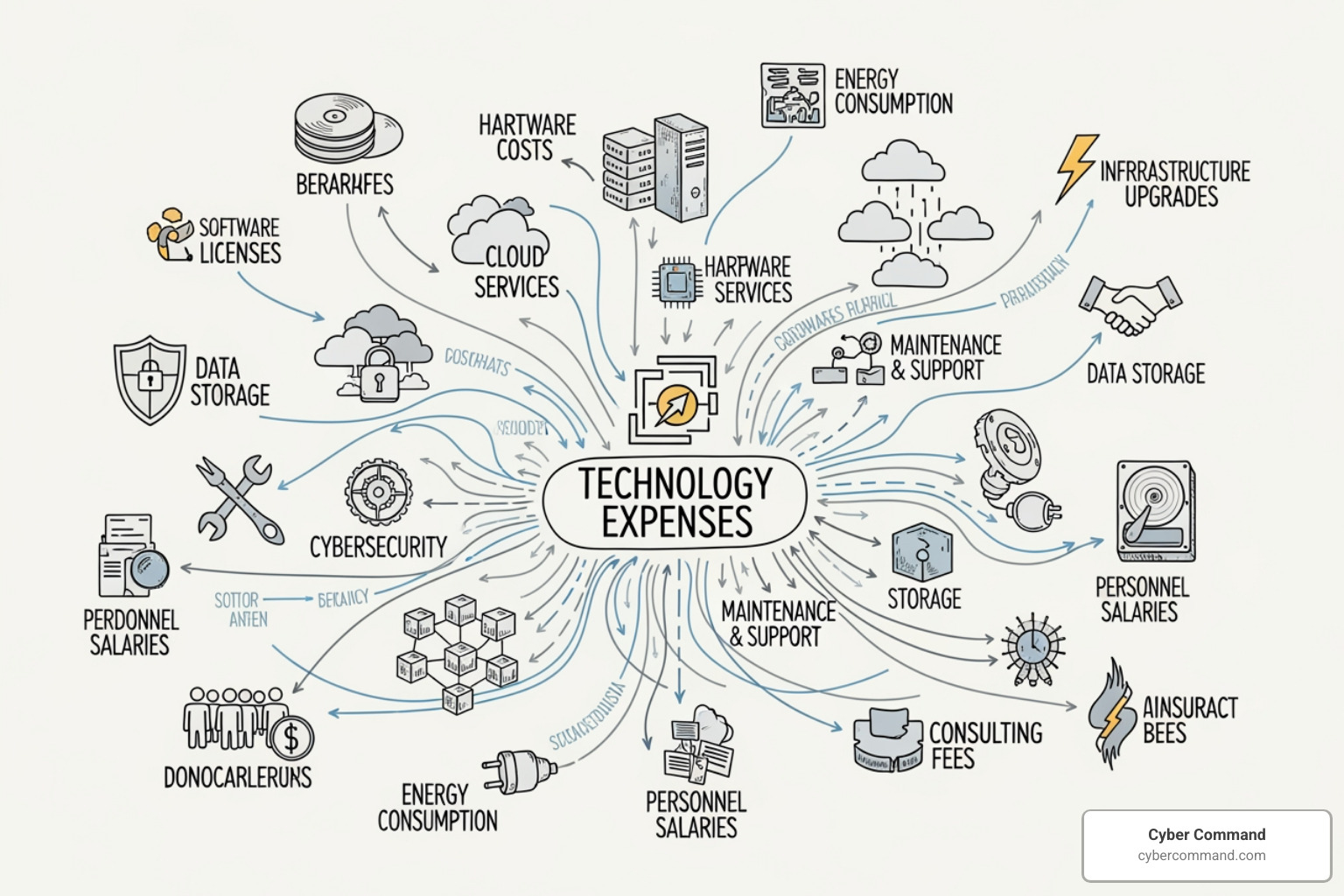
Understanding these variables is crucial for estimating your budget and evaluating provider quotes. Our guide on Discover Key Factors Influencing IT Managed Service Pricing offers a comprehensive breakdown.
How Scope of Services & Infrastructure Complexity Affects Your Bill
The range and depth of services you need are primary cost drivers. Basic helpdesk support during business hours costs less than a comprehensive, 24/7/365 solution that includes strategic IT planning, advanced cybersecurity, and proactive maintenance.
- Basic vs. Comprehensive: Basic packages cover essentials like remote monitoring and helpdesk support. Comprehensive packages, often in the $150-$250 per user/month range, include robust Cybersecurity Services (like EDR and web filtering), proactive problem-solving, data backup and disaster recovery, and vCIO consulting.
- Infrastructure Complexity: A more intricate IT environment costs more to manage. This includes:
- Number of servers and workstations: More devices mean more to manage and secure.
- Network devices: Firewalls, switches, and wireless access points add to the management load.
- On-premise vs. cloud infrastructure: Managing a hybrid environment or complex Cloud Services can increase costs. Fully hosted systems, where the MSP supplies the infrastructure, often sit at the higher end of the pricing spectrum ($250-$400 per user/month).
- Age of systems: Older infrastructure requires more attention.
- Business software: The complexity of your Line of Business Applications.
- Data volume: The amount of data requiring backup.
Effective IT Infrastructure Management ensures these components work seamlessly, but the effort involved directly influences your bill.
Business Size, Locations, and User Count
Your organization’s footprint plays a significant role in your managed it services cost.
- Number of Employees (Headcount): This directly impacts per-user pricing and the overall support load. A 35-person company in Central Florida, for example, can expect a typical monthly spend between $3,500 and $5,500 (excluding licensing costs).
- Number of Physical Locations: Multiple offices in Orlando, Jacksonville, and Tampa Bay add complexity, each potentially requiring its own network setup and on-site support.
- Remote Workforce Support Needs: MSPs must provide robust support for remote employees, requiring secure access, mobile device management, and reliable remote troubleshooting.
- Scalability Requirements: A growing business needs an MSP that can scale services accordingly, which often means proactive planning. For more on supporting growth, see our insights on IT Managed Services for Small Business.
The Impact of Compliance and Industry-Specific Needs
Stringent regulatory requirements in industries like healthcare (HIPAA), finance, and government directly impact IT needs and costs.
- Compliance Frameworks: Adhering to regulations like HIPAA, CMMC, GDPR, or NIST requires specialized security, auditing, and data protection protocols.
- Increased Cost for Auditing and Reporting: Ensuring compliance involves additional MSP effort, including security assessments and maintaining audit trails, which is reflected in the price.
- Industry-Specific Software: Sectors using unique Line of Business Applications require specialized support, such as property management software for IT Services for Real Estate or tax platforms for IT Support for Accountants.
Partnering with an experienced MSP is crucial for regulated businesses. Learn more at Master Cybersecurity Compliance for IT Managed Services.
Provider Experience and Service Level Agreements (SLAs)
Not all MSPs are created equal; provider experience and reputation significantly influence pricing.
- MSP Maturity Levels: MSPs range from cheap, reactive “Trunk Slammers” to “Value MSPs” and “Mature MSPs.” Mature MSPs, like us, are established providers with robust processes and holistic solutions. They justify higher costs with deep expertise and superior service. You can learn more at Low Versus High Operational Maturity.
- Service Level Agreements (SLAs): An SLA is a contract outlining service levels, including response times and uptime.
- Guaranteed Response Times: A 15-minute response guarantee for critical issues costs more than a 4-hour one.
- Uptime Guarantees: Demanding SLAs, like 99.99% uptime, require more investment from the MSP, increasing cost.
- On-site vs. Remote Support: Including guaranteed on-site visits to your Orlando or Plano office will impact pricing.
The more demanding your SLA and the more experienced your MSP, the higher your managed it services cost. However, this investment translates to greater reliability and peace of mind.
Beyond the Monthly Fee: Onboarding and Other Potential Costs
While the monthly fee is the bulk of your managed it services cost, be aware of other legitimate charges for out-of-scope services or initial setup. Pricing transparency is key to avoiding surprises. We believe in being upfront about all potential costs, which you can read more about in 6 Key Considerations in IT Support Charges: Understanding and Optimizing Your IT Expenses.
Why You Should Expect an Onboarding Fee
A professional MSP will charge an onboarding or setup fee, and for good reason. This covers the significant work of integrating your business into their systems and processes.
- What it Covers: An onboarding fee accounts for a comprehensive assessment, strategic planning, system configuration, data migration, security hardening, documentation, and staff training.
- Why it’s a Sign of a Mature MSP: A proper onboarding process ensures a smooth, secure transition. It means the MSP understands your network and security needs from day one, preventing frustration when you call for help. They aren’t “finding your environment on the fly.”
- Typical Cost: Onboarding fees often equate to 1-2 months of your service plan or can range from several hundred to several thousand dollars depending on your IT environment’s complexity. For a deeper breakdown, you can watch our onboarding explanation video (though dollar figures may be outdated, the context is still relevant).
Identifying Hidden or Out-of-Scope Charges
Even with an all-inclusive plan, some projects fall outside the monthly fee. Knowing these helps you budget accurately.
- Project Work: Large-scale initiatives like office moves, major hardware refreshes, or server migrations are typically billed separately. While we manage day-to-day operations, these larger projects require dedicated resources. Hourly rates for project work can range from $75.00 to $200.00 per hour.
- Hardware/Software Licensing: The monthly fee covers the MSP’s services, not necessarily all third-party software licenses like operating systems, Microsoft 365, or specialized Line of Business Applications. Refer to Compare Microsoft 365 Business Plans for licensing needs.
- VoIP Services: While we can manage your VoIP Services, the service itself is often a separate cost.
- After-Hours Support Policies: Some MSPs charge premium rates for support outside standard business hours if your SLA doesn’t include it (we offer 24/7/365 U.S.-based support).
- Travel Fees: On-site support outside a defined service radius (e.g., beyond our Orlando, Plano, or Tampa Bay coverage) may incur travel fees.
We aim for transparent, all-inclusive pricing to minimize these surprises, but you should discuss these potential charges with any MSP you consider.
Calculating ROI and Estimating Your Managed IT Services Cost
Viewing managed it services cost purely as an expense misses the bigger picture. It’s an investment that yields significant returns by improving efficiency, reducing risk, and saving money in the long run. We encourage clients to shift from a cost mindset to an investment mindset.
How to Estimate Your Potential Managed IT Services Cost
While an exact cost requires a detailed assessment, you can create a ballpark estimate.
- Simple Calculation (Per-User Model): Multiply your number of users by an average per-user rate. For a 35-person company in Florida or Texas looking at comprehensive services in the $150-$250 per user/month range:
- Minimum Estimate: 35 users * $150/user = $5,250/month
- Maximum Estimate: 35 users * $250/user = $8,750/month
- This aligns with the typical monthly spend of $3,500 to $5,500 for a 35-person company (excluding licenses like Microsoft 365).
For more insights, visit Average Cost of IT Support for Small Business.
Justifying the Expense: The True Value of Proactive IT
The real value justifying the managed it services cost comes from proactive IT management.
- The Cost of Downtime: System outages are incredibly expensive. The average cost of downtime was $1,467 per minute in 2022, and for some, it can cost $5,600-$9,000 a minute. An hour of downtime can quickly dwarf any monthly MSP fee.
- External Link:
[$5,600-$9,000 a minute](https://www.atlassian.com/incident-management/kpis/cost-of-downtime)
- External Link:
- Proactive vs. Reactive Support: An MSP proactively monitors systems, applies patches, and identifies issues before they become critical problems. This prevents costly downtime, data loss, and security breaches. In contrast, a reactive “break-fix” model waits for disaster, costing more in lost productivity and emergency repairs.
- Access to Specialized Expertise: Hiring a full in-house team with diverse expertise is expensive (a single IT pro can cost over $90,000/year before benefits). An MSP gives you access to a team of experts for a predictable monthly fee, providing enterprise-grade support most SMBs couldn’t otherwise afford.
- Business Continuity: Proactive IT includes robust backup and disaster recovery, ensuring your business can quickly recover from any event. Learn more about the benefits at Proactive IT Management and Business Continuity.
Calculating ROI: MSP vs. In-House IT
To understand the return on investment (ROI), compare the cost of an MSP to an in-house IT department.
ROI = (Current Value of Investment – Cost of Investment) / Cost of Investment
- Cost of In-House IT: This includes salary, benefits, training, recruitment, equipment, and the risk of staff turnover.
- Cost of Managed IT Services: This is your predictable monthly fee, including the MSP’s tools and expertise.
- Long-Term Savings: A successful MSP partnership can significantly reduce overall IT costs. Business Wire estimates that MSPs can reduce IT costs by 25-45% through reduced downtime, optimized operations, and avoiding internal overhead.
- External Link:
[reduce IT costs by 25-45%](https://www.businesswire.com/news/home/20220218005441/en/Global-Managed-Services-Market-2022---2027-Big-Data-Stands-to-be-Driving-Factor-for-Productivity-and-Efficiency---ResearchAndMarkets.com)
- External Link:
The predictable pricing of managed services is a benefit in itself, allowing for easier budget planning.
Frequently Asked Questions about Managed IT Services Pricing
What is a typical price range for a small business?
For small businesses, managed it services cost typically ranges from $50 to $150 per user/month for basic needs like monitoring, patch management, and helpdesk support. As your needs grow to include more comprehensive cybersecurity, proactive maintenance, and strategic consulting, this can scale up to $250 per user/month. For advanced security solutions and consulting, costs can reach $250–$400 per user/month. The price depends heavily on your location (e.g., Orlando, Plano, Jacksonville), the complexity of your IT setup, and the specific services included in your package.
Are longer contracts cheaper?
Yes, often they are! Many MSPs, including us, offer discounts or more favorable terms for multi-year contracts (e.g., 2 or 3 years). This arrangement provides budget stability for your business, as your rates are locked in, and offers the MSP client stability, fostering a long-term partnership. It’s a win-win scenario that encourages deeper engagement and strategic planning.
Why shouldn’t I just choose the cheapest MSP?
Choosing the cheapest MSP can be a tempting shortcut, but it often leads to significant challenges and hidden costs. The very lowest-cost options are frequently “monitoring-only” services, which merely alert you to problems without including the cost of fixing them. This leaves you vulnerable to expensive hourly rates for reactive fixes (which can be $175-$350/hour) and prolonged downtime. Cheap providers might also cut corners on critical security layers, leaving your business exposed to cyber threats. True value in managed IT services comes from a proactive approach, robust cybersecurity, access to expert teams, and a strategic partnership that prevents issues rather than just reacting to them. The lowest price rarely equates to the best value or the most secure and reliable IT environment.
Conclusion: Making the Right IT Investment for Your Business
Navigating the landscape of managed it services cost can feel complex, but by understanding the common pricing models—per-user, per-device, tiered, and all-inclusive—and the key factors that influence your bill, you can make an informed decision. Factors like the scope of services, infrastructure complexity, business size, industry-specific compliance, and the MSP’s experience all play a crucial role.
The lowest price isn’t always the best value. Hidden costs, reactive support, and inadequate security from a cheap provider can quickly erode any initial savings. The true value of managed IT services lies in predictable pricing, reduced downtime, improved security, and access to a team of experts who proactively manage your technology. This investment protects your business, improves efficiency, and allows you to focus on your core mission.
At Cyber Command, we pride ourselves on offering transparent, all-inclusive pricing with 24/7/365 U.S.-based support, acting as a true extension of your business in Florida and Texas. We believe in proactive IT management that prevents problems before they start, ensuring your technology is an asset, not a liability.
Ready to find the right IT partner? Find how to choose an MSP that aligns with your needs by visiting How Do You Choose a Managed IT Service?. Or, if you’re ready to explore a partnership with us, get a transparent quote for our Managed IT Services today.
