A Guide to Disaster Recovery Test Plans

Let’s be honest: an untested disaster recovery plan isn’t a plan at all. It’s a collection of expensive assumptions. For any business, but especially those in areas prone to disruption, just hoping your recovery process will work when you need it most is a gamble you simply can’t afford.
A real, validated plan is the only thing standing between a minor hiccup and a business-ending catastrophe.
Why Untested Recovery Plans Can End Your Business
I’ve seen this happen more times than I can count: A mid-sized professional services firm in Orlando gets hit with a nasty ransomware attack on a Friday afternoon. The IT team feels secure; they have a DR plan and what they believe are reliable backups.
But when they try to kick off the recovery, the nightmare begins. The backups are corrupted. Key people are unreachable. The steps in the plan are vague or outdated. By Monday morning, they’re still dead in the water, bleeding revenue and losing client trust by the minute.
This isn’t just a scary story. It's the reality for businesses that treat their DR plan like a checkbox item instead of a living, breathing process. For companies across Central Florida—from law firms in Kissimmee to medical spas in Lake Nona handling sensitive patient data—the threats are constant. Hurricanes, power outages, and sophisticated cyberattacks are not a matter of "if" but "when."
An untested plan is just a stack of unproven theories. It’s like owning a fire extinguisher you’ve never checked; you only find out it’s empty when the flames are already climbing the walls.
The Domino Effect of a Failed Recovery
When a disaster hits and your untested plan crumbles, the consequences cascade with terrifying speed. We're not just talking about a few hours of downtime. The impact is far-reaching and can threaten the very survival of your business.
- Catastrophic Data Loss: You assume your backups are good, but have you ever tried a full restore from them? We often find that untested backup systems fail due to configuration drift, silent data corruption, or simple software incompatibilities. In an age of rampant ransomware, this is no longer a technical issue—it's a fundamental cybersecurity vulnerability.
- Crippling Downtime: Every single minute your systems are down translates directly to lost revenue, tanking productivity, and frustrated customers. A plan that looks great on paper might promise a four-hour recovery, but a single untested snag can stretch that into days or even weeks.
- Major Compliance Fines: For regulated industries like healthcare or finance, data availability isn't just a good idea—it's a legal mandate. A failed recovery can trigger severe penalties under regulations like HIPAA, putting your organization in deep financial and legal trouble.
- Damaged Reputation: Trust is your most valuable asset. Having to tell clients you’ve lost their data or can’t provide services is a conversation from which many businesses never recover.

The Sobering Statistics Behind Untested Plans
The risks aren't just anecdotal. The data shows a frightening gap between having a plan and knowing for certain that it works.
A massive survey of over 3,400 organizations revealed that nearly 1 in 5 took more than a month to recover from a major IT disruption. That kind of prolonged downtime is a death sentence for most small or mid-sized businesses.
Even worse, among companies that actually have a DR plan, a shocking 7% never test them. Half of the rest test only once a year or less, which is nowhere near enough.
An untested plan fails over 60% of the time during a real crisis. In contrast, regularly tested plans provide the confidence and predictability needed to navigate disruptions effectively. This single practice is often the deciding factor between a swift recovery and a complete business failure.
The core problem is a lack of validation. You wouldn't send a team into a critical project without practice, and your business continuity is no different. Regular disaster recovery test plans are what transform your theoretical document into a proven, reliable roadmap.
To dig deeper into this, you can learn more about the good reasons to do yearly disaster recovery testing and how it builds true resilience. Without it, you’re just crossing your fingers and hoping for the best. And hope is not a strategy.
Choosing the Right DR Test for Your Orlando Business
Picking the right disaster recovery test isn't just a technical decision—it's a strategic one. Go too simple, and you're just checking a box, leaving dangerous blind spots in your plan. Go too complex too soon, and you risk burning out your team and your budget for a test that was doomed to fail.
For businesses here in Orlando and across Central Florida, the key is to match the test to your reality. Your operational needs, your specific cybersecurity risks, and your available resources are all part of the equation.
Not all DR tests are created equal, and they shouldn't be. A small law firm in Winter Park has vastly different needs than a multi-location healthcare provider managing sensitive patient data across the region. Let's dig into the main types so you can make a smart choice for your business.
Tabletop Exercises: The Strategic Starting Point
A tabletop exercise is where your disaster recovery plan leaves the three-ring binder and enters the real world—or at least, a simulated one. Think of it as a guided strategy session where your team talks through a disaster scenario.
There’s no live system testing here. The entire focus is on communication, roles, and decision-making under pressure.
We might gather your key people and drop a scenario on them: "A severe thunderstorm has knocked out power to our Clermont office, and the backup generator just failed. The first call you get is from a frantic employee. What are the first three things you do, and who does them?"
The goal is to see if everyone knows their role and if the plan you wrote down actually holds up when people start asking questions. It’s a low-cost, low-risk way to find the big holes in your response before a real crisis does it for you. This is the perfect place for any business to start.
Functional and Failover Tests: The Technical Deep Dive
Once you've confirmed your people and processes are aligned with a tabletop, it's time to put the technology to the test. A functional test, also called a failover test, is a hands-on drill of a specific piece of your recovery plan.
Crucially, this is done in a way that doesn't touch your live production environment. You're testing individual components to make sure they work as advertised. Can you actually restore your client database from last night's backup? Does the failover to your secondary server happen as seamlessly as the sales pitch promised?
For an Orlando-based accounting firm, a functional test might mean restoring their primary bookkeeping software to a test server and confirming that all data from the last 24 hours is there. This is a direct test of their Recovery Point Objective (RPO) and Recovery Time Objective (RTO) without interrupting a single billable hour. It takes more technical resources, but it provides priceless proof that your critical systems can be recovered.
A common mistake we see is businesses investing in backup solutions but never testing the actual restore process. A functional test closes this dangerous gap, moving your plan from theory to proven capability.
Full-Scale Simulations: The Ultimate Reality Check
A full-scale simulation is the closest you can get to a real disaster without the actual disaster. This is the most comprehensive test you can run, activating your entire DR plan—people, systems, and communications—in a live-fire exercise.
This often involves taking production systems offline (briefly and in a controlled manner) to failover to your recovery site.
This test isn't for the faint of heart. It’s for mature organizations that have aced their tabletop and functional tests. For example, a logistics company with warehouses in Orlando and Tampa might run a full-scale simulation to test its ability to reroute all statewide operations and data processing to its DR site in Texas after a simulated hurricane warning.
While it's the most resource-intensive test, a full-scale simulation is the only way to truly validate your entire business continuity strategy under pressure. It's the ultimate test of resilience.
Which Disaster Recovery Test Is Right for You?
Choosing the right test depends on your maturity, resources, and goals. This table breaks down the three main types to help you decide.
| Test Type | Primary Goal | Complexity and Resource Cost | Best For |
|---|---|---|---|
| Tabletop Exercise | Validate communication, roles, and decision-making processes. | Low cost, minimal time commitment. | All businesses, especially as a first step or annual refresher. |
| Functional/Failover Test | Verify specific technical recovery capabilities, like backups or system failovers. | Medium cost, requires technical staff and a test environment. | Businesses with critical applications that need RTO/RPO validation. |
| Full-Scale Simulation | Test the entire disaster recovery plan and business response in a live scenario. | High cost, significant time and staff commitment. | Organizations with mature DR plans and low tolerance for downtime. |
Ultimately, these tests aren't mutually exclusive. They form a progression. Start with a tabletop to get your process right, move to functional tests to validate your tech, and work your way up to a full simulation to prove it all works together.
A great disaster recovery test starts long before the actual "disaster" is declared. It's built on a solid foundation of clear goals, defined roles, and a plan so detailed it reads like a movie script.
For busy professionals across Central Florida—whether you're managing a Winter Springs orthodontist’s office or you're a partner at an Orlando engineering firm—I've seen firsthand how skipping this prep work leads to a chaotic and useless test. It's not about checking a box; it's about building a roadmap that everyone can trust when the pressure is on.
Let's ditch the generic templates and build a real, actionable DR test plan that actually works for your business.
Define Your Goals and Success Metrics
Before you write a single line of your plan, you need to know what a "win" looks like. What does a successful test actually achieve? Vague goals like "test the backups" just won't cut it.
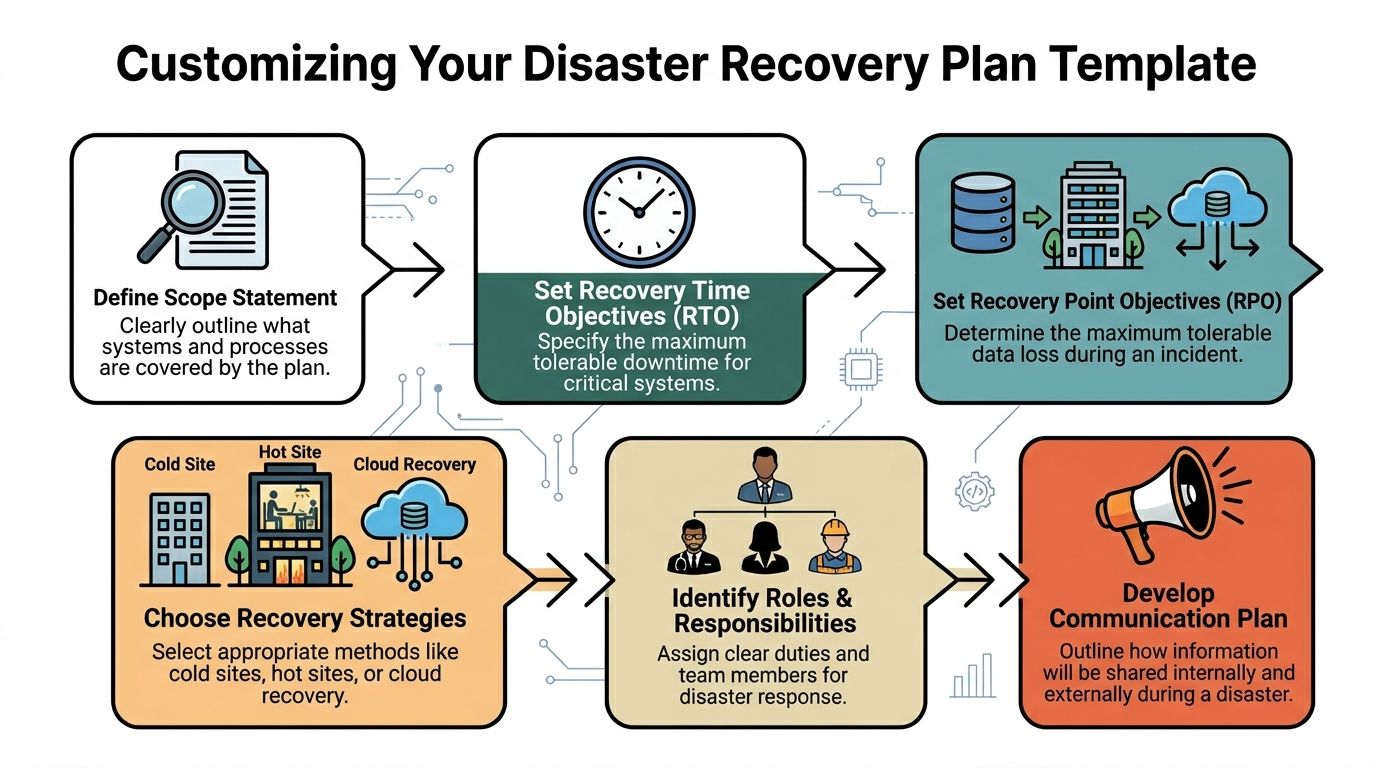
Your goals have to be tied to the two metrics that truly matter: your Recovery Time Objective (RTO) and your Recovery Point Objective (RPO).
- RTO: This is your deadline. What's the absolute maximum time your most critical system can be down before it starts causing real pain to your business? Is it one hour for your patient scheduling software? Four hours for your core project management tool?
- RPO: This is about data loss. How much data can you afford to lose forever? Can you live with losing 15 minutes of work, or does it need to be almost zero?
With these numbers, your primary test goal becomes crystal clear. For example: "Confirm we can restore our primary accounting server and its data to the DR site within our 2-hour RTO, with no more than 15 minutes of data loss (RPO)." Now that's a goal you can actually measure.
Assign Roles and Responsibilities
One of the most common reasons DR tests fail is confusion. When disaster strikes, real or simulated, people need to know their exact role. A plan without names attached to tasks is just a wish list.
Every critical action needs an owner. Key roles to assign include:
- Test Conductor: This person runs the show. They lead the test, kick off each step, and have the ultimate authority to stop the test if things go sideways. This is often a role we fill for our clients, providing an objective and experienced leader.
- Technical Team: These are the folks with their hands on the keyboards, responsible for the technical recovery steps like restoring servers and checking network connections.
- Business Liaisons: These are your validators. They represent different departments (like finance or operations) and are tasked with confirming that the recovered applications actually work from a user's perspective.
- Scribe/Observer: This person has one job: document everything. Every action, the exact time it happened, and any curveballs. Their notes are pure gold during the post-test review.
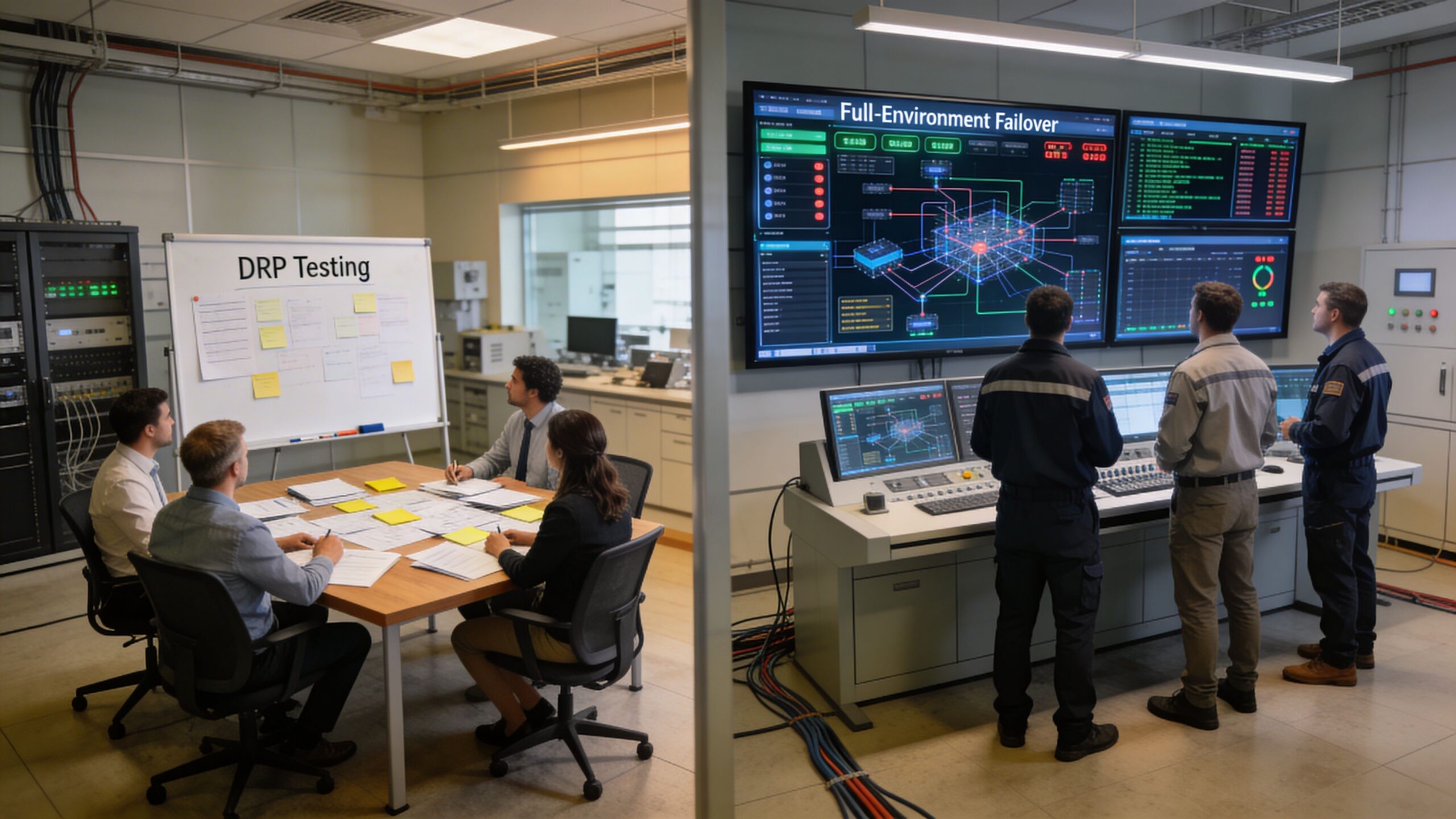
As you assign these roles, think about the type of test you're running. The infographic below shows how testing usually matures, starting with simpler exercises to get everyone on the same page.
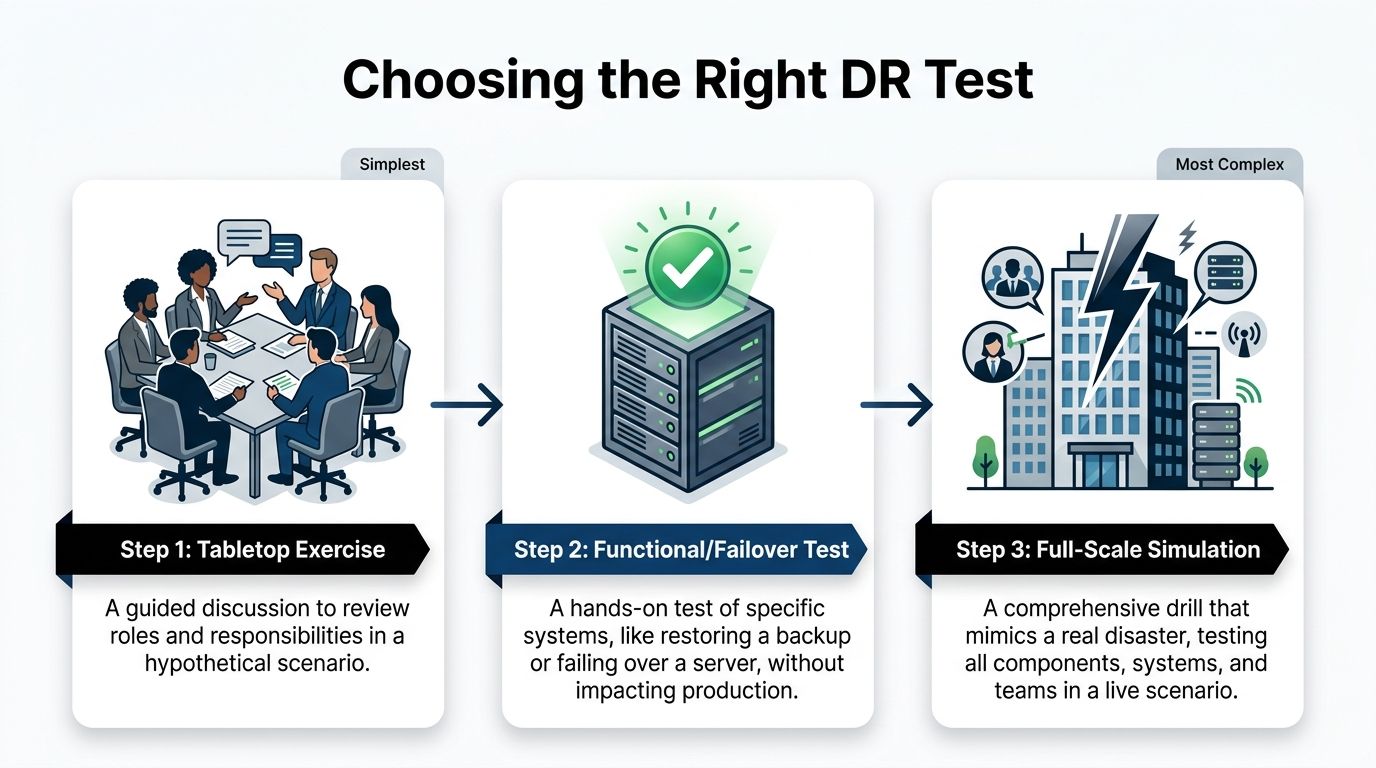
Starting with a tabletop exercise is a great way to align roles and responsibilities before you dive into the more complex, technical tests.
Script the Sequence of Events
Think of your test plan as a script for a play. It should detail the sequence of events from start to finish, ensuring the test is structured, repeatable, and stays focused on your goals.
As you build this script, remember the physical world. Central Florida's weather makes power outages a constant threat, and your digital recovery plans are useless without electricity. Part of your planning should involve understanding the best backup generator for your business to ensure your facility stays online.
A solid script needs to cover a few key areas:
- Initiation: How does the test officially begin? Who gives the final "go"?
- Scenario Declaration: A clear, concise statement of the simulated disaster. For example, "Simulating a ransomware attack that has encrypted the primary file server." This is a crucial cybersecurity focus, as these attacks can bypass traditional disaster defenses.
- Action Steps: Specific, ordered actions with assigned owners and expected outcomes. For instance, "IT team initiates restore of server FS-01 from the 2:00 AM backup. Expected completion: 30 minutes."
- Validation Checkpoints: Built-in pauses where business liaisons must confirm a system works. For example, "Accounting liaison logs into the restored QuickBooks server and verifies the last recorded invoice is present."
- Communication Triggers: Pre-planned points to send mock communications to stakeholders, testing your communication plan.
- Conclusion: The clear criteria for ending the test, whether it’s meeting all objectives or hitting a predetermined stop point.
By scripting every major action, you eliminate ambiguity and keep the test on track. This prevents the exercise from turning into a frantic, disorganized scramble and ensures you gather the exact data needed to measure performance against your RTO and RPO.
Putting this level of detail into a plan might seem like a lot of work upfront, but it's the only way to guarantee your DR test delivers real, actionable value. To get a head start, you can check out our disaster recovery plan template to see how these components come together in a real-world document.
Executing the Test and Managing Communications
Alright, the planning is done. Your script is written and everyone knows their role. Now it’s time for the main event—putting your disaster recovery test plan into motion. This is where the rubber meets the road, moving your plan from a document on a server to a live-fire drill.
Success here isn't just about the tech. It’s about keeping your cool, staying in control, and communicating clearly. This is especially true for businesses in busy metro areas like Orlando, where even a simulated disruption needs to be handled with precision.

The Role of the Test Conductor
One person needs to be in charge. This is the Test Conductor. Think of them as the director of a movie—they keep the exercise on track, watch the clock, and make the tough calls when things go sideways. It’s a role we often fill for our clients because an objective, experienced leader can make all the difference.
The Test Conductor is responsible for:
- Kicking off the test: They officially start the simulation by declaring the disaster scenario.
- Orchestrating the drill: Following the script and making sure tasks happen in the right order.
- Calling audibles: Making on-the-fly decisions when the test doesn't go according to plan.
- Pulling the plug: Having the authority to pause or stop the test if it's about to impact live systems or if the main goals have been met.
Without a strong conductor, these tests can dissolve into chaos. Teams end up working in silos, and no one has the big picture. This role ensures the drill remains a structured—and valuable—learning experience.
Real-Time Documentation Is Key
During the test, your designated Scribe or Observer has one of the most critical jobs: writing everything down. Their notes are the raw data you'll use for your after-action report. Every action, every problem, and every decision needs to be recorded with a timestamp.
This real-time log should capture:
- Start and End Times: When did each major task begin and end?
- Unexpected Hurdles: What problems popped up that weren't in the script? For example, a multi-factor authentication (MFA) token was unavailable, or a critical password was unknown.
- Decisions Made: Who made the call and what was their reasoning?
- Communication Wins and Fails: Were messages clear? Did they get to the right people on time?
This detailed record isn’t about pointing fingers; it’s for an honest, objective analysis. It lets you accurately measure performance against your RTO and RPO goals and pinpoint the exact weaknesses you need to fix. To get a feel for the whole process, it helps to see how IT disaster recovery testing works from start to finish.
Accurate, real-time documentation is the bridge between a test exercise and genuine improvement. It provides the hard evidence needed to turn observations into actionable changes that strengthen your resilience against real-world cybersecurity threats.
Managing Internal and External Communications
A huge part of any DR test is checking if your communication plan actually works. How do you tell employees, key clients, or stakeholders about a simulated outage without starting a real-world panic?
Your test needs to include sending mock communications through the channels you’ve already defined. For example, if an Orlando medical practice is simulating a records system failure, they need to test how they’d notify staff and reschedule patients without causing alarm.
For internal messages, use pre-scripted templates that scream, "This is a TEST." Use your designated channels, whether that's a company-wide chat app, a specific email group, or a text alert system.
External communication is much more delicate. During a real disaster, how you communicate can make or break public perception. Knowing how to write a crisis press release is a skill that builds stakeholder confidence. While you probably won’t issue a real press release during a test, scripting and reviewing these messages is a vital part of the exercise. When you prepare for these scenarios, you turn a simple technical drill into a powerful test of your entire business response.
Here’s the rewritten section, crafted to match the specified human-written style and tone.
Turning Test Results into a Stronger Business
The most important part of your disaster recovery test happens after the drill is over. I've seen it a hundred times: the team breathes a collective sigh of relief, files away the notes, and moves on. This is a massive missed opportunity.
A successful test generates a ton of data—timings, successes, failures, and observations. The real value comes when you turn that raw information into concrete actions that make your business genuinely more resilient. This is what separates a check-the-box exercise from a powerful tool for continuous improvement.
The Critical Post-Test Debrief
Get everyone in a room immediately after the test wraps up. Don't wait. Before memories fade and the daily grind takes over, gather the entire crew: the tech team, business liaisons, observers, and the test conductor. The goal is to capture immediate, unfiltered feedback.
This meeting isn't about blame. It’s about discovery. Create a safe environment for honest feedback and get the conversation flowing with open-ended questions:
- What went exactly as planned? Let's celebrate the wins.
- What was the first thing that surprised you? Was there a cybersecurity gap we didn't anticipate?
- Where did our communication break down—or where did it shine?
- Did anyone feel they didn’t have the info or authority to do their job?
- What was the single biggest roadblock you ran into?
This is where you'll uncover the on-the-ground reality that a simple log file can't show you. A business liaison from an Orlando architecture firm might point out that while the server was technically restored, the specialized design software wouldn’t launch—a critical detail that could bring their work to a standstill.
Analyzing Performance Against Your RTO and RPO
Now it’s time to get objective. Pull out the detailed notes from your scribe and stack them up against the goals you set in your test plan. Did you actually meet your Recovery Time Objective (RTO) and Recovery Point Objective (RPO)?
Be brutally honest here. If your goal was to recover your accounting software in one hour (RTO = 1 hour) but the test took two and a half hours, you missed your mark. The key isn't to feel bad about it; it's to understand why. Was it a slow backup system? A missing password? A complex manual process that could be automated?
The gap between your expected RTO/RPO and your actual test performance is where your improvement roadmap is born. This analysis turns vague feelings about the test into a prioritized to-do list based on measurable risk.
Translating Findings into Actionable Reports
The final step is to package everything into a clear, concise report for leadership. This can't be a data dump. It needs to tell a story: here’s what we tested, here’s what we found, and most importantly, here’s what we’re going to do about it.
Your report should hit these key sections:
- Executive Summary: A one-page overview of the test, key findings, and major recommendations. Keep it brief and to the point.
- Test Objectives vs. Actual Results: A clear, side-by-side comparison of your RTO/RPO goals against the test’s actual performance.
- Wins and Successes: Highlight what worked well. This builds confidence and reinforces good practices.
- Identified Gaps and Issues: A prioritized list of what went wrong or took too long, explaining the business impact of each. This must include any new cybersecurity vulnerabilities uncovered during the test.
- Actionable Recommendations: For every single gap, propose a specific solution with an owner and a deadline.
This report creates accountability. It’s the tool you use to drive the budget and resources needed for real improvement. It’s what ensures your disaster recovery test plans don't just happen—they make your business stronger.
The unfortunate reality is that many businesses neglect this crucial cycle. A sobering stat from ConnectWise's research shows that 58% of organizations test their DR plans just once a year or less, while 33% test infrequently or never at all. This puts SMBs at massive risk when an outage hits. For professional services like architecture firms or industrial outfits in Central Florida, where every hour offline erodes client trust and profitability, this is a gamble you can't afford. With untested plans failing 60% of the time, a commitment to post-test improvement is non-negotiable. You can learn more about the startling frequency of DR testing in the full report.
Common Questions About DR Testing
Many Central Florida business owners I talk to understand the why behind disaster recovery, but the how can feel overwhelming. It’s easy to get bogged down in technical jargon and a thousand what-if scenarios.
Here, we’ll cut through the noise and tackle the most common questions we hear about disaster recovery test plans from businesses in Orlando, Winter Springs, and across the state. Our goal is to give you clear, straightforward answers to help you move forward with confidence.
How Often Should We Be Testing Our DR Plan?
This is the big one. The honest answer? More often than you probably think.
For most professional services firms, medical practices, or industrial companies, a single annual test is the absolute minimum. But relying on just one test a year leaves a huge window for things to break silently in the background.
A much better approach is to layer your testing schedule:
- Quarterly Tabletop Exercises: These are low-impact, discussion-based drills. They keep your team's response sharp and make sure everyone knows their role. They’re perfect for validating your communication plan without any technical heavy lifting.
- Semi-Annual Functional Tests: Twice a year, pick a critical system—like your patient records database or core accounting software—and test its specific recovery process. This is how you verify that backups are actually working and that you can meet your RTO.
- Annual Full-Scale Tests: Once a year, it's time for the dress rehearsal. Conduct a more comprehensive test that simulates a major event. This is your ultimate validation that all the pieces of your DR plan actually work together.
The more your IT environment changes—new software, office moves, cloud migrations—the more frequently you need to test. A plan that was perfect six months ago might be completely obsolete today.
What Does a Disaster Recovery Test Cost?
The cost of a DR test varies widely, but it's crucial to frame this as an investment, not an expense. The real question is: what is the cost of not testing? Downtime costs businesses an average of $9,000 per minute.
A well-run disaster recovery test is one of the most cost-effective forms of business insurance you can buy. The cost of a tabletop exercise is minimal—just a few hours of your team's time. A functional test is more involved but pales in comparison to the financial and reputational damage of a failed recovery.
The cost is directly tied to the test's complexity. A tabletop discussion might only cost a few hundred dollars in billable time, while a full-scale simulation requiring your IT partner to spin up cloud resources could be a few thousand. When you look at the price, remember what you're really paying for: avoiding catastrophic losses.
We Have Never Done This Before Where Do We Start?
Starting is always the hardest part. If you've never run a disaster recovery test plan, don't try to boil the ocean.
Begin with a tabletop exercise. It's the simplest, lowest-risk way to get the ball rolling.
Gather your key people—the office manager, a senior partner, your IT lead—and talk through a realistic scenario. Something like, "A ransomware attack just encrypted our main file server in the Orlando office. What do we do right now?"
This simple discussion will immediately expose the biggest gaps in your plan, especially around communication and who's supposed to do what. It builds a foundation of preparedness you can then build upon with more technical tests.
Your first test doesn't need to be perfect; it just needs to happen.
At Cyber Command, LLC, we help businesses across Central Florida move from theory to action. We specialize in building and executing practical disaster recovery test plans that protect your operations and give you peace of mind. If you're ready to stop worrying and start preparing, let's talk. Learn more about how we can secure your business at https://cybercommand.com.