
May 2, 2026
How to Create a Business Continuity Plan
Secure your Florida SMB. Learn how to create a business continuity plan covering risk analysis, RTO/RPO, cybersecurity, & testing.
Monday starts normally. A law firm near downtown Orlando opens its case management system and finds every file encrypted. A dental practice in Winter Springs loses access to schedules, imaging, and billing after a storm knocks out power and corrupts a local server restart. Phones still ring. Patients still show up. Clients still expect answers. The problem isn’t just “IT is down.” The business itself has stopped moving.
That’s why a business continuity plan matters. Not as a binder on a shelf, and not as a generic template someone downloaded three years ago. It’s a leadership document that tells your team what happens next when a hurricane, ransomware event, vendor outage, or patient data incident interrupts normal operations.
In Central Florida, the risk picture is unusually practical. You have weather exposure, seasonal power instability, remote and hybrid work, cloud dependence, and growing pressure around data privacy. Professional firms, medical practices, and multi-location businesses all face the same hard question: if a critical system goes down today, who makes decisions, how do you keep serving customers, and how fast can you recover?
If you’re learning how to create a business continuity plan, start with one assumption. A backup drive alone won’t save you. You need a plan for operations, communications, vendors, cyber response, and recovery priorities.
Why Your Florida Business Needs More Than a Backup Drive
A backup can help you recover data. It does not tell your office what to do at 8:15 on a Monday when staff cannot log in, patients are waiting, and your front desk is fielding calls it cannot answer.
I see this mistake often with Central Florida small businesses. The owner has an external drive, a cloud backup subscription, or both, and assumes recovery is covered. Then a hurricane disrupts power across the area, a vendor outage locks up a scheduling platform, or ransomware hits a shared file system. The files may exist somewhere, but the business still stalls because nobody has clear priorities, assigned decision-makers, or a tested process for working through the interruption.
That gap is expensive.
In this region, continuity planning has to cover more than weather. Hurricanes, flooding, and utility instability are part of the equation, but so are phishing attacks, business email compromise, ransomware, and breaches involving client or patient records. For a medical practice, the problem is not limited to restoring charts. The practice also has to decide how to protect patient data, notify the right parties, keep appointments moving, and document decisions in case regulators or insurers ask questions later. For a law firm or accounting office, client trust can erode fast if communication goes quiet for even a few hours.
A usable continuity plan gives your team direction under pressure. It should answer questions like:
- Who is authorized to make response decisions if the owner or practice manager is unavailable
- Which business functions must be restored first to keep revenue and service moving
- How staff will operate in the short term if primary software, phones, or internet access are down
- What messages go to clients, patients, vendors, and carriers and who sends them
- When an outage becomes a security incident that requires containment, forensics, legal review, or breach response
Many SMBs assume their IT provider, software vendor, or cloud platform will fill these gaps during a crisis. In practice, each party covers only part of the problem. Your vendor may restore its application. Your IT team may recover servers. Neither one owns your customer communication, manual workarounds, leadership approvals, or incident coordination unless you planned for it in advance.
Backups also fail in predictable ways. The backup repository is tied to the same compromised credentials. Restore testing never happened. The last clean copy is older than anyone expected. The restored data comes back corrupted, incomplete, or still encrypted. Those are operational failures, not just technical ones.
That is why a disaster recovery plan template is useful, but incomplete on its own. Recovery documents help your team rebuild systems. Business continuity planning decides how the company keeps operating while that recovery is happening.
The Florida businesses that come through disruptions with less damage usually make one leadership shift early. They treat downtime as a business risk with legal, financial, and reputational consequences, and they build their plan around both cyber threats and real-world interruptions. For non-technical owners, that usually means working with a managed SOC and IT partner that can monitor threats, guide incident response, and help execute the plan when the pressure is real.
Stuck on something like this right now?
Talk it through with a real US-based engineer, 24/7, no phone trees: (407) 587-0089.
Book a Free Strategy SessionLaying the Foundation with a Business Impact Analysis
A hurricane warning goes up on Tuesday. By Wednesday, your office closes early. By Thursday morning, staff are scattered, your phones are forwarding inconsistently, a few people cannot get past multi-factor authentication, and the practice management system is technically online but nobody can use it. That is the point of a business impact analysis, or BIA. It identifies what has to keep working, who depends on it, and what breaks first when conditions are not normal.
For Central Florida SMBs, that exercise matters just as much for cyber incidents as it does for weather. Ransomware rarely takes down every system at once. It usually cripples a few high-dependency functions first, then exposes how much of the business depends on identity, email, internet access, and a handful of software platforms.

Start with business functions, not hardware
Owners often begin with a list of devices. Servers, laptops, Wi-Fi, firewalls, licenses. That list has value, but it does not tell you how the company earns revenue or serves patients, clients, or customers during an outage.
Start with the work itself.
A Central Florida accounting firm may say it needs “the network,” but that answer is too vague to guide recovery. The specific requirement is usually tax software, document management, secure file exchange, payroll access, email, and remote authentication. A medical spa may point to “the server,” when the higher priority is scheduling, charting, payment processing, imaging, and patient communication. A contractor may focus on office internet, while the bigger exposure is access to estimates, job documentation, field communications, and accounting approvals.
Use a whiteboard or worksheet and answer these four questions:
- What work has to continue every day?
- What has to come back fast to serve customers or patients?
- What can pause for a short period without lasting harm?
- What can wait until the situation is stable?
Business type
Critical function
Likely dependency
Law firm
Access to active matter files
Document management, email, case software
Architecture firm
Access to current project files
CAD platform, file storage, version control
Dental practice
Patient scheduling and imaging
Practice software, internet, workstations
Accounting firm
Tax and payroll processing
Line-of-business apps, MFA, secure portals
This step usually exposes the hidden pressure points. Software access, identity systems, and a small number of employees with tribal knowledge are often bigger continuity risks than the hardware itself. A good BIA helps reduce hidden risks before a storm, outage, or breach forces you to find them the hard way.
Map people, processes, and vendors
A useful BIA covers more than technology. It should show the chain behind each critical function so leadership can see what has to be available at the same time.
Use this inventory format:
- People who perform the task, plus backups who can step in
- Processes that have to happen in order for work to move
- Programs such as QuickBooks, Dentrix, Clio, AutoCAD, Microsoft 365, or your EHR
- Providers including internet carriers, cloud hosts, payment processors, and specialized software vendors
- Places where work happens, including office, home, field sites, or a secondary location
Under pressure, many plans often fail. A billing platform may be online, but staff still cannot work if identity access is down. Identity access may depend on email or mobile authentication. Both may depend on internet service. In a ransomware event, a managed SOC partner should already know that chain and be able to validate which dependencies are safe to use, which accounts need to be isolated, and which workarounds are realistic.
Your BIA should tell a stressed manager what the business needs first, second, and third. If it reads like an asset inventory, it is not finished.
Rank impact in plain language
Keep the scoring simple enough that department leaders will use it.
Classify each function into three groups:
- Must restore first because downtime immediately affects revenue, patient care, legal deadlines, compliance, or customer trust
- Restore next because the business can operate in a limited way without it for a short time
- Restore later because the impact is inconvenient but manageable
Then document the actual business effect of downtime in plain language. Examples include:
- Missed court deadlines
- Patients rescheduled or diverted
- Staff unable to bill
- Payroll delays
- Customer contracts stalled
- Inability to verify transactions or records
That level of detail changes the conversation. Instead of arguing over which server matters most, leadership can decide which business outcomes matter most. For non-technical owners, that shift is often the difference between a generic continuity binder and a plan that can guide decisions during a real incident.
Preparedness gaps are common among smaller firms, as noted earlier. That is one reason I push SMB leaders to finish the BIA before they spend money on more tools. If you do not know which functions drive revenue, compliance, and trust, it is easy to buy protection for the wrong systems and leave the actual failure points exposed.
What good BIAs include
A useful BIA usually includes:
- A ranked list of critical functions
- Named owners for each function
- Application and vendor dependencies
- Manual workaround notes
- Recovery priority based on business impact
Perfection is not the goal. Clarity is.
A BIA gives your leadership team a usable order of operations when systems are down, staff are stressed, and every vendor says their piece is working. For Florida SMBs dealing with hurricane disruption, ransomware risk, or a patient data breach, that clarity is one of the few advantages you can create before the crisis starts.
Defining Your Recovery Guardrails RTO and RPO
After the BIA, you need two guardrails that make recovery decisions real: RTO and RPO.
Most business owners don’t need a technical lecture here. They need plain language.
Recovery Time Objective (RTO) is the maximum downtime you can tolerate for a critical function.
Recovery Point Objective (RPO) is the maximum data loss you can tolerate.
If your scheduling system can be down for two hours before patients start leaving, that’s your RTO conversation. If your bookkeeping team can only afford to lose a few minutes of transactions before records become unreliable, that’s your RPO conversation.
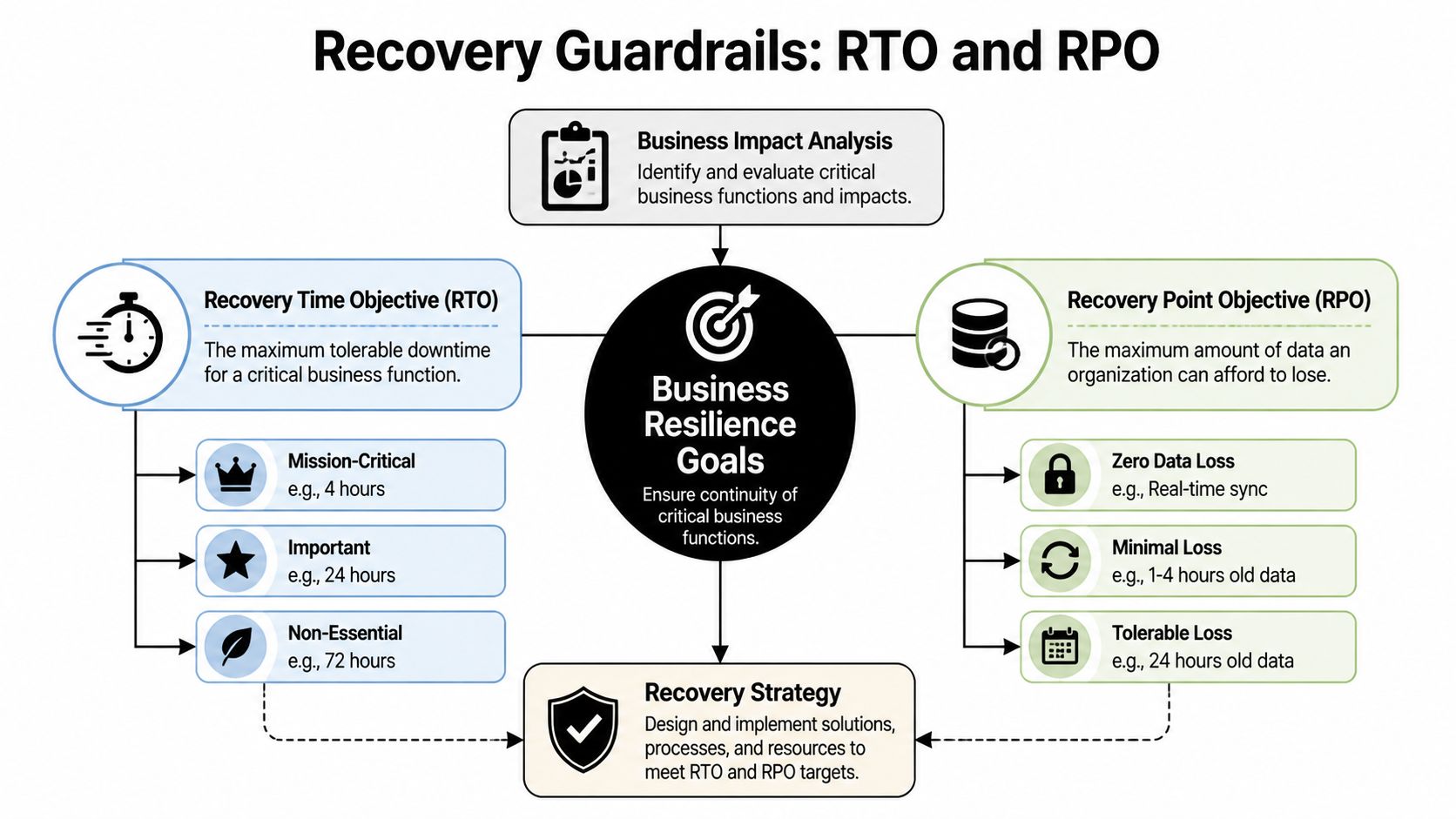
A simple way to think about each one
Use these analogies with your leadership team:
- RTO means, “How long can this be unavailable before the business takes unacceptable damage?”
- RPO means, “How much work are we willing to re-create if the latest data can’t be recovered?”
A law office may tolerate a longer outage for archived records than for active case files. A veterinary clinic may need near-current appointment and treatment data, even if a marketing platform can wait until tomorrow. A construction or engineering firm may survive temporary email disruption but not the loss of project drawings under active revision.
That’s why one company doesn’t have one RTO or one RPO. Each critical function gets its own.
Use ranges that match reality
If you’re deciding values for the first time, don’t guess based on optimism. Base them on actual customer expectations, contractual obligations, and workflow pain.
This simple model helps:
Priority level
Example business function
RTO mindset
RPO mindset
Mission-critical
Scheduling, payments, patient data, active client files
Restore very quickly
Lose very little data
Important
Internal collaboration, reporting, standard admin tasks
Restore same day if possible
Some data re-entry may be acceptable
Lower priority
Archive systems, old reference files
Can wait longer
Older restore points may be workable
A lot of teams discover their expectations and budget don’t match. They want near-instant recovery on every system while storing backups in ways that won’t support it. That’s normal. The point of setting RTO and RPO is to force that trade-off into the open.
If the business says a system must return quickly, the technology, staffing, and vendor choices must support that promise.
Where owners usually misjudge risk
The common mistake isn’t setting targets. It’s setting targets without tracing dependencies.
A firm may say, “We need Microsoft 365 back in one hour.” Fine. But can staff sign in if multi-factor authentication is affected? Can they use phones if internet service is unstable? Can remote staff reach files if VPN access relies on a single appliance in one office?
That kind of mapping helps reduce hidden risks before a real incident exposes them.
Another issue is setting the same recovery target for everything. That usually wastes money on low-priority systems and underprotects the few systems that matter most.
Why sub-four-hour recovery matters
For service-based businesses, faster recovery often means preserved trust. Organizations that successfully meet an RTO/RPO of less than 4 hours achieve 30% faster recovery post-cyber incident, according to Travelers’ business continuity planning guidance. That doesn’t mean every tool in your environment needs that target. It means your critical functions deserve serious attention.
A practical way to finish this step is to ask each department head:
- What’s the longest this process can be unavailable?
- What’s the oldest usable version of the data?
- What manual workaround exists while systems are down?
- Who signs off if recovery takes longer than planned?
Those answers become the guardrails for everything that follows. Backup design, cloud architecture, incident response, vendor contracts, and communications all depend on them.
Building a Cybersecurity-Focused Recovery Strategy
A modern continuity plan has to assume one uncomfortable truth. The disruption may start as a security event, not a weather event.
That changes the recovery strategy. If ransomware, credential theft, or a data breach is involved, you can’t just power everything back on and hope for the best. You have to contain the incident, verify system integrity, communicate carefully, and restore in a sequence that doesn’t reintroduce the same threat.

Build around the most likely disruptions
For Central Florida businesses, useful planning usually centers on a short list:
- Ransomware or account compromise
- Hurricane-related office closure
- Extended internet or power disruption
- Critical vendor outage
- Accidental deletion or system misconfiguration
- Exposure of patient, client, or financial data
These aren’t equal in impact, and they don’t trigger the same response. A weather closure may require relocation and remote work activation. A ransomware event may require isolation, forensic review, legal guidance, and staged restoration from known-good backups.
That’s why a recovery strategy should split incidents into categories instead of pretending one checklist covers everything.
Incident response comes first
If the disruption appears security-related, your first phase isn’t restoration. It’s control.
That usually means:
- Confirming the scope of affected systems and accounts
- Containing access by disabling compromised credentials, isolating devices, or segmenting network access
- Preserving evidence so you don’t erase the trail before understanding what happened
- Making a leadership decision on shutdown, communication, and recovery order
A surprising number of businesses restore too early. They bring a server back online before confirming whether admin credentials were stolen, whether remote access tools were abused, or whether backups are clean. That often turns one bad day into a week of repeated outages.
If your team hasn’t documented escalation paths, use a practical incident response planning guide to define who gets called, who approves business decisions, and when outside counsel or cyber insurance should be notified.
A recovery plan that skips containment can put infected systems back into production faster. It doesn’t put the business back into a safe state.
Communication has to be prewritten
During an outage, leaders waste time drafting messages they should have prepared months earlier.
Your continuity plan should include message templates for:
- Employees, so they know whether to work remotely, pause work, or switch to manual procedures
- Customers or patients, so they know whether appointments, deadlines, or services are affected
- Vendors, so they can assist with restoration and validate dependencies
- Regulated stakeholders, where legal or compliance notification may be required
For medical, legal, and financial firms, wording matters. Don’t speculate. Don’t promise timelines that haven’t been verified. Don’t let ten people give ten different explanations.
A good communication matrix includes the audience, sender, delivery method, approval path, and a backup channel if email is unavailable.
Choose backup and recovery architecture based on risk
There isn’t one “best” backup setup for every business. The right design depends on your RTO, RPO, budget, application stack, and local operating realities.
Here’s a useful comparison:
Approach
Works well when
Main concern
Cloud-heavy recovery
Staff can work remotely and apps are mostly SaaS-based
Internet dependence becomes critical
On-premise recovery
Specialized local systems or equipment must stay in office
Power, flooding, and physical site disruption
Hybrid recovery
You need both local speed and offsite resilience
More moving parts to document and test
For a dental office with imaging and practice software tied to local devices, a hybrid approach may make sense. For a law firm living in Microsoft 365, Clio, and cloud document storage, cloud-first continuity may be cleaner. For an architecture or engineering firm with large design files and specialized workstations, recovery often needs both local performance and offsite protection.
The key is sequencing. Decide which systems restore first, which user groups regain access first, and what “safe to use” means before reconnecting restored assets.
Map dependencies before an outage maps them for you
A lot of businesses know their critical applications. Fewer know the supporting pieces those applications need.
Document dependencies like these:
- Identity and MFA needed to sign in
- Internet and DNS availability needed to reach cloud services
- Line-of-business databases that support front-end apps
- Endpoint protection and patching needed before restored devices go back to users
- Third-party APIs or payment systems that keep transactions moving
At this stage, continuity and security stop being separate topics. If you restore a payment platform but ignore endpoint health, access controls, or stale credentials, you’ve restored exposure, not operations.
For leaders who want a broader framework, these strategies for robust cyber security are helpful because they connect prevention, detection, and recovery instead of treating them as separate projects.
Make cyber resilience the centerpiece
The old model assumed business continuity meant weather, fire, or hardware failure. That model is outdated. A 2025 IBM report indicates cyber incidents caused 43% of global downtime, with SMBs averaging $25,000 per minute in losses, as summarized by Swimlane’s business continuity overview. Even if your own loss profile differs, the direction is clear. Cyber events now sit at the center of continuity planning.
That has practical implications:
- Backups need separation and verification
- Identity systems need stronger controls
- Endpoint visibility matters during recovery
- Threat hunting and monitoring shorten the time between compromise and action
- Compliance review should happen before, not after, the incident
For non-technical business owners, this is usually the turning point. They realize the continuity plan can’t be owned by office administration alone. It needs operational leadership, IT expertise, and security discipline working from the same playbook.
Activating and Maintaining Your Continuity Plan
A continuity plan that hasn’t been tested is mostly theory.
That sounds blunt, but it’s the truth. The first live incident is the worst possible time to discover that key phone numbers are outdated, backup credentials are inaccessible, one software vendor never documented after-hours support, or nobody knows who has authority to switch operations to manual mode.

Test in layers, not all at once
The best testing programs start small and get progressively more realistic.
A simple sequence works well:
- Document review to confirm contacts, systems, vendors, and escalation paths are current
- Tabletop exercise where leaders walk through a scenario such as ransomware during business hours or a hurricane closure before payroll
- Technical recovery drill where backups, account recovery steps, and alternate access methods are tested
- Operational exercise where a team performs a short manual process or remote work shift under simulated outage conditions
These exercises reveal different weaknesses. A tabletop may uncover decision confusion. A restore drill may uncover bad assumptions about backup timing or application compatibility. An operational drill may expose process bottlenecks that IT can’t solve on its own.
Assign roles with names, not departments
One of the fastest ways a plan fails is vague ownership.
Don’t write “IT handles systems” and “management handles communication.” Write actual names and alternates. If a hurricane affects one office and a ransomware event hits while your practice administrator is on vacation, the plan still has to function.
A useful role list includes:
Role
Primary responsibility
Executive decision-maker
Authorizes major business actions and outside notifications
Technical lead
Coordinates containment, recovery, and vendor escalation
Operations lead
Directs manual workarounds and staff workflow
Communications lead
Approves and sends staff and customer updates
Compliance or legal contact
Reviews notification obligations and recordkeeping
Field note: Teams respond better when each person knows the first action they own in the first hour.
That first-hour clarity matters more than long procedural prose.
Review after every change that matters
A continuity plan should change when the business changes.
That includes:
- New software platforms
- Office relocation or expansion
- Staff turnover in key roles
- Vendor changes
- New compliance obligations
- Changes to remote work or multi-location operations
Medical practices often add systems over time without updating continuity documents. A dental group adds imaging software. A med spa adds a payment platform. A legal office changes document storage providers. The plan gradually becomes stale, then breaks loudly.
This is one reason testing matters so much. Inadequate plans are common, with 33% failing during actual outages and 35% of disaster recovery tests failing, according to the State of Business Continuity Preparedness 2023. Those failures usually aren’t caused by lack of effort. They’re caused by drift between the written plan and the actual environment.
Tie maintenance to business rhythm
Don’t rely on memory. Tie plan maintenance to existing business checkpoints.
Good triggers include:
- Quarterly leadership reviews
- Annual insurance renewal
- Compliance audits
- Post-incident reviews
- Major technology projects
For healthcare and other regulated industries, this is especially important. A tested continuity process supports stronger documentation around operations, access, recovery, and response. It also gives insurers and auditors more confidence that your business can manage an interruption without improvising every critical decision.
The goal isn’t paperwork. The goal is repeatable response under pressure.
Partnering for Resilience Why Florida SMBs Choose Managed IT
Most small and mid-sized businesses don’t struggle because they don’t care about continuity. They struggle because continuity crosses too many lanes. Operations owns the workflows. Leadership owns business decisions. Vendors own pieces of the stack. Internal IT, if it exists, is already busy. Security needs specialized attention. Nobody fully owns the whole thing.
That ownership gap is where many plans break down.
Industry data summarized by BCM Metrics says 70% of BCP failures are due to weak ownership, but shifting this responsibility to a co-managed IT partner can improve test compliance by 80% and strengthen uptime, as discussed in this guide on creating a business continuity plan. Even if a business handles some technology internally, shared accountability often works better than leaving continuity as a side project.
Build versus buy is the real decision
For a Florida SMB, the practical question isn’t whether continuity matters. It’s who is going to keep the plan current, test it, coordinate vendors, document systems, and respond after hours when something breaks.
Building all of that in-house can work if you have mature internal IT, security operations capability, documented infrastructure, and enough management time to run exercises. Many firms don’t.
That’s why managed IT and co-managed models appeal to law firms, medical groups, engineering firms, and community organizations. They need someone to help maintain the operating discipline behind the plan, not just write the document.
What a good partner changes
A strong managed partner usually improves continuity in four ways:
- Ownership becomes clear because testing, documentation, and follow-up stop floating between departments
- Technical execution improves because backup validation, endpoint controls, vendor coordination, and recovery procedures are managed consistently
- Leadership gets usable reporting instead of fragmented updates from multiple providers
- Costs become more predictable because the business plans around prevention and support instead of repeated emergency projects
The best result isn’t “outsourcing responsibility.” It’s creating a structure where the business owner can focus on clients, staff, and growth while a technical partner helps keep resilience operational.
For Florida companies weighing that decision, this overview of why to choose managed IT services is a useful starting point.
Frequently Asked Questions About Business Continuity Planning
Is a business continuity plan the same as a disaster recovery plan
No. A disaster recovery plan focuses mainly on restoring IT systems, data, and infrastructure. A business continuity plan is broader. It covers how the business keeps operating during disruption, including staff responsibilities, customer communication, vendor coordination, manual workarounds, and recovery priorities.
Can I use a template and fill in the blanks
A template can help you start, especially if you’ve never documented continuity before. It won’t be enough on its own. Generic plans usually miss your actual software stack, approval paths, vendor dependencies, and compliance needs. The useful part is the customization, not the download.
How long does it take to create a plan
That depends on the size of the business, how many systems are involved, and how clearly your workflows are already documented. A small practice with a straightforward environment can move faster than a multi-location firm with specialized software and multiple vendors. The time usually goes into interviews, dependency mapping, and testing, not writing.
What if my business is too small for a formal plan
Small businesses usually have less slack, not more. Fewer staff, fewer backups in roles, and tighter cash flow make interruptions harder to absorb. Even a lean continuity plan is better than relying on memory during a crisis.
What should I do first if I’m starting from scratch
Start with the business impact analysis. Identify your most important functions, the software and vendors behind them, who owns each process, and how long each can be down before the business is in trouble. That creates the foundation for every recovery decision that follows.
If your business in Orlando, Winter Springs, or anywhere in the U.S. needs help turning continuity planning into something operational, Cyber Command, LLC can help. Their team supports managed IT, co-managed IT, 24/7 SOC coverage, incident response, compliance support, and recovery planning so leaders can stop reacting to outages and start building resilience deliberately.
This article is for general informational purposes only and is not legal, compliance, insurance, or other professional advice. Threats, technologies, and regulations change quickly; confirm current requirements with your own advisors before acting. See our full disclaimer.