What Is Active Directory and How It Works: 2026 Guide

On Monday morning, your front desk manager can't log in. A remote employee in Winter Springs can open email but not the shared drive. A former staff member still appears to have access to an old folder with client records. Nobody is sure which passwords control what, or who approved the current setup.

That kind of confusion is common in small and mid-sized businesses. It shows up in Orlando accounting firms during tax season, in medical practices trying to protect patient data, and in industrial offices where field staff, office staff, and vendors all need different access. At first it feels like an IT inconvenience. In reality, it's an operations problem and a security problem at the same time.

When leaders ask what is active directory and how it works, they usually aren't asking for a server manual. They're asking a business question: how do we control who gets in, what they can reach, and how to keep that organized as the company grows?

The Hidden Chaos in Your Business Network

An Orlando firm can get away with informal access management for a while. One employee knows the file server password. Another person sets up laptops by hand. A manager calls IT whenever a new hire needs access to QuickBooks, the printer, a shared folder, and remote VPN. It works, until it doesn't.

The trouble starts when the business adds people, locations, devices, and compliance requirements. A law office needs tighter matter-based access. A dental group needs screen lock rules on every workstation. An engineering company needs the right software on the right machines without someone walking desk to desk.

That is where Active Directory, usually shortened to AD, changes the game. It gives a business one central system for identity, access, and policy control across a Windows network. Instead of managing users and computers one by one, IT can manage them from one place.

This isn't a niche technology. Over 90% of Fortune 1,000 companies rely on Microsoft Active Directory as their primary corporate network access management tool according to ONLC's overview of Active Directory.

Active Directory matters because it turns access management from a collection of one-off fixes into a controlled business system.

For a non-technical manager, the practical value is simple:

  • Faster onboarding: New hires get the right access without a chain of manual requests.
  • Cleaner offboarding: Former employees lose access in a controlled way.
  • Less guesswork: Permissions can follow job role, department, or location.
  • Stronger security: The business can enforce rules centrally instead of hoping each device is configured correctly.

Without that structure, access drifts over time. People collect permissions they no longer need. Shared passwords linger. Old laptops keep outdated settings. That's the hidden chaos most businesses don't notice until an audit, an outage, or a ransomware event forces the issue.

What Is Active Directory The Blueprint of Your Digital Office

The easiest way to understand Active Directory is to stop thinking of it as a technical product and start thinking of it as the blueprint of your digital office.

A physical office has employees, departments, rooms, locked cabinets, badges, printers, and policies. Your digital office has the same needs. People need access to some things and not others. Devices need standard settings. Shared resources need structure. AD keeps that organized.
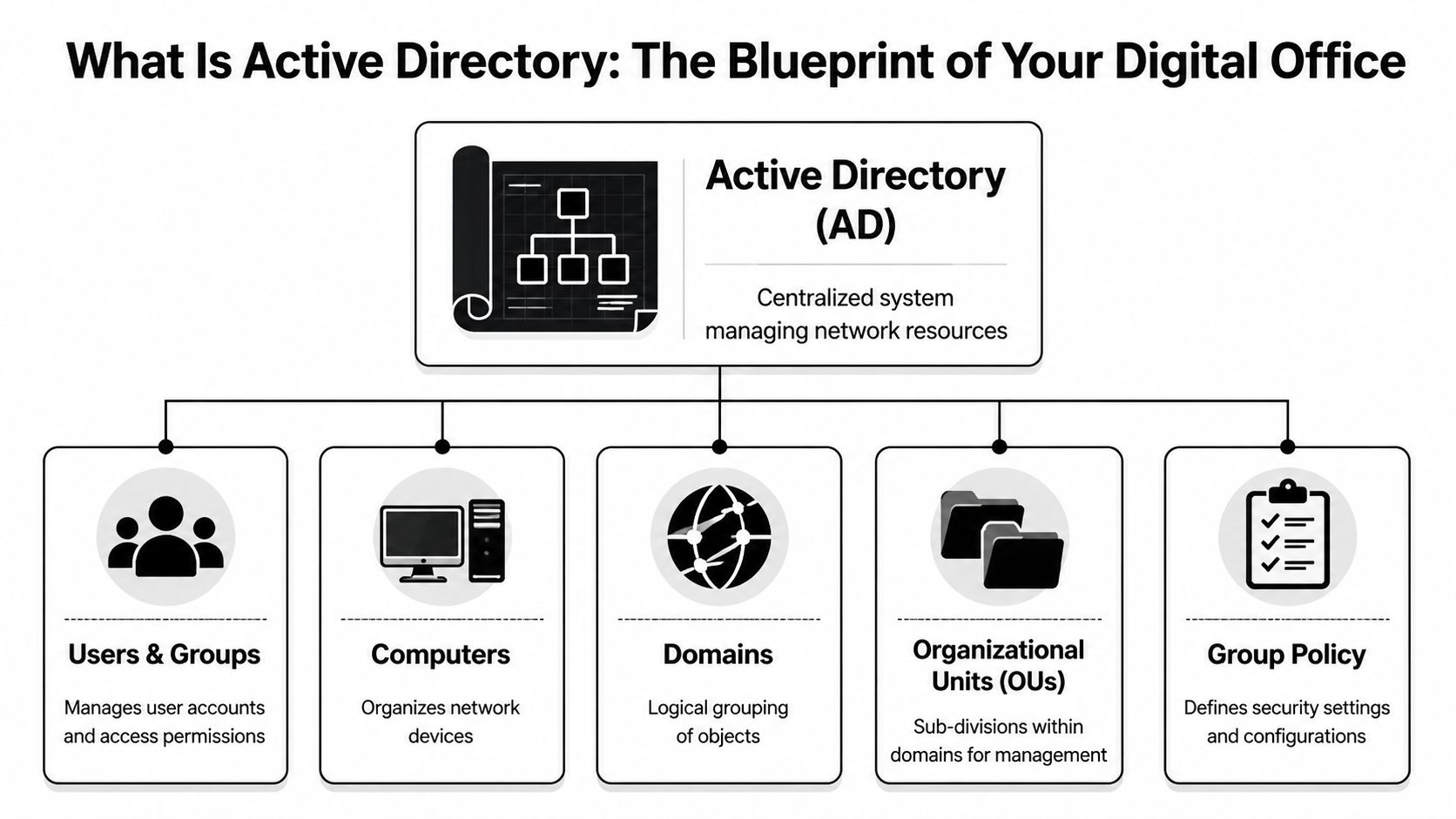
A diagram illustrating Active Directory, showing its role in managing users, computers, domains, OUs, and group policies.

The database behind the system

Active Directory is a directory service database. The database file is called NTDS.dit. It stores directory information about the business's digital environment, such as user accounts, groups, computers, and other network objects.

According to MiniOrange's explanation of Active Directory, NTDS.dit stores all directory data and can scale to manage millions of objects. The same source notes that AD uses a hierarchy of forest, domains, and Organizational Units (OUs), and that this structure is replicated across Domain Controllers to support consistency and uptime.

If those terms sound abstract, use this model:

AD term Plain-English analogy What it means for your business
Forest The entire corporate campus The top-level boundary for the directory
Domain A major building or division A main administrative and security boundary
OU Departments or suites within the building A way to organize users and devices for management
Domain Controller The secure records office A server that stores and processes directory data

A city planner model that actually makes sense

Think of AD like a city planner for your network.

The forest is the whole city. It contains the overall identity structure. The domains are neighborhoods. A company might have one domain for the whole business, or more in a larger environment. OUs are the individual buildings, floors, or departments inside those neighborhoods.

That structure matters because it lets IT apply rules in the right place. The accounting OU can get one set of policies. The front desk can get another. A branch office can be managed differently from headquarters.

Here are the objects AD commonly organizes:

  • Users: Employee accounts, admin accounts, shared service accounts
  • Groups: Collections of users who need the same access
  • Computers: Desktops, laptops, and some servers joined to the domain
  • Printers and shared folders: Network resources people need to find and use

Practical lens: If you can describe a business role, a department, or a location, Active Directory can usually mirror that structure so access follows the organization instead of personal memory.

Why business leaders should care

This structure isn't about elegance. It's about control.

If a medical practice has ten exam room PCs, a front office, billing staff, and a practice manager, AD gives IT a way to place those users and computers into logical containers and manage them centrally. If a professional services firm opens a second office, AD can keep access consistent without rebuilding everything from scratch.

For a manager, the big takeaway is this: Active Directory is the system that answers, in one place, who your people are in the network, what devices they use, and how rules are applied across the business.

How Active Directory Works The Digital Gatekeeper

If the previous section answered what Active Directory is, this part answers what is active directory and how it works in day-to-day business life.

The simplest explanation is that AD acts like the security desk and badge system for your digital office. Every time someone tries to sign in or open a protected resource, AD helps decide two things: who they are, and what they're allowed to do.

A digital graphic depicting a secure server room entrance with an access granted security lock mechanism.

Authentication means proving identity

Authentication is the first checkpoint. A user enters a username and password, and Active Directory checks whether those credentials are valid.

In Windows environments, this often involves protocols such as Kerberos or NTLM. You don't need to memorize the protocol names. The useful mental model is that Kerberos works like a digital passport process. The employee proves identity once, receives trusted proof, and then uses that proof to request access to approved services.

That first check happens through Active Directory Domain Services, often called AD DS, running on Domain Controllers. Those are the servers that process identity requests against the directory database.

Authorization means deciding what happens next

Passing the identity check doesn't mean someone should see everything. That would be a disaster.

Authorization is the second checkpoint. AD looks at the user's group memberships and assigned permissions to determine what they can access. One employee may open the accounting share but not HR files. A physician may reach clinical systems that the front desk can't. A plant manager may use a production server that office staff should never touch.

Here is the simplest way to separate the two:

  1. Authentication: Are you really who you claim to be?
  2. Authorization: Now that we know who you are, what are you allowed to open, use, or change?

Why single sign-on feels so useful

One reason people like Active Directory is single sign-on, or SSO. That means users sign in once and can then access multiple approved resources without entering passwords over and over.

For a busy office, that reduces friction. For IT, it centralizes control. For security teams, it creates a clearer identity trail than a patchwork of separate local accounts.

This matters well beyond private business. If you're comparing identity models across industries, SamSearch has a useful primer on understanding IAM in government contracting, which helps frame why centralized identity and access controls matter when compliance and accountability are high.

A healthy AD environment should make secure access feel boring. Employees log in, get what they need, and don't need workarounds.

What happens when someone logs in

A non-technical manager can think of the sequence like this:

  • Step one: The employee enters credentials on a company device.
  • Step two: The Domain Controller checks those credentials.
  • Step three: AD confirms the user's role through groups and policies.
  • Step four: The user gets access to approved resources like shared drives, printers, apps, or remote services.

If that sequence is well designed, employees barely notice it. If it's messy, the business feels it immediately through lockouts, failed app access, risky workarounds, and support calls.

Organizing Your Digital Workplace with Group Policy

Many business leaders understand user accounts. The part that often feels mysterious is Group Policy.

Group Policy is best thought of as a set of company rules that Windows devices follow automatically. Instead of asking staff to configure settings themselves, or asking IT to touch every machine by hand, administrators can push standards from the center.

What Group Policy looks like in real life

A Winter Springs medical practice might need every exam room computer to lock automatically after a short period of inactivity. That protects patient information when someone steps away between appointments. Rather than setting that manually on each device, IT can apply the rule through Group Policy to the right OU.

A law office can use Group Policy to control who can use USB storage on certain machines. That's helpful when client documents shouldn't leave the office on removable media. An accounting firm can map shared drives automatically so staff don't have to guess where returns, templates, or archived files live.

Group Policy can also standardize practical settings such as:

  • Screen lock behavior: Useful for front desks, nurse stations, and shared work areas
  • Printer deployment: Helpful when each office or department has assigned printers
  • Software rollout: Important when engineers, accountants, or designers need the same tools
  • Security settings: Password policies, firewall settings, and device restrictions

Why managers should care about GPOs

Group Policy Objects, usually called GPOs, are where Active Directory shifts from organization to enforcement.

Without GPOs, two employees with the same role may have two very different device setups. One machine might have the right settings. Another might be missing updates, allow risky behavior, or connect to the wrong resources. In regulated industries, that inconsistency creates exposure.

Manager takeaway: Group Policy turns "our policy says" into "our systems enforce."

For a multi-location architecture or engineering firm, this can save huge amounts of effort. New CAD software can be deployed to the engineering group instead of being installed manually one workstation at a time. Shared settings can follow the department, not the memory of whichever technician handled the last setup.

Where businesses get confused

A common misunderstanding is that Group Policy is only for highly technical enterprises. It isn't. Even smaller firms benefit when they stop treating every computer like a one-off exception.

Another confusion point is scope. Group Policy doesn't replace every security product or every cloud setting. But in an on-premises Windows environment, it remains one of the most powerful ways to create consistency.

A good rule of thumb is this: if your business has repeated device settings, repeated access rules, or repeated compliance requirements, Group Policy should probably be part of the answer.

Top Active Directory Security Risks for Florida Businesses

Active Directory is valuable for the same reason it's dangerous when poorly managed. It centralizes identity and access. In security terms, that makes it a high-value target.

If an attacker compromises AD, they often don't stop with one user account. They use that foothold to move through the environment, escalate privileges, and reach systems that were supposed to be protected. For a professional services firm in Orlando, that could mean client records. For a medical office, it could mean systems tied to patient care and sensitive data. For an industrial company, it could mean production disruption and business downtime.

A digital graphic of a computer processor chip featuring a glowing padlock icon and red skull alerts.

The big risk is centralization without discipline

According to Delinea's overview of Active Directory risks, Microsoft reports that over 80% of corporate breaches involve a compromised Active Directory, and CISA alerts in 2025 highlighted AD misconfigurations in 40% of reported security incidents.

Those numbers matter because they point to a pattern. Attackers don't always need a dramatic zero-day exploit. Often they win by finding weak passwords, stale admin privileges, poor segmentation, or systems that no one has hardened properly.

Common ways attackers abuse AD

Here are the risks non-technical leaders should understand in plain language:

  • Weak passwords: If a user or service account has an easy-to-guess password, an attacker can gain an initial foothold and start probing the environment.
  • Over-privileged accounts: Staff sometimes have more rights than their role requires. That makes a single compromised account more dangerous.
  • Misconfigurations: A setting that seems minor can expose unnecessary access paths.
  • Unpatched Domain Controllers: If core identity servers fall behind on updates, attackers have a larger opening.
  • Poor offboarding: Old accounts and forgotten permissions create hidden entry points.

What a Golden Ticket attack means in business terms

You may hear security teams mention a Golden Ticket attack. The technical details matter to defenders, but the business meaning is what leaders need to grasp.

A Golden Ticket attack is the kind of AD abuse that can let an attacker create trusted access inside the environment. In plain English, it can amount to forging a high-trust badge in your building's security system. Once that happens, ordinary security boundaries become far less reliable.

If your business relies on AD, identity security isn't a side project. It's part of business continuity.

Why Florida SMBs should treat this as an executive issue

Central Florida firms often run lean IT teams. That's especially true in law, accounting, private healthcare, and owner-led industrial operations. The result is that AD may exist, but nobody is reviewing permissions, watching Domain Controllers closely, or testing whether controls still match the business.

That gap becomes dangerous during ransomware events. Attackers use AD because it helps them spread. They identify who has power, what machines trust each other, and how to reach backups, file shares, or line-of-business systems.

One practical safeguard is stronger identity verification. This matters alongside AD, not instead of it. Cyber Command has a useful article on the role of MFA in strengthening identity and access management, especially for businesses trying to reduce the impact of stolen credentials.

The executive checklist

A manager doesn't need to run PowerShell to ask good questions. Start with these:

Question Why it matters
Who has administrative rights today? Excess privilege increases blast radius
Are former employees fully removed? Stale accounts create exposure
Are Domain Controllers monitored closely? They are central to identity trust
Are Group Policies reviewed regularly? Old policies can weaken security or break operations
Is MFA used where appropriate? It helps reduce credential-driven compromise

If you can't get clear answers, that's not a paperwork issue. It's a risk signal.

On-Premises AD vs Cloud-Native Azure AD

Many business leaders ask about Active Directory only after another question appears: should we keep our traditional setup, move to the cloud, or run both?

The old name Azure Active Directory is now Microsoft Entra ID. Even so, many people still say Azure AD, so you'll hear both names. The important distinction is that traditional on-premises Active Directory and cloud-native Entra ID are related, but they are not the same thing.

The difference in plain English

On-premises AD runs in your environment on Windows servers called Domain Controllers. It is well suited to office networks, Windows device management, legacy applications, shared drives, and environments where local control matters.

Entra ID is Microsoft's cloud identity platform. It is designed for cloud applications, remote access, Microsoft 365, and modern identity workflows. It shines when users work from anywhere and when the business depends more on SaaS than local servers.

Most SMBs don't live entirely in one world or the other. They often end up in a hybrid model, with local AD still handling some legacy needs while Entra ID supports cloud apps and remote identity.

Migration is where strategy meets reality

Projects often get messy. Moving from on-prem AD to the cloud isn't just flipping a switch.

According to Quest's guidance on Active Directory, 35% of projects encounter significant issues due to schema mismatches or Group Policy translation failures, which can lead to downtime and cost overruns. That helps explain why so many migration projects stall in the middle, especially when older apps or custom policies are involved.

A business may assume that if email is already in Microsoft 365, the rest of identity migration will be easy. Often it isn't. Old organizational structures, inherited permissions, login dependencies, and line-of-business software can complicate the move.

For organizations already deep in the Microsoft stack, Cyber Command's page on Microsoft 365 support and management is useful context because identity decisions often follow the broader cloud productivity strategy.

When each model makes sense

The right answer depends on how your business operates.

Feature On-Premises Active Directory Azure Active Directory (Entra ID)
Primary use case Office-based Windows networks and legacy resources Cloud apps, remote work, Microsoft 365 identity
Infrastructure Requires local servers and Domain Controllers Delivered as a cloud service
Device management style Strong for domain-joined Windows environments Strong for cloud-first and remote scenarios
Best fit Businesses with file servers, legacy apps, and site-based operations Businesses using SaaS heavily with distributed users
Management burden More hands-on server and policy administration Less local server overhead, but still needs governance
Common challenge Hardware, patching, and local infrastructure upkeep App compatibility, role design, and migration planning

A practical decision guide

A professional services firm with a central office, a local file server, and several legacy applications may still need on-prem AD for now. A newer business running mostly cloud apps may lean hard toward Entra ID. A medical or industrial organization often lands in the middle because some systems remain tied to local infrastructure.

Don't treat identity migration like a branding update. It is an access-control redesign that affects operations, security, and user experience.

If you're evaluating what is active directory and how it works in your own company, the better question may be: which identity model matches our applications, our locations, our compliance needs, and our risk tolerance right now?

How Cyber Command Manages and Secures Your AD

Active Directory rewards discipline and punishes neglect. That's why many Central Florida businesses need more than occasional break-fix help. They need a partner that treats identity infrastructure as an operational and security priority.

Cyber Command supports organizations in Orlando, Winter Springs, and beyond with managed and co-managed IT built around uptime, accountability, and prevention. In an AD environment, that means getting the fundamentals right first. Clean user lifecycle management, well-structured OUs, tightly controlled administrative access, and Group Policy that reflects real business needs instead of years of accumulated exceptions.

What strong AD management looks like

Good management isn't just about keeping users logged in. It includes active oversight of the systems that hold trust across the network. That means monitoring Domain Controllers, reviewing privilege levels, tightening access paths, and aligning identity controls with the way the business works.

Cyber Command also brings a security layer through its 24/7 SOC, which is important because AD attacks don't always begin with obvious alarms. Threat hunting, incident response, and continuous review help catch suspicious identity activity earlier, before a compromised account turns into a wider event.

For organizations balancing on-prem systems with cloud platforms, governance matters as much as technology. CloudConsultingFirms.com offers a helpful overview of multi-cloud governance best practices, and that broader governance mindset applies directly when identity spans local infrastructure, Microsoft 365, and other cloud services.

Why this matters during change

AD often becomes most fragile during transitions. Office moves, mergers, cloud projects, staffing changes, and application rollouts can all expose weak assumptions in identity design.

That is why migration planning matters. Businesses weighing modernization can review Cyber Command's guidance on how to successfully migrate applications from on-premises to cloud, especially where access dependencies and user disruption are concerns.

The primary value is that leaders don't have to choose between security and usability. With the right management approach, AD becomes a stable foundation instead of a hidden liability.

Frequently Asked Questions About Active Directory

Does a small business need Active Directory

Not every small business needs full on-premises AD. But if you have multiple employees, shared files, company-managed PCs, compliance requirements, or role-based access needs, some form of centralized identity management becomes important quickly. For many firms, the question isn't whether to centralize identity. It's which platform fits best.

Is Active Directory only for Windows

Traditional Active Directory is primarily built for Windows domain networks. That's where it is strongest. Businesses with mixed environments can still use it, but planning gets more important when Macs, Linux systems, cloud apps, and mobile devices are all part of daily operations.

What is the first step to securing Active Directory

Start with visibility. Identify who has admin rights, which accounts are stale, how Group Policy is structured, and whether Domain Controllers are monitored and patched. If leadership can't get a clean answer on those basics, the environment needs review.

Is Microsoft Entra ID the same as Active Directory

No. They are related but different systems. Traditional AD is on-premises directory infrastructure. Entra ID is a cloud identity platform. Many businesses use both during a hybrid phase.

What confuses managers most about AD

Usually this: they think it's just for login. It isn't. AD affects onboarding, offboarding, file access, remote work, device control, security policy, and incident impact. It's one of the few IT systems that touches nearly every employee and every critical business process.


If your business in Orlando, Winter Springs, or North Texas needs help untangling identity sprawl, securing Active Directory, or planning a move to a modern cloud or hybrid model, Cyber Command, LLC can help you assess the current environment, reduce risk, and build a more reliable foundation for growth.
A Guide to Program Release Management for Florida Businesses

Picture this: a team of electricians starts wiring a new hospital wing, but they’re working off a different plan than the plumbers. At the same time, the framing crew puts up a wall right where a critical doorway is supposed to be. The result is pure chaos, costly rework, and a massive safety hazard.

That's exactly what happens inside your business when different software updates and changes aren't coordinated. Program release management is the master blueprint that prevents this chaos. It's the central process for planning, scheduling, testing, and deploying all technology changes across your entire organization, with a strong focus on cybersecurity.

Why Release Management Matters Now

For businesses in Orlando, Winter Springs, and across Central Florida, treating technology updates as a string of separate, unrelated events is a recipe for disaster. This is especially true in regulated fields like healthcare, finance, and legal, where system uptime and data integrity are absolutely non-negotiable.

Without a coordinated strategy, every "minor" patch or new software rollout is a roll of the dice.

Program release management takes the guesswork out of the equation. It creates a single source of truth that orchestrates all the moving parts—from vendor patches and internal software development to security updates and new feature deployments. The goal is simple: make sure every change works together seamlessly, without causing conflicts, downtime, or new security holes for attackers to exploit.

Bridging the Gap Between Technology and Business Goals

Great release management isn't just an IT task; it's a core business strategy that directly protects your bottom line. It gives you the power to answer critical questions before they turn into expensive emergencies:

  • Will this update to our accounting software break our client management system?
  • Have we actually tested this new security patch to make sure it won’t grind our operations to a halt?
  • Who has the final say on approving this change, and what’s our plan to roll it back if things go wrong?

Having clear answers and a defined process shields your business from the operational and financial fallout of failed updates. It's a proactive approach that’s fundamental to building a resilient organization. For a deeper look at aligning your IT strategy with business outcomes, you can explore our comprehensive business IT support Florida guide.

Before we dive into the "how," it's helpful to see the real-world impact. The table below contrasts the business outcomes you can expect with a formal process versus the risks of an ad-hoc, uncoordinated approach.

Business Outcomes With and Without Release Management

Business Impact With Release Management Without Release Management
Service Stability 99.9%+ uptime. Predictable performance and fewer service disruptions. Frequent outages. Constant firefighting and unpredictable downtime.
Security Posture Reduced risk. Changes are vetted, tested, and tracked, closing security gaps. High vulnerability. Unvetted changes create new entry points for attackers.
Operational Costs Lower TCO. Fewer failed changes, less rework, and optimized resource use. Skyrocketing costs. Emergency fixes, project delays, and wasted staff hours.
Customer Trust High confidence. Consistent and reliable services build customer loyalty. Eroding trust. Service interruptions and data issues drive customers away.
Team Productivity Focused teams. Staff can focus on innovation instead of fixing broken updates. Constant chaos. IT and business teams are perpetually in reactive mode.

As you can see, the difference isn't just technical—it directly impacts your reputation, security, and financial health. A structured process delivers the stability needed for growth, while a lack of one creates a cycle of constant crisis.

The Financial and Security Stakes of Poor Processes

The need for a structured approach isn't just anecdotal. The Release Management market is projected to nearly double, growing from USD 13.48 billion in 2025 to USD 26.60 billion by 2032. This explosive growth shows how urgently businesses are trying to get control over their software deployments.

Poor processes are a massive source of operational pain. In environments without proper management, a staggering 40-50% of production incidents can be traced back to uncoordinated changes. For a small or mid-sized business in a competitive market like Central Florida, that level of disruption can be crippling.

Ad-hoc releases are a primary entry point for cyberattacks. Attackers thrive on chaos and unmonitored changes, using the confusion around an update to inject malware or gain unauthorized access. A formalized release process is one of your strongest lines of defense.

This guide will demystify program release management and give you a clear blueprint to bring this stability to your own business. It’s time to stop reacting to tech problems and start directing your technology roadmap with confidence.

Understanding the Core Components of a Strong Release Program

So, what does a solid release program actually look like under the hood? Moving from the idea of release management to a working system means breaking it down into a few critical parts. These are the components that transform chaotic, risky updates into a predictable, secure process.

For businesses across Central Florida, from the growing tech scene in Orlando to professional services in Kissimmee, getting these pieces right is how you ensure technology is a stable foundation for growth, not a constant source of anxiety.

Think of it like building a custom home. You wouldn’t just let different crews show up and start working without a master plan. A successful release program requires that same level of coordination, with each component playing a specific role to ensure the final product is sound and secure.

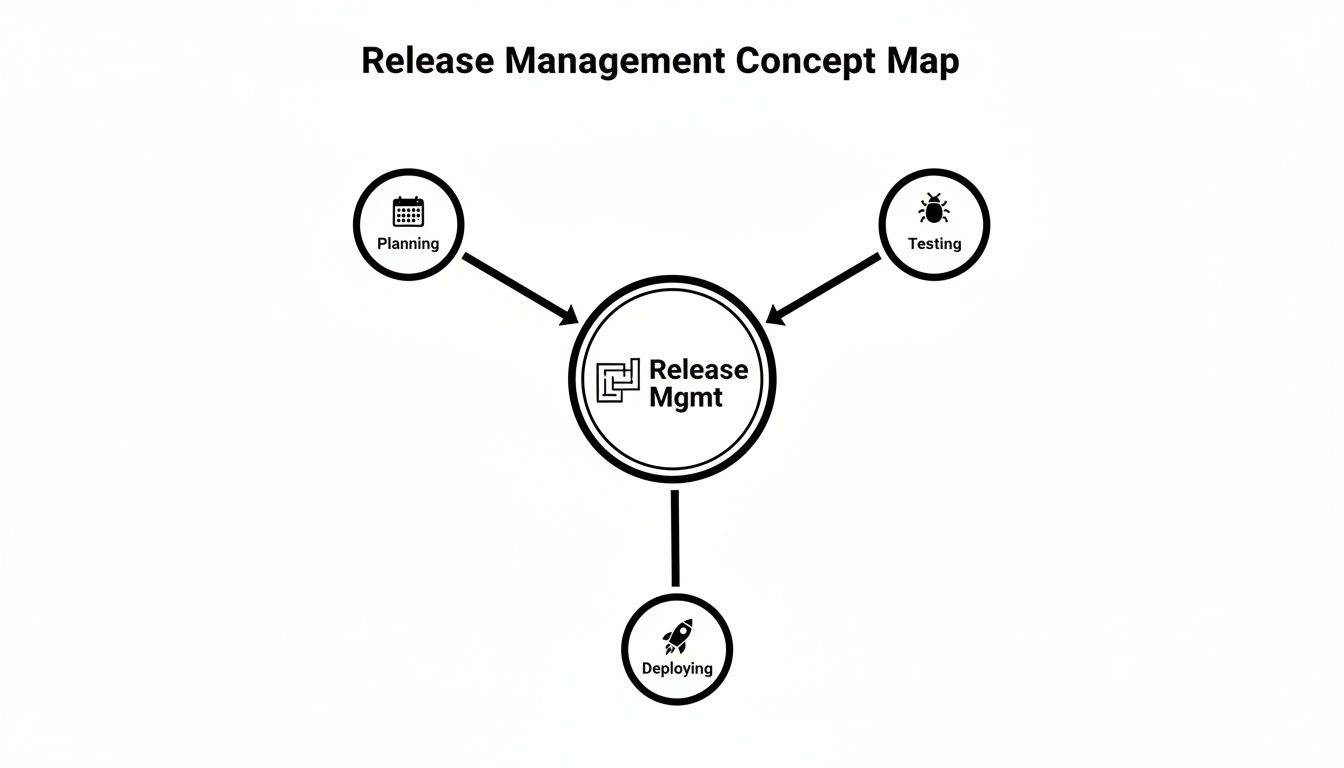
This flow chart breaks down the high-level journey of any software change, moving from planning and testing all the way through to deployment.

A concept map illustrating release management, showing planning, testing, and deploying as key processes.

As you can see, a successful deployment isn't a single event. It’s the result of a deliberate, phased process where each step builds on the last.

The Pillar of Release Governance

First up is release governance. This is your rulebook for any technology change. It answers the most important questions before anyone touches a line of code: Who has the green light to approve a new update? What security checks are non-negotiable? What paperwork needs to be filed?

For a Winter Park medical practice, strong governance is their first line of defense for compliance. Before they even think about updating their patient management software, their governance framework would demand a thorough cybersecurity and privacy review to ensure the update doesn’t violate HIPAA regulations. This isn't just red tape; it's a crucial safeguard against massive data breaches and legal fines.

Governance ensures that every change, no matter how small, follows a consistent, auditable process. This structured approach is a primary defense against cyber threats, as it eliminates the unvetted, chaotic changes that attackers love to exploit.

The Power of Strategic Release Planning

Next, you need strategic release planning. This is all about creating and maintaining a master roadmap of all upcoming changes. It's not just about picking a date on the calendar. It’s about making sure your tech updates are in lockstep with business goals and that you've accounted for all the ripple effects across your systems.

Imagine an Orlando-based architecture firm that wants to upgrade its main CAD software. A strategic plan would make sure this major update doesn't land in the middle of a critical project deadline. It would also coordinate any required patches for connected tools, like their project management or billing systems, to prevent a domino effect of failures.

Effective planning means asking the right questions upfront:

  • What is the business reason for this release?
  • Which other systems or teams will this impact?
  • What resources—people, time, and budget—do we need?
  • Who needs to be notified before, during, and after the release?

Getting these answers early on prevents the last-minute fire drills that cause so much stress and risk.

The Safety Net of Staging Environments

Finally, we have staging environments, which are an absolutely non-negotiable part of any secure release process. A staging environment is an exact clone of your live, public-facing system—a secure sandbox where you can deploy and hammer on updates without any risk to your real business operations.

This is where you find out if a new patch is going to crash your servers before your customers or employees do.

For any business, this is a mission-critical risk reduction tool. A professional services firm in Kissimmee can test a new version of its accounting software in a staging environment to confirm it works perfectly with their time-tracking and invoicing tools. If any bugs or cybersecurity vulnerabilities pop up, they can be fixed without touching real financial data or bringing daily work to a grinding halt. Without this sandbox, every single update becomes a high-stakes gamble with your live systems.

How Automation and AI Are Revolutionizing Modern Releases

Man working on a laptop displaying a release pipeline dashboard with various charts and data.

The days of holding your breath during a high-stakes, manual software deployment are finally coming to an end. Technology is quickly turning program release management from a tedious, error-prone chore into an intelligent, automated process. This isn't some far-off trend for Silicon Valley giants; it’s a critical strategy for Central Florida businesses looking to secure their operations and get ahead.

At the heart of this change is Application Release Automation (ARA). Think of ARA tools as a tireless, hyper-disciplined project manager for your software. They orchestrate the entire release pipeline—from code compilation and testing to final deployment—making sure every step is executed perfectly, every single time.

Imagine a professional services firm with offices in Orlando and Winter Park. With ARA, a critical software update gets deployed identically across both locations without anyone lifting a finger. This completely removes the risk of one office running a slightly different, potentially buggy or insecure version, guaranteeing uniform performance and security across the company.

The Rise of Intelligent Automation

Automation alone is powerful, but when you add artificial intelligence (AI), it becomes predictive. Modern release systems now use AI to analyze past release data, spot patterns, and predict potential failures before they can disrupt your business. It's a massive leap forward in managing risk.

AI-driven automation dramatically cuts down on human error, which continues to be a leading cause of expensive downtime and serious security breaches. By spotting risks early, AI lets your team fix problems proactively instead of scrambling to contain a full-blown crisis.

This predictive power is a cornerstone of modern cybersecurity. Instead of just hoping a release goes well, AI actively hunts for anomalies that could signal a vulnerability or a system conflict. It transforms your release process from a potential security liability into a fortified, self-monitoring asset. If you're new to integrating AI, developing a clear strategy is the first step. You can explore how to build one with our guide on AI roadmap development.

From Manual Effort to Automated Assurance

The impact of this technology is staggering. The move toward microservices architectures alone has multiplied release frequencies by 10 to 20 times, making manual oversight nearly impossible. This rapid pace is fueling explosive growth in the ARA market, which is projected to more than double from USD 6.42 billion in 2026 to USD 14.97 billion by 2031.

We're already seeing GenAI-powered orchestration slash failure rates. For some major companies, these tools have accelerated deployments by as much as 75%.

Adopting these advanced methods requires a shift in thinking, moving your team toward the principles found in DevOps and platform engineering. The goal is to build a system that is both incredibly fast and resilient. For those looking to adopt the most modern and efficient methods, a practical guide to mastering DevOps and Continuous Delivery can offer invaluable insights into building robust release programs.

The key benefits of an automated, AI-enhanced release process are clear:

  • Increased Speed and Frequency: Deploy updates more often and with higher confidence, allowing you to deliver value to customers and employees faster.
  • Drastically Reduced Errors: Automated checks and predictive analytics catch issues that even the most meticulous human reviewers might miss, leading to more stable and secure deployments.
  • Enhanced Security Posture: Automation enforces security policies with perfect consistency, ensuring that vulnerability scans and compliance checks are never skipped.
  • Improved Team Focus: By automating repetitive deployment tasks, you free up your valuable technical staff to focus on innovation and strategic work instead of manual drudgery.

Ultimately, bringing automation and AI into your program release management isn't just about moving faster. It's about building a smarter, more secure, and more reliable technology foundation for your entire business.

Building a Release Governance Framework That Actually Works

Three professionals discuss documents and governance in a focused business meeting setting.

Let's talk about governance. For many Florida businesses, especially those in healthcare, finance, or law, the word conjures up images of restrictive red tape and slowed-down progress. But that’s an outdated view.

Think of governance as the guardrails on a highway. They aren't there to stop you from driving; they're there to keep you from veering into a ditch. Good governance keeps your technology on the right track, preventing costly detours into downtime and security breaches.

A solid framework for program release management tackles the fundamental tension every business faces: how do you innovate quickly without exposing your operations to unacceptable risk? It shifts the focus from just checking boxes to a more strategic goal—making sure every single technology change is safe, secure, and delivers real business value.

For a Kissimmee-based accounting firm rolling out a new billing system, this means knowing exactly who is accountable if it fails and having a pre-approved plan to fix it. It’s about creating a documented, auditable process that provides clarity, not confusion.

From Vague Policies to Measurable Accountability

Old-school governance often felt like a guessing game built on subjective approvals and endless meetings. A modern framework, on the other hand, is built on cold, hard data. It treats your release process like any other critical business function—one that you can measure, manage, and continuously improve.

This means moving beyond gut feelings like "it feels stable" to tracking concrete metrics that paint a crystal-clear picture of your release health and security posture. These numbers become your dashboard, giving you the real-time visibility needed to operate with confidence.

Key metrics that provide this dashboard view include:

  • Deployment Frequency: How often are you successfully pushing changes to production? A higher frequency often points to a more mature, less risky process.
  • Change Failure Rate: What percentage of your releases blow up in production or require an emergency hotfix? This is a direct measure of your release quality.
  • Mean Time to Recovery (MTTR): When a failure inevitably happens, how fast can you restore service? A low MTTR shows your team can react effectively when things go wrong.

Tracking these numbers gives you the transparent, measurable accountability that builds trust with clients and stakeholders. It’s the proof that your technology is truly under control. A robust release governance framework often incorporates established best practices, like those found in ITIL, to manage changes. You can learn more by checking out this guide on Mastering ITIL Change Management Processes: A Practical Guide.

Enabling Value Realization Through Controlled Releases

Ultimately, the goal of governance isn’t just to prevent bad things from happening. It’s to ensure good things happen efficiently and safely. The most important KPI for any modern governance framework is value realization—confirming that your technology investments actually deliver on their promises.

The hard truth is that many projects fail to connect their activities to clear business value. This is especially true with flashy new tech like AI. Gartner’s recent forecast is a stark warning, revealing that over 40% of agentic AI projects will likely be canceled by the end of 2027 because they fail to demonstrate clear value or establish proper risk controls. To see more on this trend, you can read the full analysis on 2026 program and project management trends.

Effective governance acts as a value filter. It forces critical questions early in the process: What business problem does this release solve? How will we measure its success? What are the cybersecurity risks, and how will we mitigate them?

High-performing teams accomplish this by using smart techniques like canary releases (exposing a new version to a small group of users first) and feature flags (turning features on or off without a full redeployment). This allows them to test new ideas in a controlled way, gathering real-world data on performance and user feedback before a full rollout. It's how they safely deploy changes multiple times a day while continuously watching metrics like deployment frequency and MTTR to ensure every release is safer and faster than the last.

Common Release Pitfalls and Cybersecurity Blind Spots

Even with the best intentions, the road from a planned update to a successful deployment is paved with potential traps. I’ve seen it time and again with businesses right here in Central Florida—a single misstep can spiral into costly downtime, a damaged reputation, and dangerous security breaches. These aren't just abstract risks; they're real-world scenarios that can cripple a business.

Imagine a “minor” software patch that suddenly knocks your Orlando e-commerce site offline during a holiday sale. Or a rushed update to your patient management system that accidentally exposes sensitive client data, creating a compliance nightmare for your Winter Park medical practice. The good news? These disasters are almost always preventable.

They happen when well-known pitfalls are ignored and cybersecurity is treated like an afterthought. By understanding these common mistakes, you can build a release process that sees them coming and neutralizes them before they can do any harm.

A focused man working intensely on a laptop with a shield logo in an office.

The Pitfall of Insufficient Testing

One of the most frequent—and damaging—mistakes is skimping on testing. When business pressures to “just get it done” mount, teams can be tempted to push updates straight into the live environment. This is like performing a surgery without ever practicing the procedure—the odds of something going terribly wrong are sky-high.

Solution: The only way to sidestep this disaster is with a mandatory staging environment. As we've discussed, this is your sandbox—an exact replica of your live system where you can safely test every update. It lets you confirm a patch works as intended and, just as importantly, doesn’t break anything else before it can ever touch your operations or your customers.

The Chaos of Uncontrolled Scope Creep

Scope creep is the silent killer of technology projects. It’s what happens when new features or last-minute changes are continuously tacked onto a release after it has already been planned and approved. Each unplanned addition introduces new variables and new risks, quickly turning a controlled, orderly release into a chaotic free-for-all.

Solution: A formal change control process is your best defense. This process mandates that any proposed change to a planned release must be formally submitted, reviewed for its impact, and approved by the right people. It forces every change to be intentional and its consequences fully understood, stopping the uncontrolled expansion that so often leads to failed deployments.

Cybersecurity Blind Spot: The Disorganized Release

Hackers thrive on chaos. A disorganized release process, full of last-minute scrambles and a lack of oversight, creates the perfect cover for malicious activity. Cybercriminals specifically target these moments of confusion to inject malware, bypass security controls, or gain a foothold in your network.

A change made to your system without going through the proper security review is a backdoor waiting to be discovered. Attackers know that "duct tape" solutions and home-brewed tools often circumvent the secure software development lifecycle (SDLC), creating a massive blind spot.

Even something as seemingly simple as a configuration change can have devastating consequences if not properly vetted. A famous AWS outage was triggered by a simple DNS configuration change that bypassed the normal review process.

You have to treat every single change—whether it's code, a configuration tweak, or a vendor patch—as a potential security event. This means building security checks directly into your release workflow, a practice known as Secure DevOps or DevSecOps. To dig deeper, check out our guide on the best practices for secure DevOps in your CI/CD pipeline.

The Pitfall of Poor Communication

Finally, a release can be technically perfect and still be a total failure if nobody knows what’s happening. When your sales team is caught off guard by a CRM update or your customer service staff doesn't know about a new feature, the result is confusion, lost productivity, and a frustrated team.

Solution: A simple but effective communication plan is essential for every single release. This plan should clearly spell out:

  • Who needs to be informed (e.g., specific departments, all staff, key clients).
  • What they need to know (e.g., the purpose of the change, expected downtime, what's new).
  • When they will be notified (e.g., one week before, one day before, and immediately after deployment).

This proactive communication ensures everyone is prepared, turning a potentially disruptive event into a smooth, predictable transition. By addressing these common pitfalls, you transform your program release management from a source of risk into a powerful engine for stable, secure growth.

Your Action Plan for Better Release Management

Let's be clear: You don't need to operate like a software giant to get your technology updates under control. For most Central Florida businesses, the sweet spot is finding just enough process to make sure your technology is a reliable asset, not a source of constant fire drills.

This isn't about adding layers of bureaucracy. It's a straightforward plan designed to be practical, even if you don't have a dedicated IT department. The goal is simple: move from reacting to problems to proactively preventing them.

It all starts with visibility and communication. Get those two things right, and you've already won half the battle.

Foundational Steps for Immediate Improvement

You can't manage what you can't see. The first step toward taking control is simply knowing what technology actually runs your business. This initial inventory is the most important thing you can do.

  1. Document Your Key Software: Grab a spreadsheet and make a simple list of your business-critical software. For an Orlando law firm, this would be their case management system, accounting software, and secure document portal. Just list the software, the vendor, and the current version you're running.

  2. Define Update Cadence: Next to each piece of software, note how often it gets updated. Is it monthly? Quarterly? Whenever the vendor feels like it? A shared calendar that shows all the upcoming vendor patch cycles can be a game-changer, preventing surprise updates that crash other programs.

Maturing Your Release Process

Once you can see what’s coming, you can start to introduce some basic control. This is all about making sure changes are deliberate and secure—a non-negotiable for any business in industries like healthcare, finance, or legal handling sensitive client data.

The objective here isn't to create red tape. It's to build a common-sense cybersecurity checkpoint. By formalizing approvals, you make sure every change gets a quick review for potential risks before it can hurt your operations or expose data.

This next phase introduces two simple but powerful controls:

  • Establish a Simple Communication Plan: For any planned update, decide who needs to know and when. A quick email to your team a week before—and a day before—an update to your Kissimmee office’s CRM is all it takes to prevent confusion and lost work.
  • Define Go/No-Go Criteria: Before you hit "install," run through a simple checklist. Has the update been tested on a non-critical computer? Have a couple of key users confirmed it works as expected? This quick check prevents you from rolling out an update that’s not ready for prime time.

Taking these small steps puts you firmly in command of your technology. For Orlando and Winter Springs businesses ready to build a truly secure technology roadmap, a trusted IT partner can help fine-tune these processes to your specific goals, locking in long-term stability and security.

Frequently Asked Questions About Program Release Management

When you're trying to grow a business, managing all the moving parts of your technology can feel overwhelming. Let’s tackle some of the most common questions business owners in places like Orlando and Winter Park have about bringing order to their IT changes with program release management.

We’re a Small Business in Orlando. Is This Process Too Complex for Us?

Not at all. The beauty of program release management is that it scales to fit your business, not the other way around. It’s not about adding layers of red tape.

For a smaller business, this could be as simple as keeping a shared calendar of all planned software updates. You might designate one trusted person to approve changes and have them test those updates on a single, non-critical computer before rolling them out to everyone else. The goal is always to add control and visibility, not bureaucracy.

How Does This Actually Improve Our Cybersecurity?

Think of it this way: chaos is a hacker’s best friend. Uncoordinated, untested updates are one of the most common ways they get in. A solid release process is one of your strongest lines of defense.

It ensures every change is checked for security holes before it goes live. It guarantees critical security patches are applied everywhere, not just on some machines. It also makes sure the right access controls are in place during the update.

By closing the security gaps that chaos creates, a structured release process dramatically reduces your company's risk profile. Hackers thrive on disorder; release management brings order.

This systematic approach makes it incredibly difficult for attackers to find—and exploit—those little cracks in your technology.

Can’t Our Software Vendors Manage Their Own Releases?

Yes, they manage updates for their own product. But they have zero visibility into how that update will interact with all the other tools your business relies on.

A vendor’s perfectly good patch could easily break your accounting software, your CRM, or another critical system, bringing your entire operation to a grinding halt. A financial firm in Kissimmee can't afford for a vendor update to crash its entire portfolio management platform.

Program release management is the missing piece that coordinates all changes from all sources. Its job is to act as the air traffic controller, ensuring your entire technology ecosystem stays stable, secure, and functional. It protects your business from the domino effect of a single failed update.

What’s the First Step We Should Take to Get Started?

The simplest, most powerful first step is to take inventory.

Just start by making a list of the critical software you depend on every day—your customer database, your financial software, your scheduling system. Knowing exactly what you have is the foundation for managing it effectively. This one step gives you the visibility you need to start planning updates instead of just reacting to them.


Ready to build a technology roadmap that drives growth and locks down security? Cyber Command, LLC provides expert-led managed IT and cybersecurity services for businesses in Orlando and Winter Springs, delivering the proactive partnership you need to thrive. Learn how we can help you take command of your technology.