Business IT Support in Orlando FL: Your 2026 Guide

You're probably feeling this already. Your staff is adding people, opening another office, taking more client calls, storing more files in Microsoft 365, and relying on cloud apps for everything from billing to scheduling. At the same time, your technology still gets treated like a side task. Someone resets passwords when they can, a printer issue turns into a half-day disruption, and cybersecurity gets attention only after a scary email slips through.

That approach doesn't hold up in Orlando anymore. A growing business in Central Florida needs stable systems, fast support, documented security controls, and a real plan for downtime. If your firm handles client records, payment data, medical information, financial files, contracts, or proprietary designs, weak IT support isn't just annoying. It's a business risk.

Why Orlando Businesses Are Rethinking IT Support

Orlando companies aren't operating in a sleepy market. They're hiring, expanding, and layering more software into daily operations. The Orlando Economic Partnership says the region has a workforce of more than 1.5 million people and labor-force growth of 3.8%, placing it among the nation's fastest-growing employment markets according to its technology market overview.

That matters for business IT support in Orlando FL because growth creates technical drag if you don't standardize early. More staff means more laptops, more logins, more vendor accounts, more cloud storage, more security gaps, and more chances for someone to click the wrong link. If you're running a law office in Winter Park, a dental practice in Lake Nona, or a finance firm near downtown, your technology burden rises faster than most owners expect.

Growth creates complexity fast

A lot of Orlando business owners hit the same wall. Revenue grows, headcount rises, and the old “call a guy when something breaks” model starts failing in predictable ways:

  • Support becomes inconsistent because no one owns standards, documentation, or escalation.
  • Security gets fragmented when antivirus, backups, email protection, and user policies all come from different vendors.
  • Compliance starts creeping in as clients, insurers, and regulators ask harder questions about access controls, retention, encryption, and incident response.
  • Leadership loses time because managers become the unofficial IT traffic cop.

That's why many firms are rethinking leveraging outsourced IT for growth. The value isn't just cost control. It's getting predictable support and a cleaner operating model.

Practical rule: If your team can't tell you who owns patching, backups, user offboarding, MFA enforcement, and vendor escalation, you don't have an IT strategy. You have a collection of tasks.

A lot of owners also underestimate how much productivity gets trapped in avoidable friction. Slow machines, recurring Wi-Fi issues, poor onboarding, and unclear support channels don't look like major failures on paper. They still drain the business every week.

If you want the business case for getting serious, this breakdown of the benefits of outsourcing IT support is a useful reference. My view is simpler. In Orlando's current market, professional IT support has moved from optional overhead to operational infrastructure.

What Modern Business IT Support Actually Includes

If you still think IT support means fixing laptops and reconnecting printers, you're shopping for the wrong service.

The Orlando market is mature. Directories list over 25 established managed service providers in the city, and common offerings include managed IT, cybersecurity, cloud solutions, and helpdesk support, which reflects a shift from simple repair work to broader operational management in the local managed IT services landscape.

Break-fix is outdated

Break-fix support rewards delay. You wait for something to fail, then pay to react. That model is a poor fit for firms that depend on cloud apps, remote access, voice systems, file sharing, and compliance controls.

Modern business IT support in Orlando FL should include these core functions:

  • Helpdesk support: Staff need one place to go for password resets, Outlook issues, line-of-business software problems, and access requests.
  • Endpoint management: Every workstation and laptop should be tracked, patched, protected, and replaced on a schedule.
  • Network oversight: Firewalls, switches, wireless networks, and internet circuits need active management, not occasional attention.
  • Backup and recovery: Your provider should know what gets backed up, how often, where it goes, and how recovery works under pressure.
  • Cloud administration: Microsoft 365, SharePoint, Teams, and identity tools need policy management and security hardening.
  • Vendor coordination: Someone has to own the call with your software vendor, internet provider, copier company, and cloud platform when systems fail.

What good support looks like in practice

The right provider doesn't just “fix issues.” They reduce issue volume.

That means standardizing devices, automating software updates, removing stale accounts, documenting the network, managing licenses, testing backups, and giving leadership visibility into recurring risks. It also means someone is accountable for the environment, not just the ticket queue.

Good IT support should make your environment quieter over time. Fewer repeat issues. Fewer emergency calls. Fewer unknowns.

Many Orlando businesses often get shortchanged. They buy a support contract but never get strategic guidance, documentation, or prevention. They're paying for availability, not management.

If you're reviewing scope, compare your current agreement against a broader managed IT services checklist. If it doesn't clearly address support, security, cloud administration, backups, and vendor ownership, it's incomplete.

Managed vs Co-Managed IT Which Fits Your Orlando Business

This decision shouldn't be based on ego. It should be based on internal capacity.

If you have no in-house IT staff, fully managed support is usually the right move. If you have one or two internal IT generalists who are overloaded, co-managed support often makes more sense. The wrong model creates confusion, duplicated work, and security gaps.

Managed vs. Co-Managed IT Support Models

Consideration Fully Managed IT Co-Managed IT
Internal IT staff None, or very limited Existing IT person or small internal team
Ownership Provider owns day-to-day IT operations Responsibilities are shared
Helpdesk External provider handles user support Provider supplements internal team
Security operations Usually bundled into service stack Often added to strengthen internal coverage
Strategic planning Provider usually leads roadmap and standards Provider collaborates with internal IT leadership
Best fit Small firms, professional practices, multi-site SMBs Growing firms with internal staff that need depth
Main risk Picking a provider with shallow scope Unclear division of responsibility

Fully managed works best when nobody owns IT internally

This is common in legal, medical, accounting, and professional services firms across Central Florida. The office manager ends up coordinating vendors, the most technical employee becomes accidental support staff, and nobody consistently owns security.

In that situation, fully managed support gives you one accountable partner for user support, infrastructure, cybersecurity tooling, vendor management, and planning. That's cleaner than trying to stitch together freelancers, software vendors, and internal admins who already have another full-time job.

A fully managed model is usually the better fit when:

  • Your business runs on cloud apps all day and downtime directly disrupts client service.
  • You handle regulated or sensitive data and need documented controls, not informal habits.
  • You want leadership out of the IT weeds so owners and managers can focus on operations.

Co-managed works best when your internal team needs reinforcement

Some Orlando businesses already have capable internal staff. The problem isn't competence. It's bandwidth.

Your IT manager may be handling onboarding, hardware, Microsoft 365, vendor calls, user support, and security reviews. That's too much for one person. Co-managed IT gives that team backup in the areas that usually break first: after-hours support, endpoint management, security operations, compliance documentation, and escalation depth.

If your internal IT person is good but constantly interrupted, don't replace them. Reinforce them.

For companies considering that route, co-managed IT solutions are worth evaluating when you need shared ownership without creating internal turf battles.

My recommendation is direct. If your business depends on fast support and nobody internally can own standards, go fully managed. If you already have an internal IT lead who understands the business, use co-managed support to give them tools, coverage, and breathing room.

Critical Cybersecurity Defenses for Central Florida Firms

Cybersecurity is not a bolt-on. It's the core of modern business IT support.

That matters even more for Orlando firms in legal, finance, healthcare, engineering, and architecture. Those businesses don't just store office files. They handle contracts, tax records, medical documentation, payment data, design files, and confidential client communications. A breach doesn't just create cleanup work. It creates legal, contractual, reputational, and operational fallout.
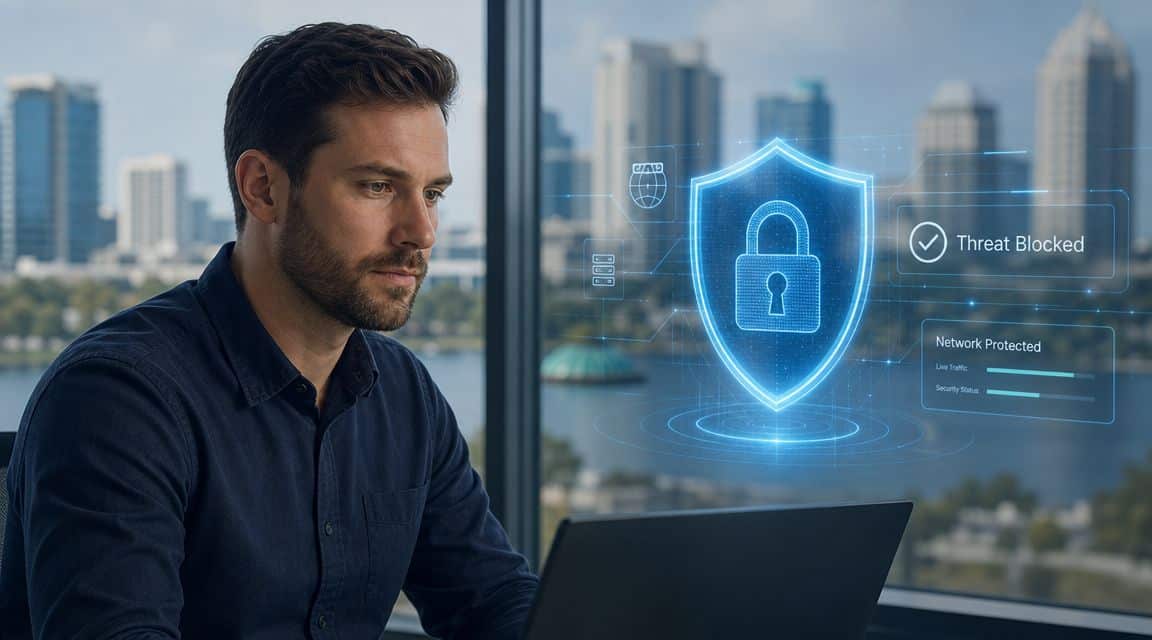
A professional man working on a laptop with a digital security shield overlay indicating a blocked threat.

The controls that actually matter

A lot of small firms buy a firewall and antivirus, then assume they're covered. They're not.

A serious security stack for business IT support in Orlando FL should include:

  • Multi-factor authentication: This is basic access control. If it isn't enforced broadly, you're exposed.
  • Endpoint detection and response: EDR gives your team visibility into suspicious behavior on laptops and desktops, not just known malware signatures.
  • Email security and phishing defense: Most business attacks still start with inbox activity, fake logins, credential theft, or malicious attachments.
  • Patch management: Unpatched systems create avoidable openings.
  • Backup integrity: Backups only matter if you can restore quickly and cleanly.
  • Security awareness training: Staff behavior affects risk every day.
  • A SOC or equivalent monitoring function: Someone has to review alerts, investigate activity, and respond fast.

Industry-specific pressure is real

For a law firm, the issue is client confidentiality and access control. For an accounting or finance firm, it's protecting financial records and aligning operations with client and insurer expectations. For a medical practice, HIPAA-related safeguards and staff access discipline aren't optional. For architecture and engineering firms, the crown jewels are often project files, plans, and intellectual property.

Those firms shouldn't ask whether cybersecurity is included. They should ask how it's delivered, who monitors it, and what happens when there's an alert at night or on a weekend.

One practical starting point is reviewing outside guidance on implementing network safeguards. Then push further. Ask your provider how they handle endpoint response, account compromise, backup validation, and user-risk training.

Security spending should be tied to continuity. You're not buying tools. You're buying the ability to keep operating when something goes wrong.

One local option in this category is Cyber Command, LLC, which offers managed IT, co-managed IT, a 24/7 SOC, helpdesk support, cloud services, and compliance-focused security for Orlando-area organizations. That's the kind of integrated model buyers should compare against other providers, especially if they need one partner to own both uptime and cyber risk.

Choosing Your Orlando IT Partner A Practical Checklist

Most IT proposals look similar at first glance. They mention monitoring, support, cybersecurity, and strategic guidance. That's not enough. You need to know how the provider operates when your team is locked out of email, a workstation won't connect to the line-of-business app, or a user reports suspicious activity.

Local provider guidance says many common incidents can be resolved in about 30 minutes when the helpdesk is structured for rapid triage and remote remediation, according to this Orlando IT support benchmark. That's the standard I'd use when evaluating responsiveness. If a provider can't clearly explain how tickets are triaged, escalated, and resolved, keep looking.
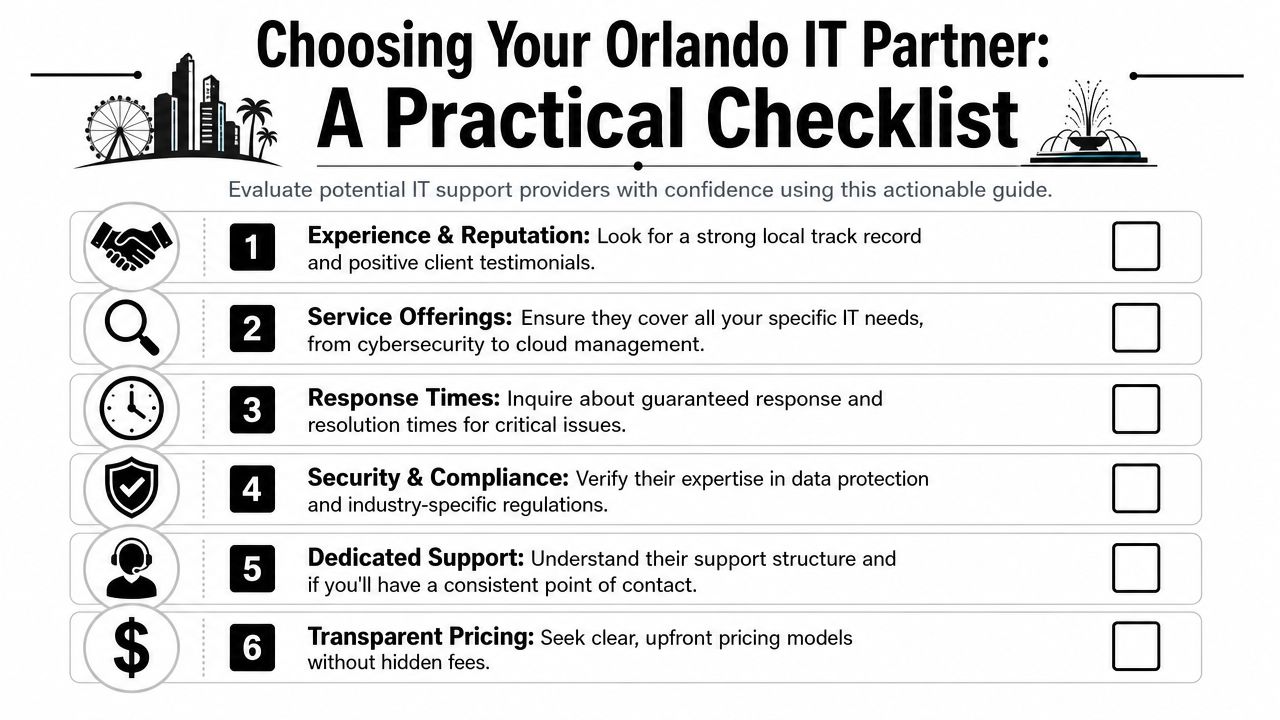
A checklist infographic titled Choosing Your Orlando IT Partner outlining six key factors for evaluating IT providers.

Ask these questions before you sign

  • Who answers the phone when we need help? You want a clear support model, live helpdesk access, and an explanation of after-hours coverage.
  • What's included in your security stack? Don't accept vague answers. Ask about endpoint protection, MFA, email security, patching, backup oversight, and active monitoring.
  • How do you handle on-site issues in Orlando and nearby cities? Some problems still need hands-on work. A local or regional presence matters.
  • What industries do you already support? Law, medical, finance, and engineering firms have different software, workflows, and risk profiles.
  • How do you document our environment? If they don't maintain diagrams, asset inventories, access records, and vendor details, they're improvising.
  • What happens during onboarding and offboarding? Weak user lifecycle management creates security risk fast.

What to listen for

A good provider gives direct answers. A weak one hides behind jargon.

Here's what I'd consider a strong response:

Question Strong sign Weak sign
Response times Clear SLA language and triage process “We're usually pretty quick”
Security Named controls and response process Generic “we do cybersecurity” claims
Compliance Familiarity with your industry obligations No documentation or policy support
Pricing Defined scope and exclusions Vague fees and project surprises
Ownership One accountable team Finger-pointing across vendors

Red flags that should end the conversation

  • They separate support from security as if they're unrelated.
  • They can't explain escalation from helpdesk to engineering to incident response.
  • They rely heavily on break-fix billing for work that should be part of ongoing management.
  • They don't ask about your business workflows and only talk about tools.
  • They avoid defining what's excluded from the monthly agreement.

Don't hire an IT company because they seem friendly. Hire them because they can show you how they prevent avoidable problems and respond when prevention fails.

The best Orlando IT partner will sound less like a gadget seller and more like an operations partner. That's what you want.

Decoding IT Support Pricing Models and Value

Buyers often get distracted at this point. They compare monthly fees without comparing scope.

For Orlando SMBs, managed IT services are commonly priced at about $100 to $300 per user per month, and one local guide also notes 300+ managed services providers in the market, which is why buyers should compare security, monitoring depth, and support cadence instead of chasing the cheapest headline rate in this Orlando IT pricing overview.
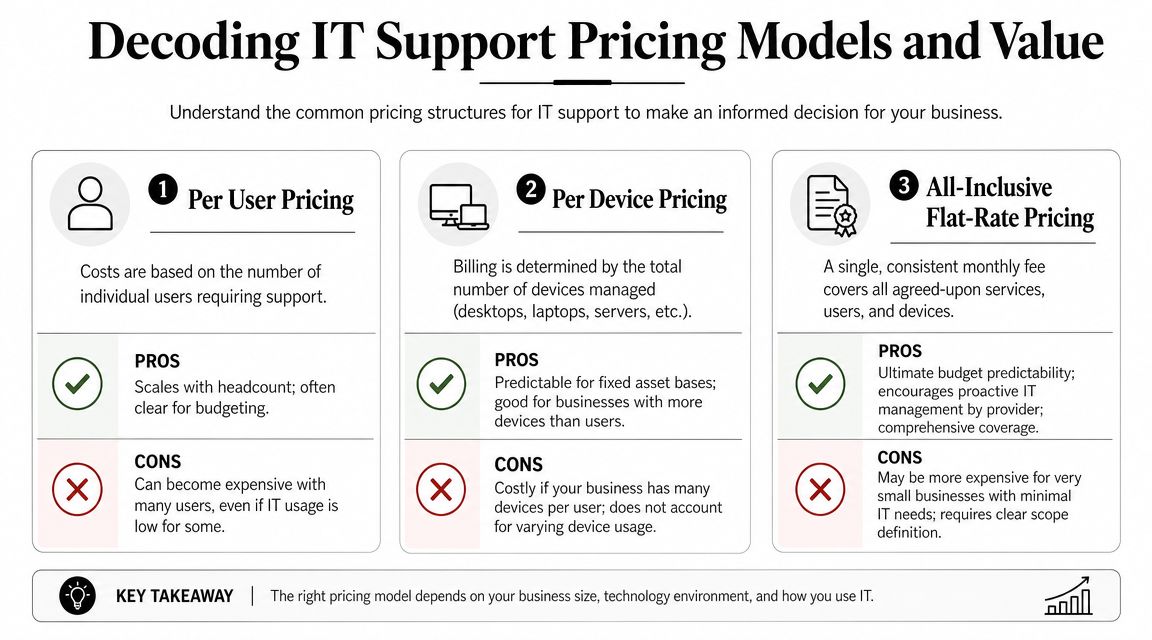
An infographic detailing common IT support pricing models including per user, per device, and flat-rate pricing.

The three pricing models you'll see most

Per-user pricing is common for firms with cloud-heavy workflows and mobile staff. It usually aligns well with support demand, but only if the scope is broad and clearly defined.

Per-device pricing can work for businesses with a stable hardware footprint. It gets messy when users rely on multiple endpoints, shared devices, or remote work setups.

Flat-rate or all-inclusive pricing is often the cleanest model for buyers who want budget predictability. The catch is scope discipline. You need a written definition of what's covered, what counts as a project, and how after-hours support is handled.

How to judge value instead of price

A cheaper proposal can cost more if it leaves gaps in:

  • Security coverage: If email protection, EDR, or backup oversight are extra, your “savings” disappear fast.
  • Project work: Many low monthly agreements shift routine improvement work into separate invoices.
  • Vendor management: If your provider doesn't own carrier issues, software support coordination, and procurement guidance, your staff carries the burden.
  • Strategic oversight: No roadmap means your environment drifts until a major upgrade becomes urgent and expensive.

The monthly fee matters. The unanswered question matters more: what problems are still going to land on your desk after you sign?

When you review pricing, ask for a plain-English scope summary. I'd want to know who owns support, security tooling, patching, backups, Microsoft 365 administration, vendor escalation, compliance assistance, and routine changes. If the provider can't make that simple, the relationship won't feel simple either.

Your Next Step Toward Resilient and Strategic IT

Orlando businesses don't need more tech clutter. They need control.

That means support that's proactive, security that's built into daily operations, and a service model that matches how the business runs. For a law office, that may mean tighter access control and better document protection. For a medical practice, it may mean stronger user policies and cleaner device management. For a finance or engineering firm, it often means reducing risk around sensitive data, vendor sprawl, and recovery readiness.

The right IT partner helps you do three things well. Keep people productive, reduce preventable risk, and give leadership clear visibility into what's being managed. That's what turns IT from a recurring frustration into a business asset.

If you're planning broader changes beyond support, this article on a complete modernization strategy is a useful complement. Just don't start with transformation language if the basics are still loose. Standardize support, tighten security, document the environment, then modernize with purpose.

If your current setup feels reactive, fragmented, or too dependent on one internal person, it's time to get a second opinion.


If you're evaluating business IT support in Orlando FL, Cyber Command, LLC can help you assess your current environment, identify operational and cybersecurity gaps, and determine whether fully managed or co-managed support fits your business. A no-obligation conversation is the fastest way to see where your risks, inefficiencies, and support blind spots are.
Boost it support for small business with Florida IT Solutions

Effective IT support for small business is a strategic move for growth, not just a reactive line item on your expense sheet. It’s about shifting away from simply fixing broken computers and instead, proactively building a secure, efficient technology foundation that stops problems before they start, protects your critical data, and paves the way for you to scale.

Why Proactive IT Support Is a Growth Engine, Not a Cost

In Florida's competitive market, from Orlando's professional services hubs to the growing communities around Kissimmee and Sanford, treating technology as an afterthought is a quick way to fall behind. Too many business owners still see IT as a necessary evil—an expense you pay only when something breaks. Frankly, that "break-fix" mindset is dangerously outdated and incredibly expensive, especially given the rising tide of cybercrime.

Think of your IT infrastructure as the foundation of your business. If that foundation is cracked or poorly maintained, everything you build on top of it—your daily operations, your client relationships, your growth plans—is at risk. A single server failure or one successful cyberattack can grind your entire business to a halt, costing you far more in lost revenue and reputational damage than proactive support ever would.

From Firefighting to Future-Proofing

Proactive IT support for a small business completely flips the script from constantly putting out fires to future-proofing your operations. Instead of waiting around for a crisis, a real IT partner works around the clock to prevent one from ever happening. This is especially true for businesses here in Central Florida with specific tech and security needs.

  • For a Law Firm in Lake Mary: It’s not enough to just store sensitive client data. Robust IT actively protects it from ransomware and data breaches, preserving the confidentiality and trust your practice is built on.
  • For a Dental Practice in Oviedo: Seamless network uptime is non-negotiable. It’s what allows you to access patient records, manage appointments, and run diagnostic tools without costly interruptions that throw your entire schedule off.
  • For an Architecture Firm in Winter Park: Your team needs reliable systems to run demanding design software and securely share huge files with clients and contractors. Without it, projects fall behind schedule and your firm's reputation suffers.

In every one of these cases, technology isn’t just a tool; it's at the very core of how you deliver your service. Any downtime or security slip-up directly hits your ability to serve clients and make money.

A modern IT partner is obsessed with two things: maximizing your uptime and bulletproofing your data. Those are the two pillars that support real, sustainable business growth. The goal is to turn your technology into a competitive edge, not a recurring headache.

This strategic approach changes your IT budget from an unpredictable, chaotic expense into a predictable investment. By preventing disasters like data loss, network outages, and devastating cybersecurity breaches, you’re actively protecting your bottom line. More importantly, it frees you and your team up to focus on what you actually do best—running and growing your business. For any company serious about efficiency, security, and scaling today, smart IT simply isn't optional anymore.

What Does Modern IT Support Actually Look Like?

If your idea of IT support is still calling a tech after a computer has already crashed, you're running your business on a model that’s destined for failure. It’s like waiting for smoke to billow from your car’s engine before you even think about an oil change. The whole game has changed. A real IT partnership isn't about having someone to call in a panic; it's about having a technology team woven into the fabric of your business.

For any small business in places like Orlando, Sanford, or Winter Springs, making this move from reactive to proactive isn't just a good idea—it's essential for survival. This is exactly where a Managed Services Provider (MSP) steps in. The best way to think of an MSP is as the general contractor for your company's entire technology stack. Just like a G.C. coordinates all the trades to build a solid house, an MSP manages every piece of your IT to build a business that’s efficient, secure, and ready to grow.

Let's dive into the three main types of IT support models you'll encounter. Understanding the pros and cons of each will make it much clearer which path is the right one for your company's specific needs and budget.

Comparing IT Support Models for Your Business

This table breaks down the three primary IT support models to help you choose the best fit for your business needs and budget.

Feature Break/Fix (Reactive) In-House IT Team Managed IT Services (Proactive)
Cost Structure Unpredictable hourly rates, billed per incident. Predictable but high fixed costs (salaries, benefits, training). Predictable monthly fee, often based on users or devices.
Approach Waits for problems to occur, then fixes them. A mix of reactive support and proactive projects. Focuses on preventing problems before they start.
Incentive Provider profits from your problems and downtime. Focused on keeping internal systems running smoothly. Provider profits when your systems are stable and efficient.
Expertise Limited to the knowledge of the on-call technician. Limited to the skillset of your in-house staff. Access to a deep bench of specialists in security, cloud, etc.
Availability Typically business hours only; after-hours is an emergency. Usually 9-to-5, with potential for on-call burnout. 24/7/365 monitoring and support are standard.
Best For Very small businesses with minimal tech needs and high risk tolerance. Larger businesses that can justify the high cost of a dedicated team. Small to mid-sized businesses seeking enterprise-level support affordably.

As you can see, the shift toward a proactive, managed model aligns the provider's goals directly with yours: they succeed when you don't have problems. This fundamental difference is what makes modern IT support so much more effective for growing businesses.

Your On-Demand Tech Team

The heart of any great IT support service is the helpdesk, but this is a far cry from the frustrating call centers you might be used to. A top-tier provider gives you a 24/7, U.S.-based live helpdesk staffed with pros who actually get to know your business. So when an employee can’t get into a critical file or the office printer decides to go on strike, they get help right now from someone who can fix it fast, keeping expensive downtime to a minimum.

This isn’t just a nice-to-have feature; it’s a direct boost to your team's productivity. Instead of your people wasting valuable time trying to be their own IT support, they can stay focused on the jobs you hired them for. This immediate, expert help is like having your own dedicated IT department, but without the staggering costs of hiring, training, and retaining one.

The Digital Security Guard for Your Network

While the helpdesk is there for your team's immediate needs, proactive network monitoring is the silent hero working in the background. It’s like having a digital security guard constantly patrolling your systems, day and night. This service is always scanning for signs of trouble—a hard drive that’s about to fail, strange network traffic that could signal an attack, or a critical security patch that got missed. It flags these issues long before they can erupt into a full-blown crisis.

For a law firm in Sanford, this could mean catching a server problem before it wipes out a full day of billable hours. For a medical practice in Kissimmee, it means keeping patient data systems stable and secure, protecting you from both operational meltdowns and painful compliance violations.

This preventative strategy is the very foundation of modern IT. It's all about stopping problems before they can even start, which keeps your business running smoothly and predictably.

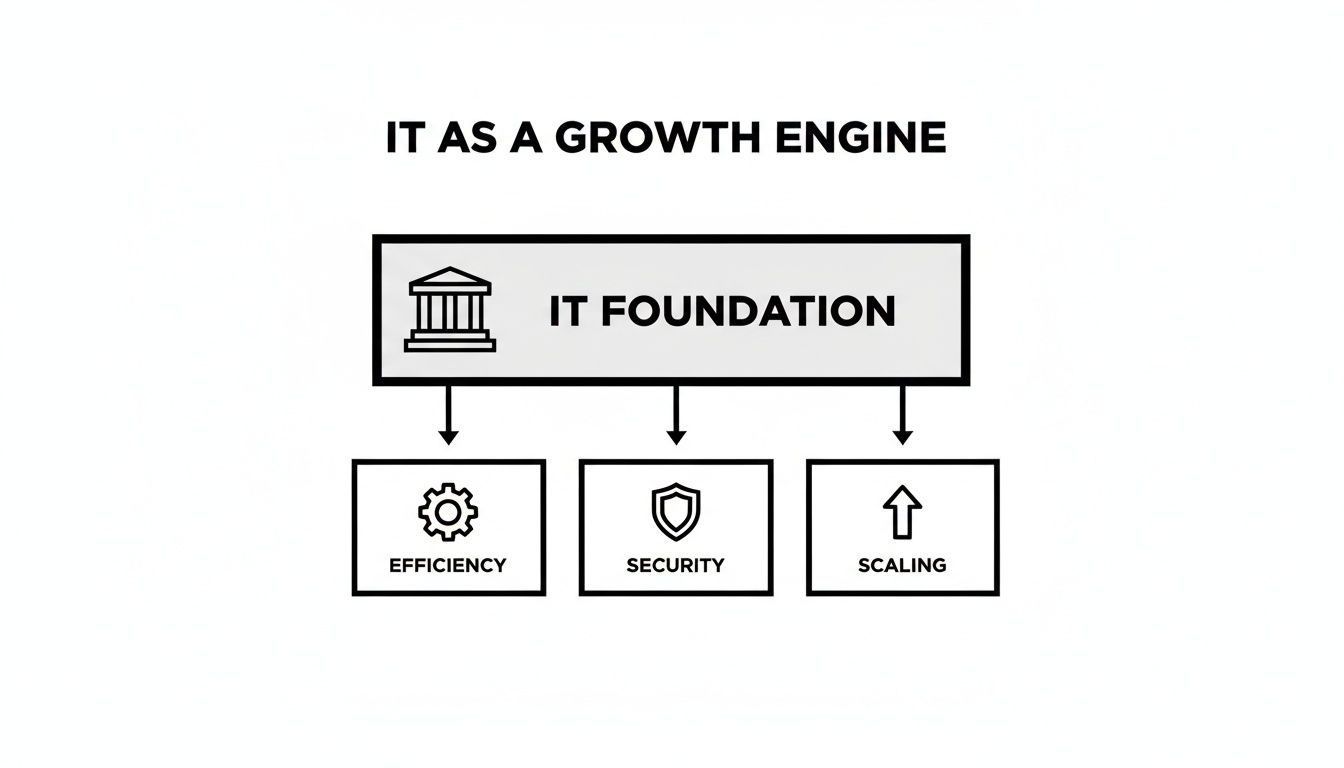
Below, the diagram illustrates how a solid IT foundation is what makes efficiency, security, and scaling possible.

An IT infrastructure diagram showing foundation supporting efficiency, security, and scaling for business growth.

This really drives home the point: if your technology base isn't stable, all your efforts to operate better, protect your data, and grow your business will be built on shaky ground.

Finding the Right Fit with Co-Managed IT

But what if you already have an IT person—or even a small team—on your payroll? This is a really common situation for growing businesses in Central Florida, and it doesn't mean you can't work with an MSP. This is exactly where a co-managed IT model becomes a game-changer.

Think of it this way: your in-house IT specialist is your on-the-ground generalist. They know your people, your office, and your day-to-day needs like the back of their hand. A co-managed partner acts as their backup, bringing a deep bench of specialized experts and powerful tools they could never access on their own.

Co-managed IT is a perfect fit for:

  • Filling Skill Gaps: Your IT person might be a superstar at daily support but doesn't have deep expertise in advanced cybersecurity or complex cloud architecture.
  • Providing 24/7 Coverage: An MSP can watch over your network after hours, on weekends, and during holidays, so your internal staff doesn't have to live on-call.
  • Handling Major Projects: When it's time for a big server migration, office move, or cloud project, the MSP can supply the extra hands and project management needed to get it done right, without derailing your daily operations.

This hybrid approach lets you get the exact level of IT support for your small business that you need, creating a powerful partnership that makes your internal team even better. It ensures you have total protection and support without having to completely scrap the team you've already built.

Confronting the Cybersecurity Threat to Florida Businesses

For a small business in Central Florida, from Orlando to Kissimmee, the biggest threats are often the ones you can't see. Cybercriminals aren't just targeting giant corporations anymore. In fact, small businesses have become their favorite targets for one simple reason: they're often less prepared and have valuable data worth stealing.

Cybersecurity operations center with a glowing shield and padlock protecting digital folders on a monitor.

This shift has created a dangerous environment for any company handling sensitive information, from law firms in Lake Mary to medical practices in Oviedo. The fallout from a breach goes way beyond a simple tech headache. We're talking about catastrophic financial loss, steep regulatory fines, and irreparable damage to the reputation you've worked so hard to build.

The Alarming Reality for SMBs

The statistics paint a pretty grim picture. A shocking 81% of small businesses suffered a security or data breach in the past year, according to the Identity Theft Resource Center. This vulnerability comes down to limited resources and a lack of in-house security expertise, which makes SMBs prime targets for ransomware, phishing attacks, and business email compromise.

When you consider that standard managed IT plans for SMBs run $125 to $200 per user per month—covering helpdesk, patching, and endpoint protection—it's a fraction of the cost of recovering from a single breach.

This isn't about fear-mongering; it's about understanding the very real risks that Florida businesses face every single day. The impact of these threats isn't just theoretical—it's tangible and incredibly disruptive. To really grasp the menace, check out our article on the impact of cybersecurity threats on small business operations.

Your 24/7 Digital Emergency Room: The SOC

So, how do you defend against an enemy that never sleeps? The answer is a Security Operations Center (SOC). Think of a SOC as a hospital's emergency room fused with a high-tech surveillance team, operating 24/7/365. It’s a dedicated command center staffed by cybersecurity experts whose only job is to protect your business.

Instead of just waiting for an alarm to go off, a SOC team is constantly:

  • Monitoring your network for any unusual activity.
  • Hunting for hidden threats that might have slipped past initial defenses.
  • Analyzing potential security events to determine if they are genuine attacks.
  • Responding instantly to shut down threats the moment they’re confirmed.

For a small business, a SOC provides an enterprise-level security posture that would be impossible to build in-house. It’s the difference between having a single night watchman and having an entire special forces team guarding your digital assets around the clock.

This proactive shield is what modern IT support for small business must include. Anything less leaves you dangerously exposed to criminals who are organized, motivated, and highly skilled at finding your weakest link.

Industry-Specific Dangers in Central Florida

The nature of cyber threats often changes depending on your industry. For professional and medical practices in the Orlando, Sanford, and Kissimmee areas, the stakes are particularly high because of the value of the data you hold.

  • For Veterinary Clinics: Ransomware doesn't just disrupt your business; it can endanger animals' lives. If attackers lock up your practice management software and patient records, you can't access medical histories, track medications, or manage critical appointments, putting animal welfare at immediate risk.
  • For Legal and Financial Services: Your client files, case details, and financial data are absolute goldmines for cybercriminals. A breach can expose confidential information, destroying client trust, triggering ethical violations, and potentially leading to legal action against your firm. The fallout from a single incident can be career-ending.

In both scenarios, the attacker’s goal is to paralyze your operations and extort a heavy ransom, knowing that every minute of downtime costs you money and credibility.

The Protective Shield of Endpoint Protection and Threat Hunting

To combat these sophisticated attacks, a multi-layered defense is essential. This starts with two critical components that a quality IT partner will manage for you.

1. Endpoint Protection: Every device connected to your network—laptops, desktops, servers, even mobile phones—is an "endpoint." Each one is a potential doorway for an attacker. Advanced endpoint protection goes beyond basic antivirus, using smart technology to detect and block malicious behaviors before they can execute and cause damage.

2. Active Threat Hunting: This is where the SOC team truly shines. Instead of just relying on automated alerts, threat hunters proactively search your systems for signs of an intruder. They look for the subtle clues that automated tools might miss, effectively hunting down attackers who may be lurking silently in your network, waiting for the right moment to strike.

By combining robust endpoint protection with vigilant, human-led threat hunting, you create a powerful protective shield around your business. This comprehensive security allows you to stop worrying about what might be hiding in the digital shadows and get back to what matters most: serving your clients and growing your Central Florida business.

How AI Is Changing the Game for Small Business IT Support

Artificial Intelligence isn't some far-off concept reserved for tech giants or sci-fi movies anymore. For small businesses right here in Central Florida, it’s become a practical, powerful tool that’s completely reshaping what’s possible with IT support.

Think of it like upgrading from a basic calculator to a full-blown financial analysis platform. Both can do math, but one gives you deep insights that help you make smarter, faster decisions.

A smiling veterinarian holds a tablet showing a glowing network, with pet carriers and a dog.

AI is quietly working behind the scenes, turning standard it support for small business into a predictive and automated powerhouse. For a specialized practice like an Orlando architecture firm or a Winter Springs veterinary clinic with limited in-house tech know-how, this shift is delivering big-business capabilities without the big-business price tag.

From Reactive Fixes to Predictive Power

The old model of IT support was all about reacting to problems. Your server goes down, you frantically call for help. AI flips that script entirely. Modern IT platforms now use AI to analyze thousands of data points across your network, spotting patterns that signal a future failure.

This means your IT partner can see that a hard drive in your main server is showing early signs of stress and replace it before it crashes during a busy workday. It's the difference between your car breaking down on I-4 during rush hour versus your mechanic calling after a routine check to say your brake pads are getting thin.

This proactive approach, all powered by AI, delivers some very real benefits:

  • Predictive Maintenance: AI algorithms can spot hardware issues and software conflicts before they ever cause downtime, keeping your business running smoothly.
  • Automated Security: AI tools identify and neutralize new cyber threats in real-time, often much faster than a human analyst could react.
  • Smarter Helpdesk Support: AI helps categorize support tickets, gives technicians instant diagnostic info, and can even resolve common issues automatically.

AI-Powered Efficiency for Florida Industries

For businesses here in our region, AI provides some distinct advantages. One of the most direct applications we're seeing is the use of chatbots for IT support to handle routine tasks and improve efficiency.

These aren't just simple auto-reply bots. They can reset passwords, guide users through software installations, and answer common questions around the clock. This frees up human technicians to focus on the more complex problems that really need their expertise.

This isn't just a niche trend, either. A staggering 82% of small business employers now use at least one AI tool in their operations.

For a medical practice in Kissimmee, an AI-powered system can constantly monitor the network running your patient records, ensuring it stays stable and compliant with HIPAA. For a law firm in Lake Mary, it can help secure sensitive client data against increasingly sophisticated phishing attacks by analyzing email patterns for threats.

By automating routine maintenance and providing smarter, faster problem-solving, AI gives small businesses a level of resilience and efficiency that was once out of reach. This allows you to focus on serving your clients and growing your business, confident that your technology backbone is not just stable, but truly intelligent. To learn more about this trend, you might be interested in our guide on how artificial intelligence is used in business.

A Checklist for Choosing Your Florida IT Partner

Finding the right IT partner in a bustling market like Central Florida can feel like searching for a needle in a haystack. With so many options, how do you separate a true strategic partner from just another vendor who closes tickets?

This practical checklist will help you cut through the noise. It’s designed to guide your vetting process, helping you ask the right questions and find a provider that truly understands the needs of businesses in Orlando, Sanford, Kissimmee, and our surrounding communities. When you're looking at potential partners, it helps to understand the full landscape of IT Service Providers and MSPs, because not all are created equal.

Essential Operational Capabilities

Before you even think about strategy, you need to confirm a potential partner can handle the basics. Downtime is a business killer, and the quality of their day-to-day support is your first line of defense.

Get direct answers to these questions about their core operations:

  • Is your helpdesk available 24/7/365? A problem at 8 PM on a Friday needs the same urgent attention as one at 10 AM on a Tuesday. Cyber threats and system failures don’t stick to business hours.
  • Are your helpdesk technicians based in the U.S.? This is huge. It’s critical for clear communication and means the support staff understands the context of your business without language or massive time-zone barriers.
  • What are your guaranteed response times? Ask to see their Service Level Agreement (SLA). Make sure you understand the difference between response time (when they acknowledge your issue) and resolution time (when it's actually fixed).

A partner who stumbles on these questions is showing you a major red flag right from the start. True IT support for small business means being there when you need them, period.

Security and Industry-Specific Expertise

Cybersecurity isn't an add-on anymore; it must be woven into the very fabric of your IT support. And a provider who gets your industry’s unique challenges can offer far more effective protection and guidance.

A provider's approach to security separates the amateurs from the professionals. They shouldn't just be installing antivirus software; they should be actively hunting for threats and ensuring you meet all compliance requirements.

Verify their security posture and industry know-how:

  • Do you operate a 24/7 Security Operations Center (SOC)? For active threat hunting and immediate incident response, this is non-negotiable.
  • What is your experience with industry-specific compliance? For veterinary clinics and medical practices, this means deep expertise in HIPAA. For law or finance firms, it involves protecting sensitive client data according to strict regulatory standards. Ask them to prove it.
  • Can you provide detailed, transparent security reports? You should get regular updates on threats blocked, vulnerabilities patched, and the overall health of your security posture. No excuses.

An IT partner without a strong security focus isn't a partner; they're a liability. Their ability to speak fluently about your industry's compliance needs is a key indicator of their expertise.

Strategic Partnership and Growth Focus

The best IT providers do more than just fix what’s broken—they help you grow. A real partner takes the time to understand your business objectives and aligns your technology strategy to help you get there.

Look for these signs of a genuine strategic relationship:

  • Do you provide a technology roadmap? They should work with you to plan future tech investments, upgrades, and projects that support your long-term goals.
  • Do you conduct Quarterly Business Reviews (QBRs)? These meetings are essential for reviewing performance, discussing upcoming needs, and making sure your IT strategy stays aligned with your business's direction. For a deeper look into what a complete IT partnership entails, explore our comprehensive guide to business IT support in Florida.
  • Is your pricing all-inclusive and predictable? A flat-rate fee structure proves they are invested in your stability. They profit when you have fewer issues, not more.

By using this checklist, you can move beyond the sales pitches and evaluate potential IT providers on what truly matters: their ability to deliver reliable support, robust security, and strategic guidance to help your Florida business thrive.

The Real ROI of Investing in Proactive IT

It’s easy to look at a managed IT services fee as just another line item on your monthly expenses. But that’s the wrong way to think about it. The reality is, that monthly fee is a direct investment in your company’s ability to operate, stay secure, and grow.

Every dollar you put toward proactive IT is a dollar spent preventing a crisis. It’s what keeps your team working without interruption, protects your most valuable data from threats, and ultimately, lets you focus on your business instead of broken tech.

For a small business here in Central Florida, this isn’t just some abstract concept. It’s the peace of mind a law firm in Sanford gets knowing its client data is being watched over by a 24/7 Security Operations Center. It's the confidence a veterinary practice in Oviedo has that its patient management systems will be up and running when the first appointment of the day arrives. This is about building a business that doesn't get derailed by technology.

Shifting Focus from Firefighting to Strategy

A proactive IT partner completely changes your role as a business owner. Instead of constantly getting dragged into putting out tech fires—a server going down, an employee locked out, a critical software patch failing—you get that time back.

When your technology hums along smoothly in the background, you can finally concentrate on the things that actually grow your business. You can focus on your clients, develop new services, and plan your next big move. That's the real game-changer.

This is exactly why so many small businesses are finally hitting their stride after making the switch. It’s not just a local thing, either. The global market for Small Business IT Support Services is projected to hit $25,000 million by 2034. In 2026 alone, North America is expected to see a surge as more companies get tired of reactive fixes and seek out strategic partnerships. You can get more details on these market projections from Data Insights Market.

Building Your Technology Roadmap for Growth

A true IT partner does more than just keep the lights on. They sit down with you to build a technology roadmap—a plan that ties your tech investments directly to your business goals for 2026 and beyond. This plan makes sure every dollar you spend on technology is strategic, timely, and supports your vision.

A technology roadmap transforms your IT from a reactive cost center into a strategic asset. It provides a clear path for upgrades, new implementations, and security enhancements that will power your business forward, not hold it back.

For business owners across Florida, this is your chance to build on a solid foundation. When you partner with an expert in it support for small business, you’re making sure your technology can scale with your ambitions, defend against new threats, and give you a real competitive advantage. It's time to stop reacting and start planning.

Frequently Asked Questions About Small Business IT Support

Choosing an IT partner is a big decision, and it’s normal to have a few questions. We get it. Here are some straightforward answers to the questions we hear most often from small business owners right here in Central Florida.

Is My Business Too Small for a Full IT Service?

Not at all. In fact, we find that smaller businesses are often the most vulnerable. With fewer internal resources, a single server crash or a ransomware attack can be devastating.

The great thing about modern it support for small business is that it scales to fit you. You get the same level of security and support that large corporations have, but for a predictable monthly cost that actually makes sense for your budget. It’s far more cost-effective than hiring a single in-house IT person or trying to clean up the mess after a security breach.

What Is Co-Managed vs Fully Managed IT?

This is a great question. Think of fully managed IT as outsourcing your entire technology department. We take care of everything—from the 24/7 helpdesk and cybersecurity to long-term tech planning. We become your IT team, period.

Co-managed IT, on the other hand, is more of a partnership. It’s perfect for companies that already have an IT person or a small team but need to fill in some gaps. We can step in to provide 24/7 security monitoring, help with specialized projects, or handle after-hours support so your internal team can avoid burnout.

How Much Should I Budget for IT Support?

Most modern IT support is priced on a simple per-user, per-month basis. This model is a huge win for budgeting because it turns your IT costs into a stable, predictable operating expense instead of a rollercoaster of unexpected bills.

For a comprehensive service that includes a 24/7 U.S.-based helpdesk, proactive network monitoring, and a robust cybersecurity defense with a SOC, businesses should plan to invest between $125 to $200 per user each month.

A transparent partner will give you a flat-rate, all-inclusive price. This means no surprise charges. It turns IT from a frustrating cost center into a strategic investment that actually helps you grow, whether your office is in Kissimmee or Winter Park.


Ready to stop worrying about technology and start focusing on growth? The team at Cyber Command, LLC provides proactive, all-inclusive IT support and cybersecurity services tailored for businesses in Central Florida and North Texas. Let's build a technology roadmap that aligns with your goals. Visit us at https://cybercommand.com to schedule a consultation.