
July 26, 2026
Azure AWS Consulting Orlando: A Complete Guide for SMBs
Explore Azure AWS consulting Orlando services for SMBs. Learn about migration, security, pricing models, and how Cyber Command delivers local cloud expertise.
You’re probably in the middle of a familiar Orlando problem right now. You know cloud can help, you’ve heard both Azure and AWS can do the job, and every consultant you talk to makes the choice sound easier than it is. The frustration is that the pricing never lines up cleanly, the engagement model changes from one proposal to the next, and nobody gives you a straight answer about what happens after migration.
For Central Florida SMBs, that’s the wrong place to start. The first question isn’t which cloud brand has the prettier pitch. It’s whether the consultant understands your operations, your compliance burden, and the fact that a growing business in Orlando needs a partner who can support the environment after launch, not just hand over a finished diagram.
Table of Contents
- Why Orlando SMBs Are Rethinking Cloud Strategy
- What Azure and AWS Consulting Actually Includes
- Single Cloud Versus Multi Cloud for Central Florida Businesses
- Understanding Cloud Consulting Pricing and Engagement Models
- Cybersecurity First Approach to Cloud Architecture
- Questions to Ask Before Hiring an Orlando Cloud Consultant
- How Cyber Command Delivers Cloud Consulting in Central Florida
Stuck on something like this right now?
Talk it through with a real US-based engineer, 24/7, no phone trees: (407) 587-0089.
Book a Free Strategy SessionWhy Orlando SMBs Are Rethinking Cloud Strategy
A lot of Orlando owners get to the same point at the same time. The server room is aging, the remote team is growing, a branch office is on a different rhythm than headquarters, and someone finally asks whether moving to cloud will solve the headaches. Then the first round of calls starts, and the answers split fast, one consultant leans Azure, another leans AWS, and both push different pricing structures and timelines.
That confusion makes sense in a market like Orlando. The metro area has about 2.7 million residents, and Orange County alone is over 1.4 million residents, which gives local consultants a dense base of professional services, healthcare, and industrial firms to serve (Central Florida market snapshot). In a market that concentrated, cloud work is rarely just a technical refresh. It’s a business decision tied to multi-site operations, regulated data, and day-to-day reliability.
The businesses that get better outcomes usually stop asking, “Which platform is cheaper?” and start asking, “Which partner can build a setup we can run?” That’s where the engagement model matters more than brand loyalty. A dental practice with several offices, a downtown law firm, and a logistics company do not need the same operating model, even if they both land on the same cloud platform.
Practical rule: If a consultant talks about virtual machines before they talk about identity, logging, segmentation, and support, they’re skipping the part that protects you from expensive mistakes.
If you want a broader view of local digital competition and how Orlando buyers search for services, the Polaris Marketing Solutions guide is a useful read because it shows how much local intent shapes B2B buying behavior. That same local intent shows up in cloud consulting. Buyers want someone nearby, responsive, and able to understand the realities of their industry, not just their infrastructure.
What Azure and AWS Consulting Actually Includes
Start with assessment and architecture, not servers
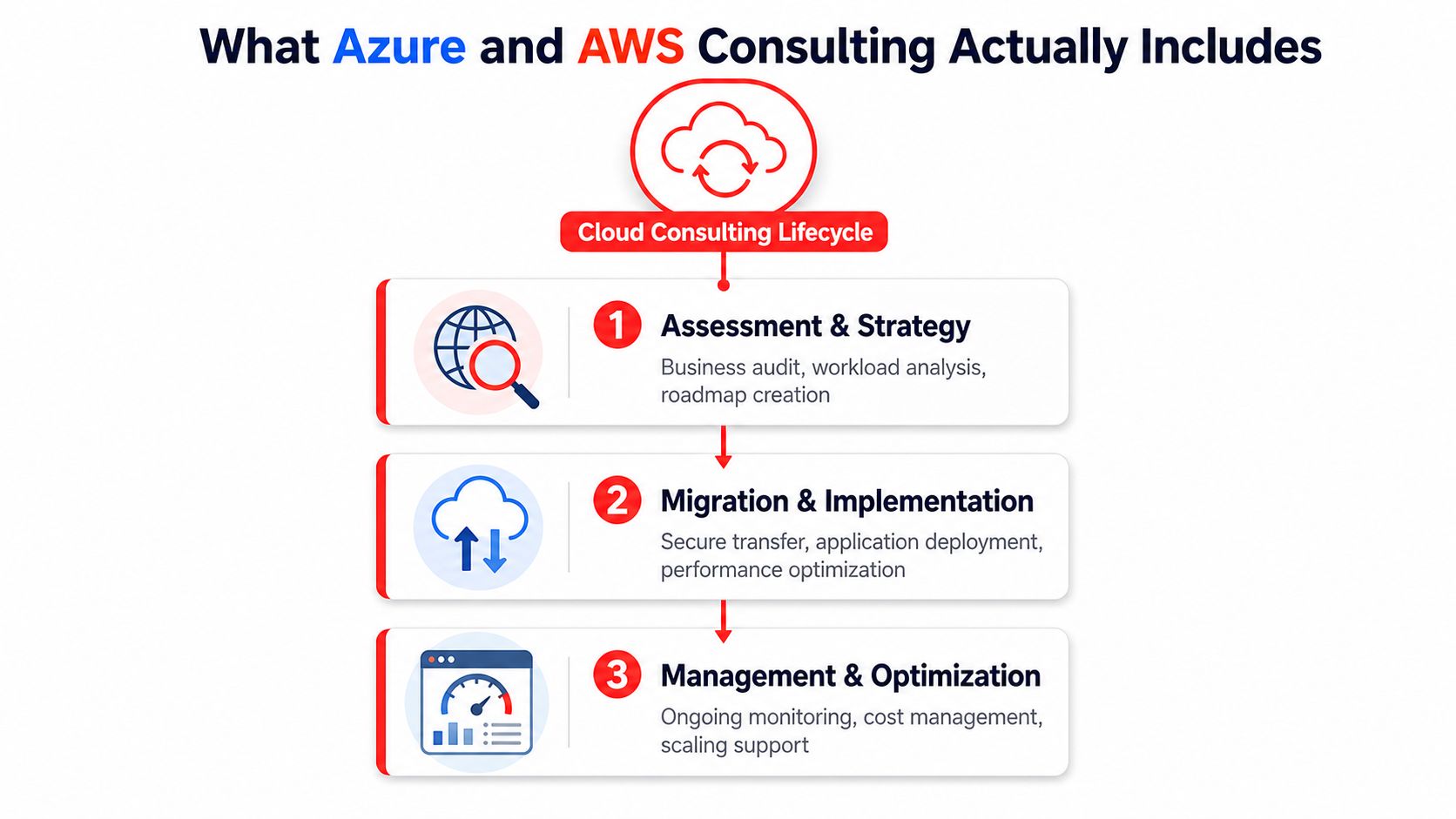
Good cloud consulting starts with a business audit. A consultant should inventory workloads, map dependencies, review compliance needs, and decide what belongs in the cloud, what should stay put, and what needs to be modernized first. That’s true whether you run a legal practice downtown or a medical group with multiple locations across Central Florida.
This is also where the landing zone matters most. In AWS and Azure consulting engagements, the most important decision is usually the architecture for identity boundaries, network segmentation, logging, and policy enforcement. Separate management, security, and workload environments reduce blast radius because one bad configuration should not be able to spread everywhere.
A multi-location dental practice, for example, needs clean identity control, secure access from each office, and consistent logging across locations. A professional services firm may care more about document controls, user permissions, and auditability. The platform comes later. The guardrails come first.
Migration is execution, not the whole job
Migration planning should follow the architecture, not replace it. A strong consultant defines sequencing, downtime tolerance, rollback paths, and user communication before moving anything important. The point is to avoid a rushed cutover that creates a mess the business has to live with for months.
That’s why a one-time migration is not the same thing as a managed partnership. The first gets systems moved. The second keeps them healthy, secure, and cost-aware after the move. The comprehensive migration strategy for businesses is a good reference point for thinking in phases rather than shortcuts.
A cloud project that ignores post-migration operations usually hands the business a new environment with the same old problems.
Ongoing operations is where value shows up
After go-live, the work is monitoring, patching, scaling, backup validation, and cost review. That’s where managed cloud operations, DevOps support, and platform engineering become practical rather than theoretical. A law firm may need tighter change control. A healthcare office may need clearer reporting and stronger recovery routines. A field-service company may need better standardization across distributed sites.
The best consultants do not jump straight to provisioning. They build a framework around governance, then connect it to daily operations. That’s the part that turns cloud from “a place to host stuff” into an actual operating model.
Single Cloud Versus Multi Cloud for Central Florida Businesses
Single cloud fits more SMBs than consultants like to admit
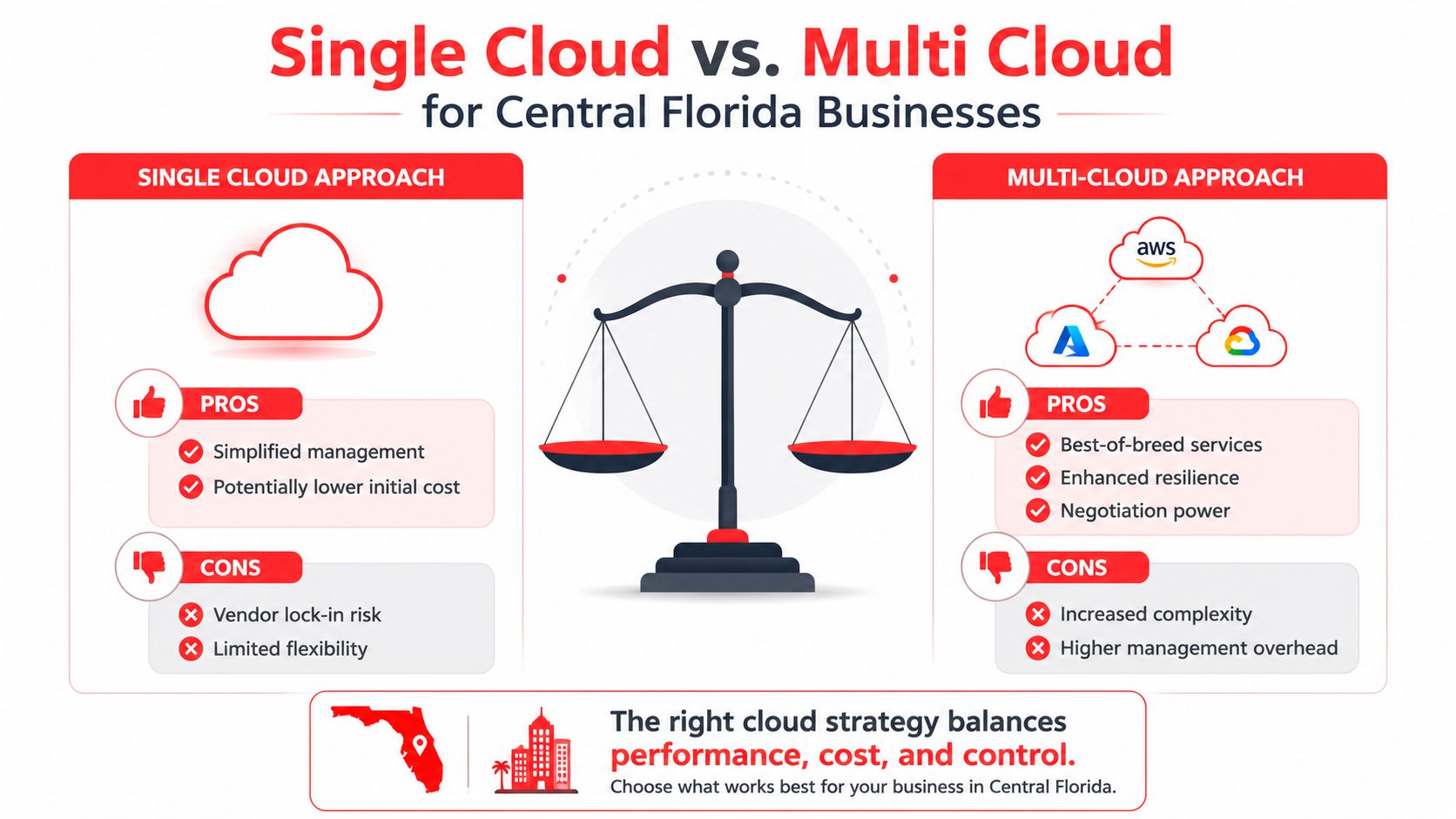
For a lot of Orlando SMBs, a single-cloud approach is the right call. It’s simpler, easier to govern, and less expensive to operate at the start. If your company already runs heavily on Microsoft 365, Entra ID, Windows Server, and related tools, Azure usually fits more naturally because the identity and productivity stack already lines up.
That doesn’t mean Azure is always the answer. It means the existing environment matters more than the sales pitch. A 25-person accounting firm does not need a complex multi-cloud design just because it sounds advanced. It needs fewer moving parts, clear ownership, and support that won’t collapse when something breaks on a Friday afternoon.
The internal partner badge resource at this cloud partner badge image is a reminder of how often buyers are forced to sort through credentials before they can judge real fit. Credentials matter, but they don’t fix a bad operating model.

Multi cloud is for specific use cases, not ego
Multi-cloud can make sense when workloads really do need different strengths, or when an engineering-heavy business wants more flexibility across teams. It can also help with resilience planning and negotiating power. But it adds operational overhead, more governance demands, and a bigger chance that nobody owns the seams between environments.
The balance scale graphic is the right mental model. One side gives you simplicity. The other gives you flexibility. Most SMBs want the second without paying for the complexity that comes with it, and that’s where bad consulting sells fantasy.
Direct advice: Don’t choose multi-cloud because it sounds advanced. Choose it only when you can point to a real workload reason and a team that can govern it.
Landing zones matter more than logos
Single-cloud and multi-cloud both fail when governance is weak. That’s why the landing zone is the critical decision point. Identity, logging, segmentation, backup, and policy controls determine how much damage a mistake can cause and how easy it is to recover.
For Orlando business owners, that means the platform logo on the invoice matters less than whether the environment has clean boundaries and clear accountability. If a consultant cannot explain how they’ll structure those boundaries, they’re not ready to manage your cloud, no matter how polished the pitch looks.
Understanding Cloud Consulting Pricing and Engagement Models
The pricing problem in cloud consulting is not subtle. Orlando buyers often discover that rates vary widely and that directory-style listings don’t make it easier to compare real value. That’s why the smart question is not, “What do you charge?” It’s, “What kind of engagement are you selling me?”
One marketplace ranking for AWS consulting shows typical dedicated consulting at $25 to $49 per hour. That figure doesn’t tell you what the work includes, whether optimization is bundled, or whether support ends the moment the migration is done. It does, however, confirm that the market is fragmented enough for pricing confusion to be a real problem.
Cloud Consulting Engagement Models Compared
Engagement Model
Best For
Typical Pricing
Key Risk
Hourly specialist
Narrow troubleshooting, short technical tasks
Variable hourly billing
Costs can spike fast, and the consultant may not stay engaged long enough to fix root causes
Project-based partner
Defined migration, redesign, or rollout
Fixed project scope
Scope gaps can turn into change orders and surprise fees
Managed services with ongoing support
SMBs that need support after launch
Predictable recurring pricing
You need a provider who actually delivers ongoing accountability, not just a monthly invoice
Hourly looks cheap until the project expands
Hourly help works when the job is small and the risk is low. It breaks down when the environment needs planning, security coordination, or post-migration follow-up. Every extra meeting, configuration issue, or after-hours fix pushes the final cost higher, and the business still has to manage the handoff.
Project pricing looks cleaner, but it only works if the scope is tight and the provider is honest about what’s outside the base estimate. The hidden costs usually show up after migration, in license management, incident response, patching, or optimization work that was never fully explained.
Managed service pricing solves the accountability problem
Predictable, all-inclusive pricing is usually better for SMBs that want ongoing support and fewer surprises. It shifts the conversation from “How low can the initial quote go?” to “Who owns the environment next month?” That’s a better fit for businesses that don’t have a full internal cloud team.
The linked cost image at this IT cost visual is useful because it reinforces the question buyers should ask: what’s included, what isn’t, and who stays accountable after the work is finished. If a proposal looks cheap on page one but becomes expensive in month two, it wasn’t cheap at all.

Cybersecurity First Approach to Cloud Architecture
If you treat security as a phase that starts after migration, you’re already behind. Florida businesses face enough threat volume that cloud design has to begin with protection, not decorate the environment later. The Florida Office of Cybersecurity reported 20,000+ cyber incidents and threats through the state’s cybersecurity portal in a single year (Florida cybersecurity portal summary), and that’s exactly the kind of signal leaders should pay attention to.
Regulated firms need controls built in from day one
For medical practices, HIPAA’s Security Rule requires administrative, physical, and technical safeguards for electronic protected health information (HIPAA Security Rule reference). That obligation doesn’t go away because the server lives in cloud. It becomes a design requirement for access control, logging, retention, and recovery.
Professional services firms in Orlando have a similar problem, even when they’re not formally under the same rule set. Law firms, accountants, and advisory shops handle sensitive records and need access controls that match the data they hold. If the consultant can’t tie cloud architecture to compliance and confidentiality, they’re not solving the right problem.
Security should shape the operating model
A serious cloud engagement should include centralized observability, automated patch baselines, recovery planning, and incident response readiness from the beginning. That means someone is monitoring logs, someone is validating alerts, and someone is making sure patching and configuration are consistent across environments. Cloud only becomes a resilience layer when those controls are built into daily operations.
Cyber Command’s model adds a dedicated SOC, continuous compliance support, and cloud services as part of a managed engagement. That matters because threat response is not just about reacting faster. It’s about detecting sooner, isolating better, and keeping the business running while the issue is being handled.
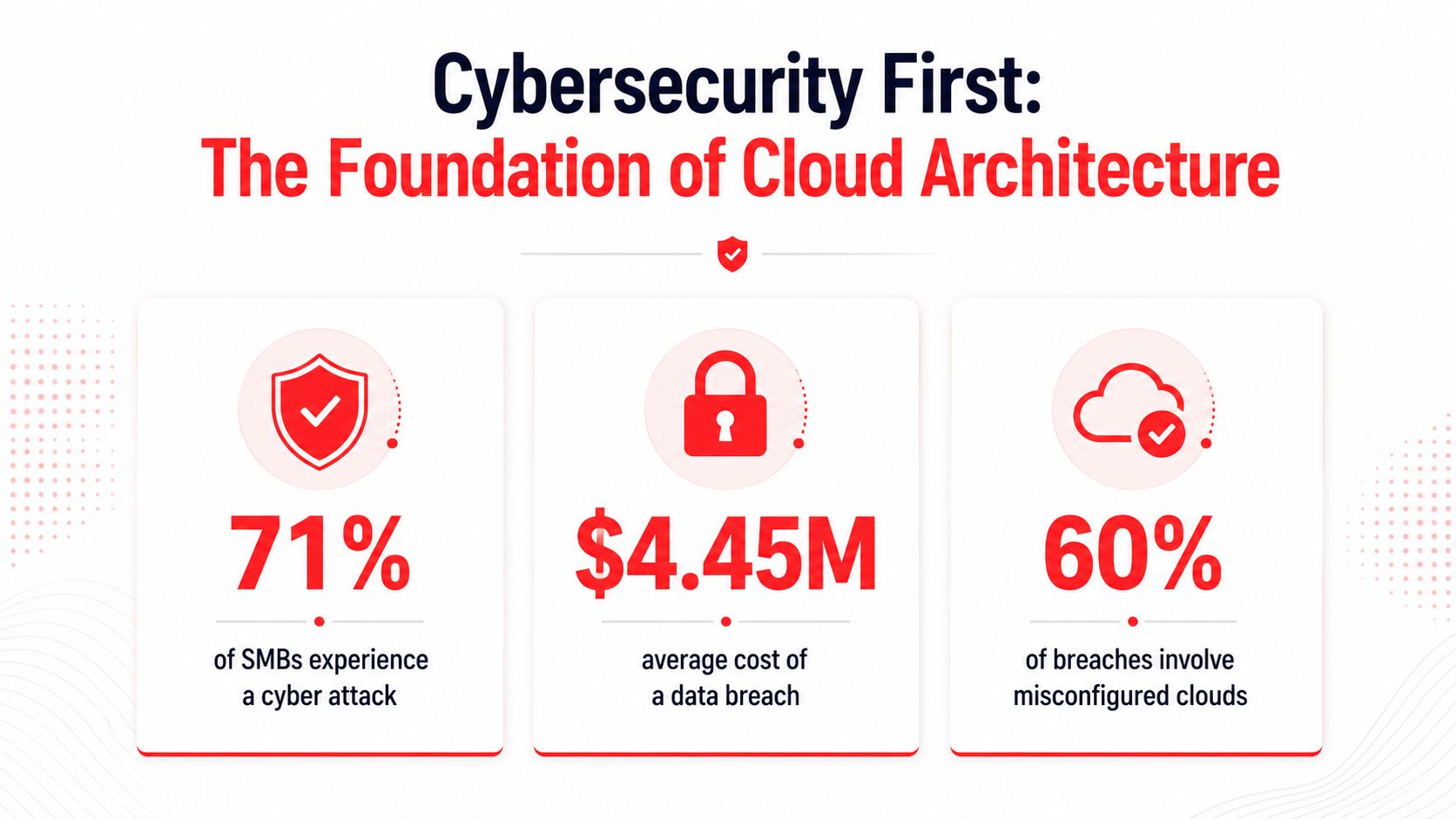
Security isn’t an add-on in cloud. If it’s not part of the first design discussion, it’ll become a cleanup project later.
The linked security visual at this cybersecurity border image fits that same point. The true benefit of cloud is not just location, it’s whether the environment is designed to absorb pressure without putting the business at risk.
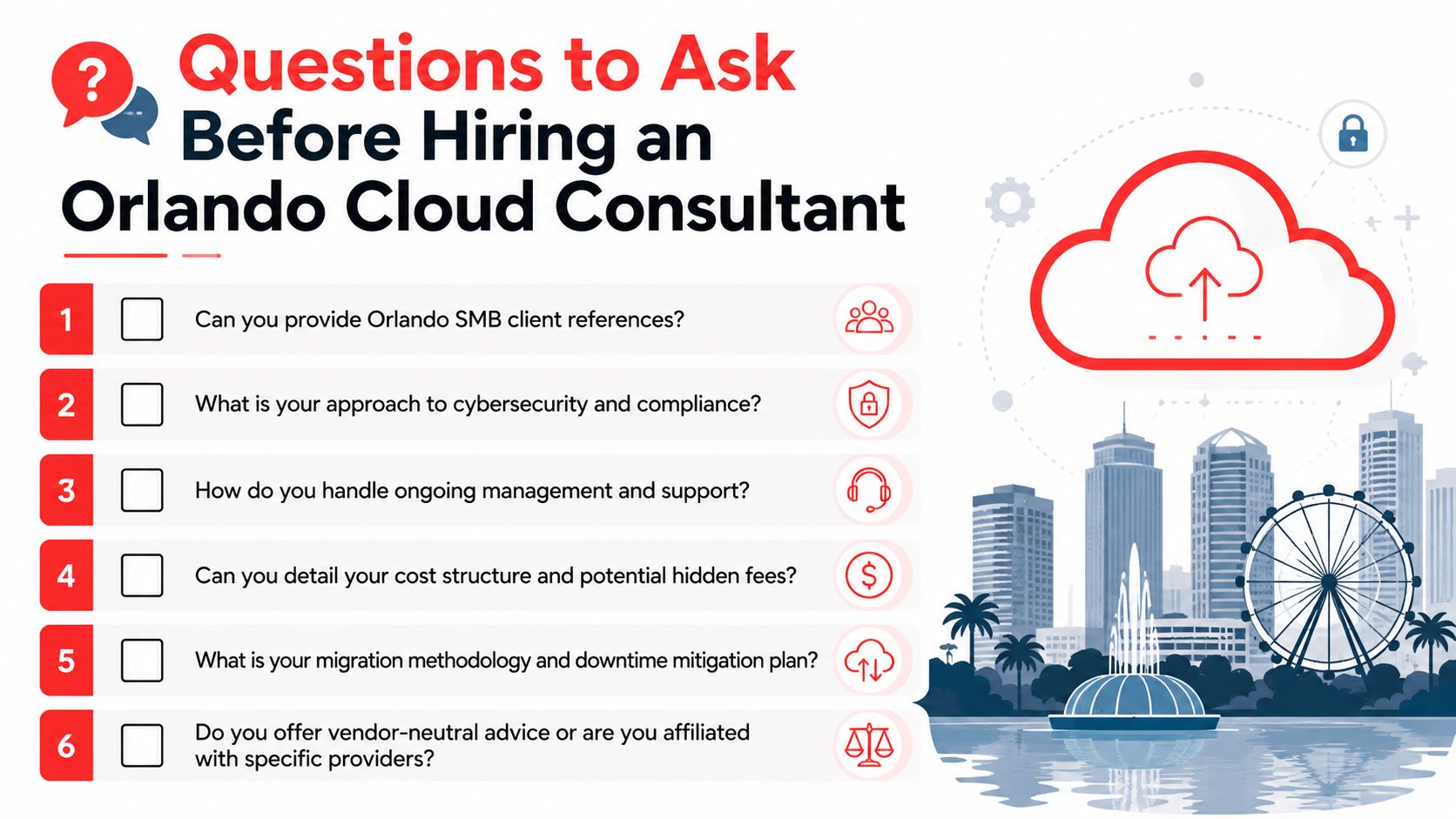
Questions to Ask Before Hiring an Orlando Cloud Consultant
The best way to compare consultants is to ask questions that force specifics. Orlando SMBs don’t need polished reassurance. They need answers that reveal whether the provider can handle the technical work, the support burden, and the pricing reality after the first invoice.
Ask about capability, not certifications
Start with the actual work. Ask how they assess workloads, how they design identity boundaries, and how they decide what should stay local versus move to cloud. A good answer will sound specific, tied to your environment, and grounded in operations. A weak answer will stay abstract and lean on credentials instead of method.
Good sign: They can explain how they build guardrails before migration.
Red flag: They keep circling back to generic cloud benefits and avoid discussing your current systems.
Ask about support after launch
A consultant who only wants the migration should say so. If you need post-launch optimization, user support, vendor coordination, or incident response planning, ask directly how they handle it. A serious partner will explain their operating model clearly, including who answers when the environment needs attention outside business hours.
That’s where local responsiveness matters. Orlando companies need a provider who understands that downtime doesn’t wait for a tidy support window. If the team is too far removed, too slow to escalate, or too dependent on outside handoffs, you’re paying for friction.
Ask about money and ownership
Pricing should be clear enough that you can see what’s included and what triggers extra cost. Ask about license management, security monitoring, reporting, optimization, and recovery support. If those items are treated as afterthoughts, the proposal isn’t transparent.
The six questions in the checklist image are the right baseline for any Orlando buyer. They force a provider to show whether they’re offering real accountability or just a migration event. And yes, ask whether their advice is vendor-neutral or tied to a narrow partner relationship, because that answer tells you a lot about whose interests they’re serving.
How Cyber Command Delivers Cloud Consulting in Central Florida
Cyber Command, LLC is built for the kind of buyer who wants cloud work handled without drama. The firm has a presence in Orlando and Winter Springs, and its model combines cloud services, DevOps, managed IT, and cybersecurity with 24/7/365 U.S.-based helpdesk support. That combination matters because cloud projects fail most often when migration, support, and security are separated into different silos.
What stands out most is the pricing philosophy. Predictable, all-inclusive pricing is the right answer for SMBs that are tired of hourly surprises and fragmented ownership. It also fits the practical reality of Central Florida businesses that need ongoing support, not just a one-time implementation.
The delivery model is straightforward. Cyber Command pairs cloud migration and managed services with a dedicated SOC, transparent reporting, and regular QBRs so leaders can see what changed and what needs attention next. That’s a better fit than ticket-driven vendor support because it keeps the focus on uptime, resilience, and measurable accountability.
For Orlando and Winter Springs businesses, that means fewer gaps between planning and execution. It also means a local partner can stay involved after the launch instead of disappearing once the project closes. For cloud strategy, that difference is the whole game.
If you’re weighing Azure AWS consulting in Orlando and want a partner that handles cloud, security, and ongoing support in one operating model, talk with Cyber Command, LLC. Visit Cyber Command, LLC to review your current setup, compare engagement options, and get a clearer plan for cloud migration, managed support, and cybersecurity in Central Florida.
Get updates like this in your inbox
Plain-English alerts when something like this breaks, and the occasional guide. No sales sequences; unsubscribe with one click.
This article is for general informational purposes only and is not legal, compliance, insurance, or other professional advice. Threats, technologies, and regulations change quickly; confirm current requirements with your own advisors before acting. See our full disclaimer.