
Healthcare IT Services in Orlando FL: Your 2026 Guide

Monday starts with a full schedule. By mid-morning, the front desk is restarting a workstation, a provider is waiting on the EHR to load, someone in billing can't access a shared folder, and your office manager is wondering whether your current setup would hold up during an audit or a breach.
That's the daily IT struggle in a lot of Orlando practices. The technology usually works, until it doesn't. And when it slips, patient flow slows down with it. A lagging chart, a dropped connection during telehealth, or a failed login at check-in doesn't feel like an “IT issue” to your staff. It feels like a disruption to care.
That pressure is part of a much bigger local picture. Healthcare isn't a side industry in Central Florida. It's one of the region's core economic engines, accounting for 12.8% of all employment, with over 193,100 workers in private education and healthcare services as of November 2024. The sector also added 1,700 jobs over the prior year, which is one reason technology support for clinics, specialty groups, and multi-site practices keeps becoming more important in Orlando's business environment (Orlando healthcare employment data).
For a practice manager, that reality creates a simple question. If healthcare operations are getting more digital, more regulated, and more dependent on uptime, who is making sure your systems are ready every day?
That's where specialized healthcare IT services come in. Not as a break-fix vendor you call after something fails, but as an operating partner that keeps systems stable, secures patient data, and reduces the drag technology puts on your team. If you're evaluating local options, it helps to understand what managed IT support in Orlando FL should do for a healthcare organization, beyond fixing printers and resetting passwords.
Table of Contents
- Introduction The Daily IT Struggle in Orlando Healthcare
- What Exactly Are Healthcare IT Services
- The Core Capabilities Your Practice Needs to Thrive
- Why a Local Orlando Partner Is a Strategic Advantage
- Decoding Pricing and Engagement Models
- Your Checklist for Vetting Healthcare IT Providers
- Conclusion The Right IT Is an Investment in Your Practice
Introduction The Daily IT Struggle in Orlando Healthcare
It is 8:07 a.m. The first patients are checking in, the fax queue is stuck, one exam room cannot print labels, and a provider is locked out after a password reset hit the wrong phone. Nobody in the office has time to sort out whether the problem starts with the EHR, the wireless network, a workstation, or an account setting. The schedule still has to move.
That is the daily strain in many Orlando practices. The issue usually is not one major outage. It is a chain of small technical failures that slow intake, interrupt clinical staff, and create risk around protected health information. In a busy private practice, even minor friction shows up fast in patient wait times, staff frustration, and missed documentation.
Orlando adds its own pressure. Practices often serve a mix of year round residents, seasonal patients, tourists, and multilingual households. Telehealth, patient portals, mobile devices, remote access, and scanned records all have to work reliably across that mix. That creates more points to secure, more workflows to support, and more ways for a small problem to become a reportable one if nobody is watching the environment closely.
I see the same pattern often. A practice may have decent tools but weak control over how they are configured, who has access, what gets logged, and how fast the team can prove what happened after an incident. HIPAA trouble usually starts there. Not with a missing policy binder, but with ordinary operational gaps such as shared accounts, stale user access, untested backups, or no clear incident response path.
Dense healthcare markets also attract more attention from attackers. A private practice does not need to look like a hospital system to be targeted. It only needs email, patient data, payment workflows, and a staff that is trying to move quickly. Compliance resilience comes from documented controls, tested recovery steps, and support that can respond under pressure, not from saying the environment is "HIPAA compliant" and stopping there.
That is why many practices benefit from a healthcare-focused approach to managed IT support in Orlando FL. The goal is not just to fix tickets. It is to reduce interruption, tighten access, support telehealth and front-office workflows, and give the practice evidence that its controls hold up when someone asks hard questions.
For teams dealing with data exchange and connected systems, the OMOPHub guide for health developers is also a useful reference point. Interoperability can improve care and efficiency, but it also raises the bar for identity management, vendor oversight, and audit readiness inside the practice.
What Exactly Are Healthcare IT Services
Healthcare IT services aren't just computer support for a medical office. They're the systems, processes, and oversight that keep your practice running securely and consistently when clinical work depends on technology.
A simple way to think about it is this: a general IT vendor fixes isolated problems. A healthcare IT partner manages a living environment where downtime, privacy mistakes, and workflow friction all have business consequences. In a practice, that environment includes clinical applications, staff devices, internet connectivity, user access, backups, cybersecurity controls, and the procedures people follow when something goes wrong.
Three jobs healthcare IT has to do well
First, it protects electronic protected health information. That means controlling who can access data, how devices are secured, how information is transmitted, and what gets recorded for review later. Security in healthcare can't be bolted on after a problem. It has to be built into daily operations.
Second, it supports compliance execution. Many practices struggle in this area. HIPAA isn't just a policy binder or an annual checkbox. It shows up in account management, password and MFA discipline, device encryption, vendor oversight, backup handling, incident response, and documentation. If those controls aren't operationalized, “HIPAA compliant” is just a marketing phrase.
Third, it keeps the office productive. Fast logins, stable EHR access, reliable printing, working integrations, and consistent support responses all affect patient throughput. Staff members don't care what category a problem falls into. They care whether they can room the patient, chart accurately, and move to the next appointment without a delay.
Practical rule: In healthcare, every technical issue is also a workflow issue.
Interoperability is part of that picture too. Many practices now have to connect data across clinical, billing, and reporting workflows. If you want a solid primer on how those connections are approached in modern health environments, the OMOPHub guide for health developers gives useful context without reducing the topic to buzzwords.
What this looks like in the real world
A good healthcare IT service model usually covers work such as:
- User and device management: Provisioning staff accounts, securing laptops and workstations, and removing access quickly when roles change.
- Application support: Keeping clinical and business applications reachable and stable, especially systems tied to scheduling, charting, billing, and communications.
- Security operations: Monitoring suspicious activity, hardening endpoints, managing updates, and responding when something looks wrong.
- Policy-backed operations: Turning compliance expectations into actual procedures your team can follow under pressure.
- Vendor coordination: Working with internet providers, line-of-business software vendors, imaging systems, phone providers, and cloud services so your staff doesn't have to quarterback every issue.
The best way to judge Healthcare IT Services in Orlando FL is not by how many tools a provider lists. Judge them by whether they reduce interruptions, tighten control over patient data, and give your practice proof that critical systems are being watched before your staff notices a problem.
The Core Capabilities Your Practice Needs to Thrive
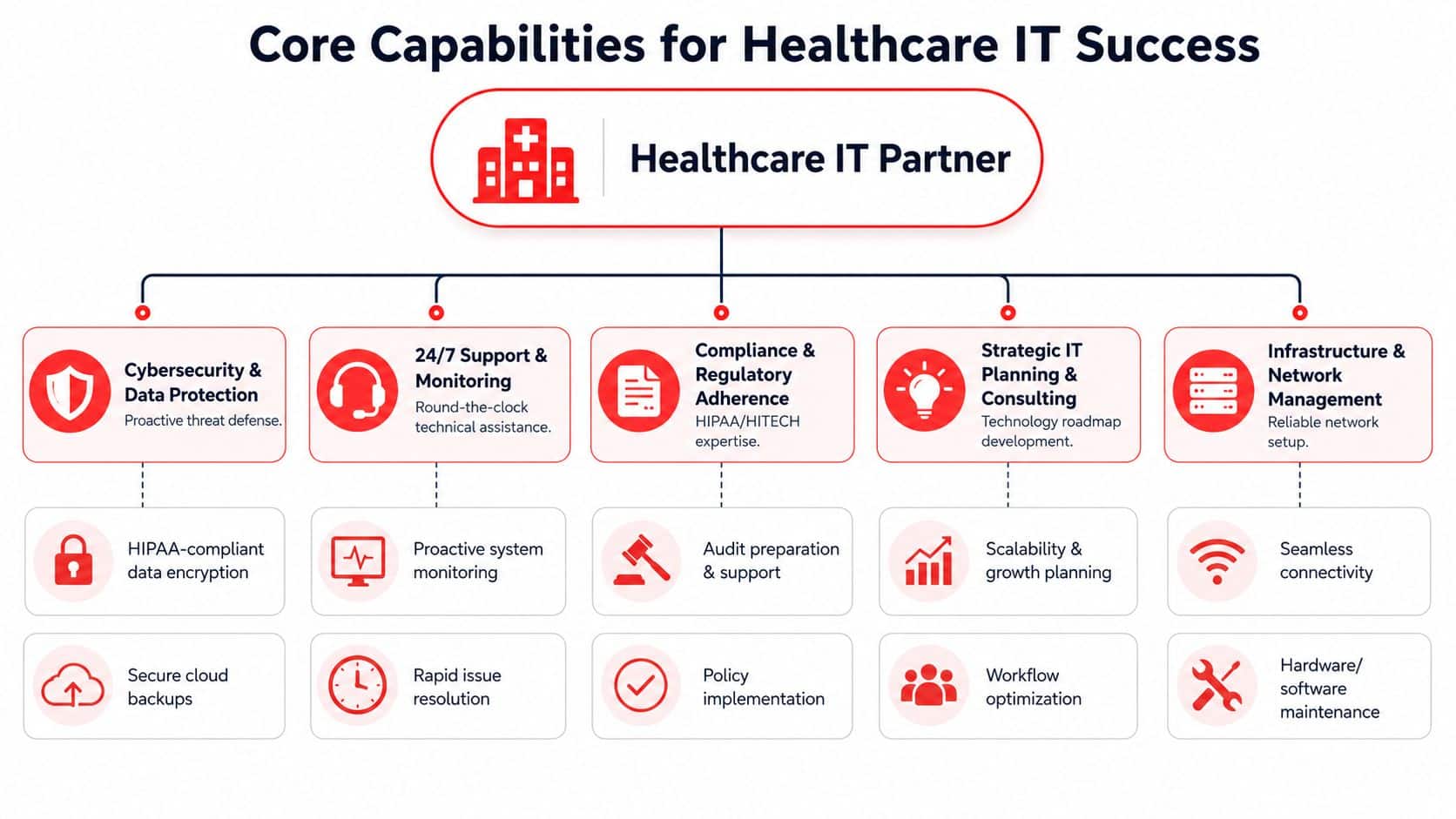
The strongest healthcare IT environments aren't built around one miracle product. They're built around a set of operational capabilities that work together. If one of these areas is weak, the rest of the setup usually gets exposed sooner or later.
Why reactive support fails in healthcare
Reactive support sounds cheaper until you look at what it leaves out. A technician can fix a failed workstation after a complaint comes in, but that doesn't help when the root cause is an unpatched device, a storage issue, unstable connectivity, or a login policy that keeps locking out staff.
Healthcare offices need support that notices conditions early. In Orlando healthcare environments, the most valuable technical baseline is a 24/7 monitoring stack that combines EHR availability monitoring, encryption, MFA, and audit logging because downtime interrupts care workflows and weak authentication or unencrypted data raises HIPAA exposure. That stack isn't a premium add-on. It's foundational.
The controls that matter most
A practice doesn't need every advanced security feature on day one. It does need the right controls in the right places.
- Continuous monitoring: Someone has to watch for service degradation, suspicious activity, and failed processes before a provider discovers them during clinic hours.
- Encryption and MFA: These are basic protections for devices, accounts, and sensitive data. If access control is loose, everything else becomes harder to defend.
- Audit logging: When an incident happens, your team needs a trail. Without logs, it's harder to understand what happened, who was affected, and what needs to be reported.
- Backup and recovery discipline: Backups only matter if they're usable. Testing recovery matters more than claiming recovery exists.
- Patch and endpoint management: Many small practices own the tools but lack the discipline to keep every endpoint consistently updated and protected.
For practices trying to understand how regulators look at accountability after a failure, this guide to HIPAA enforcement for practices is a useful complement to technical planning.
If a provider says your environment is secure but can't show how backups are tested, how MFA is enforced, and how logs are reviewed, they're selling reassurance, not resilience.
A mature partner should also be able to support the compliance side operationally. That includes evidence of control reviews, documented procedures, and practical guidance from teams that specialize in HIPAA compliance experts, not just generic business IT.
Operational support your staff will feel
The best healthcare IT work is often invisible to clinicians. Staff notice the absence of friction.
A capable partner should help your office with the parts of technology that shape daily throughput:
| Capability | What it changes for the practice |
|---|---|
| EHR support | Keeps chart access stable and shortens the time staff spend guessing whether the issue is local or vendor-side |
| Help desk coverage | Gives front desk, billing, and clinical staff a clear place to go when something breaks |
| Network management | Reduces dropped sessions, printing delays, wireless dead zones, and device conflicts |
| License and vendor management | Prevents renewal surprises, orphaned accounts, and finger-pointing between providers |
| Disaster recovery planning | Gives leadership a documented path for outages, ransomware events, weather disruptions, and office-level failures |
What works is layered and boring in the best way. Monitoring, identity controls, endpoint discipline, tested backups, and responsive support. What doesn't work is buying scattered security tools without clear ownership, documented processes, or anyone accountable for the outcome.
Why a Local Orlando Partner Is a Strategic Advantage
At 7:45 a.m., your front desk cannot print intake forms, one provider cannot reach the EHR, and a telehealth patient is waiting in the virtual room. In that moment, the value of a local IT partner is not marketing language. It is response time, onsite judgment, and a team that understands how a healthcare office in Orlando runs.

Orlando is a crowded healthcare market. Private practices compete for patients, staff, and referral relationships while handling a high volume of sensitive data across EHRs, patient portals, mobile devices, imaging systems, and telehealth platforms. That raises the bar for IT support. The job is not only to keep systems running. It is to keep care moving, protect patient information, and show that your practice can stand up to scrutiny after an incident or audit.
Florida law adds pressure to the response process. Under the Florida Information Protection Act, certain breaches affecting Florida residents trigger notification duties on a short timeline. A provider that works with Orlando medical practices should already build that clock into its incident handling, documentation, and escalation process instead of figuring it out in the middle of an event.
Local presence also matters for issues that remote support cannot fix quickly. A failed firewall, unstable office Wi-Fi, a damaged switch after a storm, poor cabling in a new suite, or exam-room devices that keep dropping off the network usually require hands-on work. Waiting for a distant provider to dispatch a subcontractor slows recovery and creates confusion about ownership.
There is also a practical difference in how local teams plan for Orlando operations. Many practices here support multilingual patient communication, satellite offices, and telehealth workflows that depend on reliable connectivity and predictable device performance. A partner who works in this market sees those patterns early and designs around them. That includes better wireless coverage in waiting areas, cleaner network segmentation for clinical and guest traffic, and support procedures that match how front-desk and clinical staff use technology.
Good local support is not about geography for its own sake. It is about accountability.
A nearby healthcare IT partner can usually offer:
- Faster onsite recovery: Hardware failures, office moves, and network outages get handled by a team that can arrive, assess the problem, and coordinate the fix directly.
- Stronger compliance follow-through: Incident response, access reviews, and policy enforcement are tied to Florida timelines and how your practice documents decisions.
- Better coordination across offices and vendors: Internet providers, copier vendors, phone systems, building management, and clinical software issues often overlap. Local teams can work those problems without making your staff play middleman.
- More realistic resilience planning: Orlando practices need continuity plans for storms, internet outages, and location-specific disruptions, not generic disaster recovery templates.
If you are comparing providers, this is a good point to review how to choose a managed service provider for a healthcare practice and test whether the firm can support your office under real operating pressure.
For Healthcare IT Services in Orlando FL, local knowledge is a strategic filter. It helps a practice move beyond basic ticket resolution and build an IT environment that supports patient care, holds up under compliance review, and recovers faster when something goes wrong.
Decoding Pricing and Engagement Models
A practice signs an IT agreement because the monthly fee looks reasonable. Three months later, a phishing incident hits, after-hours support is billable, vendor calls are out of scope, and backup testing was never included. That is how a low quote turns into a clinical disruption.
Price matters. Scope matters more.
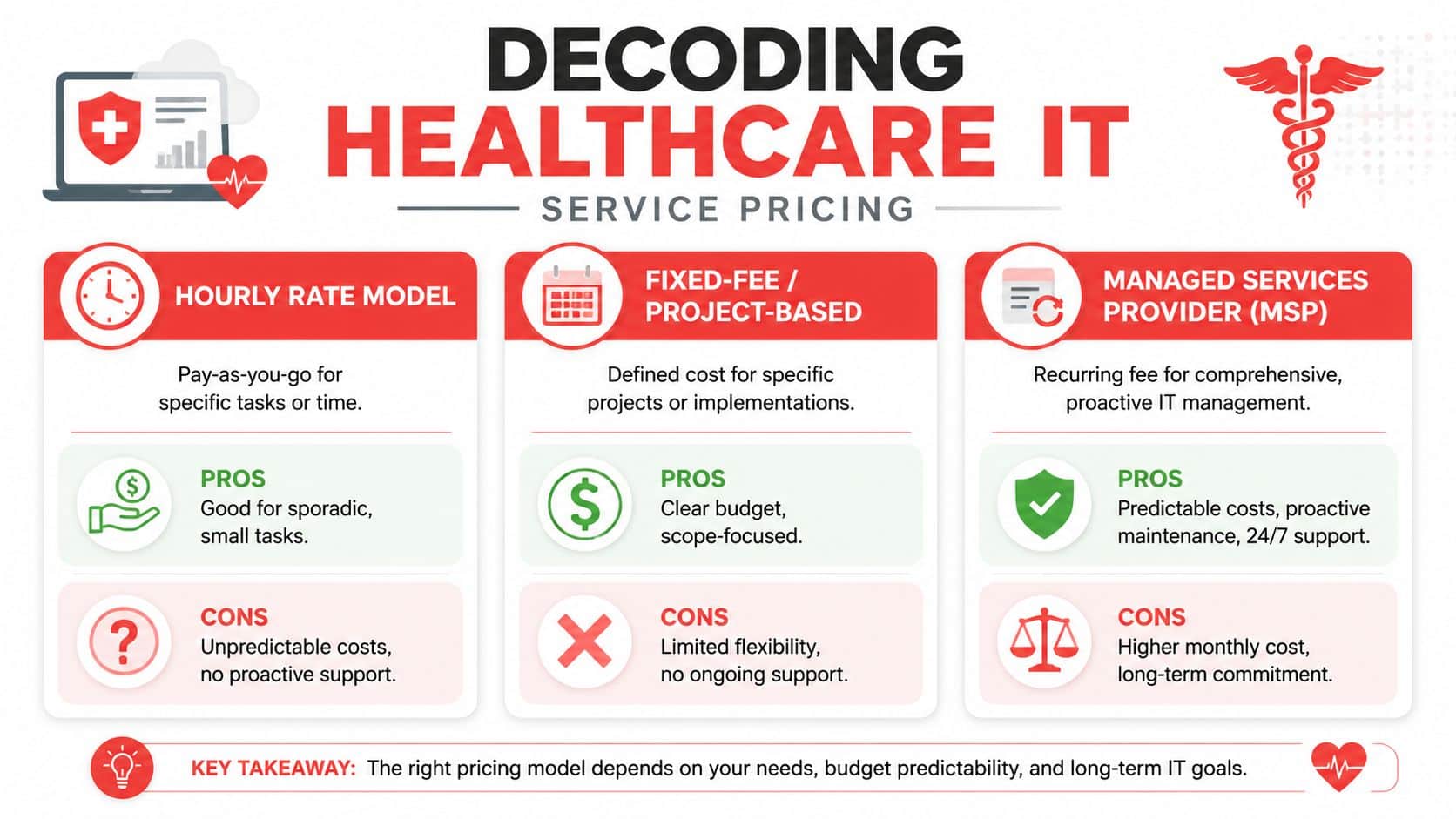
In Orlando, healthcare IT pricing usually falls into three patterns: hourly support, project work, and recurring managed services. Managed service agreements for private practices are often priced per user or per device per month, but the key difference is not the billing format. It is whether the agreement covers the security, support, and oversight your staff expects during a normal week and during a bad one.
How the main pricing models differ
Here is the practical difference between the common engagement models:
| Model | Best fit | Main trade-off |
|---|---|---|
| Hourly support | Small offices with infrequent issues and in-house oversight | Monthly costs stay low until problems stack up, then spending and downtime become unpredictable |
| Project-based work | EHR migrations, office openings, network refreshes, remediation projects | Good for defined change, but it does not provide day-to-day monitoring, access control, or incident handling |
| Managed services | Practices that need ongoing support, security management, compliance documentation, and predictable operations | Higher recurring spend, but clearer accountability and fewer gaps between tasks |
Hourly support can work for a very small practice with simple systems and a staff member who already owns the vendor relationships. In healthcare, that setup breaks down fast. A locked account, failed workstation, or internet outage affects scheduling, charting, billing, and patient communication at the same time.
Project-based work solves a different problem. It is useful when the scope is clear, such as opening a second location, replacing aging firewall hardware, or cleaning up years of deferred maintenance after an acquisition. It should not be confused with ongoing IT management.
Managed services usually fit healthcare operations better because they align with how risk shows up in a practice. Security alerts, user changes, patching, backup verification, device failures, and telehealth support do not happen as one-time events. They are continuous responsibilities. If you are reviewing proposals, this guide to choosing a managed service provider for a healthcare practice helps clarify what should be included before you sign.
What a predictable contract should include
A strong agreement defines responsibility in plain language. It should answer who handles what, how fast they respond, what is included each month, and what triggers extra charges.
Look for these elements in the scope:
- Support coverage: Business hours, after-hours response, escalation paths, and whether onsite visits are included or billed separately.
- Security services: Endpoint protection, patching, identity and access management, email security, monitoring, and documented response procedures.
- Compliance support: Risk-related documentation, audit support, policy enforcement tasks, and evidence that controls are reviewed instead of just installed.
- Vendor coordination: The IT partner should work directly with your internet carrier, phone provider, copier vendor, cloud applications, and line-of-business software support.
- Backup and recovery expectations: Backup monitoring, test restores, recovery objectives, and who owns recovery during an outage.
- Routine strategic work: Quarterly reviews, lifecycle planning, budgeting guidance, and recommendations tied to patient flow and staff productivity, not just hardware age.
One point gets missed in a lot of healthcare contracts. Telehealth support is not just a camera and a laptop. Orlando practices often serve patients with different language needs, device comfort levels, and internet reliability. If your agreement covers backend systems but ignores patient-facing workflow support, your staff will absorb that friction every day.
The best pricing model is the one that matches how your practice operates. A cheaper contract that excludes security, coordination, or recovery planning is usually more expensive once downtime, compliance pressure, and staff disruption are counted.
Your Checklist for Vetting Healthcare IT Providers
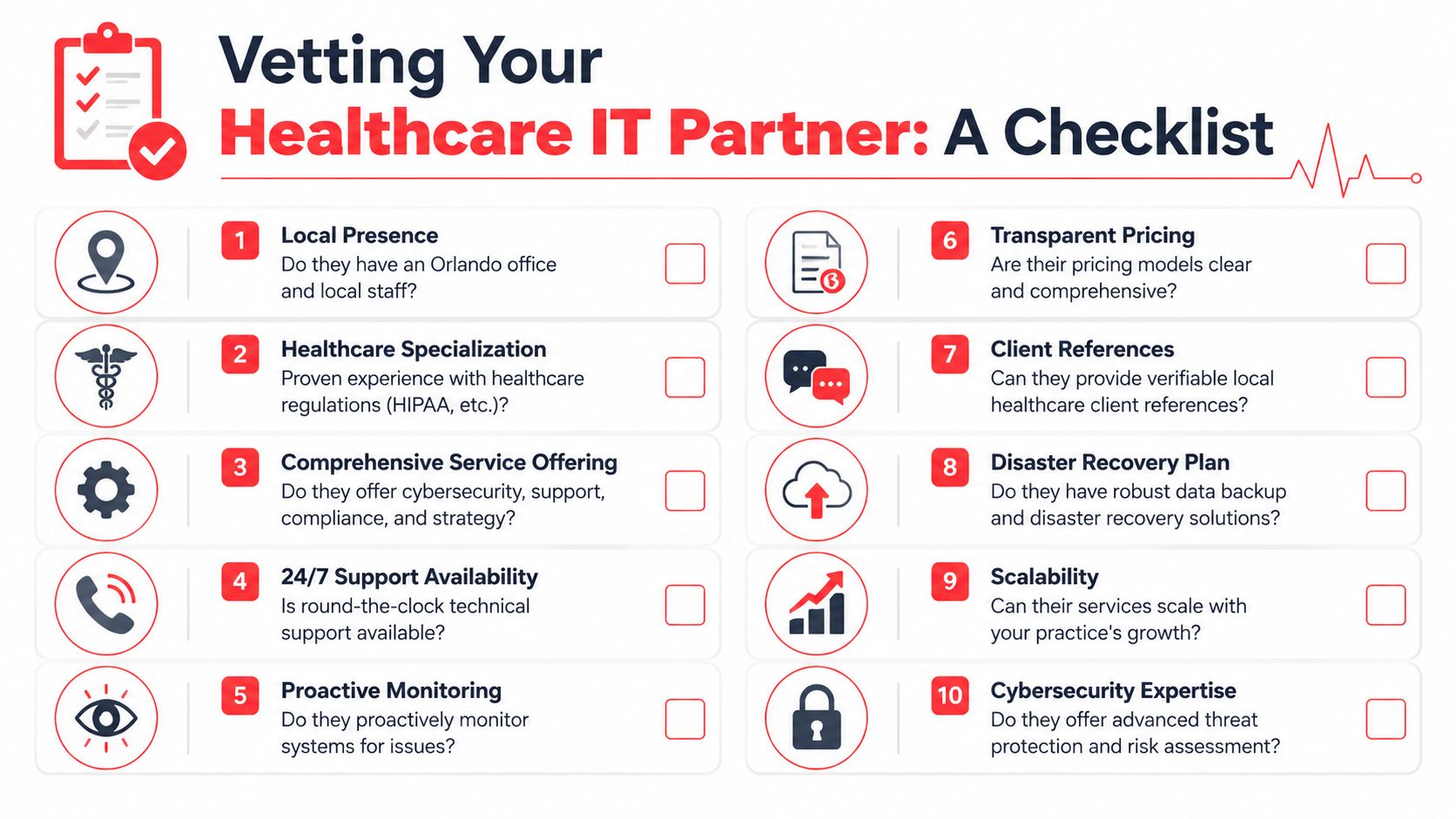
Most practices ask weak questions during vendor selection. “Do you support HIPAA?” is too broad. “Do you offer cybersecurity?” is barely a filter. Every provider knows how to answer yes.
The better approach is to ask questions that reveal process maturity, not marketing polish. You want evidence that the provider can support a clinical business under real pressure, not just maintain a server and close tickets.
One issue deserves much more attention in Orlando practices than it usually gets. Your IT partner should be able to support telehealth readiness and digital inclusion for underserved populations. Research notes that about 24 million people in the U.S. live in “digital deserts”, which matters if your patients face barriers around devices, internet access, or digital literacy (digital access and telehealth equity research). A provider that only thinks about backend uptime can still leave your patient-facing workflows weak.
Questions that expose real preparedness
Use questions that require specifics.
- Ask about backup testing: “How do you test backups, how often do you verify recoverability, and what would you show me as evidence?”
- Ask about identity controls: “How do you enforce MFA, review user access, and remove stale accounts when staff leave?”
- Ask about patch discipline: “Who owns patching for workstations, laptops, and network devices, and how do you track exceptions?”
- Ask about incident response: “What is your documented process if a ransomware event locks up user devices on a clinic day?”
- Ask about logging and visibility: “What audit trails are collected, who reviews them, and how would you investigate suspicious access?”
A reliable provider should be able to answer operational questions without switching into vague sales language.
Good answers are concrete. They describe workflows, ownership, evidence, and timelines. Weak answers lean on broad phrases like “best practices,” “enterprise-grade,” or “fully compliant” without showing how those claims are proven.
Questions most practices forget to ask
Some of the most important vendor questions aren't technical at all. They sit at the intersection of compliance, staffing, and patient access.
Consider asking:
- Telehealth support: “How do you help us reduce failed virtual visits caused by patient-side access issues?”
- Workflow fit: “Can you support hybrid operations where staff move between in-office care, remote admin work, and follow-up communication?”
- Documentation maturity: “What recurring reviews do you conduct for risk, recovery readiness, and policy alignment?”
- Staff turnover resilience: “If our office manager left next month, what documentation would let the next person step in without chaos?”
- Vendor governance: “How do you manage the third parties that touch our systems, data, or communications?”
Many providers fall short. They can talk about antivirus, help desk, and firewalls. They struggle when asked how technology choices affect no-shows, patient communication, remote follow-up, and access for patients who aren't digitally fluent.
“HIPAA-ready” isn't the finish line. The real test is whether the provider can keep your practice stable during outages, staffing changes, and patient workflow disruptions.
A simple scorecard for final decisions
Before you sign, score each provider across a few categories. Keep it simple and use plain language.
| Evaluation area | What to look for |
|---|---|
| Healthcare fit | Clear experience supporting regulated workflows, not just generic office IT |
| Security maturity | Monitoring, identity controls, patching, and incident response with evidence behind them |
| Operational clarity | Defined ownership, reporting, escalation paths, and documented procedures |
| Local support strength | Ability to respond onsite when physical systems or office infrastructure are involved |
| Patient workflow awareness | Understanding of telehealth, communication, and access barriers that affect real care delivery |
| Pricing transparency | Clear inclusions, exclusions, and response expectations |
The goal isn't to find a provider with the slickest pitch. It's to find one that can prove readiness, communicate clearly, and support the way your practice serves patients.
Conclusion The Right IT Is an Investment in Your Practice
Good healthcare IT doesn't just keep computers running. It protects patient trust, stabilizes staff workflows, and gives leadership confidence that the practice can keep operating through disruptions.
That's the core value of specialized Healthcare IT Services in Orlando FL. You're not buying a generic support desk. You're putting structure around cybersecurity, compliance, uptime, vendor management, and recovery. Done well, that reduces stress across the office because people stop improvising around fragile systems.
The strongest choice usually comes down to a few things. Does the provider understand healthcare operations, not just technology? Can they support Orlando's local compliance and response realities? Can they prove how they monitor, secure, document, and recover your environment? And can they support patient-facing workflows, including telehealth readiness, rather than focusing only on the back office?
If the answer to those questions is unclear, keep asking. A serious partner won't be annoyed by detailed due diligence. They'll welcome it.
The right IT relationship should help your practice run cleaner, safer, and with fewer surprises. That makes it an operational investment, not overhead.
If you want a practical next step, Cyber Command, LLC can help you evaluate where your current setup is strong, where it's exposed, and what a more resilient support model could look like for your Orlando healthcare practice. A focused assessment can give you clarity on security, uptime, compliance readiness, and day-to-day support without forcing a rushed decision.