
Microsoft 365 Support in Orlando FL: A Business Guide

A lot of Orlando business owners are in the same spot right now. Microsoft 365 runs email, meetings, file sharing, document workflows, and often the first layer of identity and access across the company. When it works, nobody thinks about it. When it doesn't, attorneys miss client communication, accounting teams lose access to shared files, field supervisors can't coordinate crews, and front-office staff start improvising with personal email or text threads.
That's why Microsoft 365 support isn't just a helpdesk issue anymore. For Central Florida organizations, it's an uptime issue, a cybersecurity issue, and a cost-control issue. If your tenant is loosely managed, your business feels it in slower onboarding, messy permissions, confusing licensing, and higher exposure to phishing, account takeover, and avoidable downtime.
Table of Contents
- Why Orlando Businesses Rethink Microsoft 365 Management
- The Core Components of Microsoft 365 Support
- The Local Advantage of Orlando-Based 24/7 Support
- Cybersecurity and Resilience in Your Microsoft 365 Tenant
- How to Evaluate M365 Support Providers in Central Florida
- Your Microsoft 365 Security and Optimization Checklist
- Microsoft 365 Support FAQ for Orlando Businesses
- Is Microsoft's built-in support enough for a business?
- Can a support partner help with industry-specific compliance needs?
- We already have an internal IT person. Do we still need outside Microsoft 365 support?
- What should we look for first in Microsoft 365 Support in Orlando FL?
- Where can business owners learn more about hardening Microsoft 365?
- Is support mainly about fixing user problems?
Why Orlando Businesses Rethink Microsoft 365 Management
An Orlando professional firm usually doesn't decide to “improve Microsoft 365 management” on a calm Tuesday. The push comes after friction builds. New employees wait too long for access. Shared mailboxes stop making sense. Teams permissions sprawl. Someone clicks a phishing email. A partner can't find the latest file version before a client meeting. The problem isn't that the business bought the wrong subscription. The problem is that a business platform got treated like a basic software login.
That's become harder to ignore in Central Florida because Microsoft 365 now sits in the middle of daily operations. For law offices, accounting firms, engineering groups, healthcare practices, and public-facing organizations, it functions more like infrastructure than an app bundle. If email, identity, collaboration, and document access all live in one environment, support has to be strategic.
Orlando is part of the Microsoft 365 ecosystem
Microsoft has also signaled that Orlando matters to its ecosystem. Its own support materials note that the Microsoft 365 Community Conference 2026 was scheduled in Orlando on April 21 to 23, 2026, reinforcing the city's role as a hub for Microsoft 365 education, partner engagement, and operational know-how, according to Microsoft's customer service and support documentation.
That matters because local demand changes the service model. When a region has more organizations standardizing on the same platform, businesses need more than one-off setup help. They need repeatable onboarding, better governance, and support teams that can align Microsoft 365 with security and compliance expectations.
Practical rule: If your company would stop functioning cleanly without Outlook, Teams, SharePoint, or Entra-based sign-in, you're not buying “software support.” You're managing business continuity.
A lot of Orlando companies reach this point after outgrowing ad hoc administration. One person in the office knows “just enough” to create users and reset passwords, but not enough to establish policy, audit risk, or plan for outages. That's usually when leaders start looking at a broader managed IT support model in Orlando instead of treating Microsoft 365 as a standalone issue.
The Core Components of Microsoft 365 Support
Microsoft 365 support should solve business problems, not just close tickets. If a provider only talks about password resets and app installs, that's too narrow. Good support reduces interruptions, keeps permissions under control, protects data, and makes sure your subscription spend matches how people work.
What support should include
A complete Microsoft 365 support function usually covers these areas:
- User lifecycle management means onboarding, offboarding, access changes, mailbox setup, group membership, and role-based permissions. This is where businesses either stay organized or create long-term risk.
- Tenant administration includes policy review, identity controls, collaboration settings, and governance. This is what keeps convenience from turning into sprawl.
- Security operations inside the tenant cover alerts, suspicious sign-ins, phishing response, mailbox compromise containment, and conditional access tuning.
- License management keeps the environment aligned with real job roles. Many businesses over-license some employees and under-support others because nobody revisits the plan after the initial rollout.
- Migration and change support matter during acquisitions, office moves, leadership changes, or line-of-business app transitions. Microsoft 365 often becomes the center of those projects whether anyone planned for it or not.
- Training and adoption support helps staff use the tools correctly. A secure platform still fails if people keep sharing sensitive files the wrong way or storing records in the wrong locations.
Why skilled support matters financially
This work has real market value in Orlando. As of June 2026, ZipRecruiter reported an average hourly pay of $21.61 for “Microsoft help desk remote” roles in Orlando, with a posted range of $17 to $28 per hour, according to ZipRecruiter's Orlando job market listing.
That number doesn't tell you what a support contract should cost. It does show something important. Microsoft 365 support is a defined professional capability, not an informal side task for whoever seems “good with computers.” If your business depends on the platform, it needs people who know how user issues connect to licensing, identity, security, and administration.
A simple way to assess your own environment is to ask whether support covers only incidents or also outcomes.
| Support area | What it looks like in practice | Business result |
|---|---|---|
| Reactive help | Password resets, app troubleshooting, mailbox fixes | Employees get unstuck |
| Administrative control | User provisioning, license alignment, policy management | Fewer errors and cleaner operations |
| Security management | Access reviews, alert handling, phishing response | Lower exposure to account misuse |
| Data protection | Retention decisions, backup planning, recovery workflows | Better continuity under stress |
| Optimization | Storage cleanup, archive planning, workflow simplification | More predictable spend and better usability |
Support that starts and ends with “submit a ticket” usually leaves the hardest problems untouched.
The best Microsoft 365 Support in Orlando FL is broad enough to stabilize the environment and disciplined enough to keep it from drifting every quarter.
The Local Advantage of Orlando-Based 24/7 Support
A local support partner changes the experience in ways most businesses don't appreciate until something urgent happens. During normal operations, local support means faster context, fewer explanations, and less time spent proving that the issue matters. During an incident, it means you're not trapped between a platform queue, an internal staff member with partial visibility, and a finance person who can't get a billing issue resolved until later.

Where platform support stops short
Microsoft states that technical support for Microsoft 365 business and enterprise services is available 24 hours a day, seven days a week in English, while billing support is limited to U.S. business hours, Monday through Friday, 9:00 AM to 5:00 PM, according to Microsoft 365 business support options.
That distinction matters more than it sounds. Real business problems rarely arrive cleanly labeled as “technical” or “billing.” A tenant issue might involve licensing, suspended services, user assignment confusion, renewal timing, or an admin access problem that touches both operations and account management. If your provider only handles one side of that picture, your team still ends up coordinating the mess.
Why local context changes outcomes
An Orlando-based support team usually understands the operating realities behind the ticket. A medical practice cares about patient communication continuity and access discipline. A law office cares about document handling, chain of responsibility, and after-hours responsiveness. A field-service company cares about mobile access and dispatch continuity. Those aren't abstract categories. They change how support should be delivered.
A local model also tends to work better when your business has:
- Multiple offices or remote staff who need standardized access and escalation paths
- An internal IT generalist who needs backup on security, policy, and higher-level Microsoft 365 administration
- Industry obligations that make sloppy permissions or unmanaged shared data unacceptable
- Executives who want accountability instead of a rotating queue with no institutional memory
One option in this category is Cyber Command, LLC, which provides U.S.-based managed IT, co-managed support, and Microsoft 365-related operational coverage for organizations that want one team handling both day-to-day issues and broader platform oversight.
For many businesses, the local advantage isn't geography by itself. It's proximity plus ownership. Someone knows your tenant, knows your users, knows how your approvals work, and knows who to call when a “small” issue starts affecting revenue.
Cybersecurity and Resilience in Your Microsoft 365 Tenant
Most Microsoft 365 security problems don't start with dramatic technical exploits. They start with ordinary work. An employee opens a convincing email. A manager shares too broadly because it's faster. A former contractor keeps access longer than they should. A mailbox rule forwards messages unnoticed. A rushed approval leads to the wrong person getting the wrong data.
That's why Microsoft 365 support and cybersecurity should never be separated in practice. The same environment that enables productivity also concentrates identity, email, files, collaboration, and sensitive records in one place.
The threats that show up inside everyday work
For Orlando firms in professional services, healthcare-adjacent operations, industrial environments, and public-serving organizations, the most common risks are usually operational before they become technical:
- Business email compromise exposure grows when executives, finance staff, and client-facing users don't have tightly managed sign-in protections and review processes.
- Permission creep creates risk when teams inherit access from old projects, staff changes, or temporary exceptions that nobody removes.
- Data leakage through collaboration tools happens when file sharing rules, guest access, and link behavior aren't governed intentionally.
- Insider misuse or accidental mishandling becomes harder to spot when there's little visibility into unusual behavior. For leaders thinking about internal risk, this overview of Logical Commander for insider threat prevention is useful because it frames how normal user activity can become a real security event.
A support partner should harden the tenant in practical ways. That includes stronger identity controls, access reviews, escalation playbooks, administrative separation, and structured response to suspicious email or account activity. It should also include backup and recovery planning beyond the assumption that the platform will always be available. For businesses reviewing that gap, SaaS protection for Microsoft 365 data is part of the conversation because recovery expectations need to be defined before an incident, not during one.
Security in Microsoft 365 isn't just about blocking attackers. It's about controlling normal user activity so mistakes don't become incidents.
Resilience matters when the platform has a bad day
Service disruptions do happen. Downdetector tracks Microsoft 365 incidents in real time, and that matters because many businesses still plan as if email, Teams, and SharePoint will always be there when needed, as reflected on Downdetector's Microsoft 365 incident tracking page.
The primary question during an outage isn't whether the problem is “Microsoft's fault.” It's whether your business can keep operating. A resilience plan should address:
- Alternate communication paths so teams can coordinate if Teams or Outlook are unavailable
- Offline work methods for critical documents, schedules, and client deliverables
- Admin escalation paths so someone owns status checks, internal updates, and decision-making
- Recovery workflows for what gets verified first once services return
- Local business continuity priorities by department, not just a generic company-wide response
A firm with no continuity plan treats an outage as chaos. A prepared firm treats it as a managed interruption.
How to Evaluate M365 Support Providers in Central Florida
Most provider evaluations go wrong because business owners ask broad questions and get polished broad answers. “Do you support Microsoft 365?” isn't a useful question. Almost every provider will say yes. What you need to know is how they support it, who owns what, and what happens when a user issue turns into a security event, a licensing dispute, or a business interruption.
Questions that expose the real service model
Ask direct questions that reveal the operating model behind the proposal:
- Who owns the tenant day to day. Ask whether they handle user administration, policy changes, escalations, and vendor coordination, or whether your staff still has to quarterback those tasks.
- What happens after hours. “24/7” can mean many things. Ask whether critical issues are worked live, queued for later review, or escalated only under narrow conditions.
- How do you handle security events inside Microsoft 365. You want a process, not a slogan. Ask about suspicious sign-ins, compromised mailboxes, executive impersonation, and data access review.
- How do you approach compliance-sensitive environments. For a practical outside perspective, these HIPAA and PCI compliance tips are worth reviewing because they show the kind of policy and handling questions regulated businesses should already be asking.
- What does co-managed mean in your model. Some providers effectively complement internal IT. Others just offload commodity tickets.
If you're comparing firms, this guide on how to choose a managed service provider can help organize the decision around response model, accountability, and operational fit.
Co-managed vs fully managed Microsoft 365 support
The right model depends on your internal capacity and how much ownership you want to keep.
| Feature | Co-Managed IT Support | Fully Managed IT Support |
|---|---|---|
| Internal IT involvement | Internal staff keeps primary ownership and uses the partner for depth, coverage, or after-hours support | Provider handles primary ownership for support, administration, and routine platform oversight |
| Best fit | Companies with capable in-house IT that need backup, security depth, or project support | SMBs that need consistent coverage without building an internal Microsoft 365 support function |
| Escalation flow | Internal IT often remains the first decision-maker | Provider usually becomes the main operational point of contact |
| Policy and governance | Shared responsibility, which works only if roles are clearly documented | More centralized, often easier for standardization and accountability |
| Coverage strength | Strong when internal IT is available and aligned | Strong when the business wants one team responsible across the full lifecycle |
| Common risk | Gray areas if responsibilities aren't defined | Overreliance on the provider if reporting and documentation are weak |
The best proposal isn't the one with the longest service list. It's the one that makes ownership unmistakably clear.
A good provider should be able to explain where their responsibility starts, where it ends, and how your business avoids gaps.
Your Microsoft 365 Security and Optimization Checklist
A Microsoft 365 tenant doesn't need to be perfect to be safer and easier to manage. It does need regular attention. For most Orlando businesses, the biggest improvements come from tightening access, reducing clutter, and documenting recovery expectations.
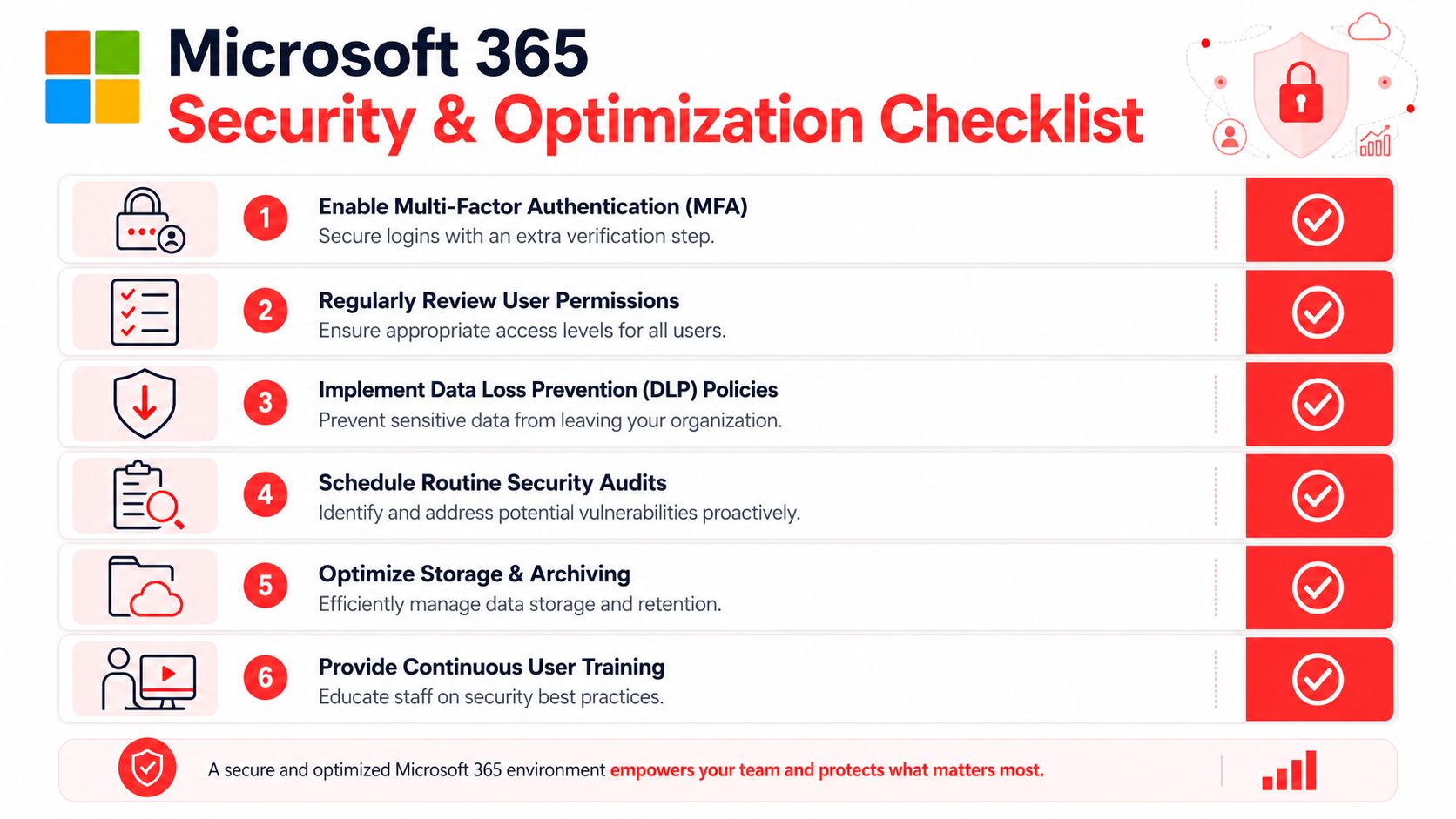
Use this checklist to tighten your environment
- Review sign-in protection and confirm stronger authentication is enforced consistently, especially for leadership, finance, and administrators.
- Audit privileged access so admin rights are limited, documented, and reviewed when staff roles change.
- Check sharing and guest access settings to make sure convenience hasn't opened the door to uncontrolled file exposure.
- Map your backup and recovery expectations so leadership knows what can be restored, by whom, and under what process.
- Reconcile licenses with real job roles instead of renewing the same way every cycle.
- Inspect shared mailboxes, groups, and Teams sprawl to remove old structures that confuse users and expand risk.
- Set a cadence for security review that includes suspicious activity, policy changes, and offboarding quality.
- Train users on the workflows they use. Generic awareness sessions help less than role-specific guidance tied to email, file sharing, approvals, and mobile access.
This checklist works whether you're planning a migration or cleaning up years of drift. The key is consistency. A tenant usually becomes risky through accumulated exceptions, not one big mistake.
Microsoft 365 Support FAQ for Orlando Businesses
Is Microsoft's built-in support enough for a business?
Usually not by itself. Platform support can help with product issues, but most companies need someone to manage the full operating picture, including user administration, licensing alignment, security response, and business continuity decisions.
Can a support partner help with industry-specific compliance needs?
Yes, if they understand the environment beyond basic ticket handling. For healthcare-adjacent, financial, legal, and public-serving organizations, support has to account for access control, data handling, audit readiness, and documented response processes.
We already have an internal IT person. Do we still need outside Microsoft 365 support?
Often, yes. Co-managed support works well when the internal team knows the business but needs deeper Microsoft 365 administration, after-hours coverage, cybersecurity support, or help with governance and recovery planning.
What should we look for first in Microsoft 365 Support in Orlando FL?
Start with ownership, response model, and security depth. If a provider can't clearly explain who handles incidents, policy changes, user lifecycle management, and continuity planning, the relationship will likely stay reactive.
Where can business owners learn more about hardening Microsoft 365?
If you want an additional outside resource, this roundup of actionable M365 security advice is a useful supplement to internal planning because it helps frame practical controls and user-focused safeguards.
Is support mainly about fixing user problems?
No. User support is the visible part. The larger value is preventing recurring issues, reducing risk, managing change cleanly, and giving leadership predictable operations instead of recurring surprises.
If your business relies on Microsoft 365 for email, collaboration, file access, and identity, support should protect more than user productivity. It should protect uptime, security, and decision-making. Cyber Command, LLC works with organizations in Orlando and beyond on managed IT, co-managed support, cybersecurity, and Microsoft 365 operations for businesses that want clearer ownership, stronger resilience, and predictable day-to-day support.