
How to Recover From a Ransomware Attack: An SMB Guide

The screen locks. A ransom note appears. Staff start shouting from down the hall that files won’t open. Your practice management system, accounting platform, or shared drive may already be affected.
If you’re a business owner in Orlando, Winter Springs, or anywhere in Central Florida, this is the moment when bad decisions get made fast. People reboot machines, reconnect laptops, forward screenshots over company email, or start talking about paying before anyone knows what was hit.
The way you recover from a ransomware attack starts with discipline, not speed. You need to stop the spread, preserve evidence, bring in the right people, and make business decisions in the right order. For law firms, medical practices, accounting firms, and other professional services companies, every hour of confusion turns into missed appointments, lost billable time, client exposure, and avoidable cost.
The First 60 Minutes Triage and Containment
The first hour is about one thing. Stop the attacker from reaching more systems.
Ransomware rarely stays on the first machine it touches. Attackers move across file shares, servers, remote sessions, and saved credentials. That movement is called lateral movement, and it’s why shutting a laptop lid or rebooting a PC isn’t enough. Rubrik notes that malware can remain in systems for up to six months, which creates a serious backup contamination risk and makes immediate isolation critical before recovery starts (Rubrik on ransomware recovery).
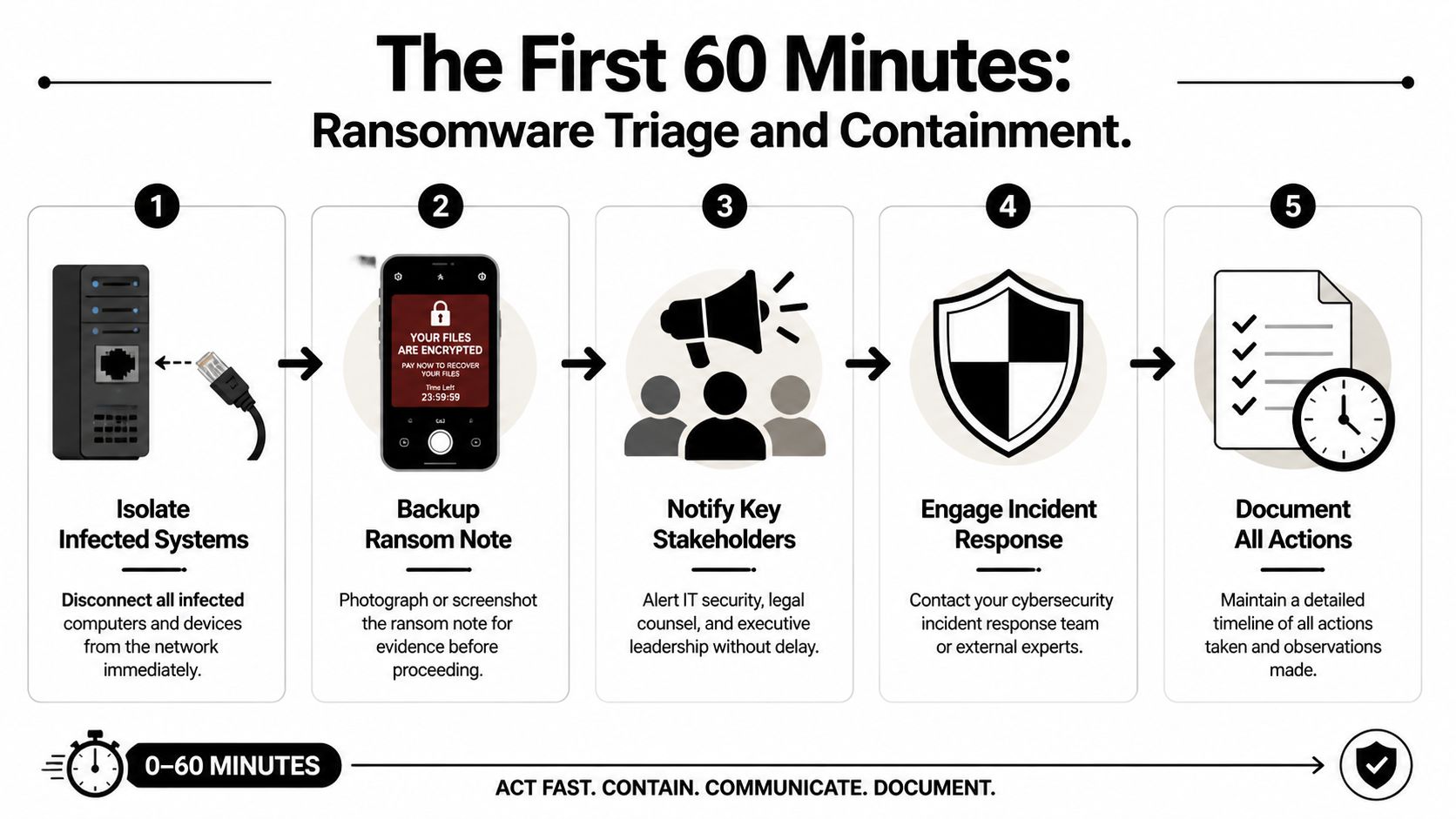
Do these things immediately
Physically disconnect affected devices
Unplug the network cable. Disable Wi-Fi. Remove docking connections. If a user is in the office, have them step away from the machine after disconnecting it.Isolate critical systems
If a file server, application server, or virtual host shows signs of encryption or strange login activity, isolate it from the network before it can infect more assets.Capture the ransom note
Take photos with a phone or screenshots if that can be done safely. Record filenames, extensions, message text, and the time you discovered the issue.Freeze internal chatter on company systems
If your email or chat may be compromised, stop using it for response coordination. Move to personal phones or another clean channel.Start a written timeline
Write down who discovered it, what they saw first, what devices are involved, and every action taken afterward.
What not to do
When people panic, they usually reach for the wrong fix.
- Don’t reboot infected systems: A restart can destroy useful volatile evidence and make forensics harder.
- Don’t begin random file restores: You can overwrite clues about what happened and restore into an unsafe environment.
- Don’t assume one machine means one machine: In many cases, the visible note is just the first symptom.
- Don’t let employees keep “checking” shared folders: That can spread damage and create more confusion.
- Don’t pay immediately: That decision comes later, with legal, insurance, and forensic input.
Practical rule: Unplugging an infected machine from the network is usually more useful than turning it off in the first few minutes.
Give staff a short script
Your employees need direction fast. Keep it simple and controlled.
Use language like this:
We’re investigating a security incident. Stop using shared drives and do not reboot your computer. If you see unusual file names, ransom messages, or login prompts, disconnect from Wi-Fi or unplug the network cable and call the designated point person immediately. Do not email screenshots or message coworkers about it on company systems.
That message matters in a busy Orlando office where people share printers, file servers, cloud apps, and line-of-business software all day. A small accounting firm in Winter Springs can spread damage quickly if one compromised user account still has access to tax files, payroll data, and document storage.
Lock down visibility, not just devices
Containment also means finding out whether the ransom note is the whole incident or just the visible part. Security teams typically use EDR tools to trace process activity, suspicious logins, and spread patterns across endpoints. If you want a plain-English primer on how those tools help SMBs during active incidents, this overview of EDR and XDR for SMB cyber defense is worth reading.
In the first hour, calm beats clever. The companies that recover best don’t improvise. They isolate, document, and keep people from making the blast radius larger.
Mobilize Your Response Team Who to Call and When
Once containment starts, build your response cell. Don’t make every decision yourself, and don’t let ten people make ten separate calls. Pick one internal incident lead and start working through the outside contacts in a disciplined sequence.
For a Central Florida medical office or law firm, the pressure is different from a large enterprise. You may not have an in-house security team, but you still need a war-room mindset. Technical containment, insurance requirements, legal exposure, and reporting obligations all begin quickly.
The four calls that matter most
The first call is your incident response partner. They help determine what is affected, whether the attacker still has access, and how to contain the spread without destroying evidence.
The second is your cyber insurer. Many policies require prompt notice. They may also require approved vendors, approved counsel, or specific steps before certain recovery costs are covered.
Your third call is legal counsel. That’s especially important if you handle patient information, financial records, client files, or regulated personal data. Counsel helps guide privilege, notification questions, and communications.
The fourth is law enforcement. That doesn’t mean they take over your recovery. It means you create an official record and may receive intelligence relevant to the threat group or extortion activity.
Ransomware response team roles and triggers
| Who to Call | When to Call | Primary Role | Information to Provide |
|---|---|---|---|
| Incident response partner | Immediately after initial isolation begins | Technical containment, scoping, forensics, recovery guidance | Time of discovery, affected systems, screenshots of ransom note, current containment actions |
| Cyber insurance provider | As soon as you confirm likely ransomware activity | Open claim, explain policy requirements, coordinate approved vendors | Policy number, incident summary, systems impacted, whether data access or operations are disrupted |
| Legal counsel | As soon as business data, regulated data, or client information may be involved | Preserve privilege, advise on compliance, guide communications and risk decisions | What data may be involved, business units affected, copies of extortion messages, current facts only |
| Law enforcement | After initial containment and core advisors are engaged | Official reporting, intelligence sharing, support on extortion and criminal activity | Timeline, ransom note details, indicators observed, affected business functions |
What each party needs from you
Don’t give long narratives. Give facts.
Prepare this short packet before each call:
- Discovery details: Who found it, when they found it, and what they saw first.
- Business impact: What’s unavailable right now, such as scheduling, document access, phones, billing, or EHR access.
- Scope you know, not scope you fear: Name confirmed systems only.
- Evidence collected so far: Photos, screenshots, filenames, user reports.
- Actions already taken: Devices unplugged, servers isolated, accounts disabled, backups paused.
Keep internal leadership aligned
Many SMBs stumble when the owner tells staff one thing, the office manager tells them another, and a vendor starts restoring machines before legal or insurance approves the path.
A cleaner approach is to appoint:
- One decision-maker: Usually the owner, managing partner, administrator, or COO.
- One technical liaison: Whoever is speaking with the response team.
- One communications coordinator: The person who sends employee instructions and external updates.
If you want a useful non-technical reference on how people and communication roles function during disruption, Paradigmie’s crisis management article is a good reminder that incidents fail just as often from confusion as from malware.
A ransomware event is both a security incident and an organizational crisis. Treat it as both.
A mature response doesn’t start during the attack. It starts with decisions you made before it. If your team needs a stronger framework afterward, a documented incident response plan for efficiency helps remove guesswork the next time something goes wrong.
Preserve Evidence for Forensics and Insurance
The strongest urge after a ransomware event is to wipe everything and get back to work. That instinct is understandable, but it often creates a second problem. You lose the evidence needed to prove what happened, support an insurance claim, and identify how the attacker got in.
Treat affected systems like a digital crime scene. If someone breaks into a physical office in Orlando, you don’t let employees clean the room before investigators arrive. The same principle applies here.

Why preservation matters to the business
Forensics is not academic busywork. It answers business questions that determine what happens next.
First, it helps support insurance claims. Carriers often want a defensible timeline, evidence of impact, and documentation of response actions.
Second, it helps legal counsel assess exposure. If an attacker accessed sensitive files before encryption, your obligations may look very different than if the attack was limited to a few endpoints.
Third, it tells you whether your recovery path is safe. If you don’t know the original entry point, you may rebuild servers and reconnect the same compromised account or remote access method a few days later.
Preserve first, clean later
Here’s the practical approach most businesses should follow:
- Leave critical systems in their current state if advised by forensics: Don’t casually power them off.
- Disconnect them from the network instead: Isolation protects the rest of the environment while preserving evidence.
- Export and retain logs: Firewall, endpoint, identity, VPN, cloud admin, and backup logs can all matter.
- Save copies of extortion messages: Include chat portals, email threats, and ransom note filenames.
- Record user observations: Sometimes the receptionist or billing clerk noticed strange login prompts days earlier. That timeline can matter.
Evidence that often gets lost
A surprising amount of useful evidence disappears because well-meaning staff try to help.
| Evidence Type | Why It Matters | How It Gets Lost |
|---|---|---|
| Ransom note and file extensions | Helps identify the strain and extortion workflow | Users delete files or close pop-ups without capture |
| Authentication logs | Shows suspicious access and account misuse | Logs roll over or systems get rebuilt too quickly |
| Endpoint state | Preserves clues about malware execution and tools used | Machines are rebooted, wiped, or reimaged |
| Staff observations | Helps establish dwell time and first symptoms | No one writes down what happened while it’s fresh |
Don’t let convenience destroy clarity. A rushed wipe can make the next month harder than the attack itself.
For a medical practice, legal office, or financial services firm, evidence preservation protects more than IT. It protects claim recovery, regulatory posture, and the ability to explain to clients what happened. Recovery is important, but informed recovery is what keeps the same attacker from walking back in.
The Ransom Negotiation Decision Framework
The hardest question usually arrives early. Should we pay?
There isn’t a responsible one-word answer. Anyone who tells an Orlando business owner to always pay or never pay is skipping the reality of payroll, patient care, court deadlines, client commitments, and cash flow. You need a decision framework that weighs cost, time, legal risk, and the chance that paying still won’t solve the problem.

IBM’s discussion of ransomware response highlights the financial reality for professional services firms. For small-to-mid-sized businesses such as law firms and medical offices, downtime directly translates to lost billable hours and client harm. Their example frames the kind of analysis leaders have to make: “Recovery cost $150k, downtime 3 weeks” versus “Ransom demand $50k, potential recovery 3 days” (IBM on ransomware response decisions).
Start with business math, not emotion
Build the decision around four questions.
How much does downtime cost your operation
A dental office without scheduling and imaging access loses appointments. A law firm without document management loses billable work and case momentum. An accounting firm locked out during a filing deadline may face client fallout immediately.
List the business functions that are down:
- client service
- scheduling
- billing
- records access
- communications
- compliance work
Then estimate what each lost day means operationally. If you don’t know your cost structure exactly, still map the impact qualitatively. The point is to move from panic to informed trade-offs.
What does insurance allow or require
Before any negotiation discussion, read your policy with counsel and the carrier. Some policies require approved breach coaches, negotiators, or forensic firms. Some cover parts of recovery but not all extortion-related costs. Some impose conditions that become painful if you act first and notify later.
How confident are you in recovery without paying
Technical facts are crucial. If backups are intact, your position is much stronger. If backups are questionable, your options narrow fast.
What are the non-financial risks of paying
Payment carries real downsides:
- you may not receive a working decryptor
- the decryptor may work badly or slowly
- the attacker may still retain stolen data
- your company may be marked as willing to pay in the future
- legal and sanctions issues may need careful review
A practical decision matrix
| Decision Factor | Favors Recovery Without Paying | Favors Considering Negotiation |
|---|---|---|
| Backup condition | Clean, validated, recent, accessible | Uncertain, compromised, or unavailable |
| Operational tolerance | Business can sustain downtime with workarounds | Business harm escalates quickly and severely |
| Insurance posture | Carrier supports forensic-led recovery path | Carrier permits and structures extortion response |
| Legal and regulatory concerns | Payment adds more risk than benefit | Counsel advises negotiation can be explored lawfully |
| Trust in attacker promises | Low confidence in criminal claims | No good alternative, despite low trust |
Paying for a key is not the same as buying certainty.
In practice, the best decision is often the least damaging one, not the morally satisfying one. But that decision should be made by leadership with legal, insurance, and incident response input together. Not by the loudest person in the room and not in the first wave of panic.
Restoring and Rebuilding Your Business Operations
Once the containment work is stable and the decision path is clear, recovery becomes a reconstruction project. This part needs patience. Businesses get into trouble when they treat restore as a race instead of a controlled rebuild.
The central rule is simple. Don’t restore blindly into production. Validate what’s clean first, test it in isolation, then rebuild core systems from a known good state.
Validate backups before trusting them
Backup strategy either saves you or disappoints you. The data is clear that effective backup protocols materially improve recovery speed. In 2025 Sophos data summarized by N2WS, 53% of organizations recovered within one week, and 16% achieved full recovery in a single day. At the same time, only 54% of victims with encrypted data restored it using backups in 2025, which was the lowest rate in six years, showing how often attackers now target backup systems too (N2WS ransomware recovery statistics).
That means your backup process should include more than checking whether files exist. It should include:
- anti-malware scanning
- validation of backup integrity
- review of restore points over time
- isolated test restores before production use
Rebuild in phases
A clean recovery usually follows a sequence, not a single button click.
Phase one is the sandbox restore
Restore critical systems into an isolated environment first. Confirm the data opens correctly, applications function, and no malicious behavior appears during testing.
Phase two is infrastructure rebuild
Rebuild affected servers and workstations from trusted images or clean installation media. Don’t rely on old snapshots or images unless they’ve been validated. Apply security patches and review identity controls before reconnecting those systems.
Phase three is controlled reintroduction
Bring systems back online by business priority. For many Central Florida firms, that means core line-of-business systems first:
- practice management
- document management
- accounting systems
- scheduling
- secure communications
Expect extra time for malware validation
Rubrik’s guidance notes that pre-restoration security scanning can add 24 to 48 hours to recovery because teams need to validate systems and backups before rollback. That time can feel painful when your office is down, but skipping it is how businesses restore infected data back into a fresh environment.
Recovery gets faster when the steps are slower and cleaner.
For firms that want a stronger foundation after the incident, investing in backup and disaster recovery solutions matters because restore speed is tied to backup design, isolation, and testing discipline long before an attack starts.
After the Attack Turning Lessons Learned into a Hardened Defense
A ransomware incident shouldn’t end with systems coming back online. It should end with your environment being harder to break into next time.
The businesses that improve most after an attack don’t hold a blame session. They hold a disciplined post-incident review. They look at what the attacker used, which decisions were delayed, what tools missed the activity, and which business processes failed under pressure.
Run a no-blame post-mortem
Bring in leadership, operations, IT, security, and any outside responders who played a major role. Focus on facts:
- How did the attacker likely get access?
- Which controls failed or were missing?
- Which systems were hardest to restore?
- Where did communication break down?
- What approvals slowed containment or recovery?
Write the answers down as operational lessons, not personal criticism.
Harden the environment in the right order
Don’t try to fix everything at once. Prioritize the controls most likely to reduce repeat exposure.
Start with:
- MFA everywhere: especially admin accounts, remote access, cloud management, and backup consoles
- EDR deployment and tuning: so suspicious process activity and lateral movement are easier to detect
- Credential hygiene: rotate passwords, review privileged access, remove stale accounts
- Patch discipline: operating systems, firewalls, line-of-business apps, and remote access tools
- Employee awareness: train staff on phishing, unusual prompts, and fast escalation
Then address architecture issues. Segment sensitive systems. Review where backups live and who can administer them. Make sure critical communications and identity systems don’t all fail together.
Fix business continuity gaps too
Ransomware exposes operational weaknesses that aren’t strictly security issues. A law office may discover it has no clean offline client contact list. A clinic may learn that appointment workflows collapse without one cloud application. A financial firm may realize too much approval authority sits with one person.
This is also a good time to review adjacent systems that affect resilience. For example, if your staff depends on voice and collaboration tools across locations, simplifying access with something like unified global login for UCaaS can reduce account confusion and access friction during a disruption.
The goal after recovery isn’t to return to normal. It’s to return stronger than normal.
A hardened defense is a mix of technology, process, and accountability. If your team only buys new software but never updates response roles, vendor access, backup testing, and employee reporting habits, you’ve improved tools but not resilience. Real recovery means the next attacker has a much harder path than the last one did.
If your business in Orlando, Winter Springs, or the surrounding Central Florida area needs a calmer, more capable response to ransomware risk, Cyber Command, LLC provides managed IT, 24/7 SOC support, incident response, recovery guidance, and resilience planning built for SMBs that can’t afford prolonged downtime. For law firms, medical practices, accountants, and other professional services teams, that means practical help before, during, and after an attack.